在 Amazon Bedrock AgentCore Runtime Instances 上构建多 Agent 音乐制作流水线
英文标题:Build a multi-agent music production pipeline on Amazon Bedrock AgentCore Runtime Instances
Amazon Bedrock AgentCore Runtime Instances 为多 Agent 工作流提供由 AWS 托管的 EC2 基础设施,支持 GPU、持久卷、多日会话以及在同一实例上协同运行多个 Agent。本文演示了一个由作曲、交付和合规三个 Agent 组成的音乐制作流水线:作曲 Agent 在 NVIDIA L4 GPU 上生成音频,其他 Agent 通过共享文件系统读取、处理和审核同一 `.wav` 文件。该方案使用共享 `runtimeSessionId` 实现 Agent 共置,并允许来自 Amazon ECR 的容器镜像与 Amazon S3 中的代码包在同一容量提供商上共存。对于开发者而言,这展示了如何创建容量提供商、独立部署不同类型的 Agent 工件、跨 Agent 编排共享会话,以及让工作流跨多天持续运行。
 1.3 MB
 101.1 KB
 124.1 KB
 345.0 KB
 141.2 KB
 346.5 KB
 205.2 KB
 20.3 KB
 20.8 KB
 40.9 KB
 14.9 KB
 160.8 KB
中文
随着组织从单一用途 Agent 转向多 Agent 系统,其基础设施需求也随之变化。一个处理客户咨询的独立 Agent 可以在会话生命周期较短的无服务器环境中运行。但当你需要三个 Agent 协作完成一项持续数日的创意工作流、共享上下文并在彼此输出的基础上继续工作时,会话时长上限只有数小时的无服务器会话就无法满足需求。
本文将讲解如何部署一条音乐制作流水线:其中一个 Agent 在实例自身的 GPU 上运行生成式音频模型,另外两个 Agent 则从共享卷中打开它写入的 .wav 文件。完成后,你将得到一首可播放的音轨。你还将了解如何创建容量提供商、从不同工件类型部署 Agent、利用共享会话编排 Agent 间协作,以及让工作流跨多日持久运行。
Amazon Bedrock AgentCore 提供两种用于托管 Agent 的计算选项。MicroVM 是无服务器选项:具备快速冷启动、会话隔离和按使用量计费等特点。Runtime Instances 则是新的选项:为持久化、长时间运行的 Agent 工作流提供由 AWS 托管的 EC2 基础设施。两者使用相同的运行时 API,但 Instances 额外支持多日会话、GPU、持久卷,以及在单个实例上共置多个 Agent。
Runtime Instances 与 MicroVM 的差异
两种选项都支持自定义框架(CrewAI、LangGraph、LlamaIndex、Strands Agents),可配合你选择的基础模型使用,可与 MCP 和 A2A 集成,并共享相同的 AgentCore 运行时 API。差异在于底层计算模型。
| 能力 | MicroVM(无服务器) | Runtime Instances |
|---|---|---|
| 计算 | 完全由 AWS 托管 | AWS 托管的 EC2 实例 |
| 会话时长 | 最长 8 小时 | 最长 14 天 |
| 每个计算资源上的 Agent 数量 | 一个运行时(microVM)托管一个 Agent(1:1) | 一个实例(EC2)可托管多个 Agent(1:N) |
| 工件类型 | 容器镜像和 Amazon S3 源代码 | 容器镜像和 Amazon S3 源代码 |
| GPU 访问 | 不支持 | 支持,但需使用受支持的实例系列 |
| 会话持久化 | 会话范围内 | 持久化存储(Amazon EBS) |
| 定价 | 按使用量计费 | EC2 实例在你的账户中运行。可使用 AWS Savings Plans 和按需容量预留(ODCR) |
| 扩缩容 | 按需扩缩容 | 由容量提供商管理 |
Agent 是在会话中运行的工作负载。不同于一个运行时只托管一个 Agent 的 MicroVM 模型,单个 Instances 会话可以托管多个 Agent。当两个 Agent 运行时共享同一个容量提供商时,可以使用相同的 runtimeSessionId 调用它们,从而让两个 Agent 落在同一个 EC2 实例上。在该实例中,它们共享文件系统,并可协作完成同一任务。
解决方案概览
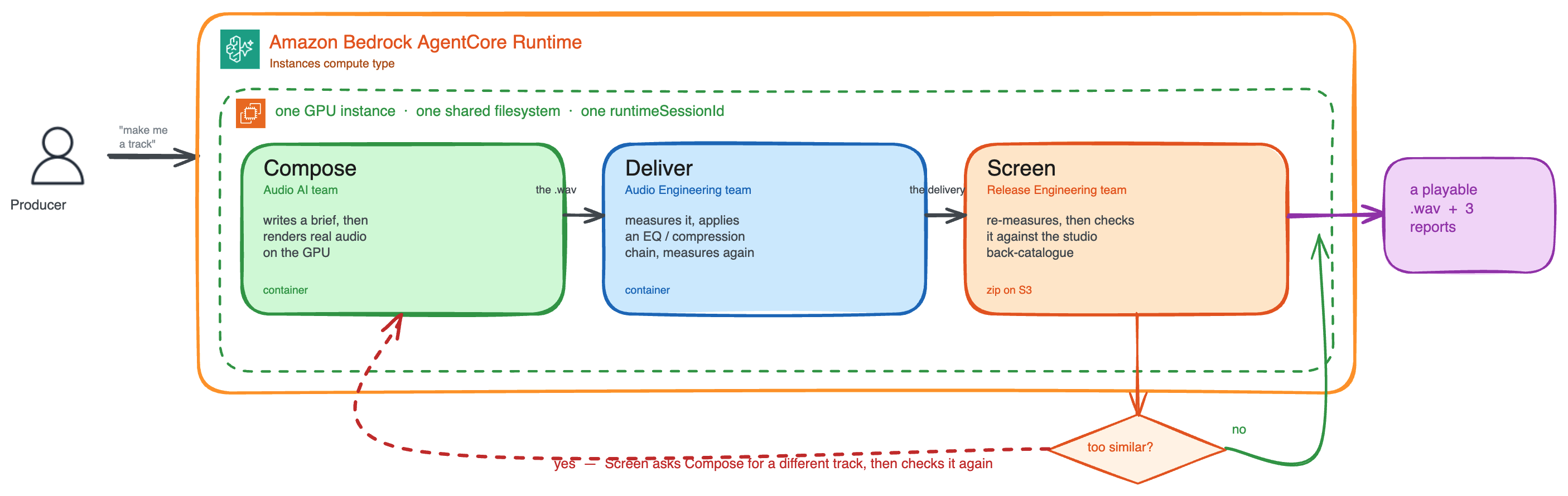
图 1:共享一个 GPU 实例和会话的三 Agent 流水线(Compose、Deliver、Screen)
我们将构建一个使用三个专业 Agent 的音乐制作系统:
- 作曲 Agent(Audio AI 团队):使用 Claude Sonnet 4.6 将制作人的需求转化为音乐简报,然后使用运行在实例自身 GPU 上的生成式音乐模型生成实际音频(ACE-Step,一个用于音乐生成的开源基础模型(FM))。它被打包为 Amazon Elastic Container Registry(Amazon ECR)中的容器镜像。
- 交付 Agent(Audio Engineering 团队):从共享文件系统读取已渲染的音轨并进行测量,然后基于测量结果而非音频本身,请 Claude Sonnet 4.6 制定交付处理链(EQ、压缩、限制)。系统会真正应用信号处理,并再次测量结果以确认其达到交付目标。它被打包为 Amazon ECR 中的容器镜像。
- 合规 Agent(Release Engineering 团队):独立重新测量完成交付的音频,检查其是否符合交付 Agent 声称的交付目标,并将其与工作室自有的历史作品库进行和声相似度筛查。如果筛查提出异议,该 Agent 会回调作曲 Agent 生成替代版本,然后重新筛查。它以 Amazon Simple Storage Service(Amazon S3)中的 zip 文件形式交付。
工作流如下:制作人发起一首音轨。作曲 Agent 编写简报,并在实例 GPU 上渲染真实音频。交付 Agent 打开该文件,对其进行测量,应用根据这些测量结果制定的处理链,并再次测量以证明结果达到了目标。随后,合规 Agent 独立重新测量,检查交付目标,并将音频与工作室的历史作品库进行筛查。如果筛查标记出匹配项,它会回调作曲 Agent 生成替代版本。最终,制作人会得到一个可播放的 .wav 文件,以及三份解释每项决策的报告。
Runtime Instances 之所以能够实现这一流程,原因包括:
- 通过共享会话 ID 实现共置。 每个 Agent 都有自己的运行时,但通过在同一个容量提供商上使用相同的
runtimeSessionId调用它们,AgentCore 会将它们放置在同一个实例上,并挂载相同的卷。它们共享文件系统,可以访问彼此的输出。 - 可直接使用的 GPU。 作曲 Agent 直接在实例的 NVIDIA L4 上运行 ACE-Step 基础模型,大约 9 秒即可渲染 20 秒、48 kHz 的立体声音频。模型及其依赖项位于持久卷上。在一个会话中构建一次后,后续每次调用都会复用它,包括在夜间停止后也是如此。
- 独立部署。 每个团队都按照自己的节奏发布各自的工件。Audio AI 团队可以推送新的作曲镜像,而无需与 Audio Engineering 或 Release Engineering 协调;其他两个 Agent 仍可不受影响地继续运行。
- 多日持久化。 制作人可以在周一进行作曲,夜间停止会话,并在周二恢复进行交付。实例会自动空闲,并在下一次调用时恢复。
- 混合工件。 来自 ECR 的容器和来自 S3 的代码包可以在同一个容量提供商上共存。团队可以选择最适合其工作流的打包方式。
操作演练
从这里开始,本文将进入实操环节。你将准备 AWS 账户,然后运行一条三 Agent 流水线,完成音频渲染、生成和审核,最终生成一个可播放的 .wav 文件。请按顺序执行以下步骤。你将先确认前置条件,然后定义三个 Agent(步骤 1),创建一个用于预置 GPU 实例及其持久卷的容量提供商(步骤 2),将每个 Agent 部署为独立运行时(步骤 3),并使用共享会话 ID 调用它们,使其共置在一个实例上并相互交接工作(步骤 4)。最后,步骤 5 将展示任一团队如何在不干扰其他团队的情况下发布其 Agent 的新版本。完整示例位于 AgentCore samples GitHub 仓库。
前置条件
开始前,请确保你已具备:
- 一个 AWS 账户,并且拥有可以创建基础设施的主体凭证。本示例会创建 AWS Identity and Access Management(IAM)角色、一个 S3 存储桶、ECR 仓库,以及一个 AgentCore 容量提供商和运行时。
- 已安装并配置 AWS Command Line Interface(AWS CLI)。
- 一个至少包含一个子网和安全组的虚拟私有云(VPC)。
- 已在 Amazon Bedrock 控制台中为 Anthropic Claude Sonnet 4.6 启用模型访问权限。
- 已在本地安装 Finch 或其他兼容 OCI 的容器工具。
- 已安装 Python 3.10+。
- boto3 ≥ 1.36.0 或 botocore ≥ 1.43.72。较早版本不包含
create_capacity_provider,deploy.py将会失败。
如需完整的可运行代码,请参阅 GitHub 上的 AgentCore samples 仓库。
步骤 1:定义 Agent
AgentCore Runtime Instances 支持任意 Agent 框架。在本示例中,每个 Agent 都是一个使用 Strands Agents 构建的 Python 应用程序。
有两个细节经常被错误配置,而且两者都会导致令人困惑的失败:
@app.entrypoint
def invoke(payload, context):  # 参数必须命名为 "context"
    session_id = getattr(context, "session_id", None) or "local-session"
SDK 根据参数名进行分派(它检查 params[1] == "context")。这是读取会话 ID 的唯一方法,而 Agent 需要该 ID 来查找彼此的文件并相互调用。
其次,应在处理程序内部构建 Agent,而不是在模块作用域中构建:
def build_agent(session_id: str, track_id: str) -> Agent:
    return Agent(
        name=AGENT_NAME,
        model=BedrockModel(model_id=MODEL_ID, region_name=REGION),
        system_prompt=SYSTEM_PROMPT,
        session_manager=FileSessionManager(
            session_id=f"{session_id}-{AGENT_NAME}",
            storage_dir=str(track_path(track_id) / f".sessions-{AGENT_NAME}"),
        ),
    )
模块级 Agent 会在并发请求之间共享,而 Strands 会拒绝可重入调用,并报错 Agent is already processing a request。历史记录通过 FileSessionManager 保存在卷上,因此数天后恢复的会话仍能记住先前的决策。
作曲 Agent
作曲 Agent 使用 Claude Sonnet 4.6 将制作人的请求(prompt)转化为音乐简报,然后使用 ACE-Step 基础模型渲染实际音频:
@app.entrypoint
def invoke(payload, context):
    session_id = getattr(context, "session_id", None) or "local-session"
    track_id = payload.get("track_id", "demo-track")
    if payload.get("mode") == "prepare":
        return {"status": "ok", "model_stack": prepare_model_stack()}
    ensure_track_dir(track_id)
    brief = build_agent(session_id, track_id)(
        payload["prompt"], structured_output_model=CompositionBrief
    ).structured_output
    wav = track_path(track_id) / "composition.wav"
    render = render_audio(wav, brief, duration_s=payload.get("duration_s", 30.0))
    write_text(track_id, "composition.md", brief.to_markdown(render))
    return {"status": "ok", "render": render, "host": host_info(),
            "artifacts": [publish(track_id, wav)]}
mode=prepare 调用会将模型栈构建到卷上,其中包括包含 CUDA PyTorch 和 ACE-Step 的虚拟环境。渲染过程作为子进程,在该卷的解释器下运行:
proc = subprocess.run(
    [status["python"], status["runner"], "--out", str(out_path),
     "--prompt", brief.style_tags, "--duration", str(duration_s)],
    capture_output=True, text=True, check=False,
    timeout=RENDER_TIMEOUT_S, env=gpu_env(),
)
交付 Agent
交付 Agent 从共享文件系统读取已渲染的音轨并进行测量。它使用 Claude Sonnet 4.6 选择 EQ 频段、压缩器设置,以及哪些部分应保持不变。随后应用数字信号处理(DSP),再重新测量输出结果,因此处理方案会被验证而不是被直接信任。
before = audio.measure(str(source))  # ITU-R BS.1770-4
plan = build_agent(session_id, track_id)(
    f"Prepare this for {platform} delivery.\n{json.dumps(before.to_dict())}",
    structured_output_model=DeliveryPlan,
).structured_output
data, rate = audio.read_audio(str(source))
bands = [b.model_dump() for b in plan.eq_bands]
if bands:
    data = audio.apply_filters(data, rate, bands)
if plan.compressor.enabled:
    data, _ = audio.compress(
        data, rate,
        threshold_db=plan.compressor.threshold_db,
        ratio=plan.compressor.ratio,
        attack_ms=plan.compressor.attack_ms,
        release_ms=plan.compressor.release_ms,
        knee_db=plan.compressor.knee_db,
    )
data, _ = audio.normalise_loudness(data, rate, plan.target_lufs)
data, _ = audio.limit(data, rate, ceiling_dbtp=plan.target_true_peak_dbtp)
audio.write_audio(str(delivery), data, rate, subtype="PCM_24")
after = audio.measure(str(delivery))  # 验证,而非盲目信任
合规 Agent
合规 Agent 会独立重新测量完成交付的音频,检查其是否符合交付 Agent 声称的交付目标,并将其与工作室自有历史作品库进行和声相似度筛查。当发现相似性时,它会提出标记,并回调作曲 Agent 进行修正。
client = boto3.client(
    "bedrock-agentcore", region_name=REGION,
    config=Config(read_timeout=600, retries={"max_attempts": 3, "mode": "standard"}),
)
response = client.invoke_agent_runtime(
    agentRuntimeArn=COMPOSITION_RUNTIME_ARN,  # 在部署时注入,而非硬编码
    qualifier=COMPOSITION_QUALIFIER,
    runtimeSessionId=session_id,  # 调用方自身的 ID——路由到此实例
    payload=json.dumps({
        "mode": "remediate", "track_id": track_id,
        "issue": issue,
        "avoid": avoid or {},
    }).encode(),
)
body = json.loads(response["response"].read())  # "response",而不是 "body"
步骤 2:创建容量提供商
容量提供商会告诉 AgentCore 应为你的 Agent 预置哪些计算基础设施。你
English / 原文
As organizations move from single-purpose agents to multi-agent systems, the infrastructure requirements change. A lone agent handling customer queries can run in a serverless environment with short-lived sessions. But when you need three agents collaborating on a creative workflow that spans several days, sharing context and building on each other’s output, serverless sessions that cap at a few hours don’t cut it.
In this post, we walk through deploying a music production pipeline: One agent runs a generative audio model on the instance’s own GPU. The other two open the .wav file it wrote, off a shared volume. By the end, you will have a track you can play. You will also have learned how to create capacity providers, deploy agents from different artifact types, orchestrate agent-to-agent collaboration using shared sessions, and persist workflows across multiple days.
Amazon Bedrock AgentCore offers two compute options for hosting agents. MicroVMs are the serverless option: fast cold starts, session isolation, and consumption-based pricing. Runtime Instances are the new option: AWS managed EC2 infrastructure for persistent, long-running agent workflows. Both use the same runtime APIs, but Instances add multi-day sessions, GPUs, persistent volumes, and the ability to colocate multiple agents on a single instance.
How Runtime Instances differs from MicroVM
Both options support custom frameworks (CrewAI, LangGraph, LlamaIndex, Strands Agents), work with your choice of foundation model, integrate with MCP and A2A, and share the same AgentCore runtime APIs. The difference is in the underlying compute model.
| Capability | MicroVM (Serverless) | Runtime Instances |
|---|---|---|
| Compute | Fully AWS managed | AWS managed EC2 instances |
| Session duration | Up to 8 hours | Up to 14 days |
| Agents per compute | One runtime (microVM) hosts one agent (1:1) | One instance (EC2) can host multiple agents (1:N) |
| Artifact types | Container image and Amazon S3 source | Container image and Amazon S3 source |
| GPU access | Not supported | Yes, on a supported instance family |
| Session persistence | Session-scoped | Persistent storage (Amazon EBS) |
| Pricing | Consumption-based | EC2 instances run in your account. Use your AWS Savings Plans and On-Demand Capacity Reservations (ODCRs) |
| Scaling | Scale on demand | Managed by capacity provider |
An agent is a workload running within a session. Unlike the MicroVM model, where one runtime hosts one agent, a single Instances session can host multiple agents. When two agent runtimes share the same capacity provider, you can invoke them with the same runtimeSessionId to land both agents on the same EC2 instance. There, they share a filesystem and can collaborate on the same task.
Solution overview
Figure 1: The three-agent pipeline (Compose, Deliver, Screen) sharing one GPU instance and session
We will build a music production system that uses three specialized agents:
- Composition agent (Audio AI team): Turns a producer’s request into a musical brief using Claude Sonnet 4.6, then renders the actual audio with a generative music model (ACE-Step, an open-source foundation model (FM) for music generation), running on the instance’s own GPU. Packaged as a container image in Amazon Elastic Container Registry (Amazon ECR).
- Delivery agent (Audio Engineering team): Reads the rendered track off the shared filesystem and measures it, then asks Claude Sonnet 4.6 for a delivery chain (EQ, compression, limiting) based on those measurements rather than on the audio itself. Real signal processing applies to the chain, and the result is measured again to confirm it hit the delivery target. Packaged as a container image in Amazon ECR.
- Compliance agent (Release Engineering team): Independently re-measures the finished delivery, checks it against the delivery targets the delivery agent claimed, and screens it for harmonic similarity against the studio’s own back catalog. If the screen objects, the agent calls back to the composition agent for a replacement and re-screens. Delivered as a zip file on Amazon Simple Storage Service (Amazon S3).
The workflow: a producer starts a track. The composition agent writes a brief and renders real audio on the instance’s GPU. The delivery agent opens that file, measures it, applies a chain it derived from those measurements, and measures again to prove the result landed on target. The compliance agent then re-measures independently, checks the delivery targets, and screens the audio against the studio’s back catalog. If the screen flags a match, it calls back to the composition agent to generate an alternative. The producer ends up with a playable .wav and three reports explaining every decision.
What makes this possible on Runtime Instances:
- Colocation via shared session ID. Each agent has its own runtime, but by invoking them with the same
runtimeSessionIdon the same capacity provider, AgentCore places them on the same instance with the same volumes mounted. They share a filesystem and can access each other’s outputs. - A GPU you can use. The composition agent runs the ACE-Step foundation model directly on the instance’s NVIDIA L4, rendering 20 seconds of 48 kHz stereo in about 9 seconds. The model and its dependencies live on a persistent volume. Built once for a session, then reused by every invocation in it, including after an overnight stop.
- Independent deployment. Each team ships its own artifact on its own cadence. The Audio AI team pushes a new composition image without coordinating with Audio Engineering or Release Engineering, and the other two keep running untouched.
- Multi-day persistence. A producer works on composition Monday, stops the session overnight, and resumes delivery Tuesday. The instance idles automatically and resumes the next invoke.
- Mixed artifacts. Containers from ECR and code packages from S3 coexist on one capacity provider. Teams choose the packaging that fits their workflow.
Walkthrough
From here on, this post is hands-on. You will prepare your AWS account, then run a three-agent pipeline that renders, generates, and clears a finished track, producing a .wav file you can play. Work through the steps in order. You will start by confirming the prerequisites, then define the three agents (Step 1), create a capacity provider that provisions the GPU instance and its persistent volumes (Step 2), deploy each agent as its own runtime (Step 3), and invoke them with a shared session ID so they can colocate on one instance and hand work to each other (Step 4). Finally, Step 5 shows how any one team can ship a new version of its agent without disturbing the others. The complete sample is in the AgentCore samples GitHub repository.
Prerequisites
Before you begin, make sure you have:
- An AWS account, with credentials for a principal that can create infrastructure. This sample creates AWS Identity and Access Management (IAM) roles, an S3 bucket, ECR repositories, and an AgentCore capacity provider and runtimes.
- AWS Command Line Interface (AWS CLI) installed and configured.
- A virtual private cloud (VPC) with at least one subnet and security group.
- Model access enabled in the Amazon Bedrock console for Anthropic Claude Sonnet 4.6.
- Finch or another OCI-compatible container tool installed locally.
- Python 3.10+ installed.
- boto3 ≥ 1.36.0 or botocore ≥ 1.43.72. Older versions lack
create_capacity_provider, anddeploy.pywill fail.
For the complete working code, see the AgentCore samples repository on GitHub.
Step 1: Define your agents
AgentCore Runtime Instances supports any agent framework. In this sample, each agent is a Python application built with Strands Agents.
Two details are commonly misconfigured, and both fail confusingly:
@app.entrypoint
def invoke(payload, context):  # the parameter must be NAMED "context"
    session_id = getattr(context, "session_id", None) or "local-session"
The SDK dispatches on the parameter name (it checks params[1] == "context"). That is the only way to read the session ID, which the agents need in order to find each other’s files and to call one another.
Second, build the Agent inside the handler, not at module scope:
def build_agent(session_id: str, track_id: str) -> Agent:
    return Agent(
        name=AGENT_NAME,
        model=BedrockModel(model_id=MODEL_ID, region_name=REGION),
        system_prompt=SYSTEM_PROMPT,
        session_manager=FileSessionManager(
            session_id=f"{session_id}-{AGENT_NAME}",
            storage_dir=str(track_path(track_id) / f".sessions-{AGENT_NAME}"),
        ),
    )
A module-level Agent is shared across concurrent requests, and Strands rejects re-entrant invocation with Agent is already processing a request. History lives on the volume through FileSessionManager, which is how a session resumed days later remembers earlier decisions.
Composition agent
The composition agent turns the producer request (prompt) into a musical brief, using Claude Sonnet 4.6, then renders the actual audio with the ACE-Step foundation model:
@app.entrypoint
def invoke(payload, context):
    session_id = getattr(context, "session_id", None) or "local-session"
    track_id = payload.get("track_id", "demo-track")
    if payload.get("mode") == "prepare":
        return {"status": "ok", "model_stack": prepare_model_stack()}
    ensure_track_dir(track_id)
    brief = build_agent(session_id, track_id)(
        payload["prompt"], structured_output_model=CompositionBrief
    ).structured_output
    wav = track_path(track_id) / "composition.wav"
    render = render_audio(wav, brief, duration_s=payload.get("duration_s", 30.0))
    write_text(track_id, "composition.md", brief.to_markdown(render))
    return {"status": "ok", "render": render, "host": host_info(),
            "artifacts": [publish(track_id, wav)]}
The mode=prepare call builds the stack onto the volume, a virtualenv with CUDA PyTorch and ACE-Step. The render runs as a subprocess under that volume’s interpreter:
proc = subprocess.run(
    [status["python"], status["runner"], "--out", str(out_path),
     "--prompt", brief.style_tags, "--duration", str(duration_s)],
    capture_output=True, text=True, check=False,
    timeout=RENDER_TIMEOUT_S, env=gpu_env(),
)
Delivery agent
The delivery agent reads the rendered track off the shared filesystem and measures it. It uses Claude Sonnet 4.6 to choose EQ bands, compressor settings, and what to leave alone. The digital signal processing (DSP) is then applied. Then the output is measured again, so the plan is checked rather than trusted.
before = audio.measure(str(source))  # ITU-R BS.1770-4
plan = build_agent(session_id, track_id)(
    f"Prepare this for {platform} delivery.\n{json.dumps(before.to_dict())}",
    structured_output_model=DeliveryPlan,
).structured_output
data, rate = audio.read_audio(str(source))
bands = [b.model_dump() for b in plan.eq_bands]
if bands:
    data = audio.apply_filters(data, rate, bands)
if plan.compressor.enabled:
    data, _ = audio.compress(
        data, rate,
        threshold_db=plan.compressor.threshold_db,
        ratio=plan.compressor.ratio,
        attack_ms=plan.compressor.attack_ms,
        release_ms=plan.compressor.release_ms,
        knee_db=plan.compressor.knee_db,
    )
data, _ = audio.normalise_loudness(data, rate, plan.target_lufs)
data, _ = audio.limit(data, rate, ceiling_dbtp=plan.target_true_peak_dbtp)
audio.write_audio(str(delivery), data, rate, subtype="PCM_24")
after = audio.measure(str(delivery))  # verify, don't trust
Compliance agent
The compliance agent independently re-measures the finished delivery, checks it against the delivery targets the delivery agent claimed, and screens it for harmonic similarity against the studio’s own back catalog. When it finds a similarity, it raises a flag and calls back to the composition agent for remediation.
client = boto3.client(
    "bedrock-agentcore", region_name=REGION,
    config=Config(read_timeout=600, retries={"max_attempts": 3, "mode": "standard"}),
)
response = client.invoke_agent_runtime(
    agentRuntimeArn=COMPOSITION_RUNTIME_ARN,  # injected at deploy time, not hard-coded
    qualifier=COMPOSITION_QUALIFIER,
    runtimeSessionId=session_id,  # the caller's own --- routes to this instance
    payload=json.dumps({
        "mode": "remediate", "track_id": track_id,
        "issue": issue,
        "avoid": avoid or {},
    }).encode(),
)
body = json.loads(response["response"].read())  # "response", not "body"
Step 2: Create a capacity provider
A capacity provider tells AgentCore what compute infrastructure to provision for your agents. You specify instance types and VPC placement. AgentCore handles provisioning and lifecycle management.
You need two IAM roles, and the distinction matters:
- An operator role AgentCore assumes to provision EC2 on your behalf: launching, tagging, and terminating instances and their network interfaces. Attach the managed policy
BedrockAgentCoreRuntimeInstancesOperatorRolePolicy. - An execution role your agent process assumes at runtime to call Bedrock and S3.
CreateAgentRuntimerequires it and fails without it.
Both trust bedrock-agentcore.amazonaws.com.
Now create the capacity provider. Note that names must use underscores (hyphens are not allowed):
control = boto3.client("bedrock-agentcore-control", region_name=REGION)
resp = control.create_capacity_provider(
    name="music_production_capacity",
    permissionsConfiguration={"capacityProviderOperatorRoleArn": operator_arn},
    computeConfiguration={
        "ec2Configuration": {
            "launchTemplateSource": {
                "launchParameters": {
                    "operatingSystem": "LINUX_X86_64", "instanceRequirements": {"allowedInstanceTypes": ["g6.xlarge"]},
                }
            },
            "vpcConfiguration": {"subnets": subnets, "securityGroups": groups},
            "volumes": [
                {"ebsConfiguration": {"name": "tracks", "sizeGiB": 20,
                    "volumeType": "gp3", "encrypted": True}},
                {"ebsConfiguration": {"name": "models", "sizeGiB": 60,
                    "volumeType": "gp3", "encrypted": True,
                    "throughput": 500}},
            ],
            "rootVolume": {"freeSpaceGiB": 30, "volumeType": "gp3"},
            "lifecycleConfiguration": {"idleInstanceTimeout": 600,
                "maxLifetime": 86400},
        }
    },
)
⚠️ GPU capacity. If you hit InsufficientInstanceCapacity across multiple Availability Zones (AZs) trying to allocate a GPU instance, you can switch to another GPU instance type, like g5.xlarge. Update allowedInstanceTypes accordingly.
Step 3: Deploy agent runtimes
Each agent here gets its own runtime. The runtimes are brought together at invoke time. When two runtimes share a capacity provider and you invoke them with the same runtimeSessionId, AgentCore places both agents on the same EC2 instance, where they share a filesystem and can collaborate on the same task. That’s how the delivery agent reads the .wav the composition agent wrote.
Next, point each runtime at the capacity provider and declare which volumes it mounts:
composition = control.create_agent_runtime(
    agentRuntimeName="music_production_composition",
    roleArn=execution_arn,  # required
    agentRuntimeArtifact={"containerConfiguration": {"containerUri": image_uri}},
    protocolConfiguration={"serverProtocol": "HTTP"},
    capacityProviderConfiguration={"capacityProviderArn": cp_arn},
    filesystemConfigurations=[
        {"capacityProviderVolume": {"volumeName": "tracks", "mountPath": "/mnt/tracks"}},
        {"capacityProviderVolume": {"volumeName": "models", "mountPath": "/mnt/models"}},
    ],
    lifecycleConfiguration={"idleRuntimeSessionTimeout": 600, "maxLifetime": 86400},
    environmentVariables={"AWS_REGION": REGION, "WORKSPACE_DIR": "/mnt/tracks",
        "MODELS_DIR": "/mnt/models", "MODEL_ID": MODEL_ID},
)
The compliance agent is the same call with a different artifact, a zip rather than an image, and only the workspace volume:
agentRuntimeArtifact={"codeConfiguration": {
    "code": {"s3": {"bucket": bucket, "prefix": key}},
    "runtime": "PYTHON_3_12",
    "entryPoint": ["compliance_agent.py"],
}},
Step 4: Orchestrate multi-agent workflows with shared sessions
Now invoke the agents. This is where the three agents become a pipeline: you pass the same runtimeSessionId to each invocation. The first invocation is the slow one because it provisions the instance. Every call after that routes to the instance already running.
client = boto3.client(
    "bedrock-agentcore", region_name=REGION,
    config=Config(read_timeout=900, retries={"max_attempts": 2, "mode": "standard"}),
)
session_id = f"music-production-{uuid.uuid4()}"  # 33-100 characters

def invoke_agent(runtime_arn, payload):
    response = client.invoke_agent_runtime(
        agentRuntimeArn=runtime_arn, qualifier="DEFAULT",
        runtimeSessionId=session_id, payload=json.dumps(payload).encode(),
    )
    return json.loads(response["response"].read())

invoke_agent(COMPOSITION_ARN, {"mode": "prepare"})
invoke_agent(COMPOSITION_ARN, {"mode": "catalogue", "track_id": track_id, "duration_s": 20})
invoke_agent(COMPOSITION_ARN, {"mode": "compose", "track_id": track_id, "duration_s": 30,
    "prompt": "Create an upbeat electronic track with heavy bass and synth melodies."})
invoke_agent(DELIVERY_ARN, {"track_id": track_id, "platform": "spotify",
    "prompt": "Prepare this for streaming delivery."})
result = invoke_agent(COMPLIANCE_ARN, {"track_id": track_id,
    "prompt": "Screen this delivery for release."})
print(result["outcome"])  # cleared | review_required | not_cleared
Here’s what that produces on a live g6.xlarge in us-east-2:
1. prepare model stack (GPU instance + torch + weights)  239s
   host : ip-172-31-11-83.us-east-2.compute.internal
   stack : ready=True in 125s
2. render back-catalogue  66s
3. compose (renders audio on the GPU)  25s
   rendered : NVIDIA L4 in 8.98s (peak VRAM 7.63 GiB)
   audio 20.062s 48000Hz 2ch -7.5 LUFS peak 0.42 dBTP
4. delivery (real DSP, verified by measurement)  41s
   read : composition.wav <- written by another agent
   before -7.5 LUFS peak 0.42 dBTP
   after -14.0 LUFS peak -3.2 dBTP
   targets : loudness met, true peak held
5. compliance screen  28s
   verdict : REVIEW REQUIRED
   screen : 2 reference(s), closest catalogue_00.wav distance 0.0665 (review)

-- collocation --  All 5 steps were served by one instance, as intended.
When you call StopRuntimeSession, the instance idles down automatically. No compute charges accrue while idle. When you invoke the session again, AgentCore resumes it, provided it lands in the same Availability Zone. Amazon Elastic Block Store (Amazon EBS) volumes are AZ-locked. If the original AZ is capacity-dry, volumes can’t reattach and persistence is lost. Use an AZ-pinned ODCR or MODELS_SNAPSHOT_ID so a re-placed resume can recover. Sessions can persist for up to 14 days.
Step 5: Update agents independently
One of the strengths of this architecture is independent deployment. When the Audio AI team ships a new version of the composition agent, they update only their runtime:
# Audio AI team pushes new container version
finch build --platform linux/amd64 \
  -f Dockerfile.composition \
  -t "$ECR/music-production/composition-agent:v2" .
finch push "$ECR/music-production/composition-agent:v2"


control.update_agent_runtime(
    agentRuntimeId=composition_id,  # all three are required
    roleArn=execution_arn,
    agentRuntimeArtifact={"containerConfiguration": {"containerUri": new_uri}},
    capacityProviderConfiguration={"capacityProviderArn": cp_arn},
)
The delivery and compliance agents continue running unchanged. No coordination needed, no shared deploy pipeline, no risk of breaking another team’s agent with your update.
Cleaning up
Delete the session first. It’s the most direct way to stop EC2 and Amazon EBS charges. Deleting a session deprovisions the EC2 resources: instance, network interface, and Amazon EBS volume. Deleting the capacity provider also stops and deletes its associated sessions and their persistent storage. However, you must first disassociate every runtime and runtime version from it, and that detachment is asynchronous. Session deletion is the fast path, and the one to reach for if you want to avoid ongoing charges.
data = boto3.client("bedrock-agentcore", region_name=REGION)
data.delete_capacity_provider_session(capacityProviderId=cp_id, sessionId=session_id)
for rid in runtime_ids:
    control.delete_agent_runtime(agentRuntimeId=rid)
# Versions detach from the capacity provider asynchronously, so poll here.
control.delete_capacity_provider(capacityProviderId=cp_id)
Then delete the ECR repositories, S3 artifacts, IAM roles, and Amazon CloudWatch log groups.
Conclusion
In this post, we deployed a multi-agent music production system on Amazon Bedrock AgentCore Runtime Instances. Three agents, built by different teams using different packaging formats, collaborated within one session on a single GPU instance, and produced a track you can play.
The architecture demonstrates several patterns that apply beyond music production:
- Colocation through shared sessions. Multiple agent runtimes on the same capacity provider share an instance when invoked with the same session ID, which gives them one host: the same GPU, the same local volume, the same process space.
- Independent team deployment. Each agent has its own runtime lifecycle. Teams ship on their own cadence without coordination.
- Mixed artifact types. Containers and code packages coexist on the same infrastructure. Use whatever packaging fits your team’s workflow.
- Multi-day persistence. Stop sessions when work pauses, resume by invoking again. Sessions persist for up to 14 days (resume depends on landing in the same AZ).
Music was a convenient vehicle, but nothing about the architecture is musical. Swap out the render step and the same three-agent shape fits the workloads AWS calls out for GPU Instances: 3D rendering, simulation, model inference, media processing. Or a long-running job where a pipeline produces a large artifact, hands it to a second agent to transform, and has a third check the result before it ships.
To learn more, see the Amazon Bedrock AgentCore documentation. For the complete working code from this post, explore the AgentCore samples repository. For advanced orchestration patterns like Graph, Swarm, or Workflow, see the Strands Agents documentation.
About the authors
Evandro Franco
Evandro is a Sr. Data Scientist working on Amazon Web Services. He is part of the Global GTM team that helps AWS customers overcome business challenges related to AI/ML on top of AWS, mainly on Amazon Bedrock AgentCore and Strands Agents. He has more than 18 years of experience working with technology, from software development, infrastructure, serverless, to machine learning. In his free time, Evandro enjoys playing with his son, mainly building some funny Lego bricks.
Rui Cardoso
Rui is a Sr. Partner Solutions Architect at AWS, specializing in Agentic AI and Physical AI. He works with AWS Partners to take solutions from prototype to production, spanning agentic workloads and accuracy evaluation frameworks for enterprise applications. His focus is helping partners build reliably on well-architected foundations.
Sayee Kulkarni
Sayee is a Software Development Engineer on the Amazon Bedrock AgentCore service. Her team is responsible for building and maintaining the AgentCore Runtime platform, a foundational component that enables customers to leverage agentic AI capabilities. She is driven by delivering tangible customer value, and this customer-centric focus motivates her work. Sayee led the design and launch of AgentCore Runtime Instances, driving the project from architecture through general availability and empowering customers to run persistent, long-running agentic workloads with the flexibility and control to build sophisticated multi-agent systems.
Yanis Telaoumaten
Yanis is a Software Development Engineer on the Amazon Bedrock AgentCore service. His team builds AgentCore Runtime Instances, a platform that lets agents run for days on instances customized to their specific needs. Yanis conceived, designed, and led the implementation of the platform, driving cross-organizational collaboration and clearing roadblocks to ensure a successful delivery.