Worktrunk:面向并行 AI Agent 工作流的 Git worktree CLI
英文标题:🔥 max-sixty/worktrunk
Worktrunk 是一款用于管理 Git worktree 的 CLI,主打让开发者能够并行运行 Claude Code、Codex 等 AI Agent,并为每个 Agent 提供独立工作目录。其核心命令将 worktree 的创建、切换、清理和状态查看简化为类似分支操作的体验,并支持 Hooks、LLM 自动生成提交信息、PR 检出及合并工作流等功能。项目称 AI Agent 已能够在无人值守下处理更长的任务,因此开发者可以并行管理 5 至 10 个以上的 Agent;Worktrunk 旨在降低原生 Git worktree 使用门槛。对开发团队而言,该工具可通过隔离并行改动、共享构建缓存和自动化本地流程,提升多 Agent 协作开发效率。
 84.7 KB
 2.2 KB
 637 B
637 B
 1.8 KB
 2.5 KB
 1.9 KB
 2.0 KB
 1.5 MB
 2.2 MB
 63.5 KB
 132.1 KB
中文
 Worktrunk

2026 年 9 月:Worktrunk 在年初发布,并迅速成为最受欢迎的 Git worktree 管理器。它是用心打造的(没有敷衍生成的内容!)。如遇到任何不顺畅之处,请告诉我;我正全力持续把 Worktrunk 做到出色,而最大的帮助是大家发布自己发现的问题。
Worktrunk 是一款用于管理 Git worktree 的 CLI,专为并行运行 AI Agent 而设计。
Worktrunk 的三个核心命令让 worktree 像分支一样易于使用。此外,Worktrunk 还提供了大量提升体验的功能,用于简化多项并行改动的处理,包括可自动化本地工作流的 Hooks。
快速演示:
Claude Code 和 Codex 等 AI Agent 能够在无人监督的情况下处理更长时间的任务,因此可以并行管理 5 至 10 个甚至更多 Agent。Git 原生的 worktree 功能为每个 Agent 提供各自的工作目录,使它们不会相互干扰彼此的改动。
但 Git worktree 的用户体验较为笨拙。即便是创建一个新 worktree 这样的小任务,也需要输入三次分支名称:git worktree add -b feat ../repo.feat,然后再执行 cd ../repo.feat。
Worktrunk 让 Git worktree 像分支一样易用
Worktree 通过分支名称进行寻址;路径则由可配置的模板计算得出。接受分支参数的命令,也接受该分支所检出 worktree 的路径。
从核心命令开始:
核心命令:
| 任务 | Worktrunk | 原生 Git |
|---|---|---|
| 切换 worktree | wt switch feat |
cd ../repo.feat |
| 创建并启动 Claude | wt switch -c -x claude feat |
git worktree add -b feat ../repo.feat && \
cd ../repo.feat && \
claude
清理 | wt remove |
cd ../repo && \
git worktree remove ../repo.feat && \
git branch -d feat
查看包含状态的列表 | wt list | git worktree list(仅路径)
可按需进一步使用高级命令。
工作流自动化:
- Hooks —— 在创建、合并前、合并后等时机运行命令
- LLM 提交信息 —— 根据 diff 生成提交信息
- 合并工作流 —— 通过一个命令完成 squash、rebase、合并和清理
- 交互式选择器 —— 通过实时 diff 和日志预览浏览 worktree
- 共享构建缓存 —— 让 10 个 worktree 获得
target/、node_modules/等内容,无需构建或复制(支持 APFS、btrfs 和 XFS) wt list --full—— 按分支展示 CI 状态和 AI 生成的摘要- PR 检出 —— 使用
wt switch pr:123直接跳转至某个 PR 的分支 - 每个 worktree 一个开发服务器 ——
hash_port模板过滤器为每个 worktree 分配唯一端口 - 别名和按分支变量 —— 自定义
wt <name>命令,以及用于 Hook 模板的分支级状态 - ……以及更多功能
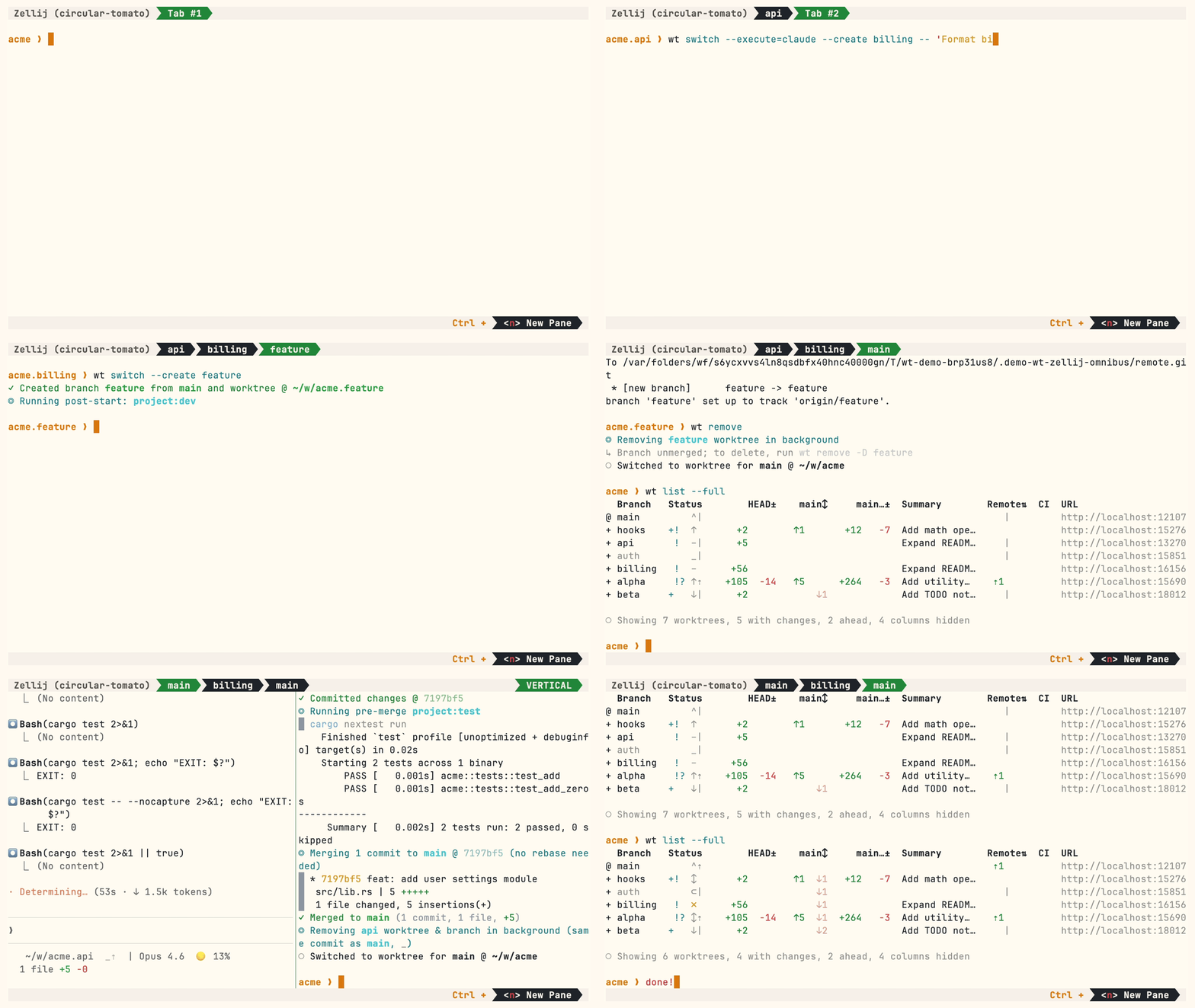
多个并行 Agent,同样简单的命令:
Homebrew(macOS 和 Linux):
brew install worktrunk && wt config shell install
Shell 集成允许命令切换目录。
Cargo:
cargo install worktrunk && wt config shell install
Windows 及其他平台
Windows。wt 默认是 Windows Terminal 的命令,因此 Winget 会额外将 Worktrunk 安装为 git-wt,以避免冲突:
winget install max-sixty.worktrunk
git-wt config shell install
或者,禁用 Windows Terminal 的别名(设置 → 应用 → 高级应用设置 → 应用执行别名 → “Terminal”/“Terminal Preview”),即可直接使用 wt。
免费代码签名由 SignPath.io 提供,证书由 SignPath Foundation 提供——政策。
Arch Linux:
sudo pacman -S worktrunk && wt config shell install
Conda / Pixi(社区维护的 feedstock):
conda install -c conda-forge worktrunk && wt config shell install
或使用 Pixi:pixi global install worktrunk && wt config shell install。
为一个新功能创建 worktree:
$ wt switch --create feature-auth
✓ Created branch feature-auth from main and worktree @ ~/repo.feature-auth
这会创建一个新分支和 worktree,然后切换至该 worktree。完成工作后,使用 wt list 查看全部 worktree:
$ wt list
  Branch        Status      HEAD±     main↕    main…±    Remote⇅  Commit    Age  Message
@ feature-auth  +   ↑      +27   -8   ↑1       +31                4bc72dc    2h  Add authenticati…
^ main              ^⇡                                    ⇡1      0e631ad    1d  Initial commit

○ Showing 2 worktrees, 1 with changes, 1 ahead, hidden: Path
@ 表示当前 worktree。+ 表示已暂存的改动,↑1 表示比 main 领先 1 个提交,⇡ 表示尚未推送的提交。
完成后,可以选择以下任一方式:
PR 工作流 —— 提交、推送、创建 PR,通过 GitHub/GitLab 合并,然后清理:
wt step commit                    # 提交已暂存的改动
gh pr create                      # 或 glab mr create
wt remove                         # PR 合并后执行
本地合并 —— squash、rebase 到 main、fast-forward 合并并清理:
$ wt merge main
◎ Generating commit message and committing changes... (2 files, +53, no squashing needed)
  Add authentication module
✓ Committed changes @ a1b2c3d
◎ Merging 1 commit to main @ a1b2c3d (no rebase needed)
  * a1b2c3d Add authentication module
   auth.rs | 51 +++++++++++++++++++++++++++++++++++++++++++++++++++
   lib.rs  |  2 ++
   2 files changed, 53 insertions(+)
✓ Merged to main (1 commit, 2 files, +53)
◎ Removing feature-auth worktree & branch in background (same commit as main, _)
○ Switched to worktree for main @ ~/repo
对于并行 Agent,创建多个 worktree,并在每个 worktree 中启动一个 Agent:
wt switch -x claude -c feature-a -- 'Add user authentication'
wt switch -x claude -c feature-b -- 'Fix the pagination bug'
wt switch -x claude -c feature-c -- 'Write tests for the API'
-x 标志会在切换后运行一个命令;位于 -- 之后的参数会传递给该命令。可配置启动后 Hooks以自动完成环境设置(安装依赖、启动开发服务器)。
- 学习核心命令:
wt switch、wt list、wt merge、wt remove - 为自动化设置配置 Hooks
- 探索 LLM 提交信息、交互式选择器、Claude Code 集成 和 CI 状态与 PR 链接
- 浏览技巧与模式中的实践方案:别名、开发服务器、数据库、Agent 交接等
- 扩展 Worktrunk —— 通过 Hooks 和别名自定义工作流
- 运行
wt --help或wt <command> --help获取快速 CLI 参考
Shell 集成测试需要 bash、zsh、fish、nushell 和 pwsh,以及 jq:
cargo test --test integration --features shell-integration-tests
[ . Please let me know any frictions at all; I'm intensely focused on continuing to make Worktrunk excellent, and the biggest help is folks posting problems they perceive.
Worktrunk is a CLI for git worktree management, designed for running AI agents in parallel.
Worktrunk's three core commands make worktrees as easy as branches. Plus, Worktrunk has a bunch of quality-of-life features to simplify working with many parallel changes, including hooks to automate local workflows.
A quick demo:
AI agents like Claude Code and Codex can handle longer tasks without supervision, such that it's possible to manage 5-10+ in parallel. Git's native worktree feature gives each agent its own working directory, so they don't step on each other's changes.
But the git worktree UX is clunky. Even a task as small as starting a new worktree requires typing the branch name three times: git worktree add -b feat ../repo.feat, then cd ../repo.feat.
Worktrunk makes git worktrees as easy as branches
Worktrees are addressed by branch name; paths are computed from a configurable template. Commands that take a branch also accept the path of the worktree it is checked out in.
Start with the core commands
Core commands:
| Task | Worktrunk | Plain git |
|---|---|---|
| Switch worktrees | wt switch feat |
cd ../repo.feat |
| Create + start Claude | wt switch -c -x claude feat |
git worktree add -b feat ../repo.feat && \
cd ../repo.feat && \
claude
Clean up | wt remove |
cd ../repo && \
git worktree remove ../repo.feat && \
git branch -d feat
List with status | wt list | git worktree list (paths only)
Expand into the more advanced commands as needed
Workflow automation:
- Hooks — run commands on create, pre-merge, post-merge, etc
- LLM commit messages — generate commit messages from diffs
- Merge workflow — squash, rebase, merge, clean up in one command
- Interactive picker — browse worktrees with live diff and log previews
- Share build caches — ten worktrees get
target/,node_modules/, etc without building or copying them (on APFS, btrfs, and XFS) wt list --full— CI status and AI-generated summaries per branch- PR checkout —
wt switch pr:123to jump straight to a PR's branch - Dev server per worktree —
hash_porttemplate filter gives each worktree a unique port - Aliases & per-branch variables — custom
wt <name>commands and branch-scoped state for hook templates - ...and lots more
Multiple parallel agents, same simple commands:
Homebrew (macOS & Linux):
brew install worktrunk && wt config shell install
Shell integration allows commands to change directories.
Cargo:
cargo install worktrunk && wt config shell install
Windows & other
Windows. wt defaults to Windows Terminal's command, so Winget additionally installs Worktrunk as git-wt to avoid the conflict:
winget install max-sixty.worktrunk
git-wt config shell install
Alternatively, disable Windows Terminal's alias (Settings → Apps → Advanced app settings → App execution aliases → "Terminal"/"Terminal Preview") to use wt directly.
Free code signing provided by SignPath.io, certificate by SignPath Foundation — policy.
Arch Linux:
sudo pacman -S worktrunk && wt config shell install
Conda / Pixi (community-maintained feedstock):
conda install -c conda-forge worktrunk && wt config shell install
Or with Pixi: pixi global install worktrunk && wt config shell install.
Create a worktree for a new feature:
$ wt switch --create feature-auth
✓ Created branch feature-auth from main and worktree @ ~/repo.feature-auth
This creates a new branch and worktree, then switches to it. Do your work, then check all worktrees with wt list:
$ wt list
  Branch        Status      HEAD±     main↕    main…±    Remote⇅  Commit    Age  Message
@ feature-auth  +   ↑      +27   -8   ↑1       +31                4bc72dc    2h  Add authenticati…
^ main              ^⇡                                    ⇡1      0e631ad    1d  Initial commit

○ Showing 2 worktrees, 1 with changes, 1 ahead, hidden: Path
The @ marks the current worktree. + means staged changes, ↑1 means 1 commit ahead of main, ⇡ means unpushed commits.
When done, either:
PR workflow — commit, push, open a PR, merge via GitHub/GitLab, then clean up:
wt step commit                    # commit staged changes
gh pr create                      # or glab mr create
wt remove                         # after PR is merged
Local merge — squash, rebase onto main, fast-forward merge, clean up:
$ wt merge main
◎ Generating commit message and committing changes... (2 files, +53, no squashing needed)
  Add authentication module
✓ Committed changes @ a1b2c3d
◎ Merging 1 commit to main @ a1b2c3d (no rebase needed)
  * a1b2c3d Add authentication module
   auth.rs | 51 +++++++++++++++++++++++++++++++++++++++++++++++++++
   lib.rs  |  2 ++
   2 files changed, 53 insertions(+)
✓ Merged to main (1 commit, 2 files, +53)
◎ Removing feature-auth worktree & branch in background (same commit as main, _)
○ Switched to worktree for main @ ~/repo
For parallel agents, create multiple worktrees and launch an agent in each:
wt switch -x claude -c feature-a -- 'Add user authentication'
wt switch -x claude -c feature-b -- 'Fix the pagination bug'
wt switch -x claude -c feature-c -- 'Write tests for the API'
The -x flag runs a command after switching; arguments after -- are passed to it. Configure post-start hooks to automate setup (install deps, start dev servers).
- Learn the core commands:
wt switch,wt list,wt merge,wt remove - Set up hooks for automated setup
- Explore LLM commit messages, interactive picker, Claude Code integration, CI status & PR links
- Browse tips & patterns for recipes: aliases, dev servers, databases, agent handoffs, and more
- Extending Worktrunk — customize workflows with hooks & aliases
- Run
wt --helporwt <command> --helpfor quick CLI reference
The shell integration tests need bash, zsh, fish, nushell, and pwsh, plus jq:
cargo test --test integration --features shell-integration-tests