RustFS:基于 Rust 的高性能分布式 S3 兼容对象存储
英文标题:🔥 rustfs/rustfs
RustFS 是一个采用 Rust 构建的开源分布式对象存储系统,主打高性能、内存安全与广泛的 S3 API 兼容性,面向数据湖、AI 和大数据工作负载优化。项目采用宽松的 Apache 2.0 许可证,并提供 OpenStack Swift、Keystone、OIDC/SSO、SFTP、FTPS、WebDAV 等能力。其功能矩阵显示,大多数 S3 核心能力、分布式部署、复制、加密、审计和可观测性已可用,而 S3 Tables 与 MinIO 磁盘格式兼容性仍处于预览阶段。对开发者而言,RustFS 提供了可通过脚本、Docker、Docker Compose 或 Podman 快速部署的 MinIO 风格对象存储替代方案,但扩容时需遵守特定 Pool 拓扑规则。
 229.9 KB
 2.3 KB
 2.2 KB
 1.3 KB
 1.3 KB
 3.2 KB
 1.5 KB
 5.1 KB
 6.8 MB
 613.2 KB
 613.2 KB
 71.9 KB
 71.9 KB
中文
RustFS 是一个使用 Rust 构建的高性能分布式对象存储系统。
RustFS 基于 Rust——全球最受喜爱的编程语言之一——构建,是一个高性能分布式对象存储系统。RustFS 结合了 MinIO 的简洁性,以及 Rust 的内存安全和原始性能优势。它对已支持的功能提供广泛的 S3 API 兼容性,完全开源,并针对数据湖、AI 及大数据工作负载进行了优化。
与其他存储系统不同,RustFS 采用宽松的 Apache 2.0 许可证发布,避免了 AGPL 的限制。以 Rust 为基础,RustFS 为下一代对象存储提供了出色的速度和安全的分布式能力。
- 高性能:基于 Rust 构建,确保最高速度和资源效率。
- 分布式架构:可扩展且具备容错能力的设计,适用于大规模部署。
- S3 兼容性:可与常见的 S3 兼容应用和工具无缝集成;当前覆盖范围见 S3 兼容性矩阵。
- OpenStack Swift API:原生支持带 Keystone 身份验证的 Swift 协议。
- OpenStack Keystone 集成:原生支持通过 X-Auth-Token 请求头进行 OpenStack Keystone 身份验证。
- 数据湖支持:针对高吞吐量大数据和 AI 工作负载进行优化。
- 开源:采用 Apache 2.0 许可证,鼓励不受限制的社区贡献和商业使用。
- 易用性:以简洁为设计理念,便于部署和管理。
状态图例:✅ 可用——已发布并受到 CI 门禁覆盖;🧪 预览——已发布,但需通过选择启用的标志使用,或仅提供有边界的兼容性声明。
| 功能 | 状态 | 功能 | 状态 |
|---|---|---|---|
| S3 核心功能 | ✅ 可用 | 分布式模式 | ✅ 可用 |
| 上传 / 下载 | ✅ 可用 | 单节点模式 | ✅ 可用 |
| 版本控制 | ✅ 可用 | 位腐烂保护 | ✅ 可用 |
| 对象锁定(WORM) | ✅ 可用 | 修复与扫描器 | ✅ 可用 |
| 服务端加密 | ✅ 可用 | Pool 扩容 / 退役 | ✅ 可用 |
| RustFS KMS | ✅ 可用 | Bucket 复制 | ✅ 可用 |
| 生命周期管理(ILM) | ✅ 可用 | 站点复制 | ✅ 可用 |
| ILM 分层(远程 S3) | ✅ 可用 | Bucket 配额 | ✅ 可用 |
| S3 Select | ✅ 可用 | 事件通知 | ✅ 可用 |
| S3 Tables(Iceberg REST) | 🧪 预览 | 审计日志 | ✅ 可用 |
| IAM / 策略 | ✅ 可用 | 日志与可观测性 | ✅ 可用 |
| OIDC / SSO | ✅ 可用 | Web 控制台 | ✅ 可用 |
| Keystone 身份验证 | ✅ 可用 | K8s Helm Charts | ✅ 可用 |
| Swift API | ✅ 可用 | FTPS / WebDAV | ✅ 可用 |
| 多租户 | ✅ 可用 | SFTP | ✅ 可用 |
| MinIO 磁盘格式兼容性 | 🧪 预览 |
说明:
- RustFS KMS:支持用于生产环境的 Vault(KV2 / Transit)和 AWS KMS 后端。
Local与Static后端仅面向开发和测试。参见 KMS 后端安全属性。 - Swift API / SFTP:通过 opt-in Cargo 功能启用(
--features swift、--features sftp或full)。默认构建已启用 FTPS 和 WebDAV。 - S3 Tables:以 Iceberg REST Catalog 形式发布,并具备自动化 PyIceberg 和 DuckDB 覆盖;其他引擎及厂商配置文件仅提供在 S3 Tables 支持矩阵中列出的有边界声明。
- MinIO 磁盘格式兼容性:由
rio-v2功能控制,默认构建不包含该功能。MinIO 加密的对象无法由 RustFS 读取。参见 MinIO 文件格式互操作性。
RustFS 与 MinIO 性能对比
压力测试环境:
| 类型 | 参数 | 备注 |
|---|---|---|
| CPU | 2 核 | Intel Xeon(Sapphire Rapids)Platinum 8475B,2.7/3.2 GHz |
| 内存 | 4GB | |
| 网络 | 15Gbps | |
| 磁盘 | 40GB x 4 | 每块磁盘 IOPS 3800 |
RustFS 与其他对象存储的对比
| 功能 | RustFS | 其他对象存储 |
|---|---|---|
| 控制台体验 | 功能强大的控制台全面的管理界面。 | 基础 / 功能有限的控制台通常过于简单或缺少关键功能。 |
| 语言与安全性 | 基于 Rust从设计上保证内存安全。 | 基于 Go 或 C可能出现内存 GC 暂停或泄漏。 |
| 数据主权 | 无遥测 / 完全合规防范未经授权的跨境数据外流。符合 GDPR(欧盟/英国)、CCPA(美国)和 APPI(日本)。 | 存在潜在风险可能面临法律风险和不必要的数据遥测。 |
| 许可证 | 宽松的 Apache 2.0对企业友好,没有“毒丸”条款。 | 限制性的 AGPL v3存在许可证陷阱和知识产权污染风险。 |
| 兼容性 | S3 兼容核心适用于常见 S3 兼容客户端,覆盖范围由兼容性矩阵跟踪。 | 兼容性不一可能缺少对本地云厂商或特定 API 的支持。 |
| 边缘与 IoT | 强大的边缘支持适合安全、创新的边缘设备。 | 较弱的边缘支持对于边缘网关往往过于笨重。 |
| 风险概况 | 企业风险缓解知识产权权属清晰,适合商业使用。 | 法律风险知识产权不明确,且存在使用限制。 |
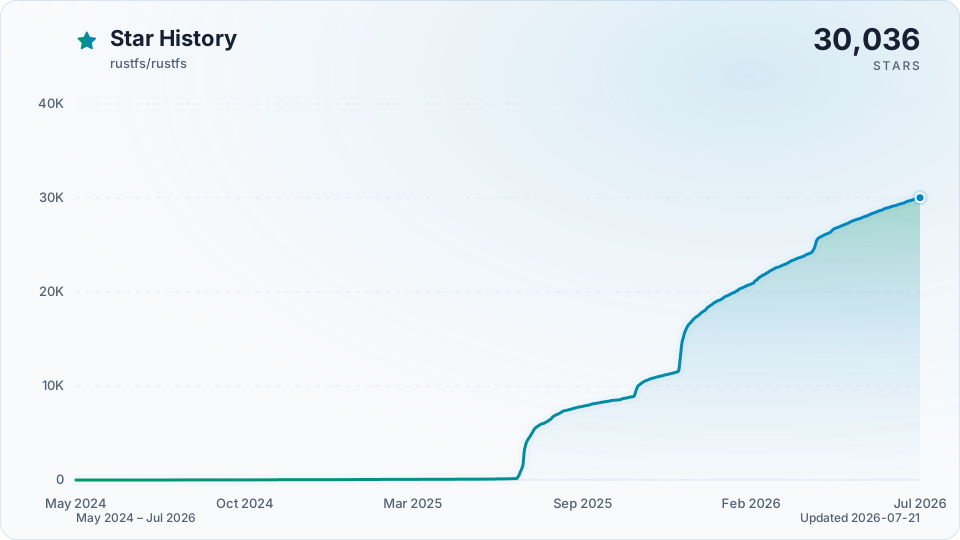
在 GitHub 上为 RustFS 点 Star,即可即时收到新版本发布通知。

重要提示
Pool 扩容通知:
- 单节点单磁盘(SNSD)部署仅支持作为独立的本地路径使用,不能原地扩容,也不能添加为一个 Pool。若要迁移至多磁盘拓扑,请创建新部署,并通过 S3 迁移数据。
- 保持现有多磁盘 Pool 的端点及 Erasure Set 宽度不变;应通过追加一个新 Pool 来扩容。对于基于省略号的扩容,每个 Pool 参数都必须包含省略号表达式,并扩展为至少两个磁盘端点。
- 允许单节点多磁盘 Pool 以及每节点单磁盘的多节点 Pool,前提是 Erasure Set 几何结构和 EC 设置有效;被接受的配置并不保证能够容忍主机故障。
这些拓扑规则遵循 MinIO,但两个项目的自动校验分片选择方式不同。扩展部署前,请参阅 Pool 布局兼容性与回归测试。
要开始使用 RustFS,请按照以下步骤操作:
1. 一键安装(选项 1)
curl -O https://rustfs.com/install_rustfs.sh && bash install_rustfs.sh
2. Docker 快速开始(选项 2)
RustFS 容器以非 root 用户 rustfs(UID/GID 为 10001:10001)运行。如果使用 Docker 或 Compose 绑定挂载主机目录,每个挂载路径都必须对该用户可写,否则启动可能因权限被拒绝错误而失败。这一要求适用于数据目录、日志目录,以及启用 RUSTFS_TLS_PATH 时的 TLS 证书目录。
# 创建数据和日志目录
mkdir -p data logs

# 修改这些目录的所有者
chown -R 10001:10001 data logs

# 使用最新版本
docker run -d -p 9000:9000 -p 9001:9001 -v $(pwd)/data:/data -v $(pwd)/logs:/logs rustfs/rustfs:latest

# 使用特定版本
docker run -d -p 9000:9000 -p 9001:9001 -v $(pwd)/data:/data -v $(pwd)/logs:/logs rustfs/rustfs:1.0.1
如果使用 podman 而非 Docker,可以通过以下命令安装 RustFS:
# 创建数据和日志目录
mkdir -p data logs

# 运行容器(podman 将自动设置文件夹所有权)
podman run -d -p 9000:9000 -p 9001:9001 -v $(pwd)/data:/data:Z,U -v $(pwd)/logs:/logs:Z,U rustfs/rustfs:latest
如果通过绑定挂载的证书目录启用 TLS,也应以相同方式准备该挂载:
mkdir -p certs
chown -R 10001:10001 certs
也可以使用 Docker Compose。在根目录中使用 docker-compose-simple.yml 文件:
docker compose -f docker-compose-simple.yml up -d
在使用主机绑定挂载运行 Compose 前:
- 确保每个挂载的主机路径均可由
10001:10001写入。 - 如果启用 TLS,请确保
/opt/tls的证书挂载也可由10001:10001读取。 - 如果不便匹配主机所有权,请改为使用
user: "<host-uid>:<host-gid>"运行rustfs服务。 docker-compose-simple.yml为命名卷包含一个volume-permission-helper服务。对于绑定挂载的主机路径,docker-compose-simple.yml要求你提前完成准备工作。
同样,也可以使用 Podman 运行该命令:
podman compose -f docker-compose-simple.yml up -d
Webhook 通知快速开始(Docker):
docker run -d --name rustfs -p 9000:9000 \
  -e RUSTFS_NOTIFY_ENABLE=true \
  -e RUSTFS_NOTIFY_WEBHOOK_ENABLE_PRIMARY=on \
  -e RUSTFS_NOTIF
English / 原文
RustFS is a high-performance, distributed object storage system built in Rust.


Getting Started · Docs · Bug reports · Discussions
English | 简体中文 | Deutsch | Español | français | 日本語 | 한국어 | Portuguese | Русский
RustFS is a high-performance, distributed object storage system built in Rust—one of the most loved programming languages worldwide. RustFS combines the simplicity of MinIO with the memory safety and raw performance of Rust. It offers broad S3 API compatibility for supported features, is completely open-source, and is optimized for data lakes, AI, and big data workloads.
Unlike other storage systems, RustFS is released under the permissible Apache 2.0 license, avoiding the restrictions of AGPL. With Rust as its foundation, RustFS delivers superior speed and secure distributed features for next-generation object storage.
- High Performance : Built with Rust to ensure maximum speed and resource efficiency.
- Distributed Architecture : Scalable and fault-tolerant design suitable for large-scale deployments.
- S3 Compatibility : Seamless integration with common S3-compatible applications and tools; current coverage is tracked in the S3 compatibility matrix.
- OpenStack Swift API : Native support for Swift protocol with Keystone authentication.
- OpenStack Keystone Integration : Native support for OpenStack Keystone authentication with X-Auth-Token headers.
- Data Lake Support : Optimized for high-throughput big data and AI workloads.
- Open Source : Licensed under Apache 2.0, encouraging unrestricted community contributions and commercial usage.
- User-Friendly : Designed with simplicity in mind for easy deployment and management.
Status legend: ✅ Available — shipped and covered by CI gates; 🧪 Preview — shipped behind an opt-in flag or with a bounded compatibility claim.
| Feature | Status | Feature | Status |
|---|---|---|---|
| S3 Core Features | ✅ Available | Distributed Mode | ✅ Available |
| Upload / Download | ✅ Available | Single Node Mode | ✅ Available |
| Versioning | ✅ Available | Bitrot Protection | ✅ Available |
| Object Lock (WORM) | ✅ Available | Healing & Scanner | ✅ Available |
| Server-Side Encryption | ✅ Available | Pool Expansion / Decommission | ✅ Available |
| RustFS KMS | ✅ Available | Bucket Replication | ✅ Available |
| Lifecycle Management (ILM) | ✅ Available | Site Replication | ✅ Available |
| ILM Tiering (Remote S3) | ✅ Available | Bucket Quota | ✅ Available |
| S3 Select | ✅ Available | Event Notifications | ✅ Available |
| S3 Tables (Iceberg REST) | 🧪 Preview | Audit Logging | ✅ Available |
| IAM / Policies | ✅ Available | Logging & Observability | ✅ Available |
| OIDC / SSO | ✅ Available | Web Console | ✅ Available |
| Keystone Auth | ✅ Available | K8s Helm Charts | ✅ Available |
| Swift API | ✅ Available | FTPS / WebDAV | ✅ Available |
| Multi-Tenancy | ✅ Available | SFTP | ✅ Available |
| MinIO On-Disk Compatibility | 🧪 Preview |
Notes:
- RustFS KMS : Vault (KV2 / Transit) and AWS KMS backends are supported for production. The
LocalandStaticbackends are for development and testing only. See KMS backend security properties. - Swift API / SFTP : opt-in cargo features (
--features swift,--features sftp, orfull). FTPS and WebDAV are enabled in the default build. - S3 Tables : ships as an Iceberg REST Catalog with automated PyIceberg and DuckDB coverage; other engines and vendor profiles carry bounded claims listed in the S3 Tables support matrix.
- MinIO On-Disk Compatibility : gated behind the
rio-v2feature and not part of the default build. Objects MinIO encrypted are not readable by RustFS. See MinIO file-format interoperability.
RustFS vs MinIO Performance
Stress Test Environment:
| Type | Parameter | Remark |
|---|---|---|
| CPU | 2 Core | Intel Xeon (Sapphire Rapids) Platinum 8475B, 2.7/3.2 GHz |
| Memory | 4GB | |
| Network | 15Gbps | |
| Drive | 40GB x 4 | IOPS 3800 / Drive |
| rustfs.mp4 |
RustFS vs Other Object Storage
| Feature | RustFS | Other Object Storage |
|---|---|---|
| Console Experience | Powerful Console | |
| Comprehensive management interface. | Basic / Limited Console | |
| Often overly simple or lacking critical features. | ||
| Language & Safety | Rust-based | |
| Memory safety by design. | Go or C-based | |
| Potential for memory GC pauses or leaks. | ||
| Data Sovereignty | No Telemetry / Full Compliance | |
| Guards against unauthorized cross-border data egress. Compliant with GDPR (EU/UK), CCPA (US), and APPI (Japan). | Potential Risk | |
| Possible legal exposure and unwanted data telemetry. | ||
| Licensing | Permissive Apache 2.0 | |
| Business-friendly, no "poison pill" clauses. | Restrictive AGPL v3 | |
| Risk of license traps and intellectual property pollution. | ||
| Compatibility | S3-Compatible Core | |
| Works with common S3-compatible clients, with coverage tracked in the compatibility matrix. | Variable Compatibility | |
| May lack support for local cloud vendors or specific APIs. | ||
| Edge & IoT | Strong Edge Support | |
| Ideal for secure, innovative edge devices. | Weak Edge Support | |
| Often too heavy for edge gateways. | ||
| Risk Profile | Enterprise Risk Mitigation | |
| Clear IP rights and safe for commercial use. | Legal Risks | |
| Intellectual property ambiguity and usage restrictions. |
Star RustFS on GitHub and be instantly notified of new releases.
Important
Pool expansion notice:
- A single-node single-drive (SNSD) deployment is supported only as a standalone local path. It cannot expand in place or be added as a Pool. To move to a multi-drive topology, create a new deployment and migrate data through S3.
- Keep an existing multi-drive Pool's endpoints and Erasure Set width unchanged; expand by appending a new Pool. With ellipsis-based expansion, every Pool argument must contain an ellipsis expression and expand to at least two drive endpoints.
- Single-node multi-drive Pools and multi-node Pools with one drive per node are allowed, subject to valid Erasure Set geometry and EC settings; acceptance does not guarantee host-failure tolerance.
These topology rules follow MinIO, but automatic parity selection differs between the projects. See the Pool layout compatibility and regression tests before expanding a deployment.
To get started with RustFS, follow these steps:
1. One-click Installation (Option 1)
curl -O https://rustfs.com/install_rustfs.sh && bash install_rustfs.sh
2. Docker Quick Start (Option 2)
The RustFS container runs as a non-root user rustfs (UID/GID 10001:10001). If you bind-mount host directories with Docker or Compose, every mounted path must be writable by that user, otherwise startup may fail with permission denied errors. This applies to data directories, log directories, and TLS certificate directories when RUSTFS_TLS_PATH is enabled.
# Create data and logs directories
mkdir -p data logs

# Change the owner of these directories
chown -R 10001:10001 data logs

# Using latest version
docker run -d -p 9000:9000 -p 9001:9001 -v $(pwd)/data:/data -v $(pwd)/logs:/logs rustfs/rustfs:latest

# Using specific version
docker run -d -p 9000:9000 -p 9001:9001 -v $(pwd)/data:/data -v $(pwd)/logs:/logs rustfs/rustfs:1.0.1
If you use podman instead of docker, you can install the RustFS with the below command
# Create data and logs directories
mkdir -p data logs

# Run the container (podman will automatically set the folders ownership)
podman run -d -p 9000:9000 -p 9001:9001 -v $(pwd)/data:/data:Z,U -v $(pwd)/logs:/logs:Z,U rustfs/rustfs:latest
If you enable TLS with a bind-mounted certificate directory, prepare that mount the same way:
mkdir -p certs
chown -R 10001:10001 certs
You can also use Docker Compose. Using the docker-compose-simple.yml file in the root directory:
docker compose -f docker-compose-simple.yml up -d
Before running Compose with host bind mounts:
- Ensure every mounted host path is writable by
10001:10001. - If you enable TLS, ensure the certificate mount for
/opt/tlsis also readable by10001:10001. - If matching host ownership is not practical, run the
rustfsservice withuser: "<host-uid>:<host-gid>"instead. docker-compose-simple.ymlincludes avolume-permission-helperservice for named volumes.docker-compose-simple.ymlrelies on you to prepare bind-mounted host paths in advance.
Similarly, you can run the command with podman
podman compose -f docker-compose-simple.yml up -d
Webhook notification quick start (Docker):
docker run -d --name rustfs -p 9000:9000 \
  -e RUSTFS_NOTIFY_ENABLE=true \
  -e RUSTFS_NOTIFY_WEBHOOK_ENABLE_PRIMARY=on \
  -e RUSTFS_NOTIFY_WEBHOOK_ENDPOINT_PRIMARY=http://<host-ip>:3020/webhook \
  -e RUSTFS_NOTIFY_WEBHOOK_QUEUE_DIR_PRIMARY=/tmp/rustfs-events \
  -e RUSTFS_OUTBOUND_ALLOW_ORIGINS=http://<host-ip>:3020 \
  rustfs/rustfs:latest
Notes:
RUSTFS_NOTIFY_ENABLE=trueenables the global notify module switch.- For ARN
arn:rustfs:sqs::primary:webhook, use instance-scoped env vars with_PRIMARY. - If queue dir is omitted, default is
/opt/rustfs/events; ensure it is writable by the container runtime user. RUSTFS_NOTIFY_WEBHOOK_SKIP_TLS_VERIFY_PRIMARYdefaults tofalse; enabling it skips webhook TLS certificate verification, allows MITM attacks, and emits a startup warning. PreferRUSTFS_NOTIFY_WEBHOOK_CLIENT_CA_PRIMARYfor private CAs.- Since
1.0.0-beta.11, webhook endpoints on private or container networks (Docker Compose service names,host.docker.internal, RFC 1918 addresses) are blocked unless their exactscheme://host:portorigin is listed inRUSTFS_OUTBOUND_ALLOW_ORIGINS(the origin only, without the path). See Outbound Connection Policy.
NOTE : We recommend reviewing the docker-compose.yml file before running. It defines several services including Grafana, Prometheus, and Jaeger, which are helpful for RustFS observability. If you wish to start Redis or Nginx containers, you can specify the corresponding profiles.
3. Build from Source (Option 3) - Advanced Users
For developers who want to build RustFS Docker images from source with multi-architecture support:
# Build multi-architecture images locally
./docker-buildx.sh

# Build a single-platform image locally
./docker-buildx.sh -p linux/amd64

# Build and push to registry
./docker-buildx.sh --push

# Build specific version
./docker-buildx.sh --release v1.0.0 --push

# Build for custom registry
./docker-buildx.sh --registry your-registry.com --namespace yourname --push
The docker-buildx.sh script supports:
- Multi-architecture builds :
linux/amd64,linux/arm64 - Automatic version detection : Uses git tags or commit hashes
- Registry flexibility : Supports Docker Hub, GitHub Container Registry, etc.
- Build optimization : Includes caching and parallel builds
You can also use Make targets for convenience:
make docker-buildx                    # Build locally
make docker-buildx-push               # Build and push
make docker-buildx-version VERSION=v1.0.0  # Build specific version
make help-docker                      # Show all Docker-related commands
Heads-up (macOS cross-compilation) : macOS keeps the default
ulimit -nat 256, socargo zigbuildor./build-rustfs.sh --platform ...may fail withProcessFdQuotaExceededwhen targeting Linux. The build script attempts to raise the limit automatically, but if you still see the warning, runulimit -n 4096(or higher) in your shell before building.
4. Build with Helm Chart (Option 4) - Cloud Native
Follow the instructions in the Helm Chart README to install RustFS on a Kubernetes cluster.
For scanner pacing, cycle budgets, bitrot cadence, lifecycle transition status, and single-node single-disk idle CPU tuning, see Scanner Runtime Controls. For repeatable scanner-pressure validation, see Scanner Benchmark Runbook. For drive timeout knobs on slow storage — including the walk stall budget that governs ListObjects on large prefixes — see Drive Timeout Tuning.
If you have Nix with flakes enabled:
# Run directly without installing
nix run github:rustfs/rustfs

# Build the binary
nix build github:rustfs/rustfs
./result/bin/rustfs --help

# Or from a local checkout
nix build
nix run
The flake also exports a NixOS module and the RustFS rc client. Add the module to your system and provide credentials through runtime files (for example, sops-nix or agenix) so secrets are never stored in the Nix store:
imports = [ inputs.rustfs.nixosModules.rustfs ];

services.rustfs = {
  enable = true;
  accessKeyFile = "/run/secrets/rustfs-access-key";
  secretKeyFile = "/run/secrets/rustfs-secret-key";
  volumes = [ "/var/lib/rustfs" ];
};
Install the S3-compatible client with nix profile install github:rustfs/rustfs#rustfs-client (the executable is named rc), or use inputs.rustfs.packages.${pkgs.system}.rustfs-client in a system configuration.
If you are an x-cmd user:
# Run directly without installing
x rustfs

# Download the binary and install it to the global environment
x env use rustfs
rustfs --help
- Access the Console : Open your web browser and navigate to
http://localhost:9001to access the RustFS console.- Default credentials:
rustfsadmin/rustfsadmin
- Default credentials:
- Create a Bucket : Use the console to create a new bucket for your objects.
- Upload Objects : You can upload files directly through the console or use S3-compatible APIs/clients to interact with your RustFS instance.
NOTE : To access the RustFS instance via https, please refer to the TLS Configuration Docs.
OIDC Roles Claim (Microsoft Entra ID)
RustFS supports mapping an OIDC claim containing role values into the existing authorization pipeline. The roles_claim setting is optional : when unset or empty, only the groups claim contributes to authorization (same as older RustFS releases). For Microsoft Entra ID app roles, set roles_claim=roles so both console admin checks and bucket IAM policies can evaluate those roles.
Example environment configuration (opt-in roles claim):
RUSTFS_IDENTITY_OPENID_ENABLE=on
RUSTFS_IDENTITY_OPENID_CONFIG_URL="https://login.microsoftonline.com/<tenant-id>/v2.0/.well-known/openid-configuration"
RUSTFS_IDENTITY_OPENID_CLIENT_ID="<client-id>"
RUSTFS_IDENTITY_OPENID_CLIENT_SECRET="<client-secret>"
RUSTFS_IDENTITY_OPENID_SCOPES="openid,profile,email"
RUSTFS_IDENTITY_OPENID_GROUPS_CLAIM="groups"
RUSTFS_IDENTITY_OPENID_ROLES_CLAIM="roles"
Policy condition example (evaluate app roles directly with jwt:roles; when roles_claim is configured, RustFS also merges those values into jwt:groups for backward compatibility with older policies):
{
  "Version": "2012-10-17",
  "Statement": [
    {
      "Effect": "Allow",
      "Action": ["admin:*"],
      "Resource": ["arn:aws:s3:::*"],
      "Condition": {
        "ForAnyValue:StringEquals": {
          "jwt:roles": ["RustFS.ConsoleAdmin"]
        }
      }
    }
  ]
}
For detailed documentation, including configuration options, API references, and advanced usage, please visit our Documentation.
If you have any questions or need assistance:
- Check the FAQ for common issues and solutions.
- Join our GitHub Discussions to ask questions and share your experiences.
- Open an issue on our GitHub Issues page for bug reports or feature requests.
RustFS is a community-driven project, and we appreciate all contributions. Check out the Contributors page to see the amazing people who have helped make RustFS better.
RustFS is a trademark of RustFS, Inc. All other trademarks are the property of their respective owners.