使用 Amazon Bedrock AgentCore 构建环境式 Agent:从事件驱动信号到人类参与工作流
英文标题:Building ambient agents with Amazon Bedrock AgentCore: From event-driven signals to human-in-the-loop workflows
环境式 Agent 不必等待聊天提示,而是可由 Amazon S3 文件上传、定时任务或系统告警等事件自动触发。本文介绍了一套基于 Amazon Bedrock AgentCore、Amazon SQS、AWS Lambda 和 Amazon DynamoDB 的无服务器参考架构,并通过统一的 `ask_human` 工具支持人类参与(HITL)流程。该方案可让 Agent 在处理文档、告警和多步骤任务时按需暂停,请求澄清、审批或审阅后继续执行。对开发者而言,该参考实现展示了如何将现有 AWS 事件基础设施连接到可推理、可并发处理且可控的生产级 Agent 工作流。
 1.3 MB
 1.3 MB
 2.4 KB
 345.0 KB
 141.2 KB
 346.5 KB
 61.3 KB
 133.2 KB
 47.7 KB
 67.7 KB
 126.8 KB
 20.2 KB
 24.4 KB
 26.4 KB
 20.4 KB
 65.8 KB
中文
大规模处理文档的团队都熟悉这样的流程:文件进入存储系统,有人发现它们,逐一打开,判断各自需要什么处理,然后将其路由至审核环节。监控告警也会以同样方式堆积起来,等待人工处置。人工分诊所浪费的时间,正是环境式 Agent 要解决的运营问题。设想一下:某个文档进入你的 Amazon Simple Storage Service(Amazon S3)存储桶,几秒钟内,Jobs 页面上就会出现一个可运行的任务(如果你已这样配置,它可能已经在运行)。Agent 会分析文件、呈现发现结果,并在执行下一步之前向你请求批准。事件本身就是提示词。这就是环境式 Agent:它响应事件流,在需要时通过单一的 ask_human 工具暂停以获取人工输入,并在人工回答后从中断处继续执行。
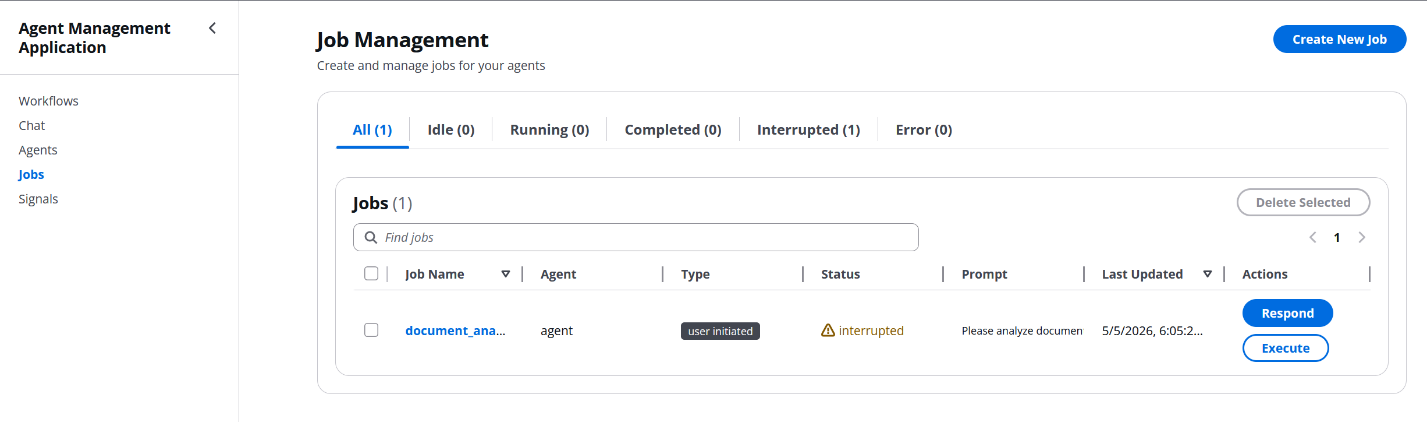
图 1:环境式 Agent 在 AgentCore Runtime 上响应事件,并暂停等待人工输入的概览
如今大多数 AI Agent 体验遵循另一种模式:用户打开聊天界面,输入提示词,然后等待响应。这种方式适合一次性问题,但它将 Agent 限制在一次处理一段对话的模式中,并且要求人类先描述发生了什么,系统才能据此采取行动。对于 Agent 应该响应基础设施中发生事件的场景——例如文件上传、数据库变更、定时任务和系统告警——这种纯聊天模式便难以胜任。
环境式 Agent描述了一种不同的范式,LangChain 等厂商已对此进行了阐述。环境式 Agent 不等待用户发起对话,而是监听事件流并据此采取行动,且可能并行处理许多事件。它们并非只由人工消息触发,多个 Agent 也可以同时运行。关键在于,它们并不完全自治:生产级设计会特别关注 Agent 应在何时暂停并与人类交互。当某个信号触发时,Agent 会执行其工作流,只有在需要澄清、批准或审阅时才中断人类。这一人类参与(human-in-the-loop,HITL)组件降低了将 Agent 部署到生产环境的风险,建立用户信任,并让 Agent 能够通过反馈不断学习和改进。
在 AWS 上运行的组织通常已经具备事件驱动基础设施:Amazon S3 事件通知、Amazon EventBridge 规则、AWS Lambda 触发器和 Amazon DynamoDB 流。缺失的部分,是将这些事件源连接到能够推理所发生事项、采取行动,并在需要时将人类纳入闭环的智能 Agent。像 AWS Step Functions 这样的全自动管道可以编排工作流,但不能推理模糊情况或提出澄清问题。基于聊天的 Agent 能够推理,但需要有人先发起对话。环境式 Agent 填补了这一空白。
Amazon Bedrock AgentCore 是一个用于大规模构建、连接和优化 Agent 的平台,支持任意框架或模型。AgentCore Runtime 提供了使该模式得以运行的执行环境:基于容器的 Agent 托管、对长时间运行工作负载的支持、内置会话隔离,以及与 Amazon Bedrock 基础模型的集成。AgentCore Runtime 支持足够长的会话,可覆盖此处展示的“信号 → Agent → 人类参与(HITL)”流程。该参考实现将每一轮 Agent 执行限制在 Lambda 的 15 分钟超时时间内,而这在实践中已绰绰有余。结合用于事件处理的 AWS Lambda 和用于状态管理的 Amazon DynamoDB,最终形成一个完全无服务器的环境式 Agent 平台。
本文将完整介绍 Amazon Bedrock AgentCore 上的这一模式。阅读后,你将了解:
- Amazon S3 事件或定时事件如何变成一个由 AgentCore Runtime 上的 Agent 执行的任务,无论是否有人类参与。
- 单个
ask_human工具加上规范响应信封,如何足以支持完整范围的人类参与交互。 - 参考示例提供了什么,以及你需要为自己的使用场景额外编写什么。
前提条件
在部署参考实现之前,请确保已具备以下条件:
- 一个 AWS 账户,并拥有创建 AWS Identity and Access Management(IAM)角色、Lambda 函数、DynamoDB 表、S3 存储桶、Amazon Simple Queue Service(Amazon SQS)队列、Amazon API Gateway API、Amazon CloudFront 分配、Amazon Cognito 用户池、Amazon Elastic Container Registry(Amazon ECR)存储库和 Bedrock AgentCore Runtime 的权限。沙盒账户中的管理员权限是一个不错的起点。
- 已配置 AWS Command Line Interface(AWS CLI),使用该账户的凭证,并将默认 AWS 区域设为
us-east-1(该示例的默认配置已为此区域设置)。 - 已安装 AWS Cloud Development Kit(AWS CDK) v2,并已在你的账户和区域中完成引导配置(
cdk bootstrap)。 - 已在本地安装并运行 Docker。Agent 容器会在部署过程中构建并推送到 Amazon ECR。
- 后端 Lambda 函数和 Agent 构建需要 Python 3.11 或更高版本,React 前端需要
Node.js18 或更高版本。 - 可在目标区域的 Amazon Bedrock 中访问 Anthropic Claude Sonnet 4.5 模型。如果你此前未使用过 Bedrock,请按照管理 Amazon Bedrock 基础模型访问权限(FM)的说明启用该模型。模型可用性因 AWS 区域而异。请查阅 Amazon Bedrock 文档,了解你的目标区域当前支持的模型列表。后续切换模型只需修改一行配置。
理解环境式 Agent
在深入架构之前,先了解环境式 Agent 与典型聊天机器人的区别,以及本文后续依赖的构建模块会有所帮助:事件驱动触发模型、环境信号抽象,以及将二者连接起来的单一人类参与工具。
事件驱动 Agent 与用户发起型 Agent 的对比
用户发起型 Agent 遵循请求—响应模式:
User → Prompt → Agent → Response → User
环境式 Agent 遵循事件驱动模式:
Event → Signal → Agent → [Optional human interaction] → Action
关键差异在于触发机制。环境式 Agent 由系统事件激活,而不是由明确的用户请求激活,因此非常适合文档处理管道、监控与告警、定时分析,以及需要在过程中设置审批关卡的多步骤工作流。
环境信号:触发机制
环境信号是一项将事件源映射到 Agent 的配置。当事件发生时,平台会自动为该 Agent 创建任务。后续行为取决于信号中的一项设置:
- 当
autoExecute: false(默认值)时,任务会以idle状态进入 Jobs 页面,等待人类审核和运行。当某个信号可能因未知输入而触发,或者 Agent 拥有高风险工具时,这种安全优先、先审核后执行的流程非常适合。 - 当
autoExecute: true时,信号处理器会直接将任务加入工作队列,Agent 立即运行,只有 Agent 自身调用ask_human时才会引入人类。这是完全自主的流程。
该模式覆盖多种信号事件源。参考示例内置前两种,其余则是扩展点:你可以通过编写新的处理 Lambda 函数,并在 Signals 页面添加相应表单字段来实现:
- Amazon S3 文件上传(内置):当文件上传至指定存储桶和前缀时触发。
- 定时事件(内置):以类似 cron 的计划触发 Agent。它由携带
jobType: "scheduled"的任务驱动,而非由 Signals 页面上的信号驱动。 - API Webhook(扩展点):响应外部系统通知。
- 数据库变更(扩展点):响应 Amazon DynamoDB 流或 Amazon Relational Database Service(Amazon RDS)事件。
环境式 Agent 需要结构化方式与人类交互。在此示例中,Agent 通过单一工具(ask_human)呈现这些交互,并返回规范响应信封。在该信封中,status 的值为 completed、interrupted 或 error 之一,而对应字段分别为 result、question 或 error。平台还会将 session_id 和 job_id 贯穿每一个响应,以便关联后续继续执行的轮次。它们是关联元数据,而不是 Agent 必须实现的核心契约的一部分。当 Agent 返回 interrupted 时,平台会将任务移至 interrupted 状态,并将其 requiresAction 标志设置为 true。参考 React 前端会在 Jobs 页面的 Interrupted 标签中展示这些任务,并在每一行显示警告标识,因此无需轮询单独的审核队列。同一个 Jobs 视图还会显示待处理问题、等待批准的拟议操作、最终结果和失败任务,让用户可以在一个地方查看所有 Agent 正在进行的工作,而不必监控多个聊天窗口或电子邮件线程。
同一机制支持更广泛 Agent 文献中读者可能熟悉的几种提示模式:Agent 仅报告结果的 Notify 轮次、请求澄清的 Question 轮次、提出操作并等待 APPROVE / REJECT / MODIFY 的 Review 轮次,以及将失败记录在任务记录中并由用户决定是否重试的 Error 轮次。这些只是 Agent 编写问题时遵循的约定,并非独立的运行时模式。在平台层面,只有一条代码路径和一种信封格式。
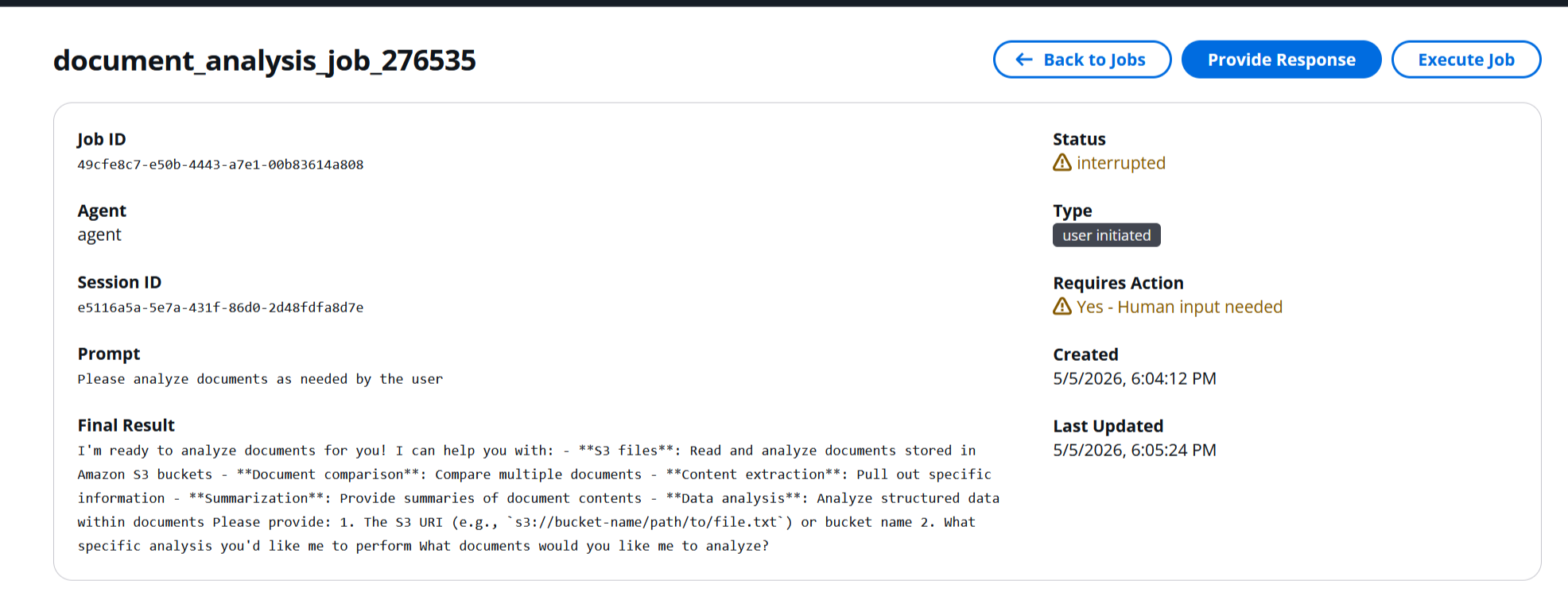
图 2:Notify、Question 和 Review 三种人类参与模式,均通过 ask_human 工具呈现
架构概览
该平台由一组通过事件管道连接在一起的小型无服务器组件构成。本节先介绍端到端流程,再逐一说明每个组件。
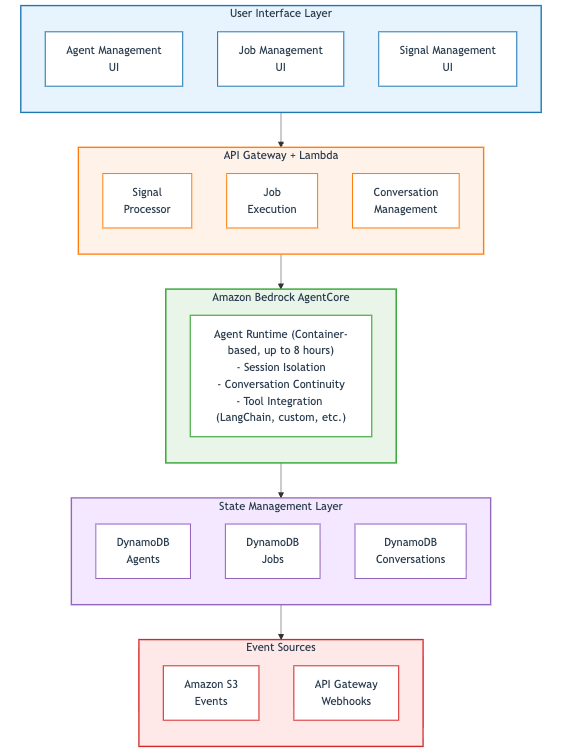
事件在平台中的端到端流转如下:Amazon S3 发出 s3:ObjectCreated 通知,由 Signal Processor Lambda 函数接收。Signal Processor 查询 ambient-signals 表上的全局二级索引(GSI),查找与事件存储桶匹配的信号,然后为每个匹配项创建任务记录。API 层(或调度器)将任务加入 Amazon SQS 队列。同一个 Job Execution Lambda 函数既服务 API 路径,也通过附加的 SQS 事件源消费队列:它调用 Amazon Bedrock AgentCore Runtime 上的 Agent,并将结果(以及任何人工输入请求)写回 Amazon DynamoDB。一个通过 Amazon CloudFront 从 Amazon S3 提供服务的 React 前端,会轮询由 Amazon API Gateway 和 Lambda 组成的小型层以获取更新,并允许用户响应待处理交互。
主要组件包括:
- Amazon S3 通过事件通知作为文件上传信号的入口。前缀和后缀过滤器会下推至存储桶的通知配置,因此只有可能匹配某个信号的事件才会调用信号处理器。
- Amazon SQS 将 API Gateway 请求与 Agent 调用解耦。任务执行队列保存待处理工作;死信队列(DLQ)会捕获工作器在配置的重试次数后仍无法处理的消息。
- 三个管道 Lambda 函数 将事件从接入阶段传递至 Agent(本节稍后将介绍 API Gateway 后方独立的管理层):
- Signal Processor 将传入事件与已配置的信号定义匹配,并创建任务。
- Job Execution 在一个 Lambda 函数中具有两条入口路径:一个用于将消息加入队列的 API 处理器,以及一个用于消费消息并使用任务上下文调用 AgentCore Runtime 的 SQS 工作器。
- Scheduler 每分钟按 cron 触发一次,并将到期的定时任务加入同一个 SQS 队列。
- Amazon Bedrock AgentCore Runtime 在隔离容器中运行 Agent 代码,并支持长时间运行的工作负载。
- Amazon DynamoDB 存储 Agent 注册表、任务记录、环境信号定义、聊天线程、对话历史记录和 Powertools 幂等性记录。对话消息使用
UpdateItem+list_append原子追加,因此并发写入者不会相互覆盖。 - 位于 Amazon API Gateway 后方的五个管理层 Lambda 函数 提供前端所使用的 REST API(
agent_management、job_management、signal_management、chat_management、conversation_management),此外还有一个chat_execution工作器 Lambda,由chat_management异步调用,因此聊天 API 调用可立即返回。有关其预置方式,请参阅生产部署。 - React 前端 通过 Amazon CloudFront 从 Amazon S3 提供服务,提供 Agent 管理 UI,用户可在其中监控任务、与 Agent 聊天、回答问题以及审核待处理操作。
[ ](https://d2908q01
English / 原文
Teams that process documents at scale know the routine: files land in storage, someone notices, opens each one, decides what it needs, and routes it for review. Monitoring alerts queue up the same way, waiting for a person to act on them. The hours lost to manual triage are the operational problem ambient agents solve. Imagine a document lands in your Amazon Simple Storage Service (Amazon S3) bucket and within seconds a job appears on your Jobs page, ready to run (or already running if you configured it that way). The agent analyzes the file, surfaces the findings, and asks you for approval before taking the next step. The event itself is the prompt. That is an ambient agent: it responds to event streams, pauses for human input through a single ask_human tool when it needs to, and resumes from where it left off once the human answers.
Figure 1: Overview of an ambient agent responding to an event on AgentCore Runtime and pausing for human input
Most AI agent experiences today follow a different pattern: a user opens a chat interface, types a prompt, and waits for a response. That works for one-time questions, but it limits the agent to one conversation at a time and requires a human to describe what happened before anything can act on it. For scenarios where agents should react to events happening across your infrastructure (file uploads, database changes, scheduled tasks, system alerts), that chat-only model breaks down.
Ambient agents describe a different paradigm, one that LangChain among others has articulated. Instead of waiting for users to initiate conversations, ambient agents listen to an event stream and act on it, potentially handling many events in parallel. They aren’t solely triggered by human messages, and multiple agents can run simultaneously. Crucially, they aren’t fully autonomous: a production design pays careful attention to when the agent pauses to interact with humans. When a signal fires, the agent executes its workflow and only interrupts a human when clarification, approval, or review is needed. This human-in-the-loop component lowers the stakes for deploying agents to production, builds user trust, and lets agents learn and improve over time through feedback.
Organizations running on AWS already have the event-driven infrastructure in place: Amazon S3 event notifications, Amazon EventBridge rules, AWS Lambda triggers, and Amazon DynamoDB streams. The missing piece is connecting those event sources to intelligent agents that can reason about what happened, act, and loop in humans when the situation calls for it. Fully automated pipelines like AWS Step Functions can orchestrate workflows but can’t reason through ambiguity or ask clarifying questions. Chat-based agents can reason but require someone to start the conversation. Ambient agents bridge this gap.
Amazon Bedrock AgentCore is a platform to build, connect, and optimize agents at scale, with any framework or model. AgentCore Runtime provides the execution environment that makes this pattern work: container-based agent hosting with support for long-running workloads, built-in session isolation, and integration with Amazon Bedrock foundation models. AgentCore Runtime supports sessions long enough to cover the signal → agent → human-in-the-loop (HITL) flow shown here. The reference implementation caps each agent turn at the Lambda 15-minute timeout, which is more than enough headroom in practice. Combined with AWS Lambda for event processing and Amazon DynamoDB for state management, the result is a fully serverless ambient-agent platform.
In this post we walk through the pattern end-to-end on Amazon Bedrock AgentCore. You will come away understanding:
- How an Amazon S3 or scheduled event becomes a job that an agent runs on AgentCore Runtime, with or without a human in the loop.
- How a single
ask_humantool plus a canonical response envelope is enough to support the full range of human-in-the-loop interactions. - What you get from the reference sample, and what you write on top for your own use case.
Prerequisites
Before deploying the reference implementation, make sure you have the following in place:
- An AWS account with permissions to create AWS Identity and Access Management (IAM) roles, Lambda functions, DynamoDB tables, S3 buckets, Amazon Simple Queue Service (Amazon SQS) queues, Amazon API Gateway APIs, Amazon CloudFront distributions, Amazon Cognito user pools, Amazon Elastic Container Registry (Amazon ECR) repositories, and Bedrock AgentCore runtimes. Administrator access on a sandbox account is a good starting point.
- The AWS Command Line Interface (AWS CLI) configured with credentials for that account and a default AWS Region of
us-east-1(the sample defaults are wired up for that Region). - The AWS Cloud Development Kit (AWS CDK) v2 installed and bootstrapped in your account and Region (
cdk bootstrap). - Docker installed and running locally. The agent container is built and pushed to Amazon ECR as part of deployment.
- Python 3.11 or later for the backend Lambda functions and the agent build, and
Node.js18 or later for the React frontend. - Access to the Anthropic Claude Sonnet 4.5 model in Amazon Bedrock in your target Region. If you haven’t used Bedrock before, follow Manage access to Amazon Bedrock foundation models (FMs) to enable the model. Model availability varies by AWS Region. Check the Amazon Bedrock documentation for the current list of models supported in your target Region. Switching models is a one-line config change later.
Understanding ambient agents
Before we get into the architecture, it helps to look at what makes an ambient agent different from a typical chatbot and at the building blocks the rest of the post relies on: the event-driven trigger model, the ambient signal abstraction, and the single human-in-the-loop tool that ties them together.
Event-driven compared to user-initiated agents
User-initiated agents follow a request-response pattern:
User → Prompt → Agent → Response → User
Ambient agents follow an event-driven pattern:
Event → Signal → Agent → [Optional human interaction] → Action
The key difference is the trigger mechanism. Ambient agents are activated by system events rather than explicit user requests, which makes them a natural fit for document-processing pipelines, monitoring and alerting, scheduled analysis, and multi-step workflows that need approval gates along the way.
Ambient signals: The trigger mechanism
An ambient signal is a configuration that maps an event source to an agent. When the event occurs, the platform automatically creates a job for the agent. What happens next depends on one setting on the signal:
- With
autoExecute: false(the default), the job lands on the Jobs page inidlestatus and waits for a human to review and run it. This is the safe, review-first flow you want when a signal could fire on unknown input or when the agent has high-stakes tools available. - With
autoExecute: true, the signal processor enqueues the job straight onto the worker queue, the agent runs immediately, and a human is only pulled in if the agent itself callsask_human. This is the fully autonomous flow.
The pattern covers several signal event sources. The reference sample ships the first two. The rest are extension points you add by writing a new handler Lambda function and a corresponding form field on the Signals page:
- Amazon S3 file uploads (ships): Trigger when files are uploaded to specific buckets and prefixes.
- Scheduled events (ships): Trigger agents on a cron-like schedule. Driven by jobs carrying
jobType: "scheduled"rather than by a signal on the Signals page. - API webhooks (extension point): Respond to external system notifications.
- Database changes (extension point): React to Amazon DynamoDB streams or Amazon Relational Database Service (Amazon RDS) events.
Ambient agents need structured ways to interact with humans. In this sample the agent surfaces those interactions through a single tool (ask_human) and returns a canonical response envelope. In that envelope, status is one of completed, interrupted, or error, and the matching field is result, question, or error. The platform additionally threads session_id and job_id through every response so continuation turns can be correlated. Those are correlation metadata, not part of the core contract your agent must implement. When the agent returns interrupted, the platform moves the job into interrupted status and sets its requiresAction flag to true. The reference React frontend surfaces these on the Interrupted tab of the Jobs page with a warning indicator on each row, so there is no separate review queue to poll. The same Jobs view shows pending questions, proposed actions awaiting approval, final results, and failed jobs, giving a user one place to see everything their agents are doing instead of monitoring multiple chat windows or email threads.
The same mechanism supports several prompting patterns that a reader may recognize from the wider agents literature: a Notify turn where the agent simply reports a result, a Question turn where it asks for clarification, a Review turn where it proposes an action and waits for APPROVE / REJECT / MODIFY, and an Error turn where the failure is captured on the job record and the user decides whether to retry. These are conventions for how the agent writes its question, not separate runtime modes. At the platform level there is exactly one code path and exactly one envelope.
Figure 2: The Notify, Question, and Review human-in-the-loop patterns, all surfaced through the ask_human tool
Architecture overview
The platform is a small set of serverless components stitched together by an event pipeline. This section walks through the end-to-end flow first, then describes each component in turn.
Events flow through the platform end-to-end as follows. Amazon S3 emits an s3:ObjectCreated notification, which a Signal Processor Lambda function receives. The Signal Processor queries a global secondary index (GSI) on the ambient-signals table to find any matching signal for the event bucket, then creates a job record for each match. The API tier (or the scheduler) enqueues the job onto an Amazon SQS queue. The same Job Execution Lambda function that serves the API path also drains the queue through an attached SQS event source, invokes the agent on Amazon Bedrock AgentCore Runtime, and writes results (and any human-input requests) back to Amazon DynamoDB. A React frontend served from Amazon S3 through Amazon CloudFront polls a small Amazon API Gateway and Lambda tier for updates and lets the user respond to pending interactions.
The major components are:
- Amazon S3 with event notifications serves as the entry point for signals when files are uploaded. Prefix and suffix filters are pushed down into the bucket’s notification configuration so the signal processor is only invoked for events that could plausibly match a signal.
- Amazon SQS decouples the API Gateway request from the agent call. A job-execution queue holds pending work. A dead-letter queue (DLQ) captures messages the worker can’t process after the configured number of retries.
- Three pipeline Lambda functions carry the event from intake to agent (a separate management tier behind API Gateway is described later in this section):
- Signal Processor matches incoming events to configured signal definitions and creates jobs.
- Job Execution has two entry paths in one Lambda function: an API handler that enqueues messages, and an SQS worker that consumes them and invokes AgentCore Runtime with the job context.
- Scheduler fires on a one-minute cron and enqueues due scheduled jobs onto the same SQS queue.
- Amazon Bedrock AgentCore Runtime runs agent code in isolated containers and supports long-running workloads.
- Amazon DynamoDB stores the agent registry, job records, ambient signal definitions, chat threads, conversation history, and Powertools idempotency records. Conversation messages are appended atomically with
UpdateItem+list_appendso concurrent writers do not clobber each other. - Five management-tier Lambda functions behind Amazon API Gateway expose the REST API the frontend consumes (
agent_management,job_management,signal_management,chat_management,conversation_management), plus achat_executionworker Lambda thatchat_managementinvokes asynchronously so chat API calls return immediately. See Production deployment for how they are provisioned. - A React frontend served from Amazon S3 through Amazon CloudFront provides the Agent Management UI where users monitor jobs, chat with agents, respond to questions, and review pending actions.
Figure 3: Event flow from Amazon S3 through Amazon SQS and AWS Lambda to AgentCore Runtime, with state in Amazon DynamoDB and a React frontend
Building the event infrastructure
With the architecture in mind, the next step is wiring up the event source that turns an Amazon S3 upload into an agent job. This section creates the bucket, points its event notifications at the Signal Processor Lambda function, and walks through how the processor matches events against configured signals.
Setting up the Amazon S3 signal trigger
Create the Amazon S3 bucket and configure event notifications that drive the Signal Processor:
aws s3 mb s3://amzn-s3-demo-bucket-$(date +%s)
The bucket is configured to send s3:ObjectCreated:* events directly to the Signal Processor Lambda function. In this sample the notification configuration is installed dynamically by the signal_management Lambda function when a signal is created or updated, so adding a new signal for a new prefix doesn’t require a redeploy.
Signal Processor Lambda function
The Signal Processor receives Amazon S3 events, finds matching signal definitions in DynamoDB, and creates a job per match. At its heart the handler is the shape shown in the following example. The real handler in backend/functions/multi_agent/signal_processor.py also uses AWS Lambda Powertools for structured logging and idempotency, queries the bucketName-signalId-index GSI on the signals table, applies the prefix and suffix checks configured on each signal, and writes a signal_triggered job row.
def process_s3_signal(event):
    """Process S3 file-upload events and create agent jobs."""
    for record in event["Records"]:
        bucket = record["s3"]["bucket"]["name"]
        key = record["s3"]["object"]["key"]

        for signal in find_matching_signals(bucket, key):
            create_agent_job(signal, {"bucket": bucket, "key": key})
Signal configuration data model
Signals are stored in DynamoDB with this structure:
{
  "signalId": "sig-123abc",
  "userId": "user-456def",
  "agentId": "agent-789ghi",
  "signalName": "Document Processor",
  "signalType": "s3_file_upload",
  "enabled": true,
  "autoExecute": false,
  "bucketName": "ambient-agent-documents",
  "configuration": {
    "bucketName": "ambient-agent-documents",
    "prefix": "invoices/",
    "suffix": ".pdf"
  },
  "triggerCount": 42,
  "lastTriggered": "2026-04-15T10:30:00Z",
  "createdAt": "2026-04-01T00:00:00Z"
}
You only set configuration.bucketName when creating a signal through the API. The top-level bucketName shown in the preceding example is populated by the platform. DynamoDB GSI partition keys can’t be nested inside a map attribute, so signal_management mirrors configuration.bucketName out to a top-level bucketName on every write so the bucketName-signalId-index GSI can fan out to matching signals on every Amazon S3 event.
The autoExecute flag is the single switch that decides whether the agent fires autonomously or a human reviews the job first. The Signals form in the Agent Management UI exposes it as a checkbox alongside the familiar enabled setting, so changing the behavior is a quick edit without touching code or the database.
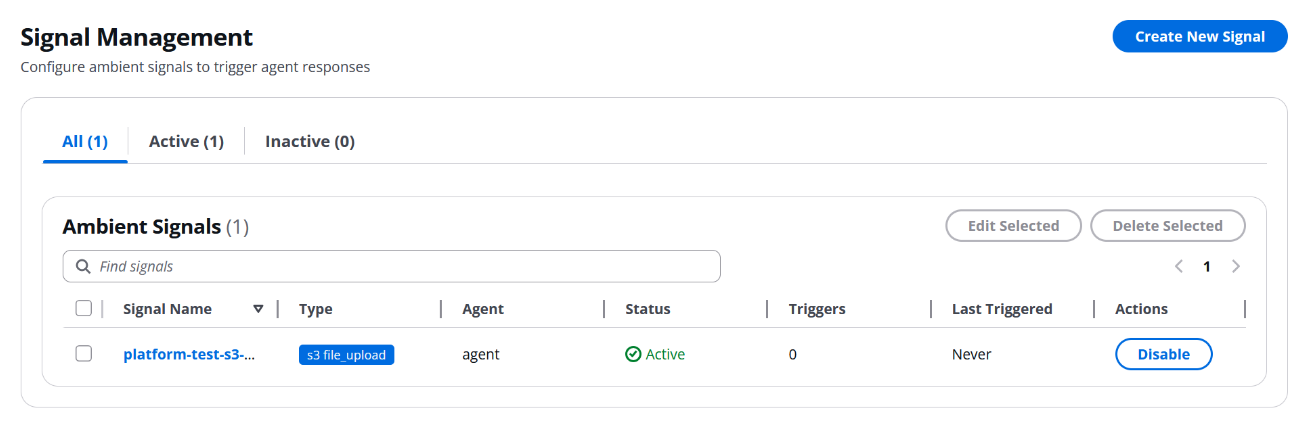
Figure 4: The Signals page with the autoExecute toggle on a signal definition
Deploying agents on AgentCore Runtime
Amazon Bedrock AgentCore Runtime hosts the agent container and exposes it through an InvokeAgentRuntime API that the worker Lambda function calls on every job. This section walks through the agent layout that ships with the sample, the configuration that drives it, and the small orchestrator that turns LangGraph tool calls into the platform’s response envelope.
Agent packaging and structure
AgentCore Runtime provides a container-based execution environment for agents, so you can bring any Python agent framework. The sample uses a modular design:
agent/
├── agent.py             # Entry point
├── config.yaml          # Agent configuration
├── requirements.txt     # Dependencies
├── core/                # Platform integration
│   ├── agent_core.py        # Main agent logic
│   ├── tool_factory.py      # Config-driven tool creation
│   └── execution_control.py # Session state + loop detection
└── tools/               # Custom tools
    ├── calculator.py        # Math operations
    ├── human_input.py       # Human-in-the-loop
    └── s3_reader.py         # Exports list_s3_files + read_s3_file
Agent configuration
config.yaml defines agent behavior, tools, and the system prompt. The sample defaults to Anthropic Claude Sonnet 4.5 on Amazon Bedrock for this walkthrough, a fit for the multi-step tool calling and long-context reasoning the human-in-the-loop workflow relies on. Switching to Claude Haiku, Amazon Nova, or another tool-calling model available on Amazon Bedrock (availability varies by Region) is a one-line change to model_id in the following configuration. max_iterations: 10 gives the graph enough headroom for around ten model-to-tool round trips before it halts (the orchestrator doubles the value to compute LangGraph’s recursion limit, since each round trip traverses two graph nodes), which covers the multi-step tool use the sample’s S3, calculator, and ask_human tools expect. The file also contains an execution: block (loop-detector, circuit-breaker, session-cache thresholds) omitted here for brevity. See agent/config.example.yaml for the full file.
# Amazon Bedrock Configuration
aws:
  bedrock:
    model_id: "us.anthropic.claude-sonnet-4-5-20250929-v1:0"
    region_name: "us-east-1"

# Agent behavior
agent:
  verbose: true
  max_iterations: 10
  handle_parsing_errors: true

# Tool configuration (enables config-driven tool composition)
tools:
  calculator:
    enabled: true
    type: "calculator"
    name: "calculator"
    description: "Perform mathematical calculations."

  human_input:
    enabled: true
    type: "human_input"
    name: "ask_human"
    description: "Request input or clarification from a human user."

  s3_list:
    enabled: true
    type: "s3_list"
    name: "list_s3_files"
    description: "List files in an Amazon S3 bucket."

  s3_reader:
    enabled: true
    type: "s3_reader"
    name: "read_s3_file"
    description: "Read and analyze files from Amazon S3."

prompts:
  system_template: |
    You are a helpful AI assistant with access to a set of tools.
    Call tools only when they add value. Prefer concise answers
    grounded in tool results.
Core agent implementation
The agent is built on langchain.agents.create_agent, a tool-calling agent compiled as a LangGraph. LangChain handles the orchestration layer because it brings pre-built tool-calling patterns, a broad open ecosystem of integrations, and APIs many teams already know, while AgentCore Runtime supplies the managed hosting, session isolation, and scaling underneath. The two layers are complementary. The platform wrapper around the graph does three things: it builds the message list for the turn (including any conversation history and, for signal-triggered jobs, the Amazon S3 bucket and key that fired the signal so the model can pick up the file without being told), it invokes the graph, and it scans the tool output for the ask_human sentinel so a tool call can be turned into an interrupted response.
In its simplest form (the full version in agent/core/agent_core.py also handles per-session history caching, loop detection, and an execution trace), the orchestrator is this:
from bedrock_agentcore import BedrockAgentCoreApp
from langchain.agents import create_agent
from langchain_aws import ChatBedrock
from langchain_core.messages import ToolMessage

from core.tool_factory import create_tools_from_config, load_config
from tools.human_input import HUMAN_INPUT_SENTINEL


class Agent:
    def __init__(self):
        self.config = load_config()
        self.llm = ChatBedrock(
            model_id=self.config["aws"]["bedrock"]["model_id"],
            region_name=self.config["aws"]["bedrock"]["region_name"],
        )
        # Tools are built from config.yaml so enabling a tool is a
        # config change rather than a code change.
        self.tools, _ = create_tools_from_config()
        self.agent_graph = create_agent(
            model=self.llm,
            tools=self.tools,
            system_prompt=self.config["prompts"]["system_template"],
        )

    def invoke(self, payload):
        """Run the agent graph for one turn. Simplified: the real method
        also loads conversation history, binds execution state on a
        ContextVar for tools to read, records an execution trace, and
        threads ``session_id`` and ``job_id`` through on every response
        so the platform can correlate continuation turns.
        """
        session_id = payload.get("session_id", "default")
        job_id = payload.get("job_id")
        result = self.agent_graph.invoke(
            {"messages": self._build_messages(payload)},
        )

        for msg in result["messages"]:
            if isinstance(msg, ToolMessage):
                content = str(msg.content)
                if content.startswith(HUMAN_INPUT_SENTINEL):
                    question = content[len(HUMAN_INPUT_SENTINEL):].strip()
                    return {
                        "status": "interrupted",
                        "question": question,
                        "session_id": session_id,
                        "job_id": job_id,
                    }

        return {
            "status": "completed",
            "result": self._extract_final_output(result["messages"]),
            "session_id": session_id,
            "job_id": job_id,
        }


app = BedrockAgentCoreApp()
agent = Agent()


@app.entrypoint
def invoke(payload):
    """AgentCore Runtime entrypoint. Delegates to the Agent wrapper."""
    return agent.invoke(payload)
Deploying the agent
Deploy the agent to AgentCore Runtime using the provided script:
cd agent

# Configure AWS settings in .env and any overrides in config.yaml.
# Then build the container, push to Amazon ECR, and register it with
# Bedrock AgentCore Runtime.
./deploy_agent.sh
The script returns an Agent Runtime Amazon Resource Name (ARN) which the backend stores in the agent registry so the Job Execution Lambda function can invoke it.
State management with DynamoDB
Amazon DynamoDB is the system of record for everything that needs to outlive a single Lambda invocation: which agents are registered, which jobs are in flight, the conversation history that gives an agent continuity across turns, and the signal definitions and chat threads the UI reads. The next subsections describe the table layout, the session model, and how the Job Execution Lambda function uses both to drive a job to completion.
Database design
The state layer is backed by DynamoDB. The core tables exercised in this post are:
Agent registry table (one record per registered agent runtime):
{
  "agentId": "agent-123abc",
  "agentName": "Document Analyzer",
  "agentArn": "arn:aws:bedrock-agentcore:us-east-1:123456789012:agent-runtime/abc123",
  "status": "active"
}
Job registry table (one record per agent invocation). With the default autoExecute: false, a new signal-triggered job lands here in idle status, waiting for a user to choose Execute:
{
  "jobId": "job-789ghi",
  "agentId": "agent-123abc",
  "sessionId": "session-xyz789",
  "jobName": "Signal: Document Processor - invoice.pdf",
  "jobType": "signal_triggered",
  "status": "idle",
  "requiresAction": false,
  "metadata": {
    "signalId": "sig-123abc",
    "triggerPayload": {
      "bucket": "documents",
      "key": "invoices/invoice.pdf",
      "eventSource": "s3"
    }
  }
}
While a job is running the worker flips status to busy. If the agent pauses by calling ask_human, status becomes interrupted and requiresAction becomes true, which surfaces the job on the Jobs page’s Interrupted tab.
Conversation store table (full message history per session, with a 30-day time to live (TTL)):
{
  "sessionId": "session-xyz789",
  "agentId": "agent-123abc",
  "messages": [
    { "type": "human", "content": "Analyze this invoice", "timestamp": "2026-04-15T10:30:00Z" },
    { "type": "ai", "content": "Which category should I focus on?", "timestamp": "2026-04-15T10:30:30Z" }
  ],
  "ttl": 1778803200
}
Additional tables exist for ambient signals, chat threads, and Powertools idempotency records. Scheduled execution reuses the job-registry table through a jobType and nextRun GSI rather than having its own table.
Session management
Sessions provide conversation continuity across job executions and chat turns. The conversation_management Lambda function owns DynamoDB persistence: every turn (human + AI pair) is appended to the session with an atomic UpdateItem + list_append so two concurrent writers on the same session can’t clobber each other, and a 30-day TTL takes care of cleanup.
Job execution with conversation continuity
The Job Execution Lambda function has two entry paths. The API path sends an SQS message (adding Powertools idempotency and a userId ownership check) and returns 202 Accepted immediately, so the frontend never waits for the model. The SQS worker path is where the real work happens: it loads conversation history, folds any human response into a continuation prompt, calls AgentCore Runtime, and writes the result back. That worker looks roughly like this:
# Worker path - consumes the SQS queue and invokes AgentCore Runtime
def execute_task(job, human_response=None):
    session_id = job["sessionId"]
    agent_id = job["agentId"]
    if human_response:
        prompt = (
            "Previous conversation:\n"
            f"{load_conversation_context(session_id, agent_id)}\n\n"
            f"Human: {human_response}"
        )
    else:
        prompt = job["prompt"]

    response = bedrock_agentcore.invoke_agent_runtime(
        agentRuntimeArn=job["agentArn"],
        runtimeSessionId=session_id,
        # The SDK expects the payload as a JSON-encoded string.
        payload=json.dumps(
            {"prompt": prompt, "metadata": job.get("metadata", {})},
        ),
    )
    result = json.loads(response["response"].read())
    save_conversation_turn(
        session_id, agent_id, prompt, result.get("result", ""),
    )

    return {
        "status": result.get("status", "completed"),
        "sessionId": session_id,
        "result": result.get("result"),
        "question": result.get("question"),
    }
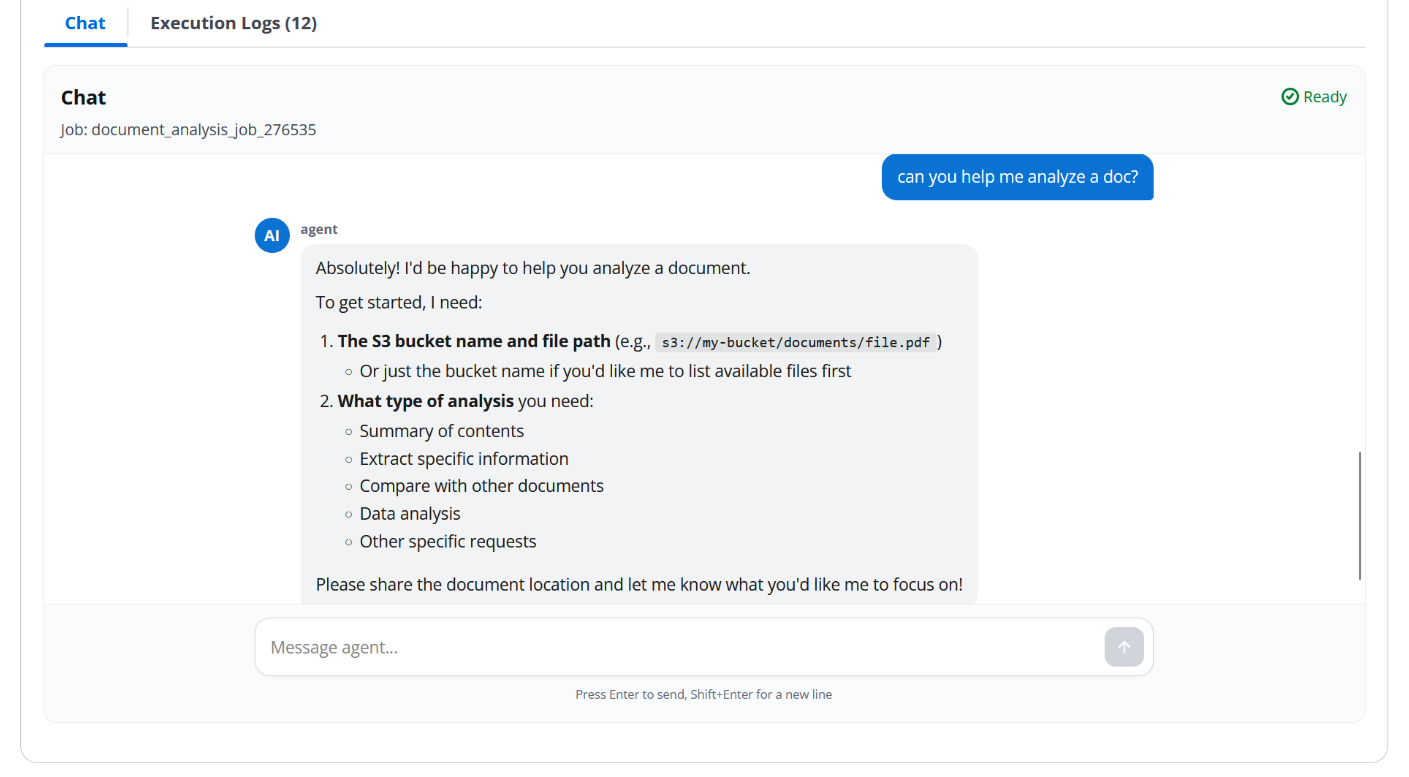
Figure 5: Job execution sequence, from API enqueue through the SQS worker and AgentCore invocation to the DynamoDB write-back
Implementing human-in-the-loop patterns
The agent snippet earlier returned a sentinel-based interrupted envelope when the graph produced an ask_human tool call. This section zooms in on the ask_human tool itself and shows exactly how the orchestrator catches that sentinel without breaking the reasoning loop.
The core of human-in-the-loop functionality is the ask_human tool. It doesn’t raise an exception: because LangGraph’s tool node captures tool exceptions as error observations and feeds them back to the model, the tool instead returns a sentinel string. The orchestrator detects the sentinel on the ToolMessage stream after the graph finishes and converts it into an interrupted response. Per-invocation state (metrics, session ID, and so on) isn’t a tool argument. The orchestrator binds it on a ContextVar that tools read through current_execution_state.get(), which keeps concurrent invocations inside the same container isolated from each other.
from core.execution_control import current_execution_state

HUMAN_INPUT_SENTINEL = "__HUMAN_INPUT_REQUIRED__::"


def create_human_input_tool_func():
    """Create the ask_human tool function."""

    def ask_human_wrapper(question: str) -> str:
        """Request input or clarification from a human user.

        Returns a sentinel string that the orchestrator converts into
        an interrupt. The model never sees the sentinel because the
        orchestrator stops the graph when it is observed.
        """
        state = current_execution_state.get()
        if state is not None:
            state.execution_metrics.record_human_interaction()
        return f"{HUMAN_INPUT_SENTINEL}{question}"

    return ask_human_wrapper
Agent-side usage
The agent uses the tool naturally as part of its tool-calling loop. For example, when analyzing an invoice with multiple line items the agent may call:
Tool call: ask_human
Arguments: {
  "question": "This invoice spans three expense categories. Should I analyze Hardware, Services, or Software Licenses in detail?"
}
The tool returns the sentinel, the orchestrator stops the graph, persists the question as the latest AI turn in the conversation store, and surfaces an interrupted job to the UI. When the user replies, the Job Execution Lambda function invokes the agent again with the answer folded into a continuation prompt.
Building the Agent Management UI
The Agent Management UI is the human side of the platform: where users browse jobs, answer pending questions, and chat with agents directly. It’s a React single-page application that talks to the same REST API the rest of the post has been describing. The next two subsections cover the layout and the user experience flow that ties signals, jobs, and human input together.
Frontend architecture
The frontend is a React and Cloudscape Design single-page application served from Amazon S3 behind Amazon CloudFront. It exposes a five-tab navigation:
- Workflows : A gallery and CRUD surface for workflow-level definitions that group agents and signals.
- Chat : A standalone chat page (
/chat,/chat/:threadId) for user-initiated conversations with a registered agent. - Agents : Manages registered agent runtimes (name, ARN, capabilities, status).
- Jobs : Lists all jobs with status filters and a detail view that includes an interactive Chat tab, an execution trace, and metadata.
- Signals : Defines and toggles ambient signals. The shipped form covers Amazon S3 prefix and suffix filters and schedules. Webhook, Amazon EventBridge, and DynamoDB stream fields are added when you wire those extension points.
The same chat component is reused by both the standalone Chat page and the Jobs detail Chat tab. While a job is running (status === "busy"), the panel polls /conversations/:sessionId on a short interval so turns from the agent or from a second browser tab show up within a few seconds. After the job settles, polling stops. Because it’s the same component in both places, a user can freely converse with an agent from the Jobs detail view while a job is active. They are not limited to answering a single pending question.
User experience flow
- Signal fires : A new job appears in the Jobs list with
jobType: "signal_triggered". If the signal hasautoExecute: false(the default) the job lands inidleand the user runs it manually. WithautoExecute: truethe worker is already drafting a response by the time the list refreshes. User-initiated jobs carryjobType: "user_initiated"and render with a different badge so you can tell the two apart at a glance. - Human input requested : Any job that calls
ask_humanmoves to the Interrupted tab and itsrequiresActionflag flips totrue, which renders a warning indicator on the row. - Responding : The detail view surfaces a Provide Response button so the user can answer the pending question without leaving the job context.
- Execution feedback : Status transitions (
idle→busy→completed|interrupted|error) are polled and reflected in the list and in the Chat tab header. - Interactive chat : The Jobs detail Chat tab and the
/chatpage both render full conversation history and accept new user messages, so humans can answer pending questions or nudge the agent with additional context without leaving the UI. - Response submission : Sending a message calls the Chat Execution or Job Execution Lambda function, which invokes the agent on AgentCore Runtime with the job context and the human response folded into the next turn.
- Completion and audit : The final result is stored on the job record and the full conversation history is preserved on the session, available in the Chat tab for audit and re-use.
Authentication is handled by Amazon Cognito and an API Gateway CognitoUserPoolsAuthorizer (see backend/infrastructure/multi_agent_stack.py).
Real-time updates are implemented as lightweight polling of the conversation and job endpoints, so there is no WebSocket infrastructure to run.
Extending the sample
The reference implementation is deliberately small so you can see the contract before you start adding to it. This section describes what ships in the box, what you build on top, and where to plug in new event sources or tools.
What ships in the sample compared to what you build
Before extending, it helps to know where the seams are. This sample is a reference implementation of the ambient-agent pattern, not a turnkey product. What ships out of the box:
- The platform : Signal intake, the SQS-backed job pipeline, the HITL interrupt mechanism, job and conversation state in DynamoDB, the React UI with the Jobs page and Chat surfaces, and AgentCore integration with Cognito-backed auth.
- A reference agent : A containerized LangChain agent with four tools (calculator,
ask_human,list_s3_files,read_s3_file) and a generic system prompt. Useful for validating the pipeline end-to-end, not for solving your business problem out of the gate. - One signal source wired through the Signals UI (Amazon S3 file uploads, matched by bucket, prefix, and suffix), plus a job-level scheduler that runs on a one-minute cron for jobs created with
jobType: "scheduled". Adding new signal types such as webhooks, Amazon EventBridge events, or DynamoDB streams requires extending thesignalTypeenum in both the backend and the Signals page form.
What you build on top, and what the platform expects from each:
- Your agent : A containerized Python agent tailored to your domain, with its own tools and its own system prompt. It must speak the two conventions the platform relies on: return the three-status envelope (
completed,interrupted, orerrorwith the matchingresult,question, orerrorfield) and use theask_humansentinel to request human input. That is roughly 50 lines of adapter code around whatever agent framework you prefer. - New signal types if Amazon S3 uploads and cron are not enough: A new handler Lambda function that queries the signals table and writes a
signal_triggeredjob row (shown in the following template), plus a corresponding form field on the Signals page so users can configure it. - New tools for your agent: A new module under
agent/tools/, a registration entry inagent/core/tool_factory.py, and an enable flag inconfig.yaml. The orchestrator and HITL flow do not change. Any tool that returns a string participates in the same graph.
In short: the platform does the plumbing, you bring the brain. The three places you will write code (agent logic, tool implementations, and new signal handlers) all slot into the existing contract without touching the rest of the stack.
Configuration over code
Enabling a new capability for an existing agent is a config change rather than a code change. The agent’s config.yaml toggles tools on or off and supplies their descriptions, so adding a new Amazon S3 prefix handler or a new calculator mode doesn’t require rebuilding the container. Signal definitions live in DynamoDB and are edited from the Signals page in the UI.
Adding a new signal type
Signals today trigger on Amazon S3 events and on cron schedules. Adding a new type (a webhook, an Amazon EventBridge rule, a DynamoDB stream, a Kafka topic) follows the same three-step contract. The downstream pipeline is signal-agnostic: everything from the SQS worker through the AgentCore call through the UI treats all signal_triggered jobs the same, so you only need to write the bridge from your event source into a job row.
# backend/functions/multi_agent/webhook_signal_processor.py (new file)
import json, os, uuid, boto3
from datetime import datetime, timezone
from boto3.dynamodb.conditions import Key

dynamodb = boto3.resource("dynamodb")
sqs = boto3.client("sqs")
signals = dynamodb.Table(os.environ["AMBIENT_SIGNALS_TABLE"])
# The jobs table env var is named TASK_REGISTRY_TABLE for historical
# reasons; the table itself holds the same job rows the rest of the
# blog refers to.
jobs = dynamodb.Table(os.environ["TASK_REGISTRY_TABLE"])
QUEUE = os.environ["JOB_EXECUTION_QUEUE_URL"]


def handler(event, _context):
    """Webhook -> ambient job. Invoked behind API Gateway."""
    payload = json.loads(event.get("body") or "{}")
    source = payload.get("source", "unknown")

    # 1. Find enabled webhook signals matching this event source.
    resp = signals.query(
        IndexName="signalType-source-index",  # add this GSI in CDK
        KeyConditionExpression=Key("signalType").eq("webhook") & Key("source").eq(source),
        FilterExpression="enabled = :e",
        ExpressionAttributeValues={":e": True},
    )

    for signal in resp.get("Items", []):
        job_id, session_id = str(uuid.uuid4()), str(uuid.uuid4())
        now = datetime.now(timezone.utc).isoformat()
        auto = bool(signal.get("autoExecute", False))

        # 2. Write a job row using the same shape the S3 path uses.
        jobs.put_item(Item={
            "jobId": job_id,
            "userId": signal["userId"],
            "agentId": signal["agentId"],
            "jobName": f"Signal: {signal['signalName']} - {source}",
            "jobType": "signal_triggered",
            "status": "busy" if auto else "idle",
            "sessionId": session_id,
            "prompt": f"Webhook from {source}:\n{json.dumps(payload)}",
            "requiresAction": False,
            "createdAt": now, "updatedAt": now,
            "metadata": {"signalId": signal["signalId"],
                         "signalType": "webhook",
                         "triggerPayload": payload,
                         "autoExecute": auto},
        })

        # 3. Enqueue if the signal is configured to auto-execute.
        if auto:
            sqs.send_message(QueueUrl=QUEUE,
                             MessageBody=json.dumps({"jobId": job_id,
                                                     "signalTriggered": True,
                                                     "signalId": signal["signalId"]}))

    return {"statusCode": 202, "body": "accepted"}
You add the Lambda function and its API Gateway route in the CDK stack, extend signalType in the frontend’s TypeScript union and the Signals page form, and the rest (the Jobs page UI, the ask_human interrupt handling, the conversation persistence, the autoExecute toggle, the contract tests) all apply without change. Like the production Signal Processor, a real webhook handler would add AWS Lambda Powertools idempotency so a retried delivery doesn’t create duplicate jobs.
Production deployment
After the pieces fit together locally, the next step is provisioning them in an account. The platform deploys as a single AWS CDK stack. The following subsections describe what that stack creates, the deploy commands, the metrics that matter when it is running, and the security and scaling defaults the sample ships with.
Infrastructure as code
The whole platform is an AWS CDK stack defined in backend/infrastructure/multi_agent_stack.py. For storage and messaging, it provisions the DynamoDB tables (agent registry, job registry, conversation store, ambient signals, chat threads, idempotency records) with pay-per-request billing and point-in-time recovery, plus the SQS job-execution queue and its dead-letter queue.
For compute and delivery, it provisions the three pipeline Lambda functions from the Architecture section (Signal Processor, Job Execution, Scheduler), the five management-tier Lambda functions that back the REST API (agent_management, job_management, signal_management, chat_management, conversation_management) and the chat_execution worker Lambda that chat_management invokes asynchronously, a Cognito-backed REST API, and the CloudFront distribution that serves the React frontend.
IAM grants flow directly from the code: DynamoDB grant_read_write_data on each table, SQS grant_send_messages and grant_consume_messages as appropriate, and a scoped bedrock-agentcore:InvokeAgentRuntime policy on the worker role.
Deployment steps
# Clone the sample
git clone https://github.com/aws-samples/sample-ambient-agent.git
cd sample-ambient-agent

# Deploy the backend (CDK) and build / deploy the frontend
cd backend
pip install -r requirements.txt
cdk bootstrap   # first time only
cdk deploy --all

cd ../frontend
npm install
npm run build

# Deploy the agent container to Bedrock AgentCore Runtime
cd ../agent
./deploy_agent.sh
Monitoring and observability
The Lambda functions emit custom CloudWatch metrics under the AmbientAgents namespace for the events that matter in this pattern: signal matches, jobs enqueued, jobs completed, jobs interrupted, and jobs errored. Combined with the default Lambda and SQS metrics (invocation count, errors, queue depth, DLQ depth), these give you a dashboard where the signal → job → agent → human cycle is visible end-to-end. Set an alarm on DLQ depth as the first line of defense against silent failures.
Security best practices
- IAM least privilege : Grant only the permissions required by each Lambda function (reads on its own table, targeted
bedrock-agentcore:InvokeAgentRuntime, targeted Amazon S3 prefixes). - Encryption at rest : All DynamoDB tables use AWS-managed keys. Amazon S3 buckets use S3-managed encryption. CloudFront logs live in a dedicated logging bucket.
- Encryption in transit : All API Gateway endpoints and CloudFront distributions require HTTPS. Amazon S3 bucket policies enforce SSL.
- Audit logging : AWS CloudTrail captures API calls across the stack. DynamoDB streams can be enabled on the job table for richer job-lifecycle audit.
- Responsible AI : Apply Amazon Bedrock Guardrails to agent inputs and outputs so content filters, denied topics, and contextual grounding checks run before findings surface on the Jobs page or reach a reviewer through the
ask_humanprompt. This protects the human-in-the-loop interaction and keeps agent outputs grounded in the source documents.
Scaling strategies
- Lambda concurrency : Reserve concurrency for the Job Execution worker Lambda function to cap downstream Bedrock invocations at a predictable per-account ceiling.
- DynamoDB capacity : Pay-per-request is the default. Switch to provisioned capacity with auto scaling when traffic patterns stabilize.
- Cost optimization : Use DynamoDB TTL to retire old conversations automatically, Amazon S3 lifecycle policies to age out processed documents, and CloudWatch metric filters to track per-agent model invocation cost.
Clean up
To avoid ongoing charges after you are finished evaluating the sample, tear the stack back down in the reverse order it was created.
First, delete the agent runtime from Amazon Bedrock AgentCore so the container stops being billed:
aws bedrock-agentcore delete-agent-runtime \
    --agent-runtime-arn <your-agent-runtime-arn>
Next, empty the Amazon S3 buckets the stack provisions (the documents bucket, the frontend hosting bucket, and the CloudFront logging bucket) so CloudFormation can delete them:
aws s3 rm s3://<amzn-s3-demo-documents-bucket> --recursive
aws s3 rm s3://<amzn-s3-demo-frontend-bucket>  --recursive
aws s3 rm s3://<amzn-s3-demo-logs-bucket>      --recursive
Then destroy the AWS CDK stack itself, which removes the Lambda functions, API Gateway, CloudFront distribution, DynamoDB tables, SQS queues, Cognito user pool, and IAM roles:
cd backend
cdk destroy --all
Finally, delete the Amazon ECR repository created by the agent deploy script if you do not plan to redeploy:
aws ecr delete-repository \
    --repository-name ambient-agent \
    --force
If you enabled Amazon Bedrock model access only for this walkthrough and no longer need it, you can revoke it from the Model access page of the Amazon Bedrock console.
Summary
Ambient agents shift AI automation from “wait for a user” to “respond to signals”. Time-to-action drops from hours to seconds, and around-the-clock monitoring becomes possible without constant human attention. Each agent operates independently with isolated sessions, so the platform handles many concurrent events in parallel without coordination overhead. Humans stay in the loop only when their input is truly needed. The unified Jobs page removes context switching across multiple tools, and full conversation history means you never lose track of what an agent did or why it paused.
When to use ambient patterns
The following use cases describe the ambient-agent pattern in general. The reference sample ships the plumbing for Amazon S3 and the scheduler today. Webhooks, database changes, and external integrations are extension points you wire up on top.
The pattern is a strong fit whenever an event in your environment should drive work that a model can reason about and a human should occasionally weigh in on. Document-processing pipelines are the canonical example: a file lands, an agent reads it, summarizes it, and asks for approval before acting. Monitoring and alerting flows benefit from the same shape, with the agent triaging an alert and asking a human only when escalation is needed. Scheduled processing, analysis, and reporting fit naturally on the cron path, and any multi-step workflow that needs an approval gate or a human checkpoint along the way maps cleanly onto the ask_human interrupt.
There are also workloads where ambient agents are the wrong tool. Real-time chat applications belong in a traditional chat agent that is purpose-built for low-latency conversational turn-taking. Simple request-response APIs do not need an agent at all. A plain API endpoint is faster, cheaper, and easier to reason about. And for purely deterministic workflows that do not need large language model (LLM) reasoning, AWS Step Functions is still the right choice. Note that ambient agents with autoExecute: true already cover the fully autonomous case if you want LLM reasoning without a human gate.
Next steps
Clone the reference implementation and follow the top-level README for deployment and configuration.
Further reading:
Start small. Pick a single use case (document processing or a monitoring alert) and expand from there. Clone the sample, point it at your own event source, and see how much routine work the Jobs page takes off your plate.
About the authors
Juan Albarran
Juan is a Forward Deployed AI Engineer on the Forward Deployed Engineering (FDE) team at AWS. He works directly with enterprise customers to translate complex generative AI and machine learning concepts into scalable applications, driving projects from initial scoping and RAG design through to full-stack implementation using Python, Amazon Bedrock, Strands Agents, React, and more. He has guided dozens of high-impact engagements, delivering tailored agentic systems and production-ready AI solutions across multiple industries.
Kenton Blacutt
Kenton is a Senior Deep Learning Architect within the Frontier AI Engineering Services team. He works hands-on with customers helping them solve real-world business problems with cutting edge AWS technologies specializing in Agentic AI. In his free time, he likes to travel, experiment with new AI techniques, and run an occasional marathon.
Andy Widjaja
Andy is a Senior AI Architect on the AWS Forward Deployed Engineering team, where he helps enterprise customers design and ship agentic systems from prototype to production. He has led technical delivery across large-scale AI engagements and focuses on agent orchestration, evaluation, and reliability. With deep experience spanning low-latency trading systems to large-scale document processing platforms, he enjoys turning cutting-edge AI into working solutions. Outside work, he swims, runs, and plays guitar.
Omar Hamden
Omar is a Delivery Consultant at Amazon Web Services, where he helps enterprise customers modernize their applications and adopt generative AI on AWS. He specializes in agentic AI systems, the AI-Driven Development Lifecycle (AI-DLC), and multi-tenant platform design, and is passionate about helping organizations move from experimentation to production-grade AI adoption.