Amazon Bedrock 推出 GLM 5.3:支持长程 Agent、提示词缓存与安全测试
英文标题:Introducing GLM 5.3 on Amazon Bedrock
Z.ai(智谱 AI)的 GLM 5.3 现已登陆 Amazon Bedrock,面向企业客户提供完全托管的 7530 亿参数混合专家(MoE)模型服务。该模型针对编程、复杂系统工程和长程 Agent 任务优化,并可通过兼容 OpenAI 的 Responses 与 Chat Completions API,以及 Bedrock 的 Invoke 和 Converse API 调用。Amazon Bedrock 支持跨区域推理、隐式与显式提示词缓存及不同服务层级,可帮助开发者降低重复上下文请求的延迟和输入成本。文章还演示了如何使用 Strix 开源 AI 渗透测试 Agent,在获得授权的前提下对自有应用开展安全测试。
 1.3 MB
 1.3 MB
 2.4 KB
 345.0 KB
 141.2 KB
 346.5 KB
 527.2 KB
 16.8 KB
 39.8 KB
中文
编程和 Agent 工作负载对 AI 模型提出的要求比以往任何时候都更高:重构一个横跨数百个文件的代码仓库、在不丢失上下文的情况下维持数小时的 Agent 工作流,以及在每一步都调用工具的前提下推理复杂系统问题。过去,若要让开放权重模型满足这些需求,通常意味着需要自行配置并运营推理基础设施。
来自 Z.ai(智谱 AI)的 GLM 5.3 现已在 Amazon Bedrock 上提供。根据其在 Hugging Face Hub 发布的信息,GLM 5.3 是一款拥有 7530 亿参数的混合专家模型,针对编程和长程 Agent 任务进行了优化。尤其值得关注的是,Z.ai 表示该模型展现出显著的网络安全能力。在 Amazon Bedrock 上,用户现在可通过全托管 API 使用该模型,并获得跨区域推理、提示词缓存和服务层级支持。无需管理任何基础设施。符合条件的企业客户可获得 Bedrock 上 GLM 5.3 的访问权限。
本文将介绍如何通过兼容 OpenAI 的 API 在 Amazon Bedrock 上调用 GLM 5.3,并利用提示词缓存降低成本和延迟。随后,我们会将该模型用于一个真实的 Agent 工作流:借助开源 AI 渗透测试 Agent Strix,对自己的应用程序执行经授权的安全测试。
与 GLM 5 相比有哪些新变化
GLM 5 于今年早些时候登陆 Amazon Bedrock。GLM 5.3 延续了同一技术谱系,并带来多项重要提升:
- 更强的编程能力:Z.ai 表示,该模型在 DeepSWE、Terminal Bench 3.0 和 FrontierSWE 等多项编程基准测试中具备有竞争力的表现。他们还称,模型在其自有内部编程基准上较 GLM 5.2 提升了 50%。由于自 GLM 5.1 公告以来,改进幅度促使测试本身进行了更新,因此未公布与 GLM 5 的直接比较结果。
- **涌现的网络安全能力:**该模型在安全任务上的基准表现尤为突出,使其天然适用于防御性安全工作流。例如,Z.ai 测得该模型在发布时于 CyberGym 基准取得了 84.5 的领先分数。
- **更广泛的 Amazon Bedrock 集成:**支持跨区域推理配置文件、隐式和显式提示词缓存,并且兼容 OpenAI 的 Responses 和 Chat Completions API 与 Invoke、Converse API 的功能一致性进一步提升。
核心能力
- **前沿编程和 Agent 性能。**GLM 5.3 专为复杂系统工程和长程 Agent 任务设计,涵盖多步骤推理、工具增强型工作流,以及跨大型代码库持续保持上下文。
- **灵活的 API 访问。**可通过兼容 OpenAI 的 Responses 和 Chat Completions API,或 Amazon Bedrock 的 Invoke 和 Converse API 调用 GLM 5.3。
- **提示词缓存。**GLM 5.3 默认支持隐式(自动)提示词缓存,并在 Responses 和 Chat Completions API 中支持显式缓存控制(推荐)。对于每轮都重新发送大型系统提示词或代码仓库上下文的 Agent 工作负载,缓存可以同时降低延迟和输入成本。
- **跨区域推理。**GLM 5.3 可通过美国跨区域推理(
us.zai.glm-5.3)和全球跨区域推理(global.zai.glm-5.3)配置文件使用。用户将请求发送至所选的源 AWS 区域,Amazon Bedrock 会安全地路由每个请求以进行处理。更多详情请参阅 Amazon Bedrock 用户指南。 - **服务层级。**对于时效要求较低的工作负载,可选择 Flex 以优化成本;对于延迟关键型请求,可选择价格更高但优先保障延迟的 Priority;也可选择在价格和速度之间提供默认平衡的 Standard。
前提条件
对于以下使用示例,你需要具备:
- 拥有可访问 Amazon Bedrock 的 AWS 账户。
- 调用基础模型和目标推理配置文件所需的 AWS Identity and Access Management(IAM)权限:
bedrock:InvokeModel、bedrock:InvokeModelWithResponseStream和bedrock:CallWithBearerToken。 - (用于基于代码的演示)Python 3.10 或更高版本。
- (仅用于可选的安全测试演示)安装 Docker 和包含 bedrock extra 的 Strix。
在 Amazon Bedrock 控制台试用 GLM 5.3
无需编写代码或安装开发者工具,即可在 AWS Management Console 中开始向 GLM 5.3 发送提示词。首先,进入 Amazon Bedrock,然后在左侧边栏菜单中选择 Test > Playground。
在此 Playground 界面中,可以从模型列表选择 GLM 5.3,并通过聊天 UI 发送首批提示词,如下图所示:
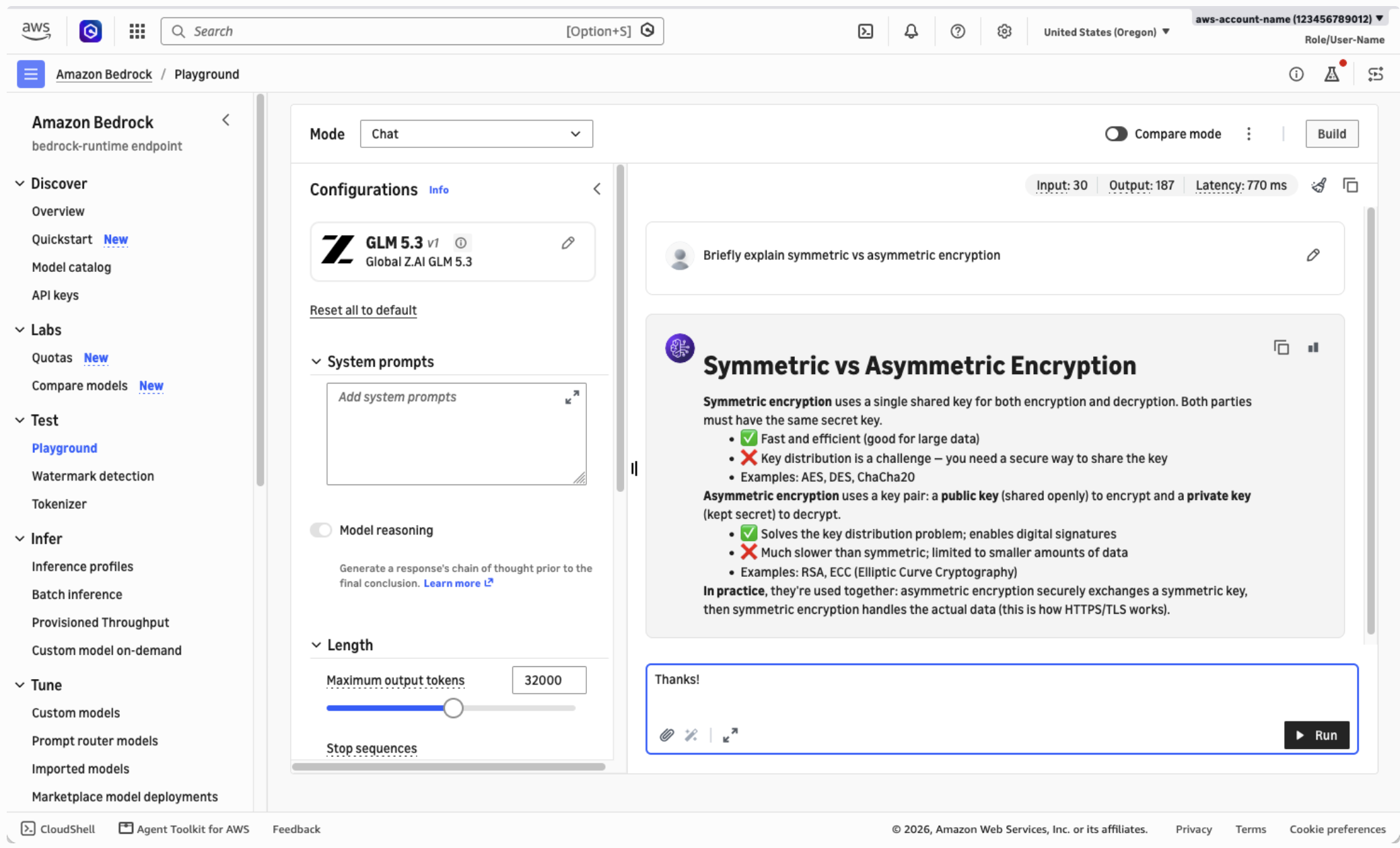
图 1:在 Amazon Bedrock 控制台中与 GLM 5.3 对话
使用 Responses API 快速入门
以编程方式调用时,可以通过 bedrock-runtime 端点调用模型。该端点支持适用于 GLM 5.3 的兼容 OpenAI 的 Responses 和 Chat Completions API,以及 Amazon Bedrock 的 Invoke 和 Converse API。对于新应用,建议使用兼容 OpenAI 的 API,因为它们支持更完整的功能集。
Amazon Bedrock 支持为需要兼容 OpenAI 集成的场景生成 API 密钥。但我们强烈建议在可行情况下优先使用短期凭证,而不是长期 API 密钥。
在下面的示例中,我们将使用 OpenAI Python SDK 调用 Responses API,并使用 aws-bedrock-token-generator 库,基于标准的 AWS Command Line Interface(AWS CLI)凭证生成短期令牌。
-
安装所需的软件包。
pip install -U openai aws-bedrock-token-generator -
将以下代码保存为
bedrock-request.py。from aws_bedrock_token_generator import provide_token from openai import OpenAI region = "us-west-2" # Your source AWS Region client = OpenAI( api_key=provide_token(region=region), base_url=f"https://bedrock-runtime.{region}.amazonaws.com/openai/v1", ) resp = client.responses.create( input="Refactor this Python function to be iterative instead of recursive: ...", model="global.zai.glm-5.3", ) print(resp.output_text) -
运行该脚本,随后将显示模型输出。
python bedrock-request.py
使用显式提示词缓存优化推理
长时间运行的编程和知识工作流,通常会在多轮对话中反复发送稳定不变的上下文,例如系统提示词、工具定义或代码仓库文件。
Amazon Bedrock 上的 GLM 5.3 默认支持隐式提示词缓存,可帮助降低共享相同初始提示词前缀的重复调用的响应延迟和输入 Token 成本。
借助显式提示词缓存模式,可以专门标记可复用的提示词前缀。与隐式缓存相比,这能够进一步提高缓存命中率(以及由此带来的延迟和成本节省)。
如以下示例所示,要将显式提示词缓存用于 GLM 5.3:
- 通过请求中的
prompt_cache_options选择显式缓存模式。 - 在输入内容块中添加一个或多个
prompt_cache_breakpoint标记,以指示可复用提示词前缀的结尾位置(包含该位置)。每个断点必须至少包含 1,024 个 Token,才有资格被缓存。
resp = client.responses.create(
    model="global.zai.glm-5.3",
    # Enable explicit caching mode:
    extra_body={"prompt_cache_options": {"mode": "explicit"}},
    input=[
        {
            "type": "message",
            "role": "system",
            "content": [
                {
                    "type": "input_text",
                    "text": SYSTEM_PROMPT,
                    # A long, static system prompt is a great target for caching:
                    "prompt_cache_breakpoint": {"mode": "explicit"},
                },
            ]
        },
        {
            "type": "message",
            "role": "user",
            "content": [
                {
                    "type": "input_text",
                    "text": USER_INPUT,
                    # Multiple breakpoints can also be defined, for layered cache:
                    "prompt_cache_breakpoint": {"mode": "explicit"},
                },
            ],
        },
    ],
)

if resp.usage.input_tokens_details.cached_tokens:
    print("Hit cache!")
更多信息请参阅 Amazon Bedrock 用户指南中的提示词缓存章节。
Agent 工作负载示例:使用 Strix 进行经授权的安全测试
能够直接受益于 GLM 5.3 优势的一类工作负载,是对自有应用程序进行自动化安全测试。Strix 是一个开源 AI 渗透测试 Agent,能够动态运行代码、发现漏洞,并通过概念验证测试进行验证。截至本文撰写时,Strix 文档将 GLM 5.3 作为默认模型。你可以将 Strix 配置为使用 Amazon Bedrock 上的 GLM 5.3,而非第三方推理服务提供商,从而使模型推理在 AWS 账户的控制范围内运行。
**仅测试你拥有或已获得明确书面授权进行测试的应用程序。**未经授权对非自有系统进行安全测试,在大多数司法管辖区均属违法行为,并且违反 AWS 可接受使用政策。在本演练中,目标是运行在本地计算机上的 OWASP Juice Shop,这是一个刻意设计为存在漏洞的示例应用。
如果希望获得完全托管的持续安全测试,而不只是自行运行开源 Agent,AWS Continuum 可将按需渗透测试和其他安全分析作为托管服务提供。这两种方法可相互补充:Strix 等开源 Agent 支持开发者驱动、人工参与且高度可定制的本地构建测试;AWS Continuum 则可大规模运行托管评估。
运行经授权的安全测试
-
在本地启动 Juice Shop 示例目标应用。
docker run --rm -p 3000:3000 bkimminich/juice-shop -
配置 Strix 以使用 Amazon Bedrock 上的 GLM 5.3。Strix 底层使用 LiteLLM,因此(如其 Amazon Bedrock 文档所述)会自动读取 AWS CLI 凭证。这意味着无需 API 密钥,但可能需要设置
AWS_PROFILE和AWS_REGION等环境变量来配置连接。截至撰写时,LiteLLM 尚不能解析bedrock/global.zai.glm-5.3。在该问题修复前,可以如下面的代码片段所示,显式指定 Converse API 路由和推理配置文件 Amazon Resource Name(ARN)。# Fill in the REGION and ACCOUNT_ID placeholders below before running! export STRIX_LLM="bedrock/converse/arn:aws:bedrock:{AWS_REGION}:{AWS_ACCOUNT_ID}:inference-profile/global.zai.glm-5.3" -
针对本地目标运行 Strix。
strix --target http://localhost:3000 -
等待根 Strix Agent 完成,然后审查发现结果。
Strix 会启动一支由子 Agent 组成的团队,以绘制威胁面、探索多种潜在漏洞类别,并尝试利用可运行的概念验证来验证每一项发现。这有助于减少用于分诊误报的时间。一次成功运行将生成报告,其中包含每项发现的严重性、证据和修复指导。
以下视频展示了为示例应用配置并运行 Strix,以及浏览测试结果的端到端过程:
图 2:使用 GLM 5.3 和 Strix 运行示例安全测试
清理
在运行 Juice Shop 的终端中按 Ctrl+C 停止 Juice Shop 容器,或者运行
docker ps查找容器 ID,并通过docker stop <container-id>停止它。Amazon Bedrock 推理按 Token 付费,且不存在持久化资源,因此请求完成后不会产生额外费用。如果你为本演练生成了 Amazon Bedrock API 密钥且不再需要它,请在 Amazon Bedrock 控制台中将其删除。
可用性
不妨在 [Amazon Bedrock co
English / 原文
Coding and agentic workloads are asking more of AI models than ever: refactor a repository spanning hundreds of files, sustain a multi-hour agentic workflow without losing context, and reason through complex systems problems with tool use at every step. Meeting those demands with open-weight models has historically meant provisioning and operating your own inference infrastructure.
GLM 5.3 from Z.ai (Zhipu AI) is now available on Amazon Bedrock. GLM 5.3, as published on Hugging Face Hub, is a 753B-parameter mixture-of-experts model optimized for coding and long-horizon agentic tasks. In particular, Z.ai has reported the model shows notable cyber security capabilities. On Amazon Bedrock, you can now use it through fully managed APIs with cross-Region inference, prompt caching, and service tiers. You don’t manage any infrastructure. Access to GLM 5.3 on Bedrock is available to eligible enterprise customers.
In this post, we show you how to invoke GLM 5.3 on Amazon Bedrock using the OpenAI-compatible APIs and reduce cost and latency with prompt caching. We then put the model to work in a realistic agentic workflow: running an authorized security test of your own application with Strix, an open-source AI penetration testing agent.
What’s new compared to GLM 5
GLM 5 arrived on Amazon Bedrock earlier this year. GLM 5.3 builds on the same lineage, with a range of important gains:
- Stronger coding: Z.ai claims competitive performance on a range of coding benchmarks including DeepSWE, Terminal Bench 3.0, and FrontierSWE. They also report a 50% improvement over GLM 5.2 on their own internal coding benchmark. Direct comparisons to GLM 5 were not reported, because the magnitude of improvements led to updating the benchmark tests themselves since the GLM 5.1 announcement.
- Emergent cyber security capabilities: Reported benchmark performance on security tasks stands out, which makes the model a natural fit for defensive security workflows. For example, Z.ai measured a leading score of 84.5 on the CyberGym benchmark at release.
- Broader Amazon Bedrock integration: Cross-Region inference profiles, implicit and explicit prompt caching, and improved feature parity of the OpenAI-compatible Responses and Chat Completions APIs alongside Invoke and Converse.
Key capabilities
- Frontier coding and agentic performance. GLM 5.3 is designed for complex systems engineering and long-horizon agentic tasks. These include multi-step reasoning, tool-augmented workflows, and sustained context across large code bases.
- Flexible API access. You can invoke GLM 5.3 through the OpenAI-compatible Responses and Chat Completions APIs, or the Amazon Bedrock Invoke and Converse APIs.
- Prompt caching. GLM 5.3 supports implicit (automatic) prompt caching by default, and explicit cache controls (recommended) on the Responses and Chat Completions APIs. For agentic workloads that resend large system prompts or repository context every turn, caching reduces both latency and input cost.
- Cross-Region inference. GLM 5.3 is available through US cross-Region inference (
us.zai.glm-5.3) and Global cross-Region inference (global.zai.glm-5.3) profiles. You send requests to the “source” AWS Region of your choice, and Amazon Bedrock securely routes each request for processing. Refer to the Amazon Bedrock User Guide for more details. - Service tiers. Choose Flex to optimize cost for less-time-sensitive workloads, Priority to prioritize latency-critical requests in return for a higher price, or Standard for the default balance between price and speed.
Prerequisites
For the following usage examples, you need:
- An AWS account with access to Amazon Bedrock.
- AWS Identity and Access Management (IAM) permissions to call the base model and the target inference profile:
bedrock:InvokeModel,bedrock:InvokeModelWithResponseStream, andbedrock:CallWithBearerToken. - (For the code-based demos) Python 3.10 or later.
- (For the optional security-testing demo only) install Docker and Strix with the bedrock extra.
Try GLM 5.3 on the Amazon Bedrock console
You can start sending prompts to GLM 5.3 on the AWS Management Console, with no need to write code or install developer tools. To get started, navigate to Amazon Bedrock and then choose Test > Playground from the left sidebar menu.
From this playground interface you can select GLM 5.3 from the model list and send your first prompts through the chat UI, as shown in the following screenshot:
Figure 1: Chatting with GLM 5.3 on the Amazon Bedrock console
Get started with the Responses API
Programmatically, you can call the model through the bedrock-runtime endpoint. This supports both the OpenAI-compatible Responses and Chat Completions APIs, and the Amazon Bedrock Invoke and Converse APIs for GLM 5.3. For new applications the OpenAI-compatible APIs are recommended as they support a more complete set of features.
Amazon Bedrock does support generating API keys for OpenAI-compatible integrations that require them. However, we strongly recommend preferring short-lived credentials over long-lived API keys where possible.
In the following example, we will call the Responses API from Python using the OpenAI Python SDK, and the aws-bedrock-token-generator library to generate short-term tokens from your standard AWS Command Line Interface (AWS CLI) credentials.
-
Install the required packages.
pip install -U openai aws-bedrock-token-generator -
Save the following code as
bedrock-request.py.from aws_bedrock_token_generator import provide_token from openai import OpenAI region = "us-west-2" # Your source AWS Region client = OpenAI( api_key=provide_token(region=region), base_url=f"https://bedrock-runtime.{region}.amazonaws.com/openai/v1", ) resp = client.responses.create( input="Refactor this Python function to be iterative instead of recursive: ...", model="global.zai.glm-5.3", ) print(resp.output_text) -
Run the script, which will display the model’s output.
python bedrock-request.py
Optimize inference with explicit prompt caching
Long-running coding and knowledge workflows often resend stable context across multiple conversation turns, such as system prompts, tool definitions, or repository files.
GLM 5.3 on Amazon Bedrock supports implicit prompt caching by default, which helps reduce response latency and input token costs for repeated calls sharing the same initial prompt prefix.
With explicit prompt caching mode you specifically identify the reusable prompt prefixes, which can further improve cache hit rate (and therefore latency and cost savings) over implicit caching.
To use explicit prompt caching with GLM 5.3, as shown in the following example:
- Select the explicit caching mode through
prompt_cache_optionson your request. - Add one or more
prompt_cache_breakpointmarkers on input content blocks to indicate the end (inclusive) of reusable prompt prefixes. Each breakpoint must contain at least 1,024 tokens to be eligible for caching.
resp = client.responses.create(
    model="global.zai.glm-5.3",
    # Enable explicit caching mode:
    extra_body={"prompt_cache_options": {"mode": "explicit"}},
    input=[
        {
            "type": "message",
            "role": "system",
            "content": [
                {
                    "type": "input_text",
                    "text": SYSTEM_PROMPT,
                    # A long, static system prompt is a great target for caching:
                    "prompt_cache_breakpoint": {"mode": "explicit"},
                },
            ]
        },
        {
            "type": "message",
            "role": "user",
            "content": [
                {
                    "type": "input_text",
                    "text": USER_INPUT,
                    # Multiple breakpoints can also be defined, for layered cache:
                    "prompt_cache_breakpoint": {"mode": "explicit"},
                },
            ],
        },
    ],
)

if resp.usage.input_tokens_details.cached_tokens:
    print("Hit cache!")
For more information, refer to the prompt caching section of the Amazon Bedrock User Guide.
Example agentic workload: Authorized security testing with Strix
One workload that benefits directly from GLM 5.3’s strengths is automated security testing of your own applications. Strix is an open-source AI penetration testing agent that runs your code dynamically, finds vulnerabilities, and validates them with proof-of-concept tests. As of this writing, the Strix documentation uses GLM 5.3 as its default model. You can configure Strix to use GLM 5.3 on Amazon Bedrock instead of a third-party inference provider, so model inference runs under your AWS account’s controls.
Only test applications you own or have explicit written permission to test. Unauthorized security testing of systems you don’t own is illegal in most jurisdictions and violates the AWS Acceptable Use Policy. In this walkthrough, the target is OWASP Juice Shop, a deliberately vulnerable sample application running locally on your machine.
If you want fully managed, continuous security testing beyond running open-source agents yourself, AWS Continuum provides on-demand penetration testing and other security analyses as a managed service. The two approaches are complementary: open-source agents like Strix give you developer-driven, in-the-loop, and deeply customizable testing against local builds, while AWS Continuum runs managed assessments at scale.
To run an authorized security test
-
Start the example Juice Shop target application locally.
docker run --rm -p 3000:3000 bkimminich/juice-shop -
Configure Strix to use GLM 5.3 on Amazon Bedrock. Strix uses LiteLLM under the hood so (as described in their documentation for Amazon Bedrock) your AWS CLI credentials will be picked up automatically. This means no API key is required, but you might want to set environment variables like
AWS_PROFILEandAWS_REGIONto configure your connection. At the time of writing, LiteLLM does not yet resolvebedrock/global.zai.glm-5.3. Until this is fixed, you can explicitly specify the Converse API route and the inference profile Amazon Resource Name (ARN) as shown in the following snippet:# Fill in the REGION and ACCOUNT_ID placeholders below before running! export STRIX_LLM="bedrock/converse/arn:aws:bedrock:{AWS_REGION}:{AWS_ACCOUNT_ID}:inference-profile/global.zai.glm-5.3" -
Run Strix against the local target.
strix --target http://localhost:3000 -
Wait for the root Strix agent to complete, then review the findings.
Strix spins up a team of sub-agents to map the threat surface, explore a range of potential vulnerability categories, and attempt to validate each finding with a working proof of concept. This helps minimize time spent triaging false positives. A successful run will generate a report including severity, evidence, and remediation guidance for each finding.
The following video shows the end-to-end journey of setting up and running Strix against the example application, and exploring the results:
Figure 2: Running an example security test with GLM 5.3 and Strix
Clean up
Stop the Juice Shop container with Ctrl+C in the terminal where it’s running, or run docker ps to find the container ID and stop it with docker stop <container-id>. Amazon Bedrock inference is pay-per-token with no persistent resources, so there are no further charges after your requests complete. If you generated an Amazon Bedrock API key for this walkthrough and no longer need it, delete it on the Amazon Bedrock console.
Availability
Give GLM 5.3 a try on the Amazon Bedrock console, use it through coding assistants like OpenCode as shown in our recent post with Kimi K3, or connect your custom applications through the supported APIs.
Interested in how Amazon Bedrock can support your team? Connect with us to start the conversation.