让 Amazon Quick 满足企业部署要求:自动化、可审计的跨账户资源推广
英文标题:Making Amazon Quick enterprise-ready: Automated, auditable cross-account resource promotion
Amazon Quick 中的 Agent、操作连接器、知识库、流程和空间,过去从开发 AWS 账户推广到生产账户需要大量手动重建,过程易出错且难以审计。本文介绍了一个运行在 Amazon Bedrock AgentCore 上的示例 MCP server,可通过幂等的创建或更新流程自动完成跨账户资源迁移。该方案会复制资源配置和权限、为更新操作写入 Amazon S3 版本化备份,并提供迁移预览、备份查询与回滚能力。对企业开发团队而言,它为 Amazon Quick 的多账户发布流程提供了更强的治理、最小权限隔离和可重复执行能力。
 1.3 MB
 1.3 MB
 2.4 KB
 345.0 KB
 141.2 KB
 346.5 KB
 342.3 KB
 128.8 KB
 63.8 KB
 166.2 KB
 111.1 KB
 51.1 KB
 114.1 KB
 29.1 KB
 25.3 KB
 110.3 KB
中文
Amazon Quick 是 Amazon 面向工作场景打造的智能体式 AI 助手。你可以构建能够基于数据进行推理、调用操作连接器并完成多步骤任务的 Agent。过去,将这些资源(聊天 Agent、操作连接器、知识库、流程和空间)像其他应用程序一样从开发 AWS 账户推广到生产 AWS 账户,一直是一项手动且容易出错的工作。本文将介绍如何借助运行在 Amazon Bedrock AgentCore 上、具备幂等性和可审计性的 Model Context Protocol(MCP)server,实现这一过程的自动化。
智能体式解决方案的构成模块包括其Agent、操作连接器、知识库和空间:配置了自定义指令的聊天 Agent、用于 Slack、Jira 及其他集成的连接器、基于自身文档构建的知识库,以及将这些组件绑定在一起的 Space。团队可在开发账户中快速组装并迭代这些资源。
多数企业会为开发和生产使用独立的 AWS 账户,有时还会在两者之间设置质量保证(QA)环境。当 Agent、操作连接器和知识库在开发账户中完成验证后,并没有原生的一键式方式将它们推广到下一个账户。团队必须手动重建每一项资源:使用相同的指令和初始提示重新创建每个 Agent、重新关联每个 Agent 的操作连接器、重新授予资源权限,以及重新配置每个知识库背后的 Amazon Simple Storage Service(Amazon S3)存储桶、存储桶策略和数据源。这项工作不仅缓慢、难以审计,也很容易出现细微错误,从而削弱企业所需的治理能力。
通过 API 管理 Amazon Quick 资源
Amazon Quick 资源可通过编程方式管理。空间、Agent、操作连接器、知识库和流程均可通过 Amazon Quick API(属于 Amazon Quick Sight API 范围)进行管理;该 API 提供完整的资源生命周期管理能力,包括创建、读取、更新、删除和列出。无论是业务用户在 Amazon Quick 中配置的 Agent(及其指令和初始提示)、连接器、知识库,还是流程,我们都可以通过编程方式检查、重建、更新和治理,其中也包括权限。
正是这一可编程接口使受治理的推广成为可能。我们不必逐项手动重建资源,而是可以通过 API 读取资源及其权限,并在另一个账户中按原样重新应用。本文介绍的迁移器将创建、读取、更新和列出操作组合为一个可重复执行的工作流,并且绝不会对目标端发出删除请求,因此每次运行只会新增或更新资源。
本文将介绍 Quick Resource Migrator:这是一个示例 MCP server,托管在 Amazon Bedrock AgentCore runtime 上;后者是 Amazon Bedrock AgentCore 的一项能力。该工具可通过一次工具调用,自动完成 Amazon Quick 资源的跨账户推广。它以资源为中心:你可以选择资源类型(Agent、连接器、知识库、流程或空间),并按 ID、名称或全部资源进行选择。它具备幂等性(可安全重复运行),并且会通过描述源资源、在目标端重放相同操作的方式,如实复制权限。完整源代码可见 aws-samples repository。
解决方案概述
迁移器可通过一次调用推广选定的一组资源。它采用 upsert 模式:目标端尚不存在的资源会被创建,已存在的资源则会原地更新。每次更新之前,系统都会将版本化备份写入 Amazon S3,因此每项资源都会保留完整历史,可供审查和回滚。只读预览会在提交前准确报告一次运行将创建或更新什么内容;迁移本身在 Amazon Bedrock AgentCore 上运行,因此可通过 Amazon Quick 或任何兼容 MCP 的客户端驱动。
会迁移哪些内容
- **选择模型:**选择资源类型(Agent、连接器、知识库、流程或空间),并按 ID、名称或全部资源进行选择。选择以资源为中心。你可以直接迁移某种资源类型,也可以迁移一个空间,从而一并迁移其关联资源。
- **聊天 Agent:**使用其自定义指令、身份、语气、初始提示和欢迎消息重新创建,并重新关联其操作连接器(映射到目标账户)。迁移空间时,其 Agent 会自动重新关联至该空间。
- **操作连接器:**使用其配置重新创建。绝不会从源端读取密钥值。连接器会使用占位凭证创建,并在目标端重新认证。
- **知识库:**在目标账户中注册知识库、重新创建其数据源,并复制其权限。对于 S3 支持的知识库,迁移器还会配置目标存储桶及其存储桶策略(这是迁移的独立输出)。文档本身(S3 对象)不会被复制。
- **流程:**根据其定义在目标账户中重新创建。由于流程 ID 在不同账户间并不相同,流程按名称匹配:如果目标端存在同名流程,则更新该流程;否则创建新流程。流程权限会被复制。
- **空间:**在目标账户中重新创建,并重新关联其 Agent、连接器和知识库(资源 Amazon Resource Names,ARNs,会映射到目标端)。请先迁移关联资源,以便目标 ARN 能够解析。空间权限会被复制。
关键设计原则
- **以资源为中心的选择。**你每次迁移一种资源类型(Agent、连接器、知识库、流程或空间),可按 ID、名称或全部资源进行选择。Agent 会在重新关联其操作连接器后被重建。空间会被重新创建,并重新关联其 Agent、连接器和知识库,同时将 ARN 映射到目标账户。
- **权限保真。**权限并非硬编码。server 会对每项源资源调用相应的
Describe*PermissionsAPI,并在目标端重放完全相同的操作列表,同时将主体映射为目标账户中的已注册用户。 - **幂等性。**每项资源都会被创建或更新。server 会先描述目标资源,再决定创建还是更新,因此重复运行迁移会收敛至相同状态,而不会产生重复资源或执行失败。
- **最小权限与隔离。**源角色仅具备只读权限。目标角色仅持有迁移所需的操作权限。runtime 使用 Cognito JSON Web Token(JWT)对调用方进行认证,并且可以运行在 virtual private cloud(VPC)网络模式下。
- **安全、可逆的更新。**在迁移器更新任何现有目标资源之前,它都会将该资源及其依赖项的版本化快照写入专用备份存储桶。如果无法写入该备份,更新将被中止。每个创建或更新的资源同样会生成快照,恢复工具可以将任意资源回滚至更早版本。
架构
该解决方案采用三账户模型。中央运行器账户在 Amazon Bedrock AgentCore runtime 上托管 MCP server。server 使用 AWS Security Token Service(AWS STS)在源账户中承担只读角色、在目标账户中承担读写角色,因此无需在任何位置存储长期凭证。
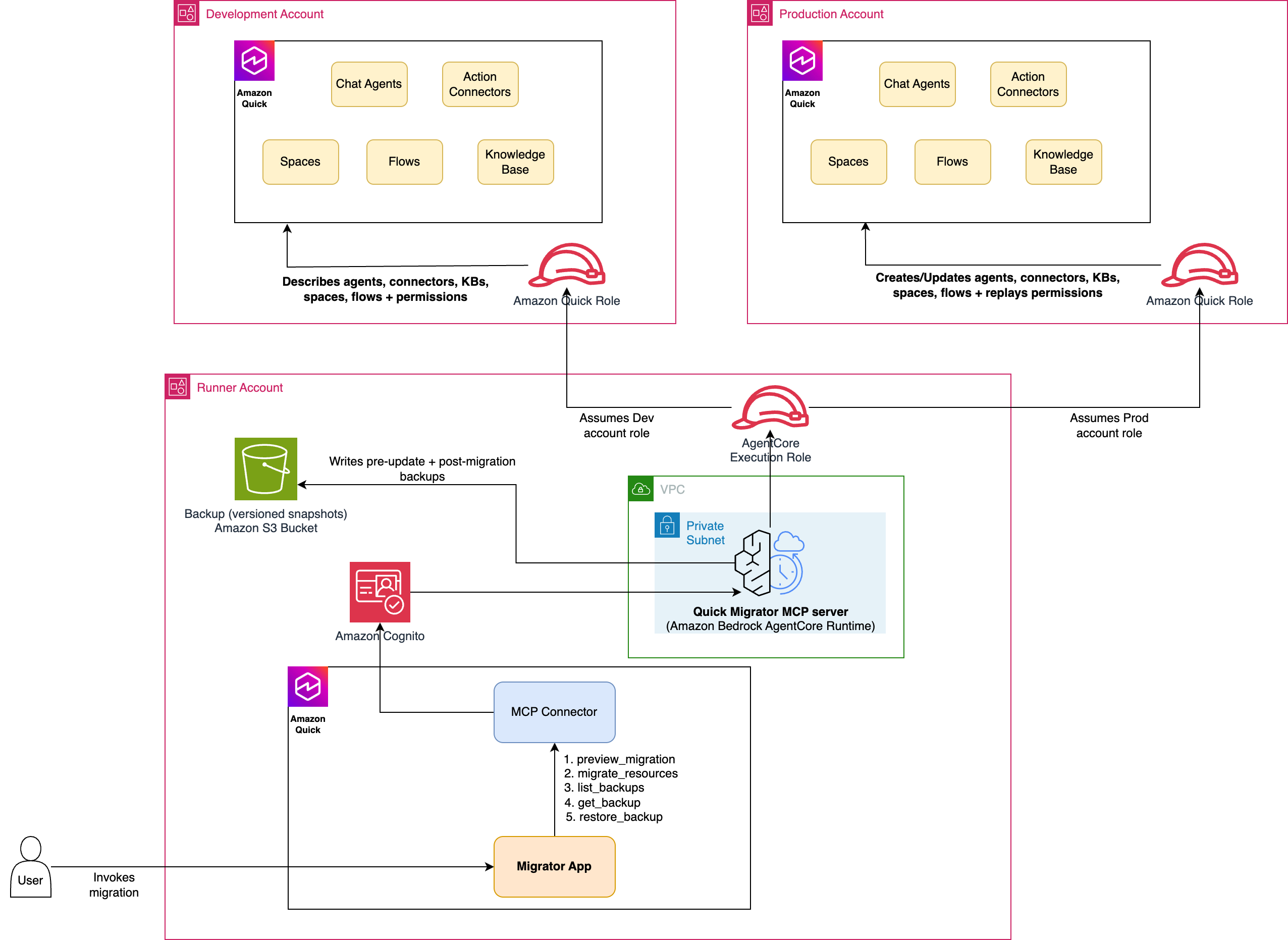
图 1:Amazon Quick Resource Migrator MCP server 的架构
组件职责
| 组件 | 职责 |
|---|---|
| AgentCore runtime(运行器账户) | 托管 MCP server(server.py)。承担源账户和目标账户中的角色,并编排迁移流程。在 VPC 网络模式下运行,并使用 Cognito JWT 授权器。 |
| Amazon Cognito(运行器账户) | 用户池、资源服务器和机器对机器应用客户端。签发 JWT(客户端凭证授权,scope 为 invoke),调用方将其提供给 AgentCore。 |
| 运行器执行角色 | AgentCore 执行角色:用于 Amazon CloudWatch Logs、遥测,以及通过 sts:AssumeRole 承担源角色和目标角色。 |
| 迁移器角色(源账户) | 只读 Quick Sight 描述/列出权限,以及知识库读取权限。 |
| 迁移器角色(目标账户) | Quick Sight 创建/更新读写权限、知识库和 S3 写入权限,以及用于主体解析的 ListUsers 权限。 |
| 备份存储桶(运行器账户) | 加密的 S3 存储桶,用于保存目标资源更新前和迁移后的版本化快照。runtime 会直接向其写入,恢复功能则从中读取。该组件为可选项(未设置时禁用)。 |
表 1:架构组件
迁移流程
- 解析资源:根据资源类型和选择器(ID、名称或全部),解析源账户中的具体资源 ID。
- 描述源资源:描述每一项选定资源,以捕获其配置和权限。
- 连接器:重新创建每个连接器。认证配置会被清理为创建(写入)模型,并使用占位密钥;随后在目标端重新认证。复制权限。
- 知识库:创建目标存储桶(
knowledge-base-<env>-<account>)、存储桶策略、数据源和知识库,然后复制知识库权限。不会复制 S3 对象。 - Agent:重新创建每个 Agent,并关联其操作连接器(映射至目标账户),然后复制 Agent 权限。Agent 与空间的关联会在迁移空间本身时恢复(参见空间步骤)。
- 流程:根据定义重新创建每个流程,并按名称匹配(流程 ID 在不同账户中不同):更新同名目标流程,或创建新流程,然后复制流程权限。
- 空间:重新创建每个空间,并使用映射至目标账户的 ARN 重新关联其 Agent、连接器和知识库(需先迁移这些资源),然后复制空间权限。
- 报告:返回一份 JSON 报告,其中包含已创建或更新的资源、存储桶、备份、跳过的权限及任何错误。
server 共公开五个工具,均在 server.py 中定义。
preview_migration(只读)
preview_migration 接受源账户 ID、资源类型(Agent、连接器、知识库、流程、空间或全部)、选择器(ID、名称或全部)以及 AWS Region。它会返回将要迁移的 Agent、操作连接器、知识库和流程清单,其中包含名称和类型,但不会做出任何更改。可将其用作演练,以确认迁移范围,并在推广前支持变更管理审批步骤。当你同时传入目标账户 ID 时,响应会增加源端到目标端的映射,并将每项资源标记为 CREATE 或 UPDATE,因此你可以在实际运行迁移前准确了解其将做出的变更。
migrate_resources(完整迁移)
migrate_resources 接受源账户和目标账户 ID、资源类型(Agent、连接器、知识库、流程或空间)、选择器(ID、名称或全部)、区域、源环境和目标环境名称(用于知识库存储桶名称),以及 Quick Sight 服务角色名称。它会执行上述完整的创建或更新迁移,并返回一份结构化报告,记录创建、更新和授予的全部内容,以及所有错误。由于它具备幂等性,你可以反复运行它,例如在每次发布时运行,并使目标状态收敛为相同结果。
list_backups(只读)
list_backups 会搜索备份目录,并列出每项资产的可用版本。备份是迁移器写入备份存储桶的更新前快照,每次更新对应一个版本化对象,因此你可以查看任何已迁移资源的完整历史记录。
get_backup(只读)
get_backup 会返回给定资产和版本的完整已存储备份(默认返回最新版本),其中包括捕获的资源配置及其依赖项。
restore_backup
restore_backup 会将存储的备份版本重新应用到目标资源:原地更新资源,或在资源已不存在时重新创建它。它会先生成一个新的恢复前备份,因此该回滚操作本身也可逆。
部署解决方案
完整源代码和分步部署说明位于 aws-samples repository 的 README 中。从高层来看,你需要部署三个 AWS CloudFormation stack、跨账户 AWS Identity and Access Management(IAM)角色、VPC 网络,以及托管 MCP server 且由 Cognito 认证的 AgentCore runtime,随后将该 runtime 注册为 Amazon Quick 中的操作连接器。
通过 Quick App 使用迁移器
将 runtime 注册为操作连接器后,你可以通过自然语言从 Amazon Quick 驱动迁移器;你也可以构建一个 Quick App,即构建在同一套 MCP 工具之上的点击式 Web 体验。你无需手动构建该 UI。代码仓库提供了可直接使用的 app-builder prompt,你只需将其粘贴到 Amazon Quick app builder 中,并将占位连接器和操作 ID 替换为自己的 ID,即可生成应用。该应用会将工作流转化为引导式流程:选择源账户和目标账户以及需要推广的资源,预览将创建或更新的内容,运行迁移,并查看每次历史迁移记录;每次迁移均由 server 写入的版本化 S3 快照提供支持。以下界面展示了
English / 原文
Amazon Quick is Amazon’s agentic AI companion built for work. You build agents that reason over your data, call action connectors, and carry multi-step tasks to completion. Promoting those resources (chat agents, action connectors, knowledge bases, flows, and spaces) from a development to a production AWS account, the way you would any other application, has been a manual and error-prone chore. This post shows how to automate it with an idempotent, auditable Model Context Protocol (MCP) server on Amazon Bedrock AgentCore.
The building blocks of an agentic solution are its agents, action connectors, knowledge bases, and spaces : chat agents configured with custom instructions, connectors for Slack, Jira, and other integrations, knowledge bases grounded in your own documents, and the Space that binds them together. Teams assemble and iterate on them quickly in a development account.
Most enterprises run separate AWS accounts for development and production, sometimes with quality assurance (QA) in between. When agents, action connectors, and knowledge bases are validated in a development account, there is no native, one-click way to promote them into the next account. Teams rebuild each resource by hand: recreate each agent with the same instructions and starter prompts, re-attach each agent’s action connectors, re-grant resource permissions, and reprovision the Amazon Simple Storage Service (Amazon S3) bucket, bucket policy, and data source behind each knowledge base. The work is slow, difficult to audit, and easy to get subtly wrong, which undermines the governance story enterprises need.
Manage Amazon Quick resources through an API
Amazon Quick resources are programmable. Spaces, agents, action connectors, knowledge bases, and flows are managed through the Amazon Quick API (part of the Amazon Quick Sight API surface), which provides the full resource lifecycle, create, read, update, delete, and list. Anything a business user configures in Amazon Quick, an agent with its instructions and starter prompts, a connector, a knowledge base, or a flow, we can inspect, recreate, update, and govern programmatically, permissions included.
This programmable surface is what makes governed promotion possible. Instead of recreating each resource by hand, we read a resource and its permissions through the API and reapply them in another account exactly as they were. The migrator in this post composes the create, read, update, and list operations into one repeatable workflow, and it never issues a delete against the target, so a run only adds or updates.
In this post, we walk through the Quick Resource Migrator, a sample MCP server hosted on Amazon Bedrock AgentCore runtime, a capability of Amazon Bedrock AgentCore, that automates cross-account promotion of Amazon Quick resources in a single tool call. It’s resource-driven: you pick a resource type (agent, connector, knowledge base, flow, or space) and select by id, by name, or all. It’s idempotent (safe to re-run), and it copies permissions faithfully by describing the source and replaying the same actions in the target. The full source code is available in the aws-samples repository.
Solution overview
The migrator promotes a chosen set of resources in a single call. It is an upsert: a resource that does not yet exist in the target is created, and one that already exists is updated in place. Every update is protected by a versioned backup written to Amazon S3 before the change, so each resource keeps a full history you can review and roll back to. A read-only preview reports exactly what a run would create or update before you commit, and the migration itself runs on Amazon Bedrock AgentCore, so it can be driven from Amazon Quick or any MCP-compatible client.
What gets migrated
- Selection model: Pick a resource type (agent, connector, knowledge base, flow, or space) and choose resources by id, by name, or all. Selection is resource-driven. Migrate a resource type directly, or migrate a space to bring its linked resources across with it.
- Chat agents: Recreated with their custom instructions, identity, tone, starter prompts, and welcome message, with their action connectors re-attached (remapped to the target account). When a space is migrated, its agents are re-linked to it automatically.
- Action connectors: Recreated with their configuration. Secret values are never read from the source. Connectors are created with placeholder credentials and re-authenticated in the target.
- Knowledge bases: The knowledge base is registered in the target account, its data source is recreated, and its permissions are copied. For S3-backed knowledge bases the migrator also provisions the target bucket and its bucket policy (a distinct output of the migration). The documents (S3 objects) themselves are not copied.
- Flows: Recreated in the target account from their definition. Because flow IDs differ across accounts, flows are matched by name: a same-named target flow is updated, otherwise a new one is created. Flow permissions are copied.
- Spaces: Recreated in the target account and re-linked to their agents, connectors, and knowledge bases (with resource Amazon Resource Names (ARNs) remapped to the target). Migrate the linked resources first so the target ARNs resolve. Space permissions are copied.
Key design principles
- Resource-driven selection. You migrate one resource type at a time (agent, connector, knowledge base, flow, or space), selecting by id, by name, or all. Agents are recreated with their action connectors re-attached. Spaces are recreated and re-linked to their agents, connectors, and knowledge bases, with ARNs remapped to the target account.
- Permission fidelity. Permissions aren’t hard-coded. The server calls the relevant
Describe*PermissionsAPI on each source resource and replays the identical action list in the target, remapping principals to registered users in the target account. - Idempotency. Every resource is created-or-updated. The server describes the target first and decides whether to create or update, so re-running a migration converges on the same state instead of producing duplicates or failing.
- Least privilege and isolation. The source role is read-only. The target role holds only the actions the migration needs. The runtime authenticates callers with a Cognito JSON Web Token (JWT) and can run in virtual private cloud (VPC) network mode.
- Safe, reversible updates. Before the migrator updates any existing target resource, it writes a versioned snapshot of that resource, and its dependencies, to a dedicated backup bucket. If that backup can’t be written, the update is aborted. Every created or updated resource is also snapshotted, and a restore tool can roll any resource back to an earlier version.
Architecture
The solution uses a three-account model. A central runner account hosts the MCP server on Amazon Bedrock AgentCore runtime. The server assumes a read-only role in the source account and a read-write role in the target account using AWS Security Token Service (AWS STS), so no long-lived credentials are stored anywhere.
Figure 1: Architecture of the Amazon Quick Resource Migrator MCP server
Component responsibilities
| Component | Responsibility |
|---|---|
| AgentCore runtime (runner account) | Hosts the MCP server (server.py). Assumes roles into the source and target accounts and orchestrates the migration. Runs in VPC network mode with a Cognito JWT authorizer. |
| Amazon Cognito (runner account) | User pool, resource server, and a machine-to-machine app client. Issues the JWT (client-credentials grant, scope invoke) that callers present to AgentCore. |
| Runner execution role | The AgentCore execution role: Amazon CloudWatch Logs, telemetry, and sts:AssumeRole into the source and target roles. |
| Migrator role (source account) | Read-only Quick Sight describe/list permissions plus knowledge base read. |
| Migrator role (target account) | Read-write Quick Sight create/update permissions, knowledge base and S3 write, and ListUsers for principal resolution. |
| Backup bucket (runner account) | Encrypted S3 bucket that stores versioned pre-update and post-migration snapshots of target resources. The runtime writes to it directly. Restore reads from it. Optional (disabled when unset). |
Table 1: Architectural components
Migration flow
- Resolve resources: from the resource type and selector (id, name, or all), resolve the concrete resource IDs in the source account.
- Describe the source: describe each selected resource to capture its configuration and permissions.
- Connectors: recreate each connector. The authentication config is sanitized to the create (write) model with placeholder secrets, then re-authenticated in the target. Copy permissions.
- Knowledge bases: create the target bucket (
knowledge-base-<env>-<account>), bucket policy, data source, and knowledge base, then copy knowledge base permissions. S3 objects are not copied. - Agents: recreate each agent with its action connectors attached (remapped to the target account), then copy agent permissions. Agent-to-space linkage is restored when the space itself is migrated (see the space step).
- Flows: recreate each flow from its definition, matched by name (flow IDs differ across accounts): update a same-named target flow or create a new one, then copy flow permissions.
- Spaces: recreate each space and re-link its agents, connectors, and knowledge bases with ARNs remapped to the target account (migrate those resources first), then copy space permissions.
- Report: return a JSON report of the created or updated resources, buckets, backups, skipped permissions, and any errors.
The server exposes five tools, all defined in server.py.
preview_migration (read-only)
preview_migration takes a source account ID, a resource type (agent, connector, knowledge base, flow, space, or all), a selector (id, name, or all), and an AWS Region. It returns an inventory of the agents, action connectors, knowledge bases, and flows that would be migrated, with names and types, without making any change. Use it as a dry run to confirm scope and to support a change-management approval step before promotion. When you also pass a target account ID, the response adds a source-to-target mapping that marks each resource CREATE or UPDATE, so you can see exactly what a migration would change before running it.
migrate_resources (full migration)
migrate_resources takes source and target account IDs, a resource type (agent, connector, knowledge base, flow, or space), a selector (id, name, or all), a region, source and target environment names (used in the knowledge base bucket name), and the Quick Sight service role name. It performs the full create-or-update migration described above and returns a structured report of everything it created, updated, and granted, along with any errors. Because it’s idempotent, you can run it repeatedly, for example on every release, and it converges on the same target state.
list_backups (read-only)
list_backups searches the backup catalog and lists the available versions for each asset. Backups are the pre-update snapshots the migrator writes to the backup bucket, one versioned object per update, so you can see the full history for any migrated resource.
get_backup (read-only)
get_backup returns the full stored backup for a given asset and version (the latest by default), including the captured resource configuration and its dependencies.
restore_backup
restore_backup re-applies a stored backup version onto the target resource, updating it in place, or recreating it if it no longer exists. It first takes a fresh pre-restore backup, so the revert is itself reversible.
Deploy the solution
The full source and step-by-step deployment instructions live in the aws-samples repository README. At a high level you deploy three AWS CloudFormation stacks, the cross-account AWS Identity and Access Management (IAM) roles, the VPC network, and the Cognito-authenticated AgentCore runtime that hosts the MCP server, then register that runtime as an action connector in Amazon Quick.
Use the migrator through a Quick App
By registering the runtime as an action connector, you can drive the migrator from Amazon Quick in natural language, and you can also build a Quick App: a point-and-click web experience layered on the same MCP tools. You don’t build that UI by hand. The repository includes a ready-to-use app-builder prompt that you paste into the Amazon Quick app builder, replacing the placeholder connector and action IDs with your own to generate the app. The app turns the workflow into a guided flow: choose a source and target account and the resources to promote, preview what will be created or updated, run the migration, and review a history of every past migration, each backed by the versioned S3 snapshots the server writes. The following screens show that experience.
An example Quick App
- Because the app is generated from a prompt, each build differs. The following screens show one such example. In it, the landing page prompts for the Source Account ID, Target Account ID, resource type (agent, connector, knowledge base, flow, or space), and selector (id, name, or all), with additional options available as needed.
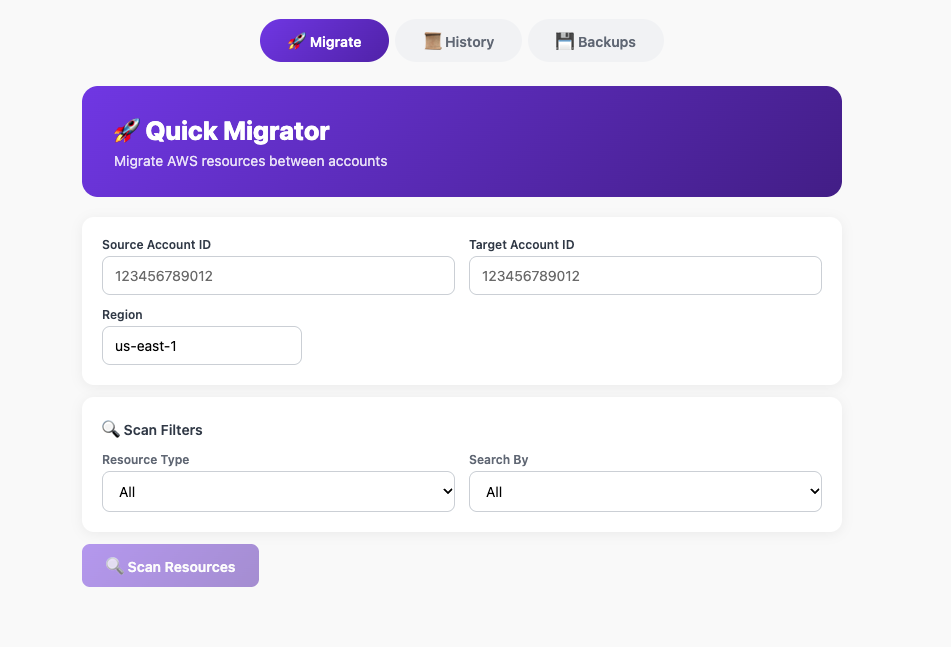
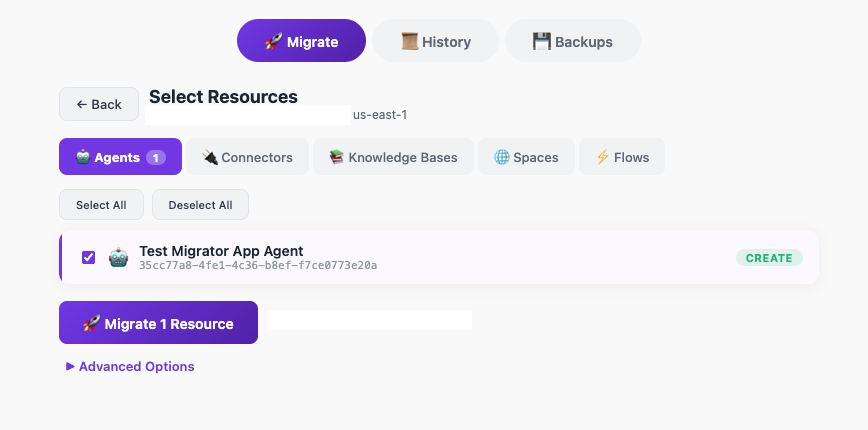
Figure 3: Additional migration options available on the landing page
- After you choose Confirm & migrate, you see a response like the following:
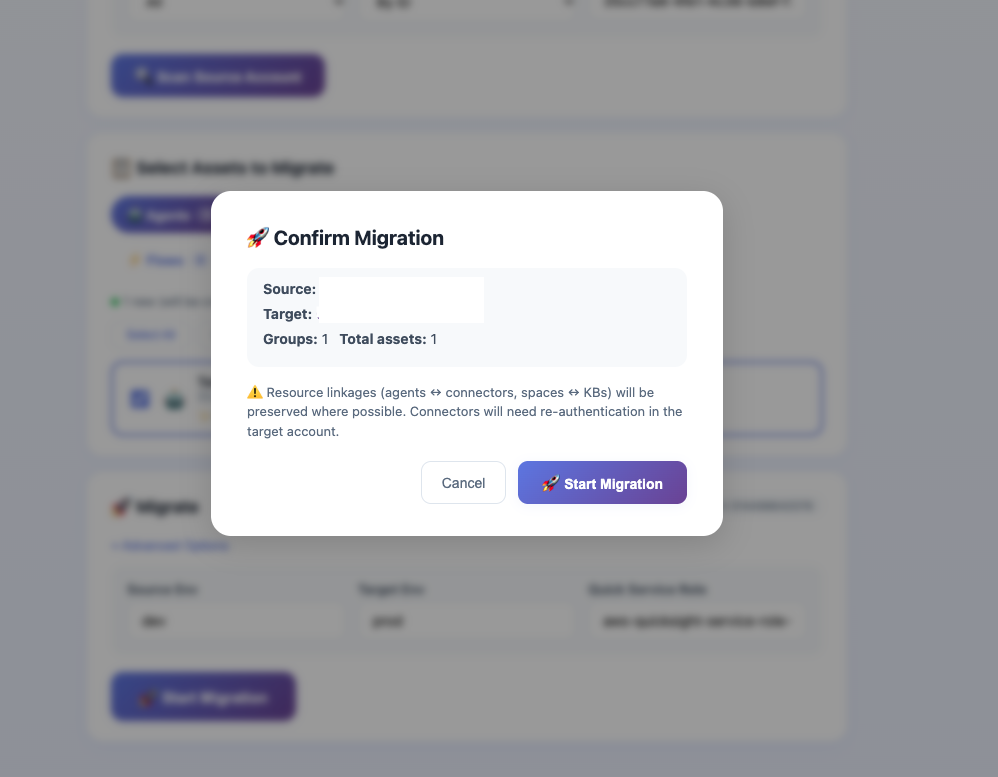
Figure 4: The confirmation response after you choose Confirm and migrate
- After you confirm and migrate, you should see the response from the MCP server returning the resources that were created/updated.
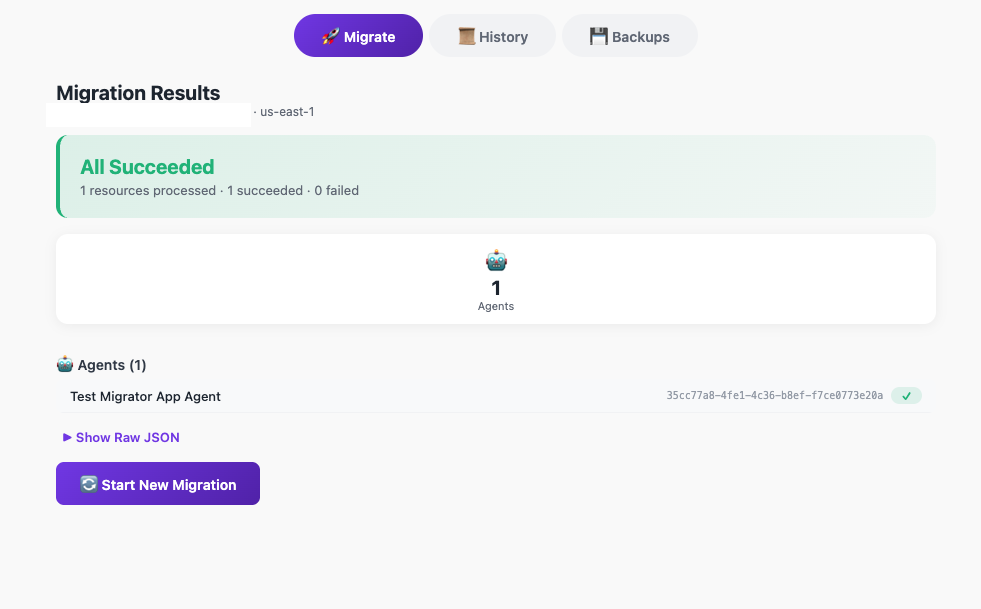
Figure 5: The MCP server response listing the resources that were created or updated
- Open the History tab to see every past migration. Each entry is backed by the versioned snapshot the migrator wrote to Amazon S3, so you get a full, auditable record of what was promoted and when, with the option to inspect any earlier version.
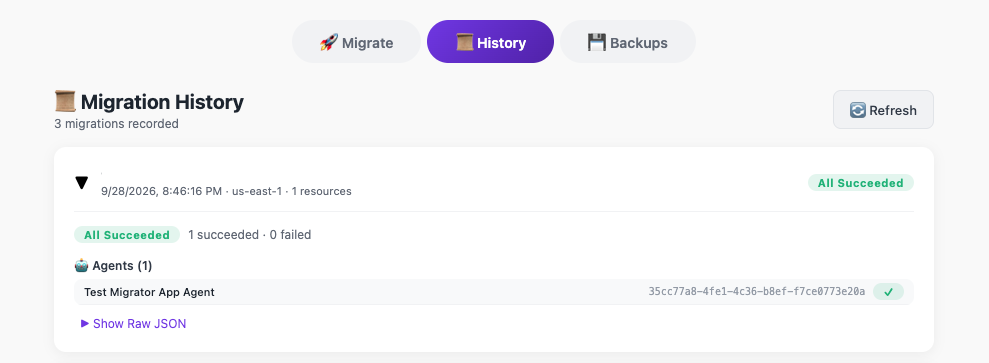
Figure 6: The History tab showing an auditable record of past migrations
- To roll back, select a resource’s backup version and choose Restore. The app re-applies that saved version to the target. Because it first captures a fresh backup before restoring, the revert is itself reversible.
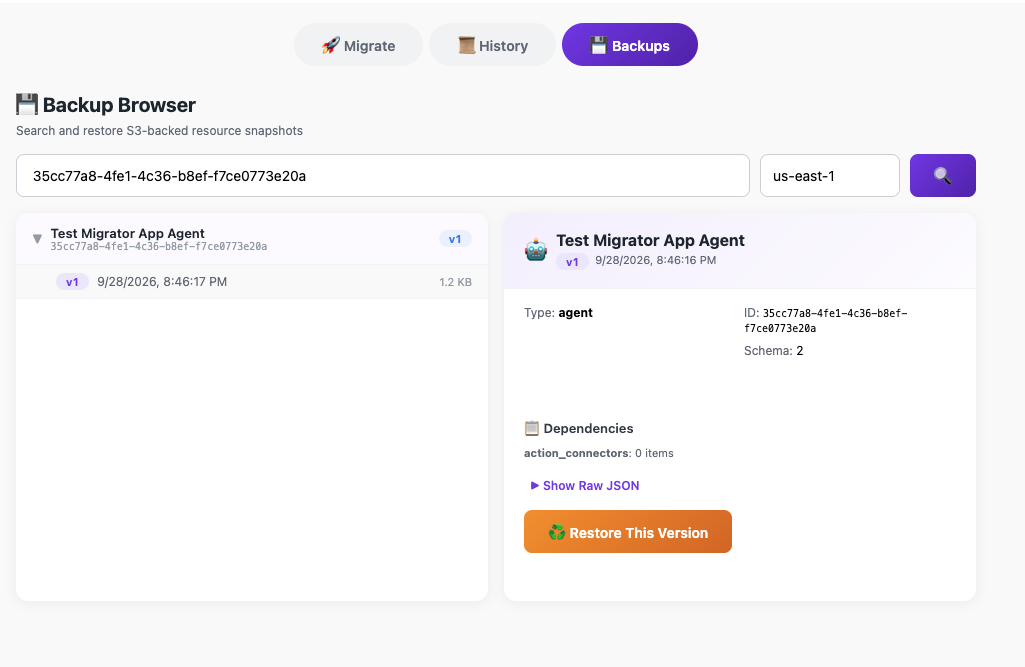
Figure 7: Rolling back a resource to an earlier backup version
Conclusion
Cross-account promotion is a baseline expectation for enterprise software, and until now it has been the missing piece for Amazon Quick. The Quick Resource Migrator turns a slow, manual, hard-to-audit task into a fast, repeatable, and governed one: a single tool call recreates agents, connectors, and knowledge bases in a target account and copies permissions faithfully, all idempotently, so you can run it on every release.
Clone the sample repository, deploy it into a runner account, and try promoting an agent or knowledge base from development to production. Then adapt the pattern to your own governance and hardening requirements.
About the authors
Keshav Ganesh
Keshav is an AI & Cloud Solutions Engineer at AWS specializing in agentic systems, DevOps, and platform engineering. He partners with customers and organizations to design and operationalize agentic AI: autonomous, tool-using agents that reason and act, alongside the scalable cloud platforms that run them, helping teams move securely from proof of concept to production at enterprise scale. He is passionate about turning emerging agentic patterns into practical, secure, and enterprise-ready solutions.
Vineet Kachhawaha
Vineet is a Sr. Worldwide Agentic AI Solution Architect at AWS, focused on Amazon Quick. He works closely with enterprise customers and partners to design, deploy, and scale AI-driven solutions. Vineet also co-led the AWS for Legal Tech initiative, helping legal and compliance organizations harness AI/ML to drive business value. He loves building and tinkering with agentic AI solutions and considers himself a lifelong learner. Vineet regularly speaks at AWS events and industry conferences, sharing his expertise on generative AI and agentic architectures.