使用 LangChain 与 Amazon Bedrock Knowledge Bases 实现 Agentic 检索
英文标题:Agentic retrieval with LangChain and Amazon Bedrock Knowledge Bases
本文展示如何结合 LangChain 与 Amazon Bedrock Managed Knowledge Bases 构建 RAG 应用,并对比标准单次检索与 Agentic 检索处理复杂多部分问题时的差异。标准检索使用一个查询向量覆盖全部意图,在示例中返回 5 个结果时仅覆盖 6 个子意图中的 4 个;将结果数增至 10 个虽可覆盖全部意图,但会带来冗余。Agentic 检索会将问题拆分为子查询、评估证据是否充分,并在必要时继续搜索,同时以追踪事件流返回其规划过程。对开发者而言,单意图问题应优先使用成本和延迟更低的标准检索,而多维比较等复杂问题则可从 Agentic 检索中受益。
 1.3 MB
 1.3 MB
 2.4 KB
 345.0 KB
 141.2 KB
 346.5 KB
 374.4 KB
 373.6 KB
 26.5 KB
 20.9 KB
 24.8 KB
 18.5 KB
 62.3 KB
中文
当用户要求支持助手——一个使用 LangChain 构建的检索增强生成(Retrieval Augmented Generation,RAG)应用——从三个维度比较两款产品时,他们实际上同时提出了六个问题。相似度搜索使用单个查询向量来封装所有意图,检索器随后生成这些意图平均值的最佳近似结果。最终答案看起来简洁,搜索执行没有报错,相关性分数也似乎合理。然而,检索到的文本块虽然在主题上相关,却只覆盖了问题实际所问内容的一部分。
本文展示一个基于 Amazon Bedrock Managed Knowledge Base 和 LangChain 的 RAG 应用。我们让同一个多部分问题分别经过标准检索和 Agentic 检索,并读取追踪事件,以了解模型生成的规划。我们还将讨论两种检索路径的成本,以及何时应选择成本更低的方案。
Amazon Bedrock Managed Knowledge Base 已提供 Agentic 检索。Amazon Bedrock Managed Knowledge Base 不再只执行一次搜索,而是会为检索制定计划:将问题拆分为子查询、执行这些查询、判断是否已获得足够证据,并在证据不足时再次搜索。langchain-aws 软件包同时暴露 Agentic 检索和标准检索,因此你可以在 LangChain 应用中任选其一。
解决方案概览
Amazon Bedrock Managed Knowledge Base 是 Amazon Bedrock 提供的全托管 RAG 能力,可从 RAG 架构中移除需要自行管理的向量存储、嵌入模型和重排序模型。你只需配置数据源,Amazon Bedrock Managed Knowledge Bases 会处理分块、嵌入、存储和检索。本演练使用 Amazon Simple Storage Service(Amazon S3)。
Amazon Bedrock Managed Knowledge Bases 提供两种 API。本文将简要说明二者的区别。Retrieve API 执行一次混合搜索,并返回带评分的文本块。AgenticRetrieveStream API 执行规划循环,并将各步骤作为追踪事件流式返回。在 langchain-aws 软件包中,前者是可直接加入链中的标准 LangChain 检索器;后者则是直接从知识库执行的函数检索。
下图展示了解决方案架构。应用程序通过 Retrieve API(标准单次检索)或 AgenticRetrieveStream API(多步骤规划循环)查询 Amazon Bedrock Knowledge Bases。两条路径都会从知识库返回文档文本块,应用程序随后使用这些文本块生成有依据的回答。
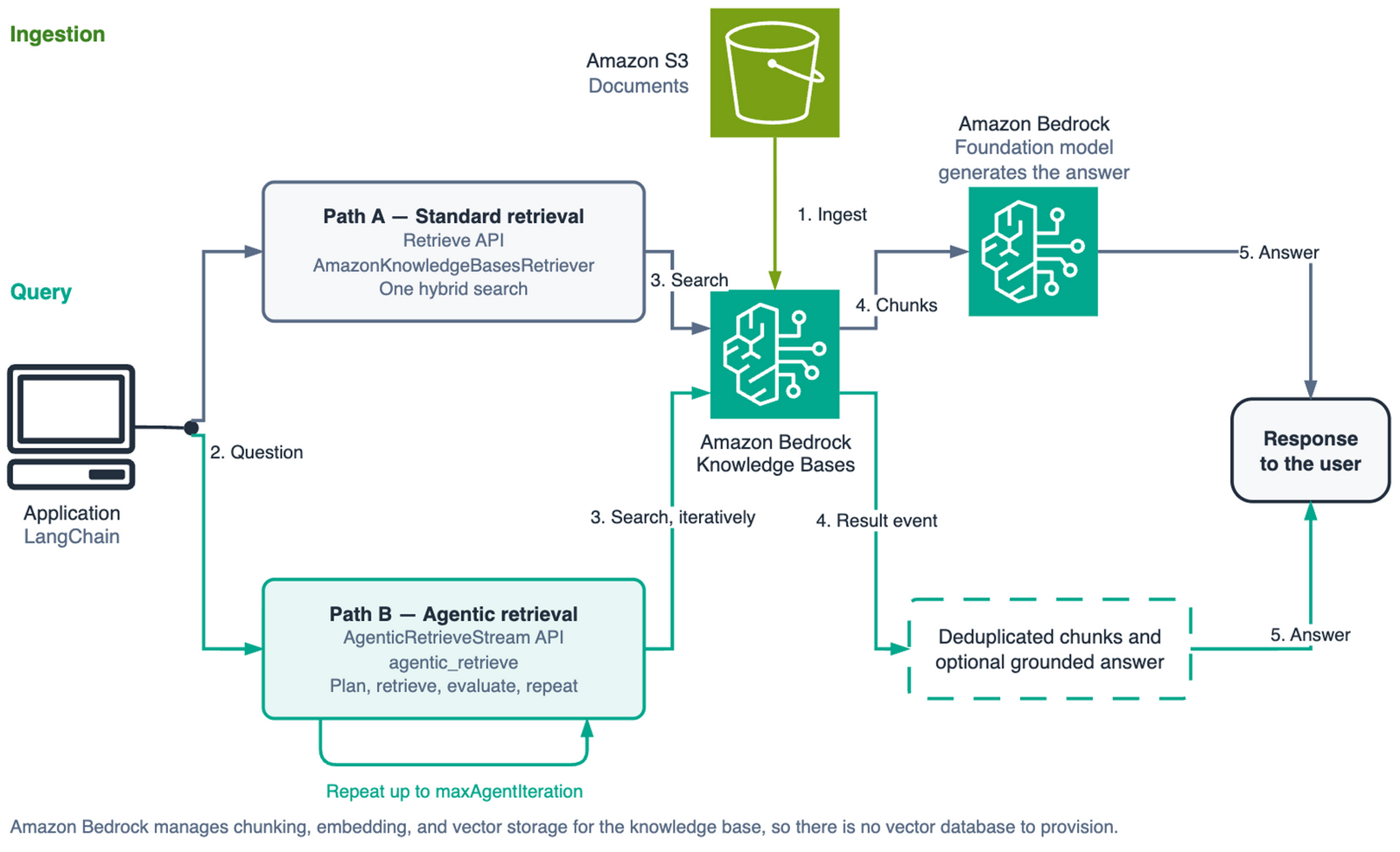
图 1:使用 Retrieve 和 AgenticRetrieveStream API 查询 Amazon Bedrock Knowledge Bases 的解决方案架构
实施演练
以下章节将引导你创建知识库,使用两种检索方法进行查询,并读取 Agentic 规划器生成的追踪事件。
前提条件
要跟随本文操作,你需要具备:
- 一个 AWS 账户,并且该账户可在支持 Amazon Bedrock Managed Knowledge Bases 和 Agentic 检索的区域中访问 Amazon Bedrock。本演练使用美国东部(弗吉尼亚北部)区域(
us-east-1),且代码始终假定使用该区域。有关其他区域的可用性和支持情况,请查看 AWS 文档。 - 两个 AWS Identity and Access Management(IAM)身份,具体将在下一节中说明:一个由知识库承担的服务角色,以及调用 API 的身份所需具备的权限。
- Python 3.12 或更高版本。
- 一个存放示例文档的 S3 存储桶。语料库需要包含多份覆盖重叠主题的文档,这样比较性问题才有可检索的内容。单一的扁平文档无法演示查询规划。
安装软件包。Boto3 的版本很重要:在 1.43.32 之前,agentic_retrieve_stream 尚不存在。
langchain-aws>=1.6.3
langchain>=1.0
boto3>=1.43.32
权限
此处涉及两个身份,有意识地将它们分开很有价值。知识库承担一个服务角色,用于读取文档并调用嵌入模型;你的应用程序则使用 AWS Security Token Service(AWS STS)调用方身份发起查询。两者都不需要拥有对方的权限。
如果你允许,Amazon Bedrock 会为你创建服务角色。若要自行提供角色,请为其配置允许 Amazon Bedrock 承担该角色的信任策略。使用 aws:SourceAccount 和 aws:SourceArn 限定范围,以防止其他账户将其作为混淆代理使用:
{
    "Version": "2012-10-17",
    "Statement": [{
        "Effect": "Allow",
        "Principal": {"Service": "bedrock.amazonaws.com"},
        "Action": "sts:AssumeRole",
        "Condition": {
            "StringEquals": {"aws:SourceAccount": "111122223333"},
            "ArnLike": {
                "aws:SourceArn": "arn:aws:bedrock:us-east-1:111122223333:knowledge-base/*"
            }
        }
    }]
}
服务角色还需要拥有对存储桶的 s3:ListBucket 权限,以及对其内容的 s3:GetObject 权限,两者都应以 aws:ResourceAccount 为条件。在创建知识库后,将 knowledge-base/* 通配符进一步限定为具体的知识库 ID。
AWS STS 调用方身份需要另一组权限。bedrock:AgenticRetrieveStream 和 bedrock:InvokeModelWithResponseStream 无法限定到知识库 Amazon Resource Name(ARN);而 bedrock:Retrieve 和 bedrock:GetDocumentContent 可以:
{
    "Version": "2012-10-17",
    "Statement": [
        {
            "Sid": "AgenticRetrievalAndPlannerModel",
            "Effect": "Allow",
            "Action": [
                "bedrock:AgenticRetrieveStream",
                "bedrock:InvokeModelWithResponseStream"
            ],
            "Resource": "*"
        },
        {
            "Sid": "RetrieveAndFullDocumentExpansion",
            "Effect": "Allow",
            "Action": ["bedrock:Retrieve", "bedrock:GetDocumentContent"],
            "Resource": "arn:aws:bedrock:<region>:111122223333:knowledge-base/<knowledge-base-id>"
        },
        {
            "Sid": "GenerateAnswersInTheChains",
            "Effect": "Allow",
            "Action": ["bedrock:InvokeModel", "bedrock:Converse", "bedrock:ConverseStream"],
            "Resource": "*"
        }
    ]
}
bedrock:GetDocumentContent 经常被忽略。当 FullDocumentExpansion 步骤判断某个段落缺少回答问题所需的上下文时,Agentic 检索会调用它。仅包含 bedrock:Retrieve 的策略在规划器尝试获取完整文档前看似可用,但一旦规划器请求完整文档,查询就会在中途失败。
要创建和管理知识库,调用角色还需要对 * 拥有 bedrock:CreateKnowledgeBase 权限,以及对 knowledge-base/* 拥有 GetKnowledgeBase、UpdateKnowledgeBase、DeleteKnowledgeBase、StartIngestionJob、GetIngestionJob 和 ListIngestionJobs 操作权限。若使用防护栏(guardrails),还需添加 bedrock:GetGuardrail 和 bedrock:ApplyGuardrail。
运行本演练可能会产生知识库中文档存储和数据摄取、检索调用及基础模型(FM)推理的费用。
有关定价的更多信息,请参阅 Amazon Bedrock 定价中的 Knowledge Bases 部分。
完成实验后,请删除相关资源。
创建并填充知识库
使用 managedKnowledgeBaseConfiguration 创建知识库。将 embeddingModelType 设置为 MANAGED,即可使用服务托管的嵌入模型。
import boto3
import os

REGION = os.environ["AWS_REGION"]
bedrock_agent = boto3.client("bedrock-agent", region_name=REGION)

response = bedrock_agent.create_knowledge_base(
    name=KB_NAME,
    roleArn=KB_ROLE_ARN,
    knowledgeBaseConfiguration={
        "type": "MANAGED",
        "managedKnowledgeBaseConfiguration": {
            "embeddingModelType": "MANAGED",
        },
    },
)
KB_ID = response["knowledgeBase"]["knowledgeBaseId"]
该请求中没有 storageConfiguration。对于自行管理的知识库,你需要传入一个用于描述向量存储的配置。Amazon Bedrock Managed Knowledge Base 不接受此配置,这是 API 中最明确的信号,表明 Amazon Bedrock 负责存储层。
将 S3 存储桶附加为数据源,然后启动数据摄取任务。摄取过程是异步的,因此应轮询直至任务进入终止状态,而不是固定等待一段时间并寄希望于任务完成。
import time

SUCCESS_STATES = frozenset({"COMPLETE"})
FAILURE_STATES = frozenset({"FAILED", "STOPPED"})

def wait_for_ingestion(kb_id, ds_id, job_id, timeout_s=1800):
    """轮询摄取任务,直至其进入终止状态。"""
    deadline = time.time() + timeout_s
    while time.time() < deadline:
        job = bedrock_agent.get_ingestion_job(
            knowledgeBaseId=kb_id,
            dataSourceId=ds_id,
            ingestionJobId=job_id,
        )["ingestionJob"]
        status = job["status"]
        if status in SUCCESS_STATES:
            return job
        if status in FAILURE_STATES:
            reasons = job.get("failureReasons") or ["no reason reported"]
            raise RuntimeError(f"Ingestion job {job_id} finished as {status}: " + "; ".join(reasons))
        time.sleep(15)
    raise TimeoutError(f"Ingestion job {job_id} did not finish in {timeout_s}s")
完整的数据源配置和错误处理代码位于示例仓库。
使用 LangChain 检索器进行查询
AmazonKnowledgeBasesRetriever 封装了 Retrieve API,其行为与其他 LangChain 检索器相同。对于 Amazon Bedrock Managed Knowledge Bases,请传入 managedSearchConfiguration。这是容易让人困惑的部分:vectorSearchConfiguration 是此前用于自行运行向量存储的知识库的配置路径,也是大多数现有示例所展示的方式。
from langchain_aws.retrievers import AmazonKnowledgeBasesRetriever

SIMPLE_QUERY = "What is the restore time objective for the checkout service?"

retriever = AmazonKnowledgeBasesRetriever(
    knowledge_base_id=KB_ID,
    region_name=REGION,
    retrieval_config={
        "managedSearchConfiguration": {
            "numberOfResults": 5,
        }
    },
)
docs = retriever.invoke(SIMPLE_QUERY)
每个结果都会作为 LangChain Document 返回。相关性分数位于 metadata["score"] 中,源文档自身的元数据位于 metadata["source_metadata"] 下,并经过重命名以避免冲突。如果希望丢弃低置信度结果,应在检索器上设置 min_score_confidence,而不是在结果返回后再进行筛选。
对于意图明确的单一问题,这是正确的工具。它只需要一次调用,延迟在两种方案中最低,并且你仍可完全控制回答的生成方式。生产级助手收到的大多数查询都属于这种形式;为了回答这些问题而使用规划循环,只会浪费资金和时间。
单次检索的边界
现在,向同一检索器提出一个由多个部分组成的问题:
COMPLEX_QUERY = (
    "Compare the checkout and inventory services across on-call escalation, backup and "
    "restore targets, and deployment rollback procedure. Where do they differ?"
)

docs = retriever.invoke(COMPLEX_QUERY)
系统返回五个文本块,并依据整个问题的单个嵌入向量计算混合分数进行排序。
该问题包含六个意图:两个服务,分别涉及三个维度。为检索到的文本评估其对每个意图的证据覆盖情况,可具体衡量单个嵌入能够恢复多少信息。
| numberOfResults | 文本块数 | 占语料库比例 | 已覆盖的子意图 | 缺失项 |
|---|---|---|---|---|
| 5 | 5 | 10% | 6 项中的 4 项 | checkout 值班响应、inventory 恢复 |
| 10 | 10 | 19% | 6 项中的 6 项 | 无 |
当结果数为 5 时,代表 6 个意图的单个嵌入遗漏了其中两个。当结果数为 10 时,虽然覆盖了全部 6 个意图,但存在明显浪费:两个子意图被重复覆盖,另一个文本块则未承载任何相关内容。
检索器完成了自身的任务。限制来自结构本身:一个向量无法表示六个意图,并且整个过程中没有任何步骤会询问返回的证据是否足以回答问题。
运行 Agentic 检索
Agentic 检索并不是一个 LangChain 检索器……
English / 原文
When a user asks the support assistant, a Retrieval Augmented Generation (RAG) application built with LangChain to compare two products across three dimensions, they’re effectively posing six questions simultaneously. Similarity search uses a single query vector to encapsulate all the intents. The retriever then generates the best approximation of the average of those intents. The resulting answer comes back concise. The search executes without errors. The relevance scores look reasonable. Yet the retrieved chunks, while topically relevant, only cover a fraction of what the question actually asked.
In this post, we showcase a RAG application on Amazon Bedrock Managed Knowledge Base with LangChain. We run the same multi-part question through standard and agentic retrieval, and read the trace events to see the plan the model produced. We also cover what the two retrieval paths cost and when the cheaper one is the right choice.
Agentic retrieval is available on Amazon Bedrock Managed Knowledge Base. Instead of one search, Amazon Bedrock Managed Knowledge Base plans the retrieval. It breaks the question into sub-queries, runs them, judges whether it has enough evidence, and searches again if it doesn’t. The langchain-aws package exposes both agentic and standard retrieval, so you can use either from a LangChain application.
Solution overview
Amazon Bedrock Managed Knowledge Base, the fully managed RAG capability in Amazon Bedrock, removes the self-managed vector store, embeddings, and re-ranking models from the RAG architecture. You configure a data source, and Amazon Bedrock Managed Knowledge Bases handles chunking, embedding, storage, and retrieval. This walkthrough uses Amazon Simple Storage Service (Amazon S3).
Amazon Bedrock Managed Knowledge Bases provides two APIs. We briefly discuss those differences in this post. The Retrieve API runs one hybrid search and returns scored chunks. The AgenticRetrieveStream API runs a planning loop and streams the steps back to you as trace events. In the langchain-aws package, the first is a standard LangChain retriever you can drop into a chain. The second is a function retrieval directly from a knowledge base.
The following diagram shows the solution architecture. The application queries Amazon Bedrock Knowledge Bases using either the Retrieve API (standard, single-shot) or the AgenticRetrieveStream API (multi-step planning loop). Both paths return document chunks from the knowledge base, which the application then uses to generate a grounded response.
Figure 1: Solution architecture for querying Amazon Bedrock Knowledge Bases with the Retrieve and AgenticRetrieveStream APIs
Implementation walkthrough
The following sections walk you through creating a knowledge base, querying it with both retrieval methods, and reading the trace events the agentic planner produces.
Prerequisites
To follow along you need:
- An AWS account with access to Amazon Bedrock in a Region where Amazon Bedrock Managed Knowledge Bases and agentic retrieval are available. This walkthrough uses the US East (N. Virginia) Region (
us-east-1), and the code assumes it throughout. Check the AWS documentation for other Regional availability and support. - Two AWS Identity and Access Management (IAM) identities, described in the next section: a service role the knowledge base assumes, and permissions on the identity you call the APIs from.
- Python 3.12 or later.
- An S3 bucket holding the sample documents. The corpus needs several documents that cover overlapping topics so that a comparative question has somewhere to go. A single flat document cannot demonstrate query planning.
Install the packages. The Boto3 version matters: agentic_retrieve_stream did not exist before 1.43.32.
langchain-aws>=1.6.3
langchain>=1.0
boto3>=1.43.32
Permissions
Two identities are involved and separating them is worth doing deliberately. The knowledge base assumes a service role to read your documents and call the embedding model. Your application uses an AWS Security Token Service (AWS STS) caller identity to query. Neither needs the other’s permissions.
Amazon Bedrock creates the service role for you if you let it. To supply your own, give it a trust policy that lets Amazon Bedrock assume it. Scope it with aws:SourceAccount and aws:SourceArn so that another account can’t use it as a confused deputy:
{
    "Version": "2012-10-17",
    "Statement": [{
        "Effect": "Allow",
        "Principal": {"Service": "bedrock.amazonaws.com"},
        "Action": "sts:AssumeRole",
        "Condition": {
            "StringEquals": {"aws:SourceAccount": "111122223333"},
            "ArnLike": {
                "aws:SourceArn": "arn:aws:bedrock:us-east-1:111122223333:knowledge-base/*"
            }
        }
    }]
}
The service role also needs s3:ListBucket on your bucket and s3:GetObject on its contents, both conditioned on aws:ResourceAccount. Scope the knowledge-base/* wildcard character down to specific knowledge base IDs after you have created them.
The AWS STS caller identity needs a different set. bedrock:AgenticRetrieveStream and bedrock:InvokeModelWithResponseStream can’t be scoped to a knowledge base Amazon Resource Name (ARN). bedrock:Retrieve and bedrock:GetDocumentContent can:
{
    "Version": "2012-10-17",
    "Statement": [
        {
            "Sid": "AgenticRetrievalAndPlannerModel",
            "Effect": "Allow",
            "Action": [
                "bedrock:AgenticRetrieveStream",
                "bedrock:InvokeModelWithResponseStream"
            ],
            "Resource": "*"
        },
        {
            "Sid": "RetrieveAndFullDocumentExpansion",
            "Effect": "Allow",
            "Action": ["bedrock:Retrieve", "bedrock:GetDocumentContent"],
            "Resource": "arn:aws:bedrock:<region>:111122223333:knowledge-base/<knowledge-base-id>"
        },
        {
            "Sid": "GenerateAnswersInTheChains",
            "Effect": "Allow",
            "Action": ["bedrock:InvokeModel", "bedrock:Converse", "bedrock:ConverseStream"],
            "Resource": "*"
        }
    ]
}
bedrock:GetDocumentContent is often overlooked. Agentic retrieval calls it when a FullDocumentExpansion step decides a passage lacks the context to answer. A policy with only bedrock:Retrieve works until the planner reaches for a whole document and then fails partway through a query.
To create and manage the knowledge base itself, the calling role additionally needs bedrock:CreateKnowledgeBase on *, and the GetKnowledgeBase, UpdateKnowledgeBase, DeleteKnowledgeBase, StartIngestionJob, GetIngestionJob, and ListIngestionJobs actions on knowledge-base/*. If you’re using guardrails, add bedrock:GetGuardrail and bedrock:ApplyGuardrail.
Running this walkthrough might incur costs for document storage and ingestion in the knowledge base, retrieval calls, and foundation model (FM) inference.
For more information about pricing, see the Knowledge Bases section of Amazon Bedrock pricing.
Delete the resources when you complete this experiment.
Creating and populating the knowledge base
Create the knowledge base with a managedKnowledgeBaseConfiguration. Setting embeddingModelType to MANAGED uses the service-managed embedding model.
import boto3
import os

REGION = os.environ["AWS_REGION"]
bedrock_agent = boto3.client("bedrock-agent", region_name=REGION)

response = bedrock_agent.create_knowledge_base(
    name=KB_NAME,
    roleArn=KB_ROLE_ARN,
    knowledgeBaseConfiguration={
        "type": "MANAGED",
        "managedKnowledgeBaseConfiguration": {
            "embeddingModelType": "MANAGED",
        },
    },
)
KB_ID = response["knowledgeBase"]["knowledgeBaseId"]
There’s no storageConfiguration in that request. For a self-managed knowledge base you would pass one describing your vector store. Amazon Bedrock Managed Knowledge Base does not take one, which is the clearest signal in the API that Amazon Bedrock owns the storage layer.
Attach the S3 bucket as a data source, then start an ingestion job. Ingestion is asynchronous, so poll until the job reaches a terminal state rather than sleeping for a fixed interval and hoping.
import time

SUCCESS_STATES = frozenset({"COMPLETE"})
FAILURE_STATES = frozenset({"FAILED", "STOPPED"})

def wait_for_ingestion(kb_id, ds_id, job_id, timeout_s=1800):
    """Poll an ingestion job until it reaches a terminal state."""
    deadline = time.time() + timeout_s
    while time.time() < deadline:
        job = bedrock_agent.get_ingestion_job(
            knowledgeBaseId=kb_id,
            dataSourceId=ds_id,
            ingestionJobId=job_id,
        )["ingestionJob"]
        status = job["status"]
        if status in SUCCESS_STATES:
            return job
        if status in FAILURE_STATES:
            reasons = job.get("failureReasons") or ["no reason reported"]
            raise RuntimeError(f"Ingestion job {job_id} finished as {status}: " + "; ".join(reasons))
        time.sleep(15)
    raise TimeoutError(f"Ingestion job {job_id} did not finish in {timeout_s}s")
The full data source configuration and error handling are in the sample repository.
Querying with the LangChain retriever
AmazonKnowledgeBasesRetriever wraps the Retrieve API and behaves like any other LangChain retriever. For Amazon Bedrock Managed Knowledge Bases, pass managedSearchConfiguration. This is the part that trips people up: vectorSearchConfiguration is the previous path for knowledge bases where you run your own vector store. It is what most existing examples show.
from langchain_aws.retrievers import AmazonKnowledgeBasesRetriever

SIMPLE_QUERY = "What is the restore time objective for the checkout service?"

retriever = AmazonKnowledgeBasesRetriever(
    knowledge_base_id=KB_ID,
    region_name=REGION,
    retrieval_config={
        "managedSearchConfiguration": {
            "numberOfResults": 5,
        }
    },
)
docs = retriever.invoke(SIMPLE_QUERY)
Each result comes back as a LangChain Document. The relevance score is in metadata["score"], and the source document’s own metadata is under metadata["source_metadata"], renamed so it does not collide. If you want to drop low-confidence results, set min_score_confidence on the retriever instead of filtering afterward.
For a question with one clear intent, this is the right tool. It is one call. The latency is the lowest of the two options, and you keep full control of how the answer gets generated. Most of the queries a production assistant sees are this shape, and reaching for a planning loop to answer them wastes money and time.
Where single-shot retrieval runs out
Now give the same retriever a question with several parts:
COMPLEX_QUERY = (
    "Compare the checkout and inventory services across on-call escalation, backup and "
    "restore targets, and deployment rollback procedure. Where do they differ?"
)

docs = retriever.invoke(COMPLEX_QUERY)
Five chunks come back, ranked by hybrid score against one embedding of that whole question.
That question contains six intents: two services across three dimensions. Scoring the retrieved text for evidence of each one gives a concrete measure of what a single embedding recovers.
| numberOfResults | Chunks | Share of corpus | Sub-intents covered | Missing |
|---|---|---|---|---|
| 5 | 5 | 10% | 4 of 6 | checkout on-call, inventory restore |
| 10 | 10 | 19% | 6 of 6 | none |
At five results, one embedding standing for six intents misses two of them. At ten it covers all six, with visible waste: two sub-intents are covered twice and one chunk carries none.
The retriever did its job. The limitation is structural: one vector cannot represent six intents, and there is no step in the process that asks whether the returned evidence is enough to answer the question.
Running agentic retrieval
Agentic retrieval is not a LangChain retriever, but a feature of Amazon Bedrock Managed Knowledge Bases. The langchain-aws package exposes it as a standalone function, agentic_retrieve, because the underlying API streams its results and doesn’t fit the synchronous BaseRetriever interface. There’s no flag on AmazonKnowledgeBasesRetriever that switches it on.
from langchain_aws.retrievers.bedrock import agentic_retrieve

result = agentic_retrieve(
    knowledge_base_id=KB_ID,
    query=COMPLEX_QUERY,
    region_name=REGION,
    generate_response=True,
    number_of_results=10,
)
print(result["generatedResponse"]["answer"])
With generate_response=True, the service returns a grounded answer and citations alongside the retrieved chunks, so you get an answer without wiring up a separate model call. The function works only against Amazon Bedrock Managed Knowledge Base.
Internally, the service plans, retrieves, evaluates whether the evidence is sufficient, and iterates if it isn’t. The helper hides all of that and hands back the final chunks, which is convenient and means you can’t see the plan.
Reading the trace events
To watch the model decompose the question, call agentic_retrieve_stream on the bedrock-agent-runtime client directly. This is the one place in this walkthrough where we step around langchain-aws, because the helper discards trace events and doesn’t expose maxAgentIteration or a custom planner model.
runtime = boto3.client("bedrock-agent-runtime", region_name=REGION)

response = runtime.agentic_retrieve_stream(
    messages=[{"role": "user", "content": {"text": COMPLEX_QUERY}}],
    retrievers=[{
        "configuration": {
            "knowledgeBase": {
                "knowledgeBaseId": KB_ID,
                "retrievalOverrides": {"maxNumberOfResults": 10},
            }
        }
    }],
    agenticRetrieveConfiguration={
        "foundationModelType": "MANAGED",
        "rerankingModelType": "MANAGED",
        # 5 is the API default. Below 4 the planner stops decomposing entirely.
        "maxAgentIteration": 5,
    },
    generateResponse=False,
)

for event in response["stream"]:
    if "traceEvent" in event:
        attrs = event["traceEvent"]["attributes"]
        print(f"{attrs.get('step')}: {attrs.get('status')}")
        for action in attrs.get("actions", []) or []:
            if "retrieve" in action:
                query = action["retrieve"].get("inputQuery", {}).get("text", "")
                print(f" sub-query: {query}")
    elif "result" in event:
        for chunk in event["result"].get("results", []):
            print(chunk.get("content", {}).get("text", "")[:120])
Set generateResponse to False when you only want the retrieval behavior. The API generates a grounded answer by default, which costs an extra model call you may not need while you are inspecting the plan.
A trace event’s step tells you where the planner is. SpeculativeRetrieval runs before the first plan to cut latency and doesn’t count against your iteration budget. Planning is where the model reads the question and prior results and emits sub-queries. Retrieval fires once per sub-query. FullDocumentExpansion appears when the model decides a passage lacks the context to answer and pulls the whole document instead. Each carries a status of IN_PROGRESS, SUCCEEDED, or FAILED, plus a human-readable message.
The final chunks arrive separately. The result is its own event type rather than a fifth step, and it holds the deduplicated chunks from every iteration along with the grounded answer when response generation is on. Branch on the event key, as the preceding loop demonstrates, rather than expect a terminal step value.
The sub-query text is the part worth logging. It sits in attributes.actions[].retrieve.inputQuery.text, not in the top-level trace fields, so a handler that reads only step and status shows you that planning happened without showing you what it decided.
The following diagram shows the agentic retrieval planning loop, including the speculative retrieval, planning, sub-query retrieval, evaluation, and optional re-planning steps.
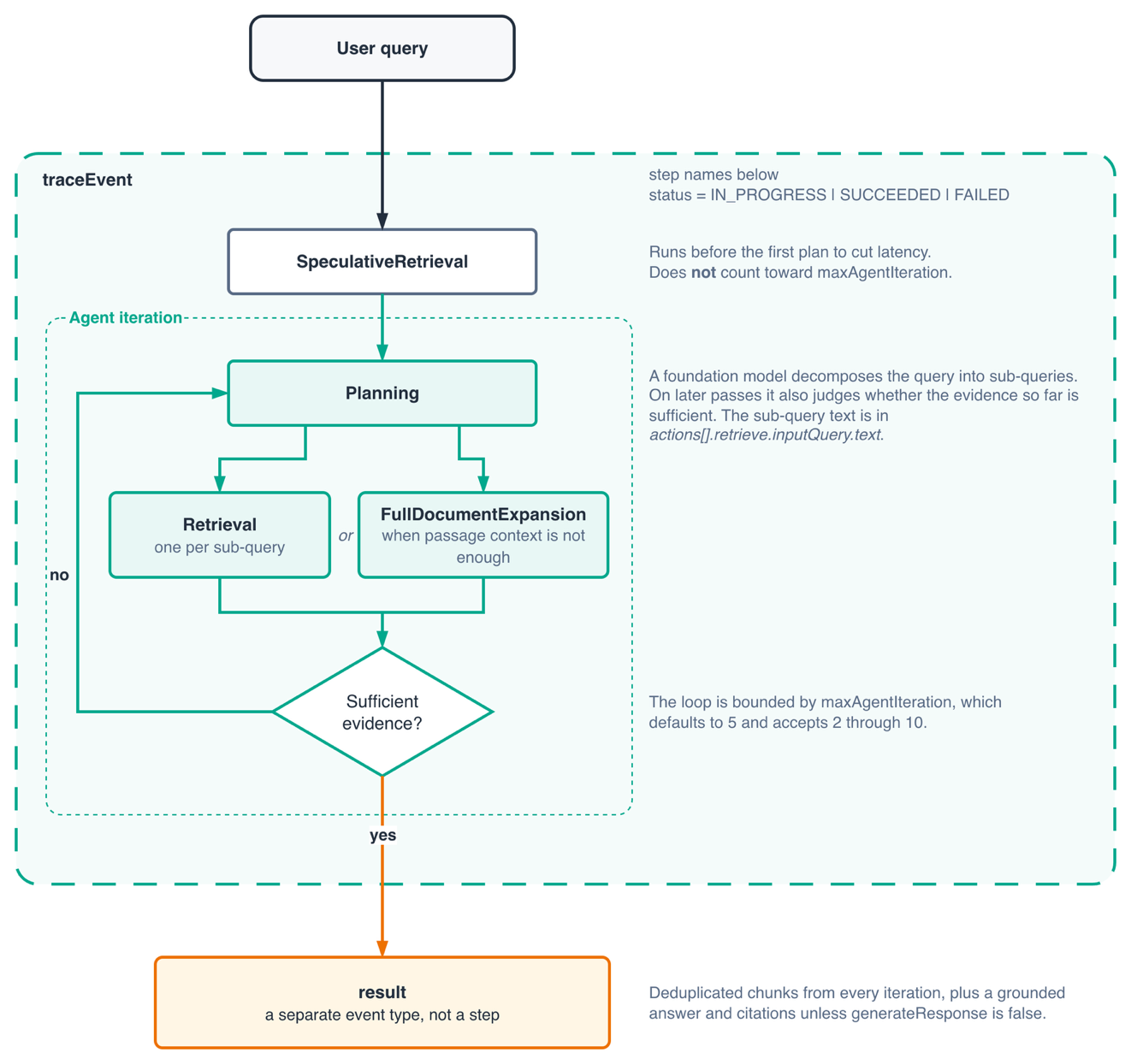
Figure 2: Steps in the agentic retrieval planning loop
Two details are worth knowing before you build on this. Deduplication applies only to the result event, so a chunk retrieved by three sub-queries appears once at the end but three times across the traces.
The second is about scores. A Retrieve response gives each chunk a typed score field holding its relevance to the query. Agentic retrieval results carry content, metadata, and sourceRetriever, with no equivalent typed field. Code that reads result["score"] after switching APIs gets nothing. If you rank or filter relevance, plan for that difference.
In production, use Amazon Bedrock Guardrails to enforce content policies and grounding checks on generated responses. Both retrieval paths support guardrails. Agentic retrieval supports guardrails through policyConfiguration.bedrockGuardrailConfiguration rather than the guardrail_config argument the LangChain retriever takes, and supports BLOCK mode only. If you rely on MASK mode, that is a reason to stay on the Retrieve API.
maxAgentIteration accepts two through ten and defaults to five. Leave it at the default. At two or three the planner runs one cycle, emits no sub-queries, and returns what the speculative retrieval step already found. This is single-shot behavior at the agentic price. Decomposition begins at four. The planner often stops early when it judges the evidence sufficient, so the ceiling is a bound rather than a target.
Comparing the two retrieval paths
For context on how this behaves at scale, AWS evaluated agentic retrieval on MuSiQue, a public multi-hop benchmark. The evaluation showed improved recall over single-shot retrieval, with the largest gains on the hardest questions. Single-hop questions saw gains under five points. That last figure matches the shape of the trade-off: decomposition helps when there is something to decompose.
Building the RAG chain
For the standard retriever, the usual LangChain Expression Language (LCEL) composition works directly:
from langchain_aws import ChatBedrockConverse
from langchain_core.output_parsers import StrOutputParser
from langchain_core.prompts import ChatPromptTemplate
from langchain_core.runnables import RunnablePassthrough

def format_docs(docs):
    return "\n\n".join(doc.page_content for doc in docs)

llm = ChatBedrockConverse(model=MODEL_ID, region_name=REGION)
prompt = ChatPromptTemplate.from_template(PROMPT_TEMPLATE)

chain = (
    {"context": retriever | format_docs, "question": RunnablePassthrough()}
    | prompt
    | llm
    | StrOutputParser()
)
format_docs matters more than it looks. Passing Document objects straight into a prompt renders their repr, and the model gets metadata noise mixed into the context.
To put agentic retrieval in the same position, wrap it in a RunnableLambda, since it is a function rather than a retriever:
from langchain_core.runnables import RunnableLambda

def agentic_context(question: str) -> str:
    result = agentic_retrieve(
        knowledge_base_id=KB_ID,
        query=question,
        region_name=REGION,
        number_of_results=10,
    )
    return "\n\n".join(
        item.get("content", {}).get("text", "")
        for item in result.get("results", [])
    )

agentic_chain = (
    {"context": RunnableLambda(agentic_context), "question": RunnablePassthrough()}
    | prompt
    | llm
    | StrOutputParser()
)
Note that generate_response is off here. The service can generate the answer itself, but inside a chain you usually want your own prompt and model, so you take the chunks and generate downstream. Use the service generation when you want one call and less code, and the wrapped version when the prompt is yours to control.
Choosing between standard and agentic retrieval
Use Retrieve for short, well-scoped questions. It is cheaper, faster, works against self-managed knowledge bases, and returns scores in the results. Most production traffic looks like this.
Use AgenticRetrieveStream when questions are multi-part, comparative, or exploratory, or when the evidence spans more than one knowledge base. It registers up to five knowledge bases in one request and routes sub-queries using a natural-language description you attach to each. The other API cannot do this at all. It costs more per call, makes several model invocations, and has the higher latency of the two.
Routing on query shape rather than picking one for everything is the pattern we recommend. A classifier or a heuristic on the question can send most traffic down the cheap path and reserve the planner for questions that need it.
Clean up resources
Delete the knowledge base, its data source, the S3 objects and bucket, and the IAM role that you created. A knowledge base with documents in it continues to incur storage charges.
bedrock_agent.delete_data_source(knowledgeBaseId=KB_ID, dataSourceId=DS_ID)
bedrock_agent.delete_knowledge_base(knowledgeBaseId=KB_ID)
The repository includes a cleanup script that also empties the bucket and removes the role.
Conclusion
We showed how to build a RAG application on Amazon Bedrock Knowledge Bases with LangChain, and how agentic retrieval handles multi-part questions that single-shot retrieval answers poorly. We also showed the friction in the current integration. Agentic retrieval is a function rather than a LangChain retriever, so it needs a RunnableLambda to sit in a chain. The trace events that show the query plan require a direct boto3 call.
Agentic retrieval trades higher per-call cost for improved recall on multi-hop questions, using a built-in model for query planning. The next useful step is measuring your own query mix before you route everything through a planner.
To get started, see the Amazon Bedrock Knowledge Bases documentation and the accompanying sample code. For help applying this to your own workload, contact your AWS account team.
About the authors
Manideep Reddy Gillela
Manideep is a Delivery Consultant, Cloud Infrastructure Architect at Amazon Web Services, where he helps enterprise customers design scalable, secure, and cost-effective cloud solutions. With more than six years of experience spanning cloud architecture, AI/ML, and generative AI on AWS, he partners with organizations to accelerate digital transformation. Outside of work, Manideep enjoys traveling, swimming, and playing recreational sports.
Luis Felipe Florez Leano
Luis is a Solutions Architect on the Americas GenAI Partner Solutions Architecture team at AWS. He works with AWS Partners across the Americas to help them design, build, and scale generative AI solutions on AWS. His focus is on practical implementations using Amazon Bedrock and helping organizations navigate the technical and business opportunities of generative AI.
Sushma Sunkollu Nagaraj
Sushma is a Partner Solutions Architect at Amazon Web Services with over five years of experience helping partners and customers build secure, scalable cloud solutions. Specializing in DevOps and infrastructure automation, she collaborates with strategic partners to design AWS-optimized architectures, lead technical workshops, and deliver high-impact proofs-of-concept. Her expertise extends into AI/ML, where she supports customers in building intelligent applications using AWS AI services. She is passionate about simplifying complexity and enabling innovation at scale.
Satya Pattanaik
Satya is a Senior Solutions Architect at AWS. In this role, he assists Independent Software Vendors (ISVs) in developing scalable and resilient applications on the AWS Cloud. Prior to joining AWS, he made a substantial impact in driving growth and cloud adaptation for large organizations. Outside of his professional endeavors, Satya is passionate about BBQ. He continuously learns new techniques to create flavorful dishes and experiments with various recipes.