insight Simon Willison 2026-10-06T19:07 正文 ok 91 words

使用 Parseable 与 Datasette 处理 OpenTelemetry 追踪

英文标题:Using Parseable with Datasette for OpenTelemetry traces

作者在 Show HN 上发现了新兴可观测性平台 Parseable:它提供开源的 AGPL Rust 实现、企业版以及云托管选项。借助 Datasette 1.0a41 新增的 OpenTelemetry 支持,作者让 Codex 协助配置 Parseable,并将 Datasette 追踪数据导入其中。测试表明,Parseable 的本地 Web 应用可以展示 Datasette 请求的完整 Trace,包括瀑布图、247 个 Span、数据库查询及其耗时。该组合为 Datasette 开发者提供了一套可在本地部署、用于分析 OpenTelemetry 链路追踪的可观测性方案。
打开原文相关 6 · 机会 2
media100.3 KB media127.3 KB

中文

我今天在 Show HN 上看到了 Parseable——这是一个新的可观测性平台,既提供 开源(AGPL)的 Rust 实现(单个约约 180MB 的二进制文件),也提供具备额外功能的“Enterprise”版本和云托管选项。

由于 Datasette 1.0a41 新增了 OpenTelemetry 支持(感谢 Alex Garcia),我决定启动 Codex,让它研究如何运行 Parseable 并向其中导入来自 Datasette 的追踪数据。

以下是我(由人工撰写的)TIL,其中展示了实际有效的模式;下面的截图则展示了一条在 Parseable 本地主机 Web 应用中显示的 Datasette Trace:
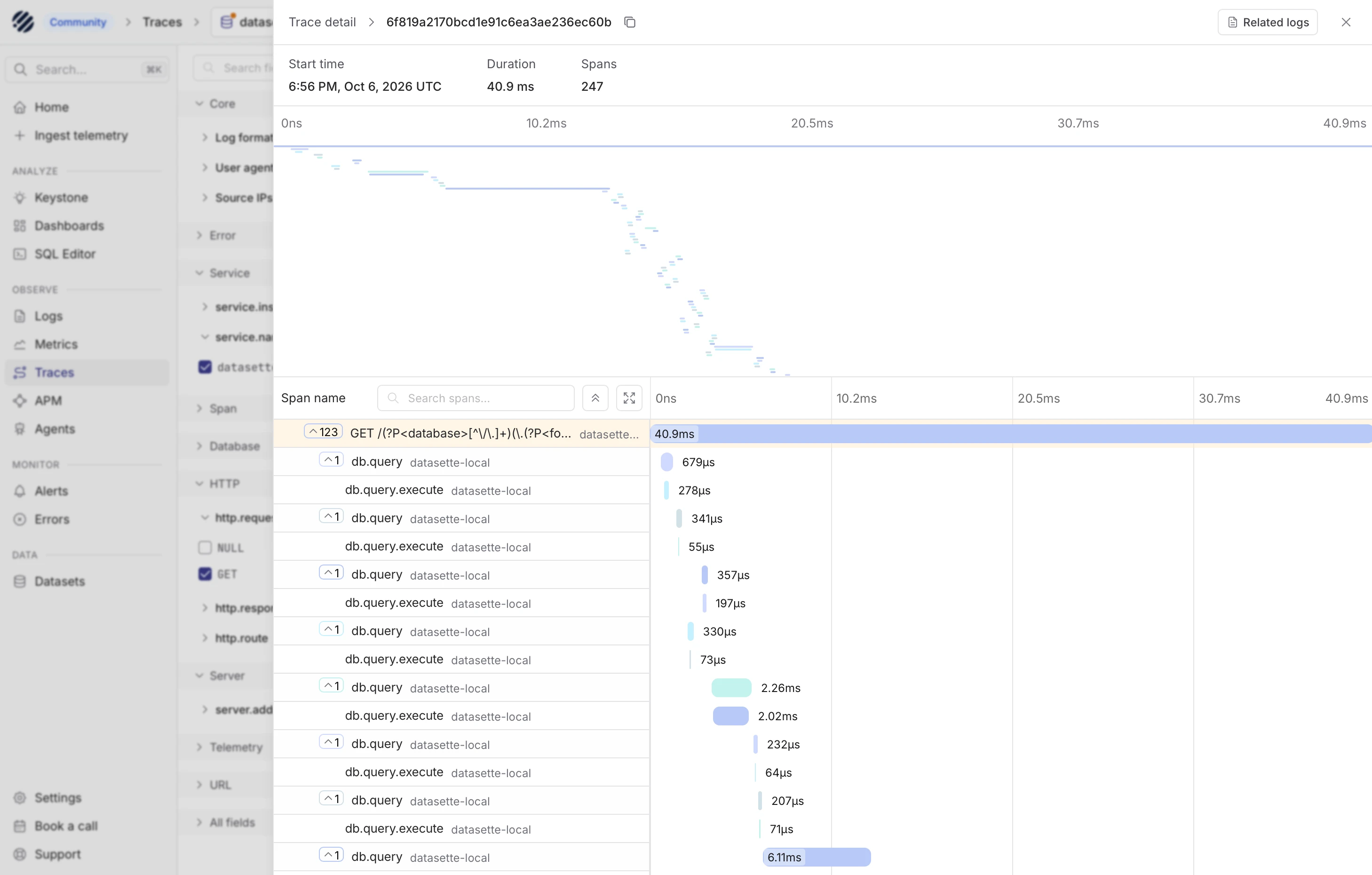
可观测性 Web 应用中的 Trace 详情视图截图:Span 瀑布图覆盖在变暗的导航侧栏和筛选栏之上。变暗的侧栏包括面包屑“Community > Traces > datas”(后半部分被截断)、搜索框“Search... ⌘K”、导航项“Home”“Ingest telemetry”;“ANALYZE”分区中的“Keystone”“Dashboards”“SQL Editor”;“OBSERVE”分区中的“Logs”“Metrics”“Traces”(已选中)“APM”“Agents”;“MONITOR”分区中的“Alerts”“Errors”;“DATA”分区中的“Datasets”;底部还有“Settings”“Book a call”“Support”。变暗的筛选栏在右侧边缘处被截断,包含“Search fi”“Core”“Log format”“User agent”“Source IPs”“Error”“Service”“service.ins”“service.na”“datasett”(已勾选),“Span”“Database”“HTTP”“http.reque”“NULL”(未勾选),“GET”(已勾选),“http.respo”“http.route”“Server”“server.add”“Telemetry”“URL”“All fields”。Trace 面板标题为“Trace detail > 6f819a2170bcd1e91c6ea3ae236ec60b”,旁有复制图标、“Related logs”按钮和关闭 X。摘要信息为:“Start time 6:56 PM, Oct 6, 2026 UTC”“Duration 40.9 ms”“Spans 247”。一张坐标轴标为“0ns 10.2ms 20.5ms 30.7ms 40.9ms”的缩略图显示,大量短 Span 条从左上方向中下部呈对角线级联排列,另有少数较长的条形。下方是 Span 表格,带有“Span name”表头、“Search spans...”搜索框、折叠与展开按钮,以及“0ns 10.2ms 20.5ms 30.7ms 40.9ms”时间轴。行项目(名称、服务、耗时)包括:带折叠开关“123”的根 Span“GET /...” “datasette...” 40.9ms,横跨整个时间轴;随后是交替出现的行,每个“db.query”均带有折叠开关“1”:db.query datasette-local 679µs、db.query.execute datasette-local 278µs、db.query datasette-local 341µs、db.query.execute datasette-local 55µs、db.query datasette-local 357µs、db.query.execute datasette-local 197µs、db.query datasette-local 330µs、db.query.execute datasette-local 73µs、db.query datasette-local 2.26ms、db.query.execute datasette-local 2.02ms、db.query datasette-local 232µs、db.query.execute datasette-local 64µs、db.query datasette-local 207µs、db.query.execute datasette-local 71µs、db.query datasette-local 6.11ms。子 Span 条在时间轴前半部分依次逐渐延后开始。

English / 原文

I saw Parseable in a Show HN today - it's a new observability platform with both an open source (AGPL) Rust implementation (a single ~180MB binary), an "Enterprise" version with extra features and a cloud hosted option.

Since Datasette 1.0a41 added OpenTelemetry support (thanks, Alex Garcia), I decided to fire up Codex and have it figure out how to run Parseable and feed it traces from Datasette.

Here's my (human-written) TIL showing the patterns that worked, and here's a screenshot of a Datasette trace displayed within the Parseable localhost web application:

Screenshot of a trace detail view in an observability web app, with a span waterfall overlaid on a dimmed navigation sidebar and filter column. Dimmed sidebar: breadcrumb "Community > Traces > datas" (cut off), search box "Search... ⌘K", nav items "Home", "Ingest telemetry", section "ANALYZE": "Keystone", "Dashboards", "SQL Editor", section "OBSERVE": "Logs", "Metrics", "Traces" (selected), "APM", "Agents", section "MONITOR": "Alerts", "Errors", section "DATA": "Datasets", and at the bottom "Settings", "Book a call", "Support". Dimmed filter column, cut off at the right edge: "Search fi", "Core", "Log format", "User agent", "Source IPs", "Error", "Service", "service.ins", "service.na", "datasett" (checked), "Span", "Database", "HTTP", "http.reque", "NULL" (unchecked), "GET" (checked), "http.respo", "http.route", "Server", "server.add", "Telemetry", "URL", "All fields". Trace panel header: "Trace detail > 6f819a2170bcd1e91c6ea3ae236ec60b" with a copy icon, a "Related logs" button and a close X. Summary: "Start time 6:56 PM, Oct 6, 2026 UTC", "Duration 40.9 ms", "Spans 247". A minimap with axis "0ns 10.2ms 20.5ms 30.7ms 40.9ms" shows many short span bars cascading diagonally from top left toward the lower middle, with a few longer bars. Below is a span table with a "Span name" header, a "Search spans..." box, collapse and expand buttons, and a timeline axis "0ns 10.2ms 20.5ms 30.7ms 40.9ms". Rows (name, service, duration): root span with collapse toggle "123", "GET /..." "datasette..." 40.9ms spanning the full timeline; then alternating rows where each "db.query" has a collapse toggle "1": db.query datasette-local 679µs, db.query.execute datasette-local 278µs, db.query datasette-local 341µs, db.query.execute datasette-local 55µs, db.query datasette-local 357µs, db.query.execute datasette-local 197µs, db.query datasette-local 330µs, db.query.execute datasette-local 73µs, db.query datasette-local 2.26ms, db.query.execute datasette-local 2.02ms, db.query datasette-local 232µs, db.query.execute datasette-local 64µs, db.query datasette-local 207µs, db.query.execute datasette-local 71µs, db.query datasette-local 6.11ms. The child span bars start progressively later across the early part of the timeline.