AWS 推出 Claude Haiku 5.5:面向高吞吐量 Agent 与成本敏感型工作负载
英文标题:Introducing Claude Haiku 5.5 on AWS
Anthropic 的 Claude Haiku 5.5 现已登陆 Amazon Bedrock 和 Claude Platform on AWS,被定位为 Claude 5.5 系列中速度最快、效率最高的模型。AWS 表示,该模型面向子 Agent、高并发及成本敏感型任务,在大多数任务上的成本较 Claude Haiku 4.5 低约 75%。Haiku 5.5 支持编码、工具调用、计算机使用、高分辨率图像和多步骤 Agent 工作流,并首次为 Haiku 系列提供 effort controls。开发者可通过 Amazon Bedrock Playground、InvokeModel、Converse API 或 Anthropic Messages API 调用该模型,并借助 AWS 的身份、审计、监控和计费体系进行生产部署。
 1.3 MB
 1.3 MB
 2.4 KB
 345.0 KB
 141.2 KB
 346.5 KB
 202.7 KB
 16.4 KB
 25.4 KB
 25.0 KB
 23.6 KB
 52.7 KB
中文
今天,我们很高兴宣布,Claude Haiku 5.5 现已在 Amazon Bedrock 和 Claude Platform on AWS 上推出。根据 Anthropic 的说法,Claude Haiku 5.5 是 Claude 5.5 系列中速度最快、效率最高的模型,专为子 Agent、高吞吐量和成本敏感型工作负载打造。对于大多数任务,其成本也比 Claude Haiku 4.5 低约 75%。
Amazon Bedrock 可在通过区域数据驻留将数据保留在 AWS 基础设施内的同时,为你提供 Haiku 5.5 的能力。它可与团队已在使用的 AWS 控制机制协同工作,包括用于访问控制的 AWS Identity and Access Management(IAM)、用于审计的 AWS CloudTrail、用于监控的 Amazon CloudWatch,以及 Amazon Bedrock Guardrails。使用费用会显示在你的 AWS 账单中。
Claude Platform on AWS 可让你通过 AWS Management Console 直接访问 Anthropic 原生的平台体验和功能。你可以使用与直接与 Anthropic 合作时相同的 API、功能和控制台体验来构建、测试和部署,同时统一使用 AWS 计费和身份验证。
本文将介绍 Claude Haiku 5.5 的改进、何时应选择 Haiku 5.5 的实用建议,以及如何在 Amazon Bedrock 上开始使用。
Claude Haiku 5.5 有何不同
Claude Haiku 5.5 是 Anthropic 能力最强的 Haiku 模型,覆盖编程、工具使用、计算机使用和 Agent 任务。它也是首个具备 effort controls 的 Haiku 模型,因此你可以针对每项任务在成本和智能水平之间进行调节,而不必为整个工作负载只选择一种设置。
这些改进在大规模、快速且可重复的工作中尤为明显。在编程任务中,它可作为子 Agent 路由请求、审查代码和分类长文档。在知识工作中,Haiku 5.5 可从中小型文档中提取关键信息、执行初步扫描,并快速回答知识库中的问题。对于交互式应用,它的响应速度足以让简单对话获得快速且有帮助的答案。它还能够以生产功能所需的吞吐量和成本,处理分类、摘要和文本生成等传统自然语言处理(NLP)任务。
Haiku 5.5 可处理 Agent 编程和多步骤工具调用,并支持高分辨率图像。它可以作为强大的计算机使用子 Agent,以可扩展的成本处理重复性的浏览器和桌面任务。在开发工作流中,它非常适合快速迭代 UI 和 UX 变更,以及跨多个文件实施小范围、针对性的代码库改动。
将 Claude Haiku 5.5 与 Opus 5.5 搭配使用
Haiku 5.5 可与近期发布的 Claude Opus 5.5 搭配使用。二者可组成强大的团队:Opus 5.5 负责规划和判断,Haiku 5.5 则快速且大规模地执行定义明确的任务。这样,你可在关键环节获得审慎推理,同时在其他环节降低成本和延迟。
- Claude Opus 5.5 规划工作并作出判断。 它会拆解复杂问题、确定处理方法,并承担最困难的推理任务,例如发布版本调试、大型 Pull Request 的安全审查,以及最终形成完整报告的长篇分析。
- Claude Haiku 5.5 承担子 Agent 的快速执行层。 它处理快速、高吞吐量的任务,例如路由请求、分类和摘要、改写长文档,以及跨许多文件应用小范围、针对性的改动。作为审查子 Agent,它可以快速检查操作顺序和整体方向,从而让 Opus 5.5 将 token 用于最困难的推理。由于其速度快且成本高效,你可以并行运行多个 Haiku 子 Agent。
在 Amazon Bedrock 上开始使用 Claude Haiku 5.5
如需试用 Haiku 5.5,请打开 Amazon Bedrock 控制台,选择 Test,然后选择 Playground,并将 Haiku 5.5 选为模型。之后,你可以直接向其运行提示词。
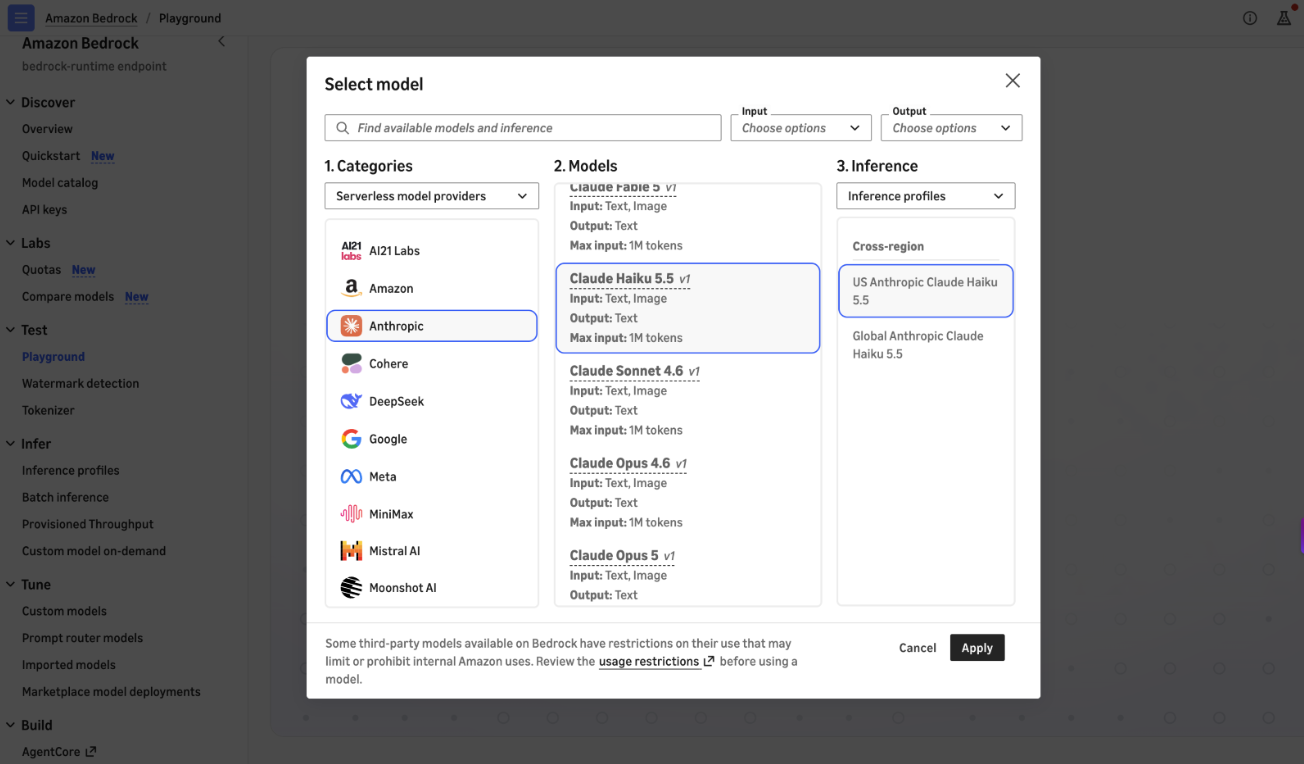
图 1:在 Amazon Bedrock 控制台 Playground 中选择 Anthropic Claude 模型
以编程方式调用时,你可以通过 Anthropic SDK,在 bedrock-runtime 上使用 Anthropic Messages API 调用模型。你还可以通过 AWS Command Line Interface(AWS CLI) 和 AWS SDK,在 bedrock-runtime 上使用 Invoke 和 Converse API。
前提条件
你必须具备以下前提条件:
- 已启用 Amazon Bedrock 访问权限的有效 AWS 账户。
- 已安装并配置 AWS Command Line Interface(AWS CLI)。
- Python 3.10+。
- 已安装 Boto3:
pip install boto3。 - 已安装 Anthropic SDK:
pip install anthropic。 - 已安装用于 Amazon Bedrock 身份验证的 Amazon Bedrock Token Generator:
pip install aws_bedrock_token_generator。 - AWS Identity and Access Management(IAM)权限:
bedrock:InvokeModel、bedrock:InvokeModelWithResponseStream。
以下是使用 AWS SDK for Python(Boto3)与 InvokeModel API 的快速示例:
import boto3
import json

# Create a Bedrock Runtime client
bedrock_runtime = boto3.client(
    service_name="bedrock-runtime",
    region_name="us-east-1"
)

# Invoke Claude Haiku 5.5
response = bedrock_runtime.invoke_model(
    modelId="global.anthropic.claude-haiku-5-5",
    contentType="application/json",
    accept="application/json",
    body=json.dumps({
        "anthropic_version": "bedrock-2023-05-31",
        "max_tokens": 4096,
        "messages": [
            {
                "role": "user",
                "content": "Can you explain the features of Amazon Bedrock?"
            }
        ]
    })
)

result = json.loads(response["body"].read())
# Haiku 5.5 may return a thinking block before the text block,
# so select the text block rather than a fixed index.
print(next(b["text"] for b in result["content"] if b["type"] == "text"))
你也可以使用 Amazon Bedrock Converse API,以获得统一的多模型体验:
import boto3

# Create a Bedrock Runtime client
bedrock_runtime = boto3.client(
    service_name="bedrock-runtime",
    region_name="us-east-1"
)

# Invoke Claude Haiku 5.5
response = bedrock_runtime.converse(
    modelId="global.anthropic.claude-haiku-5-5",
    messages=[
        {
            "role": "user",
            "content": [
                {
                    "text": "Can you explain the features of Amazon Bedrock?"
                }
            ]
        }
    ],
    inferenceConfig={
        "maxTokens": 4096
    }
)

if 'output' in response:
    blocks = response['output']['message']['content']
    print('\n'.join(b.get('text', '') for b in blocks if 'text' in b))
你还可以通过 anthropic SDK 软件包使用 Anthropic Messages API,以获得更简化的体验:
from anthropic import Anthropic
from aws_bedrock_token_generator import provide_token

token = provide_token(region="us-east-1")

client = Anthropic(
    base_url="https://bedrock-runtime.us-east-1.amazonaws.com/anthropic",
    api_key=token,
)

# Invoke Claude Haiku 5.5
response = client.messages.create(
    model="global.anthropic.claude-haiku-5-5",
    max_tokens=1024,
    messages=[{"role": "user", "content": "Can you explain the features of Amazon Bedrock?"}],
)
print(response)
你可以查阅 入门 Notebook 以获取更多示例。随着需求增长,你可以通过 Amazon CloudWatch 和 AWS Cost Explorer 监控使用量、性能和成本,并扩展应用规模。
可用性
Claude Haiku 5.5 现已通过 bedrock-runtime 上的 US Geo CRIS(us.)、EU Geo CRIS(eu.)、AU Geo CRIS(au.)、JP Geo CRIS(jp.)和 Global CRIS(global.)推理配置文件在 Amazon Bedrock 提供。在 AWS GovCloud(US)中,它同时可通过 bedrock-runtime 和 bedrock-mantle 端点使用。
有关支持的 AWS 区域完整列表,请参阅 Amazon Bedrock 文档。有关定价信息,请参阅 Amazon Bedrock 定价。它还可通过北美地区的 Claude Platform on AWS 使用。
欢迎在 Amazon Bedrock 控制台、Claude Platform on AWS 中试用 Claude Haiku 5.5,或在 GitHub 上探索 入门 Notebooks。
关于作者
Aamna Najmi
Aamna 是一名专注于生成式 AI 的高级专业解决方案架构师,重点负责 Anthropic 模型,以及在 Amazon Bedrock 上大规模实现生成式 AI 系统的运营和治理。她帮助 ISV 解决挑战、拥抱创新,并利用 Amazon Bedrock 创造新的业务机会。
Dani Mitchell
Dani 是 AWS 的生成式 AI 高级专业解决方案架构师,负责推进 Anthropic on Amazon Bedrock 的市场推广工作。他帮助全球企业设计和部署基于 Amazon Bedrock 上 Anthropic 模型与能力的生成式 AI 解决方案,以构建可扩展、适合生产环境的应用。
Alfredo Castillo
Alfredo 是 AWS 的生成式 AI 高级专业解决方案架构师,专注于 Anthropic 模型在 Amazon Bedrock 上的市场推广工作。他与金融服务客户合作,设计并扩展跨分布式系统的生成式 AI 解决方案,并将生成式 AI 实验转化为生产工作负载。工作之余,他热爱家庭生活和耐力运动。
Sofian Hamiti
Sofian 是一位技术领导者,拥有超过 12 年构建 AI 解决方案、带领高绩效团队以最大化客户成果的经验。他致力于赋能多元化人才,以推动全球影响力并帮助他们实现职业抱负。
English / 原文
Today, we’re excited to announce the availability of Claude Haiku 5.5 on Amazon Bedrock and Claude Platform on AWS. According to Anthropic, Claude Haiku 5.5 is the fastest and most efficient model in the Claude 5.5 family, built for subagents and high-volume, cost-sensitive work. It also costs around 75 percent less than Claude Haiku 4.5 for most tasks.
Amazon Bedrock gives you Haiku 5.5 capabilities while keeping your data within AWS infrastructure with Regional data residency. It works with the AWS controls your team already uses, including AWS Identity and Access Management (IAM) for access, AWS CloudTrail for audit, Amazon CloudWatch for monitoring, and Amazon Bedrock Guardrails. Usage appears on your AWS bill.
Claude Platform on AWS gives you direct access to Anthropic’s native platform experience and capabilities through the AWS Management Console. Build, test, and deploy with the same APIs, features, and console experience you’d get working with Anthropic directly, unified with AWS billing and authentication.
This post covers Claude Haiku 5.5’s improvements, practical guidance on when to choose Haiku 5.5, and how to get started on Amazon Bedrock.
What makes Claude Haiku 5.5 different
Claude Haiku 5.5 is Anthropic’s most capable Haiku model, across coding, tool use, computer use, and agentic tasks. It’s also the first Haiku model with effort controls, so you can tune cost against intelligence for each task instead of picking one setting for an entire workload.
The improvements stand out on quick and repeatable work at scale. For coding tasks, it acts as a subagent routing requests, reviewing code and classifying long documents. For knowledge work, Haiku 5.5 pulls key information from small-to-medium documents, does initial scans, and answers quick questions over a knowledge base. For interactive applications, it responds fast enough for simple conversations to have quick and helpful answers. It also handles traditional natural language processing (NLP) tasks such as classification, summarization, and text generation at the volume and cost that production features require.
Haiku 5.5 handles agentic coding and multi-step tool use, and supports high-resolution images. Haiku 5.5 can be used as a strong computer use subagent for repetitive browser and desktop tasks, at a cost that holds up at scale. In development workflows, it’s a good fit for iterating quickly on UI and UX changes and for small, specific code base changes across multiple files.
Pairing Claude Haiku 5.5 with Opus 5.5
Haiku 5.5 pairs with the recently announced Claude Opus 5.5. Together, they make a strong team: Opus 5.5 plans and makes the judgment calls, and Haiku 5.5 carries out well-defined tasks quickly and at scale. You get careful reasoning where it counts and lower cost and latency everywhere.
- Claude Opus 5.5 plans the work and makes the judgment calls. It breaks down complex problems, decides the approach, and takes on the hardest reasoning, such as release debugging, security review of large pull requests, and long analyses that end in a finished report.
- Claude Haiku 5.5 takes on the fast layer of subagents. It handles quick, high-volume tasks, such as routing requests, classifying and summarizing, rewriting long documents, and applying small, specific changes across many files. As a review subagent, it can quickly check the order of operations and high-level direction, so Opus 5.5 can spend its tokens on the hardest reasoning. Because it is fast and cost efficient, you can run many Haiku subagents in parallel.
Getting started with Claude Haiku 5.5 on Amazon Bedrock
To try Haiku 5.5, open the Amazon Bedrock console, choose Test , then Playground , and select Haiku 5.5 as the model. From there, you can run a prompt directly against it.
Figure 1: Selecting an Anthropic Claude model in the Amazon Bedrock console Playground
Programmatically, you can call the model with the Anthropic Messages API against bedrock-runtime through the Anthropic SDK. You can also use the Invoke and Converse APIs on bedrock-runtime through the AWS Command Line Interface (AWS CLI) and AWS SDK.
Prerequisites
You must have the following prerequisites:
- Active AWS account with Amazon Bedrock access.
- AWS Command Line Interface (AWS CLI) installed and configured.
- Python 3.10+.
- Boto3 installed:
pip install boto3. - Anthropic SDK installed:
pip install anthropic. - The Amazon Bedrock Token Generator for Amazon Bedrock authentication installed:
pip install aws_bedrock_token_generator. - AWS Identity and Access Management (IAM) permissions:
bedrock:InvokeModel,bedrock:InvokeModelWithResponseStream.
Here’s a quick example using the AWS SDK for Python (Boto3) with the InvokeModel API:
import boto3
import json

# Create a Bedrock Runtime client
bedrock_runtime = boto3.client(
    service_name="bedrock-runtime",
    region_name="us-east-1"
)

# Invoke Claude Haiku 5.5
response = bedrock_runtime.invoke_model(
    modelId="global.anthropic.claude-haiku-5-5",
    contentType="application/json",
    accept="application/json",
    body=json.dumps({
        "anthropic_version": "bedrock-2023-05-31",
        "max_tokens": 4096,
        "messages": [
            {
                "role": "user",
                "content": "Can you explain the features of Amazon Bedrock?"
            }
        ]
    })
)

result = json.loads(response["body"].read())
# Haiku 5.5 may return a thinking block before the text block,
# so select the text block rather than a fixed index.
print(next(b["text"] for b in result["content"] if b["type"] == "text"))
You can also use the Amazon Bedrock Converse API for a unified multi-model experience:
import boto3

# Create a Bedrock Runtime client
bedrock_runtime = boto3.client(
    service_name="bedrock-runtime",
    region_name="us-east-1"
)

# Invoke Claude Haiku 5.5
response = bedrock_runtime.converse(
    modelId="global.anthropic.claude-haiku-5-5",
    messages=[
        {
            "role": "user",
            "content": [
                {
                    "text": "Can you explain the features of Amazon Bedrock?"
                }
            ]
        }
    ],
    inferenceConfig={
        "maxTokens": 4096
    }
)

if 'output' in response:
    blocks = response['output']['message']['content']
    print('\n'.join(b.get('text', '') for b in blocks if 'text' in b))
You can also use the Anthropic Messages API through the anthropic SDK package for a streamlined experience:
from anthropic import Anthropic
from aws_bedrock_token_generator import provide_token

token = provide_token(region="us-east-1")

client = Anthropic(
    base_url="https://bedrock-runtime.us-east-1.amazonaws.com/anthropic",
    api_key=token,
)

# Invoke Claude Haiku 5.5
response = client.messages.create(
    model="global.anthropic.claude-haiku-5-5",
    max_tokens=1024,
    messages=[{"role": "user", "content": "Can you explain the features of Amazon Bedrock?"}],
)
print(response)
You can explore the Getting Started notebook for more examples. You can monitor usage, performance, and costs through Amazon CloudWatch and AWS Cost Explorer to scale your applications as demand grows.
Availability
Claude Haiku 5.5 is available today on Amazon Bedrock through the US Geo CRIS (us.), EU Geo CRIS (eu.), AU Geo CRIS (au.), JP Geo CRIS (jp.) and Global CRIS (global.) inference profiles on bedrock-runtime. In AWS GovCloud (US), it’s available on both the bedrock-runtime and bedrock-mantle endpoints.
See the Amazon Bedrock documentation for the full list of supported AWS Regions. For pricing information, see Amazon Bedrock pricing. It’s also available through Claude Platform on AWS in North America
Give Claude Haiku 5.5 a try on the Amazon Bedrock console, in Claude Platform on AWS, or explore the Getting Started notebooks on GitHub.
About the authors
Aamna Najmi
Aamna is a Senior Specialist Solutions Architect for Generative AI focusing on Anthropic models and operationalizing and governing generative AI systems at scale on Amazon Bedrock. She helps ISVs solve their challenges, embrace innovation, and create new business opportunities with Amazon Bedrock.
Dani Mitchell
Dani is a Senior Specialist Solutions Architect for Generative AI at AWS, working on go-to-market for Anthropic on Amazon Bedrock. He helps enterprises across the world design and deploy generative AI solutions using Anthropic’s models and capabilities on Amazon Bedrock to build scalable, production-ready applications.
Alfredo Castillo
Alfredo is a Senior Specialist Solutions Architect for Generative AI at AWS, focusing on Anthropic models go-to-market on Amazon Bedrock. He works with Financial Services customers to design and scale generative AI solutions across distributed systems and turn generative AI experiments into production workloads. Outside of work, he is passionate about family and endurance sports.
Sofian Hamiti
Sofian is a technology leader with over 12 years of experience building AI solutions, and leading high-performing teams to maximize customer outcomes. He is passionate about empowering diverse talents to drive global impact and achieve their career aspirations.