在 AWS DevOps Agent 调查后自动化执行修复
英文标题:Automate remediation post AWS DevOps Agent investigation
AWS DevOps Agent 可自主关联指标、日志和应用拓扑来诊断生产事故,但通常以“观察并报告”模式运行,不会直接修改生产资源。本文展示如何结合 AWS Lambda Durable Functions、Amazon EventBridge 和 Amazon Bedrock,将调查摘要转化为经过预验证、可供值班工程师一键批准的修复操作。该方案通过经批准的 Lambda 工具白名单限制自动化操作范围,读取类操作可自动执行,涉及基础设施变更的操作则必须等待人工批准。借助可长时间暂停并从检查点恢复的 Durable Functions,团队可以缩短平均修复时间(MTTR),减少值班人员的重复诊断工作。
 1.3 MB
 1.3 MB
 2.4 KB
 345.0 KB
 141.2 KB
 346.5 KB
 149.3 KB
 429.9 KB
 966.9 KB
 226.4 KB
 170.5 KB
 148.8 KB
 71.4 KB
 233.4 KB
 22.8 KB
 78.2 KB
 19.9 KB
 19.2 KB
 132.5 KB
中文
缩短从事故检测、调查到修复之间的时间,是在 AWS 上运行生产工作负载的组织的一项关键优先事项。当问题发生时,值班工程师通常需要迅速跨应用组件诊断问题、确定根本原因并实施修复,而且往往是在深夜。
AWS DevOps Agent 是一个由 AI 驱动的 Agent,可根据关联的指标、日志和应用拓扑全天自主分类和处置事故。它通过提供根本原因分析(RCA)和解决建议,解决了上述优先事项的第一部分。然而,为了保留控制权并帮助避免意外变更,组织通常会让包括 AWS DevOps Agent 在内的可观测性 Agent 保持在“观察并报告”模式:Agent 可以诊断问题,但不会直接修改生产资源。本文演示如何使用 AWS Lambda Durable Functions(AWS Lambda 的一项能力)、Amazon EventBridge 和 Amazon Bedrock,创建一个自动化修复工作流,以补充 AWS DevOps Agent 并完成问题解决步骤。该工作流会将调查摘要转化为经过预验证、可供单次批准操作执行的修复方案,帮助您缩短平均修复时间(MTTR),并让值班工程师摆脱重复性的诊断工作。
解决方案概述
借助 AWS Lambda Durable Functions,您可以构建具有弹性的多步骤应用程序和 AI 工作流,这些工作流最长可运行一年,无需管理额外基础设施,也无需编写自定义状态管理和错误处理代码。这些函数会自动检查点保存进度,在长时间运行的任务期间暂停执行,并从故障中恢复,即使发生中断也能保持可靠的进度。
下图展示了解决方案架构。
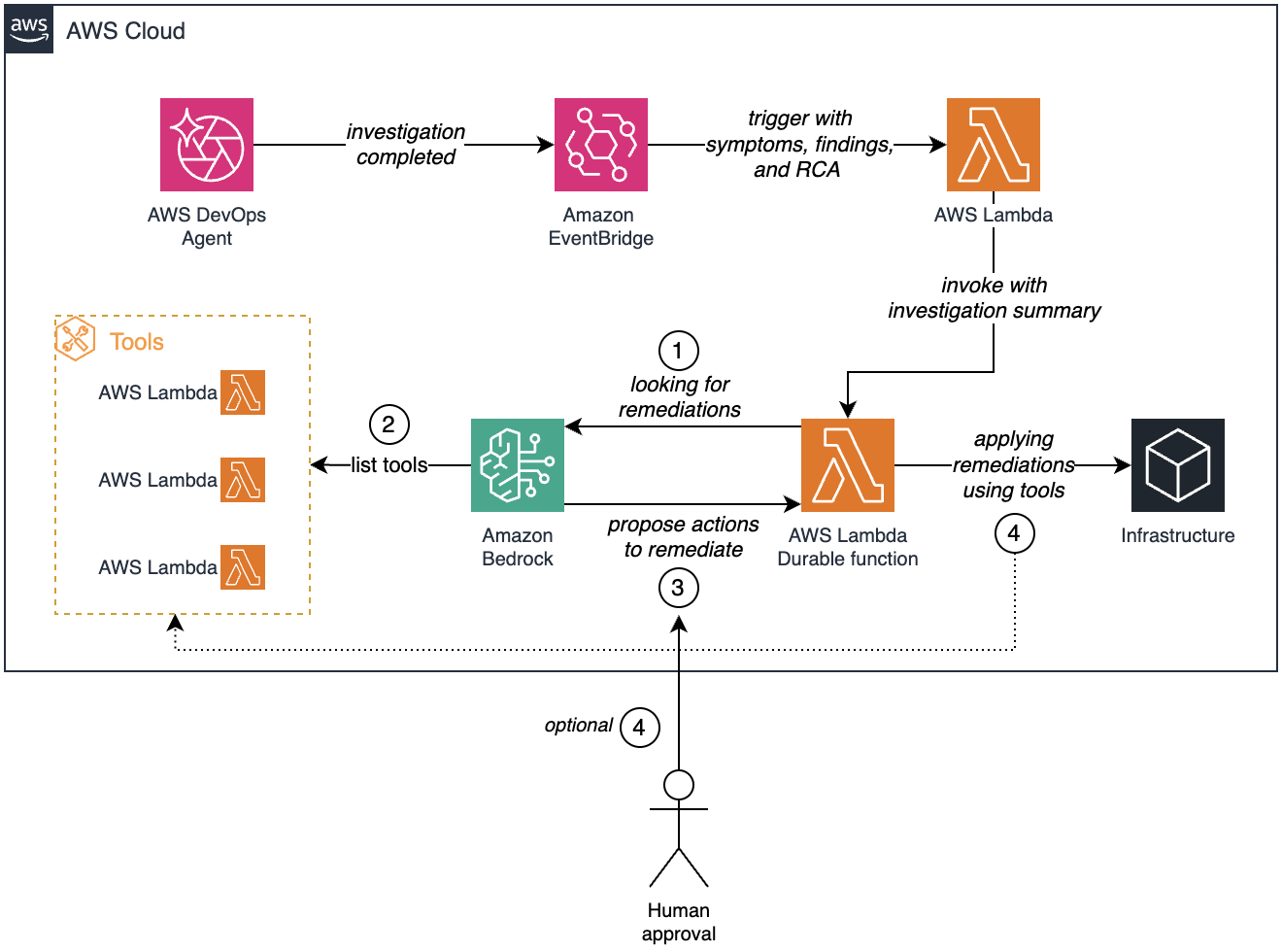
图 1:从 AWS DevOps Agent 调查开始,经由 Amazon EventBridge、AWS Lambda 和 Amazon Bedrock 的自动化修复工作流;在变更到达基础设施之前可选择进行人工批准
该工作流包含以下步骤:
- AWS DevOps Agent 完成事故调查,并发出包含症状、发现结果和根本原因分析的事件。
- Amazon EventBridge 接收调查完成事件,并使用调查内容触发
devops-agent-trigger函数。 - Lambda 函数打包调查摘要,并调用
devops-agent-remediation-durabledurable function。 - durable function 将调查上下文发送给 Amazon Bedrock,后者分析调查结果并查找适用的修复措施。
- Amazon Bedrock 从经审核批准的 Lambda 函数白名单
devops-agent-lambda-tool中识别并列出可用的修复工具。 - Amazon Bedrock 根据调查结果和可用工具提出具体的修复操作。
- 对于只读操作,durable function 会自主运行修复工具。对于基础设施变更,工作流会暂停,并在继续前等待人工批准。
- 获得批准后,durable function 使用所选工具将修复操作应用到基础设施。
durable function 以 Agentic 循环方式运行:迭代调用 Amazon Bedrock、执行经批准的工具,并将结果反馈至对话,直至修复完成。为确保自动化操作安全且可审计,编排器会强制执行经过审核的修复工具白名单。每个工具都是一个专门构建的 Lambda 函数,执行特定且边界明确的操作,例如读取 Lambda 函数配置或更新 AWS Identity and Access Management(IAM)策略语句。Amazon Bedrock 只能从这组已批准的工具中选择并调用工具,从而将自动化操作的范围保持在可控状态。
该工作流还区分只读操作和会产生变更的操作。只读工具无需人工干预即可自主运行。会修改基础设施状态的变更操作,会使 durable function 暂停执行并等待人工批准。这正是 AWS Lambda Durable Functions 的一项关键优势。该函数会检查点保存其进度,并可在不消耗计算资源的情况下暂停数分钟、数小时甚至数天;在收到批准信号后,它会从中断位置准确恢复。到值班工程师介入时,系统已经收集了相关配置,将根本原因与可用修复操作关联,并准备好一组可一键批准的预验证变更。
当前实现使用批准或拒绝信号。由于回调可接受任意 JSON 载荷,您可以扩展批准流程,使其携带参数覆盖值或审核者观察结果。这些信息可以反馈至 Bedrock 对话,在执行前进一步优化所建议的修复方案。
以下各节将介绍实现细节,包括 Amazon EventBridge 规则配置和 durable function 编排逻辑。随后,我们使用 AWS Cloud Development Kit(AWS CDK)部署该解决方案。
前提条件
部署此解决方案前,请确认满足以下前提条件:
- 已安装并配置 AWS Command Line Interface(AWS CLI)。
- Python 3.14 或更高版本。
- 已安装 AWS CDK。
- 一个活跃的 AWS DevOps Agent 空间。
- (可选)安装 Kiro 和 Agent Toolkit for AWS。Agent Toolkit 通过一个采用 IAM 访问控制的托管 MCP Server,向 Kiro 提供对 AWS API 的安全访问。如果您使用 Kiro,本文中的事故模拟、部署和清理步骤均可通过自然语言提示完成,而无需手动运行 CLI 命令。要进行设置,请将 AWS MCP Server 添加到
~/.kiro/settings/mcp.json(设置说明)。该仓库包含 Kiro 规则和 Agent 文件,可自动向 Kiro 提供项目上下文、部署顺序和安全约定。
模拟事故
为了演示端到端工作流,我们模拟一个常见场景:某个 Lambda 函数超出其配置的超时时间。这会为 AWS DevOps Agent 提供一个真实的事故进行调查,并启动修复工作流。
为了将重点放在修复解决方案本身,创建和调用此测试函数的步骤保存在仓库中。仓库包含一个可直接使用的 devops-agent-timeout 函数,以及部署、调用该函数并在 Amazon CloudWatch Logs 中确认超时错误的分步说明。有关完整演练,请参阅 README 中的 “模拟事故”部分。
在函数部署完成并至少产生一次超时错误后,您就可以使用 AWS DevOps Agent 启动调查。
使用 AWS CDK 部署解决方案
完成以下步骤,以部署剩余的解决方案资源:
**Kiro:**如果您已配置 Kiro 和 Agent Toolkit for AWS(参见“前提条件”),请在 Kiro 中打开克隆的仓库,并提出以下请求:“设置 Python 环境并部署 CDK stack。在部署前向我展示将创建哪些资源。”Kiro 会从仓库读取项目规则、设置虚拟环境、安装依赖项,并在部署前向您展示计划创建的资源。它会在执行前确认每项基础设施变更,遵循与修复解决方案本身相同的人在回路(human-in-the-loop)模式。若要手动部署,请按照以下步骤操作。
-
克隆托管在 GitHub 上的 AWS CDK 代码:
$ git clone https://github.com/aws-samples/sample-automate-remediation-post-devops-agent-investigation.git -
进入目录
sample-automate-remediation-post-devops-agent-investigation:$ cd sample-automate-remediation-post-devops-agent-investigation -
引导初始化 AWS CDK。这是在特定 AWS 环境(AWS 账户与 AWS Region 的组合)中首次使用 AWS CDK 时所必需的操作。
-
部署 stack:
AWS CDK 会自动预置并配置以下资源:
- 三个 Lambda 函数:
devops-agent-trigger。devops-agent-remediation-durable。devops-agent-lambda-tool。
- Amazon EventBridge 规则。
AWS CDK 会按照最小权限原则和 AWS 安全最佳实践自动处理 IAM 权限。例如,Amazon EventBridge 被授予对 devops-agent-trigger 函数的 lambda:InvokeFunction 权限。该 stack 向 devops-agent-trigger 函数授予 aidevops:ListJournalRecords 权限,以便其从 AWS DevOps Agent 日志中获取调查摘要。它还向 devops-agent-remediation-durable 函数授予 bedrock:InvokeModel 权限,以便其调用 Amazon Bedrock。
验证解决方案
在修复 stack 部署完成且 devops-agent-timeout 函数持续产生超时错误后,现在可以演练端到端工作流。
使用 AWS DevOps Agent 启动调查
打开 AWS DevOps Agent 控制台,进入您的 Agent 空间,并询问:“devops-agent-timeout 函数发生了什么?”
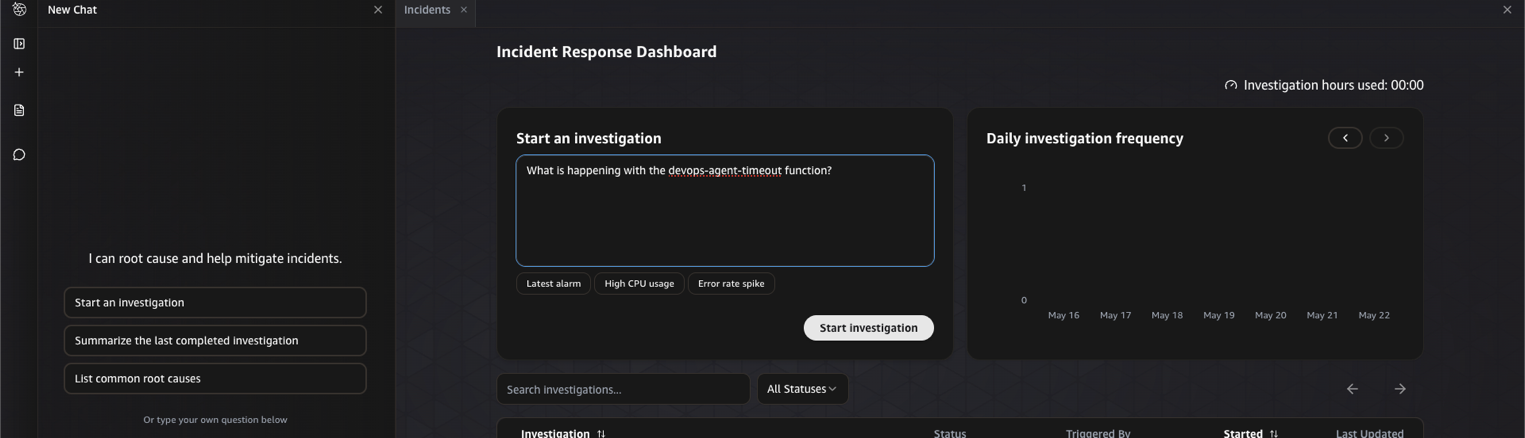
图 2:从 AWS DevOps Agent 控制台启动调查
调查启动后,需要几分钟才能完成。在此期间,AWS DevOps Agent 会自主关联 CloudWatch 指标、日志和函数配置,以确定根本原因。
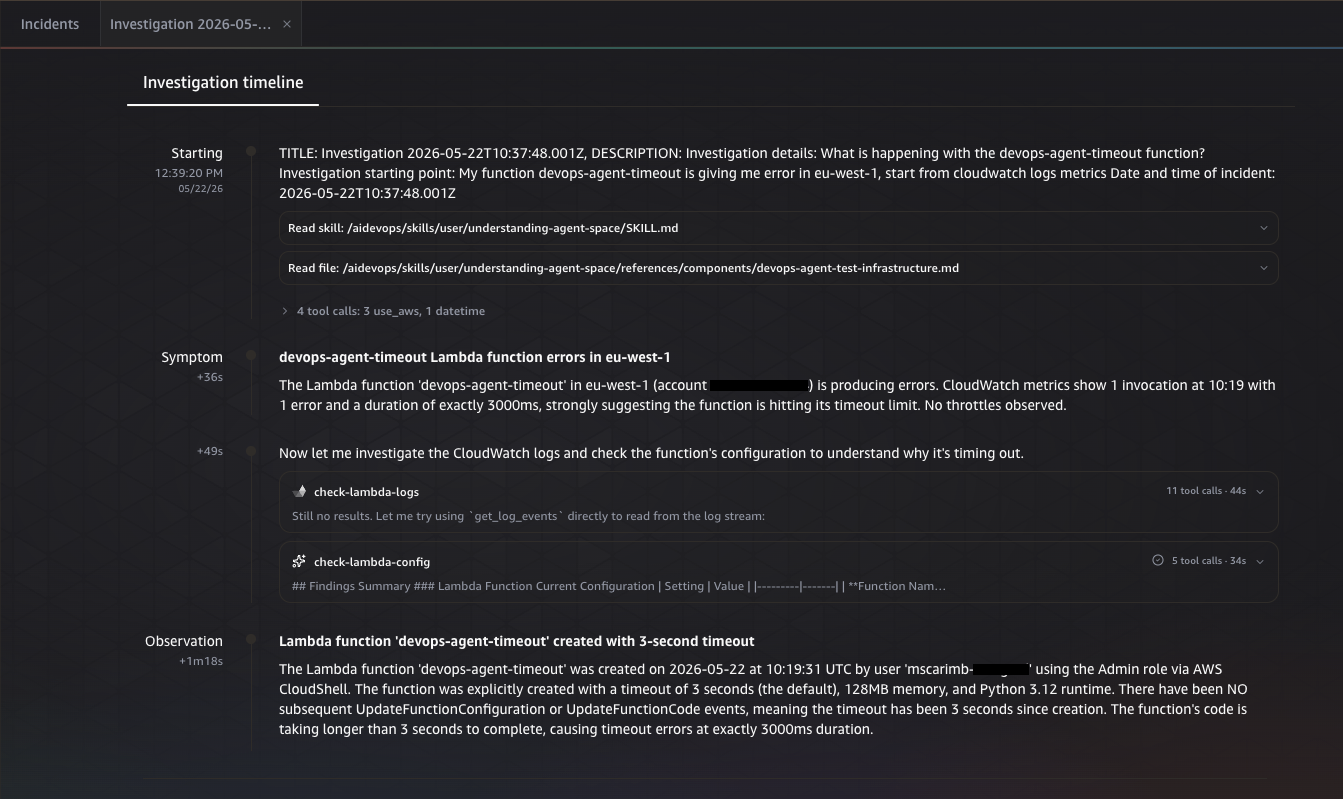
图 3:AWS DevOps Agent 在调查期间关联信号
调查完成后,AWS DevOps Agent 会给出根本原因分析,指出函数超时时间不足以满足该工作负载的需求。
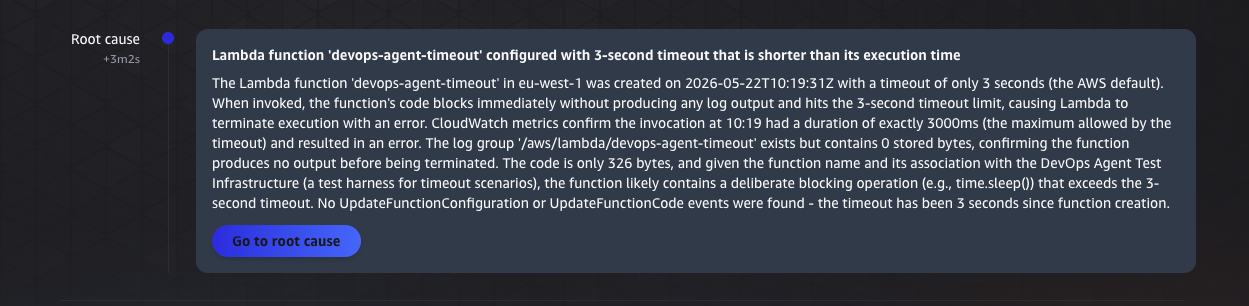
图 4:识别函数超时时间不足的根本原因分析
验证触发 Lambda 的执行情况
调查完成会向 Amazon EventBridge 发出一个 Investigation Completed 事件。
该规则会触发 devops-agent-trigger Lambda 函数,该函数从 AWS DevOps Agent 日志中获取调查摘要。在 /aws/lambda/devops-agent-trigger CloudWatch 日志组中,您可以看到发送至 devops-agent-remediation-durable durable function 的已解析摘要,其中包括症状、根本原因、促成原因和调查缺口。
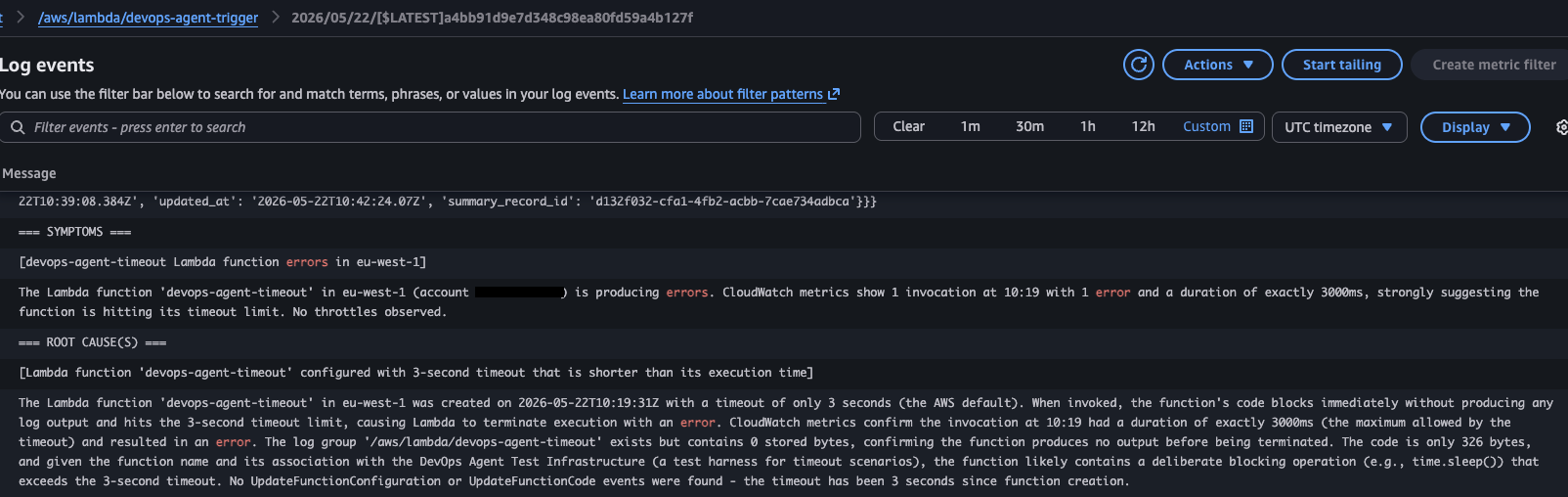
图 5:触发函数 CloudWatch 日志组中的已解析调查摘要
监控 durable function 执行
前往 Lambda 控制台,打开 devops-agent-remediation-durable 函数,然后选择 Durable executions 选项卡。选择新的执行记录以检查其已检查点保存的步骤。
[ and recommended actions for resolution. However, to retain control and help prevent unintended changes, organizations typically keep their observability agents, including AWS DevOps Agent, in an observe-and-report mode, where the agent diagnoses issues but doesn’t modify production resources directly. In this post, we demonstrate how to use AWS Lambda Durable Functions, a capability of AWS Lambda, Amazon EventBridge, and Amazon Bedrock to create an automated remediation workflow that complements AWS DevOps Agent to complete the issue resolution step. This workflow transforms investigation summaries into pre-validated fixes ready for single approval action, helping you reduce mean time to resolution (MTTR) and free your on-call engineers from repetitive diagnostic work.
Solution overview
With AWS Lambda Durable Functions, you can build resilient multi-step applications and AI workflows that can run for up to one year without requiring you to manage additional infrastructure or write custom state management and error handling code. These functions automatically checkpoint progress, suspend execution during long-running tasks, and recover from failures while maintaining reliable progress despite interruptions.
The following diagram illustrates the solution architecture.
Figure 1: Automated remediation workflow from an AWS DevOps Agent investigation through Amazon EventBridge, AWS Lambda, and Amazon Bedrock, with optional human approval before changes reach the infrastructure
The workflow consists of the following steps:
- AWS DevOps Agent completes an incident investigation and emits an event containing symptoms, findings, and root cause analysis.
- Amazon EventBridge receives the investigation completion event and triggers the
devops-agent-triggerfunction with the investigation content. - The Lambda function packages the investigation summary and invokes the
devops-agent-remediation-durabledurable function. - The durable function sends the investigation context to Amazon Bedrock, which analyzes the findings and looks for applicable remediations.
- Amazon Bedrock identifies and lists the available remediation tools from a curated allowlist of approved Lambda functions:
devops-agent-lambda-tool. - Amazon Bedrock proposes specific remediation actions based on the investigation findings and the available tools.
- For read-only actions, the durable function runs the remediation tools autonomously. For infrastructure changes, the workflow suspends and waits for human approval before proceeding.
- After approval, the durable function applies the remediation actions to the infrastructure using the selected tools.
The durable function runs as an agentic loop, iteratively calling Amazon Bedrock, executing approved tools, and feeding results back into the conversation until the remediation is complete. To keep automated actions safe and auditable, the orchestrator enforces a curated allowlist of remediation tools. Each tool is a purpose-built Lambda function that performs a specific, well-scoped action, such as reading a Lambda function configuration or updating an AWS Identity and Access Management (IAM) policy statement. Amazon Bedrock can only select and invoke tools from this approved set, which keeps the scope of automated actions controlled. The workflow further distinguishes between read-only operations and mutating operations. Read-only tools run autonomously without human intervention. Mutating actions that would modify infrastructure state cause the durable function to suspend execution and wait for human approval. This is where AWS Lambda Durable Functions provide a key advantage. The function checkpoints its progress and pauses for minutes, hours, or even days without consuming compute resources, then resumes exactly where it left off after it receives the approval signal. By the time the on-call engineer engages, the system has already gathered relevant configurations, correlated the root cause with available remediation actions, and prepared a set of pre-validated changes ready for one-click approval. The current implementation uses an approve or reject signal. Because the callback accepts an arbitrary JSON payload, you can extend the approval to carry parameter overrides or reviewer observations. These can be fed back into the Bedrock conversation to refine the proposed remediation before execution.
In the following sections, we walk through the implementation details, including the Amazon EventBridge rule configuration and the durable function orchestration logic. We then deploy the solution using the AWS Cloud Development Kit (AWS CDK).
Prerequisites
Before deploying this solution, verify that you have the following prerequisites:
- The AWS Command Line Interface (AWS CLI) installed and configured.
- Python 3.14 or later.
- The AWS CDK installed.
- An active AWS DevOps Agent space.
- (Optional) Kiro with the Agent Toolkit for AWS. The Agent Toolkit gives Kiro secure access to AWS APIs through a managed MCP Server with IAM-based access controls. If you use Kiro, the incident simulation, deployment, and cleanup steps in this post can be completed with natural language prompts instead of running CLI commands manually. To set it up, add the AWS MCP Server to
~/.kiro/settings/mcp.json(setup instructions). The repository includes a Kiro rules and agents file that gives Kiro the project context, deployment sequence, and safety conventions automatically.
Simulate the incident
To demonstrate the end-to-end workflow, we simulate a common scenario: a Lambda function that exceeds its configured timeout. This gives AWS DevOps Agent a real incident to investigate and sets the remediation workflow in motion.
To keep the focus on the remediation solution itself, the steps to create and invoke this test function are kept in the repository. It includes a ready-to-use devops-agent-timeout function and step-by-step instructions to deploy it, invoke it, and confirm the timeout error in Amazon CloudWatch Logs. For the full walkthrough, see the “Simulate the incident” section of the README.
After the function is deployed and has produced at least one timeout error, you’re ready to start an investigation with AWS DevOps Agent.
Deploy the solution using the AWS CDK
Complete the following steps to deploy the remaining solution resources:
Kiro: If you have Kiro with the Agent Toolkit for AWS configured (see Prerequisites), open the cloned repository in Kiro and ask: “ Set up the Python environment and deploy the CDK stack. Show me what resources will be created before deploying. ” Kiro reads the project rules from the repository, sets up the virtual environment, installs dependencies, and shows you the planned resources before deploying. It confirms each infrastructure change before executing, following the same human-in-the-loop pattern that the remediation solution itself uses. To deploy manually, follow these steps.
-
Clone the AWS CDK code hosted on GitHub:
$ git clone https://github.com/aws-samples/sample-automate-remediation-post-devops-agent-investigation.git -
Navigate to the directory
sample-automate-remediation-post-devops-agent-investigation:$ cd sample-automate-remediation-post-devops-agent-investigation -
Bootstrap the AWS CDK. This is required the first time you use the AWS CDK in a specific AWS environment (a combination of an AWS account and AWS Region).
-
Deploy the stack:
The AWS CDK automatically provisions and configures the following resources:
- Three Lambda functions:
devops-agent-trigger.devops-agent-remediation-durable.devops-agent-lambda-tool.
- Amazon EventBridge rule.
The AWS CDK automatically handles the IAM permissions using least-privilege principles and AWS security best practices. For example, Amazon EventBridge is granted lambda:InvokeFunction permissions for the devops-agent-trigger function. The stack grants the aidevops:ListJournalRecords permission to the devops-agent-trigger function so it can fetch investigation summaries from the AWS DevOps Agent journal. It also grants the bedrock:InvokeModel permission to the devops-agent-remediation-durable function so it can invoke Amazon Bedrock.
Validate the solution
With the remediation stack deployed and the devops-agent-timeout function failing with timeout errors, we can now walk through the end-to-end workflow.
Start an investigation with AWS DevOps Agent
Open the AWS DevOps Agent console, navigate to your agent space, and ask: “ What is happening with the devops-agent-timeout function? ”
Figure 2: Starting an investigation from the AWS DevOps Agent console
The investigation starts and takes a few minutes to complete. During this time, AWS DevOps Agent autonomously correlates CloudWatch metrics, logs, and the function’s configuration to determine the root cause.
Figure 3: AWS DevOps Agent correlating signals during the investigation
After the investigation completes, AWS DevOps Agent presents the root cause analysis, identifying that the function timeout is insufficient for the workload.
Figure 4: The root cause analysis identifying the insufficient function timeout
Verify the trigger Lambda execution
The investigation completion emits an Investigation Completed event to Amazon EventBridge.
The rule triggers the devops-agent-trigger Lambda function, which fetches the investigation summary from the AWS DevOps Agent journal. In the /aws/lambda/devops-agent-trigger CloudWatch log group, you can see the parsed summary that is sent to the devops-agent-remediation-durable durable function, including symptoms, root causes, contributing causes, and investigation gaps.
Figure 5: The parsed investigation summary in the trigger function CloudWatch log group
Monitor the durable function execution
Navigate to the Lambda console, open the devops-agent-remediation-durable function, and choose the Durable executions tab. Choose the new execution to inspect its checkpointed steps.
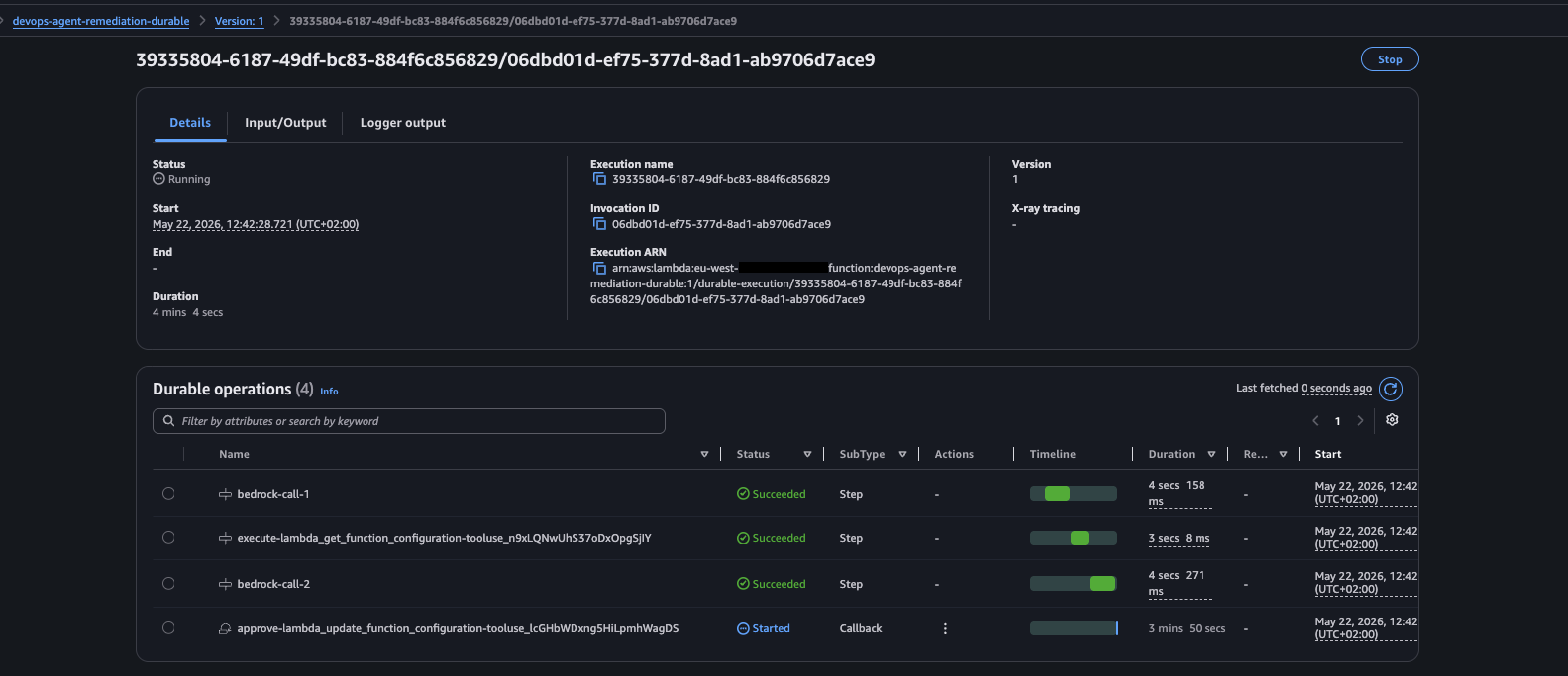
Figure 6: The durable function execution and its checkpointed steps in the Lambda console
The durable orchestrator begins its agentic loop by sending the investigation context to Amazon Bedrock. In the first Bedrock call, the model analyzes the investigation summary and determines that it needs to inspect the current function configuration before proposing a fix. It selects the lambda_get_function_configuration tool from the allowlist. Because this is a read-only operation, it runs autonomously without requiring human approval. The step result shows the current configuration of the devops-agent-timeout function, confirming a timeout value of 3 seconds.
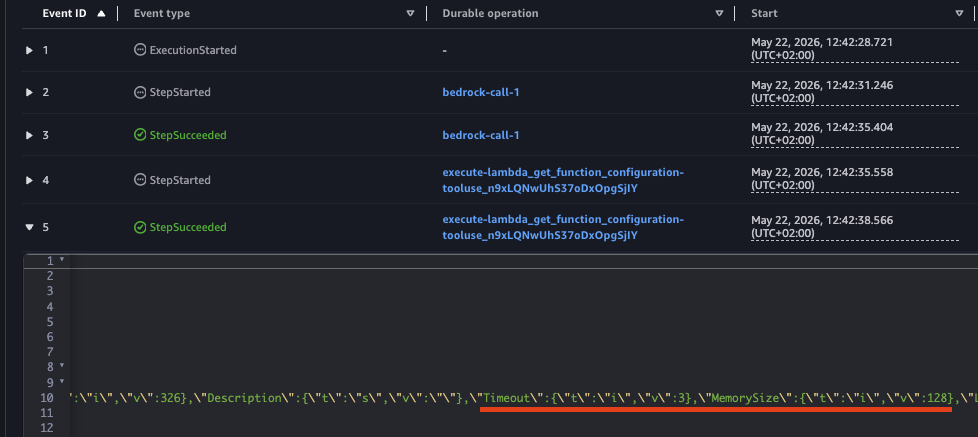
Figure 7: The read-only tool call returning the current 3-second timeout configuration
With the current configuration confirmed, Amazon Bedrock proceeds to the next iteration. It reasons that the 3-second timeout is the root cause of the failures and proposes increasing it to 30 seconds. The Amazon Bedrock response contains both the reasoning and the tool call:
{
  ....
  },
  "output": {
    "message": {
      "role": "assistant",
      "content": [
        {
          "text": "Now I can see the current configuration confirms the issue - the function has a 3-second timeout. Given that this appears to be a test function for timeout scenarios (based on the name \"devops-agent-timeout\" and its association with \"DevOps Agent Test Infrastructure\"), I'll increase the timeout to a reasonable value that should allow the function to complete successfully. I'll set it to 30 seconds, which is a common timeout for Lambda functions that need more execution time."
        },
        {
          "toolUse": {
            "toolUseId": "tooluse_lcGHbWDxng5HiLpmhWagDS",
            "name": "lambda_update_function_configuration",
            "input": {
              "FunctionName": "devops-agent-timeout",
              "Timeout": 30
            },
            "type": "tool_use"
          }
        }
        ...
      }
Because lambda_update_function_configuration is a mutating action, the durable function suspends execution and waits for human approval.
 Figure 8: cloudwatch logs output of lambda durable function for approval request
Important: The investigation_summary sent to Amazon Bedrock, and the remediation it proposes, are AI-generated and should always be reviewed before approval. The human approval gate is the security control: the approver must inspect the full tool parameters (for example, the exact FunctionName and Timeout in a lambda_update_function_configuration call) and confirm the change is correct.
Using the AWS CLI:
$ aws lambda send-durable-execution-callback-success \
    --callback-id <callback-id> \
    --cli-binary-format raw-in-base64-out \
    --result '{"approved": true}'
Using the AWS Console:
Navigate to the durable execution, select the pending callback, and choose Send success to confirm:
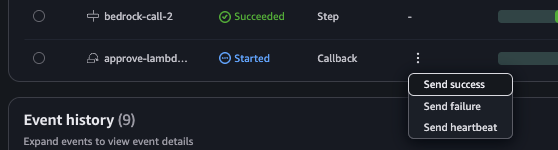
Figure 9: Approving the remediation by choosing Send success in the Lambda console
In the input field, enter {'approved': true} and confirm.
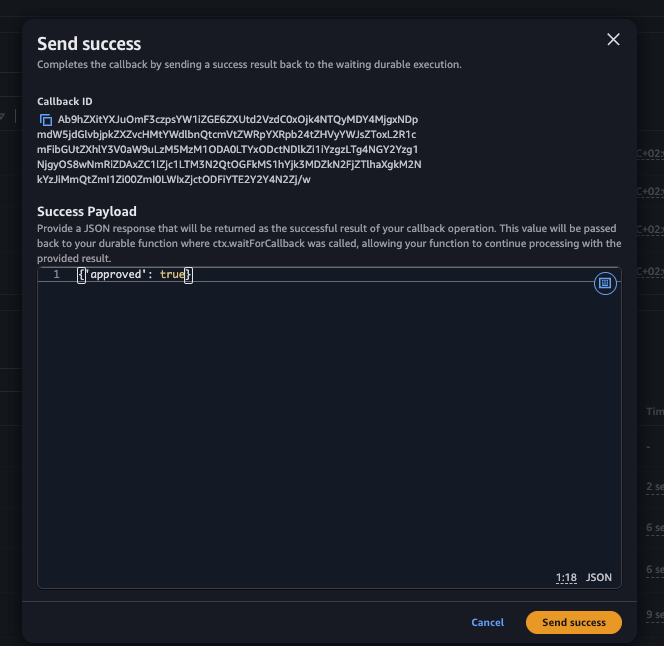
Figure 10: Entering the approval payload to confirm the callback
Verify the fix
After approval, the durable function resumes, invokes the tool Lambda to update the configuration, and Amazon Bedrock confirms the remediation is complete. The updated devops-agent-timeout function now shows the new timeout value:

Figure 11: The devops-agent-timeout function configuration updated to a 30-second timeout
The final step output (bedrock-call-4) confirms the successful remediation:
{
  "EventType": "StepSucceeded",
  "Name": "bedrock-call-4",
  ....
  },
  "output": {
    "message": {
      "role": "assistant",
      "content": [
        {
          "text": "## Remediation Complete
          **Issue Identified:** The Lambda function `devops-agent-timeout` in eu-west-1 was configured with a 3-second timeout that was insufficient for its execution time, causing timeout errors at exactly 3000ms.
          **Action Taken:** Successfully updated the Lambda function configuration to increase the timeout from 3 seconds to 30 seconds.
          **Verification:** Confirmed the configuration change was applied successfully. The function now has:
          - **Timeout:** 30 seconds (increased from 3 seconds)
          - **Status:** Successful update completion
          - **LastModified:** 2026-05-22T11:11:28.000+0000
          This remediation should resolve the timeout errors by providing the function with adequate time to complete its execution. The 30-second timeout provides a 10x increase from the original 3-second limit, which should be sufficient for most operations while still maintaining reasonable execution bounds for a Lambda function."
        }
      ]
    }
  },
  "stopReason": "end_turn",
  ...
}
This entire cycle, from incident detection to automated fix, required only a single approval action from the engineer. The system handled diagnosis, configuration retrieval, remediation proposal, and execution autonomously.
Clean up
Clean up the resources you created by completing the following steps:
Kiro: If you use Kiro with the Agent Toolkit for AWS, ask: “Clean up all resources from the DevOps Agent remediation demo: destroy the CDK stack, delete the devops-agent-timeout test function, its IAM role, and its CloudWatch log group.” Kiro removes resources in the correct order, confirming each destructive action before proceeding. To clean up manually, follow these steps.
-
Delete the AWS CDK resources:
-
Manually delete the
devops-agent-timeoutfunction that simulates the incident:$ aws lambda delete-function --function-name devops-agent-timeout -
Manually delete the IAM role and the CloudWatch log group of the
devops-agent-timeoutfunction:$ aws iam detach-role-policy \ --role-name devops-agent-timeout-role \ --policy-arn arn:aws:iam::aws:policy/service-role/AWSLambdaBasicExecutionRole $ aws iam delete-role --role-name devops-agent-timeout-role $ aws logs delete-log-group --log-group-name /aws/lambda/devops-agent-timeout
Conclusion
This post demonstrated how you can automate issue remediation by using Lambda Durable Functions, Amazon EventBridge, and Bedrock in conjunction with the DevOps Agent. The solution picks up where AWS DevOps Agent leaves off, transforming investigation summaries into actionable remediation steps that run with human-in-the-loop approval. This approach reduces mean time to resolution because, by the time the on-call engineer engages, the system has already diagnosed the issue, gathered current configurations, and prepared a ready-to-approve fix. Safety remains central to the design: the allowlist restricts Amazon Bedrock to only invoke pre-approved tools, and the human approval gate helps prevent unintended changes from reaching production without explicit authorization. The architecture is also inherently extensible. Adding new remediation capabilities requires only configuration updates to the tool registry, not code changes to the orchestrator. And because AWS Lambda Durable Functions suspend without consuming compute resources during the approval wait, the solution remains cost-efficient even when approval cycles span hours or days.
To get started using this solution, download the complete AWS CDK template from the GitHub repository, and follow the steps in this post to deploy the solution in your environment.
We would love to hear from you. Share your experience implementing this solution, ask questions, or suggest improvements in the comments. You can also join the AWS Community Builders program to connect with other builders and share your serverless architecture patterns.