先获取洞察,再推进外循环:Ambient Quality Agent 如何诊断生产环境中的 Agent
英文标题:The Outer Loop, Insights First: An Ambient Quality Agent That Diagnoses Your Production Agent
Google 开源了 Ambient Quality Agent(AQuA),用于在 Google Cloud 中与生产 Agent 并行运行,采样会话轨迹、聚类并验证质量问题,帮助发现 HTTP 200 和基础设施健康检查无法暴露的静默故障。AQuA 通过采样、审查、聚类、验证和跟踪五个阶段生成可持续追踪的洞察,并可按需结合部署时的源码快照诊断根因。在 travel-concierge 的 32 个会话测试中,系统从 42 条发现中筛出 6 个已验证问题,涉及绕过座位可用性检查、跨子 Agent 丢失饮食约束等。开发者可以将这些带有证据和源码定位的洞察及失败会话用于改进内循环,而 AQuA 不会自行修改代码或提交拉取请求。
 11.7 KB
 338.3 KB
 559.1 KB
 541.4 KB
 660.3 KB
 295.6 KB
 312.8 KB
 236.3 KB
 294.9 KB
 333.7 KB
 34.7 KB
 66.5 KB
 72.6 KB
中文
你的 Agent 返回 HTTP 200,响应时间没有超出预算,工具调用也没有报错。但它仍可能在从未询问座位选择子 Agent 3A 是否可用的情况下,就将该座位记录为已确认;或者向个人资料注明为纯素食者的旅行者推荐一家佛罗伦萨牛排馆。
最初的 80% 相对容易
在我们合作的团队中,每个在生产环境运行 Agent 的团队都在试图回答同样的三个问题:我的 Agent 表现如何?它有哪些反复出现的失败模式?我又该如何持续提升:做出改动、确认改动有效,并防止质量再次下滑?
如今,让 Agent 达到最初的 80%——能够处理预先想到的测试用例——可能相对简单、迅速。一个评估数据集、一个编码 Agent,以及运行、评分、修复和比较的紧密内循环,通常就能在几天内让已知场景的任务取得成功。但上线之后,质量曲线便趋于平缓,甚至开始下降。
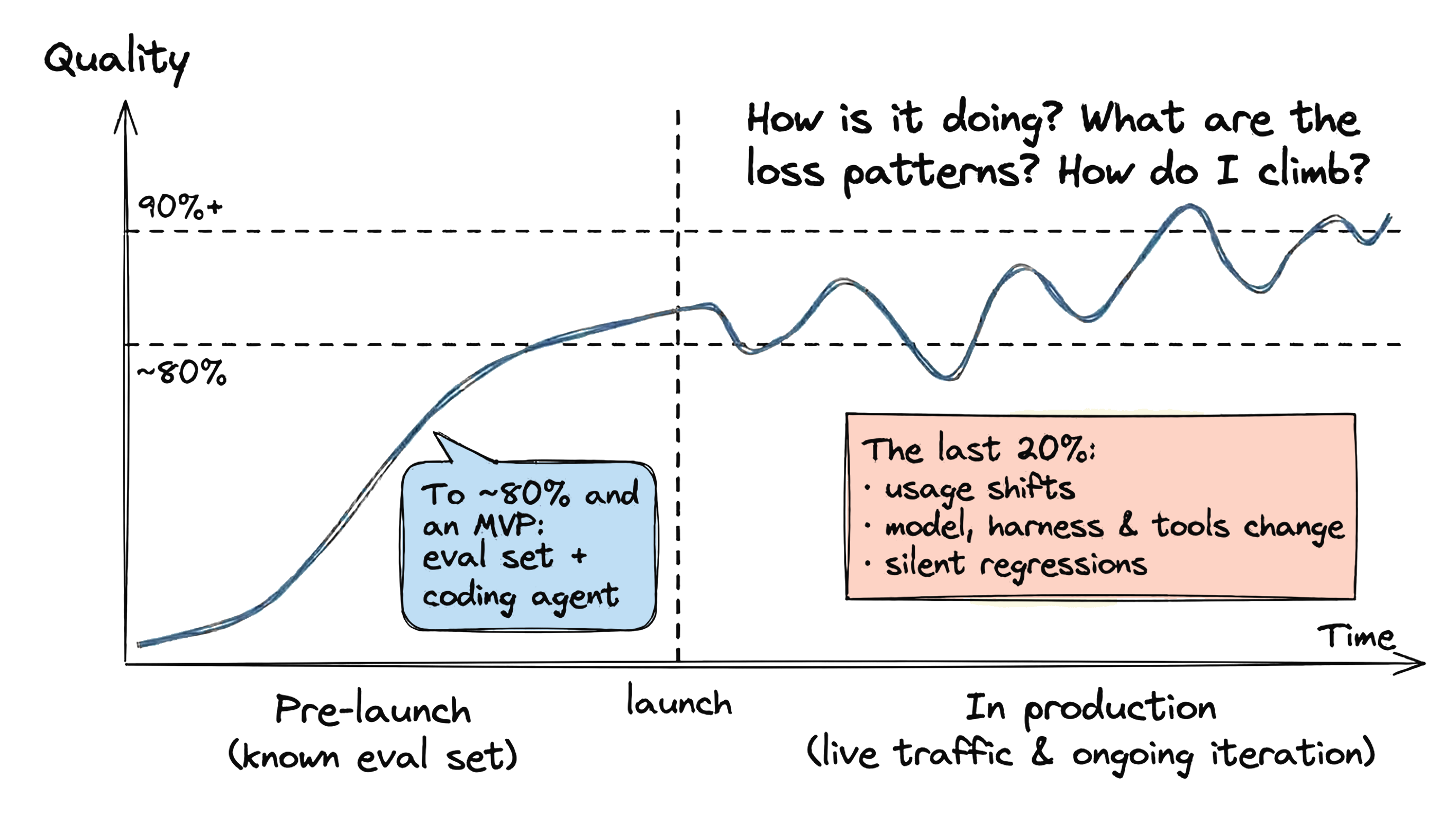
图 1. Agent 质量在上线前快速提升,随后在生产环境中出现波动。
剩下的 20% 更难,是因为上线后的情况会不断变化。随着用户逐渐了解 Agent 实际能做什么,使用方式也会改变,真实流量不再与最初的评估集相似。与此同时,底层系统也在变化:升级模型、更新编排框架,或修改工具与技能时,一切仍能运行,健康检查也依然全绿(图 2),但对话质量和任务成功率可能发生变化,而标准部署流水线不会对此发出警告。

图 2. 所有基础设施健康检查都保持绿色。故障静默发生在对话内部。
而当一个会话确实出错时,要弄清原因,就需要区分几个从外部看起来几乎一样的层面。例如:
- 模型可能凭空编造了一个参数,或遗漏了三轮对话之前提出的约束。
- 编排框架可能将请求路由到了错误的子 Agent,或在多轮交互之间丢失了状态。
- 工具契约可能拒绝了某个输入,因为其有效取值从未在 schema 中记录。
- 指令或技能可能只是缺少一条此前没人想到要写下的规则。
这些故障模式可能由不同的负责人处理,需要不同的修复方式。原始轨迹记录的是事件先后发生的情况,而不是因果关系。区分这些层面,需要将失败轨迹与产生它们的确切代码修订版本结合起来阅读。在线评估仪表盘能告诉你分数发生了变化,编码 Agent 在你知道从哪里入手后也能检查轨迹,但面对生产环境的流量规模,没有人能够手动阅读每一段对话。
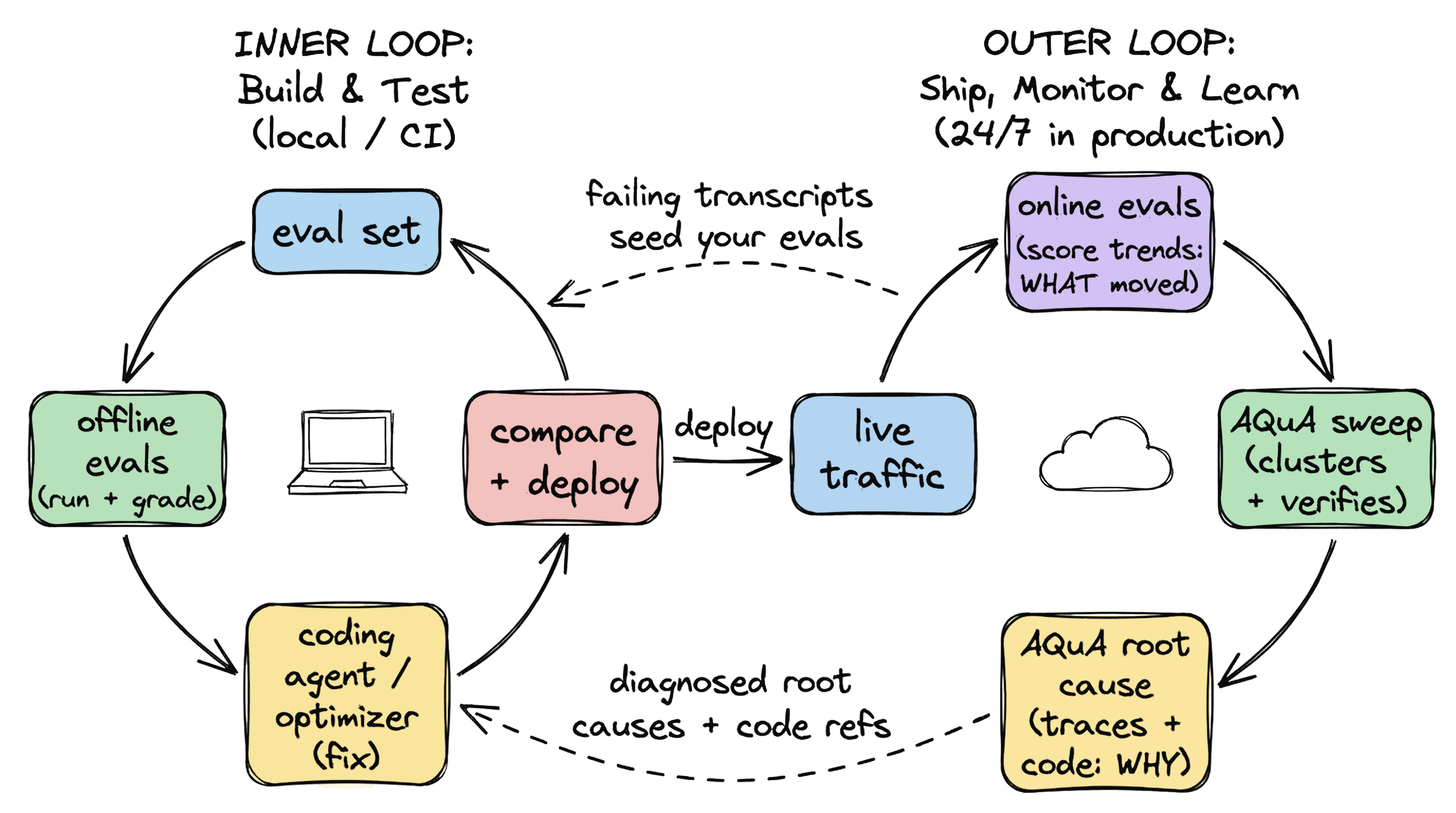
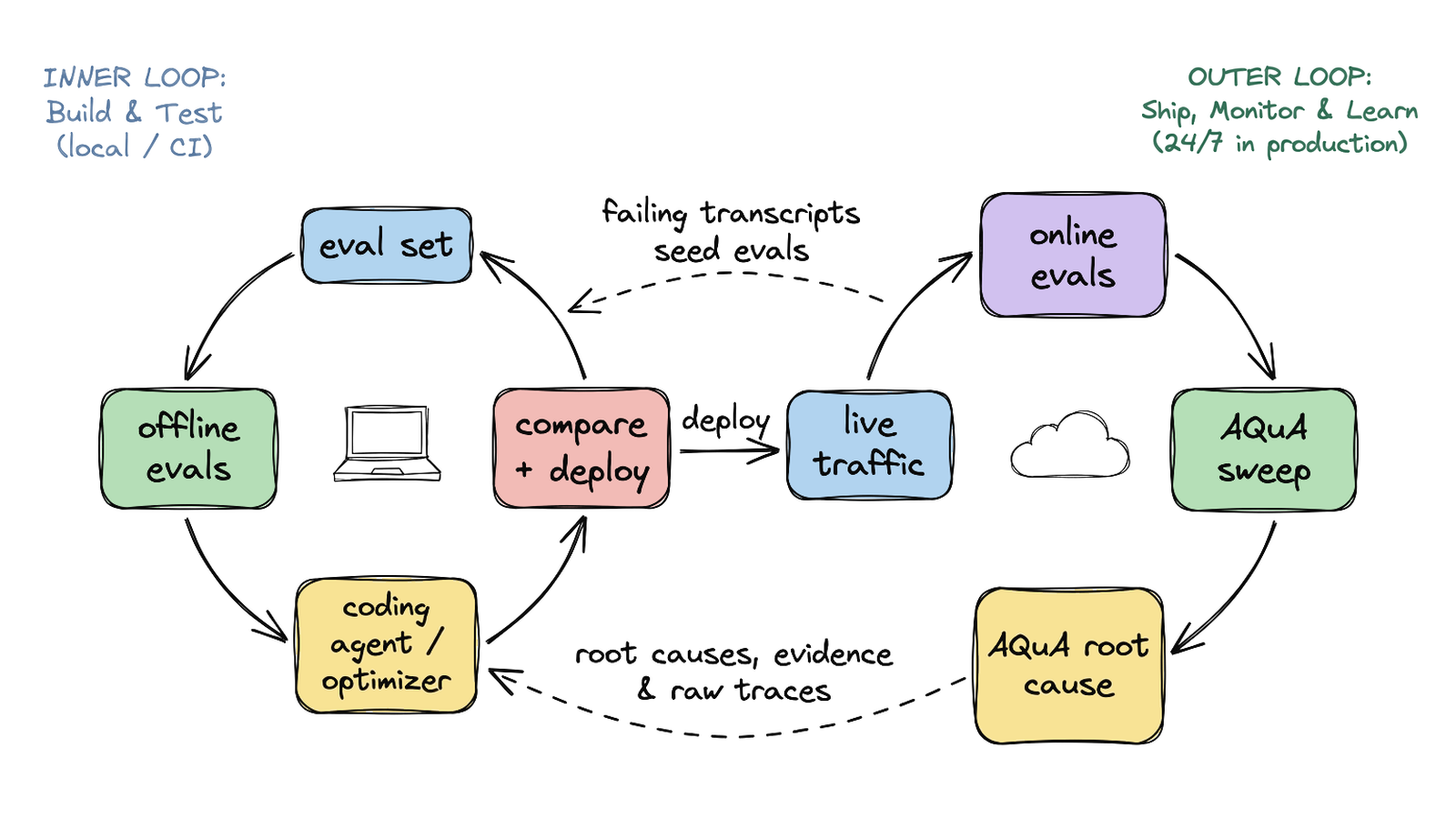
图 3. AQuA 运行于生产环境的外循环,并将发现的问题反馈到内循环中。
在我们 6 月发布的文章中,我们以 travel-concierge 为例,完整介绍了上线前的内循环。本文介绍外循环:我们已将其作为可组合的构建模块开源发布。你可以在自己的项目中运行这些模块、使其适配自己的技术栈,并在我们探索团队如何在生产环境中持续保障 Agent 质量的过程中,共同参与完善。
AQuA 是什么:一个全天候监测、聚类和诊断生产故障的质量 Agent,即使你合上笔记本也能工作
**AQuA(Ambient Quality Agent)**在你的 Google Cloud 项目中与 Agent 并行运行,无需人工值守。它可以按计划、在每次部署之后或按需扫描 Cloud Trace、Cloud Logging 或 BigQuery 中的生产轨迹,即使你合上笔记本也能继续工作。原始会话记录、源码快照和 BigQuery 表都保留在你的项目边界内;AQuA 从不处于请求处理路径中,也不会向你的 Agent 写回数据。
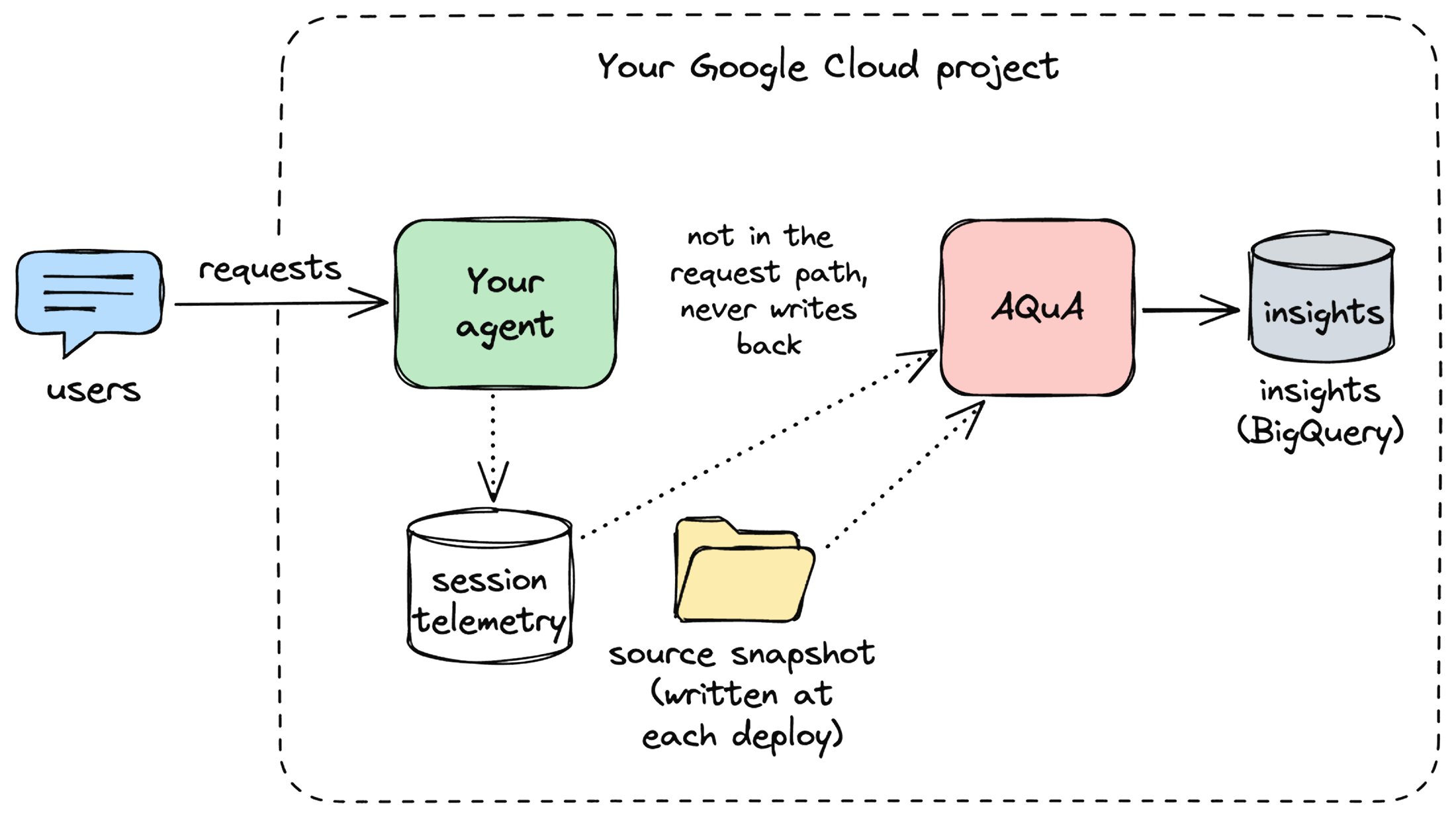
图 4. AQuA 在你的 Google Cloud 项目中与 Agent 并行运行,在请求处理路径之外读取轨迹和部署时的源码快照。
每次运行都会读取近期会话的一个样本,并经过五个阶段:
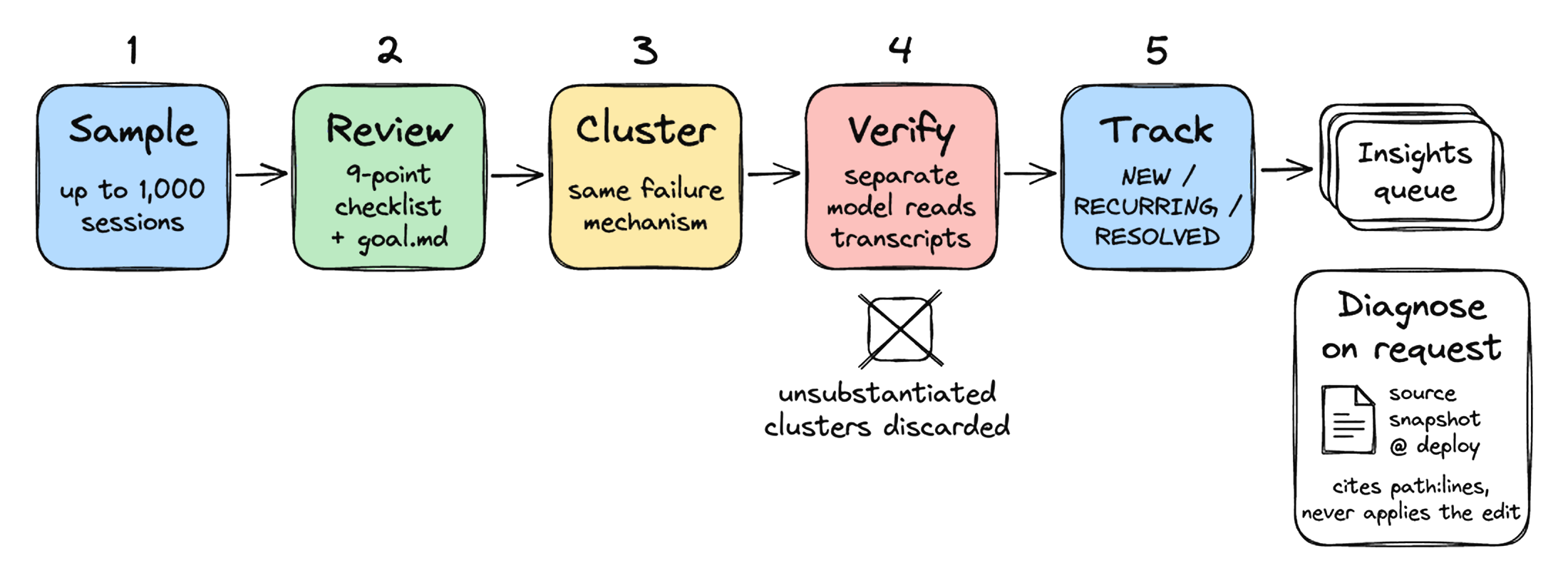
图 5. 五阶段扫描流水线将原始生产会话转化为已验证的洞察,并可针对已部署的源码快照按需执行根因诊断。
- **采样。**从遥测数据(Cloud Trace、Cloud Logging 或 BigQuery)中随机抽取最多 1,000 个近期会话;设置上限是为了让运行成本保持可预测。
- **审查。**结合 Agent 的指令、工具以及可选的
goal.md,按照涵盖常见故障的九项检查清单为每个会话评分,检查内容包括流程、工具选择及参数、依据支撑、任务完成情况等。会话未通过时,系统会生成结构化的actual / expected发现。 - **聚类。**将具有相同故障机制的会话发现归为候选问题簇。
- **验证。**另一个模型针对最多三份完整会话记录检查每个候选问题簇,丢弃证据不足以支持的问题簇。
- **跟踪。**将保留下来的问题簇与 BigQuery 中尚未解决的洞察(跨多次运行跟踪的已验证问题)匹配,标记为
NEW、RECURRING,或在 14 天内未再出现后自动标记为RESOLVED。
可以把它想象成一名负责初步筛查的初级质量工程师:阅读对话、过滤噪声,并为当值人员准备包含证据会话的调查材料。
为了让第二阶段贴合你的业务领域,你可以用通俗的英文编写开发者目标(goal.md),将其附加到每个审查提示词中;确定性的 Python 自定义指标(eval_config.yaml)则与评判器并行运行,用于跟踪通过率趋势。默认情况下,AQuA 使用单次执行的 session_review 评判器,针对检查清单评估对话,每个会话只调用一次模型,从而降低定时扫描成本,并生成驱动聚类的 actual / expected 差异。你也可以选择启用 Gemini 平台的托管轨迹 AutoRaters(task_success、tool_use_quality、trajectory_quality),它们会针对每项指标运行专门的评估器,例如在你希望依据标准化的开箱即用评分规则为会话打分,或使指标与离线评估保持一致时。
当某条洞察值得调查时,你可以从仪表盘的 Chat 或通过 agents-cli aqua run 触发根因分析。AQuA 会结合部署时捕获的不可变源码快照阅读失败轨迹:如果缺陷在你的代码仓库中,它会引用 <path>:<start>-<end>,并基于快照中的代码行提出修改建议;如果问题在你的代码之外,例如上游依赖、交接环节或检索到的载荷,它会将故障归因于轨迹中的相应步骤,而不提出代码差异。它绝不会自行应用修改或创建拉取请求。
AQuA 位于你已有的各类循环之间:离线评估根据已知测试用例为候选构建评分,在线评估监控生产环境中的通过率趋势,编码 Agent 或专门的优化器负责编辑提示词和代码。AQuA 则将原始生产流量转化为经过诊断、可定位到代码的洞察,以及归档的失败会话记录,为内循环提供输入。
以 travel-concierge 为例,演示一次多 Agent 扫描
下面以 travel-concierge(google/adk-recipes)的一次运行为例。该应用将旅行者的请求路由给多个子 Agent(inspiration_agent、place_agent、poi_agent, planning_agent、flight_search_agent、flight_seat_selection_agent、booking_agent 和 pre_trip / in_trip / post_trip),并通过 memorize(key, value)(travel_concierge/tools/memory.py)将正在规划的行程存储在会话状态中。
1. 部署、捕获源码快照并设置开发者目标
为 travel-concierge 项目接入 AQuA 只需三条 agents-cli 命令:
agents-cli extension add "${AQUA_CHECKOUT}"
agents-cli infra single-project --project="${GOOGLE_CLOUD_PROJECT}" --apply
agents-cli deploy --project="${GOOGLE_CLOUD_PROJECT}" --region us-east1
除了部署 AQuA 的运行器、BigQuery 数据集和位于 Identity-Aware Proxy 保护之后的 Cloud Run 仪表盘之外,agents-cli deploy 还会将 travel-concierge 源码树的不可变快照写入 Cloud Storage,并以部署修订版本(Revision 1)为键。
在仪表盘的 Configuration 页面,我们保存了一份开发者目标(goal.md),引导审查重点关注高层次的产品不变量,并排除风格方面的噪声,同时仍要求每条发现都引用 Agent 或子 Agent 违反其指令或工具状态的具体对话轮次:
Goal: Help travelers move from trip inspiration to a concrete itinerary and confirmed bookings across our sub-agents, with every confirmed flight, hotel, seat, and recommendation grounded in tool results and the traveler's profile.
Failure modes to make sure we cover:
- Mid-conversation changes (a weak spot in pre-launch testing): if a user updates destination, dates, or flight/hotel choices after an initial plan, make sure subsequent sub-agent tool calls and state updates reflect the change.
- Dropped context when handing off or delegating across inspiration_agent, planning_agent, and booking_agent (such as traveler profile preferences or prior selections).
Ignore: tone, greetings, small talk, or sessions where the user browses options and leaves without booking.
纯文本
如果你还希望在 eval_config.yaml 中使用确定性的 Python 评分规则来长期跟踪通过率,可以通过 agents-cli aqua metrics publish 将其与扫描配置一同发布。
2. 扫描并验证问题簇
在一次包含 32 个会话的多 Agent 扫描中——即对四个脚本化旅行者行程重放 32 次,在 travel_concierge 及其子 Agent 中产生了 1,583 个 OpenTelemetry span——5 个会话完全通过,27 个会话产生了 42 条结构化发现。每条发现都通过 span 限定到特定子 Agent 的隔离指令和工具声明。以下是一条关于 planning_agent 的发现:
**actual:**当用户在同一轮对话中选择去程航班 UA204 并要求座位 3A 和 3B 时,planning_agent 直接将这些座位号保存到会话状态中,没有调用 flight_seat_selection_agent 检查 3A 和 3B 是否可用。
**expected:**planning_agent 应先调用 flight_seat_selection_agent 核实座位可用性和价格,再将去程或返程座位号保存到会话状态中。
聚类阶段将这 42 条发现归为 9 个候选问题簇。验证器(Gemini 3.7 Flash)根据最多三份完整会话记录和各子 Agent 的定义检查每个问题簇,并排除了 3 个误报问题簇:其中两个案例里,旅行者明确要求选择第一班返程航班或直接进入预订;第三个案例中,聚类将两个不同子 Agent(flight_search_agent 和 inspiration_agent)互不相关的提示词与工具不匹配问题合并到了一起。最终剩下 6 个已验证问题,其中主要包括:
- **用户主动提出座位时绕过可用性检查(15 个会话,planning_agent):**当旅行者在选择航班时同时指定座位,或在行程中途更改目的地后立即指定座位时,planning_agent 会直接将座位写入会话状态,返回 HTTP 200 且没有工具错误,却没有调用 flight_seat_selection_agent 检查座位是否存在或可用。
- **跨子 Agent 边界丢失饮食约束(7 个会话,inspiration_agent → place_agent):**灵感 Agent 的提示词包含旅行者的个人资料(food_preference: vegan),但 place_agent 被封装为隔离工具,其提示词从未收到这份资料。当 inspiration_agent 向 place_agent 请求美食旅行建议,却没有在请求中传递“vegan”时,place_agent 推荐了意式培根蛋面和佛罗伦萨牛排。
- **poi_agent 的提示词与工具集互相矛盾(5 个会话,poi_agent):**景点子 Agent 的提示词要求提供来自 Google Maps Grounding Lite 的已验证图片、地图和地点 ID 字段,但该 Agent 声明的工具列表为空(
tools=[]),因此它编造了占位用的https://example.com/...URL。

图 6. travel-concierge 扫描得出的已验证洞察,按受影响会话数量排序。
3. 结合已部署代码进行诊断
在仪表盘中打开排名第一的洞察,即可看到该问题簇的完整细分信息:匹配的会话数量(15 条轨迹)、验证摘要,以及 15 条关联会话轨迹和触发该洞察的具体发现:
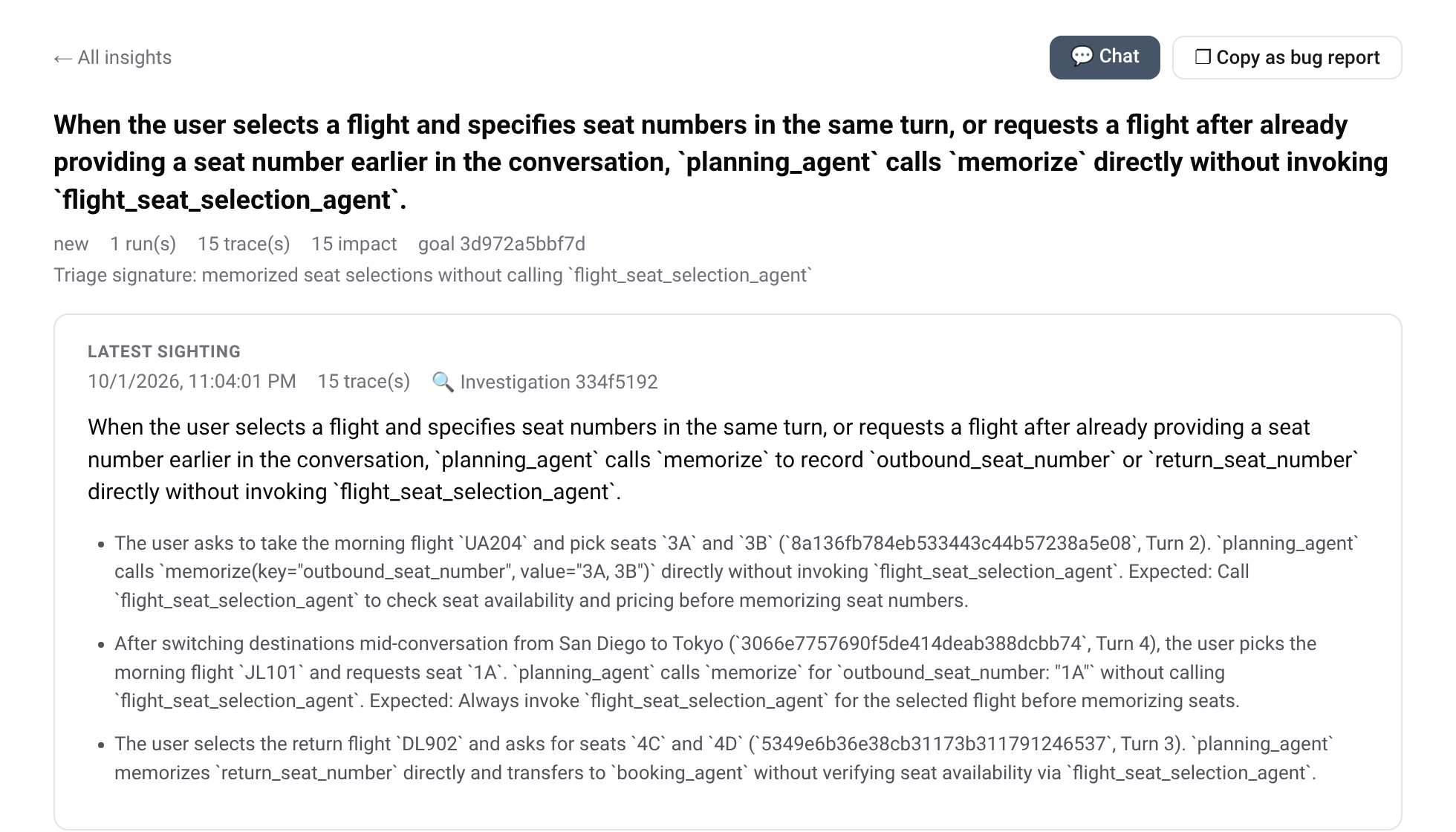
图 7. 仪表盘中的洞察详情视图,展示故障摘要和 15 条关联会话……
English / 原文
Your agent returns HTTP 200, stays inside its latency budget, and no tool call raises an error. Yet it still records seat 3A as confirmed without ever asking the seat-selection sub-agent whether 3A is free, or recommends a Florentine steakhouse to a traveler whose profile says vegan.
The first 80% is the relatively easy part
Every team we work with that runs an agent in production is trying to answer the same three questions: How is my agent doing? What are its loss patterns, the ways it fails that keep coming back? And how do I climb: change something, know it helped, and keep it from sliding back?
Getting an agent to the first 80%, where it handles the test cases you anticipated, can be relatively straightforward and fast today. An evaluation dataset, a coding agent, and a tight inner loop of run, grade, fix, and compare usually get you to task success on known scenarios in days. Then you launch, and the quality curve flattens or degrades.
Figure 1. Agent quality climbs quickly before launch, then fluctuates in production.
What makes the remaining 20% harder is that the ground moves after launch. Usage shifts as users discover what the agent can actually do, and live traffic stops resembling your initial eval set. At the same time, the system underneath also changes: when you upgrade a model, update your harness, or change a tool or skill, everything still runs and health checks stay green (Figure 2), but conversation quality and task success may shift in ways a standard deploy pipeline never warns you about.
Figure 2. Every infrastructure health check stays green. The failure is silent and happens inside the conversation.
And when a session does go wrong, working out why means separating several layers that can look nearly identical from the outside. For example:
- The model may have hallucinated an argument or dropped a constraint from three turns earlier.
- The orchestration harness may have routed to the wrong sub-agent or lost state between turns.
- A tool contract may have rejected an input because its valid values were never documented in the schema.
- The instructions or skills may simply be missing a rule nobody thought to write down.
Those failure modes can have different owners and different fixes. A raw trajectory records what happened next to what, not what caused what. Telling those layers apart requires reading the failing trajectories alongside the exact code revision that produced them. Online evaluation dashboards tell you that a score moved, and a coding agent can inspect a trace once you know where to look, but at production volume nobody can read every conversation by hand.
Figure 3. AQuA works the production outer loop and feeds what it finds back into your inner loop.
In our June post, we walked that pre-launch inner loop end to end on travel-concierge. This post covers the outer loop, released in the open as composable building blocks you can run in your own project, adapt to your stack, and help us shape as we explore how teams run continuous agent quality in production.
What AQuA is: a 24/7 quality agent that watches, clusters, and diagnoses production failures while your laptop is closed
AQuA (Ambient Quality Agent) runs unattended beside your agent in your Google Cloud project, sweeping production trajectories from Cloud Trace, Cloud Logging, or BigQuery on a schedule, after each deployment, or on demand while your laptop is closed. Raw session transcripts, source snapshots, and BigQuery tables stay inside your project boundary, and AQuA never sits in the request path or writes back to your agent.
Figure 4. AQuA runs beside your agent in your Google Cloud project, reading trajectories and deploy-time source snapshots outside the request path.
Each run reads a sample of recent sessions and puts it through a five-stage pipeline:
Figure 5. The five-stage sweep pipeline turns raw production sessions into verified insights, with root-cause diagnosis running on demand against the deployed source snapshot.
- Sample. Pulls a random sample of up to 1,000 recent sessions (capped to keep run cost predictable) from your telemetry (Cloud Trace / Cloud Logging or BigQuery).
- Review. Grades each session against a nine-point checklist of common breakdowns (procedure, tool selection and arguments, grounding, task completion, and others) with the agent's instructions, tools, and optional
goal.mdin view. When a session fails, it writes a structuredactual / expectedfinding. - Cluster. Groups session findings that share the same failure mechanism into candidate issue clusters.
- Verify. A separate model checks each candidate cluster against up to three full transcripts and discards clusters the evidence does not support.
- Track. Matches surviving clusters against open insights (verified issues tracked across runs) in BigQuery as
NEW,RECURRING, or auto-RESOLVEDafter 14 days unseen.
Think of it as a junior quality engineer doing the first pass : reading conversations, filtering out noise, and preparing the case file with evidence sessions for whoever is on rotation.
To steer Stage 2 toward your domain, you write a plain-English developer goal (goal.md) that is appended to every review prompt; deterministic Python custom metrics (eval_config.yaml) run alongside the judge to trend pass rates. By default, AQuA uses the single-pass session_review judge, which evaluates the conversation against that checklist in one model call per session (keeping scheduled sweeps economical and producing the actual / expected diffs that drive clustering). You can also opt in to the Gemini platform's managed trajectory AutoRaters (task_success, tool_use_quality, trajectory_quality), which run dedicated per-metric evaluators (for example, if you want to score sessions against standardized out-of-the-box rubrics or align metrics with offline evaluations).
When an insight is worth investigating, you trigger root-cause analysis from the dashboard Chat or agents-cli aqua run. AQuA reads the failing trajectories alongside the immutable source snapshot captured at deploy time: when the defect is in your repo, it cites <path>:<start>-<end> and proposes an edit anchored to the snapshot lines; when the fault lies outside your code (an upstream dependency, handoff, or retrieved payload), it attributes the failure to that step in the trajectory without proposing a code diff. It never applies an edit or opens a pull request on its own.
It sits between the loops you already have: offline evals grade a candidate build against known test cases, online evals monitor pass-rate trends in production, and coding agents or specialized optimizers edit prompts and code. AQuA turns raw production traffic into diagnosed, code-anchored insights and archived failure transcripts that seed your inner loop.
Walking a multi-agent sweep on travel-concierge
Let's walk a run on travel-concierge (google/adk-recipes), which routes a traveler across sub-agents (inspiration_agent, place_agent, poi_agent, planning_agent, flight_search_agent, flight_seat_selection_agent, booking_agent, and pre_trip / in_trip / post_trip) and stores the working trip in session state via memorize(key, value) (travel_concierge/tools/memory.py).
1. Deploy, capture the source snapshot, and set a developer goal
Attaching AQuA to the travel-concierge project takes three agents-cli commands:
agents-cli extension add "${AQUA_CHECKOUT}"
agents-cli infra single-project --project="${GOOGLE_CLOUD_PROJECT}" --apply
agents-cli deploy --project="${GOOGLE_CLOUD_PROJECT}" --region us-east1
Alongside AQuA's runner, BigQuery dataset, and Cloud Run dashboard (behind Identity-Aware Proxy), agents-cli deploy writes an immutable snapshot of travel-concierge's source tree to Cloud Storage keyed by the deployment revision (Revision 1).
On the dashboard's Configuration page, we save a developer goal (goal.md) to steer the review toward high-level product invariants and suppress stylistic noise (while still requiring every finding to cite a concrete turn where an agent or sub-agent violated its instructions or tool state):
Goal: Help travelers move from trip inspiration to a concrete itinerary and confirmed bookings across our sub-agents, with every confirmed flight, hotel, seat, and recommendation grounded in tool results and the traveler's profile.
Failure modes to make sure we cover:
- Mid-conversation changes (a weak spot in pre-launch testing): if a user updates destination, dates, or flight/hotel choices after an initial plan, make sure subsequent sub-agent tool calls and state updates reflect the change.
- Dropped context when handing off or delegating across inspiration_agent, planning_agent, and booking_agent (such as traveler profile preferences or prior selections).
Ignore: tone, greetings, small talk, or sessions where the user browses options and leaves without booking.
Plain text
If you also want a deterministic Python rubric in eval_config.yaml to trend pass rates over time, you can publish it alongside the sweep with agents-cli aqua metrics publish.
2. Sweep and verify clusters
Across a 32-session multi-agent sweep (32 replays of four scripted traveler journeys, producing 1,583 OpenTelemetry spans across travel_concierge and its sub-agents), 5 sessions pass cleanly and 27 produce 42 structured findings, each scoped by span to the specific sub-agent's isolated instructions and tool declarations. Here is one finding on planning_agent:
actual: When the user selected outbound flight UA204 and requested seats 3A and 3B in the same turn, planning_agent saved those seat numbers directly to session state without calling flight_seat_selection_agent to check whether 3A and 3B were available.
expected: planning_agent should call flight_seat_selection_agent to verify seat availability and pricing before saving outbound or return seat numbers to session state.
Clustering groups those 42 findings into 9 candidate clusters. The verifier (Gemini 3.7 Flash) checks each cluster against up to three full transcripts and each sub-agent's definition, and rejects 3 false-positive clusters : in two, the traveler had explicitly asked to take the first return flight or jump straight to booking; in the third, clustering had merged unrelated prompt-tool mismatches from two different sub-agents (flight_search_agent and inspiration_agent). That leaves 6 verified issues , led by:
-
Bypassing seat availability checks when a user volunteers a seat (15 sessions, planning_agent): When a traveler names a seat alongside their flight choice (or right after switching destinations mid-trip), planning_agent writes the seat straight into session state (returning HTTP 200 with zero tool errors) without calling flight_seat_selection_agent to check whether the seat exists or is open.
-
Dropping dietary constraints across sub-agent boundaries (7 sessions, inspiration_agent → place_agent): The inspiration agent's prompt includes the traveler's profile (food_preference: vegan), but place_agent is wrapped as an isolated tool whose prompt never receives that profile. When inspiration_agent asks place_agent for culinary trip ideas without passing "vegan" in the request, place_agent recommends Carbonara and Bistecca alla Fiorentina (steak).
-
Prompt-to-toolset contradiction in poi_agent (5 sessions, poi_agent): The point-of-interest sub-agent's prompt requires verified image, map, and place ID fields from Google Maps Grounding Lite, but the agent is declared with an empty tool list (
tools=[]), so it fabricates placeholderhttps://example.com/...URLs.
Figure 6. Verified insights from the travel-concierge sweep, ranked by affected sessions.
3. Diagnose against the deployed code
Opening the top insight in the dashboard surfaces the full breakdown for the cluster: the number of matching sessions (15 traces), verification summary, and the 15 linked session traces with the exact findings that triggered it:
Figure 7. Insight detail view in the dashboard, showing the failure summary and the 15 linked session traces.
Clicking Investigate from the insight card launches the root-cause diagnosis agent (Gemini 3.8 Flash) against Revision 1's 33-file source snapshot. Cross-referencing the 15 failing traces against the repository tree, the agent traces the bug to line 93 of travel_concierge/sub_agents/planning/prompt.py: the flight-search instructions only tell planning_agent to call flight_seat_selection_agent when presenting a seat map for the user to choose from, leaving out the case where a user volunteers a seat number directly. It proposes a line-anchored fix in the chat (and similarly traces the vegan profile handoff bug to line 23 of travel_concierge/sub_agents/inspiration/prompt.py):

Figure 8. Root-cause diagnosis in the dashboard chat, anchoring a proposed instruction fix to the deployed source snapshot.
4. Close the loop from a coding agent and verify on Revision 2
That same insight payload, including its anchored edits[] and occurrences[].rubrics[].trace, is available via agents-cli aqua get-insight. A coding agent (using the agents-cli-aqua and google-agents-cli-eval skills) can trigger diagnosis headlessly, apply the edit on a branch, extract the failing session's user inputs into a local replay file, and verify the fix before opening a pull request:
# 1. Pull new insights affecting >= 10 sessions without a root cause


agents-cli aqua list-insights --status NEW --root-cause false \
  | jq -r '.insights | sort_by(-.trace_count) | .[] | select(.trace_count >= 10) | "\(.insight_id)  \(.label)"'


# 2. Trigger root-cause analysis headlessly and fetch the anchored edit + evidence traces


agents-cli aqua run 'Diagnose insight 220d9209e27d4e16a73b4ad4741caa81. What is the root cause, and how would you fix it?'
agents-cli aqua get-insight 220d9209e27d4e16a73b4ad4741caa81 > insight.json


# 3. Extract the user turns from the attached trace in insight.json for local replay (or add to your eval set)


jq '{state: {}, queries: [.occurrences[0].rubrics[0].trace[] | select(.role == "user") | .content]}' \
  insight.json > ./b4b38471-inputs.json
adk run --replay ./b4b38471-inputs.json travel_concierge
Plain text
After applying both one-line prompt fixes (planning/prompt.py:93 and inspiration/prompt.py:23) and deploying Revision 2 , replaying the same 32 sessions against it under the same developer goal shows:
- Seat-selection bypass drops 87% , from 15 sessions to 2 edge-case sessions.
- Vegan profile omissions drop from 7 sessions to 0.
- Full-session pass count more than doubles , from 5/32 to 13/32.
- The untouched 5-session poi_agent defect (
tools=[]) remains tracked in the queue.
Findings you can trust enough to act on
An agent that diagnoses your agent will sometimes be wrong. That is inherent to using models as judges. When we designed AQuA, the core engineering requirement was making sure an unverified hypothesis never looks the same as a verified finding:
- Clusters are claims until verified against full transcripts. Spot-checking up to three full transcripts per cluster verifies that the failure pattern is real before it enters your queue (on an 87-trace internal benchmark, the verifier rejected 4 of 24 candidate clusters), while the cluster's trace count gives you a rough priority ordering rather than verifying every member session.
- An insight is its citations, not a self-reported confidence score. The schema has no
confidencefield: every occurrence links to its session IDs in Cloud Trace, and every root cause cites<path>:<start>-<end>ranges that the server validates against that revision's snapshot. Any citation to a nonexistent file or line is rejected. - Skipped or failed work shows up on the run record. Rejected clusters, clusters past the 50-cluster verification cap, rubric errors, and empty or uncaptured trace windows are recorded explicitly on the run rather than counted as clean sessions.
- By-design behavior can be dismissed permanently. Once you click Dismiss on a finding, future sweeps won't reopen it as NEW.
Hard problems in agent quality engineering, and where this goes
Several boundaries in this reference implementation are deliberate trade-offs across practical problems we see in production:
- Selecting which sessions to read at scale. Deeply evaluating a multi-turn trajectory costs far more than checking an HTTP status code, so this MVP samples up to 1,000 sessions per run at random (
ORDER BY RAND()). Adding cheap structural pre-filters (retries, latency spikes, high turn counts, user thumbs-down) is a straightforward next step, though filtering only on anomalies tends to pull a hundred copies of the same timeout. The harder problem is catching a silent regression that breaks 1% of a critical workflow, where every structural signal looks normal, without running a deep judge on all 50,000 daily sessions. - General checklists versus domain goals and SME calibration.
goal.mdand custom metrics steer the review toward domain rules, but getting model judges to agree with domain experts is still real engineering work. - Bounded verification and predictable run cost. Verifying up to 50 clusters per run on up to 3 transcripts each keeps run cost predictable as trajectory depth scales. On a 96-session single-agent sweep (about 5 to 6 spans/session), review, clustering, and verification cost $0.70 total (
$0.007/session; 220,841 input / 48,736 output tokens across Gemini 3.1 Pro and Gemini 3.7 Flash). On the 32-session travel-concierge sweep above (1,583 spans across travel_concierge and its sub-agents, about 50 spans/session), review and clustering (Gemini 3.1 Pro, 1,635,197 input / 128,740 output tokens) plus 9 cluster verifications (Gemini 3.7 Flash, 1,131,937 input / 36,976 output tokens) cost $3.76 total ($0.12/session) at standard Gemini platform pricing. Root-cause diagnosis (Gemini 3.8 Flash) runs only on demand and costs $0.33 to $2.47 per investigated insight, depending on how many full trajectories it pulls. - Long-horizon trajectories and context compaction. Passing whole transcripts works for ten-turn conversations, but breaks down on coding or research agents that run for hundreds of turns and megabytes of tool output. Those need semantic trajectory compaction to fold a 500-turn trace into sub-task milestones and isolate where it derailed.
- From archived transcripts to reproducible test cases.
adk run --replayre-sends recorded user turns against local code, which works when tools are idempotent or mocked, but static replay does not reconstruct external environment state (if a database row changed, an API timed out, or Turn 3 depended on what the agent said in Turn 2, re-sending static turns diverges).
What actually generalizes at the platform level. Across Google's own first-party agents, low-level primitives (trace and feedback ingestion, core evaluators, dataset management) share cleanly, whereas outer-loop workflows are often bespoke to a product's tools, domain invariants, data pipelines, and orchestration harness. As foundation models and agents improve at reading trajectories and navigating code, individual grading and root-cause reasoning get stronger automatically, which is why we think about AQuA's prompts as modular recipes and its insights as an index over raw trajectories and source snapshots, so a stronger model or coding agent can always pull the full example transcripts into context directly. What stronger models and agents alone do not give you is the surrounding platform. Here are some of the directions we are thinking about next:
- Multi-signal ingestion and the silent-failure diff. Combining trace sweeps with online eval scores, latency/cost spikes, SME calibration ratings, and end-user reactions via the Feedback service makes it possible to compare sessions where users explicitly complained against general traffic, then find the same defects in sessions where users never clicked thumbs-down and quietly abandoned the workflow.
- From diagnosed insights to sandboxed, counterfactual test cases. One domain over, CodeMender scans code for vulnerabilities and proposes patches it has already validated with static and dynamic analysis, differential testing, fuzzing, and SMT solvers. Its scan-then-validate shape maps directly onto AQuA's sweep-then-verify. Remediation diverges: a live conversation has no deterministic oracle (no crashing input or failing test) once external state has moved on, and the fix may sit in a tool contract, orchestration handoff, or upstream dependency rather than a prompt you can hill-climb in isolation. Turning a verified failure cluster into a hermetic, sandboxed test case with mocked tool state and a simulated user, so a coding agent or optimizer can climb across code, tools, and prompts, is the natural next step beyond transcript replay.
- Zero-scaffolding attach across a fleet of agents. Today's reference implementation is scaffolded 1:1 beside a single ADK agent in its repository; for teams running dozens of agents in production, we are exploring how to attach ambient quality sweeps across a fleet of agents (1:N) directly from existing project telemetry without per-agent sidecar deployments.
- Declarative and managed agents. When an observed agent is itself declarative or managed rather than arbitrary application code, "the source code" collapses to system instructions, tool schemas, and skills. That narrows the root-cause search space to a bounded set of structured artifacts, lets the platform wire trace capture and revision snapshots automatically, and turns verified passing and failing trajectories into a grounded learning signal—where live production traffic has no ground-truth labels—for an optimizer or the agent’s own memory and self-learning loop.
Try it and help shape where this goes
To explore the dashboard locally on a synthetic month of runs and insights with no cloud project, no credentials, and no model calls :
git clone https://github.com/google/adk-recipes.git
cd adk-recipes/core/python/ambient-quality-agent
make demo         # serves the dashboard locally on synthetic data
Shell
To attach AQuA to your own agent in Google Cloud with turnkey ADK scaffolding (all telemetry, source snapshots, and BigQuery tables stay inside your project under your service account, behind IAP):
agents-cli extension add "${AQUA_CHECKOUT}"
agents-cli infra single-project --project="${GOOGLE_CLOUD_PROJECT}" --apply
agents-cli deploy --project="${GOOGLE_CLOUD_PROJECT}"
Shell
To drive both loops from your coding agent (Antigravity, Gemini CLI, Claude Code, or Cursor), install the agents-cli-aqua skill (skills/agents-cli-aqua/SKILL.md) alongside the inner-loop evaluation skill (npx skills add https://github.com/google/agents-cli --skill google-agents-cli-eval).
We are sharing AQuA in the open to collaborate with teams running agents in production and shape where this goes together. As you try it on your stack, we'd love to hear what you think:
- Does a side-by-side quality agent fit your architecture? Which parts of this workflow do you want to keep customizable in your own repository versus eventually having a platform run for you (such as attaching across a fleet of agents)?
- How would an ambient quality agent fit into your engineering workflow? Who on your team triages an insight first, in what surface (CLI/coding agent, IDE, or Cloud Console), and what happens next?
- Which of the hard problems in agent quality engineering should we solve first : selecting the 40 sessions worth reading out of 50,000, diffing silent failures against user feedback, turning failure clusters into reproducible sandboxed test cases, compacting long-horizon trajectories, or something else?
Credits (alphabetical): AQuA built by Ákos Frohner , Aleksandra Grzegorczyk , Alessandro Grassi , Andrzej Kiewicz , Angelica Bilanenko , Dima Melnyk , Elia Secchi , Iwo Naglik , Lucas Matuszkowiak , Ludwik Trammer , Maciej Pawłowski , Max Gasztych , Pavel Sirotkin , Saksham Singhal , Xi Liu , Yaroslav Polyakov and the broader Gemini platform team.
Learn more: Ambient Quality Agent repository · Driving the Agent Quality Flywheel from Your Coding Agent · Agent Evaluation docs