Robium:面向编程 Agent 的 Physical AI 开发框架
英文标题:🔶 Robium – Physical AI harness for coding agents
Robium 提供面向机器人与 Physical AI 开发的技能、参考应用和 CLI,可与支持的编程 Agent 集成。其安装方式采用可编辑的 Git 工作区,而非隐藏的软件包快照,开发者可直接修改技能、插件源代码和示例应用。平台覆盖 ROS 2、Gazebo、MuJoCo、Isaac Sim/Lab、LeRobot 等生态,并提供导航、双臂策略推理和视觉语言机器人助手等参考场景。对于开发者而言,Robium 试图让 Agent 先在经过验证的环境中完成最小可用机器人行为,再基于该基础进行定制开发。
 2.2 KB
 83.8 KB
 79.8 KB
 2.2 KB
 1.5 KB
 1.3 KB
 1.3 KB
 1.2 KB
 3.1 KB
 303.8 KB
 52.9 KB
中文
你需要 Node.js 18 或更高版本、Git,以及至少一个受支持的编程 Agent。
npx robium-ai setup
npx robium-ai doctor
安装程序会检测你的 Agent,并询问要在何处创建工作区。如需为某一个 Agent 安装,或提前指定位置:
npx robium-ai setup --agent codex
npx robium-ai setup --dir ~/projects/my-robotics
这是一种可编辑安装,而不是隐藏的软件包快照。安装程序会创建常规的 Git 检出目录,并将你的 Agent 连接到这些目录:
~/robium-workspace/       # 默认位置;位置和名称可自行选择
├── robium/               # 可编辑的技能与插件源代码
└── robium-apps/          # 可运行的参考应用
可随时运行 npx robium-ai workspace 查找这些目录。编辑或手动更新 Robium 后,请再次运行 npx robium-ai setup,并重启 Agent,以便刷新其集成。
如需使用 skills CLI 将 Robium 的技能添加到现有项目,请运行:
npx skills add robium-ai/robium
可以通过交互方式选择技能,也可以按名称指定:
npx skills add robium-ai/robium --skill ros2 gazebo mujoco
这会安装技能说明及其支持文件。如需完整的 Robium 工作区、参考应用和插件集成,请使用上述 npx robium-ai setup。
完成安装后重启 Agent,在允许其工作的文件夹中打开它,并粘贴以下任一提示词。Robium 将检查对应的参考应用、核验前置条件,并力争在建议自定义工作之前先取得可见结果。
为模拟住宅建图并导航
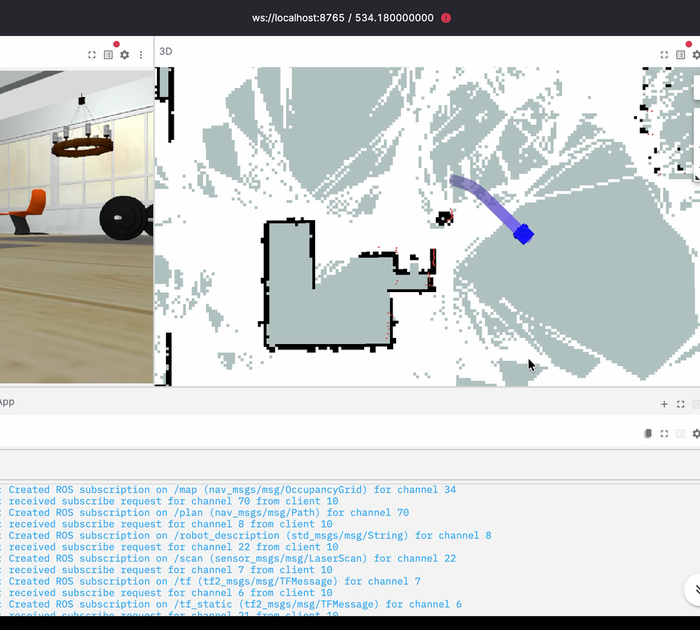
使用 ROS 2、Gazebo 和 SLAM 为一座模拟房屋建图,然后让机器人导航至目标位置。
该场景使用稳定的 robot-navigation 示例,包含 ROS 2、Nav2、Gazebo 和内置浏览器查看器。需要安装 Docker 和 Compose v2。首次成功运行后,将创建并保存地图、在地图上定位机器人,并抵达导航目标。
如需直接运行该示例:
npx robium-ai app doctor robot-navigation
npx robium-ai app run robot-navigation
运行预训练双臂策略
帮我运行一个预训练策略,让它在两台模拟机械臂之间传递一个立方体。
该场景使用 act-aloha-cube-transfer 中的官方 ACT checkpoint。无需训练步骤,也不需要专用 GPU。首次运行会准备锁定的环境并下载固定版本的模型;成功意味着查看器打开、实际推理运行,并报告默认的立方体传递结果。
npx robium-ai app doctor act-aloha-cube-transfer
npx robium-ai app run act-aloha-cube-transfer
原生路径已在 Apple Silicon 上测试。若使用其他平台,请让你的 Agent 在使用前检查应用 README。
帮我构建一个模拟机器人助手:它能够理解所看到的内容,并遵循自然语言指令。
该场景从 silly-turtlebot 开始:这是一个配备摄像头、带有受保护导航工具的 TurtleBot 模拟环境。它需要 Docker 以及你自己已获授权的 Gemini Robotics 访问权限。实时模型调用可能产生费用,因此 Robium 会在启动前检查访问权限,并且不会将模拟运行伪装成实时结果。
更多应用和托管演示可在 robium.ai 及 robium-apps 中找到。
请保持随附示例的整洁,并在自己的 my-apps/ 目录中创建一个可编辑的派生版本:
npx robium-ai app new my-navigation --from robot-navigation
随后使用你的编程 Agent 打开这个新应用,并描述一项修改。Robium 将复用经过验证的环境和测试形态,而不是从头重建整个技术栈。
常用命令:
npx robium-ai app list              # 浏览全部参考应用
npx robium-ai skills nav            # 搜索技能目录
npx robium-ai update --check        # 检查上游更新,但不修改文件
npx robium-ai update                # 安全更新干净的 main 分支
- 提供面向 ROS 2、Nav2、Gazebo、MuJoCo、Isaac Sim/Lab、LeRobot、机器人数据、可视化、测试和部署的技能。
- 提供一个架构师组件,可选择兼容的参考应用,并优先验证最小但有用的机器人行为。
- 提供捕获与学习工具,可将已验证的构建发现转化为更好的指导,无需获取原始 Agent 对话记录。
- 提供零依赖 CLI,用于安装、诊断、更新、技能管理及应用生命周期命令。
请参阅 CLI 指南,了解特定主机的安装与更新行为;或者查看 CONTRIBUTING.md,为技能作出改进。欢迎通过 Discord 和 GitHub Discussions 提问。
English / 原文
robium-launch-readme.mp4
You need Node.js 18+, Git, and at least one supported coding agent.
npx robium-ai setup
npx robium-ai doctor
Setup detects your agents and asks where to create the workspace. To install for one agent or choose the location up front:
npx robium-ai setup --agent codex
npx robium-ai setup --dir ~/projects/my-robotics
This is an editable install , not a hidden package snapshot. Setup creates ordinary Git checkouts and connects your agent to them:
~/robium-workspace/       # default; location and name are your choice
├── robium/               # editable skills and plugin source
└── robium-apps/          # runnable reference applications
Run npx robium-ai workspace anytime to find them. After editing or manually updating Robium, run npx robium-ai setup again and restart your agent so its integration refreshes.
To add Robium's skills to an existing project with the skills CLI, run:
npx skills add robium-ai/robium
Choose skills interactively, or select them by name:
npx skills add robium-ai/robium --skill ros2 gazebo mujoco
This installs the skill instructions and their supporting files. For the complete Robium workspace, reference applications, and plugin integration, use npx robium-ai setup above.
Restart your agent after setup, open it in a folder where it may work, and paste one of these prompts. Robium will inspect the matching reference app, check the prerequisites, and aim for a visible result before suggesting custom work.
Map and navigate a simulated home
Map a simulated house with ROS 2, Gazebo, and SLAM, then navigate the robot to a goal.
This uses the stable robot-navigation example with ROS 2, Nav2, Gazebo, and a bundled browser viewer. Docker with Compose v2 is required. A successful first run creates and saves a map, localizes the robot on it, and reaches a navigation goal.
To run the example directly instead:
npx robium-ai app doctor robot-navigation
npx robium-ai app run robot-navigation
Run a pretrained two-arm policy
Help me run a pretrained policy that transfers a cube between two simulated robot arms.
This uses the official ACT checkpoint in act-aloha-cube-transfer. There is no training step and no dedicated GPU is required. The first run prepares the locked environment and downloads the pinned model; success means the viewer opens, real inference runs, and the default cube-transfer result is reported.
npx robium-ai app doctor act-aloha-cube-transfer
npx robium-ai app run act-aloha-cube-transfer
The native path is tested on Apple Silicon. Ask your agent to check the app README before using another platform.
Help me build a simulated robot assistant that understands what it sees and follows natural-language instructions.
This starts from silly-turtlebot: a camera-equipped TurtleBot simulation with guarded navigation tools. It requires Docker and your own authorized Gemini Robotics access. Live model calls may cost money, so Robium checks access before starting and will not present a mock run as a live result.
More applications and hosted demos are at robium.ai and in robium-apps.
Keep the shipped examples clean and create an editable derivative in your own my-apps/ directory:
npx robium-ai app new my-navigation --from robot-navigation
Then open that new app with your coding agent and describe one change. Robium will reuse the proven environment and test shape instead of rebuilding the whole stack from scratch.
Useful commands:
npx robium-ai app list              # browse every reference app
npx robium-ai skills nav            # search the skill catalog
npx robium-ai update --check        # check upstream without changing files
npx robium-ai update                # update clean main branches safely
- Skills for ROS 2, Nav2, Gazebo, MuJoCo, Isaac Sim/Lab, LeRobot, robot data, visualization, testing, and deployment.
- An architect that selects a compatible reference app and proves the smallest useful robot behavior first.
- Capture and learning tools that turn verified build findings into better guidance without requiring raw agent transcripts.
- A zero-dependency CLI for setup, diagnosis, updates, skills, and application lifecycle commands.
See the CLI guide for host-specific setup and update behavior, or CONTRIBUTING.md to improve a skill. Questions are welcome on Discord and in GitHub Discussions.