我给四个编程 Agent 各 100 美元预算,让它们打造 PDF 编辑器
英文标题:🔶 I gave four coding agents $100 budget to build a PDF editor
作者让 Gemini 3.8 Flash、GPT Astra 6、Opus 5 和 Fable 5 在各自 100 美元预算内自主开发开源 PDF 编辑器,并要求它们研究现有工具的用户痛点。四个 Agent 都交付了可用的 Web 应用,但作者在短时间试用中发现了大量交互、性能、跨平台兼容性和功能完整性问题。作者认为,编程 Agent 的核心短板不只是“品味”,而是它们不像人类一样带着明确目标、耐心和实时交互反馈来使用软件。文章据此指出,AI 辅助开发仍需要人类承担产品管理和体验把关角色,否则软件将充斥令人烦躁的“SlopWare”。
 7.7 MB
 83.9 KB
 347.3 KB
 152.3 KB
 2.4 MB
中文
**TLDR;**我给了 4 个编程 Agent 各 100 美元预算,让它们构建一款功能完整的 PDF 编辑器。它们的实现尚可,但并不出色:只需点击几下,我就在几乎所有产品中发现了 Bug。我猜测,这部分是因为 Agent 与人类使用软件的方式不同:它们不会追求具体目标,也不会在过程中亲身感受阻碍,而且它们对 UI 的观察也少得多。因此,除非我们改变 LLM 的工作方式,否则我们将不得不忍受恼人的 SlopWare。
**简短背景。**作为一名研究用于编程的 LLM 的研究者,我的大部分时间都花在探究:为什么软件开发流程中仍然需要人类。这个问题的答案正在迅速变化。六年前,答案是根本不存在能够将自然语言需求转换为可运行代码的系统。三年前,ChatGPT 已经回答了这个问题,问题随之转向上下文化:现有系统大多只是纯粹的 LLM 补全,并不了解其所处的复杂环境、既有功能、语言约束以及输入的形态。这个问题的答案后来变成了编程 Agent:它们是围绕 LLM 的非常通用的符号式封装,使其能够像开发者一样与目标系统交互、读取、编辑和执行代码。再加上一点 RL,用来雕琢出目标导向行为,大功告成。
 使用编程 Agent 编写代码的开发者
当然,我的研究还没有结束。人类软件工程师依然存在。与流行说法相反,我确实认为他们仍然存在是有理由的,具体来说,是因为他们依然能够提供价值。但这种价值是什么?以我驱动编程 Agent 的经验来看,可以归结为两件事:
-
在 Agent 过早退出时,让它保持在正轨上,并按下回车键继续执行。
-
注意到并报告那些恼人或损坏的问题。
本文主要聚焦第 2 点,因为它经常被笼统地归为“品味”。我试图在这里对其进行更具体的分析。
**一个小实验。**我主要借鉴了两类与 LLM 交互的经验。其一更偏轶事,来自我使用编程 Agent 改进开源软件(OSS)的经历。其二则是我最近出于好奇搭建的一个小实验:如果我给一个 Agent 100 美元预算,并要求它创建一个用户体验出色的开源工具,它会怎么做?它能否自主设计出一个令人愉悦、易于交互的界面?
在后一个实验中,我让 Gemini 3.8 Flash、GPT Astra 6、Opus 5 和 Fable 5 创建一款出色的 PDF 编辑器。PDF 编辑器显然还没有优秀的 OSS 替代品,我明确要求它们检查现有工具,并在互联网上搜索潜在用户反馈的缺失功能。模型在各自的 harness 中启动,拥有可自由使用的 VM(例如可用于安装 computer-use 工具);只要 100 美元预算尚未耗尽,它们在完成一轮工作后就会被再次唤醒。Agent 起初必须在私密环境中运行,主要是为了避免彼此影响。生成的成品链接在相应页面中,可通过生成的 Web 应用轻松访问。因为最终所有模型都决定构建 Web 应用。1
千刀万剐式的失败
**Web 应用。**在我看来,这是它们犯下的第一个错误。PDF 编辑器的价值在于原生安装。它们应该成为我系统上的默认 PDF 查看器。如果模型要构建 Web 应用,就应该确保它易于访问和安装,理想情况下应当安装为原生应用。Gemini 在公开仓库中的第一次尝试,只提供了通过 npm 安装的说明——失败!相比之下,Astra 至少确保了 GitHub Pages 部署可用。这涉及两次公开的开发运行;后续运行被明确设为私密,因此我不能责怪模型没有发布网站。但是,据我所知,没有任何模型花力气确保这些应用可在本地安装,例如作为 Android 应用或可执行文件。我只能猜测,模型是受到“兼容所有 OS”的驱动,但没有意识到这会严重削弱工具的实用性。
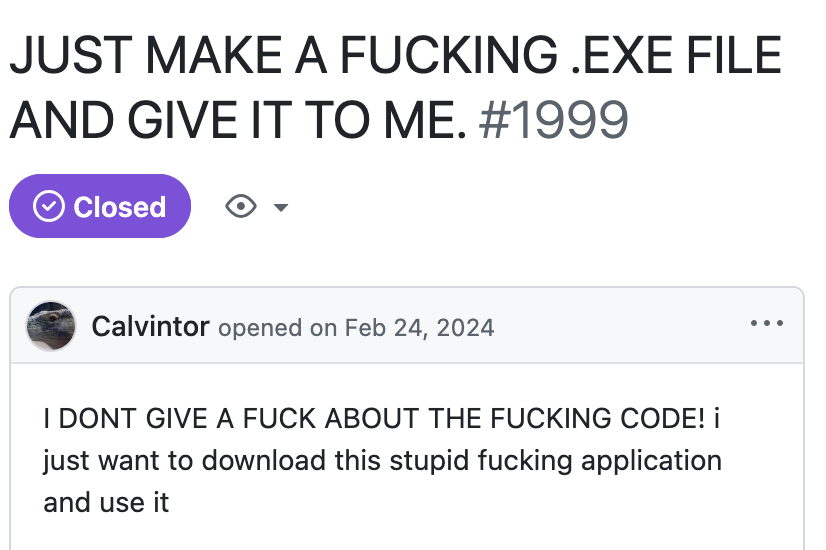 请直接给我一个原生二进制文件。
**交互。**在 Gemini 的首次尝试中,创建的 PDF 查看器支持插入图片。选择一张图片后,Gemini 3.8 Flash 的工具会在点击 PDF 时,将图片插入当前光标位置。这极其难用!首先,我看不到图片是否被正确选中;更重要的是,其次,我无法在点击前预览图片将会出现在哪里。更糟糕的是,之后根本无法选中图片来删除或移动它。Claude 和 Codex 后来巧妙地绕开了这个问题:它们直接将图片插入某个随机位置,再让我通过拖放进行调整。也许它们只是初稿碰巧做对了,或是从训练中蒸馏出的经验已经足以表明这是正确做法。但不清楚的是,如果它们一开始就坚持原先的方案,它们是否会注意到这个问题。
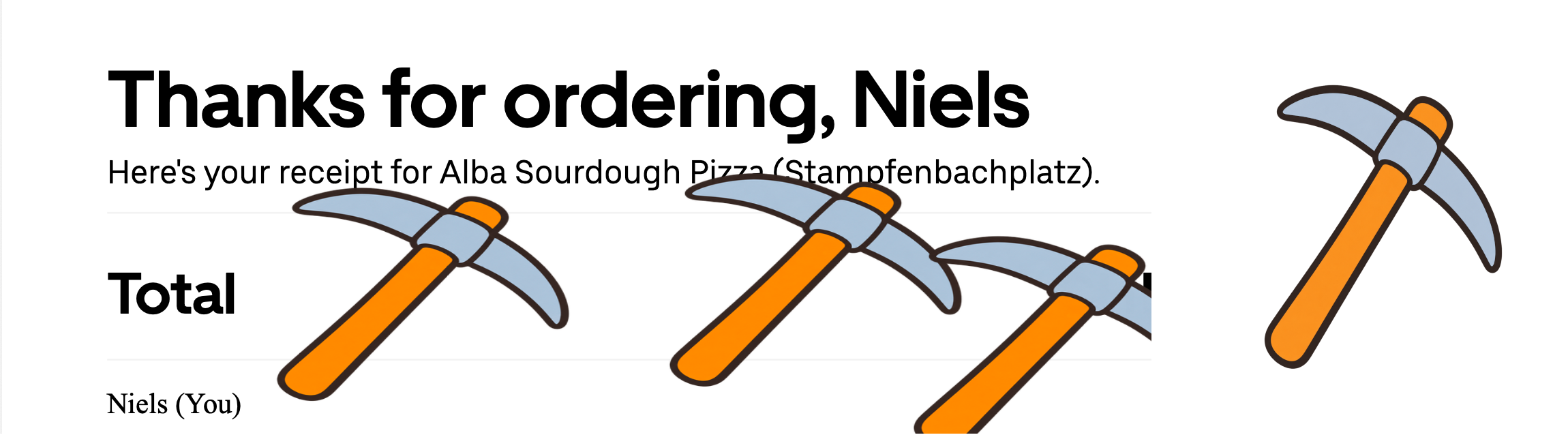 即使我知道这些镐会落在哪里,我也更希望它们不要倾斜(原图在右侧)。
**界面导航。**当我要求 Astra 构建一个非常直观的设计时,它决定为每一个(!)按钮加上明确的文字说明。我认为这恰恰与直观相反。这种设计很明确,但它没有使用常见、且人类已在文化上接受训练的设计语言;它恰恰违背了人类对界面的直觉预期!相反,Gemini 创建了上百万个按钮,图标的清晰度或多或少都令人存疑。一个实际上非常适合界面导航的现代功能,是搜索设置或可用工具的能力。注意,Android 和 iPhone 都在很短的时间差内(或许相隔一年)迅速为设置应用加入了搜索功能。我记得童年时,刚拿到新手机的前几天,经常会把所有设置都浏览一遍,这样我才知道以后该去哪里找相关功能。没有任何模型决定加入这样的搜索或帮助工具。
**速度。**几周前,我 fork 了出色的家谱管理与查看工具 Gramps 的 Web 版本:Gramps-Web。这个工具显然是在大量编程 Agent 支持下生成的。显然,没有人对这个工具做过“压力测试”。我加上引号,是因为当我的家谱包含 1,500 人时,我就注意到了性能下降。对于家谱数据库来说,这个规模算比较大,但相对于计算机工作负载而言却很小。尽管如此,UI 极其缓慢。进一步检查后,我发现许多后端请求耗时约数秒;更糟的是,这些请求由前端按顺序发送。此外,后端将通用 SQL 查询与在 Python 中手动执行的 join 混在一起(不用说,这是一团糟)。在获得明确提示和两次额外提醒后,Codex 能找出问题,但此前没有人自行注意到或费心修复这个问题。
**雄心。**在这个设定中,我要求 LLM 实现 OSS 工具中缺失的功能,并自行查找资料。它们规规矩矩地构建了一个基于 pdf.js 的查看器,以及少量基础编辑工具:插入图片、签名(有时)、评论、形状、文本遮盖、重新排列页面、压缩(仅 Gemini)。Fable 走了极简路线,除了高亮和文本之外几乎不支持任何功能:没有水印、遮盖、形状、多选,甚至无法选中单个已添加的元素(你必须选中图片添加工具,才被允许选择和调整图片大小)。只有 Opus 想到了一个更有雄心的功能:编辑 PDF 中原有的文本。它依然缺少其他相关且更明显的工具:编辑或移动图片、分隔线等图形元素,OCR,或矢量图形处理。快速用 ChatGPT 搜索就能发现,至少三款流行 PDF 编辑器支持这些功能。我猜测 pdf.js 是造成这一限制的因素,但我不在乎:它显然缺失了这些功能。
**平台。**大多数应用在移动平台上至少有些损坏,或者根本无法工作(除桌面端外,移动端是我唯一测试的平台)。在 Fable 的应用中,在 PDF 上触摸滚动会卡顿。在 Gemini 的应用中,显示比例不会随桌面端以外的设备变化,因此你连一半控件都看不到。请注意,模型被明确要求在不同平台测试自己的应用,但结果仍然如此。
**Bug、Bug、Bug。**尽管缺乏雄心,Bug 却一点也不少。例如,在最初开发的 Gemini 应用中,导出的 PDF 里的图片会歪斜,深色模式下 PDF 的颜色会反转。Opus 的文本编辑器会改变已编辑文本的字体。图片旋转功能经常缺失,对不同图片类型的支持也是如此。在框选一个区域准备遮盖、但没有执行遮盖后,编辑框会一直留在原处,直到手动点击将其关闭。即便是在 Fable 的应用中,我也无法在已有绘图内部继续绘制,因为在绘图模式下,点击一幅绘图会选中该绘图以进行缩放和移动。当然,没有任何应用提供 Bug 报告按钮(甚至没有源代码链接)。
LLM 并非人类
**这一切说明了什么?**对我而言,上述所有问题都指向所有编程 Agent 共有的一个总体问题:它们与人类使用软件的方式不同。
- 人类由目标驱动:他们有特定的文档,需要完成特定的修改。任何阻碍他们的事情——找不到正确设置、光标与图片放置位置不对齐、无法保存结果——都会被注意到。
- 人类没有耐心:在交互中,他们会遇到缓慢的操作。尽管模型在这方面已有改进,但它们通常不会花时间将操作速度提升几个数量级,即使这既可行,又能显著改善迭代时间或可用性。
- 人类进行实时交互:特别是在放置图片这一场景中,我注意到了 LLM 使用计算机与人类之间的显著差异。LLM 查看一张截图,移动光标,再查看另一张静态截图。人类则在操作输入设备时实时观察显示器。这塑造了我们关于 UI 应如何表现的大量直觉,也支撑了我们的大部分 UI 学习。
我的假设是:如果 AI Agent 不能像人类一样与软件交互,它们将无法设计出优秀、对人友好的软件。
**没有免费的午餐。**我最近遇到一种观点:我们很快会拥有每一款商业软件的 OSS 克隆品。这些结果和我的个人经验并不支持这一看法。OSS 的主要问题通常是可用性。而这似乎恰恰是编程 Agent 最吃力的维度。因此,仍然需要人类引导 Agent 处理所有让软件使用起来别扭的小 Bug 和小问题。换言之,OSS 开发者将变成产品经理。而谁愿意免费当产品经理?从历史上看,OSS 的生命力来自人们希望写出一小段段优美代码的愿望。未来会出现热爱担任产品经理的新开发者吗?
**最后,**人类自身的存在方式,以及对 UI 设计进行内省的能力,似乎是坐在编程 Agent 驾驶位上的人类所提供的主要价值之一。如果你想让编程 Agent 变得更好,就应当解决 AI 与人类软件交互之间的差异。
English / 原文
TLDR; I gave 4 coding agents a $100 budget to build a functional PDF editor. The implementations are okay, but not great: within a few clicks I find bugs in almost all of them. I hypothesize that this is partly because agents don’t interact with software like humans: they don’t pursue concrete goals and experience friction on their way, and they also just look at the UI much less. In consequence, unless we change the way LLMs operate, we will be cursed with annoying SlopWare.
A short background. As a researcher on LLMs for Code, I spend most of my time trying to find out why humans are needed in the Software Development process. The answer to this question is changing rapidly. Six years ago the answer was that no system exists that can translate natural language requirements into functional code at all. Three years ago, this problem had been answered by ChatGPT, and the problem shifted to contextualizing: Existing systems, mostly pure LLM completion, did not know about the complex surroundings within which it operated, existing functionality, constraints of the language, shape of inputs. The answer to this problem turned out to be coding agents. Very general symbolic wrappers around LLMs that would allow interaction with the target system, reading, editing, and executing code like developers. Sprinkle a bit of RL on top to chisel out goal-seeking behavior and voilà.
Developer writing code with coding agent
Of course my research is not done yet. Human software engineers are still around. Contrary to the meme, I do think they are around for a reason, and concretely because they still provide value. But what is this value? In my experience of driving coding agents it boils down to two things:
1. Staying on track and pressing enter if the agent prematurely exited.
2. Noticing and reporting the annoying/broken things.
In this post I am focusing mostly on 2, because it is often conflated with “taste”. I am trying to analyze this more concretely here.
A small experiment. I am drawing from two main pools of experiences of LLM interaction. One is more anecdotal, of my experience of building better Open-Source-Software (OSS) using coding agents. The second is a small experiment I recently set up out of curiosity: If I give an agent a $100 budget, and tell it to create an Open-Source tool with great user experience – what will it do? Can it autonomously design a good interface that will be pleasant to interact with?
For the latter experiment, I tasked Gemini 3.8 Flash, GPT Astra 6, Opus 5 and Fable 5 to create a great PDF Editor. PDF Editors apparently don’t have a good OSS alternative yet, and I explicitly instructed them to inspect existing tools and search on the internet for things that potential users reported they were lacking. The models were started in their own harness, had their own VM at free disposal (e.g. to install computer-use tools) and were woken up after returning as long as the $100 budget was not used up. The agents initially had to operate in privacy, mostly to not influence each other. The produced artifacts are linked there and easily accessible via the produced web apps. Because, eventually, all models decided to build a web app.1
Death by a thousand cuts.
Webapps. This is, in my opinion, the first mistake they made. PDF editors are useful when they are natively installed. They should be the standard PDF viewer on my system. If the model builds a web app, it should make sure that it is easy to access and install, ideally as native app. In its first attempt in a public repository, Gemini produced something that only provided installation instructions via npm – failed! Astra in contrast did make sure a GitHub Pages deployment was available. This concerns two development runs that were public, later runs were explicitly private so I can’t blame the models for not publishing a website. But, as far as I can tell, no model spent effort to make sure the apps are locally installable as e.g. Android apps, or executable. I can only speculate that the model was driven to produce something compatible with every OS, but failed to recognize that this would strongly inhibit the usefulness of their tool.
Just give me a native binary please.
Interaction. In Geminis first attempt, the created PDF viewer supported inserting images. Upon selecting an image, Gemini 3.8 Flash’s tool would insert the image at the current cursor position when clicking on the PDF. This is super unusable! First, I don’t see whether the image was correctly selected and more importantly, second, I don’t get a preview of where the image will be when I click. Worse, selecting the image to delete it or move it afterwards was impossible. Claude and Codex later neatly circumvented the issue by just inserting the image directly at a random position and letting me drag and drop it. Maybe they just got lucky in their first draft or got sufficient experience distilled from training to suggest this is the right way. But it is unclear if they would have noticed this issue if they had committed to it in the first place.
Even if I had known where these pickaxes land, I would have preferred them unslanted (original on the right).
Interface navigation. When I told Astra to build a very intuitive design, it decided to put an explicit, textual description on every (!) button. I would argue this is the opposite of intuitive. This is explicit, but not using design language that is common and that humans have been culturally trained for, it is quite the opposite of what humans would intuitively expect on an interface! Gemini on the opposite created one million buttons with more or less questionably clear icons. A modern feature that is actually great for interface navigation is the ability to search through settings/available utility. Notice that both Android and iPhones quickly shipped a search function for their settings app in short distance (maybe a year apart). I recall in my childhood that I often spent the first few days playing with my new phone looking at all the settings so that I knew where I would find the relevant things. No model decided to include such a search or help tool.
Speed. A few weeks ago I forked a great web-version of ancestry manager and viewer Gramps, Gramps-Web. This tools is clearly generated with very heavy coding agent support. And apparently no one had “stress tested” this tool. I put quotation marks because I noticed performance degradation when my ancestry contains 1500 people. That is large-ish for an ancestry database, but tiny considering computer workloads. Nonetheless, the UI was extremely slow. Inspecting closer, I found many backend requests taking ~seconds and, to make matters worse, being sequentially sent from the frontend. Additionally, the backend mixed generic SQL queries with manual joins in Python (a terrible mess, goes without saying). Codex was able to figure out the problem with a clear pointer and two additional nudges but it no one had noticed or bothered to fix this issue on their own.
Ambition. For this setting I had instructed LLMs to implement what was missing in OS tools and look up stuff. They neatly built a pdf.js based viewer and a few basic editing tools: inserting images, signatures (sometimes), comments, shapes, redacting text, reordering pages, compression (only Gemini). Fable went fully minimal and did not support anything beyond highlighting and text: no watermarks, redaction, shapes, multi-selection, or even selection of single added element (you have to select the image addition tool to be allowed to select and resize images). Only Opus even thought about something ambitious: Editing pre-existing text in the PDF. It still lacked other related (and more obvious) utilities: Edit or move graphical elements such as images or separators, OCR, or vector graphic manipulation. A quick ChatGPT search reveals this is supported by at least three popular PDF editors. My assumption is that pdf.js is a limiting factor for this but I don’t care: its clearly missing.
Platforms. Most applications are at least a bit broken or don’t work on mobile platforms (which is the only platform I tested apart from desktops). Touch scrolling across the PDF would be jagged in Fables app. In Geminis app the display ratio does not change from desktops, so you won’t see half of the controls. Note that the models are explicitly instructed to test their apps across platforms, and still.
Bugs Bugs Bugs. Despite the lack of ambition, there was no shortage of bugs. For example, in the initially developed Gemini app, the image in an exported PDF was skewed, the colors in the PDF inverted in dark mode. Opus’ text editor changes the font of edited text. Image rotation was frequently missing, as well as support for different image types. After highlighting a box for redaction and not applying the redaction, the edit box would just stay until it is manually clicked away. Even in Fables app, I can’t draw inside and existing drawing because in drawing mode, clicking on a drawing selects that drawing for resizing and moving. And of course no app has a bug reporting button (or even a link to the source code).
LLMs are non-human
What does all of this point towards? For me all of the above issues point towards an overarching issue that all coding agents share: They don’t interact with software in the way that humans do.
- Humans are purpose driven : They have specific documents for which they want to achieve specific changes. Anything that stands in their way (finding the right setting, misalignment between cursor and image placing, failing to save the result) will be noticed.
- Humans are impatient : In this interaction they will encounter operations that are slow. While models have improved at this, they usually don’t spend time to reduce operations by orders of magnitude even though it would be possible and greatly improve iteration time or usability.
- Humans are real-time interactive : Especially for the image-placing setting I noticed a stark difference between LLM computer usage and humans. LLMs inspect a screenshot, move the cursor, inspect another static screenshot. Humans inspect the monitor in real time while manipulating the inputs. This shapes a lot of our intuition about how UI should behave and also powers much of our UI learning.
My hypothesis is that AI agents that don’t interact with software in the way that humans do will not be able to design great human-friendly software.
There is no free lunch. I recently encountered opinions that we will soon have an OSS clone of every commercially available software. These results and my personal experience disagree with this. The main problem with OSS is typically usability. And this appears to be exactly the dimension on which coding agents struggle. Thus, a human is still needed to steer the agents towards all the small bugs and issues that make the software jarring to use. In other words, the OSS developer would be a product manager. And who wants to be a product manager for free? Historically, OSS lived from the desire to write small pieces of beautiful code. Will new developers emerge that love being product managers?
To conclude, the very human-being and capability to introspect on UI design seems to be one of the main values provided by humans sitting in the driver seat of coding agents. If you want to make coding agents better, tackle the discrepancy between AI and human software interaction.