Show HN:LLMxRay,一款面向大语言模型的开源可观测性工具
英文标题:🔶 Show HN: LLMxRay an open-source observability tool for LLMs
LLMxRay 是一款面向本地大语言模型的开源可观测性工具,提供实时 token 流、质量分析、性能剖析和成本追踪,无需云服务或 API 密钥。它支持比较模型与参数、检查工具调用、分析提示词缓存,并通过本地代理观察其他客户端发往 Ollama 的请求。项目称,在一项 324 个 token 的提示词测试中,将时间戳移至末尾使预填充时间从 64.6 毫秒降至 18.6 毫秒,速度提升 3.5 倍。对开发者和研究人员而言,这些功能有助于诊断本地模型行为、优化推理性能,并比较不同模型和服务协议。
 1.6 KB
 4.1 KB
 1.7 KB
 3.7 KB
 1.3 KB
 7.6 KB
 2.0 MB
 140.7 KB
 286.2 KB
 177.0 KB
 171.3 KB
 281.7 KB
 208.2 KB
 2.7 KB
 380.8 KB
中文

看清你的 AI 实际在做什么。
为本地 LLM 提供实时 token 流、质量分析、性能剖析和成本追踪。
无需云服务,无需 API 密钥,无需付费。
🌐 English • Français • 中文 • العربية • Srpski
快速开始 • 功能 • 截图 • 适用人群 • 更新日志
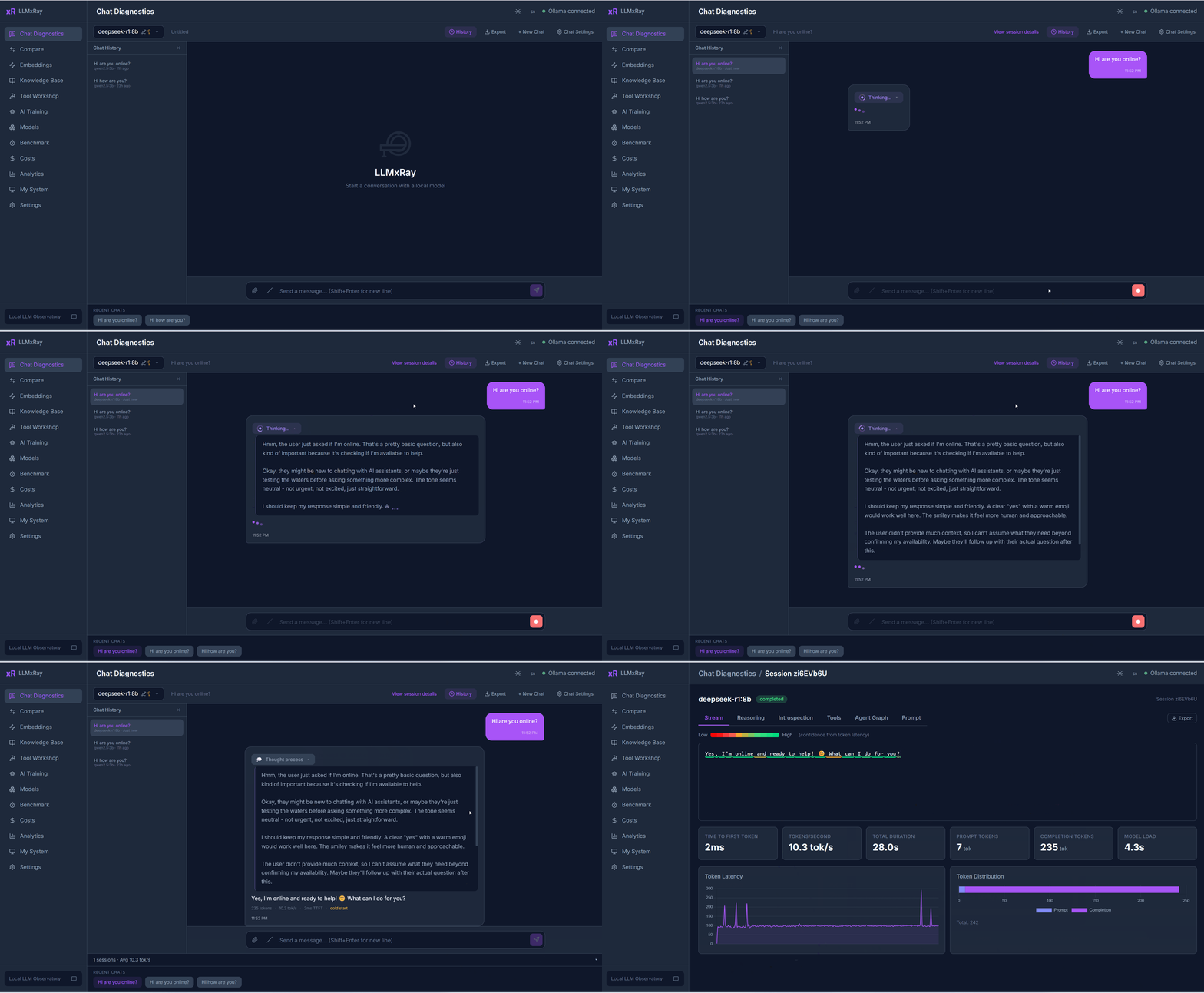
聊天诊断 —— 观察 token 逐个生成,并按速度着色。查看模型在哪里犹豫,以及对哪些内容没有把握。
Live (0.7.2 新增) —— 将 VS Code Copilot、Open WebUI、Continue 或自己的脚本指向 LLMxRay,而不是 Ollama,即可查看它们发送的每一轮请求:提示词大小、缓存保留了哪些内容、提示词在哪里导致缓存失效,以及模型是否仍能装入 GPU。只需复制一个地址,无需其他设置。
Cache Lab (0.6.0 新增) —— 你的系统提示词很可能在每一轮都从头重新计算。用 30 秒查明原因,并量化修复效果。(在我们的测试中,预填充速度提升了 3.5 倍。)
Decision Lab —— 就工单或消息向决策模型(nimble、tev1、clef)提出指定类型的问题,查看每个答案背后的概率,而不只是得到一个“是”。
Compare —— 将同一提示词分别交给两个模型,或使用两个温度参数,并排比较。不必再靠猜测判断哪种设置更好。
Surgical Benchmark —— 基于真实的 token 对数概率为模型评分,而不是看答案碰巧是否正确。
Protocol Observatory —— 查看同一个本地模型通过 Ollama 原生、OpenAI 兼容和 Anthropic 兼容 API 分别如何响应,以及它们具体在哪些地方存在差异。
Knowledge Base —— 导入 PDF 和其他文档,将其分块,并在模型看到内容之前查看 RAG 实际检索到了什么。
此外还提供嵌入向量、成本追踪、分析、工具构建器和本地历史数据库。完整功能列表见下文。
一条命令,30 秒。
或者使用 Docker:
sh docker run -p 5174:5174 djovaneli/llmxray
打开 http://localhost:5174,开始聊天。就这么简单。
**前提条件:**本地运行 Ollama,并且至少已拉取一个模型(
ollama pull llama3.2)。
你在本地运行一个 LLM,也会与它聊天。但实际发生了什么?
- 每个 token 的生成速度有多快?模型对哪些 token 有把握?
- 在长对话中,回复质量是否正在下降?
- 如果在云端运行,成本会是多少?
- 模型是否在重复自己、拒绝回答或生成乱码?
- 对于_同一个_提示词,温度 0.3 和 0.9 的表现有何不同?
LLMxRay 可以免费、实时、可视化地回答以上所有问题。
带 token 智能分析的实时聊天
与任意 Ollama 模型聊天,观察带有置信度着色的 token 逐个出现——每个 token 根据生成速度着色。支持 Markdown、多轮对话、文件附件、视觉模型和斜杠命令。对于推理模型,可针对每次对话设置思考预算:关闭、由模型决定,或明确指定低、中、高、最大努力程度。
每条回复都会自动分析。只有出现问题时,才会显示彩色标记:
- 重复 —— 短语过度重复(4-gram 分析)
- 拒绝 —— 检测“作为一个 AI 语言模型”及另外 7 种模式
- 乱码 —— 非 ASCII 字符占比过高
- 空回复 —— 少于 10 个词
- 截断 —— 达到 token 限制但尚未完成
模型比较工作台
最多提供 4 个槽位,各自独立设置模型、温度和系统提示词。功能包括并排流式输出、词级差异高亮、指标比较和一键预设(温度扫描、确定性配对、带 Token Tax 可视化的语言比较)。
- 延迟百分位数 —— 针对总耗时和首 token 延迟(TTFT)提供 P50/P95/P99
- 错误分析 —— 带时间线的 7 类错误分类器
- 使用热力图 —— 以 7×24 网格展示活跃时段
- 设置影响 —— 温度与每秒 token 数的散点图
- 冷启动与热启动追踪,并记录模型加载历史
按模型和日期统计 token 用量,并估算相当于云端运行的价格。查看本地运行_节省_了多少费用。
使用多项选择题题组测试模型知识。通过 OpenAI 兼容端点获取真实对数概率,以准确衡量置信度。可以可视化构建自定义题组,也可以让 AI 根据主题生成题组。
Embeddings Lab 与 RAG 管线
将文本转换为嵌入向量、可视化向量并测量余弦相似度。请求更窄的输出向量,观察 Matryoshka 截断对相似度的影响。基于 PDF、DOCX 和 CSV 构建本地知识库,对内容进行分块、嵌入并支持搜索。所有内容均存储在 IndexedDB 中,费用为零。
Tool Workshop(可视化画布)
使用拖放式节点画布构建工具定义。支持双向代码同步:编辑节点或 TypeScript,另一侧都会更新。可以探测 API、自动生成 schema,并通过实时执行进行测试。
Fill-in-the-Middle 游乐场 (v0.4.7 新增)
为 Qwen-Coder、CodeLlama、Codestral、DeepSeek-Coder 和 StarCoder 提供代码补全。提供两个文本框(前缀和后缀),由模型填补中间的空白。使用 Ollama /api/generate 的 suffix 字段。拼接预览会展示结果在编辑器中呈现的样子。
LLMxRay 会打开第二个端口 11435,其行为与 Ollama 完全一致,并将所有请求转发给 Ollama。将任何其他工具指向 http://localhost:11435(例如用于 Copilot Chat 的 Ollama VS Code 扩展中的 ollama.endpoint、Open WebUI 的连接 URL、Continue 的 apiBase、n8n 的 Ollama 凭据,以及脚本中的 OLLAMA_HOST),它发送的每一轮请求就会出现在 Live 页面上:包括客户端、模型、提示词 token 数、缓存命中数、预填充和生成速度,以及工具调用。选择某一轮,即可查看提示词的组成部分(系统提示词、工具 schema、历史记录、你的消息),以及它与上一轮不再匹配的确切位置,也就是缓存失效的位置。发现结果会以通俗语句呈现,并分别链接到提供证据的请求轮次:例如某客户端每轮都重新读取大部分提示词、模型因为上下文不再适合显存而部分运行在 CPU 上,或工具 schema 占据每条提示词的 40%。默认只在内存中保留计数和耗时;提示词文本需要主动选择保存,才会写入本地文件。任何内容都不会离开你的设备。
Cache Lab (v0.6.0 新增)
找出提示词为什么未命中模型的 KV 缓存,并测量每一轮因此付出的代价。本地模型只有在提示词从第一个 token 开始保持匹配时才能复用缓存,因此靠近开头的一个时间戳就会导致其后的所有内容无法复用。实验室会找出各轮之间发生变化的值,显示复用终止的确切位置,然后通过你的本地服务对每种布局发送两次请求并改变其中的值,测量将这些值移到末尾实际能节省多少。在一个真实的 324 token 提示词上测得:**时间戳放在前面时,复用 4 个 token,预填充耗时 64.6 毫秒;放在后面时,复用 290 个 token,耗时 18.6 毫秒。相同内容,速度提升 3.5 倍。**需要 Ollama 0.33.3 或更高版本。
Ollama 0.35.1 新增了决策模型——nimble、tev1、clef、clef-flash。它们通过 /v1/systemone 返回选项、概率和分数,而非文本。向实验室提供一个状态(工单、消息或日志行)和指定类型的问题:在命名候选项之间做出选择、给出是/否概率,或在有序量表上给出分数。每个答案都会以模型自身的概率分布返回,并绘制为条形图,突出显示选中的候选项。决策模型报告的唯一能力是 decision,因此 LLMxRay 不会在聊天模型选择器中显示它们,而是在这里列出。
Protocol Observatory (v0.4.7 新增)
将同一提示词通过 Ollama 的三种服务协议并行发送给本地模型:原生 /api/chat、OpenAI 兼容 /v1/chat/completions 和 Anthropic 兼容 /v1/messages。提供并排流式输出、各协议指标,以及一个信封差异选项卡,展示各协议如何组织结束原因、token 计数和错误信封。无需云服务或 API 密钥——三个端点都在本地 localhost:11434 上。
从对话中整理训练数据。添加标签、审核,并导出为 JSONL 用于微调。
本地 AI 历史数据库
每次实验(基准测试、比较、聊天、训练数据对)都会自动归档到可查询的 IndexedDB 数据库,支持筛选、趋势分析、导出和保留策略。
提供完整的英语、法语、塞尔维亚语(拉丁字母和西里尔字母)、中文和阿拉伯语翻译,支持从右到左的布局。另有希伯来语和日语的社区翻译框架。
已针对 Ollama 0.40.x 测试和验证(2026 年 10 月在 0.40.3 上验证)。LLMxRay 使用以下 Ollama 端点:
| 端点 | 用途 |
|---|---|
/api/chat |
流式聊天(NDJSON,支持 tools、think 努力程度和 format schema) |
/api/generate |
文本生成及通过 suffix 实现 Fill-in-the-Middle |
/api/tags |
模型列表、能力、上下文长度和嵌入向量宽度 |
/api/show |
参数、模板、许可证和架构元数据 |
/api/embed |
RAG 向量嵌入,可选使用 dimensions 截断 |
/api/pull、/api/delete、/api/ps、/api/version |
模型管理和状态 |
/v1/chat/completions |
Surgical Benchmark 使用的 OpenAI 兼容路径,用于获取真实对数概率和总用量 |
/v1/messages |
Protocol Observatory 使用的 Anthropic 兼容路径 |
**兼容版本:**Ollama 0.20 及更新版本(更早版本可用于聊天和生成,但缺少 think 和 JSON-schema format)。**推荐版本:**Ollama 0.33.3 及以上——会报告提示词缓存复用情况(prompt_eval_cached_count,以及 OpenAI 兼容端点上的 usage.prompt_tokens_details.cached_tokens),因此预填充吞吐量按实际计算的 token 数衡量。从 0.32 开始:模型列表中会提供能力和上下文长度,think 接受分级努力程度,嵌入接口接受 dimensions 宽度。
带 token 流和置信度的聊天 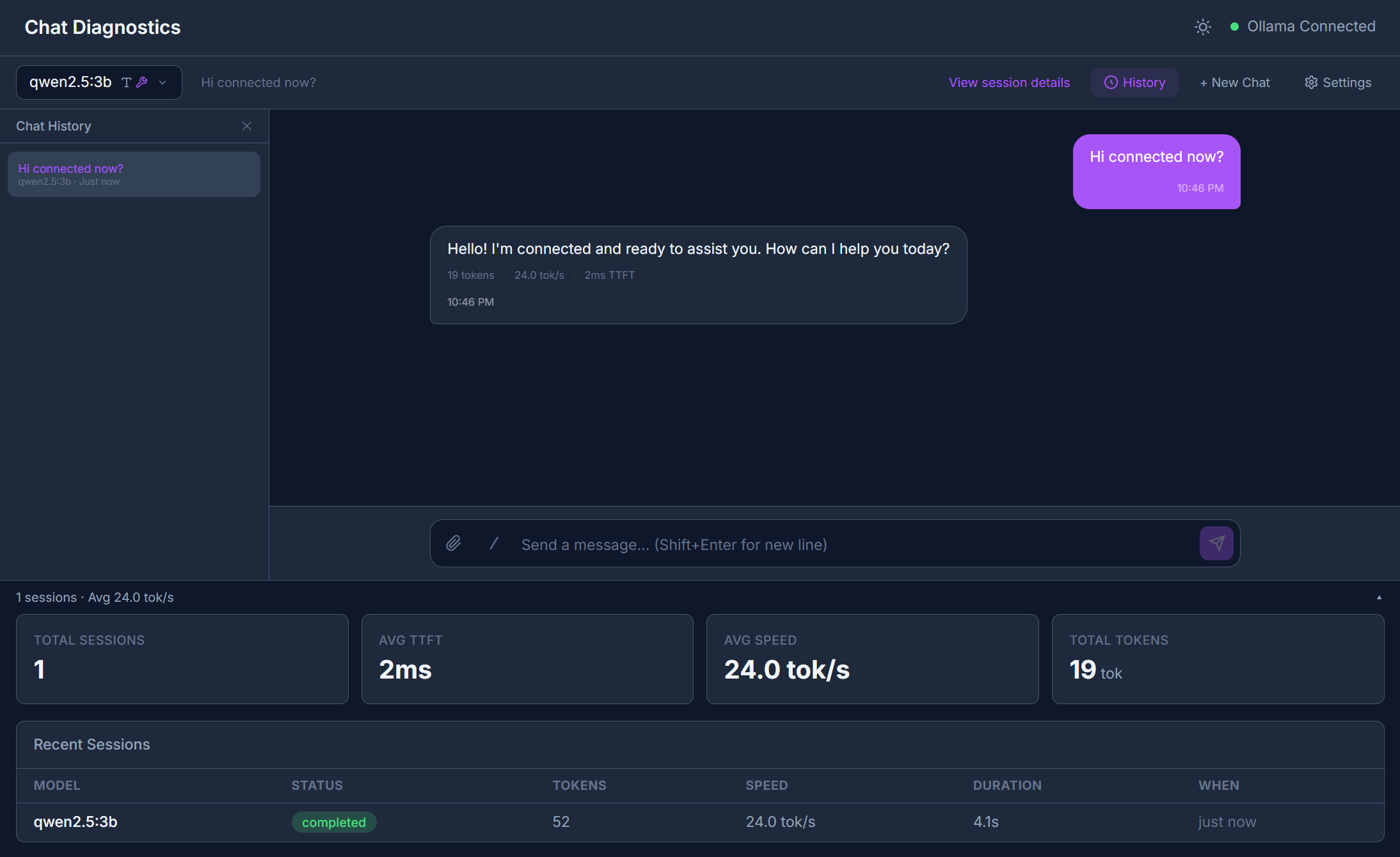 |
模型比较——并排显示 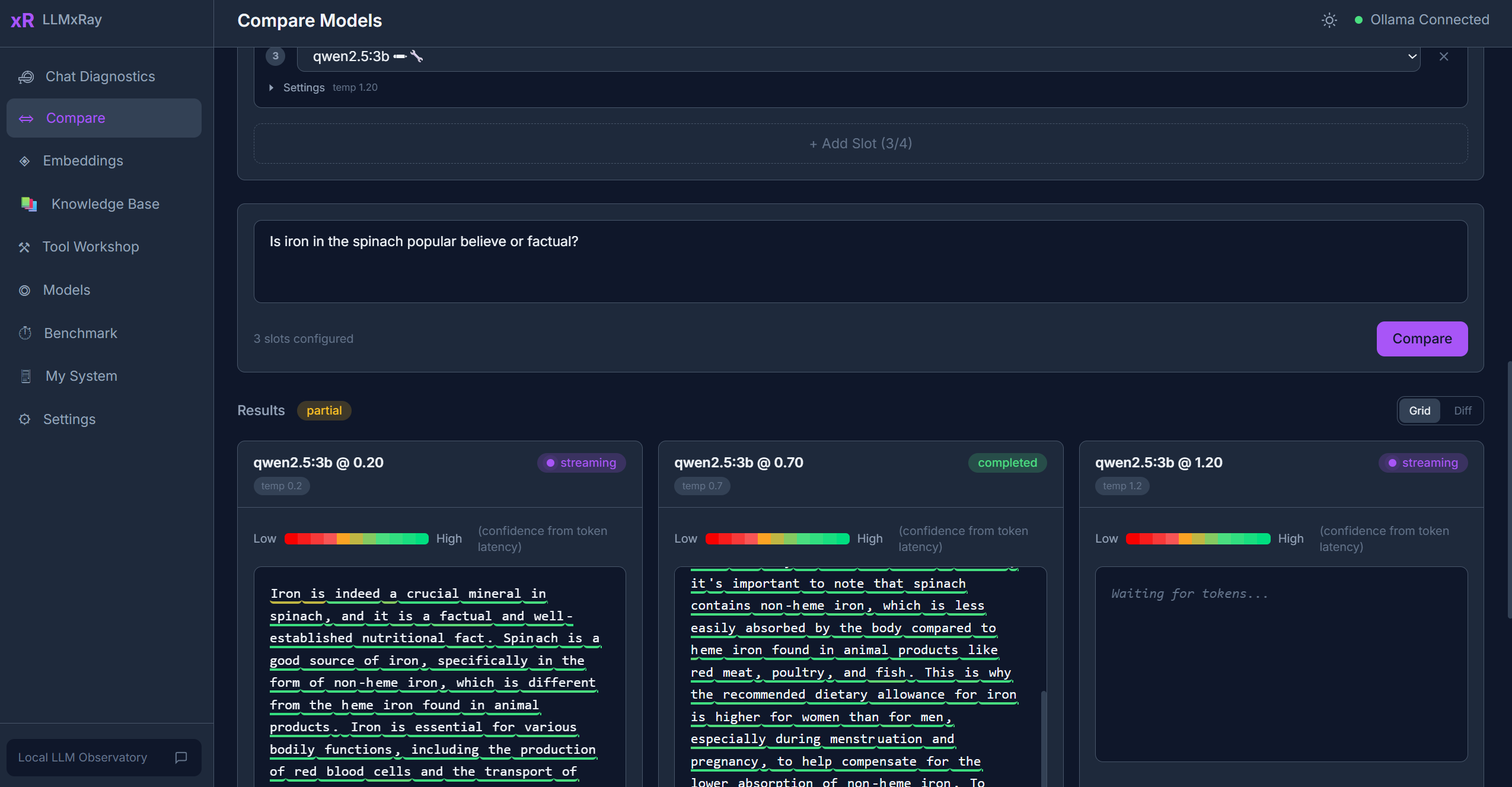 |
|---|---|
会话深度分析——指标和耗时 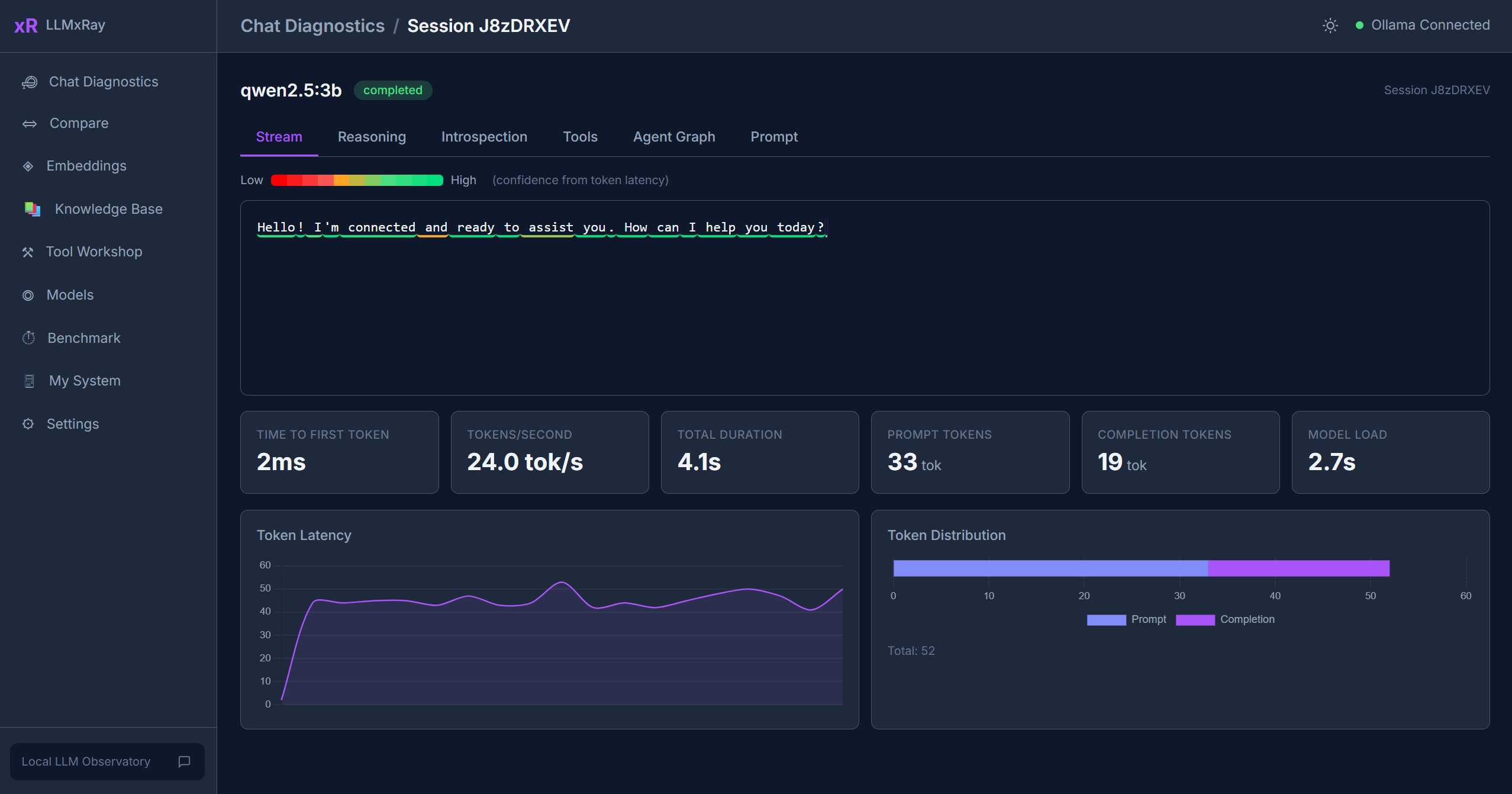 |
带置信度雷达图的基准测试 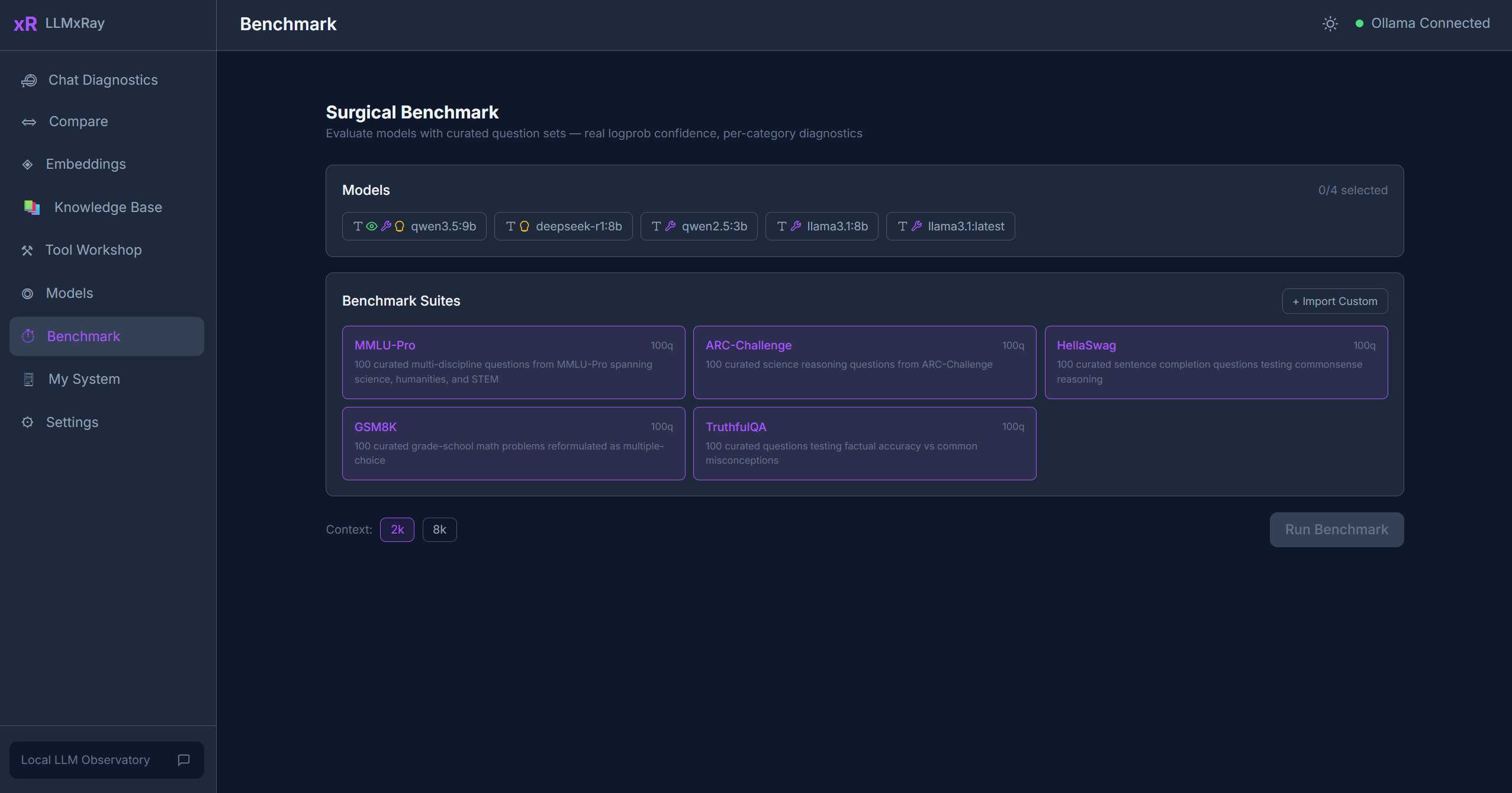 |
嵌入向量——余弦相似度 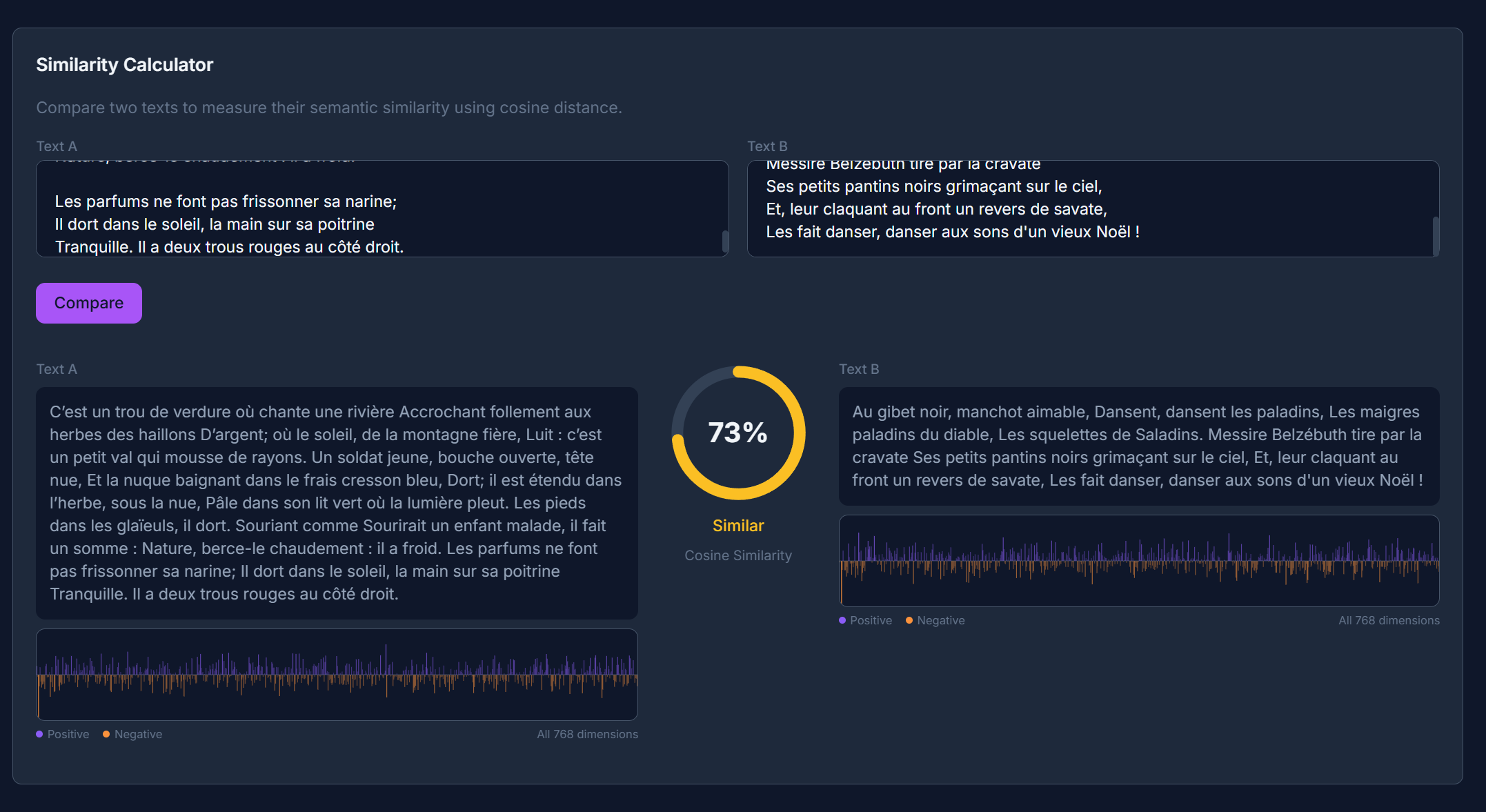 |
系统监控——硬件和 Ollama 状态 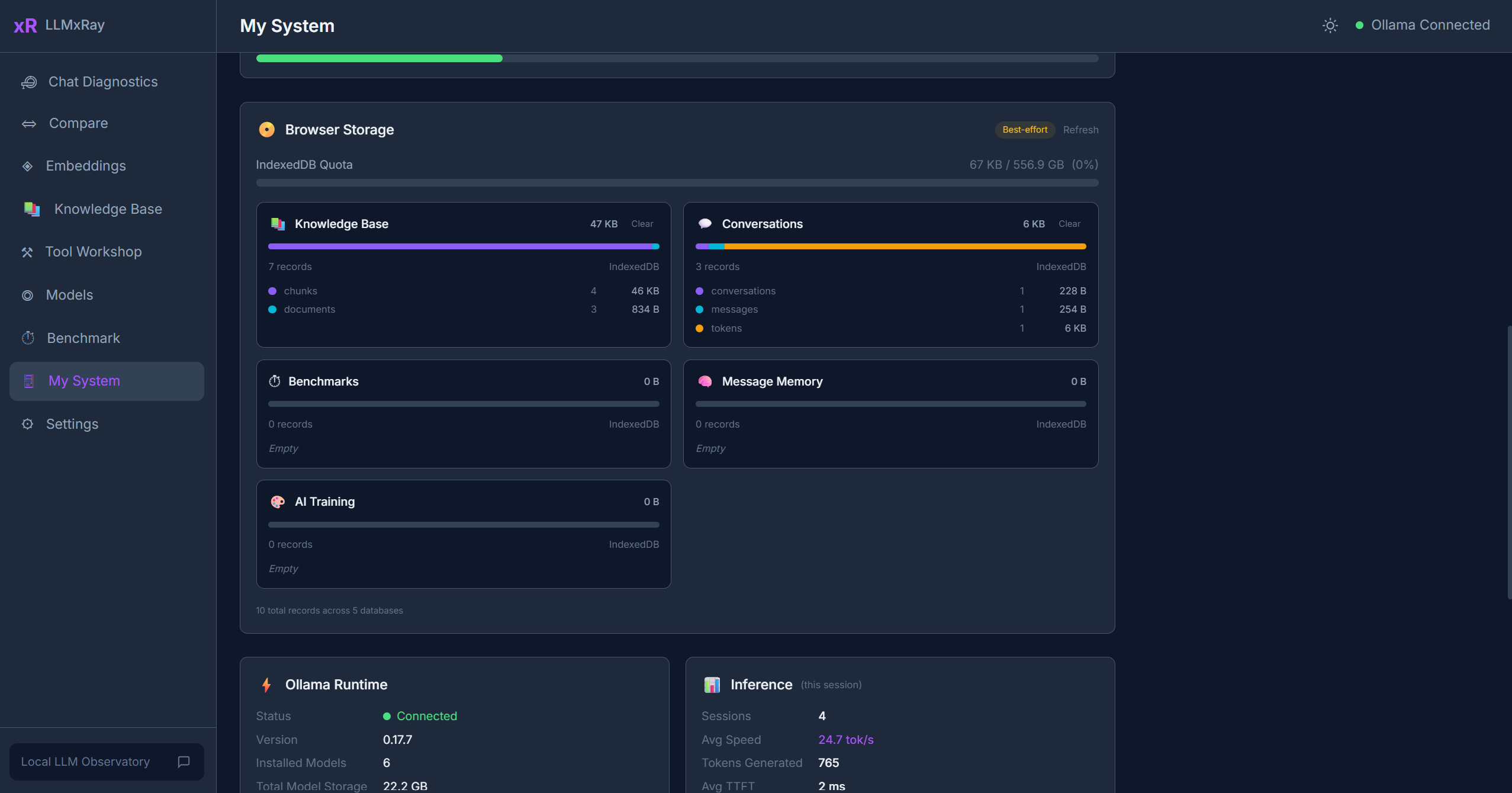 |
| 你的身份 | LLMxRay 可以帮助你…… |
|---|---|
| 开发者 | 调试提示词、分析延迟、比较模型、检查工具调用、追踪成本 |
| 研究人员 | 在不同模型间使用一致的设置开展受控实验…… |
English / 原文
See what your AI is actually doing.
Real-time token streaming, quality analysis, performance profiling, and cost tracking
for local LLMs. No cloud. No API keys. No cost.
🌐 English • Français • 中文 • العربية • Srpski
Quick Start • Features • Screenshots • Who Is This For • Changelog
Chat Diagnostics — Watch tokens arrive one by one, coloured by speed. See where the model hesitates, and what it was unsure about.
Live (new in 0.7.2) — Point VS Code Copilot, Open WebUI, Continue or your own scripts at LLMxRay instead of Ollama, and see every turn they send: prompt size, what the cache kept, where the prompt broke it, whether the model still fits on the GPU. One address to copy, nothing else to set up.
Cache Lab (new in 0.6.0) — Your system prompt is probably being recomputed from scratch every turn. Find out in 30 seconds, and measure the fix. (3.5x faster prefill in our test.)
Decision Lab — Ask a decision model (nimble, tev1, clef) typed questions about a ticket or a message, and see the probability behind every answer instead of a yes.
Compare — The same prompt against two models, or two temperatures, side by side. Stop guessing which setting was actually better.
Surgical Benchmark — Score models on real token logprobs, not on whether the answer happened to look right.
Protocol Observatory — See how the same local model replies through Ollama's native, OpenAI-compatible and Anthropic-compatible APIs, and exactly where they disagree.
Knowledge Base — Drop in PDFs and documents, chunk them, and see what RAG actually retrieves before the model ever sees it.
Plus embeddings, cost tracking, analytics, a tool builder, and a local history database. Full feature list below.
One command. 30 seconds.
Or with Docker:
docker run -p 5174:5174 djovaneli/llmxray
Open http://localhost:5174 and start chatting. That's it.
Prerequisite: Ollama running locally with at least one model pulled (
ollama pull llama3.2).
You run a local LLM. You chat with it. But what actually happened?
- How fast was each token? Which ones was the model confident about?
- Is the response quality degrading over long conversations?
- What would this have cost if you ran it in the cloud?
- Is the model repeating itself? Refusing? Generating gibberish?
- How does temperature 0.3 compare to 0.9 on the same prompt?
LLMxRay answers all of these, visually, in real time, for free.
Real-Time Chat with Token Intelligence
Chat with any Ollama model and watch tokens arrive with confidence coloring — each token is tinted based on generation speed. Supports markdown, multi-turn conversations, file attachments, vision models, and slash commands. For reasoning models, set the thinking budget per conversation — off, model's choice, or an explicit low / medium / high / max effort.
Every response is automatically analyzed. Colored badges appear only when something is wrong:
- Repetition — excessive repeated phrases (4-gram analysis)
- Refusal — "as an AI language model" and 7 other patterns
- Gibberish — high non-ASCII ratio
- Empty — fewer than 10 words
- Truncation — hit the token limit without finishing
Model Comparison Workbench
Up to 4 slots with independent model, temperature, and system prompt. Features include side-by-side streaming, word-level diff highlighting, metrics comparison, and one-click presets (Temperature Sweep, Deterministic Pair, Language Compare with Token Tax visualization).
- Latency percentiles (P50/P95/P99) for duration and TTFT
- Error intelligence — 7-category classifier with timeline
- Usage heatmap — 7x24 grid of your active hours
- Settings impact — temperature vs tokens/sec scatter plots
- Cold vs warm start tracking with model load history
Token usage per model/day with estimated cloud-equivalent pricing. See what you're saving by running locally.
Test model knowledge with multi-choice question suites. Uses real logprobs via OpenAI-compatible endpoint for accurate confidence measurement. Build custom suites visually or let AI generate them from a topic.
Embeddings Lab & RAG Pipeline
Embed text, visualize vectors, measure cosine similarity. Request a narrower output vector to see what Matryoshka truncation costs in similarity. Build a local knowledge base from PDFs, DOCX, and CSV — chunked, embedded, and searchable. All stored in IndexedDB. Zero cost.
Tool Workshop (Visual Canvas)
Drag-and-drop node canvas for building tool definitions. Bidirectional code sync (edit nodes or TypeScript — both update). Probe APIs, auto-generate schemas, test with live execution.
Fill-in-the-Middle Playground (new in v0.4.7)
Code completion for Qwen-Coder, CodeLlama, Codestral, DeepSeek-Coder, and StarCoder. Two textareas (prefix / suffix), the model fills the gap. Uses Ollama's suffix field on /api/generate. Stitched preview shows the result as it would appear in your editor.
LLMxRay opens a second port, 11435 , that behaves exactly like Ollama and forwards everything to it. Point any other tool at http://localhost:11435 (the Ollama VS Code extension's ollama.endpoint for Copilot Chat, Open WebUI's connection URL, Continue's apiBase, n8n's Ollama credential, OLLAMA_HOST for scripts) and every turn it sends appears on the Live page: client, model, prompt tokens, how many came from the cache, prefill and generation speed, tool calls. Select a turn to see what the prompt is made of (system, tool schemas, history, your message) and the exact point where it stopped matching the previous turn, which is where the cache broke. Findings are plain sentences, each linked to the turn that proves it: a client re-reading most of its prompt every turn, a model running partly on CPU because its context no longer fits in VRAM, tool schemas that take 40% of every prompt. Only counts and timings are kept, in memory; prompt text is an opt-in that writes to a local file. Nothing leaves your machine.
Cache Lab (new in v0.6.0)
Find out why your prompt misses the model’s KV cache, and measure what it costs every turn. A local model reuses its cache only while the prompt still matches from the very first token, so a single timestamp near the top forfeits everything below it. The lab finds the values that change between turns, shows the exact point where reuse dies, and then measures — sending each layout twice with a changed value, against your own daemon — what moving them to the end actually saves. Measured on a real 324-token prompt: 4 tokens reused and 64.6 ms of prefill with the timestamp at the front, 290 reused and 18.6 ms with it at the back. 3.5x faster, same words. Requires Ollama 0.33.3+.
Ollama 0.35.1 added decision models — nimble, tev1, clef, clef-flash — that answer on /v1/systemone with choices, probabilities and scores instead of text. Give the lab a state (a ticket, a message, a log line) and typed questions: a choice among named candidates, a yes/no probability , or a score on an ordered scale. Every answer comes back as the model's own probability distribution, drawn as bars with the chosen candidate highlighted. Decision models report decision as their only capability, so LLMxRay keeps them out of the chat selectors and lists them here.
Protocol Observatory (new in v0.4.7)
Fire the same prompt through Ollama's three serving protocols — native /api/chat, OpenAI-compat /v1/chat/completions, and Anthropic-compat /v1/messages — in parallel against your local model. Side-by-side streaming, per-protocol metrics, and an envelope-diff tab that shows how each protocol frames finish reasons, token counts, and error envelopes. No cloud, no API keys — all three endpoints are local on localhost:11434.
Curate training data from your conversations. Tag, review, and export as JSONL for fine-tuning.
Local AI History Database
Every experiment (benchmarks, comparisons, chats, training pairs) is automatically archived in a queryable IndexedDB database with filters, trends, exports, and retention policies.
Full translations in English, French, Serbian (Latin + Cyrillic), Chinese, and Arabic. RTL layout support. Community scaffolds for Hebrew and Japanese.
Tested and verified against Ollama 0.40.x (verified on 0.40.3, October 2026). LLMxRay uses these Ollama endpoints:
| Endpoint | Used for |
|---|---|
/api/chat |
Streaming chat (NDJSON, with tools, think effort levels, format schema) |
/api/generate |
Generation + Fill-in-the-Middle via suffix |
/api/tags |
Model list + capabilities, context length, and embedding width |
/api/show |
Parameters, template, license, and architecture metadata |
/api/embed |
Vector embeddings for RAG, with optional dimensions truncation |
/api/pull, /api/delete, /api/ps, /api/version |
Model management + status |
/v1/chat/completions |
OpenAI-compat path used by Surgical Benchmark for real logprobs and usage totals |
/v1/messages |
Anthropic-compat path used by Protocol Observatory |
Compatible with: Ollama 0.20 and newer (older versions work for chat/generate but lack think and JSON-schema format). Recommended: Ollama 0.33.3+ — prompt-cache reuse is reported (prompt_eval_cached_count, and usage.prompt_tokens_details.cached_tokens on the OpenAI-compatible endpoint), so prefill throughput is measured over the tokens actually evaluated. From 0.32: capabilities and context length arrive with the model listing, think accepts graded effort levels, and embeddings accept a dimensions width.
| Chat with token streaming and confidence |
Model comparison — side by side |
|---|---|
| Session deep dive — metrics and timing |
Benchmark with confidence radar |
| Embeddings — cosine similarity |
System monitor — hardware and Ollama status |
| You are... | LLMxRay helps you... |
|---|---|
| Developer | Debug prompts, profile latency, compare models, inspect tool calls, track costs |
| Researcher | Run controlled experiments with consistent settings across models and temperatures |
| Student / Educator | Explore model behavior visually — built-in Educators Kit with 9 interactive modules |
| AI team lead | Understand quality trends, error patterns, and resource usage across your local fleet |
npx llmxray
npx llmxray --port 3000
npx llmxray --ollama-url http://192.168.1.50:11434


docker run -p 5174:5174 djovaneli/llmxray
docker run -p 5174:5174 -e OLLAMA_URL=http://host.docker.internal:11434 djovaneli/llmxray


git clone https://github.com/LogneBudo/llmxray.git
cd llmxray
npm install
npm run dev     # http://localhost:5173
| Layer | Technology |
|---|---|
| Framework | Vue 3.5 + Composition API |
| Language | TypeScript 5.9 (strict) |
| Build | Vite 7.3 |
| Styling | Tailwind CSS 4.2 |
| State | Pinia 3 (store-per-concern) |
| Charts | Chart.js 4, D3.js 7 |
| Canvas | Vue Flow (visual node editor) |
| Code Editor | CodeMirror 6 |
| Storage | IndexedDB (browser-native) |
| LLM Backend | Ollama (local) |
Streaming — Reads Ollama NDJSON via fetch() + ReadableStream. Tokens update the UI reactively through Pinia stores.
Token confidence — Approximated from inter-token latency (faster = more confident). Clearly labeled as approximation. Benchmarks use real logprobs via OpenAI-compatible endpoint.
Store-per-concern — Each domain has its own Pinia store: tokens, sessions, metrics, reasoning, comparison, embeddings, quality, cost, and more.
Hardware detection — Custom Vite plugin queries the OS directly (PowerShell/proc/sysctl) for accurate hardware specs.
| Command | What it does |
|---|---|
npm run dev |
Dev server (port 5173) |
npm run build |
Type-check + production build |
npm run test |
Unit tests (Vitest) |
npm run test:e2e |
End-to-end (Playwright) |
Contributions welcome! See CONTRIBUTING.md for setup and guidelines.
Community translations especially welcome — scaffold files ready for Hebrew and Japanese.
LLMxRay is a trademark of Ivan Stankovic (LogneBudo). See TRADEMARK.md.
If LLMxRay helps you understand your AI better, consider giving it a star.
It helps others discover the project.