在泰国、马来西亚、新加坡、印度尼西亚和中国台湾地区通过全球跨区域推理访问 Amazon Bedrock 上的 OpenAI GPT 模型
英文标题:Accessing OpenAI GPT models on Amazon Bedrock with global cross-Region inference in Thailand, Malaysia, Singapore, Indonesia, and Taiwan
Amazon Bedrock 现支持从泰国、马来西亚、新加坡、印度尼西亚和中国台湾地区,通过全球跨区域推理调用 OpenAI GPT-6 Sol 和 GPT-6 Luna;GPT-6 Astra 则可从新加坡调用。开发者可通过 Converse API、兼容 OpenAI 的 Responses API 和 Chat Completions API,以及 ChatGPT 桌面应用和 Codex CLI 接入这些模型。文章说明了跨区域推理配置、IAM 与 SCP 权限、区域启用、配额及监控要点。该机制将请求路由到模型已部署的受支持 AWS 商业区域,同时将计费、配额追踪、CloudTrail 和 CloudWatch 记录保留在源区域。
 1.3 MB
 1.3 MB
 2.4 KB
 345.0 KB
 141.2 KB
 346.5 KB
 159.0 KB
 165.5 KB
 15.2 KB
 28.6 KB
 16.2 KB
 21.0 KB
 20.0 KB
 25.8 KB
 56.2 KB
中文
当需求超过本地区容量时,单区域推理可能遭遇限流。泰国、马来西亚、新加坡、印度尼西亚和中国台湾地区的团队需要在本地容量之外访问最新的 OpenAI 模型。Amazon Bedrock 现可从全部这五个 AWS 区域,通过全球跨区域推理提供 OpenAI GPT-6 Sol 和 GPT-6 Luna;GPT-6 Astra 则可从亚太地区(新加坡)调用。本文将说明如何配置调用、设置权限,以及如何从源区域监控推理。
GPT-6 Sol、GPT-6 Luna 和 GPT-6 Astra 均可通过上述区域的全球跨区域推理,在 bedrock-runtime 端点上使用。请参阅 Amazon Bedrock 用户指南中的跨区域推理。有关每个配置文件的完整源区域和目标区域列表,请参阅推理配置文件支持的区域和模型。
本文将介绍全球跨区域推理配置文件,并演示如何从亚太地区(新加坡)使用 Converse API、兼容 OpenAI 的 API 及编程客户端调用它们。随后还将介绍 AWS Identity and Access Management(IAM)和服务控制策略(SCP)配置、配额管理以及监控。
适用于 OpenAI GPT-6 的全球跨区域推理配置文件
GPT-6 系列提供三个模型,均可通过全球跨区域推理使用。
- GPT-6 Sol 为贯穿整个工作周的复杂任务提供强大的推理和编程能力。
- GPT-6 Luna 使高吞吐量的专注型、可重复任务变得实用。
- GPT-6 Astra 可处理复杂推理、编程和长文档任务。
三个模型均接受文本和图像输入,支持客户端工具使用和提示词缓存。它们在推理强度方面有所不同。GPT-6 Sol 和 GPT-6 Luna 支持 none、low、medium、high、xhigh 和 max。GPT-6 Astra 支持相同的等级,但不支持 none。有关 GPT-6 Sol 和 GPT-6 Luna,请参阅借助 Amazon Bedrock 上的 GPT-6 Sol 和 GPT-6 Luna,为日常工作带来更多智能。有关 GPT-6 Astra,请参阅借助 Amazon Bedrock 上的 GPT-6 Astra,应对最具雄心的工作。
全球跨区域推理会将请求路由到模型已部署的受支持 AWS 商业区域,从而让您广泛使用 Amazon Bedrock 容量。调用时,以全球跨区域推理配置文件 ID 替代模型 ID。源区域是您发起 API 调用的区域,Amazon Bedrock 会选择用于处理的目标区域。计费、配额追踪、AWS CloudTrail 和 Amazon CloudWatch 均保留在源区域。
下表列出了全球跨区域推理配置文件 ID,以及本文覆盖的源区域。
| 全球跨区域推理配置文件 | 源区域 | 目标区域 |
|---|---|---|
global.openai.gpt-6-solglobal.openai.gpt-6-luna |
亚太地区(新加坡)ap-southeast-1亚太地区(雅加达)ap-southeast-3亚太地区(马来西亚)ap-southeast-5亚太地区(泰国)ap-southeast-7亚太地区(台北)ap-east-2 |
模型已部署的受支持 AWS 商业区域 |
global.openai.gpt-6-astra |
亚太地区(新加坡)ap-southeast-1 |
模型已部署的受支持 AWS 商业区域 |
随着 AWS 新增区域和配置文件,推理配置文件可用性和区域支持会发生变化,因此在构建前,请同时在模型卡中确认两者:GPT-6 Sol、GPT-6 Luna 和 GPT-6 Astra。有关每 Token 费率,请参阅 Amazon Bedrock 定价。
开始在 Amazon Bedrock 上使用 OpenAI 模型
先完成前置条件,然后通过 Converse API、兼容 OpenAI 的 API 或现有编程客户端调用三个配置文件中的任意一个。
前置条件
- 具有调用配置文件权限的 IAM 身份。安全和权限部分中的 IAM 策略仅授予这些示例所需的权限。
- 已启用您的源区域。只需启用您发起调用的区域,无需启用目标区域,因为它们运行于 Amazon Bedrock 托管容量之上。新加坡(
ap-southeast-1)是默认启用的区域。雅加达(ap-southeast-3)、马来西亚(ap-southeast-5)、泰国(ap-southeast-7)和台北(ap-east-2)均为必须先启用的选择加入区域。更多信息,请参阅在账户中启用或禁用 AWS 区域。 - 当前版本的 AWS SDK 或 CLI。兼容 OpenAI 的示例还需要 OpenAI SDK 和 Amazon Bedrock Token Generator。可通过
pip install boto3 openai aws-bedrock-token-generator安装。
Amazon Bedrock 控制台会在系统定义的推理配置文件下列出全部三个全球跨区域推理配置文件。参见图 1。
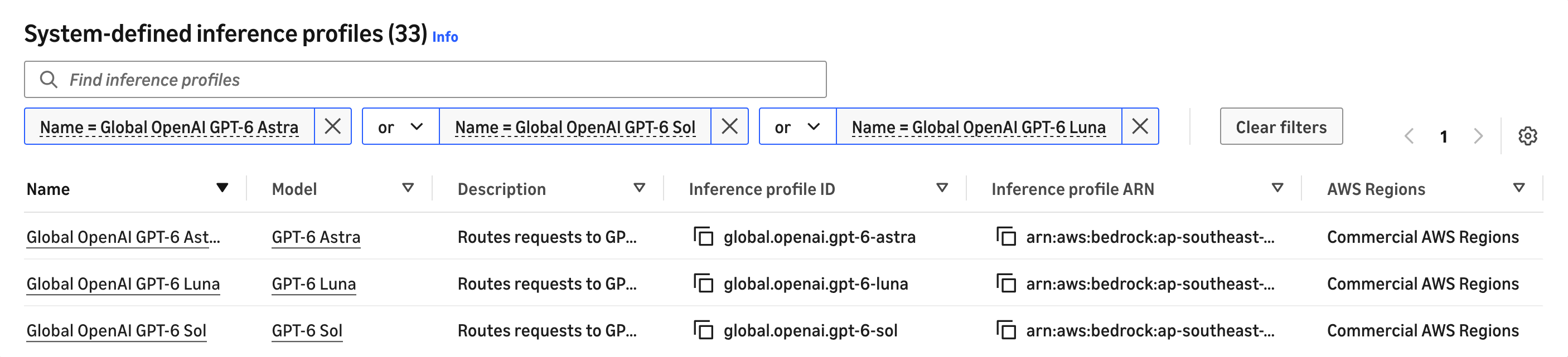
图 1:Amazon Bedrock 控制台系统定义配置文件中的三个全球 OpenAI GPT-6 推理配置文件
通过 Amazon Bedrock Runtime 调用 GPT-6 模型
每个模型在此端点上支持三种访问路径:Amazon Bedrock Converse API、OpenAI Responses API 和 OpenAI Chat Completions API。兼容 OpenAI 的 API 通过 /openai/v1 路径调用,而不是通过 AWS SDK 调用;该端点接受 Signature Version 4(SigV4)或 Amazon Bedrock API 密钥。无论使用何种方式,均将全球跨区域推理配置文件 ID 作为 model 传入。
Converse API。 以下示例从亚太地区(新加坡)调用 GPT-6 Sol 并记录响应。将 BEDROCK_PROFILE_ID 设置为 global.openai.gpt-6-luna 或 global.openai.gpt-6-astra 可切换模型;也可以调用 converse_stream 实现流式输出。
import logging
import os
import boto3

# AWS_REGION overrides this default, so set it to your source Region or unset it.
REGION = os.environ.get("AWS_REGION", "ap-southeast-1")
PROFILE_ID = os.environ.get("BEDROCK_PROFILE_ID", "global.openai.gpt-6-sol")
PROMPT = (
    "In three bullet points, explain when a workload should use "
    "cross-Region inference instead of calling a model in a single Region."
)

logging.basicConfig(format="%(levelname)s %(message)s")
log = logging.getLogger("bedrock-cris")
log.setLevel(logging.INFO)

client = boto3.client("bedrock-runtime", region_name=REGION)

# AccessDeniedException points at the IAM policy. ValidationException usually
# means the model ID is not a global cross-Region inference profile.
response = client.converse(
    modelId=PROFILE_ID,
    messages=[{"role": "user", "content": [{"text": PROMPT}]}],
    inferenceConfig={"maxTokens": 1024},
    # GPT-6 Sol and Luna accept none through max. GPT-6 Astra rejects none.
    additionalModelRequestFields={"reasoning": {"effort": "low"}},
)

# Any effort above none can prepend a reasoningContent block, so pick the text
# block by key rather than by position.
text = "".join(b["text"] for b in response["output"]["message"]["content"] if "text" in b)

log.info("Called %s from %s", PROFILE_ID, REGION)
log.info("Stop reason: %s", response["stopReason"])
log.info("Response:\n%s", text)
OpenAI Chat Completions API。 将 OpenAI SDK 指向区域端点,并传入相同的配置文件 ID。
import logging
import os
from aws_bedrock_token_generator import provide_token
from openai import OpenAI

REGION = os.environ.get("AWS_REGION", "ap-southeast-1")
PROFILE_ID = os.environ.get("BEDROCK_PROFILE_ID", "global.openai.gpt-6-sol")
PROMPT = "List three uses for a message queue."

logging.basicConfig(format="%(levelname)s %(message)s")
log = logging.getLogger("bedrock-cris")
log.setLevel(logging.INFO)

# provide_token mints a short-term key from your AWS credentials, valid up to 12 hours.
client = OpenAI(
    base_url=f"https://bedrock-runtime.{REGION}.amazonaws.com/openai/v1",
    api_key=provide_token(region=REGION),
)

response = client.chat.completions.create(
    model=PROFILE_ID,
    messages=[{"role": "user", "content": PROMPT}],
    max_completion_tokens=256,
)

log.info("Called %s from %s", PROFILE_ID, REGION)
log.info("Response:\n%s", response.choices[0].message.content)
迁移现有 OpenAI 客户端时:
- 在每个请求中设置模型参数,包括引用此前响应的请求。
- 使用受支持的工具类型:
function、mcp、custom、namespace和tool_search。 - 直接在客户端中配置推理配置文件 ID,而非查询 models 端点。
配置 ChatGPT 桌面应用和 Codex CLI
ChatGPT 桌面应用和 Codex CLI 共用 ~/.codex/config.toml,因此一次修改即可同时生效。在两个内置 Amazon Bedrock 提供商中,只有 amazon-bedrock-runtime 接受推理配置文件。
model = "global.openai.gpt-6-astra"
model_provider = "amazon-bedrock-runtime"
[model_providers.amazon-bedrock-runtime.aws]
region = "ap-southeast-1"
SigV4 签名意味着无需轮换密钥。对于非默认配置文件,请添加 profile = "<your-profile>";同时应明确设置 region,因为客户端否则会回退到 AWS_REGION。如需切换模型,请为 model 替换为其他配置文件 ID。
Codex 对这些配置文件报告的上下文窗口为 272,000 Token,这是其自身捆绑的数值,并非服务限制。可通过 model_context_window 提高该数值。此配置需要 Codex CLI 0.148 或更高版本。
图 2 展示了应用中的结果。
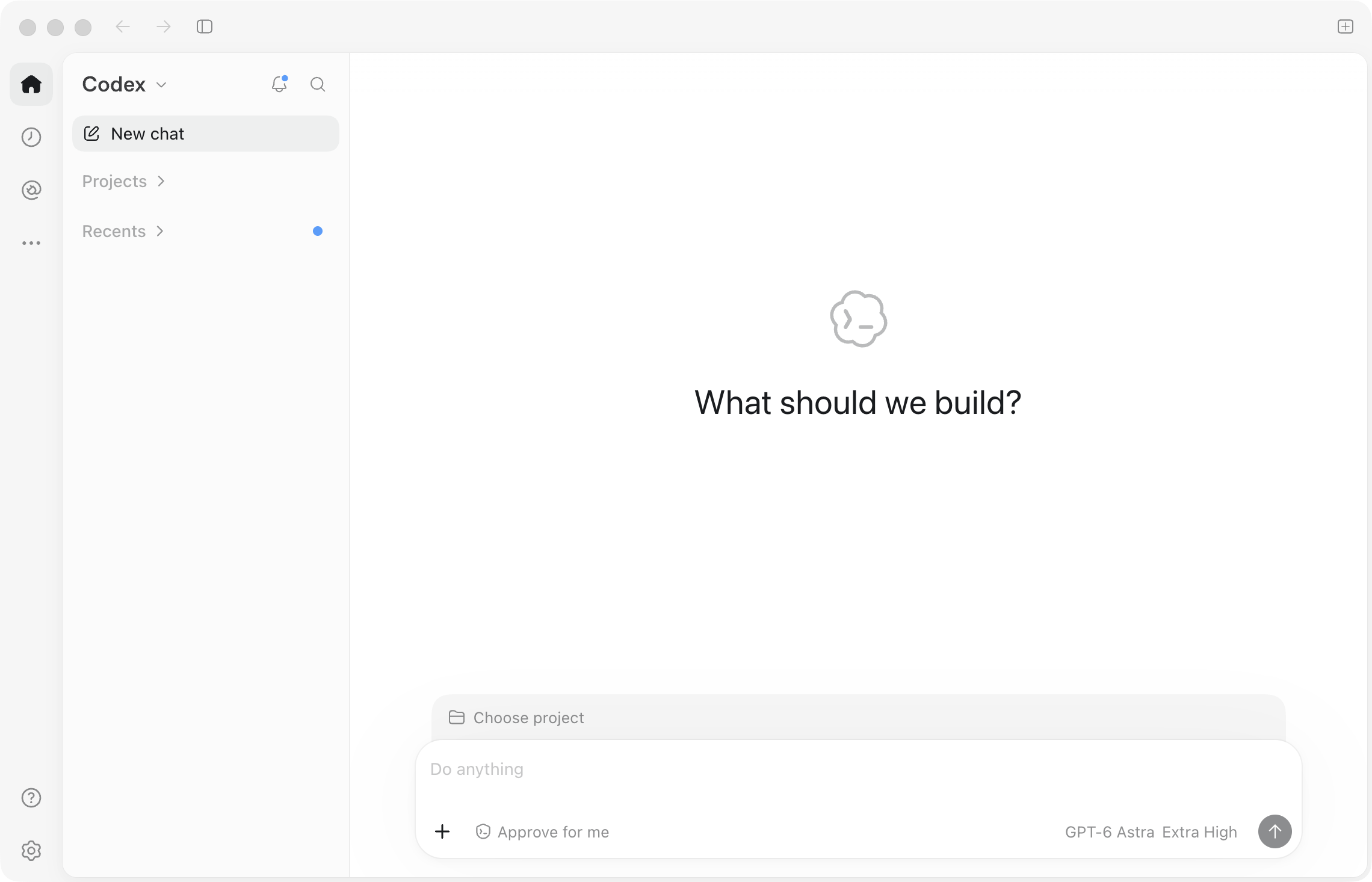
图 2:运行 Amazon Bedrock 上 GPT-6 Astra 的 ChatGPT 桌面应用
安全与权限
Amazon Bedrock 为推理提供了多种控制机制。其中两个与本文密切相关:AWS Identity and Access Management(IAM)策略控制哪些角色可以调用哪些配置文件;服务控制策略(SCP)则应用组织范围的控制,其中包括区域范围。本节将介绍二者,以及请求数据的落地位置。
全球跨区域推理的 IAM 权限
要通过全球跨区域推理配置文件调用任一模型,您的 IAM 策略需要四项声明:
- 访问源区域中的推理配置文件和项目/默认资源。
- 访问源区域中的基础模型,且权限范围限定为该推理配置文件。
- 基础模型的区域无关 Amazon Resource Name(ARN):
arn:aws:bedrock:::foundation-model/openai.gpt-6-sol,并将aws:RequestedRegion设置为unspecified,以允许跨区域路由。 - 用于 API 密钥认证的
bedrock:CallWithBearerToken。
以下 IAM 策略授予从 ap-southeast-1 通过全球跨区域推理调用 GPT-6 Sol 的权限。请替换为您的 AWS 账户 ID,并将 ap-southeast-1 替换为您的源区域。
{
  "Version": "2012-10-17",
  "Statement": [
    {
      "Sid": "GrantGlobalCrisProfileAndProjectAccess",
      "Effect": "Allow",
      "Action": ["bedrock:InvokeModel"],
      "Resource": [
        "arn:aws:bedrock:ap-southeast-1:<ACCOUNT>:inference-profile/global.openai.gpt-6-sol",
        "arn:aws:bedrock:ap-southeast-1:<ACCOUNT>:project/default"
      ],
      "Condition": {
        "StringEquals": { "aws:RequestedRegion": "ap-southeast-1" }
      }
    },
    {
      "Sid": "GrantGlobalCrisInRegionModelAccess",
      "Effect": "Allow",
      "Action": ["bedrock:InvokeModel"],
      "Resource": ["arn:aws:bedrock:ap-southeast-1::foundation-model/openai.gpt-6-sol"],
      "Condition": {
        "StringEquals": {
          "aws:RequestedRegion": "ap-southeast-1",
          "bedrock:InferenceProfileArn": "arn:aws:bedrock:ap-southeast-1:<ACCOUNT>:inference-profile/global.openai.gpt-6-sol"
        }
      }
    },
    {
      "Sid": "GrantGlobalCrisGlobalModelAccess",
      "Effect": "Allow",
      "Action": ["bedrock:InvokeModel"],
      "Resource": ["arn:aws:bedrock:::foundation-model/openai.gpt-6-sol"],
      "Condition": {
        "StringEquals": {
          "aws:RequestedRegion": "unspecified",
          "bedrock:InferenceProfileArn": "arn:aws:bedrock:ap-southeast-1:<ACCOUNT>:inference-profile/global.openai.gpt-6-sol"
        }
      }
    },
    {
      "Sid": "AllowBearerTokenAuth",
      "Effect": "Allow",
      "Action": ["bedrock:CallWithBearerToken"],
      "Resource": "*"
    }
  ]
}
如果使用流式传输(converse_stream 或 stream=True),请在前三项声明的 Action 中添加 bedrock:InvokeModelWithResponseStream。Converse 使用 bedrock:InvokeModel 授权。如果仅使用 SigV4 凭证调用 Converse,则删除
English / 原文
Single-Region inference can throttle when demand exceeds local capacity. Teams in Thailand, Malaysia, Singapore, Indonesia, and Taiwan need access to the newest OpenAI models beyond that capacity. Amazon Bedrock offers OpenAI GPT-6 Sol and GPT-6 Luna through global cross-Region inference from all five AWS Regions, and GPT-6 Astra from Asia Pacific (Singapore). This post shows you how to configure the call, set permissions, and monitor inference from your source Region.
GPT-6 Sol, GPT-6 Luna, and GPT-6 Astra are all available through global cross-Region inference from the preceding Regions, on the bedrock-runtime endpoint. See Cross-Region inference in the Amazon Bedrock User Guide. For the full list of source and destination Regions in each profile, see Supported Regions and models for inference profiles.
In this post, we introduce the global cross-Region inference profiles and invoke them from Asia Pacific (Singapore) using the Converse API, the OpenAI-compatible APIs, and coding clients. We then cover the AWS Identity and Access Management (IAM) and service control policy (SCP) configuration, quota management, and monitoring.
Global cross-Region inference profiles for OpenAI GPT-6
The GPT-6 family offers three models, each available through global cross-Region inference.
- GPT-6 Sol brings strong reasoning and coding capabilities to complex tasks performed throughout the week.
- GPT-6 Luna makes focused, repeatable tasks practical at high volume.
- GPT-6 Astra handles complex reasoning, coding, and long-document work.
All three accept text and image input, client-side tool use, and prompt caching. They differ on reasoning effort. GPT-6 Sol and GPT-6 Luna accept none, low, medium, high, xhigh, and max. GPT-6 Astra accepts the same levels except none. For GPT-6 Sol and GPT-6 Luna, see Bring more intelligence to everyday work with GPT-6 Sol and GPT-6 Luna on Amazon Bedrock. For GPT-6 Astra, see Take on your most ambitious work with GPT-6 Astra on Amazon Bedrock.
Global cross-Region inference routes requests across supported commercial AWS Regions where the model is deployed, giving you broad access to Amazon Bedrock capacity. You invoke it by passing a global cross-Region inference profile ID in place of a model ID. Your source Region is where you make the API call. Amazon Bedrock selects the destination Region for processing. Billing, quota tracking, AWS CloudTrail, and Amazon CloudWatch all stay in your source Region.
The following table lists the global cross-Region inference profile IDs and the source Regions covered in this post.
| Global cross-Region inference profiles | Source Regions | Destination Regions |
|---|---|---|
| global.openai.gpt-6-sol global.openai.gpt-6-luna | Asia Pacific (Singapore) ap-southeast-1 Asia Pacific (Jakarta) ap-southeast-3 Asia Pacific (Malaysia) ap-southeast-5 Asia Pacific (Thailand) ap-southeast-7 Asia Pacific (Taipei) ap-east-2 | Supported commercial AWS Regions where the model is deployed |
| global.openai.gpt-6-astra | Asia Pacific (Singapore) ap-southeast-1 | Supported commercial AWS Regions where the model is deployed |
Inference profile availability and Region support change as AWS adds Regions and profiles, so confirm both on the model card before you build: GPT-6 Sol, GPT-6 Luna, and GPT-6 Astra. For per-token rates, see Amazon Bedrock pricing.
Getting started with OpenAI models on Amazon Bedrock
Start with the prerequisites, then invoke any of the three profiles through the Converse API, the OpenAI-compatible APIs, or your existing coding client.
Prerequisites
- An IAM identity with permission to invoke the profile. The IAM policy in the Security and permissions section grants only what these examples need.
- Your source Region activated. Only the Region you call from needs activating. You do not activate destination Regions, which run on Amazon Bedrock managed capacity. Singapore (
ap-southeast-1) is a Region that is enabled by default. Jakarta (ap-southeast-3), Malaysia (ap-southeast-5), Thailand (ap-southeast-7), and Taipei (ap-east-2) are opt-in Regions you must activate first. For more information, see Enable or disable AWS Regions in your account. - A current AWS SDK or CLI. The OpenAI-compatible examples also require the OpenAI SDK and the Amazon Bedrock token generator. Install them with
pip install boto3 openai aws-bedrock-token-generator.
The Amazon Bedrock console lists all three global cross-Region inference profiles under system-defined inference profiles. See Figure 1.
Figure 1: The three global OpenAI GPT-6 inference profiles among the system-defined profiles in the Amazon Bedrock console
Invoke GPT-6 models through Amazon Bedrock Runtime
Each model supports three access paths on this endpoint: the Amazon Bedrock Converse API, the OpenAI Responses API, and the OpenAI Chat Completions API. The OpenAI-compatible APIs are called on the /openai/v1 paths rather than through the AWS SDKs, and the endpoint accepts either Signature Version 4 (SigV4) or an Amazon Bedrock API key. Pass the global cross-Region inference profile ID as the model in every case.
Converse API. This example calls GPT-6 Sol from Asia Pacific (Singapore) and logs the response. Set BEDROCK_PROFILE_ID to global.openai.gpt-6-luna or global.openai.gpt-6-astra to switch models, or call converse_stream for streaming.
import logging
import os
import boto3

# AWS_REGION overrides this default, so set it to your source Region or unset it.
REGION = os.environ.get("AWS_REGION", "ap-southeast-1")
PROFILE_ID = os.environ.get("BEDROCK_PROFILE_ID", "global.openai.gpt-6-sol")
PROMPT = (
    "In three bullet points, explain when a workload should use "
    "cross-Region inference instead of calling a model in a single Region."
)

logging.basicConfig(format="%(levelname)s %(message)s")
log = logging.getLogger("bedrock-cris")
log.setLevel(logging.INFO)

client = boto3.client("bedrock-runtime", region_name=REGION)

# AccessDeniedException points at the IAM policy. ValidationException usually
# means the model ID is not a global cross-Region inference profile.
response = client.converse(
    modelId=PROFILE_ID,
    messages=[{"role": "user", "content": [{"text": PROMPT}]}],
    inferenceConfig={"maxTokens": 1024},
    # GPT-6 Sol and Luna accept none through max. GPT-6 Astra rejects none.
    additionalModelRequestFields={"reasoning": {"effort": "low"}},
)

# Any effort above none can prepend a reasoningContent block, so pick the text
# block by key rather than by position.
text = "".join(b["text"] for b in response["output"]["message"]["content"] if "text" in b)

log.info("Called %s from %s", PROFILE_ID, REGION)
log.info("Stop reason: %s", response["stopReason"])
log.info("Response:\n%s", text)
OpenAI Chat Completions API. Point the OpenAI SDK at the Regional endpoint and pass the same profile ID.
import logging
import os
from aws_bedrock_token_generator import provide_token
from openai import OpenAI

REGION = os.environ.get("AWS_REGION", "ap-southeast-1")
PROFILE_ID = os.environ.get("BEDROCK_PROFILE_ID", "global.openai.gpt-6-sol")
PROMPT = "List three uses for a message queue."

logging.basicConfig(format="%(levelname)s %(message)s")
log = logging.getLogger("bedrock-cris")
log.setLevel(logging.INFO)

# provide_token mints a short-term key from your AWS credentials, valid up to 12 hours.
client = OpenAI(
    base_url=f"https://bedrock-runtime.{REGION}.amazonaws.com/openai/v1",
    api_key=provide_token(region=REGION),
)

response = client.chat.completions.create(
    model=PROFILE_ID,
    messages=[{"role": "user", "content": PROMPT}],
    max_completion_tokens=256,
)

log.info("Called %s from %s", PROFILE_ID, REGION)
log.info("Response:\n%s", response.choices[0].message.content)
When migrating an existing OpenAI client:
- Set the model parameter on every request, including those referencing a previous response.
- Use supported tool types:
function,mcp,custom,namespace, andtool_search. - Configure the inference profile ID directly in your client rather than querying the models endpoint.
Set up the ChatGPT desktop app and Codex CLI
The ChatGPT desktop app and the Codex CLI share ~/.codex/config.toml, so one change covers both. Of the two built-in Amazon Bedrock providers, only amazon-bedrock-runtime accepts an inference profile.
model = "global.openai.gpt-6-astra"
model_provider = "amazon-bedrock-runtime"
[model_providers.amazon-bedrock-runtime.aws]
region = "ap-southeast-1"
SigV4 signing means there is no key to rotate. Add profile = "<your-profile>" for a non-default profile, and set region explicitly, because the client otherwise falls back to AWS_REGION. Substitute another profile ID for model to change models.
Codex reports a 272,000-token window for these profiles, which is its own bundled figure rather than a service limit. Raise it with model_context_window. This configuration needs Codex CLI 0.148 or later.
Figure 2 shows the result in the app.
Figure 2: The ChatGPT desktop app running GPT-6 Astra on Amazon Bedrock
Security and permissions
Amazon Bedrock offers a range of controls over inference. Two of them matter here. AWS Identity and Access Management (IAM) policies control which roles can invoke which profiles, and service control policies (SCPs) apply organization-wide controls, including Region scope. This section covers both, and where request data lands.
IAM permissions for global cross-Region inference
To call any of these models through a global cross-Region inference profile, your IAM policy needs four statements:
- Access to the inference profile and the project/default resource in your source Region.
- Access to the foundation model in your source Region, scoped to the inference profile.
- The Region-agnostic Amazon Resource Name (ARN) for the foundation model,
arn:aws:bedrock:::foundation-model/openai.gpt-6-sol, withaws:RequestedRegionset tounspecifiedto permit cross-Region routing. bedrock:CallWithBearerTokenfor API-key authentication.
This IAM policy grants permission to invoke GPT-6 Sol through global cross-Region inference from ap-southeast-1. Replace with your AWS account ID and ap-southeast-1 with your source Region.
{
  "Version": "2012-10-17",
  "Statement": [
    {
      "Sid": "GrantGlobalCrisProfileAndProjectAccess",
      "Effect": "Allow",
      "Action": ["bedrock:InvokeModel"],
      "Resource": [
        "arn:aws:bedrock:ap-southeast-1:<ACCOUNT>:inference-profile/global.openai.gpt-6-sol",
        "arn:aws:bedrock:ap-southeast-1:<ACCOUNT>:project/default"
      ],
      "Condition": {
        "StringEquals": { "aws:RequestedRegion": "ap-southeast-1" }
      }
    },
    {
      "Sid": "GrantGlobalCrisInRegionModelAccess",
      "Effect": "Allow",
      "Action": ["bedrock:InvokeModel"],
      "Resource": ["arn:aws:bedrock:ap-southeast-1::foundation-model/openai.gpt-6-sol"],
      "Condition": {
        "StringEquals": {
          "aws:RequestedRegion": "ap-southeast-1",
          "bedrock:InferenceProfileArn": "arn:aws:bedrock:ap-southeast-1:<ACCOUNT>:inference-profile/global.openai.gpt-6-sol"
        }
      }
    },
    {
      "Sid": "GrantGlobalCrisGlobalModelAccess",
      "Effect": "Allow",
      "Action": ["bedrock:InvokeModel"],
      "Resource": ["arn:aws:bedrock:::foundation-model/openai.gpt-6-sol"],
      "Condition": {
        "StringEquals": {
          "aws:RequestedRegion": "unspecified",
          "bedrock:InferenceProfileArn": "arn:aws:bedrock:ap-southeast-1:<ACCOUNT>:inference-profile/global.openai.gpt-6-sol"
        }
      }
    },
    {
      "Sid": "AllowBearerTokenAuth",
      "Effect": "Allow",
      "Action": ["bedrock:CallWithBearerToken"],
      "Resource": "*"
    }
  ]
}
If you use streaming (converse_stream or stream=True), add bedrock:InvokeModelWithResponseStream to the Action in the first three statements. Converse authorizes as bedrock:InvokeModel. If you only call Converse with SigV4 credentials, drop the fourth statement.
To switch models, replace openai.gpt-6-sol with openai.gpt-6-luna or openai.gpt-6-astra throughout. For the complete reference, see IAM policy requirements for global cross-Region inference.
Service control policy considerations for global cross-Region inference
A global cross-Region inference request carries no Region name. Amazon Bedrock sets aws:RequestedRegion to unspecified, so a Region allowlist in an SCP denies the call, and the error names only the policy type, not which policy. That is a common reason a first call fails in an enterprise account.
Rather than widening the allowlist, scope the exception. Amazon Bedrock populates the bedrock:InferenceProfileArn condition key during authorization, so an SCP can allow these profiles while keeping Region controls for everything else. The following SCP does that.
{
  "Version": "2012-10-17",
  "Statement": [
    {
      "Sid": "DenyOutsideApprovedRegionsExceptBedrockInvoke",
      "Effect": "Deny",
      "NotAction": [
        "iam:*", "sts:*", "organizations:*", "account:*",
        "route53:*", "cloudfront:*", "waf:*", "wafv2:*", "shield:*",
        "support:*", "trustedadvisor:*", "health:*",
        "budgets:*", "ce:*", "cur:*", "tax:*", "billing:*",
        "bedrock:Invoke*"
      ],
      "Resource": "*",
      "Condition": {
        "StringNotEquals": { "aws:RequestedRegion": ["ap-southeast-1"] }
      }
    },
    {
      "Sid": "DenyBedrockInferenceOutsideApprovedRegionsUnlessCris",
      "Effect": "Deny",
      "Action": ["bedrock:Invoke*"],
      "Resource": "*",
      "Condition": {
        "StringNotEquals": { "aws:RequestedRegion": ["ap-southeast-1"] },
        "ArnNotLike": {
          "bedrock:InferenceProfileArn": [
            "arn:aws:bedrock:*:*:inference-profile/global.*"
          ]
        }
      }
    }
  ]
}
The first statement enforces your Region allowlist for every service except Amazon Bedrock inference. The second denies that inference outside those Regions unless it routes through a global cross-Region inference profile. For geographic profiles, add their prefix (for example inference-profile/us.*) to the ArnNotLike list, because geographic requests carry a real Region name. Keep your source Region in the allowlist, and add the global services your organization uses to NotAction.
A blunter alternative is to add unspecified to your existing allowlist, which works but opens the same exception to every other service. For a ready-to-use policy file, see the aws-samples service-control-policy-examples repository.
Data retention and abuse detection
For automated offline abuse detection, classifier-flagged traffic is retained by AWS for up to 30 days and processed programmatically. Under cross-Region inference that retention happens in the destination Region, which for a global profile is any supported commercial AWS Region where the model is deployed. Eligible customers might request full zero data retention through their AWS account team. For more information, see Amazon Bedrock abuse detection and Data retention.
If your organization has data residency requirements, take this to your risk and compliance team early. See the AWS Financial Services Compliance Center country pages for these five countries. We recommend you obtain your own advice on compliance with the requirements relevant to your business.
Quota management
GPT-6 quotas on bedrock-runtime are measured in tokens per minute (TPM), tracked against the source Region you call from. Input and cache-write tokens count 1:1, and each output token consumes 10 tokens of quota. For example, a request with 2,000 input tokens and 1,000 output tokens depletes 12,000 tokens from your quota.
Amazon Bedrock reserves the full max_tokens up front, so set it close to the completions you expect. One quota covers InvokeModel, Converse, Responses, and Chat Completions. Review and raise it on the Service Quotas console from your source Region. Before production, request increases early and alarm on EstimatedTPMQuotaUsage in the AWS/Bedrock namespace at 70–80 percent of your allocation. See How tokens are counted in Amazon Bedrock and Amazon Bedrock endpoints and quotas for current values.
Monitoring and logging
Your operational surface stays in your source Region. Amazon CloudWatch metrics, AWS CloudTrail events, model invocation logs, quota accounting, and billing all remain in the Region you called from. You pay that Region’s rates, not the processing Region’s.
CloudTrail records where each request was processed. AWS documents a global cross-Region inference profile’s destinations as its commercial Regions rather than enumerating them. GetInferenceProfile returns the Region-agnostic and source-Region model ARNs rather than a destination list. Your per-request record is additionalEventData.inferenceRegion in CloudTrail in your source Region. Inference on this endpoint is a management event, logged by default at no extra cost. CloudTrail Event History retains 90 days, so longer horizons need a trail or model invocation logging. Retrieve the CloudTrail events with this command.
aws cloudtrail lookup-events \
  --region ap-southeast-1 \
  --lookup-attributes AttributeKey=EventSource,AttributeValue=bedrock.amazonaws.com \
  --start-time <START> \
  --end-time <END> \
  --max-results 1 \
  --query 'Events[0].CloudTrailEvent' --output text | python3 -m json.tool
Set the window around a call you just made, because CloudTrail delivery lags by a few minutes. If the most recent event was a failed call, it carries an errorCode and no inferenceRegion. Raise --max-results and pick an event without errorCode.
{
  "eventName": "Converse",
  "eventSource": "bedrock.amazonaws.com",
  "awsRegion": "ap-southeast-1",
  "managementEvent": true,
  "requestParameters": {
    "modelId": "global.openai.gpt-6-sol",
    "inferenceConfig": { "maxTokens": 1024 }
  },
  "additionalEventData": {
    "inferenceRegion": "us-east-1"
  }
}
Metrics and coding-agent usage stay in CloudWatch. Where developers reach GPT-6 through a coding agent, CloudWatch Coding Agent Insights adds ready-made dashboards under GenAI Observability that break token use down by user, team, and cost center. The agents emit OpenTelemetry metrics natively. For Codex, see Set up OpenTelemetry for OpenAI Codex.
Clean up
This post adds an IAM policy and optionally an SCP statement and a logging destination. Detach or delete the IAM policy you attached, and revert the SCP entry if you added one. Delete the model invocation logging destination in Amazon Simple Storage Service (Amazon S3) or Amazon CloudWatch Logs if you created one, to avoid storage charges. The global cross-Region inference profiles are system-defined, so there is nothing to delete.
Conclusion
This post showed how to invoke GPT-6 Sol and GPT-6 Luna from five Asia Pacific source Regions, and GPT-6 Astra from Asia Pacific (Singapore), through global cross-Region inference on bedrock-runtime. Pass a global cross-Region inference profile ID as the model parameter, and configure the IAM policy and SCP exception from this post. The same endpoint serves the OpenAI-compatible APIs, so an existing OpenAI integration moves across by changing a base URL and a key.
To get started, attach the IAM policy from this post, and send a first request through global.openai.gpt-6-sol. Size your tokens-per-minute quota at the 10x burndown rate, and confirm in CloudTrail that additionalEventData.inferenceRegion appears on your calls.
For more information, see the Amazon Bedrock User Guide, Route model inference requests across AWS Regions with cross-Region inference, and Amazon Bedrock pricing.
About the authors
Traci Lim
Traci is a Senior AI/ML Specialist Technical Account Manager at AWS based in Singapore. A machine learning engineer by trade, he works with startups and enterprises to operationalize and scale AI/ML applications in production, with a focus on GenAIOps, Agentic Ops, operational excellence, and cost and performance optimization. Prior to AWS, Traci led engineering teams in the tech and financial industries, scaling distributed AI systems across AWS, Azure, GCP, and SAP. He is a builder at heart, always looking for ways to create meaningful impact through technology.
Karan Jhaveri
Karan is a Senior Technical Account Manager at AWS based in Singapore. He works with public sector and enterprise customers to take generative AI from experimentation to production at scale. He likes to stay hands-on, getting into the details and building out solutions that solve real operational problems.
Melanie Li
Melanie, PhD, is a Senior Generative AI Specialist Solutions Architect at AWS based in Sydney, Australia, where her focus is on working with customers to build solutions using state-of-the-art AI/ML tools. She has been actively involved in multiple generative AI initiatives across APJ, harnessing the power of LLMs. Prior to joining AWS, Dr. Li held data science roles in the financial and retail industries.
Zohreh Norouzi
Zohreh is a Senior Security Solutions Architect at Amazon Web Services (AWS). She helps customers make good security choices and accelerate their journey to the AWS Cloud. She has been actively involved in AI security initiatives, using her expertise to help customers build secure AI solutions at scale.
Saurabh Trikande
Saurabh is a Senior Product Manager for Amazon Bedrock and Amazon SageMaker Inference. He is passionate about working with customers and partners, motivated by the goal of democratizing AI. He focuses on core challenges related to deploying complex AI applications, inference with multi-tenant models, cost optimizations, and making the deployment of generative AI models more accessible. In his spare time, Saurabh enjoys hiking, learning about innovative technologies, following TechCrunch, and spending time with his family.
Chris Dickens
Chris is a Member of Product Staff at OpenAI focused on the OpenAI APIs. His work includes collaboration with AWS on Amazon Bedrock to make OpenAI’s frontier models widely accessible to developers.