使用 llama.cpp 在 Amazon SageMaker AI 上部署决策模型
英文标题:Deploy decision models with llama.cpp on Amazon SageMaker AI
本文介绍如何使用 AWS Deep Learning Container for llama.cpp 在 Amazon SageMaker AI 上部署量化模型,并通过 OpenAI 兼容的 Chat Completions API 提供文本生成服务。文章进一步通过 SemIf 扩展同一运行时,使模型无需生成答案 token 即可对预定义选项返回概率和 logits,适用于请求路由、Agent 动作选择和策略判定等场景。基准测试显示,在 Qwen3.5-4B Q4_K_M 模型上,GPU 端点的 p50 延迟比 CPU 快 4.9 倍,p95 延迟快 32.2 倍,而准确率基本相当。开发者可根据延迟、吞吐量和部署复杂度,在标准 llama.cpp DLC 路径与 SemIf 子镜像路径之间选择。
 1.3 MB
 1.3 MB
 2.4 KB
 345.0 KB
 141.2 KB
 346.5 KB
 104.9 KB
 4.6 KB
 5.3 KB
 32.8 KB
 37.8 KB
 154.1 KB
中文
需要路由请求、选择 Agent 动作或分配策略结果的应用,通常需要针对一组固定选项进行评分,而不是生成自由形式的文本。通过 llama.cpp 在 Amazon SageMaker AI 上部署这些决策模型,可以借助托管方式在 CPU 或 GPU 基础设施上提供量化模型服务。
本文延续了面向生成式 AI 推理的专用 AWS Deep Learning Containers(DLC)系列。此前的文章涵盖了 WhisperX、vLLM-Omni – 第 1 部分 和 vLLM-Omni – 第 2 部分。
本文首先使用 适用于 llama.cpp 的 AWS DLC,通过 SageMaker AI InvokeEndpoint 提供 OpenAI 兼容的 Chat Completions 服务。随后,您将使用 SemIf(此前名为 OpenJev)扩展同一运行时;它无需解码答案 token,即可返回所声明选项的概率。配套的代码示例提供了 CPU 和 GPU 部署选项。
解决方案概览
图 1 展示了基于同一个已打包模型的两种部署路径。文本生成路径使用适用于 llama.cpp 的 AWS DLC,并通过 OpenAI 兼容 API 返回生成的响应。结构化决策路径则构建一个子镜像,以 SemIf 适配器替换默认服务器,并返回已声明选项的概率。
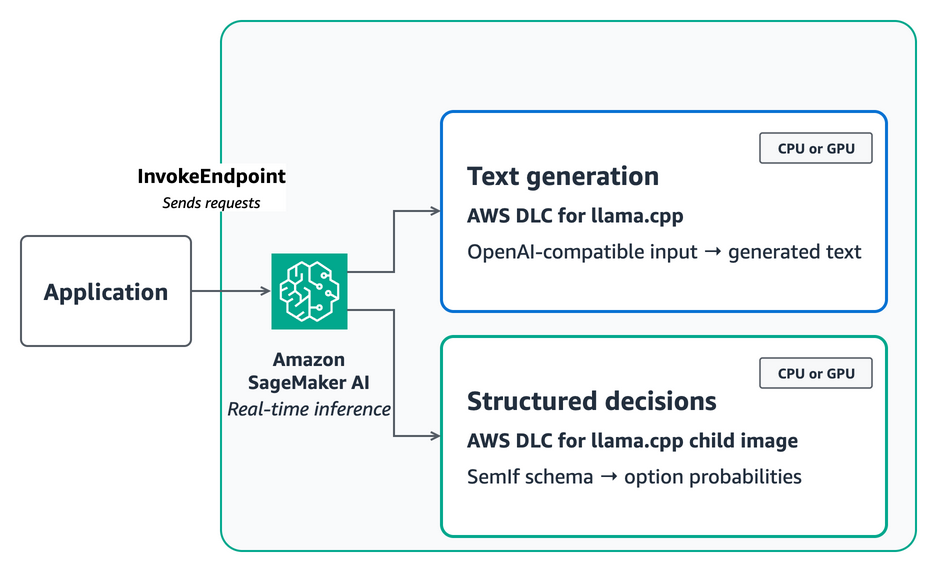
图 1:根据工作负载的 API 和延迟要求,在 CPU 或 GPU 上运行适用于 llama.cpp 的 AWS DLC 或 SemIf 子镜像
对于标准路径,将模型以 model.tar.gz 形式打包到 Amazon Simple Storage Service(Amazon S3) 中,并直接引用已发布的 DLC 镜像。容器会在 /opt/ml/model 下查找第一个 .gguf 文件,将 POST /invocations 映射至 llama-server 的 /v1/chat/completions,并将 SM_LLAMA_CPP_* 环境变量传递为 llama.cpp 参数。
llama-server HTTP API 不会公开 SemIf 所需的最终位置 logits 和状态操作。因此,结构化决策路径使用 AWS CodeBuild 构建子镜像,并将其存储在 Amazon Elastic Container Registry(Amazon ECR) 中。该子镜像保留 DLC 已编译的 CPU 或 CUDA 库,同时将其入口点替换为兼容 SageMaker 的适配器。
理解输入和输出 Schema
适用于 llama.cpp 的 AWS DLC 接受 OpenAI Chat Completions Schema。发送包含 role 和 content 的 messages 数组,以及 max_tokens 和 stream 等生成控制参数:
{
  "messages": [
    {
      "role": "user",
      "content": "A customer cannot receive a password reset email. Reply with the best support queue."
    }
  ],
  "max_tokens": 64,
  "stream": false
}
响应使用 OpenAI 兼容的 choices 数组。从 choices[0].message.content 读取生成文本。
SemIf 使用受约束的决策 Schema,而不是聊天消息。请求包含调用方定义的 ID、非结构化状态、问题和一个有序的允许选项列表:
{
  "decision": {
    "id": "support-route",
    "state": "The customer cannot receive a password reset email.",
    "question": "Which queue should handle this request?",
    "options": [
      {"id": "account_access", "description": "Account access support."},
      {"id": "billing", "description": "Billing support."}
    ]
  }
}
响应将按相同顺序返回 option_ids、probabilities 和原始 option_logits,以及提示词、时序数据和固定模型元数据。借助稳定的选项 ID,您的应用可以应用阈值、回退逻辑和策略检查,而无需解析生成的自然语言文本。
SemIf 属于更广泛的决策模型类别,这类模型会根据非结构化状态对应用定义的结果进行评分。其他实现包括:Jev,即 TypeSafe 的决策模型和 /v1/systemone API;Kev,一个旨在兼容 TypeSafe API 的模型服务器;以及 Strands Decider 2B,一个面向 Agent 工作流、提供校准输出的专用模型。
选择合适的决策工作流
当您的应用在请求时定义允许选项,并需要模型解释非结构化上下文时,请使用这一模式。示例包括:将案例路由至某个队列、从已知集合中提取一个值、分配事件优先级、检查策略结果,或选择 Agent 动作。请将授权和确定性业务规则保留在模型之外,并在将模型概率视为运营置信度前对其进行验证。
如果您需要通过 InvokeEndpoint 获得 OpenAI 兼容的 Chat Completions,请使用标准 SageMaker AI 文本生成路径。SageMaker AI 镜像会将 POST /invocations 映射到 llama-server 的 /v1/chat/completions 端点。只有当应用需要该接口未提供的行为时,才需要构建子镜像,例如 SemIf 对 logits 和状态的直接访问。
移除答案 token 生成并不意味着移除了模型推理。在 SemIf 读取最终 logits 前,模型仍会处理完整的状态、问题和选项描述。请保持提示词聚焦,并在投入生产前,使用应用中带标签的决策来评估所选模型。
针对延迟和质量目标进行调优
以下基准测试适用于 SemIf 扩展,而非文本生成端点。模型大小、量化方式、提示词长度、运行时和 CPU 线程数都会影响每次决策。为量化这些权衡,我们将相同的 231 个公开 JevBench 任务串行发送到一个 CPU 端点和一个 GPU 端点。
| 配置 | 适用于 llama.cpp 的 AWS DLC | 有效响应 | 准确率 | 客户端 p50 | 客户端 p95 |
|---|---|---|---|---|---|
Qwen3.5-4B Q4_K_M,ml.c6i.8xlarge,32 线程 |
llama-cpp:server-sagemaker-cpu-v1 | 231/231 | 179/231 (77.5%) | 1.715 秒 | 19.291 秒 |
Qwen3.5-4B Q4_K_M,ml.g6e.xlarge,完整 GPU 卸载 |
llama-cpp:server-sagemaker-cuda-v1 | 231/231 | 180/231 (77.9%) | 0.352 秒 | 0.599 秒 |
与 CPU 配置相比,GPU 端点的 p50 延迟快 4.9 倍,p95 延迟快 32.2 倍。该示例使用 SageMaker AI 实例池功能,按优先级列出兼容的 GPU 实例类型,因此当首选实例不可用时,SageMaker 可以选择替代实例。该实例池依次排列 g6e、g6、g5 和 g4dn。SageMaker 选择了 ml.g6e.xlarge,启动日志确认 llama.cpp 将全部 34 个模型层卸载至 NVIDIA L40S。CPU 和 GPU 镜像使用了不同的 llama.cpp 构建版本,并在六个困难任务上产生了不同预测。应将单个答案的准确率差异视为运行时差异,而非 GPU 卸载能够提升模型质量的证据。
较小模型降低了中位延迟,但 2B 和 0.8B 候选模型的准确率分别仅为 66.7% 和 58.4%。因此,该示例将 4B Q4_K_M 模型保留为质量优先的默认选择。这些测量结果包含网络延迟,并非服务保证。
请针对您自身的决策任务,对完整模型和基础设施配置进行基准测试。对于不敏感于延迟、可容忍数秒响应时间的后台、离线或低吞吐量工作负载,请使用 CPU。对于交互式决策、长提示词或尾延迟目标严格的工作负载,请使用 GPU。请保持状态和选项描述简洁,将共享相同状态的决策合并到一个请求中,并通过扩展端点实例来支持并发。共享状态评分会复用共同的提示词前缀;同时,适配器会返回可重试的 HTTP 503 响应,而不是围绕有状态的 llama.cpp 上下文允许无限队列。
前提条件
您需要:
- 一个 AWS 账户,以及部署所在 AWS Region 中的 S3 存储桶。
- Python 3.10 或更高版本、Git 和 AWS Command Line Interface(AWS CLI)。
- 一个用于可选 SemIf 扩展的专用 CodeBuild 服务角色。
- 一个 SageMaker AI 可以代入的 AWS Identity and Access Management(IAM) 角色。
- SageMaker AI、Amazon ECR、Amazon S3、CodeBuild、IAM pass-role 操作和 Amazon CloudWatch Logs 的权限。
- 兼容 x86 CPU 或 NVIDIA GPU SageMaker 实时端点的配额。
文本生成示例使用 CPU DLC 和固定的 CPU 实例。对于不敏感于延迟的工作负载,SemIf 扩展默认保留 CPU,同时提供带有有序实例池的可选 CUDA 镜像。创建端点前,请查看 SageMaker AI 定价。
部署决策模型并使用 SemIf 扩展
使用以下流程部署标准文本生成端点,然后构建可选的 SemIf 扩展,以便在 CPU 或 GPU 上执行结构化决策。
-
克隆代码示例并安装其依赖项。
git clone https://github.com/aws-samples/sagemaker-genai-hosting-examples.git cd sagemaker-genai-hosting-examples/03-features/semif-decision-model python3 -m venv .venv . .venv/bin/activate python3 -m pip install -r deploy/requirements.txt -
设置账户的部署值。
export AWS_REGION="<your-region>" export ARTIFACT_BUCKET=amzn-s3-demo-semif-artifacts export CODEBUILD_ROLE_ARN=arn:aws:iam::111122223333:role/semif-codebuild-role export SAGEMAKER_ROLE_ARN=arn:aws:iam::111122223333:role/semif-sagemaker-role export STANDARD_ENDPOINT_NAME=llamacpp-gguf export SEMIF_ENDPOINT_NAME=semif-decision-workflows -
使用 CodeBuild 打包固定版本的 GGUF 模型和 tokenizer。
python deploy/prepare_model_build.py \
  --region "$AWS_REGION" \
  --bucket "$ARTIFACT_BUCKET" \
  --codebuild-role-arn "$CODEBUILD_ROLE_ARN" \
  --model-s3-uri "s3://$ARTIFACT_BUCKET/semif-llamacpp/model.tar.gz"
等待返回的构建 ID 进入
SUCCEEDED状态。该构建会在model-manifest.json中记录源代码修订版本和校验和;如果 GGUF 校验和与已验证的值不同,构建将停止。 -
使用适用于 llama.cpp 的 AWS DLC 部署 GGUF 模型。
从适用于 llama.cpp 的 AWS DLC 文档中解析一个使用摘要固定的
server-sagemaker-cpu-v1镜像,然后创建 SageMaker AI 模型、端点配置和端点:export STANDARD_IMAGE_URI="<published-llama-cpp-cpu-image>@sha256:<digest>" python deploy/deploy_standard_endpoint.py \ --region "$AWS_REGION" \ --image-uri "$STANDARD_IMAGE_URI" \ --model-data-url "s3://$ARTIFACT_BUCKET/semif-llamacpp/model.tar.gz" \ --role-arn "$SAGEMAKER_ROLE_ARN" \ --instance-type ml.c6i.2xlarge \ --name "$STANDARD_ENDPOINT_NAME"请选择
server-sagemaker-cpu-v1或server-sagemaker-cuda-v1镜像,而不要选择对应的 EC2 镜像。SageMaker AI 镜像实现了/ping和/invocations容器契约,并将调用负载映射为 Chat Completions。本演练通过 Amazon S3 中的 SageMaker AI 模型工件提供 GGUF 模型。作为替代方案,当端点具备网络出口时,您可以配置
SM_LLAMA_CPP_HF_REPO和SM_LLAMA_CPP_HF_FILE,以从 Hugging Face 下载 GGUF 文件。对于该路径,您不需要 Dockerfile 或 ECR 存储库。等待端点进入
InService状态,然后发送一个 OpenAI 兼容的聊天请求:python deploy/invoke_standard_endpoint.py \ --region "$AWS_REGION" \ --endpoint-name "$STANDARD_ENDPOINT_NAME" -
构建可选的 SemIf 子镜像,并解析其不可变摘要。
对于 CPU:
python deploy/prepare_build.py \ --region "$AWS_REGION" \ --bucket "$ARTIFACT_BUCKET" \ --codebuild-role-arn "$CODEBUILD_ROLE_ARN"对于 GPU,请改为构建 CUDA 子镜像:
python deploy/prepare_build.py \ --region "$AWS_REGION" \ --bucket "$ARTIFACT_BUCKET" \ --codebuild-role-arn "$CODEBUILD_ROLE_ARN" \ --dockerfile Dockerfile.gpu \ --image-tag "gpu-$(date +%Y%m%d%H%M%S)"构建成功后,构造不可变镜像 URI:
ECR_REPOSITORY_URI=$(aws ecr describe-repositories \ --region "$AWS_REGION" \ --repository-names semif-llamacpp-dlc \ --query 'repositories[0].repositoryUri' \ --output text) IMAGE_DIGEST=$(aws ecr describe-images \ --region "$AWS_REGION" \ --reposit
English / 原文
Applications that route requests, select agent actions, or assign policy outcomes often need scores over a fixed set of choices instead of free-form text. Deploying these decision models with llama.cpp on Amazon SageMaker AI gives you a managed path for serving quantized models on CPU or GPU infrastructure.
This post continues a series on specialized AWS Deep Learning Containers (DLCs) for generative AI inference. Previous posts cover WhisperX, vLLM-Omni – Part 1, and vLLM-Omni – Part 2.
In this post, you first use the AWS DLC for llama.cpp to serve OpenAI-compatible chat completions through SageMaker AI InvokeEndpoint. You then extend the same runtime with SemIf, formerly OpenJev, which returns probabilities over declared options without decoding an answer token. The accompanying code sample includes CPU and GPU deployment options.
Solution overview
Figure 1 shows two deployment paths from the same packaged model. The text-generation path uses the AWS DLC for llama.cpp and returns generated responses through the OpenAI-compatible API. The structured-decision path builds a child image that replaces the default server with a SemIf adapter and returns probabilities for declared options.
Figure 1: Run the AWS DLC for llama.cpp or the SemIf child image on CPU or GPU, depending on the API and latency requirements of your workload
For the standard path, package the model as model.tar.gz in Amazon Simple Storage Service (Amazon S3) and reference the published DLC image directly. The container finds the first .gguf file under /opt/ml/model, maps POST /invocations to llama-server at /v1/chat/completions, and passes SM_LLAMA_CPP_* environment variables to llama.cpp arguments.
The llama-server HTTP API doesn’t expose the final-position logits and state operations that SemIf uses. The structured-decision path therefore uses AWS CodeBuild to build a child image and store it in Amazon Elastic Container Registry (Amazon ECR). The child image keeps the DLC’s compiled CPU or CUDA libraries while replacing its entry point with a SageMaker-compatible adapter.
Understand the input and output schemas
The AWS DLC for llama.cpp accepts the OpenAI Chat Completions schema. Send a messages array with role and content, plus generation controls such as max_tokens and stream:
{
"messages": [
{
"role": "user",
"content": "A customer cannot receive a password reset email. Reply with the best support queue."
}
],
"max_tokens": 64,
"stream": false
}
The response uses the OpenAI-compatible choices array. Read generated text from choices[0].message.content.
SemIf uses a constrained decision schema instead of chat messages. The request contains a caller-defined ID, unstructured state, a question, and an ordered list of allowed options:
{
"decision": {
"id": "support-route",
"state": "The customer cannot receive a password reset email.",
"question": "Which queue should handle this request?",
"options": [
{"id": "account_access", "description": "Account access support."},
{"id": "billing", "description": "Billing support."}
]
}
}
The response returns option_ids, probabilities, and raw option_logits in the same order, along with prompt, timing, and pinned model metadata. With stable option IDs, your application can apply thresholds, fallbacks, and policy checks without parsing generated prose.
SemIf belongs to a broader class of decision models that score application-defined outcomes from unstructured state. Other implementations include Jev, TypeSafe’s decision model and /v1/systemone API; Kev, a model server designed for TypeSafe API compatibility; and Strands Decider 2B, a purpose-built model for agent workflows with calibrated outputs.
Choose the right decision workflows
Use this pattern when your application defines the allowed choices at request time and needs a model to interpret unstructured context. Examples include routing a case to a queue, extracting one value from a known set, assigning an incident priority, checking a policy outcome, or selecting an agent action. Keep authorization and deterministic business rules outside the model, and validate model probabilities before treating them as operational confidence.
Use the standard SageMaker AI text-generation path when you need OpenAI-compatible chat completions through InvokeEndpoint. The SageMaker AI image maps POST /invocations to the llama-server /v1/chat/completions endpoint. Build a child image only when your application needs behavior that this interface doesn’t provide, such as SemIf’s direct logits and state access.
Removing answer-token generation doesn’t remove model inference. The model still processes the complete state, question, and option descriptions before SemIf reads the final logits. Keep prompts focused, and evaluate the selected model with labeled decisions from your application before production use.
Tune for your latency and quality targets
The following benchmark applies to the SemIf extension, not the text-generation endpoint. Model size, quantization, prompt length, runtime, and CPU thread count affect each decision. To quantify these trade-offs, we sent the same 231 public JevBench tasks serially to one CPU endpoint and one GPU endpoint.
| Configuration | AWS DLC for llama.cpp | Valid responses | Accuracy | Client p50 | Client p95 |
|---|---|---|---|---|---|
Qwen3.5-4B Q4_K_M, ml.c6i.8xlarge, 32 threads |
llama-cpp:server-sagemaker-cpu-v1 | 231/231 | 179/231 (77.5%) | 1.715 seconds | 19.291 seconds |
Qwen3.5-4B Q4_K_M, ml.g6e.xlarge, full GPU offload |
llama-cpp:server-sagemaker-cuda-v1 | 231/231 | 180/231 (77.9%) | 0.352 seconds | 0.599 seconds |
Compared with the CPU configuration, the GPU endpoint was 4.9 times faster at p50 and 32.2 times faster at p95. The sample uses the SageMaker AI instance pools feature to list compatible GPU instance types in priority order, so SageMaker can select an alternative when the first preference isn’t available. The pool ordered g6e, g6, g5, then g4dn. SageMaker selected ml.g6e.xlarge, and startup logs confirmed that llama.cpp offloaded all 34 model layers to an NVIDIA L40S. The CPU and GPU images used different llama.cpp builds and produced different predictions on six hard tasks. Treat the one-answer accuracy difference as runtime variation, not evidence that GPU offload improves model quality.
Smaller models reduced median latency, but the 2B and 0.8B candidates achieved 66.7 percent and 58.4 percent accuracy. The sample therefore keeps the 4B Q4_K_M model as its quality-first default. These measurements include network latency and aren’t service guarantees.
Benchmark the complete model and infrastructure configuration against your own decisions. Use CPU for background, offline, or low-throughput workloads that aren’t latency-sensitive and can tolerate seconds of response time. Use GPU for interactive decisions, long prompts, or workloads with tight tail-latency targets. Keep state and option descriptions concise, group decisions that share the same state into one request, and scale endpoint instances for concurrency. Shared-state scoring reuses the common prompt prefix, while the adapter returns retryable HTTP 503 responses instead of allowing an unbounded queue around its stateful llama.cpp context.
Prerequisites
You need:
- An AWS account and an S3 bucket in your deployment AWS Region.
- Python 3.10 or later, Git, and the AWS Command Line Interface (AWS CLI).
- A purpose-specific CodeBuild service role for the optional SemIf extension.
- An AWS Identity and Access Management (IAM) role that SageMaker AI can assume.
- Permissions for SageMaker AI, Amazon ECR, Amazon S3, CodeBuild, IAM pass-role actions, and Amazon CloudWatch Logs.
- Quota for a compatible x86 CPU or NVIDIA GPU SageMaker real-time endpoint.
The text-generation example uses the CPU DLC and a fixed CPU instance. The SemIf extension keeps CPU as the default for workloads that aren’t latency-sensitive and offers an optional CUDA image with ordered instance pools. Review SageMaker AI pricing before creating an endpoint.
Deploy a decision model and extend it with SemIf
Use the following procedure to deploy the standard text-generation endpoint, then build the optional SemIf extension for structured decisions on CPU or GPU.
-
Clone the code sample and install its dependencies.
git clone https://github.com/aws-samples/sagemaker-genai-hosting-examples.git cd sagemaker-genai-hosting-examples/03-features/semif-decision-model python3 -m venv .venv . .venv/bin/activate python3 -m pip install -r deploy/requirements.txt -
Set the deployment values for your account.
export AWS_REGION="<your-region>" export ARTIFACT_BUCKET=amzn-s3-demo-semif-artifacts export CODEBUILD_ROLE_ARN=arn:aws:iam::111122223333:role/semif-codebuild-role export SAGEMAKER_ROLE_ARN=arn:aws:iam::111122223333:role/semif-sagemaker-role export STANDARD_ENDPOINT_NAME=llamacpp-gguf export SEMIF_ENDPOINT_NAME=semif-decision-workflows -
Package the pinned GGUF model and tokenizer with CodeBuild.
python deploy/prepare_model_build.py \ --region "$AWS_REGION" \ --bucket "$ARTIFACT_BUCKET" \ --codebuild-role-arn "$CODEBUILD_ROLE_ARN" \ --model-s3-uri "s3://$ARTIFACT_BUCKET/semif-llamacpp/model.tar.gz"
Wait for the returned build ID to reach SUCCEEDED. The build records the source revisions and checksums in model-manifest.json and stops if the GGUF checksum differs from the validated value.
- Deploy the GGUF model with the AWS DLC for llama.cpp.
Resolve a digest-pinned server-sagemaker-cpu-v1 image from the AWS DLC for llama.cpp documentation, then create the SageMaker AI model, endpoint configuration, and endpoint:
export STANDARD_IMAGE_URI="<published-llama-cpp-cpu-image>@sha256:<digest>"

python deploy/deploy_standard_endpoint.py \
  --region "$AWS_REGION" \
  --image-uri "$STANDARD_IMAGE_URI" \
  --model-data-url "s3://$ARTIFACT_BUCKET/semif-llamacpp/model.tar.gz" \
  --role-arn "$SAGEMAKER_ROLE_ARN" \
  --instance-type ml.c6i.2xlarge \
  --name "$STANDARD_ENDPOINT_NAME"
Select a server-sagemaker-cpu-v1 or server-sagemaker-cuda-v1 image rather than the corresponding EC2 image. The SageMaker AI images implement the /ping and /invocations container contract and map invocation payloads to chat completions.
This walkthrough supplies the GGUF model through the SageMaker AI model artifact in Amazon S3. As an alternative, you can configure SM_LLAMA_CPP_HF_REPO and SM_LLAMA_CPP_HF_FILE to download a GGUF file from Hugging Face when the endpoint has network egress.
You don’t need a Dockerfile or an ECR repository for this path. Wait for the endpoint to enter InService, then send an OpenAI-compatible chat request:
python deploy/invoke_standard_endpoint.py \
  --region "$AWS_REGION" \
  --endpoint-name "$STANDARD_ENDPOINT_NAME"
- Build the optional SemIf child image and resolve its immutable digest.
For CPU:
python deploy/prepare_build.py \
  --region "$AWS_REGION" \
  --bucket "$ARTIFACT_BUCKET" \
  --codebuild-role-arn "$CODEBUILD_ROLE_ARN"
For GPU, build the CUDA child image instead:
python deploy/prepare_build.py \
  --region "$AWS_REGION" \
  --bucket "$ARTIFACT_BUCKET" \
  --codebuild-role-arn "$CODEBUILD_ROLE_ARN" \
  --dockerfile Dockerfile.gpu \
  --image-tag "gpu-$(date +%Y%m%d%H%M%S)"
After the build succeeds, construct the immutable image URI:
ECR_REPOSITORY_URI=$(aws ecr describe-repositories \
  --region "$AWS_REGION" \
  --repository-names semif-llamacpp-dlc \
  --query 'repositories[0].repositoryUri' \
  --output text)
IMAGE_DIGEST=$(aws ecr describe-images \
  --region "$AWS_REGION" \
--repository-name semif-llamacpp-dlc \
--query 'sort_by(imageDetails,&imagePushedAt)[-1].imageDigest' \
--output text)
export IMAGE_URI="${ECR_REPOSITORY_URI}@${IMAGE_DIGEST}"
The deployment script rejects mutable image tags.
- Deploy the SemIf endpoint.
The CPU configuration uses a fixed instance type:
     python deploy/deploy_endpoint.py \
       --region "$AWS_REGION" \
       --image-uri "$IMAGE_URI" \
       --model-data-url "s3://$ARTIFACT_BUCKET/semif-llamacpp/model.tar.gz" \
       --role-arn "$SAGEMAKER_ROLE_ARN" \
       --instance-type ml.c6i.8xlarge \
       --threads 32 \
       --name "$SEMIF_ENDPOINT_NAME"
Wait for the returned endpoint name to enter InService. This path sets n_gpu_layers=0. The adapter serializes scoring around one stateful llama.cpp context, so scale out with endpoint instances after measuring your workload rather than assuming parallel scoring inside one container.
For the GPU image, provide ordered instance pools and request full model offload:
     python deploy/deploy_endpoint.py \
       --region "$AWS_REGION" \
       --image-uri "$IMAGE_URI" \
       --model-data-url "s3://$ARTIFACT_BUCKET/semif-llamacpp/model.tar.gz" \
       --role-arn "$SAGEMAKER_ROLE_ARN" \
       --instance-pool ml.g6e.xlarge \
       --instance-pool ml.g6.2xlarge \
       --instance-pool ml.g5.2xlarge \
       --instance-pool ml.g4dn.2xlarge \
       --gpu-layers=-1 \
       --provision-timeout 1200 \
       --name "$SEMIF_ENDPOINT_NAME"
Instance pools are ordered placement fallbacks, not inference load balancing. SageMaker selects one available type for the variant. Endpoint creation can take longer while SageMaker AI works through the pool. Check the startup logs for the selected GPU and a message confirming that all model layers were offloaded.
- Invoke the SemIf endpoint with the example decision.
The request declares stable IDs for each allowed option:
     {
       "decision": {
         "id": "support-route",
         "state": "Customer asks to reset a forgotten password and says the reset email never arrived.",
         "question": "Which queue should handle this request?",
         "options": [
           {"id": "account_access", "description": "Account access and authentication support."},
           {"id": "billing", "description": "Billing and payment support."},
           {"id": "sales", "description": "Sales and product evaluation."}
         ]
       }
     }

     python deploy/invoke_endpoint.py \
       --region "$AWS_REGION" \
       --endpoint-name "$SEMIF_ENDPOINT_NAME"
The response preserves the option order and includes conditional probabilities, raw logits, token and prompt metadata, and the pinned model identity:
     {
       "result": {
         "id": "support-route",
         "option_ids": ["account_access", "billing", "sales"],
         "probabilities": [0.99996, 0.00003, 0.00001],
         "option_logits": [28.47, 17.92, 17.04],
         "prompt_sha256": "016267542103ab91422c425d2234ec7e1b9aef77f9d3e481b96db2de7cca470a",
         "readout": "quantized last-position logits restricted to declared answer slots; no generated tokens"
       }
     }
Apply application-level thresholds and fallbacks. Don’t use a model decision as a substitute for authorization.
Clean up
Delete the SageMaker AI endpoint, endpoint configuration, and model:
python deploy/cleanup_endpoint.py \
  --region "$AWS_REGION" \
  --name "$STANDARD_ENDPOINT_NAME"

python deploy/cleanup_endpoint.py \
  --region "$AWS_REGION" \
  --name "$SEMIF_ENDPOINT_NAME"
The script deletes only those explicitly named SageMaker AI resources. Delete the CodeBuild projects, ECR repository, model and source objects in Amazon S3, logs, and purpose-specific IAM roles when you no longer need them.
Conclusion
The AWS DLC for llama.cpp gives you a managed foundation for serving decision models on SageMaker AI across CPU and GPU instances. It can load GGUF models from SageMaker AI model artifacts or a configured Hugging Face repository, then serve OpenAI-compatible chat completions through InvokeEndpoint without requiring a custom container. When your application needs direct logits and model state operations, you can extend the DLC with a SemIf adapter. Choose CPU for workloads that aren’t latency-sensitive, and choose GPU when prompt prefill and tail latency affect the application experience.
Review the code sample, AWS DLC for llama.cpp documentation, and SageMaker AI custom inference container contract to adapt the deployment for your workload.
About the authors
Jyothirmai Kottu
Jyothirmai is a Software Development Engineer on the AWS Deep Learning Containers team. She builds AI and machine learning infrastructure with a focus on container performance, reliability, and developer usability. Outside of work, she enjoys coffee, yoga, and exploring new places with family and friends.
Daniel Wirjo
Daniel is a Solutions Architect at AWS, focused on frontier AI startups. As a former startup CTO, he enjoys collaborating with founders and engineering leaders to drive growth and innovation on AWS. Outside of work, Daniel enjoys taking walks with a coffee in hand, appreciating nature, and learning new ideas.
Daniel Quang
Daniel is a Solutions Architect on the Frontier AI Startups team at AWS, where he helps the world’s largest and most strategic generative AI startups scale their infrastructure on the cloud. He holds a PhD in Computer Science from the University of California, Irvine, with a research focus on machine learning and bioinformatics.
Dmitry Soldatkin
Dmitry is the Worldwide Leader for Specialist Solutions Architecture, SageMaker Inference at AWS. He helps customers design, build, and optimize generative AI and machine learning solutions, with interests in deep learning and deploying machine learning at scale. He has a passion for continuous innovation and using data to drive business outcomes.