使用 Ray LLM Deep Learning Containers 运行多节点推理工作负载
英文标题:Run multi-node inference workloads using Ray LLM Deep Learning Containers
本文介绍如何在 Amazon EKS 上使用多节点 Ray LLM Deep Learning Containers,将一个大型语言模型部署到两个 GPU 节点,并通过单一 OpenAI 兼容端点提供服务。该方案将 Prefill 和 Decode 推理阶段拆分到不同 GPU 节点,以减少长提示词处理对持续生成任务的干扰,并支持各阶段独立扩缩容。Ray LLM DLC 预集成了 Ray Serve LLM、vLLM、NIXL、EFA、libfabric 和 aws-ofi-nccl 等组件,免去了开发者手动解决 GPU 软件栈依赖兼容性的问题。文章以 Qwen3.5-9B 为例,说明了 EKS 集群、EFA 网络、KubeRay、RayService 配置及 OpenAI 兼容 API 调用方式。
 1.3 MB
 1.3 MB
 2.4 KB
 345.0 KB
 141.2 KB
 346.5 KB
 51.7 KB
 20.9 KB
 22.8 KB
 21.4 KB
 135.3 KB
中文
本文展示如何使用多节点 Ray LLM Deep Learning Containers,在 Amazon Elastic Kubernetes Service(Amazon EKS)上的两个 GPU 节点之间部署一个大型语言模型(LLM)。该方案在一个 OpenAI 兼容端点之后使用独立的 Prefill 和 Decode 节点。这类多节点架构常见于张量并行、流水线并行、数据并行,以及 Prefill/Decode 解耦推理工作负载。在之前的一篇文章中,我们介绍了 Ray Serve DLC,并使用它在单个 GPU 节点上通过 HTTP 端点部署了一个小型模型。你可以获得一个可用的推理端点,而且容器会保持包括 CUDA 库在内的 GPU 软件栈兼容,因此无需编写样板代码。
Ray 是一个分布式计算框架,因此 Ray Serve 部署可以跨越多个节点。客户使用多节点 Ray Serve 的原因有多种。一些客户希望运行单个 GPU 无法容纳的基础模型或开放权重模型;另一些客户需要超过单个副本所能提供的吞吐量;还有一些客户希望分离推理的两个阶段以提升性能。在每种场景中,客户都必须自行构建依赖链:为 GPU 软件栈选择兼容的库,并在组件版本发生偏移时调试问题。这些差异化程度不高的工作会占用时间和精力,使团队无法专注于交付模型。
AWS Deep Learning Containers(DLC)长期以来一直在解决训练和推理工作负载中的此类问题。DLC 是预构建、经性能优化的 Docker 镜像,将框架、其依赖项和 GPU 软件栈打包为已测试、已修补的组合,可立即拉取和使用。随着面向多节点部署的 Ray LLM DLC 发布,这一方法如今扩展到了多节点推理。你可以获得一个专为通过 HTTP 端点提供模型服务而构建、由 AWS 维护和测试的容器,其中已组装好完整的推理软件栈。
本文将介绍如何使用多节点 Ray LLM DLC 实现多节点解耦推理:在 Amazon EKS 上的两个 GPU 驱动节点之间部署一个单一大型语言模型,并通过单一端点协同提供服务。其中一个 GPU 节点负责 Prefill 阶段,另一个 GPU 节点负责 Decode 阶段。分离这两个阶段可以防止计算密集型长提示词阻塞已在进行中的请求的 token 生成。这种方法非常适合检索增强生成(RAG)、文档摘要和 Agent 应用等工作负载。我们使用多节点 Ray LLM DLC,它内置 Ray Serve LLM、NVIDIA Inference Transfer Library(NIXL) 和 Elastic Fabric Adapter(EFA) 软件栈,并在无需应用代码的情况下暴露 OpenAI 兼容 API。完整代码可在配套仓库中获取。
为什么需要 Prefill/Decode(PD)解耦
LLM 推理包含两个不同阶段。Prefill 会并行处理整个输入提示词,并构建键值(KV)缓存。随后,Decode 阶段会逐个 token 生成响应,同时读取并扩展该缓存。Prefill 受计算能力限制,而 Decode 受内存带宽限制。当两个阶段共享同一块 GPU 时,它们会争用相同资源;突发且计算密集的 Prefill 工作会干扰稳定、对延迟敏感的 Decode 工作。将 Prefill 阶段与 Decode 阶段分离,意味着可以分别为各阶段选择硬件和服务属性,从而提升大规模场景下的整体性能。
PD 解耦将这两个阶段部署在不同节点上,使每个阶段能够独立运行、互不干扰,并可独立扩缩容。其代价是:在 Prefill 阶段构建的 KV 缓存必须传递给 Decode 节点,并且传输速度必须足够快,才能避免抵消解耦带来的收益。这正是节点间互连至关重要的原因。
Ray LLM DLC 提供什么
AWS DLC 是预构建、经性能优化的 Docker 镜像,将框架、其依赖项和 GPU 软件栈打包为已经测试和修补的组合,可立即拉取和使用。每次发布前,所有组件都会被一起验证,因此 CUDA 运行时、框架和服务层之间不会出现版本漂移。安全补丁会在构建时应用。
Ray LLM DLC 将这一能力扩展到了分布式 LLM 服务。它以 vLLM 作为推理引擎,以 Ray Serve 的 HTTP 作为服务层,使用 NIXL 在节点之间传输 KV 缓存,并使用 EFA 软件栈(libfabric 和 aws-ofi-nccl)实现高带宽节点间通信。由于 Ray Serve LLM 库包含内置应用构建器,因此整个服务应用只需一段 YAML 配置。无需 handler 类、无需模型归档文件,也无需构建自定义镜像。单个辅助函数 build_pd_openai_app 接收 Prefill 配置和 Decode 配置,并在统一的 OpenAI 兼容端点之后连接两者之间的 KV 缓存传输。
架构
下图展示了该部署在 Amazon EKS 上的布局。用户请求到达位于 CPU 系统节点上的 Ray head,两个 GPU worker 节点分别运行模型的 Prefill 和 Decode 阶段。
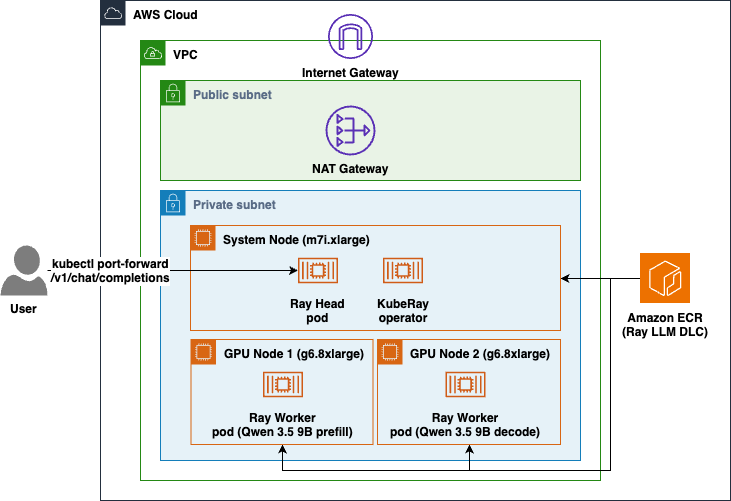
图 1:Amazon EKS 上的多节点推理架构,Ray head 位于 CPU 系统节点,Prefill 和 Decode 阶段位于两个 GPU worker 节点
该部署是位于虚拟私有云(VPC)内的 EKS 集群。节点运行在私有子网中,并通过 NAT Gateway 获得出站访问能力。一个 CPU 系统节点(m7i.xlarge)承载系统工作负载、KubeRay operator 和仅使用 CPU 的 Ray head Pod。两个 GPU worker 节点(g6.8xlarge)运行 Ray worker:一个为 Prefill 阶段提供服务,另一个为 Decode 阶段提供服务。两个节点都从 Amazon Elastic Container Registry(Amazon ECR) 拉取 Ray LLM DLC。
KubeRay 会监测你应用的 RayService,并自动完成 head 与 worker 的连接。Ray Serve 将 Prefill 和 Decode 部署放置在两个 GPU worker 上。KV 缓存通过 NIXL 从 Prefill worker 流向 Decode worker,其中 NIXL 使用 EFA 的 libfabric 后端。GPU 节点组被固定在单一可用区(AZ),因为 EFA 无法跨 AZ 工作。
前提条件
要按照本文操作,你需要:
- 一个已启用计费的 AWS 账户。
- 目标区域中运行两个 g6.8xlarge 实例的足够服务配额(至少 64 个 vCPU)。
- 已配置凭证的 AWS 命令行界面(AWS CLI)。
- 用于与 Kubernetes 集群控制平面通信的 kubectl CLI。
- 用于在 EKS 上创建和管理集群的 eksctl CLI。
- 用于安装 KubeRay operator 的 helm(Kubernetes 包管理器)。
- 用于渲染清单的 envsubst 工具(GNU gettext 的组成部分)。
使用以下命令验证你的 AWS 凭证是否处于活动状态:
aws sts get-caller-identity
使用预构建应用提供推理服务
应用配置位于 manifest/rayservice.yaml 中的 serveConfigV2 区块。它使用 build_pd_openai_app,该函数接收 prefill_config 和 decode_config,并在它们之间连接 KV 缓存传输:
applications:
- name: qwen
  import_path: ray.serve.llm:build_pd_openai_app # OpenAI-compatible PD app, built in
  route_prefix: /
  args:
    prefill_config:
      model_loading_config: { model_id: qwen3.5-9b, model_source: Qwen/Qwen3.5-9B }
      engine_kwargs:
        max_model_len: 4096
        dtype: bfloat16
        gpu_memory_utilization: 0.90
        enforce_eager: true # Skip CUDA graph capture to reduce peak GPU memory
      kv_transfer_config:
        kv_connector: NixlConnector
        kv_role: kv_both
        engine_id: prefill
        kv_connector_extra_config: { backends: ["LIBFABRIC"] }
      deployment_config: { num_replicas: 1 }
    decode_config:
      model_loading_config: { model_id: qwen3.5-9b, model_source: Qwen/Qwen3.5-9B }
      engine_kwargs:
        max_model_len: 4096
        dtype: bfloat16
        gpu_memory_utilization: 0.90
        enforce_eager: true
      kv_transfer_config:
        kv_connector: NixlConnector
        kv_role: kv_both
        engine_id: decode
        kv_connector_extra_config: { backends: ["LIBFABRIC"] }
      deployment_config: { num_replicas: 1 }
少数几个设置承担了大部分关键作用。max_model_len: 4096 将上下文大小设为可适配 GPU 上已测量 KV 缓存的规模。dtype: bfloat16 和 gpu_memory_utilization: 0.90 分别设定精度以及 vLLM 可占用的显存比例。enforce_eager: true 会跳过 CUDA 图捕获,以降低 GPU 峰值内存使用量(具体效果取决于模型和输入)。kv_transfer_config 设置是实现解耦的关键:两个阶段都使用 NixlConnector 和 kv_role: kv_both,但使用不同的 engine_id(一个为 prefill,另一个为 decode)。最关键的设置是 kv_connector_extra_config: { backends: ["LIBFABRIC"] }。如果没有这一行,NIXL 默认使用 UCX;即使在 EFA 上,UCX 的运行速度也仅相当于 TCP。
位于 rayClusterConfig 中的其余清单配置描述了 Pod。head Pod 仅使用 CPU(num-gpus: "0"),并被固定到系统节点组。每个 worker Pod 请求一个 GPU 和一个 EFA 接口(nvidia.com/gpu: "1", vpc.amazonaws.com/efa: "1"),并通过 nodeSelector: { role: gpu-worker } 定向至 GPU 节点。由于 NIXL 会将 CUDA VRAM 注册到 EFA 网卡,该 Pod 必须以 privileged: true 运行,仅授予 IPC_LOCK capability 并不足够。worker 设置 FI_PROVIDER=efa,从 Pod IP 中读取 VLLM_HOST_IP,并挂载共享内存卷。内存限制显著高于约 18 GiB 的检查点大小,以便操作系统页缓存能够保存它。对于采用前述缓存配置、在 g6.8xlarge 上加载 Qwen3.5-9B 模型的场景,重启时模型权重加载时间可从约 145 秒降至约 2 秒。
在 Amazon EKS 上部署
所有脚本共享一个配置文件 scripts/env.sh。该脚本包含 CLUSTER_NAME、REGION、K8S_VERSION 和 NAMESPACE 的默认值,其他默认值涵盖系统和 GPU 节点组、KubeRay 版本以及模型。你可以在运行脚本前导出任意变量来覆盖其值。
在项目根目录中,设置基础目录,然后加载变量:
CURRENT_DIR=$(pwd)
cd $CURRENT_DIR/ray-serve-multi-node/scripts
source ./env.sh
第 1 步:创建 EKS 集群
此步骤会预置 EKS 集群(VPC、OIDC provider、核心附加组件)以及一个 CPU 系统节点组,该节点组运行系统工作负载、KubeRay operator 和 Ray head。节点运行在私有子网中,并通过 NAT Gateway 出站;集群子网位于可提供该 GPU 实例类型的 AZ 中。该脚本具有幂等性,在全新环境中运行需要 15 至 20 分钟。
第 2 步:添加 GPU worker 节点
此步骤创建 GPU 节点组:两个启用 EFA 的 g6.8xlarge 实例,被固定在单一 AZ,并打上 role=gpu-worker 标签,以便 Ray worker 定向至这些节点。启用 EFA 还会安装 EFA device plugin,该插件在每个节点上声明 vpc.amazonaws.com/efa 资源。该步骤约需 5 至 20 分钟,首次运行通常耗时更长。
第 3 步:安装 KubeRay operator
此步骤使用 Helm 安装 KubeRay operator,并将其固定在系统节点组,以使 GPU 节点可用于推理。KubeRay 会监测接下来应用的 RayService,并自动完成 head 与 worker 的连接。此步骤约需 1 至 2 分钟。
第 4 步:部署 RayService
此步骤使用 envsubst 将你的镜像、模型和命名变量渲染至 manifest/rayservice.yaml,然后应用该文件。KubeRay 会创建 head 和两个 worker Pod,Ray Serve LLM 则会启动 Prefill 和 Decode 部署。该脚本会等待 head 进入 Ready 状态、两个 worker 进入 Running 状态,最后等待 Serve 应用报告 RUNNING。由于每个节点都要加载模型,预计此步骤需要数分钟。
可随时检查状态,包括每个 Pod 被调度到哪个节点以及可用的 GPU 容量:
./deploy_ray_service.sh status
调用模型
Serve 应用健康后,KubeRay 会创建一个稳定的 <rayservice-name>-serve-svc Service。将端口转发到该服务:
kubectl port-forward -n inference svc/ray-llm-serve-svc 8000:8000
由于 DLC 暴露 OpenAI 兼容 API,因此你可以列出模型,并发送标准 chat-completion 请求,无需使用自定义 schema:
curl --silent http://127.0.0.1:8000/v1/models
curl --fail --silent --show-error \
  --request POST "http://127.0.0.1:8000/v1/chat/completions" \
  --header "Content-Type: application/json" \
  --data '{
    "model": "qwen3.5-9b",
    "messages": [
      {"rol
English / 原文
This post shows how to deploy one large language model (LLM) across two GPU nodes on Amazon Elastic Kubernetes Service (Amazon EKS) with the multi-node Ray LLM Deep Learning Containers. It uses separate prefill and decode nodes behind one OpenAI-compatible endpoint. This kind of multi-node setup is common for tensor, pipeline, and data parallelism, as well as prefill/decode disaggregation inference workloads. In a previous post, we introduced the Ray Serve DLC and used it to stand up a small model behind an HTTP endpoint on a single GPU node. You had a working inference endpoint, and the container keeps the GPU stack compatible, including CUDA libraries, so you did not need to write boilerplate code.
Ray is a distributed compute framework, so Ray Serve deployments can span multiple nodes. Customers use multi-node Ray Serve for several reasons. Some want to run foundation or open-weight models that are too large for a single GPU. Others need more throughput than one replica can deliver. Still others want to separate the two phases of inference to improve performance. In each case, customers must build the dependency chain themselves: choosing compatible libraries for the GPU stack and debugging issues when a component drifts out of alignment. This is undifferentiated work that takes time and effort away from delivering models.
AWS Deep Learning Containers (DLCs) have long solved this kind of problem for training and inferencing workloads. DLCs are pre-built, performance-optimized Docker images that bundle a framework, its dependencies, and the GPU stack into a tested, patched combination you can pull and use immediately. With the launch of the Ray LLM DLC for multi-node deployments, that same approach now extends to multi-node inference. You get a container purpose-built for serving models behind an HTTP endpoint, maintained and tested by AWS, with the full inference stack already assembled.
This post walks through implementing multi-node disaggregated inference using multi-node Ray LLM DLC: deploying a single large language model across two GPU-powered nodes on Amazon EKS cooperating behind a single endpoint. While one of the GPU nodes handles the prefill phase, the other GPU node handles the decode phase. Separating the phases prevents compute-heavy long prompts from stalling token generation for requests already in progress. This approach is well suited for workloads such as Retrieval Augmented Generation (RAG), document summarization, and agentic applications. We use the multi-node Ray LLM DLC, which ships Ray Serve LLM, NVIDIA Inference Transfer Library (NIXL), and the Elastic Fabric Adapter (EFA) stack, and exposes an OpenAI-compatible API with no application code. The complete code is available in the accompanying repository.
Why prefill/decode (PD) disaggregation
LLM inference has two distinct phases. Prefill processes the entire input prompt in parallel and builds the key-value (KV) cache. Decode then generates the response one token at a time, reading and extending that cache. Prefill is compute bound, and Decode is bound by memory bandwidth. When both phases share one GPU, they contend for the same resources, and the bursty, compute-heavy prefill work interferes with the steady, latency-sensitive decode work. Separating the prefill phase from the decode phase means you can select the hardware and serving properties for each phase, improving overall performance at scale.
PD disaggregation places the two phases on separate nodes, so each phase runs without interfering with the other and can be scaled independently. The trade-off is that the KV cache built during prefill must be handed to the decode node, and that transfer should be fast enough not to erase the benefit. That is exactly why the interconnect between the nodes matters.
What the Ray LLM DLC provides
AWS DLCs are pre-built, performance-optimized Docker images that bundle a framework, its dependencies, and the GPU stack into a tested, patched combination you can pull and use immediately. All components are validated together before each release, so there is no version drift between the CUDA runtime, the framework, and the serving layer. Security patches are applied at build time.
The Ray LLM DLC extends this to distributed LLM serving. It ships vLLM as the inference engine, Ray Serve’s HTTP as the serving layer, NIXL for KV-cache transfer between nodes, and the EFA stack (libfabric and aws-ofi-nccl) for high-bandwidth node-to-node communication. Because the Ray Serve LLM library includes a built-in application builder, the entire serving application is a block of YAML. There’s no handler class, no model archiver, and no custom image to build. A single helper, build_pd_openai_app, takes a prefill configuration and a decode configuration and wires the KV-cache transfer between them behind one OpenAI-compatible endpoint.
Architecture
The following diagram shows how the deployment is laid out on Amazon EKS. A user request reaches the Ray head on the CPU system node, and the two GPU worker nodes run the prefill and decode phases of the model.
Figure 1: Multi-node inference architecture on Amazon EKS, with the Ray head on a CPU system node and the prefill and decode phases on two GPU worker nodes
The deployment is an EKS cluster inside a virtual private cloud (VPC). Nodes run in private subnets with outbound access through a NAT Gateway. A CPU system node (m7i.xlarge) hosts system workloads, the KubeRay operator, and the Ray head pod, which is CPU-only. Two GPU worker nodes (g6.8xlarge) run the Ray workers: one serving the prefill phase, and the other serving the decode phase. Both nodes pull the Ray LLM DLC from Amazon Elastic Container Registry (Amazon ECR).
KubeRay watches the RayService you apply and wires the head-to-worker join automatically. Ray Serve places the prefill and decode deployments on the two GPU workers. The KV cache flows from the prefill worker to the decode worker over NIXL, using EFA through NIXL’s libfabric backend. The GPU node group is pinned to a single Availability Zone (AZ) because EFA cannot cross AZs.
Prerequisites
To follow along with this post, you need:
- An AWS account with billing enabled.
- Sufficient service quota for running two g6.8xlarge instances (at least 64 vCPU) in your target Region.
- AWS Command Line Interface (AWS CLI) with credentials configured.
- kubectl CLI for communicating with a Kubernetes cluster’s control plane.
- eksctl CLI for creating and managing clusters on EKS.
- helm (package manager for Kubernetes) to install KubeRay operator.
- envsubst utility (part of the GNU gettext) to render the manifest.
Verify that your AWS credentials are active with the following command:
aws sts get-caller-identity
Use the pre-built application to serve inference
The application is the serveConfigV2 block in manifest/rayservice.yaml. It uses build_pd_openai_app, which takes a prefill_config and a decode_config and connects the KV-cache transfer between them:
applications:
- name: qwen
  import_path: ray.serve.llm:build_pd_openai_app # OpenAI-compatible PD app, built in
  route_prefix: /
  args:
    prefill_config:
      model_loading_config: { model_id: qwen3.5-9b, model_source: Qwen/Qwen3.5-9B }
      engine_kwargs:
        max_model_len: 4096
        dtype: bfloat16
        gpu_memory_utilization: 0.90
        enforce_eager: true # Skip CUDA graph capture to reduce peak GPU memory
      kv_transfer_config:
        kv_connector: NixlConnector
        kv_role: kv_both
        engine_id: prefill
        kv_connector_extra_config: { backends: ["LIBFABRIC"] }
      deployment_config: { num_replicas: 1 }
    decode_config:
      model_loading_config: { model_id: qwen3.5-9b, model_source: Qwen/Qwen3.5-9B }
      engine_kwargs:
        max_model_len: 4096
        dtype: bfloat16
        gpu_memory_utilization: 0.90
        enforce_eager: true
      kv_transfer_config:
        kv_connector: NixlConnector
        kv_role: kv_both
        engine_id: decode
        kv_connector_extra_config: { backends: ["LIBFABRIC"] }
      deployment_config: { num_replicas: 1 }
A few settings carry most of the weight. max_model_len: 4096 sizes the context to fit the measured KV cache on the GPU. dtype: bfloat16 and gpu_memory_utilization: 0.90 set precision and how much VRAM vLLM can claim. enforce_eager: true skips CUDA graph capture to reduce peak GPU memory (model- and input-dependent). The kv_transfer_config setting is what makes disaggregation work: both phases use NixlConnector with kv_role: kv_both and a distinct engine_id (prefill on one, decode on the other). The critical setting is kv_connector_extra_config: { backends: ["LIBFABRIC"] }. Without that line, NIXL defaults to UCX, which runs at TCP speed even on EFA.
The rest of the manifest, in rayClusterConfig, describes the pods. The head pod is CPU-only (num-gpus: "0") and pinned to the system node group. Each worker pod requests one GPU and one EFA interface (nvidia.com/gpu: "1", vpc.amazonaws.com/efa: "1") and targets the GPU nodes through nodeSelector: { role: gpu-worker }. It runs privileged: true because NIXL registers CUDA VRAM with the EFA NIC. The IPC_LOCK capability alone isn’t enough. The workers set FI_PROVIDER=efa, read VLLM_HOST_IP from the pod IP, and mount a shared-memory volume. Memory limits sit well above the roughly 18 GiB checkpoint so the OS page cache can hold it. For Qwen3.5-9B model loading on g6.8xlarge with the preceding cache configuration, the model weights loading drops from around 145 seconds to about 2 seconds on restart.
Deploy on Amazon EKS
All scripts share a single configuration file, scripts/env.sh. The script contains defaults for CLUSTER_NAME, REGION, K8S_VERSION, and NAMESPACE. Other defaults cover the system and GPU node groups, the KubeRay version, and the model. Override any variable by exporting it before running a script.
From the project root, set a base directory, then load the variables:
CURRENT_DIR=$(pwd)
cd $CURRENT_DIR/ray-serve-multi-node/scripts
source ./env.sh
Step 1: Create the EKS cluster
This provisions the EKS cluster (VPC, OIDC provider, core add-ons) and a CPU system node group that runs system workloads, the KubeRay operator, and the Ray head. Nodes run in private subnets with egress through a NAT Gateway, and cluster subnets are placed in the AZs that offer the GPU instance type. The script is idempotent and takes 15–20 minutes on a fresh run.
Step 2: Add GPU worker nodes
This creates the GPU node group: two g6.8xlarge instances with EFA enabled, pinned to a single AZ and labeled role=gpu-worker so the Ray workers target them. Enabling EFA also installs the EFA device plugin, which advertises vpc.amazonaws.com/efa on each node. This step takes about 5-20 minutes, usually longer on a first run.
Step 3: Install the KubeRay operator
This installs the KubeRay operator using Helm, pinned to the system node group to keep the GPU nodes available for inference. KubeRay watches the RayService you apply next and wires the head-to-worker join automatically. This step takes about 1–2 minutes.
Step 4: Deploy the RayService
This renders manifest/rayservice.yaml with your image, model, and naming variables using envsubst and applies it. KubeRay creates the head and two worker pods, and Ray Serve LLM brings up the prefill and decode deployments. The script waits for the head to be Ready, both workers to be Running, and finally for the Serve app to report RUNNING. Because each node loads the model, expect this step to take several minutes.
Check status at any time, including which node each pod landed on and the GPU capacity available:
./deploy_ray_service.sh status
Invoke the model
After the Serve app is healthy, KubeRay creates a stable <rayservice-name>-serve-svc Service. Port-forward to it:
kubectl port-forward -n inference svc/ray-llm-serve-svc 8000:8000
Because the DLC exposes an OpenAI-compatible API, you can list models and send a standard chat-completion request with no custom schema:
curl --silent http://127.0.0.1:8000/v1/models
curl --fail --silent --show-error \
  --request POST "http://127.0.0.1:8000/v1/chat/completions" \
  --header "Content-Type: application/json" \
  --data '{
    "model": "qwen3.5-9b",
    "messages": [
      {"role": "user", "content": "Explain the benefits of prefill/decode disaggregation."}
    ],
    "max_tokens": 200,
    "temperature": 0.7
  }'
Verify EFA is being used
NIXL falls back to a TCP-speed transport if it cannot use libfabric, and it does so without raising an error, so it’s worth confirming the backend it picked. Grep the worker logs:
for POD in $(kubectl get pods -n inference -l ray.io/node-type=worker \
  -o jsonpath='{.items[*].metadata.name}'); do
  kubectl exec -n inference "$POD" -c ray-worker -- \
    grep -rhoE "Backend (LIBFABRIC|UCX) was instantiated" /tmp/ray/session_latest/logs/ 2>/dev/null
done | sort | uniq -c
deploy_node_group.sh already prints the vpc.amazonaws.com/efa count per node when it creates the group. For a cross-node bandwidth number, the DLC ships a prebuilt NVIDIA Collective Communications Library (NCCL) benchmark at /usr/local/bin/all_reduce_perf.
Clean up
To avoid ongoing charges, tear down the resources in reverse order:
./delete_ray_service.sh # Remove the RayService
./install_kuberay.sh cleanup # Uninstall the KubeRay operator
./delete_node_group.sh # Remove the GPU node group
./delete_cluster.sh # Delete the EKS cluster
Conclusion and next steps
You served a single model across two GPU nodes with prefill/decode disaggregation, and the entire application was a block of YAML, with no handler code, no model archiver, and no hand-assembled GPU and EFA stack. The multi-node Ray LLM DLC supplied the tested inference stack, KubeRay orchestrated the Ray cluster, and NIXL over EFA carried the KV cache between nodes. Your job was to configure it, not to build it.
Common patterns for running multi-node inference include tensor and pipeline parallelism (sharding a model too big for one instance), data parallelism (replicating a model for throughput), and prefill/decode disaggregation (separating the two phases of inference onto different nodes).
From here you can scale the decode replicas for more throughput, move to larger models with tensor or pipeline parallelism on larger GPU instances, or layer extra libraries onto the same tested base for models that need them. For the full code, the current list of image tags, and the underlying mechanics, see the accompanying repository, the Ray LLM DLC available images page, the Ray Serve LLM prefill/decode documentation, and the EFA documentation.
About the authors
Ananth Raghavendra
Ananth is a Senior AI Solutions Architect at AWS. He specializes in architecting distributed Gen AI applications running on NVIDIA GPUs, AWS Trainium and AWS Inferentia using platforms and orchestrators such as Amazon SageMaker HyperPod, Amazon EKS, Ray, SageMaker Serverless Inference, Amazon Nova Forge, and Slurm.
Jinyan Li
Jinyan is a Software Development Engineer at AWS on the Deep Learning Containers team, where she builds and maintains the ML container images that ship PyTorch, vLLM, Ray, and other frameworks to customers running workloads on Amazon SageMaker, Amazon Elastic Compute Cloud (Amazon EC2), and Amazon EKS, including the Ray LLM DLC used in this post.
Felipe Lopez
Felipe is a Principal AI/ML Specialist Solutions Architect at AWS. Prior to joining AWS, Felipe worked with GE Digital and SLB, where he focused on modeling and optimization products for industrial applications.