insight Simon Willison 2026-10-12T15:54 正文 ok 115 words

web-edit 0.1a0

英文标题:web-edit 0.1a0

开发者在通过 Codex Remote 用手机处理项目时,希望直接编辑凭据文件,避免将敏感凭据经由 LLM 传递。为此,其使用 Codex 和 GPT-6 Astra Extra High 构建了 Python Web 应用 web-edit,为指定文件夹提供文件浏览与编辑界面。该工具计划通过 Tailscale 运行,使 Agent 启动服务后,用户可以通过手机在 Tailscale 网络中直接管理和编辑文件。编辑器采用 CodeMirror 6,而非 Monaco,原因是 Monaco 的移动端体验仍不够理想。
打开原文相关 8.4 · 机会 1
media116.1 KB media77.6 KB

中文

我当时正通过 Codex Remote 用手机处理一个项目,后来发现自己想编辑一个凭据文件,同时不希望让这些凭据在 LLM 本身中来回传递。

于是……我让 Codex 和 GPT-6 Astra Extra High 构建了这个 Python Web 应用。它提供了一个用于查看和编辑文件夹中文件的 Web UI。该应用设计为通过 Tailscale 运行,因此我可以让一个 Agent 启动它,然后直接通过 Tailscale 网络在手机上编辑文件。

下面是用于浏览文件夹中文件的界面:
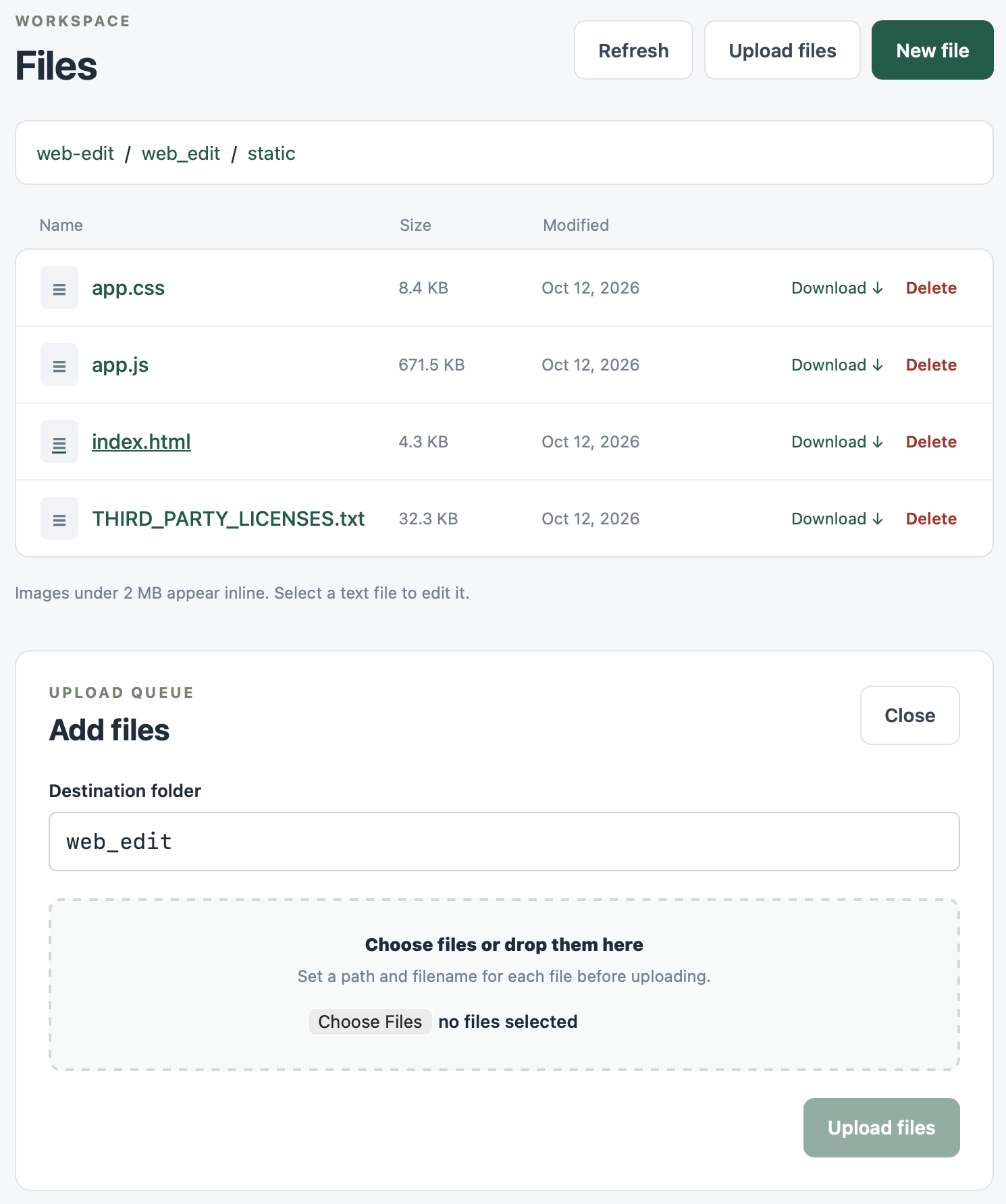
Web 文件管理器界面截图。页眉显示“WORKSPACE”,下方标题为“Files”,并提供“Refresh”“Upload files”和“New file”按钮(深绿色)。面包屑路径显示“web-edit / web_edit / static”。表格包含“Name”“Size”“Modified”三列,列出四个文件;每个文件均有“Download ↓”和“Delete”链接:“app.css” 8.4 KB,2026 年 10 月 12 日;“app.js” 671.5 KB,2026 年 10 月 12 日;“index.html” 4.3 KB,2026 年 10 月 12 日(带下划线,如同鼠标悬停状态);“THIRD_PARTY_LICENSES.txt” 32.3 KB,2026 年 10 月 12 日。表格下方写着:“小于 2 MB 的图片会以内联方式显示。选择一个文本文件即可编辑。”下方的面板标为“UPLOAD QUEUE”,标题为“Add files”,并带有“Close”按钮。其中有一个“Destination folder”文本字段,内容为“web_edit”;随后是一个虚线拖放区域,显示“Choose files or drop them here”及“Set a path and filename for each file before uploading.”,并提供“Choose Files”按钮和“no files selected”文字。右下角有一个灰显的“Upload files”按钮。

编辑功能使用 CodeMirror 6——我原本打算使用 Monaco,但它目前的移动端体验仍然不够好。

English / 原文

I was working on a project from my phone using Codex Remote when I found myself wanting to edit a credentials file without round-tripping those credentials through the LLM itself.

So... I had Codex and GPT-6 Astra Extra High build this Python web app which provides a web UI for viewing and editing files in a folder. It's intended to be run over Tailscale, so I can have an agent start this running and then edit files via my Tailscale network directly from my phone.

Here's the interface for browsing files in a folder:

Screenshot of a web file manager interface. Header reads "WORKSPACE" above the title "Files", with buttons "Refresh", "Upload files" and "New file" (dark green). A breadcrumb shows "web-edit / web_edit / static". A table with columns "Name", "Size", "Modified" lists four files, each with "Download ↓" and "Delete" links: "app.css" 8.4 KB Oct 12, 2026; "app.js" 671.5 KB Oct 12, 2026; "index.html" 4.3 KB Oct 12, 2026 (underlined, as if hovered); "THIRD_PARTY_LICENSES.txt" 32.3 KB Oct 12, 2026. Below the table: "Images under 2 MB appear inline. Select a text file to edit it." A panel below is labelled "UPLOAD QUEUE" with heading "Add files" and a "Close" button. It has a "Destination folder" text field containing "web_edit", then a dashed drop zone reading "Choose files or drop them here" and "Set a path and filename for each file before uploading." with a "Choose Files" button and the text "no files selected". A greyed-out "Upload files" button sits at the bottom right.

Editing uses CodeMirror 6 - I was going to use Monaco but that still doesn't have a great mobile experience yet.