使用 Amazon Bedrock AgentCore 构建可自我改进的文档处理系统
英文标题:Build self-improving document processing using Amazon Bedrock AgentCore
本文介绍如何使用 Amazon Bedrock AgentCore 构建代理式智能文档处理(IDP)系统,实现业务文档的分类、信息提取、校验与持续学习,并将人工干预降至最低。该方案由八个专业 Agent 协作完成,可自动处理供应商发票、采购订单、保险理赔和贷款申请等新文档格式,无需手动配置模板。对于首次出现的文档类型,系统会生成并迭代提取指令;对于已知类型,则复用已有指令直接提取,示例中处理时间从 3 分 49 秒缩短至 1 分 30 秒。按美国东部(弗吉尼亚州)每月处理 10 份训练文档和 1,000 份业务文档估算,该方案成本约为每月 58 美元,其中约 85% 为 Amazon Bedrock 基础模型推理成本。
 1.3 MB
 1.3 MB
 2.4 KB
 345.0 KB
 141.2 KB
 346.5 KB
 80.9 KB
 137.0 KB
 8.4 KB
 6.4 KB
 8.5 KB
 159.5 KB
中文
IDC 研究显示,与文档相关的挑战每年会使组织中每位信息工作者损失 19,732 美元,并使生产率降低 21.3%。从数百家供应商接收发票的组织,通常需要面对因开具方而异、且会在未提前通知的情况下变更的文档布局。在这种规模下,基于模板的系统需要持续维护。员工最多可能将 30% 的时间花在文档相关任务上,而人工数据录入的错误率介于 1–4% 之间。传统的智能文档处理(IDP)解决方案能够缓解部分负担,但它们需要针对每种文档格式进行大量的前期配置,并且当不同供应商的布局存在差异时容易失效。
在本文中,您将学习如何使用 Amazon Bedrock AgentCore 构建一个代理式 IDP 系统,以最低限度的人工干预完成业务文档的分类、提取、校验和学习。Amazon Bedrock AgentCore 是一个用于大规模构建、连接和优化 Agent 的平台,支持任何框架或模型。您的 Agent 能够自动处理新的文档格式,例如供应商发票、采购订单、保险理赔和贷款申请。阅读完本文后,您将能够:
- 部署一个多 Agent IDP 系统,通常可在 20 分钟内完成。
- 无需手动配置模板即可处理新的文档类型。
- 让 Agent 针对每种新文档格式自行训练并复用所学知识,使后续同类文档可直接进入提取流程,无需重新训练。
基于规则的文档处理面临的挑战
许多 IDP 流水线要求您预先为每种文档格式定义模板、提取规则和校验逻辑。当新的供应商发送布局不同的采购订单时,流水线便会失效。这带来三项核心挑战:
- 模板僵化: 每种新的文档格式都需要手动配置,即便是微小的布局变化也可能导致提取失败。
- 无法学习: 系统不会保留此前修正中获得的知识,因此相似文档中会重复出现相同的提取错误。
- 扩展负担: 每增加一个供应商或文档变体,维护工作量都会成倍增加;对于处理来自数百个来源文档的组织而言,这会带来持续的运营成本。
代理式方法能够应对这些挑战。Agent 不再依赖静态模板,而是自动分析每份文档、生成提取指令、校验结果并从修正中学习。随着时间推移,您的系统会构建文档格式知识库,从而以极少的额外配置处理相似文档。
解决方案概述
在该解决方案中,八个专业 Agent 会在两个基于图的工作流中协作,这些工作流运行于 Amazon Bedrock AgentCore 上。
下图展示了使用 Strands Agents 构建的多 Agent 工作流图。Strands Agents 是一个用于构建 AI Agent 的开源 SDK。
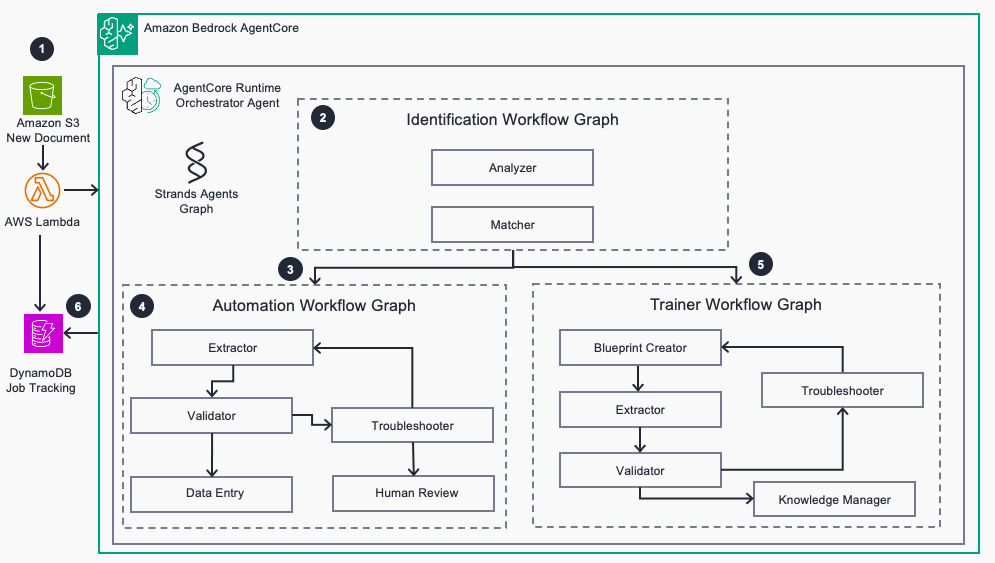
图 1:多 Agent 编排工作流图
- 识别工作流:Analyzer Agent 使用 Amazon Textract 提取文本,并识别文档类型和发送方。Matcher Agent 使用 Amazon S3 Vectors 中的向量相似度搜索相似文档;Amazon S3 Vectors 是 Amazon Simple Storage Service(Amazon S3)的一项功能。
- 训练工作流(新的文档类型):当未找到匹配项时,Instructions Agent 生成提取提示词,Extractor Agent 提取结构化数据,Validator Agent 根据 Amazon Aurora DSQL 中的模式和业务规则检查结果。如果校验失败,Instructions Fixer Agent 会优化提示词并重试。成功后,Save Instructions Agent 会持久化这些指令以供复用。
- 自动化工作流(已知文档类型):当找到匹配项时,Extractor Agent 使用现有指令。如果校验失败,Troubleshooter Agent 会直接修复提取的数据,而不会修改指令。
工作原理
下图展示了该解决方案的基础设施架构。
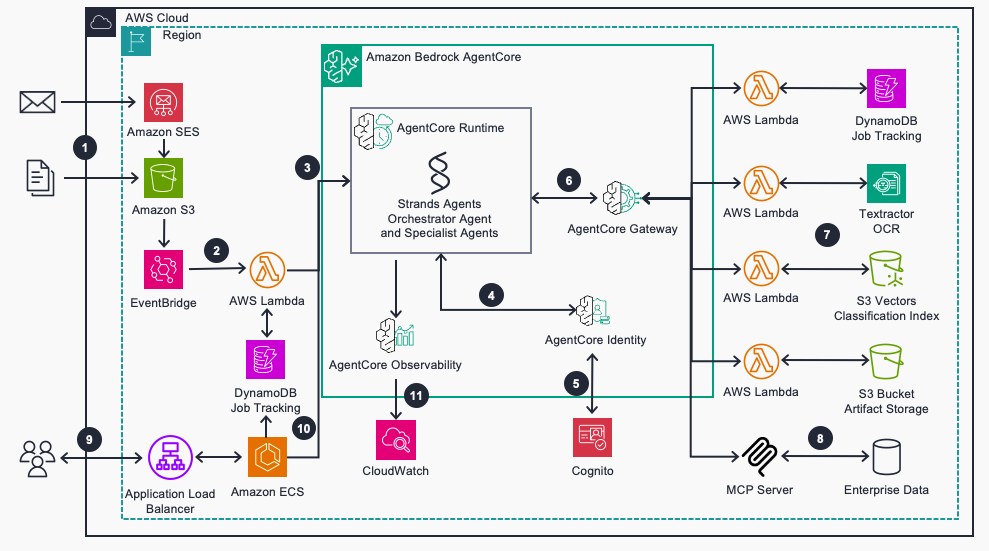
图 2:AWS 上的代理式 IDP 基础设施架构
- 业务文档通过 Amazon Simple Email Service(Amazon SES)到达,或者直接上传至 Amazon S3。
- Amazon EventBridge 触发一个 AWS Lambda 函数,该函数在 Amazon DynamoDB 中创建跟踪任务,并调用 AgentCore runtime;后者是 Amazon Bedrock AgentCore 的一项功能。
- AgentCore runtime 通过 Strands Agents 编排文档处理流程。
- 您的 Agent 通过由 AgentCore Identity(Amazon Bedrock AgentCore 的一项功能)和 Amazon Cognito 管理的机器对机器凭证,安全地访问 AWS 资源。
- 通过 AgentCore Gateway(Amazon Bedrock AgentCore 的一项功能)的模型上下文协议(MCP)接口,您的 Lambda 函数可成为兼容 Agent 的工具。
- Agent 使用 Amazon Textract 提取文本,使用 S3 Vectors 中的向量嵌入对文档进行分类,并依据 Aurora DSQL 中的业务规则校验数据。
- Agent 通过 MCP 服务器访问企业数据,以便根据业务规则校验提取的内容。
- 您可以通过托管在 Amazon Elastic Container Service(Amazon ECS)上的支持聊天功能的控制面板,监控状态并排查问题。
- 您可通过 AgentCore Observability(Amazon Bedrock AgentCore 的一项功能)以及 Amazon CloudWatch 遥测数据,了解 Agent 的性能表现。
部署解决方案
请按照以下步骤,将解决方案基础设施和 Web UI 部署至您的 AWS 账户。
前提条件
要部署该解决方案,您必须具备:
- 一个 AWS 账户。
- 可访问已启用 Amazon Nova 和 Anthropic(Claude)模型的 Amazon Bedrock。有关各 AWS 区域的模型可用性,请参阅 Amazon Bedrock 中按 AWS 区域列出的受支持模型。
- 可在受支持的区域中访问 Amazon Bedrock AgentCore(Runtime、Gateway、Identity)、S3 Vectors 和 Amazon Aurora DSQL。
- 已安装 AWS Cloud Development Kit(AWS CDK)v2。
- 已安装且正在运行的 Docker(构建和部署容器镜像时需要)。
- Python 3.11+ 和 Node.js 18+。
- 用于创建 S3 存储桶、Lambda 函数、DynamoDB 表、Cognito 用户池、Amazon Elastic Container Registry(Amazon ECR)仓库和 Amazon ECS 服务的 AWS Identity and Access Management(IAM)权限。
-
克隆仓库并设置环境:
git clone https://github.com/aws-samples/agenticidp-guidance.git cd agenticidp-guidance uv venv source .venv/bin/activate uv pip install -r requirements.txt cd ui/orchestrator npm install cd ../.. -
部署各个栈:
uv run deploy.py --admin-email your-email@example.com
该操作会部署六个 AWS CloudFormation 栈:Core(S3、Cognito、DynamoDB)、Gateway(Lambda 工具、AgentCore Gateway)、Aurora(Amazon Aurora DSQL)、Agent(AgentCore runtime、容器)、UI Orchestrator(API 端点)和 Modern UI(部署在 Amazon CloudFront 上的 React 应用)。部署大约需要 15–20 分钟。
- 在 CloudFormation 控制台中确认每个栈均显示
CREATE_COMPLETE,以验证部署是否成功。
处理文件并审查结果
部署完成后,您将收到一封电子邮件,其中包含 CloudFront URL、用户名和临时密码。
处理文档
- 登录 Web UI,选择 Process Document。
- 从
infrastructure/sample_data/purchase_orders/training/上传一个采购订单示例文件。 - 文档将进入 Agent 工作流:
- Analyzer Agent 提取文本,并识别发送方和文档类型。
- Matcher Agent 在向量存储中搜索相似文档。
- 对于新的文档类型,训练工作流会生成提取指令、提取数据、校验数据,并保存指令以供未来使用。
- 对于已知的文档类型,自动化工作流会使用现有指令提取数据并进行校验。
- 在 Review Jobs and Instructions 选项卡中查看结果,以验证提取的数据、校验结果和生成的指令。
示例:一种新的文档类型(训练工作流)
假设您上传了来自新零售商 Two Wheel Store 的第一份采购订单。Matcher Agent 搜索向量存储,未找到相似文档,因此将任务路由至训练工作流。
Analyzer Agent 使用 Amazon Textract 提取原始文档文本:
# PURCHASE ORDER
FROM: Two Wheel Store
Order #: PO-2026-0102-2584
Date: 2026-01-02

## Items Ordered
AC-021  Advanced Computer     Qty: 1   $75.61
        Colors: cr4321        @ $75.61
...
SB-004  Folding Classic       Qty: 8   $9634.32
        Colors: cb8901 I Sizes: S     @ $1204.29

TOTAL: $14931.54
Instructions Agent 根据模式生成提取提示词,Extractor Agent 产出结构化 JSON:
{
  "po_number": "PO-2026-0102-2584",
  "retailer_name": "Two Wheel Store",
  "order_date": "2026-01-02T00:00:00Z",
  "line_items": [
    { "sku": "AC-021", "product_name": "Advanced Computer", "quantity": 1, "unit_price": 75.61, "line_total": 75.61 },
    { "sku": "SB-004", "product_name": "Folding Classic",   "quantity": 8, "unit_price": 1204.29, "line_total": 9634.32 }
  ],
  "order_total": 14931.54
}
Validator Agent 根据模式检查结果,并且失败:
validation_status: INVALID
error: 'SB-004' does not match '^AB-[A-Z]{2}-\d{3}$'
该供应商的 SKU 格式(SB-004)与 Acme Bikes 的内部格式(AB-SB-004)不匹配。Instructions Fixer Agent 会诊断这一不匹配问题,并向提取提示词加入明确的 SKU 转换规则:在供应商 SKU 前加上 AB- 前缀。第二次处理时,7 个行项目均成功通过校验,Save Instructions Agent 将优化后的提示词持久化至向量存储。首次运行的端到端耗时为 3 分 49 秒。
示例:一种已知文档类型(自动化工作流)
当 Two Wheel Store 的第二份采购订单到达时,Matcher Agent 会找到首次运行时存储的指令,其置信度得分为 3.946(阈值:3.7),并将任务路由至自动化工作流:
- Extractor Agent 直接应用存储的指令,因此编排器会跳过提示词生成步骤。训练期间学习到的 SKU 转换规则会自动应用(
EL-002→AB-EL-002、HB-071→AB-HB-071、PD-002→AB-PD-002)。 - 三个行项目均在首次处理时通过校验,订单总额为 5,979.19 美元。
- 端到端处理在 1 分 30 秒内完成,低于首次运行的 3 分 49 秒。
使用交互式聊天
该控制面板包含一个用于故障排查的聊天界面:
- 输入
what tools do you have可查看可用的 Agent 能力。 - 输入
list instructions可查看已存储的提取指令。 - 输入
what is the status of job XXXX可检查处理进度。 - 输入
what went wrong with job XXXX, how can we update the instructions?可诊断失败原因。
了解准确率如何随时间提升
系统通过两个反馈循环不断改进:
- 训练循环:当 Instructions Fixer Agent 在校验失败后优化提取提示词时,改进后的指令会被保存,并复用于相似文档。
- 处理循环:当 Troubleshooter Agent 修复提取错误时,它会提供详细分析,以帮助识别文档格式变化的模式。
更换模型时,请使用 AgentCore Evaluations(Amazon Bedrock AgentCore 的一项功能)确认提取质量仍处于可接受水平。该解决方案已经使用 AgentCore Observability,因此已具备所需的监测工具。
预估成本
您只需为实际使用的资源付费,因为该解决方案使用无服务器和按需资源,不会产生闲置成本。对于在美国东部(弗吉尼亚北部)区域每月处理 10 份训练文档和 1,000 份业务文档的工作负载,预估成本约为每月 58 美元。通过 Amazon Bedrock 进行的基础模型(FM)推理约占总成本的 85%,每份文档约为 0.055 美元。实际成本在很大程度上取决于分配给各 Agent 的模型。模型选择集中配置在 agents/orchestratorgraph/utils/config.py 中,因此您可以为简单任务使用成本较低的模型,并在需要时使用能力更强的模型。有关详细定价,请参阅 Amazon Bedrock 定价页面。
针对您的使用场景自定义解决方案
您将获得一个采购订单处理用例,其中包括合成的自行车公司数据集、预构建的 JSON 模式,以及一个校验 Lambda 函数;该函数会根据模拟 ERP 数据库中的产品和供应商记录检查提取的数据。要处理您自己的文档,您必须 r
English / 原文
IDC research shows that document-related challenges cost organizations $19,732 for each information worker annually and reduce productivity by 21.3 percent. Organizations receiving invoices from hundreds of suppliers often face layouts that vary by issuer and change without notice. Template-based systems require constant maintenance at this scale. Staff can spend up to 30 percent of their time on document-related tasks, and manual data entry error rates range from 1–4 percent. Conventional intelligent document processing (IDP) solutions address some of this burden, but they require extensive upfront configuration for each document format and break when layouts vary across vendors.
In this post, you learn how to build an agentic IDP system using Amazon Bedrock AgentCore that classifies, extracts, validates, and learns from business documents with minimal human intervention. Amazon Bedrock AgentCore is a platform to build, connect, and optimize agents at scale, with any framework or model. Your agents automatically handle new document formats, such as supplier invoices, purchase orders, insurance claims, and loan applications. By the end of this post, you can:
- Deploy a multi-agent IDP system, often in under 20 minutes.
- Process new document types without manual template configuration.
- Let agents train themselves on each new document format and reuse what they learn, so later documents of that type go straight to extraction without retraining.
Challenges with rule-based document processing
Many IDP pipelines require you to define templates, extraction rules, and validation logic for every document format upfront. When a new vendor sends a purchase order with a different layout, the pipeline breaks. This creates three core challenges:
- Template rigidity: Each new document format requires manual configuration, and even minor layout changes can cause extraction failures.
- No learning: The same extraction errors repeat across similar documents because the system doesn’t retain knowledge from previous corrections.
- Scaling burden: Each new vendor or document variant multiplies the maintenance effort, and organizations processing documents from hundreds of sources face ongoing operational costs.
An agentic approach addresses these challenges. Instead of static templates, AI agents analyze each document, generate extraction instructions, validate results, and learn from corrections automatically. Over time, your system builds a knowledge base of document formats, so you process similar documents with minimal additional configuration.
Solution overview
In this solution, eight specialized agents collaborate across two graph-based workflows running on Amazon Bedrock AgentCore.
The following diagram shows the multi-agent workflow graph built using Strands Agents, an open source SDK for building AI agents.
Figure 1: Multi-agent orchestration workflow graph
- Identification workflow : The Analyzer agent extracts text using Amazon Textract and identifies the document type and sender. The Matcher agent searches for similar documents using vector similarity in Amazon S3 Vectors, a capability of Amazon Simple Storage Service (Amazon S3).
- Training workflow (new document types): When no match is found, the Instructions agent generates extraction prompts, the Extractor agent extracts structured data, and the Validator agent checks results against schemas and business rules in Amazon Aurora DSQL. If validation fails, the Instructions Fixer agent refines the prompts and retries. On success, the Save Instructions agent persists the instructions for reuse.
- Automation workflow (known document types): When a match is found, the Extractor agent uses existing instructions. If validation fails, the Troubleshooter agent fixes the extracted data directly without modifying instructions.
How it works
The following diagram shows the infrastructure architecture for the solution.
Figure 2: Agentic IDP infrastructure architecture on AWS
- Business documents arrive in Amazon Simple Email Service (Amazon SES) or direct upload to Amazon S3.
- Amazon EventBridge triggers an AWS Lambda function that creates a tracking job in Amazon DynamoDB and invokes AgentCore runtime, a capability of Amazon Bedrock AgentCore.
- AgentCore runtime orchestrates document processing through Strands Agents.
- Your agents securely access AWS resources through machine-to-machine credentials managed by AgentCore Identity, a capability of Amazon Bedrock AgentCore, and Amazon Cognito.
- Your Lambda functions become agent-compatible tools through the Model Context Protocol (MCP) interface of AgentCore Gateway, a capability of Amazon Bedrock AgentCore.
- Agents extract text using Amazon Textract, classify documents using vector embeddings in S3 Vectors, and validate data against business rules in Aurora DSQL.
- Agents access enterprise data through MCP servers to validate extracted content against business rules.
- You monitor status and troubleshoot issues through a chat-enabled dashboard hosted on Amazon Elastic Container Service (Amazon ECS).
- You gain visibility into agent performance through AgentCore Observability, a capability of Amazon Bedrock AgentCore, and Amazon CloudWatch telemetry.
Deploy the solution
Follow these steps to deploy the solution infrastructure and web UI to your AWS account.
Prerequisites
To deploy this solution, you must have:
- An AWS account.
- Access to Amazon Bedrock with Amazon Nova and Anthropic (Claude) models enabled. For model availability by AWS Region, refer to Supported models by AWS Region in Amazon Bedrock.
- Access to Amazon Bedrock AgentCore (Runtime, Gateway, Identity), S3 Vectors, and Amazon Aurora DSQL in a supported Region.
- AWS Cloud Development Kit (AWS CDK) v2 installed.
- Docker installed and running (required for building and deploying container images).
- Python 3.11+ and Node.js 18+.
- AWS Identity and Access Management (IAM) permissions to create S3 buckets, Lambda functions, DynamoDB tables, Cognito user pools, Amazon Elastic Container Registry (Amazon ECR) repositories, and Amazon ECS services.
-
Clone the repository and set up the environment:
git clone https://github.com/aws-samples/agenticidp-guidance.git cd agenticidp-guidance uv venv source .venv/bin/activate uv pip install -r requirements.txt cd ui/orchestrator npm install cd ../.. -
Deploy the stacks:
uv run deploy.py --admin-email your-email@example.com
This deploys six AWS CloudFormation stacks: Core (S3, Cognito, DynamoDB), Gateway (Lambda tools, AgentCore Gateway), Aurora (Amazon Aurora DSQL), Agent (AgentCore runtime, containers), UI Orchestrator (API endpoints), and Modern UI (React app on Amazon CloudFront). Deployment takes approximately 15–20 minutes.
- Verify deployment by checking that each stack shows
CREATE_COMPLETEin the CloudFormation console.
Process files and review results
After deployment, you receive an email with the CloudFront URL, username, and temporary password.
Process a document
- Sign in to the web UI and choose Process Document.
- Upload a sample purchase order from
infrastructure/sample_data/purchase_orders/training/. - The document enters the agent workflow:
- The Analyzer agent extracts text and identifies the sender and document type.
- The Matcher agent searches for similar documents in the vector store.
- For a new document type, the training workflow generates extraction instructions, extracts data, validates it, and saves the instructions for future use.
- For a known document type, the automation workflow extracts data using existing instructions and validates it.
- Review results in the Review Jobs and Instructions tab to verify extracted data, validation results, and generated instructions.
Example: A new document type (training workflow)
Suppose you upload the first purchase order from a new retailer, Two Wheel Store. The Matcher agent searches the vector store, finds no similar document, and routes the job through the training workflow.
The Analyzer agent uses Amazon Textract to extract the raw document text:
# PURCHASE ORDER
FROM: Two Wheel Store
Order #: PO-2026-0102-2584
Date: 2026-01-02

## Items Ordered
AC-021  Advanced Computer     Qty: 1   $75.61
        Colors: cr4321        @ $75.61
...
SB-004  Folding Classic       Qty: 8   $9634.32
        Colors: cb8901 I Sizes: S     @ $1204.29

TOTAL: $14931.54
The Instructions agent generates extraction prompts from the schema, and the Extractor agent produces structured JSON:
{
  "po_number": "PO-2026-0102-2584",
  "retailer_name": "Two Wheel Store",
  "order_date": "2026-01-02T00:00:00Z",
  "line_items": [
    { "sku": "AC-021", "product_name": "Advanced Computer", "quantity": 1, "unit_price": 75.61, "line_total": 75.61 },
    { "sku": "SB-004", "product_name": "Folding Classic",   "quantity": 8, "unit_price": 1204.29, "line_total": 9634.32 }
  ],
  "order_total": 14931.54
}
The Validator agent checks the result against the schema and fails :
validation_status: INVALID
error: 'SB-004' does not match '^AB-[A-Z]{2}-\d{3}$'
The vendor’s SKU format (SB-004) doesn’t match Acme Bikes’ internal format (AB-SB-004). The Instructions Fixer agent diagnoses the mismatch and adds an explicit SKU transformation rule to the extraction prompt: prefix vendor SKUs with AB-. On the second pass, the seven line items validate successfully, and the Save Instructions agent persists the refined prompt to the vector store. End-to-end time for this first run: 3 minutes 49 seconds.
Example: A known document type (automation workflow)
When a second purchase order from Two Wheel Store arrives, the Matcher agent finds the stored instructions from the first run with a confidence score of 3.946 (threshold: 3.7) and routes the job through the automation workflow:
- The Extractor agent applies the stored instructions directly, so the orchestrator skips prompt generation. The SKU transformation rule learned during training applies automatically (
EL-002→AB-EL-002,HB-071→AB-HB-071,PD-002→AB-PD-002). - The three line items validate on the first pass with an order total of $5,979.19.
- End-to-end processing completes in 1 minute 30 seconds, down from 3 minutes 49 seconds on the first run.
Use the interactive chat
The dashboard includes a chat interface for troubleshooting:
- Ask
what tools do you haveto see available agent capabilities. - Ask
list instructionsto view stored extraction instructions. - Ask
what is the status of job XXXXto check processing progress. - Ask
what went wrong with job XXXX, how can we update the instructions?to diagnose failures.
Understand how accuracy improves over time
The system improves over time through two feedback loops:
- Training loop : When the Instructions Fixer agent refines extraction prompts after validation failures, the improved instructions are saved and reused for similar documents.
- Processing loop : When the Troubleshooter agent fixes extraction errors, it provides detailed analysis that helps identify patterns in document format variations.
When changing models, use AgentCore Evaluations, a capability of Amazon Bedrock AgentCore, to confirm that extraction quality remains acceptable. The solution already uses AgentCore Observability, so it has the required instrumentation.
Estimated cost
You pay only for what you use, because the solution runs on serverless and on-demand resources with no idle costs. For a workload of 10 training documents and 1,000 processed documents each month in US East (N. Virginia), the estimated cost is approximately $58 per month. Foundation model (FM) inference through Amazon Bedrock represents approximately 85 percent of the total cost, at roughly $0.055 per document. Actual cost depends largely on the models assigned to each agent. Model choices are centralized in agents/orchestratorgraph/utils/config.py, so you can use lower-cost models for simpler tasks and stronger models where needed. For detailed pricing, refer to the Amazon Bedrock pricing page.
Customize the solution for your use case
You get a purchase order processing use case with a synthetic bike company dataset, a pre-built JSON schema, and a validation Lambda function that checks extracted data against product and vendor records in a mock ERP database. To process your own documents, you must replace the included schemas and validation logic with your own.
Define your document schema
Create a JSON schema that defines the fields you want to extract for each document type. The sample purchase order schema in agents/orchestratorgraph/doc_schema/purchase_order_schema.json provides a reference. Your schema should specify field names, data types, and whether each field is explicitly stated in the document or inferred from context.
Build your validation process
The included validator checks purchase order data against synthetic vendor and product tables in Aurora DSQL. Your production implementation requires a validation process tailored to your business rules. For example:
- An invoice validator might check vendor IDs against your accounts payable system and verify line item totals match the invoice total.
- A contract validator might verify that the document contains required clauses and that dates and party names match your records.
- A claims validator might check policy numbers, coverage limits, and claimant information against your policy management system.
To add a new validator, create a Lambda function that accepts extracted JSON and returns a pass/fail result with detailed error messages, then register it as a tool in AgentCore Gateway. Refer to gateway/tools/po_validator_tool/ for the implementation pattern.
Update agent prompts
The agent prompts in agents/orchestratorgraph/prompts/ reference purchase order terminology. Update these prompts to reflect your document types and extraction requirements. The Orchestrator agent, Validator agent, and Instructions agent each contain document-type-specific language that you should adapt.
Best practices
Keep these recommendations in mind as you train and operate your agentic IDP system.
- Start with representative samples : Upload 5–10 documents per type during training, including edge cases with format variations, to build reliable extraction instructions.
- Use business rule validation : Connect validators to your reference data (vendor lists, product catalogs) in Aurora DSQL to catch extraction errors early.
- Monitor agent performance : Use AgentCore Observability and CloudWatch to track execution paths, identify bottlenecks, and measure extraction accuracy over time.
- Add document types incrementally : Create a JSON schema for each new document type and a corresponding validation Lambda function. The agents handle the rest.
- Add guardrails for production : Apply Amazon Bedrock Guardrails to enforce content filtering and grounding checks on agent outputs. This is especially important when you process sensitive document types such as insurance claims or loan applications.
- Review the OWASP Top 10 for LLMs : Consult the OWASP Top 10 for LLMs and Generative AI Apps for security considerations when building applications that use large language models (LLMs).
Clean up
Important: Before running cleanup, export the data you want to retain. The destroy.py script permanently deletes processed documents (S3), job history (DynamoDB), validation data (Aurora DSQL), and learned extraction instructions (vector store).
To avoid ongoing charges, remove the deployed resources:
Verify that the six CloudFormation stacks are deleted on the console: AgenticIDP-Core-Dev, AgenticIDP-Gateway-Dev, AgenticIDP-Aurora-Dev, AgenticIDP-Agent-Dev, AgenticIDP-UIOrchestr-Dev, and AgenticIDP-ModernUI-Dev.
Conclusion
In this post, you learned how to build a self-improving document processing system using Amazon Bedrock AgentCore, where specialized AI agents collaborate to classify, extract, validate, and learn from business documents. This agentic approach adapts to new document formats automatically and improves accuracy over time through feedback loops, replacing manual template configuration with autonomous learning.
As next steps:
- Deploy the sample solution and test with the included purchase order samples.
- Add your own document types by creating JSON schemas and validation rules.
- Explore how to integrate extracted data with downstream systems such as ERP, CRM, or content management tools.
To learn more about the services and patterns used in this post, refer to the following resources:
For expert guidance on building document processing solutions, AWS Professional Services and AWS Partners can help.
About the authors
Erik Cordsen
Erik is a Solutions Architect at AWS serving customers in Georgia. He is passionate about applying cloud technologies and machine learning to solve real life problem. When he is not designing cloud solutions, Erik enjoys travel, cooking, and cycling.
Vivek Mittal
Vivek is a Solution Architect at Amazon Web Services, where he helps organizations architect and implement cutting-edge cloud solutions. With a deep passion for Generative AI, Machine Learning, and Serverless technologies, he specializes in helping customers harness these innovations to drive business transformation. He finds particular satisfaction in collaborating with customers to turn their ambitious technological visions into reality.
Sourabh Jain
Sourabh is a Senior Solutions Architect with over 8 years of experience developing cloud solutions that drive better business outcomes for organizations worldwide. He specializes in architecting and implementing robust cloud software solutions, with extensive experience working alongside global Fortune 500 teams across diverse time zones and cultures.