A2UI + MCP Apps:融合声明式与自定义 Agent 界面的优势
英文标题:A2UI + MCP Apps: Combining the best of declarative and custom agentic UIs
本文介绍三种架构模式(文中详细展示了两种),旨在整合模型上下文协议(MCP)应用与 Agent 到用户界面(A2UI),解决高度自定义 iframe 环境与原生声明式渲染之间的权衡。通过 MCP 服务器交付 A2UI 可绕过 iframe 限制、提升安全性与可移植性;将 MCP App 封装为 A2UI 组件则保留了复杂状态模块的创作自由并维持设计一致性。这些方案为开发者提供了兼顾性能、安全与定制化的灵活路径,有望成为 MCP 生态的正式扩展。
 11.7 KB
 552.7 KB
 32.6 KB
中文
随着 Agent 工作流从简单的文本交换演进到丰富的用户界面,开发者始终面临深度定制与无缝集成之间的持续权衡。
在此之前,开发者往往只能在两条截然不同的路径中做出选择:
- 模型上下文协议(MCP)应用 在 iframe 内使用标准 Web 技术提供创作自由。然而,对这些应用的 iframe 依赖可能导致碎片化的用户体验,比如设计系统冲突或冗余滚动条等视觉不一致,同时在计算性能和安全隔离方面也存在明显障碍。
- Agent 到用户界面(A2UI) 采用声明式框架。它不是发送原始的 HTML、CSS 和 JavaScript,而是用 JSON 载荷定义要渲染的内容,让宿主应用通过其原生组件处理呈现。A2UI 的宿主应用随后将这些数据安全地转换为其自身的原生 UI 元素。虽然这确保了设计一致性和更高的安全性,但开发者被限制在特定的组件库中。这种方法为结构化数据(如图表和表单)提供了高性能、安全且集成的体验,但难以应对复杂的客户端逻辑。
为了解决这些权衡,我们分享了三种架构模式,并提供了实现指南和示例代码,以展示 A2UI 与 MCP 应用的无缝集成。我们正在考虑推出 MCP 扩展以支持 A2UI,从而使这些模式更易采用。如果你感兴趣,请告诉我们。
整合这两种方式,开发者可以为标准 UI 元素利用原生组件渲染,同时为高度定制、复杂的体验保留自定义 iframe 嵌入。
模式 1:通过 MCP 服务器提供 A2UI
通过 MCP 服务器提供 A2UI 让开发者能够为他们的工具添加丰富的、原生渲染的 UI,作为 MCP 应用的一种替代方案。它结合了广泛采用的 MCP 工具连接的简洁性与原生 A2UI 渲染。
这种方法降低了开发者采用生成式 UI 的门槛。它提供了动态 UI 的好处,而无需构建完整的 Agent 到 Agent(A2A) 架构或处理复杂的发现机制。
架构优势
- 绕过 iframe 限制: 在 MCP 服务器中使用 MCP 应用来呈现 UI 会导致视觉割裂和延迟。A2UI-over-MCP 绕过了 iframe,允许宿主应用使用自己的设计系统原生渲染 Agent 的意图。
- 关注点分离: MCP 处理后端工具和数据访问,而 A2UI 处理前端组件渲染。这使得 Agent 逻辑保持简洁,专注于推理而非 UI 实现细节。
- 增强的环境可移植性: 一个 MCP 服务器可以将数据馈送到在 React、Flutter 或 Angular 上渲染的 A2UI 客户端,无需定制连接。它提供了“一次编写,随处原生渲染”的能力,解决了服务器必须为每个不同界面准备独特响应的问题。
- 简化的安全性: 来自 MCP 工具的数据流融合到 A2UI 默认安全的 JSON 架构中。与传统方法传递原始 HTML 不同,A2UI 使用基于能力的安全模型,客户端只渲染来自预定义目录的受信任组件。
- 加速开发周期: 在构建 MCP 工具或定义资源方面的专业知识现在直接转化为生成复杂用户界面的能力。通过使用 A2UI Agent SDK,工程团队可以绕过手工编写 JSON 的复杂性,因为该库原生管理模式的执行和验证。
实际操作演示
下面是一个由 A2UI-over-MCP 架构驱动的演示应用。该应用包含两个面板。左侧面板包含一个简单的表单,允许用户选择烹饪风格和蛋白质类型,右侧面板显示一张食谱卡片。用户在左侧面板中选择烹饪风格和蛋白质类型并点击“获取食谱”按钮,即可获取一张新的食谱卡片并显示在右侧面板上。
这个应用中的两个面板都是由 A2UI 生成的,并且都利用了 A2UI-over-MCP 架构,A2UI 载荷直接从 MCP 服务器获取并直接用 A2UI 框架渲染。通过利用 A2UI 框架渲染 UI,宿主应用无需维护任何 UI 组件逻辑,同时只需将自身主题应用到 A2UI 组件上即可保持设计一致性。
抱歉,您的浏览器不支持播放此视频
A2UI-over-MCP 食谱工作室运行中
原理剖析
与 MCP 服务器返回标准文本响应或打包的 HTML/JS 网页应用不同,为了让 MCP 服务器返回 A2UI 载荷,它会返回一个具有特定 MIME 类型的结构化 JSON 载荷:application/a2ui+json。
{
  "content": [
    {
      "type": "resource",
      "resource": {
        "uri": "a2ui://dynamic-ui/recipe-card",
        "mimeType": "application/a2ui+json",
        "text": "[
          { \"version\": \"v0.9\",
            \"createSurface\": { ... }
          }
        ]"
      }
    }
  ]
}
JSON
示例:通过 MCP 工具调用交付为嵌入式资源的 A2UI 载荷 — 在 GitHub 上查看完整示例代码
开发者可以利用两种不同的交付机制来传输此载荷:通过 MCP 资源(resources/read)或通过 MCP 工具调用(tools/call)。无论使用哪种方法,端点都使用 a2ui:// URI 方案。端点在收到后,具备 A2UI 能力的宿主环境会自动将 JSON 结构导向其原生渲染引擎执行。
实现策略:静态与动态交付
1. 通过 MCP 资源(resources/read)进行静态交付
对于需要不随对话上下文变化的规范性界面的工作流,开发者可以将 A2UI 负载作为标准 MCP 资源提供服务。宿主应用只需检索一个专用 URI——例如 a2ui://config-panel——服务器便会直接交付不可变的 JSON 结构。
- 理想用例: 基础组件,如隐私声明、标准化配置表单或持久化偏好设置。
- 核心优势: 这种方式确保了高可预测性和高效缓存,且零计算开销,因为它消除了 LLM 实时合成 UI 的需要。
2. 通过 MCP 工具调用(tools/call)进行动态交付
为了解锁真正的生成式 UI 和实时数据注入,客户端可以调用 MCP 工具。后端执行逻辑以检索实时上下文,允许 Agent 动态组装 A2UI 布局。这个定制的载荷随后作为 CallToolResult 中的嵌入式资源返回。
- 理想用例: 响应式数据可视化、上下文感知的天气模块或针对特定用户需求的个性化内容卡片。
- 核心优势: 提供了架构的多功能性,使 Agent 能够构建复杂、原生感的体验来响应用户目标。

架构图:Agent 利用 MCP 检索本地数据集上下文,并利用 A2UI 将动态数据可视化组件直接流式传输到客户端。
探索代码
要查看此架构的实际效果,请查阅 A2UI-over-MCP 快速入门指南,以运行上文中演示的 A2UIxMCP 食谱工作室 Web 应用。该交互式演示同时运行了从 MCP 资源加载的静态 A2UI 界面(食谱选择表单)和从 MCP 工具返回的动态 A2UI 界面(自定义生成的食谱卡片)。
理解差异:A2UI over MCP 与 A2UI over A2A
工程团队经常询问的一个问题是,A2UI-over-MCP 实现与原生 Agent 到 Agent(A2A)架构之间除了传输协议之外还有何不同。区别在于动态性和编排复杂度的层面:
- A2UI over MCP(资源): 静态和规范性 UI。这是对固定数据结构要求(如固定数据输入表单)的最优选择。
- A2UI over MCP(工具): 基于工具参数的模板化和动态 UI。它同样可以提供静态和规范性 UI。动态控制仅限于工具的输入参数。
- A2UI over A2A: 在支持的组件目录范围内完全生成式和开放式的体验。Agent 拥有完整的对话上下文,并动态驱动 UI 构建。如果需要,这种方式也可以提供模板化 UI 和静态 UI。
虽然工程师通常利用 MCP 工具来实现确定性结果,但这些端点本质上并不限于静态逻辑。尽管在标准 MCP 工具配置中使用后端 LLM 并不常见,但开发者可以在工具调用背后编排一个 Agent 层,通过 A2UI-over-MCP 架构提供更具生成性的 UI 体验(如果他们选择这样做)。然而,驱动 UI 生成的上下文仍将限于工具参数和为后端 Agent 指定的提示。
模式 2:在 A2UI 组件中运行 MCP 应用
虽然 A2UI over MCP 是原生集成的理想之选,但有时你需要 MCP 应用 那种隔离且高度自定义的环境。你可以通过将 MCP 应用封装在 A2UI 组件内来实现这一点,而不会破坏宿主的原生设计系统或安全边界。通过将 MCP 应用封装在 A2UI 组件中,工程师可以将复杂、状态密集的模块委托给安全的 iframe,实现高度定制化的体验。
这种混合方法赋予了工程师对复杂、状态密集模块的创作灵活性,同时确保主要界面与宿主的原生设计保持一致,并维护健壮的状态同步协议。
架构优势
- 品牌一致性与受控委托: 宿主在 MCP 应用 iframe 之外保持 UX 的设计控制,同时小心地将 MCP 应用内部的 UX 委托给外部工具开发者。
- 专业化能力: 复杂的、状态密集的模块——例如具有实时状态转换的交互游戏,或具有自定义验证逻辑的复杂工作流(如演唱会选座)——通常很难用纯声明式组件构建。嵌入 MCP 应用通过给予开发者最需要的创作自由来解决这一问题。
- 安全的状态对齐: 宿主应用通过一个受监管的、基于事件的循环与 MCP 应用的内部状态保持同步。通过利用 A2UI 渲染引擎作为中介,该架构在确保状态一致性的同时,将主环境的上下文与第三方代码分离。
实际操作演示
下面是一个演示应用,展示了作为 A2UI 组件的 MCP 应用。服务器端 Agent 以一个 A2UI 负载响应,其中一个组件是 MCP 应用组件,其输入参数包含一个基于 Web 的 Pong 游戏的完整代码。A2UI 负载还包括两张不属于 MCP 应用的记分卡。
当用户开始与 CPU 对战 Pong 游戏时,球拍的控制和球的位置状态由嵌入式 MCP 应用中的代码管理。然而,每当有得分时,该事件就会被传递给 Agent,原生的 A2UI 组件会根据更新的分数重新水合,从而实现 A2UI 界面上所有组件(原生 A2UI 和 MCP 应用)之间的状态同步。
抱歉,您的浏览器不支持播放此视频
原理剖析
为了实现这种混合方式,开发者定义一个自定义 A2UI 组件,该组件充当一个安全的 iframe 包装器(称为 MCP 应用组件)。这个通用的包装器可以容纳任何标准的 MCP 应用,并为应用提供一个桥接通道,使其与外部世界通信。
每当 Agent 请求时,MCP 服务器将应用的 HTML 和 JavaScript 资源传输给 Agent。Agent 随后将应用代码嵌入结构化的 A2UI JSON 中,将其与指定的组件参数集成。整合后的 JSON 被派发到宿主端,MCP 应用在上述 iframe 包装器中与其他 A2UI 原生组件一同渲染。
A2UI 渲染引擎使用一个安全的、事件驱动的循环来维护原生组件和嵌入式 MCP 应用之间的状态,我们称之为状态同步。同步不依赖于实时 DOM 抓取或状态轮询,而是遵循显式的拦截循环:
- 拦截与转换: 当 MCP 应用内部发生关键状态转换时……(原文至此中断)
English / 原文
As agentic workflows evolve beyond simple text exchanges to rich UIs, developers face a persistent trade-off between deep customization and seamless integration.
Until now, developers often had to choose between two distinct paths:
- Model Context Protocol (MCP) Apps offer creative freedom within an iframe using standard web technologies. However, this reliance on iframes for these applications can lead to a fragmented user experience, characterized by aesthetic inconsistencies like clashing design systems or redundant scrollbars, while simultaneously presenting notable hurdles in both computational performance and security encapsulation.
- Agent-to-User Interface (A2UI) utilizes a declarative framework. Instead of sending raw HTML, CSS, and JavaScript, A2UI employs a JSON payload to define what to render, allowing the host application to handle the presentation through its native components. The host application then securely converts this data into its own native UI elements. While this ensures consistent design and enhanced security, developers are restricted to a specific component library. This method provides a performant, secure, and integrated experience, particularly for structured data like charts and forms, but struggles with complex client-side logic.
To address these trade-offs, we are sharing three architectural patterns, with implementation guides and sample code to demonstrate seamless integration of A2UI and MCP Apps. We are considering making a MCP extension to support A2UI, making these patterns easier to adopt. Let us know if you’re interested.
Integrating these two approaches allows developers to leverage native component rendering for standard UI elements, while reserving custom iframe embedding for highly tailored, complex experiences.
Pattern 1. Using A2UI over MCP servers
Serving A2UI over MCP servers allows developers to add rich, natively rendered UIs to their tools as an alternative to MCP Apps. It pairs the simplicity of widely adopted MCP tool connectivity with native A2UI rendering.
This approach lowers the barrier to entry for developers adopting generative UI. It provides the benefits of dynamic UI without the overhead of building a full Agent-to-Agent (A2A) architecture or dealing with complex discovery mechanisms.
Architectural Advantages
- Bypassing iframe limitations: Using MCP Apps for UI in MCP servers, causing visual disjointment and lag. A2UI-over-MCP bypasses the iframe, allowing the host application to natively render the agent's intent using its own design system.
- Separation of concerns: MCP handles backend tools and data access, while A2UI handles frontend component rendering. This keeps agent logic clean and focused on reasoning rather than UI implementation details.
- Enhanced environment portability: An MCP server can feed data to an A2UI client that renders on React, Flutter, or Angular without custom wiring. It provides "write-once, render-natively anywhere" capabilities, solving the problem where a server must prepare a unique response for every different surface.
- Simplified security: Data flowing from MCP tools integrates with A2UI's secure-by-default JSON architecture. Unlike traditional methods passing raw HTML, A2UI uses a capability-based security model where the client only renders trusted components from a predefined catalog.
- Accelerating Development Cycles: Expertise in crafting MCP Tools or defining Resources now translates directly into the ability to generate sophisticated user interfaces. By utilizing the A2UI Agent SDK, engineering teams can bypass the complexities of manual JSON authoring, as the library manages schema enforcement and validation natively.
See it in action
Below is a demo application that is powered by the A2UI-over-MCP architecture. The application consists of 2 panels.The left panel contains a simple form that allows users to select cooking style and protein type, and the right panel displays a recipe card. Users select the cooking style and protein types in the left panel and click on the "Get Recipe" button to fetch a new recipe card to be displayed on the right panel.
Both panels in this app are generated by A2UI, and both leverage the A2UI-over-MCP architecture where A2UI payloads are retrieved directly from an MCP server and directly rendered with the A2UI framework. By leveraging the A2UI framework for rendering the UI, the host application does not have to maintain any UI component logic while maintaining a design consistency by simply applying its own theming to the A2UI components.
Sorry, your browser doesn't support playback for this video
The A2UI-over-MCP Recipe Studio in action
Under the hood: How it works
Instead of an MCP server returning a standard text response or a bundled HTML/JS web app, for an MCP server to return A2UI payloads, it returns a structured JSON payload with a specific MIME type: application/a2ui+json.
{
  "content": [
    {
      "type": "resource",
      "resource": {
        "uri": "a2ui://dynamic-ui/recipe-card",
        "mimeType": "application/a2ui+json",
        "text": "[
          { "version": "v0.9",
            "createSurface": { ... }
          }
        ]"
      }
    }
  ]
}
JSON
[ Example: A2UI payload delivered as Embedded Resource via MCP Tool Call] — See the full sample code on GitHub ](https://github.com/a2ui-project/a2ui/tree/main/samples/community/mcp/a2ui-over-mcp-recipe)
Developers can leverage two distinct delivery mechanisms for this payload: via MCP Resources (resources/read) or through MCP Tool invocations (tools/call). Regardless of the method, the endpoint utilizes the a2ui:// URI scheme. Upon receipt, an A2UI-capable host environment automatically directs the JSON structure to its native rendering engine for execution.
Implementation strategy: Static versus Dynamic Delivery
1.Static Delivery via MCP Resources (resources/read)
For workflows requiring prescriptive interfaces that remain constant regardless of conversation context, developers can serve A2UI payloads as standard MCP Resources. The host application simply retrieves a dedicated URI—for example, a2ui://config-panel—and the server delivers the immutable JSON structure directly.
- Ideal use cases: Foundational components such as privacy notices, standardized configuration forms, or persistent preference settings.
- Key Benefit: This approach ensures high predictability and efficient caching with zero computational overhead, as it removes the need for real-time UI synthesis by the LLM.
2.Dynamic Delivery via MCP Tool Calls (tools/call)
To unlock authentic generative UI and live data injection, clients can invoke an MCP Tool. The backend executes logic to retrieve real-time context, allowing the agent to assemble the A2UI layout dynamically. This bespoke payload is then returned as an embedded resource within the CallToolResult.
- Ideal use cases: Reactive data visualizations, context-aware weather modules, or personalized content cards tailored to specific user requirements.
- Key Benefit: Provides architectural versatility, empowering agents to build sophisticated, native-feeling experiences that respond to user objectives.
Architecture Diagram: An agent uses MCP to retrieve local dataset context and A2UI to stream a dynamic data visualization component directly to the client.
Explore the code
To see this architecture in action, check out the A2UI-over-MCP Quick Start guide to run A2UIxMCP Recipe Studio Web App shown in the demo above. This interactive demo features a static A2UI surface loaded from an MCP Resource (a recipe selection form) and a dynamic A2UI surface served from an MCP Tool (a custom generated recipe card) running side-by-side.
Understanding the differences: A2UI over MCP vs. A2UI over A2A
A frequent point of inquiry among engineering teams is how the A2UI-over-MCP implementation differs from native Agent-to-Agent (A2A) architectures beyond the transport protocol. The distinction lies in the level of dynamism and orchestration complexity:
- A2UI over MCP (Resources): Static and prescriptive UI. This is the optimal choice for rigid structural requirements such as fixed data entry forms.
- A2UI over MCP (Tools): Templated and dynamic UI based on tool parameters. It can also serve static and prescriptive UI too. The dynamic controls are limited to the tool's input parameters.
- A2UI over A2A: Fully generative and open-ended within the scope of the components in the supported catalogs. The agent has full conversational context and drives UI construction on the fly. This approach can also serve templated UI and static UI if desired.
While engineers typically leverage MCP Tools for deterministic results, these endpoints are not inherently limited to static logic. Although employing a backend LLM is unconventional in standard MCP Tool configurations, developers can orchestrate an agentic layer behind the tool call to serve a more generative UI experience through the A2UI-over-MCP architecture if they choose to do so. However, the context for driving the UI generation will remain limited to the too parameters and the prescribed prompt for the backend agent.
Pattern 2. Running MCP Apps in A2UI Components
While A2UI over MCP is ideal for native integration, sometimes you need the isolated, highly custom environment of an MCP App. You can achieve this by encapsulating an MCP App within an A2UI component without disrupting the host's native design system or security boundaries. By encapsulating an MCP App within an A2UI component, engineers can delegate complex, state-intensive modules to a secure iframe for highly tailored experiences.
This hybrid methodology empowers engineers with creative flexibility for intricate, state-intensive modules, while ensuring the primary interfaces to remain aligned with native design of the host and maintain robust state synchronization protocols.
Architectural Advantages
- Brand Consistency and Controlled Delegation: The host maintains design control over the UX outside of the MCP App iframe, while carefully delegating the UX inside the MCP App to external tool developers
- Specialized Capabilities: Complex, state-intensive modules — such as interactive games with real-time state transition, or intricate workflows with bespoke validation logics like concert seat selection — are often challenging to build with purely declarative components. Embedding an MCP App solves this by giving developers creative freedom where they need it most.
- Secure State Alignment: The host application maintains synchronization with the MCP App's internal state via a regulated, event-based loop. By utilizing the A2UI Rendering Engine as an intermediary, this architecture ensures state consistency while keeping the context of the primary environment separate from the third-party code.
See it in action
Below is a demo application that showcases the MCP App as an A2UI component. The server-side Agent responds with an A2UI payload, in which one of the components is an MCP App component whose input parameter includes the full code of a web-based Pong Game. The A2UI payload also includes 2 score cards that are not part of the MCP App.
When the user starts playing the Pong Game against the CPU, the control of the paddle and the ball position states are governed by the code within the embedded MCP App. Yet, whenever there is a score, this event is relayed to the Agent and the native A2UI components are rehydrated with the updated score allowing state synchronization across all components (native A2UI and MCP App) in the A2UI surface.
Sorry, your browser doesn't support playback for this video
Example: A2UI Pong Game in Action
Under the hood: How it works
To achieve this hybrid approach, developers define a custom A2UI component that acts as a secure iframe wrapper (referred to as MCP App Component). This generalized wrapper can hold any standard MCP App and provides a bridged channel for the app to communicate with the outside world.
Whenever an agent requests, the MCP server transmits the app’s HTML and JavaScript assets to the agent. The agent then embeds the application code within a structured A2UI JSON, integrating it with the specified component parameters. The consolidated JSON is dispatched to the host and the MCP App is rendered within the above iframe wrapper alongside with the other A2UI native components.
The A2UI Rendering Engine maintains the state across both the native components and the embedded MCP Apps using a secure, event-driven cycle, which we refer to as state synchronization. Rather than relying on real-time DOM scraping or state polling, synchronization follows an explicit interception loop:
- Interception and Conversion: When key state transitions occur inside the MCP App (e.g., a point is scored in Pong Game), the app triggers a standard MCP tool call. The wrapping A2UI component layer intercepts this request locally, maps the JSON arguments into structured A2UI Action context, and immediately returns an acknowledgment so the app's local UI loop is unblocked.
- Request Routing: The host application packages this converted context as an A2UI Action and routes it to the backend AI Agent. The agent functions as the overarching coordinator, tracking only macro "key-states" (such as game score or reservation confirmation) without keeping track of micro-states (such as paddle/ball coordinates or temporary form inputs).
- Hydration: Once the agent evaluates the overall surface state, it returns a formatted DataModel Update JSON. The A2UI engine directly updates native components (like a scorecard) and pushes this updated resource through the App Bridge to re-hydrate the inner MCP App's internal state.
Explore the code
To see this exact architecture in action, check out our MCP Apps in A2UI Quick Start guide to run a live client. This interactive demo features an AI Agent integrated with an MCP Server that can serve a Calculator App and a Pong Game which can be served in an Angular implementation of a generic MCP App wrapper component.
Pattern 3. Running A2UI inside MCP Apps
This pattern serves as a powerful modernization bridge, allowing developers to inject dynamic, agent-driven UIs into legacy applications or non-A2UI environments without requiring a complex architectural overhaul.
In this pattern, the MCP App bundle contains its own A2UI renderer. To fetch the dynamic A2UI interfaces, the MCP App bridges a tool call to the server to retrieve the A2UI payload, leveraging the A2UI-over-MCP mechanics discussed earlier. Once the A2UI JSON payload is received, the MCP App parses and renders them entirely within its own iframe boundary. By absorbing the generative UI complexity into a self-contained renderer, this pattern allows developers to bring dynamic AI-driven interactions to existing systems with minimal to no architectural overhaul.
Architectural Advantages
- Generative UI for non-A2UI hosts: This allows an MCP App to provide agent-driven A2UI capabilities even if the host environment does not natively support A2UI itself.
- Upgrades for legacy systems: Legacy applications only need to support a basic MCP App iframe container. The MCP App absorbs all the generative UI complexity, unlocking dynamic AI interactions for older systems with minimal engineering effort.
- Self-contained interaction loop : Because the A2UI renderer lives entirely within the iframed MCP App's boundary, local state transitions (e.g., accepting / rejecting document revision) can be handled securely and directly within the app. Only managed, predefined context is relayed back through the App Bridge to the host.
See it in action
Below is a demo application that showcases the A2UI embedded MCP App. The host app loads an MCP App that offers an online text-editor retrieved from an MCP Server. This MCP App is packaged together with the A2UI library which provides the capability to render A2UI JSON Payload as UI. By incorporating the A2UI-over-MCP technology discussed in Pattern 1, this MCP App can effectively communicate with the MCP Server to support generative UI features via A2UI protocol.
In this demo, the user kicks off their AI-assisted text-editing by highlighting a portion of the text. When the user highlights the text, the backend server takes the text as an argument to devise contextually relevant parameters for editing the text. These controls are served via A2UI, and the MCP App renders them on receiving this payload. Users can then adjust the parameters to direct the AI on how they want to edit the parts. When the user clicks on "Generate Revision", the AI Agent will take these parameters into account and provide an edit suggestion to the user.
Sorry, your browser doesn't support playback for this video
Example: A Generative Document Editor
Under the hood: How it works
In contrast to the other patterns, this architectural pattern removes the need for native A2UI support within the host environment. By packaging the A2UI rendering engine directly within the MCP App bundle, developers can offload the complexity to the embedded application itself.
By leveraging the App Bridge, the embedded MCP App communicates with a backend AI Agent using the A2UI-over-MCP mechanics from Pattern 1. Any response it receives from the MCP Server containing the MIME type application/a2ui+json is treated as an A2UI Payload and delegated to the A2UI library for rendering.
To achieve the features that are generative in nature, this demo app has an AI Agent sitting behind the MCP Server. This allows the MCP Tool Calls to leverage LLM to produce context-relevant control parameters and text revisions from the provided arguments.
The following interaction lifecycle governs this self-contained loop:
- Context Trigger: A user engages with the primary interface, such as by highlighting a specific passage within a document editor.
- Event Relay: The App Bridge transmits this event to the host via postMessage, which subsequently routes the context to the backend AI agent.
- Generative Payload Return: The agent evaluates the requirements and returns a bespoke A2UI JSON payload, which may include dynamic sliders or specialized editing controls, via the MCP Server.
- Internal Rendering: Upon identifying the application/a2ui+json MIME type, the app’s internal renderer dynamically mounts the interface in the designated panel.
- Managed Communication: High-level user actions are relayed through the bridge for backend processing, while local state transitions—like accepting or rejecting revisions—are managed directly within the app sandbox to maintain security isolation.
<html>
<body>

  <div>
    <h3>MCP App (Editor Panel)</h3>
    <p>This text is native to the sandboxed third-party app.</p>

    <!-- A2UI Surface custom element provided by the A2UI SDK -->
    <a2ui-surface surfaceId="recipe-card"></a2ui-surface>
  </div>

  <script>
    // Note: The pseudocode below assumes AppBridge from @modelcontextprotocol/ext-apps
    // and a2uiProcessor from the A2UI SDK are preloaded or inlined.
    const bridge = new AppBridge({ name: 'editor-panel', version: '1.0.0' });

    // Helper to extract and process dynamic A2UI responses from tool results
    function processA2UIResponse(result) {
      const a2uiResource = result?.content?.find(
        c => c.type === 'resource' && c.resource?.mimeType === 'application/a2ui+json'
      );
      if (a2uiResource?.resource?.text) {
        const payload = JSON.parse(a2uiResource.resource.text);
        window.a2uiProcessor.processMessages(payload);
      }
    }

    // 1. Initialize AppBridge and fetch initial controls
    async function initApp() {
      await bridge.connect();

      // Call server tool to load initial layout controls
      const result = await bridge.callServerTool({ name: 'fetch_controls', arguments: {} });
      processA2UIResponse(result);
    }

    // 2. Handle interactive User Actions routed by the A2UI SDK
    window.a2uiProcessor.events.subscribe(async (event) => {
      if (!event.message.userAction) return;
      const action = event.message.userAction;

      // Route the user action directly via the bridge to the MCP Server tool
      const result = await bridge.callServerTool({
        name: action.name,
        arguments: action.context
      });

      // Feed any updated server UI states back to the A2UI processor
      processA2UIResponse(result);
    });

    // Initialize the app on startup
    initApp();
  </script>
</body>
</html>
HTML
Example: A high-level overview of an embedded MCP App’s functional logic. It highlights the use of postMessage for host communication, the retrieval of dynamic A2UI layouts, and the relay of user interactions back to the server.
Explore the code
To see this exact architecture in action, check out our A2UI in MCP Apps Quick Start guide to run a live client. This interactive demo features the MCP App containing its own A2UI rendering engine to support generative text-editing experience for users.
Conclusion
Combining A2UI and MCP Apps helps your agentic UIs remain secure, capable, and native-feeling without sacrificing creative expressiveness. This unified approach allows you to bypass iframes when rendering UI with tools (A2UI over MCP), display rich custom canvases inside declarative views (MCP Apps in A2UI), and easily drop dynamic UIs into existing web apps (A2UI in MCP Apps).
Choosing the right architecture
A2UI is a flexible message format which can be transmitted from any backend to any frontend. That flexibility means there are a lot of options for how you can use it.
To help you navigate these options, use the decision tree below to find the optimal architecture for your project's specific constraints and requirements:
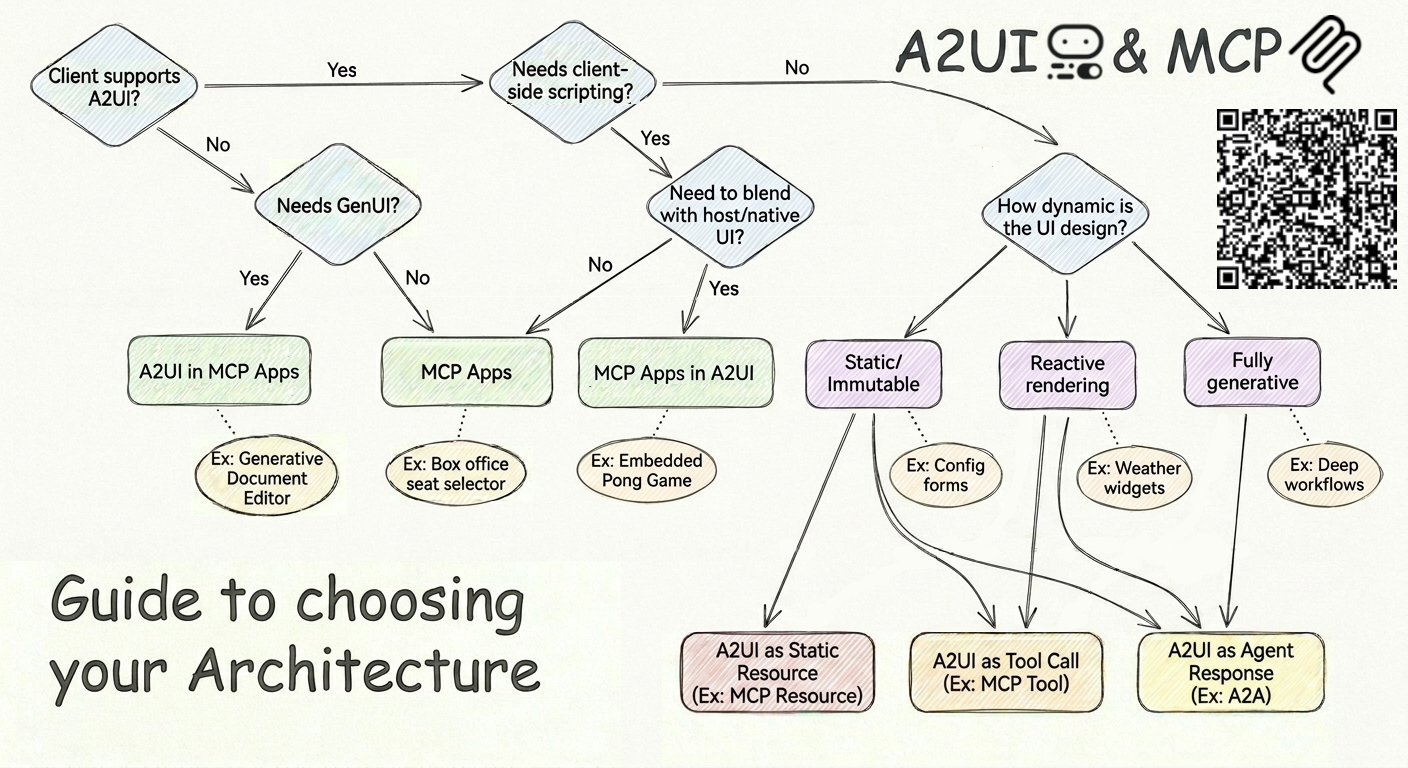
Selection Framework: Navigate the architectural decision tree above to identify the optimal delivery pattern for your specific agentic requirements.
Get started
Ready to wire up A2UI and MCP Apps in your own stack?