Anthropic 日本 BDR 如何用一支 Claude Agent 团队安排日常工作
英文标题:ArticleOct 16, 2026How an Anthropic Japan BDR runs his day with a fleet of Claude agentsHow one business development representative clears his inbound queue and drafts bilingual customer emails with Claude Managed Agents and Claude Tag.Claude Managed Agents
Anthropic 日本团队的一名业务拓展代表通过 Claude Managed Agents 构建了名为“Nakama”的 Agent 团队,用于线索分配、客户资格审查、双语邮件起草、Salesforce 更新和会议跟进。该团队由多个职责明确、按计划运行的 Agent 组成,并通过共享记忆库持续从人工修改中学习。借助 Claude Tag,超出常规流程的事项可在 Slack 中交由 Claude 跟进、提醒和升级处理。该作者估算,这套系统每周可节省约 60 小时工作时间,也展示了销售人员无需自行维护复杂基础设施即可部署 Agent 自动化流程的可能性。
 185.2 KB
 229.3 KB
 253.3 KB
 408.6 KB
 267.6 KB
 57.6 KB
中文
作为 Anthropic 日本团队的一名业务拓展代表,我的工作是向日本企业展示 Claude 如何简化和自动化其工作流;但直到今年早些时候,我自己的大部分工作仍是手动完成的。每天早上,我要花几个小时分配和筛选线索,然后用日语或英语撰写邮件。剩余时间里,我还要更新 CRM,而且通常会滞后一天甚至更久。现在,在我开始一天的工作前,我的 Agent 已经准备好了大部分内容,而我负责审核。
我构建的第一个由 Claude 驱动的工作流相当粗糙,但确实能完成任务。我一次只交给 Claude 一项工作,纠正它出错的地方,并保存这些修正。随着时间推移,它发展成了几个 Agent,每个 Agent 分别负责不同的日常流程。
消息很快传开,团队成员开始向我索要提示词和技能,以便构建自己的 Agent。我能发给他们的,只有一个包含我的技能和若干知识库 Markdown 文件的 zip 压缩包;他们必须将其上传到 Claude,然后回答一轮设置问题,系统才能开始工作。我的设置也越来越难以管理。每个 Agent 都由一个技能、一个定时任务和一个共享文件夹构成;而我会在当时打开的任意聊天中要求 Claude 修改它们,因此同一项技能会在许多不同的对话中被编辑。
我希望能在一个地方定义每个 Agent 一次,并查看我对它做出的每一次改动。因此,我决定尝试 Claude Managed Agents(在新标签页中打开)(测试版),即 Claude Platform 上的托管 Agent 基础设施。
起初我对尝试它有所犹豫。文档中谈到了计划任务、工具和凭据保险库,而我是一名销售代表,因此我以为 Managed Agents 是为能够构建并维护所需基础设施的开发者准备的。但我还是试了,因为我的 Agent 已经存在,我只需要将它们迁移过去。
结果证明,我并不需要是一名开发者。我用自然语言描述每个 Agent 的职责,Claude 写出了几段简短的设置脚本,我再通过笔记本电脑上的终端运行这些脚本。(如果你从零开始,Console 还提供了包含现成 Agent 模板的 快速入门。)从那以后,我不再需要维护任何基础设施。
在本文中,我将介绍如何设计和原型化这支 Agent 团队、为何将其迁移至 Managed Agents、Claude Tag 如何接手超出常规流程的事项、它如何改变了我的一周,以及我会给希望构建自身 Agent 以自动化手动重复性工作流的销售人员哪些建议。
设计我的 Agent 团队
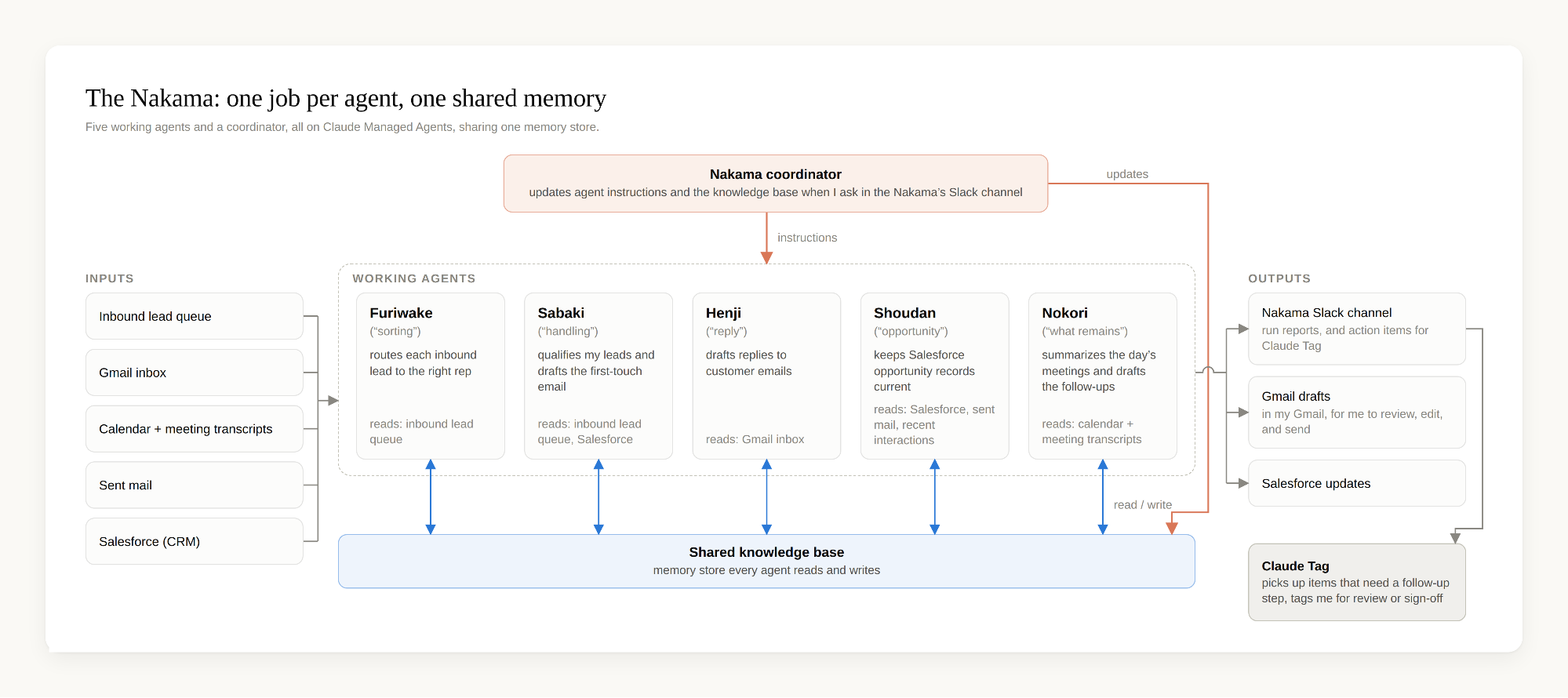
我将工作流拆分到多个 Agent 中,并为每个 Agent 赋予一项明确职责。单一职责让每个 Agent 都更容易理解和追踪,尤其是在出现问题时。我还为每个 Agent 起了一个日文名字,因为它们大多以日语工作。它们合称为 Nakama,意为“团队”,或者更直白地说,是与你共事的伙伴:
- Furiwake(“分类”)最先启动:它读取每日入站线索队列,并将每条线索分配给团队中合适的代表,同时平衡线索数量和每条线索的优先级,并检查当天有哪些人上班,从而确保我们任何人开始工作之前,每条线索都有负责人。每次运行结束时,它都会在专门的 Slack 频道发布报告(每一条进入的线索、每一条已分配的线索),以便我追踪交接情况。
- Sabaki(“处理”)会对分配给我的线索进行分流:它筛选每条线索,根据预设标准进行分类,为该类别采取既定的下一步行动(起草一封引导客户使用自助服务的回复,或撰写一封定制化的首次邮件),在 Salesforce 中更新线索记录,并起草首次触达邮件。它从 Nakama 的共享知识库中获取草稿内容;这一知识库是一个 记忆存储库(在新标签页中打开),每个 Agent 都会读取和写入其中的数据(下文将进一步说明)。
- Henji(“回复”)每小时扫描我的收件箱,查找需要回复的客户邮件,并根据邮件线程以日语或英语准备回复草稿,同时使用与 Sabaki 相同的知识库。我可以审核、编辑并发送草稿。
- Shoudan(“商机”)读取近期客户互动记录,并将更新推送至 Salesforce,从而让商机记录保持最新,无需手动录入数据。
- Nokori(“剩余事项”)在一天结束时运行:它扫描我的日历,阅读附带的会议记录稿,总结每场会议,并再次基于同一个知识库起草后续跟进内容。
每个 Agent 都按照一个计划运行。第六个 Agent,即 Nakama 的协调员,是这支团队的运营经理。它会在两次运行之间更新 Agent 的指令和共享知识库。当我希望改变某个 Agent 的工作方式时,我会在 Nakama 的 Slack 频道中用自然语言写下我的要求。只有我可以发布对 Agent 指令和系统提示词的修改请求。协调员大约每 15 分钟检查一次该频道,获取请求并完成更新。
在 Claude 中原型化 Agent 团队
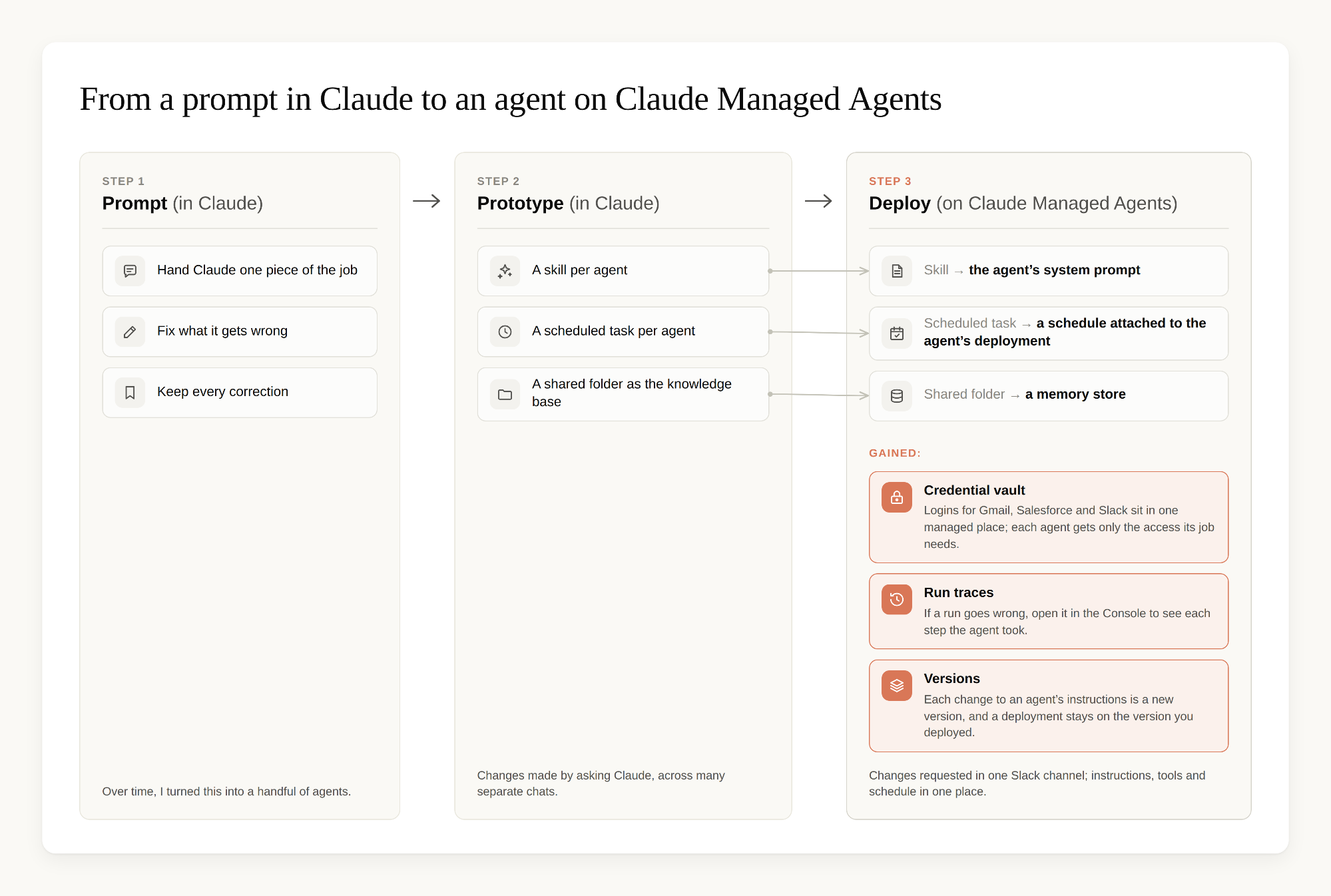
你不需要 Managed Agents 才能开始。我最初先在 Claude 中完成了整支团队的原型,使用的组件如下:
- 每个 Agent 对应一个技能:一项工作的指令。
- 每个技能对应一个定时任务,因此我无需手动运行它。
- 笔记本电脑上的一个共享文件夹,作为每个技能都会写回其学习结果的知识库:包括它起草的内容与我实际发送内容之间的差异,以及它在此过程中发现的任何新信息。
在 Managed Agents 中,技能变成了 Agent 的系统提示词,定时任务变成了 Agent 部署中的计划任务(在新标签页中打开),共享文件夹则变成了记忆存储库。我仍然用自然语言提出修改要求,但现在我会在同一个 Slack 频道中完成所有操作;每次对 Agent 指令的修改都会保存为一个新版本,因此每个 Agent 都会保留其指令的带编号历史记录。我建议先在 Claude 中开始;当你的 Agent 数量多到无法轻松追踪时,再将其迁移至 Managed Agents。
在 Claude Managed Agents 上运行 Agent 团队
Managed Agents 为我的工作流带来了三项最重要的能力:
Agent 可以在后台运行
无论我的笔记本电脑是否开启,甚至在其离线时,Agent 都会按照计划运行。计划是每个 Agent 部署的一部分。我同样可以在 Claude 中为技能安排计划,但每个计划都是在我自己的应用中设置的任务。在 Managed Agents 中,我在 Console 里设置运行频率和时区,它们与已部署 Agent 的指令和工具位于同一处,我不需要额外维护 cron 作业。如果某次运行出现问题,我可以在 Console 中打开它,查看 Agent 执行的每一步。而且,当我试验某个 Agent 的修改时,定时运行仍会使用已部署的版本,因此未完成的编辑不会进入明天的运行。
Nakama 共享同一份记忆,并从我的编辑中学习
每个 Agent 都读取和写入同一个记忆存储库(在新标签页中打开),因此任何 Agent 都可以利用其他 Agent 的学习成果。Agent 会比较它们起草的邮件与我实际发送的邮件,并将每一处差异保存为关于我会如何措辞的注释。它们也会保留在研究答案时发现的任何新信息,信息来源包括我们的内部文档和官方网站。我只需在 Henji 的草稿中修正一次措辞,Sabaki 和 Nokori 就不会再犯同样的错误。
凭据存储在具有范围限定权限的托管保险库中
我的 Agent 可以访问我的电子邮件和 Salesforce 记录,但这些内容涉及客户对话和公司记录,因此我希望这种访问处于受控状态。凭据存储在托管保险库(在新标签页中打开)中,它们会保护 Agent 用于登录外部服务的凭据,例如 OAuth 访问令牌和刷新令牌、API 密钥和个人访问令牌。每个 Agent 的部署只使用其工作所需的保险库,它永远不会看到凭据本身,而我可以一步撤销访问权限。
将下一步交给 Claude Tag
对于 Nakama 产出的大多数内容,我只需要在收件箱中阅读草稿并发送,或者快速查看已更新的 Salesforce 记录。但有些事项需要后续步骤,例如确定升级路径或采购途径,或者将问题升级给另一个团队。
对于这些事项,Agent 不会停下来等待我,而是将其交给 Claude Tag(在新标签页中打开)(测试版)。Claude Tag 是作为我们 Slack 工作区成员配置的 Claude:在它已加入的任何频道中,任何人——无论是人还是我的某个 Agent——都可以通过 @Claude 标记它并提出请求,它会获取该请求并在线程中处理。一旦在你的工作区中完成配置,就没有任何需要新学的操作。你像标记一位同事那样标记 Claude。
在我的设置中,流程如下:Agent 会将行动事项发布到 Nakama 的 Slack 频道并标记 Claude。Claude 读取线程,检查我们的规则和适用条款,列出选项,并起草所需内容。当某个步骤需要我审核或批准时,它会标记我。当客户或其他团队需要先回复时,Claude 会为自己设置提醒,在指定日期再次查看。在线程示例中,它设置了周二的提醒,以检查客户是否已回复,以及交易支持团队是否已回应工单。提醒到期时,Claude 会检查两者,并在同一线程中发布当前进展。如果需要提醒某人,它会起草消息并标记我以便发送。
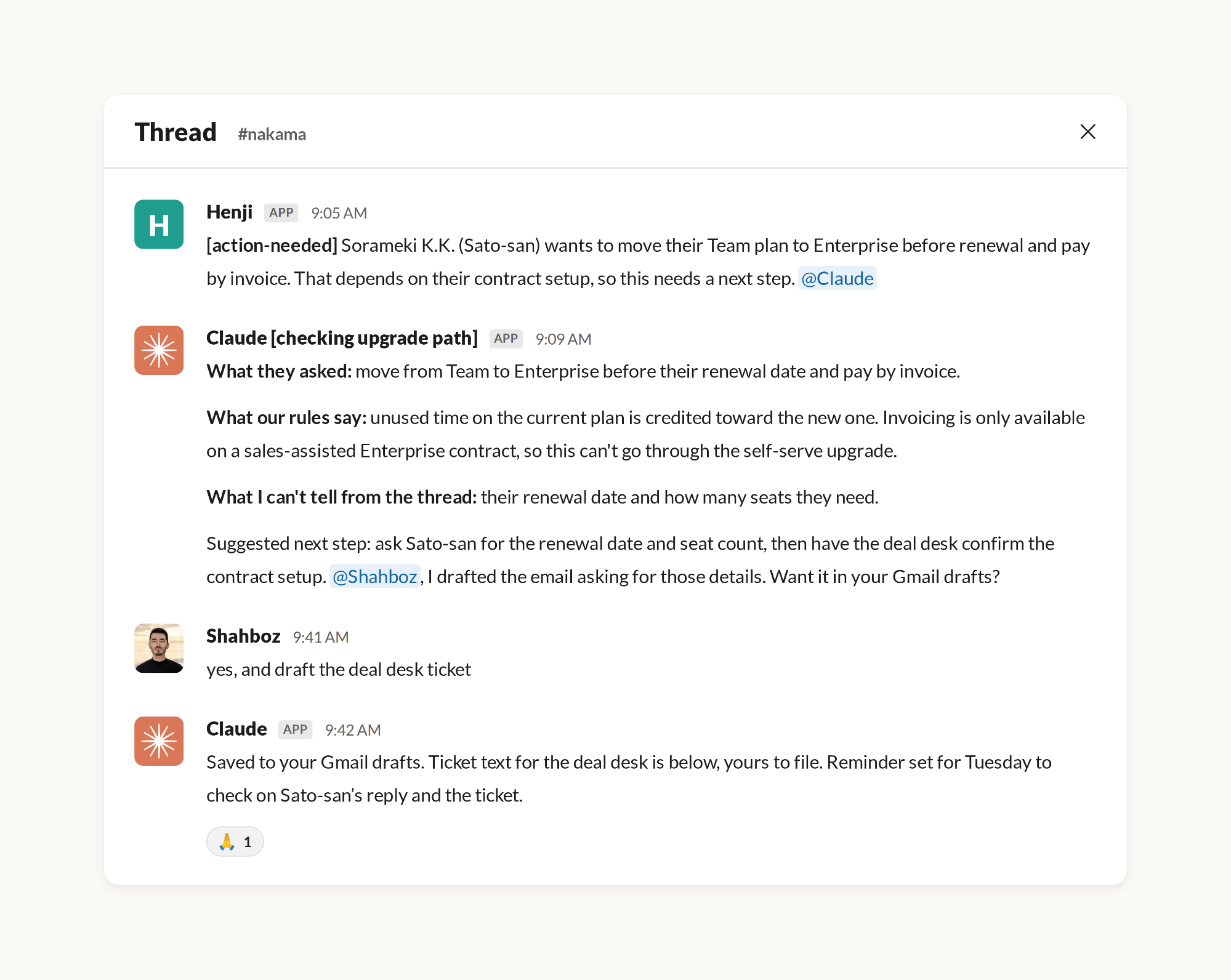
Claude 还会发布产品和定价更新的晨间简报。Nakama 协调员会获取这份简报,并将必要的更改写入共享知识库。
我的一周发生了什么变化
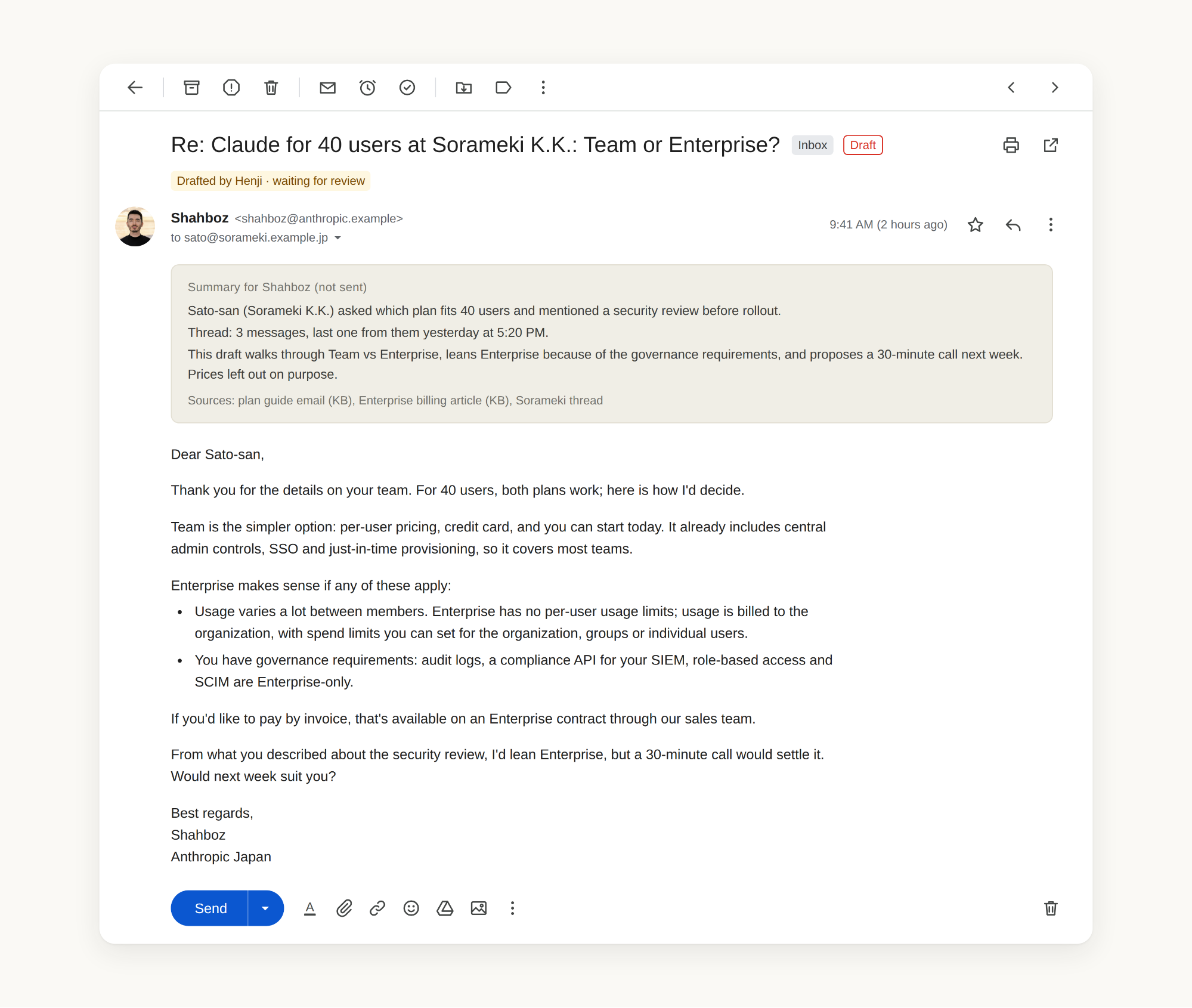
现在,Claude 可以准备入站回复,并且在大多数情况下无需我的手动输入即可让 CRM 记录保持最新;我的职责转变为审核所有需要人类判断的事项。一份书面规则手册定义了每个 Agent 的职责边界,而定价问题、敏感账户或含糊的请求等事项会被路由给我。Henji、Sabaki 或 Nokori 生成的每封邮件草稿,顶部都会附有关于当前情况的简短摘要,因此我无需追溯整个邮件线程来理解上下文:我阅读摘要、确认内容、进行修改,然后发送。
通过查看 Nakama 每周完成事项的日志,并将每项任务按我手动完成所需时间计算,这支团队每周可为我节省约 60 小时工作。我将释放出来的时间投入到 Agent 目前还无法有效完成的工作上:与客户交流、制定外联策略、跨职能项目,以及帮助团队成员构建他们自己的 Agent 团队。
让 Agent 更高效的设计方法
定时 Agent 每天都会运行,无论我是否在查看,因此浪费会在成本和可靠性上不断累积。一些最常见的错误包括:在现有指令上不断追加内容而非更新指令、给 Agent 提供超过其任务所需的上下文,以及让每一项工作都使用最大模型和最高努力级别运行。
保持 Agent 高效的大部分关键,在于我如何设计这支团队:每个 Agent 只负责一项工作,因此其指令始终聚焦于这项工作;每个工作 Agent 都按计划运行,因此它启动、完成处理并停止;Agent 之间共享记忆,因此一次修正可以在所有地方复用。
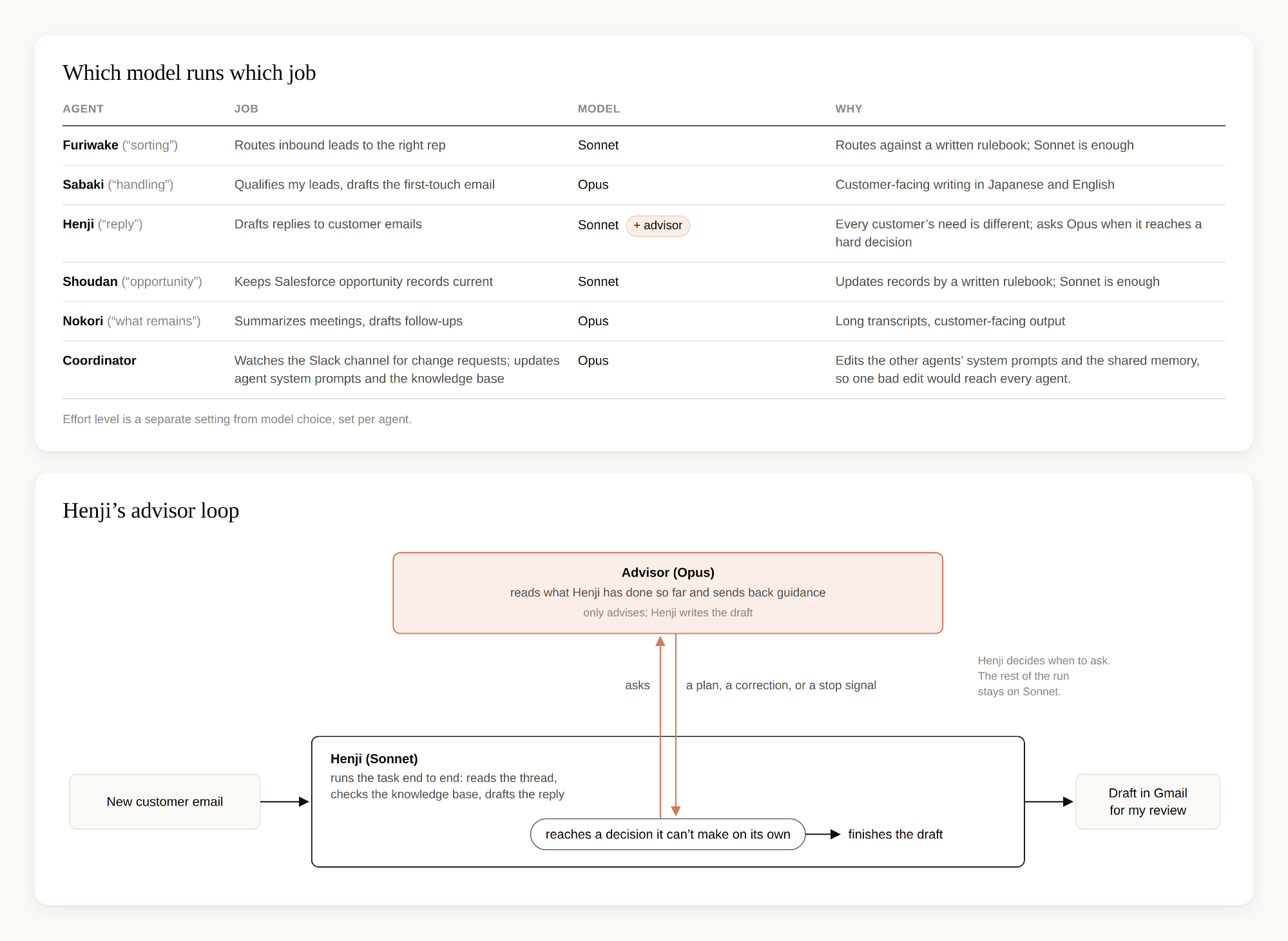
另一个重要因素是每个 Agent 使用何种模型。一旦 Agent 的工作定义清晰,它可能不需要我们能力最强的模型。Furiwake 和 Shoudan 遵循书面规则手册,因此它们运行在较小的 Sonnet 模型上。Sabaki、Nokori 和协调员运行在较大的 Opus 模型上,因为它们的工作需要更多判断。协调员最需要 Opus,因为它会编辑其他 Agent 的指令,一次错误编辑会影响所有 Agent。Henji 所需的判断能力与 Sabaki 一样多,因为每位客户的邮件都不同;但它的运行频率也高于其他任何 Agent,贯穿整个工作日。每次都让它运行在 Opus 上将是最昂贵的选择,因此我在 Managed Agents 中采用顾问策略(在新标签页中打开):Henji 运行在 Sonnet 上,当它遇到无法自行做出的决策时,会向 Opus 寻求建议。顾问会阅读 Henji 迄今为止完成的工作,并返回计划、修正意见或停止信号;随后 Henji 完成草稿,供我审核。我还会将每个 Agent 的努力级别(模型回答前思考的时长)与所用模型分开设置,只在推理难度较高时提高这一设置,例如处理 Henji 的回复时。
我学到的经验
我想将三点经验分享给任何正在构建自己 Agent 团队的人。
- 你不需要每次都写详细的提示词。 一次性描述工作,让 Claude 起草,修正草稿,再让它保留这次修正。
- 知识库比提示词更重要。 每一次修正和过去的互动都会保存在所有 Agent 都可以读取和写入的位置,因此 Claude 会从那里获取上下文,而不是从……
English / 原文
As a business development representative on Anthropic's Japan team, my job is to show Japanese companies how Claude can simplify and automate their workflows, but until earlier this year, most of mine were still manual. I was spending a couple of hours each morning routing and qualifying leads, then writing emails in Japanese or English. In the time I had left, I was updating our CRM, often a day or more behind. Now my agents prepare most of that before my day starts, and I review it.
The first Claude-run workflow I built was pretty scrappy, but it did the job. I'd hand Claude one piece of my work at a time, correct what it got wrong, and save those corrections. Over time, that grew into a handful of agents, each covering a different routine.
Word got around quickly, and teammates started asking for my prompts and skills so they could build their own. All I could send them was a zip file with my skills and a few Markdown files from the knowledge base, which they had to upload to Claude and then answer a round of setup questions before anything worked. My own setup was getting harder to keep track of, too. Each agent was a skill, a scheduled task and a shared folder, and I changed them by asking Claude in whatever chat I had open, so the same skill was being edited from lots of different conversations.
I wanted to define each agent once, in one place, and be able to see every change I'd made to it. So I decided to try Claude Managed Agents (opens in new tab) (beta), our managed agent infrastructure on the Claude Platform.
I was hesitant to try it at first. The docs talk about schedules, tools, and credential vaults, and I'm a sales rep, so I assumed Managed Agents was for developers who can build and maintain the necessary infrastructure. I tried it anyway because my agents already existed, and I only had to move them over.
It turned out I didn't need to be a developer. I described each agent's job in plain language, Claude wrote a few short setup scripts, and I ran them from the terminal on my laptop. (If you're starting from scratch, the Console also has a quickstart with ready-made agent templates.) Since then, there has been no infrastructure for me to look after.
In this post, I'll walk through how I designed and prototyped the fleet, why I moved it to Managed Agents, how Claude Tag picks up anything that falls outside the routine, how it all changed my week, and what I'd tell sellers who want to build their own agents to automate manual, repetitive workflows.
Designing my fleet of agents
I divided up my workflow across several agents and gave every agent one clear job. A single responsibility keeps each one easy to reason about and easy to track, especially when something is off. I also gave every agent a Japanese name, because they mostly work in Japanese. Together they're called the Nakama , "the crew," or more literally, the companions you work with:
- Furiwake ("sorting") kicks off first: it reads the daily inbound queue and routes each lead to the right rep on the team, balancing the number of leads and the priority of each one and checking who's in that day, so every lead has an owner before any of us start our day. At the end of each run it posts a report to a dedicated Slack channel (every lead in, every lead assigned) so I can track the handoff.
- **Sabaki **("handling") triages the leads that are assigned to me: it qualifies each lead, categorizes it against pre-set criteria, takes the defined next step for that category (draft a reply pointing them to to self-serve, craft a customized first email), updates the lead record in Salesforce, and drafts the first-touch email. It sources the draft's contents from the Nakama 's shared knowledge base, a memory store (opens in new tab) every agent reads and writes (more on this below).
- **Henji **("reply") scans my inbox hourly for customer emails that need a response and prepares a draft reply in Japanese or English, depending on the thread, drawing on the same knowledge base as Sabaki. I can review, edit, and send the draft.
- Shoudan ("opportunity") reads recent customer interactions and pushes updates into Salesforce, so opportunity records stay current without manual data entry.
- **Nokori **("what remains") runs at the end of the day: it scans my calendar, reads the attached meeting transcripts, summarizes each meeting, and drafts the follow-ups, again from the same knowledge base.
Each agent runs on a schedule. A sixth agent, the Nakama's coordinator, is the fleet’s operations manager. It updates the agents’ instructions and the shared knowledge base between runs. When I want to change how an agent works, I write what I want in plain language in the Nakama’s Slack channel. Only I can post requests for changes to agents’ instructions and system prompts. The coordinator checks that channel every 15 minutes or so, picks up the request, and makes the update.
Prototyping the fleet in Claude
You don't need Managed Agents to start. I prototyped the whole fleet in Claude first, using the following pieces:
- A skill per agent: the instructions for one job.
- A scheduled task for each skill, so I don’t need to run it manually.
- A shared folder on my laptop as the knowledge base every skill writes its learnings back into: the difference between what it drafted and what I sent, plus anything new it dug up along the way.
On Managed Agents, the skill became the agent's system prompt, the scheduled task became a schedule on the agent's deployment (opens in new tab), and the shared folder became a memory store. I still ask for changes in plain language, but now I do it all in one Slack channel, and each change to an agent's instructions is saved as a new version, so each agent keeps a numbered history of its instructions. I'd suggest starting in Claude and moving your agents to Managed Agents once you have more than you can comfortably keep track of.
Running the fleet on Claude Managed Agents
Three things I got on Managed Agents that mattered most for my workflow:
The agents can run in the background
The agents run on their schedule whether my laptop is open or not, even when it's offline. The schedule is part of each agent's deployment. I could schedule skills in Claude too, but each of those schedules was a task set up in my own app. On Managed Agents, I set the cadence and timezone in the Console, next to the deployed agent's instructions and tools, and I have no cron jobs to maintain on the side. If a run goes wrong, I can open it in the Console and see each step the agent took. And while I'm trying out a change to an agent, the scheduled runs keep using the version that’s deployed, so a half-finished edit doesn't end up in tomorrow's run.
The Nakama shares one memory and learns from my edits
Every agent reads and writes the same memory store (opens in new tab), so any agent can use the others’ learnings. The agents compare the drafts they wrote with the emails I sent, and they save each difference as a note on how I'd phrase it. They also keep whatever new information they dig up while researching an answer, from our internal docs and our official websites. I fix a phrasing once in Henji's drafts, and Sabaki and Nokori stop making the same mistake.
Credentials live in a managed vault with scoped permissions
My agents have access to my email and our Salesforce records, but since these are customer conversations and company records, I wanted that access under control. The credentials live in managed vaults (opens in new tab), which protect credentials agents use to log in to outside services, such as OAuth access and refresh tokens, API keys, and personal access tokens. Each agent’s deployment uses only the vaults its job needs, it never sees the credentials, and I can revoke access in one step.
Handing the next steps to Claude Tag
For most of what the Nakama produces, I only need to read a draft in my inbox and send it, or glance at an updated Salesforce record. But some items need a follow-up step, such as figuring out an upgrade path or a purchasing route, or escalating an issue to another team.
For those, the agents don't stop and wait for me. They hand the item to Claude Tag (opens in new tab) (in beta). Claude Tag is Claude set up as a member of our Slack workspace: anyone in a channel it has joined, a person or one of my agents, can tag @Claude with a request and it picks the request up and works on it in the thread. Once it's configured in your workspace there is nothing new to learn. You tag Claude the way you would a colleague.
In my setup it works like this. An agent posts the action item to the Nakama's Slack channel and tags Claude. Claude reads the thread, checks our rules and the terms that apply, lays out the options, and drafts what's needed. It tags me when a step needs my review or sign-off. When a customer or another team needs to reply first, Claude sets a reminder for itself to check back on a set day. In the thread below, it set a reminder for Tuesday to check whether the customer had replied and whether the deal desk had answered the ticket. When the reminder comes due, Claude checks both and posts where things stand in the same thread. If someone needs a nudge, it drafts the message and tags me to send it.
Claude also posts a morning brief of product and pricing updates. The Nakama coordinator picks up that brief and writes the necessary changes into the shared knowledge base.
What changed in my week
Now that Claude prepares inbound replies and keeps CRM records current (mostly) without my manual input, my role is to review anything that requires human judgment. A written rulebook defines each agent's lane and items like pricing questions, sensitive accounts, or ambiguous asks route to me. Every email draft from Henji, Sabaki, or Nokori arrives with a short summary at the top of what's going on, so I don't have to trace the whole thread to understand the context: I read the summary, confirm, make revisions, and send.
Looking at the weekly log of what the Nakama gets through and counting each task as the time it would have taken me to do manually, the fleet saves me around 60 hours of work. I spend the time that frees up on work that agents can't effectively do (yet): conversations with customers, outbound strategy, cross-functional projects, and helping teammates build their own fleets.
Designing agents to be more efficient
Scheduled agents run every day whether I'm watching or not, so waste can add up, in cost and reliability. Some of the most common mistakes include adding to existing instructions rather than updating them, giving agents more context than they need for their tasks, and running every job on the biggest model at the highest effort level.
Most of what keeps the agents efficient is how I designed the fleet: each agent has one job, so its instructions stay focused on that job; each working agent runs on a schedule, so it wakes up, does its pass, and stops; and the agents share memory, so a correction made once is reused everywhere.
The other big factor is which model each agent runs on. Once an agent's job is well defined, it may not need our most capable model. Furiwake and Shoudan follow a written rulebook, so they run on Sonnet, our smaller model. Sabaki, Nokori and the coordinator run on Opus, our larger model, because their work needs more judgment. The coordinator needs it most, since it edits the other agents' instructions and one bad edit would reach every agent. Henji needs as much judgment as Sabaki, because every customer's email is different, but it also runs more often than any other agent, all through the working day. Running it on Opus every time would be the most expensive option, so I use the advisor strategy (opens in new tab) in Managed Agents: Henji runs on Sonnet, and when it reaches a decision it can't make on its own, it asks Opus for advice. The advisor reads what Henji has done so far and sends back a plan, a correction, or a stop signal, and Henji then finishes the draft for my review. I also set each agent's effort level (how long the model thinks before it answers) separately from its model, and I raise it only where the reasoning is hard, as with Henji's replies.
What I learned
Three things I'd pass on to anyone building their own fleet.
- You don't need a detailed prompt every time. Describe the job once, let Claude draft, fix the draft, and let it keep the fix.
- The knowledge base matters more than the prompt. Every correction and past interaction is saved where all the agents can read it and write to it, so Claude takes its context from there instead of from a longer prompt. It took a few hundred cheap rounds of drafting, fixing, and saving to get the drafts to sound like me.
- Give Claude more room, sooner. At first I kept doing the tasks that I assumed needed me: updating the knowledge base, or editing each agent's instructions by hand. Both worked fine once I let go of them. The agents now write what they learn into the knowledge base themselves, and the coordinator updates the other agents' instructions when I ask in plain English. I had been too cautious with work I could trust the agents to do.