Show HN: Pi-cowboy —— 将 Codex、Claude Code、OpenCode 作为子 Agent 协同运行的多智能体编排器
英文标题:🔶 Show HN: Pi-cowboy – use Codex, Claude Code, OpenCode as subagents
Pi-cowboy 是一款面向 pi.dev 的多智能体(Multi-Agent)编排工具,能够将大型工程任务拆解为聚焦的子任务,并分配给后台并行运行的 Agent 独立完成。该工具结合 Herdr 终端窗格与基于写时复制(Copy-on-Write, CoW)的 Git Worktree 机制,使得在几十 GB 级的大型代码仓库上高并发编辑和测试成为可能,实测磁盘额外占用仅为 75 MiB。此外,Pi-cowboy 支持在同个会话中混用并调度 Codex、Claude Code、OpenCode 与 Pi 等不同 Agent 运行框架,具备细粒度的并发限制与完善的生命周期安全清理机制,为开发者探索 Agent 协作编程提供了高效实用的工程方案。
 5.3 KB
 158.0 KB
 1.2 KB
 11.4 KB
 60.5 KB
 90.8 KB
中文
许可证: MIT
pi-cowboy 是一个面向 pi 的多智能体编排器(Multi-agent Orchestrator)。它可以将大型任务拆分成聚焦的子任务,分发给在后台并行运行的 Agent,并在它们执行完成后统一进行整合。
每个 Agent 都在 Herdr 内独立的终端窗格中运行,并在隔离的写时复制(Copy-on-Write, CoW)Git 工作树(worktree)中开展工作。你可以实时查看各 Agent 的工作状态,随时跳入任意窗格进行人工干预引导,或在同一个会话中组合混用 Pi、Claude Code、OpenCode 和 Codex 等不同的 Harness 运行环境。任务完成后,pi-cowboy 会自动为你清理所有残留资源。
欢迎查看 Demo 演示。
聚焦的任务产出更优质的代码
为每个 Agent 分配更小、更独立的子任务。目标单一且指令明确的任务几乎没有出错空间;反之,冗长的期望列表极易引发目标偏离和过度工程化。由于每个 Agent 都会提交到各自独立的分支,你可以单独审查并合并每个子任务的代码变更。
pi-cowboy 能够编排 Claude Code、Codex、OpenCode 等:你可以在 Pi 上启动工作,在 Claude Code 上继续推进,最后在 OpenCode 上收尾。还需要支持其他框架?欢迎在 GitHub 上提交 Issue。
极低磁盘开销的并行工作
多个 Agent 可以同时进行编辑、构建和测试,互不干扰。写时复制(CoW)工作树将磁盘占用保持在极小水平,即使你的仓库规模达到数吉字节(GB),也能轻松实现高并发并行。
以下数据来自一个包含 153,607 个文件的 Git 仓库(已跟踪文件 479 MiB,包含未跟踪文件共 27 GiB):
| 方法 | 包含未跟踪文件 | 磁盘占用 |
|---|---|---|
| Pi-cowboy 的写时复制模式 | 是 | 75 MiB |
传统 git worktree add |
否 | 479 MiB |
传统 git worktree add + 复制未跟踪文件 |
是 | 27 GiB |
每个任务都会获得独立的 Shell 环境、一个可随时打开的可视化终端窗格,并在 Agent 需要你关注时发送通知。
你可以为专业角色定义可复用的 Agent 模板,并通过编排器模板调整 Agent 的工作与汇报方式。
屏幕上的“吃草奶牛”与“牛仔”
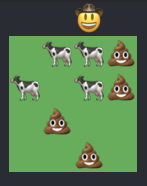
谁不想把自己的 Agent 可视化呈现为奶牛 emoji 呢?猜猜看……没错,没有人会拒绝。
- Linux 或 macOS
herdr0.8 或更高版本,并启用herdrpi 集成- macOS 系统需安装
python3(用于写时复制工作树;由于 macOS 从 12.3 起不再自带python3,请通过xcode-select --install安装 Xcode 命令行工具) - 支持写时复制(Copy-on-write)的文件系统(macOS 上的 APFS;Linux 上的 BTRFS 或 ZFS)
ext4不支持写时复制。在ext4上,agent.worktreeMaterialization会降级回退至checkout模式。
通过 npm 安装:
pi install npm:pi-cowboy
只要你在 Git 仓库中运行 pi,pi-cowboy 就会自动激活。
Based on the security audit, group the relevant files into 10 groups, and launch parallel cowboy agents to address their audit results.(根据安全审计结果,将相关文件分成 10 组,并启动并行的 cowboy agents 来处理各自的审计问题。)
pi-cowboy 会立即为子任务启动后台 Agent:
✓ Spawned agent b7g2nspx (general-purpose)
✓ Spawned agent 5m1xx7fa (general-purpose)
...
如果创建的 Agent 数量超出了并发上限,多出的任务将排队等待。在默认全局并发限制为 4 的情况下,前 4 个 Agent 会立即启动,其余 6 个将在出现空闲槽位时陆续运行。
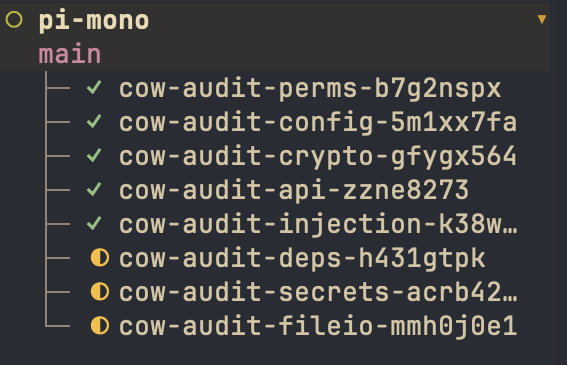
每个 Agent 都作为独立进程运行在各自的 Herdr 工作区中,拥有专属的标签页和终端窗格。你可以随时切换到任意 Agent 的工作区来查看其进度,或直接介入指导。
在磁盘上,每个 Agent 都在 <agent dir>/pi-cowboy/worktrees/(默认为 ~/.pi/agent)下的独立 Git 工作树中工作。
当 Agent 结束当轮任务(settles)时,其报告会作为一条消息发送回父会话:
✓ [Cowboy agent "general-purpose" b7g2nspx completed]
Addressed all the points raised in the security audit for the given set of files.
(Worktree: $HOME/.pi/agent/pi-cowboy/worktrees/cow-audit-perms-b7g2nspx (branch cow-audit-perms-b7g2nspx). The agent process and its herdr pane stay until you call cleanup_cowboy_agent — its pane is closed, which ends that process. The worktree stays until you call cleanup_cowboy_agent to remove it — call it once the branch is merged or rejected.)
父会话随后可以查看报告,在需要修改时向 Agent 提供进一步反馈,或直接合并分支。
若要合入变更,编排器会调用 merge_cowboy_branch,将该 Agent 的分支合并到主仓库的工作树中:
✓ Merged "cow-audit-perms-b7g2nspx" into "main" in pi-mono.
合并完成后,编排器会清理 Agent 的资源(你也可以主动发起清理):
Clean up perms audit agent.(清理权限审计 agent。)
cleanup_cowboy_agent 会关闭 Herdr 窗格和标签页,移除工作树并删除分支:
✓ Cleaned up agent b7g2nspx:
agent status: completed
pane: closed
worktree: removed ($HOME/.pi/agent/pi-cowboy/worktrees/cow-audit-perms-b7g2nspx)
branch: deleted (cow-audit-perms-b7g2nspx)
清理操作默认是安全的:系统会拒绝操作仍在运行中的 Agent,保留仍包含未提交变更的工作树,并且仅在分支已合并的情况下才会删除分支。如果某一步骤无法完成,pi-cowboy 会报告原因并继续完成其余清理操作。
当 /cowboy status 菜单因存在未提交变更或状态不可读而拒绝移除工作树时,会提供一个 Force(强制)移除选项。强制删除会移除工作树并丢弃其中所有未提交的内容,因此系统会要求确认,并明确列出对应的检出状态和可能丢失的内容。强制移除操作会以 forced — <reason> 进行报告。该覆盖操作仅存在于菜单中——cleanup_cowboy_agent 工具自身绝不会执行强制删除,且菜单也仅对已结算(settled)的 Agent 提供此选项,绝不会对仍标记为运行中的 Agent 开放。
自定义你的工作流
如果你发现自己经常为重复性任务输入相同的指令,可以将它们打包为 Agent 模板,配置专用的系统提示词、模型、Harness 环境以及工具权限。
例如,一个 release-notes 模板示例如下:
name = "release-notes"
description = "Prepares release notes."
system_prompt = '''
You prepare release notes for this repository. Read the history and tags
(git log, git tag) and report the changes as a message.
'''
随后你便可以在父会话中通过名称直接调用它:
> Spawn a cowboy agent using release notes template to prepare the release notes for the most recent changes.(使用 release notes 模板启动一个 cowboy agent,为最近的变更准备发布说明。)
模板的所有字段与存放目录路径请参见 Agent 模板。
Agent 模板用于定制单个工作 Agent,而编排器模板(Orchestrator templates)则用于定义适用于所有派生 Agent 的全局规则。它们还允许你自定义当 Agent 启动、排队或结算时发送给父会话的状态消息(“cues”)。
例如,如果你使用对抗性审查(adversarial review)工具,可以定义一个编排器模板,要求每个 Agent 在提交前必须运行该工具:
name = "adversarial-review"
guidance = '''
Run the adversarial-review tool before you commit, and fix any glaring mistakes that the review finds and then commit.
'''
你可以随时通过 /cowboy > Default orchestrator 切换当前生效的编排器。详见 编排器模板。
当 Codex、Claude Code、OpenCode、PiG 和 Pi-Bolt 安装在系统 PATH 中时,pi-cowboy 会自动检测它们。你可以直接在 Prompt 中指定特定的 Harness(例如“为此任务启动一个 OpenCode agent”),或在配置和 Agent 模板中设置默认选项。
你可以在四个独立的层级上限制同时运行的 Agent 数量:
- 全局层级:
concurrency.default(默认为4),适用于所有 Agent - Harness 层级:
concurrency.harnesses.<harness-id> - Provider(供应商)层级:
concurrency.providers.<provider> - 模型层级:
concurrency.models["<provider>/<model-id>"]
一个运行中的 Agent 会占用其适用的每个层级的配额。当 Agent 任务结算时,会释放这些槽位,pi-cowboy 会接着启动队列中下一个在所有对应层级均有空闲配额的 Agent。正在等待某个繁忙模型配额的 Agent,不会阻塞排在它后面使用其他模型的 Agent。
如果你介入引导(steer)一个已经结算的 Agent,它会在现有窗格中被唤醒并立即运行,即使这会临时超出并发配额限制。
你可以在 config.json 中配置这些限制,也可以在会话中通过 /cowboy > Settings > Concurrency Settings 实时调整。详见 配置指南。
当 pi-cowboy 启动一个 Agent 时,会按以下优先顺序进行首项匹配来选取模型:
- 传递给
cowboy_agent工具调用的model参数 - 当前会话中按类型设置的模型覆盖项(
/cowboy>Model overrides) - 配置文件中按类型设置的覆盖项(
agent.<agent-type>) - 所启动 Harness 系列在 Agent 模板中设置的模型
- Pi 系列的会话默认模型(通过
/cowboy model从 Pi 的目录中选择) - 启动 Harness 配置的默认项(Pi 系列对应
agent.default,外部 Harness 对应agent.defaultModelByHarness) - 针对 Pi 系列启动,取父会话当前活跃的模型
完整规则请参见 配置指南。
运行 /cowboy 可打开交互式菜单,也可以直接传入子命令。各界面的完整操作指南请参见 菜单文档。
/cowboy                         # 打开 pi-cowboy 交互菜单
/cowboy status                  # 列出已启动、排队中以及已结算的 Agent
/cowboy spawn                   # 手动启动一个 Agent
/cowboy worktree                # 创建一个不附带 Agent 的 git 工作树
/cowboy model                   # 选择本会话的默认 Agent 模型
/cowboy model provider/model-id # 设置本会话的默认 Agent 模型
/cowboy model clear             # 清除当前会话的模型覆盖设置
/cowboy enable                  # 启用 pi-cowboy
/cowboy disable                 # 禁用 pi-cowboy
将一个或多个任务委托给 cowboy agents。默认情况下,调用会立即返回每个任务的 Agent ID,执行结果将在各个 Agent 结算后送达父会话。
| 参数 | 是否必填 | 说明 |
|---|---|---|
agents[] |
是 | 每个任务对应一个对象。 |
run_in_background |
否 | 设为 false 可在当前回合中等待执行结果。仅在 agents 只包含单个任务时允许使用。 |
agents[] 中的每个项目包含:
| 字段 | 是否必填 | 说明 |
|---|---|---|
prompt |
是 | 给 cowboy agent 的任务指令。 |
task_name |
是 | 2-3 个单词构成的简短名称(例如 "fix login flow"),用于命名 Agent 的分支、工作树和标签页。 |
agent_type |
否 | 使用的 Agent 模板。默认为在 /cowboy > Agent 中选中的类型。 |
model |
否 | 该 Agent 使用的模型,格式为 "provider/model-id"。根据模型解析规则进行解析。 |
harness_type |
否 | 启动该 Agent 的 Harness 框架:pi、pig、pi-bolt、opencode、codex、claude,或插件在当前会话中注册的 Harness。该参数会覆盖 Agent 模板的 harness_type 以及 agent.harnessType 配置。如果指定的 Harness 未在此处注册或当前机器无法启动它,调用会在启动前直接报错。 |
向一个或多个 Agent 发送后续追加消息。如果 Agent 正在运行,它会在下一次模型调用前收到该消息;如果 Agent 已经结算,介入引导会将其在原窗格中唤醒以开启新一轮执行,并在再次结算时输出新的完成信息。
排队中的 Agent 无法被引导,因为它们尚未创建窗格。已经被清理(或正在被清理)的 Agent 同样无法被引导。
| 参数 | 是否必填 | 说明 |
|---|---|---|
agent_ids[] |
是 | 接收消息的 Agent ID 列表。 |
message |
是 | 发送给每个 Agent 的消息内容。 |
中断一个或多个正在运行的 Agent 并将其标记为停止。它们的工作树、分支和窗格将被保留,以便你后续检查或手动清理。
| 参数 | 是否必填 | 说明 |
|---|---|---|
agent_ids[] |
是 | 需要停止的 Agent ID 列表。 |
将一个或多个已结算 Agent 的分支合并到代码仓库主工作树的目标分支中。主工作树必须已经处于目标分支上且没有任何未提交的代码修改。如果发生合并冲突(原文在此截断)
English / 原文
readme-video.mp4
License: MIT
pi-cowboy is a multi-agent orchestrator for pi. Break a large job into focused subtasks, hand them off to background agents running in parallel, and consolidate them when they finish.
Each agent runs in its own terminal pane inside Herdr and works in an isolated copy-on-write Git worktree. You can watch agents work in real time, jump into any pane to steer them, or mix and match harnesses like Pi, Claude Code, OpenCode, and Codex in the same session. When the work is finished, pi-cowboy cleans up the leftovers for you.
Check out the demo.
Focused tasks produce better code
Give each agent a smaller, isolated subtask. A single task with clear instructions leaves little room for error, whereas a long list of expectations invites drift and over-engineering. Because each agent commits to its own branch, you can review and merge each subtask on its own.
pi-cowboy can orchestrate Claude Code, Codex, OpenCode, and more: start work on Pi, continue on Claude Code, finish on OpenCode. Do you need support for something else? Create an issue on GitHub.
Parallel work with minimal disk overhead
Multiple agents can edit, build, and run tests at the same time without interfering with each other. Copy-on-write worktrees make high parallelism practical by keeping disk usage small even when your repository is in the magnitude of gigabytes.
The numbers below come from a Git repository with 153,607 files in total (479 MiB tracked, 27 GiB total including untracked files):
| Method | Including untracked | Size on disk |
|---|---|---|
| Pi-cowboy's copy-on-write | yes | 75 MiB |
Classic git worktree add |
no | 479 MiB |
Classic git worktree add + copy of untracked |
yes | 27 GiB |
Each task gets its own shell, a visible terminal pane you can open at any time, and notifications when an agent needs your attention.
Define reusable agent templates for specialist roles and orchestrator templates to adapt how agents work and report back.
Grazing cows and a cowboy on your screen
Who wouldn’t want their agents visualized as cow emojis? Go on… guess. That's exactly right. No one.
- Linux or macOS
herdr0.8 or later, with theherdrpi integration enabledpython3on macOS (used for copy-on-write worktrees; macOS has not shippedpython3since 12.3, so install the Xcode Command Line Tools withxcode-select --install)- Copy-on-write capable filesystem (APFS on macOS; BTRFS or ZFS on Linux)
ext4does not support copy-on-write. Onext4,agent.worktreeMaterializationfalls back tocheckout.
Install from npm:
pi install npm:pi-cowboy
pi-cowboy activates automatically whenever you run pi inside a Git repository.
Based on the security audit, group the relevant files into 10 groups, and launch parallel cowboy agents to address their audit results.
pi-cowboy spawns background agents for the subtasks right away:
✓ Spawned agent b7g2nspx (general-purpose)
✓ Spawned agent 5m1xx7fa (general-purpose)
...
If you spawn more agents than your concurrency limit allows, the extras wait in a queue. With the default global limit of 4, the first 4 agents start immediately and the remaining 6 start as slots open up.
Each agent runs as a separate process in its own Herdr workspace, inside its own tab and terminal pane. You can switch to an agent's workspace at any time to watch its progress or steer it directly.
On disk, each agent works in a dedicated Git worktree under <agent dir>/pi-cowboy/worktrees/ (~/.pi/agent by default).
When an agent finishes its turn (settles), its report arrives as a message in the parent session:
✓ [Cowboy agent "general-purpose" b7g2nspx completed]
Addressed all the points raised in the security audit for the given set of files.
(Worktree: $HOME/.pi/agent/pi-cowboy/worktrees/cow-audit-perms-b7g2nspx (branch cow-audit-perms-b7g2nspx). The agent process and its herdr pane stay until you call cleanup_cowboy_agent — its pane is closed, which ends that process. The worktree stays until you call cleanup_cowboy_agent to remove it — call it once the branch is merged or rejected.)
The parent session can then review the report, steer the agent if something needs another pass, or merge the branch.
To bring the changes in, the orchestrator calls merge_cowboy_branch, which merges the agent's branch into your repository's main working tree:
✓ Merged "cow-audit-perms-b7g2nspx" into "main" in pi-mono.
Once the work is merged, the orchestrator cleans up the agent's resources (or you can ask it to):
Clean up perms audit agent.
cleanup_cowboy_agent closes the Herdr pane and tab, removes the worktree, and deletes the branch:
✓ Cleaned up agent b7g2nspx:
agent status: completed
pane: closed
worktree: removed ($HOME/.pi/agent/pi-cowboy/worktrees/cow-audit-perms-b7g2nspx)
branch: deleted (cow-audit-perms-b7g2nspx)
Cleanup is safe by default: it refuses to touch an agent that is still running, keeps any worktree that still has uncommitted changes, and deletes the branch only if it has already been merged. If one step cannot be completed, pi-cowboy reports the reason and finishes the rest.
When the /cowboy status menu refuses to remove a worktree because of uncommitted changes or an unreadable state, it offers to Force the removal. Force deletes the worktree and discards anything uncommitted in it, so it asks for a confirmation that names the checkout and what will be lost. Forced removals are reported as forced — <reason>. This override lives in the menu only — the cleanup_cowboy_agent tool never forces, and the menu only offers it for a settled agent, never one it still lists as running.
Customizing your workflow
If you find yourself repeating the same instructions for recurring jobs, you can package them into an agent template with its own system prompt, model, harness, and tool permissions.
For example, a release-notes template looks like this:
name = "release-notes"
description = "Prepares release notes."
system_prompt = '''
You prepare release notes for this repository. Read the history and tags
(git log, git tag) and report the changes as a message.
'''
You can then ask for it by name in the parent session:
> Spawn a cowboy agent using release notes template to prepare the release notes for the most recent changes.
See Agent Templates for all template fields and directory locations.
While agent templates specialize individual workers, orchestrator templates apply rules across every agent you spawn. They also let you customize the status messages ("cues") sent to the parent session when agents spawn, queue, or settle.
For instance, if you use an adversarial review tool, you can define an orchestrator template that requires every agent to run it before committing:
name = "adversarial-review"
guidance = '''
Run the adversarial-review tool before you commit, and fix any glaring mistakes that the review finds and then commit.
'''
You can switch the active orchestrator at any time from /cowboy > Default orchestrator. See Orchestrator Templates for details.
pi-cowboy auto-detects Codex, Claude Code, OpenCode, PiG, and Pi-Bolt when they are installed on your PATH. You can request a specific harness directly in your prompt (for example, "Launch an OpenCode agent for this task") or set defaults in your configuration and agent templates.
You can cap how many agents run at the same time across four independent levels:
- Global:
concurrency.default(default4), which applies to every agent - Per harness:
concurrency.harnesses.<harness-id> - Per provider:
concurrency.providers.<provider> - Per model:
concurrency.models["<provider>/<model-id>"]
A running agent occupies a slot in every limit that applies to it. When the agent settles, it releases those slots and pi-cowboy starts the next queued agent that has room at all of its levels. An agent waiting on a busy model limit will not block a queued agent behind it that uses a different model.
If you steer a settled agent, it wakes up in its existing pane and runs immediately, even if that temporarily puts a limit over capacity.
Configure these limits in config.json or live in your session via /cowboy > Settings > Concurrency Settings. See Configuration for details.
When pi-cowboy spawns an agent, it picks the model using the first match in this order:
- The
modelparameter passed to thecowboy_agenttool call - The session per-type model override (
/cowboy>Model overrides) - The config per-type override (
agent.<agent-type>) - The model set in the agent template for the launching harness family
- The Pi-family session default model (
/cowboy model, which picks from Pi's catalogue) - The launching harness's configured default (
agent.defaultfor the Pi family, oragent.defaultModelByHarnessfor foreign harnesses) - For Pi-family launches, the parent session's active model
See Configuration for the full rules.
Run /cowboy to open the interactive menu, or pass a subcommand directly. See Menu for a guide to every screen.
/cowboy                         # Open the pi-cowboy menu
/cowboy status                  # List spawned, queued, and settled agents
/cowboy spawn                   # Spawn an agent manually
/cowboy worktree                # Create a git worktree with no agent attached
/cowboy model                   # Pick the default agent model for this session
/cowboy model provider/model-id # Set the default agent model for this session
/cowboy model clear             # Clear the session model override
/cowboy enable                  # Enable pi-cowboy
/cowboy disable                 # Disable pi-cowboy
Delegates one or more tasks to cowboy agents. By default, the call returns immediately with an agent ID for each task, and results arrive in the parent session as each agent settles.
| Parameter | Required | Description |
|---|---|---|
agents[] |
yes | One object per task. |
run_in_background |
no | Set to false to wait for the result in the same turn. Only allowed when agents has one task. |
Each item in agents[] takes:
| Field | Required | Description |
|---|---|---|
prompt |
yes | Task instructions for the cowboy agent. |
task_name |
yes | Short 2-3-word name (e.g. "fix login flow") used to name the agent's branch, worktree, and tab. |
agent_type |
no | Agent template to use. Defaults to the type selected at /cowboy > Agent. |
model |
no | Model for this agent as "provider/model-id". Resolved according to Model resolution. |
harness_type |
no | Harness that launches this agent: pi, pig, pi-bolt, opencode, codex, claude, or a harness a plugin registered in this session. Overrides the agent template's harness_type and the agent.harnessType setting. If the harness is not registered here, or this machine cannot launch it, the call fails before spawning. |
Sends a follow-up message to one or more agents. If an agent is running, it receives the message before its next model call. If an agent has already settled, steering revives it in the same pane for another turn and delivers a new completion message when it settles again.
Queued agents cannot be steered because they do not have a pane yet. Agents that have already been cleaned up (or are currently being cleaned up) cannot be steered either.
| Parameter | Required | Description |
|---|---|---|
agent_ids[] |
yes | Agent IDs to send the message to. |
message |
yes | The message to deliver to each agent. |
Interrupts one or more running agents and marks them as stopped. Their worktrees, branches, and panes are preserved so you can inspect or clean them up afterward.
| Parameter | Required | Description |
|---|---|---|
agent_ids[] |
yes | Agent IDs to stop. |
Merges one or more settled agent branches into a target branch in your repository's main working tree. Your main working tree must already be on the target branch with no uncommitted changes. If a merge conflict occurs, pi-cowboy leaves the conflict in place so you can resolve it.
| Parameter | Required | Description |
|---|---|---|
branches[] |
yes | The cow-<task>-<id> branch names from the agent completion reports. |
target |
no | Branch to merge into. Defaults to main. |
repo |
no | Path inside the repository. Defaults to the parent session's working directory. |
Closes the Herdr pane and tab, removes the worktree, and deletes the branch for one or more settled agents. The tool reports the result for each agent.
Cleanup never throws on partial failures: it deletes a branch only after it has been merged, and it keeps any worktree that still has uncommitted changes (reporting why it was kept).
| Parameter | Required | Description |
|---|---|---|
agent_ids[] |
yes | Agent IDs to clean up. cleanup_cowboy_agent refuses an agent that is still running. |
Why is my agent queued, not running?
Every running agent occupies a slot in each concurrency limit that applies to it: model, provider, harness, and global (model and provider keys can also be scoped to a harness, like opencode:provider/model). pi-cowboy queues new agents until all of their applicable limits have room. You can raise limits in /cowboy > Settings > Concurrency Settings or in your config file. See Concurrency.
Why did my worktree survive cleanup?
cleanup_cowboy_agent refuses to delete a worktree that still has uncommitted changes or whose git status cannot be verified. Commit or discard the leftover changes, make sure the agent is stopped, and run cleanup again. See cleanup_cowboy_agent.
Isn't one pi process per agent too much overhead?
For a single tiny change, spinning up a fresh process can take longer than making the edit directly. pi-cowboy is built for running several tasks in parallel, where that startup cost is paid once across all concurrent agents.
If you want faster startup and lower memory usage, pi-cowboy also supports pig (a drop-in Pi replacement written in Go) and pi-bolt (an ahead-of-time compiled Pi variant). Set agent.harnessType in Configuration to use them.
I don't like the emojis, can I turn them off?
Yes. You can disable both the cowboy indicator and the grazing cows in /cowboy > Settings or in your config file. See Configuration.