借助 Model Explorer 为定制边缘编译器带来可视化计算图调试
英文标题:Bringing Visual Graph Debugging to Custom Edge Compilers with Model Explorer
Google AI Edge Model Explorer 现已支持定制编译器中间表示(IR)以及面向端侧机器学习的 TOSA、VGF 和 PTE 等开源适配器。开发者可以利用层级计算图可视化、分栏对比视图和逐节点 Trace 叠加分析,直观发现模型导出中的性能回退与非预期算子。通过 Arm 与 Google 的深度合作,工程团队能够并排验证 NPU 硬件委派情况,并将周期级性能数据直接映射到执行图上,显著提升了端侧 AI 模型的编译与部署优化效率。
 11.7 KB
 1.6 MB
 193.1 KB
 239.9 KB
 24.5 KB
 33.1 KB
 286.2 KB
 36.9 KB
 48.9 KB
 327.4 KB
 79.6 KB
中文
Model Explorer 的能力不仅限于高层级的模型计算图。来看看 Arm 如何接入定制编译器 IR、并排验证 NPU 委派(delegation),并将周期级(cycle-level)性能分析 Trace 直接映射到执行图上。
机器学习模型可以在广泛的硬件上本地运行,涵盖从低功耗边缘设备到游戏图形显卡以及物理 AI 系统。要在这些目标设备上高效运行模型,需要经过量化、图下沉(graph lowering)、算子融合和硬件委派等编译步骤。
Arm 借助 Google AI Edge Model Explorer 为开发者提供了深入观察这些流水线的可见性。依托 Model Explorer 的分层图可视化能力和插件架构,Arm 构建了多个开源适配器,使边缘模型的转换过程更易于审查。
面临的挑战
将模型部署到边缘硬件时,框架变更或算子约束可能会改变导出的执行图。工程师通常需要回答三个问题:
- 结构完整性: 图下沉是否引入了非预期的算子,例如多余的布局转置(layout transpose)?
- 硬件委派: 模型是完全委派给 NPU 或 GPU,还是有不支持的子图回落(fallback)到了 CPU?
- 周期级瓶颈: 下沉后的图中有哪些节点消耗了最多的计算周期?
通过查阅原始 flatbuffer 或文本日志来解答这些问题非常耗时,对于大语言模型(LLM)和神经网络而言尤其如此。Arm 需要一款可视化工具来检查 Arm 特定的中间表示(IR)以及硬件性能分析 Trace。
Arm 如何利用 Model Explorer 的可视化调试工作流
为了解决这些部署挑战,Arm 为 Google AI Edge Model Explorer 开发了自定义适配器,以支持多种模型格式(即 TOSA、VGF 和 PTE),构建了一套面向端侧优化的全流程可视化工作流。借助这些扩展,工程团队可以直接在模型图上验证导出流水线、核验加速器委派情况,并精准定位周期级的性能瓶颈:
1. 捕获 VGF 中隐蔽的导出回退问题
Arm 工程师使用 Model Explorer 验证了一个经 PyTorch 训练并通过 ExecuTorch Arm 后端导出为 Vulkan ML 扩展 VGF 文件的神经超采样(NSS)模型。在检查 VGF 图时,团队发现了因 ExecuTorch Arm 后端变更而引入的非预期 TRANSPOSE 算子。
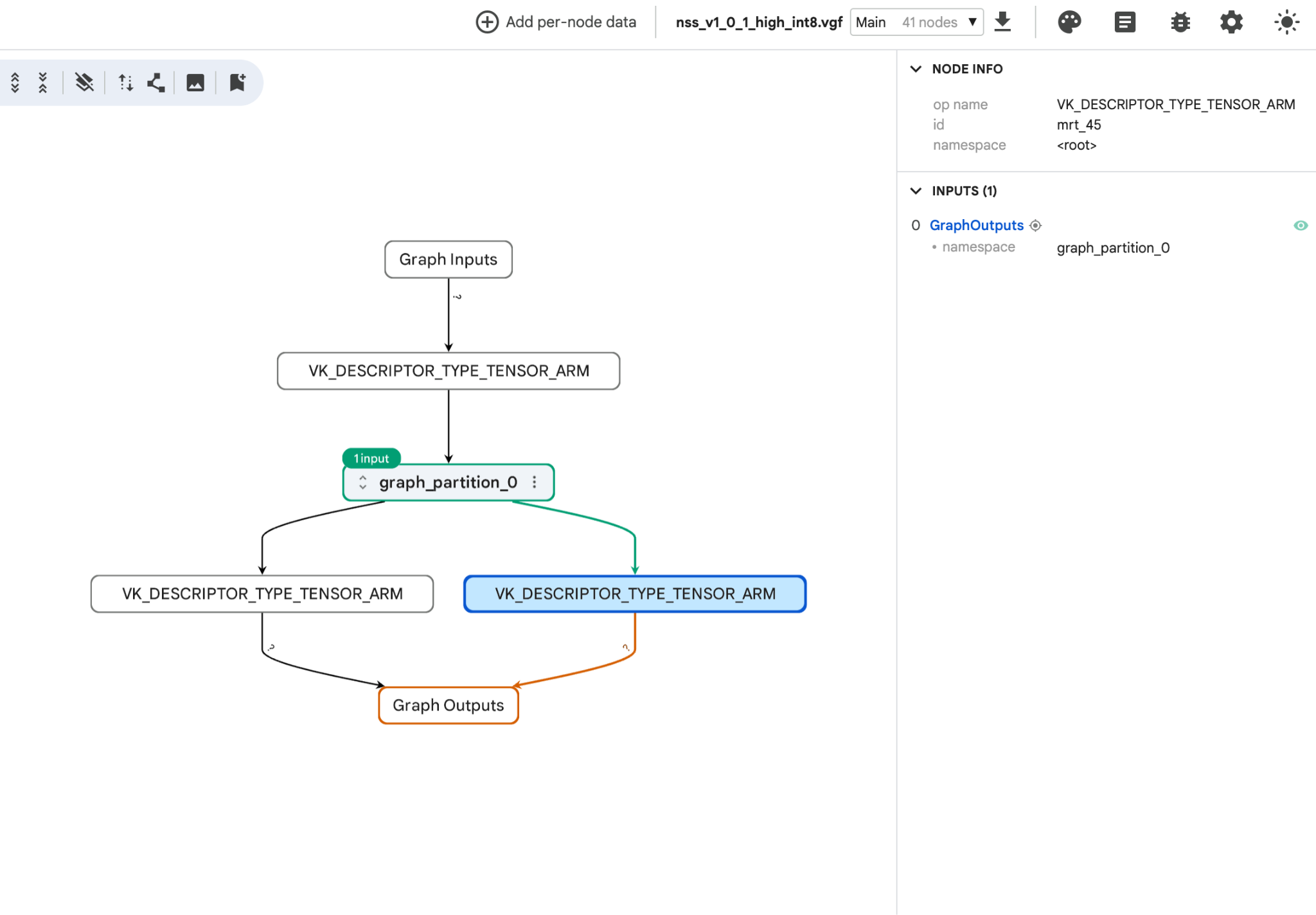
图 1:以 VGF 格式导出的 NSS 模型概览,展示了图分区及其与模型输入和输出的连接。
Model Explorer 允许用户检查模型图中的单个节点,如下所示的 rescale 算子,其中展示了该算子的属性及其 SPIR-V 张量连接。这一功能帮助 Arm 团队识别并解决了回退问题,无需手动分析原始日志文件。
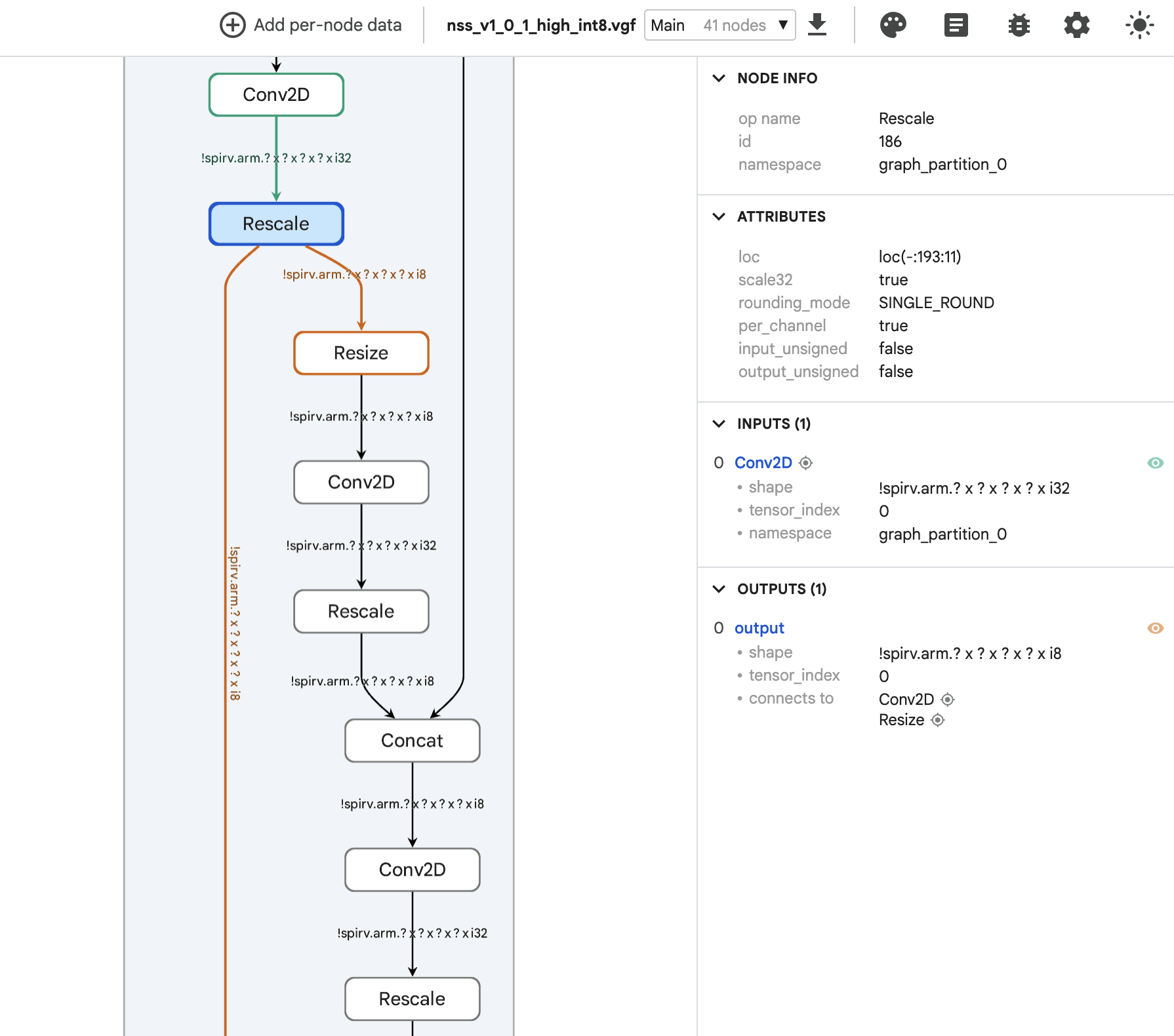
图 2:NSS 图的详细视图,展示了选中的 rescale 算子及其属性和 SPIR-V 输入/输出连接。
2. 利用分栏视图验证 NPU 委派与 CPU 回落
为了针对 Arm Ethos-U85 NPU 等加速器优化视觉模型,Arm 工程师使用 Model Explorer 的分栏视图(split-pane view),对 Ultralytics YOLO 模型的 CPU 计算图和 NPU 委派计算图进行了并排对比。
分栏视图清晰地展现了结构差异:CPU 图显示了每一个独立的层,而 NPU 图则将网络整合在 quantize 和 dequantize 节点之间的单个 EthosUBackend 块中。对于在 LiteRT 或 ExecuTorch 中仅部分受支持的模型,该视图有助于快速识别未被委派的算子以及被分割的子图。
图 3a:分栏视图中的 Ultralytics YOLO 模型 CPU 计算图
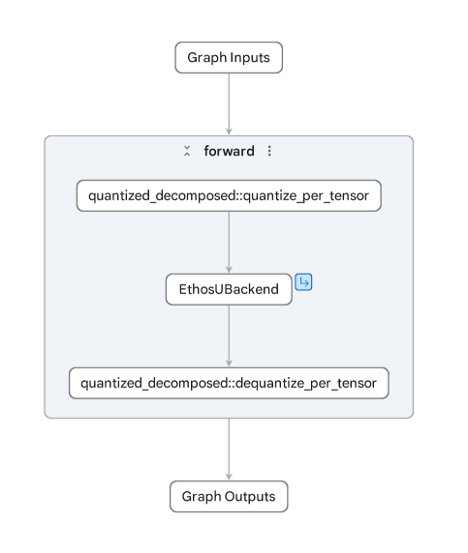
图 3b:分栏视图中的 Ultralytics YOLO 模型 NPU 计算图
3. 通过逐节点 Trace 叠加精准定位硬件瓶颈
为了找出 Ethos-U NPU 上的延迟瓶颈,Arm 在其固定虚拟平台(FVP)仿真器上运行模型,并利用 Model Explorer 的节点数据插件将周期精确(cycle-accurate)的执行 Trace 叠加到计算图上。颜色编码的热力图直观显示出一个单独的 TRANSPOSE 节点是主要的延迟瓶颈。
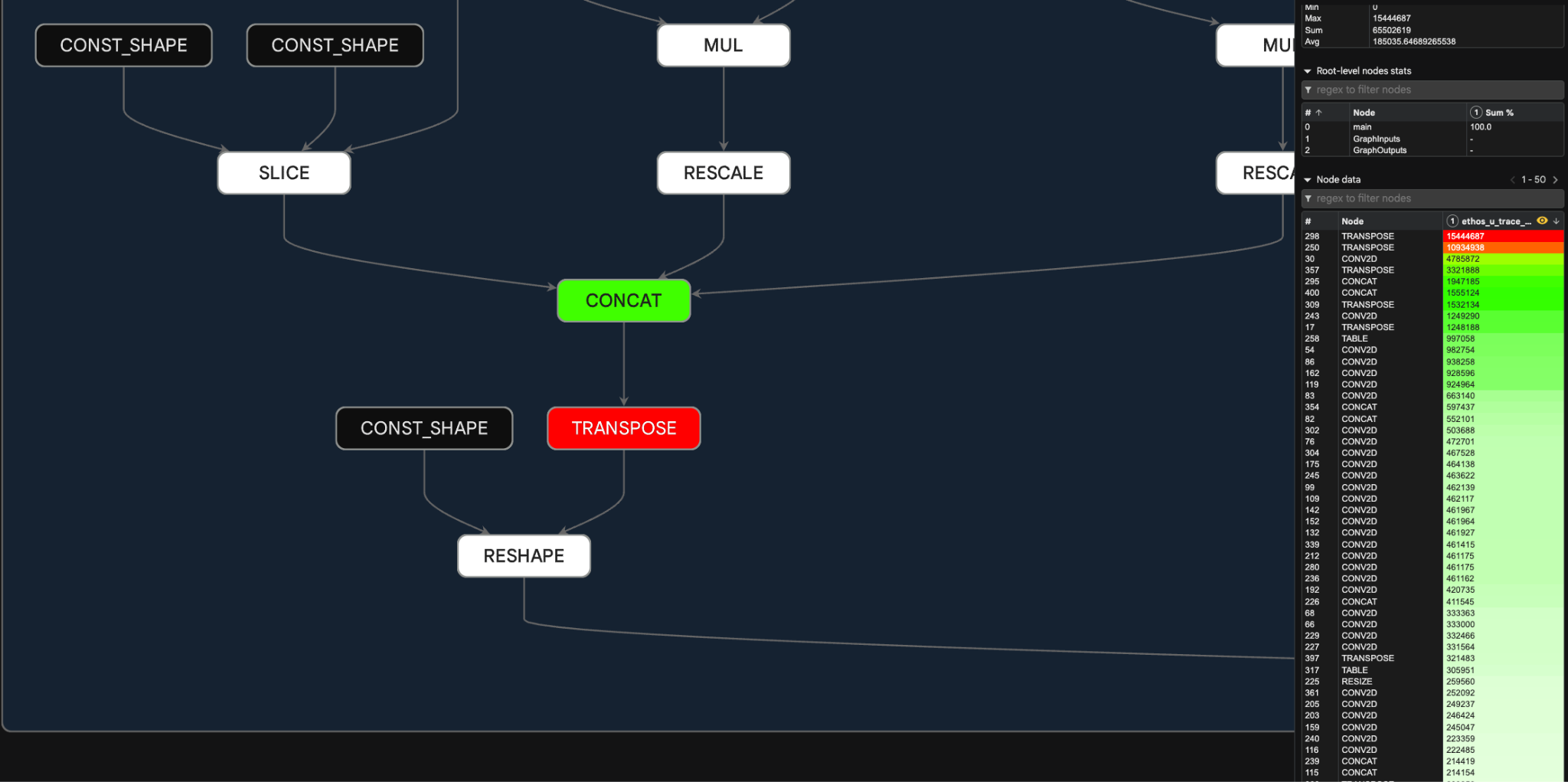
图 4:高亮标出的性能数据叠加层,清晰展示了瓶颈所在。
如何开始使用
你现在就可以结合使用 Google AI Edge Model Explorer 与 Arm 的开源适配器,通过 PyPI 或 GitHub 在本地检查并优化你自己的端侧模型。
- 安装 Google AI Edge Model Explorer
- 安装对应的适配器并为你所用的模型格式启动 Model Explorer:
- LiteRT 适配器(内置)
- PyTorch 适配器(内置)
- Hugging Face Transformers 适配器(内置)
- TOSA 适配器(Arm 插件)
- VGF 适配器(Arm 插件)
- PTE 适配器(Arm 插件)
- 参阅用户指南并体验主要功能:
致谢
特别鸣谢 Arm 和 Google AI Edge 团队中为这些适配器及集成工作做出贡献的成员:
工程师:
- ARM:Narumol Prangnawarat, Joshua Slater, Stefana Simion, Adam Hodson, Alona Enraght-Moony, Áron Virginás-Tar, Carey Williams, Gleb Vinnychenko, Hamza Arslan, Marco Domingo, Matthew Sloyan, Michael Mc Curtin, Mitch Bailey, Richard Burton, Robert Hughes, Robert Taylor, Tomás Agustín González Orlando
- Google:Alan Ma, Eric Yang, Jing Jin, Na Li
产品经理:Charlie Stokes (ARM), Derek Bekebrede
设计师:Ami Kubota, Ioannis Politis (ARM), Kathleen Low, Philip Watson (ARM)
高级赞助人:Bala Gattu (ARM), Cormac Brick, Joe Alderson (ARM), Matthias Grundmann, Sharbani Roy (ARM)
English / 原文
Model Explorer goes beyond high-level model graphs. See how Arm plugs in custom compiler IRs, verifies NPU delegation side-by-side, and maps cycle-level profiling traces directly onto your execution graph.
Machine learning models run locally on a wide range of hardware, from low-power edge devices to gaming graphics and physical AI systems. Running models efficiently on these targets requires compilation steps such as quantization, graph lowering, operator fusion, and hardware delegation.
Arm used Google AI Edge Model Explorer to give developers visibility into these pipelines. With Model Explorer's hierarchical graph visualization and plugin architecture, Arm built several open-source adapters that make edge model transformations easier to inspect.
The Challenge
When deploying a model to edge hardware, a framework change or operator constraint can alter the exported execution graph. Engineers often need to answer three questions:
- Structural integrity: Did graph lowering introduce unintended operators such as extra layout transposes?
- Hardware delegation: Is the model fully delegated to the NPU or GPU, or are unsupported subgraphs falling back to the CPU?
- Cycle-level bottlenecks: Which nodes in the lowered graph take the most compute cycles?
Answering these questions by reading raw flatbuffers or text logs takes time, especially for large language models (LLMs) and neural networks. Arm needed a visual tool to inspect Arm-specific intermediate representations and hardware profiling traces.
How Arm Used Model Explorer's Visual Debugging Workflows
To address these deployment challenges, Arm developed custom adapters for Google AI Edge Model Explorer to support several model formats (i.e., TOSA, VGF, and PTE), establishing a comprehensive visual workflow for on-device optimization. Using these extensions, engineering teams can validate exported pipelines, verify accelerator delegation, and pinpoint cycle-level performance bottlenecks directly on the model graph:
1. Catching hidden export regressions in VGF
Arm engineers used Model Explorer to validate a PyTorch-trained Neural Super Sampling (NSS) model exported through the ExecuTorch Arm backend as a VGF file for Vulkan ML Extensions. While inspecting the VGF graph, the team found unintended TRANSPOSE operators introduced by a change in the ExecuTorch Arm backend.
Figure 1: Overview of the exported NSS model in VGF format, showing the graph partition and its connections to the model inputs and outputs.
Model Explorer enables users to inspect individual nodes of the model graph, such as the rescale operator depicted below, which displays the operator's attributes and SPIR-V tensor connections. This functionality assisted the Arm team in identifying and resolving the regression without requiring manual analysis of raw log files.
Figure 2: Detailed view of the NSS graph, showing a selected rescale operator with its attributes and SPIR-V input and output connections.
2. Verifying NPU delegation vs. CPU fallback with Split-Pane View
To optimize vision models for accelerators like the Arm Ethos-U85 NPU, Arm engineers used Model Explorer's split-pane view to compare CPU and NPU-delegated graphs side-by-side for a Ultralytics YOLO model.
The split-pane view showed the structural difference: the CPU graph displays each individual layer, while the NPU graph groups the network into a single EthosUBackend block between quantize and dequantize nodes. For partially supported models in LiteRT or ExecuTorch , this view helps identify un-delegated operators and split subgraphs.
Figure 3a: Ultralytics YOLO model CPU graph in split-pane view
Figure 3b: Ultralytics YOLO model NPU graph in split-pane view
3. Pinpointing Hardware Bottlenecks with Per-node Trace Overlays
To find latency bottlenecks on the Ethos-U NPU, Arm ran their model on their Fixed Virtual Platform (FVP) simulator and used Model Explorer's node data plugin to overlay cycle-accurate execution traces onto the graph. Color-coded heatmaps showed that a single TRANSPOSE node was the main latency bottleneck.
Figure 4. Highlighted performance data overlay that clearly shows where the bottleneck is.
How to get started
You can use Google AI Edge Model Explorer along with Arm's open-source adapters today to inspect and optimize your own on-device models locally via PyPI or GitHub.
- Install Google AI Edge Model Explorer
- Install adapter and launch Model Explorer for your model format.
- LiteRT adapter (built-in)
- PyTorch adapter (built-in)
- Hugging Face Transformers adapter (built-in)
- TOSA adapter (Arm plugin)
- VGF adapter (Arm plugin)
- PTE adapter (Arm plugin)
- See User Guide and try out major features:
Acknowledgements
Special thanks to the contributors across the Arm and Google AI Edge teams for their work on these adapters and integrations:
Engineers:
- ARM: Narumol Prangnawarat, Joshua Slater, Stefana Simion, Adam Hodson, Alona Enraght-Moony, Áron Virginás-Tar, Carey Williams, Gleb Vinnychenko, Hamza Arslan, Marco Domingo, Matthew Sloyan, Michael Mc Curtin, Mitch Bailey, Richard Burton, Robert Hughes, Robert Taylor, Tomás Agustín González Orlando
- Google: Alan Ma, Eric Yang, Jing Jin, Na Li
Product manager: Charlie Stokes (ARM), Derek Bekebrede
Designers: Ami Kubota, Ioannis Politis (ARM), Kathleen Low, Philip Watson (ARM)
Senior Sponsors: Bala Gattu (ARM), Cormac Brick, Joe Alderson (ARM), Matthias Grundmann, Sharbani Roy (ARM)