在 AWS 上通过 Smartsheet MCP 为 AI Agent 引入工作管理上下文
英文标题:Work management context for AI agents with Smartsheet MCP on AWS
项目与运营管理平台 Smartsheet 正式推出 Model Context Protocol (MCP) Server,使 AI Agent 能够通过标准化协议直接读取、写入和更新实时工作数据。文章展示了在 AWS 上的两种集成路径:面向业务与运营团队的 Amazon Quick,支持以自然语言无代码查询看板与更新行;面向开发者的 Agentic IDE Kiro,支持在编码环境中直接对齐项目规范与自动化更新任务状态。该方案不仅通过精简的结构化上下文大幅降低 Token 消耗与延迟,还沿用了企业级权限与安全控制,为消除工具切换成本、实现端到端 Agent 协同提供了可靠落地方案。
 1.3 MB
 1.3 MB
 2.4 KB
 345.0 KB
 141.2 KB
 346.5 KB
 186.1 KB
 43.8 KB
 87.8 KB
 121.3 KB
 86.0 KB
 185.9 KB
 450.5 KB
 348.9 KB
 27.7 KB
 25.9 KB
 21.7 KB
 175.7 KB
中文
AI Agent 只有在能够对组织内部发生的真实工作进行操作时,才能发挥最大效用。工作管理涉及复杂的跨职能任务,例如更新项目时间线、重新分配任务以及呈现状态。AI Agent 可以在不让任何人切换工具的情况下为此提供支持。Smartsheet 是用于管理项目、项目组合和运营的工作管理平台,现已正式推出其 Model Context Protocol (MCP) Server。
借助 Smartsheet MCP Server,AI 助手可以通过标准化协议读取、写入和管理 Smartsheet 数据。该协议涵盖了用于探索、创建和管理工作表(sheets)、行(rows)、列(columns)以及自动化流程的 40 多个工具。你可以直接通过自然语言更新任务状态、创建行并修改项目结构。
在本文中,我们将介绍将它连接到现有工作流的两种方式。Amazon Quick 是专为业务用户、项目经理和运营团队构建的 Agentic AI 工作区。他们无需编写代码,即可通过自然语言提问、更新工作表和构建仪表板。Kiro 是一款 Agentic IDE,开发者可以通过 MCP 连接到 Smartsheet,在不离开编码工作流的情况下引用项目规范、更新任务状态并跟踪依赖项。
架构概述
下图展示了 Smartsheet MCP Server 如何作为连接 AWS 服务的中心集成层。Amazon Quick 和 Kiro 作为 MCP 客户端直接连接。
Amazon Quick 服务于希望通过自然语言查询、更新和自动化 Smartsheet 的知识工作者、项目经理和运营团队。借助 Kiro,开发者无需离开编码工作流,即可引用项目规范、更新任务状态并跟踪依赖关系。
下面的架构图展示了这些集成路径:Smartsheet MCP Server 位于中心,左侧为作为 MCP 客户端的 Amazon Quick 和 Kiro,右侧为 Smartsheet 的 API 和数据层。
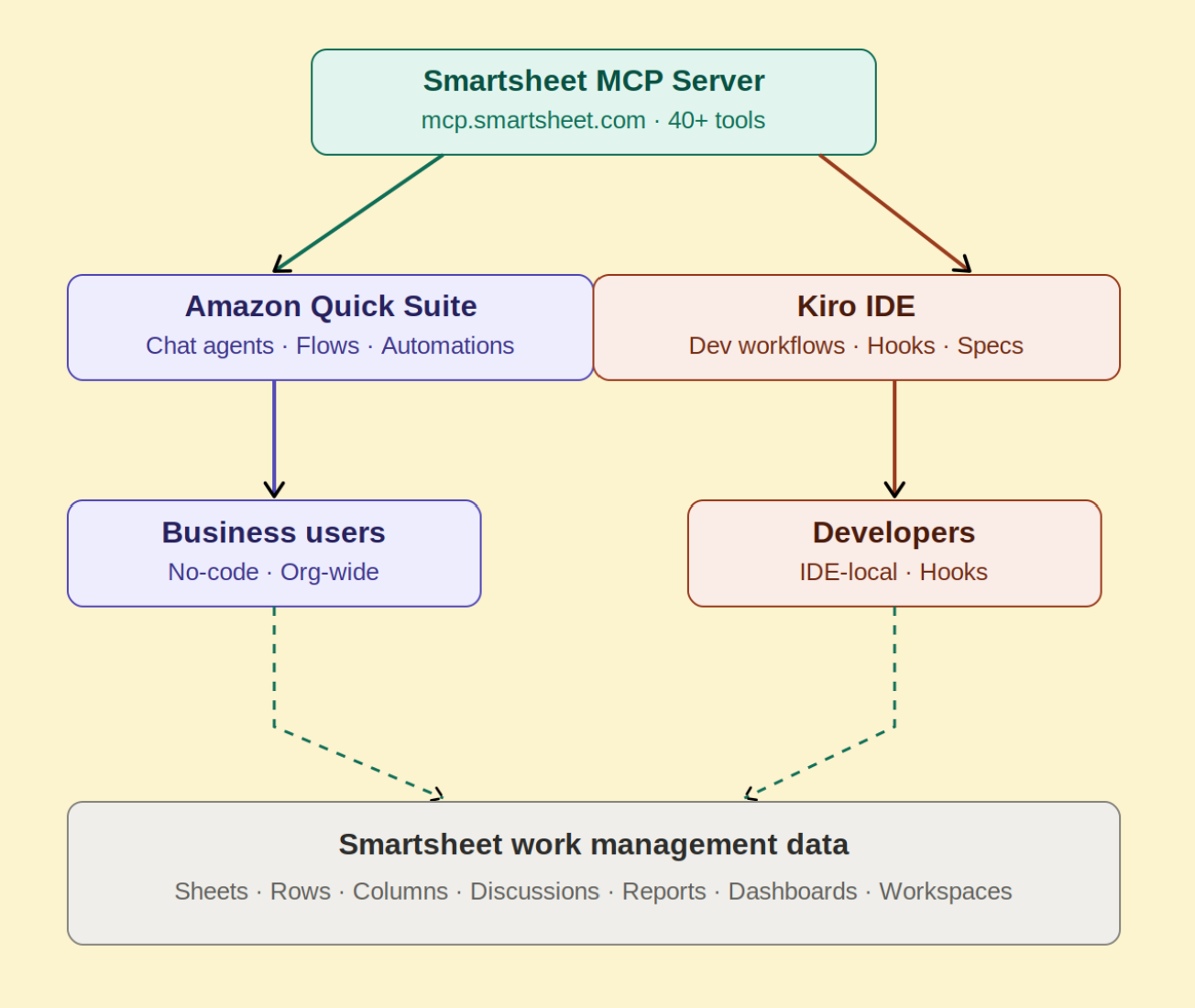
图 1:Smartsheet MCP Server 架构,展示了从 Amazon Quick 和 Kiro 通过服务器到 Smartsheet API 层的 MCP 客户端连接
使用 Amazon Quick 和 Kiro 进行 Sprint 管理
假设有一个在 Smartsheet 中跟踪其 Sprint 的软件工程团队。任务、负责人、状态和阻塞问题(blockers)都位于项目工作表中。以下是同一团队在两条路径下的使用方式:
当项目经理等用户想要查看本周有哪些 Sprint 任务被阻塞时,他们可以通过自然语言询问 Amazon Quick。Amazon Quick 对话 Agent 会查询 Smartsheet MCP Server,提取相关行,并呈现包含负责人姓名和截止日期的摘要。该响应由实时 Smartsheet 数据生成,无需构建报表或仪表板。
对于正在修复 Bug 或推进功能的开发者,他们可以让 Kiro 拉取当前 Sprint 工作表并展示分配给他们的未解决后端任务。Kiro 通过 MCP 查询 Smartsheet 并以内联方式呈现列表。当修复提交(commit)时,Kiro hook 会自动将相应行的状态更新为“Complete”。
前置条件
Smartsheet MCP Server 提供精确结构化的上下文,包括行关系、列类型、单元格历史记录和注释。这生成了 Token 高效的 Payload 大小,而不是返回原始的 API Payload。当在项目组合中运行数百个 AI 辅助查询时,这项工程决策能够显著降低成本并改善大规模运行时的延迟。要了解 Smartsheet 如何在 AWS 上构建其远程 MCP 服务器,请参阅Smartsheet 如何在 AWS 上构建远程 MCP 服务器。
在将 Smartsheet MCP Server 连接到 Amazon Quick 和 Kiro 之前,请确认你已具备以下条件:
- 一个处于活跃状态的 AWS 账户,并对所连接的服务(Amazon Quick 或 Kiro)拥有相应的 AWS Identity and Access Management (IAM) 权限
- 处于 Business、Enterprise 或 AWM 计划中的 Smartsheet 账户。
- Smartsheet 个人访问令牌(Personal Access Token),或者如果你的客户端支持 OAuth 流程,则提供 OAuth 凭证。
- 对于 Amazon Quick:在你的 Amazon Quick 账户中拥有 Author 或更高权限。
- 对于 Kiro:从 kiro.dev 安装的 Kiro IDE,且环境中具备
Node.js。
Smartsheet MCP Server 在三个区域端点可用。它使用可流式传输的 HTTP 传输协议(MCP 规范版本 2025-06-18 和 2025-03-26),并通过 OAuth 2.0 或个人访问令牌进行身份验证。
- 美国商业区(Commercial US):https://mcp.smartsheet.com。
- 欧洲区(EU):https://mcp.smartsheet.eu。
- 澳洲区(AU):https://mcp.smartsheet.au。
两种选择都公开了相同的 Smartsheet 工具集。正确的选择取决于你的工作在哪里完成:
如果你需要一个适合全团队使用的全托管、组织级解决方案,请选择 Amazon Quick:无需应用注册,仅使用预构建的 OAuth,并且可跨企业知识工作者进行扩展。
如果你是追求轻量级方案的开发者,请选择 Kiro:无需基础设施,仅需一个配置文件和一个个人访问令牌,且仅限定在你自己的工作流中。
Amazon Quick 集成
Amazon Quick 在其目录中将 Smartsheet 作为预构建连接器提供。这意味着读取项目状态、更新行、发起讨论和呈现风险,全都可以在业务用户原本工作所用的相同界面中完成。
Amazon Quick 使该集成在整个组织中可用,涵盖从项目经理、运营团队到在 Smartsheet 中管理工作的业务用户。
要添加 Quick 集成:
- 在 Amazon Quick 控制台 中,导航至 Connectors(连接器)并在目录中找到 Smartsheet。
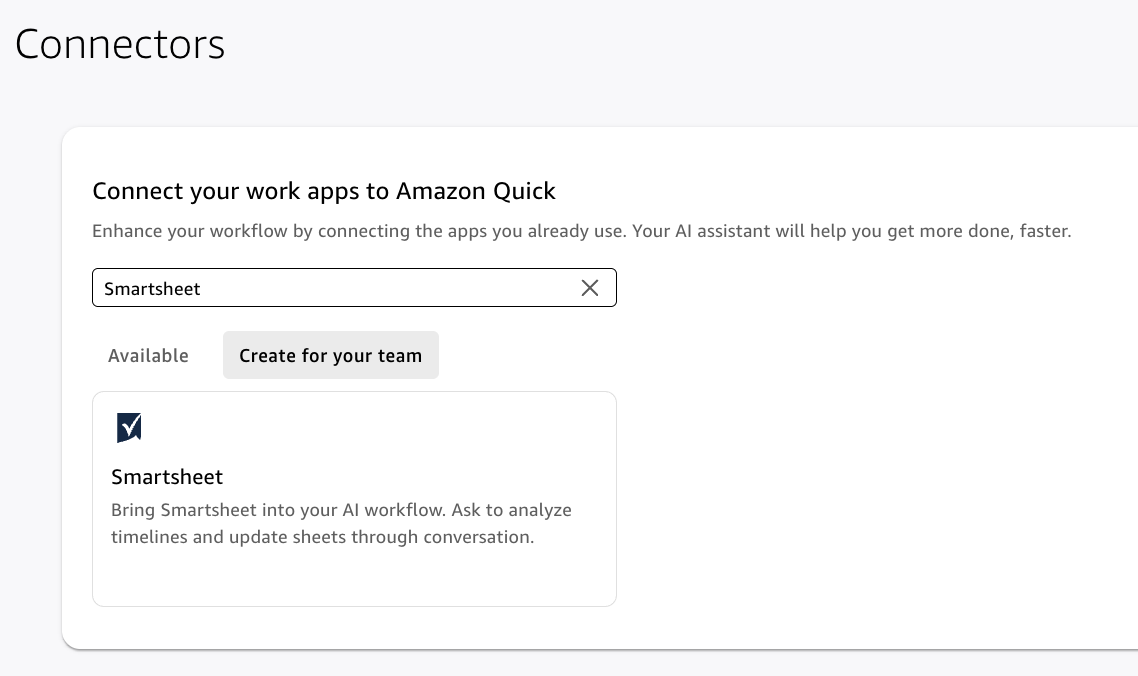
图 2:Amazon Quick 连接器目录中的 Smartsheet 连接器
- 选择 Smartsheet connector 卡片。
- 输入以下集成详细信息:
- Name – 你的 Smartsheet 集成的描述性名称。
- 保持 Connection type 和 Auth configuration 设置不变。
- Base URL – https://mcp.smartsheet.com。
- Client ID – 来自 Smartsheet 开发者工具应用注册的应用客户端 ID。
- Client Secret – 来自 Smartsheet 开发者工具应用注册的应用密钥。
- Token URL – https://api.smartsheet.com/2.0/token。
- Auth URL – https://app.smartsheet.com/b/authorize。
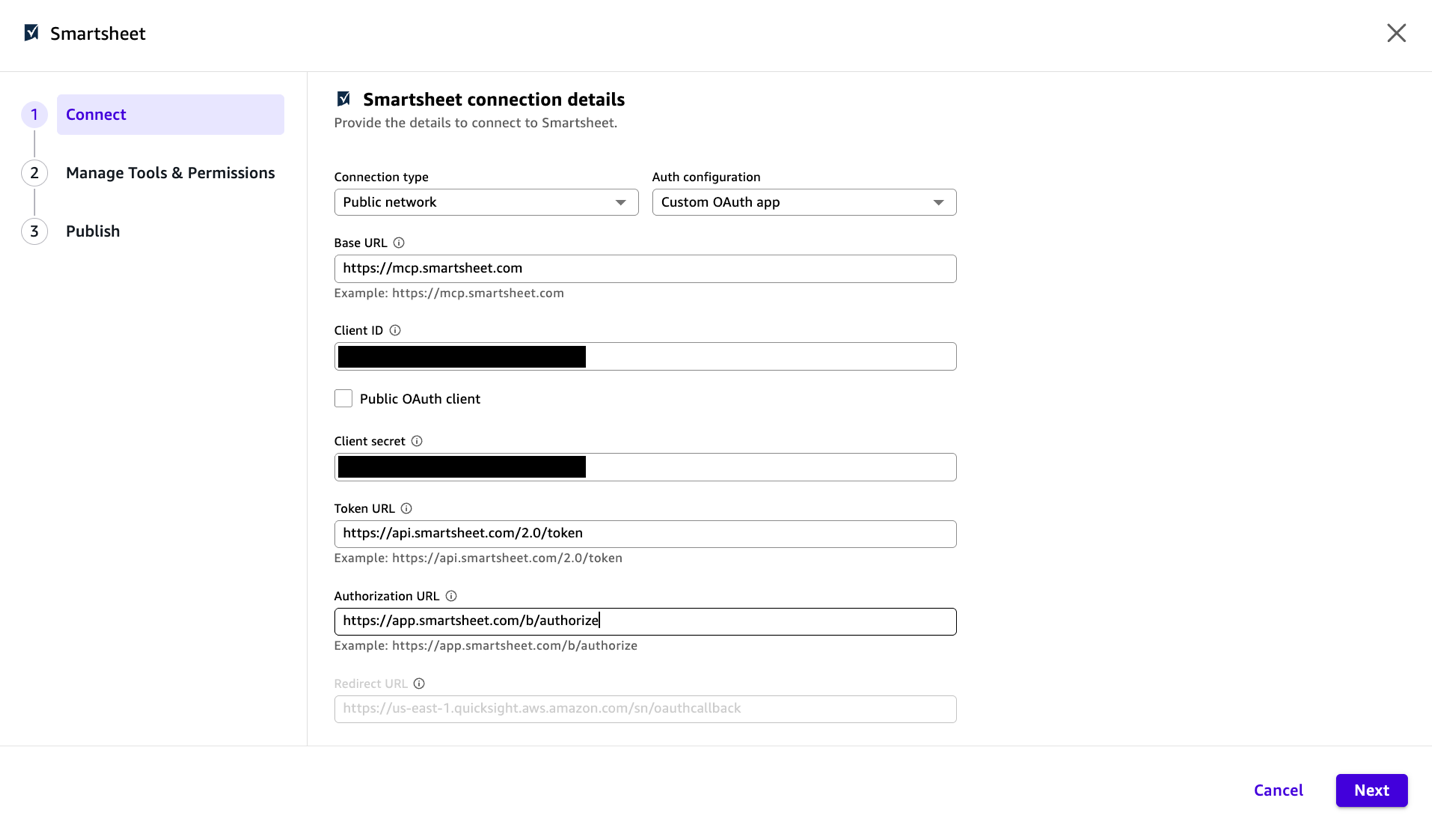
图 3:在 Amazon Quick 中输入 Smartsheet 连接详情
- 选择 Next。
- 在 Manage Tools & Permissions 页面上,你将看到可用工具列表。选择 Next。
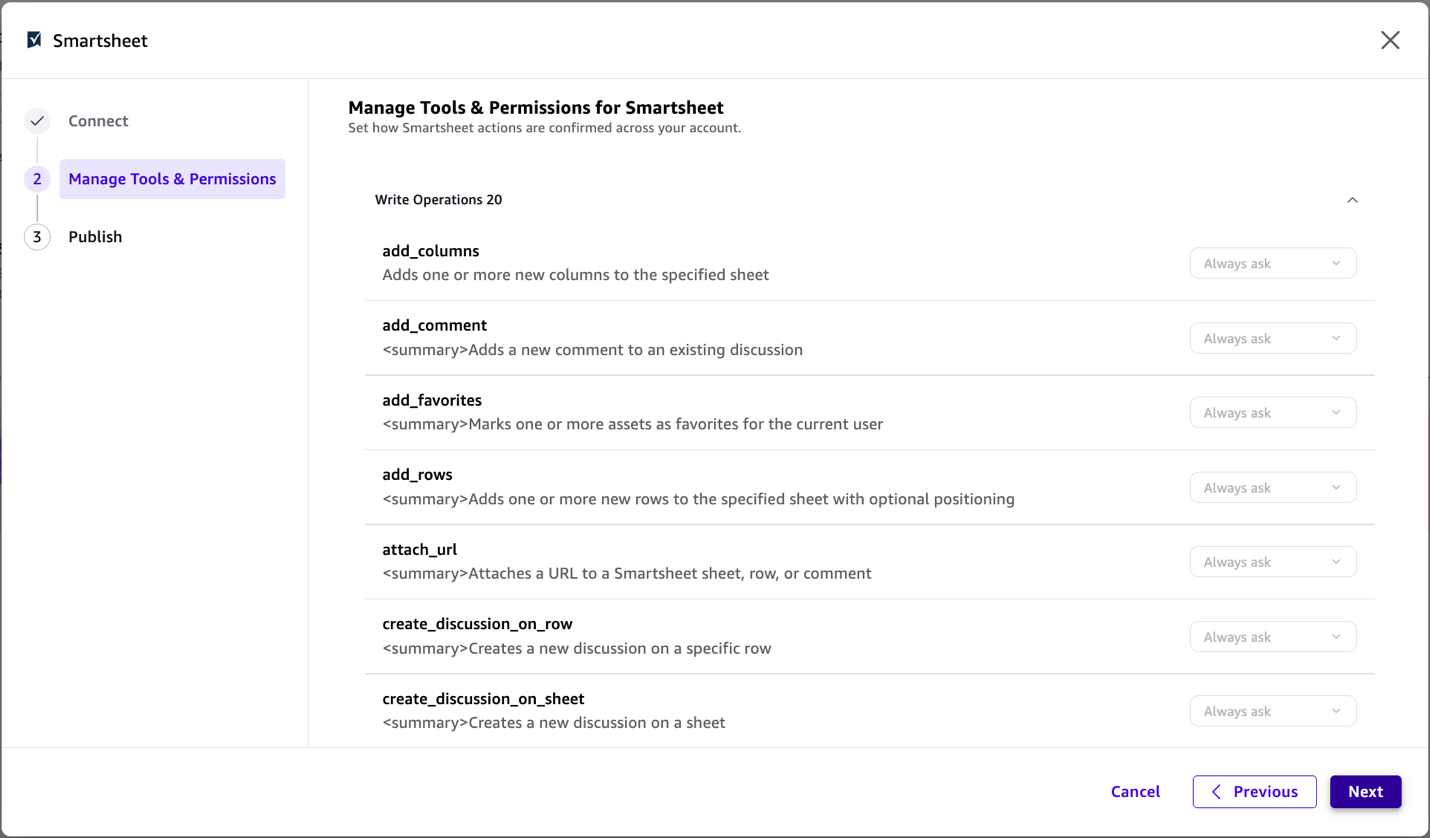
图 4:Smartsheet 连接器的 Manage Tools and Permissions 页面
- 在 Publish 页面上,选择谁可以访问此连接,然后选择 Publish。
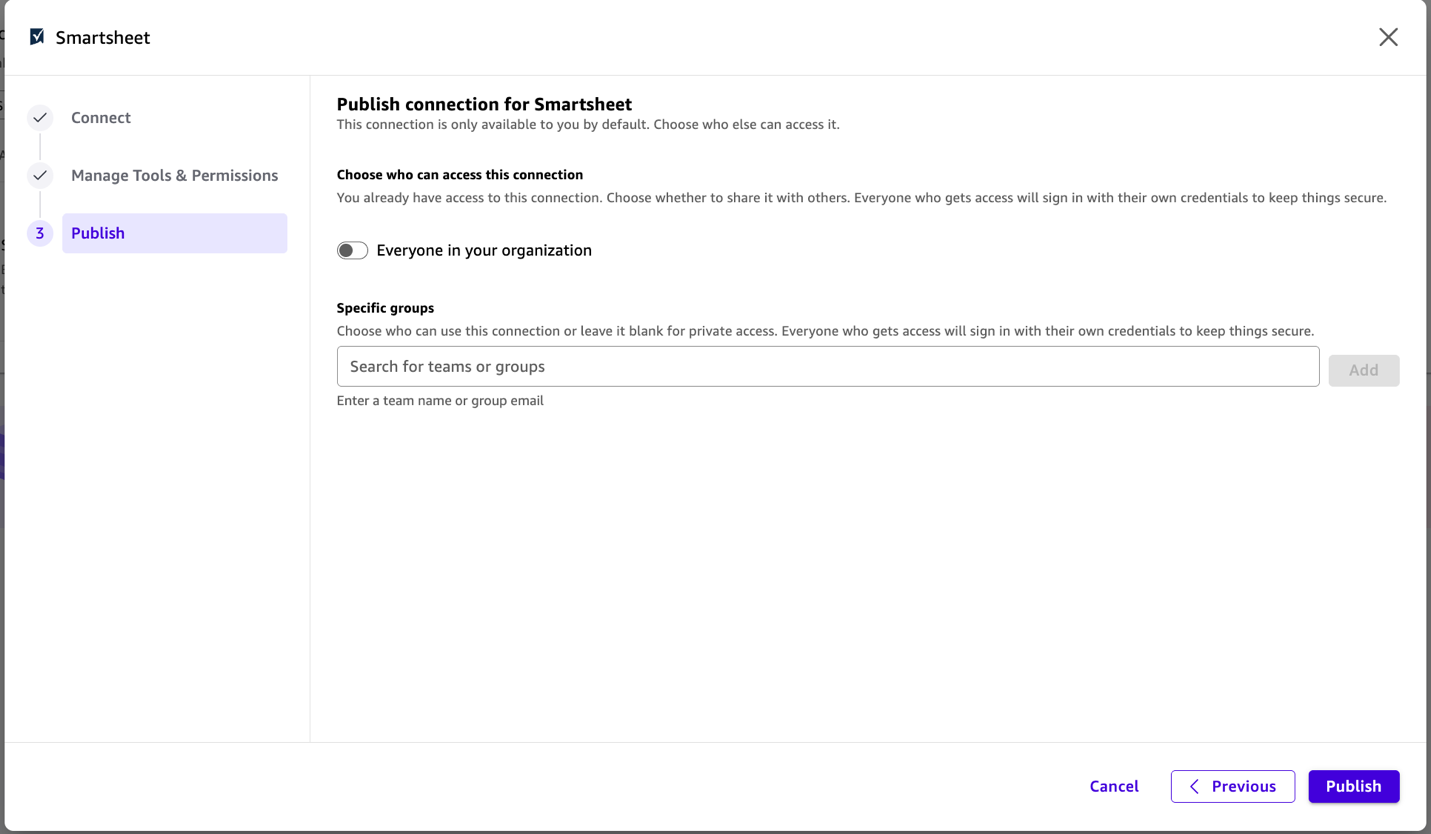
图 5:在 Publish 页面上选择谁可以访问 Smartsheet 连接
- 选择 Next。
连接完成后,你的 Amazon Quick 对话 Agent 就可以通过自然语言处理 Smartsheet 数据:
- “我们项目组合中有哪些项目目前处于 At Risk 状态?”
- “将 Backend API 表中的身份验证任务状态更新为 Complete。”
- “汇总 Q3 Roadmap 中所有逾期的项目并发送给团队。”
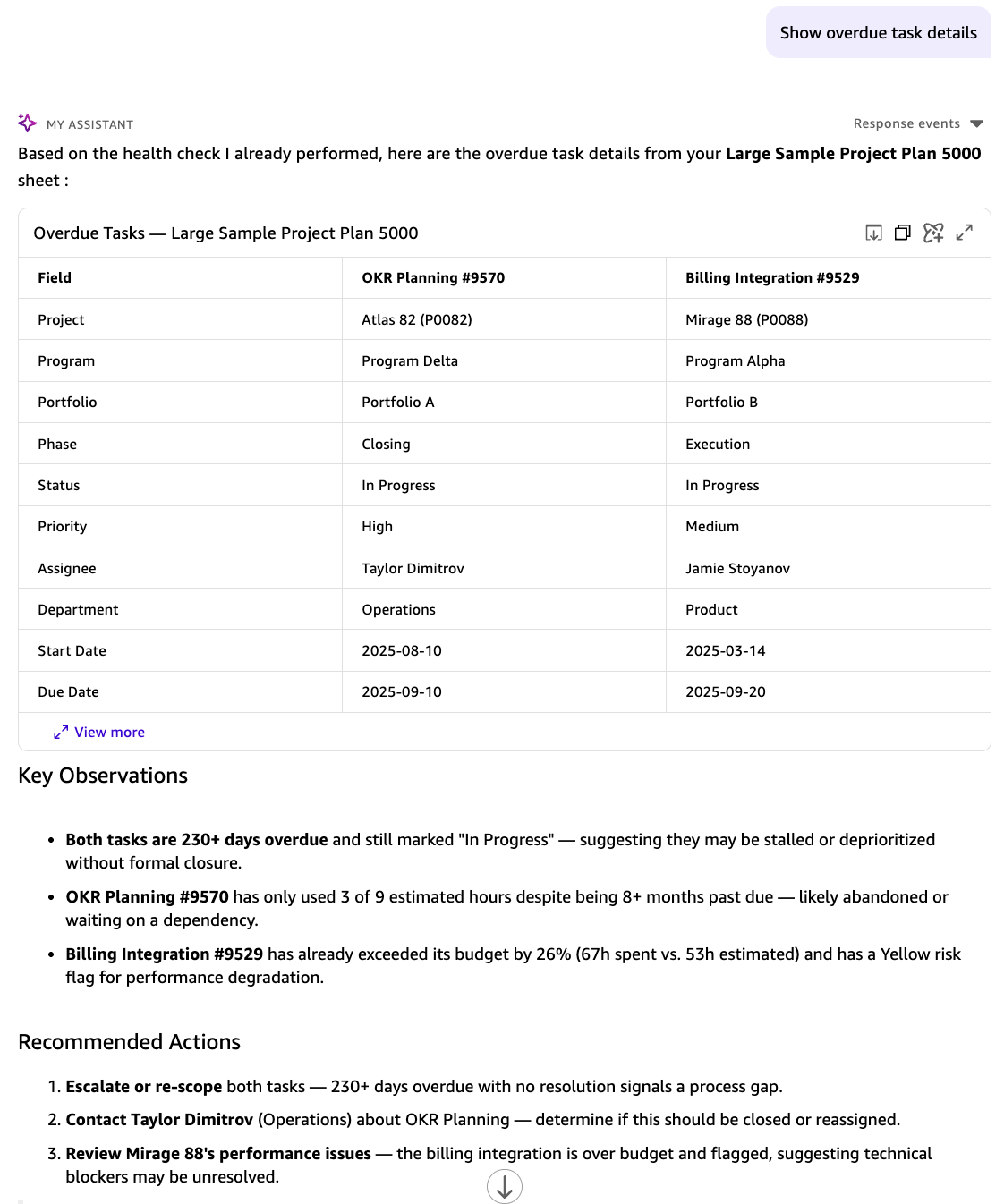
图 6:Amazon Quick 对话响应,总结 Smartsheet 项目表中的逾期任务,并提供关键观察与建议操作
Kiro 集成
当开发者希望在自己的开发环境中直接获取 Smartsheet 项目上下文,与代码并存而无需切换上下文时,Kiro 是理想途径。
Kiro 围绕规范驱动开发(spec-driven development)构建。它将高层级 Prompt 转化为结构化规范(spec),进而生成可运行的代码、文档和测试。MCP 服务器是 Kiro 获取真实世界上下文的方式,通过连接到文档、数据库、API 和企业系统,将其 Agent 立足于实时数据而非训练时知识。
Kiro 中一个名为 powers 的功能是一个一键安装包,它打包了精选的 MCP 服务器以及 steering 文件和 hooks。它为 Kiro 编码 Agent 提供了开箱即用的新能力。对于 Smartsheet,配置连接只需一个 JSON 配置块,从那一刻起,Kiro Agent 就可以在开发工作流中引用实时项目数据。
要将 Smartsheet MCP Server 连接到 Kiro,请将其添加到你的 Kiro MCP 配置中(工作区范围对应 .kiro/settings/mcp.json)。有关完整演练,请参阅Kiro 与 MCP 服务器入门:
{
  "mcpServers": {
    "smartsheet-us": {
      "type": "http",
      "url": "https://mcp.smartsheet.com",
      "headers": {
        "Authorization": "Bearer <SMARTSHEET_API_TOKEN>"
      }
    }
  }
}
此配置采用个人访问令牌(API Key)方案。对于生产环境部署,建议使用 OAuth。
在你的环境中将 SMARTSHEET_API_TOKEN 设置为你的 Smartsheet 个人访问令牌。Kiro 在启动时将 MCP 服务器作为后台进程加载。初始化完成后,Smartsheet 工具将在所有模式下供 Kiro Agent 使用:聊天、规范规划(spec planning)和基于 hooks 的自动化。完整详细信息请参阅 Smartsheet MCP Server 文档。
之后,Kiro 可以在开发工作流中引用 Smartsheet 数据:
- “检查 Backend API 项目表中的所有未解决 Bug,并生成按优先级排序的修复列表。”
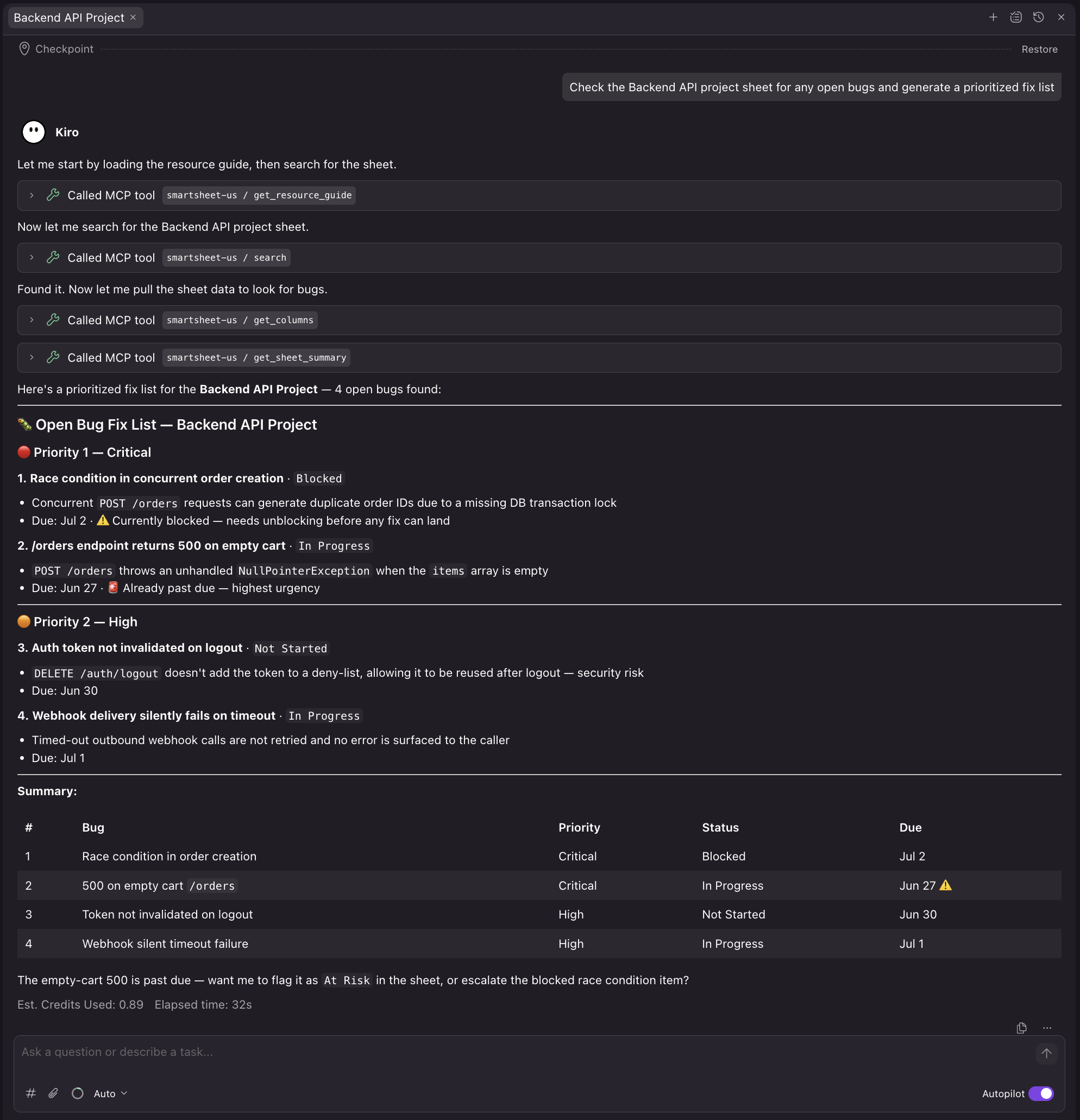
图 7:Kiro 根据 Backend API 项目表中的未解决 Bug 生成按优先级排序的修复列表
- “拉取 Q3 Roadmap 表,并为标记为 In Progress 的功能创建规范。”
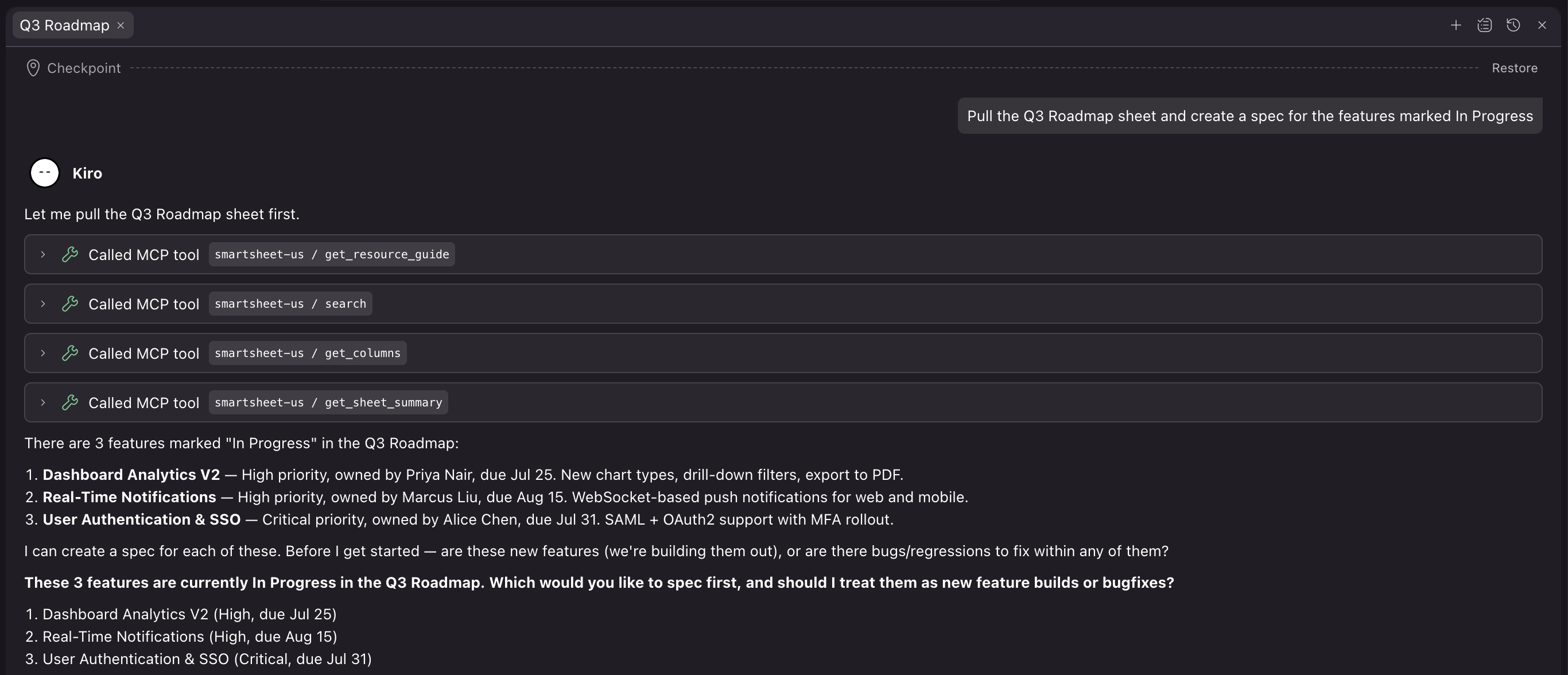
图 8:Kiro 根据 Q3 Roadmap 表中正在进行的功能创建规范
企业级治理
对于在受监管或企业环境中进行部署的构建者,Smartsheet MCP Server 的安全模型构建在与 Smartsheet REST API 相同的基础设施和权限层之上。这并非引入了新的信任边界:
- OAuth 2.0 和个人访问令牌认证:选择你的 MCP 客户端支持的身份验证方式。
- 用户级权限实施:Agent 只能访问经过身份验证的用户有权查看的数据。不会通过自然语言 Prompt 发生特权提权。
- 组织级 AI 控制:系统管理员可以在全局开启或关闭 AI 功能。写入工具权限可按用户组配置。
- 流式 HTTP 传输协议(Streamable HTTP transport):防火墙白名单按完全限定域名(FQDN)(mcp.smartsheet.com)而非 IP 地址进行配置。
对于合规架构师而言,MCP Server 不会存储 Prompt,Prompt 内容仅保留在 AI 客户端与模型之间。Smartsheet 只能看到结构化的工具调用及其执行结果。
清理资源
如果你跟随本教程操作,并希望在事后移除集成,以下是撤销各路径的方法:
Amazon Quick
- 在 Amazon Quick 控制台中,导航至 Connectors。
- 选择你的 Smartsheet 连接器。
- 选择 Delete 移除连接。这会撤销凭证访问权限。
English / 原文
AI agents are most useful when they can act on the real work happening across your organization. Work management involves complex, cross-functional tasks such as updating project timelines, reassigning tasks, and surfacing status. AI agents can support you with these without anyone switching tools. Smartsheet, the work management platform for managing projects, portfolios, and operations, has launched a generally available Model Context Protocol (MCP) Server.
With the Smartsheet MCP Server, AI assistants can read, write, and manage Smartsheet data through a standardized protocol. The protocol spans more than 40 tools for exploring, creating, and managing sheets, rows, columns, and automations. You can update task statuses, create rows, and modify project structure directly through natural language.
In this post, we walk through two ways you can connect it to your existing workflows. Amazon Quick is an agentic AI workspace built for business users, project managers, and operations teams. They can ask questions, update sheets, and build dashboards through natural language without writing code. Kiro is an agentic IDE where developers connect to Smartsheet through MCP to reference project specs, update task status, and track dependencies without leaving their coding workflow.
Architecture overview
The following diagram shows how the Smartsheet MCP Server sits as the central integration layer connecting to AWS services. Amazon Quick and Kiro connect directly as MCP clients.
Amazon Quick serves knowledge workers, project managers, and operations teams who want to query, update, and automate Smartsheet through natural language. With Kiro, developers can reference project specs, update task status, and track dependencies without leaving their coding workflow.
The following architecture diagram illustrates these integration paths: the Smartsheet MCP Server in the center, with Amazon Quick and Kiro as MCP clients on the left, and Smartsheet’s API and data layer on the right.
Figure 1: Smartsheet MCP Server architecture showing MCP client connections from Amazon Quick and Kiro through the server to the Smartsheet API layer
Sprint management with Amazon Quick and Kiro
Consider a software engineering team that tracks their sprint in Smartsheet. Tasks, owners, statuses, and blockers all live in a project sheet. Here’s what each path looks like for the same team:
When a user such as a project manager wants to check which sprint tasks are blocked this week, they can ask Amazon Quick through natural language. The Amazon Quick chat agent queries the Smartsheet MCP Server, pulls the relevant rows, and surfaces a summary with owner names and due dates. The response is generated from live Smartsheet data without building a report or dashboard.
For developers who are fixing bugs or working through features, they can ask Kiro to pull the current sprint sheet and show them the open backend tasks assigned to them. Kiro queries Smartsheet through MCP and surfaces the list inline. When the fix is committed, a Kiro hook automatically updates the corresponding row status to Complete.
Prerequisites
Smartsheet MCP Server delivers precisely structured context, including row relationships, column types, cell history, and comments. This produces token-efficient payload sizes rather than returning raw API payloads. This engineering decision compounds into reduced cost and improved latency at scale when running hundreds of AI-assisted queries across a project portfolio. To learn how Smartsheet built their remote MCP server on AWS, see How Smartsheet built a remote MCP server on AWS.
Before connecting the Smartsheet MCP Server to Amazon Quick and Kiro, verify that you have the following in place:
- An active AWS account with appropriate AWS Identity and Access Management (IAM) permissions for the service you’re connecting (Amazon Quick, or Kiro)
- A Smartsheet account on a Business, Enterprise, or AWM plan.
- A Smartsheet Personal Access Token, or OAuth credentials if your client supports the OAuth flow.
- For Amazon Quick: Author or higher permissions in your Amazon Quick account.
- For Kiro: Kiro IDE installed from kiro.dev with
Node.jsavailable in your environment.
The Smartsheet MCP Server is available at three regional endpoints. It uses Streamable HTTP transport (MCP spec versions 2025-06-18 and 2025-03-26) and is authenticated with either OAuth 2.0 or a Personal Access Token.
- Commercial US: https://mcp.smartsheet.com.
- EU: https://mcp.smartsheet.eu.
- AU: https://mcp.smartsheet.au.
Both options expose the same Smartsheet toolset. The right choice depends on where your work gets done:
Choose Amazon Quick if you need a fully managed, organization-wide solution your whole team can use: no app registration, only pre-built OAuth, and it scales across knowledge workers in your enterprise.
Choose Kiro if you’re a developer who wants something lightweight: no infrastructure, only a config file and a personal access token, scoped to your own workflow.
Amazon Quick integration
Amazon Quick includes Smartsheet as a pre-built connector in its directory. That means reading project status, updating rows, creating discussions, and surfacing risks, all in the same interface your business users already work in.
Amazon Quick makes that integration available across the organization, from project managers and operations teams to business users who manage work in Smartsheet.
To add the Quick integration:
- In the Amazon Quick console, navigate to Connectors and find Smartsheet in the directory.
Figure 2: The Smartsheet connector in the Amazon Quick Connectors directory
- Select the Smartsheet connector tile.
- Enter the following integration details:
- Name – Descriptive name for your Smartsheet integration.
- Keep the Connection type and Auth configuration settings as is.
- Base URL – https://mcp.smartsheet.com.
- Client ID – App client ID from your Smartsheet Developer Tools app registration.
- Client Secret – App secret from your Smartsheet Developer Tools app registration.
- Token URL – https://api.smartsheet.com/2.0/token.
- Auth URL – https://app.smartsheet.com/b/authorize.
Figure 3: Entering the Smartsheet connection details in Amazon Quick
- Choose Next.
- On the Manage Tools & Permissions page, you see a list of available tools. Choose Next.
Figure 4: The Manage Tools and Permissions page for the Smartsheet connector
- On the Publish page, choose who can access this connection, and then choose Publish.
Figure 5: Choosing who can access the Smartsheet connection on the Publish page
- Choose Next.
After you’re connected, your Amazon Quick chat agent can work with Smartsheet data through natural language:
- “What projects in our portfolio are currently At Risk?”
- “Update the status of the authentication task in the Backend API sheet to Complete.”
- “Create a summary of all overdue items across the Q3 Roadmap and send it to the team.”
Figure 6: Amazon Quick chat response summarizing overdue tasks from a Smartsheet project sheet with key observations and recommended actions
Kiro integration
Kiro is the right path when developers want Smartsheet project context available directly in their development environment, alongside their code, without context-switching.
Kiro is built around spec-driven development. It turns high-level prompts into structured specs, then into working code, docs, and tests. MCP servers are how Kiro gets real-world context by connecting to documentation, databases, APIs, and enterprise systems to ground its agent in live data rather than training-time knowledge.
A Kiro feature called powers is a one-click installable bundle that packages a curated MCP server with steering files and hooks. It gives the Kiro coding agent a new capability out of the box. For Smartsheet, configuring the connection takes a single JSON configuration block and from that point, the Kiro agent can reference live project data as part of a development workflow.
To connect the Smartsheet MCP Server to Kiro, add it to your Kiro MCP configuration (.kiro/settings/mcp.json for workspace scope). For a full walkthrough, see Getting Started with Kiro and MCP Servers:
{
  "mcpServers": {
    "smartsheet-us": {
      "type": "http",
      "url": "https://mcp.smartsheet.com",
      "headers": {
        "Authorization": "Bearer <SMARTSHEET_API_TOKEN>"
      }
    }
  }
}
This configuration uses the Personal Access Token (API key) approach. For production deployments, OAuth is recommended.
Set SMARTSHEET_API_TOKEN to your Smartsheet Personal Access Token in your environment. Kiro loads MCP servers as background processes on startup. After it’s initialized, Smartsheet tools are available to the Kiro agent across all modes: chat, spec planning, and hooks-based automation. Full details in the Smartsheet MCP Server Documentation.
From there, Kiro can reference Smartsheet data as part of development workflows:
- “Check the Backend API project sheet for any open bugs and generate a prioritized fix list.”
Figure 7: Kiro generating a prioritized fix list from open bugs in the Backend API project sheet
- “Pull the Q3 Roadmap sheet and create a spec for the features marked In Progress.”
Figure 8: Kiro creating a spec from the in-progress features in the Q3 Roadmap sheet
Enterprise governance
For builders deploying in regulated or enterprise environments, the Smartsheet MCP Server security model is built on the same infrastructure and permissions layer as the Smartsheet REST API. It’s not a new trust boundary:
- OAuth 2.0 and Personal Access Token authentication : choose the auth method supported by your MCP client.
- User-level permission enforcement : agents can only access data the authenticated user has permission to see. No privilege escalation through natural language prompts.
- Organization-level AI controls : system administrators can turn on or off AI features globally. Write-tool access is configurable by user group.
- Streamable HTTP transport : firewall allowlisting is done by fully qualified domain name (FQDN) (mcp.smartsheet.com), not IP address.
For compliance architects, the MCP Server doesn’t store prompts, and prompt content stays between the AI client and the model. Smartsheet sees only the structured tool calls and their results.
Clean up
If you followed this walkthrough and want to remove the integration afterward, here’s how to undo each path:
Amazon Quick
- In the Amazon Quick console, navigate to Connectors.
- Select your Smartsheet connector.
- Choose Delete to remove the connection. This revokes the OAuth token and stops agent access to Smartsheet data.
Kiro
- Open your MCP configuration file (
.kiro/settings/mcp.json). - Remove the
smartsheet-usentry from themcpServersobject. - Restart Kiro to unload the server.
Next steps
For background on how the server works, see How Smartsheet built a remote MCP server on AWS. After you’ve connected the Smartsheet MCP Server to your system of choice, here are four actions we recommend trying:
You can ask the chat agent to monitor your active project sheets, identify rows marked Blocked or At Risk. You can also ask to annotate projects with a discussion comment, and deliver a structured summary to your team through your preferred channel. This would be an example workflow that chains get_sheet_summary, search, and create_discussion_on_row.
The agent can also retrieve data through the Smartsheet MCP Server to reconcile task statuses between your issue tracker and your Smartsheet project plan. It can flag drift between the two, and update the affected rows, using get_sheet_summary, get_columns, update_rows, and create_discussion_on_row in sequence.
You can also try to aggregate project health signals across your reports and dashboards. You can use it to produce a structured briefing without manual data gathering, drawing on list_reports, get_report, list_dashboards, get_dashboard, and search.
Lastly, you can use the agent to follow every write with a discussion comment explaining what changed and why. This creates a human-readable audit trail inside Smartsheet through the combination of update_rows and create_discussion_on_row.
All four patterns work across the preceding paths: Amazon Quick for business-user-facing workflows, and Kiro for developer-initiated actions.
Building something with Smartsheet MCP and AWS? Share what you’re working on in the comments, or connect with us in the Smartsheet Developer Community.
About the authors
Galina Jordanowa
Galina is a senior product marketing manager II at Smartsheet. She translates complex AI and product capabilities into clear, strategic market narratives and go-to-market (GTM) motions. She brings 26+ years in B2B SaaS marketing and a dev background that means she actually gets how builders think. Throughout her career, she’s connected technical depth with business impact and stays genuinely energized by what’s next in AI and the new ways it’s reshaping how teams build and work.
Pyone Thant Win
Pyone is a Partner Solutions Architect at AWS, where she supports strategic ISV partners to bring AI-powered solutions to market. She works at the intersection of cloud infrastructure and partner networks, helping partners use AWS services from AI/ML capabilities to data integration patterns to build deeper, more intelligent product experiences. Her work bridges hands-on technical partnership and go-to-market strategy, delivering joint solutions and industry offerings that reach shared customers.
Vishnu Elangovan
Vishnu is a Worldwide Agentic AI Solution Architect with over a decade of experience in Applied AI/ML and Deep Learning. He loves building and tinkering with scalable AI/ML solutions and considers himself a lifelong learner. Vishnu is a trusted thought leader in the AI/ML community, regularly speaking at leading AI conferences and sharing his expertise on Agentic AI at top-tier events.