通过跨区域推理在加拿大从 Amazon Bedrock 访问 OpenAI GPT 系列模型
英文标题:Access OpenAI GPT models on Amazon Bedrock from Canada with cross-Region inference
AWS 宣布加拿大(中部)与加拿大西部(卡尔加里)区域的用户现可通过 Amazon Bedrock 跨区域推理(CRIS)访问 OpenAI GPT-5.6、GPT-6 及 GPT-6.1 系列模型。跨区域推理机制将加拿大源区域的调用动态路由至北美或全球支持区域,有效缓解流量高峰期的算力瓶颈,且无需开发者手动管理路由。该方案提供 US 地理与 Global 两种推理配置文件以兼顾数据驻留合规性,同时全面兼容 OpenAI Responses API、Chat Completions API 及 Bedrock Converse API。
 1.3 MB
 1.3 MB
 2.4 KB
 345.0 KB
 141.2 KB
 346.5 KB
 446.4 KB
 21.1 KB
 22.7 KB
 15.4 KB
 20.0 KB
 16.2 KB
 21.0 KB
 230.9 KB
中文
在 Amazon Bedrock 上构建生成式 AI 应用程序的加拿大企业与机构,通常需要从加拿大本地 AWS 区域直接访问最新的基础模型(FM),例如 OpenAI GPT-6.1、OpenAI GPT-6 和 GPT-5.6。借助 Amazon Bedrock 跨区域推理(cross-Region inference,简称 CRIS),您现在可以在加拿大直接访问这些模型。OpenAI GPT-5.6 系列模型(Sol、Terra 和 Luna)、GPT-6(Astra、Sol 和 Luna)以及 GPT-6.1 Sol 现已在加拿大(中部)和加拿大西部(卡尔加里)区域提供。推理计算在北美境内完成,具体的数据驻留控制机制将在后文详述。
跨区域推理是一种容量保障机制。您的应用程序只需调用源区域的 Amazon Bedrock Runtime 端点,Amazon Bedrock 会自动将请求路由到受支持的目标区域进行处理。通过这种方式,您可以利用更广泛的算力池,帮助应用程序在业务流量高峰期维持稳定吞吐量,且无需在应用程序中自行管理目标区域的路由逻辑。
在本文中,我们将梳理可在加拿大访问的 GPT-5.6、GPT-6 和 GPT-6.1 模型及其背后的跨区域推理配置文件(inference profiles);随后演示如何配置权限,并通过 OpenAI Responses API、Chat Completions API 以及 Amazon Bedrock Converse API 调用这些模型(针对 Responses API,我们还会提供流式传输与工具调用示例);最后介绍如何申请提高配额、查看源区域的监控可观测性指标,以及在测试完成后清理资源。
可在加拿大访问的模型
借助 Amazon Bedrock,您可以通过跨区域推理在加拿大访问三大家族的 OpenAI 模型。下表汇总了各模型及其定位:
| 模型 | 定位 |
|---|---|
| GPT-6.1 Sol | 具备强大的推理与代码生成能力,适用于对性能与成本均有严苛要求的任务 |
| GPT-6 Astra | 适用于端到端复杂推理与 Agent 任务 |
| GPT-6 Sol | 具备强大的推理与代码能力,成本结构适合高频、常态化任务 |
| GPT-6 Luna | 快速且低成本的推理,适用于大批量重复任务,并支持按单次请求调节推理思考强度(reasoning effort) |
| GPT-5.6 Sol | 面向深度推理、代码编写与 Agent 工作负载 |
| GPT-5.6 Terra | 在性能与成本之间取得平衡,适合日常生产环境使用 |
| GPT-5.6 Luna | 快速且高性价比,适用于大吞吐、低延迟敏感型应用 |
这些模型均支持文本与图像输入并返回文本,支持 100 万 token 的上下文窗口、推理模式(reasoning mode)与工具调用(tool calling)。GPT-6.1 Sol 在支持相同上下文窗口与工具调用的同时,还支持其模型卡中记录的额外输入与输出模态。此外,GPT-5.6、GPT-6 和 GPT-6.1 在 Amazon Bedrock 上均支持提示词缓存(Prompt caching,详见提示词缓存章节)。开发者可以通过 bedrock-runtime 端点上的 OpenAI Responses API、OpenAI Chat Completions API 以及 Amazon Bedrock Converse API 访问上述模型。
定价信息请参阅 Amazon Bedrock 定价。有关各模型的具体区域可用性,请参阅 Amazon Bedrock 用户指南 中的模型卡。
加拿大适用的跨区域推理配置文件
Amazon Bedrock 推理配置文件(inference profiles)是用于替代原始模型 ID 的逻辑标识符。每个配置文件定义了一个模型以及 Amazon Bedrock 可以向其路由请求的目标区域集合。加拿大目前提供两类配置文件:
- US 地理区域(US geographic,前缀为
us.):将请求路由至您的加拿大源区域和美国区域。当您的业务合规要求推理处理必须严格留在北美境内(加拿大和美国)时,请选择此类配置文件。 - 全球区域(Global,前缀为
global.):将请求路由至已部署该模型的所有受支持商业 AWS 区域。这可以在发起请求时接入更庞大的可用容量池。
不同模型与源区域支持的端点类型有所差异,如下表所示:
| 模型 | US 地理区域配置文件 | 全球配置文件 |
|---|---|---|
| GPT-6.1 Sol | ca-central-1, ca-west-1 | ca-central-1, ca-west-1 |
| GPT-6 Astra / Sol / Luna | ca-central-1, ca-west-1 | ca-central-1, ca-west-1 |
| GPT-5.6 Sol / Terra / Luna | ca-central-1, ca-west-1 | ca-central-1 |
配置文件的成员范围和模型可用性可能会发生变动。目前 GPT-5.6 系列模型的全球配置文件仅支持从 ca-central-1 调用;若从 ca-west-1 发起,请使用 GPT-5.6 的 US 地理区域配置文件。部署前,建议通过 AWS 命令行界面(AWS CLI)或控制台核实源区域当前的活动配置文件(见下文),亦可查阅 跨区域推理支持文档。
快速入门
以下各节将介绍从加拿大源区域调用这些模型所需的配置步骤与示例代码。
前提条件
在开始之前,请确认您已具备以下条件:
- 一个启用了加拿大(中部)
ca-central-1或加拿大西部(卡尔加里)ca-west-1作为源区域的 AWS 账户。 - 具备调用对应推理配置文件权限的 AWS Identity and Access Management(IAM)角色或用户(参见配置权限部分)。
- 如果您的组织实施了服务控制策略(SCP),需配置允许在源区域使用相应推理配置文件的 SCP 规则(参见 SCP 注意事项)。
- Python 3.9 或更高版本,并安装了
openai、boto3和aws-bedrock-token-generator依赖包。
配置权限
若仅用于快速体验测试,可直接挂载 AWS 托管策略 AmazonBedrockLimitedAccess。对于具备严格访问控制要求的生产工作负载,建议使用最小权限原则自定义策略。以下示例授予了从 ca-central-1 访问 GPT-6 Astra 全球配置文件的权限:
{
  "Version": "2012-10-17",
  "Statement": [
    {
      "Effect": "Allow",
      "Action": ["bedrock:InvokeModel*"],
      "Resource": [
        "arn:aws:bedrock:ca-central-1::inference-profile/global.openai.gpt-6-astra"
      ]
    },
    {
      "Effect": "Allow",
      "Action": ["bedrock:InvokeModel*"],
      "Resource": ["arn:aws:bedrock:*::foundation-model/openai.gpt-6-astra"],
      "Condition": {
        "StringLike": {
          "bedrock:InferenceProfileArn": "arn:aws:bedrock:ca-central-1::inference-profile/global.openai.gpt-6-astra"
        }
      }
    }
  ]
}
如果您使用 API 密钥方式进行身份验证(即面向 OpenAI SDK 的 Bearer Token),还需授予 bedrock:CallWithBearerToken 权限。若使用 Responses API,还需要针对 arn:aws:bedrock:ca-central-1:*:project/default 补充 bedrock:InvokeModel 权限。
SCP 注意事项
如果您的组织通过 SCP 限制了可用区域,请使用 bedrock:InferenceProfileArn 条件键在放行 CRIS 流量的同时,拦截对未经批准区域的直接调用。以下 SCP 示例会拒绝在批准的源区域之外执行 Amazon Bedrock 推理,除非请求通过 CRIS 推理配置文件发起:
{ "Version": "2012-10-17", "Statement": [ { "Sid": "DenyBedrockOutsideCanadaUnlessCris", "Effect": "Deny", "Action": ["bedrock:InvokeModel*"], "Resource": "", "Condition": { "StringNotEquals": { "aws:RequestedRegion": ["ca-central-1", "ca-west-1"] }, "ArnNotLike": { "bedrock:InferenceProfileArn": [ "arn:aws:bedrock:::inference-profile/us.openai.", "arn:aws:bedrock:::inference-profile/global.openai.*" ] } } } ] }
通过该条件配置,即使某些目标区域在 SCP 中原本被显式拒绝,Amazon Bedrock 也能够自动路由到所选配置文件包含的目标区域。所选配置文件中的每个目标区域都必须允许通信,请求才能顺利完成。更多详情,请参阅在多账户环境中设置跨区域推理。
验证可用的推理配置文件
在调用模型之前,可以通过 AWS CLI 验证源区域内处于活动状态的配置文件。以下命令列出了 ca-central-1 中处于活动状态的 OpenAI 配置文件。若要在卡尔加里执行相同检查,请将 ca-central-1 替换为 ca-west-1:
bash
aws bedrock list-inference-profiles
--region ca-central-1
--type-equals SYSTEM_DEFINED
--query "inferenceProfileSummaries[?contains(inferenceProfileId, 'openai')].[inferenceProfileId,status]"
--output table
Amazon Bedrock 控制台也提供相同视图。打开控制台,将区域选择为 Canada (Central) 或 Canada West (Calgary),点击 Inference 下方的 Cross-Region inference,即可查看所有可用配置文件。
下图展示了 Amazon Bedrock 控制台上列出的加拿大(中部)区域活动状态 OpenAI 推理配置文件。
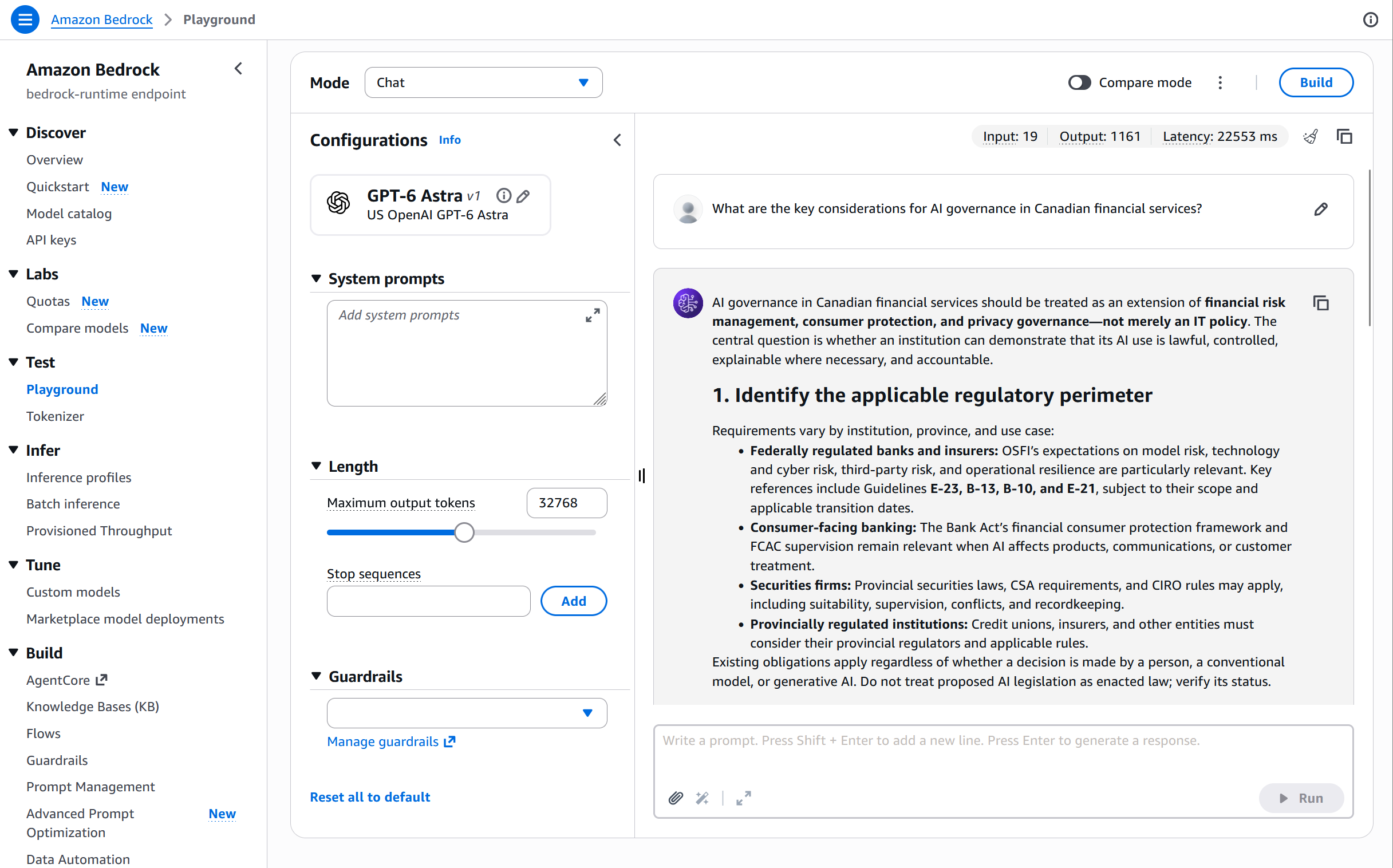
图 1:Amazon Bedrock 控制台上的活动 OpenAI 跨区域推理配置文件(加拿大(中部))
通过 Amazon Bedrock Runtime 调用模型
GPT-5.6、GPT-6 和 GPT-6.1 在 bedrock-runtime 端点上支持三种调用方式:OpenAI Responses API、OpenAI Chat Completions API 和 Amazon Bedrock Converse API。兼容 OpenAI 的 API 通过端点的 /openai/v1 路径访问。该端点支持 AWS Signature Version 4(SigV4)或 Amazon Bedrock API 密钥。
以下示例使用 Amazon Bedrock token generator for Python 基于您当前的 AWS 凭证生成短期 Amazon Bedrock API 密钥,因此您的应用程序无需存储静态密钥。
OpenAI Responses API
对于已在使用 OpenAI SDK 结合 Responses API 的应用程序,只需将客户端指向区域性的 Amazon Bedrock Runtime 端点,并将推理配置文件 ID 作为模型参数传入:
python from aws_bedrock_token_generator import provide_token from openai import OpenAI
region = "ca-central-1" # 卡尔加里请使用 "ca-west-1" client = OpenAI( base_url=f"https://bedrock-runtime.{region}.amazonaws.com/openai/v1", api_key=provide_token(region=region), )
response = client.responses.create( model="global.openai.gpt-6-astra", input="What are the key considerations for AI governance in Canadian financial services?", max_output_tokens=1024, ) print(response.output_text)
如需流式输出,设置 stream=True 并遍历响应事件流,在接收文本增量时实时打印:
python stream = client.responses.create( model="global.openai.gpt-6-luna", input="List five generative AI use cases for Canadian healthcare.", max_output_tokens=512, stream=True, ) for event in stream: if event.type == "response.output_text.delta": print(event.delta, end="", flush=True)
OpenAI Chat Completions API
OpenAI Chat Completions 格式同样可通过该端点使用:
python response = client.chat.completions.create( model="global.openai.gpt-5.6-terra", messages=[{"role": "user", "content": "Summarize recent AI regulatory trends in Canada."}], max_completion_tokens=1024, reasoning_effort="low", ) print(response.choices[0].message.content)
有关支持参数的完整列表(包括推理强度级别),请参阅 Amazon Bedrock 用户指南中的模型卡。
Amazon Bedrock Converse API
当您的应用程序通过 AWS SDK 调用 Amazon Bedrock 时,请使用 Converse API。Boto3 会通过标准的 AWS 凭证链自动解析鉴权凭据:
python import boto3
bedrock = boto3.client("bedrock-runtime", region_name="ca-central-1") response = bedrock.converse( modelId="us.openai.gpt-5.6-terra", messages=[{"role": "user", "content": [{"text": "Summarize recent AI regulatory trends in Canada."}]}], inferenceConfig={"maxTokens": 1024}, )
GPT-5.6 和 GPT-6 可能会在文本旁边返回 reasoningContent 块。
筛选出包含文本输出的 block。
text_output = next(block["text"] for block in response["output"]["message"]["content"] if "text" in block) print(text_output)
同样的调用逻辑也适用于 GPT-6 Sol、GPT-6 Luna 和 GPT-6.1 Sol,只需更改推理配置文件 ID 即可。以下示例展示了 GPT-6 Sol 的 US 地理区域配置文件和 GPT-6 Luna 的全球配置文件调用,两者均已在 ca-central-1 完成验证:
python
GPT-6 Sol、GPT-6 Luna 和 GPT-6.1 Sol 采用相同的调用方式。只需更换推理配置文件 ID,并选择匹配您数据边界要求的 us. (US 地理区域) 或 global. 配置文件。
例如,通过 US 地理区域配置文件的 GPT-6.1 Sol: modelId="us.openai.gpt-6.1-sol"
通过 US 地理区域配置文件的 GPT-6 Sol:适用于复杂任务的强推理与代码能力。
response = bedrock.converse( modelId="us.openai.gpt-6-sol", messages=[{"role": "user", "content": [{"text": "Summarize recent AI regulatory trends in Canada."}]}], inferenceConfig={"maxTokens": 512}, )
通过全球配置文件的 GPT-6 Luna:快速且低成本的推理,适用于分类等大批量任务。
response = bedrock.converse( modelId="global.openai.gpt-6-luna", messages=[{"role": "user", "c
English / 原文
Canadian organizations building generative AI applications on Amazon Bedrock often need the latest foundation models (FMs), such as OpenAI GPT-6.1, OpenAI GPT-6, and GPT-5.6, accessible from the Canadian AWS Regions. With Amazon Bedrock cross-Region inference (CRIS), you can now access these models from Canada. OpenAI GPT-5.6 models (Sol, Terra, and Luna), GPT-6 (Astra, Sol, and Luna), and GPT-6.1 Sol are available from the Canada (Central) and Canada West (Calgary) Regions. Inference is processed in North America, with data-residency controls described later in this post.
Cross-Region inference is a capacity mechanism. Your application calls the Amazon Bedrock Runtime endpoint in your source Region. Amazon Bedrock then routes the request to a supported destination Region for processing. With this approach, you get access to a broader capacity pool that can help your application sustain throughput during demand spikes. You don’t need to manage destination Region routing in your application.
In this post, we walk through the GPT-5.6, GPT-6, and GPT-6.1 models available from Canada and the cross-Region inference profiles that serve them. We then show how to set up permissions and invoke the models with the OpenAI Responses API, Chat Completions API, and the Amazon Bedrock Converse API. For the Responses API, we include streaming and tool-use examples. Finally, we cover how to request quota increases, review the observability signals available in your source Region, and clean up when you are done.
Models available from Canada
With Amazon Bedrock, you can access three families of OpenAI models in Canada through cross-Region inference. The following table summarizes each model and its positioning.
| Model | Positioning |
|---|---|
| GPT-6.1 Sol | Strong reasoning and coding for tasks where both performance and cost matter |
| GPT-6 Astra | Complex end-to-end reasoning and agentic tasks |
| GPT-6 Sol | Strong reasoning and coding for recurring tasks with economics suited to regular use |
| GPT-6 Luna | Fast, low-cost inference for high-volume repeated tasks with adjustable reasoning effort per request |
| GPT-5.6 Sol | High reasoning, coding, and agentic workloads |
| GPT-5.6 Terra | Balanced performance and cost for everyday production |
| GPT-5.6 Luna | Fast and affordable for high-volume, latency-sensitive applications |
These models accept text and image inputs, return text, and support a 1-million-token context window, reasoning mode, and tool calling. GPT-6.1 Sol supports the same context window and tool calling, with additional input and output modalities documented in its model card. GPT-5.6, GPT-6, and GPT-6.1 also support prompt caching on Amazon Bedrock (see the Prompt caching section). These models are available through the OpenAI Responses API, the OpenAI Chat Completions API, and the Amazon Bedrock Converse API on the bedrock-runtime endpoint.
For pricing, see Amazon Bedrock pricing. For per-model Region availability, see the model cards in the Amazon Bedrock User Guide.
Cross-Region inference profiles from Canada
Amazon Bedrock inference profiles are logical identifiers you pass in place of a raw model ID. Each profile defines a model and the set of Regions to which Amazon Bedrock can route a request. Two profile types are available from Canada:
- US geographic (prefixed
us.) routes requests to your Canadian source Region and US Regions. Choose this profile when your workload requires inference processing to remain within North America (Canada and the US). - Global (prefixed
global.) routes requests to supported commercial AWS Regions where the model is deployed. This draws on a broader capacity pool at the time of the request.
Endpoint availability differs by model and source Region, as shown in the following table.
| Model | US geographic profile | Global profile |
|---|---|---|
| GPT-6.1 Sol | ca-central-1, ca-west-1 | ca-central-1, ca-west-1 |
| GPT-6 Astra / Sol / Luna | ca-central-1, ca-west-1 | ca-central-1, ca-west-1 |
| GPT-5.6 Sol / Terra / Luna | ca-central-1, ca-west-1 | ca-central-1 |
Profile membership and model availability can change. The global profile for the GPT-5.6 models is available only from ca-central-1. From ca-west-1, use the US geographic profile for GPT-5.6. Verify the active profiles for your source Region before deployment, either with the AWS Command Line Interface (AWS CLI) or on the console (see the following section), or see the Cross-Region inference support documentation.
Getting started
The following sections walk through the setup and code needed to invoke these models from your Canadian source Region.
Prerequisites
Before you begin, confirm that you have the following:
- An AWS account with the Canada (Central)
ca-central-1or Canada West (Calgary)ca-west-1Region enabled as your source Region. - An AWS Identity and Access Management (IAM) role or user with permissions to invoke the inference profiles (see Set up permissions).
- A service control policy (SCP) that allows the inference profiles in your source Region, if your organization enforces SCPs (see SCP considerations).
- Python 3.9 or later with the
openai,boto3, andaws-bedrock-token-generatorpackages installed.
Set up permissions
For quick exploration, attach the AWS managed policy AmazonBedrockLimitedAccess. For deployed workloads with stricter access controls, use a least-privilege custom policy. The following example grants access to the GPT-6 Astra global profile from ca-central-1:
{
"Version": "2012-10-17",
"Statement": [
{
"Effect": "Allow",
"Action": ["bedrock:InvokeModel*"],
"Resource": [
"arn:aws:bedrock:ca-central-1::inference-profile/global.openai.gpt-6-astra"
]
},
{
"Effect": "Allow",
"Action": ["bedrock:InvokeModel*"],
"Resource": ["arn:aws:bedrock:*::foundation-model/openai.gpt-6-astra"],
"Condition": {
"StringLike": {
"bedrock:InferenceProfileArn": "arn:aws:bedrock:ca-central-1::inference-profile/global.openai.gpt-6-astra"
}
}
}
]
}
If you authenticate through the API-key path (bearer token for the OpenAI SDK), also grant bedrock:CallWithBearerToken. For the Responses API, add bedrock:InvokeModel on arn:aws:bedrock:ca-central-1:*:project/default.
SCP considerations
If your organization restricts Regions through SCPs, use the bedrock:InferenceProfileArn condition key to allow CRIS traffic while blocking direct calls to unapproved Regions. The following SCP denies Amazon Bedrock inference outside your approved source Regions unless the request uses a CRIS inference profile:
{
  "Version": "2012-10-17",
  "Statement": [
    {
      "Sid": "DenyBedrockOutsideCanadaUnlessCris",
      "Effect": "Deny",
      "Action": ["bedrock:InvokeModel*"],
      "Resource": "*",
      "Condition": {
        "StringNotEquals": {
          "aws:RequestedRegion": ["ca-central-1", "ca-west-1"]
        },
        "ArnNotLike": {
          "bedrock:InferenceProfileArn": [
            "arn:aws:bedrock:*:*:inference-profile/us.openai.*",
            "arn:aws:bedrock:*:*:inference-profile/global.openai.*"
          ]
        }
      }
    }
  ]
}
With this condition, Amazon Bedrock can route to the profile’s destination Regions even when those Regions are otherwise denied by your SCP. Every destination Region in your chosen profile must be allowed for the request to succeed. For more detail, see Set up cross-Region inference in multi-account environments.
Verify active inference profiles
Before invoking a model, you can verify which profiles are active in your source Region with the AWS CLI. The following command lists the active OpenAI profiles from ca-central-1. To run the same check from Calgary, replace ca-central-1 with ca-west-1.
aws bedrock list-inference-profiles \
    --region ca-central-1 \
    --type-equals SYSTEM_DEFINED \
    --query "inferenceProfileSummaries[?contains(inferenceProfileId, 'openai')].[inferenceProfileId,status]" \
    --output table
The Amazon Bedrock console offers the same view. Open the console, choose Canada (Central) or Canada West (Calgary) as your Region, choose Cross-Region inference under Inference , and review the available profiles.
The following screenshot shows the active OpenAI inference profiles listed on the Amazon Bedrock console for the Canada (Central) Region.
Figure 1: Active OpenAI cross-Region inference profiles on the Amazon Bedrock console (Canada (Central))
Invoke the models through Amazon Bedrock Runtime
GPT-5.6, GPT-6, and GPT-6.1 support three access paths on the bedrock-runtime endpoint: the OpenAI Responses API, the OpenAI Chat Completions API, and the Amazon Bedrock Converse API. The OpenAI-compatible APIs are called on the /openai/v1 paths of the endpoint. The endpoint accepts either AWS Signature Version 4 (SigV4) or an Amazon Bedrock API key.
The following examples use the Amazon Bedrock token generator for Python to create a short-term Amazon Bedrock API key from your current AWS credentials, so your application does not need to store a static key.
OpenAI Responses API
For applications that already use the OpenAI SDK with the Responses API, point the client at the Regional Amazon Bedrock Runtime endpoint and pass the inference profile ID as the model.
from aws_bedrock_token_generator import provide_token
from openai import OpenAI

region = "ca-central-1"  # Use "ca-west-1" for Calgary
client = OpenAI(
    base_url=f"https://bedrock-runtime.{region}.amazonaws.com/openai/v1",
    api_key=provide_token(region=region),
)

response = client.responses.create(
    model="global.openai.gpt-6-astra",
    input="What are the key considerations for AI governance in Canadian financial services?",
    max_output_tokens=1024,
)
print(response.output_text)
For streaming output, set stream=True and iterate over the response events, printing text as it arrives:
stream = client.responses.create(
    model="global.openai.gpt-6-luna",
    input="List five generative AI use cases for Canadian healthcare.",
    max_output_tokens=512,
    stream=True,
)
for event in stream:
    if event.type == "response.output_text.delta":
        print(event.delta, end="", flush=True)
OpenAI Chat Completions API
The OpenAI Chat Completions format works through the same endpoint.
response = client.chat.completions.create(
    model="global.openai.gpt-5.6-terra",
    messages=[{"role": "user", "content": "Summarize recent AI regulatory trends in Canada."}],
    max_completion_tokens=1024,
    reasoning_effort="low",
)
print(response.choices[0].message.content)
For the full list of supported parameters, including reasoning effort levels, see the model cards in the Amazon Bedrock User Guide.
Amazon Bedrock Converse API
Use the Converse API when your application calls Amazon Bedrock through an AWS SDK. Boto3 resolves credentials through the standard AWS credential chain.
import boto3

bedrock = boto3.client("bedrock-runtime", region_name="ca-central-1")
response = bedrock.converse(
    modelId="us.openai.gpt-5.6-terra",
    messages=[{"role": "user", "content": [{"text": "Summarize recent AI regulatory trends in Canada."}]}],
    inferenceConfig={"maxTokens": 1024},
)
# GPT-5.6 and GPT-6 may return a reasoningContent block alongside the text.
# Select the block that contains the text output.
text_output = next(block["text"] for block in response["output"]["message"]["content"] if "text" in block)
print(text_output)
The same call works for GPT-6 Sol, GPT-6 Luna, and GPT-6.1 Sol by changing the inference profile ID. The following example uses the US geographic profile for GPT-6 Sol and the global profile for GPT-6 Luna. Both were validated from ca-central-1.
# GPT-6 Sol, GPT-6 Luna, and GPT-6.1 Sol are called the same way. Swap the inference profile ID, and choose a us. (US geographic) or global. profile to match your data boundary.
# For example, GPT-6.1 Sol via the US geographic profile: modelId="us.openai.gpt-6.1-sol"
# GPT-6 Sol via the US geographic profile: strong reasoning and coding for complex work.
response = bedrock.converse(
    modelId="us.openai.gpt-6-sol",
    messages=[{"role": "user", "content": [{"text": "Summarize recent AI regulatory trends in Canada."}]}],
    inferenceConfig={"maxTokens": 512},
)

# GPT-6 Luna via the global profile: fast, low-cost inference for high-volume tasks such as classification.
response = bedrock.converse(
    modelId="global.openai.gpt-6-luna",
    messages=[{"role": "user", "content": [{"text": "Classify this ticket as BILLING, TECHNICAL, or OTHER: ..."}]}],
    inferenceConfig={"maxTokens": 256},
)
These models support client-side tool use (function calling). Define tools in the tools parameter, and the model returns a structured tool-call request for your application to execute.
response = client.responses.create(
    model="global.openai.gpt-6-astra",
    input="What's the current exchange rate from CAD to USD?",
    tools=[{
        "type": "function",
        "name": "get_exchange_rate",
        "parameters": {
            "type": "object",
            "properties": {
                "from_currency": {"type": "string"},
                "to_currency": {"type": "string"}
            }
        }
    }],
)

# The model returns a tool-call request rather than text.
for item in response.output:
    if item.type == "function_call":
        print(f"Tool: {item.name}, Args: {item.arguments}")
Prompt caching
GPT-5.6, GPT-6, and GPT-6.1 support prompt caching on Amazon Bedrock to reduce the cost and latency of repeated prompt prefixes. Implicit caching requires no changes to your code: Amazon Bedrock automatically caches eligible prefixes of 1,024 tokens or more. Cached tokens read on subsequent requests are billed at a discounted rate and do not count against your tokens-per-minute quota. Cached tokens appear in the response usage object and in Amazon CloudWatch metrics so you can track usage. For cache-write pricing, minimum prefix sizes, and support for explicit cache breakpoints, see the prompt caching documentation and the individual model cards.
Quota management
Cross-Region inference quotas on the bedrock-runtime endpoint are measured in tokens per minute (TPM) per model. Each quota combines input and output tokens against a single limit. US geographic and global inference profiles have separate quota allocations, so switching between them changes the pool you draw from.
Token consumption combines input tokens, cache-write input tokens, and output tokens. Output tokens are multiplied by the model’s burndown rate, so output-heavy workloads consume quota faster than raw token counts suggest. Before a production rollout, request quota increases early and monitor quota utilization. Test with representative prompts, output lengths, streaming behavior, concurrency, and peak traffic.
To request a quota increase, follow these steps:
- Open the Service Quotas console in
ca-central-1orca-west-1. - Choose Amazon Bedrock , then select the quota named “Cross-Region InvokeModel tokens per minute” for the model that you need.
- Choose Request increase at account level , enter your target value, and submit the request.
For details on how token usage and costs are tracked, see Track usage and costs in Amazon Bedrock.
Observability
Because these models run through the Amazon Bedrock Runtime API, requests made through an inference profile appear in your observability tooling the same way on-demand requests do. Invocation logs and Amazon CloudWatch metrics are recorded in your source Region. This holds regardless of where the request was processed. Your observability stays in one place.
-
AWS CloudTrail logs every request, recording which destination Region served it in the
additionalEventData.inferenceRegionfield. For example:"additionalEventData": { "inferenceProfileArn": "arn:aws:bedrock:ca-central-1:111122223333:inference-profile/global.openai.gpt-6-astra", "inferenceRegion": "us-west-2" } -
Amazon CloudWatch metrics are published per inference profile, covering invocation count, token count, latency, throttles, and errors.
-
Model invocation logging delivers full request and response payloads to Amazon Simple Storage Service (Amazon S3) or Amazon CloudWatch Logs. To activate it on the Amazon Bedrock console, choose Settings , then choose Model invocation logging. You can also call the
PutModelInvocationLoggingConfigurationAPI. It is off by default. -
AWS Data Exports itemizes spend by model and profile.
Amazon CloudWatch Coding Agent Insights
If you use these models to power AI coding assistants such as OpenAI Codex, Amazon CloudWatch Coding Agent Insights provides a dedicated dashboard. It surfaces token usage, API request counts, active users, and cost attribution across dimensions such as department, team, and environment. To activate it, configure your coding agent to export telemetry to Amazon CloudWatch. For the setup steps, see Set up OpenTelemetry for OpenAI Codex.
Clean up
To avoid ongoing charges after testing, remove the resources you created:
- Turn off model invocation logging. On the Amazon Bedrock console, choose Settings , then choose Model invocation logging , or call
DeleteModelInvocationLoggingConfiguration. This stops delivery of logs to Amazon S3 and Amazon CloudWatch Logs. - Delete or detach the IAM policies and any Amazon Bedrock API keys that you created for testing.
The inference profiles themselves are system-defined and incur no cost when they aren’t in use.
Security and compliance
Cross-Region inference is designed to protect your data in transit and at rest. Requests travel over the AWS private backbone encrypted with TLS 1.2+ rather than the public internet. For Canadian customers, your data at rest stays in your source Region by default. This includes invocation logs, knowledge bases, and configurations. Only the transient inference computation happens in the destination Region, and by default model providers don’t have access to your prompts or completions.
There’s one consideration specific to OpenAI models. Content flagged by automated abuse classifiers might be retained for up to 30 days in the destination Region for review. If you want to constrain processing to North America (Canada and the US), you can choose the US geographic profile. We recommend reviewing Amazon Bedrock abuse detection with your compliance team.
For a more detailed look at Canadian data residency patterns, see Cross-Region Inference and Canadian Data Residency: A Technical Architecture Guide.
Conclusion
In this post, we showed how to access OpenAI GPT-5.6 (Sol, Terra, and Luna), GPT-6 (Astra, Sol, and Luna), and GPT-6.1 Sol from Canada. These models are available from the Canada (Central) and Canada West (Calgary) Regions using cross-Region inference on Amazon Bedrock. We covered the available inference profiles, how to set up permissions and an example SCP, and how to invoke the models with the Responses, Chat Completions, and Converse APIs. For the Responses API, we included streaming and tool-use examples. We also showed how to request quota increases, review usage, and clean up your test resources.
To get started, review the OpenAI model cards in the Amazon Bedrock User Guide, then open the Amazon Bedrock console and send a test prompt through an inference profile. For pricing, see the Amazon Bedrock pricing page.
If you have questions or feedback, leave a comment on this post.
About the authors
Roopesh Ramklass
Roopesh is a Specialist Principal Solutions Architect for AI/ML at AWS, based in Vancouver, Canada, where he helps customers design and scale generative AI solutions. He brings deep expertise across the AI/ML spectrum, partnering with organizations to turn ambitious AI ideas into reliable, high-impact solutions.
Dan MacKay
Dan is the Financial Services Compliance Specialist for AWS Canada. He advises customers on recommended practices and practical solutions for cloud and AI-related governance, risk, and compliance. Dan specializes in helping AWS customers navigate financial services and privacy regulations applicable to the use of cloud and AI technology in Canada with a focus on digital sovereignty, third-party risk management, and operational resilience.
Prasoon Gupta
Prasoon is a Solutions Architect at Amazon Web Services (AWS) Canada. He enjoys helping public sector customers modernize and get the most value from the cloud. Outside of work, he enjoys building full-stack, AI-based tools on AWS for fun, spanning serverless architectures, agentic AI, and developer platforms.
Saurabh Trikande
Saurabh is a Senior Product Manager for Amazon Bedrock and Amazon SageMaker Inference. He is passionate about working with customers and partners, motivated by the goal of democratizing AI. He focuses on core challenges related to deploying complex AI applications, inference with multi-tenant models, cost optimizations, and making the deployment of generative AI models more accessible. In his spare time, Saurabh enjoys hiking, learning about innovative technologies, following TechCrunch, and spending time with his family.
Melanie Li
Melanie, PhD, is a Senior Generative AI Specialist Solutions Architect at AWS based in Sydney, Australia, where her focus is on working with customers to build solutions using state-of-the-art AI/ML tools. She has been actively involved in multiple generative AI initiatives across APJ, harnessing the power of LLMs. Prior to joining AWS, Dr. Li held data science roles in the financial and retail industries.
Zohreh Norouzi
Zohreh is a Senior Security Solutions Architect at Amazon Web Services (AWS). She helps customers make good security choices and accelerate their journey to the AWS Cloud. She has been actively involved in AI security initiatives, using her expertise to help customers build secure AI solutions at scale.