使用 AWS PrivateLink 保障企业网络访问 Amazon Quick 的安全性
英文标题:Securing Quick access from corporate networks with AWS PrivateLink
本文介绍了如何借助 AWS PrivateLink 与 Direct Connect/VPN 将本地企业数据源安全私密地连接至 Amazon Quick,彻底避免分析与交互流量暴露于公网。架构将访问链路划分为面向用户的终端访问流量与面向数据源的数据拉取流量,全面覆盖 Quick Sight、Quick Agents、MCP 服务及自动化流程等组件。对于受 HIPAA、FedRAMP、PCI-DSS 等严苛合规要求约束或追求低延迟、高审计能力的企业,该方案提供了兼顾 AI 洞察与数据网络边界安全的实操指南。
 1.3 MB
 1.3 MB
 2.4 KB
 345.0 KB
 141.2 KB
 346.5 KB
 85.3 KB
 254.0 KB
 218.0 KB
 158.5 KB
 202.8 KB
 144.8 KB
 146.7 KB
 200.6 KB
 99.9 KB
 104.4 KB
 118.6 KB
 160.6 KB
 179.9 KB
 40.1 KB
中文
当企业数据位于企业防火墙后或本地私有数据中心时,即便 Amazon Quick 中的 AI Agent 和仪表板几乎可以查询任何数据源,AWS 与这些本地数据之间默认也并不存在直接的网络路径。管理员必须确保其敏感的企业数据既能用于 AI 驱动的洞察与行动,又不会暴露在公共互联网中。
对于许多企业而言,让流量穿过公共互联网会带来不可接受的风险。诸如 HIPAA、FedRAMP 和 PCI-DSS 等监管框架通常强制要求敏感数据必须保留在受控的网络边界内。即使合规并非主要驱动因素,暴露内部数据路径也会增加攻击面、让审计追踪变得复杂,并引入可能劣化用户体验的不可控网络延迟。
本演练将指导你如何将本地数据源私密地连接到 Amazon Quick,全程无需流量经过公共互联网。本方案假定你已经通过 AWS Direct Connect 或 AWS Site-to-Site VPN 将本地环境连接到了虚拟私有云(VPC)。在此基础之上,我们将配置基于 AWS PrivateLink 的 VPC 终端节点(VPC endpoints),使 Quick 能够通过 AWS 骨干网络访问你的私有资源,随后叠加安全组和 VPC 终端节点策略实现深度防御。
完成配置后,你将拥有一套能将 Quick 与本地数据源之间的流量隔离在公网之外的网络架构,从而缩小攻击面、提供一致的低延迟连接,并为合规性提供清晰的审计追踪记录。
Amazon Quick 与建立私有网络连接
Amazon Quick 是一个由 AI 驱动的工作空间,将搜索、分析、研究和自动化整合到单一的对话式体验中。明确哪些组件会访问你的私有网络以及如何访问,决定了后续各章节中的具体架构设计。
Amazon Quick 中的数据访问主要分为两条路径:面向用户的流量涵盖打开 Quick 控制台、与仪表板交互、发起 API 调用或使用 Quick Desktop 的任何人。所有这些流量都会通过 VPC 终端节点路由(详见“用于用户和 API 访问的 VPC 终端节点”),使用户会话完全避开公共互联网。
数据拉取流量则是指 Quick 自身深入你的网络中拉取数据。这由 VPC 连接处理(详见“用于数据源访问的 VPC 连接”),也是绝大多数架构决策的重点所在。发起数据拉取连接的功能与集成包括:
- Amazon Quick Sight 通过置于你 VPC 中的弹性网络接口(ENI)直接查询本地数据库(PostgreSQL、MySQL、SQL Server、Oracle 等)。这是 VPC 连接最主要的使用场景。
- Amazon Quick Flows 和 Amazon Quick Automate 是独立的自动化功能。Flows 处理可重复的任务;Automate 处理包含人工干预的复杂多系统编排。两者都会调用 Action Connector,包括私有托管在你 VPC 中的 MCP 服务器。任何调用内部 API 的工作流都会经过此路径。
- Quick Agents 是所有对话交互的基础,可以直接调用 Action Connector。当自定义 Agent 调用私有托管的 MCP 服务器或内部 API 时,流量会经由 VPC 连接传输。
- Amazon Quick Index 跨连接的数据源(如 Confluence、SharePoint 和 Amazon Simple Storage Service (Amazon S3))构建统一的搜索层。对于 VPC 内或本地的数据,知识库 VPC 连接目前仅支持 Amazon Redshift。Confluence、SharePoint、Box、Google Drive、OneDrive 和 Amazon S3 等数据源目前无法使用 Quick VPC 连接(请参阅支持的 VPC 数据源)。你仍可通过存储桶策略将 Amazon S3 存储桶的访问限制为 VPC 终端节点,这是一套独立的机制。
- Amazon Quick Research 为其具有来源引用的报告访问防火墙背后的企业源以及公共互联网数据,在访问私有源时会使用 VPC 连接。
- Apps in Quick 在结构化数据和 Action Connector 之上构建交互式 Web 应用程序,继承与 Quick Sight 和 Flows 相同的 VPC 连接。
- Quick Spaces 用于组织上述功能的内容,但其本身不发起数据连接。
这两条流量路径需要两种各司其职且相互协作的私有连接机制:
- VPC 终端节点(AWS PrivateLink): 处理面向用户的流量,如访问 Quick 网站、调用 API 和管理员访问。这些终端节点使公网与用户流量完全隔离。
- VPC 连接: 处理数据源流量。Amazon Quick 深入你的 VPC(并由此扩展到你的本地网络),从数据库、Amazon Redshift 知识库源以及内部 API 中拉取数据。这些配置在 Quick 控制台内部完成。
配置私有连接
本节将依次介绍四个构建模块:用于用户和 API 访问的 VPC 终端节点、用于数据源访问的 VPC 连接、用于 AWS 数据服务的 VPC 终端节点,以及访问所需外部域的出站访问权限。
前提条件
在为 Quick 配置私有连接之前,请确保以下条件已准备就绪:
- 拥有开通了 Amazon Quick Enterprise 订阅的有效 AWS 账户(VPC 连接需要 Enterprise 版本)。
- Quick 部署所在 AWS 区域中已存在现有的 VPC。
- 处于受支持的 AWS 区域。AWS 中国区域和 AWS GovCloud(US)区域目前暂不支持 Quick 网站 VPC 终端节点。
- 本地网络与 VPC 之间已建立 AWS Direct Connect 连接或 Site-to-Site VPN。这是将流量从数据中心承载至 AWS 的私有路径。
- 具备创建和管理 VPC 终端节点、安全组以及 Quick 管理的 AWS Identity and Access Management (IAM) 权限。如需创建 VPC 连接,管理员的 IAM 身份还需要具备
quicksight:CreateVPCConnection、quicksight:DescribeVPCConnection、quicksight:ListVPCConnections、quicksight:UpdateVPCConnection、quicksight:DeleteVPCConnection、ec2:DescribeSubnets、ec2:DescribeVpcs、ec2:DescribeSecurityGroups、iam:ListRoles以及限制在 VPC 连接执行角色作用域内的iam:PassRole权限。 - 具备贵组织 DNS 管理系统的访问权限(Route 53 私有托管区或本地 DNS 转发器),因为私有 DNS 解析会将流量路由至 VPC 终端节点而非公共地址。
用于用户和 API 访问的 VPC 终端节点(AWS PrivateLink)
由 PrivateLink 驱动的 VPC 终端节点处理所有面向用户的 Amazon Quick 流量,包括网站、API 调用和嵌入内容。它们可以避免用户通过公共互联网访问 Amazon Quick 控制台。
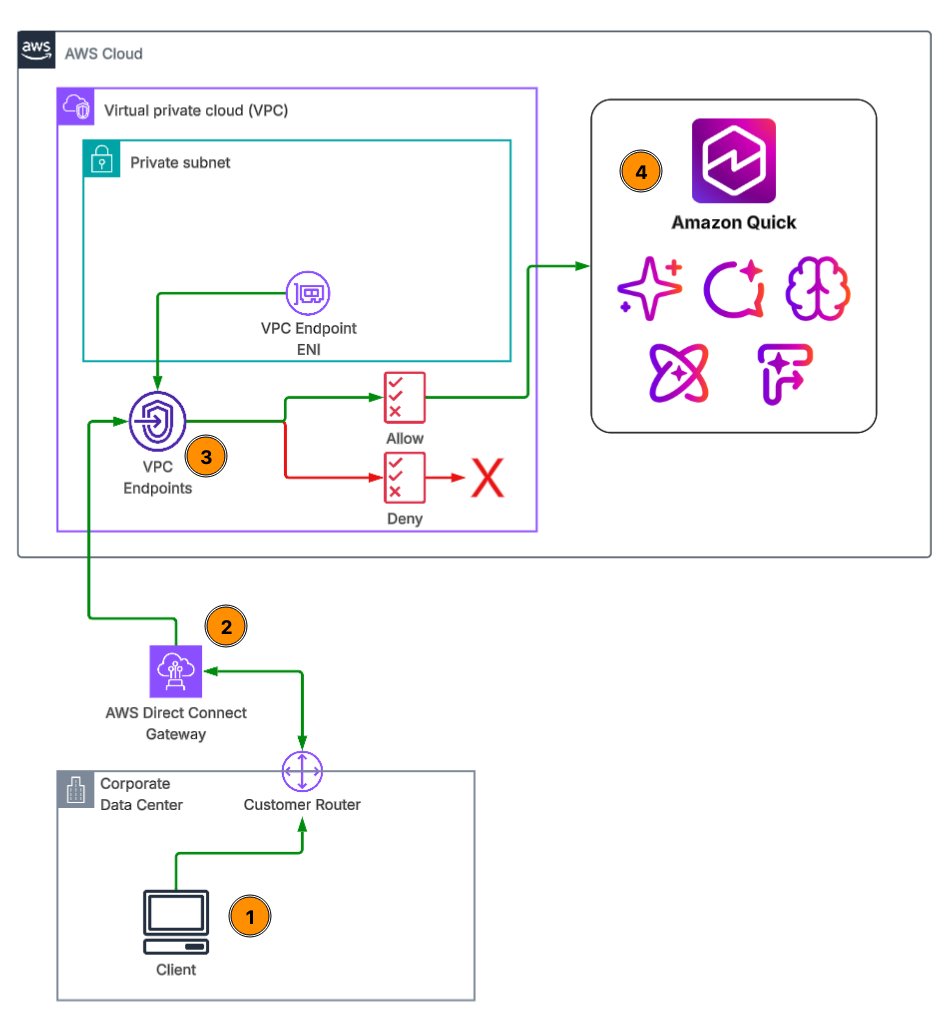
图 1:从企业数据中心通过 VPC 终端节点私网访问 Amazon Quick
如图 1 所示:(1) 企业网络上的客户端向 Quick 发送请求;(2) 请求通过 AWS Direct Connect、经由 Direct Connect 网关进入你的 VPC;(3) Quick VPC 终端节点评估终端节点策略,并允许或拒绝该请求;(4) 被允许的请求通过 AWS 内部网络到达 Amazon Quick。
规划你的 VPC 终端节点架构
在规划终端节点架构时,首先确定部署 Quick 账户的 AWS 区域,因为 VPC 终端节点必须处于同一区域。选择跨多个可用区的子网来放置终端节点 ENI,并确保这些子网拥有通过 Direct Connect 或 VPN 通往本地网络的路由。
设计安全组以将终端节点 ENI 上的流量仅限制在必需的端口和源地址范围内。如果你希望所有流量都走私有路由(包括 Amazon Quick 对 Amazon S3、Amazon Redshift 和 Amazon Athena 发起的调用),请为这些服务同样规划 VPC 终端节点(参见“配置数据源 VPC 终端节点”一节)。
为 Quick 创建 VPC 终端节点
Quick 需要两个接口型 VPC 终端节点(Interface VPC Endpoints)才能实现完整的私网访问:
- 网站访问终端节点 – 服务名称
com.amazonaws.<region>.quicksight-website。它处理前往 Quick 控制台的大部分用户流量。Quick 网站的私有 DNS 名称与公共 URL 不同,因此必须为<region>.quicksight.aws.amazon.com创建指向该 VPC 终端节点的 A 记录。 - API 访问终端节点 – 服务名称
com.amazonaws.<region>.quicksight。它处理程序化的 API 调用。当启用私有 DNS 时,现有针对quicksight.<region>.amazonaws.com的 API 调用将自动通过 VPC 终端节点路由,无需额外的 DNS 配置。若需满足 FIPS 合规性,请使用com.amazonaws.<region>.quicksight-fips。
注意: 并非所有 Quick API 都可以通过 API VPC 终端节点访问。以下 13 个 API 暂不支持:Action Connector API(CreateActionConnector、DeleteActionConnector、DescribeActionConnector、DescribeActionConnectorPermissions、ListActionConnectors、SearchActionConnectors、UpdateActionConnector、UpdateActionConnectorPermissions)以及 Flow API(GetFlowMetadata、GetFlowPermissions、ListFlows、SearchFlows、UpdateFlowPermissions)。以编程方式管理 Action Connector 或 Flow 的自动化工具需要保留通往公共 API 终端节点的路径。详见 Quick 与接口 VPC 终端节点。
如果管理员作为 IAM 用户通过 VPC 登录 Amazon Quick,还需要创建 AWS 管理控制台终端节点:
com.amazonaws.<region>.consolecom.amazonaws.<region>.signin
在 Amazon Virtual Private Cloud(Amazon VPC)控制台中创建网站终端节点的步骤如下:
- 打开 Amazon VPC 控制台。在导航窗格的 PrivateLink and Lattice 下,选择 Endpoints(终端节点),然后选择 Create endpoint(创建终端节点)。
- 输入 Name tag(名称标签,例如 my-quicksight-vpc-endpoint),并在 Type(类型)中选择 AWS services(AWS 服务)。
- 在 Services(服务)下,搜索
com.amazonaws.<region>.quicksight并选择com.amazonaws.<region>.quicksight-website(图 2)。
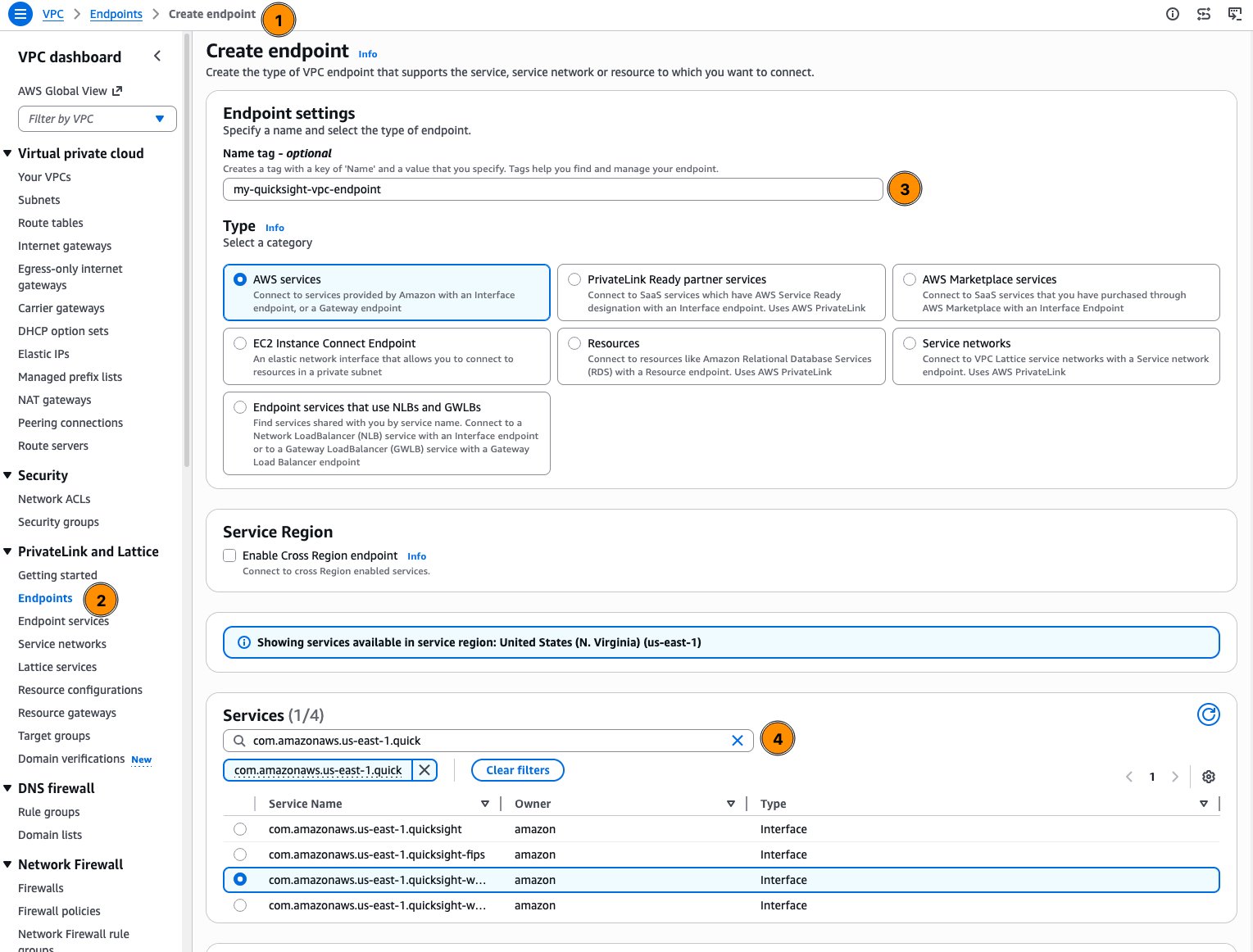
图 2:命名终端节点并选择 Quick 网站终端节点服务
- 在 Network settings(网络设置)下,选择你的 VPC。在 Additional settings(其他设置)下,保持选中 Enable private DNS name(启用私有 DNS 名称)。
- 在至少两个可用区中选择子网,然后选择终端节点 ENI 所属的安全组(图 3)。
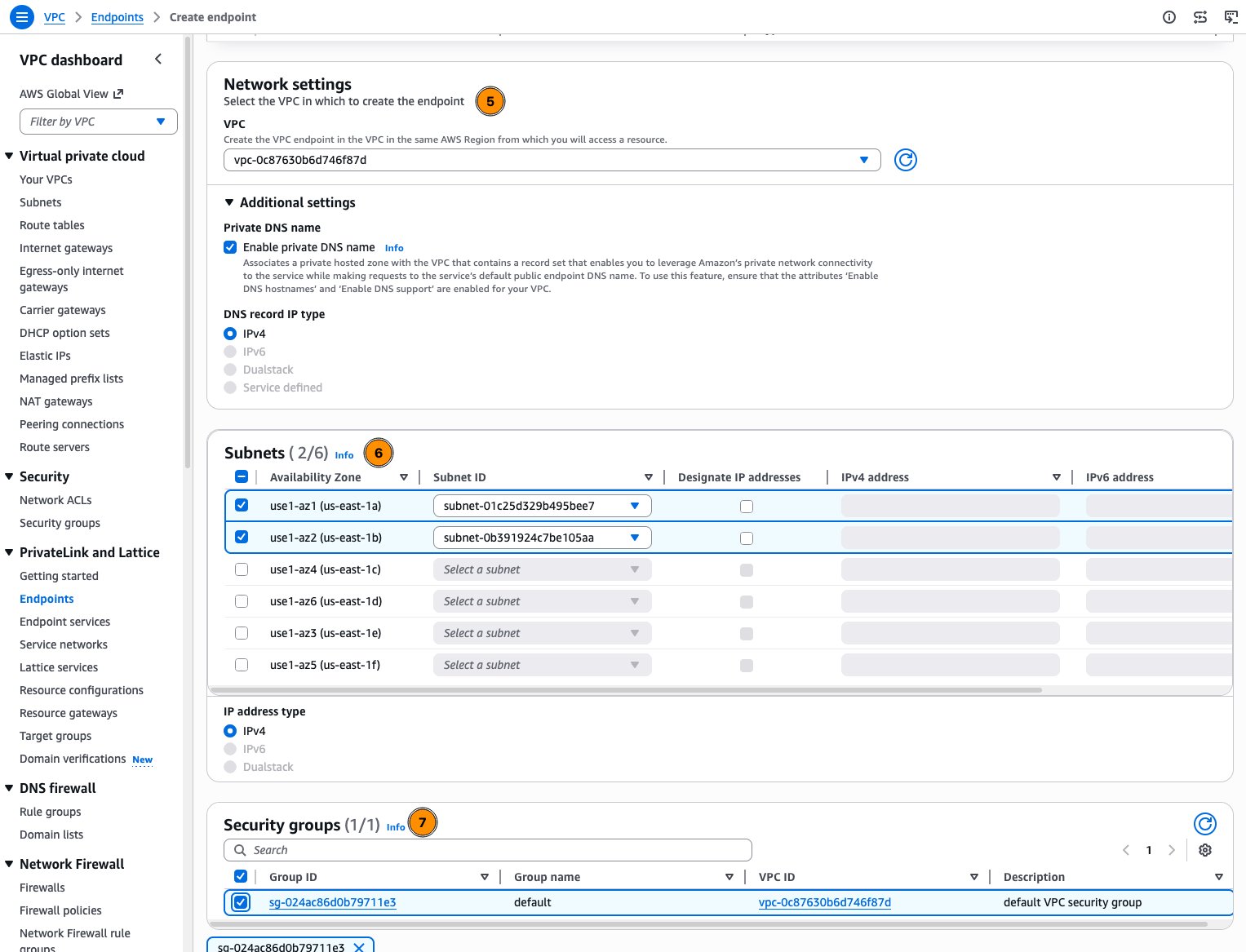
图 3:为终端节点选择 VPC、私有 DNS、子网和安全组
- 选择一个 Policy(策略,请参见下文的“设置 VPC 终端节点策略”部分),添加标签,然后选择 Create endpoint(创建终端节点)(图 4)。
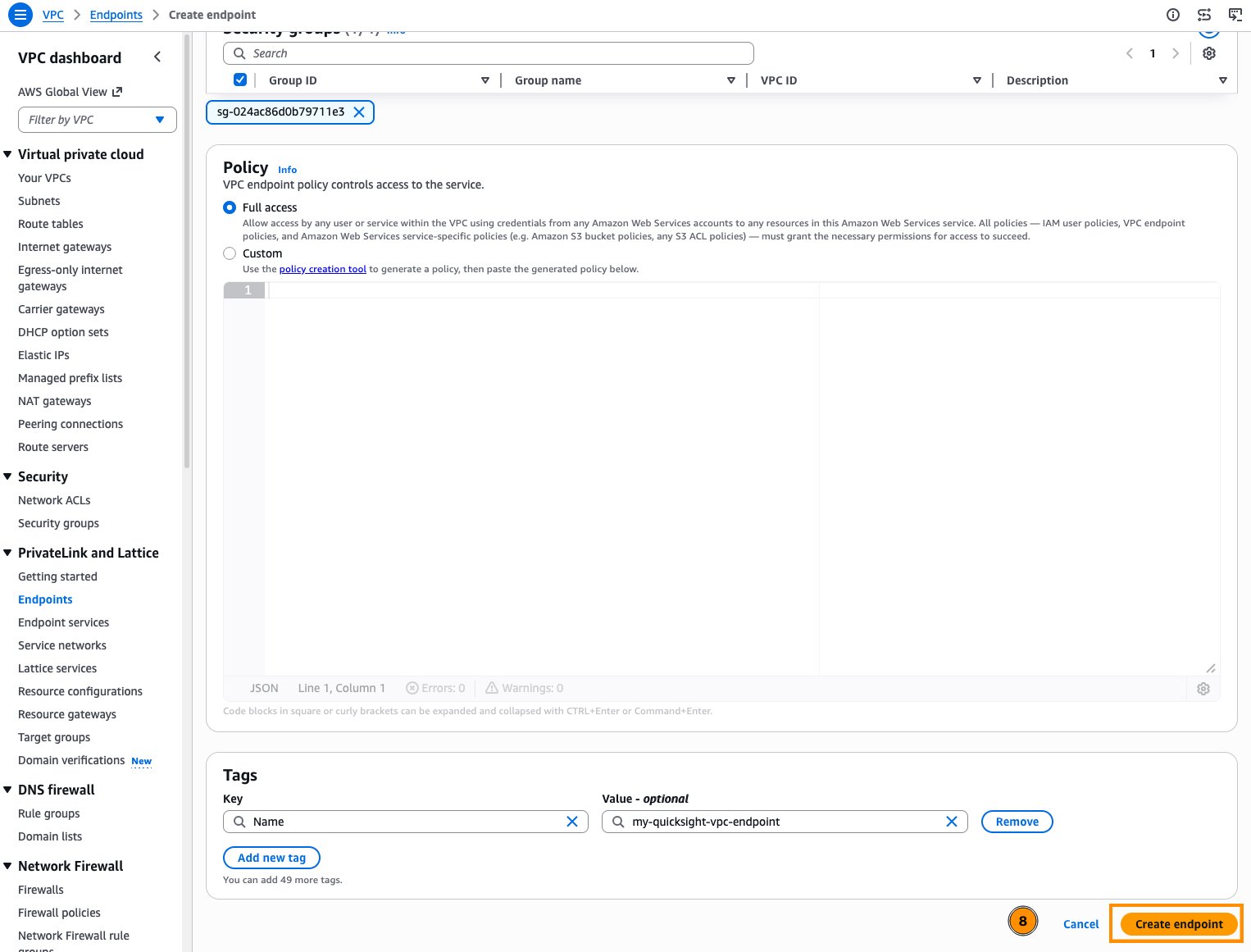
图 4:选择终端节点策略并创建终端节点
- 针对 API 终端节点
com.amazonaws.<region>.quicksight重复上述步骤。
配置 DNS 解析
对于网站终端节点,请为 <region>.quicksight.aws.amazon.com 创建一条 A 记录并将其指向 VPC 终端节点的 DNS 名称。这样,当企业网络中的用户解析 Quick URL 时,流量将通过私有终端节点进行路由,而不是走向公共互联网。对于 API 终端节点,仅在 VPC 终端节点上启用私有 DNS 即可,因为 API 调用会自动解析为终端节点的私有 IP 地址。
Route 53 私有托管区仅响应与其关联的 VPC 内部的查询。由于用户是从企业网络发起连接的,因此需要配置本地 DNS 服务器将对 <region>.quicksight.aws.amazon.com 的查询转发给 VPC 中的 Route 53 Resolver 入站终端节点(或在本地 DNS 中托管对应的等价记录)。最后,从企业网络验证 DNS 解析,确认请求解析为 VPC 内部的私有 IP 地址,而非公网地址。
在 Route 53 中创建记录的步骤如下:
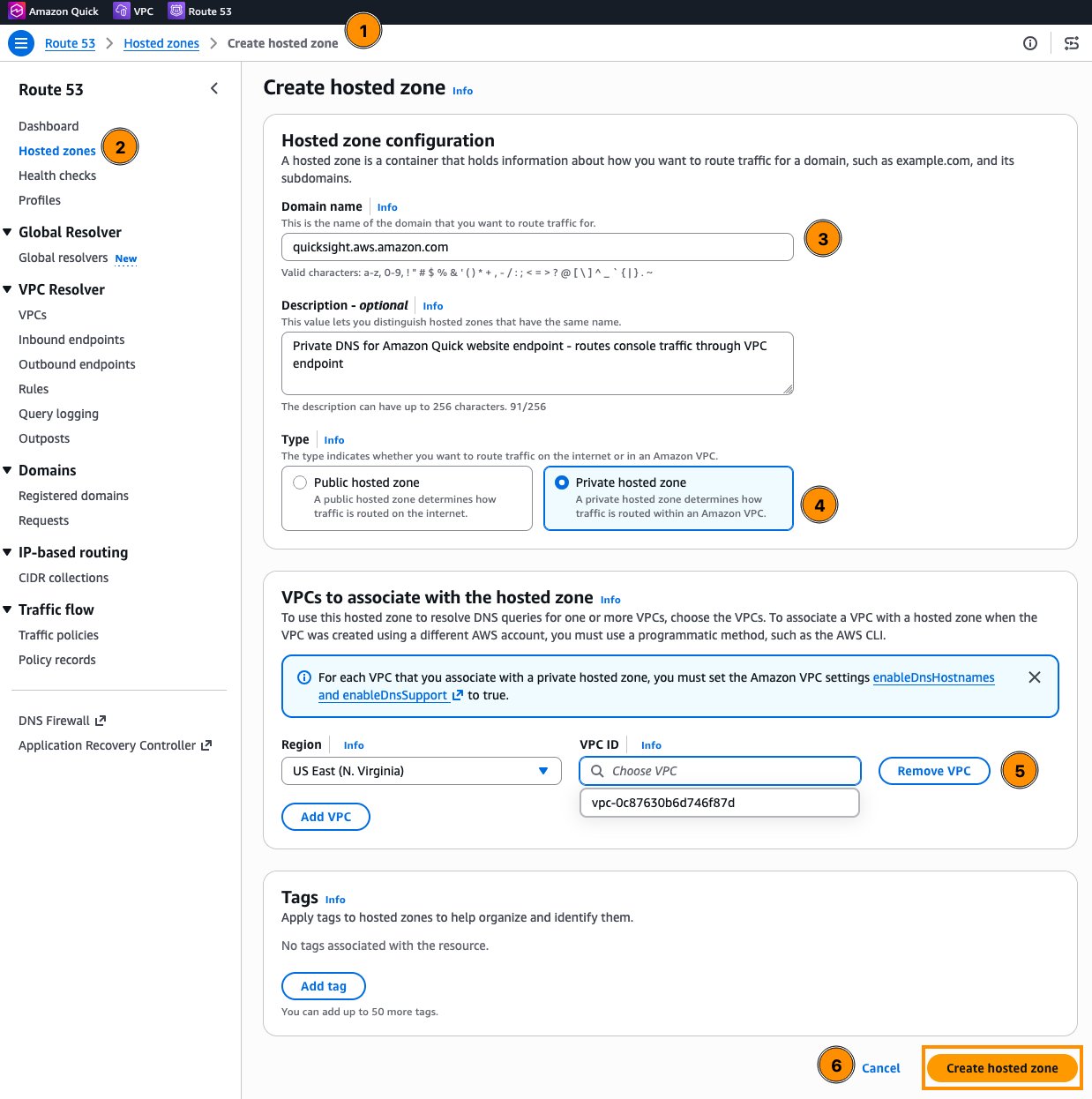
- 在 Route 53 控制台中,选择 Hosted zones(托管区),然后选择 Create hosted zone(创建托管区)。
- 在 Domain name(域名)中输入
<region>.quicksight.aws.amazon.com(例如us-east-1.quicksight.aws.amazon.com)。将托管区范围限制在你所在的区域可避免覆盖其他 Quick 主机名。选择 Private hosted zone(私有托管区),关联你的 VPC,然后选择 Create hosted zone(创建托管区)(图 5)。
English / 原文
When enterprise data sits behind a corporate firewall or in a private on-premises data center, there’s no direct network path from AWS, even though the AI agents and dashboards in Amazon Quick can query virtually any data source. Administrators must make sure their sensitive enterprise data isn’t exposed to the public internet while being accessible for AI-driven insights and actions.
For many enterprises, routing traffic over the public internet introduces unacceptable risk. Regulatory frameworks such as HIPAA, FedRAMP, and PCI-DSS often mandate that sensitive data remain within controlled network boundaries. Even where compliance isn’t the primary driver, exposing internal data paths increases the attack surface, complicates audit trails and introduces variable latency that can degrade the user experience.
This walkthrough shows you how to connect on-premises data sources to Amazon Quick privately, without traffic traversing the public internet. It assumes you already have AWS Direct Connect or an AWS Site-to-Site VPN linking your on-premises environment to your virtual private cloud (VPC). From that foundation, we configure VPC endpoints powered by AWS PrivateLink so that Quick can reach your private resources over the AWS backbone, then layer security groups and VPC endpoint policies for defense in depth.
By the end, you will have a network architecture that keeps traffic between Quick and your on-premises data sources off the public internet, reducing the attack surface, providing consistent low-latency connectivity, and giving you a clear audit trail for compliance.
Amazon Quick and establishing private network connectivity
Amazon Quick is an AI-powered workspace that brings search, analytics, research, and automation into a single conversational experience. Understanding which components reach your private network, and how, determines the architecture in the sections that follow.
Data access in Amazon Quick falls into two paths. User-facing traffic covers anyone opening the Quick console, interacting with a dashboard, making an API call, or using Quick Desktop. All this routes through VPC endpoints (see VPC endpoints for user and API access), keeping user sessions off the public internet.
Data-fetching traffic is when Quick itself reaches into your network to pull data. This is handled by VPC connections (see VPC connections for data source access), and it’s where most of the architectural decisions lie. The features and integrations that initiate data-fetching connections are:
- Amazon Quick Sight queries on-premises databases (PostgreSQL, MySQL, SQL Server, Oracle, and others) directly through ENIs placed in your VPC. This is the heaviest consumer of VPC connections.
- Amazon Quick Flows and Amazon Quick Automate are separate automation features. Flows handle repeatable tasks. Automate handles complex, multi-system orchestration with human-in-the-loop. Both invoke action connectors, including MCP servers hosted privately in your VPC. Any workflow that calls an internal API routes through this path.
- Quick Agents underpin all conversational interactions and can invoke action connectors directly. When a custom agent calls a privately hosted MCP server or internal API, traffic flows through the VPC connection.
- Amazon Quick Index builds a unified search layer across connected sources such as Confluence, SharePoint, and Amazon Simple Storage Service (Amazon S3). For data inside your VPC or on premises, knowledge base VPC connections are currently supported only for Amazon Redshift. Sources such as Confluence, SharePoint, Box, Google Drive, OneDrive, and Amazon S3 can’t use a Quick VPC connection today (see Supported VPC data sources). You can still restrict Amazon S3 bucket access to a VPC endpoint through a bucket policy, which is a separate mechanism.
- Amazon Quick Research accesses enterprise sources behind the firewall alongside public internet data for its citation-backed reports, using the VPC connection when reaching private sources.
- Apps in Quick build interactive web applications on top of structured data and action connectors, inheriting the same VPC connectivity as Quick Sight and Flows.
- Quick Spaces organize content from the preceding features but don’t initiate their own data connections.
These two traffic paths require two distinct private connectivity mechanisms that work together:
- VPC endpoints (AWS PrivateLink): Handle user-facing traffic such as accessing the Quick website, making API calls, and administrative access. These keep user traffic off the public internet.
- VPC connections: Handle data source traffic. Amazon Quick reaches into your VPC (and by extension, your on-premises network) to fetch data from databases, Amazon Redshift knowledge base sources, and internal APIs. These are configured within the Quick console.
Configuring private connectivity
This section walks through the four building blocks in order: VPC endpoints for user and API access, VPC connections for data source access, VPC endpoints for AWS data services, and outbound access to required external domains.
Prerequisites
Before configuring private connectivity for Quick, make sure the following are in place:
- An active AWS account with an Amazon Quick Enterprise subscription (VPC connections require Enterprise edition).
- An existing VPC in the AWS Region where Quick is deployed.
- A supported AWS Region. Quick website VPC endpoints are not available in the AWS China Regions or the AWS GovCloud (US) Regions.
- An AWS Direct Connect connection or Site-to-Site VPN established between your on-premises network and your VPC. This is the private path that carries traffic from your data center into AWS.
- AWS Identity and Access Management (IAM) permissions to create and manage VPC endpoints, security groups, and Quick administration. To create VPC connections, the administrator’s IAM identity also needs
quicksight:CreateVPCConnection,quicksight:DescribeVPCConnection,quicksight:ListVPCConnections,quicksight:UpdateVPCConnection,quicksight:DeleteVPCConnection,ec2:DescribeSubnets,ec2:DescribeVpcs,ec2:DescribeSecurityGroups,iam:ListRoles, andiam:PassRolescoped to the VPC connection execution role. - Access to your organization’s DNS management (Route 53 private hosted zones or on-premises DNS forwarders), as private DNS resolution routes traffic through VPC endpoints rather than public addresses.
VPC endpoints for user and API access (AWS PrivateLink)
VPC endpoints powered by PrivateLink handle all user-facing traffic to Amazon Quick, including the website, API calls, and embedded content. They prevent users from needing to traverse the public internet to access the Amazon Quick console.
Figure 1: Private access to Amazon Quick from a corporate data center through a VPC endpoint
As shown in Figure 1: (1) a client on the corporate network sends a request to Quick; (2) the request travels over AWS Direct Connect, through the Direct Connect gateway, into your VPC; (3) the Quick VPC endpoint evaluates the endpoint policy and allows or denies the request; (4) allowed requests reach Amazon Quick over the AWS network.
Planning your VPC endpoint architecture
When planning your endpoint architecture, begin by identifying the AWS Region where your Quick account is deployed, as VPC endpoints must be in the same Region. Choose subnets across multiple Availability Zones for endpoint ENI placement, and make sure those subnets have routes to your on-premises network through Direct Connect or VPN.
Design security groups that restrict traffic on the endpoint ENIs to only required ports and source ranges. If you want all traffic routed privately (including the calls Amazon Quick makes to Amazon S3, Amazon Redshift, and Amazon Athena), plan VPC endpoints for those services as well (see Configuring data source VPC endpoints).
Creating VPC endpoints for Quick
Quick requires two interface VPC endpoints for full private access:
- Website access endpoint – Service name
com.amazonaws.<region>.quicksight-website. This handles the bulk of user traffic to the Quick console. Private DNS names for the Quick website differ from the public URL, so you must create an A record for<region>.quicksight.aws.amazon.compointing to the VPC endpoint. - API access endpoint – Service name
com.amazonaws.<region>.quicksight. This handles programmatic API calls. When private DNS is enabled, existing API calls toquicksight.<region>.amazonaws.comautomatically route through the VPC endpoint with no additional DNS configuration. For FIPS compliance, usecom.amazonaws.<region>.quicksight-fips.
Note: Not every Quick API is available through the API VPC endpoint. The following 13 APIs are not supported: the action connector APIs (CreateActionConnector, DeleteActionConnector, DescribeActionConnector, DescribeActionConnectorPermissions, ListActionConnectors, SearchActionConnectors, UpdateActionConnector, UpdateActionConnectorPermissions) and the flow APIs (GetFlowMetadata, GetFlowPermissions, ListFlows, SearchFlows, UpdateFlowPermissions). Automation that manages action connectors or flows programmatically needs a path to the public API endpoint. See Quick and interface VPC endpoints.
If administrators sign in to Amazon Quick as IAM users through the VPC, also create the AWS Management Console endpoints:
com.amazonaws.<region>.console.com.amazonaws.<region>.signin.
To create the website endpoint in the Amazon Virtual Private Cloud (Amazon VPC) console:
- Open the Amazon VPC console. In the navigation pane, under PrivateLink and Lattice , choose Endpoints , then choose Create endpoint.
- Enter a Name tag (for example, my-quicksight-vpc-endpoint) and, for Type , choose AWS services.
- Under Services , search for
com.amazonaws.<region>.quicksightand selectcom.amazonaws.<region>.quicksight-website(Figure 2).
Figure 2: Naming the endpoint and selecting the Quick website endpoint service
- Under Network settings , select your VPC. Under Additional settings , keep Enable private DNS name selected.
- Select subnets in at least two Availability Zones, then select the security group for the endpoint ENIs (Figure 3).
Figure 3: Selecting the VPC, private DNS, subnets, and security group for the endpoint
- Choose a Policy (see the following Setting up VPC endpoint policies section), add tags, and choose Create endpoint (Figure 4).
Figure 4: Choosing the endpoint policy and creating the endpoint
- Repeat these steps for the API endpoint,
com.amazonaws.<region>.quicksight.
Configuring DNS resolution
For the website endpoint, create an A record for <region>.quicksight.aws.amazon.com and point it to the VPC endpoint DNS name. This way, when users on your corporate network resolve the Quick URL, traffic routes through the private endpoint rather than the public internet. For the API endpoint, enabling private DNS on the VPC endpoint is sufficient, as API calls automatically resolve to the endpoint’s private IP addresses.
A Route 53 private hosted zone only answers queries from inside the VPCs associated with it. Because your users connect from the corporate network, configure your on-premises DNS servers to forward queries for <region>.quicksight.aws.amazon.com to a Route 53 Resolver inbound endpoint in the VPC (or host an equivalent record in your on-premises DNS). Finally, validate DNS resolution from your corporate network to confirm that requests resolve to private IPs within your VPC rather than public addresses.
To create the record in Route 53:
- In the Route 53 console, choose Hosted zones , then Create hosted zone.
- For Domain name , enter
<region>.quicksight.aws.amazon.com(for example,us-east-1.quicksight.aws.amazon.com). Scoping the zone to your Region avoids overriding other Quick host names. Choose Private hosted zone , associate your VPC, and choose Create hosted zone (Figure 5).
Figure 5: Creating a private hosted zone in Amazon Route 53
- In the new hosted zone, choose Create record (Figure 6).
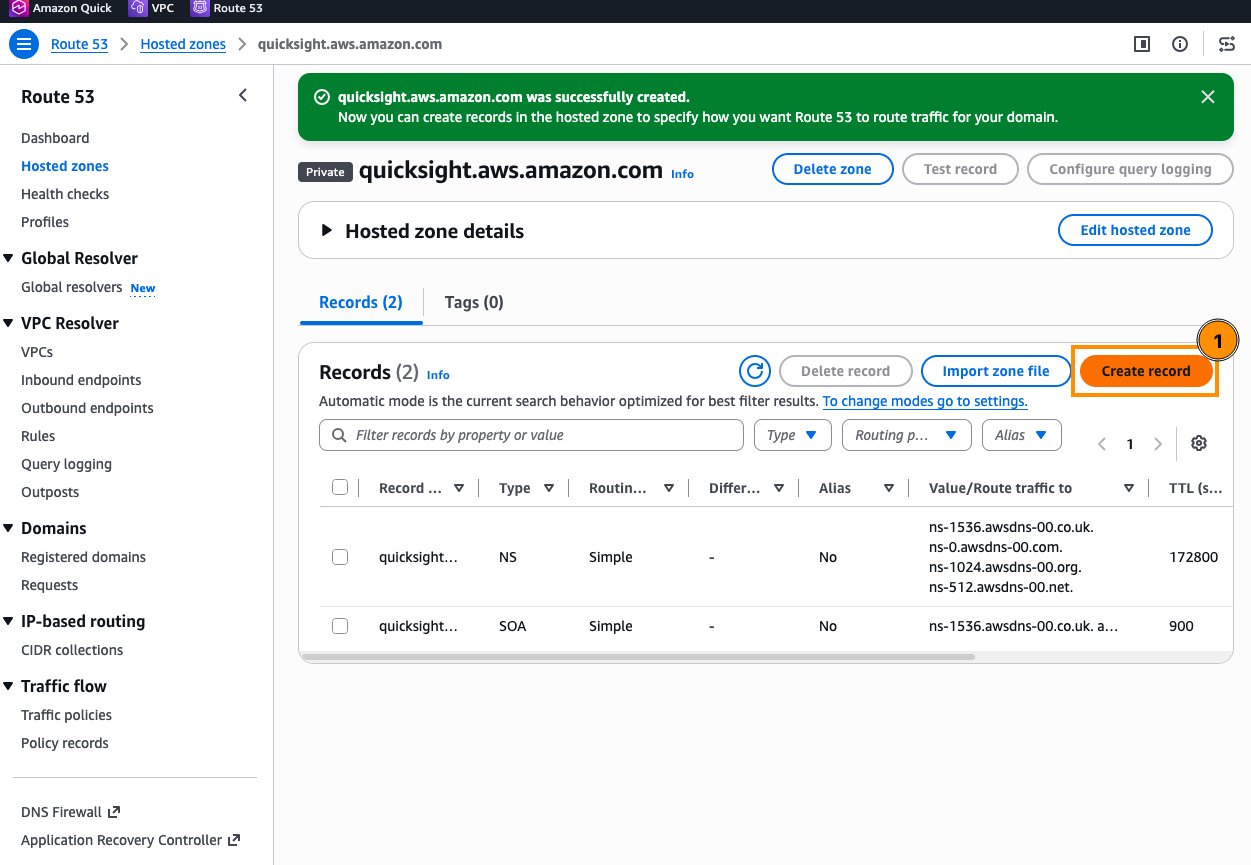
Figure 6: Creating a record in the new private hosted zone
- Leave Record name blank, choose record type A , turn on Alias , choose Alias to VPC endpoint , select your Region and the website endpoint’s DNS name, and choose Create records (Figure 7).
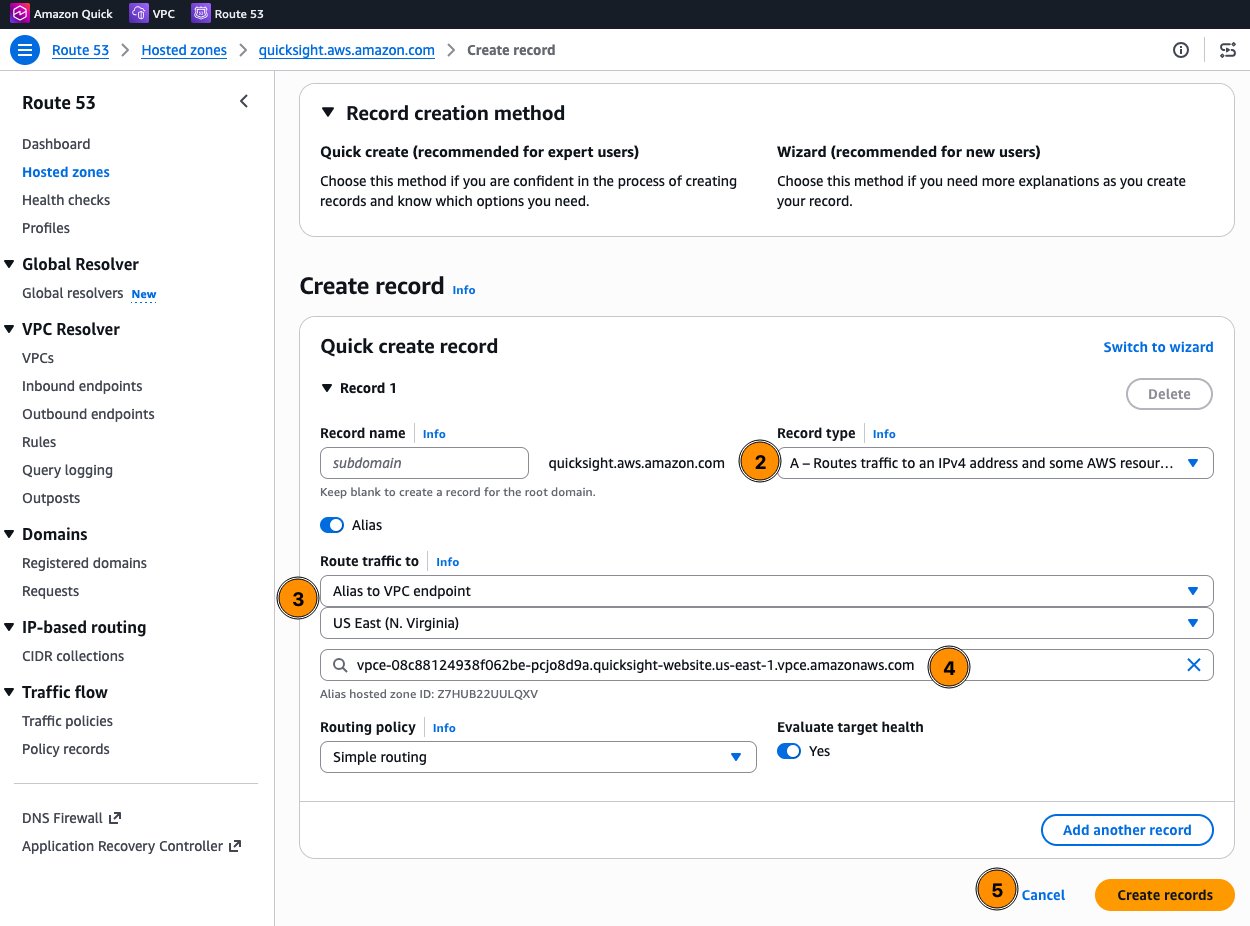
Figure 7: Creating an alias A record that points to the Quick website VPC endpoint
Setting up VPC endpoint policies
VPC endpoint policies restrict which accounts or organizations can use the endpoint. For Quick, policies can be scoped by AWS account ID or Organization ID. To change a policy, open the endpoint in the Amazon VPC console, choose the Policy tab, and choose Edit Policy (Figure 8).
Important limitation: For the Quick website endpoint, the
Principal,Action, andResourcefields must all be set to*. Conditions might only be specified against theaws:PrincipalAccountoraws:OrgIdattributes. More restrictive action-level policies are only supported on the API endpoint.
Website endpoint policy example:
{
    "Version": "2012-10-17",
    "Statement": [
        {
            "Effect": "Allow",
            "Principal": "*",
            "Action": "*",
            "Resource": "*",
            "Condition": {
                "StringEquals": {
                    "aws:PrincipalAccount": ["012345678901"]
                }
            }
        }
    ]
}
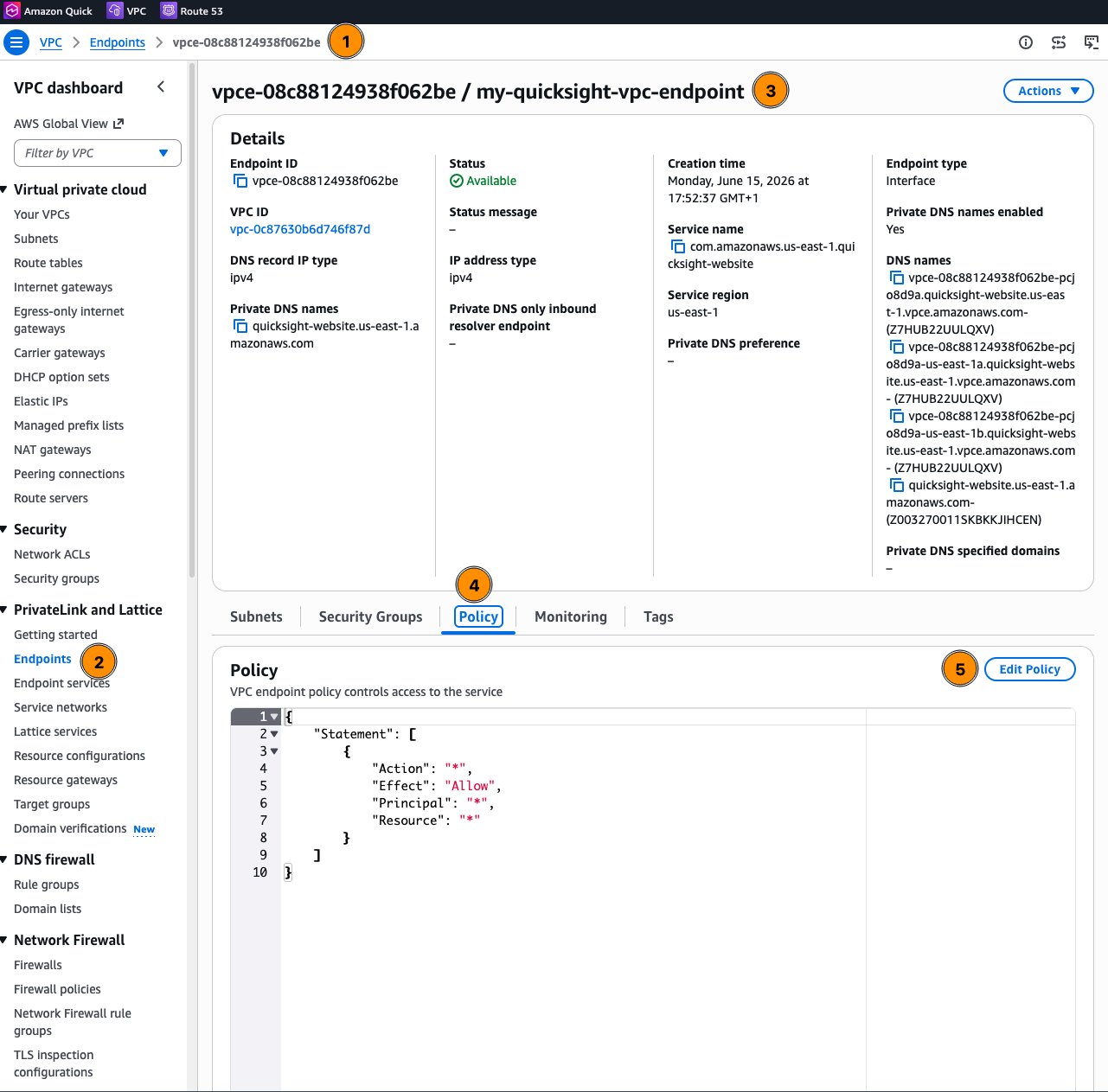
Figure 8: Opening the endpoint policy from the VPC endpoint details page
API endpoint policy example (restricted to specific actions):
{
    "Version": "2012-10-17",
    "Statement": [
        {
            "Effect": "Allow",
            "Principal": "*",
            "Action": [
                "quicksight:DescribeUser",
                "quicksight:ListUsers"
            ],
            "Resource": "*",
            "Condition": {
                "StringEquals": {
                    "aws:PrincipalAccount": ["012345678901"]
                }
            }
        }
    ]
}
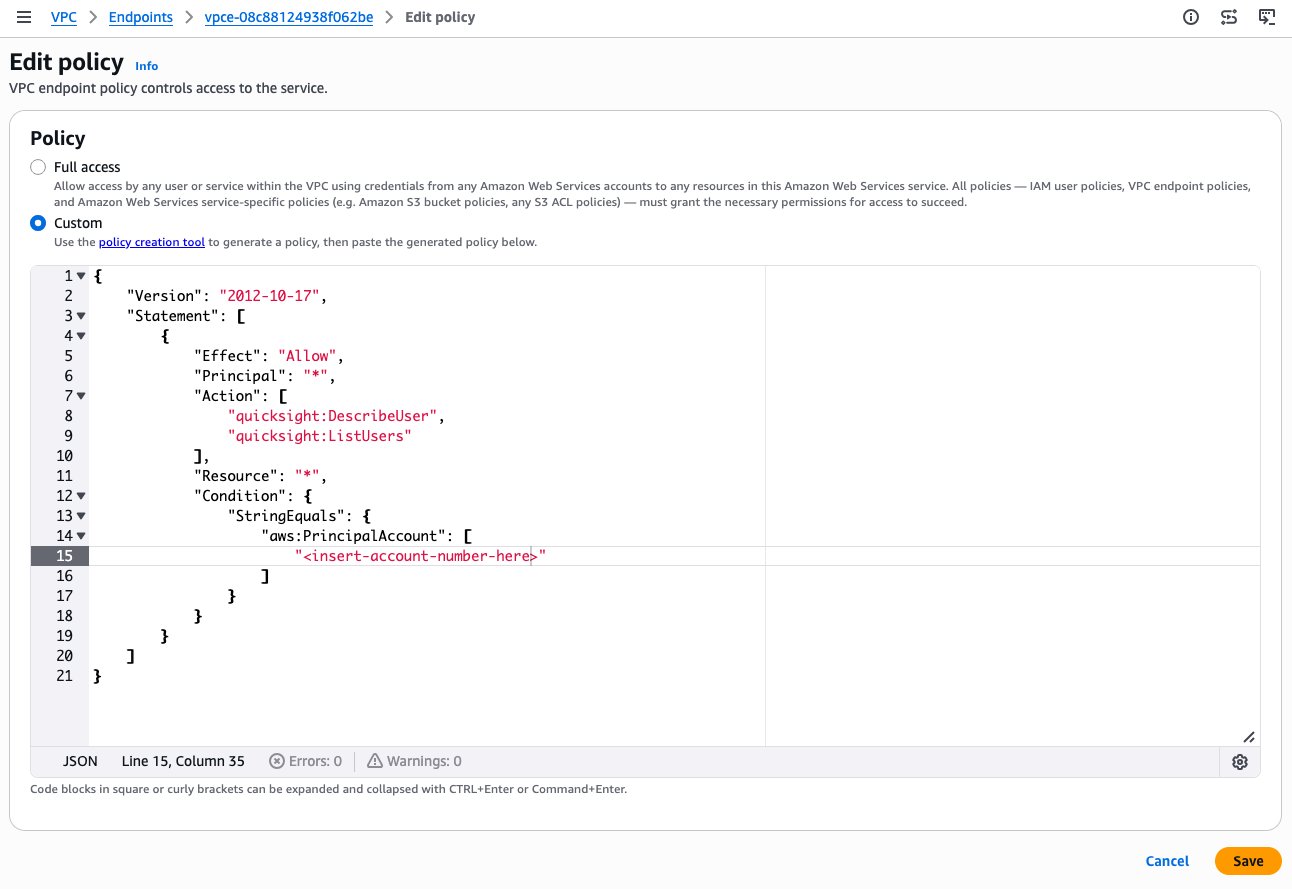
Figure 9: Editing a custom VPC endpoint policy
VPC connections for data source access
While VPC endpoints handle user-facing traffic, VPC connections handle the server-side path, meaning Amazon Quick reaches into your VPC to access databases, Amazon Redshift knowledge base sources, and internal APIs.
How VPC connections work
Amazon Quick Enterprise edition is fully integrated with Amazon VPC. When you create a VPC connection in Amazon Quick, you are adding elastic network interfaces (ENIs) into your VPC subnets. These ENIs allow Quick to exchange network traffic with resources within your VPC and, by extension, anything reachable from that VPC, including on-premises systems connected through Direct Connect or VPN.
All standard VPC security controls apply to this traffic. Route tables, network ACLs, subnets, and security groups govern traffic to and from Quick in the same way they govern traffic between any other instances in your VPC. This means you can connect to:
- Private databases not exposed to the public internet.
- On-premises data sources reachable through Direct Connect or VPN.
- Internal APIs accessible by IP address within your network.
Create a dedicated security group (for example, QuickSight-VPC) for the VPC connection ENIs. On each data source’s security group, allow inbound traffic on the database port from that security group ID.
Note for VPC connections created before April 27, 2023: The security group attached to the Quick network interface is not stateful. You must add an inbound rule that explicitly allows return traffic from your data source’s security group on all ports (0–65535), because return packets use randomly allocated destination ports. Connections created after that date use standard stateful behavior. See Security groups: inbound and outbound rules.
Creating the execution role
Amazon Quick doesn’t create the VPC connection execution role for you. Before you add the connection, create a dedicated IAM role (recommended), or update an existing role that already trusts Quick, such as aws-quicksight-service-role-v0 used in the screenshots in this post. The role needs:
- A permissions policy that grants the Amazon Elastic Compute Cloud (Amazon EC2) actions Quick uses to manage its ENIs (Figure 10).
- A trust policy that allows
quicksight.amazonaws.comto assume the role. Only roles with this trust policy appear in the Execution role list in the Quick console.
Permissions policy:
{
    "Version": "2012-10-17",
    "Statement": [
        {
            "Effect": "Allow",
            "Action": [
                "ec2:CreateNetworkInterface",
                "ec2:DeleteNetworkInterface",
                "ec2:ModifyNetworkInterfaceAttribute",
                "ec2:DescribeSubnets",
                "ec2:DescribeSecurityGroups"
            ],
            "Resource": "*"
        }
    ]
}
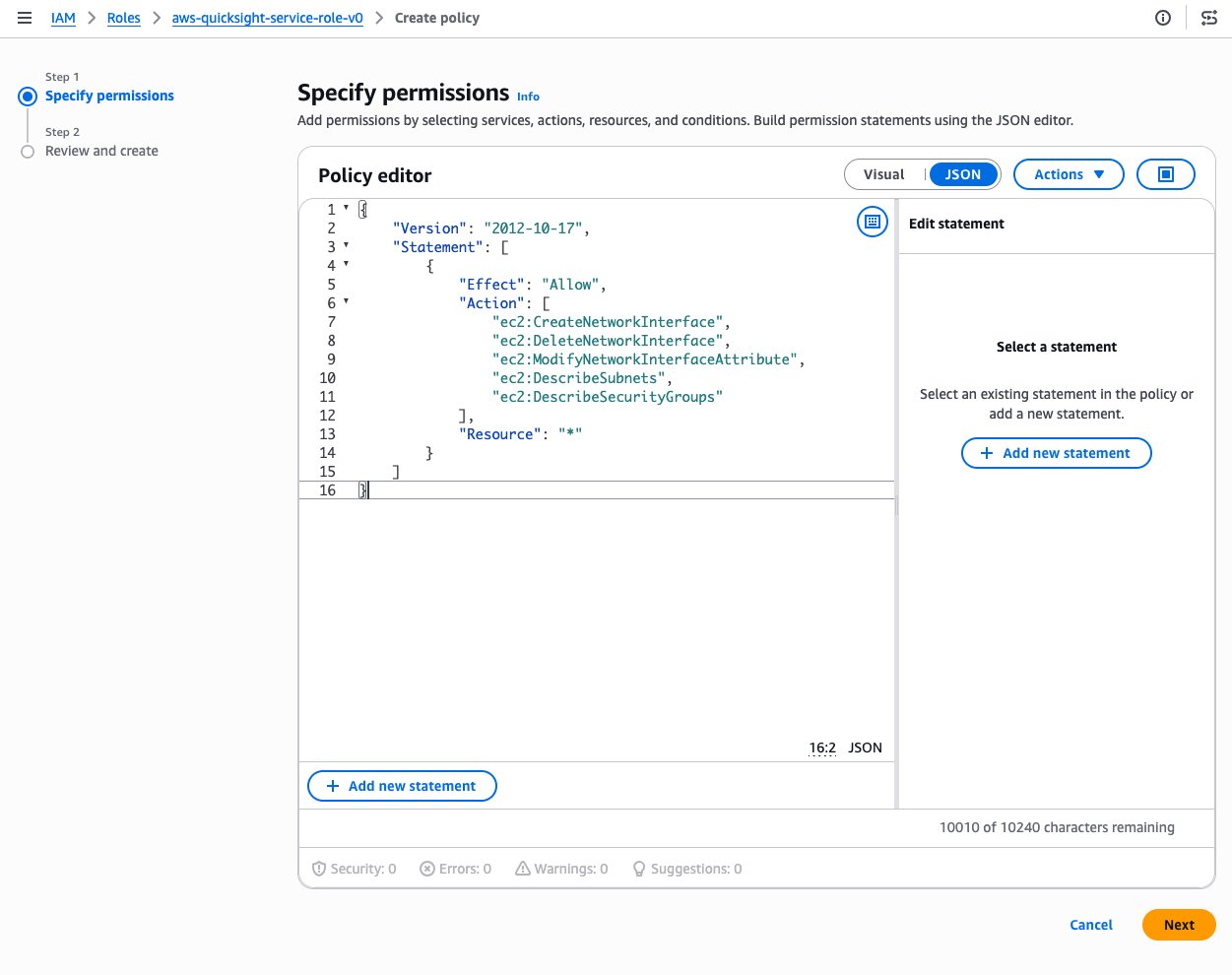
Figure 10: Adding the Amazon EC2 permissions required by the VPC connection execution role
Trust policy:
{
    "Version": "2012-10-17",
    "Statement": [
        {
            "Effect": "Allow",
            "Principal": { "Service": "quicksight.amazonaws.com" },
            "Action": "sts:AssumeRole"
        }
    ]
}
Configuring a VPC connection
To create a VPC connection in the Quick console:
- Sign in to Amazon Quick as an administrator. Choose your profile icon in the upper-right, then choose Manage account (Figure 11). If you don’t see this option, you’re not a Quick administrator.
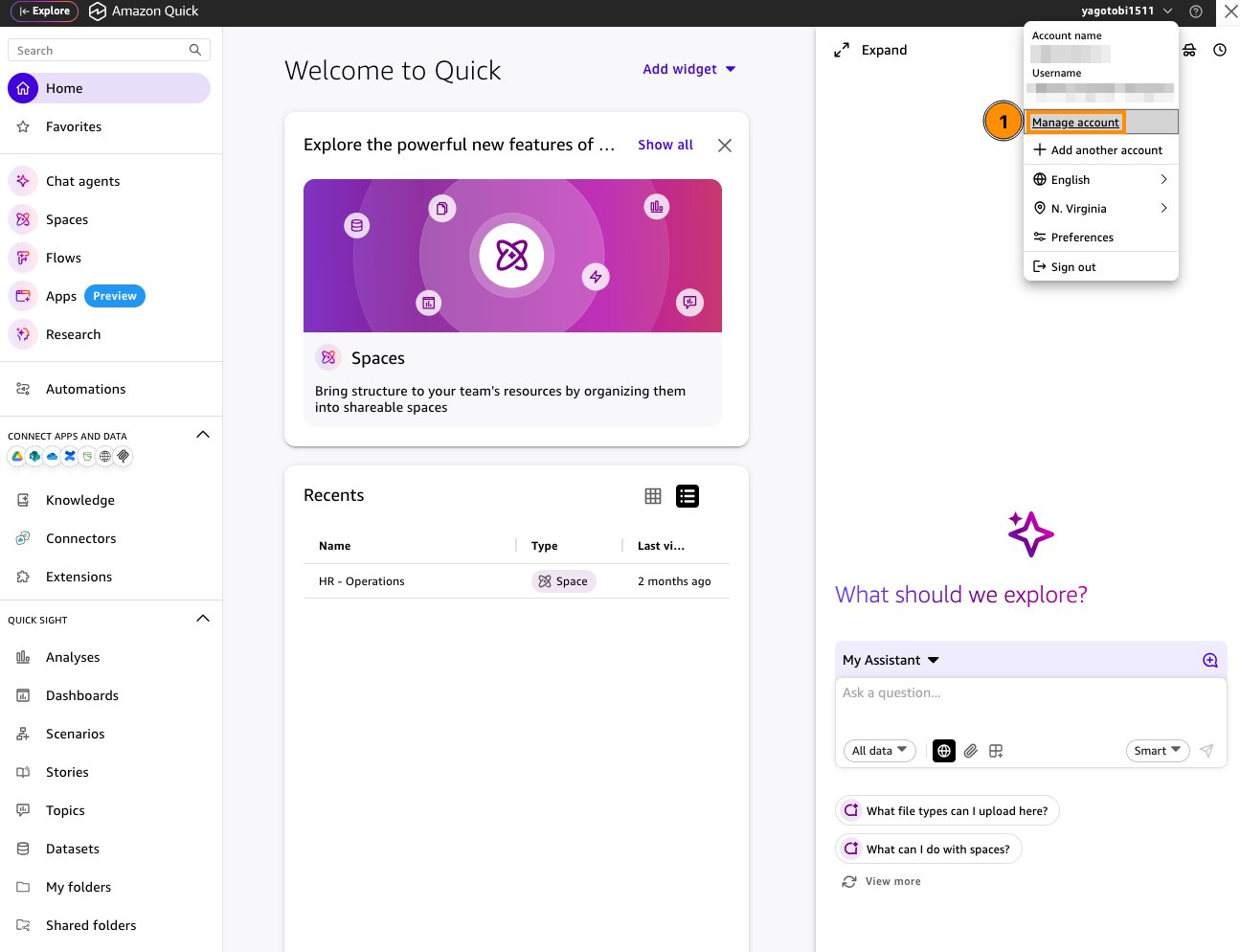
Figure 11: Opening Manage account from the Quick profile menu
- In the navigation pane, under Security , choose Manage VPC connections (Figure 12), then choose Add VPC connection.
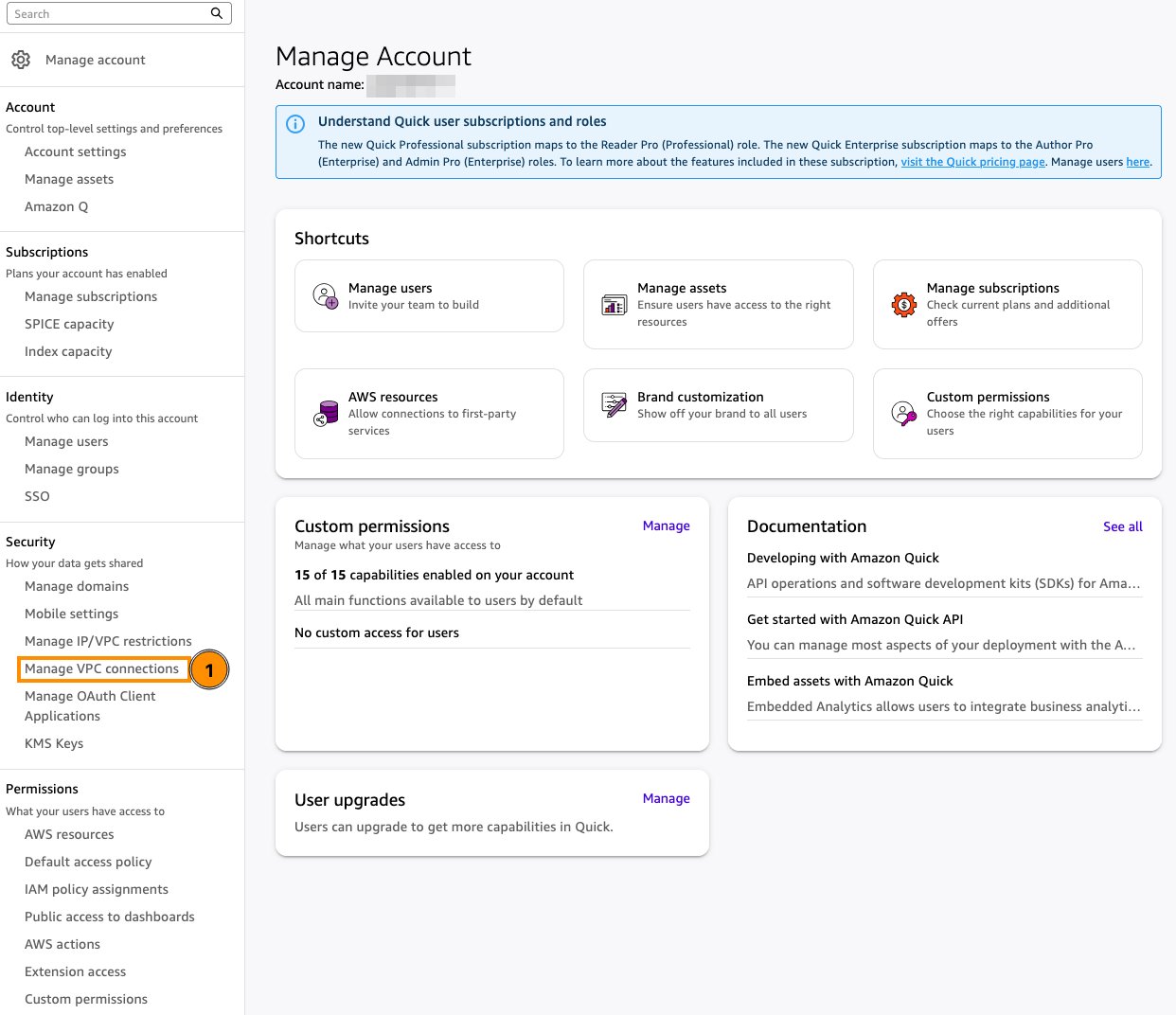
Figure 12: Manage VPC connections under Security on the Manage account page
- Provide the following (Figure 13):
- A descriptive VPC connection name.
- The VPC ID of the target VPC. This can’t be changed later.
- The Execution role you created in the previous step.
- At least two subnets in different Availability Zones.
- At least one security group ID.
- (Optional) If your database host name must be resolved through private DNS, enter the IP addresses of your Route 53 Resolver inbound endpoints under DNS resolver endpoints.
- Choose ADD.
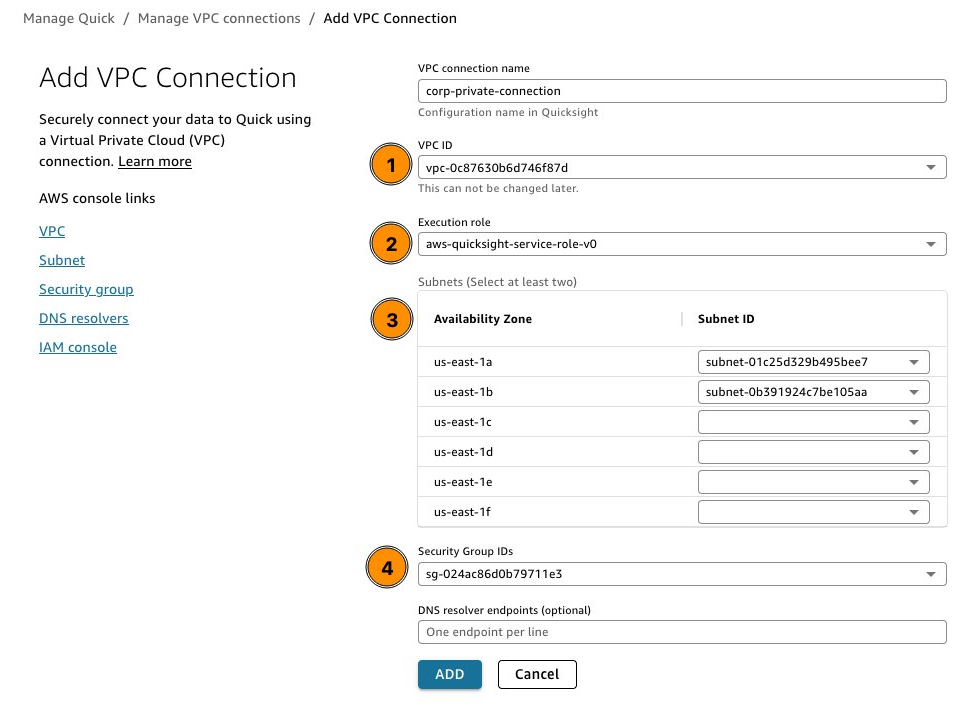
Figure 13: Adding a VPC connection in the Quick console
The connection status shows UNAVAILABLE until Quick finishes provisioning the ENIs, then changes to AVAILABLE. A status of PARTIALLY AVAILABLE means one of the ENIs is unavailable, but the connection can still be used.
Configuring data source VPC endpoints
VPC endpoints (PrivateLink, used here for AWS service APIs) and VPC connections (Quick ENIs placed in your VPC; see VPC connections for data source access) are different mechanisms. Quick accesses other AWS services (Amazon S3, Amazon Redshift, Amazon Athena, AWS Secrets Manager) when retrieving data for dashboards and analytics. If you want all traffic to remain private, including the calls Amazon Quick makes to these AWS services, create interface or gateway VPC endpoints for each:
| Service | Endpoint type | Service name |
|---|---|---|
| Amazon S3 | Gateway | com.amazonaws.<region>.s3 |
| Amazon Redshift | Interface | com.amazonaws.<region>.redshift |
| Amazon Athena* | Interface | com.amazonaws.<region>.athena |
| AWS Secrets Manager | Interface | com.amazonaws.<region>.secretsmanager |
| AWS Glue | Interface | com.amazonaws.<region>.glue |
* Athena isn’t supported as a VPC connection data source. The Athena endpoint keeps Athena API traffic on AWS PrivateLink only.
Create these endpoints in the same VPC where the Amazon Quick ENIs are placed. Make sure route tables and security groups allow traffic between the Amazon Quick subnets and the endpoint subnets.
Enabling access to required external domains
While data traffic between Quick and your on-premises sources stays on the private network, users’ browsers still need to reach a set of domains for sign-in, static assets, client-side metrics, and integrations. Even with VPC endpoints configured, domains without VPC endpoint support need outbound connectivity, typically through your corporate proxy or firewall. If your account uses IAM Identity Center, browser sign-in also requires the public AWS sign-in and IAM Identity Center endpoints (see Secure user access and identity federation).
Required external domains
| Domain | Purpose | VPC endpoint support |
|---|---|---|
<region>.quicksight.aws.amazon.com |
Bulk of Quick website traffic | Yes |
quicksight.<region>.amazonaws.com |
Quick public API calls | Yes |
signin.aws.amazon.com |
AWS console sign-in for accounts that use IAM identities | Yes |
<region>.signin.aws |
Sign-in | No |
*.cloudfront.net |
Static assets (CSS, JavaScript) | No |
*.s3.<region>.amazonaws.com |
Reports and thumbnails | Yes |
*.execute-api.<region>.amazonaws.com |
Client-side metrics | No |
*.kinesisvideo.amazonaws.com |
Live streaming of automation workflows | No |
apis.google.com/js/api.js |
Google Drive file picker | N/A |
*.officeapps.live.com |
Quick side panel extension | N/A |
outlook.cloud.microsoft |
Quick side panel extension | N/A |
*.sharepoint.com |
Quick side panel extension | N/A |
*.office.com |
Quick side panel extension | N/A |
*.office365.com |
Quick side panel extension | N/A |
Source: Domains accessed by Quick .
Configuration guidance:
- For domains with VPC endpoint support (the Quick website and API,
signin.aws.amazon.com, and Amazon S3), create the corresponding VPC endpoints and DNS records. - For domains without VPC endpoint support, allow them through your corporate internet egress (outbound proxy or firewall). If user traffic egresses through your VPC, use a NAT gateway in a public subnet.
- If your security posture requires URL-level filtering, use an outbound proxy or AWS Network Firewall domain filtering rules to allow only the domains listed earlier.
- Test from a corporate workstation (or an instance in the same egress path):
nslookupandcurlagainst each domain confirm DNS resolution and routing.
Enforcing VPC endpoint restrictions
After your endpoints are configured and tested, you can enforce that all access to your Quick account must come through the VPC endpoint, blocking general internet access entirely. As a result, users can only reach Quick from your corporate network through the private path you’ve established.
Quick provides IP and VPC endpoint restriction controls that limit account access to a predefined list of IP ranges, VPC IDs, or VPC endpoint IDs. For example, you can create a rule that allows access only from the VPC endpoint used for Direct Connect, meaning anyone attempting to reach Quick from the public internet will be denied.
To configure through the Quick console (only administrators signed in with IAM credentials can access the restrictions page):
- Choose your profile icon, then Manage account. Under Security , choose Manage IP/VPC restrictions.
- In the Restriction field, enter the VPC endpoint ID (for example,
vpce-001122def), enter a Description , and choose Add (Figure 14). - Choose Save changes to apply the rule.
- Turn on Enforce restrictions.
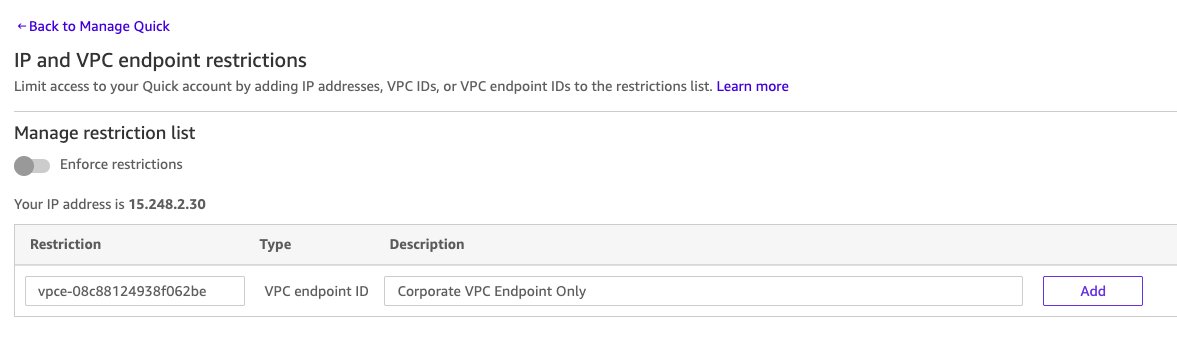
Figure 14: Adding a VPC endpoint rule on the IP and VPC endpoint restrictions page
Alternatively, configure through the AWS Command Line Interface (AWS CLI):
aws quicksight update-ip-restriction \
--aws-account-id ACCOUNT_ID \
--region REGION \
--enabled \
--vpc-endpoint-id-restriction-rule-map \
vpce-001122def=CorporateVpcEndpoint
Note:
UpdateIpRestrictionreplaces the entire rule map. Retrieve your current rules withaws quicksight describe-ip-restrictionand include any existing rules in the update.
Key considerations:
- IP and VPC endpoint rules apply to Quick web, embedded, and mobile access, meaning they don’t restrict access to the public API. To restrict API calls from specific sources, use IAM policies with
aws:SourceIporaws:SourceVpceconditions. - Make sure your own IP or VPC endpoint is included in the rules before enabling restrictions, otherwise you will lock yourself out.
- Rules can take up to 10 minutes to take full effect.
- You can combine IP rules and VPC endpoint rules, such that traffic is allowed if it satisfies either rule type. You can add up to 100 IP and VPC endpoint rules combined.
- IP and VPC endpoint rules are enforced across all AWS Regions for your account, but you can only add or manage them from the AWS Region where your Quick account was created.
- If you have publicly embedded dashboards, they will only be accessible through the VPC endpoint once restrictions are enabled.
After you enforce the restrictions, only traffic arriving through the specified VPC endpoint (or allowed IP ranges) can reach your Quick account. All other access is denied.
Secure user access and identity federation
Private network connectivity keeps traffic off the public internet, but it doesn’t answer the question of who can access what within Quick. This section covers how to integrate your corporate identity provider, control user provisioning, and enforce fine-grained access segmentation across Quick components.
Integrating with AWS IAM Identity Center
Important: For Quick accounts integrated with IAM Identity Center, browser-based authentication requires access to the public AWS sign-in and IAM Identity Center endpoints. VPC endpoints don’t provide this browser sign-in path. Public IP addresses aren’t required. Provide outbound connectivity through a NAT gateway or proxy. See Considerations for private access in the IAM Identity Center User Guide.
Amazon Quick uses AWS IAM Identity Center as the central point for workforce identity management. IAM Identity Center connects to your existing corporate identity provider (IdP) using SAML 2.0 for authentication and SCIM 2.0 for automatic user and group provisioning. This provides:
- Automatic user provisioning and deprovisioning synced from your IdP.
- Group membership synchronization – when a user is added to or removed from a group, that change propagates to Quick.
- Single sign-on (SSO) using existing corporate credentials.
- Temporary credentials through assumed IAM roles – no long-lived Quick-specific passwords.
For a step-by-step guide on setting up IAM Identity Center with your identity provider, see Getting started with IAM Identity Center.
Role-based access in Quick
Quick supports three base roles that determine what a user can do:
- Admin – Full management access including data source configuration, VPC connections, security settings, user management, and SPICE capacity purchasing.
- Author – Can create and publish dashboards, build agents, configure Spaces, manage data sources, create flows, and build apps.
- Reader – Can view published dashboards, interact with agents, use Spaces they’ve been granted access to, and consume Quick Research reports.
These roles are mapped to IAM roles that federated users assume at sign-in. By managing role assignment in your IdP, you maintain a single source of truth for who has what level of access.
Additionally, Quick supports custom permissions profiles that can override default role permissions at the account, role, or user level. User-level permissions override role-level, which in turn override account-level. This gives administrators granular control beyond the three base roles.
User segmentation with Spaces
Quick Spaces provide an additional layer of access segmentation beyond roles. Each Space can be configured with specific user and group permissions, meaning:
- A finance team Space containing sensitive revenue dashboards and financial knowledge bases is only accessible to the finance group.
- A sales team Space with CRM-connected agents and pipeline dashboards is restricted to sales users.
- Cross-functional Spaces can be shared across multiple groups with appropriate permissions.
Space-level access is controlled by the groups synced from your identity provider, so adding a new team member to the appropriate group automatically grants them access to the relevant Spaces.
Row-level security in Quick Sight
For dashboards backed by structured data, Quick Sight supports row-level security (RLS) that restricts which data rows each user or group can see. RLS is configured through dataset rules, which are a permissions dataset that maps users or groups to the field values they can access.
For example, a regional sales dashboard can be configured so that:
- The EMEA sales group only sees rows where
region = 'EMEA'. - The NA sales group only sees rows where
region = 'NA'. - The VP of Sales sees all rows.
RLS rules are evaluated based on the user’s identity as determined by IAM Identity Center, meaning the same identity federation that controls sign-in also governs data-level access. This applies equally to traditional dashboard views and AI-powered natural language queries. The same security policies restrict what data the AI can reference when generating answers.
Column-level security
In addition to row-level restrictions, Quick Sight supports column-level security (CLS) to hide sensitive columns from specific users or groups. For example, a dataset containing employee information might restrict the salary and SSN columns to only the HR group, while other groups can still access non-sensitive columns in the same dataset.
How identity ties to private connectivity
The identity layer and network layer work together:
- A user on the corporate network authenticates through your IdP → IAM Identity Center → Quick.
- Their request reaches Quick through the VPC endpoint (the private network path; see VPC endpoints for user and API access).
- Quick evaluates their identity to determine role, Space access, and RLS/CLS policies.
- When Quick fetches data from an on-premises source, it uses the VPC connection (ENIs in your VPC; see VPC connections for data source access) to reach the database over Direct Connect.
- The response is returned to the user through the same private path.
Apart from the sign-in and static-asset traffic described under Enabling access to required external domains, no traffic traverses the public internet, and at every point the user’s identity determines what they can see and do.
Validation and testing
Before enforcing restrictions in production, validate end-to-end connectivity for each access pattern:
| Access pattern | Test | Expected result |
|---|---|---|
| Website (VPC endpoint) | nslookup <region>.quicksight.aws.amazon.com from the corporate network |
Resolves to a private IP in your VPC CIDR |
| Website (auth) | Navigate to the Quick console from a corporate machine | Sign-in completes via IdP. Console loads normally |
| API (VPC endpoint) | aws quicksight describe-account-settings from within the VPC |
Returns account settings; Flow Logs show source IP from your VPC |
| Data source (VPC connection) | Create a test Quick Sight data source pointing to an on-premises database through the VPC connection | Connection test succeeds. Test query returns data |
| Knowledge base (VPC connection) | Create a knowledge base from an Amazon Redshift source using the VPC connection, then trigger a sync | Sync completes. Content appears in the knowledge base |
| Action connector (VPC connection) | Create a test action pointing to an internal API and invoke it through an agent | Action returns the expected response |
| Embedded dashboards | Load an embedded Quick Sight dashboard from an internal app | Dashboard renders. Browser dev tools confirm private IP |
Monitoring
For ongoing visibility, enable VPC Flow Logs on all endpoint and VPC connection ENIs to capture traffic metadata. Monitor CloudWatch metrics on VPC endpoints (ActiveConnections, BytesProcessed, PacketsDropped) and set alarms for connection failures or unexpected traffic sources. These logs also serve as the audit trail referenced in your compliance documentation.
Troubleshooting common issues
| Symptom | Likely cause | Resolution |
|---|---|---|
| Quick website unreachable from corporate network | DNS not resolving to VPC endpoint | Verify the A record for <region>.quicksight.aws.amazon.com points to the endpoint DNS name, and that on-premises DNS forwards the name to a Route 53 Resolver inbound endpoint. Check private DNS settings on the endpoint. |
| Locked out after enabling restrictions | Your IP/endpoint not in the allow list | Use the update-ip-restriction CLI command with an IAM identity that has API access (the API is not restricted by IP/VPC rules) to add your endpoint. |
| API calls timing out | Security group blocking traffic | Make sure the endpoint security group allows inbound HTTPS (port 443) from your corporate CIDR. |
| Data source connection fails | VPC connection ENIs can’t reach target | Verify security groups on the VPC connection ENIs allow outbound to the database port, and the database security group allows inbound from the Quick security group. For connections created before April 27, 2023, verify the inbound all-ports return-traffic rule. Check route tables for a path to the on-premises network. |
| Static assets not loading (blank page) | External domains blocked | Make sure your proxy or NAT gateway allows *.cloudfront.net, and that *.s3.<region>.amazonaws.com is reachable through an S3 VPC endpoint or your proxy. |
| SSO login fails | Sign-in domains unreachable | Allow signin.aws.amazon.com and <region>.signin.aws through your firewall/proxy. For IAM Identity Center accounts, also allow the public AWS sign-in and IAM Identity Center endpoints (see Secure user access and identity federation). |
| VPC connection status shows UNAVAILABLE | Execution role misconfigured | Verify the execution role has ec2:CreateNetworkInterface, ec2:DescribeSubnets, ec2:DescribeSecurityGroups, ec2:ModifyNetworkInterfaceAttribute, and ec2:DeleteNetworkInterface, and that its trust policy allows quicksight.amazonaws.com. |
| Public embedded dashboards inaccessible | VPC endpoint restrictions block public traffic | Known behavior: public embeds require VPC endpoint access once restrictions are enabled. Consider a separate endpoint for public consumers, or disable public embedding. |
Security best practices
Neither network isolation nor identity controls alone is sufficient. This architecture relies on both: network controls prevent unauthorized access paths, while identity controls prevent unauthorized data access within authorized sessions. The practices below maintain both layers.
- Least-privilege endpoint policies: Restrict website endpoints by
aws:PrincipalAccountoraws:OrgId. On API endpoints, scope policies to only the specific actions your automation requires rather than allowing allquicksight:*actions. - Layered security groups: Apply security groups to both VPC endpoint ENIs (user traffic) and VPC connection ENIs (data traffic). On endpoint ENIs, restrict inbound HTTPS to your corporate CIDR ranges. On VPC connection ENIs, use a dedicated security group, restrict outbound to only the database ports and destinations Quick needs, and reference that security group in each data source’s inbound rules.
- Enable VPC Flow Logs on all endpoint ENIs: These logs capture traffic metadata for security monitoring, anomaly detection, and compliance auditing. They also provide the audit trail that regulatory frameworks require for controlled network boundaries.
- Audit endpoint policies regularly: Review endpoint policies quarterly. Use AWS Config rules to detect drift from your baseline configuration.
- Separate VPC connections by sensitivity: If you have multiple data environments (dev, staging, production), create separate VPC connections with distinct security groups to prevent cross-environment access.
- Monitor with CloudWatch: Set alarms on
PacketsDroppedandActiveConnectionsmetrics. Unusual patterns may indicate misconfiguration or attempted unauthorized access.
Example Requirements and AWS Configuration
The following examples show how the configuration in this post can address common security network requirements. Evaluate them against your own requirements with your security team.
| Requirement | AWS controls that can support your assessment |
|---|---|
| Sensitive data must not traverse the public internet | VPC endpoints for user traffic, VPC connections for data traffic, and VPC Flow Logs for network visibility |
| User data isolation | Security groups on VPC connection ENIs and row-level security for sensitive data access |
| Access restricted to authorized endpoints | VPC endpoint restrictions (Section 4), CloudTrail API logs and VPC Flow Logs |
Cost considerations
| Component | Cost model | Estimate |
|---|---|---|
| VPC interface endpoints | $0.01/hour per AZ + $0.01/GB processed | ~$7.20/month per endpoint per AZ (fixed) + data transfer |
| VPC gateway endpoints (S3) | No charge | No charge |
| VPC connections (Quick ENIs) | Included with Quick Enterprise | No additional charge |
| NAT gateway (for external domains) | $0.045/hour + $0.045/GB processed | ~$32/month (fixed) + data transfer |
| VPC Flow Logs | CloudWatch Logs ingestion rates | Varies with traffic volume |
| Direct Connect | Port hours + data transfer | Varies with circuit size |
Cost optimization tips:
- Use gateway endpoints (no additional charge) for S3 instead of interface endpoints where possible.
- Consolidate endpoint ENIs: each endpoint only needs ENIs in the AZs where the Amazon Quick VPC connection subnets reside.
- Enable VPC Flow Logs selectively on endpoint ENIs rather than the entire VPC.
- Consider whether all external domains need NAT gateway access or whether a targeted proxy would be more cost-effective for your traffic patterns.
Conclusion
This architecture establishes four complementary controls: VPC endpoints keep user traffic private, VPC connections give Quick a private path to your data sources, identity federation determines who can access what, and VPC endpoint restrictions make the private path mandatory. Each layer is independently auditable and maps to specific compliance requirements (see Compliance mapping).
With this in place, Quick Agents can query your on-premises databases, Quick Research can investigate enterprise sources behind the firewall, Quick Sight dashboards can visualize sensitive data, and Quick Flows can orchestrate internal systems, all without your data traversing the public internet. The AI capabilities are unchanged. The exposure is removed.
To implement, start with the VPC endpoints for user and API access, and validate user access before progressing to the VPC connections for data source access. Enable VPC endpoint restrictions only after confirming all access patterns work through the private path. For identity federation setup and advanced RLS/CLS configuration, refer to the IAM Identity Center documentation.
About the authors
Rahul Kulkarni
Rahul is a Generative AI and machine learning specialist at AWS, helping financial-services organizations move AI workloads from experimentation to production. He is particularly interested in how banks, investment firms, and fintechs can apply generative AI to research, customer engagement, and knowledge-intensive workflows. Outside of work, Rahul enjoys travelling and cheering on the Boston Red Sox.
Yago Tobio Souto
Yago is a Solutions Architect at AWS, based in London, specializing in generative AI, Amazon Bedrock, and agentic frameworks. He helps organizations turn AI prototypes into production-ready solutions. On weekends, he’s probably going for a run, or exploring the city… or both at the same time.
Muhammad Zain Akram
Zain is a Solutions Architect at AWS, based in Sweden, specializing in generative AI. He partners with customers to understand their business challenges and translate them into secure, scalable solutions that deliver real outcomes. In his free time, he enjoys spending time with family and friends, often over a movie or cooking food.