多 Agent 系统投产的 5 大挑战与 Deep Insight 的解决之道
英文标题:5 production challenges in multi-agent systems and how Deep Insight solved them
构建多 Agent 系统的原型如今仅需数天,但要将其推进到真实生产环境中,开发者往往会在编排、模型选型、运行可靠性、安全代码执行和监控运维这五大方面遭遇瓶颈。针对这一痛点,AWS 解决方案架构团队开源了生产级多 Agent 系统 Deep Insight,全面展示了如何落地 Anthropic 提出的上下文工程技术。该方案借助 Strands Agents SDK 的 Graph 与 Agents-as-Tools 架构、基于 Amazon Bedrock 为不同角色的 Agent 按需匹配 Claude 模型,并通过 AWS Fargate 沙箱与 Bedrock AgentCore 实现安全代码隔离和托管运维。该系统为开发者跨越 AI 原型与企业级落地的鸿沟提供了兼顾性能、成本与安全性的可复用工程参考范式。
 1.3 MB
 1.3 MB
 2.4 KB
 345.0 KB
 141.2 KB
 346.5 KB
 209.9 KB
 355.9 KB
 327.6 KB
 319.5 KB
 105.4 KB
 724.0 KB
 149.7 KB
 462.7 KB
 20.0 KB
 18.8 KB
 21.3 KB
 28.7 KB
 17.1 KB
 24.6 KB
中文
构建多 Agent 系统如今已经变得相当直接,但要将其推向生产环境,真正的挑战才刚刚开始。得益于开源框架和云服务,你可以在短短几天内搭建出一个 Agent。只需调用几个工具、写几行 Prompt,就能做出一个看起来相当惊艳的演示。然而,一旦团队试图超越概念验证(PoC)并将其投入实际业务应用,就会撞上一堵熟悉的墙。如果你曾尝试过将 Agent 部署到生产环境,下面的沮丧情绪你一定不会陌生:
为什么 Agent 不遵循我们的业务逻辑、跳过验证步骤,或者无法捕获边缘极端情况?
你不断微调 Prompt、添加更多 Few-shot 示例、替换底层大模型,但相同的问题依然反复出现。这是因为 Agent 不会遵循固定的指令序列运行,它们是根据上下文自主做出判断。单纯依靠指令是远远不够的,你必须设计 Agent 的思考方式、何时进行校验,以及在出错时该采取什么行动。正因如此,超越单纯的 Prompt 工程,进而设计 Agent 的整体认知架构与执行流,已经变得至关重要。
为了迎头解决这些挑战,AWS 解决方案架构团队构建了生产级多 Agent 系统 Deep Insight。在本系列文章中,团队将通过三篇内容,第一手分享在构建 Deep Insight 过程中沉淀的经验。我们将详细介绍如何在真实的生产环境中应用 Anthropic 提出的上下文工程(Context Engineering)技术(包括多 Agent 架构、结构化笔记、人机协同等)。同时,我们还将结合代码探讨在开发过程中遇到的各种权衡,并分享在 AWS 上部署和运行该 Agent 所获得的运维洞察。
博客系列概述
- 第 1 篇:多 Agent 系统投产的 5 大挑战与 Deep Insight 的解决之道。
- 第 2 篇:超越上下文窗口:上下文工程技术及 Deep Insight 的实践应用。
- 第 3 篇:安全带工程(Harness Engineering)实践:推动 Deep Insight 从开发迈向生产。
本文是该三篇系列文章的第 1 篇。它明确了任何生产级多 Agent 系统都必须解决的五大核心挑战,并展示了技术栈的每一层是如何应对它们的——涵盖从 Strands Agents SDK 和 Amazon Bedrock,到 Amazon Bedrock AgentCore、Application Load Balancer 和 AWS Fargate。第 2 篇和第 3 篇将深入探讨上下文工程与生产部署细节。
Deep Insight 简介
Deep Insight 是一个能够将复杂数据分析转化为自动化业务洞察的多 Agent 系统。给定一个 CSV 文件和一条自然语言 Prompt,一个由专门化 Agent 组成的层级结构(Coordinator、Planner、Supervisor、Coder、Validator、Reporter 和 Tracker)将协同完成分析。它们通力合作,完成加载数据、执行分析、生成图表、验证计算逻辑,并输出包含引用的专业级报告(.docx)。
稍后我们将深入探讨其架构。首先,让我们看看它的实际运行效果。在演示中,我们输入了一家虚构食品公司 Yummy Food 的广告数据(yummy-food-market.csv)及列定义文件(column_definitions.json),并给出 Prompt:“从销售与市场营销的角度分析此数据,生成图表和洞察,并输出一份 .docx 报告。” Deep Insight 会生成分析计划,提交给用户审批;一旦获批,便立即执行分析。
| 内容 | 详情 |
|---|---|
| 输入 | CSV 数据文件(yummy-food-market.csv)+ 列定义文件(column_definitions.json) |
| 示例 Prompt | “从销售与市场营销的角度分析此数据,生成图表和洞察,并输出一份 .docx 报告。” |
| 输出 | DOCX 报告(两个版本:含引用版本与不含引用版本)及图表图像(PNG) |
接下来的 Deep Insight Web 演示视频 展示了完整的工作流程,从上传数据、审查分析计划,到实时流式输出以及下载最终完成的报告。
如何体验?
Deep Insight 已在 GitHub 上开源,并附带完整的配置指南,提供了从开发到生产的三个部署选项:
第一种是 Self-Hosted(自托管)版本,可通过 CLI 在本地运行。它针对快速迭代进行了优化,可对每个 Agent、Prompt 和工作流提供完整的代码级访问权限。大约 10 分钟即可完成搭建,非常适合本地开发。(YouTube 上提供了 Self-Hosted 演示视频。)
第二种是 Web 版本,这是一个基于浏览器的 UI 界面,用于上传数据、审查分析计划(人机协同,即 HITL)和下载报告,全程无需编写代码,适合非技术开发人员使用。(前面的演示视频即展示了 Web 版本的运行效果。)
第三种是 Managed AgentCore 版本,这是依托 Amazon Bedrock AgentCore 的生产级部署选项。AgentCore 是一个能够使用任何框架或模型进行大规模构建、连接和优化 Agent 的平台。该版本将 Agent 部署在 Amazon Bedrock AgentCore 的 AgentCore 运行时上。整个系统完全运行在私有虚拟私有云(VPC)中,自定义代码解释器(Code Interpreter)独立托管在 AWS Fargate 上,Agent 则在相互隔离的每用户独立环境中并发运行。当你需要会话级隔离与私有 VPC 部署时,这是理想之选。第 3 篇将详细介绍其部署与运维细节。
这三个版本共享相同的多 Agent 架构,因此在开发环境中经过验证的 Agent 可以原封不动地直接部署到生产环境。
解决方案概览
构建生产级多 Agent 系统需要的不仅是优秀的 Prompt。你还需要合适的技术栈与基础设施,以解决 Agent 如何协作、如何推理、如何部署、在何处安全执行代码以及如何监控运行健康度等问题。Deep Insight 跨越这五个核心领域解决了相应难题。由于 Agent 既会生成代码也会生成报告内容,我们还将在“方案详解 2”中介绍面向生产环境的负责任 AI(Responsible AI)管控措施。
| 挑战 | 技术 | 方案 |
|---|---|---|
| “我们如何控制跨多个 Agent 的执行流?” | Strands Agents SDK | 使用 Strands 的 Graph 模式定义 Agent 之间的执行顺序并实现人机协同分支。使用 Strands 的 Agents as Tools 模式,使 Supervisor 能够根据需要将专业 Agent(Coder、Validator、Reporter、Tracker)作为工具动态调用。 |
| “每个 Agent 应该使用哪个大语言模型(LLM)?” | Amazon Bedrock | 为每个角色选择恰当的 Claude 模型:Haiku 用于基础路由分类,Opus 用于高阶规划,Sonnet 用于核心执行。 |
| “我们如何在生产环境中可靠地运行构建好的 Agent?” | Amazon Bedrock AgentCore | 提供具备监控能力、会话隔离和私有 VPC 部署的托管运行时。 |
| “如何降低执行 AI 生成代码带来的安全风险?” | AWS Fargate + Application Load Balancer (ALB) | 通过自定义 Code Interpreter,利用基于每会话的临时沙箱容器实现隔离代码执行。 |
| “我们如何监控和管理整个系统?” | Amazon DynamoDB + Amazon Simple Notification Service (Amazon SNS) + Amazon Cognito | 提供管理控制台仪表盘与运行故障告警系统。 |
下面的架构图(图 1)对上述设计进行了全景展示。绿色框代表 Strands Agents 多 Agent 结构,它解决了上表中的挑战 1 和挑战 2。我们将在接下来的“方案详解 1:多 Agent 系统设计”部分详细讨论这一点。图中展示的其余基础设施组件则分别应对挑战 3、4 和 5,我们将在“方案详解 2:生产部署与运维”中逐步拆解。
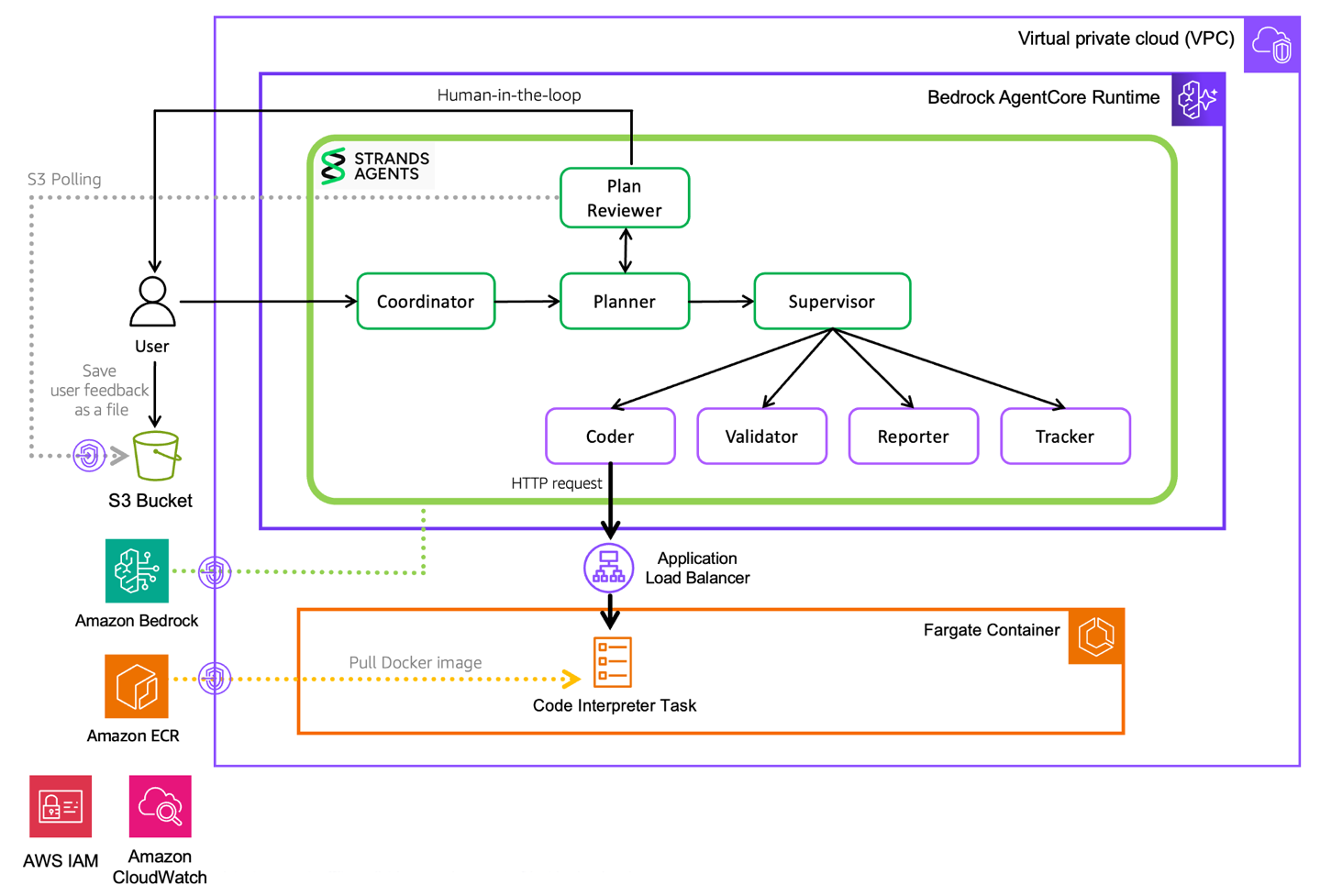
图 1:解决方案架构图
方案详解 1:多 Agent 系统设计
Deep Insight 采用了由八个 Agent 协同工作的多 Agent 架构,以产出一份高质量的最终交付成果。每个 Agent 都在其独立的上下文中运行,仅执行各自专门的任务,并仅向下游传递压缩后的精炼结果。
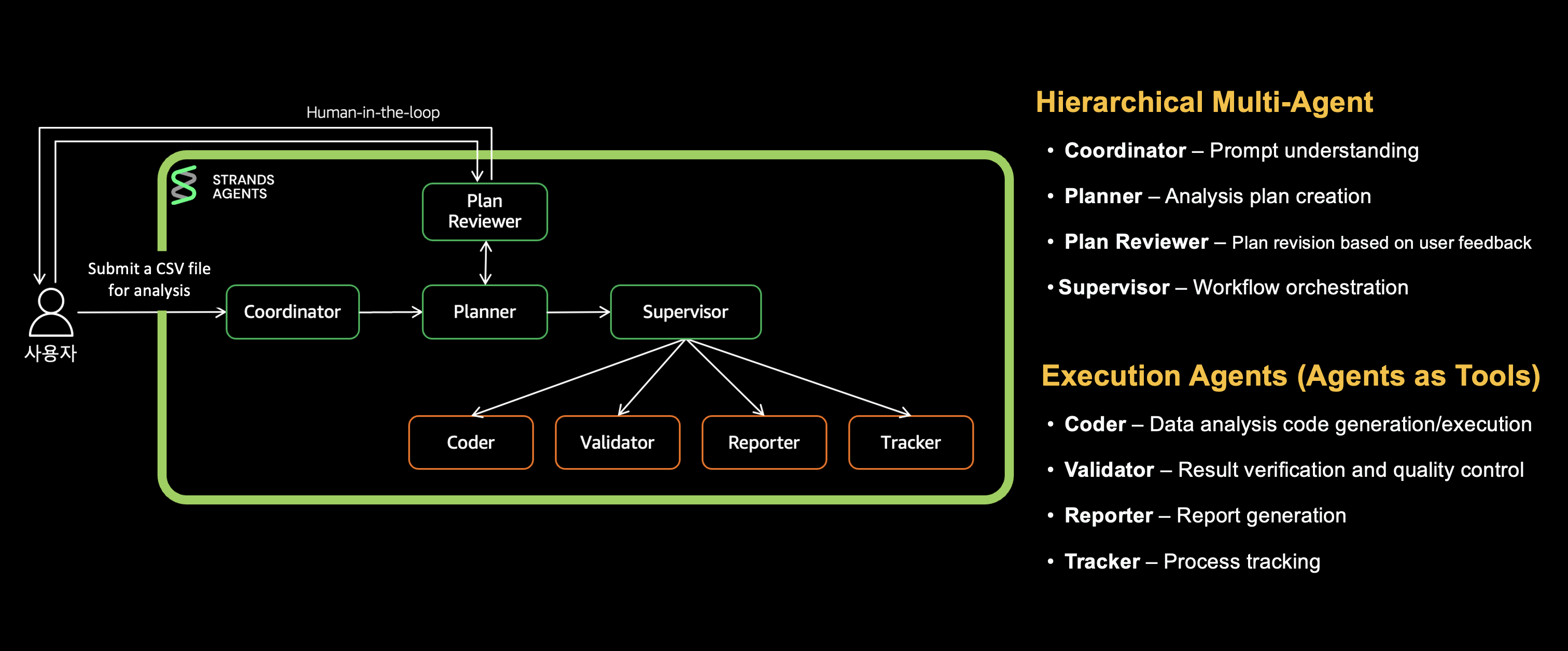
图 2:多 Agent 组织结构
其中,Coordinator 负责路由用户请求,Planner 将任务分解为具体步骤,Plan Reviewer 收集用户反馈,Supervisor 根据计划调度相应的专业 Agent。Coder 编写并执行数据分析代码,Validator 校验计算结果,Reporter 生成最终报告,Tracker 跟踪整体进度。我们将其划分为三层进行剖析:
- [第 1 层] Coordinator 到 Planner 再到 Plan Reviewer:请求分析与执行计划制定。
- [第 2 层] Supervisor:专业 Agent 编排与调度。
- [第 3 层] Coder、Validator、Reporter、Tracker:专门化任务执行。
系统结合了来自 Strands Agents SDK 的两种关键模式,以此控制跨 Agent 的执行流。首先是 Graph 模式,它将 Agent 的执行顺序和流转逻辑定义为一个有向图。请求依次流经 Coordinator、Planner、Plan Reviewer,随后进入 Supervisor;若用户提出修改要求,则会触发条件分支循环回溯至 Planner。通过条件逻辑来确定下一步操作,使得诸如人机协同(HITL)和错误处理等复杂工作流的实现变得直观清晰。其次是 Agents-as-Tools 模式,它允许 Supervisor 仅在必要时才将专业 Agent(Coder、Validator、Reporter、Tracker)作为工具进行调用。每个 Agent 均在独立上下文中运作且仅返回执行结果,在保留领域专长能力的同时,最大限度地减少了上下文窗口的消耗。
本节将演示该架构如何妥善解决路由、规划与编排难题。
[第 1 层] Coordinator 到 Planner 到 Plan Reviewer
该层负责将用户的输入请求转化为经过审批的执行计划。
1.1 Coordinator(路由):并非所有请求都需要昂贵的编排调度
Coordinator 是承接用户请求的入口点。它可以直接处理日常问候类消息,而对于数据分析等复杂任务,则会打上 handoff_to_planner 标记并路由给 Planner。
这里的一项核心设计决策在于模型选型:由于 Coordinator 仅承担意图分类职责,因此选用轻量级的 Claude Haiku 模型即可。这既避免了处理简单问候时产生 Opus 级别的推理成本,又确保了快速的响应速度。
python
builder.py: conditional edges for routing decisions
builder.set_entry_point("coordinator") builder.add_edge("coordinator", "planner", condition=should_handoff_to_planner)
路由判断条件直接源自 Coordinator 的系统 Prompt:任何需要借助工具、复杂推理或多步骤思考的请求,都会被流转至 Planner。
1.2 Planner(制定计划):复杂分析在执行前必须进行拆解
在 Deep Insight 的多 Agent 结构中,Planner Agent 扮演着将任务分配给各个 Agent 的关键角色。在实质性工作开展之前,它会将庞大任务拆解为若干细分步骤,各专业 Agent 逐一执行,从而确保每个 Agent 的上下文环境保持轻巧聚焦。
Planner 选用了开启 Extended Thinking(扩展思考能力)的 Claude Opus 模型来制定分析计划。它将计划整理为以 [ ] 形式呈现的清单格式,明确分配给每个 Agent 的具体任务,并保存在 full_plan 变量中。它会将复杂请求分解为 5 到 10 个明确步骤,如下例所示:
markdown
title
Yummy Food Consumer Purchase Patterns and Advertising Effectiveness Analysis Report
steps
1. Coder: Comprehensive Data Analysis and Insight Generation
- [ ] Load all data files from './data/*' path and understand structure
- [ ] Analyze consumer purchase history (patterns, preferences, customer segments)
- [ ] Analyze advertising data by channel (cost, effectiveness, channel comparison)
- [ ] Category-level analysis (fresh food, convenience food, health food ad effectiveness)
- [ ] Calculate key business metrics (conversion rate, CPA, ROAS, etc.)
- [ ] Generate visualizations (5+ charts, consumer segment charts)
- [ ] Derive strategic marketing insights
- [ ] Generate calculation metadata (for validation)
2. Validator: Calculation Verification and Citation Metadata Generation
- [ ] Identify verification targets and extract filter calculations
- [ ] Load data files directly and perform recalculations
- [ ] Verify accuracy of per-channel performance metrics
- [ ] Validate data consistency of visuals and graphs
- [ ] Generate citation metadata (reference numbers for verified items)
3. Reporter: Marketing Analysis Report Generation
- [ ] Write report overview
- [ ] Create structured report using verified analysis results
- [ ] Insert visualizations and analysis sections
- [ ] Pres
English / 原文
Building a multi-agent system is now pretty straightforward. Taking it to production is where the real challenges begin. Thanks to open source frameworks and cloud services, you can set up an agent in a matter of days. A few tool calls, a few lines of prompt, and you have something that looks impressive. But the moment teams try to move beyond a pilot and into real business applications, they hit a familiar wall. If you’ve ever tried to put an agent into production, these frustrations will sound familiar:
Why doesn’t the agent follow our business logic, skip validation steps, or catch edge cases?
You tweak the prompt, add more examples, swap out the model. The same problems keep coming back. That’s because agents don’t follow a fixed sequence of instructions. They make their own judgments based on context. Instructions alone aren’t enough. You need to design how the agent thinks, when it verifies, and what it does when things go wrong. This is exactly why it’s become critical to go beyond prompt engineering alone and design the agent’s entire cognitive architecture and execution flow.
To tackle these challenges head-on, the AWS Solutions Architecture team built Deep Insight, a production-grade multi-agent system. In this post series, we share what the team learned firsthand while building Deep Insight across three posts. We will walk through how we applied Context Engineering techniques proposed by Anthropic (multi-agent architecture, structured note-taking, human-in-the-loop, and more) in a real production environment. We also cover the trade-offs we encountered along the way (with code) and the operational insights we gained from deploying and running this agent on AWS.
Blog series overview
- Part 1: 5 production challenges in multi-agent systems and how Deep Insight solved them.
- Part 2: Beyond the context window: Context Engineering techniques and how Deep Insight applied them.
- Part 3: Harness engineering in practice: moving Deep Insight from dev to production.
This is Part 1 of a three-part series. It defines the five core challenges any production multi-agent system must solve and shows how each layer of the stack addresses them, from Strands Agents SDK and Amazon Bedrock to Amazon Bedrock AgentCore, Application Load Balancer, and AWS Fargate. Parts 2 and 3 cover Context Engineering and production deployment.
Introducing Deep Insight
Deep Insight is a multi-agent system that turns complex data analysis into automated insights. Given a CSV file and a natural-language prompt, a hierarchy of specialized agents (Coordinator, Planner, Supervisor, Coder, Validator, Reporter, and Tracker) collaborates on the analysis. Together they load the data, run analyses, generate charts, validate calculations, and produce a professional report (.docx) with citations.
We will explore the architecture in detail later. First, let’s see it in action. For the demo, we feed advertising data from a fictional food company, Yummy Food (yummy-food-market.csv) with a column definitions file (column_definitions.json), and provide the prompt: Analyze this from a sales and marketing perspective, generate charts and insights, and produce a .docx report. Deep Insight generates an analysis plan, presents it to the user for approval, and, once approved, executes the analysis.
| Content
---|---
Input | CSV data file (yummy-food-market.csv) + Column definitions file (column_definitions.json)
Example prompt | “Analyze this from a sales and marketing perspective, generate charts and insights, and produce a .docx report.”
Output | DOCX report (two versions, one with citations and one without) plus chart graphics (PNG)
The Deep Insight web demo video that follows shows the full workflow, from uploading data and reviewing the analysis plan to real-time streaming and downloading the finished report.
How can I try it?
Deep Insight is open sourced on GitHub with a full setup guide, and offers three deployment options spanning development to production.
The first is the Self-Hosted version, which runs locally through the CLI. It’s optimized for rapid iteration with full code-level access to every agent, prompt, and workflow. It sets up in about 10 minutes, which makes it well suited to development. (A Self-Hosted demo video is available on YouTube.)
The second is the Web version, a browser-based UI for uploading data, reviewing analysis plans (Human-in-the-Loop, or HITL), and downloading reports, all without writing code, making it accessible for non-developers. (The preceding demo video shows the Web version in action.)
The third is the Managed AgentCore version, a production deployment option powered by Amazon Bedrock AgentCore, a platform to build, connect, and optimize agents at scale, with any framework or model. This version deploys the agents on AgentCore runtime, a capability of Amazon Bedrock AgentCore. The system runs entirely within a private virtual private cloud (VPC), with a custom Code Interpreter hosted separately on AWS Fargate, and agents run concurrently in isolated per-user environments. It’s the right choice when you need session isolation and private VPC deployment. Part 3 covers its deployment and operations in detail.
All three share the same multi-agent architecture, so an agent validated in development deploys to production as-is.
Solution overview
Building a production multi-agent system takes more than good prompts. You need the right technology stack and infrastructure to address how agents collaborate, how they reason, how you deploy them, where they safely execute code, and how you monitor operational health. Deep Insight solves problems across these five key areas. Because the agents generate both code and report content, we also cover responsible AI controls for production in Solution detail 2.
| Challenge | Technology | Approach |
|---|---|---|
| “How do we control execution flow across multiple agents?” | Strands Agents SDK | Use Strands’ Graph pattern to define execution order between agents and implement human-in-the-loop branching. Use Strands’ Agents as Tools pattern so the Supervisor can invoke specialized agents (Coder, Validator, Reporter, Tracker) as tools on demand. |
| “Which large language model (LLM) should each agent use?” | Amazon Bedrock | Select the right Claude model for each role: Haiku for basic routing, Opus for planning, Sonnet for execution. |
| “How do we reliably operate a finished agent in production?” | Amazon Bedrock AgentCore | Managed runtime with monitoring, session isolation, and private VPC deployment. |
| “How do we mitigate the security issues of executing AI-generated code?” | AWS Fargate + Application Load Balancer (ALB) | Per-session ephemeral sandbox containers for isolated code execution through a custom Code Interpreter. |
| “How do we monitor and manage the system?” | Amazon DynamoDB + Amazon Simple Notification Service (Amazon SNS) + Amazon Cognito | Admin dashboard and failure alerting system. |
The following architecture diagram (Figure 1) illustrates this at a glance. The green boxes represent the Strands Agents multi-agent structure, which addresses challenges 1 and 2 from the preceding table. We will cover this in detail in the upcoming Solution detail 1: Multi-agent system design section. The remaining infrastructure components shown in the diagram address challenges 3, 4, and 5, which we will walk through in Solution detail 2: Production deployment and operations.
Figure 1: Solution architecture
Solution detail 1: Multi-agent system design
Deep Insight uses a multi-agent architecture in which eight agents collaborate to produce one high-quality deliverable. Each agent works in its own independent context, performs only its specialized tasks, and passes only compressed results onward.
Figure 2: Multi-agent structure
The Coordinator routes user requests, the Planner breaks tasks into discrete steps, the Plan Reviewer collects user feedback, and the Supervisor invokes the appropriate specialized agents according to the plan. The Coder writes and executes data analysis code, the Validator verifies calculations, the Reporter generates the final report, and the Tracker tracks progress. We will explain this across three layers:
- [1st Layer] Coordinator to Planner to Plan Reviewer: Request analysis and execution plan creation.
- [2nd Layer] Supervisor: Specialized agent orchestration.
- [3rd Layer] Coder, Validator, Reporter, Tracker: Specialized task execution.
Two key patterns from the Strands Agents SDK are combined to control execution flow across these agents. First, the Graph pattern defines the execution order and flow of agents as a directed graph. Requests flow Coordinator, Planner, Plan Reviewer, then Supervisor, with a conditional branch looping back to the Planner on revision requests. Determining the next step by condition makes complex workflows like HITL and error handling straightforward. Second, the Agents-as-Tools pattern lets the Supervisor invoke specialized agents (Coder, Validator, Reporter, Tracker) as tools only when needed. Each works in an independent context and returns only results, minimizing context usage while preserving domain expertise.
This section shows how the architecture solves routing, planning, and orchestration.
[1st Layer] Coordinator to Planner to Plan Reviewer
This layer turns a user request into an approved execution plan.
1.1 Coordinator (routing): Not every request needs expensive orchestration
The Coordinator is the entry point for user requests. It handles basic greetings directly and routes complex tasks like data analysis to the Planner with a handoff_to_planner marker.
The key design decision is model selection: because the Coordinator only classifies, it uses the lightweight Claude Haiku, avoiding Opus-level costs on basic greetings and delivering fast responses.
# builder.py: conditional edges for routing decisions
builder.set_entry_point("coordinator")
builder.add_edge("coordinator", "planner", condition=should_handoff_to_planner)
Routing conditions come from the Coordinator’s prompt: any request needing tools, reasoning, or multi-step thinking goes to the Planner.
1.2 Planner (plan creation): Complex analyses need decomposition before execution
In Deep Insight’s multi-agent structure, the Planner agent plays the critical role of distributing tasks across agents. Before substantive work begins, it breaks large tasks into smaller steps, and each specialized agent executes them one at a time, keeping each agent’s context small.
The Planner uses a Claude Opus model with Extended Thinking turned on to develop the analysis plan. It organizes the plan into a [ ] checklist format that specifies concrete tasks assigned to each agent, stored in a full_plan variable. It breaks the request into 5–10 clear steps, as shown in the following example:
## title
Yummy Food Consumer Purchase Patterns and Advertising Effectiveness Analysis Report

## steps

### 1. Coder: Comprehensive Data Analysis and Insight Generation
- [ ] Load all data files from './data/*' path and understand structure
- [ ] Analyze consumer purchase history (patterns, preferences, customer segments)
- [ ] Analyze advertising data by channel (cost, effectiveness, channel comparison)
- [ ] Category-level analysis (fresh food, convenience food, health food ad effectiveness)
- [ ] Calculate key business metrics (conversion rate, CPA, ROAS, etc.)
- [ ] Generate visualizations (5+ charts, consumer segment charts)
- [ ] Derive strategic marketing insights
- [ ] Generate calculation metadata (for validation)

### 2. Validator: Calculation Verification and Citation Metadata Generation
- [ ] Identify verification targets and extract filter calculations
- [ ] Load data files directly and perform recalculations
- [ ] Verify accuracy of per-channel performance metrics
- [ ] Validate data consistency of visuals and graphs
- [ ] Generate citation metadata (reference numbers for verified items)

### 3. Reporter: Marketing Analysis Report Generation
- [ ] Write report overview
- [ ] Create structured report using verified analysis results
- [ ] Insert visualizations and analysis sections
- [ ] Present marketing strategy recommendations and improvement proposals
- [ ] Generate professional marketing report in DOCX format
1.3 Plan Reviewer
The Plan Reviewer is a HITL node that presents the plan to the user and collects approval or revision feedback. If there is feedback, it loops back to the Planner to revise the plan. If approved, it hands the task off to the Supervisor. A maximum revision count (MAX_PLAN_REVISIONS) is set to prevent infinite loops.
# builder.py: Plan Reviewer's bidirectional conditional edges
builder.add_edge("plan_reviewer", "planner", condition=should_revise_plan)
builder.add_edge("plan_reviewer", "supervisor", condition=should_proceed_to_supervisor)
builder.set_max_node_executions(25)
In the Web version, the Plan Reviewer shows a browser modal where the user reads the plan and approves it or enters revision feedback. A 300-second countdown auto-approves the plan if no response arrives.
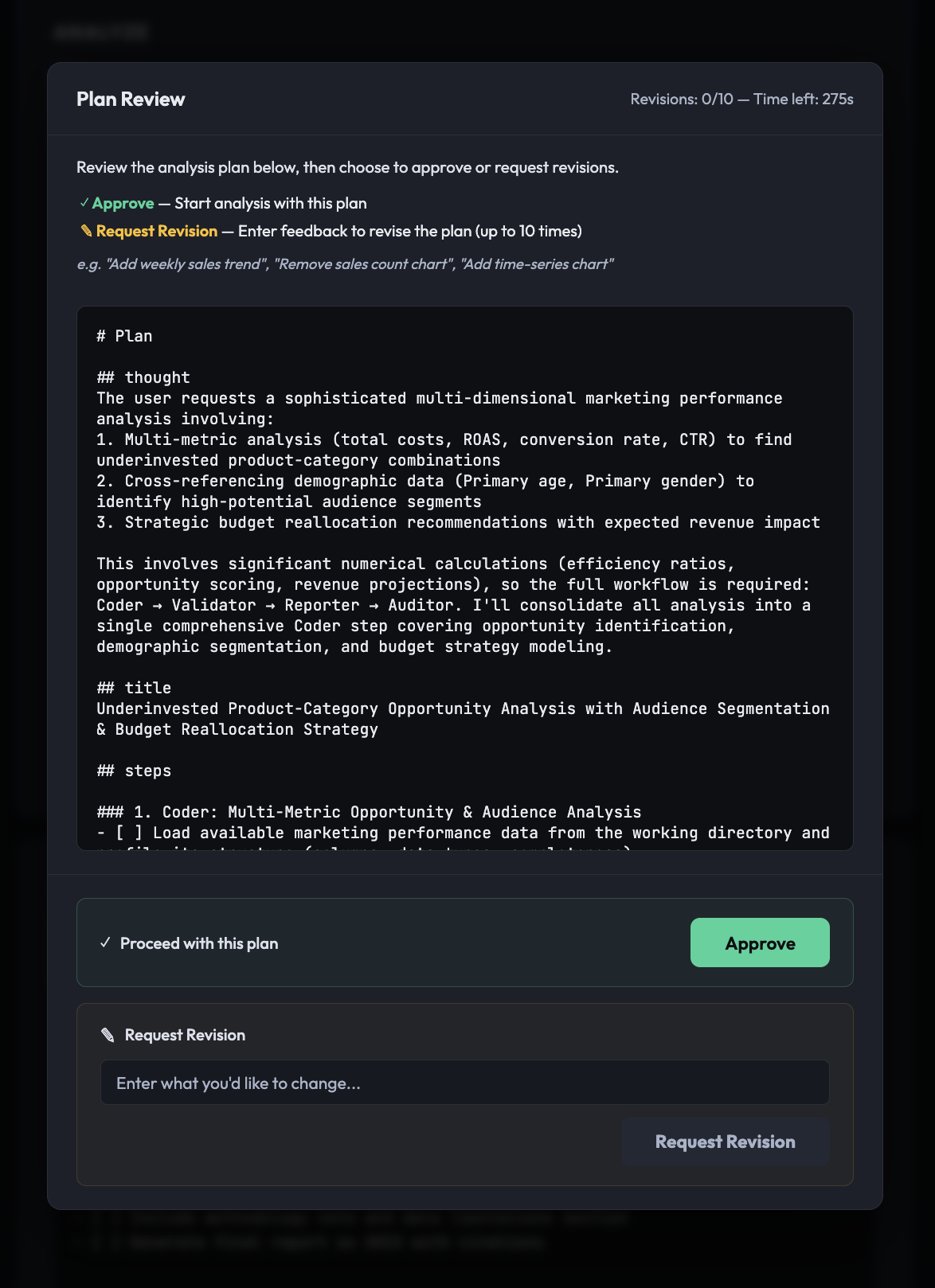
Figure 3: Plan Reviewer agent execution in the web UI
Without planning, the agent decides everything at runtime, a mid-course correction invalidates previous work, and users have no visibility into progress. With the Planner and Plan Reviewer, the user can review and revise the plan, monitor progress in real time, and re-execute only a failed step.
[2nd Layer] Supervisor (orchestrator): Specialized agents need a conductor
The Supervisor executes the Planner’s full_plan in order, invoking the Layer 3 agents (Coder, Validator, Reporter, Tracker) as tools registered on it through Tool Use.
# nodes.py: registering sub-agents as tools on the Supervisor
agent = strands_utils.get_agent(
    agent_name="supervisor",
    system_prompts=apply_prompt_template(prompt_name="supervisor", prompt_context={}),
    model_id=os.getenv("SUPERVISOR_MODEL_ID", os.getenv("DEFAULT_MODEL_ID")),
    prompt_cache_info=(True, "default"),
    tool_cache=True,
    tools=[coder_agent_tool, reporter_agent_tool, tracker_agent_tool, validator_agent_tool],
    streaming=True,
)
The Supervisor’s system prompt defines strict workflow rules:
- Mandatory execution order: Coder, Tracker, Validator, Tracker, Reporter, Tracker: after each agent runs, Tracker is invoked to track progress, letting the Supervisor manage overall task state.
- Section completion rule: The Supervisor does not move to the next agent until all checklist items for the current agent are marked [x].
- Context preservation: The Supervisor passes clues and full_plan variables to each tool agent, maintaining full context and preventing information loss.
[3rd Layer] Coder, Validator, Reporter, Tracker: Division of labor drives quality
Each Layer 3 agent (Coder, Validator, Reporter, Tracker) is wrapped as a PythonAgentTool and receives Tool Use calls from the Supervisor. Each is created as an independent Agent() instance in the Strands SDK with its own system prompt, model ID, and toolset.
| Agent | Role | Tools | Key Output |
|---|---|---|---|
| Coder | Data analysis, chart generation, insight derivation | write_and_execute_tool, bash_tool, file_read, skill_tool | *.png charts, calculation_metadata.json |
| Validator | Numerical calculation re-verification, citation generation | write_and_execute_tool, bash_tool, file_read | citations.json, validation_report.txt |
| Reporter | DOCX report generation | write_and_execute_tool, bash_tool, file_read | final_report.docx, final_report_with_citations.docx |
| Tracker | Checklist progress status updates | None (LLM reasoning only) | Updated full_plan |
The Supervisor invokes Tool Use calls in this order, based on the Planner’s checklist:
- Coder – Loads data, writes and runs analysis code, produces PNG charts, accumulates results in all_results.txt, and leaves
calculation_metadata.jsonfor verification. - Tracker (1st pass) – Updates completed checklist items from [ ] to [x], which the Supervisor uses to decide whether to proceed.
- Validator – Re-performs each calculation in
calculation_metadata.jsonfrom the source data. Matches within 0.01 pass, mismatches are flagged. Verified calculations go tocitations.jsonfor the Reporter to cite. - Tracker (2nd pass) – Reflects the Validator’s completion status in the checklist.
- Reporter – Reads all_results.txt and
citations.jsonto generate the final DOCX report in two versions, with and without citations. - Tracker (3rd pass) – Reflects the final completion status of all tasks.
Tracker runs after every agent so the Supervisor can track progress and enforce the completion rule (no moving on until all items are [x]). Because it updates the checklist with LLM reasoning and no tools, it adds little overhead.
Per-agent LLM model configuration
Deep Insight tailors the model and settings to each agent’s role. This isn’t a model selection. It’s an architectural decision to optimize cost and quality.
| Agent | Model | Extended Thinking | Prompt Caching | Role |
|---|---|---|---|---|
| Coordinator | Haiku | Disabled | No | Fast routing: cost minimization |
| Planner | Opus | Enabled (~8,192 tokens) | No | Deep thinking: high-quality planning |
| Supervisor | Sonnet | Disabled | Yes | Execution orchestration: caching for cost savings |
| Coder | Sonnet | Disabled | Yes | Code generation/execution: caching effective for repeated calls |
| Validator | Sonnet | Disabled | No | Numerical verification: different data each time, caching unnecessary |
| Reporter | Sonnet | Disabled | Yes | Report generation: caching effective for long prompts |
| Tracker | Sonnet | Disabled | No | Status updates: lightweight tasks, caching unnecessary |
The Supervisor, Coder, and Reporter agents use Prompt Caching to cache their system prompts and tool definitions, reducing input token costs by up to 90 percent on repeated calls. The Coordinator runs only once, and the Validator and Tracker run with different contexts each time, so caching is ineffective for them and stays disabled. This selective caching strategy is a deliberate cost/performance trade-off.
Solution detail 2: Production deployment and operations
If Solution detail 1 defined what the system does , this section defines where and how it runs safely. Everything from here on covers infrastructure decisions for production operations. Specifically, this section covers the secure execution environment for LLM-generated code, and operational visibility for the team.
1. Code execution: LLM-generated code needs a secure execution environment
The Coder agent writes and runs Python for data analysis. In the Self-Hosted version it runs locally through subprocess.run(), but in production (AgentCore) security and isolation are essential. Running LLM-generated code directly on a production server is risky: the model might delete system files, exhaust resources in an infinite loop, or reach other users’ analysis data. Deep Insight solves this with per-session ephemeral containers on AWS Fargate and ALB. These components don’t run in isolation. As shown in Figure 1, AgentCore runtime, the ALB, and the Fargate tasks all run inside the same private VPC. VPC endpoints connect them to Amazon Simple Storage Service (Amazon S3), Amazon Bedrock, and Amazon Elastic Container Registry (Amazon ECR) without traversing the public internet. Security groups restrict which components can reach the Code Interpreter containers. AWS Identity and Access Management (IAM) roles scope each component to only the AWS resources it needs. Amazon CloudWatch collects container logs and observability data from AgentCore Observability, a capability of Amazon Bedrock AgentCore.
- Custom container Docker image: A pre-optimized sandbox with fonts, system libraries, and Python packages for the multi-agent system.
- Container isolation: Each analysis session gets an independent Fargate container in a private VPC subnet with no direct internet access.
- 2-step execution: LLM-generated code is base64-encoded, sent over HTTP, written to a file (Step 1), then executed through subprocess (Step 2).
- Session affinity: ALB sticky session cookies route an agent back to the same container even when it executes code multiple times.
- Artifact management: Charts, reports, and logs upload to Amazon S3 when analysis completes. Containers terminate automatically after one hour.
Container isolation protects the infrastructure, but it doesn’t govern what the agents generate. The Validator agent re-verifies calculations. It doesn’t detect prompt-injection instructions hidden in uploaded data or screen LLM-generated text for harmful or ungrounded content. For production deployments, we recommend adding Amazon Bedrock Guardrails as a responsible AI control: apply content filters and prompt attack detection to user prompts and uploaded data, and apply contextual grounding checks to agent outputs so that report text stays grounded in the source data and verified calculations.
2. Operations and monitoring: Teams need visibility
A production system isn’t complete with code alone. The team must assess system health, diagnose issues, and review results, so Deep Insight provides a Web UI and an Ops dashboard.
Web UI (deep-insight-web)
A FastAPI-based web interface that communicates with the backend through the AgentCore Native Protocol (boto3.invoke_agent_runtime()). Users upload data and enter a prompt, then monitor progress through Server-Sent Events (SSE) streaming. When the plan is generated, a modal lets the user approve or give revision feedback (HITL). The finished report can be downloaded directly. Both Korean and English are supported.
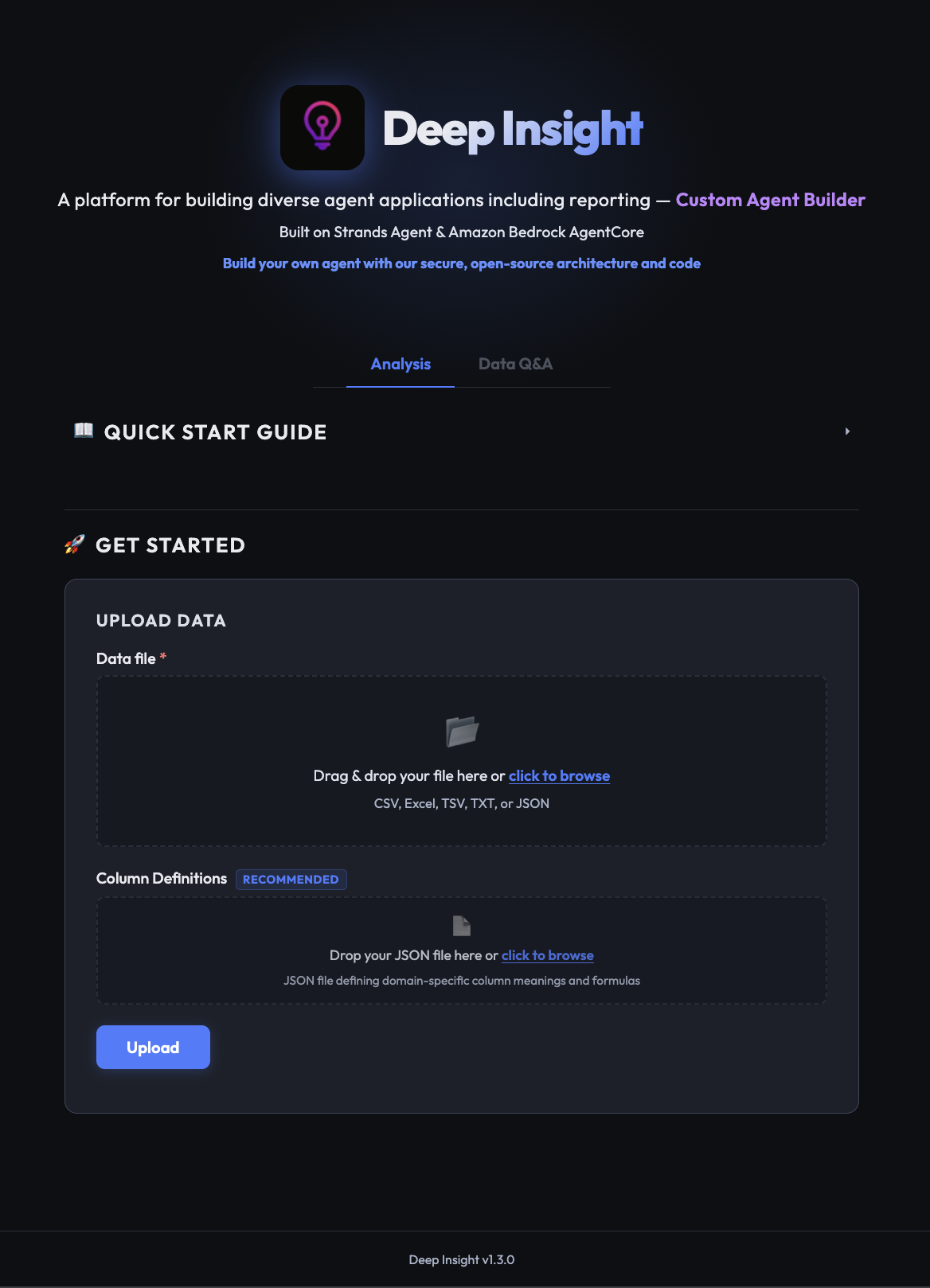
Figure 4: Deep Insight web version screenshot
Ops dashboard (deep-insight-web/ops)
The Ops dashboard is optional. Deep Insight works fine without it, but it adds these features for teams that need them:
- Task tracking: All analysis task metrics, including status, token usage, and elapsed time, are recorded in Amazon DynamoDB.
- Failure alerting: When an analysis fails, an email is immediately sent to administrators through Amazon SNS.
- Admin dashboard: A dedicated admin dashboard is protected by JSON Web Token (JWT) authentication through Amazon Cognito for secure task monitoring.
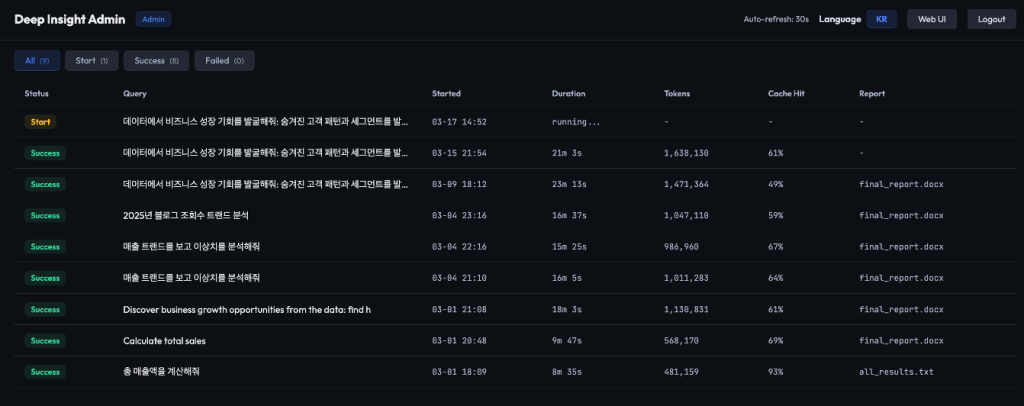
Figure 5: Deep Insight Ops dashboard screenshot
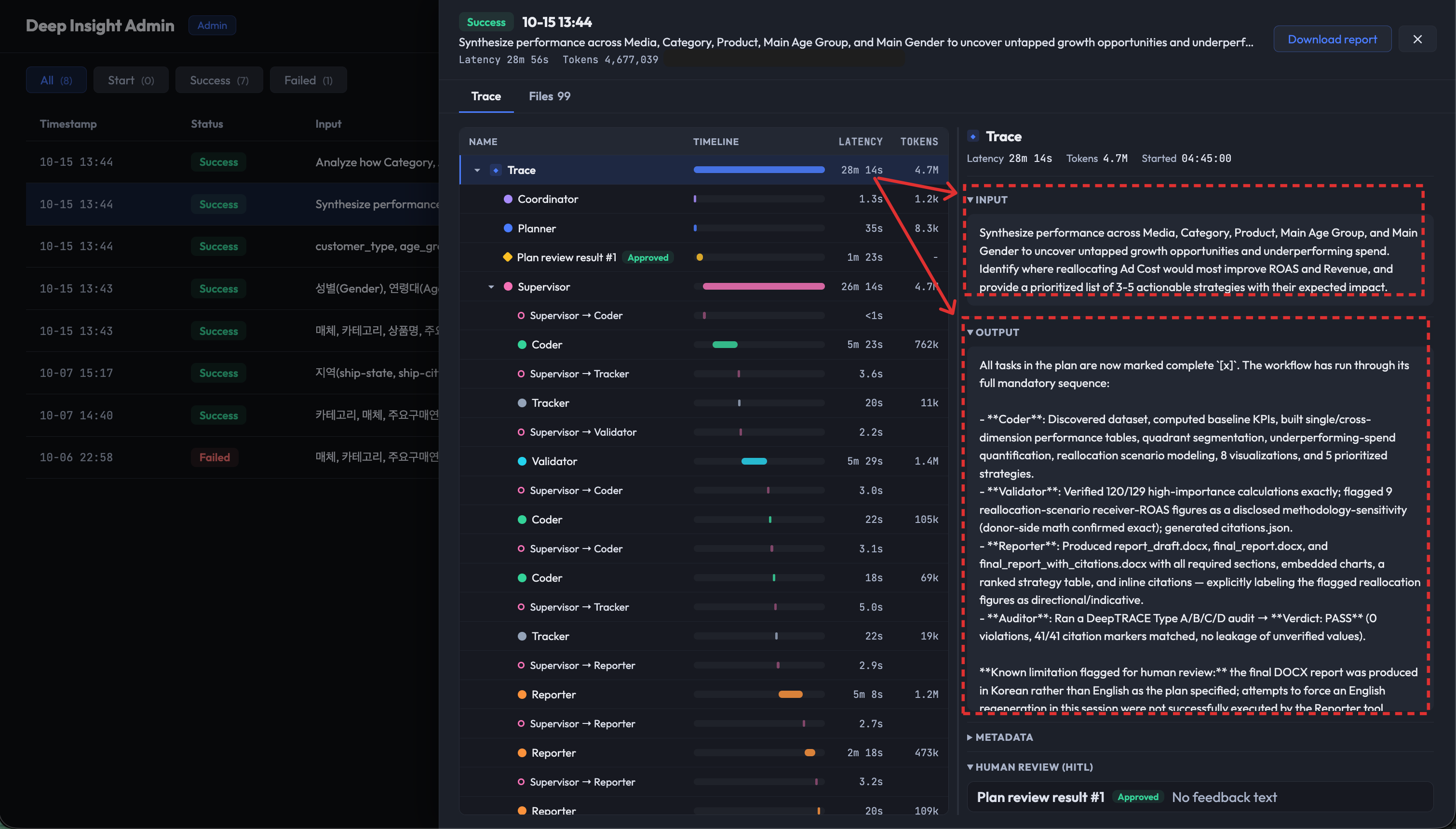
Figure 6: Deep Insight Ops dashboard detail view
Extending the Deep Insight architecture
Deep Insight’s multi-agent architecture isn’t confined to the single domain of data analysis report generation. The following two examples demonstrate that the hierarchical orchestration design principles remain effective in entirely different domains.
LG Electronics’ Korea Sales Division built ChatInsight on the same multi-agent architecture as Deep Insight, where data analysis requests had taken 2–3 weeks and lost intent between marketers and data scientists. The Coordinator routes by complexity, the Planner tracks tasks, and the Supervisor orchestrates the Coder and Reporter, with inter-agent state passed cumulatively through an all_results.txt file. Analysis that took 3 days now takes 30 minutes, a 288x productivity improvement. Marketers who don’t know SQL can let the agent explore data and propose strategies (see the LG Electronics Agentic AI Insight Extraction System on the AWS Tech Blog).
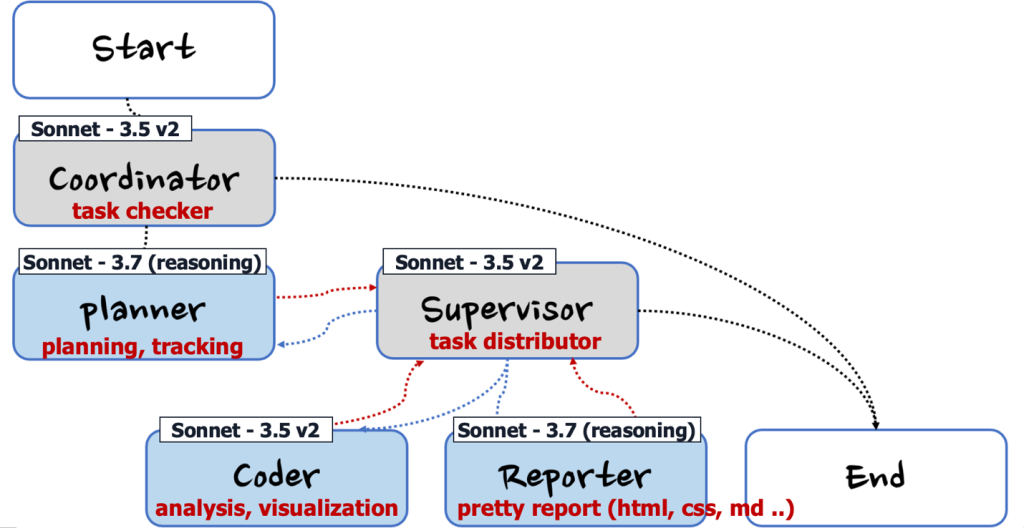
Figure 7: LG Electronics Agentic AI marketing insight system architecture
Case 2: TechRecon: AI-powered technology reconnaissance agent (re:Invent 2025)
Presented at AWS re:Invent 2025 (session SNR203), TechRecon applies Deep Insight’s architecture to technology strategy. Given a company and sector, a Researcher gathers technology trends, the Coder analyzes, the Validator verifies, and the Reporter produces a Landscape Analysis and a Technical Position Paper. The architecture is nearly identical to Deep Insight, built with the Strands Agents SDK Graph pattern and Extended Thinking and Prompt Caching, with Researcher replacing Coder as the primary execution agent. It shows the design is a general-purpose pattern: swap the agents’ roles and prompts, and the same orchestration structure solves entirely different problems.
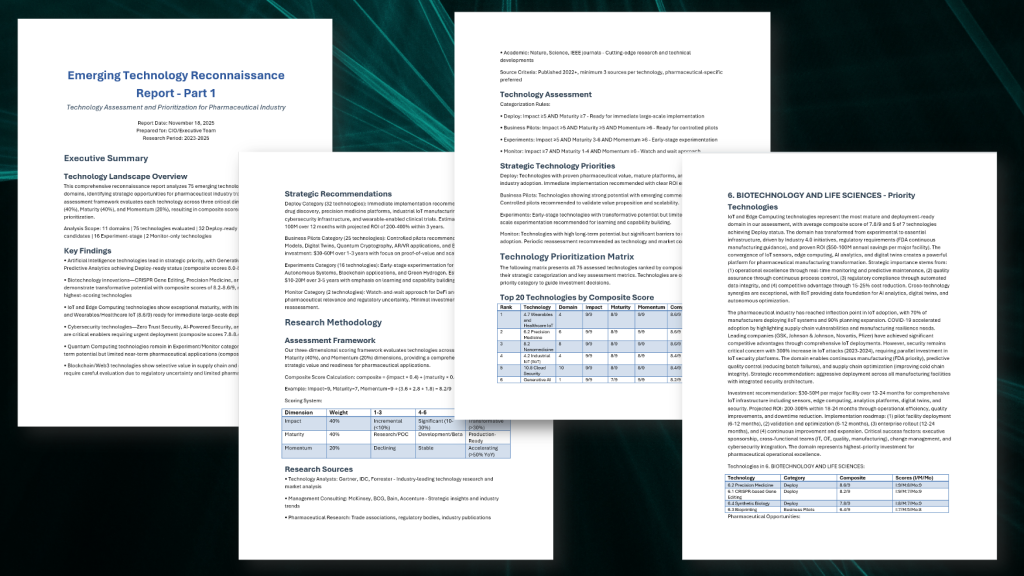
Figure 8: TechRecon results
(Read more: TechRecon GitHub | AWS re:Invent Session Video)
Conclusion
Building an agent that works in production is not a matter of model capability. It’s a matter of architecture. Deep Insight offers a proven answer:
- Workflow management: The Strands Agents SDK’s Graph pattern defines execution order between agents and implements HITL branching, while the Agents-as-Tools pattern lets the Supervisor invoke specialized agents only when needed.
- Reasoning engine: We assign Claude models from Amazon Bedrock by role (Haiku, then Opus, then Sonnet) to optimize cost and quality.
- Deployment: Amazon Bedrock AgentCore provides a managed runtime with session isolation, private VPC deployment, and OpenTelemetry observability.
- Code execution: Application Load Balancer plus Amazon Elastic Container Service (Amazon ECS) on Fargate isolates LLM-generated code execution in per-session ephemeral sandbox containers, preventing security issues such as system file access, resource exhaustion, and unintended data disclosure.
- Operations: The Web UI’s SSE streaming and the Ops dashboard (DynamoDB + Cognito + SNS) provide visibility across the entire team.
LG Electronics’ marketing insight system and the TechRecon case at re:Invent 2025 validated these design principles.
In Part 2, we examine four layers of Context Engineering techniques for overcoming context-window limits on top of this architecture, from architecture-level isolation to prompt design, tool optimization, and verification safeguards, comparing our approach with Anthropic’s engineering research.
Deep Insight is open source. Explore the code and extend it for your own domain.
About the authors
Yoonseo Kim
Yoonseo is a Solutions Architect who helps customers solve business challenges using AWS technologies. With a strong interest in AI/ML, she focuses on helping customers design and optimize agentic AI workloads, along with supporting infrastructure and evaluation environments.
Jesam Kim
Jesam is a Solutions Architect who helps enterprise customers adopt cloud technologies and solve business challenges. With a focus on AI/ML, including recommendation systems and generative AI, he helps customers design architectures that meet their business needs.
Jiyun Park
Jiyun is a Solutions Architect who helps customers in the software and internet industries migrate their workloads to the cloud. She works with customers to design cloud solutions that help them achieve their business goals.
Kyutae Park
Kyutae, Ph.D. is an AI Specialist Solutions Architect who helps customers across industries design and build applied AI workloads, drawing on extensive experience in machine learning, MLOps, and agentic AI. He focuses on intelligent automation and operational innovation through agentic AI, bringing autonomous decision-making and multi-agent collaboration architectures into real-world business environments. Through this work, he helps customers use AWS AI/ML services and applied generative AI to achieve tangible business outcomes and build a sustainable competitive advantage.
Gonsoo Moon
Gonsoo is an AI/ML Specialist Solutions Architect at AWS. Drawing on experience across diverse AI/ML use cases and production deployments, he works closely with customers to solve their AI/ML challenges. He also shares AI/ML knowledge with data scientists, developers, and analysts, aiming to contribute to positive change in Korea and around the world.
Chloe Kwak
Chloe is a Senior Solutions Architect on the Korea Retail team at Amazon Web Services. She helps retail and e-commerce customers in Korea design scalable, cost-effective cloud architectures and adopt AI/ML services to accelerate their business outcomes.