基于 Strands Agents 的自适应智能体架构(AAIF):本地 SLM 与云端大模型的智能协同分流
英文标题:Adaptive agentic intelligence framework using Strands Agents
当前构建 AI Agent 的企业普遍面临单次请求成本高、延迟不确定以及无法离线运行的挑战。基于 Strands Agents 构建的自适应智能体架构(AAIF)提出了一种分级处理新方案:利用端侧运行的小语言模型(SLM)处理日常状态检查与视觉分析,仅将复杂的跨领域分析和多步推理路由至 Amazon Bedrock 云端模型。实践表明,该架构能将约 80% 的常规流量截留在本地,不仅显著降低了 API 调用成本并实现低延迟,还支持在树莓派等边缘设备、混合云及纯离线网络间灵活适配,为工业级 Agent 系统的工程化落地提供了重要参考。
 1.3 MB
 1.3 MB
 2.4 KB
 345.0 KB
 141.2 KB
 346.5 KB
 370.7 KB
 159.5 KB
 128.8 KB
 25.5 KB
 28.4 KB
 221.2 KB
中文
构建 AI Agent 的企业普遍面临一个共同挑战:无论是常规状态检查还是复杂的综合分析,每个请求通常都会被路由至单一且昂贵的大模型。这种“一刀切”的方式不仅推高了 API 成本,引入了不可预测的网络延迟,还彻底剥夺了离线运行的可能性。即便那些完全可以在本地解决的例行查询,也必须经历一次往返云端大语言模型(LLM)的完整网络开销。
基于 Strands Agents 构建的自适应智能体架构(Adaptive Agentic Intelligence Framework,简称 AAIF)采取了截然不同的思路。AAIF 没有将所有请求一股脑交给单一大型模型,而是采用小语言模型(SLM)在本地处理日常任务;更复杂的请求则通过 Amazon Bedrock 路由至云端托管模型。该方案借鉴了 NVIDIA Belcak 等人的研究观点,他们认为在智能体系统的诸多调用场景中,小语言模型“性能足够强劲、天然更为契合,且必然更加经济”。基于 Strands Agents 构建的这套架构展示了智能模型编排如何在保持本地操作低延迟的同时有效降低成本。
在本文中,我们将以物联网(IoT)监控场景作为参考实现,深入拆解 AAIF 的核心组件,演示如何结合通过 Ollama 运行的本地 SLM 与 Amazon Bedrock 云端模型共同构建该系统。
方案概述
如图 1 所示,AAIF 将 AI 处理划分为三层,每层均针对不同的任务类型进行了优化:
- 智能编排层:使用轻量级 SLM(llama3.2:1b)作为决策中枢。该编排器负责对传入请求进行分类,并在无需硬编码规则的前提下将其路由到合适的处理层。
- 本地处理层:通过 Ollama 在本地硬件上运行 SLM,处理设备遥测数据检索和图像分析等日常任务。此类任务延迟极低,且完全不依赖云端。
- 云端处理层:通过 Amazon Bedrock 中的前沿模型处理复杂的模式分析和战略建议。这些请求需要更广泛的上下文和多步推理能力,而这通常是 SLM 无法稳定提供的。
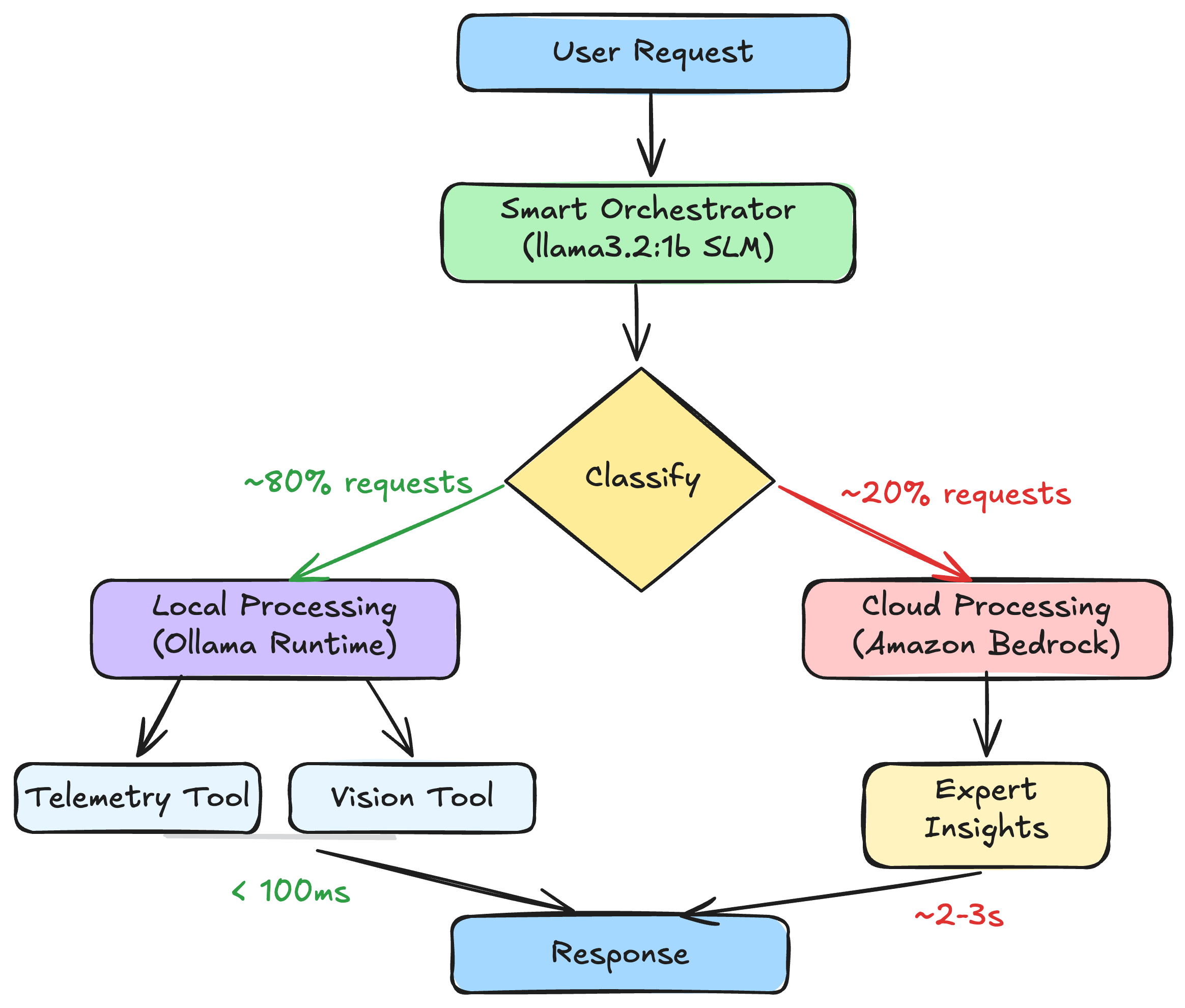
图 1:涵盖智能编排、本地处理和云端处理的 AAIF 三层处理架构
图 1 展示了完整的 AAIF 系统架构。核心部分是 Strands agent,它连接到托管了 1B 参数编排模型和视觉模型的 Ollama 运行时。该 Agent 对外暴露三个工具:用于本地传感器数据检索的 get_device_telemetry、通过 llama3.2-vision 进行端侧视觉处理的 analyze_camera_feed,以及通过 boto3 调用 Amazon Bedrock 执行复杂分析的 get_expert_insights。用户请求进入后,由 SLM 编排器对其进行分类,并依据任务复杂度分派给本地工具或云端接口。
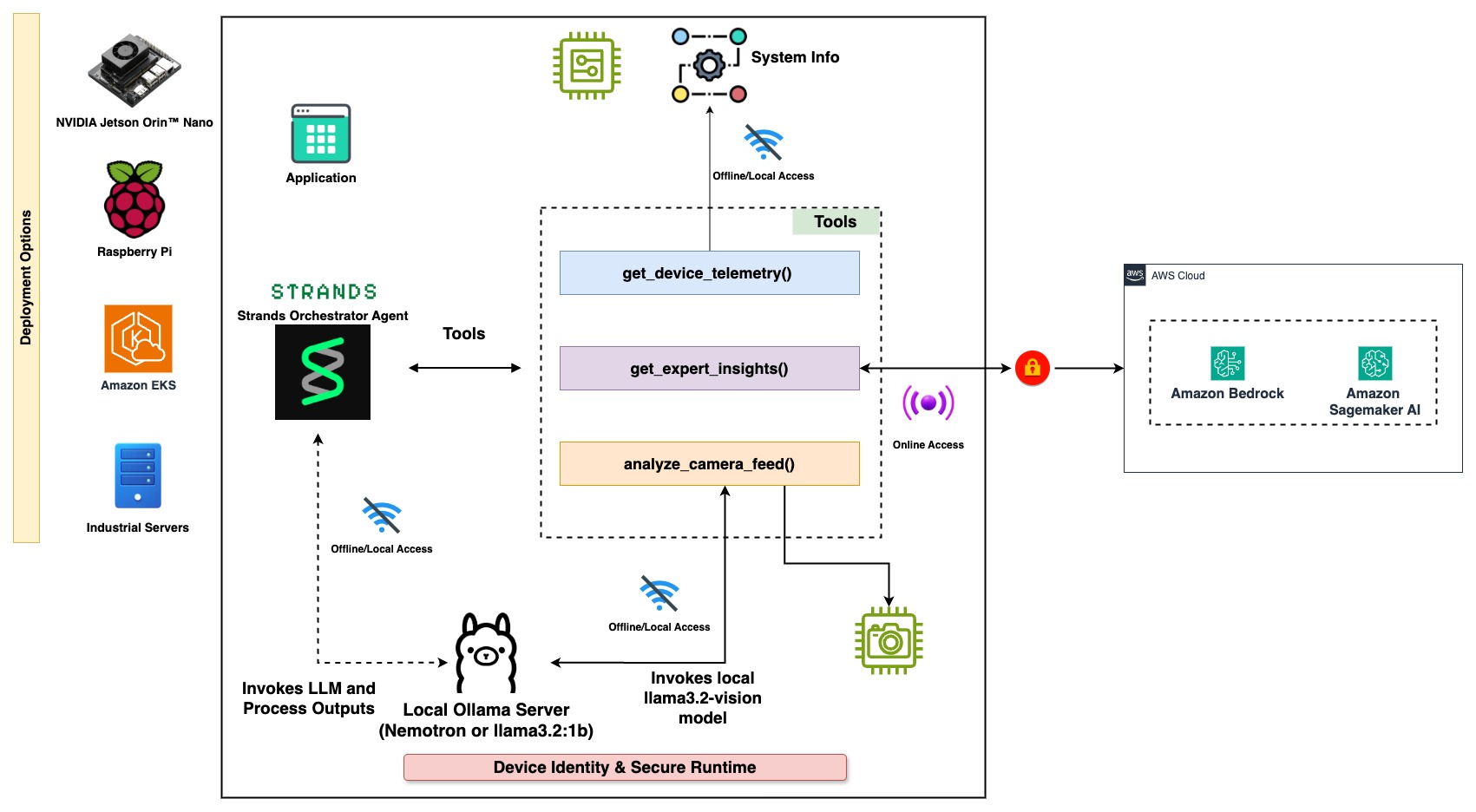
图 2:完整的 AAIF 系统架构,展示 Strands agent、Ollama 运行时、工具集成以及 Amazon Bedrock 的连通性
该框架能够自适应配合现有的部署环境约束,而非强迫用户推倒重建基础设施。该架构既能运行在配备 8GB 内存的树莓派等边缘设备上,也能部署在所有推理均走 Amazon Bedrock 的全云端环境,亦或是结合本地高速度与云端高推理能力的混合配置中。这种灵活性源于路由逻辑(SLM 编排器)与处理工具的解耦设计,你可以根据可用硬件和网络连接条件独立更换或重构这些组件。
前提条件
在开始本教程之前,你需要准备好以下环境与资源:
环境搭建
创建项目目录并启动 Ollama 服务:
mkdir aaif-demo && cd aaif-demo ollama serve
拉取所需模型:
ollama pull llama3.2:1b ollama pull llama3.2-vision
新建名为 aaif_agent.py 的文件,并添加以下组件。
Strands Agents 使用 @tool 装饰器定义 Agent 可调用的能力。首先从创建本地处理工具开始。
第一个工具负责获取设备遥测数据。在生产环境中,该工具会连接真实的 IoT 传感器;在本次演练中,我们使用模拟数据:
from strands import Agent, tool import random
DEVICE_TELEMETRY = { "sensor-001": { "device_type": "Temperature Sensor", "location": "Building A - Floor 2", "temperature": 72.5, "humidity": 45.2, "status": "normal" }, "camera-001": { "device_type": "Security Camera", "location": "Main Entrance", "fps": 30, "resolution": "1080p", "status": "recording" }, "hvac-001": { "device_type": "HVAC Controller", "location": "Building A - Central", "set_temp": 71.0, "current_temp": 72.5, "mode": "cooling", "status": "active" } }
@tool def get_device_telemetry() -> str: """Retrieve current telemetry data from connected IoT devices.""" device_id = random.choice(list(DEVICE_TELEMETRY.keys())) device_data = DEVICE_TELEMETRY[device_id]
report = f"Device: {device_id} ({device_data['device_type']})\n"
report += f"Location: {device_data['location']}\n"
report += f"Status: {device_data['status']}\n"
for key, value in device_data.items():
    if key not in ['device_type', 'location', 'status']:
        report += f"{key}: {value}\n"
return report
第二个工具使用本地 SLM 执行视觉分析。llama3.2-vision 模型完全在本地硬件上运行,这意味着敏感的摄像头监控画面无需离开设备:
import ollama
@tool def analyze_camera_feed(image_path: str) -> str: """Analyze visual data from cameras using local vision model.""" stream = ollama.chat( model='llama3.2-vision', messages=[{ 'role': 'user', 'content': 'Describe this image in one sentence. ' 'What are the 3 most important things you see?', 'images': [image_path] }], stream=True, )
full_response = ""
for chunk in stream:
    chunk_content = chunk['message']['content']
    print(chunk_content, end='', flush=True)
    full_response += chunk_content

return f"Object Detection Report:\n{full_response}"
实现云端处理
对于需要更强推理能力的复杂分析任务,创建一个调用 Amazon Bedrock 的工具。只有当编排器判定本地模型无法处理该请求时,才会调用此工具:
import boto3
@tool def get_expert_insights(context_data: str, question: str) -> str: """Get advanced analysis and expert recommendations for complex questions via Amazon Bedrock.""" client = boto3.client("bedrock-runtime", region_name="us-east-1")
conversation = [
    {
        "role": "user",
        "content": [
            {"text": f"Context: {context_data}\n\nQuestion: {question}"}
        ],
    }
]

response = client.converse(
    modelId="<<model_id>", //Refer model id [details](https://docs.aws.amazon.com/bedrock/latest/userguide/foundation-models-reference.html)
    messages=conversation,
    inferenceConfig={
        "maxTokens": 512,
        "temperature": 0.5,
        "topP": 0.9
    }
)

response_text = response["output"]["message"]["content"][0]["text"]
return f"Expert Analysis:\n{response_text}"
为 Strands Agent 配置智能编排
AAIF 的核心在于 Strands Agent 的配置。该 Agent 采用本地 SLM(llama3.2:1b)作为编排器。Strands Agents 支持多种模型提供商,这里我们使用 Ollama provider 在本地运行编排模型:
from strands.models.ollama import OllamaModel
model = OllamaModel( model_id="llama3.2:1b", host="http://localhost:11434", params={ "max_tokens": 300, "temperature": 0.3, }, )
system_prompt = """You are a monitoring assistant for operational facilities. You have access to device telemetry tools, analysis capabilities, and expert insights to help monitor operations effectively.
When users ask for:
- Device status or telemetry: use get_device_telemetry
- Image or data analysis: use analyze_camera_feed
- Expert advice or complex questions: use get_expert_insights
Always return the complete tool results directly to the user."""
agent = Agent( model=model, system_prompt=system_prompt, tools=[ get_device_telemetry, analyze_camera_feed, get_expert_insights, ], )
基于 SLM 的编排器会深入分析每个请求,无需硬编码关键字匹配即可将其分流至对应工具。整个路由决策完全依赖于模型对请求语意的理解:
| 请求 | 路由方式 | 延迟 |
|---|---|---|
| “检查设备状态” | 本地 SLM | 低(本地推理) |
| “分析此图像” | 本地视觉 AI | 低(本地推理) |
| “你建议采取哪些优化策略?” | 云端(Amazon Bedrock) | 较高(网络往返) |
表 1:本地推理与云端推理的请求、路由及预估延迟对比
运行 Agent
完成 Agent 配置后,你可以直接与其进行交互:
本地处理 - 设备遥测
response = agent("What's the current status of our devices?") print(response)
本地处理 - 视觉分析
response = agent("Analyze the camera feed from camera-001") print(response)
云端处理 - 复杂分析
response = agent( "Based on current telemetry patterns, " "what optimization strategies do you recommend?" ) print(response)
Agent 会自动对每个请求进行分类并将其路由至最合适的处理层,整个过程不需要配置任何显式路由规则。
适配不同的部署场景
通过调整模型配置,AAIF 架构可弹性适配不同的基础设施需求:
当你的业务负载完全运行在云端且没有边缘硬件可用时,只需将 Ollama 模型配置替换为 Amazon Bedrock。此时所有请求都会经由托管的云端推理处理,无需本地 GPU 资源即可享受弹性扩缩容优势。拥有可靠低延迟网络连接且无数据驻留合规限制的团队最适合采用该方案:
from strands.models import BedrockModel
model = BedrockModel( model_id="<<model_id>", //Refer model id details region_name="us-east-1" )
混合配置则保留了本地 SLM 编排器,同时引入云端大模型来承接超出本地能力范畴的复杂请求。这也是本教程所演示的 AAIF 默认形态。它非常契合大多数请求足够简单可本地解决、少数请求需要更强通用推理能力的业务环境。高达约 80% 的请求不必命中付费云端 API,从而带来显著的成本节约。
针对完全处于物理隔离(air-gapped)环境或有严苛数据主权要求的场景,可以用更大规模的本地模型替换云端工具,将所有计算留在端侧完成。在内存充足的硬件上运行 3B 参数模型,足以胜任原本需要 1B 编排器上报升级的中等复杂度任务。尽管在处理最顶尖的极端难题时推理深度会略有折损,但其换来的是敏感数据绝不出境的绝对安全保障:
model = OllamaModel( model_id="llama3.2:3b", # 用于处理复杂任务的更大规模本地模型 host="http://localhost:11434", )
本文示例中采用的是在 Agent 代码内直接定义本地工具调用的方式。若在生产环境中面临多 Agent 跨服务共享工具的场景,建议将这些工具封装为模型上下文协议(Model Context Protocol,MCP)服务端。MCP 提供了工具发现与调用的标准化接口,便于实现工具的集中管控以及在不同 Agent 和环境间的复用。在图 3 中,我们展示了如何将 AAIF 工具转换为 MCP 服务器以支持分布式、集中式的工具调用。
如图 3 所示的分布式配置中,设备 1 作为编排中心,运行搭载 SLM 路由器的 Strands agent 及本地遥测工具;通过 MCP 协议,它连接到作为边缘视觉处理服务器运行 llama3.2-vision 的设备 2;而设备 3 则充当连接到 Amazon Bedrock 的云端分析网关。从
English / 原文
Organizations building AI agents face a common challenge: Every request, whether a routine status check or complex analysis, typically gets routed to a single large, expensive model. This one-size-fits-all approach can drive up API costs, introduce unpredictable latency, and remove the possibility of offline operation. Even routine queries that could resolve locally end up requiring a full network round-trip to a cloud-hosted large language model (LLM).
The Adaptive Agentic Intelligence Framework (AAIF), built with Strands Agents, takes a different approach. Instead of routing all requests to a single large model, AAIF uses small language models (SLMs) to handle routine tasks locally. More complex requests are routed to cloud-hosted models through Amazon Bedrock. This approach builds on the research position from Belcak et al. at NVIDIA. They argue that small language models are “sufficiently powerful, inherently more suitable, and necessarily more economical for many invocations in agentic systems.” Built on Strands Agents, the framework demonstrates how intelligent model orchestration can help reduce costs while maintaining low latency for local operations.
In this post, we walk through the key components of AAIF using Strands Agents with local SLMs through Ollama and cloud models through Amazon Bedrock. We use an Internet of Things (IoT) monitoring scenario as a reference implementation.
Solution overview
AAIF organizes AI processing into three layers, each optimized for different task types, as Figure 1 shows:
- Smart orchestration uses a lightweight SLM (llama3.2:1b) as the decision-making layer. This orchestrator classifies incoming requests and routes them to the appropriate processing layer without hardcoded rules.
- Local processing handles routine tasks like device telemetry retrieval and image analysis using SLMs running on local hardware through Ollama. These tasks complete with low latency and no cloud dependency.
- Cloud processing handles complex pattern analysis and strategic recommendations through frontier models in Amazon Bedrock. These requests need broader context and multi-step reasoning that SLMs cannot reliably provide.
Figure 1: The three AAIF processing layers for smart orchestration, local processing, and cloud processing
Figure 1 shows the complete AAIF system architecture. At the center sits the Strands agent, which connects to an Ollama runtime hosting both the 1B-parameter orchestrator model and the vision model. The agent exposes three tools: get_device_telemetry for local sensor data retrieval, analyze_camera_feed for on-device vision processing through llama3.2-vision, and get_expert_insights which calls Amazon Bedrock through boto3 for complex analysis. Incoming user requests flow through the SLM orchestrator, which classifies each request and dispatches it to either a local tool or the cloud endpoint based on task complexity.
Figure 2: Complete AAIF system architecture showing the Strands agent, Ollama runtime, tool integrations, and Amazon Bedrock connectivity
The framework adapts to your deployment constraints rather than requiring you to restructure your infrastructure around it. This architecture runs on edge devices like a Raspberry Pi with 8 GB of memory, in full cloud deployments where all inference hits Amazon Bedrock, or in hybrid configurations that combine local speed with cloud reasoning. The flexibility comes from separating the routing logic (the SLM orchestrator) from the processing tools, which you can swap or reconfigure independently depending on available hardware and network connectivity.
Prerequisites
For this walkthrough, you should have the following prerequisites:
Set up the environment
Create a project directory and start the Ollama server:
mkdir aaif-demo && cd aaif-demo
ollama serve
Pull the required models:
ollama pull llama3.2:1b
ollama pull llama3.2-vision
Create a file called aaif_agent.py and add the following components.
Strands Agents uses the @tool decorator to define capabilities that agents can invoke. Start by creating tools for local processing.
The first tool retrieves device telemetry data. In a production environment, this would connect to actual IoT sensors. For this walkthrough, it uses simulated device data:
from strands import Agent, tool
import random

DEVICE_TELEMETRY = {
    "sensor-001": {
        "device_type": "Temperature Sensor",
        "location": "Building A - Floor 2",
        "temperature": 72.5,
        "humidity": 45.2,
        "status": "normal"
    },
    "camera-001": {
        "device_type": "Security Camera",
        "location": "Main Entrance",
        "fps": 30,
        "resolution": "1080p",
        "status": "recording"
    },
    "hvac-001": {
        "device_type": "HVAC Controller",
        "location": "Building A - Central",
        "set_temp": 71.0,
        "current_temp": 72.5,
        "mode": "cooling",
        "status": "active"
    }
}

@tool
def get_device_telemetry() -> str:
    """Retrieve current telemetry data from connected IoT devices."""
    device_id = random.choice(list(DEVICE_TELEMETRY.keys()))
    device_data = DEVICE_TELEMETRY[device_id]

    report = f"Device: {device_id} ({device_data['device_type']})\n"
    report += f"Location: {device_data['location']}\n"
    report += f"Status: {device_data['status']}\n"
    for key, value in device_data.items():
        if key not in ['device_type', 'location', 'status']:
            report += f"{key}: {value}\n"
    return report
The second tool performs vision analysis using a local SLM. The llama3.2-vision model runs entirely on local hardware, which means sensitive camera feeds don’t leave the device:
import ollama

@tool
def analyze_camera_feed(image_path: str) -> str:
    """Analyze visual data from cameras using local vision model."""
    stream = ollama.chat(
        model='llama3.2-vision',
        messages=[{
            'role': 'user',
            'content': 'Describe this image in one sentence. '
            'What are the 3 most important things you see?',
            'images': [image_path]
        }],
        stream=True,
    )

    full_response = ""
    for chunk in stream:
        chunk_content = chunk['message']['content']
        print(chunk_content, end='', flush=True)
        full_response += chunk_content

    return f"Object Detection Report:\n{full_response}"
Implement cloud processing
For complex analysis that requires broader reasoning, create a tool that calls Amazon Bedrock. This tool is invoked only when the orchestrator determines that local models can’t handle the request:
import boto3

@tool
def get_expert_insights(context_data: str, question: str) -> str:
    """Get advanced analysis and expert recommendations
    for complex questions via Amazon Bedrock."""
    client = boto3.client("bedrock-runtime", region_name="us-east-1")

    conversation = [
        {
            "role": "user",
            "content": [
                {"text": f"Context: {context_data}\n\nQuestion: {question}"}
            ],
        }
    ]

    response = client.converse(
        modelId="<<model_id>", //Refer model id [details](https://docs.aws.amazon.com/bedrock/latest/userguide/foundation-models-reference.html)
        messages=conversation,
        inferenceConfig={
            "maxTokens": 512,
            "temperature": 0.5,
            "topP": 0.9
        }
    )

    response_text = response["output"]["message"]["content"][0]["text"]
    return f"Expert Analysis:\n{response_text}"
Configure the Strands agent with smart orchestration
The core of AAIF is the Strands agent configuration. The agent uses a local SLM (llama3.2:1b) as its orchestrator. Strands Agents supports multiple model providers, and here we use the Ollama provider to run the orchestrator locally:
from strands.models.ollama import OllamaModel

model = OllamaModel(
    model_id="llama3.2:1b",
    host="http://localhost:11434",
    params={
        "max_tokens": 300,
        "temperature": 0.3,
    },
)

system_prompt = """You are a monitoring assistant for operational facilities.
You have access to device telemetry tools, analysis capabilities,
and expert insights to help monitor operations effectively.

When users ask for:
- Device status or telemetry: use get_device_telemetry
- Image or data analysis: use analyze_camera_feed
- Expert advice or complex questions: use get_expert_insights

Always return the complete tool results directly to the user."""

agent = Agent(
    model=model,
    system_prompt=system_prompt,
    tools=[
        get_device_telemetry,
        analyze_camera_feed,
        get_expert_insights,
    ],
)
The SLM-powered orchestrator analyzes each request and routes it to the appropriate tool without hardcoded keyword matching. The routing happens through the model’s understanding of the request:
| Request | Routing | Latency |
|---|---|---|
| “Check device status” | Local SLM | Low (local inference) |
| “Analyze this image” | Local vision AI | Low (local inference) |
| “What optimization strategies do you recommend?” | Cloud (Amazon Bedrock) | Higher (network round-trip) |
Table 1: Request, routing, and latency estimates for local compared to cloud inference
Run the agent
With the agent configured, you can interact with it directly:
# Local processing - device telemetry
response = agent("What's the current status of our devices?")
print(response)

# Local processing - vision analysis
response = agent("Analyze the camera feed from camera-001")
print(response)

# Cloud processing - complex analysis
response = agent(
    "Based on current telemetry patterns, "
    "what optimization strategies do you recommend?"
)
print(response)
The agent automatically classifies each request and routes it to the appropriate processing layer. No explicit routing rules are needed.
Adapt to different deployment scenarios
The AAIF architecture adapts to different infrastructure requirements by changing the model configuration:
When your workload runs entirely in the cloud and no edge hardware is available, replace the Ollama model configuration with Amazon Bedrock for all processing. This routes every request through managed cloud inference, giving you auto scaling without requiring local GPU resources. Teams with reliable low-latency connectivity and no data residency constraints benefit most from this configuration:
from strands.models import BedrockModel

model = BedrockModel(
    model_id="<<model_id>", //Refer model id [details](https://docs.aws.amazon.com/bedrock/latest/userguide/foundation-models-reference.html)
    region_name="us-east-1"
)
The hybrid configuration keeps the local SLM orchestrator intact while adding cloud models for requests that exceed local model capabilities. This is the default AAIF configuration shown in this walkthrough. It suits environments where most requests are routine enough to resolve locally, but some require the broader reasoning of a larger model. Cost savings can come from the roughly 80 percent of traffic that doesn’t hit a paid API endpoint.
For environments that are fully air-gapped or have strict data sovereignty requirements, replace the cloud tool with a larger local model and run all processing on-device. A 3B-parameter model running on hardware with adequate memory can handle moderately complex tasks that the 1B orchestrator would otherwise escalate. The trade-off is reduced reasoning depth on the hardest queries, but the benefit is data not leaving the premises:
model = OllamaModel(
    model_id="llama3.2:3b", # Larger local model for complex tasks
    host="http://localhost:11434",
)
The implementation in this post uses local tool calls defined directly in the agent code. For production deployments with multiple agents sharing tools across services, expose these tools as Model Context Protocol (MCP) servers. MCP provides a standardized interface for tool discovery and invocation, so you can centralize tool management and reuse tools across different agents and environments. In Figure 3, we show how to convert AAIF tools into MCP servers for distributed, centralized tool calling.
In the distributed configuration as shown in Figure 3, Device 1 acts as the orchestrating hub, running the Strands agent with the SLM router and a local telemetry tool. It connects through the MCP protocol to Device 2, which runs an edge vision processing server with llama3.2-vision. Device 3 serves as a cloud analytics gateway connected to Amazon Bedrock. From the orchestrator’s perspective, all remote tools appear as local function calls because the MCP transport layer handles serialization and network communication transparently.
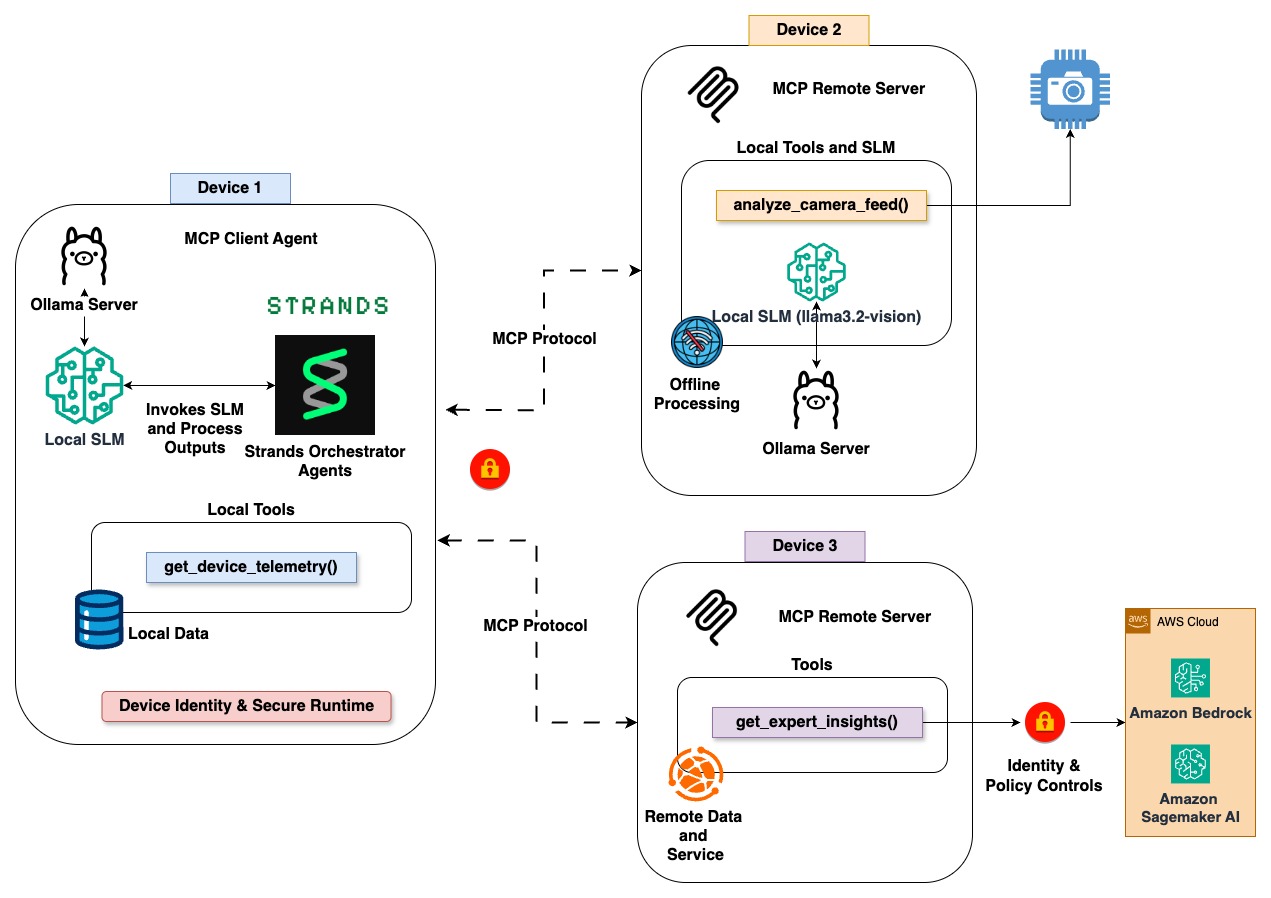
Figure 3: Distributed intelligence with MCP servers
Cleaning up
To avoid incurring future charges, complete the following cleanup steps:
-
Disable Amazon Bedrock model access: Open the Amazon Bedrock console, choose Model access , and revoke access for Amazon Nova Lite. For detailed steps, see Manage model access in the Amazon Bedrock User Guide.
-
Stop the Ollama server and remove models to free local disk space (approximately 2 GB):
ollama stop ollama rm llama3.2:1b ollama rm llama3.2-vision -
Delete the project directory if you no longer need the sample code:
Conclusion
We showed how to build cost-effective AI agents using the Adaptive Agentic Intelligence Framework with Strands Agents. By routing routine requests to local SLMs and reserving cloud models on Amazon Bedrock for complex analysis, AAIF can help reduce API costs while maintaining low latency for routine operations.
Before you run this pattern in production, add responsible AI controls to the cloud inference path, since those requests carry tool outputs, retrieved data, and user input. You can attach Amazon Bedrock Guardrails to the Strands BedrockModel with a guardrail ID and version. It then applies content filters for harmful categories, prompt injection filters, and contextual grounding checks that block responses not supported by the source data. To apply the same policies to the local SLM tier, call the standalone ApplyGuardrail API on its inputs and outputs. This way, every request follows one safety standard no matter which model handles it.
This architectural pattern applies beyond IoT monitoring. A healthcare organization could run patient monitoring locally while routing diagnosis support to cloud models. A financial services firm could process transactions on-premises and reserve cloud capacity for risk analysis. A manufacturing team could run quality control vision models at the edge while sending optimization requests to the cloud.
To learn more about building agents with Strands Agents, visit the Strands Agents documentation. For information about available foundation models, see Amazon Bedrock.
About the authors
Nitin Eusebius
Nitin is a Principal Solutions Architect at AWS, specializing in generative AI and agentic systems. He focuses on helping customers build intelligent, cost-effective AI solutions across cloud and edge environments.
Mani Khanuja
Mani is a Principal Solutions Architect at AWS, focused on AI/ML and generative AI. She helps customers adopt scalable AI solutions and is passionate about advancing responsible AI practices.