在 Amazon SageMaker AI 上使用 Kokoro TTS 实现 AI Agent 低延迟语音流式传输
英文标题:Stream low-latency speech from AI agents using Kokoro TTS on Amazon SageMaker AI
传统语音 Agent 通常需要等待大模型完整生成所有文本响应后才启动语音合成,导致用户面临数秒的明显等待延迟。AWS 提出了一种在 Amazon SageMaker AI 上部署轻量级 Kokoro-82M 文本转语音(TTS)模型的流式架构,在 Agent 实时生成句子的同时即时进行增量语音合成。结合 SageMaker 双向流式传输长连接及音频/控制帧多路复用机制,该方案避免了 SSE 传输 Base64 音频带来的 33% 额外载荷与帧对齐问题,有效将首句发音延迟缩短至数百毫秒级。这为开发者在生产环境中构建低延迟、低成本的交互式 AI 语音应用提供了可落地的端到端实践指南。
 1.3 MB
 1.3 MB
 2.4 KB
 345.0 KB
 141.2 KB
 346.5 KB
 265.8 KB
 145.9 KB
 295.4 KB
 56.8 KB
 20.9 KB
 51.4 KB
中文
用户向 AI 语音 Agent 提出问题后便陷入等待。此时 Agent 其实已经构思好了答案,正在生成一段较长且包含多个段落的回复,但在长达 5 秒的时间里用户什么也听不到。等到语音真正响起时,用户往往已经感到沮丧、困惑,甚至不再专注于对话。
文本转语音(TTS)的传统集成方式正是造成这一延迟空隙的根源。一句简单的回答可能仅需 600 毫秒即可生成,但完整的回复需要耗时 5 秒;而传统的语音合成管道必须等待全文生成完毕后才开始合成。
本文将展示如何消除这一延迟空隙。我们在 Amazon SageMaker AI 上托管了轻量级的 Kokoro-82M 文本转语音(TTS)模型。一旦 Agent 生成一个完整句子,就立即将其流式传输给模型,从而在句子一生成完毕时就启动合成,而无需等待整个响应完成。将这些音频实时传回浏览器同样需要相应的方案,因此本文还将探讨两种传输方式及其在实际应用中的成本。
方案概览 (Solution overview)
本方案通过在生成文本的同时并行流式合成音频来消除延迟,而不是等待生成结束。当 Agent 每产出一个句子时,该句子便会立即流式传入托管的 Kokoro-82M TTS 模型,因此在 Agent 尚未完成整个长文本回复前,音频播放就已经开始。Kokoro-82M 仅有 8200 万(82M)参数,足够轻量,可以在单台主流中端 GPU 实例上低成本运行。这使得承载真实流量的语音 Agent 能够兼具极低的延迟与低廉的推理成本。
Kokoro-82M 作为自定义容器运行在 SageMaker AI 实时端点上,搭载 ml.g5.xlarge GPU 实例。该容器公开了两个路由:POST /invocations(针对单个完整输入流式返回响应)以及 WS /invocations-bidirectional-stream(在双向多条消息交互期间保持单个连接)。
下图展示了从客户端到模型的请求路径:
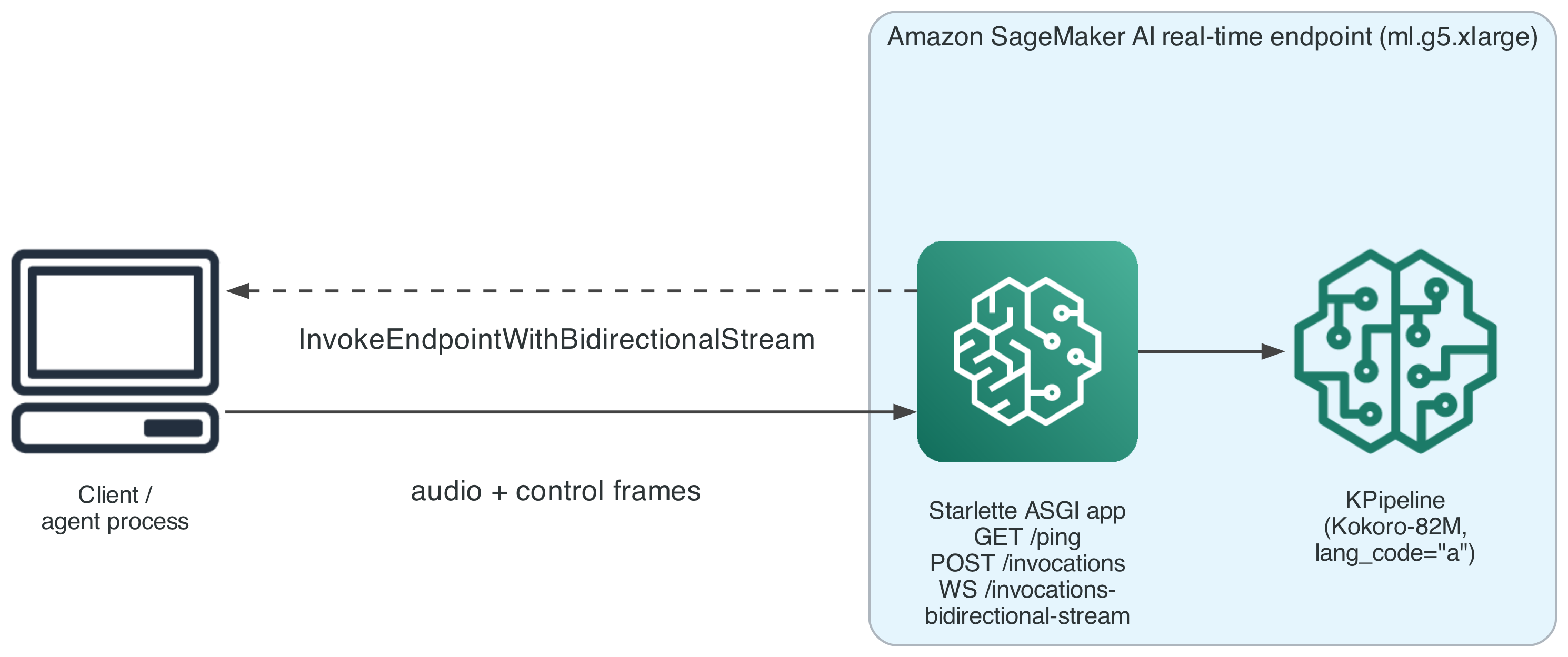
图 1:通过双向流从客户端到 SageMaker AI 实时端点的请求路径
前提条件 (Prerequisites)
在开始之前,你需要准备:
- 一个具备以下权限的 AWS 账户:创建 SageMaker AI 端点;使用 Amazon Bedrock AgentCore 的 AgentCore 运行时功能;AWS Identity and Access Management (IAM) 角色;以及 Amazon Elastic Container Registry (Amazon ECR) 存储库,至少包括
sagemaker:CreateEndpoint、sagemaker:CreateEndpointConfig、sagemaker:CreateModel、sagemaker:InvokeEndpointWithBidirectionalStream和bedrock:InvokeModelWithResponseStream操作权限。 - 示例容器中锁定的旧版 PyTorch 存在已知安全漏洞(
PYSEC-2026-2286,在 torch 2.10.0 中已修复)。在任何非概念验证(PoV)环境中使用前,请务必审查并升级该版本锁定。 - 在目标账户与 AWS 区域中安装并 Bootstrapped AWS Cloud Development Kit (AWS CDK) v2。
- 基于声明了
com.amazonaws.sagemaker.capabilities.bidirectional-streaming=trueDocker 标签的容器镜像部署的 SageMaker AI 实时端点。 - Python 3.12 或更高版本、uv 以及用于构建容器镜像的 Docker(底层的 HTTP/2 客户端仅为 Python 3.12 及更新版本提供预构建 wheel 包)。
- 支持
invoke_endpoint_with_bidirectional_stream操作的 AWS SDK for Python (Boto3)。 - 熟悉 WebSocket 以及 Starlette 或类似的 ASGI 框架。
- 本文参考的 GitHub 代码库 中的部署代码。
实操演练 (Walkthrough)
本演练首先部署端点和 Agent,然后逐步进行客户端改造,以实现端到端的增量流式处理。
部署端点与 Agent (Deploy the endpoint and agent)
Kokoro-82M 端点与 Agent 运行时通过两个 CLI 工具进行部署,各自封装了对应的 AWS CDK 堆栈:
bash uv run speech-infra deploy kokoro-82m uv run agent-infra deploy --bedrock-model-id
speech-infra deploy 用于配置 Kokoro-82M 端点。这包括创建底层 IAM 角色并将模型权重同步到 Amazon Simple Storage Service (Amazon S3) 的基础和模型缓存堆栈。随后,端点堆栈构建容器镜像并创建 SageMaker AI 模型、端点配置和端点。agent-infra deploy 则用于部署托管 Strands Agent 的 Amazon Bedrock AgentCore 运行时,该 Agent 会调用刚部署的端点,因此请先部署端点。
步骤 1:处理 SageMaker AI 实际发送的 WebSocket 帧类型
SageMaker AI 所采用的双向传输协议,会将客户端消息的每一个分片以**二进制 WebSocket 帧(binary frame)**的形式传递给容器。编写 Starlette WebSocket 处理程序时,常见的做法是调用 receive_text(),该方法会读取 message["text"],如果该键不存在则会抛出 KeyError。由于客户端发送的每条消息都是以二进制格式到达,这种处理逻辑会在每次请求时直接失败。
这一故障经常被误诊。如果使用了将 str(e) 转发给客户端的通用异常捕获器,会将 KeyError('text') 转换为内容为 'text' 的错误帧,这看起来像缺少字段,而非帧协议问题。在此期间,端点本身始终报告为 InService(正常服务),因为它能正常接受连接并对每条消息都返回了响应——只是每次返回的都是错误。
正确做法是显式兼容这两种帧类型,而不是假设只会出现一种:
python from starlette.websockets import WebSocket, WebSocketDisconnect
async def _receive_message(websocket: WebSocket) -> str: message = await websocket.receive() if message["type"] == "websocket.disconnect": raise WebSocketDisconnect(message.get("code", 1000)) payload = message.get("text") if payload is None: payload = message.get("bytes", b"").decode("utf-8") return payload
当不存在文本字段时,这段代码会将 bytes 解码为 UTF-8,而不是仅假设某一种帧类型。测试时请发送二进制帧进行验证,因为这种错误模式只会生成一个格式合法的错误帧并将端点状态标记为正常,而不会引发显式的崩溃。
步骤 2:在消息之间保持 Session 长连接
当容器完成一条消息的音频合成后,直觉往往是关闭当前会话,就像传统的 HTTP 周期那样。在这里这样做是错误的。在发送完一条消息的音频数据和 synthesis_complete 控制帧之后,容器循环应当回到同一个尚未关闭的会话上,继续通过 receive() 等待下一条消息。只有当客户端发送显式的 {"type": "close"} 消息时,才应当关闭连接。
下图展示了一个承载连续两个句子的会话,仅在最后才关闭:
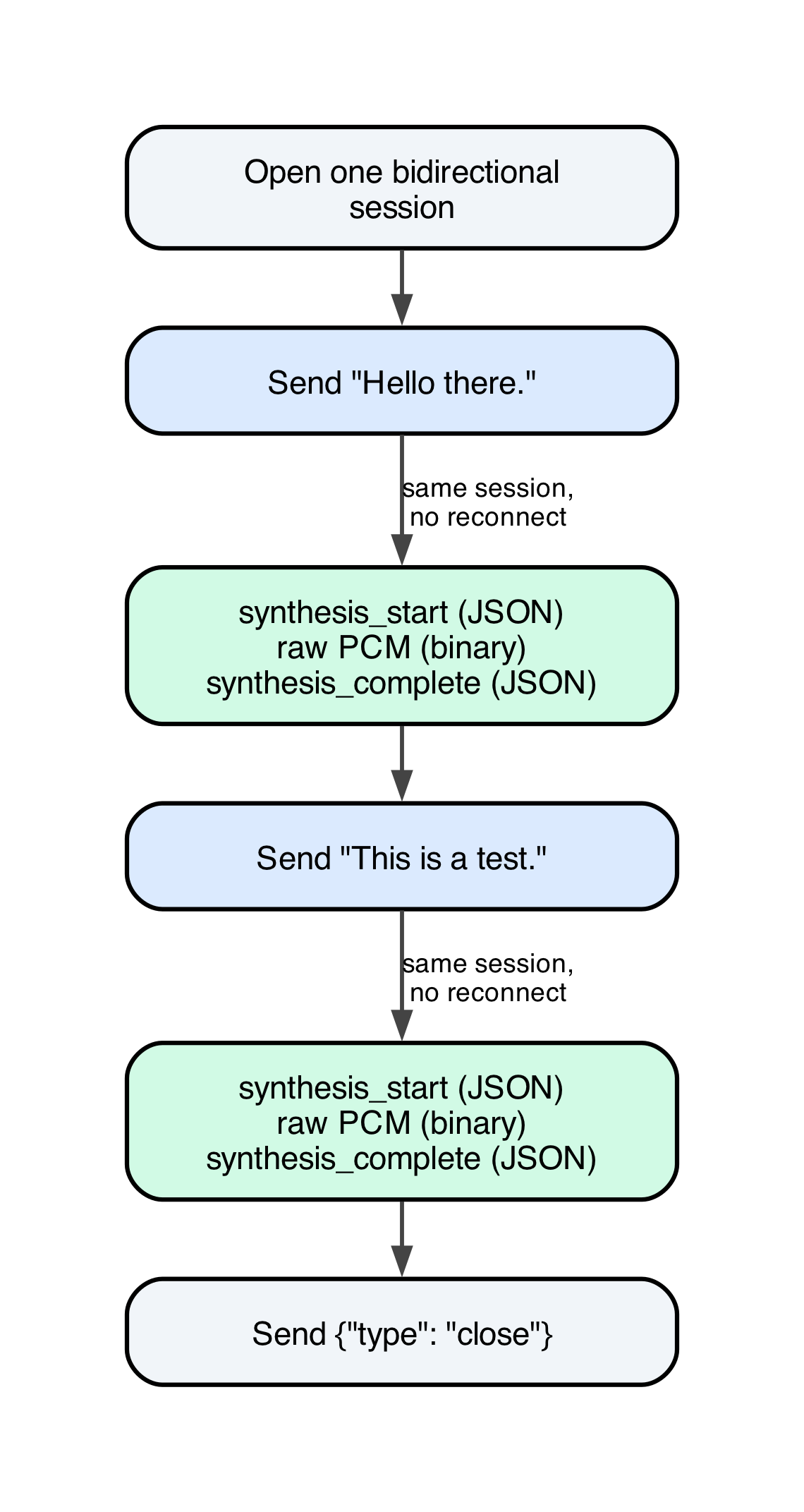
图 2:单个双向会话按序传输两个句子,仅在最后关闭
通过这种方式,你可以在单个持久会话中依次发送多个句子,句子之间完全没有重连开销。如果在单次响应后就急于断开连接,会导致每个句子都必须重新建立连接,从而抵消绝大部分延迟优势。
步骤 3:在 Agent 生成句子的同时进行流式传输
确立了会话机制后,客户端解决延迟问题的核心是一个分块处理类。该类负责将两种形式到达的文本进行标准化处理:一种是预先给出的完整字符串,另一种是实时的 Token 流。无论哪种形式,它的输出都是一致的:产出完整的句子,并在每个句子成形后立即准备发送。
python import re
_SENTENCE_RE = re.compile(r"(?<=[.!?])\s+")
class IncrementalSentenceChunker: def init(self) -> None: self._buffer = ""
def feed(self, fragment: str) -> list[str]:
    self._buffer += fragment
    parts = _SENTENCE_RE.split(self._buffer)
    if len(parts) == 1:
        return []
    self._buffer = parts[-1]
    return [s.strip() for s in parts[:-1] if s.strip()]

def flush(self) -> str | None:
    remainder = self._buffer.strip()
    self._buffer = ""
    return remainder or None
每当接收到文本碎片时调用一次 feed()。它会返回所有最新拼接完成的句子,并暂存末尾未完成的文本。在输入结束时调用一次 flush(),以便在缺少尾部标点符号的情况下也能将剩余的局部文本输出。这样可以避免因流在遇到句号前终止而丢失最后一个句子。
需要说明的是,这并非并发合成。每个双向处理程序本质上都是一个严格顺序执行的循环:接收消息 -> 合成音频 -> 发送该音频 -> 发送 synthesis_complete -> 接着接收下一条消息。在传输第一句音频的过程中,第二句音频并没有提前生成。增量发送带来的核心收益其实更聚焦:在第一句话生成的瞬间即可立刻开始合成,而不用等待全文生成完毕。对于句子间存在实际生成时间间隔的多句响应,这正是全部延迟提升的来源。
我们在真实端点上验证了这一过程,在单个会话中发送包含三个句子的输入。所有 3 个分块均顺利返回,且音频内容与发送的文本准确对应:
| 分块 (Chunk) | 文本 (Text) | 音频字节数 (Audio bytes) | 时长 (Duration, s) |
|---|---|---|---|
| 1 | “Hello there.” | 73,200 | 1.525 |
| 2 | “This is a post deployment check.” | 108,000 | 2.250 |
| 3 | “It has three sentences.” | 98,400 | 2.050 |
步骤 4:选择将音频传回客户端的传输机制
将文本增量流式输入模型只解决了前半部分问题。后半部分是如何将生成的音频传出并送达渲染端(通常是浏览器)。大多数 Agent 和聊天前端已经在使用 Server-Sent Events (SSE) 流式传输文本:这种单向协议得到了大多数浏览器的原生支持。然而 SSE 是一种文本协议,设计初衷并非承载原始二进制数据。若团队要在现有 SSE 管道中加入语音功能,很自然会沿用现有模式:将音频进行 Base64 编码并包装进 JSON 事件中。
我们对 24 个音频片段测试了该方案的成本,并通过 Amazon Transcribe 确认了不同编码方式下的语音质量没有差异,同时对比了 MP3 与 AAC:
| 候选格式 | 原始字节数 (Raw bytes) | Base64 字节数 (Base64 bytes) | 码率 (Bitrate) |
|---|---|---|---|
| Raw PCM | 2,396,400 | 3,195,200 | 384 kbps |
| MP3 48k | 308,304 | 411,072 | 49.5 kbps |
| AAC 32k fMP4 | 258,039 | 344,084 | 41.6 kbps |
Base64 编码使每个载荷都膨胀了近 33%。更为隐蔽的开销在于帧对齐(frame alignment)。SSE 事件通过空行定界,但内部的音频是按照 MP3 帧切分的。这两种定界机制在传输分块时往往无法对齐。在一次实测响应中,4 个逻辑 MP3 帧被分拆为 6 个传输分块到达,其中有 2 个分块恰好在帧中途中断。如果消费端直接把每个传输分块当成一个完整的音频单元处理,在正常的常规流量下就会解析失败。解决方案是缓冲接收到的字节,仅在检测到定界符时才进行处理:
python buffer = b"" for event in resp["Body"]: if "PayloadPart" not in event: continue buffer += event["PayloadPart"]["Bytes"] while b"\n\n" in buffer: frame, buffer = buffer.split(b"\n\n", 1) handle(frame)
目前面向模型的链路所采用的替代方案是完全跳过 Base64 和 SSE 定界。它在已经承载增量文本输入的同一双向会话中,对原始二进制音频与 JSON 控制帧进行多路复用(Multiplexing),并通过一条简单的规则加以区分:
python import json
def _decode_control_frame(chunk: bytes) -> dict | None: try: decoded = json.loads(chunk.decode("utf-8")) except (UnicodeDecodeError, json.JSONDecodeError): return None return decoded if isinstance(decoded, dict) else None
任何无法解码为有效 JSON 对象的分块都被视为原始音频,直接原样转发,在整条链路上无需任何编码步骤。这里有一个关键的边界情况:原始 PCM 音频的合法字节开头可能恰好是 0x7b(即 ASCII 字符 {,对应 JSON 对象的起始符号)。上述规则之所以能避免将此类音频误判,是因为它要求整个分块都必须解析为有效的 JSON,而不仅是检查首字节——PCM 帧几乎绝不可能整块解析为有效 JSON。
**注意:**如果你的前端已经有一套运行良好的文本 SSE 管道,在 SSE 事件中嵌入 Base64 编码的音频是一个务实的选择。虽然这会带来大约 33% 的额外载荷以及“缓冲与重组”步骤,但它复用了你已有的基础设施。如果你是从头构建语音链路,或者将低延迟作为首要目标,那么统一的二进制与 JSON 方案能够同时避免这两项开销,并复用已经用于传输文本的连接。
步骤 5:在真实 Agent 中集成
更完整且端到端的场景是一个动态生成的 Agent 逐 Token 地生成回复,在第一句话出来之前根本无法预知第四句话的内容。此示例作为一个由 Amazon Bedrock 提供支持并部署在 Amazon Bedrock AgentCore 运行时的 Strands Agent 运行,它遵循步骤 4 中的模式调用 Kokoro 端点。该架构连接了三条通信链路:面向浏览器向调用方返回 Server-Sent Events 的链路、Agent 向 Amazon Bedrock 发起流式调用的链路[……原文在此处截断]。
English / 原文
A customer asks an AI voice agent a question and waits. The agent already has an answer, it’s midway through generating a long, multi-paragraph response, but the customer hears nothing for five seconds. By the time an answer arrives, the customer is frustrated, confused, and no longer paying attention.
Text-to-speech integrations create exactly that gap. A one-sentence response might generate in 600 milliseconds, but the full response takes five seconds, and the integration waits for all of it before synthesis starts.
This post shows how to close that gap. We stream each sentence to a hosted Kokoro-82M text-to-speech (TTS) model on Amazon SageMaker AI as soon as an agent produces it, so synthesis begins on sentence one instead of the finished response. Getting that audio back to a browser needs its own solution too, so we also cover both transports for doing it and what each costs in practice.
Solution overview
This solution closes the gap by streaming synthesis alongside generation instead of waiting for it to finish. As the agent produces each sentence, that sentence streams immediately to a hosted Kokoro-82M text-to-speech model, so audio playback can start before the agent finishes speaking its full response. Kokoro-82M holds only 82 million parameters, small enough to run cheaply on a single mid-tier GPU instance. That keeps both latency and inference cost low for a voice agent handling real traffic.
Kokoro-82M runs in a custom container on a SageMaker AI real-time endpoint, on an ml.g5.xlarge GPU instance. The container exposes two routes: POST /invocations, which streams a response for one complete input, and WS /invocations-bidirectional-stream, which keeps one connection open across many messages in both directions.
The following diagram shows the request path from client to model:
Figure 1: Request path from the client to the SageMaker AI real-time endpoint over a bidirectional stream
Prerequisites
Before you begin, you need:
- An AWS account with permissions to create SageMaker AI endpoints; AgentCore runtime, a capability of Amazon Bedrock AgentCore; AWS Identity and Access Management (IAM) roles; and an Amazon Elastic Container Registry (Amazon ECR) repository, including at minimum the
sagemaker:CreateEndpoint,sagemaker:CreateEndpointConfig,sagemaker:CreateModel,sagemaker:InvokeEndpointWithBidirectionalStream, andbedrock:InvokeModelWithResponseStreamactions. - The sample container pins an older PyTorch with a known advisory (
PYSEC-2026-2286, fixed in torch 2.10.0). Review and upgrade the pin before any non-proof-of-value use. - AWS Cloud Development Kit (AWS CDK) v2, installed and bootstrapped in your target account and AWS Region.
- A SageMaker AI real-time endpoint deployed from a container that declares the
com.amazonaws.sagemaker.capabilities.bidirectional-streaming=trueDocker label. - Python 3.12 or later, uv, and Docker to build the container image (the underlying HTTP/2 client only ships pre-built wheels for Python 3.12 and newer).
- The AWS SDK for Python (Boto3) with support for
invoke_endpoint_with_bidirectional_stream. - Familiarity with WebSockets and Starlette or a comparable ASGI framework.
- The deployment code from the GitHub repository referenced in this post.
Walkthrough
The walkthrough first deploys the endpoint and agent, then works through the client-side changes that make incremental streaming work end to end.
Deploy the endpoint and agent
The Kokoro-82M endpoint and the agent runtime deploy through two CLI tools, each wrapping its own AWS CDK stacks:
uv run speech-infra deploy kokoro-82m
uv run agent-infra deploy --bedrock-model-id <your-bedrock-model-id>
speech-infra deploy provisions the Kokoro-82M endpoint. This includes the foundation and model-cache stacks that create the underlying IAM roles and sync the model’s weights into Amazon Simple Storage Service (Amazon S3). The endpoint stack then builds the container image and creates the SageMaker AI model, endpoint configuration, and endpoint. agent-infra deploy provisions the Amazon Bedrock AgentCore runtime hosting the Strands agent, which calls the endpoint you just deployed, so deploy the endpoint first.
Step 1: Handle the WebSocket frame type SageMaker AI actually sends
The bidirectional transport SageMaker AI uses delivers every piece of a client’s message to your container as a binary WebSocket frame. A common way to write a Starlette WebSocket handler is calling receive_text(), which reads message["text"] and raises KeyError if that key isn’t present. Because every message this client sends arrives as binary, that handler fails on every request.
The failure is commonly misdiagnosed. A generic exception handler that forwards str(e) to the client turns KeyError('text') into an error frame reading 'text', which looks like a missing field, not a framing issue. The endpoint itself reports InService throughout, since it accepts connections and responds to every message, with an error each time.
Accept either frame type explicitly instead of assuming one will show up:
from starlette.websockets import WebSocket, WebSocketDisconnect

async def _receive_message(websocket: WebSocket) -> str:
    message = await websocket.receive()
    if message["type"] == "websocket.disconnect":
        raise WebSocketDisconnect(message.get("code", 1000))
    payload = message.get("text")
    if payload is None:
        payload = message.get("bytes", b"").decode("utf-8")
    return payload
This decodes bytes as UTF-8 when no text field is present, rather than assuming one frame type. Test it by sending a binary frame, because this failure mode produces a well-formed error frame and a healthy endpoint status, not an obvious crash.
Step 2: Keep the session open between messages
After your container finishes synthesizing one message’s audio, the instinct is to close the session, the way an HTTP cycle ends. That’s wrong here. After sending a message’s audio and a synthesis_complete control frame, the container loop should go back to waiting on receive() for the next message on the same, still-open session. Close the connection only when the client sends an explicit {"type": "close"} message.
The following diagram shows one session carrying two sentences in sequence, closing only at the end:
Figure 2: One bidirectional session carrying two sentences in sequence, closing only at the end
This way, you can send several sentences, one after another, on one persistent session, with no reconnection cost between them. Closing eagerly after one response would force a new connection per sentence, undoing most of the latency benefit.
Step 3: Stream sentences as the agent produces them
With the session behavior in place, the client-side fix for the latency problem is a class that normalizes text arriving in two shapes: a complete string known up front, or a live token stream. It produces the same output either way: complete sentences, ready to send as soon as each one is complete.
import re

_SENTENCE_RE = re.compile(r"(?<=[.!?])\s+")


class IncrementalSentenceChunker:
    def __init__(self) -> None:
        self._buffer = ""

    def feed(self, fragment: str) -> list[str]:
        self._buffer += fragment
        parts = _SENTENCE_RE.split(self._buffer)
        if len(parts) == 1:
            return []
        self._buffer = parts[-1]
        return [s.strip() for s in parts[:-1] if s.strip()]

    def flush(self) -> str | None:
        remainder = self._buffer.strip()
        self._buffer = ""
        return remainder or None
Call feed() once per fragment of text as it arrives. It returns any newly completed sentences, holding back trailing text. Call flush() once, at the end of input, to release whatever partial text remains even without trailing punctuation. This keeps a stream that ends before a period arrives from dropping a final sentence.
This isn’t concurrent synthesis. Every bidirectional handler is a strictly sequential loop: receive a message, synthesize its audio, send that audio, send synthesis_complete, then receive the next message. Sentence two’s audio isn’t generated while sentence one’s still transmits. What incremental sending buys is narrower: synthesis on sentence one begins the instant it exists, rather than waiting for the full response. For a multi-sentence response with real generation time between its first and last sentence, that’s the entire latency win.
We verified this against a live endpoint sending a three-sentence input over one session. All three chunks arrived with audio matching the text sent for each:
| Chunk | Text | Audio bytes | Duration (s) |
|---|---|---|---|
| 1 | “Hello there.” | 73,200 | 1.525 |
| 2 | “This is a post deployment check.” | 108,000 | 2.250 |
| 3 | “It has three sentences.” | 98,400 | 2.050 |
Step 4: Choose a transport for getting audio back to the client
Streaming text into the model incrementally solves half the problem. The other half is getting the resulting audio out to whatever renders it, commonly a browser. Most agent and chat frontends already stream text over Server-Sent Events (SSE): one-directional, and supported natively by most browsers. SSE is a text protocol, not built to carry a raw binary payload. A team adding voice to an existing SSE pipeline naturally reaches for the pattern it already has: base64-encode the audio and wrap it in a JSON event.
We measured the cost of that approach across 24 clips, confirmed with Amazon Transcribe that quality didn’t differ across encodings, and compared MP3 against AAC:
| Candidate | Raw bytes | Base64 bytes | Bitrate |
|---|---|---|---|
| Raw PCM | 2,396,400 | 3,195,200 | 384 kbps |
| MP3 48k | 308,304 | 411,072 | 49.5 kbps |
| AAC 32k fMP4 | 258,039 | 344,084 | 41.6 kbps |
Base64 inflates every payload by close to the expected 33%. The subtler cost is frame alignment. SSE events are delimited by a blank line, but the audio inside is delimited into MP3 frames. The two schemes don’t necessarily align with how the transport chunks the data. In one measured response, four logical MP3 frames arrived as six delivery chunks, two ending mid-frame. A consumer that treats each delivery chunk as one complete unit fails on ordinary, healthy traffic. The fix buffers incoming bytes and acts only once a delimiter is found:
buffer = b""
for event in resp["Body"]:
    if "PayloadPart" not in event:
        continue
    buffer += event["PayloadPart"]["Bytes"]
    while b"\n\n" in buffer:
        frame, buffer = buffer.split(b"\n\n", 1)
        handle(frame)
The alternative used today for the model-facing leg skips base64 and SSE framing entirely. It multiplexes raw binary audio and JSON control frames over the same bidirectional session already carrying incremental text input, and tells them apart with one rule.
import json


def _decode_control_frame(chunk: bytes) -> dict | None:
    try:
        decoded = json.loads(chunk.decode("utf-8"))
    except (UnicodeDecodeError, json.JSONDecodeError):
        return None
    return decoded if isinstance(decoded, dict) else None
A chunk that fails to decode as a JSON object is audio, forwarded as received, with no encoding step anywhere in the path. One edge case matters: raw PCM audio can legitimately begin with byte 0x7b, the ASCII character {, the same character that opens a JSON object. This rule avoids misclassifying that audio because it requires the entire chunk to parse as valid JSON, not its first byte alone, something a PCM frame will essentially never do.
Note: If your frontend already has a working SSE pipeline for text, base64-encoded audio inside an SSE event is the pragmatic choice. It costs roughly 33 percent extra payload and a buffer-and-reassemble step, but reuses infrastructure you already operate. If you’re building the voice path fresh, or latency is the priority, the unified binary and JSON approach avoids both costs and reuses the connection already carrying text.
Step 5: Put it together in a real agent
The fuller, end-to-end case is a live, generative agent composing its response one token at a time, with no way to know sentence four until sentence one exists. This example runs as a Strands agent, backed by Amazon Bedrock, deployed to Amazon Bedrock AgentCore runtime, calling the Kokoro endpoint with the pattern from Step 4. Three communication legs connect in this design: the browser-facing leg carrying Server-Sent Events back to the caller, the agent’s streaming call to Amazon Bedrock for text generation, and the agent’s bidirectional session with the Kokoro endpoint for synthesis.
The following diagram shows those three communication legs, and where the overlap between generation and synthesis happens:
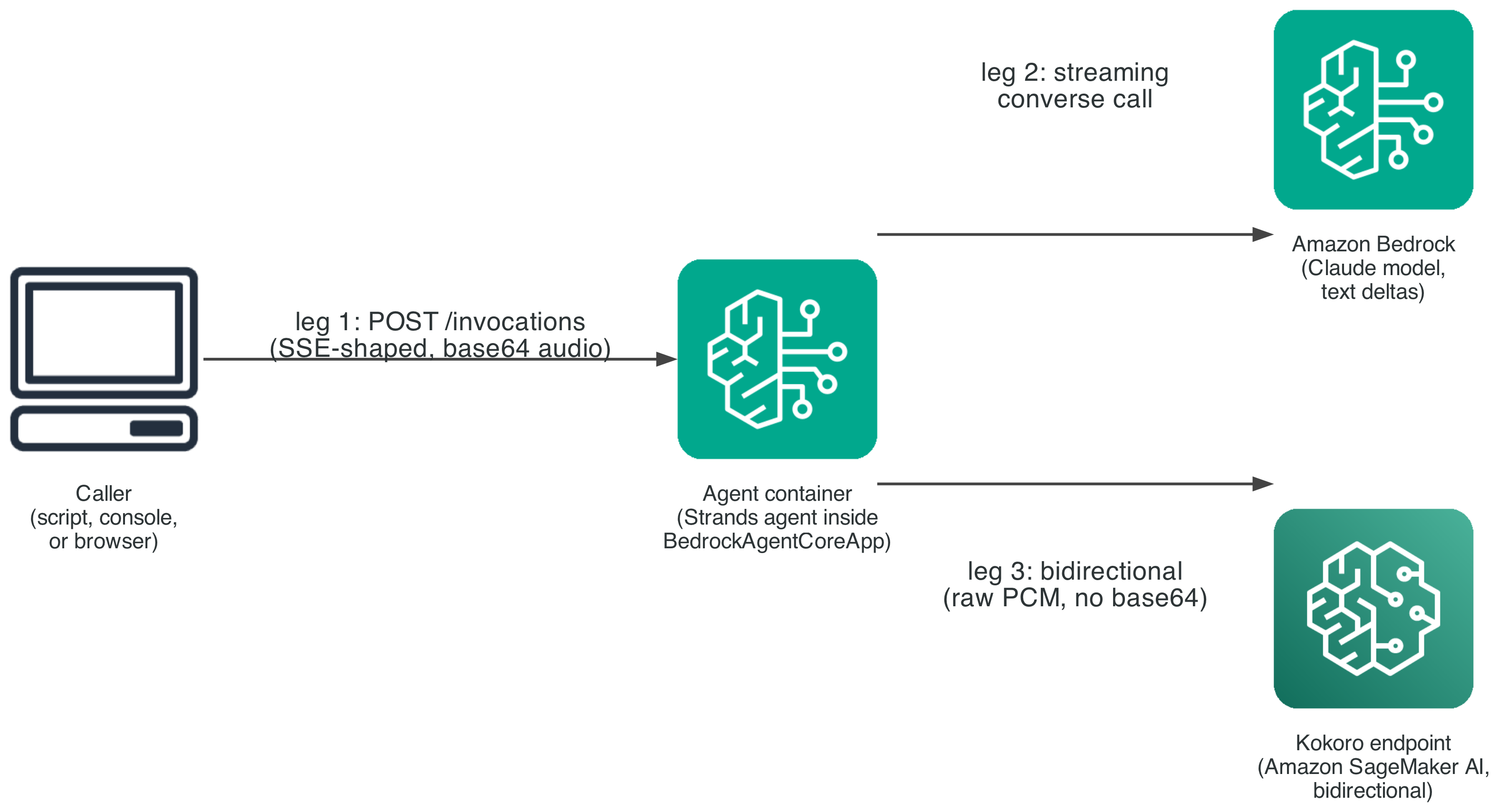
Figure 3: The three communication legs connecting the caller, Amazon Bedrock, and the Kokoro endpoint
The request payload carries a mode field, either "bidi" or "batch", dispatched to two code paths inside the same entrypoint function. A benchmark between them changes exactly one variable: when synthesis starts. In run_bidi, two tasks run concurrently. One drains the Bedrock text stream and feeds completed sentences into the chunker. The other drains the Kokoro session and emits audio chunks as they arrive. Both push into one shared queue, so a consumer yields events in true arrival order: audio for an early sentence can reach the caller while Bedrock still generates a later one. run_batch is the deliberate opposite: it waits for the full response before one synthesis call, kept as a fair baseline.
Going the other direction, the leg from the agent container back to the caller does use base64, for a different reason than Step 4 describes. BedrockAgentCoreApp’s entrypoint must yield plain, JSON-serializable dictionaries, which its SDK turns into data: {json}\n\n frames automatically. There’s no way to hand it a raw binary frame. That’s a consequence of the JSON-native managed runtime, not the choice Step 4 measured and moved away from. Both run_bidi and run_batch pay that identical cost on this leg, so the measured difference between them is purely timing: when the first audio chunk is emitted.
Testing and validation
We isolated the TTS transport’s own contribution to time to first audio by sending the same 267-character, four-sentence block of text two ways: as one message (batch), and as only its first sentence (incremental). We ran five trials each against the live endpoint.
As measured earlier, sending only the first sentence cut mean time to first audio byte from 329.3 ms to 156.7 ms, a 52.4 percent relative improvement, isolated to the TTS transport itself.
We then measured the fuller, end-to-end case with a real language model producing the text, running the identical prompt through run_bidi and run_batch against the same live Bedrock model and endpoint, so the only variable is when synthesis starts.
Using that same methodology, bidi mode’s time to first audio measured 2.4 times faster than batch mode against a local container, and 3.5 times faster against the deployed AgentCore runtime.
The following chart shows that gap across both environments:
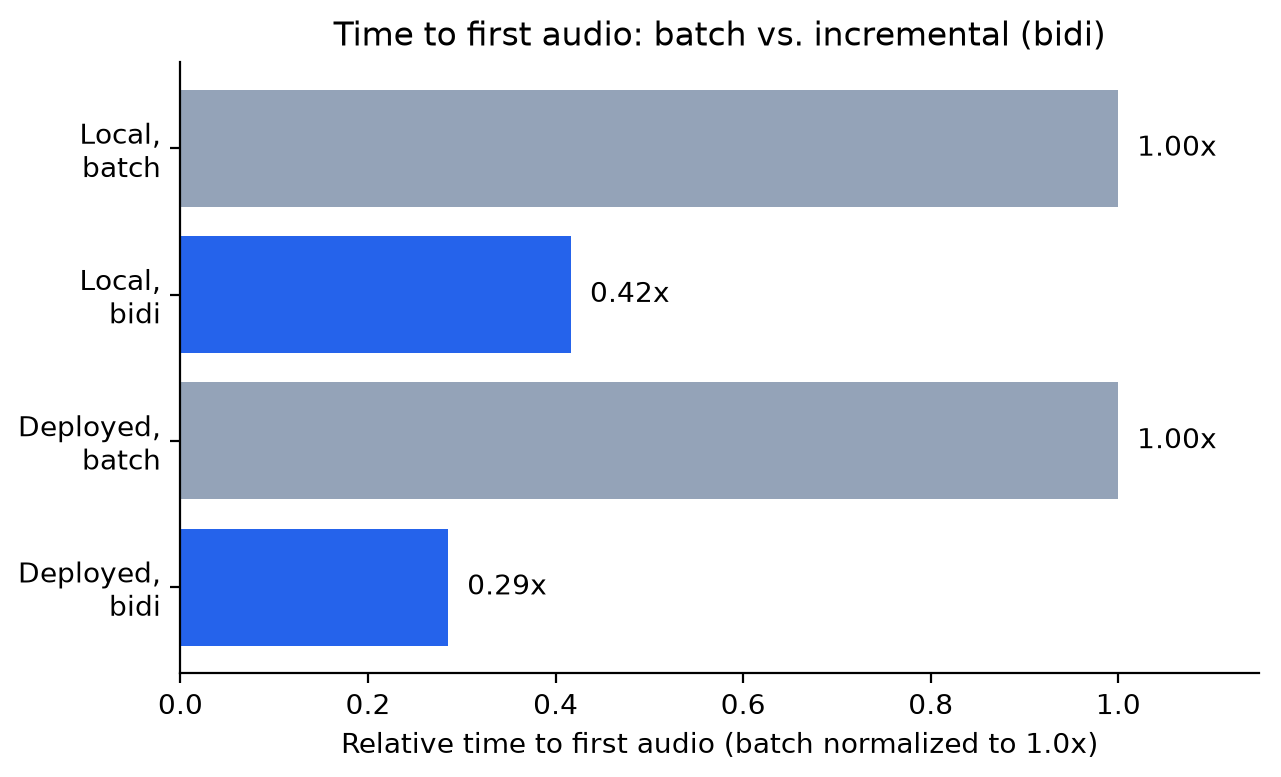
Figure 4: Relative time to first audio for batch and bidi modes, locally and on the deployed runtime
The gap widens, rather than narrows, for the deployed case once a real network hop is added. run_bidi absorbs that hop inside the overlap it’s already exploiting between generation and synthesis. run_batch has no equivalent overlap to hide that cost in, since it does one thing at a time, so every added millisecond of network overhead lands directly on its serial wait.
To reproduce this comparison against your own deployment, run the same bidi-vs-batch test the agent container exposes:
uv run agent-infra demo --endpoint-url <your-endpoint-url> --prompt "<your prompt>"
This sends the prompt through both modes and reports the timestamp of the first audio_chunk event against agent_start for each. If you see errors instead, check for the KeyError: 'text' symptom from Step 1. An endpoint reporting InService while every request fails signals that bug, not a deployment issue.
Clean up
To avoid ongoing charges, tear down the resources this walkthrough creates in reverse deployment order, agent first, then endpoint:
uv run agent-infra destroy --bedrock-model-id <your-bedrock-model-id>
uv run speech-infra destroy kokoro-82m
agent-infra destroy removes the Amazon Bedrock AgentCore runtime resource. speech-infra destroy removes the SageMaker AI model, endpoint configuration, and endpoint. Neither empties the Amazon S3 bucket that caches model weights or deletes the Amazon ECR repository holding the container image, since both can be shared across models. If you no longer need them, empty and delete the Amazon S3 bucket and remove the Amazon ECR repository manually, since a stored model checkpoint and container image continue to incur small storage charges until removed.
Conclusion
We showed how to remove one source of avoidable latency from a voice agent, waiting for an agent’s full response before starting speech synthesis, and how to quantify a second, quieter cost: base64-encoded audio inside SSE inflates payload by about a third and can misalign with MP3 frame boundaries if you don’t buffer for it. Streaming each sentence into a SageMaker AI bidirectional endpoint as soon as an agent produces it cut time to first audio by more than half in isolation, and by 2.4 to 3.5 times in a deployed agent. Multiplexing binary audio and JSON control frames over that session, instead of encoding audio as text, removes the size inflation and frame-realignment work a naive SSE relay requires.
If you’re adding voice to an agent that already streams text over SSE, start with the base64 approach in Step 4 and revisit the unified transport once latency becomes the priority. To learn more, see the Amazon SageMaker AI real-time inference documentation and the Amazon Bedrock AgentCore documentation. If you’d like help applying this pattern to your own architecture, contact your AWS account team.
About the author
Joseph Cottingham
Joseph is a Machine Learning Engineer with the AWS Generative AI Innovation Center, where he designs and delivers AI systems that move organizations from idea to production. His technical background spans firmware, software, and machine learning, with deep expertise in high-throughput, event-driven architectures that keep AI workloads performant at scale. Joseph focuses on the intersection of state-of-the-art research and operational reality, delivering solutions that materially transform organizations and the systems they operate.