使用 AWS CDK 在托管 Amazon Bedrock Knowledge Base 上构建 Agent 检索系统
英文标题:Build agentic retrieval on a Managed Amazon Bedrock Knowledge Base with CDK
本文介绍了如何利用 AWS CDK 在全托管的 Amazon Bedrock Knowledge Base 上构建企业级 Agent 检索系统。该架构淘汰了传统单次向量检索模式,通过 AgentCore Gateway 将多个知识库封装为 MCP 工具,由 Agent 进行多轮规划与语义路由,并调用 AgenticRetrieveStream API 生成有事实依据且带引用的答案。整套方案实现了开箱即用的七层遥测可观测性与连续评估,并通过 CDK 实现单命令声明式部署,为解决复杂跨语料库检索与企业级可运维性提供了全新范式。
 1.3 MB
 1.3 MB
 2.4 KB
 345.0 KB
 141.2 KB
 346.5 KB
 408.3 KB
 275.8 KB
 316.1 KB
 174.4 KB
 291.3 KB
 230.6 KB
 146.2 KB
 35.4 KB
 35.6 KB
 28.6 KB
 15.8 KB
 16.3 KB
 18.7 KB
 258.2 KB
中文
本文介绍了如何使用 AWS 云开发工具包(AWS CDK)在托管 Amazon Bedrock Knowledge Base 上构建企业级 Agent 检索系统(Enterprise agentic retrieval)。为了理解为什么值得构建这套系统,我们首先需要了解普通的检索增强生成(RAG)在哪些场景下会失效。大多数 RAG 系统都遵循相同的模式:先将问题向量化,从单一索引中检索出最相近的切片,交给模型处理,然后返回答案。一次检索,一次生成。对于很大一部分问题而言,这种设计恰到好处,无需构建任何更复杂的架构。
但在面对特定问题时,它会暴露出明显的局限性。如果一个问题的答案跨越了两个语料库,单次检索只能返回模型所需内容的一半,这比什么都查不到更糟,因为模型最终生成的答案虽然流畅但并不完整;如果一个问题需要根据具体内容来决定查阅哪个数据源,单一索引完全缺乏选择机制;如果一个问题在看到首批检索结果后需要二次回查语料库,这种线性流程根本没有提供二次检索的机会。
企业级 Agent 检索通过将推理 Agent 引入闭环来解决这三个问题。Agent 会在撰写最终答案之前,自行判断是否需要检索、该查阅哪个知识库,以及是否需要回查更多上下文。这也是 Amazon Bedrock Knowledge Bases 的演进方向。随着托管知识库(Managed Knowledge Base)的推出,检索不再只是一次简单的“向量化并获取”(embed-and-fetch)调用,而演进为一种具备 Agent 特性的能力:支持多轮规划、工具驱动检索,以及有事实依据且附带引用的答案。AgenticRetrieveStream API 将这一能力作为一等云服务功能提供,而无需用户自行拼装。这种方式不仅有效,同时也带来了运维层面的真正挑战。单次调用的流水线代码清晰直观,阅读即可推导逻辑;但在循环中进行推理和检索的 Agent,面对每个问题都会走出完全不同的执行路径。在默认情况下,你既看不到它经过了哪些路径,也无法获知它产出的答案质量如何。此时,可观测性不再只是可有可无的加分项,而是验证系统能够正常运行的唯一手段。
2024 年 8 月,文章 使用 Knowledge Bases for Amazon Bedrock 和 AWS CDK 构建端到端 RAG 解决方案 曾通过 CDK 应用程序部署了单次检索架构:包含 Amazon Simple Storage Service (Amazon S3) 语料库、Amazon OpenSearch Serverless 集合与索引、知识库以及数据源,这些资源被配置为需要手动排列部署顺序的 CDK Stack。自该文发布以来,情况发生了三项重要变化:
- Amazon Bedrock 现已提供托管知识库(Type: MANAGED),其自身全权负责数据摄取、存储、索引和检索。原方案中需要配置的 OpenSearch Serverless 集合和索引,不再需要由你手动创建、扩展,也不再需要支付 OpenSearch 计算单元(OCU)费用。
- Amazon Bedrock AgentCore 提供了 Agent 维度的能力,包括将每个知识库公开为 Model Context Protocol (MCP) 工具的 Gateway、托管推理 Agent 的 Runtime,以及能在内部重新排序并返回综合且带引用答案的
AgenticRetrieveStream。Agent 检索能力仅在托管知识库上可用。 - 可观测性与评估方案现在可以直接通过代码部署,而不再是后期外挂的组件。该解决方案随附了两个覆盖七层遥测数据的 Amazon CloudWatch 仪表板,并在同一次部署中提供按需评估与持续评估两种形式。
本文构建的正是这套系统:一个能够在两个知识库之间路由、通过 Gateway 进行检索、返回有据可查且附带引用的答案的 Agent,其每一层行为均已植入遥测追踪,整套系统以一个 Python 编写的单一 AWS CDK 应用程序交付。只需一条命令即可部署全部资源,CDK 会自动推导依赖顺序。
如果你阅读过 2024 年的那篇文章,从 Amazon S3 存储桶到知识库的路径看起来会很熟悉,但在此之后的一切都是全新的:向量数据库不复存在,检索变为了 Agent 模式,且应用所配置的近半数资源都是为了呈现 Agent 的实际行为轨迹。如果你没读过也没关系,本文完全独立成篇。
以下是涉及的各项服务以及单个问题在其中的流转路径:Agent 决定是否进行检索以及咨询哪个知识库;Gateway 将每个知识库公开为其可调用的工具;Managed Knowledge Bases 负责搜索和标注引用;根据问题需求,循环可多次执行。Agent 沿途执行的所有操作最终都会沉淀到 Amazon CloudWatch 中。
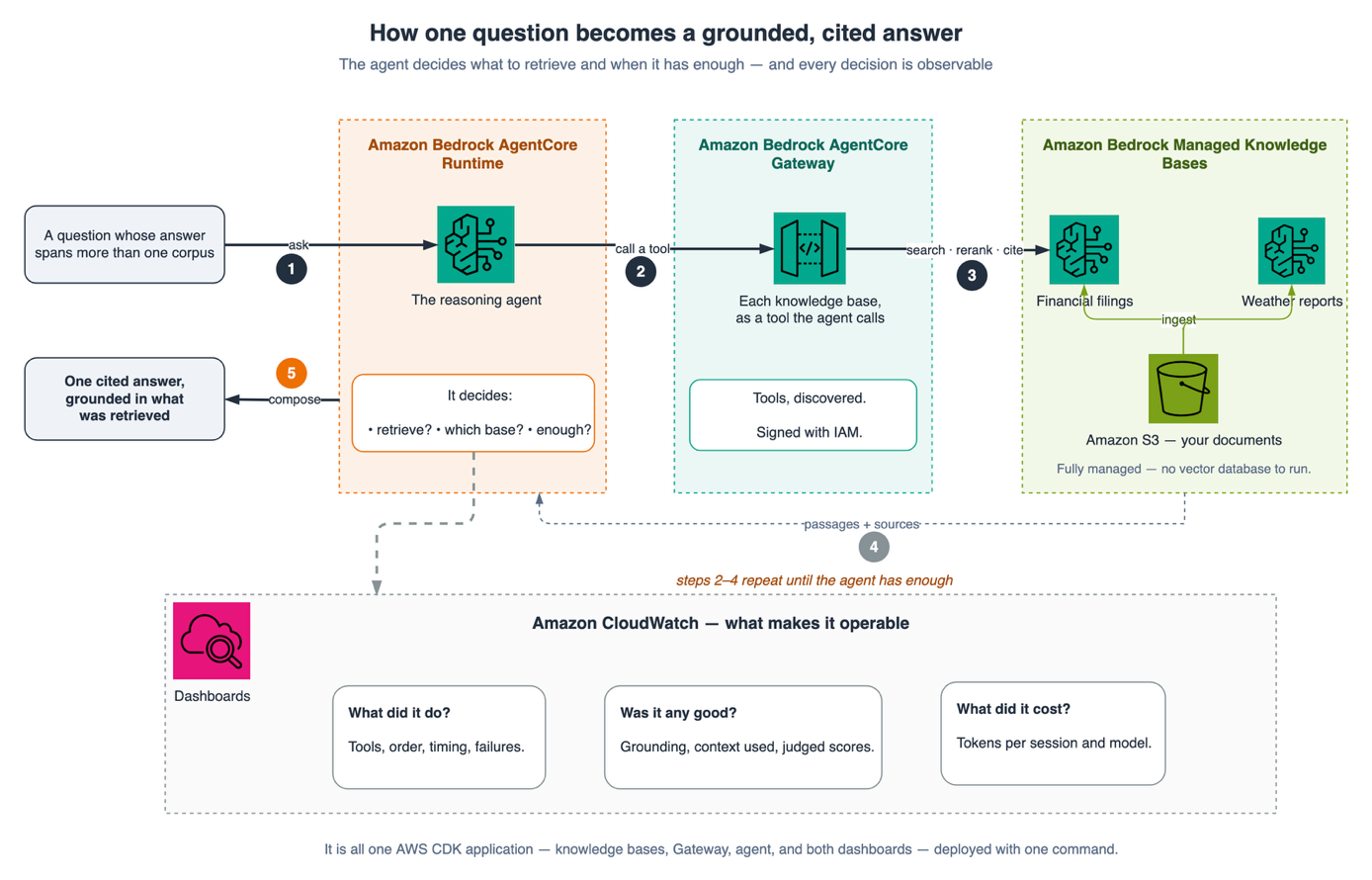
图 1:涉及的服务及单个问题的流转路径
背景知识
在逐步展开讲解之前,先明确三点会有所帮助:是什么让检索具备了 Agent 特性、为什么托管知识库是其理想基石,以及为什么可观测性与评估应当内建于设计之中而非事后补全。
从 RAG 到企业级 Agent 检索
传统的检索增强生成(RAG)只执行一次检索和一次生成。企业级 Agent 检索将推理 Agent 置于循环中:它决定是否以及检索什么,可以通过多次检索进行精炼,选择哪个知识库与问题相关(语义路由),然后才会撰写带有引用的扎实答案。依托托管知识库,这变成了一项一等服务功能:AgenticRetrieveStream API 负责执行多轮规划、执行检索并返回引用的答案,而不是让你在原始向量搜索之上自行构建和维护编排层。这能在处理复杂问题时产出更优质的答案,但同时也带来了一个运维复杂度更高的系统,这正是我们从一开始就内建可观测性和评估体系的原因。
托管知识库与自建知识库的对比
Amazon Bedrock 现已提供托管知识库(Type: MANAGED):Amazon Bedrock 为你全权管理摄取、存储、索引和检索,默认包含由服务托管的模型执行的向量嵌入和重排序,因此无需配置、缩放或打补丁任何向量数据库。这与客户自管(DIY)知识库截然不同,后者需要你自行选择并运维向量存储(例如 Amazon OpenSearch Serverless)。
对于本解决方案而言,最重要的两项差异如下:
| 能力 | Amazon Bedrock 托管知识库 | 客户自管(DIY)知识库 |
|---|---|---|
Agent 检索(AgenticRetrieveStream) |
✅ 支持 | ❌ 不支持 |
| AgentCore Gateway 集成 | ✅ 支持 | ❌ 不支持 |
| 数据存储 | 自动扩缩容,由 Amazon Bedrock 全托管 | 自行配置、扩缩容与维护 |
| 向量嵌入 + 重排序 | 内置托管模型,无额外费用 | 自行配置 |
| 需管理的底层基础设施 | 无 | 向量数据库及其他组件 |
由于 Agent 检索和 AgentCore Gateway 连接器仅在托管知识库上受支持,因此它自然成为了企业级 Agent 检索的基石。这也意味着 Amazon Bedrock 会代你管理存储与索引,在本设计中无需配置 OpenSearch Serverless 集合或 OCU 容量。客户自管选项依然是特定场景下的合适选择,例如复用现有的 OpenSearch Serverless 集合,或满足特定的数据驻留、微调及合规要求。而对于企业级 Agent 检索而言,托管知识库是实现该功能的前提。
为什么需要可观测性与评估
对于生产环境而言,一个仅仅能返回答案的 Agent 系统是远远不够的。你需要观察它的运行时行为(延迟、调用量、Token 消耗量),了解检索和答案的质量,并且你需要持续获取这些信号。本方案附带部署了两个 CloudWatch 仪表板,覆盖七层遥测数据,并包含两种评估形式(按需评估和持续评估),所有这些均由同一个 CDK 应用程序配置。事实依据、引用追溯与评估层同样支持负责任的 AI 使用规范。引用的答案可以追溯到其源段落,确保回答具备可审计性;同时,忠实度(Faithfulness)和正确度(Correctness)评分使你能够在偏离源文本时及时发现,避免到生产阶段才暴露问题。
为何该方案特别选用 CDK
任何基础设施即代码(IaC)工具都可以创建这些资源。CDK 之所以在此处占据重要地位,原因在于该架构的特定特征:四个 Stack 之间存在高密度的交叉引用。Gateway 需要两个知识库的 ID;Agent 需要 Gateway 的 URL 和 ARN;仪表板需要知识库 ID、Gateway ARN 以及 Agent 运行时 ID。一共有七个变量跨越了 Stack 边界,每一个都是指标的维度或是连接器上的目标。
如果用原生模板编写,这些都需要通过一堆手工维护的 Stack 输出(Exports)和跨 Stack 查找(Lookups)来保证一致,此外还需要编写脚本按正确顺序部署并向下传递输出参数;一旦重命名任何内容,两者就会立即发生漂移。而在 CDK 中,你只需传递 Construct 对象,导出的定义和依赖边界都会基于这种参数传递自动推导形成。2024 年的方案包含三个 Stack,依赖链路基本是线性的;当演进到四个 Stack 且相互穿插七个核心参数时,选择 CDK 已不仅仅是编码风格的偏好。
解决方案概览
以下是单个问题贯穿整个系统的端到端流转路径。值得仔细梳理,因为本文接下来的内容将从左到右逐步剖析它。
下图描绘了端到端的 Agent 检索工作流。用户的问题进入 AgentCore Runtime 上的 Agent,Agent 通过 AgentCore Gateway 将其路由至两个 AgenticRetrieveStream 工具之一——每个托管知识库对应一个工具(金融语料库和天气语料库,分别从 Amazon S3 摄取)。选中的工具返回有事实依据且带引用的答案,每一步操作都会流式传输至 Amazon CloudWatch 和 AWS X-Ray。带数字的徽标与下文的流程说明相对应。
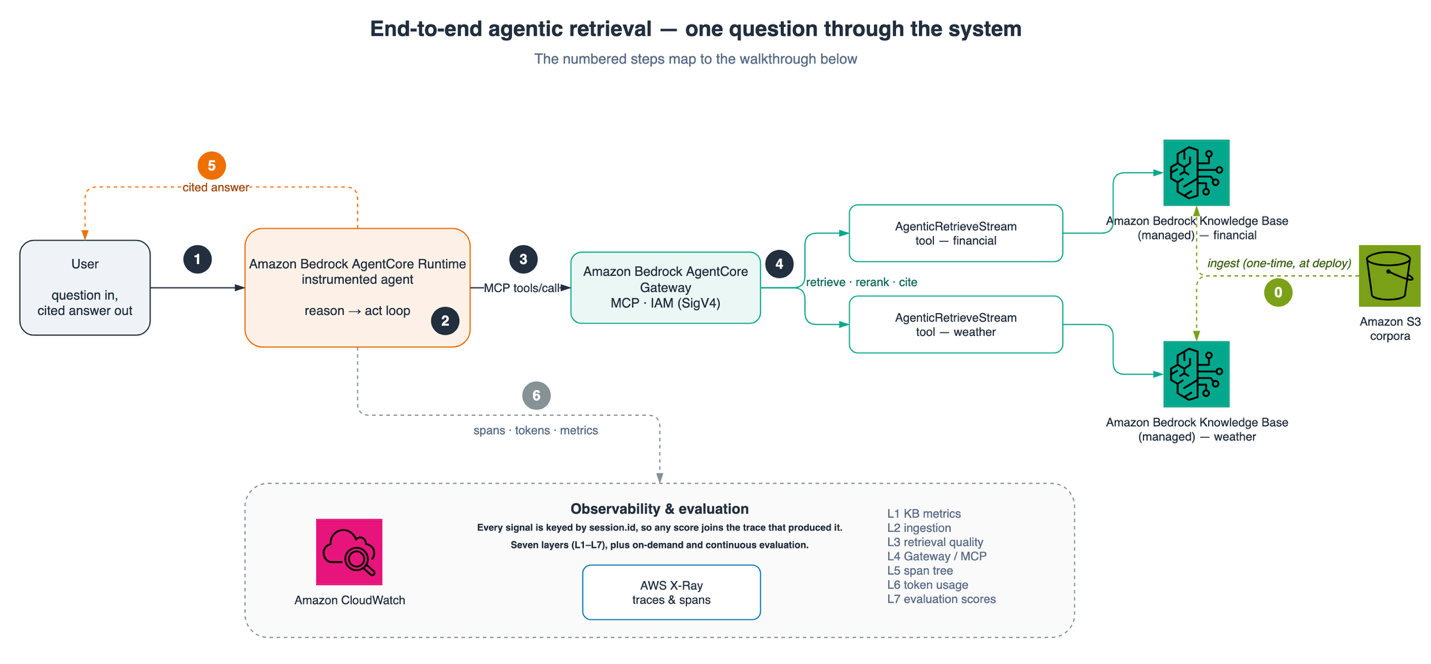
图 2:针对单个问题的端到端 Agent 检索工作流
图中的编号步骤对应如下工作流程:
步骤 0 —— 部署时的一次性执行。 在提出任何问题之前,Amazon S3 中的各个语料库都会被摄取到其对应的托管知识库中:Amazon Bedrock 会自动执行解析、分块、向量化和索引。这在 Stack 部署时发生一次,不属于针对每个问题的运行时路径,因此在图中以虚线箭头表示并标记为步骤 0。随后的每个问题均遵循步骤 1 至 6:
- 用户向托管在 Amazon Bedrock AgentCore Runtime 上的 Agent 发送问题。Runtime 会使用 OpenTelemetry (OTEL) Span 自动对整个“推理-行动”(reason-and-act)循环进行遥测插桩,从而确保系统从第一次调用开始就具备可观测性。
- Agent 的推理模型进行规划并在知识库之间进行路由。 由于每个知识库都被公开为独立的检索工具,Agent 会选择主题与问题相匹配的工具(金融或天气),而不是去检索一个混合大索引。
- 选定的工具调用由 AgentCore Gateway 通过 MCP 协议代理,经过 Agent 的 IAM 任务角色授权并使用 SigV4 签名,调用托管知识库上对应知识库的
AgenticRetrieveStreamAPI。 AgenticRetrieveStream执行知识库内部处理: 它将问题拆解为多个子查询,从 Amazon Bedrock 管理的数据存储(由 Amazon S3 语料库摄取生成)中进行迭代检索,并合成一份有据可查、带引用的答案,通过 Gateway 流式传回。- Agent 检查返回的上下文是否充分。 如果不够,它会循环重新路由和检索,最后再组织最终答案;如果充分,则将附带引用的答案返回给用户。
- 在整个过程中,Runtime 持续向 Amazon CloudWatch 和 AWS X-Ray 发送 Span、Token 统计和指标,填充七层可观测性数据,并为按需评估与持续评估分数提供数据支持。
在底层实现上,该工作流被封装在一个 CDK 应用 app.py 中,声明了四个 Stack。你无需手动指定顺序,CDK 会根据传入的 Construct 引用自动推导依赖关系:
python kb_stack = KnowledgeBasesStack(app, f"{project}-kb", env=env)
gateway_stack = AgenticGatewayStack( app, f"{project}-gateway", env=env, financial_kb=kb_stack.financial_kb, # ← 传入引用即自动建立依赖 weather_kb=kb_stack.weather_kb, )
agent_stack = AgentRuntimeStack( app, f"{project}-agent", env=env, gateway=gateway_stack.gateway, )
DashboardsStack( app, f"{project}-dashboards", env=env, financial_kb=kb_stack.financial_kb, weather_kb=kb_stack.weather_kb, gateway=gateway_stack.gateway, agent_runtim
English / 原文
This post builds enterprise agentic retrieval on a Managed Amazon Bedrock Knowledge Base with the AWS Cloud Development Kit (AWS CDK). To see why that’s worth building, it helps to start with where ordinary Retrieval Augmented Generation (RAG) breaks down. Most RAG systems start the same way: they embed the question, fetch the nearest chunks from one index, hand them to a model, and return the answer. One retrieval, one generation. For a large class of questions that’s the right design, and there’s no reason to build anything more complicated.
It fails in a recognizable way. Ask a question whose answer spans two corpora, and a single retrieval returns half of what the model needs, which is worse than returning nothing, because the answer comes back fluent and incomplete. Ask a question where the right source depends on the question , and a single index has no mechanism to choose. Ask a question that needs a second look at the corpus after seeing the first result, and there is nowhere for that second look to happen.
Enterprise agentic retrieval answers all three by putting a reasoning agent in the loop. The agent decides whether to retrieve, which knowledge base to consult, and whether to go back for more before it composes an answer. This is the direction Amazon Bedrock Knowledge Bases have evolved. With the launch of the Managed Knowledge Base, retrieval is no longer a single embed-and-fetch call. It has become an agentic capability: multi-turn planning, tool-driven retrieval, and grounded, cited answers. The AgenticRetrieveStream API offers this as a first-class service feature rather than something you assemble yourself. That works, and it also introduces a genuinely harder operational problem. A single-shot pipeline is a function you can reason about by reading it. An agent that reasons and retrieves in a loop takes a different path on every question. By default you can see neither the path it took nor whether the answer it produced was any good. Observability stops being a nice-to-have and becomes the only way to know the system works.
In August 2024, Build an end-to-end RAG solution using Knowledge Bases for Amazon Bedrock and the AWS CDK deployed the single-shot design as a CDK application: an Amazon Simple Storage Service (Amazon S3) corpus, an Amazon OpenSearch Serverless collection and index, a knowledge base, and a data source, provisioned as CDK stacks whose order you sequenced by hand. Three things have changed since it was published.
- Amazon Bedrock now offers a managed knowledge base (Type: MANAGED), which owns the ingestion, storage, indexing, and retrieval itself. The OpenSearch Serverless collection and index that post provisions are no longer something you need to create, scale, or pay for with OpenSearch Compute Units (OCUs).
- Amazon Bedrock AgentCore provides the agentic half, a Gateway that exposes each knowledge base as a Model Context Protocol (MCP) tool, a Runtime that hosts the reasoning agent, and AgenticRetrieveStream, which reranks internally and returns a synthesized, cited answer. Agentic retrieval is available only on the Managed Knowledge Base.
- The observability and evaluation story is now something you can provision , not something you bolt on. This solution ships two Amazon CloudWatch dashboards spanning seven layers of telemetry, plus two forms of evaluation, on-demand and continuous, from the same deployment.
This post builds that system: an agent that routes across two knowledge bases, retrieves through the Gateway, and returns a grounded, cited answer, with every layer of its behavior instrumented, as a single AWS CDK application in Python. One command deploys all of it, and CDK derives the order.
If you read the 2024 post, the path from an Amazon S3 bucket to the knowledge base will look familiar, and everything after it is new: the vector store is gone, the retrieval is agentic, and roughly half of what the app provisions exists to tell you what the agent did. If you didn’t, this post stands on its own.
The services at play and the path one question takes through them: the agent decides whether to retrieve and which knowledge base to consult, the Gateway exposes each knowledge base as a tool it can call, the Managed Knowledge Bases search and cite, and the loop repeats as many times as the question needs. Everything the agent does along the way lands in Amazon CloudWatch.
Figure 1: The services involved and the path a single question takes through them
Background
Before the walkthrough, it helps to establish three things: what makes retrieval agentic, why the Managed Knowledge Base is the right foundation for it, and why observability and evaluation belong in the design rather than bolted on later.
From RAG to enterprise agentic retrieval
Classic Retrieval Augmented Generation (RAG) does one retrieval and one generation. Enterprise agentic retrieval puts a reasoning agent in the loop: it decides whether and what to retrieve, can retrieve several times to refine, chooses which knowledge base is relevant (semantic routing), and only then composes a grounded answer with citations. With the Managed Knowledge Base, this is a first-class service capability, the AgenticRetrieveStream API performs the multi-turn planning, executes the retrieval, and returns a cited answer, rather than an orchestration layer you build and maintain over a raw vector search. That produces better answers on complex questions, but it also produces a more complex system to operate, which is exactly why observability and evaluation are built in from the start.
Managed compared to do-it-yourself Knowledge Bases
Amazon Bedrock now offers a Managed Knowledge Base (Type: MANAGED): Amazon Bedrock manages the ingestion, storage, indexing, and retrieval for you, including embedding and reranking with service-managed models by default, so there is no vector database to provision, scale, or patch. This differs from a Customer-managed (DIY) Knowledge Base, where you choose and operate the vector store (for example, Amazon OpenSearch Serverless) yourself.
Two differences matter most for this solution:
| Capability | Amazon Bedrock managed | Customer-managed (DIY) |
|---|---|---|
| Agentic retrieval (AgenticRetrieveStream) | ✅ Supported | ❌ Not supported |
| AgentCore Gateway integration | ✅ Supported | ❌ Not supported |
| Data store | Auto scaling, fully managed by Amazon Bedrock | You provision, scale, and maintain it |
| Embedding + reranking | Built-in managed models, no extra cost | You configure them |
| Infrastructure to manage | None | Vector DB + more |
Because agentic retrieval and the AgentCore Gateway connector are available only on the managed knowledge base, it is the natural foundation for enterprise agentic retrieval. It also means Amazon Bedrock manages the storage and indexing for you, so there is no OpenSearch Serverless collection or OCU capacity to provision in this design. The customer-managed option remains the right choice when you want to select and operate your own vector store, for example to reuse an existing OpenSearch Serverless collection or to meet specific data-residency, tuning, or compliance requirements. For enterprise agentic retrieval, the managed knowledge base is what makes the capability possible.
Why observability and evaluation
An agentic system that returns an answer isn’t enough for production. You need to see how it behaves (latency, call volume, token usage), how good the retrieval and answers are, and you need those signals continuously. This solution ships two CloudWatch dashboards spanning seven layers of telemetry, plus two forms of evaluation (on-demand and continuous), all provisioned by the same CDK application. The grounding, citations, and evaluation layers also support responsible use. Cited answers trace back to their source passages so responses stay auditable, and the faithfulness and correctness scores let you catch answers drifting from their sources rather than finding out in production.
Why CDK for this particular solution
Any infrastructure-as-code tool can create these resources. CDK earns its place here for a reason specific to this architecture: the four stacks are densely cross-referenced. The Gateway needs both knowledge base ids. The agent needs the URL and ARN for the Gateway. The dashboards need the KB ids, the Gateway ARN, and the agent runtime id, seven values crossing stack boundaries, each one a dimension on a metric or a target on a connector.
Written as raw templates, that is a set of stack exports and cross-stack lookups kept in agreement by hand, plus a script that deploys in the right order and threads outputs forward, and both drift the moment anything is renamed. In CDK you pass the construct, and the export and the dependency edge are derived from that one act of passing it. The 2024 solution had three stacks and a mostly linear dependency chain. At four stacks with seven values crossing between them, the difference stops being stylistic.
Solution overview
Here is the path a single question takes through the system, end to end. It’s worth a slow look, because the rest of the post walks through it left to right.
The following diagram traces the end-to-end agentic retrieval workflow. A user’s question enters the agent on the AgentCore Runtime, which routes it through the AgentCore Gateway to one of two AgenticRetrieveStream tools, one per managed knowledge base, financial and weather, each ingested from Amazon S3. The selected tool returns a grounded, cited answer, and every step streams to Amazon CloudWatch and AWS X-Ray. The numbered badges map to the following walkthrough.
Figure 2: End-to-end agentic retrieval workflow for a single question
The numbered steps in the diagram map to the workflow, which is as follows.
Step 0 — one-time, at deploy. Before any question is asked, each corpus in Amazon S3 is ingested into its own Managed Knowledge Base: Amazon Bedrock parses, chunks, embeds, and indexes it automatically. This happens once when the stacks deploy, it isn’t part of the per-question path, so it is drawn as a dashed arrow and marked step 0. Every question then follows steps 1–6:
- A user sends a question to the agent hosted on the Amazon Bedrock AgentCore Runtime. The Runtime auto-instruments the whole reason-and-act loop with OpenTelemetry (OTEL) spans, so the system is observable from the very first call.
- The agent’s reasoning model plans and routes across knowledge bases. Because each knowledge base is exposed as its own retrieval tool, the agent selects the tool whose topic matches the question, financial or weather, rather than searching one blended index.
- The selected tool call is brokered by the AgentCore Gateway over MCP , authorized by the agent’s IAM task role and signed with SigV4, which invokes that knowledge base’s AgenticRetrieveStream API on the Managed Knowledge Base.
- AgenticRetrieveStream does the within-knowledge-base work: it decomposes the question into sub-queries, retrieves iteratively from the data store that Amazon Bedrock manages (ingested from the corpora in Amazon S3), and synthesizes a grounded, cited answer that streams back through the Gateway.
- The agent checks whether the returned context is sufficient. If not, it loops, routing and retrieving again, before composing its final answer. If so, it returns the cited answer to the user.
- Throughout, the Runtime emits spans, token counts, and metrics to Amazon CloudWatch and AWS X-Ray, populating the seven observability layers and feeding both the on-demand and continuous evaluation scores.
Internally, that workflow is one CDK app, app.py, that declares four stacks. You don’t choose the order, CDK derives it from the construct references you pass:
kb_stack = KnowledgeBasesStack(app, f"{project}-kb", env=env)

gateway_stack = AgenticGatewayStack(
    app, f"{project}-gateway", env=env,
    financial_kb=kb_stack.financial_kb,  # ← the reference creates the dependency
    weather_kb=kb_stack.weather_kb,
)

agent_stack = AgentRuntimeStack(
    app, f"{project}-agent", env=env,
    gateway=gateway_stack.gateway,
)

DashboardsStack(
    app, f"{project}-dashboards", env=env,
    financial_kb=kb_stack.financial_kb,
    weather_kb=kb_stack.weather_kb,
    gateway=gateway_stack.gateway,
    agent_runtime=agent_stack.agent_runtime,
)
That is the whole wiring. Those four constructor calls are what replace the export/import bookkeeping and the deploy script.
| # | Stack | What it creates | Note |
|---|---|---|---|
| 1 | -kb | S3 bucket, corpora upload, two Type: MANAGED KBs, data sources, IAM, ingestion | KBs reach ACTIVE, corpora ingested |
| 2 | -gateway | Gateway (AWS_IAM / MCP), per-KB AgenticRetrieveStream targets | no Cognito needed |
| 3 | -agent | ECR, CodeBuild, instrumented Strands agent on Runtime, vended logs/traces, online eval | ~8–10 min (image build) |
| 4 | -dashboards | agentic-observability + kb-observability dashboards | empty until you drive traffic |
The agent runs a reason-and-act loop: it thinks (a large language model (LLM) call), decides which KB tool to call, reads what came back through the Gateway, and often retrieves again before composing its final, cited answer. Every step is auto-instrumented by the Runtime, so the seven observability layers fill from real traffic.
The seven layers. L1 KB-native metrics, L2 ingestion, L3 agentic retrieval quality, L4 Gateway/MCP metrics, L5 OTEL span tree , L6 token usage, and L7 evaluation scores. Layers 1, 4, and 5 are emitted automatically. Layers 3, 6, and 7 are published as custom metrics by the driver notebook.
Everything tunable lives in one file, config.py:
| Setting | Meaning | Default |
|---|---|---|
EnvSettings.PROJECT_NAME |
Name prefix for every stack and resource | bmkb-obs-cdk |
EnvSettings.ACCOUNT_REGION |
AWS Region to deploy into | us-west-2 (or your profile’s) |
KbConfig.EMBEDDING_MODEL_TYPE |
MANAGED (bundled) or CUSTOM (bring your own ARN) |
MANAGED |
AgentConfig.MODEL_ID |
The agent’s reasoning model, the Layer 6 spend | Claude Haiku 4.5 |
EvalConfig.SAMPLING_PERCENTAGE |
Online-evaluation sampling rate, see the disclaimer | 100 |
Changing PROJECT_NAME gives you an independently-named copy of the whole solution, so two deployments can coexist in one account. The driver notebook reads the same constant, so it follows the rename automatically, there are no stack names to keep in sync by hand.
Describe the dataset
The solution ships with two small corpora, bundled in the repository under data/:
- Financial — A synthetic Octank Financial 10-K (octank_financial_10K.pdf, ~198 KB).
- Weather — A real, publicly available U.S. Congressional Research Service report on tornadoes (IF12695, tornadoes_report.pdf, ~560 KB).
⚠️ About the data: The financial corpus is synthetic. Octank is a fictional company and the 10-K is model-generated sample data (CC0-licensed). It isn’t real financial data. The weather corpus is a real, public-domain U.S. Government work and is a Congressional Research Service report, publicly available at sgp.fas.org/crs/misc/IF12695.pdf (works of the U.S. Government aren’t subject to copyright). To use your own data, drop files under data/ and adjust the prefixes in config.py, no other change is required.
The two corpora are intentionally distinct, so the agent must route each question to the right knowledge base, the semantic-routing story. Because these are Managed Knowledge Bases, we don’t configure chunking, embedding, or an index: on ingestion, Amazon Bedrock parses each PDF, chunks it, embeds it with its managed model, and indexes it automatically.
We use two separate knowledge bases, each exposed through the Gateway as its own retrieval tool, rather than one knowledge base holding both corpora and that choice is deliberate. Giving the agent two named tools makes routing an explicit act of reasoning it can be observed making: the span tree shows which tool it chose for a given question, and the retrieval-quality metrics in Layer 3 stay separable per knowledge base, so financial and weather precision never blur into a single number. A single tool spanning both corpora would collapse that distinction, the routing decision would move inside one index’s ranking, out of view, and every quality signal would be an average across two unrelated domains. Keeping the corpora and their tools separate is what makes the agent’s behavior legible, which is the whole point of the exercise.
In CDK, getting the corpora into S3 is a BucketDeployment:
s3deploy.BucketDeployment(
    self, "FinancialCorpus",
    sources=[s3deploy.Source.asset(str(ROOT / "data" / "financial"))],
    destination_bucket=self.source_bucket,
    destination_key_prefix=KbConfig.FINANCIAL_PREFIX,
)
BucketDeployment is worth knowing about precisely because the alternative is so tempting: without it, the custom resource that triggers ingestion tends to grow an upload step, and now one resource owns two unrelated jobs. Here it only has to ingest.
Managed ingestion scans, chunks, embeds, and indexes each document automatically: one document indexed per knowledge base, zero failures.
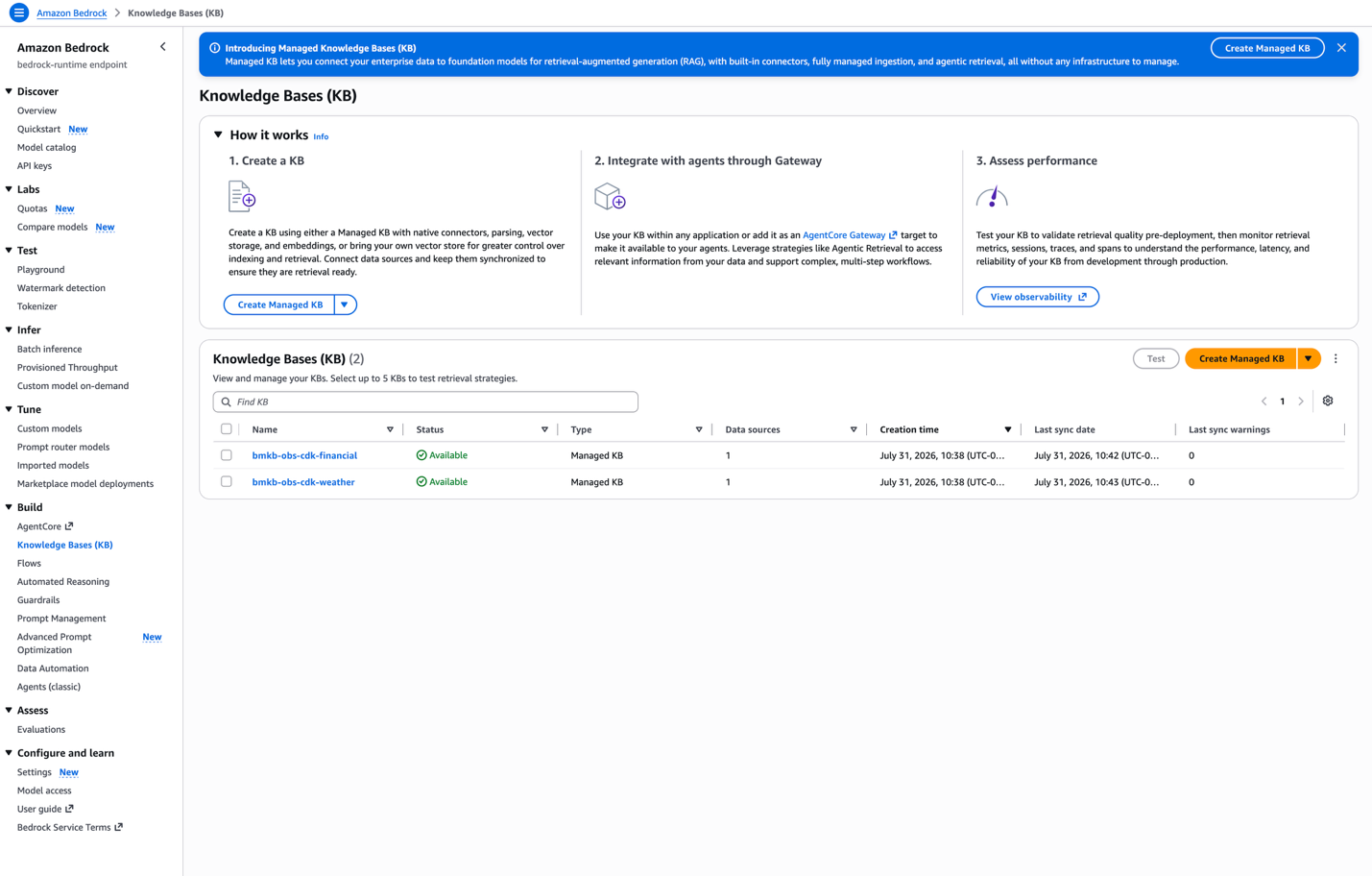
Figure 3: Managed ingestion results, one document indexed per knowledge base with zero failures
Deploy the solution
This section walks through deploying the whole solution with one command. After the prerequisites are met, cdk deploy --all provisions all four stacks in CDK’s derived dependency order and threads every cross-stack value through automatically.
Prerequisites
- An AWS account with permissions for Amazon Bedrock, AgentCore (Runtime + Gateway), AWS Identity and Access Management (IAM), CloudWatch, AWS X-Ray, Amazon Elastic Container Registry (Amazon ECR), AWS CodeBuild, Amazon S3, AWS Lambda, and AWS CloudFormation.
- The agent’s model available in the account (default
us.anthropic.claude-haiku-4-5-20251001-v1:0). - CloudWatch Transaction Search enabled, so OTEL spans land in aws/spans for Layers 5–7.
- Node.js 18+ and the CDK CLI (
npm install -g aws-cdk), plus Python 3.13+. - The account and region bootstrapped for CDK (cdk bootstrap), once per account/region.
- No local Docker, the agent image is built by CodeBuild (ARM64).
One command
To deploy the solution, clone the repository, create a virtual environment, install the dependencies, and run cdk deploy --all. Run the following commands from your terminal:
git clone https://github.com/aws-samples/amazon-bedrock-samples.git
cd rag/managed-knowledge-bases/07-IaaC/managed-kb-observability-cdk/
python3 -m venv .venv && source .venv/bin/activate
pip install -r requirements.txt
cdk bootstrap  # once per account/region
cdk deploy --all
The first two commands clone the sample and move into the project directory. The next two create and activate a Python virtual environment and install the CDK app’s dependencies. cdk bootstrap prepares the account and region for CDK (you only need it once per account/region), and cdk deploy --all provisions all four stacks.
Account and region come from your AWS profile (CDK_DEFAULT_ACCOUNT / CDK_DEFAULT_REGION), so the app deploys with no edits.
Region availability: The managed knowledge base, agentic retrieval (AgenticRetrieveStream), and Amazon Bedrock AgentCore (Runtime and Gateway) aren’t available in every AWS Region. Before you deploy, confirm that all of these are offered in your target Region, and set ACCOUNT_REGION in config.py accordingly. The default is us-west-2. For current availability, see the Amazon Bedrock and Amazon Bedrock AgentCore documentation and the AWS Regional Services List.
There is no deploy script in this version, and that is the point: cdk deploy --all walks the dependency graph it derived from app.py, deploys the four stacks in order, and passes every cross-stack value automatically. The terminal reports each stack as it completes, bmkb-obs-cdk-kb [1/4] (the default PROJECT_NAME), then gateway [2/4], then agent [3/4], then dashboards [4/4] and that order is derived, not declared: it falls out of the construct references between the stacks, so adding a fifth stack that consumes an existing output reorders the deploy on its own.
Stack -agent builds the agent container with CodeBuild, so allow roughly 8–10 minutes for that stage. The other three are quick. Each stack prints its outputs on completion, which is where you pick up the knowledge base ids, the Gateway URL, the runtime ARN, and both dashboard URLs. When the deploy finishes, all four stacks are complete. The following screenshot shows the AWS CloudFormation console after a successful cdk deploy --all.
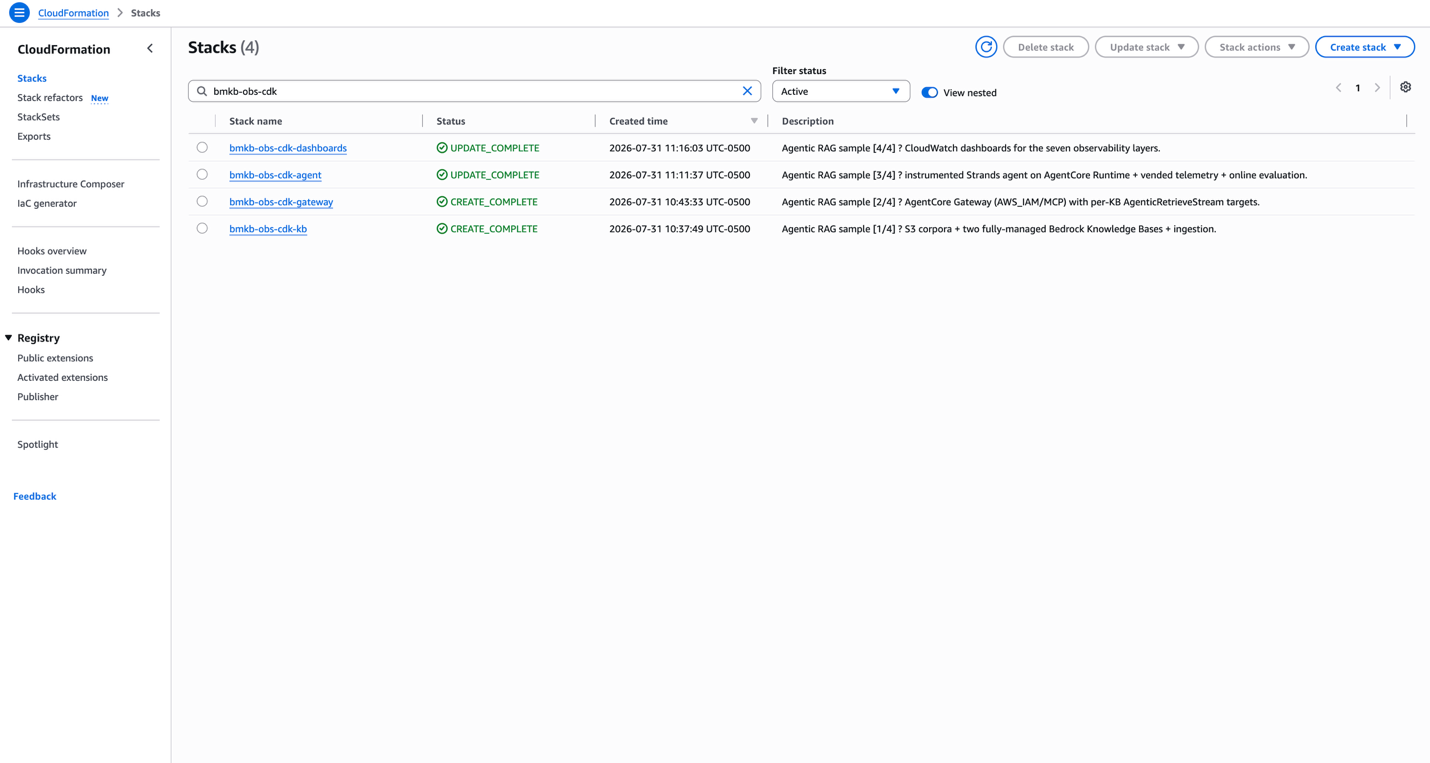
Figure 4: AWS CloudFormation console after a successful deploy, with all four stacks CREATE_COMPLETE
On the console, all four stacks, kb, gateway, agent, and dashboards, report CREATE_COMPLETE, each with its [n/4] position in the derived dependency order shown in its description.
A note on long-running resources
Two things in this solution take far longer than the 15-minute ceiling of an AWS Lambda function allows for naive polling: the KB ingestion sync and the CodeBuild image build. The AWS CDK Provider framework handles this with an on_event / is_complete split, where one handler starts the work and a second is polled until it reports done.
cr.Provider(
    self, "IngestSyncProvider",
    on_event_handler=on_event,        # StartIngestionJob, return the job id
    is_complete_handler=is_complete,  # GetIngestionJob, report IsComplete
    query_interval=Duration.seconds(30),
    total_timeout=Duration.minutes(30),
)
Nothing blocks, the response protocol back to CloudFormation is owned by the framework rather than hand-written into each handler, and the 30-minute budget is a property rather than something to engineer around.
Launch and test
Open notebooks/01-drive-and-observe.ipynb and run it top to bottom (pip install -r requirements-notebook.txt first). It reads the stack outputs, then sends topic-specific prompts to the deployed agent, one session per KB , so you can see both the answers and the semantic routing in one place: financial questions are answered from the Octank 10-K and weather questions from the tornadoes report, each routed to the matching AgenticRetrieveStream tool automatically.
The notebook discovers everything from the stack outputs, so there is nothing to paste in by hand:
# Stack names are derived from the same PROJECT_NAME the CDK app uses, so renaming the
# project in config.py cannot leave this notebook pointing at stale stacks.
from config import EnvSettings

PROJECT = EnvSettings.PROJECT_NAME
STACKS = {suffix: f'{PROJECT}-{suffix}'
          for suffix in ('kb', 'gateway', 'agent', 'dashboards')}

def outputs(stack_name):
    s = cfn.describe_stacks(StackName=stack_name)['Stacks'][0]
    return {o['OutputKey']: o['OutputValue'] for o in s.get('Outputs', [])}
The notebook imports the same config.py the app does, so the two can never disagree about what the stacks are called.
The driver sends per-KB prompts through the deployed agent. Financial questions route to the financial KB and weather questions to the weather KB, each with a grounded, cited answer.
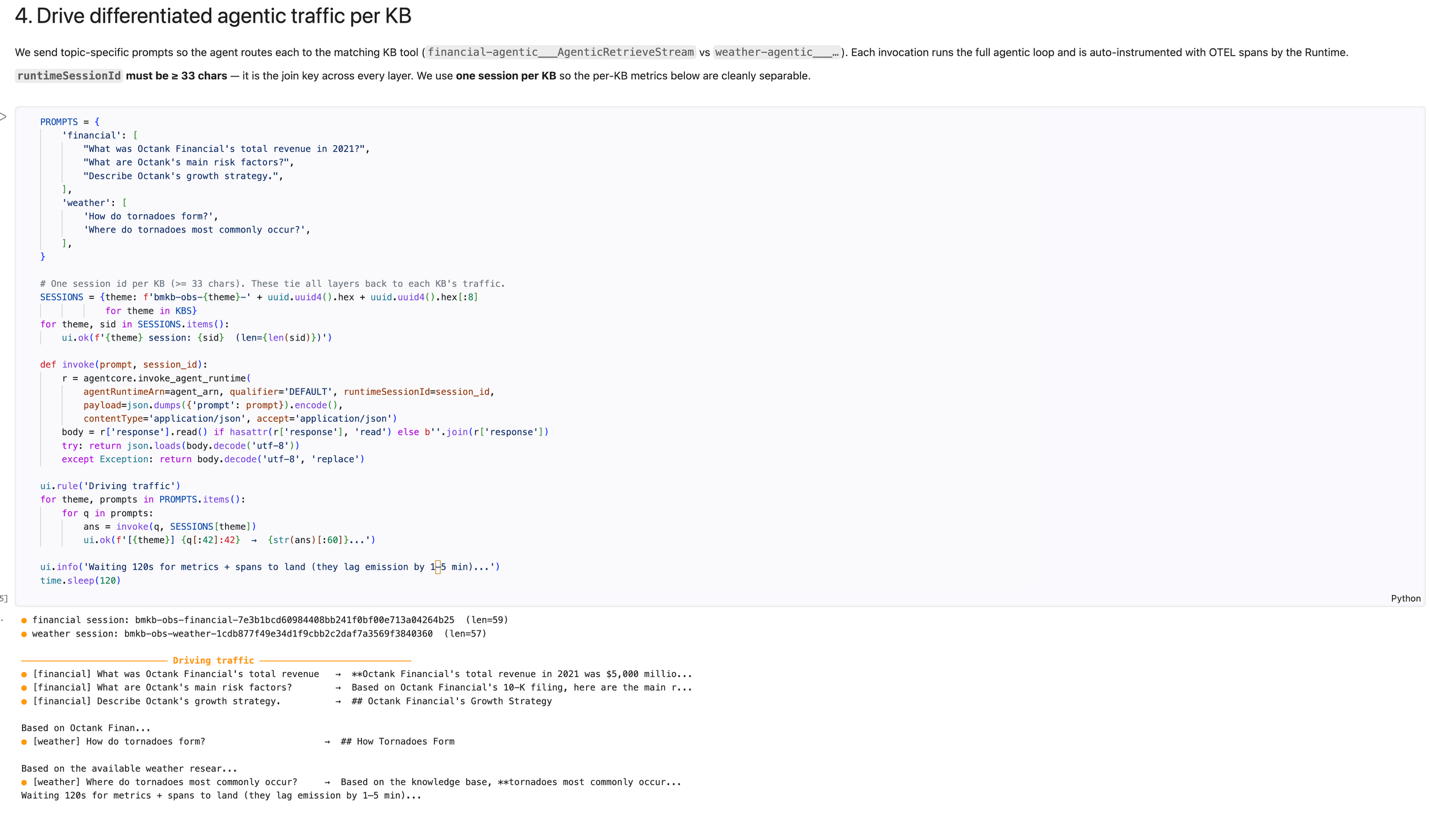
Figure 5: Per-KB prompts routed to the matching knowledge base, each returning a grounded, cited answer
The notebook also computes the reference-free Layer 3 retrieval-quality signals from what the agent actually retrieved and cited, no ground truth, no extra judge, and publishes them to CloudWatch.
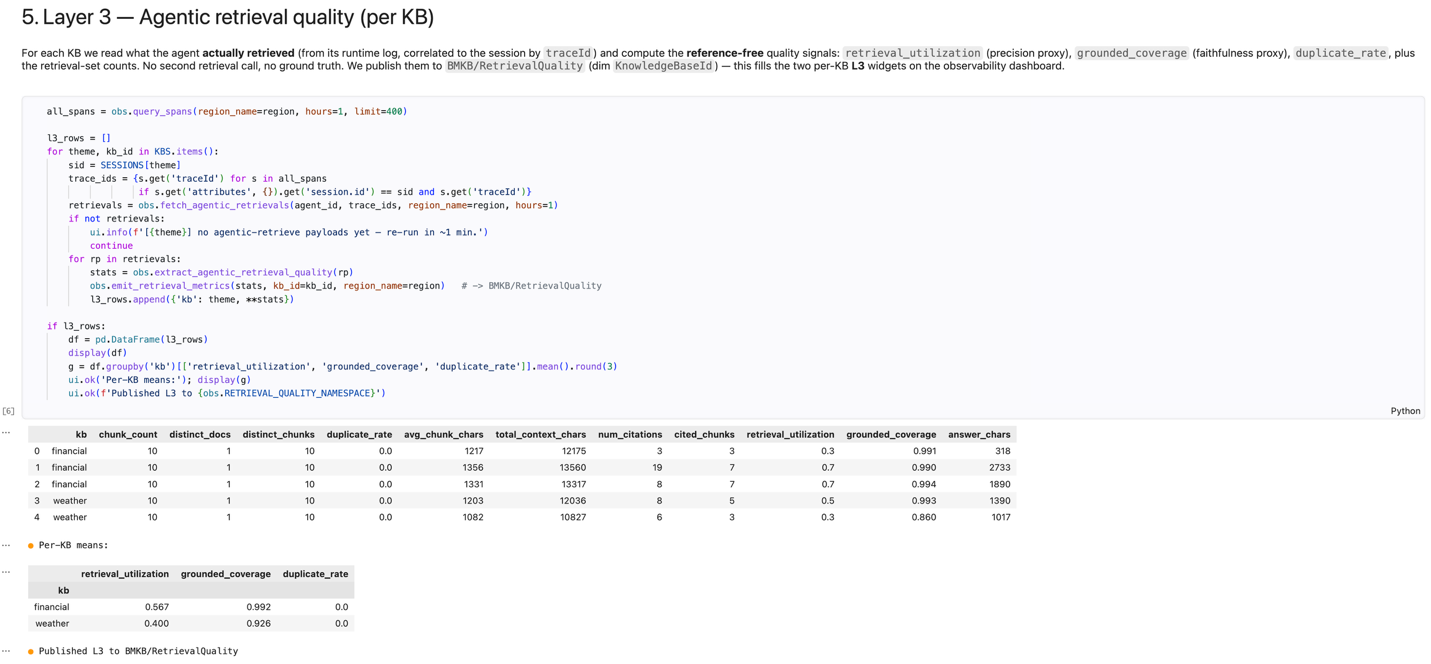
Figure 6: Reference-free Layer 3 retrieval-quality signals per knowledge base
Observe: The seven-layer dashboards
The two dashboards are where the seven layers become visible. The stack creates both dashboards, and driving traffic populates them. The following screenshot shows the two dashboards as they appear in the CloudWatch console.
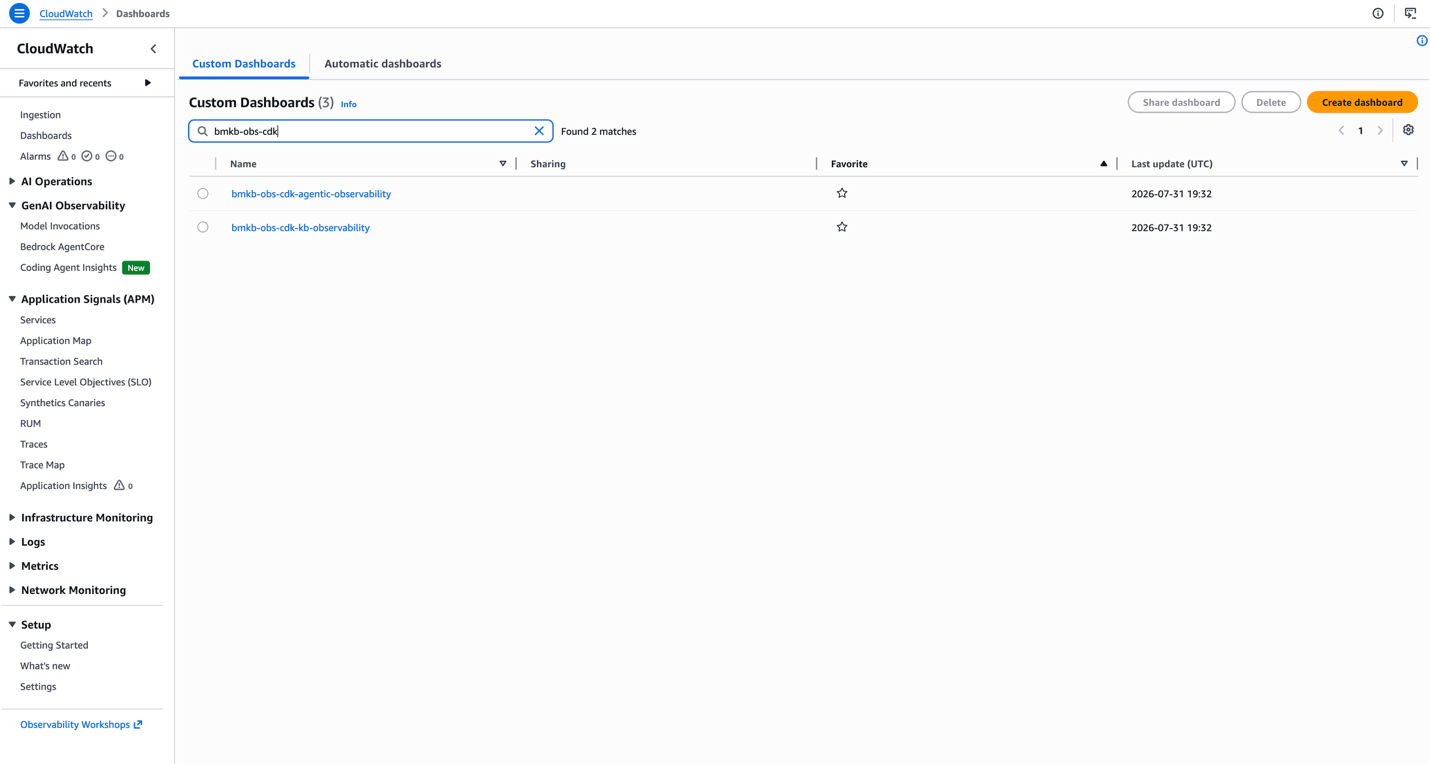
Figure 7: The two dashboards in the CloudWatch console, end-to-end agentic observability and per-KB observability
Both dashboards appear in the CloudWatch console: one for end-to-end agentic observability and one for per-KB observability (BMKB, Bedrock Managed Knowledge Base). The rest of this section walks through what each layer shows.
In this version the dashboards are built from typed objects rather than a JSON string. A metric is a Metric, a widget is a GraphWidget, and the layout is a list of Rows:
cw.GraphWidget(
    title="L4 — Gateway metrics (MCP)",
    width=12, height=6, period=PERIOD, statistic="Sum",
    left=[
        self._gateway_metric("Invocations", gateway_arn, "tools/call Invocations"),
        self._gateway_metric("SystemErrors", gateway_arn, "SystemErrors"),
        self._gateway_metric("UserErrors", gateway_arn, "UserErrors"),
        self._gateway_metric("Throttles", gateway_arn, "Throttles"),
    ],
)
The practical benefit isn’t fewer lines, dashboards_stack.py runs to 400 lines, more than the equivalent DashboardBody JSON would. It is that a misspelled property or an invalid widget combination fails at cdk synth, on your laptop, in about a second. The same mistake inside a DashboardBody string deploys successfully and renders as a broken widget on the AWS Management Console, where you find it by looking at it.
Because a Row accepts any widget, the documentation is part of the layout rather than a wiki page that drifts. Each dashboard interleaves TextWidgets with the graphs:
[cw.TextWidget(width=24, height=7, markdown=self._l3_explainer())],
[
    self._quality_widget("L3 · Financial KB — agentic quality (reference-free, 0–1)", fin_id),
    self._quality_widget("L3 · Weather KB — agentic quality (reference-free, 0–1)", wx_id),
],
_l3_explainer() returns a markdown table defining each ratio and how to read it, so the widget that explains grounded_coverage ships in the same commit as the widget that plots it, and a reader who opens the dashboard cold doesn’t need to guess what a reference-free metric is.
Dashboard A — agentic observability (end to end). The board opens with an explainer of how each layer counts a different thing (for N queries you’ll see ~N agent invocations, ~2 N retrievals, ~3 N LLM calls, and ~5 N Gateway MCP operations, the agentic loop made visible), then shows KB metrics (L1), Gateway metrics and latency (L4), token usage (L6), and because the agent uses AgenticRetrieveStream, which returns a synthesized, cited answer rather than per-chunk scores, the reference-free Layer 3 quality signals, defined inline and plotted per KB.
On Dashboard A, the Layer 3 reference-free quality signals are plotted per knowledge base. First, the financial KB. The following chart plots its retrieval_utilization, grounded_coverage, and duplicate_rate.
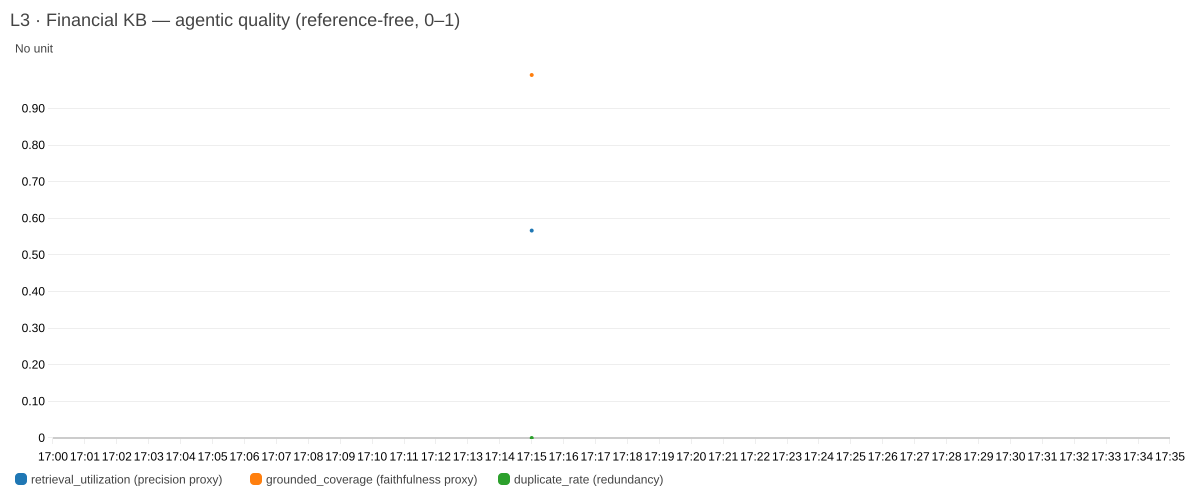
Figure 8: Financial KB Layer 3 quality, plotting retrieval utilization, grounded coverage, and duplicate rate
The weather KB shows the same three signals, tracked separately so the two domains never blur into one number.
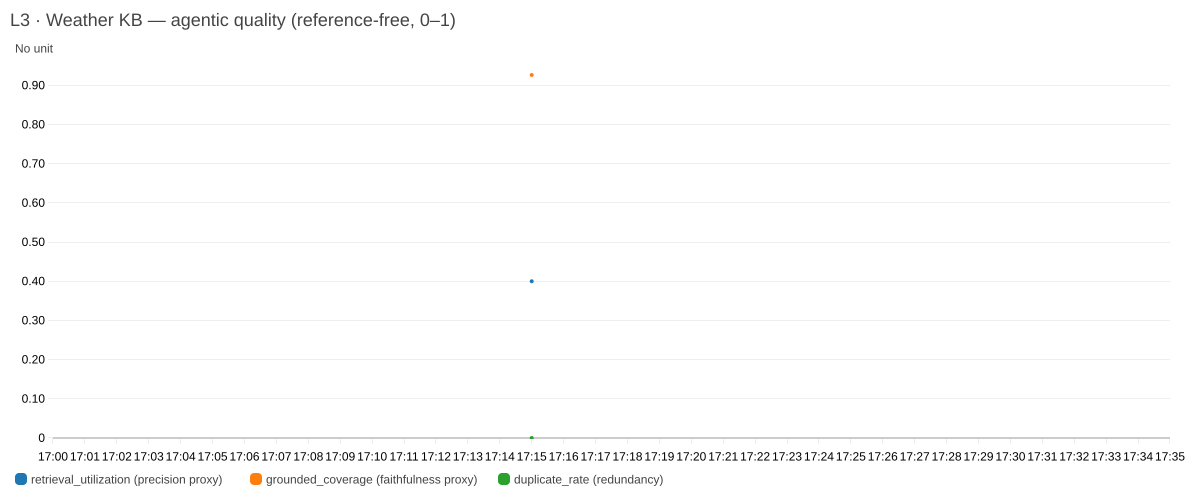
Figure 9: Weather KB Layer 3 quality, tracked separately from the financial KB
The two charts plot retrieval_utilization, grounded_coverage, and duplicate_rate for the financial KB (left) and the weather KB (right), so each knowledge base’s retrieval quality stays separable rather than averaged into one number.
Dashboard B — per-KB (BMKB) observability. The operational signals that also determine spend, per KB: index size (from S3 source bytes), retrieve volume, agentic tool-calls, session token usage, and generation token usage by model, each with an inline explanation.
The following screenshots show Dashboard B’s four metric widgets, populated after a run. The first widget reports index size, derived from S3 source bytes, per knowledge base.
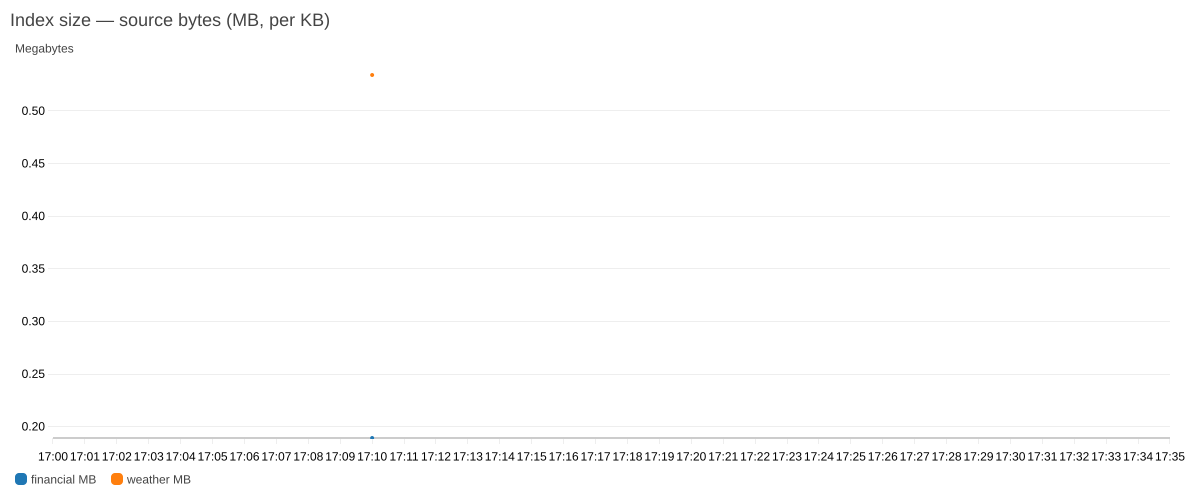
Figure 10: Dashboard B index size per knowledge base, derived from Amazon S3 source bytes
The second widget counts retrieve calls per knowledge base.
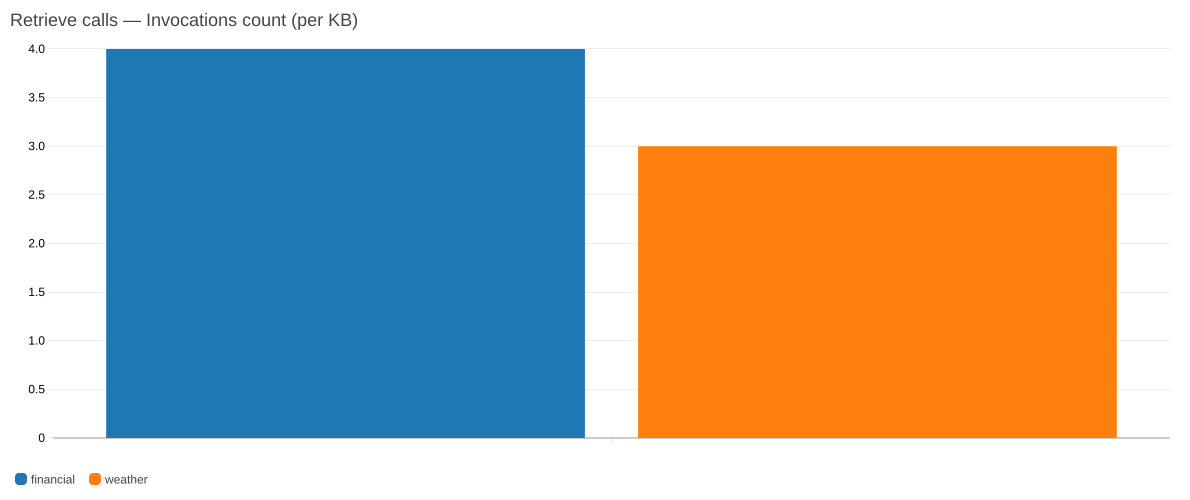
Figure 11: Dashboard B retrieve-call count per knowledge base
The third widget counts agentic tool-calls through the Gateway. This one is shared across both KBs rather than split.
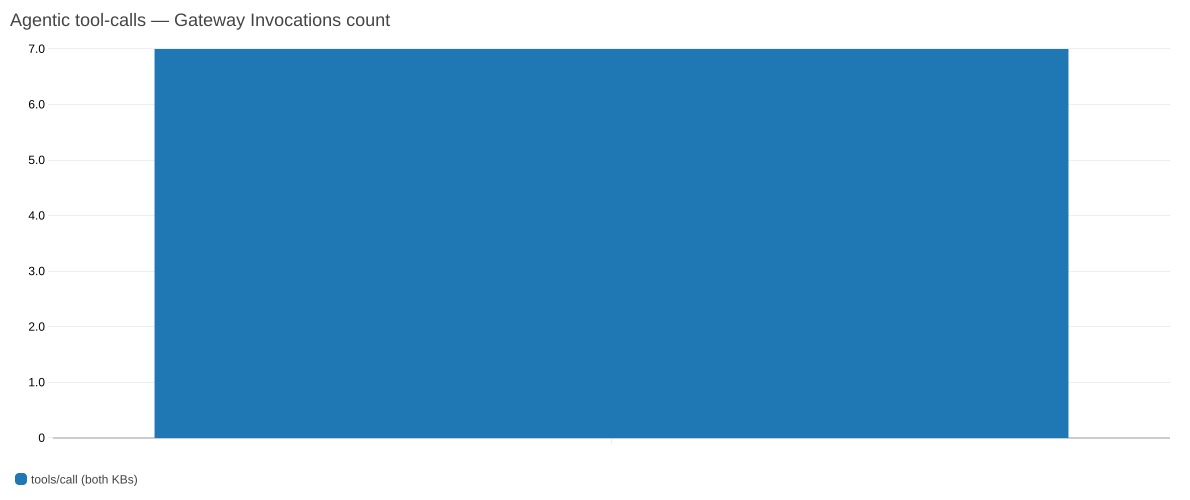
Figure 12: Dashboard B agentic tool-call count through the AgentCore Gateway, shared across both knowledge bases
The fourth widget reports session token usage per knowledge base.
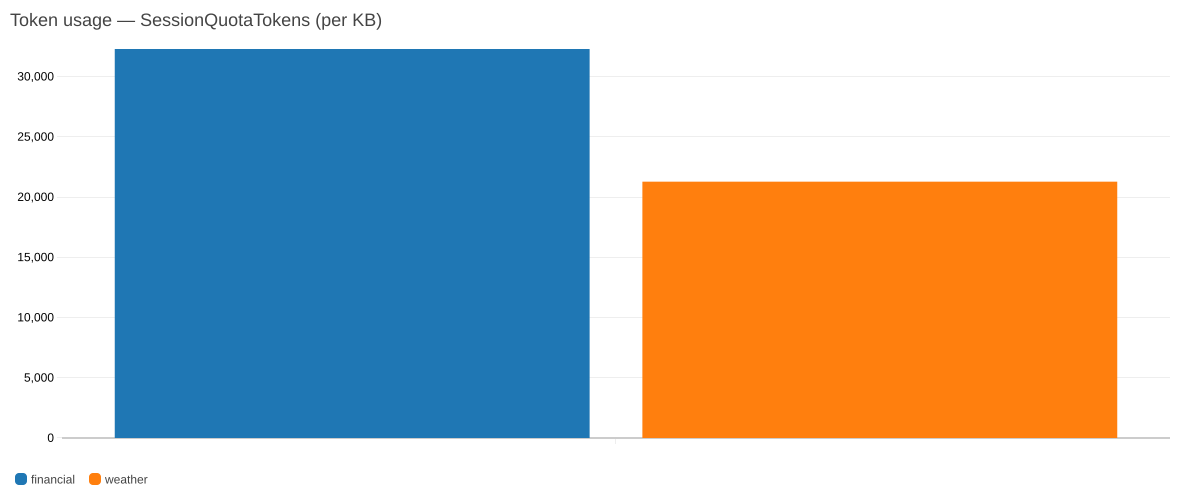
Figure 13: Dashboard B session token usage per knowledge base
The four widgets show index size (from S3 source bytes), retrieve-call volume, agentic tool-calls through the Gateway, and session token usage. Each is broken out per knowledge base except the Gateway tool-call count, which is shared across both.
One dimension detail is worth calling out, because the typed API won’t catch it for you: the AWS/Bedrock/KnowledgeBases namespace expects a prefixed id, knowledge-base/<id>, while the solution’s own BMKB/* namespaces use the bare id. Both are only strings as far as CDK is concerned.
# L1 — AWS/Bedrock/KnowledgeBases wants the prefixed form.
dimensions_map={"Operation": "Retrieve", "KnowledgeBaseId": f"knowledge-base/{kb_id}"}

# BMKB/* — our own namespaces use the bare id.
dimensions_map={"KnowledgeBaseId": kb_id}
Layer 5: The span tree
Layer 5 is the raw OTEL span tree in aws/spans, and it is the layer that shows you the agentic loop directly. It is worth reading carefully, because the nesting isn’t obvious: one LLM call produces three spans. The Strands invoke_agent span wraps the turn, an internal chat span wraps the model call, and a chat <model> span of kind CLIENT is the actual call, and all three repeat the same gen_ai.usage.* token attributes.
The following screenshot shows the span tree in aws/spans, with the three-span nesting visible in the top rows.
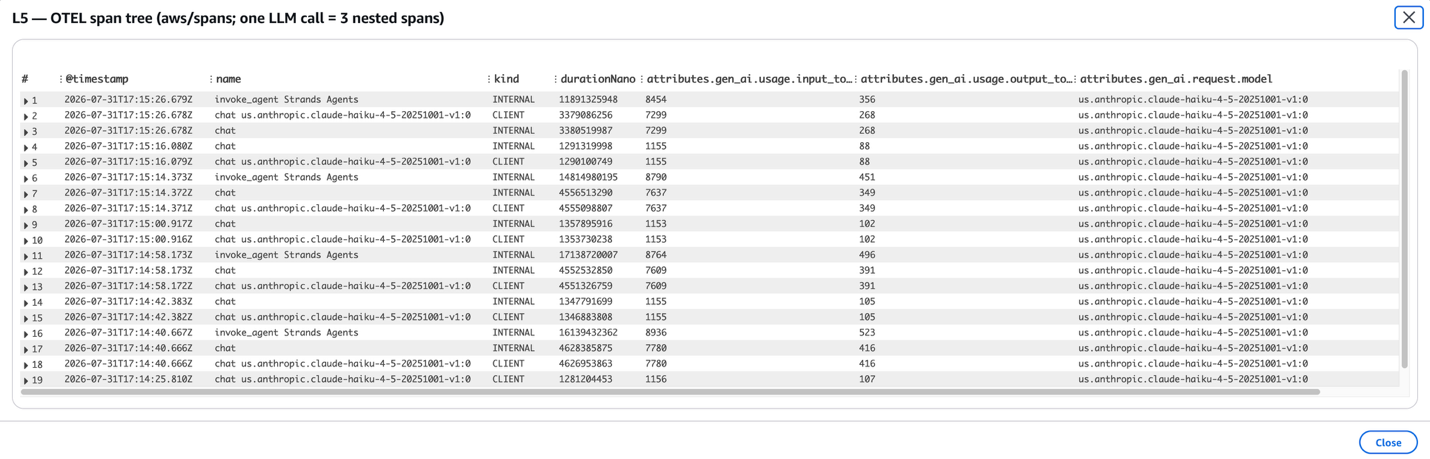
Figure 14: Layer 5 span tree in aws/spans, showing the three-span nesting of a single LLM call
Reading the top three rows: an invoke_agent Strands Agents aggregate, then an internal chat span, then a CLIENT chat span, all reporting an identical 7,299 input and 268 output tokens. That is the same LLM call appearing at three levels of the tree, which is why aggregation needs care.
That structure matters the moment you aggregate. To count each LLM call once, filter to the CLIENT leaf:
fields attributes.gen_ai.request.model as model,
       attributes.gen_ai.usage.input_tokens as in_tok,
       attributes.gen_ai.usage.output_tokens as out_tok
| filter ispresent(in_tok) and kind = 'CLIENT' and name like /^chat /
| stats sum(in_tok) as input_tokens, sum(out_tok) as output_tokens,
        count(*) as llm_calls by model
Without that filter the same query reports three times the tokens and three times the calls.
Applying that CLIENT-leaf filter, the following screenshot shows generation token usage by model with each LLM call counted once.
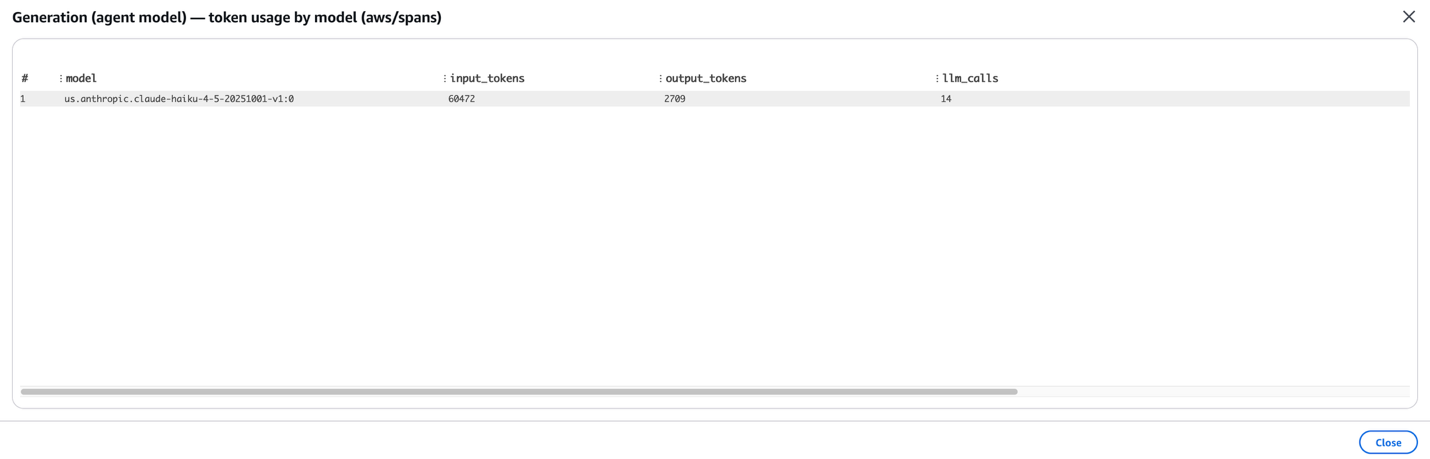
Figure 15: Generation token usage by model, with each LLM call counted once
With the filter in place, the run shows 14 LLM calls totaling 60,472 input and 2,709 output tokens. Without it, the same query would report three times the calls and three times the tokens.
Evaluate: On-demand and continuous
Quality is measured two ways, and both are provisioned by the app.
On-demand: The driver notebook calls AgentCore There is no deploy script in this version, and that is the point: (LLM-as-judge) over each session’s spans for built-in evaluators, Correctness, Faithfulness, Tool-Selection Accuracy and publishes the scores to CloudWatch, where they appear as Layer 7 on Dashboard A.
The following screenshot shows Layer 7 on Dashboard A: on-demand evaluation scores per knowledge base, with the Layer 5 OTEL span table on the same dashboard.
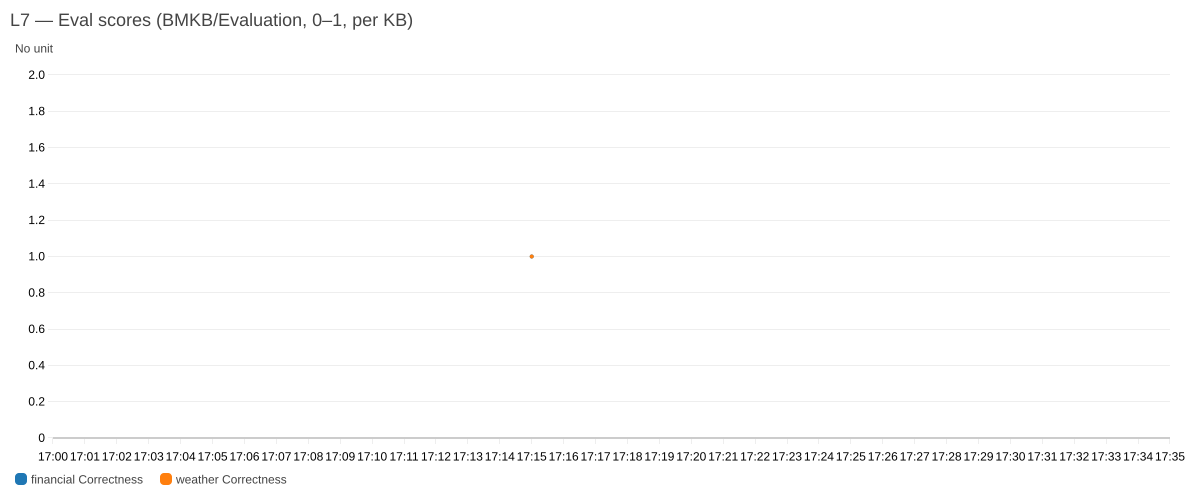
Figure 16: Layer 7 on-demand evaluation scores per knowledge base, beside the Layer 5 span table
Layer 7 shows the on-demand evaluation scores per knowledge base, with the Layer 5 OTEL span table alongside, so the scores and the spans that produced them read together on one board.
Continuous (online): The agent stack also provisions an AWS::BedrockAgentCore::OnlineEvaluationConfig that samples live sessions and scores them automatically, no notebook run required. The configuration itself is visible in the Bedrock AgentCore console under Assess → Evaluations → Evaluation configurations. Results land in the log group /aws/bedrock-agentcore/evaluations/results/<config-id>, and every score is also published as a CloudWatch metric in the Bedrock-AgentCore/Evaluations namespace, keyed by evaluator name and configuration id, so you can graph the scores or alarm on them without parsing logs.
The following screenshot shows the online evaluation configuration in the AgentCore console, under Assess, then Evaluations, then Evaluation configurations.
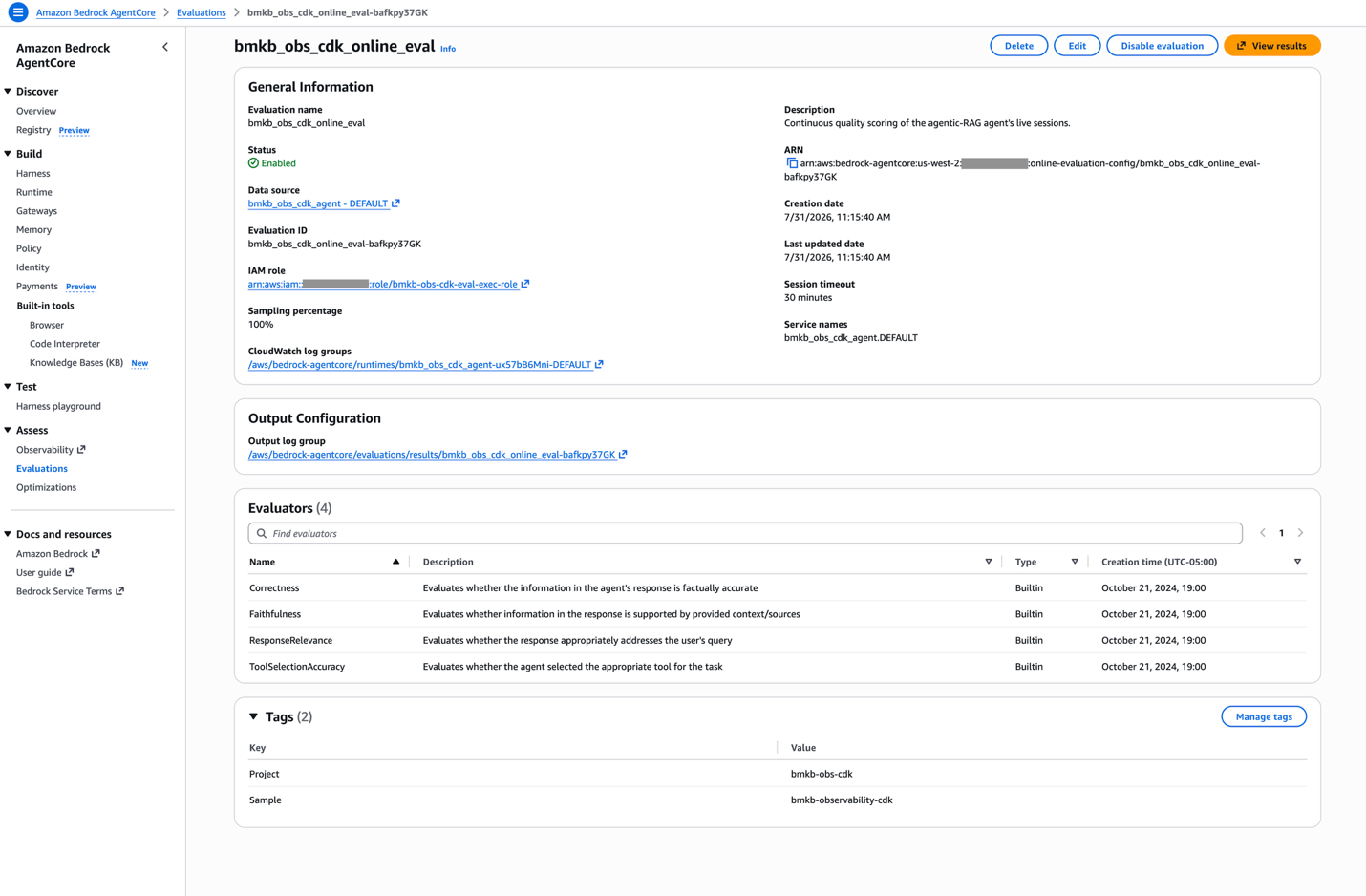
Figure 17: The online evaluation configuration in the AgentCore console, with four built-in evaluators at 100 percent sampling
The configuration lists four built-in evaluators, Tool-Selection Accuracy, Faithfulness, Correctness, and Response Relevance, set to 100 percent sampling and shown as ACTIVE and enabled.
Because the scores are ordinary CloudWatch metrics, they graph like anything else, no log parsing, and the same widget could carry an alarm. The following screenshot shows those four evaluator scores graphed as ordinary CloudWatch metrics.
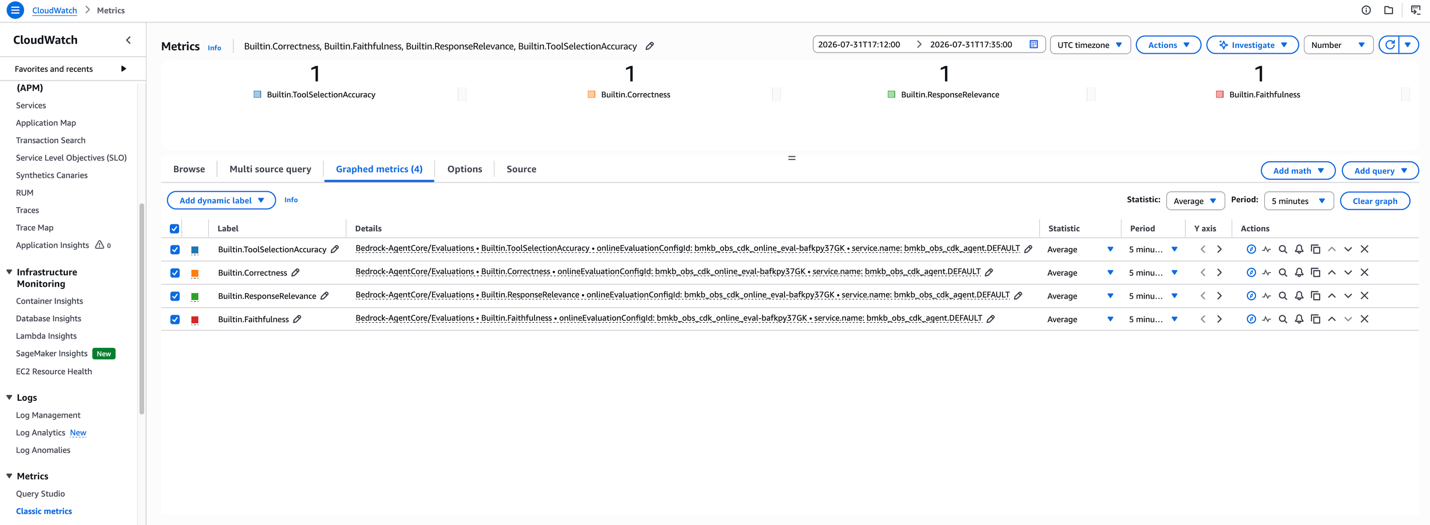
Figure 18: The four continuous evaluator scores graphed as ordinary CloudWatch metrics
The four evaluator scores appear as metrics in the Bedrock-AgentCore/Evaluations namespace, each keyed to the evaluation configuration id and the agent’s service name, so you can graph them or alarm on them without parsing logs.
Online results only arrive after a session closes. Scoring runs on the completed session, so the results log group stays empty for roughly the session idle timeout (~30 minutes) after you drive traffic. An empty group right after a run is expected, not a misconfiguration. Each result event carries session.id, so it joins to every other layer. The on-demand path in the notebook has no such wait, which is why both are here.
Across the four built-in evaluators on this run, the continuous path scored 1.00 on Correctness, Faithfulness, Response Relevance, and Tool-Selection Accuracy, five scored traces per evaluator, each result carrying a written explanation.
⚠️ Sampling and cost. This app sets SAMPLING_PERCENTAGE = 100 purely for the blog experiment , so every session is scored and the results are immediately visible. This isn’t a production recommendation. Online evaluation invokes an LLM-as-judge per sampled session, so cost scales with the sampling rate and traffic volume. For a real deployment, choose a sampling percentage that fits your quality-monitoring needs and budget, and align the configuration with your organization’s own policies and cost-governance requirements before enabling it. The rate is a single constant, EvalConfig.SAMPLING_PERCENTAGE, in config.py.
Clean up
When you’re finished, remove the solution so it stops incurring charges, since stored KB data, the agent image in ECR, and the still-active online evaluation all cost money while the stacks sit idle. One command tears everything down:
CDK deletes the stacks in reverse dependency order on its own, dashboards, then agent, then gateway, then kb: the same graph it derived for the deploy, walked backward. There is no teardown script to keep in agreement with the deploy script, which is one of the more quietly valuable properties of modelling the dependencies once.
Two removal behaviors are worth knowing, because both replace hand-written cleanup code:
self.source_bucket = s3.Bucket(
    self, "SourceBucket",
    removal_policy=RemovalPolicy.DESTROY,
    auto_delete_objects=True,  # replaces a list_object_versions delete loop
)

self.repository = ecr.Repository(
    self, "AgentImageRepo",
    removal_policy=RemovalPolicy.DESTROY,
    empty_on_delete=True,  # replaces an image-delete loop
)
Both are set for sample hygiene, for anything you care about, switch the bucket to RemovalPolicy.RETAIN.
The CDK bootstrap stack (CDKToolkit) and its staging bucket aren’t removed. They are shared account-wide infrastructure that other CDK apps may depend on.
What changed since the single-shot solution
Both this post and the 2024 solution are CDK applications in Python, deployed with cdk deploy. The authoring tool is the constant here, what changed is the architecture underneath it, and most of the change is subtraction:
| Concern | 2024: Single-shot RAG | This solution |
|---|---|---|
| Vector store | An OpenSearch Serverless collection and index you provision, scale, and pay OCU for | None. Type: MANAGED, Amazon Bedrock owns storage and indexing |
| Index lifecycle | A custom resource creates the index and waits for it to become searchable | Nothing to create |
| Embedding model | You select it and grant model access | Service-managed by default |
| Stacks | 3: KB role → OpenSearch infra → KB + data source | 4: kb → gateway → agent → dashboards |
| Retrieval | One Retrieve, top-k chunks by vector similarity | AgenticRetrieveStream, reranked internally, returns a synthesized cited answer |
| Choosing a knowledge base | Not applicable, there is one index | The agent routes semantically across two |
| Second look at the corpus | Not possible in one shot | The agent retrieves again before answering |
| Telemetry | None provisioned | Seven layers, two dashboards |
| Evaluation | Manual: sync, pick a model, ask questions | On-demand and continuous, both provisioned |
| Cost floor when idle | OCU charges accrue whether or not you query | Storage only |
The trade is real in both directions. A single index answering single-shot questions is cheaper per query, simpler to reason about, and entirely sufficient when one corpus holds the answer. Reach for this design when it doesn’t.
The CDK constructs doing the work
Four constructs carry most of the weight in this app, and they are worth naming because each replaces something people otherwise hand-write:
- Provider – For custom resources that outlive the 15-minute ceiling of an AWS Lambda function. The
on_event/is_completesplit means nothing sleeps in a poll loop, and the response protocol back to CloudFormation is the framework’s job rather than a vendoredurllibcallback in every handler. - BucketDeployment – Uploads the corpora, so the ingestion custom resource only ingests.
- auto_delete_objects=True and empty_on_delete=True , replace the hand-written
list_object_versionsand image-delete loops that a stack otherwise needs to be destroyable at all. - repository.grant_pull_push(project) – One line for the eight
ecr:*actions CodeBuild needs, spelled correctly by construction.
And typed dashboards, from the Observe section: Metric / GraphWidget / Row objects instead of a DashboardBody JSON string, which moves an invalid widget combination from “renders broken on the console” to “fails at cdk synth.”
Two things CDK doesn’t change, and both are worth knowing before you start:
- Free-form JSON stays camelCase.
connector_parametersandparameter_valuesare passed through verbatim, so the AWS CDK snake_case to PascalCase conversion does not apply inside them. Keys likebucketNameandinclusionPrefixesmust be spelled exactly as the API expects, and nothing will tell you otherwise until the resource fails. - String-typed values are still strings. The
knowledge-base/<id>versus bare<id>dimension difference from the Observe section is invisible to the type system. Typed constructs check structure , not semantics.
Neither is a reason to prefer one tool over the other. They are the boundary of what “typed” buys you, and knowing where that boundary sits is most of what makes CDK pleasant instead of surprising.
Conclusion
We built a complete enterprise agentic retrieval solution on a Managed Amazon Bedrock Knowledge Base and AgentCore: multi-KB semantic routing, a reasoning agent, seven layers of observability, and both on-demand and continuous evaluation, and deployed all of it as a single AWS CDK application.
Two things are worth taking away. The managed knowledge base removed infrastructure rather than adding it: no vector store to provision, no index to create and wait on, no OCU line item accruing while the system sits idle. It is also the knowledge base type that supports agentic retrieval and the AgentCore Gateway connector, as described in the Amazon Bedrock documentation. And once retrieval became agentic, observability stopped being optional. Roughly half of what this app provisions exists to answer what the agent actually did and whether the answer was any good, which isn’t overhead on an agentic system. It’s the part that makes one operable.
The CDK authoring model earned its place on the seams. Seven values cross stack boundaries in this architecture, and every one of them is a construct reference rather than an export/import pair, which is also why there’s no deploy script, no teardown script, and no fixed order to remember.
From here you can point the data sources at your own corpora, place the agent in a virtual private cloud (VPC), tune the online-evaluation sampling rate to your budget and policies, or add more knowledge bases to the router. To learn more, see the Amazon Bedrock detail page and the Amazon Bedrock documentation. The app, the driver notebook, and the self-contained utilities are all in the accompanying GitHub repository, so you can clone it and deploy your own copy with one command.
About the authors
Prabhakar Chandrasekaran
Prabhakar is a Senior Technical Account Manager with AWS Enterprise Support. Prabhakar enjoys helping customers build AI and ML solutions on the cloud. He also works with enterprise customers providing proactive guidance and operational assistance, helping them improve the value of their solutions when using AWS. Prabhakar holds eight AWS and seven other professional certifications. With over 23 years of professional experience, Prabhakar was a data engineer and a program leader in the financial services space prior to joining AWS.
Siddhant Sahu
Siddhant is a Senior Product Manager at AWS, where he leads product development for Amazon Bedrock Managed Knowledge Base. He focuses on building and rolling out infrastructure software services that handle multi-modal, multi-lingual enterprise data through fully managed ingestion, parsing and agentic search pipelines, in a cost-efficient, accurate and secure way, leveraging state-of-the-art capabilities such as hybrid search, multi-shot retrieval, tool use and embedding techniques. His work enables thousands of enterprise customers and ISVs to build agents at scale.