在 Google Cloud 上管理 Claude Code 成本并衡量 ROI:核心策略与最佳实践
英文标题:ArticleOct 27, 2026Manage costs and demonstrate ROI for Claude Code on Google CloudBest practices for managing costs and measuring return on investment for Claude Code on Google Cloud.Claude Code
随着企业组织将更多开发任务交付给 Claude Code,平台工程团队面临着在避免成本失控的同时量化业务价值的双重挑战。Anthropic 与 Google Cloud 联合提出了涵盖「控制(Control)」、「追踪(Track)」与「证明(Prove)」的三大治理杠杆,借助 Claude apps gateway 与 Google Cloud 原生工具实现按用户与模型的细粒度预算管理。通过 OpenTelemetry 原生遥测以及与 BigQuery、Cloud Monitoring 的集成,企业不仅能实时监控任务级成本与工具调用,还能从交付周期、审查轮次及交付量等多维度证明工程投资回报率。
 195.2 KB
 168.6 KB
 274.0 KB
 196.1 KB
 419.6 KB
 241.0 KB
 274.6 KB
 58.0 KB
中文
随着企业组织将更多工作交由 Claude Code 处理,相关支出也随之增长,平台团队需要一种既能控制成本又能直观了解实际成效的方法。受到近期与 Google Cloud 联合举办的线上研讨会(在新标签页打开)启发,我们在此分享使用 Claude Code 的企业如何在 Google Cloud 上更好地追踪并优化这些考量,其中包括三大核心杠杆:控制(Control)、追踪(Track)和证明(Prove)。
管理 Claude Code 支出的控制手段
Claude on Google Cloud 采用按量计费模式(consumption-based pricing),因此你的账单直接反映了开发者在 Google Cloud 环境中使用 Claude 的频次与深度。采纳度推动了使用量;使用量决定了你的支出,而这也正是价值体现的地方。
你的 Claude Code 账单是任务消耗的 Token 数量以及处理这些任务的模型种类的综合结果。Token 消耗量随着任务复杂度和对话长度而增加。普通 Chat 是问答式的对话。相比 Chat,像 Claude Code 这样的 Agent 工具在每个任务上消耗的 Token 更多,因为它是多步骤运作的:读取文件、运行工具,并在整个任务过程中进行持续推理。与此同时,每个模型都有自己的每 Token 单价,因此让模型与任务相匹配是另一个核心的成本控制手段。
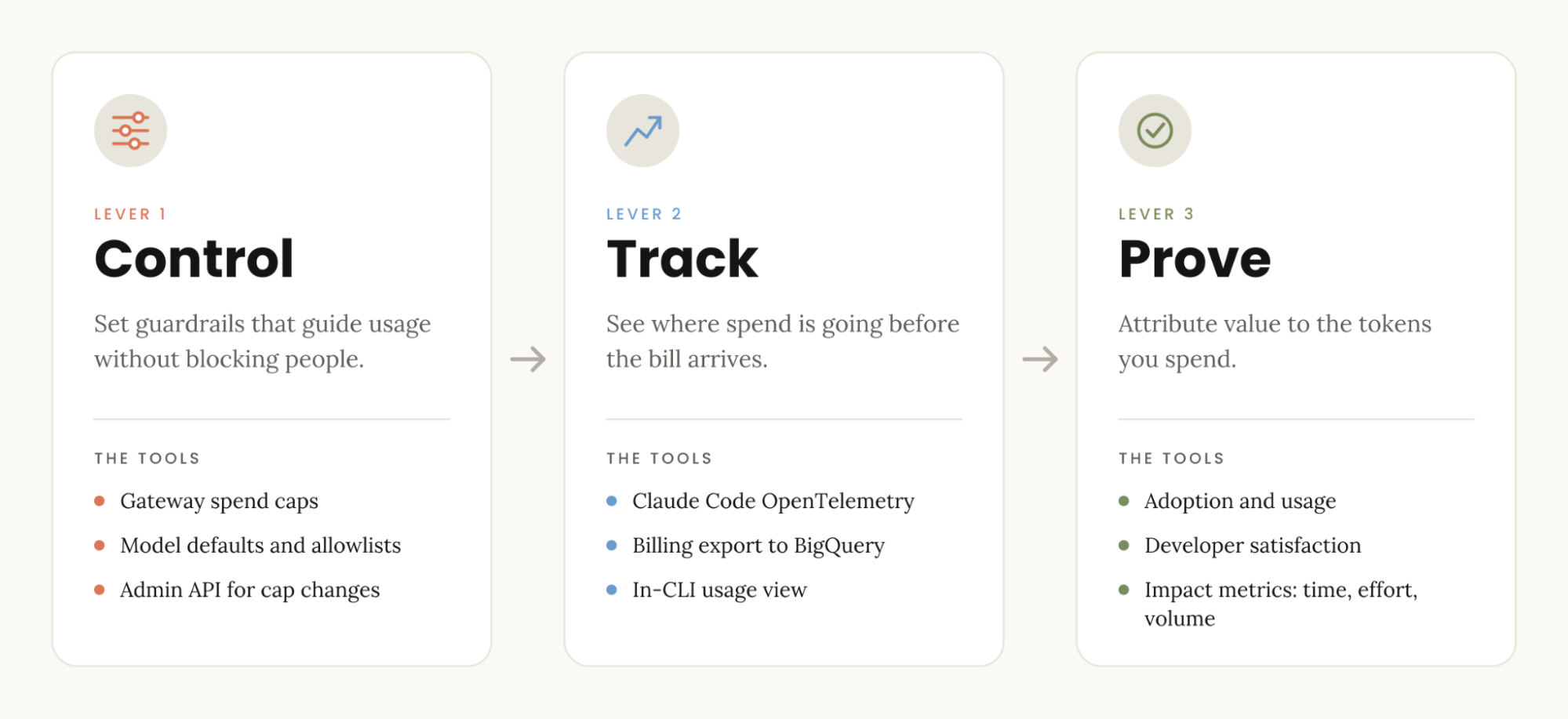
通过 Claude apps gateway 和 Google Cloud 服务,你可以清晰洞察每月影响组织账单的 Token 和模型选择情况。你可以通过三个独立的杠杆来治理支出并管理成本:
- 控制(Control):建立安全护栏来引导使用,而不是过度限制访问并无意中阻断开发人员的正常工作。
- 追踪(Track):在账单送达之前,对当前支出的具体去向以及未来的支出走势进行细粒度监管。
- 证明(Prove):明确你的组织从消耗这些 Token 中获得的实际价值,并精准归因其具体来源。
以下是如何在你的 Google Cloud 环境中将这一「控制 -> 追踪 -> 证明」框架应用于 Claude Code 部署的方法。
治理工具箱
Claude on Google Cloud 配备了用于控制、追踪以及证明支出价值的工具与功能。
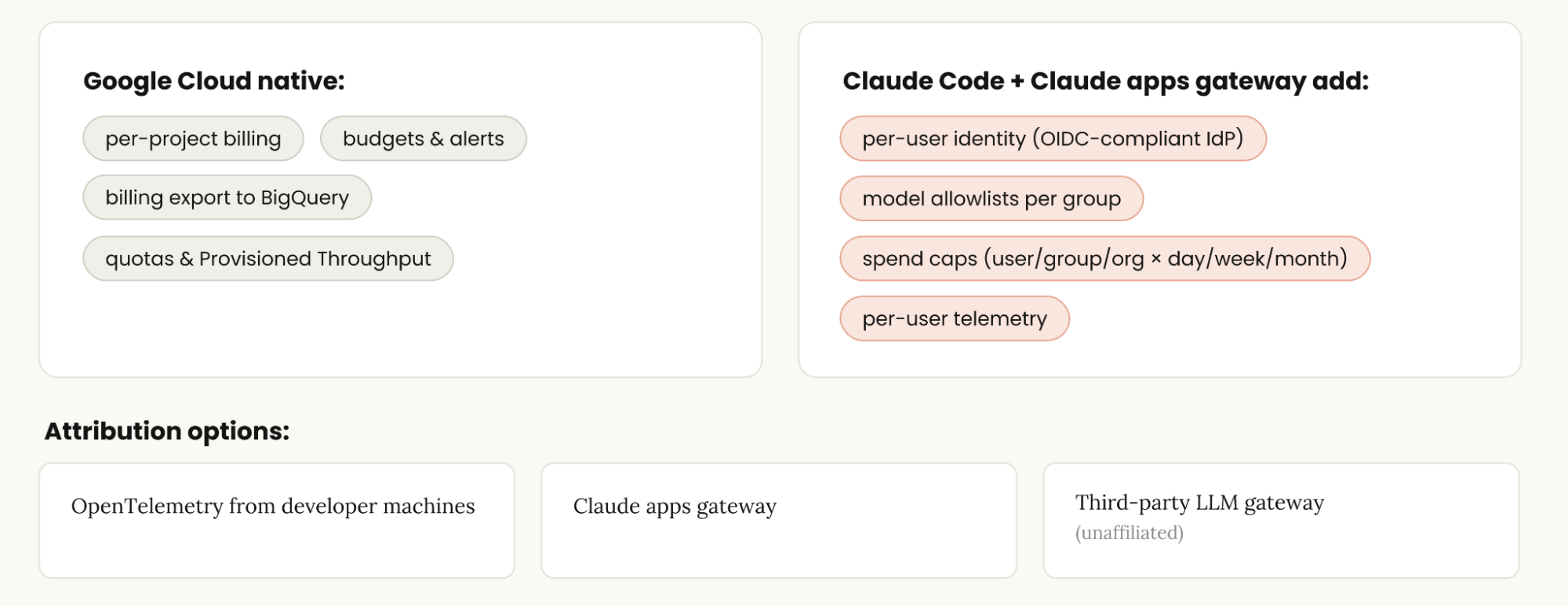
Google Cloud 已经提供了许多可用于追踪和控制 Claude 支出的原生能力:
- 按项目计费(Per-project billing):允许你为 Claude Code 托管一个专用项目,作为追踪成本的清晰途径。
- 计费预算与告警(Billing budgets and alerts):允许你设置预算告警,并在实际支出跨越你设定的阈值时收到通知。
- 支出上限(Spend caps,预览版):允许你强制执行服务级别的 Google Cloud 支出预算,并具备手动提升上限的能力。
- BigQuery 导出(BigQuery exports):让你能够将 Claude 支出与其他云成本放在一起进行统一分析。
- 配额(Quotas):Google Cloud 上的 Claude 模型针对每个模型家族和终端节点位置,设置了针对请求数、输入 Token 和输出 Token 的每分钟上限。
- 预配吞吐量(Provisioned throughput):为预留容量支付固定费用,而非采用即现即付模式。
Claude Code 和 Claude apps gateway 增加了其专属的追踪与控制能力。Gateway 是一个自托管服务,内置于开发者已在使用的主 claude 二进制文件中,运行在你的 Google Cloud 项目中,介于 Claude Code 和 Claude on Google Cloud 之间。开发者通过你的身份提供商(IdP,如 Google Workspace)登录,因此每个请求都带有经过验证的身份。这使你能够按 IdP 用户组设置模型白名单,并按天、周或月按用户、IdP 组或组织层级设置支出上限。
以下是如何选择并结合这些能力,来驾驭衡量组织在 Google Cloud 上投入 Claude 的成本与 ROI 的三大杠杆:
杠杆 1:控制(Control)
控制杠杆的核心在于提供指导开发者使用 Claude Code 的护栏,而不是用武断的额度上限来限制他们。
引导而非限制之所以至关重要,是因为高成本的会话并不一定意味着坏事——事实上,在 Claude Code 中,这些会话往往具有很高的价值。这些会话通常来自站在前沿的核心用户,他们正在探索新工作流、从 Claude 获取大量价值,并高效完成大量工作。
真正的浪费往往隐藏在那些重度支出者的长尾中间。例如,他们使用旗舰模型来处理 Sonnet 完全可以胜任的日常例行任务;或者他们忘记了某个不再关心的计划任务,但该任务仍在自动持续运行。
有四项功能为你提供了引导用户而非限制用户的安全护栏:
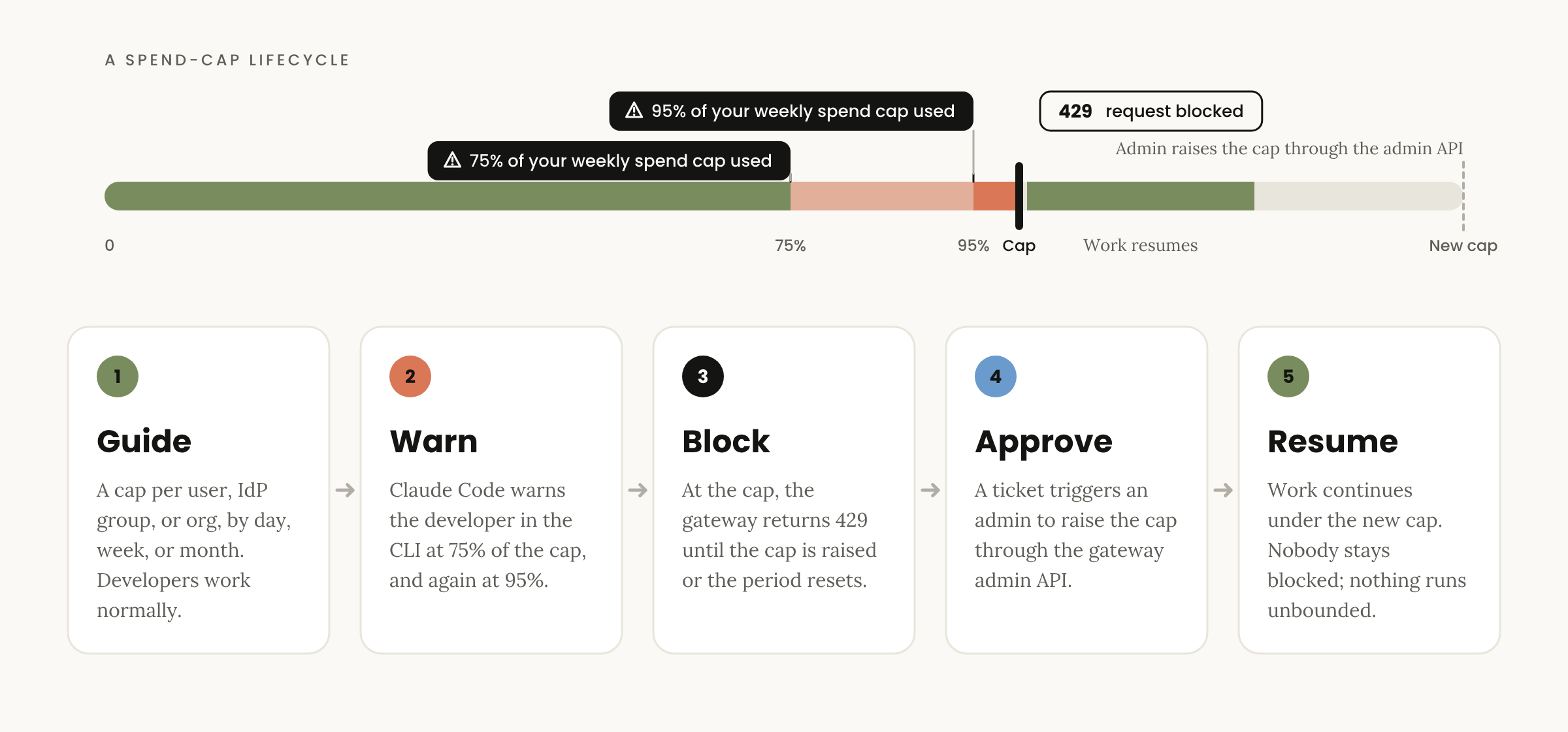
- 支出限额(在新标签页打开):Claude apps gateway 允许你按用户、按 IdP 组或在整个组织范围内,按天、周或月设置支出上限。组和组织上限是每个开发者继承的默认额度,而非共享资源池。
- 阈值告警(Threshold alerts):与 Claude apps gateway 配合使用时,Google Cloud 上的 Claude Code 会在开发者接近其上限时发出警告,首先在超过 75% 时警告,再次在超过 95% 时警告。这些是在 CLI 终端内面向开发者的直接警告,而 Google Cloud Billing 告警则是面向管理员的。达到上限后,网关会返回 429 状态码,直到周期重置或管理员提高上限;你还可以通过网关的管理员 API 脚本化实现额度提升。
- 模型默认值与白名单(Model defaults and allowlists):通过 Claude apps gateway 按 IdP 组指定可用模型,网关会在每个请求的服务端强制执行该白名单。我们发现设置模型默认值非常有效,因为大多数人都会沿用默认模型;如果他们想切换模型,通常都是有明确理由的。你可以在模型白名单的基础上增加或单独使用模型默认值。
- 网关管理员 API(Gateway Admin API):网关提供了一个用于支出限额管理的管理员 API(在新标签页打开),以便你可以以编程方式设置和更改上限,例如接入内部工单审批流程。
结合这些功能可以有效控制你的总体账单,但请记住,控制只是第一个杠杆。单 Token 价格无法反映全貌,最重要的指标是每个任务的成本(cost per task),这需要通过追踪使用情况来监控和分析。
杠杆 2:追踪(Track)
这一杠杆的核心是掌握支出的具体去向以及如何被使用。值得庆幸的是,你可以跨整个组织全面追踪 Claude Code 的使用情况、成本和工具调用活动。核心追踪策略包括:
- 使用量与成本可观测性(Usage and cost observability):Claude Code 的 OpenTelemetry 指标和事件(在新标签页打开)能够上报使用情况和预估成本,并按技能(skill)、插件(plugin)、Agent 和 MCP 服务器进行细分。你可以通过 OpenTelemetry 协议(OTLP),借助 OpenTelemetry Collector 或通过 Claude apps gateway 中继(用于集中式 OpenTelemetry 配置),将其发送到你现有的监控工具中,如 Google Cloud Monitoring。
- 终端用户使用视图(End-user usage view):开发者可以直接在 Claude Code 内部查看自己的支出情况,并在触及额度上限之前收到使用警告。
- 将数据导出到现有系统(Data export to your existing systems):通过将 Google Cloud Billing 导出到 BigQuery,你可以按模型和 Token 类型筛选 Claude SKU,将 Claude 支出与其余云和 AI 支出统一呈现。OTel 数据流向你的可观测性(O11y)技术栈,而网关管理员 API 则可以直接将支出限额状态同步到工单系统。
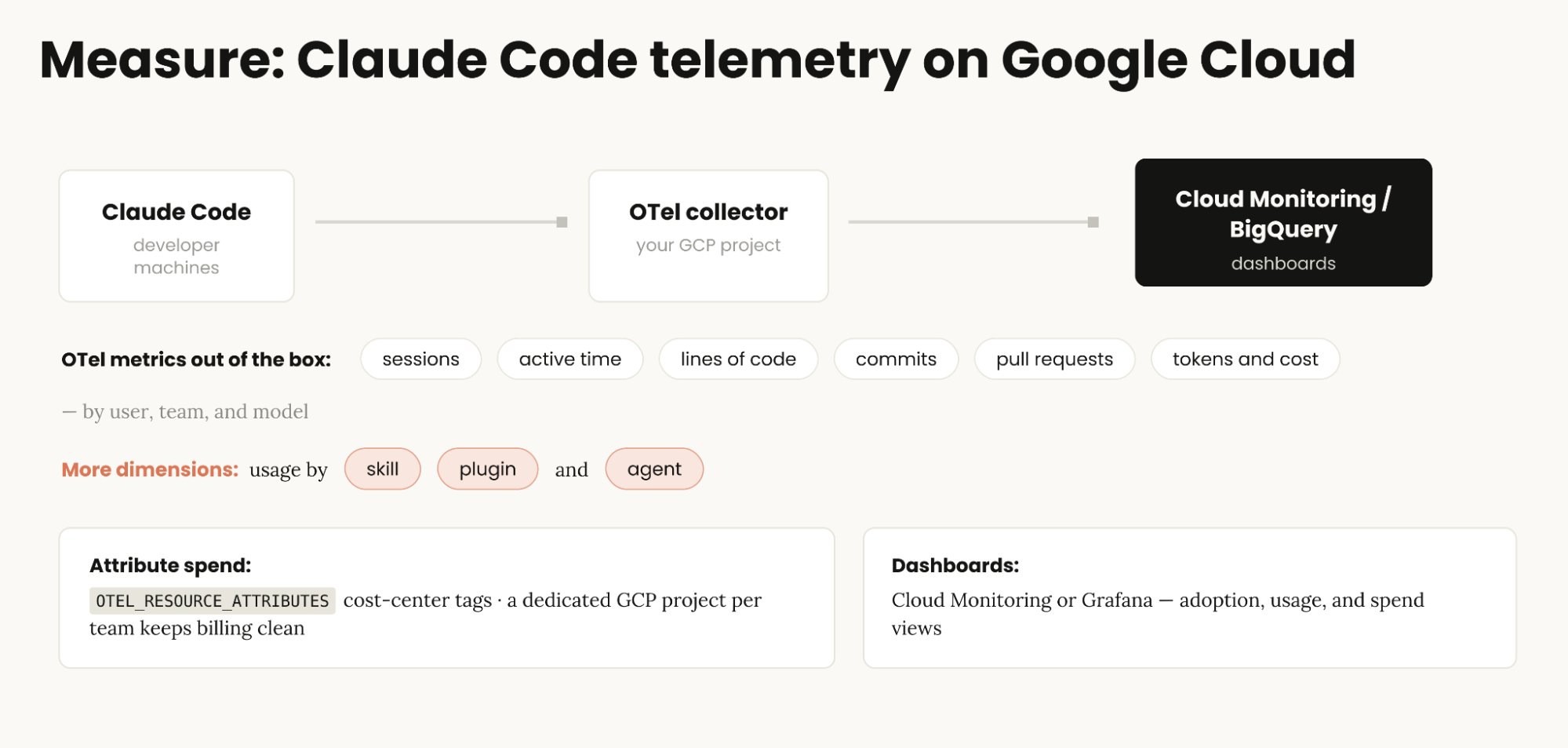
无论 Claude Code 运行在开发者本地机器还是云端工作站(Cloud Workstations)上,只要启用,它都可以导出 OpenTelemetry 数据,涵盖会话、活跃时间、代码行数、Commit、Pull Request、Token 及成本,并按用户、团队和模型进行细分。Claude Code 的最新版本还支持按技能、插件、Agent 和 MCP 服务器细分使用情况,因此你不仅能看到 Claude Code 的总体使用状态,还能了解组织内部开发的技能和插件中哪些得到了真正的采纳。借助 Claude apps gateway,你无需单独配置每台机器,只需在网关上设置遥测接收端点,它就会为所有登录的开发者自动启用遥测。同时,网关会使用开发者登录时经过验证的邮箱和 IdP 用户组标记每次导出,而不是依赖客户端配置的不可信字段。
为了将使用情况归因到你自己的成本中心和部门,只需设置 OTEL_RESOURCE_ATTRIBUTES 环境变量(例如 department=engineering,cost_center=eng-123)。Claude Code 会将这些标签附加到每个指标和事件中,方便你按维度进行筛选和聚合。这些带有自定义属性的指标最终会汇聚至 Google Cloud Monitoring(或其他监控方案,如 Grafana 或 Splunk)。
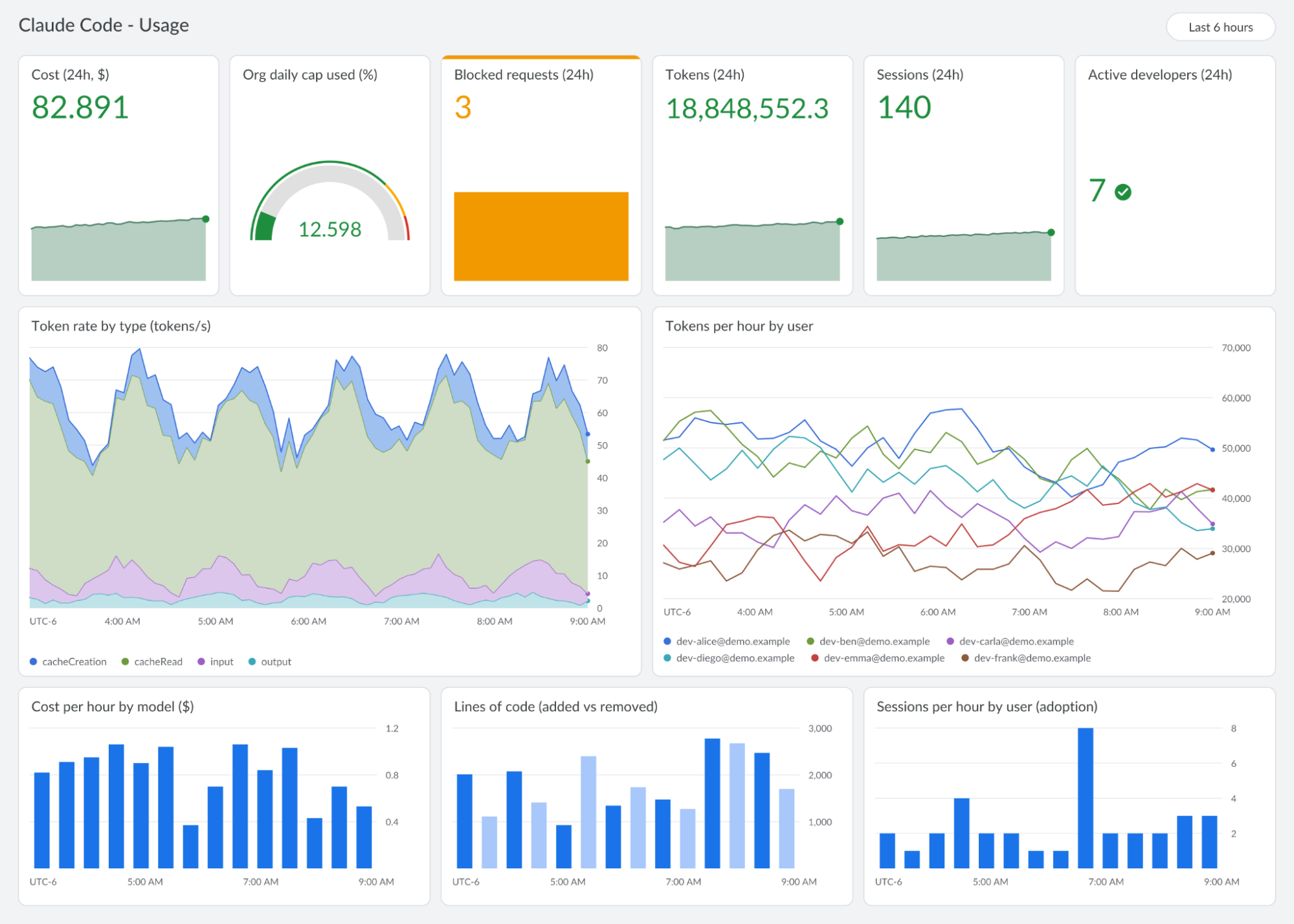 Cloud Monitoring 中的 Claude Code 使用情况仪表盘,基于 Claude Code 的 OpenTelemetry 指标构建(使用样本数据的展示性效果重构)。
典型的采纳度视图会展示活跃开发者数量、过去 24 小时的会话数以及消耗的 Token 总量。橙色方框标记了当开发者触及网关强制执行的支出上限时被拦截的请求。该指标非常适合与现有的工单系统联动,形成允许开发者申请提升额度的自动化工作流。
对于开箱即用的 Cloud Monitoring 仪表盘,请参考 Claude Code Monitoring 模板(在新标签页打开),它将 Claude Code 的 OpenTelemetry 指标整合为包含采纳情况、编码活动、Token 使用量及预估支出的单一视图,便于在 Google Cloud 上推广 Claude Code 时按用户和模型跟踪使用情况与成本。你可以直接在 Cloud Monitoring 控制台中复制此模板。
若要在 Google Cloud 上设置自定义 Claude Code 遥测,可以参考 Claude Code OTel 快速入门指南(在新标签页打开)。利用它可以配置 Claude Code 将 OpenTelemetry 数据直接导出到包括 Cloud Logging 和 Cloud Monitoring 在内的 Google Cloud Observability 套件。该快速入门还会将日志分流至分区的 BigQuery 数据表中,每种事件类型一张表(API 请求、工具调用决策、工具执行结果、Assistant 响应和已完成的 Hook 执行),并附带现成的 SQL 查询语句,用于分析每位开发者/模型的支出、工具成功率与延迟、Hook 等待时间,以及单轮对话和整个会话的深度统计。
杠杆 3:证明(Prove)
控制杠杆用于规范和分配使用与成本;追踪杠杆让你能够实现支出可视化;而证明杠杆则是将 Google Cloud 上的 Claude Code 使用情况映射到实际 ROI 的关键。
平台工程师在评估 Claude Code 时最关心的指标主要分布在三个维度:使用情况、开发者满意度和业务影响。
**采纳与使用(Adoption and usage)**指标衡量组织内部人员使用 Claude 的方式,包括激活用户数及其按周、按天的活跃度。这些指标揭示了使用深度、用户随时间的留存率,以及谁是团队中的 Claude Code 高级用户(Power User)。这些数据全部来自 Claude Code 的 OTel 遥测体系。
**满意度(Satisfaction)**指标监控工程师的使用体验,包括他们对 Claude Code 的满意程度、感知到的时间节省量、对生成结果的信心,以及他们遇到的任何阻力或困扰。满意度数据主要来源于推广前后的简短问卷调研,以及随后持续进行的用户沟通跟进。
**影响(Impact)**指标评估 Claude 如何带来可衡量的工程成果,通过将吞吐量、交付周期(cycle time)和代码审查速度与基准线进行对比,并对特定工作内容进行定性评估。
初始影响指标集
以下是一套推荐的初始影响指标集,分为三个维度:时间、工作量和交付量。
**时间(Time)**衡量交付产出的速度:PR 从创建到合并的周期时间(PR cycle time),以及代码审查(Code Review)的流转周期。
**工作量(Effort)**衡量每次变更所耗费的精力:每个 PR 的审查迭代轮次(review iterations)、审查意见数量以及重新返工的工作量。
**交付量(Volume)**衡量释放出的工程产能带来了什么:人均 PR 数量、部署频率,以及被命名的具体工作成果(named bodies of work)——即团队利用释放出来的生产力所解决的特定积压待办项(backlog)。这些指标在量化统计的同时补充了定性视角的业务价值。
这些是方向性的参考基准而非硬性规则,但它们是评估 Claude Code 在组织内产生影响的良好起点。你所需要的对比基线其实已经存在:那就是版本控制系统和工单系统中沉淀的历史交付数据。
定义你的工作单元
上述大部分指标都在统计 PR,但修复一个错别字和发布一个重大功能同样都算作一个 PR。因此,应当转为统计特定类别下已合并的 PR:例如由 Claude 开启 PR,再由人工决定是否合入上线。通过标注诸如 hotfix 或 feature release 的标签、关联工单 ID,并标记 Claude 是否参与其中,便能在现有系统中轻松检索到这些 PR。当然,并非所有工作单元都是 PR,例如完成一次服务割接或从根因上排查并关闭线上故障也是工作单元。规则同样适用:在产出落地之处,统计一件已闭环交付的成果。
Claude Code 原生遥测
在完成成本治理和使用追踪部署之后,下一步便是将其映射至 ROI。Claude Code 的原生遥测功能可帮助你捕获代码贡献度和生产力指标,从而完整记录你的组织所获得的实际价值……
English / 原文
As organizations delegate more work to Claude Code, spend grows with it, and platform teams need a way to both control costs and understand impact. Inspired by a recent webinar (opens in new tab) with Google Cloud, we share how organizations using Claude Code can better track and optimize these considerations on Google Cloud, including three core levers: control, track, and prove.
Controls for managing Claude Code spend
Claude on Google Cloud has consumption-based pricing, so your bill is a readout of how much your developers are using Claude in your Google Cloud environment. Adoption drives usage; usage is what you pay for, and it’s also where the value shows up.
Your Claude Code bill is a product of how many tokens tasks consume and the models that handle them. Token consumption scales with task complexity and conversation length. Chat is a Q&A conversation. An agentic tool like Claude Code spends more tokens per task relative to chat because it's doing multistep work: reading files, running tools, and reasoning across a whole task. Meanwhile each model has its own price per token, so matching the model to the task is the other major cost control.
Visibility into the tokens and model choices impacting your organization’s bill each month is available through the Claude apps gateway and Google Cloud services. You can govern the spend and manage costs via three independent levers:
- Control. Creating guardrails that guide usage without over-restricting access and unintentionally blocking people.
- Track. Granular oversight of where the spend is happening, and where it will continue to go, before the bill arrives.
- Prove. Identifying the value your org is getting from spending these tokens and attributing exactly where it’s coming from.
Here’s how to apply this control -> track -> prove framework to your own Claude Code on Google Cloud deployment.
The governance toolbox
Claude on Google Cloud comes with tools and capabilities for controlling, tracking, and proving the value of your spend.
Google Cloud already gives you many native capabilities you can apply to tracking and controlling your Claude spend:
- Per-project billing. Allows you to host a dedicated project for Claude Code as a clean way to track costs.
- Billing budgets and alerts. Allows you to set budget alerts and get notified as actual spend crosses thresholds you define.
- Spend caps (Preview). Allows you to enforce a service-level Google Cloud spend budget with ability to manually lift the cap.
- BigQuery exports. Lets you analyze Claude spend alongside the rest of your cloud costs.
- Quotas. Claude models on Google Cloud have per-minute limits on requests, input tokens, and output tokens for each model family and endpoint location.
- Provisioned throughput. Pay a fixed fee for reserved capacity instead of pay-as-you-go.
Claude Code and Claude apps gateway add their own tracking and control capabilities. The gateway is a self-hosted service, shipped in the same claude binary your developers already use, that runs in your Google Cloud project between Claude Code and Claude on Google Cloud. Developers sign in through your identity provider, such as Google Workspace, so every request carries a verified identity. That lets you set model allowlists per IdP group, and spend caps per user, IdP group, or organization, by day, week, or month.
Here's how to choose and combine capabilities to manage the three levers measuring the cost and ROI behind your organization’s AI investments with Claude on Google Cloud:
Lever 1: Control
The control lever is all about providing guardrails that guide developers in their Claude Code use, instead of restricting them with arbitrary caps.
Guiding rather than restricting is important because high cost sessions are not necessarily bad — in fact, they're often high value, especially in Claude Code. Those sessions are generally your power users that are at the forefront, using new workflows and getting a lot of value from Claude and getting a lot of work done.
Waste tends to sit in the long middle of heavy spenders. For example, they're using Fable for a daily routine that Sonnet can easily handle. Or maybe they have forgotten some scheduled task they no longer care about, but it keeps on running automatically anyway.
There are four features that give you the guardrails to guide your users instead of restricting them:
- **Spend limits (opens in new tab). **The Claude apps gateway allows you to set spend caps per user, per IdP group, or organization-wide, by day, week, or month. Group and organization caps are per-developer defaults that each member inherits, not a shared pool.
- Threshold alerts. When used with Claude apps gateway, Claude Code on Google Cloud warns developers as they approach their cap, first past 75% and again past 95%. These are in-CLI warnings for developers, whereas Google Cloud Billing alerts are meant for admins. At the cap, the gateway returns 429 until the period resets or an admin raises the cap, and you can script cap increases through the gateway's admin API.
- Model defaults and allowlists. Specify which models are available, per IdP group, via the Claude apps gateway which enforces the allowlist server-side on every request. We have found that setting a model default works really well, because most people will stick to the model default; if they want to switch models, they usually are switching for a reason. You can use model defaults in addition to or instead of model allowlists.
- Gateway Admin API. The gateway serves an admin API for spend limits (opens in new tab), so you can set and change caps programmatically, for example using a ticketing workflow.
Combine these capabilities to control your overall bill, but remember that control is only the first lever. Price per token doesn't give you the full picture. The most important metric is the cost per task, which can be monitored and analyzed by tracking this usage.
Lever 2: Track
This lever is all about seeing where spend is going and how it’s being used. The good news is that you can track Claude Code usage, costs, and tool activity across your organization. Primary tracking strategies include:
- Usage and cost observability.Claude Code's OpenTelemetry metrics and events (opens in new tab) report usage and estimated cost, broken down by skill, plugin, agent, and MCP server. Send them over OpenTelemetry Protocol (OTLP) to tools you already run, such as Google Cloud Monitoring, through an OpenTelemetry collector or relayed by the Claude apps gateway (for centralized OpenTelemetry config).
- End-user usage view. Developers see their own spend and get usage warnings right in Claude Code before they hit a limit.
- Data export to your existing systems. Google Cloud Billing exports to BigQuery let you filter to Claude SKUs by model and token type, putting Claude spend alongside the rest of your cloud and AI spend. OTel flows to your O11y stack, and the gateway Admin API can feed spend-limit status straight into your ticketing system.
Claude Code, whether running on developer machines or on cloud workstations, can export OpenTelemetry once you enable it, including sessions, active time, lines of code, commits, pull requests, tokens and cost, broken down by user, team, and model. The most recent releases of Claude Code also break usage down by skill, plugin, agent, and MCP server so you can see not just overall Claude Code usage but also which of your org’s internal skills and plugins get adopted. With the Claude apps gateway, you don't need to configure each machine. Set a telemetry destination on the gateway, and it turns telemetry on for signed-in developers. It also tags every export with the developer's verified email and IdP groups from their sign-in, rather than values configured on the client-side.
To attribute usage to your own cost centers and departments, set the OTEL_RESOURCE_ATTRIBUTES environment variable (for example, department=engineering,cost_center=eng-123). Claude Code adds these tags to every metric and event, so you can filter and aggregate by them. The metrics land in Google Cloud Monitoring (or other monitoring solutions like Grafana or Splunk) with those custom attributes.
A Claude Code usage dashboard in Cloud Monitoring, built from Claude Code's OpenTelemetry metrics. Illustrative recreation with sample data.
A typical adoption view shows active developers, number of sessions over the last 24 hours, and total tokens consumed. The orange box shows blocked requests when developers hit their gateway-enforced spend caps. That metric pairs well with your existing ticketing system as a workflow that allows developers to request an increase.
For ready-made Cloud Monitoring dashboard, refer to the Claude Code Monitoring template (opens in new tab), which turns Claude Code’s OpenTelemetry metrics into a single view of adoption, coding activity, and token usage and estimated spend, so you can track usage and costs by user and model as you roll out Claude Code on Google Cloud. You can copy this template directly from within the Cloud Monitoring console.
To set up custom Claude Code telemetry on Google Cloud, start with the Claude Code OTel quickstart (opens in new tab). Use it to configure s Claude Code to export OpenTelemetry straight to Google Cloud Observability suite including Cloud Logging and Cloud Monitoring. The quickstart also routes logs into partitioned BigQuery tables, one per event type (API requests, tool decisions, tool results, assistant responses, and completed hook executions), and ships SQL queries for spend per developer/model, tool success and latency, hook wait time, per-turn and per-session analytics.
Lever 3: Prove
The control lever governs and apportions usage and costs; the track lever allows you to visualize that spend. The prove lever is how you map usage to ROI for Claude Code on Google Cloud.
The metrics that platform engineers care most about measuring in Claude Code are contained within three dimensions: usage, developer satisfaction, and impact.
Adoption and usage metrics measure how people are using Claude in your organization, including your activated users and their weekly and daily usage. These reveal information like depth of use, user retention over time, and who your Claude Code power users are. These metrics are all derived via Claude Code OTel data.
Satisfaction metrics monitor the user experience for your engineers, including their happiness with Claude Code, perceived time savings, confidence in output, and any friction they might experience. Satisfaction metrics come from a short survey run before and after rollout, followed by ongoing user check-ins.
Impact metrics assess how Claude is delivering measurable engineering outcomes, comparing throughput, cycle time, and review speed against a baseline, plus qualitative measurements on specific bodies of work.
A starting set of impact metrics
Here's a starting set of impact metrics, grouped into three areas: time, effort, and volume.
Time measures how quickly work ships: PR cycle time from open -> merge, and code review turnaround.
Effort measures how much work each change takes: review iterations per PR, review comments and rework per PR.
Volume measures what the freed-up capacity delivers: PRs per engineer, deployment frequency, and named bodies of work: the specific backlog items your teams shipped with the freed capacity. These add a qualitative view alongside the counts..
These are directional reference points, not rules, but a good starting point for measuring Claude Code's impact in your organization. The baseline you need already exists: your delivery history in source control and tickets.
Define your unit of work
Most of these metrics count PRs, but a typo fix and a feature release are both one PR. Therefore, count merged PRs of a defined class instead: Claude opens the PR, and a person decides whether it ships. Labels such as hotfix or feature release, the ticket ID, and whether Claude was involved make those PRs easy to find in the systems you already run. Not every unit of work is a PR; a service cutover or an incident closed at its root cause are examples. The same rule applies: count one finished thing, where it lands.
Claude Code native telemetry
After putting cost governance and usage tracking in place, the next step is to map those to ROI. Claude Code’s native telemetry helps you capture contribution and productivity metrics that document the value your organization is deriving.
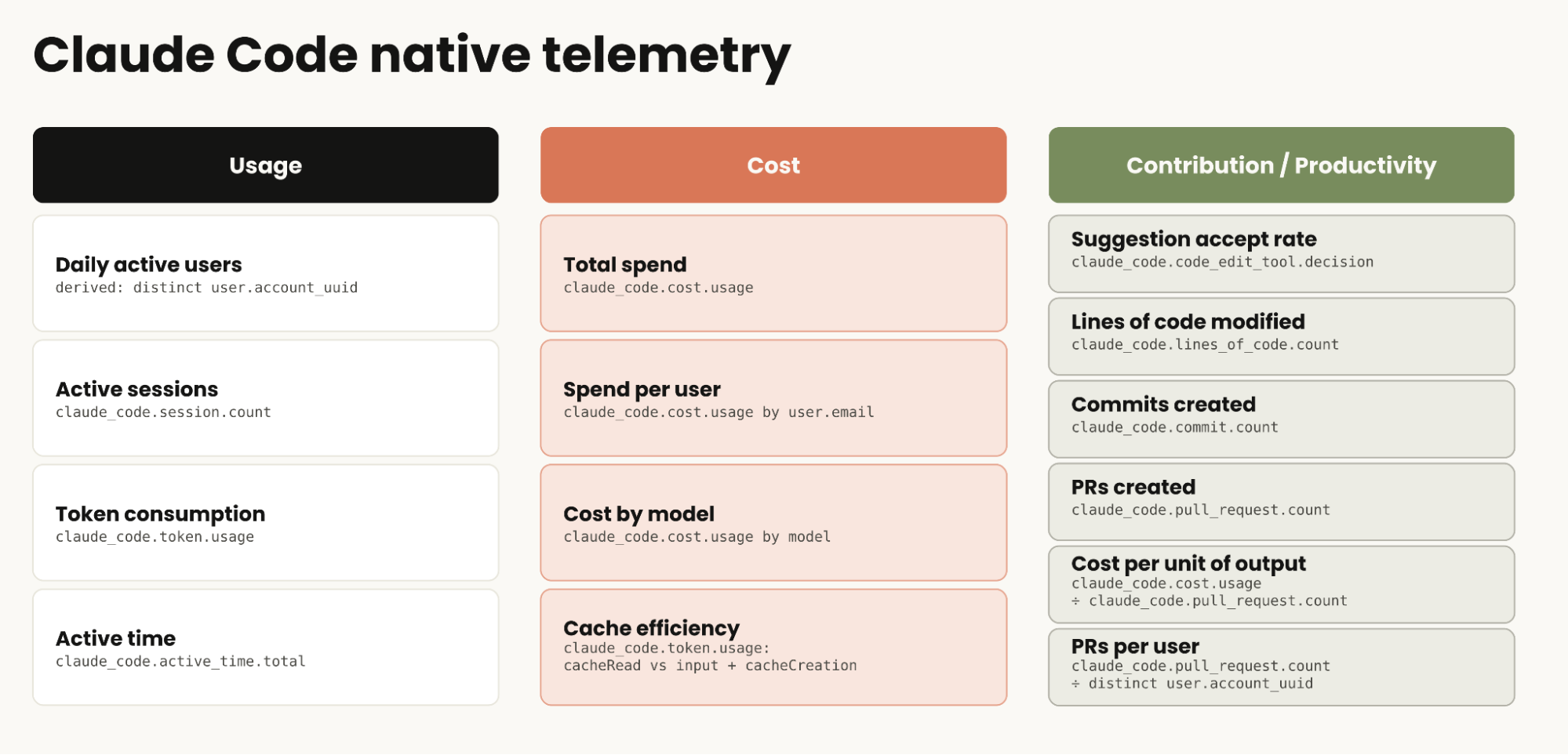
Claude Code’s OTel metrics let you track or derive code suggestion accept rate, lines of code modified, commits created, PRs created, cost per unit of output, and PRs per user.
All of these native metrics offer useful and actionable information. This info becomes even more valuable when paired with logged events like user prompts and tool decisions, captured via Claude Code telemetry on Google Cloud (opens in new tab). Logging user prompts, for example, is a good way to understand everything your user base is trying to build, because not every unit of work is necessarily a PR. Note that user prompts are not logged automatically due to potentially sensitive content; you have to specifically opt in.
One example would be using Claude Code to troubleshoot an incident if you’re an SRE or generate sample data for a live demo if you’re a sales engineer. Those sessions do not result in a PR, but they do accelerate those teams’ workflows. Keep in mind that Claude Code's PR metric counts the PRs Claude Code creates , not what eventually merges. Your source control and ticketing systems remain the record of what shipped, so correlate Claude Code telemetry with GitHub or GitLab and your ticket tracker for the full picture
Here’s the measurable impact that some Claude on Google Cloud customers have achieved with Claude Code.
- Delivery Hero (opens in new tab) had a team overhaul a design system across 100 UI components. Claude Code did in minutes what would normally take a week of an engineer's time.
- Shopify (opens in new tab)engineers build faster with Claude Code, but non-engineers are also building internal tools in minutes instead of days. Claude Code is expanding who can build at Shopify, not just speeding up the people already building.
- Fifth Dimension (opens in new tab) engineers universally use Claude Code on Google Cloud. Combined, they're writing over 300,000 lines of code a month with a 98% acceptance rate.
Getting started
The goal of this post is to help you feel comfortable with the tools and capabilities that exist to help you manage Claude Code on Google Cloud costs and demonstrate ROI. As platform engineers, the system serves not only to notice and observe behavior in your user base. It also gives you the knowledge necessary to dynamically adjust governance and settings.
It’s a continuous loop: start with reasonable defaults, such as an org-wide spend cap, a default model, and a model allowlist, then refine by role and team as usage data comes in. By tracking actual use and correlating metrics to the value you’re getting from Claude Code, you can then deliver these to your stakeholders who need to analyze the ROI and business impact of using Claude Code.
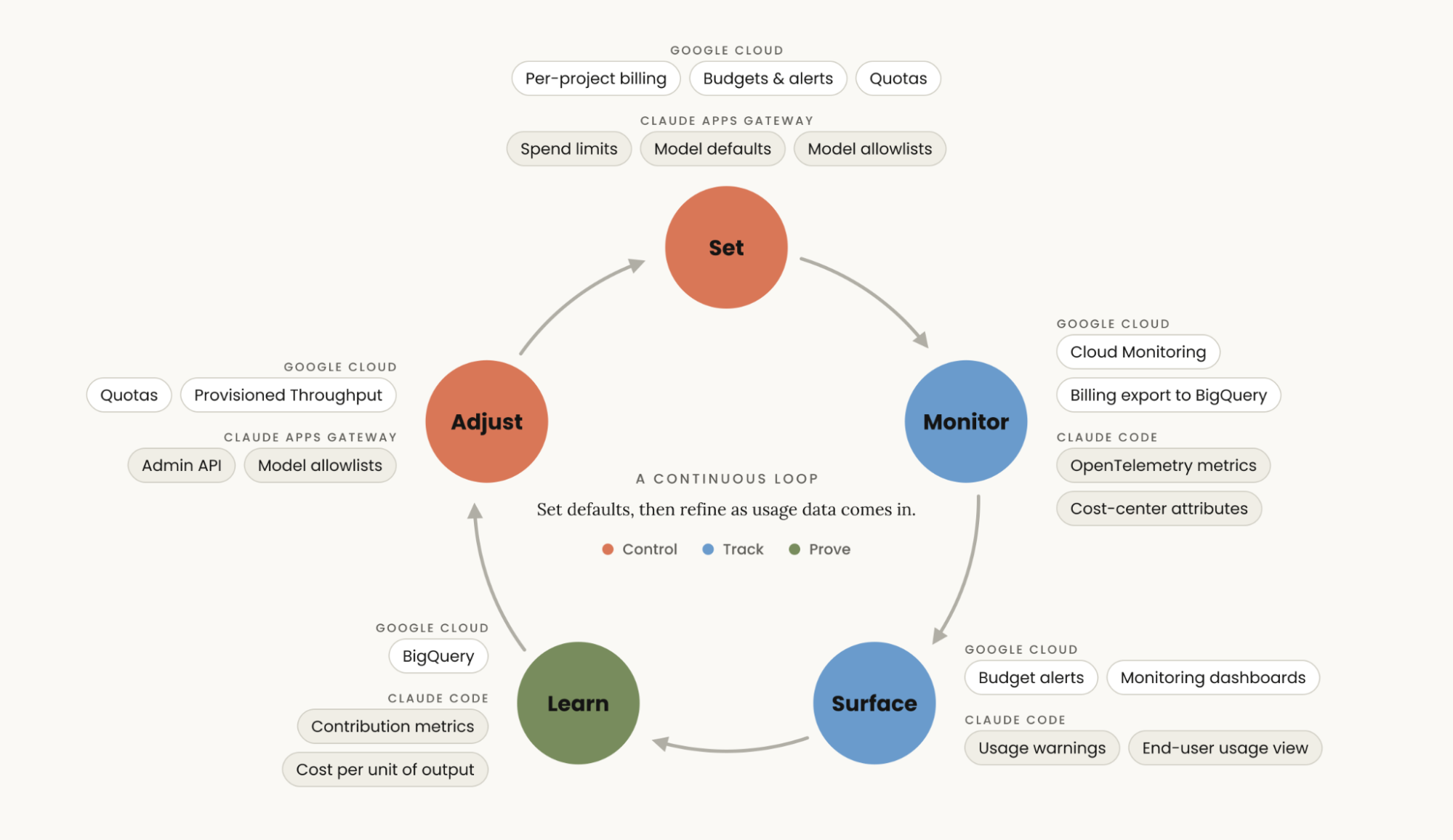
How organizations use Claude Code on Google Cloud and the value derived from that usage will both evolve as the amount of work and the type of work we're delegating to Claude keep getting deeper and more diverse. The control → track → prove framework outlined here is a stable starting point for measuring every aspect and outcome of your Claude Code deployment.
Here are resources to get you started: