高速、可靠的 A2UI:引入可插拔推理格式与 Express 语法
英文标题:Fast, reliable A2UI, with swappable inference formats
生成式 UI 框架 A2UI 宣布支持可插拔推理格式,并推出全新的默认格式 A2UI Express。Express 采用类 Python 的紧凑语法,与直接生成 JSON 相比可减少高达 3 倍的 Token 消耗,显著降低界面生成延迟,且在关闭思考模式下仍能稳定运行。同时,A2UI 还展示了如何利用 TypeSafe 的 Jev 等“系统一”决策模型进行受控生成,使布局决策延迟最多降低 80 倍。此次更新为开发者提供了根据不同界面在速度与表现力之间灵活权衡的能力,推动 Agent 驱动的动态 UI 体验走向实用化与高响应化。
 11.7 KB
 612.4 KB
 224.0 KB
 228.3 KB
 292.4 KB
 324.1 KB
 189.3 KB
 256.3 KB
 166.1 KB
 260.9 KB
 72.9 KB
 43.0 KB
 43.4 KB
 107.2 KB
 479.0 KB
中文
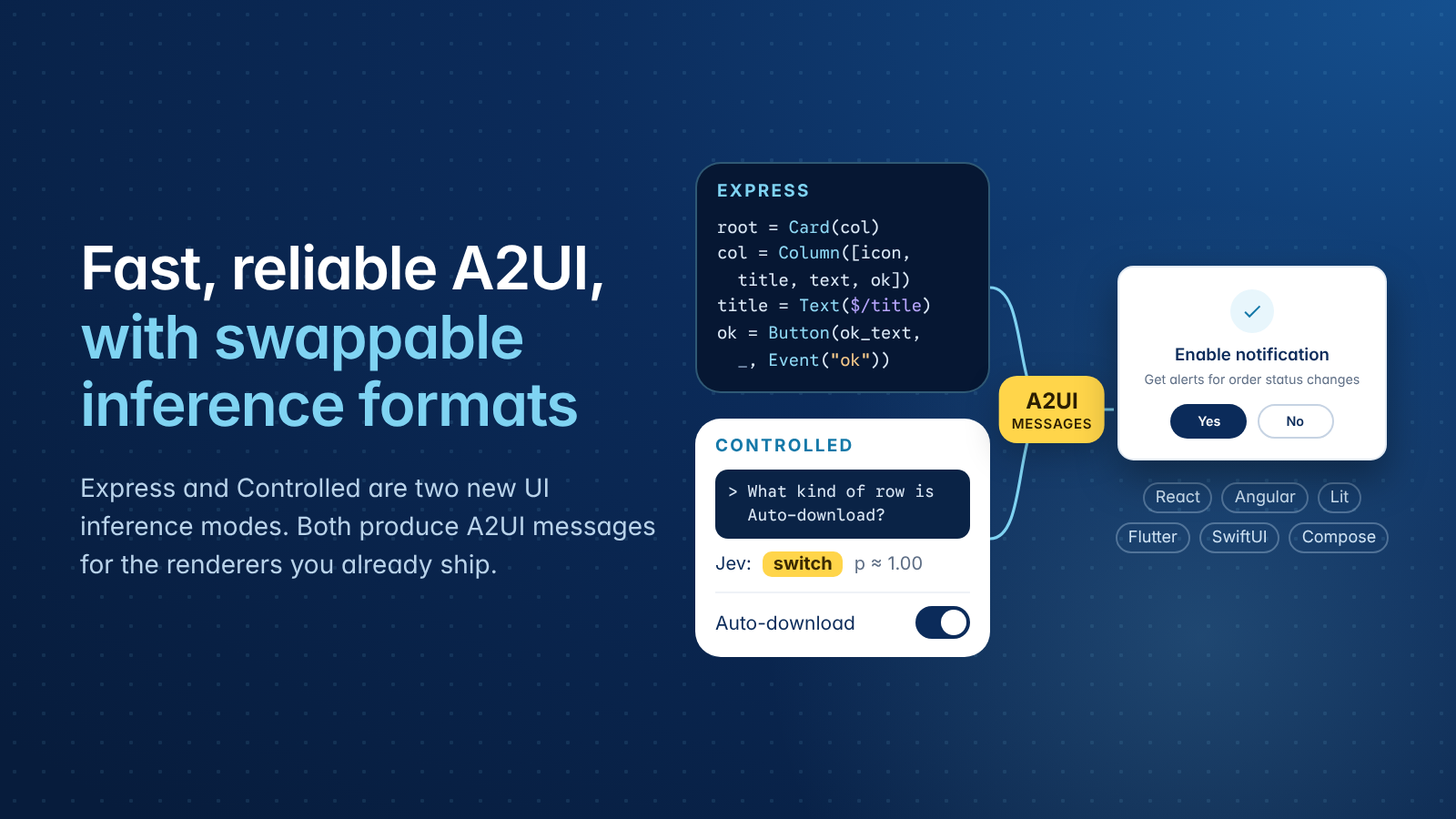
我们听到了大家关于 A2UI 和生成式 UI 体验速度的关切:每当模型生成一个新屏幕时,用户都需要等待。本次版本更新为你提供了提升速度的抓手,使你能够为每个具体界面选择最适合的权衡方案。
在此次发布中,我们很高兴引入可插拔推理格式(swappable inference formats),并分享利用决策模型配合 A2UI 的实践示例,帮助打造更快、更可靠的生成式 UI 体验。使用我们全新的 A2UI Express 作为推理格式,你可以将延迟降低高达 3 倍;而使用像 Jev 这样的决策模型来制定布局决策时,延迟降低甚至可达 80 倍。与直接输出 JSON 相比,Express 生成相同界面所消耗的 Token 数量最多可减少 3 倍。我们将在本文中深入探讨这些细节。
A2UI 是一个针对 Agent 优化的生成式 UI 协议:客户端发布一个受信任的组件目录(Catalog)作为合约,Agent 发送 A2UI 消息来描述由该目录组合而成的定制用户界面,然后客户端的渲染器绘制出该 UI(参见介绍 A2UI)。
起初,Agent 直接生成 A2UI JSON 传输消息——包含每一个花括号和嵌套元素。事实证明,让 LLM 生成受复杂 JSON Schema 约束的 JSON 树不仅速度慢,而且容易出错。这导致 A2UI 强绑定在输出纯文本的 LLM 上,并且难以集成速度更快的“系统一(System One)”决策模型。
现在,Agent 可以生成 A2UI Express——这是一种针对推理速度和准确性专门优化的中间格式,并通过 A2UI Agent SDK 中的确定性代码将其转换为基于 JSON 的传输协议。Agent 开发者还可以自由替换为任何其他 DSL 及其关联编译器以适应特殊用例,而我们的 A2UI Agent SDK 会确保其与传输及渲染层兼容。
模型生成的格式我们称之为 推理格式(inference_format)。你可以在创建生成器时通过一个参数进行设置。SDK 会为该格式生成提示词指令,并将模型的回复编译为标准的 A2UI 消息。本文将介绍这种切换的工作原理、我们为何将 A2UI Express 开发为新的默认推理格式,以及决策模型如何根据你预先定义的布局来构建屏幕界面。
关于 A2UI 不再成立的两件事
可插拔推理格式的工作原理
一种推理格式包含两个部分,SDK 均从你的组件目录 JSON Schema 中自动生成:提示词部分向模型讲授该格式的语法;编译器则负责将模型的回复编译为经过验证的 A2UI 消息。因为两者均来源于 Schema,所以该格式不可能描述出你的组件目录中不存在的组件或属性。
在创建生成器时,你只需传入一个参数来指定格式:
python from a2ui.processor import A2uiGenerator, CatalogConfig from a2ui.inference_formats import ExpressFormatFactory
catalog = CatalogConfig.from_path("catalog.json") generator = A2uiGenerator( [catalog], examples=few_shot_examples, # 一次性写好的 A2UI JSON inference_format_factory=ExpressFormatFactory(), )
processor = generator.create_processor(renderer_capabilities) system_prompt = f"{instructions}\n\n{processor.prompt_snippet}" parts = processor.parse_response(model_reply) # 文本部分 + 校验后的 A2UI 消息
Python
A2UI Express 已在 Python Agent SDK(PyPI 上的 a2ui-agent-sdk 0.9.0)、TypeScript Agent SDK(npm 上的 @a2ui/agent)以及 Dart SDK(pub.dev 上的 a2ui_agent 0.0.1-wip004)中提供。在 TypeScript 中,只需将 new ExpressFormatFactory() 作为生成器的第三个参数传入即可。Python 和 TypeScript SDK 均支持逐块流式传输 Direct JSON,并能从完整回复中编译 Express。
Express:Token 消耗仅需三分之一即可呈现相同界面
Express 采用每行一条语句的书写方式,语法风格接近 Python。每一行将一个组件赋值给一个变量,变量名即成为组件的 ID。参数采用位置传参:编译器会根据组件目录 Schema 中声明的顺序将它们映射到属性名称,使用 _ 可跳过某个参数。$/title 将值绑定到数据模型,而 Event("accept") 则声明一个服务端动作。以下是 A2UI 图库中的通知卡片在 Express 中的写法:
plain text surface("gallery-notification-permission") $/description="Get alerts for order status changes" $/icon="check" $/title="Enable notification" root=Card(main_column) main_column=Column([icon, title, description, actions], _, "center") icon=Icon($/icon) title=Text($/title) description=Text($/description, "body") actions=Row([yes_btn, no_btn], "center") yes_btn_text=Text("Yes") yes_btn=Button(yes_btn_text, _, Event("accept", {})) no_btn_text=Text("No") no_btn=Button(no_btn_text, _, Event("decline", {}))
Plain text
包括 A2UI Express 在内的可插拔推理格式还可以与 Python Agent SDK 中的宏(Macros)配合使用,这在界面需要展示你系统已有数据时非常有帮助。模型只需写出一个仅包含 ID 的调用,如 OrderStatus("ord_42"),宏就会拉取订单并填入相应数值,从而使屏幕上的每个值都直接来源于你的真实数据。宏说明文档(macros README) 展示了具体的配置方法。
我们是如何设计 A2UI Express 的
客户反馈揭示了直接生成 JSON 存在的延迟与准确性问题。为了解决这一问题,我们开始构想一种新的推理格式。我们试验了四种方案:
- Direct JSON:我们最初在 2025 年 12 月发布时采用的原有基线方案。
- Express:受到 Python 语法启发并最终被选为新默认格式的方案。
- Atom:编写类似 Lisp 的 S 表达式,不含赋值操作,也不含闭合标签。
- Elemental:编写带有自定义元素的 HTML,押注于模型现有的 HTML 生成能力。
我们在 gemini-3.5-flash 上通过相同的 51 项评估任务运行了所有四种格式,并对比了开启与关闭思考模式(thinking mode)下的表现。
我们观察到,Express 推理格式即使在关闭思考模式下也表现得同样出色;在使用 A2UI Express 时,这能为你带来最极致的推理速度。
使用 Jev 进行受控生成
某些界面的形态是已知的,例如设置页面、结账页面或确认页面。对于这些界面,模型不需要设计布局,它只需要从你预先定义好的布局中进行选择,而这正是另一类模型的用武之地。在这种场景下,你并不需要 A2UI Express 所提供的全部表现力。
来自 TypeSafe 的 Jev 就是所谓的 系统一模型(System One model),旨在做出代码可直接使用的快速、结构化决策。Jev 不生成文本或 JSON。你向它发送一个状态和一组带类型的问题,它会以校准后的概率回答每一个问题。问题可以询问某个陈述是否为真(Noul)、列表中的哪个选项最合适(Choice),或者某事物在评分量表上的得分如何(Score)。Jev 可以在单个请求中回答许多问题,耗时大约仅需 100 到 300 毫秒。
开源设计工具 Apparite(jev2ui)展示了一种将系统一模型连接到 A2UI 的方法。Jev 决定每个屏幕的结构,代码根据这些决策构建 A2UI 组件,而一个小型模型 gemini-3.5-flash-lite 仅负责撰写文本。这些问题存在于预先编写好的 Markdown 文法(grammar)中。引用块提出一个问题,项目符号列表则是附带判定标准的选项。以下来自 grammar/screen.md 的片段用于决定设置行应采用哪种控件:
plain text
row_control (of each row in rows, within each group in groups)
Material: a switch for one on/off setting that takes effect at once. HIG: a disclosure indicator for a row that opens another page.
{row}is a row in the supplied screen and section. Grouped rows can represent content, navigation, settings or actions; use their actual text and context to decide.What kind of row is {row}?
- switch — A setting that is simply on or off and takes effect at once: notifications, dark mode, autoplay, sync.
- value — A setting with one current value picked from several, changed on another page: language, quality, theme, frequency, units.
- nav — A link to another page: a content item, details, account, privacy, help, about, or managing something. Its text and section identify what it opens.
- check — One of several alternative options listed together, of which one is chosen: the choices of a single setting, such as '10 seconds', '30 seconds', 'High', 'Low'.
- danger — A final or destructive account action: sign out, delete account, clear data, reset.
Plain text
在播客应用的设置屏幕上,Jev 对 Skip forward 给出 value,对 Auto-download 给出 switch,对 Log out 给出 danger,置信概率均达到 p ≈ 1.00。Apparite 分三步构建出整个屏幕:
- 一次 Jev 请求回答文法中的布局问题,每个屏幕大约包含 30 个问题。
- 代码根据组件目录构建组件树,在大约 200 毫秒时发送
createSurface和updateComponents,其中包含放置文本的占位符。 - gemini-3.5-flash-lite 将文本流式传入
updateDataModel。随着每个部分的到达,后续的小型 Jev 请求将处理依赖于它的内容(例如上面的行控件)。
在包含 11 个提示词的一次运行测试中,组件树在 92 到 298 毫秒内即可渲染上屏,每个完整屏幕在 0.8 到 1.7 秒内全部完成。文本编写器每个屏幕生成 101 到 341 个 Token,并且 Apparite 的两条 Jev 流水线在全部 11 个提示词上都生成了合法的 A2UI。鉴于样本量较小,该项目将这些数据视为初步观察结果。
受控生成只能产出其文法所描述的布局。Apparite 的文法涵盖了 9 种屏幕原型和 12 种区块,因此没有已知形态的屏幕更适合使用 Express。A2UI Agent SDK 目前尚未内置决策模型的推理格式;apparite(jev2ui) 项目展示了如何根据决策模型的一批独立决策来组装 A2UI 消息。
该选择哪种模式
A2UI Express 速度飞快,同时保留了 A2UI 的全部表现力,但做出多个独立决策的决策模型速度还要更快。请根据你可以提前定义界面的多少来进行选择:
- 当决策模型能满足需求时,使用受控模式(Controlled)。 如果你的屏幕遵循固定的既定布局,决策模型可能是最快的选择。
- 需要完整表现力时,使用 Express。 当某个界面需要根据你的组件目录发挥更多表现力时,退回使用 A2UI Express。它不仅速度快,而且模型依然会编写整个组件树。
- 对于任何全新场景,自定义专属格式。 因为推理格式是可插拔的,所以新用例或未来的语法只需一个用于向模型讲授 DSL 的提示词生成器,以及一个在你的 DSL 与 A2UI 消息之间进行转换的转换器。你的组件目录和渲染器均无需更改。
立即体验
在你的 Agent 中使用 Express。 通过 pip install a2ui-agent-sdk 安装 Python SDK,或通过 npm install @a2ui/agent 安装 TypeScript SDK,在创建生成器时传入 ExpressFormatFactory(),并在关闭思考模式下运行模型。你的组件目录和渲染器保持原样,具体语法可查阅 Express 规范。
为了让 Gemini 或任何其他支持加载技能(Skills)的模型仅使用你的组件编写 Express,可以通过 Python SDK 的 SkillGenerator 根据你的组件目录生成技能:
python import json from a2ui.core import Catalog from a2ui.inference_formats.express import ExpressFormat from a2ui.skill import SkillGenerator
catalog = Catalog.from_json(json.load(open("catalog.json"))) skills = SkillGenerator(ExpressFormat([catalog])).generate_skillset() skills.export_to_directory("skills") # a2ui-core 加上每个 catalog 对应一个 skill
Python
尝试受控生成。 克隆 示例 jev2ui 仓库,并按照那里的指引开始上手。Apparite(jev2ui) 的在线托管版本可在 apparite.cnfg.ai 体验。
来源
先前的 A2UI 博文:介绍 A2UI(2025 年 12 月)、A2UI v0.9(2026 年 4 月)以及 A2UI + MCP Apps(2026 年 6 月)。
English / 原文
We've heard your concerns about the speed of A2UI and generative UI experiences: people wait while the model generates each screen. This release gives you levers to make that faster, so you can choose the trade-off that fits each screen.
With this release, we’re happy to introduce swappable inference formats and share examples on leveraging decision models with A2UI, which help building faster and more reliable generative UI experiences. Using our new A2UI Express as an inference format you can reduce latency by up to 3x , and up-to 80x using decision models like Jev to make layout decisions. Express requires up to 3x fewer tokens to generate the same kinds of UI compared to Direct JSON. We'll dive into the details in this blog post.
A2UI is an agent-optimized protocol for generative UI, where a client advertises a catalog of trusted components as a contract, an agent sends A2UI messages describing a bespoke user interface composed from that catalog, and the client's renderer draws the UI (see Introducing A2UI).
Initially agents generated A2UI JSON transport messages directly, every curly brace and nested element. It turns out that generating JSON trees constrained by a complex JSON schema is slow and error-prone for LLMs. This coupled A2UI to LLMs, which output text, and made it difficult to integrate faster System One decision models.
Now agents can generate A2UI Express , an intermediate format optimized for inference speed and accuracy, and rely on deterministic code in A2UI's Agent SDKs to translate it into the JSON-based transport protocol. Agent builders are also free to swap in any other DSL and its associated compiler for any special use-cases, and our A2UI Agent SDK(s) make it compatible with transports and renders.
The format the model generates is what we call inference_format. You set it with one argument when you create the generator. The SDK generates the prompt instructions for that format and compiles the model's reply into standard A2UI messages. This post covers how the swap works, why we developed A2UI Express as the new default inference format, and how a decision model can build screens from layouts you define in advance.
Two things no longer true about A2UI
How swappable inference formats work
An inference format has two parts, and the SDK generates both from your catalog's JSON schema. A prompt section teaches the model the format's syntax, and a compiler compiles the model's reply into validated A2UI messages. Because both come from the schema, a format can't describe a component or property that your catalog lacks.
You choose the format with one argument when you create the generator:
from a2ui.processor import A2uiGenerator, CatalogConfig
from a2ui.inference_formats import ExpressFormatFactory

catalog = CatalogConfig.from_path("catalog.json")
generator = A2uiGenerator(
    [catalog],
    examples=few_shot_examples,  # written once as A2UI JSON
    inference_format_factory=ExpressFormatFactory(),
)

processor = generator.create_processor(renderer_capabilities)
system_prompt = f"{instructions}\n\n{processor.prompt_snippet}"
parts = processor.parse_response(model_reply)  # text parts + validated A2UI messages
Python
A2UI Express is available in the Python agent SDK (a2ui-agent-sdk 0.9.0 on PyPI), in the TypeScript agent SDK (@a2ui/agent on npm), and in the Dart SDK (a2ui_agent 0.0.1-wip004 on pub.dev). In TypeScript, you pass new ExpressFormatFactory() as the generator's third argument. The Python and TypeScript SDKs can both stream Direct JSON chunk by chunk, and they compile Express from the complete reply.
Express: the same screens in a third of the tokens
Express writes one statement per line, in a style close to Python. Each line assigns a component to a variable, and the variable name becomes the component ID. Arguments are positional: the compiler maps them to property names in the order your catalog schema declares them, and _ skips one. $/title binds a value to the data model, and Event("accept") declares a server action. This is the A2UI gallery's notification card in Express:
surface("gallery-notification-permission")
$/description="Get alerts for order status changes"
$/icon="check"
$/title="Enable notification"
root=Card(main_column)
main_column=Column([icon, title, description, actions], _, "center")
icon=Icon($/icon)
title=Text($/title)
description=Text($/description, "body")
actions=Row([yes_btn, no_btn], "center")
yes_btn_text=Text("Yes")
yes_btn=Button(yes_btn_text, _, Event("accept", {}))
no_btn_text=Text("No")
no_btn=Button(no_btn_text, _, Event("decline", {}))
Plain text
Swappable Inference formats including A2UI Express also work with macros in the Python agent SDK, which help when a screen shows data your systems already hold. The model writes a call with only an ID, such as OrderStatus("ord_42"), and your macro fetches the order and fills in the values, so every value on screen comes straight from your data. The macros README shows the setup.
How we devised A2UI Express
Customer feedback uncovered latency and accuracy issues with direct JSON generation. To fix this, we started devising a new inference format. We experimented with four options:
- Direct JSON : This was our existing baseline that we launched with back in December 2025.
- Express : The final
pythonsyntax inspired format that we picked as the new default. - Atom : Writes Lisp-style S-expressions with no assignments and no closing tags.
- Elemental : Writes HTML with custom elements, betting on how well models already write HTML.
We ran all four formats through the same 51-task eval on gemini-3.5-flash and compared them for thinking modes: on and off.
We observed that Express inference format works just as well even with thinking off; which can give you the fastest inference times when working with A2UI Express.
Controlled generation with Jev
Some screens have a known shape, such as a settings page, a checkout or a confirmation. For those, the model doesn't need to design a layout. It needs to choose among layouts you have already defined, and a different kind of model is built for that. For this, you would not need the full expressivity provided by A2UI Express.
Jev, from TypeSafe, is what is called a System One model , built to make fast, structured decisions that code can use directly. Jev doesn't generate text or JSON. You send it a state and a set of typed questions, and it answers each one with calibrated probabilities. A question can ask whether a statement is true (Noul), which option from a list fits (Choice), or how something scores on a rubric (Score). Jev answers many questions in one request, in roughly 100 to 300 ms.
Apparite(jev2ui), an open-source design tool, shows one way to connect a System One model to A2UI. Jev decides the structure of each screen, code builds the A2UI components from those decisions, and a small model, gemini-3.5-flash-lite, writes only the text. The questions live in a Markdown grammar written ahead of time. A blockquote asks a question, and the bullets are its options, each with criteria. This block from grammar/screen.md decides which control a settings row gets:
#### row_control (of each row in rows, within each group in groups)

Material: a switch for one on/off setting that takes effect at once. HIG: a disclosure indicator for a row that opens another page.

> `{row}` is a row in the supplied screen and section. Grouped rows can represent content, navigation, settings or actions; use their actual text and context to decide.
>
> What kind of row is {row}?

- **switch** — A setting that is simply on or off and takes effect at once: notifications, dark mode, autoplay, sync.
- **value** — A setting with one current value picked from several, changed on another page: language, quality, theme, frequency, units.
- **nav** — A link to another page: a content item, details, account, privacy, help, about, or managing something. Its text and section identify what it opens.
- **check** — One of several alternative options listed together, of which one is chosen: the choices of a single setting, such as '10 seconds', '30 seconds', 'High', 'Low'.
- **danger** — A final or destructive account action: sign out, delete account, clear data, reset.
Plain text
On a podcast app's settings screen, Jev answers Skip forward → value, Auto-download → switch and Log out → danger, each at p ≈ 1.00. Apparite builds a whole screen in three steps:
- One Jev request answers the grammar's layout questions, about 30 for a screen.
- Code builds the component tree from the catalog and sends
createSurfaceandupdateComponentsat about 200 ms, with placeholders where the text will go. - gemini-3.5-flash-lite streams the text into
updateDataModel. As each part arrives, small follow-up Jev requests settle what depends on it, such as the row controls above.
In one run of 11 prompts, the component tree was on screen in 92 to 298 ms and each screen was complete in 0.8 to 1.7 s. The text writer generated 101 to 341 tokens per screen, and both of Apparite's Jev pipelines produced valid A2UI on all 11 prompts. The project treats these numbers as a first look, since the sample is small.
Controlled generation can only produce the layouts its grammar describes. Apparite's grammar covers nine screen archetypes and twelve blocks, so screens without a known shape are a better fit for Express. A2UI Agent SDKs, don’t include a decision model inference format yet; apparite(jev2ui) project is an example on how A2UI messages could be assembled given a batch of independent decisions from a decision model.
Which mode to use
A2UI Express is fast and keeps the full expressivity of A2UI, but a decision model making multiple independent decisions is still faster. Choose by how much of the screen you can define ahead of time:
- Controlled, when a decision model can produce what you need. If your screens follow set and defined layouts, a decision model may be the fastest option.
- Express for full expressivity. When a screen needs more expressivity based on your catalog, fall back to A2UI Express. It's fast, and the model still writes the whole component tree.
- Your own format for anything new. Because inference formats are swappable, a new use case or a future syntax needs only a prompt generator that teaches the model your DSL and a converter that converts between your DSL and A2UI messages. Your catalog and renderers stay the same.
Try it
Use Express in your agent. Install the Python SDK with pip install a2ui-agent-sdk or the TypeScript SDK with npm install @a2ui/agent, pass ExpressFormatFactory() when you create the generator, and run the model with thinking off. Your catalog and renderers stay as they are, and the Express specification documents the syntax.
To teach Gemini, or any other model that loads skills, to write Express with only your components, generate skills from your catalog with the Python SDK's SkillGenerator:
import json
from a2ui.core import Catalog
from a2ui.inference_formats.express import ExpressFormat
from a2ui.skill import SkillGenerator

catalog = Catalog.from_json(json.load(open("catalog.json")))
skills = SkillGenerator(ExpressFormat([catalog])).generate_skillset()
skills.export_to_directory("skills")  # a2ui-core plus one skill per catalog
Python
Try controlled generation. Clone the example jev2ui repository, and follow the instructions there to get started. A hosted version of Apparite(jev2ui) runs at apparite.cnfg.ai.
Sources
Earlier A2UI posts: Introducing A2UI (December 2025), A2UI v0.9 (April 2026) and A2UI + MCP Apps (June 2026).