Liquid AI 发布 LFM3:基于 2B 级共享基座构建专用多模态模型,支持单卡微调与端侧部署
英文标题:Build specialized multimodal models with LFM3
Liquid AI 正式发布新一代 Liquid 基础模型 LFM3 系列,通过 1.7B 共享基座统一衍生出文本、视觉、音频、Omni 全模态及决策等六款 2B 级别专用模型。LFM3 采用创新的三混合架构(短卷积、滑动窗口注意力与全局注意力),参数量减少 35% 却超越前代,并在 4-bit 精度下仅占约 1 GB 内存,原生支持 256K 上下文。所有模型均支持单张 GPU 微调并适配 14 种端侧与芯片后端,为开发者在端侧构建专用智能体与多模态应用提供了极高能效的解决方案。
 4.5 KB
 10.7 KB
 6.7 KB
 11.2 KB
 1.3 KB
 4.6 KB
 1.3 KB
 397 B
397 B
 6.5 KB
 1.3 KB
 7.3 KB
 8.2 KB
 15.2 KB
 1.3 KB
 10.7 KB
 397 B
397 B
 397 B
397 B
 10.1 KB
 7.5 KB
 8.7 KB
中文
LFM3 是我们推出的新一代 Liquid 基础模型(LFM),旨在作为构建专用智能系统的基石。它将文本、视觉、音频、Omni(全模态)和决策模型统一收敛至同一个共享基座上,且模型规模全部保持在 2B 参数量级别。这意味着你可以针对特定的模态选择对应模型,仅需单张 GPU 即可使用私有数据完成微调,并将其部署在实际业务应用运行的端侧环境中。
与上一代 LFM2 家族相比,LFM3 带来了四大核心变革:
- 单位参数性能更强: 全新的三混合架构(tri-hybrid architecture)和训练配方使 LFM3-1.7B 在参数量减少 35% 的同时,性能超越了 LFM2.5-2.6B。
- 单一基座统一所有模态: 基于 LFM3-1.7B-Base 衍生训练出六款 2B 级模型(文本、视觉、音频、Omni 与决策),其中包括我们的首个 Omni 模型,并为视觉模型加入了视频输入能力。
- 专为边缘端打造: 文本模型在 4-bit 精度下显存占用仅约 1 GB;全新自研的视觉和音频编码器大幅提升了处理速度;文本模型配备的 256K 上下文窗口使得端侧运行 Agent 成为现实。
- 专为定制化而生: 每个模型均可在单张 GPU 上进行微调,便于开发者针对私有数据、专业领域术语以及特定部署环境进行定制适配。
我们如何构建更具表现力的基座架构
LFM2 证明了短卷积(short convolutions)与注意力机制(attention)的混合架构能够在不牺牲模型质量的前提下在端侧高速运行。在 LFM3 中,我们利用硬件在环(hardware-in-the-loop)架构搜索重新设计了该架构,专门针对 Agent 类用例进行了优化——这类场景对单位参数能力以及长上下文下的推理速度有着极高要求。目前的搜索范围覆盖了 14 种设备与后端组合,包括智能手机、树莓派 5(Raspberry Pi 5)、笔记本电脑、云端 CPU、GPU 以及高通 Hexagon NPU 等。

LFM3-1.7B-Base 包含 24 层,主要有以下四项改进:
- 三混合层混合机制(Tri-hybrid layer mix): 包含 13 个门控短卷积层、5 个窗口大小为 256 token 的滑动窗口注意力(SWA)层以及 6 个全局注意力层。卷积核大小从 LFM2 的 3 提升到了 7。
- 按头门控注意力(Head-wise gated attention): 通过 Sigmoid 门控缩放每个注意力头的输出,使得某个头在没有有效信息贡献时能够自动关闭。这有助于抑制破坏模型量化的激活异常值(activation outliers)。
- 部分旋转位置编码(Partial RoPE): 全局注意力层仅对每个头的最高频前一半进行旋转编码,另一半则忽略距离直接进行内容匹配。SWA 层则保留完整的 RoPE。
- 三明治归一化(Sandwich norm): 每个模块同时对其输入和输出进行归一化,以保证激活值始终保持良好的尺度范围。
这些优化的回报在长上下文场景中尤为明显。在单位参数效率方面,LFM3-1.7B 在各类边缘设备上的短 Prompt 表现与 LFM2-1.2B 相当;而在上下文达到 8K token 时,其运行速度提升约 25%。LFM3-1.7B-Base 在 22T token 上进行了预训练,词表大小与 LFM2.5-8B-A1B 相同(128K)。最后的 3.5T token 属于中程训练阶段(mid-training stage),采用了高质量筛选数据,其中包含了更高比例的 Agent 轨迹与工具调用(tool calls)数据,同时将上下文窗口扩展到了 256K token。
一个基座,六款模型
每个 LFM3 模型均源自 LFM3-1.7B-Base。开发者无需运行庞大的通用模型,而是可以根据具体输入需求选择对应模型,进行定制后直接部署在设备端。

| 模型 | 输入 | 输出 | 构建基座 |
|---|---|---|---|
| LFM3-1.7B | 文本 | 文本 | LFM3-1.7B-Base |
| LFM3-VL-2B | 文本、图像、视频 | 文本 | LFM3 基座 + 视觉编码器 |
| LFM3-Audio-2B | 文本、音频 | 文本、语音 | LFM3 基座 + 音频编码器、音频解码器及 LiquidCodec |
| LFM3-Omni-2B | 文本、图像、视频、音频 | 文本、语音 | LFM3 基座 + 视觉与音频编码器及音频解码器 |
| d1-2B | 文本、图像、视频 | 校准回答(Calibrated answers) | LFM3-VL-2B |
| d1-omni-2B | 文本、图像、视频、音频 | 校准回答(Calibrated answers) | LFM3-Omni-2B |
视觉与音频模型还配备了两个全新的自研编码器:
- 视觉编码器: 融合了卷积与注意力机制,计算量仅为此前 LFM VL 模型中 SigLIP2 编码器的三分之一。我们这款 164M 参数的编码器在精度上媲美 Qwen3.5-2B 的视觉编码器,但所需 FLOPs 减少了 2.2 倍(两者均使用相同的 LFM2.5-230M 语言基座进行评测)。在视频处理方面,它将采样的每对帧嵌入为一个时间切片,从而将时序序列长度缩短了一半。
- 音频编码器与 LiquidCodec: 音频编码器混合了滑动窗口注意力与短卷积,且为全因果(fully causal)设计,使得模型能够在你讲话的同时进行预填充(prefill),首字延迟(time to first token)低至 50 毫秒。全新音频分词器 LiquidCodec 在 Apple M4 Max 的单 CPU 线程上可以约 87 倍于实时的速度将生成的 token 转换为语音,并支持流式解码。
如何使用 LFM3 模型
每个模型均可直接在 transformers 中运行。以下代码片段来自模型卡片,卡片中还列出了各模型支持的其他推理引擎。
LFM3-1.7B
当你需要本地 Agent、工具调用、结构化输出或特定领域微调基座时,请选用 LFM3-1.7B。它经过了后训练,可直接在 Hermes Agent、Pi 和 OpenClaw 等 Agent 运行框架中执行。在参数量减少 35% 的情况下,它的表现超越了前代 LFM2.5-2.6B,并且在 Agent 任务上的提升最为显著:在 WebArena-Verified 基准上,其得分从 3.02 飙升至 38.42,在浏览器和商业应用的长任务中甚至击败了 Qwen3.5-9B。更多详情请参阅 LFM3-1.7B 模型卡片。
要运行 LFM3-1.7B,请安装最新版本的 transformers:
bash pip install -U transformers
然后加载并运行模型:
python from transformers import pipeline
generator = pipeline( "text-generation", model="LiquidAI/LFM3-1.7B", trust_remote_code=True, )
messages = [{"role": "user", "content": "What is C. elegans?"}] output = generator( messages, do_sample=True, temperature=0.1, top_k=50, repetition_penalty=1.1, max_new_tokens=2048, ) print(output[0]["generated_text"][-1]["content"])
关于本地 Agent 的配置,请参阅 Agent Harnesses 指南。
LFM3-VL-2B
当你需要端侧视觉理解能力时,请选用 LFM3-VL-2B。这是首款支持视频输入的 LFM 视觉模型;它在作答前会进行逐步推理(reason step by step),能够定位物体并推理其空间摆放关系,为机器人领域奠定了扎实基础。与 LFM2.5-VL-3B 相比,它的参数量更小(1.9B vs 3.1B),但在 62 项视觉基准测试上的平均分从 57.6 提升至 71.4,与参数量超过其六倍的 Gemma 4 12B 旗鼓相当。更多详情请参阅 LFM3-VL-2B 模型卡片。
要运行 LFM3-VL-2B,请安装 transformers>=5.21.0 及其视觉依赖:
bash pip install "transformers>=5.21.0" torch torchvision pillow
然后加载并运行模型:
python import torch from transformers import AutoModelForImageTextToText, AutoProcessor
model_id = "LiquidAI/LFM3-VL-2B"
model = AutoModelForImageTextToText.from_pretrained(model_id, dtype=torch.bfloat16, device_map="auto", trust_remote_code=True) processor = AutoProcessor.from_pretrained(model_id, trust_remote_code=True)
messages = [ { "role": "user", "content": [ {"type": "image", "url": "https://placecats.com/300/200"}, {"type": "text", "text": "Describe this image."}, ], } ]
inputs = processor.apply_chat_template( messages, add_generation_prompt=True, tokenize=True, return_dict=True, return_tensors="pt", ).to(model.device)
with torch.inference_mode():
output_ids = model.generate(
**inputs,
do_sample=True,
temperature=0.1,
top_k=50,
repetition_penalty=1.1,
max_new_tokens=16384,
)
generated_ids = output_ids[:, inputs["input_ids"].shape[1] :] print(processor.batch_decode(generated_ids, skip_special_tokens=True)[0])
有关工具调用、工具搜索以及使用 llama.cpp 进行端侧推理的内容,请参见 LFM3-VL-2B 模型卡片。
LFM3-Audio-2B
当你需要在笔记本或边缘设备上实现语音对话、语音识别、语音合成或 18 种语言的互译时,请选用 LFM3-Audio-2B。它支持文本或音频输入,并能以文本、语音或图文/音频交错的方式作答,还能将语音请求转化为工具调用。与 LFM2.5-Audio-1.5B 相比,它采用了全新的自研音频编码器和语音编解码器,语音质量更高(UTMOSv2 从 3.22 提升至 3.83),并新增了音频理解、通用音频推理与工具调用能力。更多详情请参阅 LFM3-Audio-2B 模型卡片。
要运行 LFM3-Audio-2B,请安装 transformers>=5.20.2 及其音频依赖:
bash pip install "transformers>=5.20.2" torch accelerate librosa soundfile
直接从 Hugging Face Hub 加载模型和处理器:
python import torch import soundfile as sf
from transformers import AutoModelForMultimodalLM, AutoProcessor
model_id = "LiquidAI/LFM3-Audio-2B" device = "cuda" if torch.cuda.is_available() else "cpu" dtype = torch.bfloat16 if device == "cuda" else torch.float32
model = AutoModelForMultimodalLM.from_pretrained( model_id, dtype=dtype, device_map=device, trust_remote_code=True ).eval() processor = AutoProcessor.from_pretrained(model_id, trust_remote_code=True) codec = processor.audio_tokenizer.to(device=device).eval()
然后通过语音提问并获取文本与语音回复:
python conversation = [ {"role": "system", "content": "Respond with interleaved text and audio."}, {"role": "user", "content": [{"type": "audio", "audio": "question.wav"}]}, {"role": "assistant", "content": "<|mixed_start|>"}, ] inputs = processor.apply_chat_template( conversation, continue_final_message=True, tokenize=True, return_dict=True, return_tensors="pt", ).to(device) with torch.no_grad(): outputs = model.generate( **inputs, max_new_tokens=1024, audio_temperature=1.0, audio_top_k=128, audio_repetition_penalty=1.1, audio_repetition_window=4096, return_dict_in_generate=True, )
text = processor.decode(
    outputs.sequences[0, inputs["input_ids"].shape[1]:],
    skip_special_tokens=True,
)
waveform = codec.decode(
    outputs.audio_codes[:1, :, :outputs.audio_lengths[0]]
).audio_values[0]
print(text) sf.write("reply.wav", waveform.float().cpu().numpy(), 24_000)
有关实时语音识别、语音合成、音频理解和工具调用的内容,请参见 LFM3-Audio-2B 模型卡片。
LFM3-Omni-2B
当你需要一个既能看、能听又能交流的端侧一体化模型,来替代原先分散的 ASR 模型、视觉语言模型、LLM 以及 TTS 模型时,请选用 LFM3-Omni-2B。它能够回答针对图片的语音提问,同时对视频的画面与声音进行联合理解,并将视听信息转化为工具调用。这是我们的首款 Omni 模型,支持文本、视觉和音频输入,并输出文本与语音,同时完整保留了各单模态 LFM3 模型的核心能力(包括视觉问答、语音识别、语音合成和指令遵循)。与 LFM3-Audio-2B 相同,它通过 LiquidCodec 进行语音生成,生成速度超过实时水平,能够在模型生成内容的同时流式输出语音回答。在音视频综合理解方面,它在 Daily-Omni、WorldSense 和 AV-SpeakerBench 等基准测试中超越了诸如 Qwen2.5-Omni-7B 等高达 10.7B 参数的模型。更多详情请参阅 LFM3-Omni-2B 模型卡片。
要运行 LFM3-Omni-2B,请安装 transformers>=5.20.2 及其视觉与音频依赖:
bash pip install "transformers>=5.20.2" torch torchvision torchcodec accelerate pillow librosa soundfile
加载模型与处理器:
python import torch import soundfile as sf
from transformers import AutoModelForMultimodalLM, AutoProcessor
model_id = "LiquidAI/LFM3-Omni-2B" device = "cuda" if torch.cuda.is_available() else "cpu" dtype = torch.bfloat16 if device == "cuda" else torch.float32
model = AutoModelForMultimodalLM.from_pretrained( model_id, dtype=dtype, device_map=device, trust_remote_code=True ).eval() processor = AutoProcessor.from_pretrained(model_id, trust_remote_code=True) codec = processor.audio_tokenizer.to(device=device).eval()
随后通过语音就某张图片发起提问:
python conversation = [ { "role": "system", "content": "Answer questions about the provided image. Base every answer only on what can be seen. Respond with text.", }, { "role": "user", "content": [
English / 原文
LFM3 is our new generation of Liquid Foundation Models (LFMs), built to be the starting point for specialized intelligence. It brings text, vision, audio, omni, and decision models onto one shared backbone, all in the 2B parameter range. This means you can pick the model for your modality, fine-tune it on your own data on a single GPU, and deploy it where your application runs.
LFM3 brings four main changes compared to our previous LFM2 family:
- More capability per parameter: a new tri-hybrid architecture and training recipe allow LFM3-1.7B to outperform LFM2.5-2.6B while using 35% fewer parameters.
- Every modality on one backbone: six 2B-class models (text, vision, audio, omni, and decision) trained from LFM3-1.7B-Base, including our first omni model and video input for our vision model.
- Built for the edge: the text model fits in about 1 GB at 4-bit precision, new in-house vision and audio encoders speed up processing, and the text model’s 256K context window lets agents run on-device.
- Made to be specialized: every model fine-tunes on a single GPU, so you can adapt it to your data, terminology, and deployment environment.
How we built a more expressive backbone
LFM2 showed that a hybrid of short convolutions and attention can run fast on-device without sacrificing quality. For LFM3, we used our hardware-in-the-loop architecture search to redesign that architecture for agentic use cases, which need more capability per parameter and fast inference over long contexts. The search now covers 14 device and backend combinations, from phones and a Raspberry Pi 5 to laptops, cloud CPUs, GPUs, and the Qualcomm Hexagon NPU.
LFM3-1.7B-Base has 24 layers and four main changes:
- Tri-hybrid layer mix: 13 gated short convolutions, 5 sliding-window attention (SWA) layers with a 256-token window, and 6 global attention layers. The convolutions use a kernel size of 7, up from 3 in LFM2.
- Head-wise gated attention: a sigmoid gate scales each head's output, so a head can switch off when it has nothing to add. This can help suppress activation outliers that hurt quantization.
- Partial RoPE: global attention layers rotate only the highest-frequency half of each head, so the other half matches on content regardless of distance. SWA layers keep full RoPE.
- Sandwich norm: each block normalizes both its input and its output to keep activations well-scaled.
The payoff shows at long context. Per parameter, LFM3-1.7B matches LFM2-1.2B on short prompts across edge devices, and with 8K tokens in context it is about 25% faster. LFM3-1.7B-Base was pre-trained on 22T tokens with the same 128K vocabulary as LFM2.5-8B-A1B. The final 3.5T tokens are a mid-training stage on curated data with a larger share of agentic traces and tool calls, which also extends the context window to 256K tokens.
One backbone for six models
Every LFM3 model branches from LFM3-1.7B-Base. Instead of running one large general-purpose model, you pick the one that fits your inputs, customize it, and run it on-device.
| Model | Input | Output | Built on |
|---|---|---|---|
| LFM3-1.7B | Text | Text | LFM3-1.7B-Base |
| LFM3-VL-2B | Text, images, video | Text | LFM3 backbone + vision encoder |
| LFM3-Audio-2B | Text, audio | Text, speech | LFM3 backbone + audio encoder, audio decoder, and LiquidCodec |
| LFM3-Omni-2B | Text, images, video, audio | Text, speech | LFM3 backbone + vision and audio encoders and audio decoder |
| d1-2B | Text, images, video | Calibrated answers | LFM3-VL-2B |
| d1-omni-2B | Text, images, video, audio | Calibrated answers | LFM3-Omni-2B |
The vision and audio models also get two new in-house encoders:
- Vision encoder: it combines convolution and attention and uses 3x less compute than the SigLIP2 encoder in previous LFM VL models. Our 164M-parameter encoder matches Qwen3.5-2B's vision encoder in accuracy while requiring 2.2x fewer FLOPs (both measured with the same LFM2.5-230M language backbone). For video, it embeds each pair of sampled frames into one temporal slice, halving the temporal sequence length.
- Audio encoder and LiquidCodec: the audio encoder mixes sliding-window attention and short convolutions and is fully causal, so the model can prefill while you speak, with time to first token as low as 50 ms. LiquidCodec, our new audio tokenizer, turns generated tokens into speech at about 87x real time on a single CPU thread on Apple M4 Max and supports streaming decoding.
How to use the LFM3 models
Each model runs in transformers. The snippets below come from the model cards, which also list the other inference engines each model supports.
LFM3-1.7B
Reach for LFM3-1.7B when you need local agents, tool calling, structured outputs, or a base for domain-specific fine-tuning. It is post-trained to run in agentic harnesses such as Hermes Agent, Pi, and OpenClaw. It outperforms its predecessor, LFM2.5-2.6B, with 35% fewer parameters, and the biggest gains are on agentic tasks: on WebArena-Verified, it scores 38.42 against 3.02, and it even beats Qwen3.5-9B on long tasks in browsers and business apps. You can find more details in the LFM3-1.7B model card.
To run LFM3-1.7B, install the latest version of transformers:
pip install -U transformers
Then load and run the model:
from transformers import pipeline

generator = pipeline(
    "text-generation",
    model="LiquidAI/LFM3-1.7B",
    trust_remote_code=True,
)

messages = [{"role": "user", "content": "What is C. elegans?"}]
output = generator(
    messages,
    do_sample=True,
    temperature=0.1,
    top_k=50,
    repetition_penalty=1.1,
    max_new_tokens=2048,
)
print(output[0]["generated_text"][-1]["content"])
For local agent setup, see the Agent Harnesses guide.
LFM3-VL-2B
Reach for LFM3-VL-2B when you need on-device visual understanding. It is the first LFM vision model that takes video as input; it reasons step by step before it answers, and it finds objects and reasons about how they are placed, a strong foundation for robotics. Compared with LFM2.5-VL-3B, it has fewer parameters (1.9B against 3.1B) yet raises the average across 62 vision benchmarks from 57.6 to 71.4, on par with Gemma 4 12B, a model more than six times larger. You can find more details in the LFM3-VL-2B model card.
To run LFM3-VL-2B, install transformers>=5.21.0 with its vision dependencies:
pip install "transformers>=5.21.0" torch torchvision pillow
Then load and run the model:
import torch
from transformers import AutoModelForImageTextToText, AutoProcessor

model_id = "LiquidAI/LFM3-VL-2B"

model = AutoModelForImageTextToText.from_pretrained(model_id, dtype=torch.bfloat16, device_map="auto", trust_remote_code=True)
processor = AutoProcessor.from_pretrained(model_id, trust_remote_code=True)

messages = [
    {
        "role": "user",
        "content": [
            {"type": "image", "url": "https://placecats.com/300/200"},
            {"type": "text", "text": "Describe this image."},
        ],
    }
]

inputs = processor.apply_chat_template(
    messages,
    add_generation_prompt=True,
    tokenize=True,
    return_dict=True,
    return_tensors="pt",
).to(model.device)

with torch.inference_mode():
    output_ids = model.generate(
        **inputs,
        do_sample=True,
        temperature=0.1,
        top_k=50,
        repetition_penalty=1.1,
        max_new_tokens=16384,
    )

generated_ids = output_ids[:, inputs["input_ids"].shape[1] :]
print(processor.batch_decode(generated_ids, skip_special_tokens=True)[0])
See the LFM3-VL-2B model card for tool calling, tool search, and on-device inference with llama.cpp.
LFM3-Audio-2B
Reach for LFM3-Audio-2B when you need voice chat, speech recognition, speech synthesis, or translation across 18 languages on a laptop or edge device. It takes text or audio as input and responds with text, speech, or both, and it can turn spoken requests into tool calls. Compared with LFM2.5-Audio-1.5B, it uses a new in-house audio encoder and speech codec, speaks with higher quality (UTMOSv2 3.83 against 3.22), and adds audio understanding, general-purpose audio reasoning, and tool calling. You can find more details in the LFM3-Audio-2B model card.
To run LFM3-Audio-2B, install transformers>=5.20.2 with its audio dependencies:
pip install "transformers>=5.20.2" torch accelerate librosa soundfile
Load the model and processor directly from the Hugging Face Hub:
import torch
import soundfile as sf

from transformers import AutoModelForMultimodalLM, AutoProcessor

model_id = "LiquidAI/LFM3-Audio-2B"
device = "cuda" if torch.cuda.is_available() else "cpu"
dtype = torch.bfloat16 if device == "cuda" else torch.float32

model = AutoModelForMultimodalLM.from_pretrained(
    model_id, dtype=dtype, device_map=device, trust_remote_code=True
).eval()
processor = AutoProcessor.from_pretrained(model_id, trust_remote_code=True)
codec = processor.audio_tokenizer.to(device=device).eval()
Then ask a question aloud and get a reply in text and speech:
conversation = [
    {"role": "system", "content": "Respond with interleaved text and audio."},
    {"role": "user", "content": [{"type": "audio", "audio": "question.wav"}]},
    {"role": "assistant", "content": "<|mixed_start|>"},
]
inputs = processor.apply_chat_template(
    conversation,
    continue_final_message=True,
    tokenize=True,
    return_dict=True,
    return_tensors="pt",
).to(device)
with torch.no_grad():
    outputs = model.generate(
        **inputs,
        max_new_tokens=1024,
        audio_temperature=1.0,
        audio_top_k=128,
        audio_repetition_penalty=1.1,
        audio_repetition_window=4096,
        return_dict_in_generate=True,
    )

    text = processor.decode(
        outputs.sequences[0, inputs["input_ids"].shape[1]:],
        skip_special_tokens=True,
    )
    waveform = codec.decode(
        outputs.audio_codes[:1, :, :outputs.audio_lengths[0]]
    ).audio_values[0]
print(text)
sf.write("reply.wav", waveform.float().cpu().numpy(), 24_000)
See the LFM3-Audio-2B model card for live speech recognition, speech synthesis, audio understanding, and tool calling.
LFM3-Omni-2B
Reach for LFM3-Omni-2B when you need one on-device model that sees, listens, and talks back, in place of a separate ASR model, vision-language model, LLM, and TTS model. It can answer spoken questions about an image, watch and listen to a video together, and turn what it sees and hears into tool calls. It is our first omni model, with text, vision, and audio input and both text and speech output, and it keeps the core capabilities of the standalone LFM3 models, including visual question answering, speech recognition, speech synthesis, and instruction following. Like LFM3-Audio-2B, it speaks through LiquidCodec, which turns generated tokens into speech faster than real time, so spoken replies stream as the model generates them. On audio-visual video understanding, it beats models up to 10.7B parameters, such as Qwen2.5-Omni-7B, on Daily-Omni, WorldSense, and AV-SpeakerBench. You can find more details in the LFM3-Omni-2B model card.
To run LFM3-Omni-2B, install transformers>=5.20.2 with its vision and audio dependencies:
pip install "transformers>=5.20.2" torch torchvision torchcodec accelerate pillow librosa soundfile


import torch
import soundfile as sf

from transformers import AutoModelForMultimodalLM, AutoProcessor

model_id = "LiquidAI/LFM3-Omni-2B"
device = "cuda" if torch.cuda.is_available() else "cpu"
dtype = torch.bfloat16 if device == "cuda" else torch.float32

model = AutoModelForMultimodalLM.from_pretrained(
    model_id, dtype=dtype, device_map=device, trust_remote_code=True
).eval()
processor = AutoProcessor.from_pretrained(model_id, trust_remote_code=True)
codec = processor.audio_tokenizer.to(device=device).eval()
Then ask a question about a photo by voice:
conversation = [
    {
        "role": "system",
        "content": "Answer questions about the provided image. Base every answer only on what can be seen. Respond with text.",
    },
    {
        "role": "user",
        "content": [
            {"type": "image", "image": "photo.jpg"},
            {"type": "audio", "audio": "question.wav"},
        ],
    },
]
inputs = processor.apply_chat_template(
    conversation,
    add_generation_prompt=True,
    tokenize=True,
    return_dict=True,
    return_tensors="pt",
).to(device)

with torch.no_grad():
    outputs = model.generate(**inputs, max_new_tokens=1024, generation_mode="text")

print(processor.decode(
    outputs.sequences[0, inputs["input_ids"].shape[1]:outputs.sequence_lengths[0]],
    skip_special_tokens=True,
))
See the LFM3-Omni-2B model card for speech output, video with its soundtrack, and tool calling.
d1-2B and d1-omni-2B
Reach for the d1 models when you need fast, structured decisions instead of generated text. Give them a situation (a support ticket, an invoice, an app screen, a photo, a voice note) and a list of questions, and they answer all of them in a single forward pass, each with a calibrated probability. Beyond yes/no, choices, and scores, they can now point at objects, read values from documents, estimate numbers with a range, and pick every option that applies. You can find more details in the model cards for d1-2B and d1-omni-2B.
Between the two d1 models:
- d1-2B : choose it for text, pictures, and video. It replaces d1-3B with a third fewer parameters and scores higher on all four of our decision suites, for example, 75.5 against 64.0 on ImajevBench.
- d1-omni-2B : choose it when your inputs include audio. If you ask by voice instead of in writing, it keeps nearly all of its accuracy.
To run d1-2B, install transformers>=5.19 with its vision dependencies:
pip install "transformers>=5.19" torch torchvision pillow
Then load d1-2B and ask it several questions about one support ticket in a single pass:
import torch
from transformers import AutoModel

device = "cuda" if torch.cuda.is_available() else "mps" if torch.backends.mps.is_available() else "cpu"
dtype = torch.float32 if device == "cpu" else torch.bfloat16
model = AutoModel.from_pretrained("LiquidAI/d1-2B", trust_remote_code=True, dtype=dtype).to(device)


questions = {
    "refund": {"type": "noul", "instructions": "Is the customer asking for a refund?"},
    "team": {"type": "choice", "instructions": "Which team should handle this?",
             "criteria": {"billing": "Charges, refunds, invoices", "shipping": "Delivery and parcels",
                          "technical": "App or site faults"}},
    "topics": {"type": "choice", "multiple": True, "instructions": "Which topics does the message raise?",
               "criteria": {"billing": "Payments and charges", "delivery": "Shipping and parcels",
                            "login": "Signing in to the account"}},
    "urgency": {"type": "score", "instructions": "How urgent is this ticket?", "criteria": ["low", "medium", "high"]},
}
out = model.system_one("I was charged twice and my parcel never arrived. Please refund one charge.", questions)
a = out["answers"]
urgency = a["urgency"]["legend"][str(int(a["urgency"]["score"]))]
print(round(a["refund"]["noul"], 2), a["team"]["choice"], a["topics"]["choices"], urgency)
For brevity, we only include the example for d1-2B. See the d1-omni-2B model card for audio clips and spoken questions.
Fine-tune LFM3 for your task
LFM3 is built to be specialized. Frontier models are powerful generalists, but they are not necessarily experts in your use case. LFM3 packs extra capacity into a small, fast model, so a short fine-tune can turn it into a reliable expert on your task, with your data, terminology, and tools. Because it is small, you can deploy the fine-tuned model where your application runs, from devices to private infrastructure to the cloud.
Every model can be fine-tuned on a single GPU, and these notebooks walk you through a complete task for the text, vision, audio, and omni models, from data preparation to evaluation.
| Model | Method | Task | Notebook |
|---|---|---|---|
| LFM3-1.7B | SFT | Extract structured JSON from messy documents | Open in Colab |
| LFM3-1.7B | DPO | Answer from retrieved documents, or decline | Open in Colab |
| LFM3-1.7B | GRPO | Call the right tools in a 108-tool phone app | Open in Colab |
| LFM3-1.7B | CPT | Learn a new language (Turkish) from raw text | Open in Colab |
| LFM3-VL-2B | SFT | Read receipt photos into JSON | Open in Colab |
| LFM3-VL-2B | GRPO | Transcribe images of equations to LaTeX | Open in Colab |
| LFM3-Audio-2B | SFT | Map spoken smart-home commands to function calls | Open in Colab |
| LFM3-Audio-2B | SFT | Teach the model a new voice | Open in Colab |
| LFM3-Omni-2B | SFT | Map spoken smart-home commands to function calls | Open in Colab |
| LFM3-Omni-2B | SFT | Answer spoken questions about medical images | Open in Colab |
Example: teaching LFM3 to act
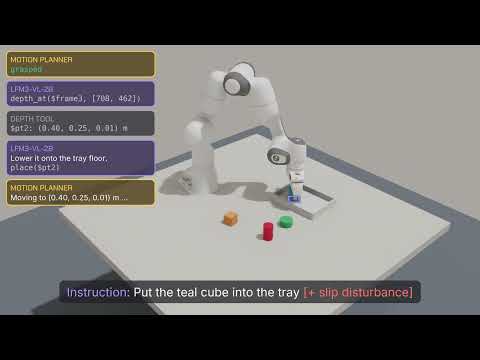
We adapt LFM3-VL-2B into three complementary robotics models for orchestration, navigation, and manipulation. The orchestrator operates a robot arm through tool calls: it grounds objects by pointing, measures them with depth tools, invokes motion planners, and checks outcomes in subsequent camera images. The navigator follows route descriptions using recent RGB observations, predicting spatial targets and a waypoint trajectory in just five tokens. The manipulation VLA maps images, language, and robot state to eight-step chunks of continuous actions in a single forward pass. Jointly trained across 15 embodiments, the VLA achieves 96.2% average success across the four LIBERO suites and 45.7% on RoboCasa-GR1 tabletop tasks, generating action chunks in under 50 ms on a Jetson AGX Orin with TensorRT FP16. These results highlight LFM3-VL-2B as a compact foundation for robotics, spanning high-level planning to low-level control with real-time action generation on embedded hardware.
Watch LFM3-VL-2B handle perception, navigation, and manipulation in this demo video.
Get Started with LFM3
All LFM3 models are open-weight and available on Hugging Face today:
We can't wait to see what you build.
Citation
If you use this work, please cite the release blog:
@article{liquidAI2026LFM3,
  author = {Liquid AI},
  title = {Introducing LFM3: Every Modality for Specialized Intelligence},
  journal = {Liquid AI Blog},
  year = {2026},
  note = {www.liquid.ai/blog/lfm3},
}