在参会胸卡上运行 Game Boy Color
英文标题:Game Boy Color on My Conference Badge
在今年的 GitHub Universe 大会上,与会者佩戴的可编程全彩屏电子胸卡再次成为极客的魔改对象。开发者 Steve Francia 借助 Google Gemini AI 的辅助,成功在该胸卡上运行了完整的 NES 模拟器,并进一步移植适配了 Game Boy 和 Game Boy Color 模拟器。参会者只需加载 ROM 并将胸卡倒置,即可直接利用机身内置的触控按键游玩《塞尔达传说:织梦岛》等经典掌机游戏。这一尝试展现了大语言模型在嵌入式硬件开发与跨平台移植中的实用辅助价值。
 270.9 KB
 261.2 KB
中文
2026 年 10 月 27 日 - 链接博客
在我的参会胸卡上运行 Game Boy Color。我这周正在参加 GitHub Universe,和去年类似,今年的参会胸卡同样是一台功能完备的彩屏电脑。
我一直在尝试对它做些魔改探索,随后偶遇了 Steve Francia……他借助 Gemini 在上面成功运行了完整的 NES 模拟器,接着更进一步,又部署了同时兼容 Game Boy 和 Game Boy Color 的模拟器。
这意味着,只要你能拿到游戏 ROM,就可以在参会胸卡上直接玩《塞尔达传说:织梦岛》(The Legend of Zelda: Link's Awakening)了!
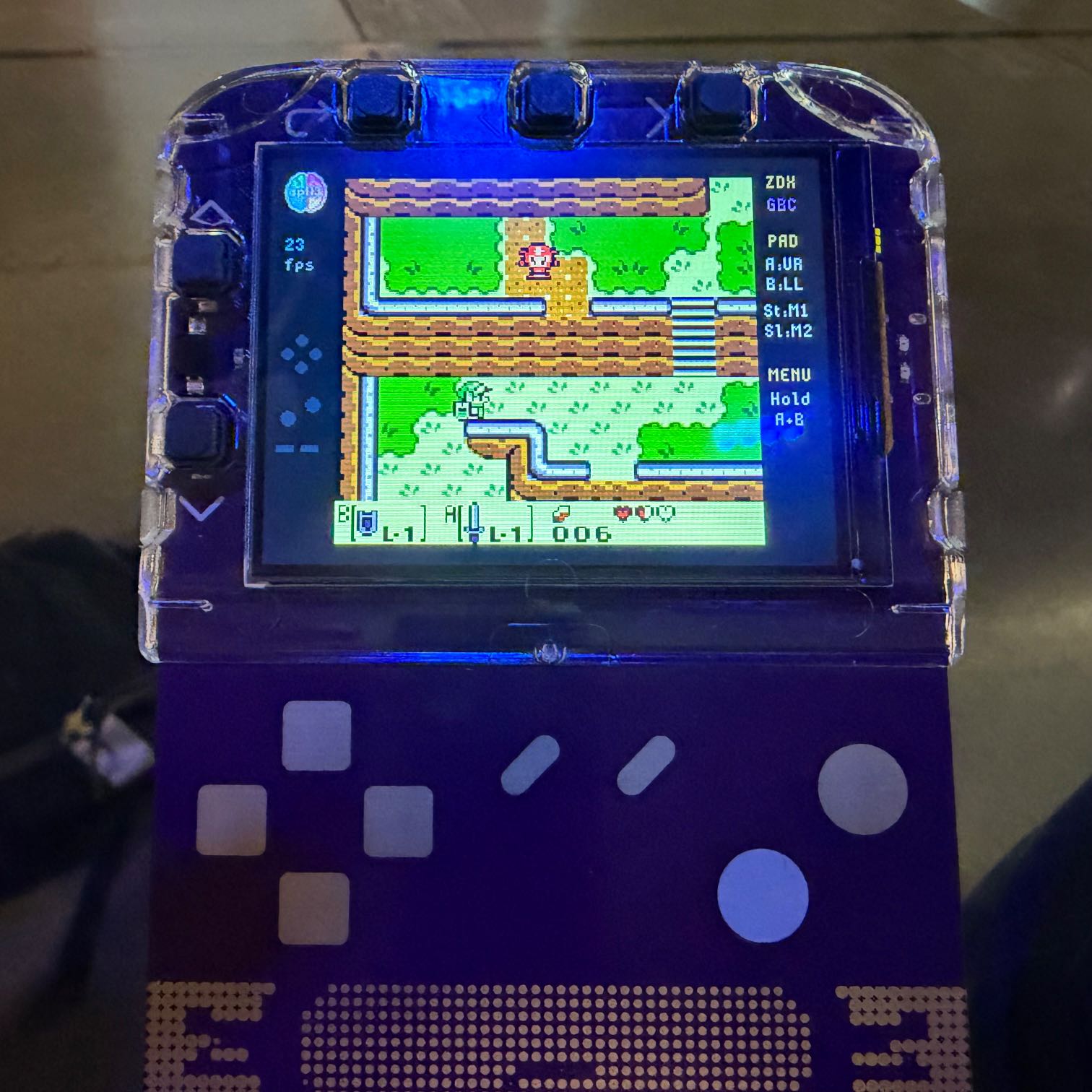
该胸卡还有一个非常巧妙的设计:你可以把它倒过来拿,直接使用集成在胸卡机身上的游戏手柄触控按键来进行操作。
English / 原文
27th October 2026 - Link Blog
Game Boy Color on My Conference Badge. I'm at GitHub Universe this week and, similar to last year, the conference badge is a full-blown color screen computer.
I've been hacking around with it again, and then I ran into with Steve Francia... who worked with Gemini to get a full NES emulator working on it, and then went a step further and deployed an emulator for both the Game Boy and the Game Boy Color.
Which means, if you can obtain the ROM, you can run The Legend of Zelda: Link's Awakening on your conference badge!
A neat feature of the badge is that you can turn it upside down and then use game controller touch buttons that are built into the badge body.