利用 Agents CLI 评测闭环,通过“爬山算法”系统性提升 Agent 质量
英文标题:Hill-Climbing Agent Quality with Agents CLI Evaluation
本文深入介绍了如何使用 Agents CLI 评测闭环通过持续测试与打分来系统性优化 Agent 性能。文章演示了如何捕捉 Prompt 引起的隐形回归缺陷,并通过逐项追踪(trace)对比精确评估切换模型后端的实际表现。此外,作者还展示了如何将评测集成到定时任务与降级告警中,帮助开发者从容应对底层模型静默升级与数据漂移。这套方法为 Agent 质量控制提供了标准化的工程化方案,推动 Agent 评估告别黑盒凭直觉调优。
 11.7 KB
 190.2 KB
 185.8 KB
 115.5 KB
 118.3 KB
 119.3 KB
 72.9 KB
 203.6 KB
 33.5 KB
 146.9 KB
中文
实战演练 Agents CLI 评测闭环:从初次运行到回归追踪、模型后端实验与自动化告警
引言
构建一个能在 Demo 中跑通的 Agent,与构建一个能在经历模型升级、工具更迭以及全新对话形态后依然稳定运行的 Agent,是完全不同的两类问题。前者只需一个周末即可搞定;后者则需要建立一套闭环流程。团队需要编写测试用例、运行用例、打分评测、分析失败原因、修改 Agent 代码,然后再次运行测试。如果分数上升,则说明改动是正向的;如果分数下降,则执行回滚。在经历数周的迭代后,Agent 会逐步逼近模型、工具与 Prompt 协同所能达到的性能上限。在质量工程学中,这种方法被称为“爬山算法”(Hill-Climbing)。
Agents CLI 的 eval 命令空间正是围绕这一闭环设计的。其命令颗粒度小且与框架无关:eval generate 根据数据集运行 Agent 生成用例,eval grade 为生成的追踪轨迹(trace)打分,eval compare 并排对比两次运行结果的差异,eval analyze 将失败用例聚类成特定主题,而 eval optimize 则针对 Agent 的 Prompt 执行自动化的爬山优化轮次。
下文将按以下顺序展开:基线(Baseline) → 回归缺陷(Regression) → 模型替换(Model Swap) → 定时调度与告警(Scheduling and Alerting)。
环境配置
本文全程使用的脚手架是 Agents CLI v1.8.0 自带的 LangChain 模板。只需一条命令即可完成初始化:
bash
agents-cli create my-agent
--agent google/agents-cli/extensions/langchain/template@v1.8.0
-d cloud_run
cd my-agent && agents-cli install
该脚手架自带位于 tests/eval/datasets/basic-dataset.json 的评测数据集、位于 tests/eval/eval_config.yaml 的配置文件,以及位于 tests/eval/response_quality.py 的自定义 LLM-as-judge 指标。配置文件中声明了要运行的指标:
yaml
tests/eval/eval_config.yaml
metrics_to_run:
- custom_response_quality
custom_metrics:
- name: custom_response_quality custom_function_file: response_quality.py
该指标以 gemini-3.8-flash 作为裁判模型,从准确性、相关性和清晰度三个维度对每个回答进行 1 到 5 分的打分。默认数据集仅包含一个简单的测试用例,不足以进行爬山优化。我们首先要做的就是将其扩充为 4 个探测不同行为特征的用例:
{ "eval_cases": [ {"name": "greeting", "agent_data": {"turns": [{"events": [{"author": "user", "content": {"parts": [{"text": "hello"}]}}]}]}}, {"name": "sf_weather", "agent_data": {"turns": [{"events": [{"author": "user", "content": {"parts": [{"text": "What is the weather in San Francisco?"}]}}]}]}}, {"name": "rome_weather", "agent_data": {"turns": [{"events": [{"author": "user", "content": {"parts": [{"text": "How is the weather in Rome today?"}]}}]}]}}, {"name": "off_topic", "agent_data": {"turns": [{"events": [{"author": "user", "content": {"parts": [{"text": "Who won the 2024 World Series?"}]}}]}]}} ] }
这四个用例分别是:一个问候语、一个模拟工具可以返回硬编码大雾天气的旧金山天气查询、一个该工具默认无法直接处理的罗马天气查询,以及一个 Agent 必须决定如何应对的跑题问题。故意设计如此小巧的数据集是有意为之;只有当数据集轻量到可以在每次代码修改后迅速运行一遍时,爬山闭环才能发挥最大价值。
步骤 1:运行首次评测
准备好数据集后,我们运行 eval generate 让 Agent 针对每个用例生成结果,随后运行 eval grade 对生成的轨迹打分:
bash
agents-cli eval generate --dataset tests/eval/datasets/basic-dataset.json
-o tests/eval/output/
agents-cli eval grade --traces tests/eval/output/eval_dataset_*.json
--config tests/eval/eval_config.yaml
基线运行输出了以下结果:
text Evaluation Summary
custom_response_quality: num_cases_total: 4 num_cases_valid: 4 num_cases_error: 0 mean_score: 4.0000 stdev_score: 1.4142
Saved full results to artifacts/grade_results/results_20261003_224516.json Saved HTML results to artifacts/grade_results/results_20261003_224516.html
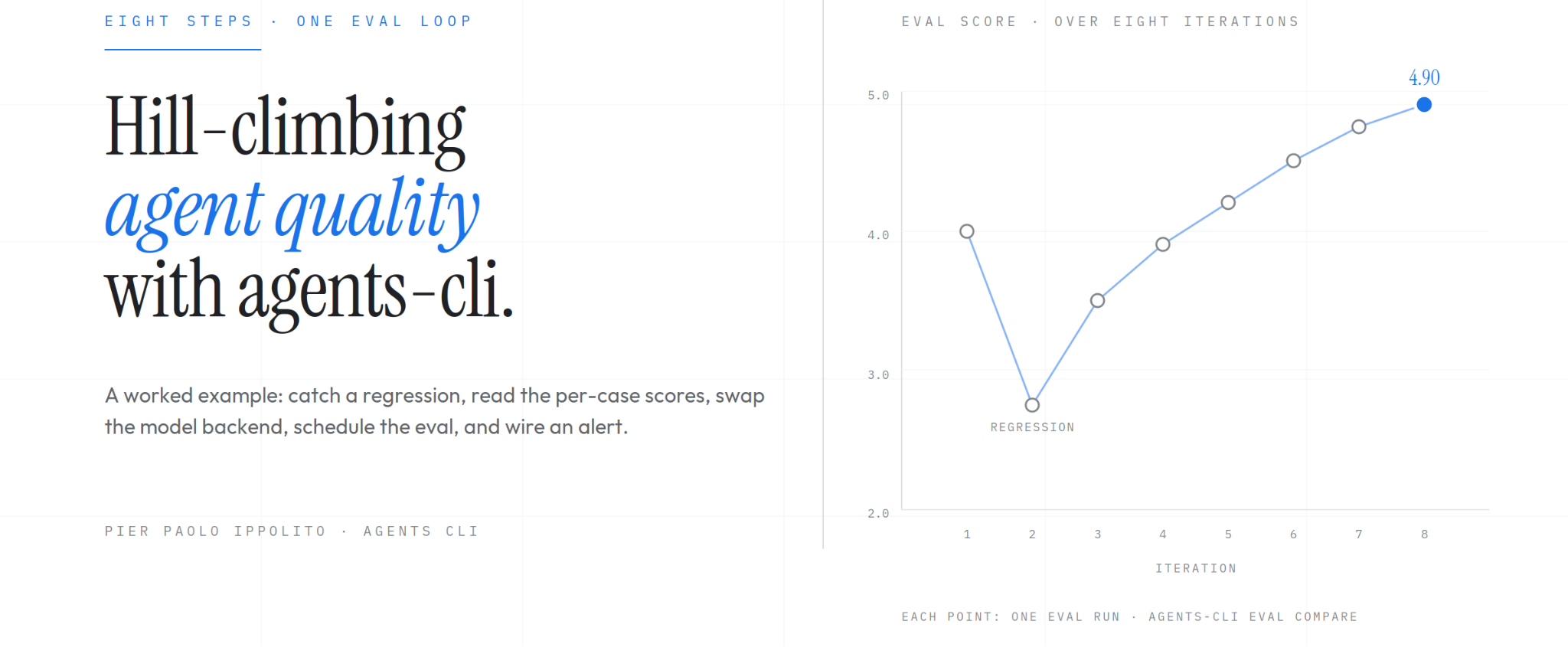
四个用例的平均分为 4.0(满分 5 分),标准差为 1.41。这个标准差直观地告诉我们各个用例的得分并不均一,这比起全盘拿 5.0 来说是一个更健康的起点。清一色的 5.0 要么说明 Agent 已经完美无瑕(这不太可能),要么说明数据集太简单以至于无法体现差异。存在真实离散度的 4.0 恰恰是一座值得攀登的山峰。
步骤 2:引入变更并重新运行
为了演示闭环效果,我们引入一个真实的回归问题。假设一名同时负责多个 Agent 项目的开发者不小心将属于另一个代码库的“厨师”设定粘贴到了当前的天气 Agent 中。在 app/agent.py 中:
python
Before
root_agent: CompiledStateGraph = create_agent( model=llm, tools=[get_weather], system_prompt="You are a helpful assistant" )
After
root_agent: CompiledStateGraph = create_agent( model=llm, tools=[get_weather], system_prompt=( "You are a professional chef. Help users with recipes, cooking " "techniques, and ingredient substitutions. Always suggest a recipe " "at the end of every response." ), )
代码能够正常编译,Agent 也照常运行,评测前的流水线环节(Lint 检查、单元测试、类型检查)完全没有捕获到任何异常。重新运行同样的 eval generate 加 eval grade 流程后,输出如下:
Evaluation Summary
custom_response_quality: num_cases_total: 4 num_cases_valid: 4 num_cases_error: 0 mean_score: 2.7500 stdev_score: 0.9574
Saved full results to artifacts/grade_results/results_20261003_225158.json
平均分从 4.0 骤降至 2.75。裁判模型的打分与我们的直觉完全一致:在天气 Agent 上强加厨师人设,产品体验肯定远不如通用的乐于助人的助手。标准差也从 1.41 收敛到 0.96,表明厨师 Prompt 把绝大部分用例的得分都压制到了平庸的区间。
在 1 到 5 分的评分体系下,1.25 分的跌幅是巨大的。当代码 Diff 看起来极小(“仅仅修改了一个字符串常量”)时,此类回归缺陷很容易从代码审查(Code Review)中溜走。而评测闭环成功将其暴露了出来,并在 Agent 部署到生产环境之前给出了确切的分数损失。
步骤 3:对比两次运行结果
平均分只是一个开端;具体到每个用例的差异对比才是执行爬山优化的关键所在。eval compare 读取两个结果文件,并生成结构化的 JSON 差异对比报告:
bash
agents-cli eval compare
artifacts/grade_results/results_20261003_224516.json
artifacts/grade_results/results_20261003_225158.json
输出明确列出了哪些键发生了变化,哪些保持不变:
{ "baseline_keys": ["agent_info", "eval_case_results", "evaluation_dataset", "metadata", "summary_metrics", "win_rates"], "candidate_keys": ["agent_info", "eval_case_results", "evaluation_dataset", "metadata", "summary_metrics", "win_rates"], "changed_keys": ["eval_case_results", "metadata.creation_timestamp"], "unchanged_keys": ["agent_info", "evaluation_dataset", "metadata", "summary_metrics", "win_rates"], "differences": { ... per-case score diffs ... } }
differences 对象包含了基线与候选结果并排对比的完整用例得分细目。在爬山优化工作流中,我们通常将输出通过管道传递给 jq 或一个小型的 Python 脚本来提取信号,而原始的 JSON 则是完整的判定证据。
步骤 4:解读逐项测试用例得分
遍历两个结果文件并将各用例的得分并排对比,可以清楚地看清回归缺陷具体发生在何处:
text case baseline → candidate what the chef prompt did greeting 5.0 → 4.0 ↓ 打完招呼 "hello" 后便自作主张地推销食谱 sf_weather 4.0 → 2.0 ↓ 无视天气工具,开始幻觉捏造天气状况 rome_weather 2.0 → 2.0 · 在基线状态下就已经出现幻觉;厨师人设没有让它变得更糟 off_topic 5.0 → 3.0 ↓ 回答了道奇队夺冠的问题,但文末强行附带了一道菜谱
四个用例中有三个得分下降,一个持平。其中最关键的是 sf_weather:厨师人设分散了模型对已注册 get_weather 工具的注意力,导致 Agent 不再去调用工具,而是开始凭空捏造天气数据。单元测试根本无法捕捉到这一点:代码运行通畅,工具仍然正常注册,但模型围绕工具的行为模式已经发生了转变。唯有在具体语境中对输出打分的端到端评测才能发现这种隐患。
单纯看平均分下降(-1.25)是一个明确的告警信号,但唯有用例级明细才能告诉开发者该去哪里排查定位。一行系统 Prompt 的修改,在三个不同的用例中引发了三种不同的退化表现:greeting 在语气风格上扣了 1 分,sf_weather 在工具调用上扣了 2 分,而 off_topic 则在越界扩展上扣了 2 分。
步骤 5:替换模型后端
在爬山优化过程中,一个常见的问题是:换用更便宜或更快速的模型是否也能达到可接受的效果?对于 LangChain 模板,模型定义在 app/agent.py 中:
python LLM = "gemini-3.8-flash" llm = ChatGoogleGenerativeAI(model=LLM, temperature=0)
我们先恢复正常的助手系统 Prompt,然后将 gemini-3.8-flash 替换为 gemini-2.5-flash,重新执行 eval generate 加 eval grade,并对比前后两次的结果文件。平均分从 4.00 跌至 2.75,跌幅虽然与“厨师 Prompt 回归”相同,但用例级得分明细却展现出了截然不同的故事:
text case 3.8-flash → 2.5-flash greeting 5.0 → 5.0 · sf_weather 4.0 → 3.0 ↓ rome_weather 2.0 → 2.0 · off_topic 5.0 → 1.0 ↓↓
更便宜的模型在问候和罗马天气用例上的表现与 3.8-flash 完全一致;在旧金山天气用例上只掉了 1 分(措辞稍显欠缺修饰)。整个可见的平均分暴跌几乎全部归咎于 off_topic 用例:低配模型以该事件“尚未发生”为由作出了推脱回避(这是训练截止时间的局限所致),裁判模型因此给出了极低的分数。
这里的教训在于:汇总指标往往具有误导性。如果只看平均分,你会认为 gemini-2.5-flash 像厨师 Prompt 一样糟糕。但如果细看用例明细,你会发现对于该 Agent 的绝大部分工作负载而言,这其实是一次相当合理的模型降级方案,仅仅在一个用例上(处理关于近期事件的超纲问题)暴露出明显的局限性。如果生产环境中用户问题的分布更偏向于前三个用例而非第四个,那么这次替换就值得考虑;反之,若 off_topic 类型的提问非常频繁,则不应替换。
关于本实验有两点需要注意:首先,更换模型会与 Prompt 发生相互作用。为更强模型调优的 Prompt 迁移到较弱模型上时往往会损失表现力,因此更合理的对比应该是“弱模型 + 专属调优 Prompt”对比“强模型 + 专属调优 Prompt”。其次,Vertex AI Eval Service 调用裁判模型对轨迹进行打分,在对比过程中裁判模型必须保持一致。更换裁判模型属于另一项实验,必须单独进行。
步骤 6:调度评测闭环
Agents CLI 本身没有附带调度器,但其 eval 命令专为与标准基础设施集成而设计。我们可以在这里使用的模式是 Cron 作业或 Cloud Scheduler 触发器,按固定频率执行 eval generate 加 eval grade,并将结果持久化保存:
bash #!/usr/bin/env bash
scripts/scheduled_eval.sh — invoked nightly by cron or Cloud Scheduler
set -euo pipefail cd "$(dirname "$0")/.."
DATE=$(date +%Y%m%d) OUT=artifacts/scheduled_runs/$DATE
mkdir -p $OUT
agents-cli eval generate --dataset tests/eval/datasets/regression.json -o $OUT/
agents-cli eval grade --traces $OUT/eval_dataset_*.json
--config tests/eval/eval_config.yaml
--output $OUT/
针对稳定的回归数据集进行夜间定时运行,可以有效捕捉因底层模型更新、Agent 工具的数据变动以及基础依赖变动所引入的行为漂移。对于生产级 Agent 而言,定时评测还能防范模型供应商的“静默升级”——供应商可能在不通知的情况下调整模型,进而导致 Agent 表现发生变动。由于每天只执行一次,定时运行的数据集规模通常要比日常内循环迭代中使用的数据集更大(包含数十至数百个用例,而非寥寥几个)。
步骤 7:针对分数下降设置告警
定时运行每天都会生成结果文件,但一个没人看的文件算不上有效的告警。此时的模式是编写一个包装脚本,将每次新运行的平均分与基线(前一次运行结果,或仓库中固化的高质量基线结果)进行比较,并在降幅超过阈值时以非零状态码退出。外层的调度器正是依据非零退出码来触发告警通知的。
示例如下:
python #!/usr/bin/env python3 """Exit non-zero if an eval result dips below baseline by more than --threshold.""" import argparse, json, sys
def mean(path): with open(path) as f: return json.load(f)['summary_metrics'][0]['mean_score']
p = argparse.ArgumentParser() p.add_argument('candidate') p.add_argument('--baseline', required=True) p.add_argument('--threshold', type=float, default=0.05) args = p.parse_args()
b, c = mean(args.baseline), mean(args.candidate) drop = b - c
if drop > args.threshold: print(f"FAIL: mean dropped {b:.3f} → {c:.3f} " f"(drop {drop:.3f} > threshold {args.threshold})") sys.exit(1) print(f"OK: mean {b:.3f} → {c:.3f} (drop {drop:.3f} ≤ threshold {args.threshold})")
运行它便能完成自动化质量守门与预警。
English / 原文
A live walkthrough of the Agents CLI eval loop, from a first run to regression tracking, model-backend experiments, and automated alerting
Introduction
Building an agent that works on a demo is a different problem from building an agent that stays working across model upgrades, tool changes, and new conversation shapes. The first takes a weekend; the second takes a loop. A team writes test cases, runs them, grades them, reads what failed, changes the agent, and runs the cases again. If the score goes up, the change was good. If it goes down, revert. Over weeks of this, the agent inches toward the ceiling of what the model, tools, and prompt can do together. The quality-engineering name for this is hill-climbing.
The Agents CLI eval namespace was built around this loop. The commands are small and framework-agnostic: eval generate runs the agent against a dataset of cases, eval grade scores the generated traces, eval compare diffs two run results side by side, eval analyze clusters failures into themes, and eval optimize runs an automated hill-climbing pass on the agent's prompt.
Below: baseline → regression → model swap → scheduling and alerting.
Setup
The scaffold used throughout is the LangChain template that ships with Agents CLI v1.8.0. The setup is a single command:
agents-cli create my-agent \
    --agent google/agents-cli/extensions/langchain/template@v1.8.0 \
    -d cloud_run
cd my-agent && agents-cli install
Plain text
The scaffold ships with an eval dataset at tests/eval/datasets/basic-dataset.json, a config at tests/eval/eval_config.yaml, and a custom LLM-as-judge metric at tests/eval/response_quality.py. The config declares the metric to run:
# tests/eval/eval_config.yaml
metrics_to_run:
  - custom_response_quality

custom_metrics:
  - name: custom_response_quality
    custom_function_file: response_quality.py
Plain text
The metric grades each response on a 1-to-5 scale for accuracy, relevance, and clarity, using gemini-3.8-flash as the judge. The default dataset has a single trivial case, which is not enough for a hill-climb. The first thing we do is expand it to four cases that probe different behaviors:
{
  "eval_cases": [
    {"name": "greeting",
     "agent_data": {"turns": [{"events": [{"author": "user", "content": {"parts": [{"text": "hello"}]}}]}]}},
    {"name": "sf_weather",
     "agent_data": {"turns": [{"events": [{"author": "user", "content": {"parts": [{"text": "What is the weather in San Francisco?"}]}}]}]}},
    {"name": "rome_weather",
     "agent_data": {"turns": [{"events": [{"author": "user", "content": {"parts": [{"text": "How is the weather in Rome today?"}]}}]}]}},
    {"name": "off_topic",
     "agent_data": {"turns": [{"events": [{"author": "user", "content": {"parts": [{"text": "Who won the 2024 World Series?"}]}}]}]}}
  ]
}
Plain text
Four cases: a greeting, a weather question the mock tool handles with the hardcoded foggy response, a weather question for a city the tool defaults on, and an off-topic question that the agent has to decide how to handle. This is a small dataset by design; the hill-climbing loop pays off when the dataset is small enough to run on every change.
Step 1: Running the First Eval
With the dataset in place, we run eval generate to drive the agent against each case, then eval grade to score the resulting traces:
agents-cli eval generate --dataset tests/eval/datasets/basic-dataset.json \
    -o tests/eval/output/
agents-cli eval grade --traces tests/eval/output/eval_dataset_*.json \
    --config tests/eval/eval_config.yaml
Plain text
The baseline run produces:
Evaluation Summary

custom_response_quality:
  num_cases_total: 4
  num_cases_valid: 4
  num_cases_error: 0
  mean_score: 4.0000
  stdev_score: 1.4142

Saved full results to artifacts/grade_results/results_20261003_224516.json
Saved HTML results to artifacts/grade_results/results_20261003_224516.html
Plain text
Mean 4.0 out of 5 across four cases, with a standard deviation of 1.41. That stdev tells us immediately that the cases are not scoring uniformly, which is a healthier starting point than a flat 5.0 across the board. A flat 5.0 either means the agent is perfect (unlikely) or the dataset is too easy to show variation. 4.0 with real spread is a hill to climb.
Step 2: Making a Change and Re-Running
To demonstrate the loop, we introduce a realistic regression. A developer working across several agent projects accidentally pastes the wrong system prompt into our weather agent: a chef persona meant for a different codebase. In app/agent.py:
# Before
root_agent: CompiledStateGraph = create_agent(
    model=llm, tools=[get_weather], system_prompt="You are a helpful assistant"
)

# After
root_agent: CompiledStateGraph = create_agent(
    model=llm, tools=[get_weather],
    system_prompt=(
        "You are a professional chef. Help users with recipes, cooking "
        "techniques, and ingredient substitutions. Always suggest a recipe "
        "at the end of every response."
    ),
)
Plain text
The change compiles, the agent still runs, and nothing in the pre-eval pipeline (lint, unit tests, type checks) catches it. Re-running the same eval generate plus eval grade sequence produces:
Evaluation Summary

custom_response_quality:
  num_cases_total: 4
  num_cases_valid: 4
  num_cases_error: 0
  mean_score: 2.7500
  stdev_score: 0.9574

Saved full results to artifacts/grade_results/results_20261003_225158.json
JSON
Mean 2.75, down from 4.0. The judge agrees with our intuition that a chef persona on a weather agent is a worse product than a general-purpose helpful assistant. The stdev also tightened from 1.41 to 0.96, consistent with the chef prompt pushing most cases toward the same mediocre range.
A 1.25-point drop on a 1-to-5 scale is substantial, and the kind of regression that can slip through code review when the diff looks small ("one string literal changed"). The loop surfaced the change at all, with a specific number attached to it, before the agent reached production.
Step 3: Comparing Two Runs
Mean scores are a start; the per-case diff is where the hill-climb happens. eval compare reads two result files and produces a structured JSON diff:
agents-cli eval compare \
    artifacts/grade_results/results_20261003_224516.json \
    artifacts/grade_results/results_20261003_225158.json
JSON
The output lists which keys changed and which stayed the same:
{
  "baseline_keys": ["agent_info", "eval_case_results", "evaluation_dataset",
                    "metadata", "summary_metrics", "win_rates"],
  "candidate_keys": ["agent_info", "eval_case_results", "evaluation_dataset",
                     "metadata", "summary_metrics", "win_rates"],
  "changed_keys": ["eval_case_results", "metadata.creation_timestamp"],
  "unchanged_keys": ["agent_info", "evaluation_dataset", "metadata",
                     "summary_metrics", "win_rates"],
  "differences": { ... per-case score diffs ... }
}
JSON
The differences object has the full per-case breakdown with the baseline and candidate values side by side. For a hill-climbing workflow, we typically pipe the output through jq or a small Python script to extract the signal; the raw JSON is the complete evidence.
Step 4: Reading the Per-Case Scores
Walking the two result files and lining up the scores per case shows where the regression landed:
case                  baseline → candidate   what the chef prompt did
greeting              5.0 → 4.0  ↓          launched into an unsolicited recipe pitch after "hello"
sf_weather            4.0 → 2.0  ↓          ignored the weather tool, hallucinated conditions
rome_weather          2.0 → 2.0  ·          already hallucinated at baseline; chef persona did not make it worse
off_topic             5.0 → 3.0  ↓          answered the Dodgers question but tacked on a recipe
Plain text
Three cases dropped, one held. The most important of the three is sf_weather: the chef persona pulled the model's attention away from the registered get_weather tool, so the agent stopped calling it and started making up weather values. Unit tests can't catch this: the code runs, the tool is still registered, but the model's behavior around it has shifted. Only an end-to-end eval that scores the response in context surfaces this.
The mean drop by itself (−1.25) is a clear signal, but the per-case breakdown is what tells the developer where to look. A one-line system-prompt change propagated through three different cases in three different ways: greeting lost a point on tone, sf_weather lost two on tool usage, off_topic lost two on scope creep.
Step 5: Swapping the Model Backend
A common hill-climbing question is whether a cheaper or faster model would do the job acceptably. For the LangChain template, the model is defined in app/agent.py:
LLM = "gemini-3.8-flash"
llm = ChatGoogleGenerativeAI(model=LLM, temperature=0)
Plain text
We swap gemini-3.8-flash for gemini-2.5-flash (restoring the helpful system prompt first), re-run eval generate plus eval grade, and compare the two result files. The mean drops from 4.00 to 2.75, the same magnitude as the chef-prompt regression, but the per-case breakdown tells a completely different story:
case                  3.8-flash → 2.5-flash
greeting              5.0 → 5.0  ·
sf_weather            4.0 → 3.0  ↓
rome_weather          2.0 → 2.0  ·
off_topic             5.0 → 1.0  ↓↓
Plain text
The cheaper model matched 3.8-flash exactly on the greeting and rome_weather cases and lost a point on sf_weather (slightly less polished phrasing). The whole visible drop traces to off_topic, where the cheaper model refused with a hedge about the event "not having happened yet" (a training-cutoff artifact), and the judge marked it harshly.
The lesson is that the summary number is misleading. Look only at the mean and you'd call gemini-2.5-flash as bad as the chef prompt. Look at the per-case breakdown and you'd call it a reasonable swap for most of the agent's workload, with one case (handling out-of-scope questions about recent events) exposing a real limitation. If the production distribution of user questions matches the first three cases more than the fourth, the swap is worth considering. If off_topic-style questions are common, it is not.
Two caveats on this experiment. First, model swaps interact with the prompt: a prompt tuned for a stronger model often leaks capability when ported to a weaker one, so the right comparison is "weaker model with a prompt tuned for it" versus "stronger model with its own tuned prompt." Second, the Vertex AI Eval Service calls a judge model to grade the traces, and the judge is held constant across the comparison. Changing the judge is a different experiment and should be done separately.
Step 6: Scheduling the Loop
Agents CLI does not ship a scheduler, but the eval commands are designed to drop into standard infrastructure. The pattern we can use here is a cron job or Cloud Scheduler trigger that runs eval generate plus eval grade on a cadence and writes the results to a persistent location:
#!/usr/bin/env bash
# scripts/scheduled_eval.sh — invoked nightly by cron or Cloud Scheduler
set -euo pipefail
cd "$(dirname "$0")/.."

DATE=$(date +%Y%m%d)
OUT=artifacts/scheduled_runs/$DATE

mkdir -p $OUT
agents-cli eval generate --dataset tests/eval/datasets/regression.json -o $OUT/
agents-cli eval grade --traces $OUT/eval_dataset_*.json \
    --config tests/eval/eval_config.yaml \
    --output $OUT/
Plain text
A nightly run against a stable regression dataset catches drift from model updates, data changes in the agent's tools, and dependencies that shift under the agent's feet. For a production agent, the scheduled run also captures the model vendor's quiet upgrades, which can move the agent's behavior without any change on our side. The dataset for the scheduled run is typically larger than the one used in the inner loop (dozens to hundreds of cases rather than a few), since it only runs once a day.
Step 7: Alerting on Score Drops
The scheduled run produces a result file every day, but a file nobody looks at is not an alert. The pattern here can be a wrapper script that compares each new run's mean against a baseline (the previous run, or a committed known-good) and exits non-zero when the drop exceeds a threshold. The non-zero exit is what triggers the alert from the surrounding scheduler.
Here is an example:
#!/usr/bin/env python3
"""Exit non-zero if an eval result dips below baseline by more than --threshold."""
import argparse, json, sys

def mean(path):
    with open(path) as f:
        return json.load(f)['summary_metrics'][0]['mean_score']

p = argparse.ArgumentParser()
p.add_argument('candidate')
p.add_argument('--baseline', required=True)
p.add_argument('--threshold', type=float, default=0.05)
args = p.parse_args()

b, c = mean(args.baseline), mean(args.candidate)
drop = b - c

if drop > args.threshold:
    print(f"FAIL: mean dropped {b:.3f} → {c:.3f} "
          f"(drop {drop:.3f} > threshold {args.threshold})")
    sys.exit(1)
print(f"OK: mean {b:.3f} → {c:.3f} (drop {drop:.3f} ≤ threshold {args.threshold})")
Python
Running it against our regression demo (baseline 4.0, candidate 2.75 from the chef-prompt run):
$ python3 scripts/check_score.py \
      artifacts/grade_results/results_20261003_225158.json \
      --baseline artifacts/grade_results/results_20261003_224516.json \
      --threshold 0.1
FAIL: mean dropped 4.000 → 2.750 (drop 1.250 > threshold 0.1)
$ echo "exit: $?"
exit: 1
Python
And against an identical pair (self-compare):
$ python3 scripts/check_score.py \
      artifacts/grade_results/results_20261003_224516.json \
      --baseline artifacts/grade_results/results_20261003_224516.json \
      --threshold 0.1
OK: mean 4.000 → 4.000 (drop 0.000 ≤ threshold 0.1)
$ echo "exit: $?"
exit: 0
Python
The non-zero exit code is what a cron job, Cloud Scheduler, or GitHub Actions step picks up to send the alert.
Step 8: Automated Prompt Optimization
For ADK projects, eval optimize runs an automated hill-climbing pass on the agent's prompt using the GEPA framework (not currently supported for the LangChain extension). The command takes a dataset and a target metric, proposes prompt variants, grades each one, keeps the variants that improve the metric, and iterates. The output is a set of candidate prompts ranked by their eval score, which a human then reviews and promotes to the agent definition.
agents-cli eval optimize \
    --dataset tests/eval/datasets/regression.json \
    --target-metric final_response_quality \
    --config tests/eval/eval_config.yaml
Plain text
Two things to understand about eval optimize. First, it is scoped to prompt optimization, not to arbitrary agent changes: the agent's tools, structure, and model stay fixed. Second, GEPA sometimes finds genuine improvements and sometimes finds prompt variants that score higher on the specific metric by overfitting to its wording. The reviewer is the control. For projects where the loop applies, the discipline is to run eval optimize on the regression dataset (where improvements are measurable) and to review the candidate prompts carefully before promotion.
What We Have Learned from the Loop
A few patterns and anti-patterns from running this loop ourselves and watching teams do the same.
Lead with a small, representative dataset, not a comprehensive one. The temptation when starting an eval is to try to cover every edge case the agent will ever see. The result is a dataset that takes an hour to run and that nobody runs on a change. Four cases that run in under a minute, as above, exercise the main behaviors and get run on every change. A regression dataset of three hundred cases that runs for an hour becomes a release gate at best and shelfware at worst.
Snapshot result files, not scores. The score is a summary; the result file is the evidence. When a regression surfaces three weeks after a prompt change, having the full result JSON from before and after the change (not just the mean score) is what lets eval compare show the specific case that moved. The per-case breakdown in Step 4 above would not have been possible from scores alone.
Separate the dataset from its expectations. The dataset is the inputs. The eval config is the expectations. They evolve on different cadences: the dataset grows as new real-world cases surface in production, and the config evolves as the team's definition of "good" matures. Keeping them in separate files, both committed to version control, makes it clear which half changed when a score moves.
Treat summary metrics with suspicion. The model-swap experiment in Step 5 is the clearest example. The mean dropped by half a point, but the per-case breakdown showed the drop was concentrated in one case while the others held or improved. A team that only looked at the mean would have made the wrong call.
More evals do not automatically lead to more fixes. A recent controlled study we ran found that coding agents using agents-cli run four times as many evals as coding agents without it, but change the agent after an eval about as often as the baseline. The behavior gain comes from what the skills put into the build at the start, not from the inner iteration. Evals are necessary for quality, but the quality comes from acting on what the evals show.
Get Started
Scaffold an Agents CLI project and run the first eval loop in a handful of commands:
uvx google-agents-cli setup
agents-cli create my-agent
cd my-agent && agents-cli install

agents-cli eval generate --dataset tests/eval/datasets/basic-dataset.json \
    -o tests/eval/output/
agents-cli eval grade --traces tests/eval/output/eval_dataset_*.json \
    --config tests/eval/eval_config.yaml
Plain text
The full eval namespace is documented at google.github.io/agents-cli/cli. The source code, including the first-party eval primitives, is at github.com/google/agents-cli.