利用 A2UI 与 CopilotKit Agent 构建生成式 UI 应用
英文标题:Build Generative UI Apps with A2UI & CopilotKit Agents
Google 推出了跨框架的生成式 UI 开源标准 A2UI(Agent-to-UI),使 AI Agent 能够以结构化数据描述界面,并在客户端安全渲染出丰富的交互组件。结合基于 AG-UI 协议的 CopilotKit SDK,开发者可以轻松打通 LangChain、AWS Strands 及 Google ADK 等主流 Agent 后端,跨 React、Angular 等前端实现原生组件渲染。该方案支持流式传输与双向响应式交互,并具备端侧校验和错误自愈能力,标志着 Agent 交互正式从单调的纯文本向动态、可交互的富 UI 时代演进。
 11.7 KB
 2.0 MB
 1.9 MB
 160.4 KB
 1.6 MB
 1.2 MB
 125.0 KB
 203.6 KB
 84.7 KB
 33.5 KB
 318.3 KB
中文
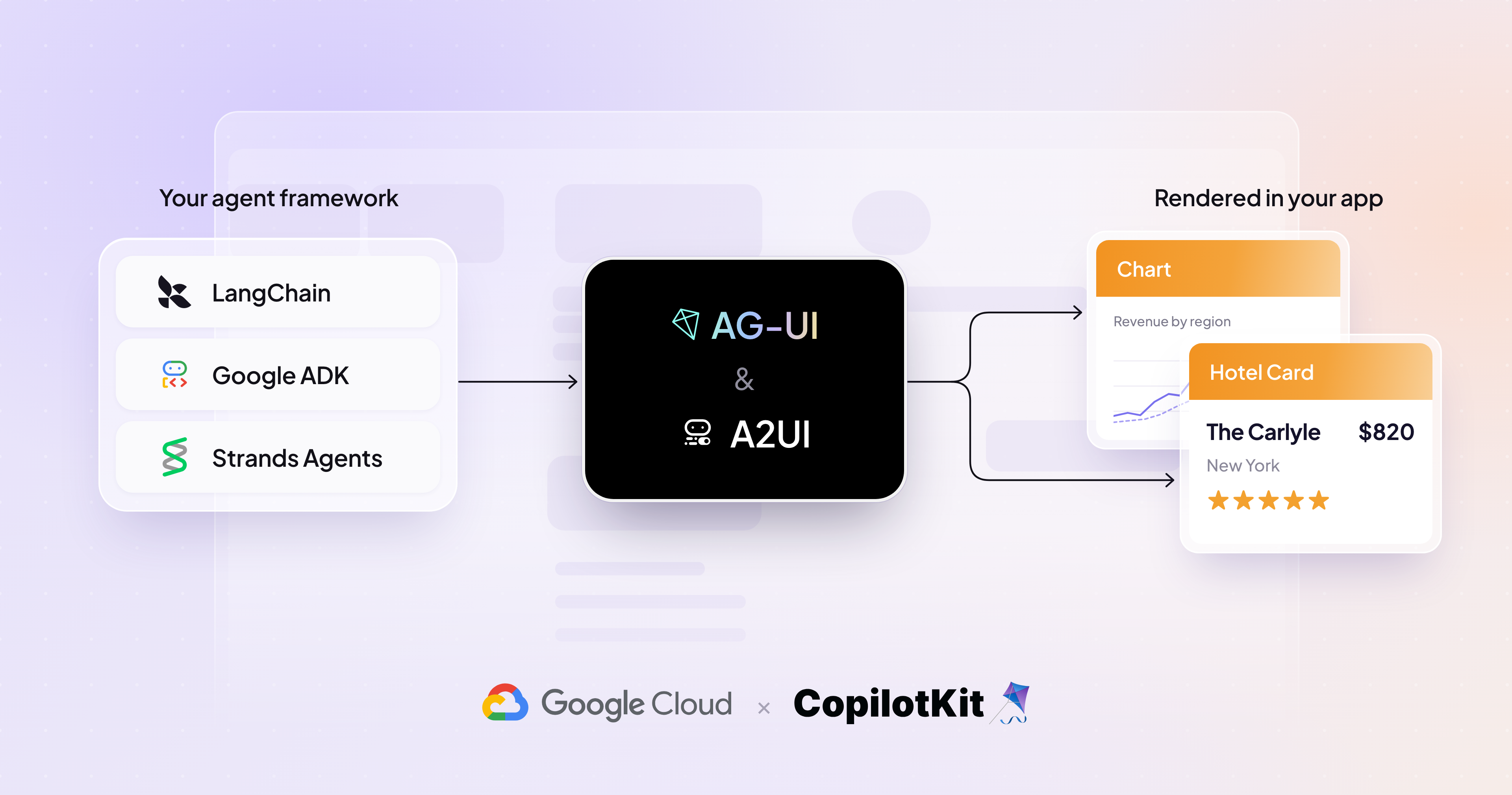
Agent 与用户的交互目前正在从纯文本对话演化为丰富的 UI。直到最近,大多数对话看起来还是这样的:
用户: "帮我找找三月份去巴厘岛的度假套餐。"
Agent: (用大段文本罗列了六个套餐,每个都包含日期、酒店、航班和价格)
用户: "选那个五晚含早餐的。"
Agent: "这是链接。你可以在运营商的网站上预订。"
Agent 能够规划行程,但所有内容都以密密麻麻的文字墙形式返回。在对话本身内部,它们没有标准的方法来渲染可供勾选的套餐列表、目的地地图,或者用于完成后续预订流程的日期选择器。
生成式 UI(Generative UI)正是让 Agent 能够根据每个请求的需求在运行时动态构建界面的层级——为用户提供丰富且具交互性的体验。实现这一点需要两个部分:一种描述 UI 的方式,以及一个将你的 Agent 连接到应用程序并渲染该 UI 的 Agent 技术栈。
- A2UI (Agent-to-UI) 是 Google 推出的与框架无关的生成式 UI 开源标准。Agent 将界面描述为数据,而你的应用程序使用现有的组件将其绘制出来。它在设计上与传输层完全无关。
- CopilotKit 提供了 Agent 集成技术栈,可与 "LangChain"、"AWS Strands"、"Google ADK" 等 Agent 框架集成,以构建面向用户的 Agent 应用。它提供了一套基于 A2UI 协议构建丰富应用的工具包,包括聊天界面、运行时,并在 React 和 Angular 中利用了 A2UI 渲染器。CopilotKit 还为 Vue 和 Slack 提供了自定义的 A2UI 渲染器。
什么是 A2UI?
生成式 UI 涵盖了一系列实现方案:从使用预定义的高阶组件,到赋予 AI Agent 自主决定如何构建 UI 的灵活性。
在受控的一端,你提前构建好每个组件,Agent 负责挑选渲染哪一个以及填入什么数据。这种方式保障了品牌安全性,但无法根据用户的意图进行深度定制和个性化。在开放的一端,Agent 返回由 HTML、JavaScript 和/或 Dart 编写的原始 UI 程序,并在沙盒化的 iframe 中渲染。这能覆盖你未曾预料到的任何场景,但代价是界面脱离了你的设计系统,并且需要执行模型编写的代码。
A2UI 贯穿了这一完整光谱。它既参与使用决策模型的受控生成(例如 Typesafe 的 Jev),也支持可能输出 A2UI JSON 消息的开放式代码生成。其中最受欢迎的是声明式模式——由 Agent 组装预先声明的组件和函数。A2UI 是用于声明 UI 意图的跨框架标准,因此本地或远程 Agent 都可以使用通用语言,从你现有的组件目录中生成 UI。
- 安全优先。 A2UI 是一种声明式数据格式,而非可执行代码。客户端维护着一个受信任组件的目录,因此 Agent 在该集合之外臆造出的任何内容都会在呈现在屏幕之前被拦截。
- 对 LLM 友好且支持流式传输。 Payload 是一个小巧的 JSON 消息扁平列表,彼此通过 ID 相互引用,因此 Agent 可以增量发出,而客户端则在组件到达时即刻渲染。
- 跨框架且可移植。 相同的响应可以通过 React、Lit、Angular、SwiftUI、Jetpack Compose (Android) 或 Flutter(多平台)进行渲染,也可以通过面向 Vue 的社区渲染器甚至在终端中进行渲染。
前端开发者现在只需交付一次基础构建块,Agent 便能根据每个请求对它们进行组合。
基础目录(Basic Catalog)提供了跨越布局、展示、输入和容器的 18 个通用原语。Agent 可以根据请求的需求,使用相同的 18 个原语组合出完全不同的界面。
基础目录特意保持了精简,因此大多数生产应用都会定义自己的自定义目录。自定义组件可以是你的前端已经渲染的任何内容,包括一个由 Agent 填充坐标、同时由渲染器绘制路线的实时地图。
A2UI 与 CopilotKit 如何协同工作
CopilotKit 构建于 AG-UI (Agent-User Interaction Protocol) 之上,该协议支持 A2UI payload,并为众多 Agent 后端提供了 Agent SDK。
你的 Agent 发出 A2UI 操作,AG-UI 将它们作为类型化事件传输到客户端。当用户执行任何操作时,其数值会沿同一条数据流回传。
A2UI 可与任何兼容 AG-UI 的 Agent 协同工作。 像 Google ADK、LangChain、Mastra 和 Strands 等框架都兼容 AG-UI,因此无论你的 Agent 运行在哪个框架上,配置都是完全一致的。
在你的应用中配置 A2UI
配置归结为两件事:将你的 Agent 连接到 CopilotKit,以及定义允许 Agent 使用哪些组件。
以 Google ADK 为例,ag_ui_adk 包封装了任意 ADK agent,并在 FastAPI 上将其作为 AG-UI 端点提供服务:
python from fastapi import FastAPI from google.adk.agents import LlmAgent from ag_ui_adk import ADKAgent, add_adk_fastapi_endpoint
root_agent = LlmAgent( name="flight_agent", model="gemini-3.8-flash", instruction="Help users find and book flights. Call generate_a2ui to show results.", )
adk_agent = ADKAgent( adk_agent=root_agent, app_name="flights", user_id="demo_user", use_in_memory_services=True, )
app = FastAPI() add_adk_fastapi_endpoint(app, adk_agent, path="/")
在应用端,你需要在 /api/copilotkit 处将该端点注册到 CopilotKit 运行时。这是几行标准设置,在 Google ADK 快速入门指南中已有介绍,且无需任何针对 A2UI 的特殊配置。
A2UI 本身是在客户端开启的,因为你的组件本来就在那里。定义允许 Agent 绘制哪些内容,将每个定义映射到一个渲染器,然后将目录传递给 CopilotKit 提供程序。
javascript import { CopilotKit, CopilotChat } from '@copilotkit/react-core/v2'; import { createCatalog, type CatalogDefinitions, type CatalogRenderers, } from '@copilotkit/a2ui-renderer'; import { z } from 'zod';
const catalogDefinitions = { FlightCard: { description: 'A flight result with airline, times, and stops.', props: z.object({ airline: z.string(), departs: z.string(), arrives: z.string(), stops: z.number(), }), }, } satisfies CatalogDefinitions;
const catalogRenderers = { FlightCard: MyFlightCard, // your React component } satisfies CatalogRenderers;
const catalog = createCatalog(catalogDefinitions, catalogRenderers, { catalogId: 'flight-catalog', includeBasicCatalog: true, });
<CopilotKit runtimeUrl="/api/copilotkit" a2ui={{ catalog }}>
其中 description 会被放入 Agent 的提示词中,这样模型就知道何时该使用 FlightCard 而不是通用卡片。Zod schema 则负责校验它返回的 props 参数。
A2UI 配置可以在服务端提前预设,也可以动态创建并随请求由客户端发送给服务端。上面的 ADK 代码使用了动态配置,这就是为什么它可以在未明确定义的情况下直接使用 generate_a2ui。文档中涵盖了这两种方式。
这是 CopilotKit 的实现路径。你也可以直接使用 @ag-ui/client 消费事件流,并将 A2UI 操作交给任何兼容的渲染器处理:@a2ui/react,或者是 Flutter、Lit 或 Angular 的对应实现。
构建双向 A2UI 界面
大多数由 Agent 生成的 UI 都是单向一次性的。Agent 绘制某些内容,你阅读它,而一旦发生任何变动,它就会立刻过时。
A2UI 界面是双向的,且组件具备响应性,这使得多步骤流程成为可能。用户在界面上执行的任何操作(选择日期、选择航班、输入乘客信息)都会沿着同一条数据流回传,Agent 随后会根据这些值重新生成界面。
这是一个端到端预订流程的高层架构示例,其中运行在 Cloud Run 上的 AG-UI agent 向 CopilotKit 前端流式传输 A2UI 界面。
两件事让这种双向往返成为可能:绑定到数据路径的输入控件,以及携带指定回传路径动作的按钮。
{ "id": "cabin", "component": "ChoicePicker", "variant": "mutuallyExclusive", "options": [ { "label": "Economy", "value": "eco" }, { "label": "Business", "value": "biz" } ], "value": { "path": "/booking/cabin" } }, { "id": "confirm", "component": "Button", "child": "confirm_label", "action": { "event": { "name": "confirmBooking", "context": { "cabin": { "path": "/booking/cabin" }, "email": { "path": "/booking/email" } } } } }
校验逻辑运行在客户端,因此无效的电子邮件可以在不发起模型调用的情况下直接内联显示错误。在按钮触发之前,任何数据都不会发送给 Agent。
随后客户端发送绑定的数值,Agent 会针对同一个 surfaceId 重新发出内容。这就是整个流程能够在同一个界面中完整展现的机制:航班搜索、搜索结果、乘客详情和确认信息。
在 AG-UI 之上运行 A2UI 的优势
每个 AG-UI 集成都能继承这些优势,因此你无需自行构建它们:
- 极简的服务端设置: 目录在配置时即传递给 Agent,因此只需在客户端完成注册即可。
- 在独立的子 Agent 中生成: 目录和协议规则不会占用主 Agent 的上下文窗口,且子 Agent 生成界面的同时即可流式传输到客户端。
- 自愈型输出: 捕获不合规的生成结果并将具体错误返回以进行修正,确保没有任何损坏的界面会呈现在屏幕上。
- 优雅降级: 当重试次数耗尽时,界面会降级为简短消息,对话将继续进行,而不是因错误状态中断。
快速上手
创建一个完整的 A2UI + CopilotKit 应用程序。这会生成一个集成了 CopilotKit Agent 的 A2UI 入门应用:
shell npx copilotkit@latest create --name my-app --framework a2ui
CopilotKit Dojo 提供了可运行的 A2UI 演示案例:固定服务端 schema、基于自定义目录的动态 schema,以及一个展示不合规初始渲染自愈为合规渲染的错误恢复示例。
了解如何使用 CopilotKit 构建生成式 UI Agent,或深入查阅 A2UI 文档以学习如何将 A2UI 与你选择的任何框架集成。
English / 原文
Agent-User Interactions are now evolving from text exchanges to rich UIs. Until recently, most conversations looked like this:
User: "Find me a holiday package to Bali in March."
Agent: (six packages in prose, each with dates, hotel, flights, price)
User: "The five-night one with breakfast."
Agent: "Here's the link. You can book it on the operator's site."
Agents could plan the trip, but everything came back as walls of text. They had no standard way to render a selectable list of packages, a map of the destinations, or a date picker to carry you through the rest of the booking, inside the conversation itself.
Generative UI is the layer that lets agents build interfaces at runtime, shaped by what each request needs - giving users a rich, interactive experience. Implementing that takes two pieces: a way to describe the UI and an agentic stack that connects your agent to your application and renders that UI.
- A2UI (Agent-to-UI) is Google's framework-agnostic open standard for Generative UI. The agent describes an interface as data, and your application draws it with the components you already have. It's transport-agnostic by design.
- CopilotKit provides the agent-integration stack to integrate with agent frameworks like “LangChain”, “AWS Strands”, “Google ADK”, etc. for building user-facing agentic apps. It provides a toolkit for building rich applications with A2UI protocol, including the chat surface, runtime, and leverages A2UI renderer, across React and Angular. CopilotKit also provides custom A2UI renderers for Vue and Slack.
What is A2UI?
Generative UI covers a spectrum of approaches, from using predefined higher order components, to enabling your AI agent to have the flexibility to decide how to build the UI.
At the controlled end, you build each component ahead of time, and the agent picks which one to render and with what data. It's brand-safe but it does not allow for deep customization and personalization based on the user’s intent. At the open end, the agent returns a raw UI program written in HTML, Javascript and/or Dart that renders inside a sandboxed iframe. That covers anything you did not plan for, at the cost of a surface that drifts from your design system and executes code a model wrote.
A2UI works through the entire spectrum. It participates in controlled generation with decision models like Typesafe’s Jev and also open-ended code generation that may output A2UI JSON messages. The declarative mode, where agents assemble pre-declared components and functions, is the most popular. A2UI is the framework-agnostic standard for declaring UI intent, so local or remote agents can generate your UI from your existing component catalog using a common language.
- Security first. A2UI is a declarative data format rather than executable code. The client keeps a catalog of trusted components, so anything the agent invents outside that set is caught before it reaches the screen.
- LLM-friendly and streaming. The payload is a flat list of small JSON messages that reference each other by ID, so the agent emits it incrementally and the client renders components as they arrive.
- Framework-agnostic and portable. The same response renders through React, Lit, Angular, SwiftUI, Jetpack Compose (Android) or Flutter (multi-platform), and through community renderers for Vue, or even the terminal.
Frontend developers can now ship the building blocks once, and the agent composes them for each request.
Sorry, your browser doesn't support playback for this video
The Basic Catalog ships 18 general-purpose primitives across layout, display, input, and containers. The agent can compose entirely different interfaces from the same 18 primitives, depending on what the request needs.
The Basic Catalog is deliberately sparse, so most production apps define their own custom catalog. A custom component can be anything your frontend already renders, including a live map the agent fills with coordinates while your renderer draws the route.
How A2UI and CopilotKit work together
CopilotKit is built on AG-UI (Agent-User Interaction Protocol), which supports A2UI payload and provides Agent SDKs across many agentic backends.
Your agent emits A2UI operations. AG-UI carries them to the client as typed events. When the user takes any action, the values are sent back along the same stream.
A2UI works with any AG-UI compatible agent. Frameworks like Google ADK, LangChain, Mastra and Strands are all AG-UI compatible, so the setup is identical whichever one your agent runs on.
Setting up A2UI in your app
Setup comes down to two things: connecting your agent to CopilotKit, and defining which components the agent is allowed to use.
Using Google ADK as the example, the ag_ui_adk package wraps any ADK agent and serves it as an AG-UI endpoint on FastAPI:
from fastapi import FastAPI
from google.adk.agents import LlmAgent
from ag_ui_adk import ADKAgent, add_adk_fastapi_endpoint

root_agent = LlmAgent(
    name="flight_agent",
    model="gemini-3.8-flash",
    instruction="Help users find and book flights. Call generate_a2ui to show results.",
)

adk_agent = ADKAgent(
    adk_agent=root_agent,
    app_name="flights",
    user_id="demo_user",
    use_in_memory_services=True,
)

app = FastAPI()
add_adk_fastapi_endpoint(app, adk_agent, path="/")
Python
On the app side, you register that endpoint with the CopilotKit runtime at /api/copilotkit. It's a few lines of standard setup, covered in the Google ADK quickstart, and it needs nothing A2UI-specific.
A2UI itself turns on from the client, where your components already are. Define what the agent is allowed to draw, map each definition to a renderer, and pass the catalog to the CopilotKit provider.
import { CopilotKit, CopilotChat } from '@copilotkit/react-core/v2';
import {
  createCatalog,
  type CatalogDefinitions,
  type CatalogRenderers,
} from '@copilotkit/a2ui-renderer';
import { z } from 'zod';

const catalogDefinitions = {
  FlightCard: {
    description: 'A flight result with airline, times, and stops.',
    props: z.object({
      airline: z.string(),
      departs: z.string(),
      arrives: z.string(),
      stops: z.number(),
    }),
  },
} satisfies CatalogDefinitions;

const catalogRenderers = {
  FlightCard: MyFlightCard, // your React component
} satisfies CatalogRenderers<typeof catalogDefinitions>;

const catalog = createCatalog(catalogDefinitions, catalogRenderers, {
  catalogId: 'flight-catalog',
  includeBasicCatalog: true,
});

<CopilotKit runtimeUrl="/api/copilotkit" a2ui={{ catalog }}>
  <CopilotChat />
</CopilotKit>
JavaScript
The description goes into the agent's prompt, so the model knows when to reach for FlightCard instead of a generic card. The Zod schema validates the props it sends back.
The A2UI configuration can be set up ahead of time on the server, or it can be created dynamically, shipped from the client to the server with the request. The ADK code above used dynamic configuration which is why it used generate_a2ui without defining it. The docs cover both approaches.
That’s the CopilotKit path. You can also consume the event stream directly with @ag-ui/client and hand the A2UI operations to any compliant renderer: @a2ui/react, or the Flutter, Lit, or Angular equivalent.
Sorry, your browser doesn't support playback for this video
Building bi-directional A2UI surfaces
Most agent-generated UI is one-shot. The agent draws something, you read it, and it goes stale the moment anything changes.
A2UI surfaces are bi-directional and the components are reactive , which makes multi-step flows possible. Any action the user takes on the interface (picking dates, choosing a flight, entering passenger details) travels back along the same stream, and the agent re-emits the surface from there using those values.
Here is a high-level architecture example of an end-to-end booking flow, with an AG-UI agent on Cloud Run streaming A2UI surfaces to a CopilotKit frontend.
Two things make the round trip work: inputs bound to a data path, and a button carrying an action that names which paths to send back.
{ "id": "cabin", "component": "ChoicePicker", "variant": "mutuallyExclusive",
  "options": [ { "label": "Economy", "value": "eco" },
               { "label": "Business", "value": "biz" } ],
  "value": { "path": "/booking/cabin" } },
{ "id": "confirm", "component": "Button", "child": "confirm_label",
  "action": { "event": { "name": "confirmBooking",
                         "context": { "cabin": { "path": "/booking/cabin" },
                                      "email": { "path": "/booking/email" } } } } }
JSON
Validation runs on the client, so a bad email shows an error inline without a model call. Nothing reaches the agent until the button fires.
Then the client sends the bound values, and the agent re-emits against the same surfaceId. That is how the whole flow lives on one surface: flight search, results, passenger details, and confirmation.
Sorry, your browser doesn't support playback for this video
Benefits of running A2UI over AG-UI
Every AG-UI integration inherets these benefits, so you don't have to build them yourself:
- Minimal server-side setup: the catalog reaches the agent on setup, so registering it on the client is all it takes.
- Generation in a dedicated sub-agent: the catalog and protocol rules stay out of your main agent's context window, and the surface streams to the client as the sub-agent produces it.
- Self-healing output: invalid generations are caught and the specific errors go back for a correction, so nothing broken reaches the screen.
- Graceful failure: when retries are exhausted, the surface resolves to a short message and the conversation continues instead of dying in an error state.
Get Started
Create a complete A2UI + CopilotKit application. This creates a starter A2UI application with Copilotkit Agent integration.
npx copilotkit@latest create --name my-app --framework a2ui
Shell
The CopilotKit Dojo has runnable A2UI demos: fixed server-side schema, dynamic schema against a custom catalog, and an error-recovery example where an invalid first render heals into a valid one.
Explore how to build Generative UI Agents with CopilotKit , or dive into A2UI documentation to learn how to integrate A2UI with any framework of your choice.