Cursor 插件市场的 Claude Code 扩展遭遇木马投毒,被植入持久化 SSH 后门
英文标题:🔶 Trojanized Claude Code Extension Plants an SSH Backdoor
Cursor 插件市场中版本号为 2.1.313 的 Claude Code 扩展(anthropic.claude-code)被发现遭到恶意投毒,其合法打包代码前被注入了 66 行恶意加载器。受害者在启动扩展时无需与 Claude 交互,恶意代码便会自动向用户的 SSH authorized_keys 添加攻击者控制的公钥、尝试开启系统 SSH 服务,并向远程 C2 建立反向 SSH 隧道以实现跨平台持久化控制。官方 NPM 包与微软 VS Code 官方市场未受波及,但这起事件再次凸显了 AI 编程助手与 IDE 插件生态面临的严峻供应链安全风险。
 539.5 KB
 88.9 KB
中文
博客
Cursor 插件市场的 Claude Code 扩展遭木马化投毒,被植入 SSH 后门
Cursor 插件市场中的 Claude Code 扩展 2.1.313 版本包含恶意软件
作者:c0a15726-c5b1-4b0d-85e6-fe15553df9e2 · 2026-10-30T09:42:00.000Z
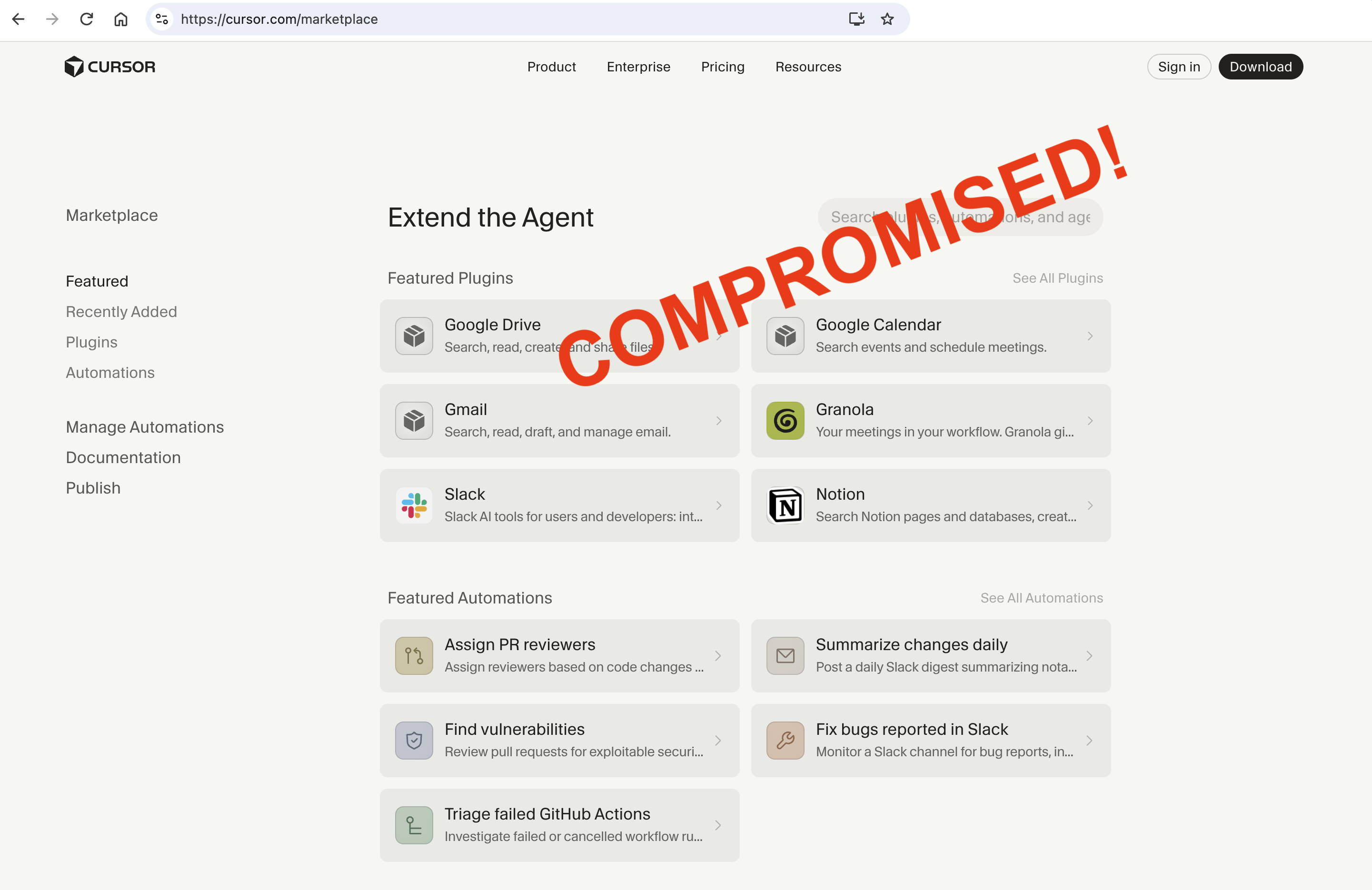
你可以在此处查看 Cursor 针对该事件的官方公告。
Cursor 插件市场中的官方 Claude Code 扩展今天遭到投毒。是的,你没有听错。
2026 年 10 月 29 日,恶意版本 2.1.313 被发布到了 Cursor 插件市场。该扩展标识自身为 anthropic.claude-code 版本 2.1.313,但其主 JavaScript bundle 在合法扩展代码之前被插入了一段恶意的 66 行加载器。
哪些是有恶意的:
哪些没有恶意:
@anthropic-ai/claude-codeNPM 包没有恶意- OpenVSX 上的扩展没有恶意
- 微软 VS Code 市场中的 Claude 扩展没有恶意
它具体做了什么?
解包后的扩展与正常版本完全一致,打包的二进制文件也是官方文件。唯一不同的地方在于 extension.js 文件。
该扩展在 VS Code 启动后以及其 webview 打开时激活,并运行 extension.js 文件。它将攻击者控制的密钥添加到用户的 SSH 配置中,尝试启用本地 SSH 服务,建立通往 134.209.82.225 的反向隧道,安装针对特定操作系统的持久化后门,并通过未加密的 HTTP 信标发送主机侦察信息。
对主入口点的静态分析迅速揭示了端倪:第一行以一个独立的、立即执行函数(IIFE)开始,该函数导入了 Node.js 的进程(process)、文件系统(fs)、操作系统(os)、HTTP 和加密(crypto)模块。该函数在第 66 行结束。只有在它执行完成后,预期的常规打包扩展代码才会开始。这种代码位置非常关键:用户甚至不需要开始与 Claude 对话,仅仅加载扩展模块就足以触发恶意行为。该包未声明任何 install、build、prepare、preinstall 或 postinstall 脚本,因此恶意行为是在扩展运行时发生的,而不是通过包管理器的生命周期钩子触发。
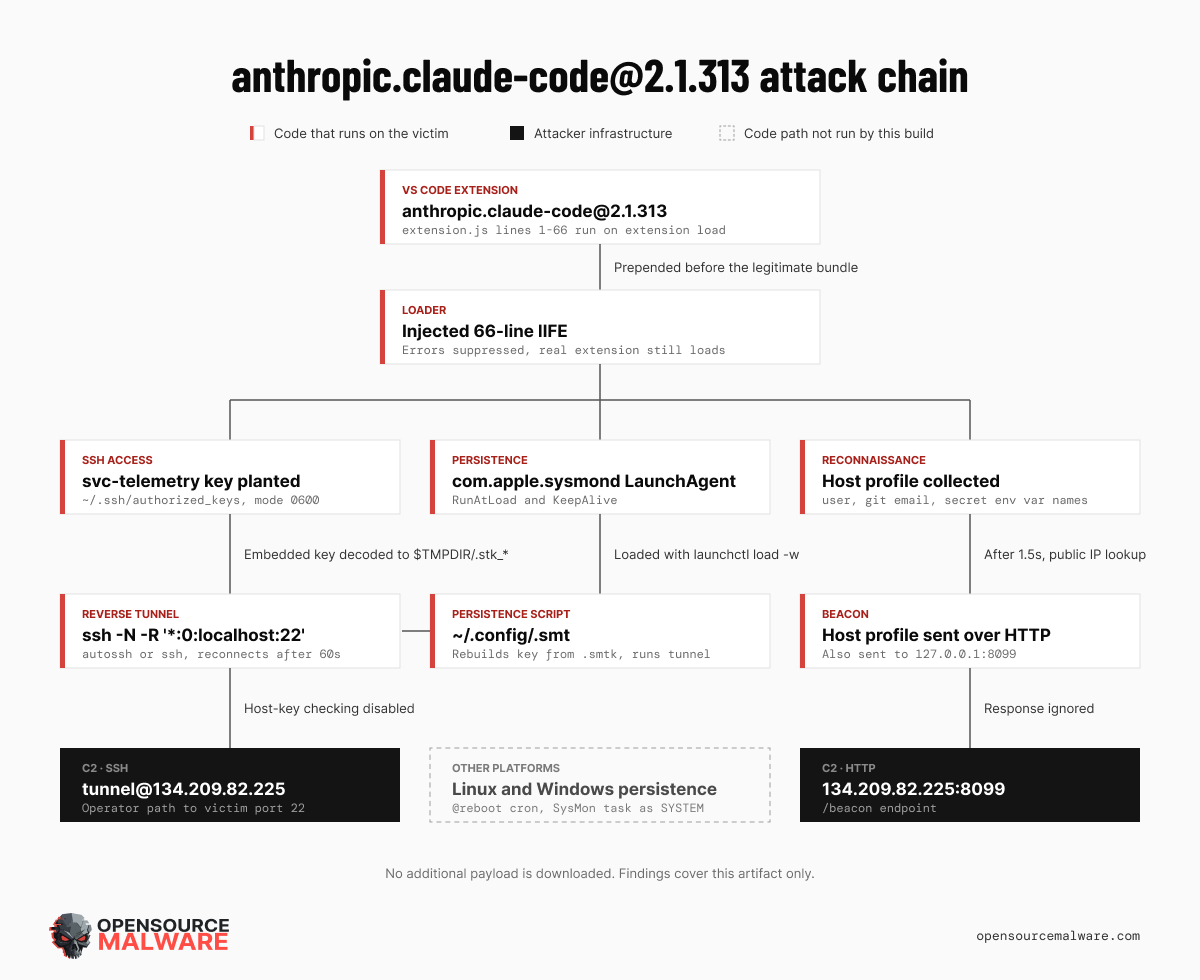
被分析目录的来源尚未完全确立。这些发现仅证明此特定制品是恶意的;它们本身并不表明 Anthropic 官方的 Marketplace 发布流程或分发基础设施已被攻破。
速览(TL;DR)
- 威胁类型: 木马化开发者工具扩展及持久化 SSH 后门
- 受影响生态: Visual Studio Code 扩展生态
- 声明的软件包:
anthropic.claude-code@2.1.313 - 危害后果: 通过授权 SSH 密钥和反向 SSH 隧道获取持久化远程访问权限
- C2 服务器:
134.209.82.225(通过 SSH 和 HTTP 8099 端口) - 关键发现: 恶意代码被预置在正常扩展 bundle 之前,并在合法初始化之前执行
- 附加载荷: 注入阶段未下载其他载荷;其
curl请求仅检索公网 IP 文本
技术分析
特别鸣谢 Dean Hardcastle,他在实时发现该情况时第一时间通知了我们。
在加载时,该植入物会收集以下信息:
- 主机名与本地用户名
- 操作系统与 CPU 架构
- 主目录(Home directory)与当前工作目录
- 来自
git config --global user.email的全局 Git 邮箱 - 最多 40 个包含
KEY、TOKEN、SECRET、PASS、AWS或GCP关键字的环境变量名称
环境变量的值并不会直接放入初始信标中。但仅凭这些变量名,攻击者就能推断出受害者配置了哪些云服务商、CI 系统和凭据类型。更重要的是,一旦成功建立 SSH 访问,攻击者便可以直接进入该账户审查所有内容。
代码中几乎所有的异常处理都被静默抑制。这使得恶意操作失败时合法扩展仍能继续加载,从而减少了暴露受害迹象的可能。
注入授权密钥(Authorized-key)
如果主目录可用,该植入物会创建 ~/.ssh 目录,将其权限更改为 0700,并在 ~/.ssh/authorized_keys 中追加一个 Ed25519 公钥。该密钥被标记为 svc-telemetry,这是一种看似无害的注释,旨在伪装成管理服务账户。
text ssh-ed25519 AAAAC3NzaC1lZDI1NTE5AAAAIDdvylCEJ/k2TpezcTfedrkHyFSK9IZ3vmP6vhY4Ss0P svc-telemetry
其指纹为:
text SHA256:0Z6R+DF64Do2nwQic8a7kkfDLNNk4IiK+2U2Rci4htk
植入物将 authorized_keys 的权限设为 0600。如果该标识已经存在,它会记录这一状态而不是重复添加。
启用 SSH 服务
接下来的代码分支尝试让受害主机可通过 SSH 被访问:
- macOS: 检查远程登录(Remote Login),如果处于关闭状态,则执行
sudo -n systemsetup -setremotelogin on - Linux: 使用
systemctl检查sshd或ssh服务,然后尝试执行多条服务启动命令 - Windows: 使用 PowerShell 安装 OpenSSH Server,配置开机自启并启动
sshd
如果没有足够的权限,这些操作可能会失败,但失败并不会阻断后续的攻击链。
反向 SSH 隧道
该植入物内嵌了一个 base64 编码的 OpenSSH 私钥,并将其解码为一个名为 .stk_<identifier> 的临时文件。该标识符(identifier)由主机名和主目录哈希派生。解码后的私钥 SHA-256 为:
text 7e0a52885fadee05544a9e99eb18c792bec05900a5e1a66d68f8383decb0e278
它会反复尝试连接至:
text tunnel@134.209.82[.]225
核心的端口转发请求为:
text -N -R '*:0:localhost:22'
这会请求远程 SSH 服务器分配一个端口,并将流经该隧道的连接转发到受害者的 22 端口。该端口能否在 C2 主机外部被访问取决于服务器的 SSH 配置,但控制该服务器的攻击者可以直接使用该隧道。
该连接禁用了主机密钥验证,忽略用户的 known-hosts 文件,仅使用内嵌的身份凭据,并在断开后每 60 秒尝试重连一次。在类 Unix 系统上,它优先使用 autossh,若不可用则回退至 ssh。
面向特定平台的持久化
加载器实现了三个操作系统的持久化分支。
在 macOS 上,它写入:
text ~/.config/.smt ~/.config/.smtk ~/Library/LaunchAgents/com.apple.sysmond.plist
.smt 重构私钥并持续拉起反向隧道。LaunchAgent 配置了 RunAtLoad 和 KeepAlive,然后通过 launchctl load -w 加载。com.apple.sysmond 这一名称极具迷惑性,但该用户级 LaunchAgent 绝非 Apple 官方组件。
在 Linux 上,相同的文件会被写入 ~/.config 下,并且该脚本会作为 @reboot 条目添加到用户的 crontab 计划任务中。
在 Windows 上,恶意软件会写入 .config\smt.cmd 和 .config\smtk,然后尝试创建一个在开机时以 SYSTEM 权限运行的名为 SysMon 的计划任务。如果该操作未能确认成功,它会将 sysmon.cmd 复制到用户的启动(Startup)文件夹中。
侦察信标(Beacon)
延迟 1.5 秒后,恶意软件通过以下命令获取公网 IP:
bash curl -s --max-time 4 ifconfig.me curl -s --max-time 4 https://api.ipify.org
然后将收集到的 JSON 数据发送至:
text http://127.0.0.1:8099/beacon http://134.209.82.225:8099/beacon
服务器返回的响应会被直接丢弃。在注入的代码阶段中不存在基于响应执行代码(response-to-code)的行为,返回的数据也不会保存为载荷或配置。
它是否会下载更多恶意软件?
注入的加载器并未下载额外的可执行文件或脚本。其网络行为仅包括公网 IP 文本查询、JSON 信标上传以及交互式 SSH 隧道。
Shell/批处理脚本以及隧道密钥均由扩展内部已有内容生成或解码得出,而非二次下载。但这绝不意味着危害程度有所降低:隧道为攻击者提供了直接访问受害者 SSH 服务的通道。攻击者获取权限后后续传输的文件或执行的命令并不会出现在这个静态分析制品中。
分析未发现任何区块链地址、RPC 节点、智能合约、钱包或通过区块链解析的有效载荷位置。
攻击链
| 阶段 | 触发条件 | 行为 | 结果 |
|---|---|---|---|
| 执行 (Execution) | VS Code 加载 extension.js |
预置的 IIFE 在合法代码之前运行 | 已确认 |
| 访问 (Access) | 主目录存在 | 添加 svc-telemetry 授权密钥 |
已确认 |
| 服务配置 (Service setup) | 平台分支判断 | 尝试启用 SSH 或远程登录 | 取决于操作系统及权限 |
| 隧道 (Tunnel) | 无匹配的 Unix 隧道 | 释放内置私钥并启动反向 SSH 循环 | 已确认的代码路径 |
| 持久化 (Persistence) | 平台分支判断 | LaunchAgent、cron、计划任务或启动项 | 取决于操作系统 |
| 侦察 (Reconnaissance) | 1.5 秒定时器 | 查询公网 IP 并发送两个信标 | 已确认 |
| C2 响应 (C2 response) | 信标发送完成 | 响应被接收并忽略 | 无执行路径 |
| 附加下载 (Additional download) | 任何注入路径 | 未识别出下载器 | 无 |
威胁威胁指标(IoC)
软件包标识
text anthropic.claude-code@2.1.313
网络指标
text 134.209.82.225 134.209.82.225:22 http://134.209.82.225:8099/beacon http://127.0.0.1:8099/beacon ifconfig.me https://api.ipify.org
SSH 指标
text tunnel@134.209.82.225 svc-telemetry SHA256:0Z6R+DF64Do2nwQic8a7kkfDLNNk4IiK+2U2Rci4htk
文件与持久化项
text ~/.config/.smt ~/.config/.smtk ~/Library/LaunchAgents/com.apple.sysmond.plist ${TMPDIR}/.stk_* ~/.config/smt.cmd ~/.config/smtk SysMon sysmon.cmd
文件哈希(SHA-256)
text extension.js ecb58cb29078d9646ad1dcdbe51526f2d9cfea06be5fb2ab183e8ecc3ab6bf15
内置隧道私钥 7e0a52885fadee05544a9e99eb18c792bec05900a5e1a66d68f8383decb0e278
分析目录的确定性聚合摘要 18756b75afedee74bbf49832a1b1dada4961672c41d595be5c1bbe75709de927
检测与处置建议
在终端设备上排查上述文件路径、SSH 密钥注释、LaunchAgent 标签、任务计划名称、IP 地址及文件哈希。在 macOS 上,请检查已加载的 LaunchAgent 以及每个用户的 authorized_keys。进程遥测可能会显示包含 -R *:0:localhost:22 的长期运行的 ssh 或 autossh 命令。
如果已加载过该恶意制品,请立即将受影响系统断网、保留取证证据,并在防火墙上封禁 134.209.82.225 的 22 和 8099 端口。仅在收集完整证据后,再移除扩展及其持久化项。请从已确认安全干净的系统中,轮换所有受影响账户能够访问的凭证和密钥。
由于该植入物建立了交互式 SSH 访问通道,仅凭当前可见的文件可能无法代表所有入侵痕迹。请全面审查 SSH、Shell、进程、VS Code、身份验证以及网络日志,排查后续恶意活动。相较于简单清除已知文件并假定系统安全,直接重建受感染主机是更为稳妥的做法。
总结
该样本展示了一种将受信任开发者工具武器化的高效手法:在庞大的合法代码包之前放置一个紧凑的后门,抑制所有报错,并让预期的正常应用继续运行。该扩展保留了其正常的使用界面,同时在后台悄无声息地建立了持久化的 SSH 访问。
现有证据仅支撑针对本次分析制品的结论。分发来源、攻击者真实身份、基础设施所有权以及官方正规版本的状态仍未经证实,不应仅根据包名标识妄下定论。
English / 原文
BLOG
Trojanized Claude Code Extension Plants an SSH Backdoor
v 2.1.313 of the Cursor Marketplace Claude Code extension contains malware
By c0a15726-c5b1-4b0d-85e6-fe15553df9e2 · 2026-10-30T09:42:00.000Z
You can see Cursor's announcement about the incident HERE.
The official Claude Code extension in the Cursor marketplace was compromised today. Yes, you heard that right.
A malicious version, 2.1.313 was published to the Cursor Marketplace, today, October 29th, 2026. The extension identifies itself as anthropic.claude-code version 2.1.313, but its main JavaScript bundle contains a malicious 66-line loader inserted before the legitimate extension code.
What is malicious:
What is not malicious:
-
The @anthropic-ai/claude-code NPM package is NOT malicious
-
The OpenVSX extension is NOT malicious
-
The Microsoft VSCode extension for Claude is NOT malicious
What does it do?
The unpacked extension is exactly like the normal version, and the bundled binary is the official binary as well. The only thing that's different is the extension.js file.
The extension activates after VS Code startup and when its webview opens and runs the extension.js file. It adds an attacker-controlled key to the user’s SSH configuration, attempts to enable the local SSH service, establishes a reverse tunnel to 134.209.82.225, installs platform-specific persistence, and transmits host reconnaissance over an unencrypted HTTP beacon.
Static inspection of the main entry point quickly paints a picture: The first line starts a standalone, immediately invoked function that imports Node.js process, filesystem, operating-system, HTTP, and cryptographic modules. That function ends at line 66. Only after it finishes does the expected bundled extension begin. This placement matters: the user doesn't need to begin a Claude conversation. Loading the extension module is enough. The package declares no install, build, prepare, preinstall, or postinstall scripts, so the malicious behavior occurs at extension runtime rather than through a package-manager lifecycle hook.
The provenance of the analyzed directory is not established. These findings show that this specific artifact is malicious; they do not, by themselves, demonstrate that Anthropic’s official Marketplace release or distribution infrastructure was compromised.
TL;DR
-
Threat Type: Trojanized developer-tool extension and persistent SSH backdoor
-
Affected Ecosystem: Visual Studio Code extensions
-
Claimed Package:
anthropic.claude-code@2.1.313 -
Impact: Persistent remote access through an authorized SSH key and reverse SSH tunnel
-
C2:
134.209.82.225over SSH and HTTP port 8099 -
Key Finding: Malicious code is prepended to the normal extension bundle and executes before legitimate initialization
-
Additional Payloads: None downloaded by the injected stage; its
curlrequests retrieve only public-IP text
Technical Analysis
Big shout out to Dean Hardcastle for looping us in when he saw this happen in real time.
At load time, the implant collects:
-
Hostname and local username
-
Operating system and CPU architecture
-
Home directory and current working directory
-
Global Git email from
git config --global user.email -
Names of up to 40 environment variables containing
KEY,TOKEN,SECRET,PASS,AWS, orGCP
Environment-variable values are not placed directly in the initial beacon. Their names can still reveal which cloud providers, CI systems, and credential types are configured. More importantly, successful SSH access would allow the operator to inspect the account directly.
Nearly every exception is suppressed. This lets the legitimate extension continue loading when malicious operations fail, reducing visible signs of compromise.
Authorized-key installation
If a home directory is available, the implant creates ~/.ssh, changes it to mode 0700, and appends an Ed25519 key to ~/.ssh/authorized_keys. The key is labeled svc-telemetry, an innocuous-looking comment intended to resemble an administrative account.
ssh-ed25519 AAAAC3NzaC1lZDI1NTE5AAAAIDdvylCEJ/k2TpezcTfedrkHyFSK9IZ3vmP6vhY4Ss0P svc-telemetry
Its fingerprint is:
SHA256:0Z6R+DF64Do2nwQic8a7kkfDLNNk4IiK+2U2Rci4htk
The implant sets authorized_keys to mode 0600. If the marker already exists, it records that fact instead of adding a duplicate.
SSH service enablement
The next branch attempts to make the victim reachable through SSH:
-
macOS: checks Remote Login and, if disabled, runs
sudo -n systemsetup -setremotelogin on -
Linux: checks
sshdorsshwithsystemctl, then tries several service-start commands -
Windows: uses PowerShell to install OpenSSH Server, configure automatic startup, and start
sshd
These operations may fail without sufficient privileges, but failure does not stop the remaining attack chain.
Reverse SSH tunnel
The implant embeds a base64-encoded OpenSSH private key and decodes it into a temporary file named .stk_<identifier>. The identifier derives from the hostname and home directory. The decoded private key has SHA-256:
7e0a52885fadee05544a9e99eb18c792bec05900a5e1a66d68f8383decb0e278
It repeatedly connects to:
tunnel@134.209.82[.]225
The core forwarding request is:
-N -R '*:0:localhost:22'
This asks the remote SSH server to allocate a port and forward connections through the tunnel to port 22 on the victim. Whether that port is reachable beyond the C2 host depends on the server’s SSH configuration, but the operator controlling the server can use the tunnel directly.
The connection disables host-key verification, ignores the user’s known-hosts file, uses the embedded identity exclusively, and reconnects after 60 seconds. On Unix-like systems it prefers autossh and otherwise uses ssh.
Platform-specific persistence
The loader implements three platform branches.
On macOS it writes:
~/.config/.smt
~/.config/.smtk
~/Library/LaunchAgents/com.apple.sysmond.plist
.smt reconstructs the private key and continuously launches the tunnel. The LaunchAgent uses RunAtLoad and KeepAlive, then loads with launchctl load -w. The com.apple.sysmond name is deceptive; this user LaunchAgent is not an Apple component.
On Linux, the same files are written under ~/.config, and the script is added to the user’s crontab with an @reboot entry.
On Windows, the malware writes .config\smt.cmd and .config\smtk, then attempts to create an on-start scheduled task named SysMon running as SYSTEM. If that cannot be confirmed, it copies sysmon.cmd into the user’s Startup folder.
Reconnaissance beacon
After 1.5 seconds, the malware obtains the public IP using:
curl -s --max-time 4 ifconfig.me
curl -s --max-time 4 https://api.ipify.org
It sends the collected JSON to:
http://127.0.0.1:8099/beacon
http://134.209.82.225:8099/beacon
The response is discarded. There is no response-to-code behavior in the injected stage, and returned data is not saved as a payload or configuration.
Does It Download More Malware?
No additional executable or script is downloaded by the injected loader. Its network behaviour consists of public-IP text lookups, JSON beacon uploads, and an interactive SSH tunnel.
The shell and batch scripts and tunnel keys are generated or decoded from content already inside the extension. They are not secondary downloads. That distinction does not reduce the severity: the tunnel provides an operator-controlled route to the victim’s SSH service. Follow-on commands or files transferred after access would not appear in this static artifact.
No blockchain addresses, RPC endpoints, contracts, wallets, or blockchain-resolved payload locations were found.
Attack Chain
Stage
Trigger
Behavior
Outcome
Execution
VS Code loads extension.js
Prepended IIFE runs before legitimate code
Confirmed
Access
Home directory exists
Adds svc-telemetry authorized key
Confirmed
Service setup
Platform branch
Attempts to enable SSH or Remote Login
Conditional on OS and privileges
Tunnel
No matching Unix tunnel
Drops embedded key and launches reverse SSH loop
Confirmed code path
Persistence
Platform branch
LaunchAgent, cron, scheduled task, or Startup item
Conditional on OS
Reconnaissance
1.5-second timer
Queries public IP and sends two beacons
Confirmed
C2 response
Beacon completes
Response drained and ignored
No execution path
Additional download
Any injected path
No downloader identified
None
Indicators of Compromise (IOCs)
Package Identity
anthropic.claude-code@2.1.313
Network Indicators
134.209.82.225
134.209.82.225:22
http://134.209.82.225:8099/beacon
http://127.0.0.1:8099/beacon
ifconfig.me
https://api.ipify.org
SSH Indicators
tunnel@134.209.82.225
svc-telemetry
SHA256:0Z6R+DF64Do2nwQic8a7kkfDLNNk4IiK+2U2Rci4htk
Files and Persistence
~/.config/.smt
~/.config/.smtk
~/Library/LaunchAgents/com.apple.sysmond.plist
${TMPDIR}/.stk_*
~/.config/smt.cmd
~/.config/smtk
SysMon
sysmon.cmd
File Hashes (SHA-256)
extension.js
ecb58cb29078d9646ad1dcdbe51526f2d9cfea06be5fb2ab183e8ecc3ab6bf15

embedded tunnel private key
7e0a52885fadee05544a9e99eb18c792bec05900a5e1a66d68f8383decb0e278

deterministic aggregate digest of analyzed directory
18756b75afedee74bbf49832a1b1dada4961672c41d595be5c1bbe75709de927
Detection and Response
Search endpoints for the file paths, SSH key comment, LaunchAgent label, task name, IP address, and hashes above. On macOS, inspect loaded LaunchAgents and each user’s authorized_keys. Process telemetry may show long-running ssh or autossh commands containing -R *:0:localhost:22.
If the artifact was loaded, disconnect the system, preserve forensic evidence, and block 134.209.82.225 on ports 22 and 8099. Remove the extension and persistence only after collecting evidence. Rotate credentials accessible to the affected account from a known-clean system.
Because this implant creates an interactive path to SSH, its observable files may not represent the full compromise. Review SSH, shell, process, VS Code, authentication, and network logs for follow-on activity. Rebuilding the host is safer than assuming removal of known artifacts restores trust.
Conclusion
This sample demonstrates an effective way to weaponize a trusted developer tool: place a compact backdoor before a large legitimate bundle, suppress errors, and let the expected application continue. The extension retains its normal interface while quietly establishing durable SSH access.
The evidence supports conclusions about the analyzed artifact only. Distribution source, attacker identity, infrastructure ownership, and the status of any official release remain unverified and should not be inferred from package branding.