利用 Amazon Bedrock AgentCore 运行时在 Coding Agent 构建 Web 应用时进行实时预览
英文标题:Preview web apps live as your coding agent builds them with Amazon Bedrock AgentCore runtime
Amazon Bedrock AgentCore 推出会话端点(Session endpoints)功能,可为每个独立的运行时 microVM 会话分配带身份验证的 URL,并将 HTTP 与 WebSocket 流量安全转发至指定开放端口。通过该功能,开发者在 Coding Agent 编写与修改前端代码的同时,借助 Vite 等热重载服务直接在浏览器中实现免刷新的实时效果预览。这一机制消除了传统流程中每次改动都需重新打包部署的等待成本,大幅加速了 AI 原型设计与编码反馈循环。
 1.3 MB
 1.3 MB
 2.4 KB
 345.0 KB
 141.2 KB
 346.5 KB
 294.4 KB
 1.6 MB
 23.5 KB
 114.6 KB
中文
如今,Coding Agent 已经能够构建出功能完善的 Web 应用,例如仪表盘、产品展示页或产品团队急需体验的原型。审查这类工作成果最快的方式,就是打开该应用亲自使用、提出修改需求并查看结果。如果应用能够在 Agent 编辑文件的同一环境中保持持续运行,每次改动就能在数秒内直接呈现在浏览器中,这种工作流效率极高。相反,如果必须先将应用代码复制并部署到其他环境,每次修改都必须经历漫长的部署等待,审查节奏也会随之被拖慢。
Amazon Bedrock AgentCore 是一个用于大规模构建、连接和优化 Agent 的平台,支持自由选择 Agent 框架与基础模型(FM)。作为 Amazon Bedrock AgentCore 的一项能力,AgentCore runtime 会在独立的 microVM 中运行每个 Agent 会话。借助会话端点(Session endpoints),你可以直接从自己的浏览器中打开该会话内正在运行的应用。会话端点为每个会话提供一个经过身份验证的 URL,能够将每个请求的 HTTP 方法、路径、查询字符串、请求体以及 WebSocket 连接转发至你允许的端口。你可以实时观察 Agent 保存每个文件时的页面更新。
在本文中,你将部署一个 Coding Agent,并在其会话中保持运行一个 Vite 网站;接着打开一个本地页面,左侧为聊天交互窗口,右侧为实时更新的网站。你将要求 Agent 将网站切换为暗色主题,实时跟随流式传输的执行步骤,并目睹网站在无需刷新的情况下完成更新。最后,我们将剖析其内部运行机制:同一会话中的第二个端口,以及会话端点会拒绝哪些请求。
包含本文配套 notebook 的完整示例位于 agentcore-samples GitHub 仓库 的 14-remote-access 目录 下。
会话端点的工作原理
每个会话都会获得一个专属于它的会话端点,其使用方式由以下六个关键特性决定:
由你决定开放访问的端口。 在调用 CreateAgentRuntime 时,你需要设置 allowedPorts:可配置 1 到 5 项,每项可以是一个单独的端口或位于 8000–12000 范围内的端口区间,但需排除保留的平台端口。允许端口并不会自动启动服务,因此你的应用程序必须主动监听该端口并绑定到 0.0.0.0。
URL 随会话一同返回。 InvokeAgentRuntime 的响应中会在 X-Amzn-Bedrock-AgentCore-Runtime-Session-Endpoint-Url 响应头中携带该 URL,支持它的 SDK 会将其映射为 sessionEndpointUrl。
每个请求都经过身份验证。 对于使用 AWS Identity and Access Management (IAM) 的运行时,每个 HTTP 请求、HTTP/2 流以及 WebSocket 握手都会携带 Signature Version 4 (SigV4) 签名。调用方还需要在运行时及其运行时端点上拥有 bedrock-agentcore:InvokeAgentRuntimeProxy 权限。对于配置了入站 JSON Web Token (JWT) 授权方的运行时,每个请求则携带 Bearer Token。仅获知 URL 并不能获得访问权限。
通过主机名选择端口。 无论目标端口为何,客户端始终连接在 443 端口,并通过主机名前缀来选择会话内部的端口:
https://8090--.runtime.bedrock-agentcore..on.aws/index.html https://8081--.runtime.bedrock-agentcore..on.aws/status
透传服务器所使用的协议。 包括服务器发送事件(SSE)和 gRPC 在内的 HTTP/1.1 与 HTTP/2 请求,以及 WebSocket 连接均可顺利穿透。本文实践中将使用 HTTP/1.1 和 WebSocket。
作用域仅限单次会话。 该 URL 在每个请求中都需要凭证,且有效时间仅与会话生命周期相同,因此非常适合用于构建、测试和评审 Agent 生成的内容。若要向真实用户提供生产应用,应将其部署到 AWS Amplify Hosting 等托管服务中。
由于浏览器自身发出的页面请求无法自动附加 SigV4 签名或 Bearer Token,bedrock-agentcore SDK 中的会话端点客户端可以在你的本机上开启一个本地端点。浏览器只需打开 http://localhost:8088,本地端点就会在转发每个请求和 WebSocket 握手之前自动添加你的凭证。
会话端点与 AgentCore 运行时原本提供的运行时端点(runtime endpoint)有所不同。运行时端点(例如 DEFAULT)用于与你的 Agent 本身进行通信,控制调用者将访问哪一个 Agent 版本。InvokeAgentRuntime 的调用通过它来解析路由,以便将开发与生产环境隔离在不同版本上,在无需更改调用方的情况下完成升级或回滚。而会话端点则是用来查看 Agent 在其会话内部运行的内容(例如 Web 预览)。它是一个经过身份验证的 URL,仅能访问你明确允许的端口,与该会话运行的具体版本协同工作,并在会话结束时停止服务。完整文档可参阅通过会话端点连接到运行时会话。
方案概览
本示例包含四个部分:一个 Coding Agent 在会话的 8080 端口上运行,并通过四个工具编辑网站文件:list(列出)、read(读取)、write(写入)和 edit(编辑)。Agent 在 8090 端口上启动了一个 Vite 开发服务器,负责托管网站,并通过其热重载 WebSocket 将每次保存的更改推送到浏览器。在你的本机上,PreviewApp 提供预览页面托管服务,将你的 Prompt 发送至 InvokeAgentRuntime,并为该网站建立本地端点。如图 1 所示,预览页面通过本地端点和会话端点从 8090 端口上的 Vite 开发服务器加载网站,并通过 InvokeAgentRuntime 将你的 Prompt 发送给 8080 端口上的 Agent。图中标注的序号展示了一次修改请求的流转顺序。
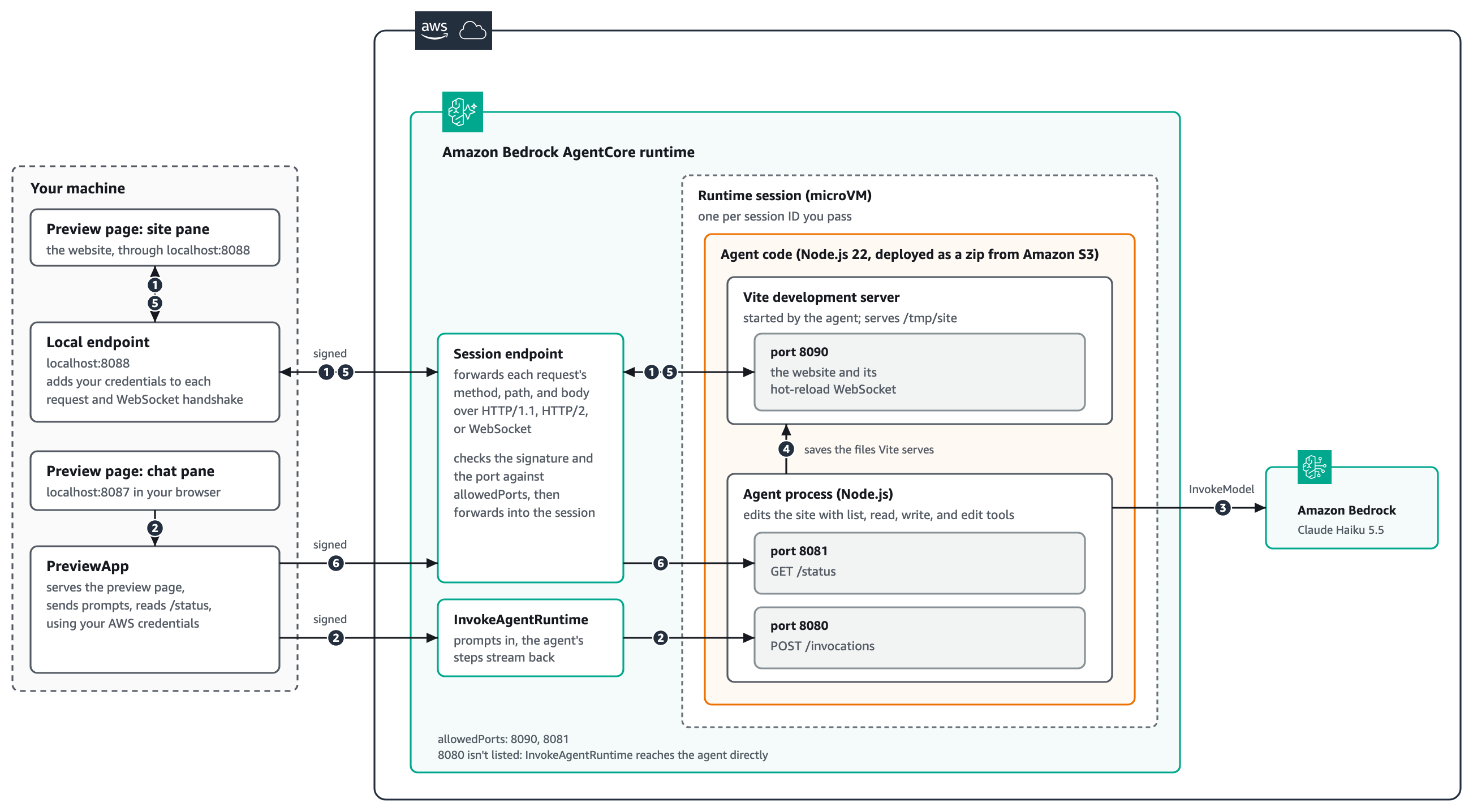
图 1:解决方案架构
在步骤 1 开始之前,PreviewApp 已经调用过一次 InvokeAgentRuntime 来启动会话,从而启动了 Agent 和 Vite 开发服务器。PreviewApp 从该响应中读取会话端点 URL,并针对 8090 端口打开了本地端点。图 1 中的编号步骤对应了一次修改请求的完整流程:
- 预览页面的网站窗格通过
localhost:8088上的本地端点加载网站。本地端点为每个请求和 WebSocket 握手附加你的凭证,并将其转发给会话端点。会话端点根据allowedPorts校验签名和端口,然后转发至 8090 端口上的 Vite 开发服务器。页面保持与 Vite 热重载 WebSocket 的连接连接。 - 你在聊天窗格中发送一条 Prompt。
PreviewApp使用你的 AWS 凭据进行签名,以标准 AWS API 调用形式将其发送给InvokeAgentRuntime,运行时将其分发给 8080 端口上的 Agent。Agent 工作时的各个步骤将实时流式回传到聊天窗格。 - Agent 调用 Amazon Bedrock 中的 Claude Haiku 5.5 来决定需要进行哪些代码变更。
- Agent 读取站点文件,并保存修改后的文件。Vite 开发服务器负责托管这些文件并监听变更。
- 文件保存后,Vite 会通过步骤 1 中建立的 WebSocket,经由会话端点和本地端点将变更推回,网站窗格无需手动刷新即可直接更新。
- 在 notebook 中,
PreviewApp可以通过同一个会话端点读取 8081 端口上 Agent 的/status路由。只有访问端口发生了改变。
端口 8080 并不在 allowedPorts 中,因为 InvokeAgentRuntime 与 Agent 通信无需经过会话端点。
前置条件
要完成本演练,你需要准备:
- 一个已配置好凭证的 AWS 账户,且所在 AWS Region 支持 AgentCore runtime 会话端点功能。
- 具备创建 AWS Identity and Access Management (IAM) 角色、上传至 Amazon Simple Storage Service (Amazon S3) 以及创建运行时的权限,此外还需要对该运行时及其
DEFAULT运行时端点拥有bedrock-agentcore:InvokeAgentRuntime和bedrock-agentcore:InvokeAgentRuntimeProxy权限。详情请参阅 AgentCore runtimes 的 IAM 权限。 - Python 3.10 或更高版本,并安装
bedrock-agentcore1.25.2 或以上版本以及boto31.43.122 或以上版本。 - 用于克隆示例仓库的 Git,以及用于运行 notebook 的 Jupyter 环境(例如 JupyterLab 或安装了 Jupyter 扩展的 Visual Studio Code)。
- 拥有在 Amazon Bedrock 中访问 Claude Haiku 5.5 的权限。关于各 Region 的模型可用性,请参阅模型按区域可用性。
- Node.js 22 或更高版本(包含
npm),部署脚本将使用它来打包 Agent 与网站代码。
该示例通过 Node.js 直接代码部署将 Agent 作为 zip 文件部署在 Amazon S3 中,因此无需 Docker 或 Amazon Elastic Container Registry (Amazon ECR) 仓库。会话端点适用于 microVM 运行时,暂不支持 Instances 计算类型,且会话端点 URL 可通过公共 HTTPS 访问。入站连接不支持 AWS PrivateLink。
部署 Agent 及其网站
首先,你需要部署运行时,在此处选择的配置将决定会话端点可以访问哪些端口。部署脚本会将 Agent 打包为单个文件,加入针对运行时 Linux on Arm64 系统的网站及其依赖项,将 zip 包上传到 Amazon S3,并创建运行时。
以下来自 deploy.py 的代码摘录展示了本文重点关注的两项配置。protocolConfiguration 指定了 Agent 监听 InvokeAgentRuntime 的位置,而 allowedPorts 列出了会话端点允许访问的端口:用于网站的 8090 端口,以及用于 Agent 状态路由的 8081 端口。端口 8080 不在该列表中,因为 InvokeAgentRuntime 访问 Agent 时无需通过它。关于端口和路径配置,请参阅配置 Agent 的服务端口与调用路径。
python agentRuntimeArtifact={"codeConfiguration": { "code": {"s3": {"bucket": code_bucket(), "prefix": S3_PREFIX}}, "runtime": "NODE_22", "entryPoint": ["app.js"], }}, protocolConfiguration={"serverProtocol": "HTTP", "port": 8080, "path": "/invocations"}, allowedPorts=[{"port": 8090}, {"port": 8081}],
该网站的 Vite 配置确保了开发服务器可以通过会话端点进行访问。它在端口 8090 上监听 0.0.0.0,并且不限制 Host 请求头(server.allowedHosts 设置为 true),因为请求到达时使用的是运行时分配的主机名而非 localhost。会话端点在请求到达服务器前会先行完成鉴权,因此服务器本身无需再进行 Host 头校验。
部署运行时的具体步骤如下:
- 克隆示例仓库并进入示例目录:
bash git clone https://github.com/awslabs/agentcore-samples.git cd agentcore-samples/01-features/02-host-your-agent/01-runtime/03-advanced/16-session-endpoints
-
从示例文件夹中打开
session_endpoints_preview.ipynb。 -
运行安装依赖的单元格(安装对应的 Python 依赖包)。
-
运行
%run deploy.py单元格。部署过程需要几分钟,主要是等待运行时状态转为READY。
打开预览页面
当运行时就绪后,即可启动预览。只需一次调用便可完成三项任务:启动会话(同时启动网站)、针对 8090 端口打开本地端点,以及在 localhost:8087 上托管预览页面。
python from preview_app import PreviewApp
app = PreviewApp().start() print("Open", app.url)
在 start() 内部,使用会话端点的调用代码非常简短。首次 InvokeAgentRuntime 调用会在响应头中返回该 URL,session_endpoint_url 提取该地址,然后会话端点客户端为端口 8090 打开一个本地端点:
python answer = client.invoke_agent_runtime( agentRuntimeArn=runtime_arn, runtimeSessionId=session_id, payload=json.dumps({"prompt": ""}).encode(), contentType="application/json", ) endpoint = client.session_endpoint_client(session_endpoint_url(answer)) local = endpoint.open_local_endpoint(port=8090, local_port=8088).start()
若要打开预览:
- 运行启动预览应用的相关代码单元格。
English / 原文
Coding agents now build working web apps: a dashboard, a product page, a prototype that a product team wants to try. The fastest way to review that work is to open the app, use it, ask for a change, and check the result. That loop works well when the app keeps running where the agent edits it, so each change shows up in the browser within seconds. When the app must be copied out and deployed somewhere else first, every change waits for a deployment, and the review slows down to that pace.
Amazon Bedrock AgentCore is a platform to build, connect, and optimize agents at scale, with your choice of agent framework and foundation model (FM). AgentCore runtime, a capability of Amazon Bedrock AgentCore, runs each agent session in its own isolated microVM. With Session endpoints, you can open an app running in that session from your own browser. Session Endpoints give each session an authenticated URL that forwards each request’s HTTP method, path, query string, and body, and WebSocket connections, to the ports you allow. You can watch the page update as the agent saves each file.
In this post, you deploy a coding agent that keeps a Vite website running in its session, then open one local page with a chat on the left and the live website on the right. You ask the agent to switch the site to a dark color theme, follow its steps as they stream in, and watch the website change without a refresh. Finally, you look at what happens internally: a second port in the same session, and the requests the Session endpoint refuses.
The complete sample, including the notebook this post follows, is in the 14-remote-access folder of the agentcore-samples GitHub repo.
How Session endpoints work
Each session gets its own Session endpoint, and six details shape how you use it.
You choose which ports it reaches. You set allowedPorts when you call CreateAgentRuntime: 1–5 entries, each a single port or a range within 8000–12000, excluding the reserved platform ports. Allowing a port doesn’t start a server, so your application must listen on it, bound to 0.0.0.0.
The URL arrives with the session. The InvokeAgentRuntime response carries it in the X-Amzn-Bedrock-AgentCore-Runtime-Session-Endpoint-Url header, which SDKs that model it expose as sessionEndpointUrl.
Every request is authenticated. For a runtime that uses AWS Identity and Access Management (IAM), each HTTP request, HTTP/2 stream, and WebSocket handshake carries a Signature Version 4 (SigV4) signature. The caller also needs bedrock-agentcore:InvokeAgentRuntimeProxy on the runtime and its runtime endpoint. For a runtime with an inbound JSON Web Token (JWT) authorizer, each request carries a bearer token instead. Knowing the URL doesn’t grant access.
The host name selects the port. Your client connects on port 443 regardless of the target port, and a prefix on the host name chooses the port inside the session:
https://8090--<session-endpoint-id>.runtime.bedrock-agentcore.<region>.on.aws/index.html
https://8081--<session-endpoint-id>.runtime.bedrock-agentcore.<region>.on.aws/status
It carries the protocols your server speaks. HTTP/1.1 and HTTP/2 requests, including server-sent events and gRPC, and WebSocket connections all pass through. This walkthrough uses HTTP/1.1 and WebSocket.
It’s scoped to one session. The URL needs credentials on every request and lasts only as long as the session, so use it to build, test, and review what your agent produces. To serve an app to your users, deploy it to a hosting service such as AWS Amplify Hosting.
A browser can’t add a SigV4 signature or a bearer token to the requests a page makes on its own, so the Session endpoint client in the bedrock-agentcore SDK can open a local endpoint on your machine. Your browser opens http://localhost:8088, and the local endpoint adds your credentials to each request and WebSocket handshake before forwarding it.
A Session endpoint is different from a runtime endpoint, which AgentCore runtime already provides. Use a runtime endpoint, such as DEFAULT, to reach your agent, which controls which version of it callers will reach. InvokeAgentRuntime calls resolve through it, so you can keep development and production on different versions and promote or roll back without changing callers. Use a Session endpoint to see what your agent runs in its session, such as a web preview. It’s an authenticated URL that reaches only the ports you allow, works with whichever version the session runs, and stops working when the session ends. For complete documentation, refer to Connect to runtime sessions through a session endpoint.
Solution overview
The sample has four parts. A coding agent runs in the session on port 8080 and edits the website’s files with four tools: list, read, write, and edit. The agent starts a Vite development server on port 8090, which serves the website and pushes each saved change to the browser over its hot-reload WebSocket. On your machine, PreviewApp serves the preview page, sends your prompts to InvokeAgentRuntime, and opens a local endpoint for the website. As Figure 1 shows, the preview page loads the website from the Vite development server on port 8090 through the local endpoint and the Session endpoint, and sends your prompts through InvokeAgentRuntime to the agent on port 8080. The numbers show the order of the steps for one request.
Figure 1: Solution architecture
Before step 1, PreviewApp has already called InvokeAgentRuntime once to start the session, which starts the agent and the Vite development server. PreviewApp read the Session endpoint URL from that response and opened a local endpoint for port 8090. The numbered steps in Figure 1 then follow one request for a change:
- The site pane of the preview page loads the website from the local endpoint on
localhost:8088. The local endpoint adds your credentials to each request and the WebSocket handshake, and forwards them to the Session endpoint. TheSession endpoint checks the signature and the port againstallowedPorts, then forwards them to the Vite development server on port 8090. The page keeps the Vite hot-reload WebSocket open. - You send a prompt from the chat pane.
PreviewAppsends it toInvokeAgentRuntimeas a standard AWS API call signed with your AWS credentials, and the runtime delivers it to the agent on port 8080. The agent’s steps stream back to the chat pane as it works. - The agent calls Claude Haiku 5.5 in Amazon Bedrock to decide what to change.
- The agent reads the site’s files and saves the ones it changes. The Vite development server serves those files and watches them for changes.
- When a file is saved, Vite pushes the change over the WebSocket opened in step 1, back through the Session endpoint and the local endpoint, and the site pane updates without a refresh.
- From the notebook,
PreviewAppreads the agent’s/statusroute on port 8081 through the same Session endpoint. Only the port changes.
Port 8080 isn’t in allowedPorts, because InvokeAgentRuntime reaches the agent without going through the Session endpoint.
Prerequisites
To follow the walkthrough, you need:
- An AWS account in an AWS Region where AgentCore runtime Session endpoints are available, with credentials configured.
- Permissions to create an AWS Identity and Access Management (IAM) role, upload to Amazon Simple Storage Service (Amazon S3), and create a runtime, plus
bedrock-agentcore:InvokeAgentRuntimeandbedrock-agentcore:InvokeAgentRuntimeProxyon that runtime and itsDEFAULTruntime endpoint. For details, refer to IAM permissions for AgentCore runtime. - Python 3.10 or later, with
bedrock-agentcore1.25.2 or later andboto31.43.122 or later. - Git, to clone the sample repo, and a Jupyter environment, such as JupyterLab or Visual Studio Code with the Jupyter extension, to run the notebook.
- Access to Claude Haiku 5.5 in Amazon Bedrock. For model availability by Region, refer to Regional availability by models.
- Node.js 22 or later with
npm, which the deployment script uses to package the agent and the website.
The sample deploys the agent as a zip file in Amazon S3 with direct code deployment for Node.js, so you don’t need Docker or an Amazon Elastic Container Registry (Amazon ECR) repository. Session endpoints work with microVM runtimes, not with the Instances compute type, and Session endpoint URLs are reachable over public HTTPS. AWS PrivateLink isn’t supported for inbound connections.
Deploy the agent and its website
First, you deploy the runtime, and the configuration you choose here decides which ports the Session endpoint can reach. The deployment script bundles the agent into one file, adds the website and its dependencies for the runtime’s Linux on Arm64 system, uploads the zip to Amazon S3, and creates the runtime.
The following excerpt from deploy.py shows the two settings that matter for this post. protocolConfiguration says where the agent listens for InvokeAgentRuntime, and allowedPorts lists the ports the Session endpoint can reach: 8090 for the website and 8081 for the agent’s status route. Port 8080 isn’t in the list, because InvokeAgentRuntime reaches the agent without it. For the port and path settings, refer to Configure your agent’s serving port and invocation path.
agentRuntimeArtifact={"codeConfiguration": {
    "code": {"s3": {"bucket": code_bucket(), "prefix": S3_PREFIX}},
    "runtime": "NODE_22",
    "entryPoint": ["app.js"],
}},
protocolConfiguration={"serverProtocol": "HTTP", "port": 8080, "path": "/invocations"},
allowedPorts=[{"port": 8090}, {"port": 8081}],
The website’s Vite configuration makes the development server reachable from the Session endpoint. It listens on 0.0.0.0 at port 8090 and doesn’t restrict the Host header (server.allowedHosts is true), because requests arrive under a host name the runtime assigns rather than localhost. The Session endpoint authenticates every request before it reaches the server, so the server doesn’t need its own host check.
To deploy the runtime:
1. Clone the sample repo and change to the sample folder:
git clone https://github.com/awslabs/agentcore-samples.git
cd agentcore-samples/01-features/02-host-your-agent/01-runtime/03-advanced/16-session-endpoints
2. Open session_endpoints_preview.ipynb from the sample folder.
3. Run the install cell, which installs the Python dependencies.
4. Run the %run deploy.py cell. Deployment takes a few minutes, mostly waiting for the runtime to reach the READY status.
Open the preview
With the runtime ready, you start the preview. One call does three things: it starts a session (which starts the website), opens a local endpoint for port 8090, and serves the preview page on localhost:8087.
from preview_app import PreviewApp

app = PreviewApp().start()
print("Open", app.url)
Inside start(), the calls that use Session endpoints are short. The first InvokeAgentRuntime call returns the URL in a response header, session_endpoint_url reads it, and the Session endpoint client opens a local endpoint for port 8090:
answer = client.invoke_agent_runtime(
    agentRuntimeArn=runtime_arn, runtimeSessionId=session_id,
    payload=json.dumps({"prompt": ""}).encode(), contentType="application/json",
)
endpoint = client.session_endpoint_client(session_endpoint_url(answer))
local = endpoint.open_local_endpoint(port=8090, local_port=8088).start()
To open the preview:
- Run the cell that starts
PreviewApp. - Open the printed link,
http://localhost:8087, in your browser.
The page shows the website on the right, served from port 8090 in the session, and a short guide with suggested requests on the left.
Ask the agent for a change
Now you ask for a change and watch it arrive. Each prompt goes to the agent through InvokeAgentRuntime. The agent reads the files it needs, writes the ones it changes, and reports each step as it happens. When a file is saved, the Vite development server pushes the change over its WebSocket, through the Session endpoint and the local endpoint, and the website updates in place.
To ask for a change:
- On the preview page, choose Switch this website to a dark coffee-house color theme.
- Follow the agent’s steps in the chat pane as it reads and saves files.
- Watch the site pane. It changes when the agent saves the stylesheet, and a banner names the file the change came from.
The following video shows the preview page while the agent works through several requests. Choosing a suggested request sends it to the agent, the chat pane lists each file the agent reads and saves, and the site pane on the right updates without a refresh, from the dark theme to a green Order ahead button.
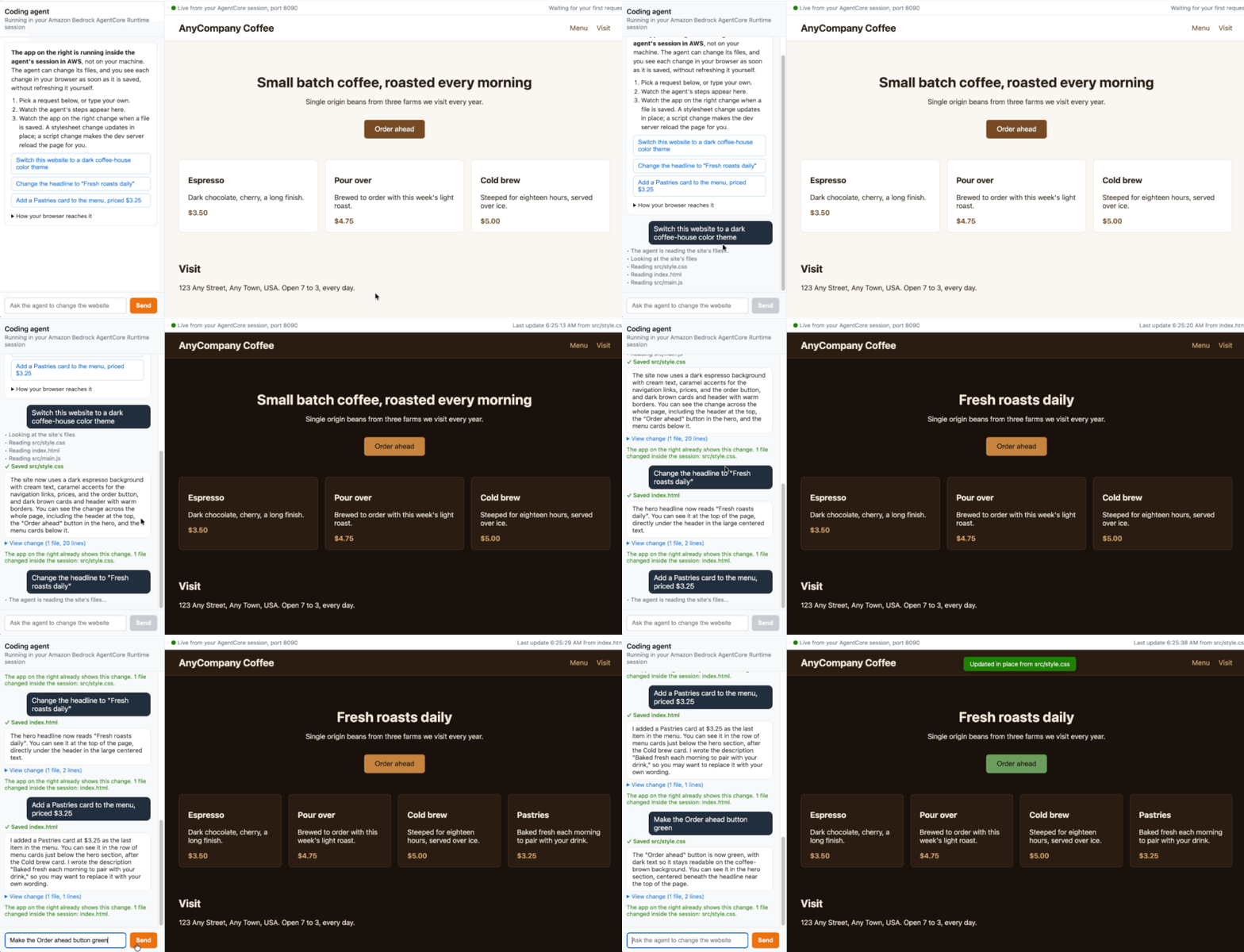
Figure 2: The preview page as the agent works
The steps stream because the agent answers with server-sent events when you ask it to. You can send the same prompts from Python with app.ask, which reads the stream with iter_events from the bedrock-agentcore SDK. The open page updates in the same way:
for event in app.ask("Make the Order ahead button green"):
    if "step" in event:
        print("  ", event["step"])
    elif "done" in event:
        print(event["done"]["reply"])
The output of this Python script should resemble the following:
   Looking at the site's files
   Reading src/main.js
   Reading src/style.css
   Reading index.html
   Saved src/style.css
The Order ahead button is now green instead of brown, with white text kept for contrast. You can see it in the hero section, just below the "Small batch coffee, roasted every morning" heading at the top of the page.
Reach a second port in the same session
The website isn’t the only server you can reach. The agent serves /status on port 8081, which lists each prompt and the files it changed. The same Session endpoint reaches it, and the only difference is the port argument.
status = app.endpoint.request("GET", "/status", port=8081)
print("GET /status on port 8081: HTTP", status.status)
for edit in status.json()["edits"]:
    print("  ", edit["prompt"], "->", ", ".join(edit["files"]))
The output of this Python script should resemble the following:
GET /status on port 8081: HTTP 200
   Make the Order ahead button green -> src/style.css
What the Session endpoint refuses
When the runtime refuses a request, it answers with an HTTP status, an empty body, and an error code in a response header, so you can tell its refusals from errors your application returns. The notebook sends a request to a port outside allowedPorts and a request without credentials, and the runtime refuses both with 403 AccessDenied.
The following table lists the refusals you’re likely to meet while you build with Session endpoints.
| Request | Response from the runtime |
|---|---|
A port that isn’t in allowedPorts |
403 AccessDenied |
| A request without valid credentials | 403 AccessDenied or 401 AuthenticationRequired |
| An allowed port with nothing listening on it | 502 PortNotReachable |
| A URL whose session no longer exists | 404 SessionNotFound |
How access to your session is protected
The runtime removes its own authentication headers before it forwards a request, so the website doesn’t receive your signature. Requests are recorded in AWS CloudTrail as InvokeAgentRuntimeProxy events, with the event source bedrock-agentcore.amazonaws.com. The local endpoint acts with your credentials, so it limits who can use it. It listens on 127.0.0.1 only, answers only requests addressed to its own local address, and refuses WebSocket connections opened by pages from other origins. Run the local endpoint only while you use the preview. For more information, see Log session endpoint requests in CloudTrail.
The access controls don’t separate the website from the agent. Both run in the same session, so give the execution role only the permissions the agent needs. If the runtime replaces the session’s compute, open connections close, and the agent’s edits might not survive unless the session uses persistent storage. Refer to File system configurations for AgentCore runtime if you need the files to outlast the compute.
The agent’s file tools resolve every path inside the site folder and refuse paths outside it, so a prompt can’t make the agent change other files in the session. If other people can send prompts to your coding agent, consider Amazon Bedrock Guardrails to filter harmful prompts and responses, and review the agent’s changes before you publish them.
Clean up
To avoid ongoing charges, stop the preview and delete the resources the sample created. The website the agent edited lives in the session, so it goes with the session.
To clean up:
1. Run the stop cell, and press Enter when the notebook asks. This stops the preview page, the local endpoint, and the session.
2. Run the %run cleanup.py cell, which deletes the runtime, the uploaded code, and the IAM role.
Conclusion
Session endpoints give you authenticated access to the applications in an AgentCore runtime session from your own tools over HTTP/1.1, HTTP/2, and WebSocket, on the ports you allow. In this post, you deployed a coding agent with a Vite website in its session, opened the live website in your browser through a local endpoint, asked the agent for a dark theme, and watched the change arrive as the agent saved the file. You also reached a second port in the same session and confirmed what the Session endpoint refuses.
To go further, run the notebook with your own site in the site folder, or change the agent’s tools to match how your coding agent works. For the full set of options, including port ranges, OAuth, HTTP/2, and gRPC, refer to Connect to runtime sessions through a session endpoint.
To change the port or path that InvokeAgentRuntime uses in your own agent, refer to Configure your agent’s serving port and invocation path. If your agent also needs to run build or test commands in the same session, refer to Execute shell commands in AgentCore runtime sessions. To deploy your own Node.js agent from a zip file the way this sample does, refer to Direct code deployment for Node.js. For everything else the service offers, start with Host agent or tools with Amazon Bedrock AgentCore runtime, and find more examples in the agentcore-samples GitHub repo.