将 Gemma 4 12B 引入你的笔记本电脑:借助 Google AI Edge 解锁本地 Agentic 工作流
英文标题:Bringing Gemma 4 12B to your Laptop: Unlocking Local, Agentic Workflows with Google AI Edge
谷歌 DeepMind 的最新开源模型 Gemma 4 12B 可运行在 16GB 内存的普通笔记本电脑上,实现本地智能体、多模态能力。用户可通过 macOS 上的 Google AI Edge Gallery 动态生成并执行 Python 代码,进行数据分析和可视化;Google AI Edge Eloquent 实现了完全设备端的语音听写与语音命令编辑,交互质量提升超 60%;LiteRT-LM CLI 新增 serve 命令,可直接作为本地 LLM 服务器,无缝对接 OpenClaw、Aider 等标准工具与框架。这些组合为开发者提供了高效、隐私保护且成本可控的本地 AI 构建体验,大幅降低了设备端智能应用的门槛。
 11.7 KB
 1.3 MB
 515.5 KB
中文
谷歌 DeepMind 的最新开源模型 Gemma 4 12B 旨在将智能体、多模态智能直接带到你的笔记本电脑上。通过将该模型的优势与 Google AI Edge 技术栈相结合,你可以在普通设备上立即动手构建和实验(查看模型卡了解规格要求)。
这种模型与运行时组合释放出强大的设备端能力,从自主数据处理和生成丰富的可视化洞察,到构建功能齐全的网页以及执行日常工具使用。你现在就可以通过 Google AI Edge 各处开始与 Gemma 4 12B 交互:
- 通过 Google AI Edge Gallery 探索 Gemma,这是我们的本地 AI 展示应用,现已推出 macOS 版。使用 12B 模型,你可以即时生成并执行脚本,完成数据分析等任务。
- Google AI Edge Eloquent 设备端语音听写应用 现已推出 macOS 版。我们新增了交互式功能,可借助全新的 Gemma 4 12B 模型,完全在设备上通过语音指令对文本进行润色和改写。
- LiteRT-LM 现在可通过 LiteRT-LM CLI 中的新 serve 命令,直接从终端提供兼容行业标准的本地服务端点。与 Gemma 4 12B 搭配时,这是为完全本地化的智能体工具、框架和工作流提供支持的强大且高效选项。
在 MacOS 上使用 Google AI Edge Gallery 编码
Google AI Edge Gallery 应用现已推出 macOS 版,展示了 Gemma 4 12B 的编码能力,让你可以直接在设备上从数据中提取有价值的洞见。通过无缝的界面,你只需用自然语言描述分析目标。在以下示例中,我们向模型提问:“use a python program to render a chart png to compare the top 10 girl names born in 2024 vs 2025”,并提供两个包含数据的文本文件。作为回应,模型动态生成 Python 代码,在本地执行,并将原始数据转化为美观且易于理解的可视化图表和洞察。
当涉及高级编码时,Gemma 4 12B 不仅能编写脚本。在一个复杂的 3D 渲染任务中,我们观察到只需一次用户提示,模型就能生成带依赖说明的橡皮鸭渲染代码、生成代码并自我纠正,全部在单次对话中完成。
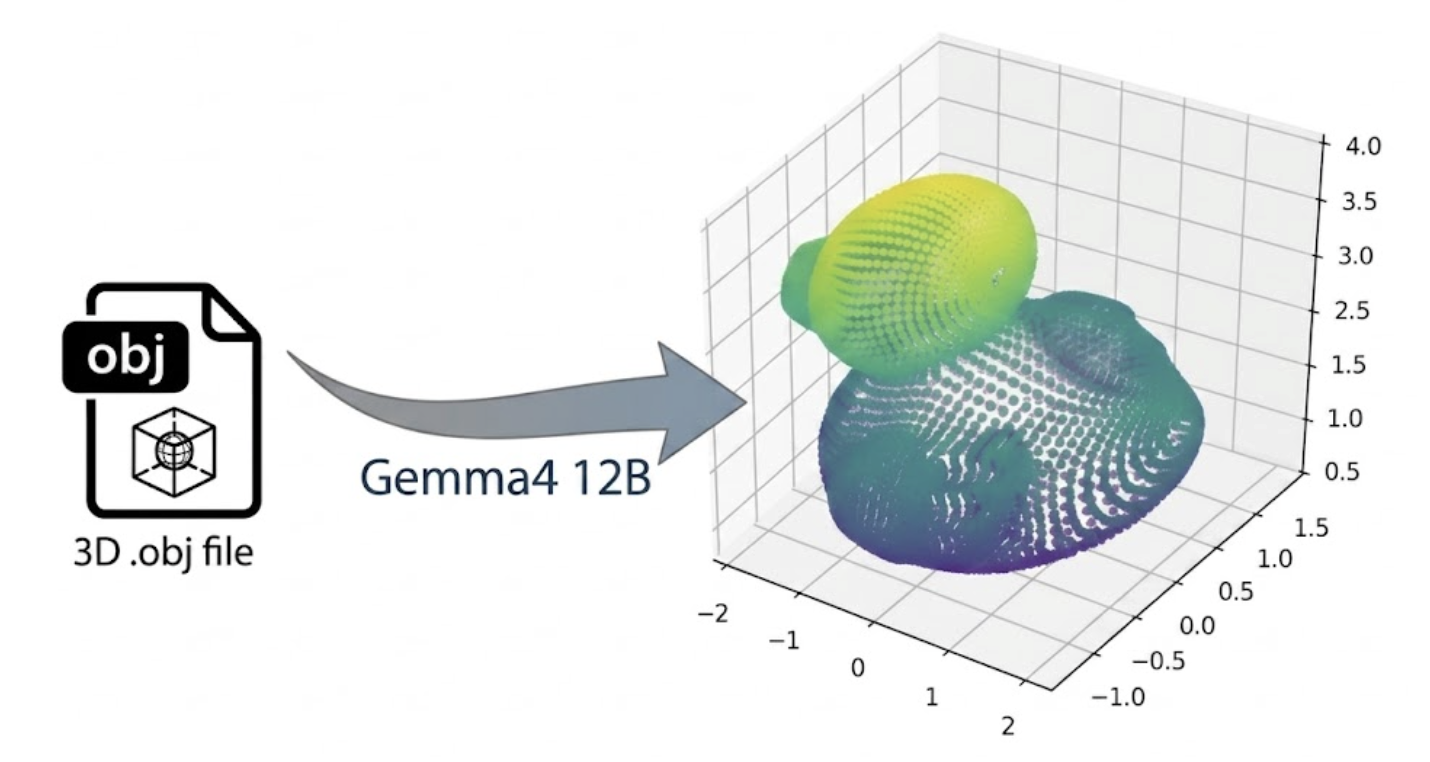
Prompt: "use trimesh to write a python program to render the attached obj file to a png file"
立即下载 macOS 版 Google AI Edge Gallery,试用 Gemma 4 12B 进行本地编码。
Google AI Edge Eloquent 的听写与语音驱动编辑
Google AI Edge Eloquent 是我们的 AI 驱动的听写和编辑应用,能将原始的非结构化想法无缝转换为优美文本。全新 macOS 桌面版的所有功能 100% 在设备端运行,确保强大的完全离线体验。借助方便的自定义热键,Eloquent 让你能够在 Mac 上的任何应用中使用语音听写。此外,Eloquent 还支持对你的音频或视频文件进行完全本地转录。
利用 Gemma 4 12B 的先进推理能力,我们推出了 语音编辑 新功能,让你只需口述语音命令,即可在桌面工作流中转换任意文本。例如,你可以高亮一个段落并说“将这些笔记重组为执行摘要”,或“将其翻译成印地语”。借助 Gemma 4 12B,我们看到了相较以往模型的巨大进步——更出色的指令遵循能力、更严格的范围遵守,以及整体质量 60% 以上的跃升。
立即下载 macOS 版 Google AI Edge Eloquent,体验 Gemma 4 12B 作为完全本地 AI 听写与编辑助手的强大功能。
使用 LiteRT-LM 构建,包括即插即用的本地服务
LiteRT-LM CLI 提供了一个轻量级、零代码的工具,用于在本地运行语言模型。我们现在通过 serve 命令扩展该工具,使 CLI 能够充当即插即用的本地 LLM 服务器。将此功能与 Gemma 4 12B 配合使用,可将任何标准工具、SDK 或框架(例如 OpenClaw、Hermes、OpenCode、Pi,或诸如 Continue 和 Aider 等流行扩展)直接指向你的本地端点。
# Import the Gemma 4 12B model as "gemma4-12b"
litert-lm import --from-huggingface-repo=litert-community/gemma-4-12B-it-litert-lm gemma-4-12B-it.litertlm gemma4-12b

# Start the OpenAI-compatible server
litert-lm serve
Shell
curl http://localhost:9379/v1/chat/completions \
  -H "Content-Type: application/json" \
  -d '{
    "model": "gemma4-12b,gpu",
    "messages": [{"role": "user", "content": "Hello!"}]
  }'
Shell
[视频:LiteRT-LM CLI serve 命令演示:创建兼容行业标准的本地端点,将 Gemma 4 12B 与 Open WebUI 连接,实现一键粒子效果演示]
适合日常笔记本电脑使用
运行 Gemma 4 12B 使得设备端 AI 驱动的能力广泛适用于日常笔记本电脑。查阅 LiteRT-LM 模型卡了解性能和内存基准。通过将这款新模型的强大能力与 Google AI Edge 的优化性能及易用性相结合,你可以构建多轮本地智能体、在 Google AI Edge Gallery 中分析数据,或利用 Google AI Edge Eloquent 简化写作。此外,你的数据保留在设备上,同时保持可靠的响应能力、实用性和成本效益。
致谢
我们特别感谢以下重要贡献者(按字母顺序排列):
Advait Jain, Alice Zheng, Alex Kanaukou, Ami Kubota, Changming Sun, Cormac Brick, Denis Daletski, Fengwu Yao, Hriday Chhabria, Jingxiao Zheng, Jingtao Zhou, Jenn Lee, Jianing Wei, Jing Jin, Lin Chen, Lu Wang, Marius Kintel, Marissa Ikonomidis, Matthias Grundmann, Mogan Shieh, Mohammadreza Heydary, Matthew Soulanille, Na Li, Qidong Zhao, Queenie Zhang, Ram Iyengar, Rishika Sinha, Sachin Kotwani, Suleman Shahid, Suril Shah, Tenghui Zhu, Wai Hon Law, Weiyi Wang, Xiaoming Hu, Xinan Cheng, Yi-Chun Kuo, Yishuang Pang, Yu-hui Chen.
English / 原文
Google DeepMind’s latest open model, Gemma 4 12B, is designed to bring agentic, multimodal intelligence directly to your laptop. By combining the model's strengths with the Google AI Edge stack, you can immediately get hands-on to build and experiment locally, on everyday machines (see model card for spec requirement).
This model-runtime combination unlocks powerful on-device capabilities, from autonomous data processing and generating rich visual insights, to building fully functional webpages and executing everyday tool use. You can start interacting with Gemma 4 12B across Google AI Edge right now:
- Explore Gemma with Google AI Edge Gallery, our local AI showcase app, now available on macOS. With the 12B model you can generate and execute scripts on the fly for tasks such as data analysis.
- The Google AI Edge Eloquent on-device, voice dictation app is now available on macOS. We added the ability to interactively polish and rewrite text through voice commands, entirely on-device, powered by the new Gemma 4 12B model.
- LiteRT-LM can now serve local, industry compatible endpoints directly from your terminal via the new serve command in the LiteRT-LM CLI. When used with Gemma 4 12B, this is a highly capable and efficient optionto power fully-local agentic tools, harnesses, and workflows.
Coding with Google AI Edge Gallery on MacOS
The Google AI Edge Gallery app, now available on macOS, showcases Gemma 4 12B’s coding capability, allowing you to extract meaningful insights from your data right on your device. Through a seamless interface, you can simply describe your analytical goals in natural language. In the example below, we asked the model to “use a python program to render a chart png to compare the top 10 girl names born in 2024 vs 2025” given two text files containing the data. In response, the model dynamically generates Python code, executes it locally, and converts raw data into beautiful, easy-to-grasp visualizations and insights.
When it comes to advanced coding, Gemma 4 12B doesn't just write scripts. In a complex 3D rendering task, we observed that with just one user prompt, the model can generate a rubber duck rendering with dependency specification, generate code and self correct, all in a single turn.
Prompt: "use trimesh to write a python program to render the attached obj file to a png file"
Download Google AI Edge Gallery on macOS today and try local coding with Gemma 4 12B.
Dictation and Voice-Driven Editing with Google AI Edge Eloquent
Google AI Edge Eloquent, our AI powered dictation and editing app, seamlessly transforms your raw unstructured thoughts into polished text. The new MacOS desktop version runs 100% on-device across the entire feature set, ensuring a powerful, fully offline experience. Using a convenient, customizable hotkey, Eloquent enables you to use voice dictation across any application on your Mac. Additionally, Eloquent supports fully local transcription of your audio or video files.
Leveraging the advanced reasoning power of Gemma 4 12B, we are introducing Voice Edit , a new feature that allows you to simply dictate voice commands to transform any piece of text in your desktop workflow. For example, you can highlight a paragraph and say, “restructure these notes into an executive summary”, or “translate this into Hindi”. With Gemma 4 12B, we see a huge step up to prior models with superior instruction following, stricter scope adherence, and a 60%+ jump in overall quality.
Download Google AI Edge Eloquent on macOS today and experience the power of Gemma 4 12B as a fully local AI dictation and editing assistant.
Build with LiteRT-LM including Drop-in Local Serving
The LiteRT-LM CLI provides a lightweight, zero-code tool for running language models locally. We are now expanding the tool with the serve command, letting the CLI act as a drop-in local LLM server. Use this functionality with Gemma 4 12B to point any standard tool, SDK, or framework (such as OpenClaw, Hermes, OpenCode, Pi, or popular extensions like Continue and Aider) directly to your local endpoint.
# Import the Gemma 4 12B model as "gemma4-12b"
litert-lm import --from-huggingface-repo=litert-community/gemma-4-12B-it-litert-lm gemma-4-12B-it.litertlm gemma4-12b

# Start the OpenAI-compatible server
litert-lm serve
Shell
curl http://localhost:9379/v1/chat/completions \
  -H "Content-Type: application/json" \
  -d '{
    "model": "gemma4-12b,gpu",
    "messages": [{"role": "user", "content": "Hello!"}]
  }'
Shell
Sorry, your browser doesn't support playback for this video
Demonstrating the LiteRT-LM CLI serve command: Creating an industry compatible local endpoint to connect Gemma 4 12B with Open WebUI for one-shot particle effect demo.
Ready for use on everyday Laptops
Running Gemma 4 12B makes on-device AI powered capabilities broadly available to everyday laptops. Check out the LiteRT-LM model card for performance and memory benchmarks. By pairing the powerful capabilities of this new model with the optimized performance and ease of use of Google AI Edge you can build multi-turn local agents, analyze data in Google AI Edge Gallery, or streamline your writing with Google AI Edge Eloquent. Furthermore, your data stays on your device while maintaining reliable responsiveness, utility, and cost efficiency.
Acknowledgements
We'd like to extend a special thanks to our significant contributors for their work on this project (in alphabetical order):
Advait Jain, Alice Zheng, Alex Kanaukou, Ami Kubota, Changming Sun, Cormac Brick, Denis Daletski, Fengwu Yao, Hriday Chhabria, Jingxiao Zheng, Jingtao Zhou, Jenn Lee, Jianing Wei, Jing Jin, Lin Chen, Lu Wang, Marius Kintel, Marissa Ikonomidis, Matthias Grundmann, Mogan Shieh, Mohammadreza Heydary, Matthew Soulanille, Na Li, Qidong Zhao, Queenie Zhang, Ram Iyengar, Rishika Sinha, Sachin Kotwani, Suleman Shahid, Suril Shah, Tenghui Zhu, Wai Hon Law, Weiyi Wang, Xiaoming Hu, Xinan Cheng, Yi-Chun Kuo, Yishuang Pang, Yu-hui Chen.