OpenAI 首款品牌硬件是……一款发光键盘?
英文标题:OpenAI's first branded hardware is... a light-up keyboard?
OpenAI 正式推出首款品牌硬件 Codex Micro——一款售价 230 美元的 RGB 发光迷你键盘,专为监控多个 Codex 代理线程设计。该键盘与 Work Louder 合作推出,通过六颗颜色编码的磨砂按键提供任务状态实时反馈,用户轻点即可切换窗口。这一设备对需要持续关注后台 AI 代理的开发者而言提供了便利的桌面解决方案,但移动场景下仍需依赖 ChatGPT 应用。这标志着 OpenAI 从纯软件代理向物理交互界面的探索。
 258.1 KB
 448.1 KB
 375.9 KB
 548.4 KB
 638.4 KB
 185.2 KB
 368.0 KB
 281.4 KB
 462.5 KB
 349.1 KB
 45.1 KB
 3.9 KB
 9.1 KB
 777.4 KB
 2.4 KB
 25.1 KB
中文
随着有关 OpenAI 正在研发一款个性化智能音箱及其他硬件的传闻不断涌现,该公司于今日推出了其首款品牌设备。售价 230 美元的 Codex Micro 是一款特别的 RGB 发光迷你键盘,旨在让用户只需一瞥和几次点击就能监控并快速与多个 Codex 代理交互。
该设备被描述为与 Work Louder 的“限量合作”产品,后者已经在销售面向创意专业人士的外观非常相似的 Creator Micro 系列可定制方形键盘。Codex Micro 与其主要区别在于顶部两排的六颗磨砂按键,它们可对最多六个 Codex 线程提供颜色编码的实时反馈,即使这些线程并未在屏幕上显示。
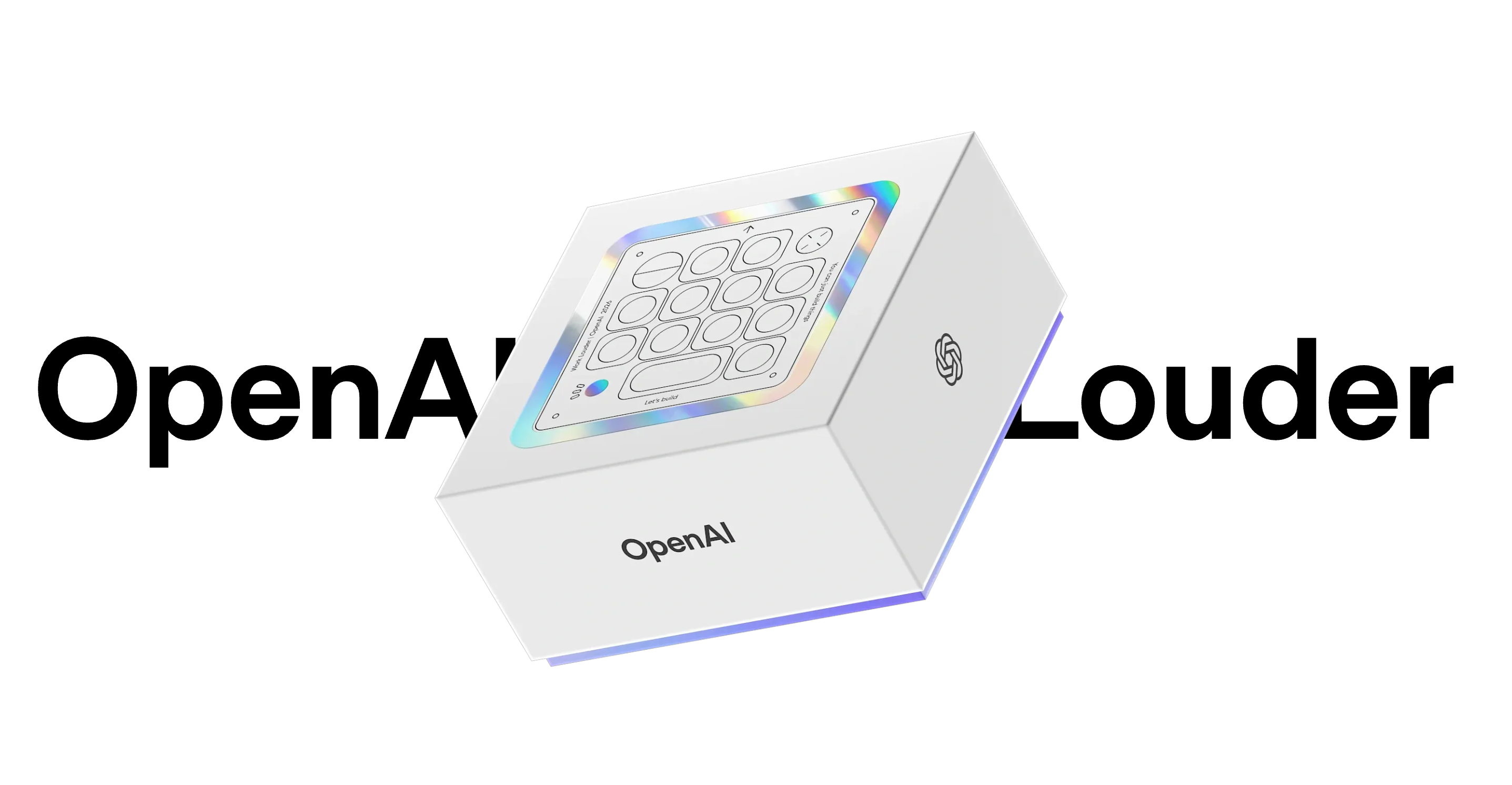
打开 OpenAI 盒子获取 AI 协助。
图片来源:OpenAI / Work Louder
打开 OpenAI 盒子获取 AI 协助。图片来源:OpenAI / Work Louder
理想情况下,这些彩色按键会在线程空闲时显示白色,Codex 思考时变为蓝色,任务完成时变为绿色。但这些按键也可以在 Codex 需要反馈或人工决策时闪烁琥珀色,在线程遭遇错误时变为红色,让用户一眼就能知道哪个 Codex 任务需要立即关注。轻点发光的按键即可在屏幕上调出对应的 Codex 窗口。
这种简化且始终可用的线程监控对于那些让笔记本电脑半开以监控持续运行的 AI 代理的用户来说可能非常方便。当然,这种物理键盘附件主要在桌面环境下有用,而 ChatGPT 移动应用则可以在远离办公桌时提供更详细的监控。
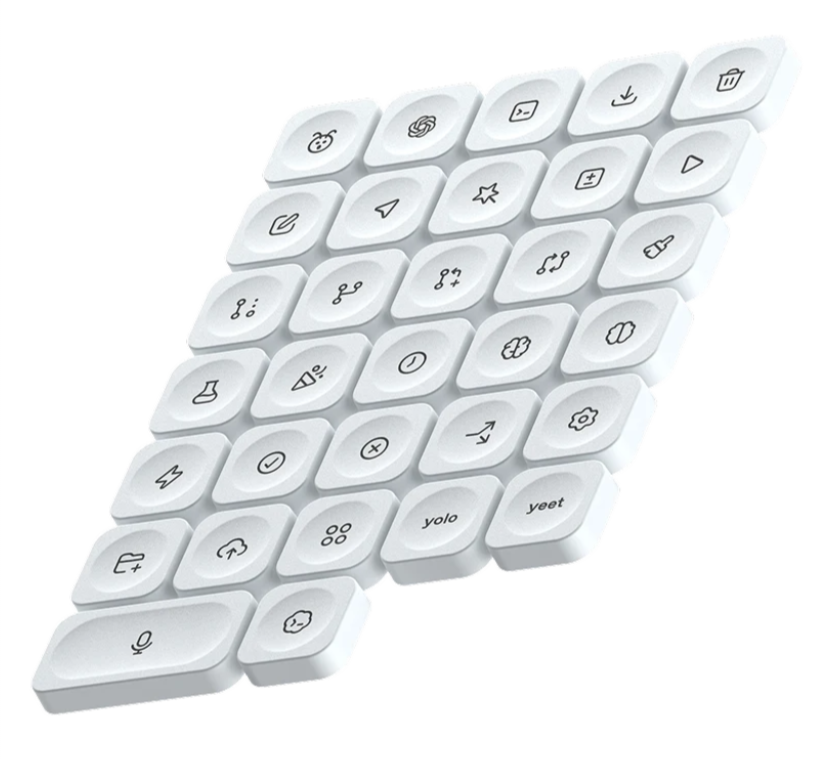
终于有一款可选“yeet”键的键盘了。
终于有一款可选“yeet”键的键盘了。
在这些磨砂发光按键下方,Codex Micro 提供了六个默认映射到常用 Codex 任务的按钮,例如接受和拒绝更改、分支线程,以及一个用于音频提示的“按住说话”按钮。但这些功能都可以通过软件重新映射,并可通过附带的 32 个键帽进行物理更换。尽管自定义功能的第一“层”专为 Codex 保留,用户还可以编程并循环切换另外五个功能集,用于通用计算快捷操作。
English / 原文
As rumors continue to swirl about OpenAI’s work on a personalized smart speaker and other hardware, the company is today rolling out its first branded device. The $230 Codex Micro is a specialized, RGB-lit mini-keyboard designed to let users monitor and quickly interact with multiple Codex agents with a glance and a few clicks.
The device is described as a “limited-run collaboration” with Work Louder, which already sells a very similar-looking Creator Micro line of customizable square keyboards targeted at creative professionals. The Codex Micro differentiates itself from those mainly through six frosted keys in the top two rows, which offer color-coded live feedback on up to six Codex threads, even when they are not in focus on-screen.
Open the OpenAI box for AI assistance.
Credit: OpenAI / Work Louder
Open the OpenAI box for AI assistance. Credit: OpenAI / Work Louder
Ideally, those colored keys will cycle from white when a thread is idle to blue when Codex is thinking to green when a task is complete. But the keys can also flash amber when Codex requires feedback or a decision from a human operator and red when a thread encounters an error, letting users know at a glance which of their Codex tasks needs immediate attention. A quick tap on the lit-up button brings up the applicable Codex window on-screen.
That kind of simplified, always-available thread monitoring could be handy for users who keep a half-open laptop to monitor their continually running AI agents. But this kind of physical keyboard attachment is, of course, primarily useful in a desktop setting, while ChatGPT’s mobile app can offer more detailed monitoring away from the desk.
Finally, a keyboard with an optional “yeet” key.
Finally, a keyboard with an optional “yeet” key.
Below those frosted light-up buttons, the Codex Micro offers six buttons mapped by default to common Codex tasks like accepting and rejecting changes, branching threads, and a “push to talk” button for audio prompts. But those functions can be remapped through software and altered physically with one of 32 included keycaps. And while the first “layer” of customized functions is reserved for Codex, users can program and cycle through five other function sets for general computing shortcuts.