代理式视觉:利用 Amazon Bedrock 与 MCP 服务构建视觉智能
英文标题:Agentic vision: Building visual intelligence with Amazon Bedrock and MCP servers
本文介绍如何集成计算机视觉、Strands Agents 框架和模型上下文协议 (MCP),打通视觉感知、理解与行动的统一管道。通过 Computer Vision MCP Server,开发者能用标准接口让 AI 系统处理图像与视频,并做出智能决策。该方案以 Amazon Bedrock、Amazon Rekognition、Amazon S3 等服务构建,并提供 Streamlit 交互界面。这一融合降低了集成复杂度,使视觉 AI 能力更易触达更广泛的应用场景。
 49.1 KB
 116.4 KB
 1.1 MB
 316.1 KB
 1.2 MB
 565.6 KB
 145.7 KB
 1.2 MB
 905.1 KB
 16.6 KB
 20.7 KB
 26.5 KB
 5.7 KB
 157.8 KB
中文
将 AI 融入真实世界应用,一直受一个根本挑战所困扰:能看的系统、能思考的系统、能行动的系统彼此脱节。开发者不得不费力进行复杂集成,管理多个 API,并创建定制方案来弥合这些鸿沟,最终实现往往效率低下、成本高昂且脆弱不堪。
我们正在融合三项关键技术:计算机视觉、Strands Agents 和模型上下文协议 (MCP)。它们共同创建了一条管道,可在统一框架内捕获、理解视觉信息并据此行动。这种集成减少了感知、决策和行动之间的传统壁垒,让 AI 系统更像人类智能一样,以协调的方式去看、去理解、去回应。
本文将带您了解 Computer Vision MCP Server,它展示了这一方法,体现了 AI 系统如何通过单一、标准化的接口处理视觉信息并做出智能决策。这一融合将曾经复杂的集成挑战转变为精简的流程,使 AI 能力对更广泛的应用和开发者而言都触手可及。
解决方案概览
在我们的架构中,客户端通过一个可信的 AWS Identity and Access Management (IAM) 角色与多项 Amazon Web Services (AWS) 交互,该角色作为管理权限的安全网关。Amazon Simple Storage Service (Amazon S3) 处理对象存储,获取和管理数据。Amazon OpenSearch 提供搜索能力,用于查询索引数据。Amazon Bedrock 提供生成式 AI 模型,让客户端能够访问 AI 工具,例如为 Agent 生成文本。最后,Amazon Rekognition 专门从事图像分析,执行物体检测等功能。此架构强调统一安全模型,由 IAM 角色集中管理权限,消除了在客户端嵌入凭证的必要,并简化了对多项 AWS 服务的受控访问。
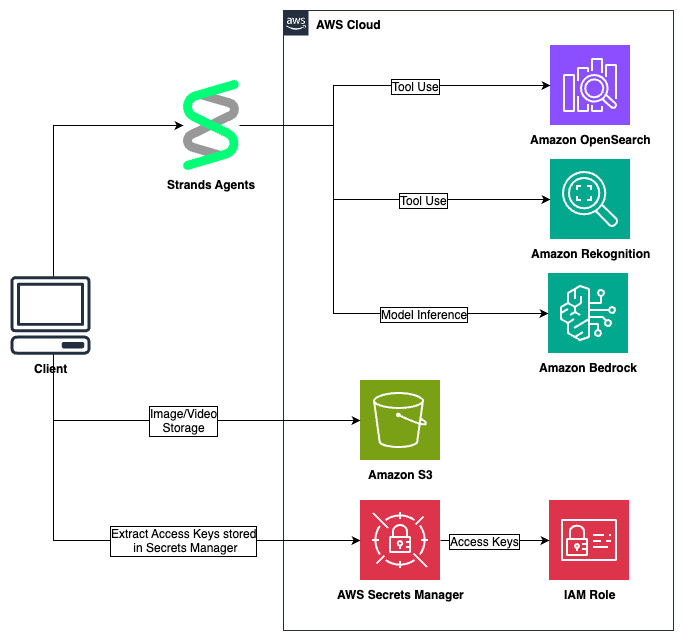
计算机视觉、Strands Agents 和 MCP 服务
该解决方案使用三项主要技术。计算机视觉专注于处理照片和视频等视觉信息。Strands Agents 是一个用于构建 AI Agent 的框架,支持多种模型提供方和部署目标,提供了可定制的 Agent 循环,并具备可观测性、追踪和可扩展部署等生产级能力。最后,模型上下文协议 (MCP) 是一个旨在简化 AI 系统与工具及数据源集成方式的标准,取代了为每一对 AI 模型与数据源分别构建连接的过程。
用户界面(MCP 客户端)
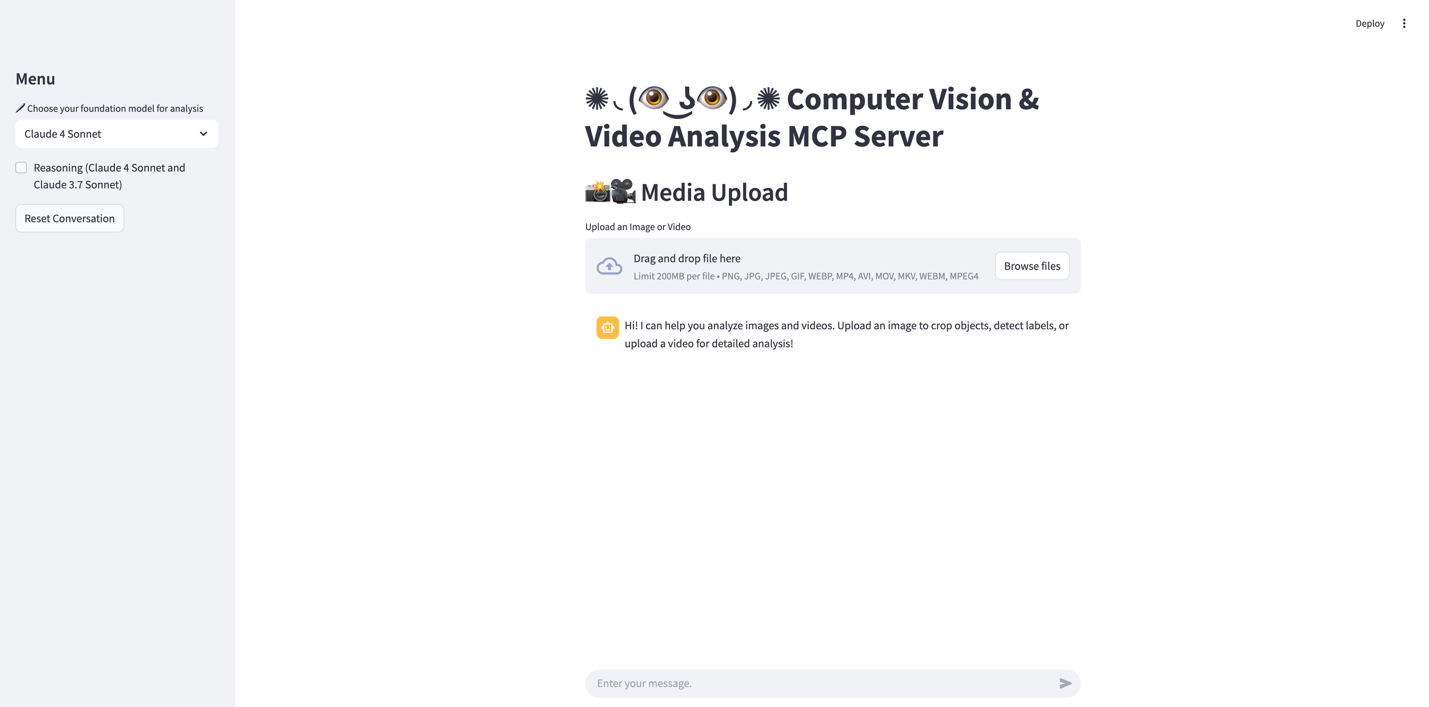
该界面采用 Streamlit 聊天 UI。左侧是菜单面板,用户可选择用于分析的首选基础模型,默认为具备推理能力的 Claude 4 Sonnet,可选方案包括 Claude 4 Sonnet 和 Claude 3.7 Sonnet。用户还可以通过侧边栏中的专用按钮重置对话历史。
要使用此应用,用户可通过界面中央醒目的 媒体上传 区域上传视觉内容。系统同时接受图像和视频,支持 PNG、JPG、JPEG、GIF、WEBP(图像)和 MP4、AVI、MOV、MKV、WEBM、MPEG4(视频)等多种格式,最大文件体积限制为 200 MB。用户可以将文件直接拖放到指定上传区域,或选择 浏览文件 从设备上手动选取文件。媒体上传后,AI 系统可以执行物体裁剪、标签检测和详细内容分析等多种分析任务。之后,用户可以通过界面底部的消息输入框与系统互动,询问有关已上传媒体的具体问题或请求特定类型的分析。
以下是 Agent 使用的系统提示:
SYSTEM_PROMPT = """You are a specialized computer vision agent with direct access to CV tools.
YOUR ROLE: Single-agent CV specialist
- Handle image/video analysis, cropping, background removal, label detection
- Process user requests directly using available tools
- Provide clear, actionable responses with visual results
AVAILABLE TOOLS:
- crop_bounding_box(image_filename, object_name) - Returns "cropped_image_filename"
...
TOOL USAGE PATTERNS:
Cropping Workflow:
- Call crop_bounding_box("image.jpg", "person") - "cropped_person_123.jpg"
- Call crop_bounding_box("image.jpg", "dog") - "cropped_dog_456.jpg"
- Call ui_show_images(["cropped_person_123.jpg", "cropped_dog_456.jpg"])
...
VARIABLE PASSING:
- Input: User queries with uploaded filenames in context
...
EFFICIENCY RULES:
- Use ui_show_images for multiple results (creates better layouts)
...
RESPONSE FORMAT:
- Acknowledge the request
- Execute appropriate tools in logical sequence
- Display results using UI tools
- Summarize what was accomplished
- Call ui_show_images with ["image_bg_removed_123456.png"] to display the result
Example workflow for video analysis:
- Call analyze_video with video filename and specific monitoring instructions
- The tool will return detailed analysis results
Always report back error messages exactly as received.
"""
计算机视觉 MCP 服务
我们的实现由两个服务组成,即 CV 服务与 OpenSearch 服务。它们分别处理不同类型的请求,如下文所述。
CV 服务
AWS 计算机视觉 MCP 服务通过将三项 AmazonAI 服务整合进一个标准化协议,为图像和视频分析提供了统一接口。这种集成使 AI Agent 能够通过一致的 API 访问和处理视觉内容,从而简化了计算机视觉应用的开发。该 MCP 服务提供以下工具:
describe_image工具使用 Amazon Bedrock 中的 Claude 模型,根据具体的监测指令提供图像分析。该函数从 Amazon S3 存储获取图像,并通过 Claude 的多模态能力进行处理,支持对视觉内容进行 AI 驱动的解读。它适用于需要描述或识别图像中特定属性的场景,并返回分析结果及状态信息。
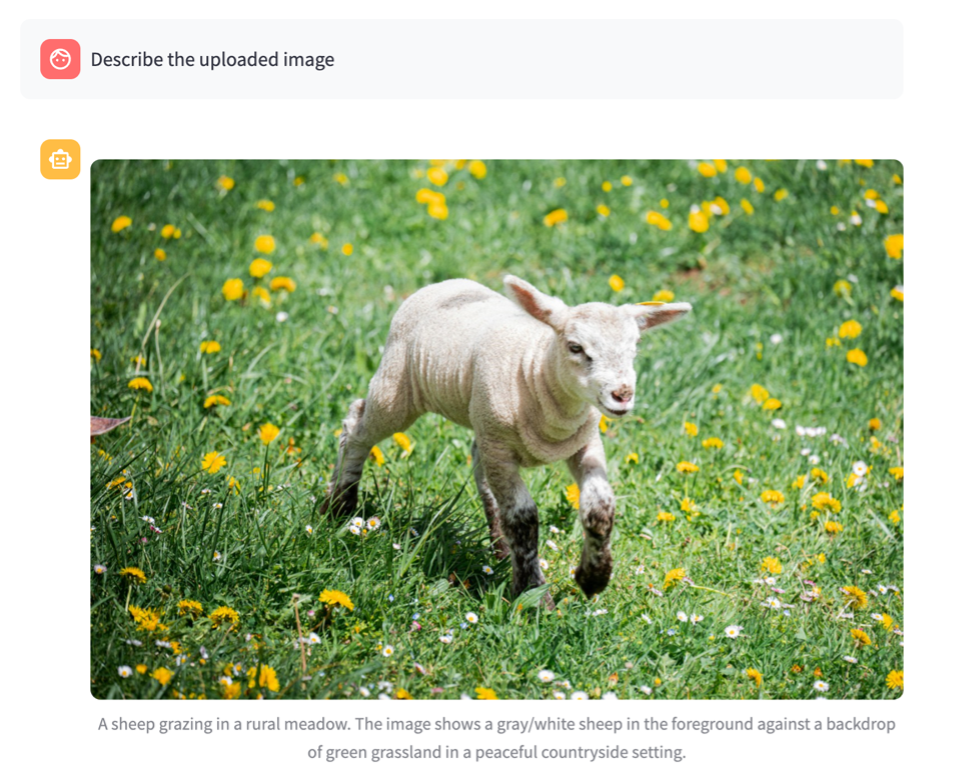
Agent 响应: 我来帮您描述上传的图像。先让我用计算机视觉 Agent 进行分析。现在我将显示图像并附上描述:
图像描述
上传的图像展示了一个乡村户外场景,特征如下:
- 前景中有一只羊(置信度 99.07%)
- 羊似乎正在草地或牧场上吃草
- 羊的毛色以灰/白为主
- 背景为草地/草甸环境
- 背景由乡村或牧场景观中常见的绿色田野构成
- 场景为自然室外光线
图像捕捉了一幅宁静的乡村景象,羊位于画面中央,背倚翠绿的草地。主色调为背景中各种深浅不同的绿色(代表草地)与前景中羊的灰白色调。
这是一张自然摄影作品,记录了家畜在其自然牧养环境中的状态,展现了一只羊在开阔田野上吃草的景象。
以下代码片段来自 describe_image 工具,展示了工具的总体结构:
async def describe_image(image_file_name: str, monitoring_instructions: str) ... try: # Get the image from S3 prefix = f"mcp/{image_file_name}" print(f"\n[DEBUG] Attempting to analyze image at s3://{Connections.agent_bucket_name}/{prefix}\n") response = Connections.s3_client.get_object( Bucket=Connections.agent_bucket_name, Key=prefix ) image_data = response['Body'].read() content_type = response['ContentType'] # Ensure content type is supported by Bedrock valid_content_types = ['image/jpeg', 'image/png', 'image/gif', 'image/webp'] if content_type not in valid_content_types: # Try to determine from file extension if image_file_name.lower().endswith(('.jpg', '.jpeg')): content_type = 'image/jpeg' elif image_file_name.lower().endswith('.png'): content_type = 'image/png' elif image_file_name.lower().endswith('.gif'): content_type = 'image/gif' elif image_file_name.lower().endswith('.webp'): content_type = 'image/webp' else: content_type = 'image/jpeg' # Default fallback print(f"[DEBUG] Content type corrected to: {content_type}") # Create the prompt for Claude prompt = create_multimodal_prompt( image_data=image_data, text=monitoring_instructions, content_type=content_type, system_prompt=( "You are a helpful assistant that analyzes images. " "Provide detailed, accurate descriptions based on the user's instructions." ) ) # Get analysis from Claude analysis = invoke_bedrock_model(prompt) return ImageAnalysisResponse( status="success", source=prefix, analysis=analysis, message="Image analysis completed successfully" ) except Exception as e: logger.error(f"Error analyzing image: {str(e)}") return ImageAnalysisResponse( status="error", source=image_file_name, analysis=None, message=f"Error analyzing image: {str(e)}" )
analyze_video工具利用 Amazon Nova 视频分析能力来处理视频内容。此函数处理存储在 S3 中的视频文件,并可根据具体指令对其进行分析。
已上传视频:

用户:分析已上传视频
Agent 响应: 我来帮您分析上传的视频。让我将此任务委派给计算机视觉专家。
我已分析您上传的视频 (15dc6b31_19642406-uhd_3840_2160_30fps.mp4),以下是我的发现:
内容描述
- 视频特写展示了一株植物(可能是一种草),上面覆盖着雪
- 场景似乎是晴朗冬日里的一片田野
- 背景刻意模糊,营造出自然的景深效果,将注意力引向主体
视觉元素
- 白雪与植物的自然绿色元素之间形成鲜明的视觉对比
- 雪不均匀地分布在植物细长的叶片上
- 雪似乎在轻微融化,暗示气温温和
detect_labels工具集成了 Amazon Rekognition,提供标签检测和图像属性分析。它支持对检测参数进行控制,包括置信度阈值、最大标签数量和自定义标签过滤器。该工具能够识别图像中的物体、场景和活动,同时提供详细的边界框信息,用于空间定位。
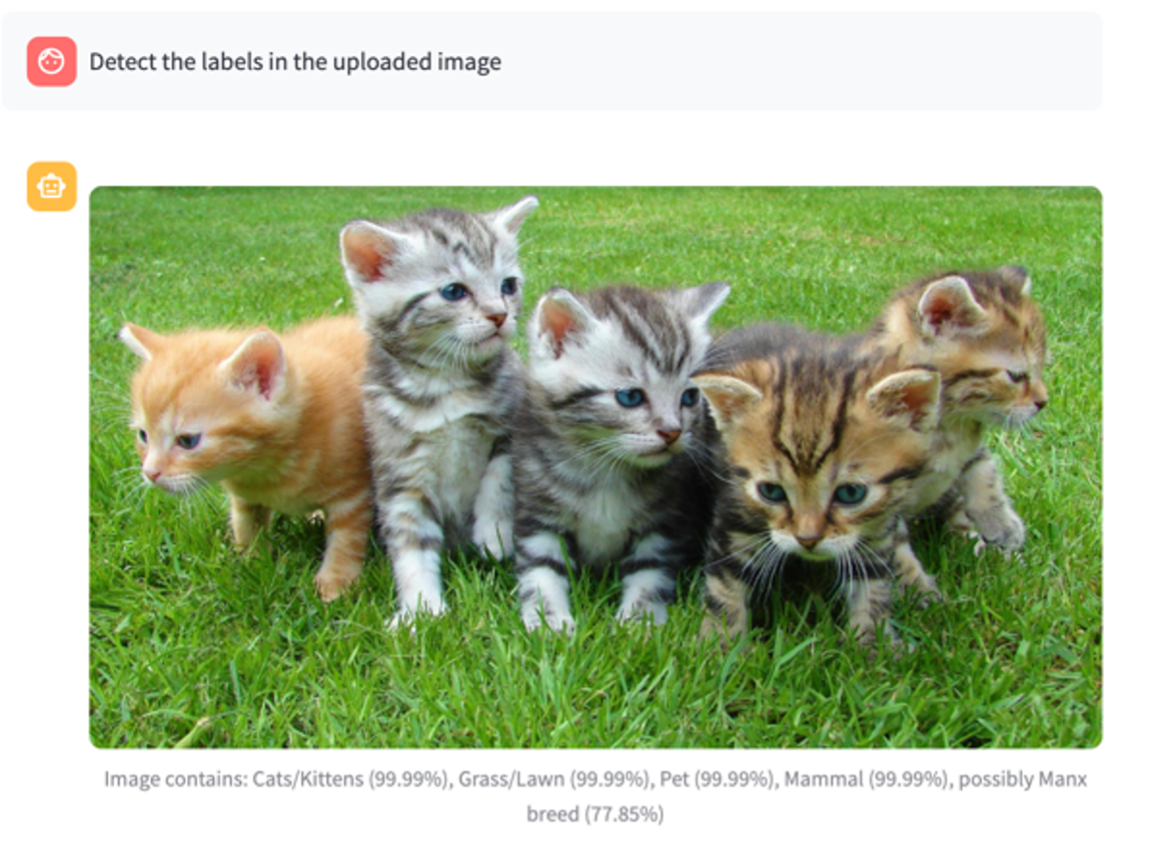
Agent 响应: 我来帮您检测已上传图像中的标签。让我用计算机视觉专家来分析。现在我已分析完毕,让我显示图像及检测到的标签:## 图像标签检测结果
计算机视觉分析在您的图像中检测到以下标签:
主要标签(含置信度分数):
- Animal (动物) - 99.99%
- Cat (猫) - 99.99%
- Kitten (小猫) - 99.99%
- Mammal (哺乳动物) - 99.99%
- Pet (宠物) - 99.99%
- Grass (草) - 99.99%
- Plant (植物) - 99.99%
- Lawn (草坪) - 95.56%
- Manx (曼岛猫) - 77.85%
详情:
- 图像中有 5 只猫/小猫(由各自的边界框检测出)
- 猫似乎在草地/草坪上
- 其中一只猫可能是曼岛猫品种(置信度 77.85%)
- 主色调包括不同深浅的灰色、绿色和棕色
该图像主要展示多只小猫或猫在草地上放松的场景。
crop_bounding_box利用 Amazon Rekognition 的对象检测功能。当使用 Amazon Rekognition 进行裁剪时,该服务首先分析图像,识别面部、物体、o
English / 原文
The integration of AI into real-world applications has long been hindered by a fundamental challenge: the disconnect between systems that can see, systems that can think, and systems that can act. Developers have struggled with complex integrations, managing multiple APIs, and creating custom solutions to bridge these gaps, resulting in inefficient, costly, and often fragile implementations.
We are converging the three key technologies: Computer Vision, Strands Agents, and the Model Context Protocol (MCP). Together, they create a pipeline where visual information can be captured, understood, and acted upon within a unified framework. This integration reduces the traditional barriers between perception, decision-making, and action, letting AI systems operate more like human intelligence by seeing, understanding, and responding in a coordinated way.
In this post, we walk you through the Computer Vision MCP Server, which illustrates this approach, representing how AI systems can process visual information and make intelligent decisions through a single, standardized interface. This convergence transforms what was once a complex integration challenge into a streamlined process, making AI capabilities accessible to a broader range of applications and developers.
Solution overview
In our architecture, the client interacts with multiple Amazon Web Services (AWS) through a centralized AWS Identity and Access Management (IAM) role, which serves as the security gateway for managing permissions. Amazon Simple Storage Service (Amazon S3) handles object storage to retrieve and manage data. Amazon OpenSearch provides search capabilities for querying the indexed data. Amazon Bedrock offers generative AI models, granting the client access to AI tools for tasks like text generation for the agent. Finally, Amazon Rekognition specializes in image analysis, performing functions such as object detection. The architecture emphasizes a unified security model, where the IAM role centralizes permission management, which removes the need for embedded credentials in the client and streamlines controlled access across multiple AWS services.
Computer vision, Strands Agents, and MCP servers
The solution uses three main technologies. Computer vision focuses on processing visual information such as photos and videos. Strands Agents is a framework for building AI agents that supports multiple model providers and deployment targets, offering a customizable agent loop with production capabilities including observability, tracing, and scalable deployment. Lastly, the Model Context Protocol (MCP) is a standard designed to simplify how AI systems integrate with tools and data sources, replacing the process of building separate connections for each AI model and data source pair.
User interface (MCP client)
The interface features a Streamlit chat UI. On the left side, there’s a menu panel where users can select their preferred foundation model for analysis, defaulted to Claude 4 Sonnet with reasoning capabilities that include both Claude 4 Sonnet and Claude 3.7 Sonnet options. Users also can reset their conversation history through a dedicated button in this sidebar.
To use this application, users can upload their visual content through the prominent Media Upload section in the center of the interface. The system accepts both images and videos, supporting a wide range of formats including PNG, JPG, JPEG, GIF, WEBP for images, and MP4, AVI, MOV, MKV, WEBM, MPEG4 for videos, with a maximum file size limit of 200 MB. Users can either drag and drop their files directly into the designated upload area or select Browse files to manually select files from their device. After the media is uploaded, the AI system can perform various analysis tasks such as object cropping, label detection, and detailed content analysis. Users can then interact with the system through the message input field at the bottom of the interface, asking specific questions about their uploaded media or requesting types of analysis.
The following is the system prompt used by the agent:
SYSTEM_PROMPT = """You are a specialized computer vision agent with direct access to CV tools.

YOUR ROLE: Single-agent CV specialist

- Handle image/video analysis, cropping, background removal, label detection
- Process user requests directly using available tools
- Provide clear, actionable responses with visual results

AVAILABLE TOOLS:

1. crop_bounding_box(image_filename, object_name) - Returns "cropped_image_filename"

...

TOOL USAGE PATTERNS:

Cropping Workflow:
```
1. Call crop_bounding_box("image.jpg", "person") - "cropped_person_123.jpg"
2. Call crop_bounding_box("image.jpg", "dog") - "cropped_dog_456.jpg"
3. Call ui_show_images(["cropped_person_123.jpg", "cropped_dog_456.jpg"])
```

...

VARIABLE PASSING:

- Input: User queries with uploaded filenames in context

...

EFFICIENCY RULES:

- Use ui_show_images for multiple results (creates better layouts)

...

RESPONSE FORMAT:

1. Acknowledge the request
2. Execute appropriate tools in logical sequence
3. Display results using UI tools
4. Summarize what was accomplished
- Call ui_show_images with ["image_bg_removed_123456.png"] to display the result

Example workflow for video analysis:

- Call analyze_video with video filename and specific monitoring instructions
- The tool will return detailed analysis results

Always report back error messages exactly as received.

"""
Computer vision MCP servers
Our implementation is composed of two servers namely the CV server and the OpenSearch server. Each handles different types of requests as described in the following section.
CV server
The AWS Computer Vision MCP server provides a unified interface for image and video analysis by consolidating three Amazon AI services into a standardized protocol. This integration lets AI agents access and process visual content through a consistent API, which streamlines the development of computer vision applications. The following tools are available in the MCP server:
- The
describe_imagetool uses the Claude model in Amazon Bedrock to provide image analysis based on specific monitoring instructions. This function retrieves images from Amazon S3 storage and processes them through Claude’s multimodal capabilities to support AI-powered interpretation of visual content. It’s useful for scenarios requiring descriptions, or specific attribute identification within images, returning analysis results along with status information.
Agent Response: I’ll help you describe the uploaded image. Let me analyze it first using the computer vision agent. Now I’ll display the image with the description:
Image Description
The uploaded image shows a rural outdoor scene featuring:
- A sheep in the foreground (detected with 99.07% confidence)
- The sheep appears to be grazing in a meadow or pasture
- The sheep has predominantly gray/white coloring
- The setting is a grassland/meadow environment
- The background consists of green fields typical of countryside or pastoral landscapes
- The scene has natural outdoor lighting
The image captures a peaceful rural scene with the sheep positioned in the center of the frame against the backdrop of green meadows. The dominant colors are various shades of green in the background (representing the grassland) and gray/white tones of the sheep in the foreground.
This is a nature photograph capturing livestock in its natural pastoral environment, showing the sheep grazing in an open field.
The following code snippet from the describe_image tool represents the overall structure of a tool:
async def describe_image(image_file_name: str, monitoring_instructions: str) ...
    try:
        # Get the image from S3
        prefix = f"mcp/{image_file_name}"
        print(f"\n[DEBUG] Attempting to analyze image at s3://{Connections.agent_bucket_name}/{prefix}\n")
        response = Connections.s3_client.get_object(
            Bucket=Connections.agent_bucket_name,
            Key=prefix
        )
        image_data = response['Body'].read()
        content_type = response['ContentType']
        # Ensure content type is supported by Bedrock
        valid_content_types = ['image/jpeg', 'image/png', 'image/gif', 'image/webp']
        if content_type not in valid_content_types:
            # Try to determine from file extension
            if image_file_name.lower().endswith(('.jpg', '.jpeg')):
                content_type = 'image/jpeg'
            elif image_file_name.lower().endswith('.png'):
                content_type = 'image/png'
            elif image_file_name.lower().endswith('.gif'):
                content_type = 'image/gif'
            elif image_file_name.lower().endswith('.webp'):
                content_type = 'image/webp'
            else:
                content_type = 'image/jpeg'  # Default fallback
            print(f"[DEBUG] Content type corrected to: {content_type}")
        # Create the prompt for Claude
        prompt = create_multimodal_prompt(
            image_data=image_data,
            text=monitoring_instructions,
            content_type=content_type,
            system_prompt=(
                "You are a helpful assistant that analyzes images. "
                "Provide detailed, accurate descriptions based on the user's instructions."
            )
        )
        # Get analysis from Claude
        analysis = invoke_bedrock_model(prompt)
        return ImageAnalysisResponse(
            status="success",
            source=prefix,
            analysis=analysis,
            message="Image analysis completed successfully"
        )
    except Exception as e:
        logger.error(f"Error analyzing image: {str(e)}")
        return ImageAnalysisResponse(
            status="error",
            source=image_file_name,
            analysis=None,
            message=f"Error analyzing image: {str(e)}"
        )
- The
analyze_videotool uses Amazon Nova video analysis capabilities to process video content. This function handles video files stored in S3 and can analyze them according to specific instructions.
Uploaded Video:
User : Analyze the uploaded video
Agent Response: I’ll help you analyze the uploaded video. Let me delegate this task to the computer vision specialist.
l’ve analyzed your uploaded video (15dc6b31_19642406-uhd_3840_2160_30fps.mp4) and here’s what I found:
Content Description
- The video features a close-up view of a plant (likely a type of grass) covered in snow
- It’s set in a field on what appears to be a sunny winter day
- The background is intentionally blurry, creating a natural depth of field effect that draws attention to the main subject
Visual Elements
- There’s a striking visual contrast between the white snow and the natural green elements of the plant
- The snow is distributed unevenly across the plant’s long, thin leaves
- The snow appears to be melting slightly, suggesting mild temperatures
- The
detect_labelstool integrates with Amazon Rekognition to provide label detection and image property analysis. It offers control over detection parameters, including confidence thresholds, maximum label counts, and custom label filters. The tool can identify objects, scenes, and activities within images while providing detailed bounding box information for spatial localization.
Agent Response: I’ll help you detect labels in your uploaded image. Let me analyze it using the computer vision specialist.Now that I’ve analyzed the image, let me display it with the detected labels:## Image Label Detection Results
The computer vision analysis detected the following labels in your image:
Main Labels (with confidence scores):
- Animal (99.99%)
- Cat (99.99%)
- Kitten (99.99%)
- Mammal (99.99%)
- Pet (99.99%)|
- Grass (99.99%)
- Plant (99.99%)|
- Lawn (95.56%)
- Manx (77.85%)
Details:
- The image contains 5 cats/kittens (detected with individual bounding boxes)
- The cats appear to be on grass/lawn
- One of the cats may be a Manx breed (77.85% confidence)
- The dominant colors include various shades of gray, green, and brown
The image primarily shows multiple kittens or cats relaxing on a grassy lawn area.
- The
crop_bounding_boxutilizes Amazon Rekognition for its object detection features. When using Amazon Rekognition for cropping, the service first analyzes the image to identify key elements such as faces, objects, or text, then provides precise bounding box coordinates that can be used to intelligently crop the image.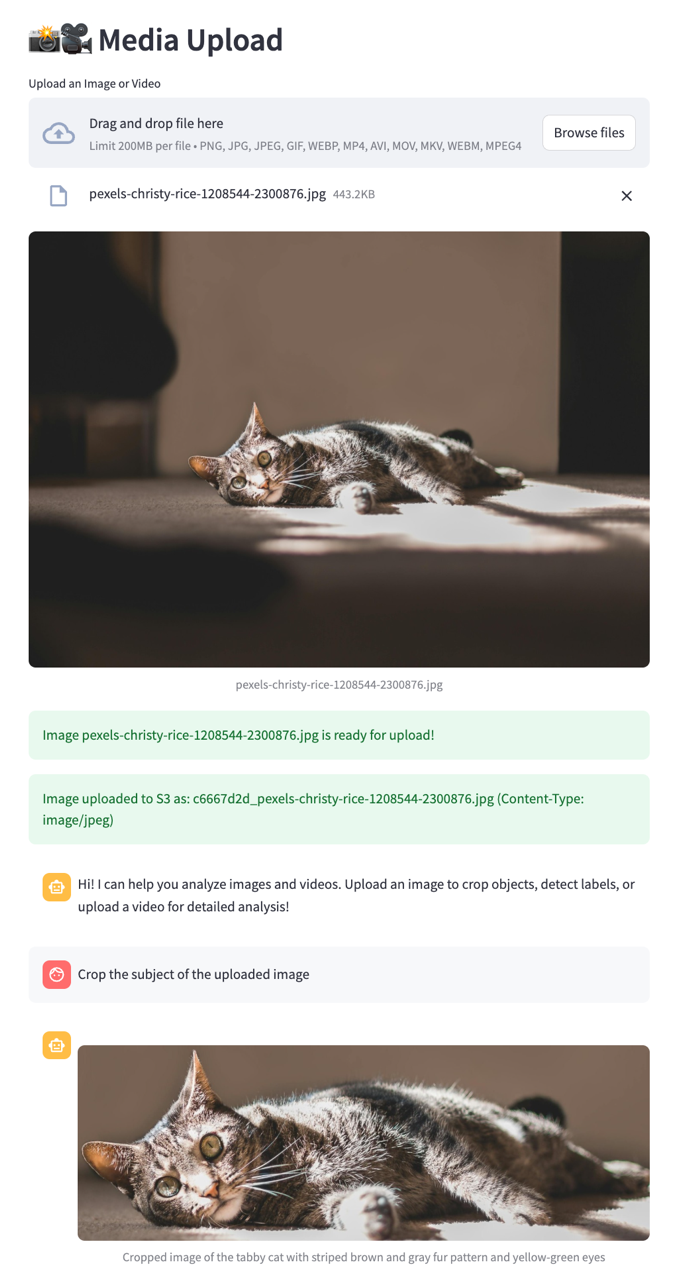
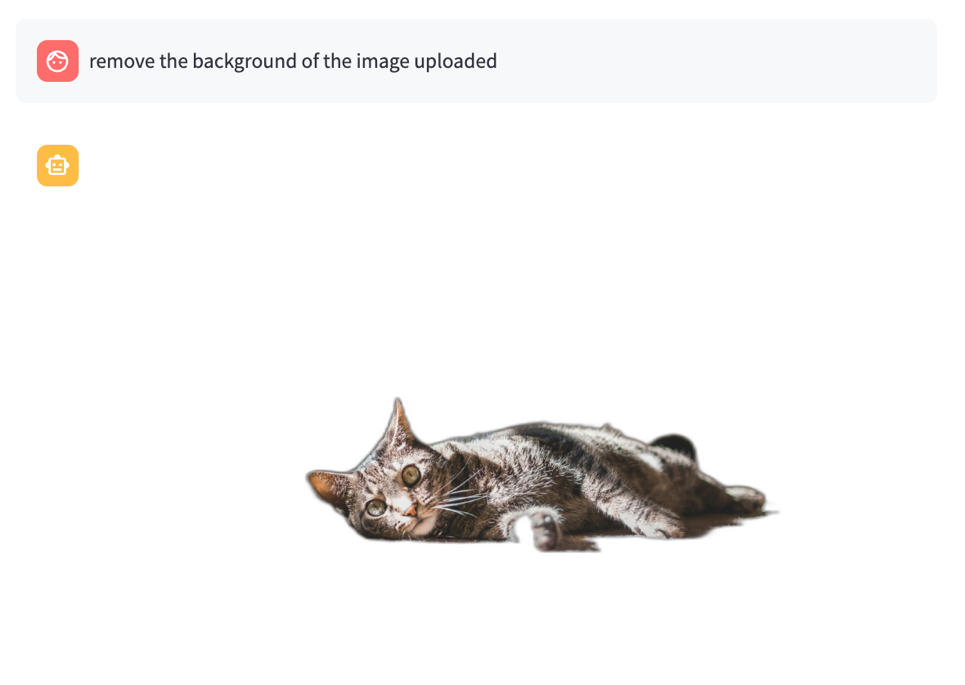
- The
remove_backgroundtool uses the rembg library which is a solution for background removal from images without requiring complex setup or extensive machine learning (ML) expertise.
OpenSearch server
The OpenSearch MCP server provides a unified interface for the ingestion and retrieval of images. The following tools are available in the MCP server:
- The
generate_image_descriptiontool uses the Amazon Bedrock Claude models to analyze images and generate natural language descriptions. It processes images by first converting them into a format compatible with Claude’s multimodal capabilities, then generates detailed, contextual descriptions based on the visual content. - The
generate_multimodal_embeddingtool uses the Amazon Titan multimodal models to create high-dimensional vector representations (embeddings) that capture both visual and textual information. These embeddings encode semantic relationships between images and text in a shared vector space, which supports similarity comparisons and cross-modal retrieval tasks. - The
ingest_image_to_opensearchtool provides an end-to-end pipeline for processing and storing images in OpenSearch. It combines the capabilities of image description generation and multimodal embedding creation, then indexes this information in OpenSearch with appropriate metadata. - The
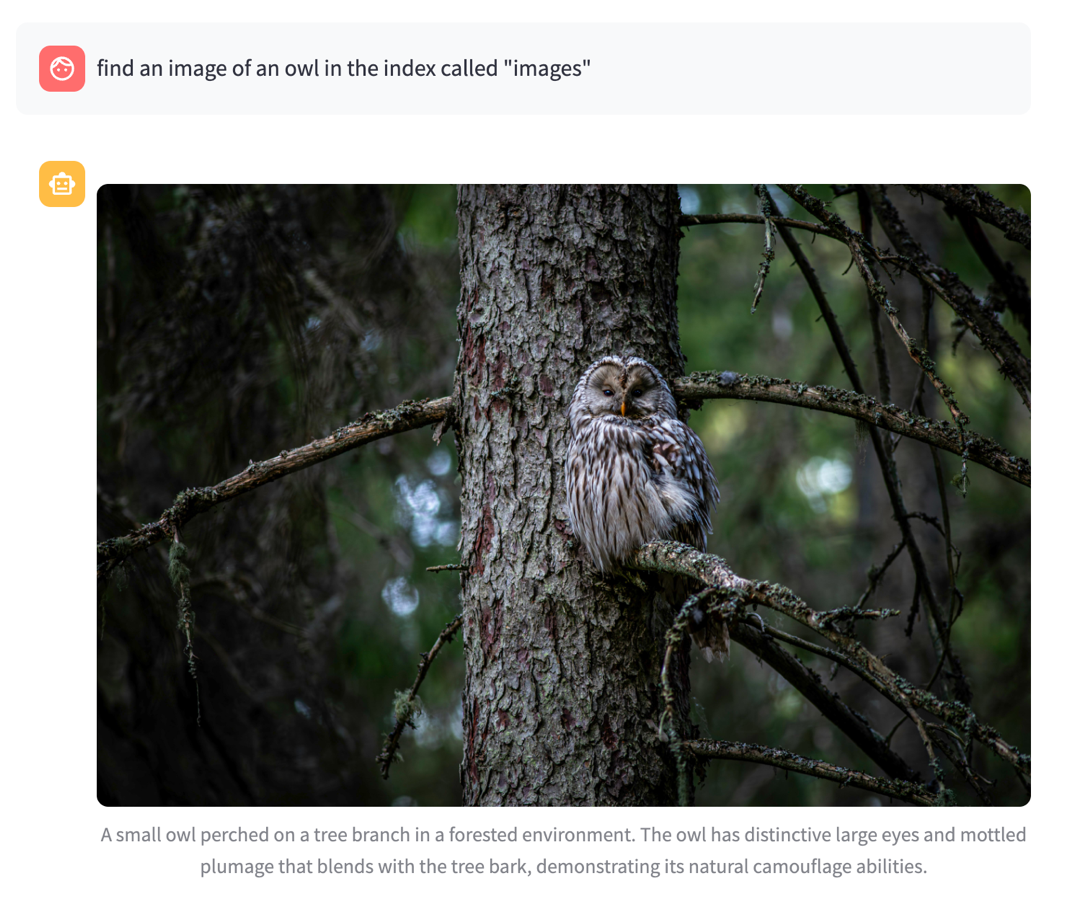
query_images_by_texttool supports natural language search across image collections by using the multimodal embeddings stored in OpenSearch. Users can search for images using text queries, which are converted into embeddings and compared against the stored image embeddings to find the most semantically similar matches.
- The
query_images_by_imagetool implements image-based search functionality, allowing users to find similar images by using an image as the query input. It processes the query image to generate its embedding and then performs similarity searches against the stored image embeddings in OpenSearch.
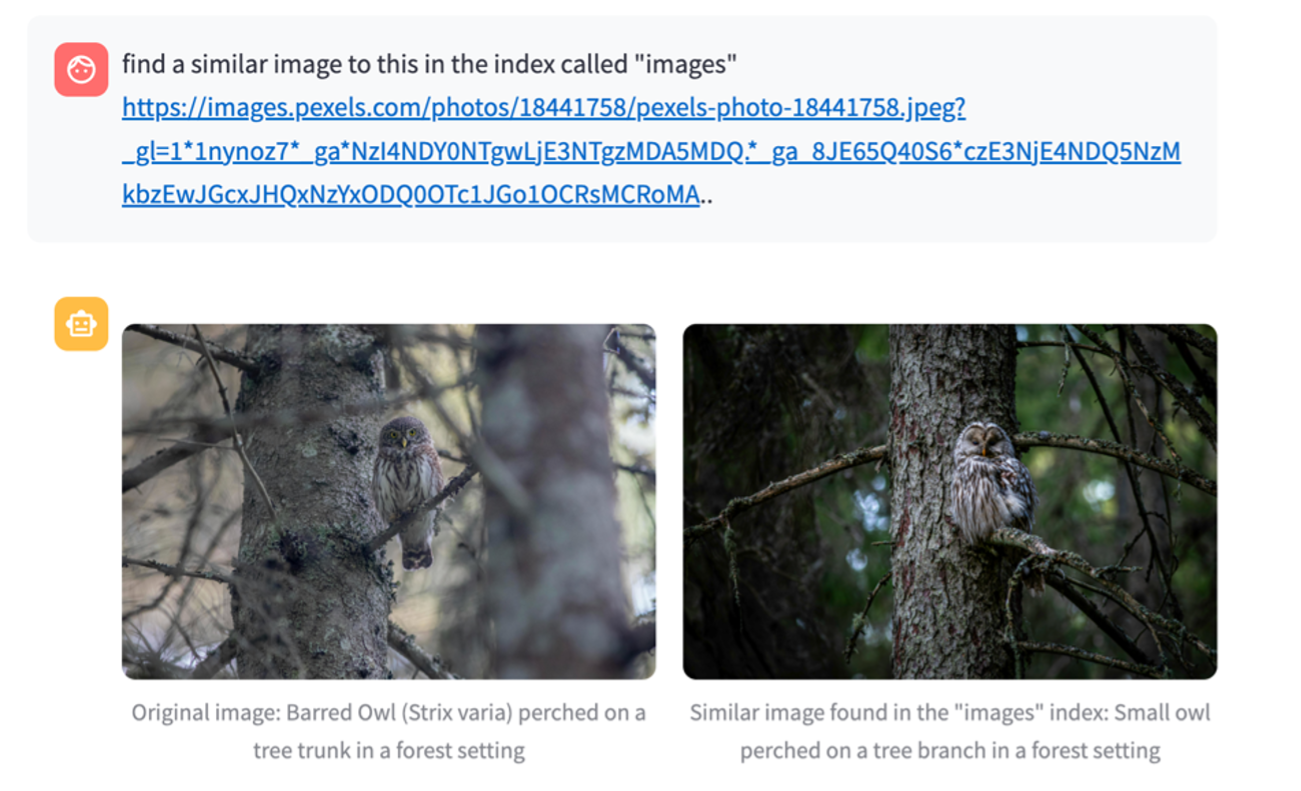
Agent Response: I’ll help you find similar images to the one you provided in the “images” index. Let me analyze this image first and then search for similar ones. Based on the search results, I found one similar image in the “images index that matches your query. Let me show you both the original image and the similar one I found:l’ve found a similar image to the one you provided in the”images” index.
Here’s what I found:
- Original Image: A Barred Owl (Strix varia) perched on a tree trunk in a forest setting. The owl has distinctive large eyes and mottled plumage that creates effective camouflage against the tree bark.
- Similar Image Found: Another owl image showing a small owl perched on a tree branch in a forest environment. This owl also has large, alert eyes and fluffy feathers that help it blend with its woodland surroundings.
The similarity score between these images is 0.65 (on a scale where higher is more similar), indicating a good match based on the visual elements and context of both images. Both photos capture owls in their natural forest habitat with similar composition and subject matter.
Would you like me to search for more similar images using different keywords, or would you like more information about either of these owl images?
- The
bulk_ingest_imagestool provides batch processing capabilities for large-scale image ingestion. It optimizes the process of generating descriptions and embeddings for multiple images simultaneously, managing parallel processing and resource utilization.
Setup and dependencies
Now that we’ve gone through the different features of the application, we will now walk through the deployment process. To get started, make sure you have the following installed:
- AWS Command Line Interface (AWS CLI)
- Active AWS account
- Python
To deploy the solution please follow the README found in the GitHub repository.
Click here to open the AWS console and follow along.
Use case extensions
The Computer Vision MCP servers have many applications including but not limited to the ones mentioned below:
Use case 1: Computer vision pipeline
The Infrastructure-less Computer Vision Pipeline offers an approach to implementing visual analysis capabilities without the traditional complexities of setting up and maintaining extensive infrastructure. This setup lets developers perform tasks such as generating bounding boxes for detected objects, creating detailed image descriptions, and analyzing video content, all without the need for dedicated servers or complex management systems. The Inline Agent serves as the orchestrator, efficiently coordinating with the MCP Server to access a suite of computer vision tools. This streamlined approach removes the need for server management and infrastructure maintenance. It also offers the advantages of a pay-per-use model and rapid deployment. As a result, developers can quickly implement robust computer vision pipelines with minimal overhead, focusing their efforts on using the technology rather than managing its underlying infrastructure.
Use case 2: Intelligent image cataloging with embeddings
The Intelligent Image Cataloging system improves traditional image search by implementing embedding-based similarity algorithms that support semantic understanding of visual content. By generating and storing image embeddings in a vector database, this solution transcends the limitations of conventional keyword-based searches, allowing for context-aware image retrieval. The system uses AI models to create rich embeddings that capture the semantic essence of images, letting users find visually similar content even when exact keyword matches aren’t available. This approach creates a scalable cataloging system that understands visual relationships and context, making it particularly valuable for large image collections where traditional search methods fall short. The resulting application offers intuitive similarity searches that can identify related images based on visual characteristics, compositional elements, and semantic meaning, providing a more natural and effective way to organize and retrieve visual content.
Use case 3: Visual memory database for contextual reasoning
The Visual Memory Database for Contextual Reasoning represents a fusion of computer vision and semantic understanding, combining the strengths of infrastructure-less CV pipelines with embedding-based similarity search. This system processes scenes to extract objects and their bounding boxes, generates embeddings for each element, and stores them with rich metadata including temporal and spatial information. This approach supports contextual reasoning across multiple cameras and time periods, allowing for complex queries and insights. The system excels in applications such as security monitoring, people tracking, and comprehensive scene understanding, offering temporal reasoning capabilities that can identify patterns and anomalies. It can answer nuanced questions about individuals, their associations, and object presence in specific areas, while also integrating with video monitoring agents to build a contextual visual memory. This integration facilitates features like suspicious activity detection and historical pattern analysis, creating a dynamic and intelligent visual understanding system that goes beyond simple object recognition to provide deep, context-aware insights.
Clean up
To avoid ongoing charges, complete the following cleanup steps:
- Empty the S3 Bucket.
- Delete the AWS CloudFormation stack.
Conclusion
By integrating the powerful AI capabilities of Amazon Bedrock with standardized MCP protocols, we’ve demonstrated how modern computer vision applications can be both sophisticated and accessible. The three use cases demonstrate the practical applications of this unified approach. This integration addresses challenges in the field by reducing infrastructure complexity through serverless architectures, semantic understanding, contextual reasoning capabilities, and offering standardized interfaces that simplify development and deployment.
The combination of standardized protocols, powerful AI models, and flexible deployment options positions this solution as a foundation for the next generation of visual intelligence applications. As AI continues to evolve, the principles demonstrated here, namely standardization, accessibility, and integration, will become increasingly important in building practical, scalable solutions that bridge the gap between visual perception and intelligent action. This marks not just a technical achievement, but a fundamental shift in how we approach the development of AI-powered visual systems.
We’d love to hear how you’re using the Computer Vision MCP servers. Share your use cases and questions in the comments.
References
About the authors
Kiowa Jackson
Kiowa is a Senior Machine Learning Engineer at AWS ProServe. He specializes in visual intelligence systems that combine computer vision with agentic AI and bringing these to production in the enterprise industrial sector.
Jundong Qiao
Jundong is a Sr. Machine Learning Engineer at AWS Professional Service, where he specializes in implementing and enhancing AI/ML capabilities across various sectors. His expertise encompasses building next-generation AI solutions, including chatbots and predictive models that drive efficiency and innovation.
Justin Kuskowski
Justin is a Principal Delivery Consultant at Amazon Web Services, specializing in Generative AI solutions that help enterprise customers accelerate innovation and reduce time to market. As a passionate advocate for emerging AI technologies, he combines hands-on consulting experience with technical writing to share practical GenAI implementation insights while continuously expanding his expertise in foundation models, prompt engineering, and AI governance frameworks. When not exploring the latest developments in artificial intelligence, Justin enjoys traveling the country to watch his kids play soccer and wakesurfing on Michigan’s lakes with family and friends.
Nick Biso
Nick is a Senior Machine Learning Engineer at AWS Professional Services. He solves complex organizational and technical challenges using data science and engineering. In addition, he builds and deploys AI/ML models on the AWS Cloud. His passion extends to his proclivity for travel and diverse cultural experiences.