在 Amazon Bedrock 上推出 Grok
英文标题:Introducing Grok on Amazon Bedrock
xAI 的 Grok 4.3 已在 Amazon Bedrock 上正式可用,它具备可配置的推理强度、强大的工具调用与指令遵循能力,并支持文本和图像输入,上下文窗口达 100 万 Token。该模型在多个基准测试中表现领先,尤其在企业级代理和工作负载场景下可显著提升准确性并降低成本。开发者可通过 OpenAI 兼容 API 或 Mantle 端点调用,并能灵活控制推理深度、使用结构化输出与有状态对话。这对构建高性能、安全可控的 AI 代理与自动化流程具有重要意义。
 16.9 KB
 2.7 KB
 19.8 KB
 32.5 KB
 290.1 KB
 2.5 KB
 33.5 KB
中文
本文由 xAI(SpaceXAI)的 Eric Jiang 与 AWS 联合撰写。
xAI 的 Grok 4.3 现已在 Amazon Bedrock 上正式可用,为构建代理和 AI 工作流的团队提供了一个能在长篇输入上可靠推理的模型。随着此次发布,xAI 作为模型提供商加入了 Amazon Bedrock。Grok 4.3 是一个具备可配置推理强度的模型,为构建代理提供了强大的工具使用和指令遵循能力,并且在高吞吐量推理中具有 Token 效率。它接受文本和图像输入,并拥有 100 万 Token 的上下文窗口,适用于长文档和多轮对话。该模型运行在 Amazon Bedrock 的下一代推理引擎 Mantle 上。
本文介绍了为什么 Grok 4.3 非常适合代理和企业工作负载、如何通过 Amazon Bedrock 访问它,以及团队最常使用的能力:基础聊天请求、可配置的推理强度、工具调用、结构化输出、图像输入和有状态多轮对话。
为什么 Grok 4.3 非常适合代理和推理工作负载
根据 xAI 的说法,Grok 4.3 专为注重准确性的企业工作而构建。在模型发布时的自有基准测试中,xAI 报告其性能超越了多个行业基准。Grok 4.3 在 Artificial Analysis Omniscience 基准中排名第一,在相较的前沿模型中幻觉率最低。它还在面向客服场景工具调用的 Artificial Analysis Tau2 Telecom 基准中排名第一,并在 Vals AI 判例法和企业金融基准测试中排名第一,展示了出色的文档理解能力。xAI 也将该模型定位在智能与成本 Pareto 前沿上,称其单位美元智能是其他前沿模型的 2 到 10 倍。
使用 Grok 4.3,你可以通过每个请求上的努力程度来控制模型在回答前思考的深度。你可以按请求配置努力级别(none、low、medium 和 high),让一个模型覆盖全部工作需求。将分类调用设为 none 努力以保持低延迟,而在深度比响应时间更重要的合同分析或判例法任务中则使用 high。Grok 4.3 接受文本和图像输入并返回文本,其 100 万 Token 上下文窗口为长文档和扩展的多轮会话留出了空间。该模型在工具调用和指令遵循方面表现出色,这使得它对于依赖函数调用来执行操作的代理而言非常实用。这些特性与合同审查、信贷协议分析和金融文档问答等用例相符。在这些场景中,模型对长输入进行推理,然后调用记录系统。
如何通过 Amazon Bedrock 访问 Grok 4.3
Grok 4.3 运行在 Mantle 上,其访问方式不同于使用 Amazon Bedrock Runtime API 的模型。Mantle 使用与 OpenAI 兼容的 API。你可以使用 OpenAI SDK 或通过直接 HTTPS 请求调用 Grok 4.3,支持 Chat Completions API 或 Responses API。
Mantle 端点 URL 是 Region 特定的,遵循以下模式:
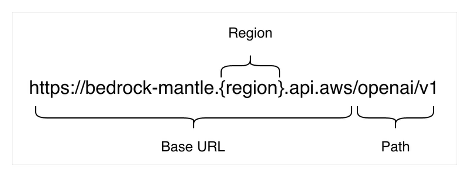
例如,在 us-west-2 中,Base URL 为 https://bedrock-mantle.us-west-2.api.aws/openai/v1。请注意,Responses API URL 路由在 Mantle 端点上与 Runtime 端点(/openai/v1/)略有不同(对比 /v1/responses)。
要使用 Grok 4.3 设置 SDK,请按上一节所述设置正确 Region 和路径的 Base URL。
使用 Grok 时,请注意上下文窗口为 100 万 Token,且默认值与标准 OpenAI 规范有以下三处不同:
temperature默认值为0.7而非1。top_p默认值为0.95而非1。max_completion_tokens默认值为131072。
如果你的应用需要不同行为,请显式设置这些参数。
进行身份验证并运行第一个请求
你有两种方式对 Mantle 端点进行身份验证,并且两者均可与相同的 OpenAI SDK 配合使用。对于生产环境,我们建议使用从 IAM 凭证生成的短期 bearer token,因为它们会自动过期并保持访问与 IAM 身份绑定。长期 Amazon Bedrock API 密钥适用于快速探索和入门。请将长期密钥限制于此目的,而非将其嵌入生产应用中。
以下示例展示如何使用长期 Amazon Bedrock API 密钥进行身份验证以访问模型。请将其视为仅供探索的凭证。你可以从 Amazon Bedrock 控制台生成一个,并安装 OpenAI SDK:
将客户端指向区域 Mantle 端点并使用 API 密钥进行身份验证。模型 ID 为 xai.grok-4.3:
python from openai import OpenAI
client = OpenAI( api_key="", base_url="https://bedrock-mantle.us-west-2.api.aws/openai/v1", )
response = client.chat.completions.create( model="xai.grok-4.3", messages=[ {"role": "user", "content": "In one sentence, what is Amazon Bedrock?"} ], ) print(response.choices[0].message.content)
当你准备将 Amazon Bedrock 集成到更高安全需求的应用中时,我们建议使用短期凭证。你可以在请求时使用 Amazon Bedrock token 生成器从现有 AWS 凭证生成短期 bearer token。这将保持身份验证与 IAM 身份绑定,并避免长期密钥。要开始,请安装 aws-bedrock-token-generator 包。
bash pip install aws-bedrock-token-generator
在代码中使用 aws_bedrock_token_generator 库的 provide_token 函数,如下所示:
python from aws_bedrock_token_generator import provide_token from openai import OpenAI
client = OpenAI( api_key=provide_token(region="us-west-2"), base_url="https://bedrock-mantle.us-west-2.api.aws/openai/v1", )
配置推理输出
你可以通过 Responses API 上的 reasoning 参数控制模型投入的推理努力程度。努力级别有 none(禁用推理)、low(默认)、medium 和 high。更高的努力程度往往有助于解决多步骤问题,此时快速回答可能出错,但代价是更多的输出 Token。
Chat Completions API 不返回推理跟踪。如果你希望模型在会话各轮之间保留推理内容,请使用 Responses API。在默认的有状态模式下,当你设置 store=True 并通过 previous_response_id 链接调用时,服务会保留每一轮的推理并自动回传,因此你无需自行管理。加密的推理适用于无状态情况。如果你设置 store=False(例如当工作负载要求不在服务器端持久化会话时),请使用 include=["reasoning.encrypted_content"] 请求推理内容,并在下一个请求的输入中将其传回,以便为模型提供其自身的先前推理作为上下文。
以下示例以高努力程度运行一个经典的陷阱问题:
python response = client.responses.create( model="xai.grok-4.3", reasoning={"effort": "high"}, # none, low, medium, or high include=["reasoning.encrypted_content"], max_output_tokens=4096, input=( "A bat and ball cost $1.10. The bat costs $1 more than the ball. " "How much is the ball? Answer with just the number." ), ) print(response.output_text) print(response.usage.output_tokens_details.reasoning_tokens)
模型通过代数方式得出了正确答案,而非直觉性地给出 0.10 美元的错误答案,用量块报告了内部消耗的推理 Token 数量。将努力程度降至 none,同一字段会报告 0 个推理 Token,这是在简单、延迟敏感的调用上应采用的设置:
python response = client.responses.create( model="xai.grok-4.3", reasoning={"effort": "none"}, max_output_tokens=2048, input="Say OK.", ) print(response.output_text) # OK.
一个实用的模式是:在 none 或 low 下运行分类、提取和简短事实查找,将 high 保留给规划步骤、数学和那些一次早期错误就会导致整个任务失败的链条。
工具调用是代理工作负载的核心,Grok 4.3 通过同一套 OpenAI 兼容接口支持它。你描述可用的工具,模型决定何时调用某个工具,并返回一个结构化请求,你的代码执行该请求并将结果反馈回去。Grok 4.3 遵循标准的 OpenAI 工具调用模式,因此你可以使用 JSON Schema 为每个工具定义其参数。
以下示例提供了一个 get_weather 工具,并提出了一个应触发该工具的问题:
python tools = [ { "type": "function", "function": { "name": "get_weather", "description": "Get the current weather for a city", "parameters": { "type": "object", "properties": {"city": {"type": "string"}}, "required": ["city"], }, }, } ]
response = client.chat.completions.create( model="xai.grok-4.3", messages=[{"role": "user", "content": "What's the weather in Sydney? Use the tool."}], tools=tools, tool_choice="auto", # let the model decide whether to call a tool )
tool_call = response.choices[0].message.tool_calls[0] print(tool_call.function.name, tool_call.function.arguments)
get_weather {"city":"Sydney"}
模型从问题中解析出城市并生成了一个与 Schema 匹配的有效参数对象。接下来,你在自己的代码中执行该函数,附加一个 tool 角色的消息并包含结果,然后再次调用模型,使其能够将数据整合到自然语言回复中。这是使用 Grok 4.3 构建多步骤代理的基石。
结构化输出
当你需要模型返回代码可直接解析的数据时,可以使用带 JSON Schema 的结构化输出功能。Grok 4.3 支持带有严格模式的 json_schema 响应格式,因此响应会遵循你提供的 Schema,而不是自由格式文本。
例如,以下代码询问关于某个国家的事实并限制答案的结构:
python import json
schema = { "type": "object", "properties": { "name": {"type": "string"}, "capital": {"type": "string"}, "population_millions": {"type": "number"}, }, "required": ["name", "capital", "population_millions"], "additionalProperties": False, }
response = client.chat.completions.create( model="xai.grok-4.3", messages=[{"role": "user", "content": "Return facts about the country Australia."}], response_format={ "type": "json_schema", "json_schema": {"name": "country_facts", "strict": True, "schema": schema}, }, max_completion_tokens=4096, )
data = json.loads(response.choices[0].message.content) print(data)
{'name': 'Australia', 'capital': 'Canberra', 'population_millions': 26.6}
将 strict 设为 True 并将 additionalProperties 设为 False 可使响应仅包含你要求的键,这在当下游系统要求固定记录格式时与工具调用配合得非常好。来自测试的一项操作提示:即使输入良性内容,请求偶尔也会因自动内容安全检查而返回 400 错误,因此在生产调用中应构建一个简短的重试机制。
图像输入
Grok 4.3 接受图像作为输入并返回文本,这涵盖了文档理解、图表阅读和视觉问答等任务。你传递图像的方式与 OpenAI Chat Completions API 的模式相同,将图像作为内容部分提供,其中包含带有 base64 编码字节的 data: URL 或公开图像 URL。文本和图像部分放在同一个 content 数组中,使模型能够同时看到问题和图片。
python import base64
with open("chart.png", "rb") as f: b64 = base64.b64encode(f.read()).decode()
response = client.chat.completions.create( model="xai.grok-4.3", messages=[ { "role": "user", "content": [ {"type": "text", "text": "Describe this image in one short sentence."}, { "type": "image_url", "image_url": {"url": f"data:image/png;base64,{b64}"}, }, ], } ], max_completion_tokens=4096, ) print(response.choices[0].message.content)
在测试中,模型读取了一张生成的测试图片并正确说出了其主色。请使用 PNG 或 JPEG 等支持的图像格式,并保持编码干净:格式错误或被截断的图像负载会返回 validation_error 而非最佳猜测答案。
使用 Responses API 进行有状态对话
Responses API 可以在服务端保存对话状态,因此你无需每次都重新发送完整的对话历史。相反,你可以设置 store=True 并利用 previous_response_id 链接请求,服务会自动保留并注入相关上下文。这使多轮交互更简单且更具成本效益,同时保持了跨回合的连贯推理。对于需要长期记忆而无客户端管理开销的客户支持代理或分析工作流而言,这种有状态模式尤为强大。
English / 原文
This post is co-written with Eric Jiang from xAI (SpaceXAI).
xAI’s Grok 4.3 is now generally available on Amazon Bedrock, giving teams that build agents and AI workflows a model that reasons reliably over long inputs. With this launch, xAI joins Amazon Bedrock as a model provider. Grok 4.3 is a model with configurable reasoning effort. It offers strong tool use and instruction following for building agents, and token efficiency for high-volume inference. It accepts text and image input, and has a 1 million token context window for long documents and multi-turn sessions. The model runs on Mantle, the next-generation inference engine in Amazon Bedrock.
This post covers what makes Grok 4.3 a great fit for agentic and enterprise workloads, how you access it through Amazon Bedrock, and how to use the capabilities most teams reach for first: a basic chat request, configurable reasoning effort, tool calling, structured output, image input, and stateful multi-turn conversations.
Why Grok 4.3 is a great fit for agentic and reasoning workloads
According to xAI, Grok 4.3 is built for enterprise work where accuracy matters. On its own benchmarks at the time of the model launch, xAI reports it outperforms various industry benchmarks. Grok 4.3 ranked #1 on the Artificial Analysis Omniscience benchmark with the lowest hallucination rate among the frontier models it compared. It also placed #1 on the Artificial Analysis Tau2 Telecom benchmark for tool calling in customer support scenarios, and #1 on the Vals AI Case Law and Corporate Finance benchmarks for document understanding. xAI also places the model on the intelligence-versus-cost Pareto frontier, which it describes as 2 to 10 times more intelligence per dollar than other frontier models.
With Grok 4.3, you can control how much the model thinks before answering through an effort level on each request. You configure the effort level (none, low, medium, and high) per request and let one model serve the full range of work. A classification call can run at none effort to keep latency low. A contract analysis or case law task can run at high when depth matters more than response time. Grok 4.3 accepts text and image input and returns text, and its 1 million token context window leaves room for long documents and extended multi-turn sessions. The model handles tool calling and instruction following well, which is what makes it practical for agents that depend on function calls to take action. These traits line up with use cases such as contract review, credit agreement analysis, and financial document question answering. In these cases, the model reasons over long inputs and then calls out to systems of record.
How you access Grok 4.3 on Amazon Bedrock
Grok 4.3 runs on Mantle, and accessing it differs from models that use the Amazon Bedrock Runtime API. Mantle uses OpenAI-compatible APIs. You can invoke Grok 4.3 either with the OpenAI SDK or through direct HTTPS requests to the Chat Completions API or the Responses API.
The Mantle endpoint URL is Region-specific and follows this pattern:
For example, in us-west-2 the base URL is https://bedrock-mantle.us-west-2.api.aws/openai/v1. Note that the Responses API URL route differs slightly on the Mantle endpoint (/openai/v1/) from the Runtime endpoint (/v1/responses).
To set up your SDK with Grok 4.3, set the base URL with the correct Region and path as described in the preceding section.
When using Grok, note that the context window is 1 million tokens and that the defaults depart from the standard OpenAI specification in three places:
temperaturedefaults to0.7rather than1.top_pdefaults to0.95rather than1.max_completion_tokensdefaults to131072.
Set these explicitly if your application needs different behavior.
Authenticate and run a first request
You have two ways to authenticate against the Mantle endpoint, and both work with the same OpenAI SDK. For production, we recommend short-term bearer tokens generated from your IAM credentials, because they expire automatically and keep access tied to your IAM identity. Use a long-term Amazon Bedrock API key for quick exploration and getting started. Restrict long-lived keys to that purpose rather than embedding them in production applications.
The following example shows how to authenticate with a long-term Amazon Bedrock API key to access the model. Treat this as an exploration-only credential. You can generate one from the Amazon Bedrock console, and then install the OpenAI SDK:
Point the client at the regional Mantle endpoint and authenticate with your API key. The model ID is xai.grok-4.3:
from openai import OpenAI

client = OpenAI(
    api_key="<your Amazon Bedrock API key>",
    base_url="https://bedrock-mantle.us-west-2.api.aws/openai/v1",
)

response = client.chat.completions.create(
    model="xai.grok-4.3",
    messages=[
        {"role": "user", "content": "In one sentence, what is Amazon Bedrock?"}
    ],
)
print(response.choices[0].message.content)
When you’re ready to incorporate Amazon Bedrock into applications with greater security requirements, we recommend using short-term credentials. You can generate a short-term bearer token from your existing AWS credentials at request time using the Amazon Bedrock token generator. This keeps authentication tied to your IAM identity and avoids a long-lived secret. To get started, install the aws-bedrock-token-generator package.
pip install aws-bedrock-token-generator
Use the provide_token function from the aws_bedrock_token_generator library in code as shown below:
from aws_bedrock_token_generator import provide_token
from openai import OpenAI

client = OpenAI(
    api_key=provide_token(region="us-west-2"),
    base_url="https://bedrock-mantle.us-west-2.api.aws/openai/v1",
)
Configure reasoning output
You can control how much of reasoning effort the model spends through the reasoning parameter on the Responses API. The effort levels are none (which disables reasoning), low (the default), medium, and high. Higher effort tends to help on multi-step problems where a quick answer would be wrong, at the cost of more output tokens.
The Chat Completions API does not return a reasoning trace. If you want the model’s reasoning available across turns, use the Responses API. In the default stateful pattern, where you set store=True and chain calls with previous_response_id, the service retains each turn’s reasoning and feeds it back automatically, so you do not manage it yourself. Encrypted reasoning is for the stateless case. If you set store=False (for example, when your workload requires that turns are not persisted server-side), request the reasoning with include=["reasoning.encrypted_content"]. Pass it back in your next request’s input to give the model its own prior reasoning as context.
This example runs a classic trick question at high effort:
response = client.responses.create(
    model="xai.grok-4.3",
    reasoning={"effort": "high"},  # none, low, medium, or high
    include=["reasoning.encrypted_content"],
    max_output_tokens=4096,
    input=(
        "A bat and ball cost $1.10. The bat costs $1 more than the ball. "
        "How much is the ball? Answer with just the number."
    ),
)
print(response.output_text)
print(response.usage.output_tokens_details.reasoning_tokens)
The model worked through the algebra rather than reaching for the intuitive wrong answer of $0.10, and the usage block reports the reasoning tokens it spent internally. Drop the effort to none and that same field reports 0 reasoning tokens, which is the setting to reach for on simple, latency-sensitive calls:
response = client.responses.create(
    model="xai.grok-4.3",
    reasoning={"effort": "none"},
    max_output_tokens=2048,
    input="Say OK.",
)
print(response.output_text)  # OK.
A practical pattern is to run classification, extraction, and short factual lookups at none or low, and reserve high for planning steps, math, and chains where a single early mistake derails the whole task.
Tool calling is central to agentic workloads, and Grok 4.3 supports it through the same OpenAI-compatible interface. You describe the tools available, the model decides when to call one, and it returns a structured request that your code executes and feeds back. Grok 4.3 follows the standard OpenAI tool-calling shape, so you define each tool with a JSON Schema for its parameters.
The following example offers a single get_weather tool and asks a question that should trigger it:
tools = [
    {
        "type": "function",
        "function": {
            "name": "get_weather",
            "description": "Get the current weather for a city",
            "parameters": {
                "type": "object",
                "properties": {"city": {"type": "string"}},
                "required": ["city"],
            },
        },
    }
]

response = client.chat.completions.create(
    model="xai.grok-4.3",
    messages=[{"role": "user", "content": "What's the weather in Sydney? Use the tool."}],
    tools=tools,
    tool_choice="auto",  # let the model decide whether to call a tool
)

tool_call = response.choices[0].message.tool_calls[0]
print(tool_call.function.name, tool_call.function.arguments)
# get_weather {"city":"Sydney"}
The model parsed the city out of the question and produced a valid arguments object that matches the schema. From here you run the function in your own code, append a tool role message with the result, and call the model again so it can fold the data into a natural-language reply. This is the building block for multi-step agents on Grok 4.3.
Structured output
When you need the model to return data your code can parse directly, use structured output with a JSON Schema. Grok 4.3 supports the json_schema response format with strict mode, so the response conforms to the schema you provide, rather than giving free-form text.
For example, the following code asks for facts about a country and constrains the shape of the answer:
import json

schema = {
    "type": "object",
    "properties": {
        "name": {"type": "string"},
        "capital": {"type": "string"},
        "population_millions": {"type": "number"},
    },
    "required": ["name", "capital", "population_millions"],
    "additionalProperties": False,
}

response = client.chat.completions.create(
    model="xai.grok-4.3",
    messages=[{"role": "user", "content": "Return facts about the country Australia."}],
    response_format={
        "type": "json_schema",
        "json_schema": {"name": "country_facts", "strict": True, "schema": schema},
    },
    max_completion_tokens=4096,
)

data = json.loads(response.choices[0].message.content)
print(data)
# {'name': 'Australia', 'capital': 'Canberra', 'population_millions': 26.6}
Setting strict to True and additionalProperties to False keeps the response constrained to the keys you asked for, which pairs well with tool calling when a downstream system expects a fixed record format. One operational note from testing: requests occasionally return a 400 from an automated content safety check even on benign input, so build a short retry into production calls.
Image input
Grok 4.3 accepts images as input and returns text, which covers document understanding, chart reading, and visual question answering. You pass an image using the same pattern as the OpenAI Chat Completions API, as a content part with a data: URL holding base64-encoded bytes, or a public image URL. The text and image parts go in the same content array so the model sees the question and the picture together.
import base64

with open("chart.png", "rb") as f:
    b64 = base64.b64encode(f.read()).decode()

response = client.chat.completions.create(
    model="xai.grok-4.3",
    messages=[
        {
            "role": "user",
            "content": [
                {"type": "text", "text": "Describe this image in one short sentence."},
                {
                    "type": "image_url",
                    "image_url": {"url": f"data:image/png;base64,{b64}"},
                },
            ],
        }
    ],
    max_completion_tokens=4096,
)
print(response.choices[0].message.content)
In testing, the model read a generated test image and named its dominant color correctly. Use a supported image format such as PNG or JPEG and keep the encoding clean: a malformed or truncated image payload returns a validation_error rather than a best-guess answer.
Stateful conversations with the Responses API
The Responses API can hold conversation state on the service side, so you do not need to resend the full message history on every turn. You store a turn by passing store=True, capture the returned response ID, and reference it on the next call with previous_response_id. The model treats the earlier exchange as context.
first = client.responses.create(
    model="xai.grok-4.3",
    input="Remember the number 42. Just acknowledge.",
    store=True,
    max_output_tokens=2048,
)

second = client.responses.create(
    model="xai.grok-4.3",
    previous_response_id=first.id,
    input="What number did I ask you to remember?",
    max_output_tokens=2048,
)
print(second.output_text)  # 42
From the second client.responses.create call in the code example, there is no message being sent except for the previous_response_id. Because the service stores each turn, the model’s prior reasoning is carried forward automatically to the next call, so you keep both the conversation and the model’s thinking in scope without managing that state yourself. One thing to know before you turn this on: storing conversation state means the service retains those turns. Review the Amazon Bedrock data protection documentation for details on the security and privacy of your stored data, and how to disable retention if needed.
Service tiers and Regional availability
Amazon Bedrock offers multiple service tiers so you can match cost and throughput to each workload. Standard tier on-demand inference provides pay-per-token access with no commitment, Priority offers preferential treatment in the processing queue for a higher per-token price, and Flex provides lower-cost access for workloads that are not time-sensitive. You can use Grok 4.3 with the Standard, Priority, and Flex tiers. For details, see service tiers for inference.
Grok 4.3 uses in-Region inference, so you pin your client to a Region where the model is available and set the Mantle base URL to match. Geo and Global cross-Region inference are not offered for this model at launch. The examples in this post use us-west-2. For the current list of supported Regions, see the Regional availability documentation, and for pricing across the tiers, see the Amazon Bedrock pricing page.
Conclusion
Grok 4.3 on Amazon Bedrock gives you a reasoning-first model with configurable effort, native tool calling, strict structured output, image understanding, and server-side conversation state. You can reach the model through the OpenAI SDK pointed at the bedrock-mantle endpoint. The examples in this post do not create billable AWS resources beyond per-request token usage. But if you generated a long-term Amazon Bedrock API key for exploration, delete it from the Amazon Bedrock console when you are done. A long-term key is a standing credential, so removing the ones you no longer need keeps your account’s attack surface small.
To start building, review the Grok 4.3 model card for the current Region list and parameter details, and see the Amazon Bedrock pricing page for token rates. From there, a few directions are worth exploring: wire the tool-calling loop end to end by executing the returned function and feeding the result back, thread encrypted reasoning content across Responses turns to give long-running agents continuity in how they think, and benchmark effort levels against your own workloads to find where higher reasoning stops earning its token cost. Join the discussion in the Amazon Bedrock community on AWS re:Post.
About the authors
Melanie Li
Melanie Li, PhD, is a Senior Generative AI Specialist Solutions Architect at AWS based in Sydney, Australia, where her focus is on working with customers to build solutions using state-of-the-art AI/ML tools. She has been actively involved in multiple generative AI initiatives across APJ, harnessing the power of LLMs. Prior to joining AWS, Dr. Li held data science roles in the financial and retail industries.
Saurabh Trikande
Saurabh is a Senior Product Manager for Amazon Bedrock and Amazon SageMaker Inference. He is passionate about working with customers and partners, motivated by the goal of democratizing AI. He focuses on core challenges related to deploying complex AI applications, inference with multi-tenant models, cost optimizations, and making the deployment of generative AI models more accessible. In his spare time, Saurabh enjoys hiking, learning about innovative technologies, following TechCrunch, and spending time with his family.
Alex Thewsey
Alex is a Generative AI Specialist Solutions Architect at AWS, based in Singapore. Alex helps customers across Southeast Asia to design and implement solutions with ML and Generative AI. He also enjoys karting, working with open source projects, and trying to keep up with new ML research.
Eric Jiang
Eric Jiang is an engineer at SpaceXAI based in Palo Alto. He leads the API and Enterprise post-training teams, and is passionate about building products that delight users. Outside of work, he enjoys running, playing bass guitar, and trying new foods. Thanks again for your great help.
Anirban Gupta
Anirban is a Principal Engineer at AWS based in Seattle, USA, where he focuses on the design of secure, high-scale model-serving infrastructure for Amazon Bedrock. He has driven the technical work behind several foundation-model launches on the platform. Prior to joining Amazon Bedrock, he was a Principal Engineer on AWS Outposts, building hybrid on-premises cloud infrastructure.