使用 Amazon Bedrock AgentCore 和 Amazon Nova 2 Sonic 构建餐厅电话语音 AI 前台
英文标题:Building a restaurant telephony AI host with Amazon Bedrock AgentCore and Amazon Nova 2 Sonic
餐厅每月平均漏接 150 通来电,其中约六成是顾客下单或订位,且多集中在晚餐高峰,人工接听难以兼顾。本文展示如何基于 Amazon Bedrock AgentCore 和 Amazon Nova 2 Sonic 构建端到端的语音点餐系统,通过模型上下文协议(MCP)连接餐厅后端,在电话振铃时预热智能体会话,实现从问候到订单确认的无缝对话。方案使用 AWS CDK 一键部署完整堆栈,并借助 SIP 网关桥接电话网络与智能体,将电话通道、对话逻辑与业务后端彻底解耦。对开发者而言,该架构让同一智能体可复用于移动应用或自助点餐机,后端变更无需触及智能体,显著降低了多渠道扩展的复杂度和运维成本。
 418.4 KB
 239.5 KB
 191.7 KB
 203.1 KB
 99.0 KB
 102.9 KB
 94.5 KB
 60.3 KB
中文
餐厅每个门店每月平均漏接 150 通来电,其中约 60% 是顾客想要下单或预订餐位。这些电话大多在晚餐服务时段打入,此时前台正在引导客人入座、服务员正在翻台,电话因此被遗忘。把人从楼面拽去接电话并不能解决问题,反而让两种体验都变得更糟。增加 App 或网站能帮助偏好在线下单的顾客,但对那些只想打个电话的人来说却毫无作用。
在本文中,我们将展示如何构建一个语音点餐系统,该系统可接听电话号码,并完成从问候到订单确认的整个下单流程。系统使用 Amazon Bedrock AgentCore 托管和运行智能体,使用 Amazon Nova 2 Sonic 进行实时语音交互,并通过 模型上下文协议(MCP) 连接餐厅后端。本文的演练将涵盖使用 AWS Cloud Development Kit (AWS CDK) 部署完整技术栈,以及通过 Amazon Elastic Container Service (Amazon ECS) 和 AWS Fargate 上的会话发起协议(SIP)网关将电话接入智能体。同时,系统还会在电话仍在振铃时预热智能体会话,因此主叫方永远不会听到空白的等待音。
解决方案概览
该系统分为三层。电话网络层处理与电话相关的特定问题:音频通过电话网络而非浏览器传入,系统通过电话号码而非登录来识别主叫方。SIP 网关通过已签名的 WebSocket 连接将音频流传输至智能体层,智能体在此借助 Amazon Nova 2 Sonic 驱动对话。智能体通过 MCP 工具访问后端层。后端层保存菜单、购物车、订单和门店位置数据。将这几层分开意味着下单逻辑独立于调用它的通道。新的通道(如移动应用或自助服务亭)可以连接到同一个智能体,而无需重写后端。由于 MCP 是连接智能体与外部工具的开放标准,后端可以在不触及智能体的情况下进行变更。该智能体同时支持文本和音频的输入与输出,能在单个双向流中处理转录、话轮转换和打断。
该解决方案将部署以下组件:
在电话网络侧,Amazon Chime SDK Voice Connector 提供 SIP 中继和用于接听入站呼叫的免费号码。Amazon ECS on AWS Fargate 在 网络负载均衡器 之后运行 SIP 网关。在智能体层,AgentCore 运行时托管对话逻辑,每次通话都在其自己的 microVM 中运行以实现隔离。Amazon Nova 2 Sonic 处理语音到语音的交互。AgentCore 网关将后端 API 暴露为智能体可以发现并按名称调用的 MCP 工具。后端层使用 Amazon API Gateway 为 REST 端点提供前端,并由 AWS Identity and Access Management (IAM) 提供安全保障。AWS Lambda 运行菜单、购物车、订单和位置查找等业务逻辑。Amazon DynamoDB 存储数据,Amazon Location Service 处理地理编码和路线计算。Amazon Elastic Container Registry (Amazon ECR)、AWS CodeBuild 和 Amazon Simple Storage Service (Amazon S3) 用于构建和存储智能体容器镜像。
架构图
下图展示了该解决方案,共划分为四个部分。
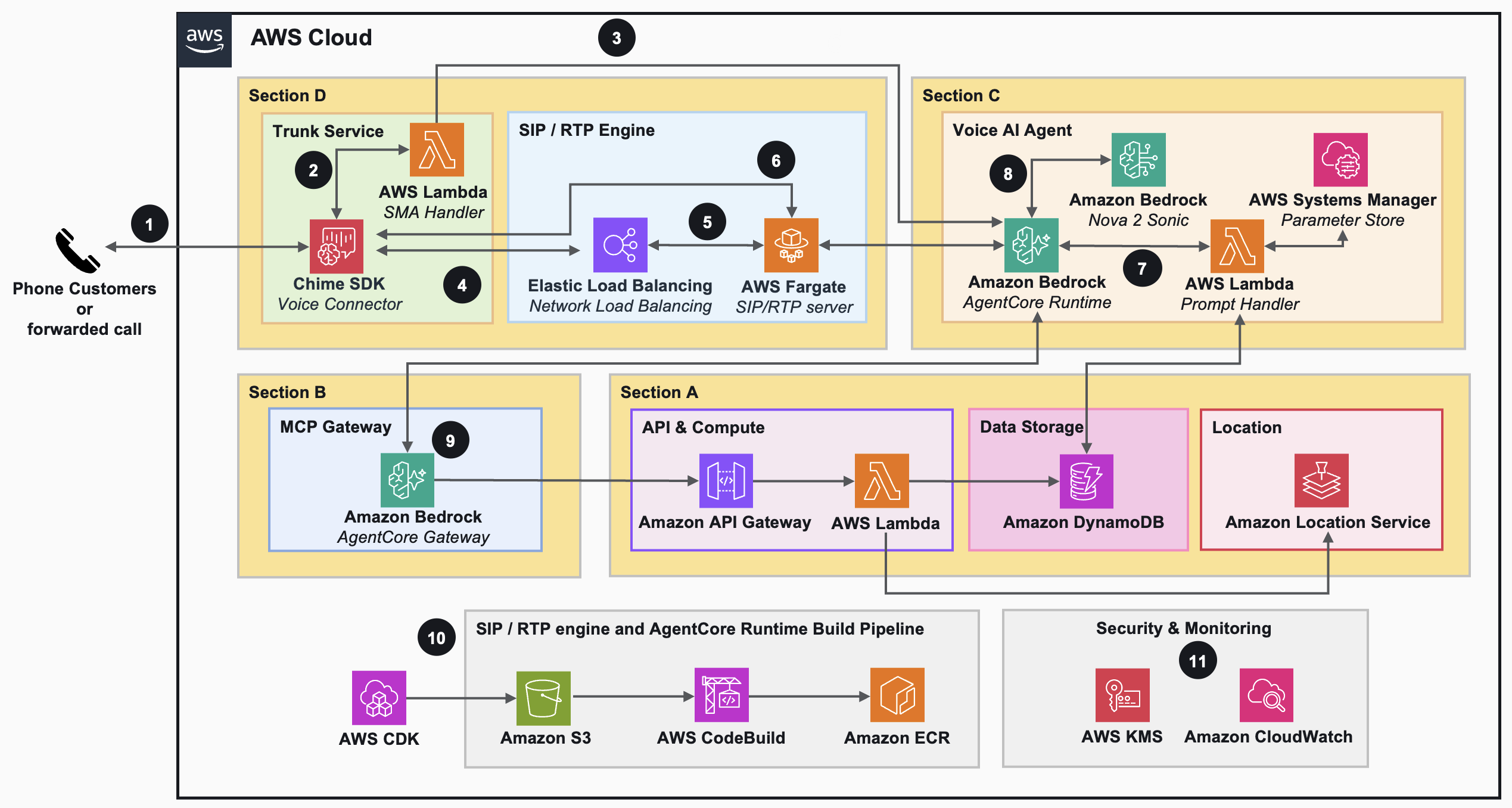
餐厅的后端基础设施首先在 A 部分部署。Amazon DynamoDB 保存客户、订单、菜单、购物车和位置数据,Amazon Location Service 处理地址和路线。AWS Lambda 执行业务逻辑,Amazon API Gateway 以 IAM 授权的方式对外暴露。各资源按依赖顺序部署。
B 部分创建 AgentCore 网关,设置其 IAM 权限,并将网关配置为把后端端点暴露为智能体可访问的 MCP 工具。正是这一层将智能体与后端解耦开来。没有它,增加或更改工具就需要重新部署智能体本身。
C 部分配置智能体。它创建 Amazon ECR 存储库,并使用 Amazon S3 和 AWS CodeBuild 构建并推送容器镜像。随后部署 AgentCore 运行时。同时部署支持部分,使智能体能为每个通话提供个性化体验,包括一个提示词渲染 Lambda 函数,以及一组 AWS Systems Manager Parameter Store 条目,用于存放提示模板和用于识别主叫方的密钥。
D 部分配置电话通路。它设置 Amazon Chime SDK Voice Connector 和一个免费号码、一个决定如何处理入站呼叫的 SIP 媒体应用程序 Lambda、一个共享的 Amazon Virtual Private Cloud (Amazon VPC),以及在 Amazon ECS on AWS Fargate 上、网络负载均衡器后面运行的 SIP 网关(drachtio-server)。该网关桥接 Chime SDK Voice Connector 和 AgentCore 运行时之间的通话。
上图带编号的标注从端到端追踪了解决方案的流程:
- 由顾客发起或从其他线路转接的呼叫,拨打至 Amazon Chime SDK 分配的号码。
- Amazon Chime SDK 接听呼叫,并调用 AWS Lambda 以搭建桥接。
- Lambda 创建一个会话标识符,并向 AgentCore 运行时打开连接以预热 microVM,从而在媒体流开始时避免冷启动。
- Lambda 成功后,Amazon Chime SDK 通过 TCP 端口 5060 向网络负载均衡器发送 SIP 邀请,以发起桥接操作。
- 运行在 AWS Fargate 上的 SIP 服务接受该邀请,并在同一容器中的实时传输协议(RTP)服务上分配一个空闲端口,并在分配的公共 IP 地址上接收媒体流。
- RTP 服务从 Voice Connector 接收 UDP 端口上的媒体,并连接到 AgentCore 运行时 WebSocket 以开始媒体转换,使用的正是 SIP 媒体应用程序处理程序所创建的会话标识符。
- AgentCore 运行时调用一个 AWS Lambda 函数,基于会话标识符和客户的 Amazon DynamoDB 记录,读取存储在 AWS Systems Manager Parameter Store 中的系统提示来构建提示。
- AgentCore 运行时使用 Amazon Nova 2 Sonic 创建一个会话,并按照系统提示的指示,通过已建立的连接向顾客问候。
- AgentCore 运行时通过 MCP 协议列出并调用 AgentCore 网关提供的可用工具。
- AWS CDK 将解决方案部署到 Amazon S3,触发 AWS CodeBuild 构建容器镜像并将其存储在 Amazon ECR 中。AgentCore 运行时和 AWS Fargate 使用这些镜像部署智能体以及 SIP 和 RTP 服务器。
- Amazon CloudWatch 提供跨所有服务的集中式监控、日志记录和告警,所有静态数据均使用 AWS Key Management Service (AWS KMS) 进行加密。
标注 1–9 在单次通话期间发生,标注 10 涉及如何部署 SIP 服务器和 AgentCore 运行时,标注 11 涉及如何进行监控和安全保障。接下来的部分将部署和运维放在一边,更深入地审视通话本身。
入站呼叫流程
这一部分从主叫方的角度,跟踪一通电话从第一次振铃到语音回复的完整过程。这与上文架构图中的标注 1–9 是相同的运行时路径。下图以时序图的形式展示,以便更直观地看清事件顺序。
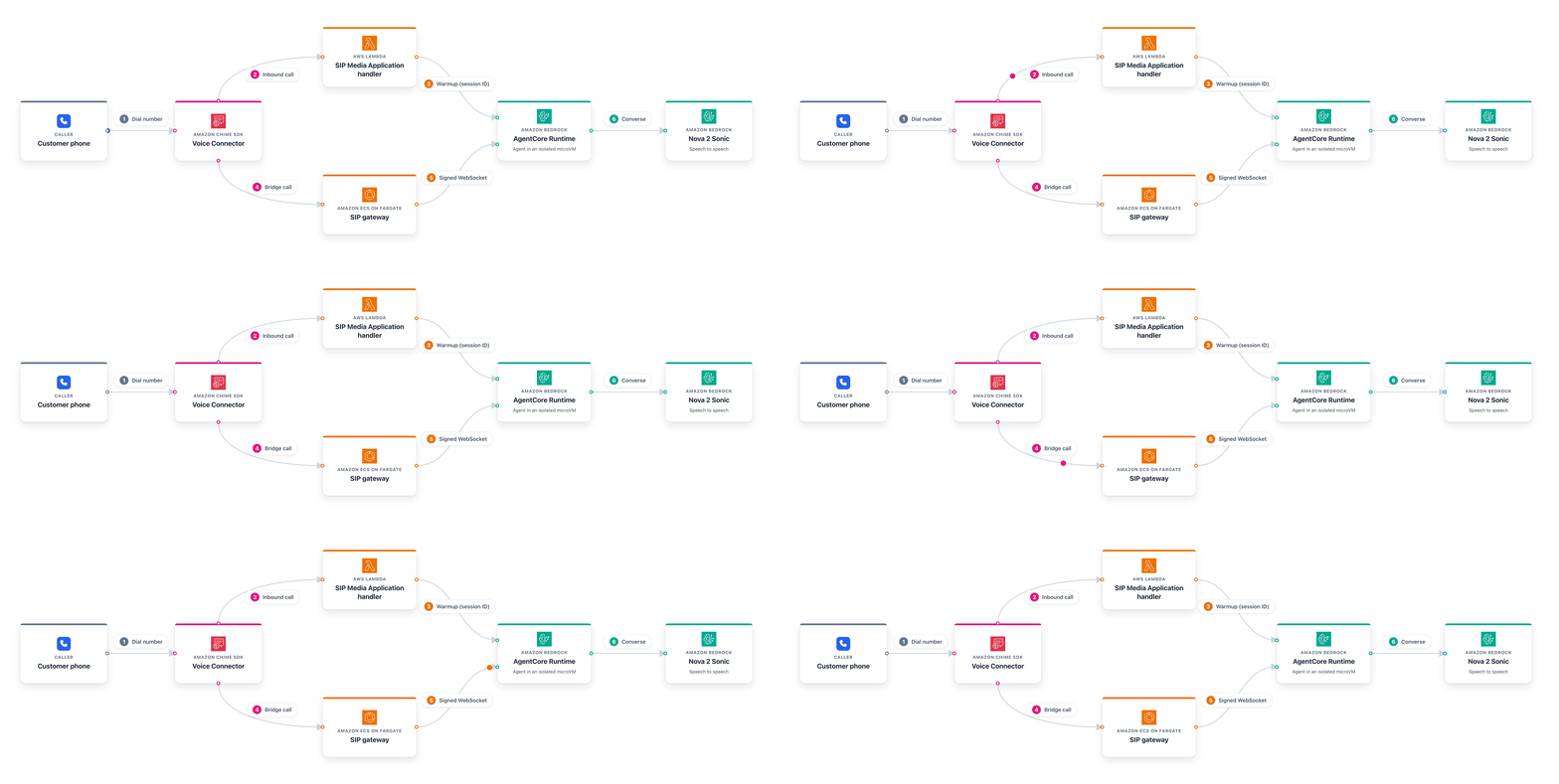
上图中的编号步骤与通话的以下阶段相对应:
- 主叫方拨打免费号码,Amazon Chime SDK Voice Connector 接听。
- Voice Connector 调用 SIP 媒体应用程序 Lambda,该 Lambda 为此次呼叫计算出一个会话标识符。
- Lambda 向 AgentCore 运行时发送预热请求,因此智能体在电话仍在振铃时便准备其会话。
- Lambda 告知 Voice Connector 将呼叫桥接到 Amazon ECS on AWS Fargate 上的 SIP 网关,并将会话标识符一并传递。
- SIP 网关使用相同的会话标识符向 AgentCore 运行时打开一个 SigV4 签名的 WebSocket。呼叫连接到已预热的会话,主叫方的音频流向智能体,智能体的音频则流回主叫方。
- 智能体使用 Amazon Nova 2 Sonic 驱动对话,并在需要菜单、购物车、订单或位置数据时,通过 AgentCore 网关调用后端工具。
先决条件
开始之前,请确认您已具备以下条件:
- 一个 AWS 账户。
- 在您部署的 AWS 区域中为 Amazon Nova 2 Sonic 启用了 Amazon Bedrock 模型访问权限,请在 Amazon Bedrock 控制台 的模型访问页面中申请。
- 已启用 Amazon Chime SDK PSTN Audio 访问权限,如果您从未在此账户中订购过号码,请在 Amazon Chime SDK 控制台 中申请提升号码配额。
- Node.js 24.x 或更高版本。
- 已配置凭证的 AWS Command Line Interface (AWS CLI) 2.x。
- git 用于克隆仓库。
- 在目标账户和区域中已完成 AWS CDK 引导(
npx cdk bootstrap aws://<ACCOUNT_ID>/<REGION>)。
智能体容器使用 Python 构建,但构建在 AWS CodeBuild 内部运行,因此您自己的机器上不需要安装 Python。请在 Amazon Nova 2 Sonic、Amazon Chime SDK PSTN Audio 和 AgentCore 运行时均可用的区域部署。美国东部(弗吉尼亚北部),us-east-1,是一个不错的起点。
使用 AWS CDK 部署解决方案
完整的解决方案可在 GitHub 示例仓库 中获取。克隆仓库并进入项目目录。
git clone https://github.com/aws-samples/sample-restaurant-telephony-ai-host-using-amazon-bedrock-agentcore-nova-sonic.git
cd sample-restaurant-telephony-ai-host-using-amazon-bedrock-agentcore-nova-sonic
运行预检脚本。它会确认 Node.js、AWS CLI、git、AWS CDK 引导和 Amazon Bedrock 模型访问权限都已就绪,并报告任何缺失项。
./scripts/preflight-check.sh
然后使用部署前缀运行部署脚本。该前缀会添加到每个资源名称中,您可以使用它在同一账户中多次部署解决方案。
./scripts/deploy-all.sh --deploymentPrefix qsr-tel
该脚本按顺序部署每个 AWS CDK 堆栈,并将前一个堆栈的输出传递给后续堆栈。它首先构建后端,然后在后端 API 前面加上 AgentCore 网关。接下来,它使用 AWS CodeBuild 构建并推送智能体容器镜像,并将智能体部署在 AgentCore 运行时上。最后,它在 Amazon ECS on AWS Fargate 上启动 SIP 网关,并分配 Amazon Chime SDK Voice Connector 和免费号码。它还会填充示例菜单和位置数据,使您在部署完成后即可立即下真实的订单。第一次构建智能体容器镜像需要几分钟时间,因此执行过程会在 AWS CodeBuild 工作时暂停,这是预期行为。
脚本完成后,会打印出要拨打的号码:
Your telephony agent is live at +1XXXXXXXXXX. Dial to test.
SIP 网关的工作原理
电话网络层只做一件事:将电话转换为智能体可以读写的媒体流。这很重要,因为电话网络和智能体使用不同的协议。电话以 UDP 上的 RTP 数据包传输音频。智能体期望一个承载 Amazon Nova 2 Sonic 所理解帧格式的 WebSocket。如果中间没有转换层,智能体就需要了解 SIP、编解码协商和网络级媒体路由,这些都会将其耦合到单个通道上。有两个组件负责这一转换工作。
Amazon Chime SDK Voice Connector 接收入站呼叫并调用 SIP 媒体应用程序 Lambda。该 Lambda 是呼叫的调度点。它返回一条指令,将呼叫桥接到 SIP 网关,并携带会话标识符,以便下一跳知道此呼叫属于哪个会话。
SIP 网关运行在 Amazon ECS on AWS Fargate 上。它使用 drachtio-server 处理 SIP 信令,并搭配一个 Node.js 桥接用于音频。网关接听呼叫,并在电话网络使用的音频格式与 Amazon Nova 2 Sonic 期望的格式之间进行转换。为实现高可用性(HA),它以两个任务跨两个 可用区(AZ) 运行,提供冗余,并可向 Amazon CloudWatch 发布呼叫计数指标。
English / 原文
Restaurants miss an average of 150 phone calls per location every month, and about 60 percent of those are customers trying to place an order or book a table. Most of these calls come in during dinner service, exactly when the host is seating guests, servers are turning tables, and the phone becomes an afterthought. Pulling someone off the floor to answer doesn’t fix the problem. It only makes two experiences worse. Adding an app or a website helps customers who prefer to order online, but it does nothing for the person who only wants to call.
In this post, we show you how to build a voice ordering system that answers a phone number and takes the order from greeting to confirmation. The system uses Amazon Bedrock AgentCore to host and run the agent and Amazon Nova 2 Sonic for real-time speech, connected to a restaurant backend through the Model Context Protocol (MCP). The walkthrough covers deploying the full stack with AWS Cloud Development Kit (AWS CDK) and bridging a phone call into the agent through a Session Initiation Protocol (SIP) gateway on Amazon Elastic Container Service (Amazon ECS) and AWS Fargate. It also warms the agent session while the phone is still ringing, so the caller never hears dead air.
Solution overview
The system has three layers. The telephony layer handles phone-specific concerns. Audio arrives over the phone network rather than a browser, and the system identifies the caller by phone number rather than by a login. A SIP gateway streams that audio to the agent layer over a signed WebSocket connection, where the agent runs the conversation with Amazon Nova 2 Sonic. The agent reaches the backend layer through MCP tools. The backend holds the menu, carts, orders, and locations. Keeping these layers apart means the ordering logic stays independent from the channel that calls it. A new channel like a mobile app or a kiosk can connect to the same agent without rewriting the backend. And because MCP is an open standard for connecting an agent to external tools, the backend can change without touching the agent. The agent supports both text and audio as input and output, handling transcription, turn-taking, and interruptions in a single bidirectional stream.
The solution deploys the following:
On the telephony side, Amazon Chime SDK Voice Connector provides the SIP trunk and toll-free number that accepts inbound calls. Amazon ECS on AWS Fargate runs the SIP gateway behind a Network Load Balancer. For the agent layer, AgentCore Runtime hosts the conversation logic, with each call running in its own microVM for isolation. Amazon Nova 2 Sonic handles the speech-to-speech interaction. AgentCore Gateway exposes the backend APIs as MCP tools the agent can discover and call by name. The backend layer uses Amazon API Gateway to front REST endpoints secured by AWS Identity and Access Management (IAM). AWS Lambda runs the business logic for menus, carts, orders, and location lookups. Amazon DynamoDB stores the data, and Amazon Location Service handles geocoding and route calculation. Amazon Elastic Container Registry (Amazon ECR), AWS CodeBuild, and Amazon Simple Storage Service (Amazon S3) build and store the agent container image.
Architecture diagram
The following diagram shows the solution, which is organized into four sections.
The restaurant’s backend infrastructure deploys first in Section A. Amazon DynamoDB holds the customer, order, menu, cart, and location data, and Amazon Location Service handles addresses and routing. AWS Lambda runs the business logic, and Amazon API Gateway exposes it externally with IAM authorization. Resources deploy in dependency order.
Section B creates the AgentCore Gateway, sets up its IAM permissions, and configures the gateway to expose the backend endpoints as agent-accessible MCP tools. This is the layer that decouples the agent from the backend. Without it, adding or changing a tool would require redeploying the agent itself.
Section C provisions the agent. It creates the Amazon ECR repository and uses Amazon S3 and AWS CodeBuild to build and push the container image. It then deploys AgentCore Runtime. It also deploys the supporting pieces that let the agent personalize each call, including a prompt-renderer Lambda function and a set of AWS Systems Manager Parameter Store entries that hold the prompt templates and a secret used for caller identification.
Section D provisions the phone path. It sets up the Amazon Chime SDK Voice Connector and a toll-free number, a SIP Media Application Lambda that decides what to do with an incoming call, a shared Amazon Virtual Private Cloud (Amazon VPC), and the SIP gateway (drachtio-server), which runs on Amazon ECS on AWS Fargate behind a Network Load Balancer. The gateway bridges the calls between the Chime SDK Voice Connector and AgentCore Runtime.
The numbered callouts in the preceding diagram trace the solution end to end:
- A call is initiated to the phone number provisioned by Amazon Chime SDK, either by a customer or forwarded from another line.
- Amazon Chime SDK answers the call and invokes AWS Lambda to set up the bridge.
- The Lambda creates a session identifier and opens a connection to AgentCore Runtime to warm up the microVM, which avoids a cold start when media streaming begins.
- After a successful response from the Lambda, Amazon Chime SDK initiates a bridge action against the Network Load Balancer by sending a SIP invite over TCP port 5060.
- The SIP service running on AWS Fargate accepts the invite and allocates a free port in the Real-time Transport Protocol (RTP) service on the same container to receive media on the assigned public IP address.
- The RTP service receives the media on the UDP port from the Voice Connector and connects to the AgentCore Runtime WebSocket to begin media translation, using the same session identifier created by the SIP Media Application handler.
- AgentCore Runtime invokes an AWS Lambda function to build the system prompt, stored on AWS Systems Manager Parameter Store, based on the session identifier and the customer’s Amazon DynamoDB record.
- AgentCore Runtime creates a session with Amazon Nova 2 Sonic and greets the customer over the established connection, following the system prompt instructions.
- AgentCore Runtime lists and calls the available tools from AgentCore Gateway using the MCP protocol.
- AWS CDK deploys the solution to Amazon S3, triggering AWS CodeBuild to build the container images and store them in Amazon ECR. AgentCore Runtime and AWS Fargate use these images to deploy the agent and the SIP and RTP servers.
- Amazon CloudWatch provides centralized monitoring, logging, and alerting across all services, and all data at rest is encrypted using AWS Key Management Service (AWS KMS).
Callouts 1–9 happen during a single phone call, callout 10 covers how the solution deploys the SIP server and AgentCore Runtime, and callout 11 covers how it’s monitored and secured. The following section sets deployment and operations aside and gets closer to the call itself.
Inbound call flow
This section follows one call from the caller’s side from the first ring to the spoken reply. It is the same runtime path as callouts 1–9 in the preceding architecture diagram. The following diagram shows it as a sequence so the order of events is more straightforward to see.
The numbered steps in the preceding diagram correspond to these stages of the call:
- The caller dials the toll-free number and Amazon Chime SDK Voice Connector answers.
- The Voice Connector invokes the SIP Media Application Lambda, which computes a session identifier for the call.
- The Lambda sends a warmup request to AgentCore Runtime, so the agent prepares its session while the phone is still ringing.
- The Lambda tells the Voice Connector to bridge the call to the SIP gateway on Amazon ECS on AWS Fargate, passing the session identifier along.
- The SIP gateway opens a SigV4-signed WebSocket to AgentCore Runtime using that same session identifier. The call attaches to the warmed session, caller audio flows to the agent, and the agent’s audio flows back to the caller.
- The agent runs the conversation with Amazon Nova 2 Sonic and calls backend tools through AgentCore Gateway when it needs menu, cart, order, or location data.
Prerequisites
Before you begin, verify that you have the following in place:
- An AWS account.
- Amazon Bedrock model access for Amazon Nova 2 Sonic in the AWS Region where you deploy, requested on the model access page in the Amazon Bedrock console.
- Amazon Chime SDK PSTN Audio access, with a phone-number quota increase requested in the Amazon Chime SDK console if you have never ordered a number in this account.
- Node.js 24.x or later.
- AWS Command Line Interface (AWS CLI) 2.x configured with credentials.
- git to clone the repository.
- AWS CDK bootstrapped in your target account and Region (
npx cdk bootstrap aws://<ACCOUNT_ID>/<REGION>).
The agent container is built with Python, but the build runs inside AWS CodeBuild, so you do not need Python on your own machine. Deploy in a Region where Amazon Nova 2 Sonic, Amazon Chime SDK PSTN Audio, and AgentCore Runtime are all available. US East (N. Virginia), us-east-1, is a good place to start.
Deploy the solution with AWS CDK
The full solution is available in the sample repository on GitHub. Clone the repository and change into the project directory.
git clone https://github.com/aws-samples/sample-restaurant-telephony-ai-host-using-amazon-bedrock-agentcore-nova-sonic.git
cd sample-restaurant-telephony-ai-host-using-amazon-bedrock-agentcore-nova-sonic
Run the preflight check. It confirms that Node.js, the AWS CLI, git, the AWS CDK bootstrap, and Amazon Bedrock model access are all in place and reports anything missing.
./scripts/preflight-check.sh
Then run the deployment script with a deployment prefix. The prefix is added to every resource name, which you can use to deploy the solution more than once in the same account.
./scripts/deploy-all.sh --deploymentPrefix qsr-tel
The script deploys each AWS CDK stack in order and passes the outputs of one stack to the subsequent stack. It builds the backend first, then adds the AgentCore Gateway in front of the backend APIs. Next, it builds and pushes the agent container image with AWS CodeBuild and deploys the agent on AgentCore Runtime. Finally, it brings up the SIP gateway on Amazon ECS on AWS Fargate and provisions the Amazon Chime SDK Voice Connector and toll-free number. It also seeds sample menu and location data so you can place a real order as soon as it finishes. The build of the agent container takes several minutes the first time, so expect the run to pause while AWS CodeBuild works.
When the script completes, it prints the number to dial:
Your telephony agent is live at +1XXXXXXXXXX. Dial to test.
How the SIP gateway works
The telephony layer has one job. It turns a phone call into a media stream the agent can read and write. This matters because the phone network and the agent speak different protocols. The phone delivers audio as RTP packets over UDP. The agent expects a WebSocket carrying frames in the format Amazon Nova 2 Sonic understands. Without a translation layer in between, the agent would need to know about SIP, codec negotiation, and network-level media routing, all of which would couple it to a single channel. Two components handle that translation.
The Amazon Chime SDK Voice Connector accepts the inbound call and invokes the SIP Media Application Lambda. That Lambda is where the call is steered. It returns an instruction to bridge the call to the SIP gateway and carries the session identifier along so the next hop knows which session this call belongs to.
The SIP gateway runs on Amazon ECS on AWS Fargate. It uses drachtio-server for SIP signaling, with a Node.js bridge for the audio. The gateway answers the call and converts between the audio format the phone network uses and the format Amazon Nova 2 Sonic expects. For high availability (HA), it runs as two tasks across two Availability Zones (AZs), which gives it redundancy and a place to publish a call-count metric to Amazon CloudWatch for scaling. The signaling for the call passes through the Network Load Balancer, but the audio itself flows directly between the Voice Connector and the Fargate task, which keeps the load balancer off the media path.
Warming the agent while the phone rings
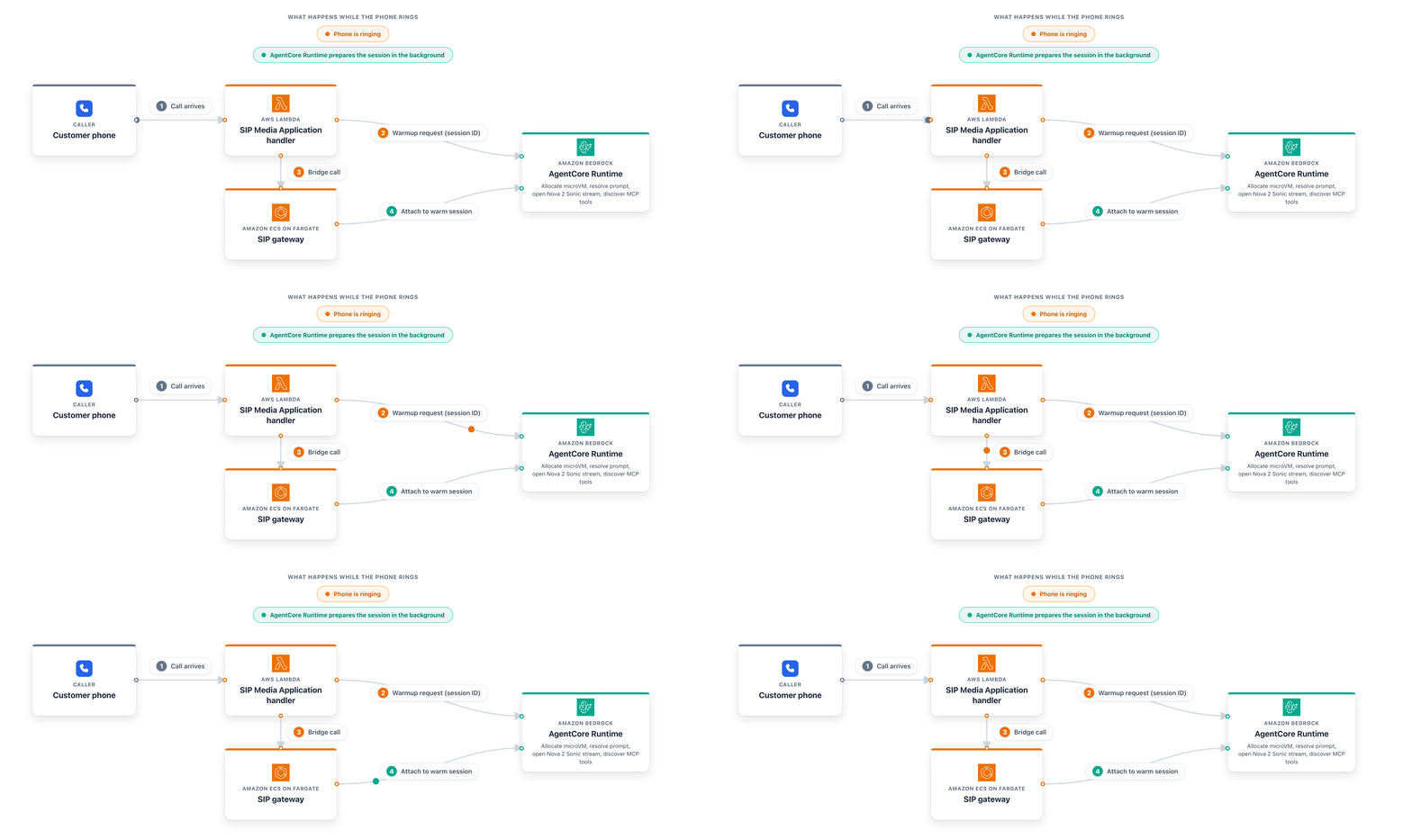
A voice call is unforgiving about silence. If a caller connects and hears nothing for a few seconds, the call feels broken even though the system is working. The slow part of starting a call is the one-time setup. The agent has to resolve the system prompt for this caller, open the Amazon Nova 2 Sonic stream, and discover the available MCP tools.
Rather than make the caller wait through that, the SIP Media Application Lambda kicks it off while the phone is still ringing. As soon as the call arrives, the Lambda sends a warmup request to AgentCore Runtime with a session identifier for the call. AgentCore Runtime allocates a microVM and runs the setup during the ringing window. A moment later, when the SIP gateway opens its WebSocket connection using the same session identifier, AgentCore Runtime routes it to that already-warm microVM, and the agent is ready to talk.
The session identifier is what connects the two requests. The Lambda computes it from the call itself, so the warmup request and the later audio connection resolve to the same microVM without any extra state to track. The following diagram shows how this overlaps with the ringing window so the agent is ready when the call connects.
Storing menus, carts, and orders
Five Amazon DynamoDB tables cover the ordering workflow. The Customers table stores profiles, including name, phone, and loyalty information, which the agent uses to recognize a returning caller. The Orders table keeps order history along with the pickup location. The Menu table holds items, prices, and availability, which can differ by location. The Carts table holds in-progress carts and uses a time-to-live value so abandoned carts clean themselves up. The Locations table holds restaurant details such as coordinates, hours, and tax rates that the agent uses for totals and recommendations. DynamoDB on-demand capacity scales with traffic, so there’s no throughput to manage.
Finding a pickup location
Amazon Location Service helps a caller find a convenient pickup spot without typing anything. A phone caller has no browser to share a location, so the agent asks for a ZIP code or a cross-street and uses Amazon Location Service to turn that into coordinates. From there, the backend can do a few things with those coordinates. It can find the nearest restaurants, rank them by driving time rather than straight-line distance so it favors a short detour along the caller’s route, or geocode a specific address. That lets the agent say something a caller can act on, such as “the closest location is on Main Street, about five minutes away,” instead of reading back an internal code.
Processing voice with Amazon Bedrock AgentCore and Amazon Nova 2 Sonic
The agent runs on AgentCore Runtime. Each call runs in its own microVM, so one caller’s session can’t affect another’s. AgentCore Runtime handles scaling and provides the WebSocket connection that carries audio both ways.
Within the agent, the agent framework defines the system prompt, the tools it can call, and the flow of the conversation. Amazon Nova 2 Sonic does the speech work within the call. It recognizes speech across a range of accents and handles the varied audio quality that comes with a phone line. It streams audio in both directions with low latency, and it calls tools asynchronously without stopping the conversation (see Async tool calls in Amazon Nova Sonic), so the caller isn’t left waiting while data is fetched. It also handles interruptions, so a caller can talk over the agent the way people do on human-to-human calls.
One detail is specific to phone calls. A backend lookup can take a few seconds, and Amazon Nova 2 Sonic ends a session that sits idle on the server side for too long. To hold the session open during a slow tool call, the agent sends a silent frame at a short interval. The session stays alive and the caller hears nothing unusual.
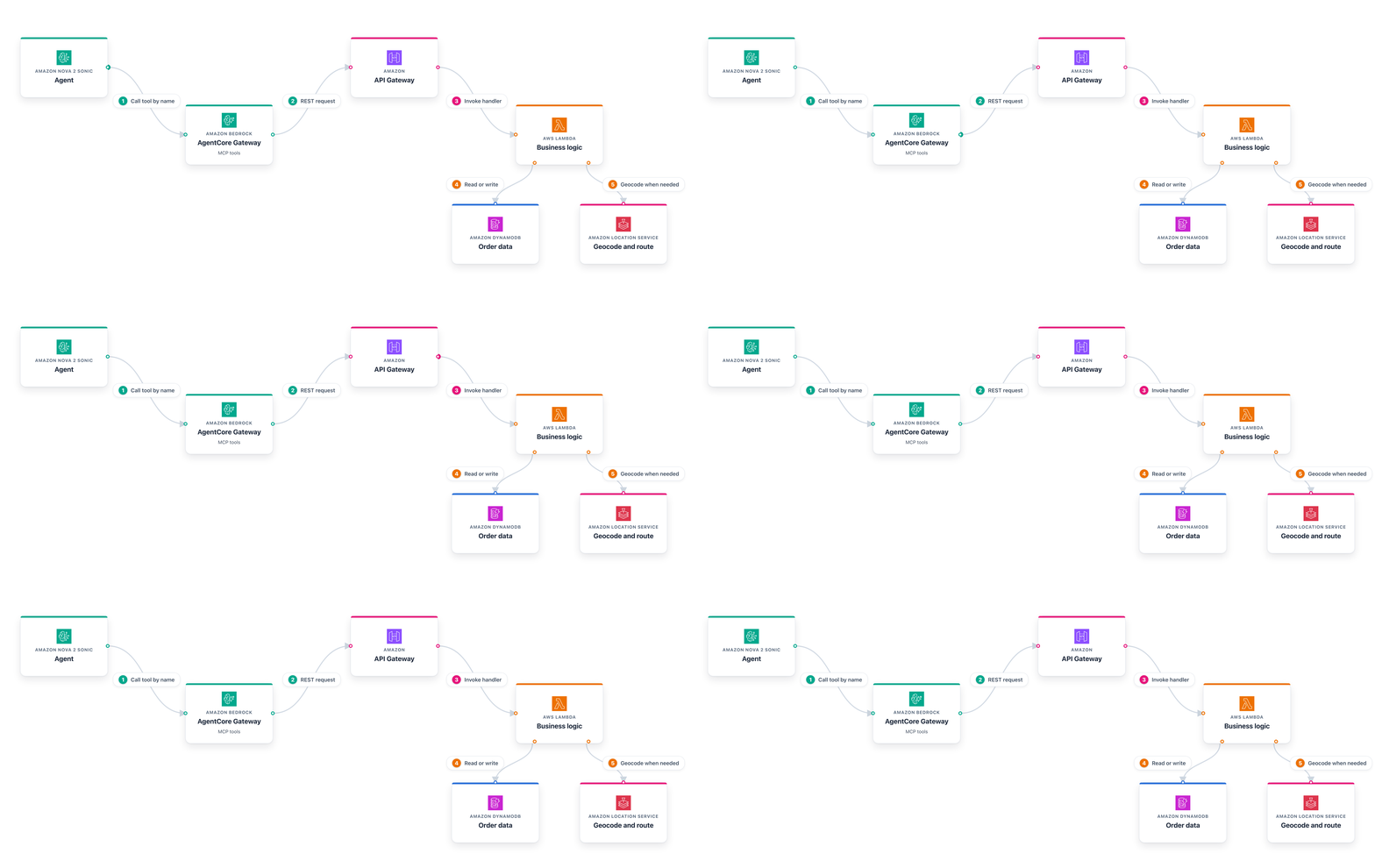
The agent never calls the backend Lambda functions directly. AgentCore Gateway sits in between and presents the backend endpoints as MCP tools that the agent discovers and calls by name, covering menu lookups, cart operations, order placement, customer and order history, geocoding, and location search. This means the agent doesn’t need to know which Lambda function lives behind a given operation or how to authenticate to it.
That layer is what keeps the design loosely coupled. When the agent calls a tool such as PlaceOrder, the gateway turns it into a REST request to Amazon API Gateway, which routes it to the matching AWS Lambda function. Because the agent talks to named tools rather than to specific functions, you can change a backend handler or add a tool without changing the agent. The same backend can also serve other channels, because they all place orders against the same tools and data.
The following diagram shows how a single tool call travels from the agent to the backend.
Recognizing a caller without a login
A phone caller doesn’t sign in, so the system uses the caller’s phone number as the basis for identity. The system hashes the number with a secret value held on AWS Systems Manager Parameter Store, and the result becomes the session identifier. The raw phone number doesn’t appear in logs or session state. This hashing approach helps meet personally identifiable information (PII) handling requirements by ensuring that sensitive caller information is never stored or transmitted in plain text.
If that identifier matches a known customer, the agent greets the caller by name and can offer their last order. If it doesn’t match, the caller orders as a guest, and the order is still placed and stored. Each order records the channel it came from and whether the caller was a guest, so you can identify telephony orders later.
This recognizes a returning caller without asking for a login, but it’s not identity verification, and the phone-number hash shouldn’t be treated as proof of who is calling. Anyone with access to the same phone can place an order under that identity. A production deployment that needs verified identity can add a step such as a one-time passcode sent through SMS before the agent opens the caller’s account history.
Ordering walkthrough
Dial the number from the deploy output. The agent greets you and asks what you would like. You can speak naturally, ask about the menu, give a ZIP code for pickup, and confirm the order, all by voice. While the caller talks, the agent calls backend tools in the background, so there are no pauses while data loads. The following video shows a typical order from greeting to confirmation.
After the call ends, you can trace the full path in Amazon CloudWatch Logs. The SIP gateway logs show how the call was set up and bridged to the agent. The agent logs show each agent event and tool call as the conversation progressed. Once the order is confirmed, it lands in the DynamoDB Orders table with its total and estimated ready time.
Cost
You pay for the AWS services the system uses. The toll-free per-minute charge and the always-on Fargate tasks are the two largest line items. You can lower both if it fits your needs. A local Direct Inward Dialing number costs less per minute than a toll-free number, and scaling the Fargate tasks down outside business hours cuts the compute charge once you know your traffic. Check the pricing page for each service for current rates, and set up a budget in AWS Cost Explorer to track spend.
Clean up
To avoid ongoing charges, remove the resources when you are done. The always-on Fargate tasks and the toll-free number continue to accrue cost whether or not calls are coming in. The cleanup script deletes the stacks in reverse order so each stack is removed before the ones it depends on.
# Preview what will be deleted without removing anything.
./scripts/cleanup-all.sh --dry-run

# Delete every stack the deploy created.
./scripts/cleanup-all.sh
Cleanup is destructive. It releases the toll-free number, deletes the order history in Amazon DynamoDB, removes the secret on AWS Systems Manager Parameter Store, and deletes the container images in Amazon ECR. Back up anything you want to keep first. When the script finishes, confirm in the AWS CloudFormation console that the stacks are gone (see Viewing AWS CloudFormation stack data and resources on the AWS Management Console) and in the Amazon Chime SDK console that the toll-free number has been released (see Managing phone numbers in Amazon Chime SDK).
Conclusion
In this post, we walked through a telephony voice ordering system from deployment to a completed order. The architecture keeps telephony, agent, and backend independent so each piece can evolve on its own. That separation is what makes the system practical to operate, because you can update menu data, swap in a new voice model, or add a channel without coordinating changes across the whole stack.
For the restaurant, this means phone orders flow in without pulling staff away from the counter. Callers get an immediate greeting instead of hold music, the agent confirms each item out loud to reduce mistakes, and the system handles peak hours without extra headcount. Because the agent connects to the backend through MCP tools, you can add capabilities like reservations or loyalty points by registering new tools without changing the agent or the telephony layer.
To get started, clone the sample repository on GitHub and run the preflight check to confirm your environment is ready. From there, replace the seed data in the DynamoDB table definitions with your own menu items, locations, and pricing. Update the system prompt templates in the Parameter Store entries to reflect your restaurant’s name, greeting style, and any ordering rules. Then run the deploy script to bring the system live on your own toll-free number.
About the authors
Sergio Barraza
Sergio is a Senior Technical Account Manager at AWS, helping customers design and optimize cloud solutions. With more than 25 years in software development, he guides customers through AWS service adoption. Outside work, Sergio plays guitar, piano, and drums, and practices Wing Chun Kung Fu.
Salman Ahmed
Salman is a Senior Technical Account Manager at AWS, specializing in helping customers design, implement, and optimize their AWS environments. He combines deep networking expertise with a passion for exploring emerging technologies to help organizations get the most out of their cloud investments. Outside of work, he enjoys photography, traveling, and watching his favorite sports teams.
Ravi Kumar
Ravi is a Senior Technical Account Manager in AWS Enterprise Support who helps customers in the travel and hospitality industry run their cloud operations. He has more than 20 years of IT experience and explores applications of generative AI in cloud computing. Outside of work, Ravi enjoys painting, cricket, and traveling to new places.