使用 Amazon Quick 转型销售组织:你的全新 AI 智能体队友
英文标题:Transform your sales organization with Amazon Quick: your new agentic AI teammate
平均销售人员仅有 40% 的时间用于实际销售,其余被 CRM 更新、调研等低价值任务吞噬。Amazon Quick 作为 AI 助手,通过线索评分、个性化外联、风险检测、会议准备和 CRM 自动化等功能,覆盖从识别高价值潜在客户到成交的完整销售周期。它还能从自然语言构建自定义应用,降低非代码使用门槛。本文结合实时数据演示了这些能力,为企业通过 AI 优化销售效率、减少管理摩擦提供了端到端的实践指南。
 468.3 KB
 274.1 KB
 489.6 KB
 601.3 KB
 612.4 KB
 615.4 KB
 707.7 KB
 571.5 KB
 297.5 KB
 476.1 KB
 461.0 KB
 322.4 KB
 645.5 KB
 541.0 KB
 505.5 KB
 9.0 KB
 230.8 KB
中文
平均销售人员只有 40% 的时间真正用于销售。其余时间被必要但低价值的工作吞噬:客户关系管理(CRM)更新、潜在客户调研、邮件起草,以及在工具之间不断地切换上下文。不知不觉中,一天已经过去,而你只把一小部分时间花在了推动成交和为客户创造价值的事情上。
Amazon Quick 是一款工作 AI 助手,能将问题转化为答案,将答案转化为行动,再将行动转化为成果。无论你是在浏览器、桌面应用中,还是直接在 Microsoft 365、Outlook 及其他你每天使用的工具里工作,Quick 都能帮助销售人员在销售上投入更多时间,减少行政事务。结果就是:你的销售团队可以覆盖更多领域、更快成交、并在任何规模下加深客户忠诚度。
像 「视频:3M」、AWS Global Sales 和 Amazon 这样的公司已经使用 Quick 来释放其销售人员的全部潜力。请观看 「视频:AWS Global Sales 如何转变洞察交付」、「视频:AWS 销售团队如何及时了解新产品发布」,以及 「视频:Amazon 在数千名用户中部署 Quick Suite 的历程」。
在本文中,我们将介绍 Quick 兑现这一承诺的几种方式。覆盖整个销售周期,从识别最高优先级的潜在客户,到联系他们、推进交易直至成交,并在账户成熟的过程中保持 CRM 的最新状态,同时保护你最稀缺的资源:时间。
线索评分与潜在客户优先级排序:专注于最高价值机会
你正盯着 CRM 中 200 条线索的列表。有些人 6 个月前填写了表格。其他人上周下载了白皮书。少数人回复了冷邮件。今天谁值得你关注?
这一挑战是常态。大多数销售团队缺乏对哪些线索真正准备好购买的可见性,从而导致错失机会和更长的销售周期。或者,稀缺资源被用于优先处理较小的机会,而牺牲了最大的机会。
Amazon Quick 通过连接你的 CRM、电子邮件、网络分析和支持系统,分析互动信号,并根据购买意向动态排列线索,帮助你自动识别和优先处理高意向潜在客户。借助能够从内部文档、商机详情和账户历史中提取上下文的自定义聊天智能体,Quick 让你能够专注于最有可能转化的潜在客户。
在开始优先考虑外联潜在客户之前,你必须将 Quick 与现有的 CRM 系统集成。Quick 文档中提供了面向 Salesforce、HubSpot、ServiceNow 和其他系统的分步说明。
首先使用 Amazon Quick Sight 创建仪表板——这是 Amazon Quick 中的商业智能服务,用于从已连接的数据源构建交互式可视化。然后,使用聊天功能提示 Quick 评估该仪表板,并提供最紧急需要推进的交易列表。
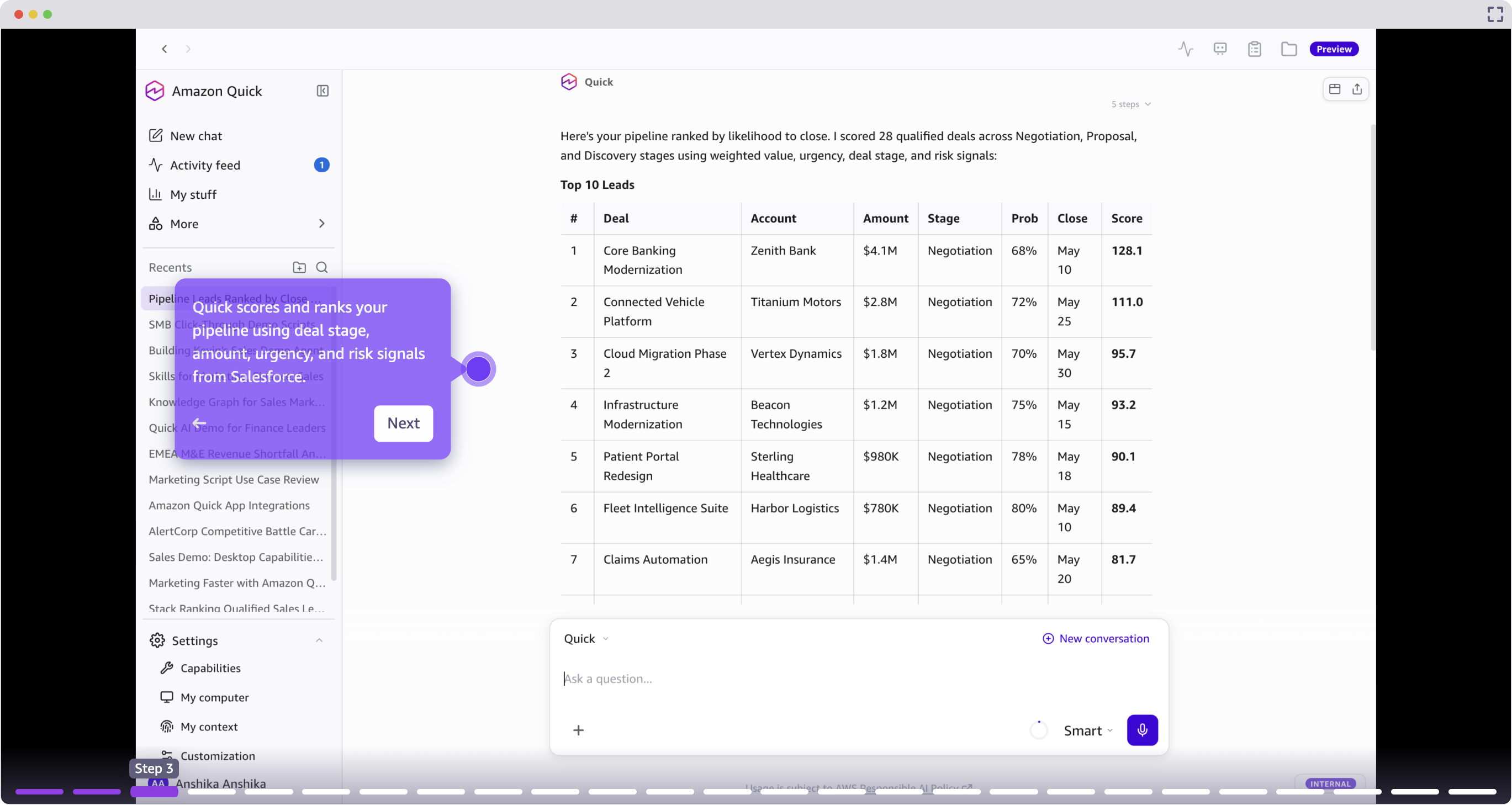
用户提供一个自然语言提示,例如“排列我的管道”,Quick 会汇总跨连接系统的数据,生成一个按优先级排序的视图。进展停滞、逾期跟进或面临竞争压力的交易会出现在顶部。
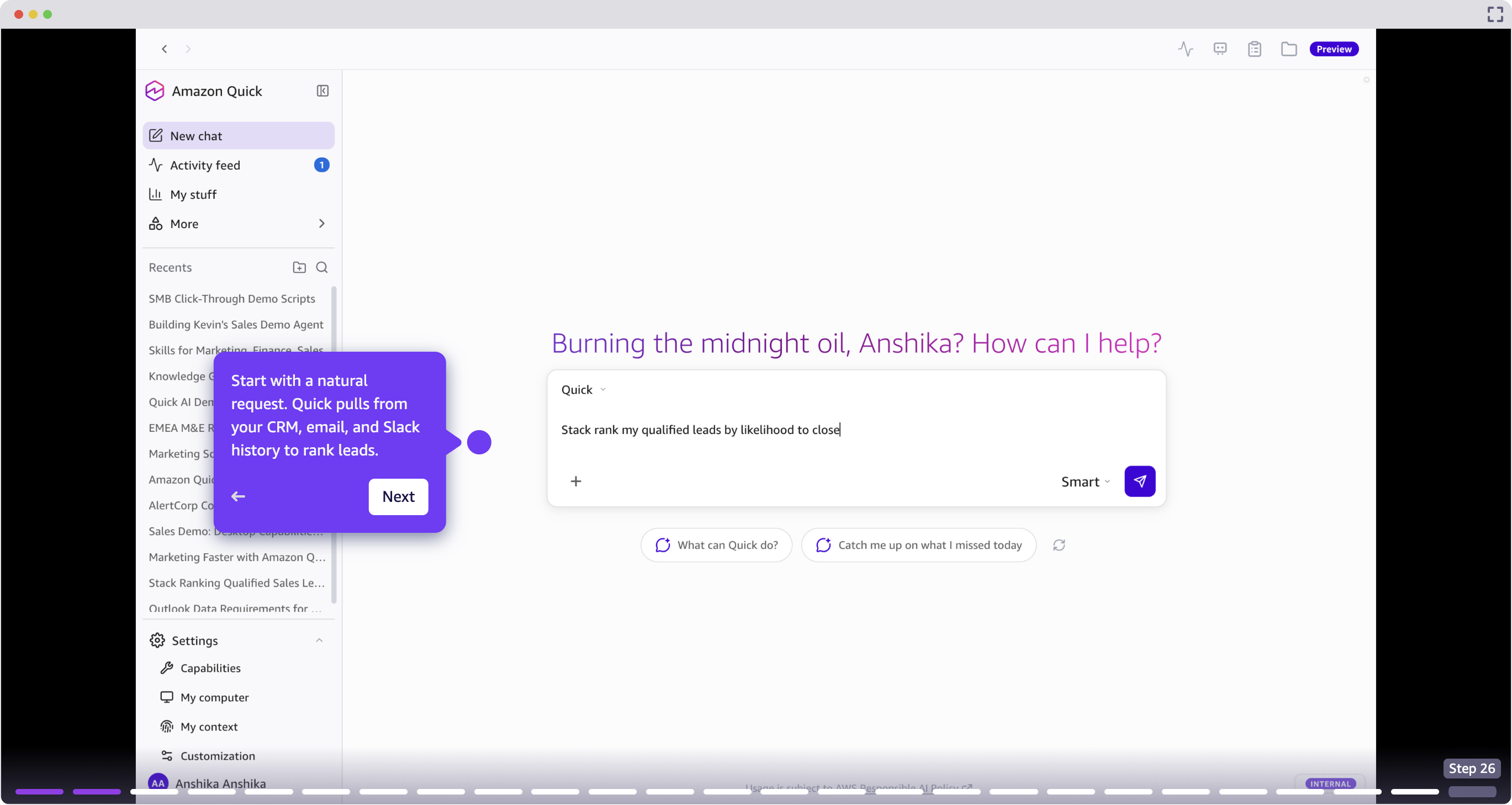
风险检测与下一步行动
对于每笔交易,Quick 会识别特定的风险信号,例如停滞的邮件往来、错过的跟进以及对竞争者的提及,并推荐具体的下一步行动。销售人员可以直接从对话中触发后续技能,无需切换上下文。
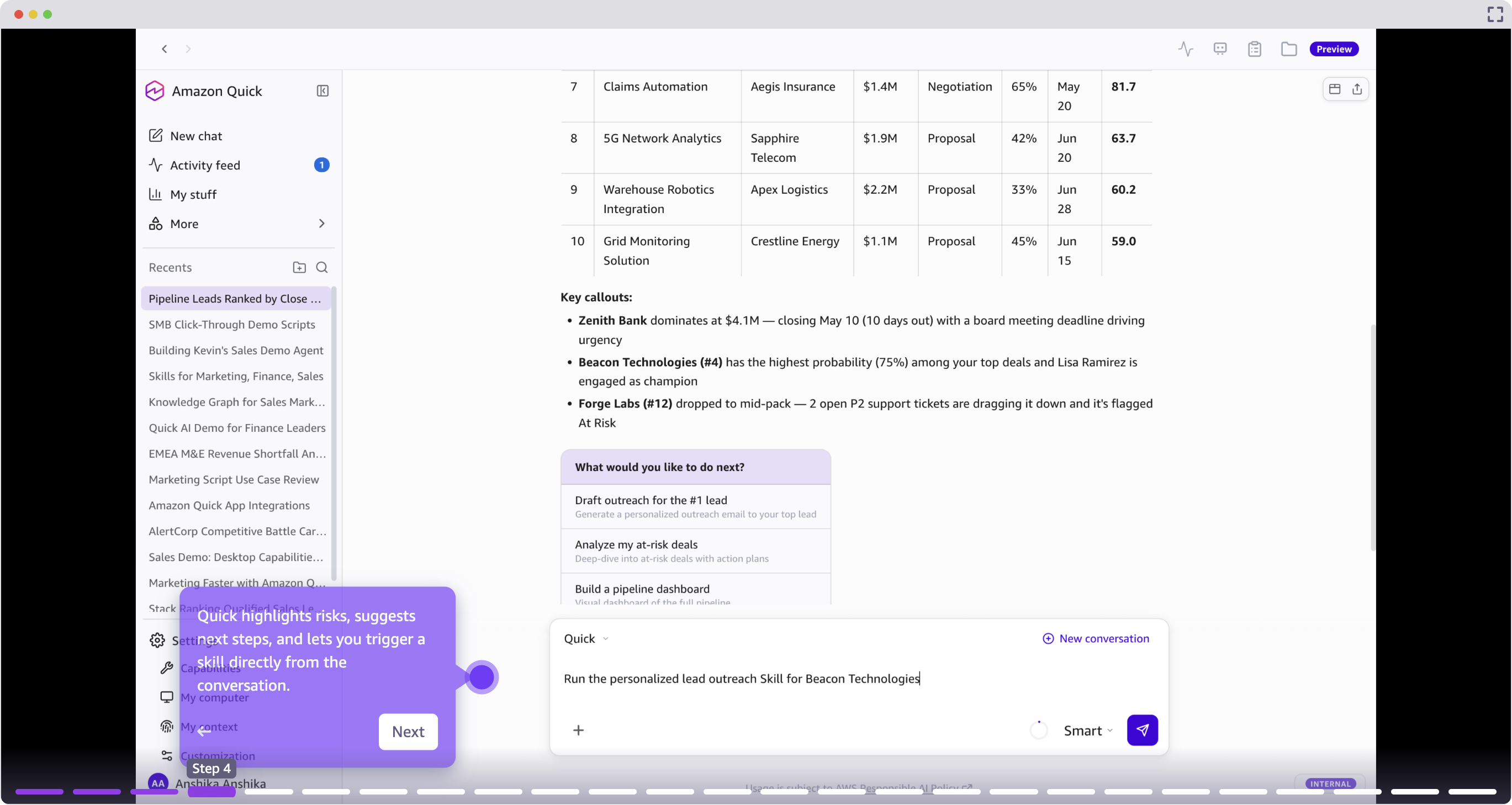
个性化外联与邮件互动:秒速打造能引起共鸣的讯息
现在你已经确定了最高优先级的潜在客户,是时候去联系他们了。传统上,要起草一封足够个性化的邮件,需要你在 CRM、内部文档以及外部信号(如公司网站、近期新闻稿、潜在客户的 LinkedIn 页面)之间手动搜索。替代方案是发送一封几乎肯定会被忽略的通用邮件。
Quick 消除了这种权衡,帮助你撰写高度定制的外联邮件,引述特定的上下文,例如近期的公司新闻、过往互动中的痛点以及相关的应用案例,而无需数小时的人工调研。
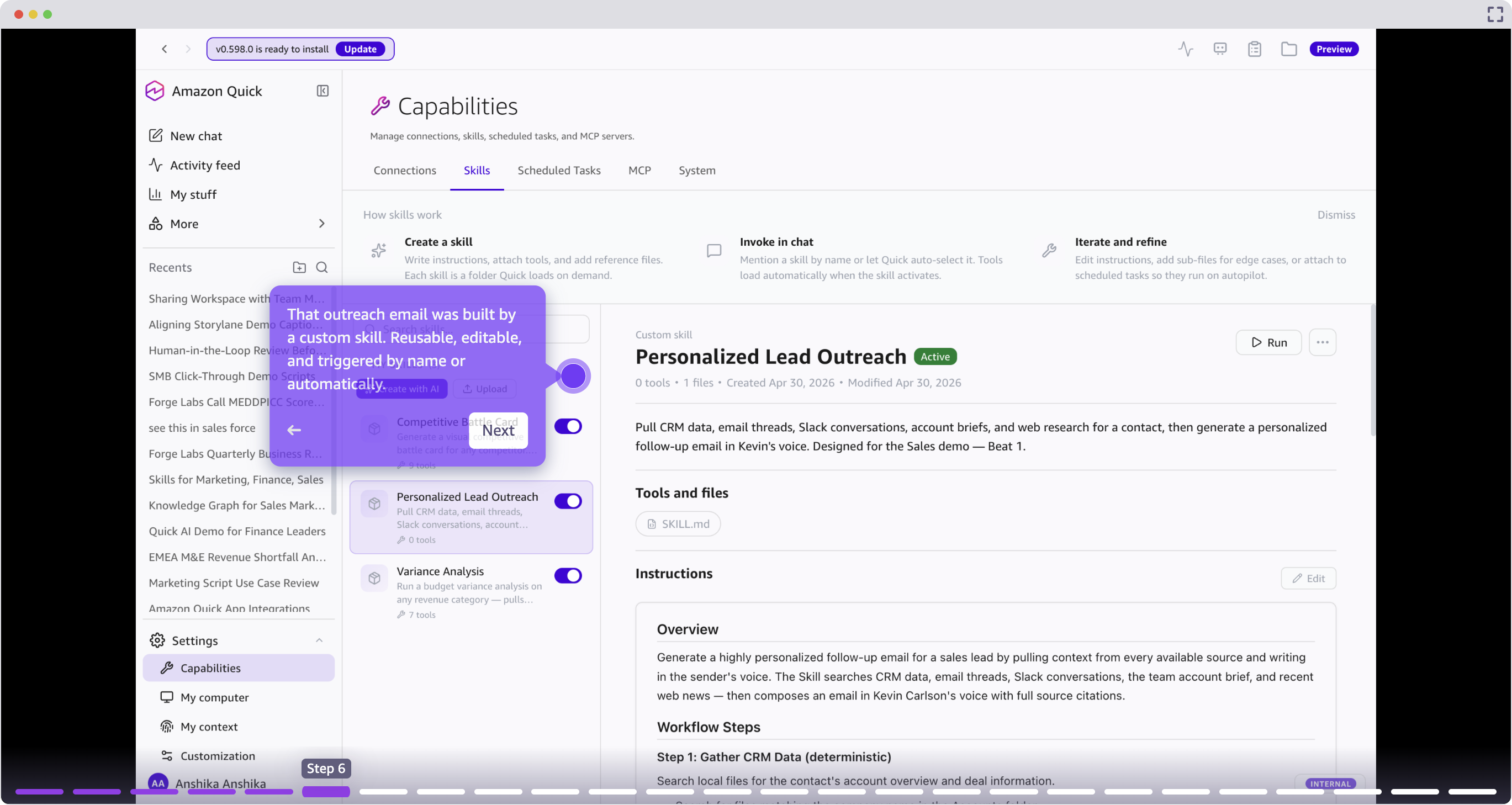
由于这是一个重复性的挑战,你可以使用 Amazon Quick 创建一个技能:一个可重复使用、自动按步骤执行的工作流。在这个例子中,我们告诉 Quick“通过从多个来源(CRM、邮件往来、Slack 对话、账户简报和网络调研)拉取数据来研究一个潜在客户,然后生成一封个性化的外联邮件”。你可以为当前潜在客户使用这项技能,并在未来将其复用于所有账户。
此步骤需要将 Outlook 与 Amazon Quick 集成。
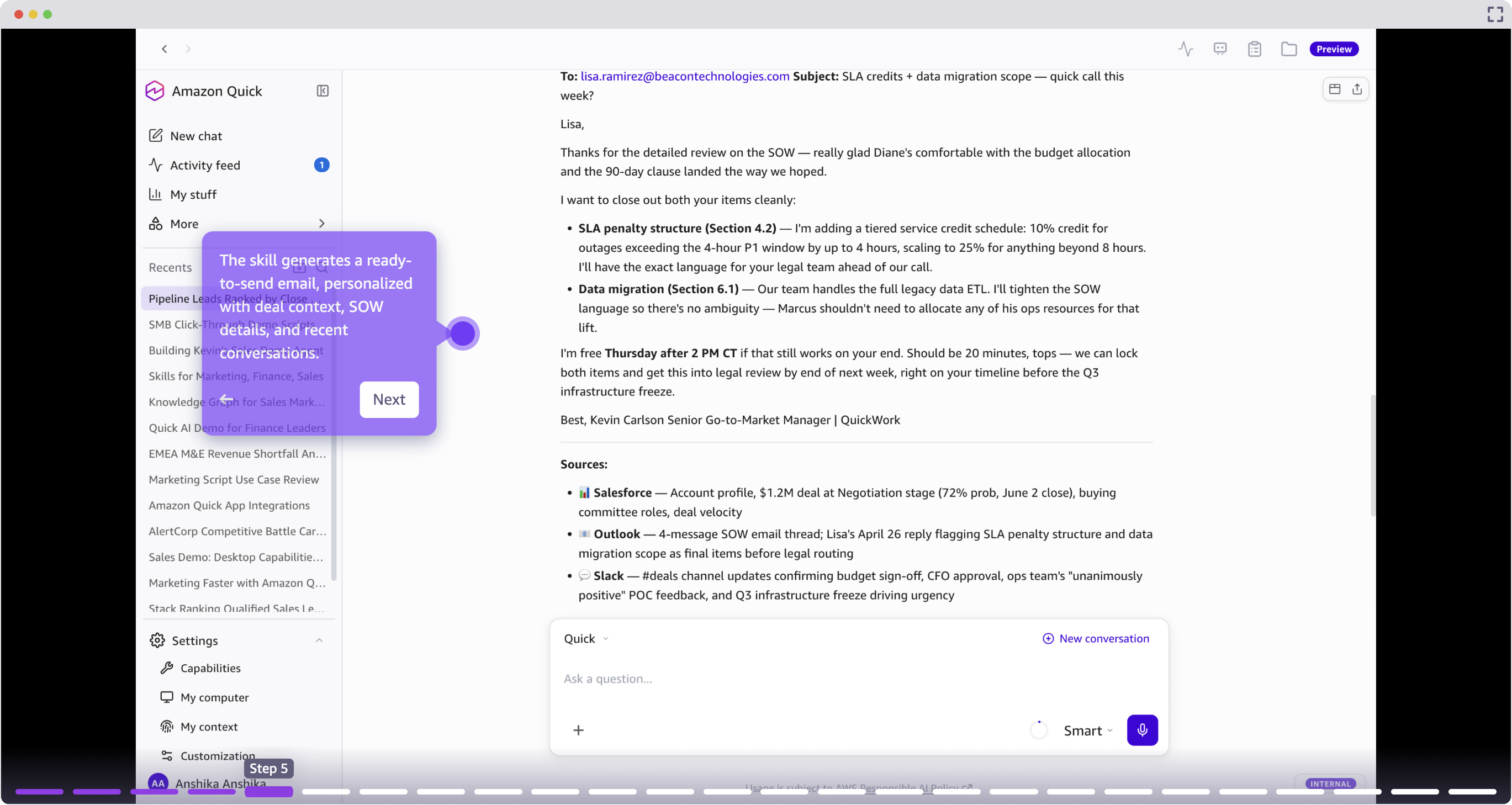
这种外联由一个自定义技能驱动:一种可重复使用的工作流,任何团队成员都可以按名称触发,或配置为在满足条件时自动运行。在审阅邮件并提供反馈之后,你可以直接从 Quick 中将其发出。
借助 Microsoft 365 扩展,你也可以直接在 Outlook 或 Teams 中工作。Quick 会在你的邮件客户端中作为侧边栏浮现,让你无需切换标签页就能生成个性化外联、拉取账户上下文并优化消息。
活动监控:以清晰的思路开始每一天
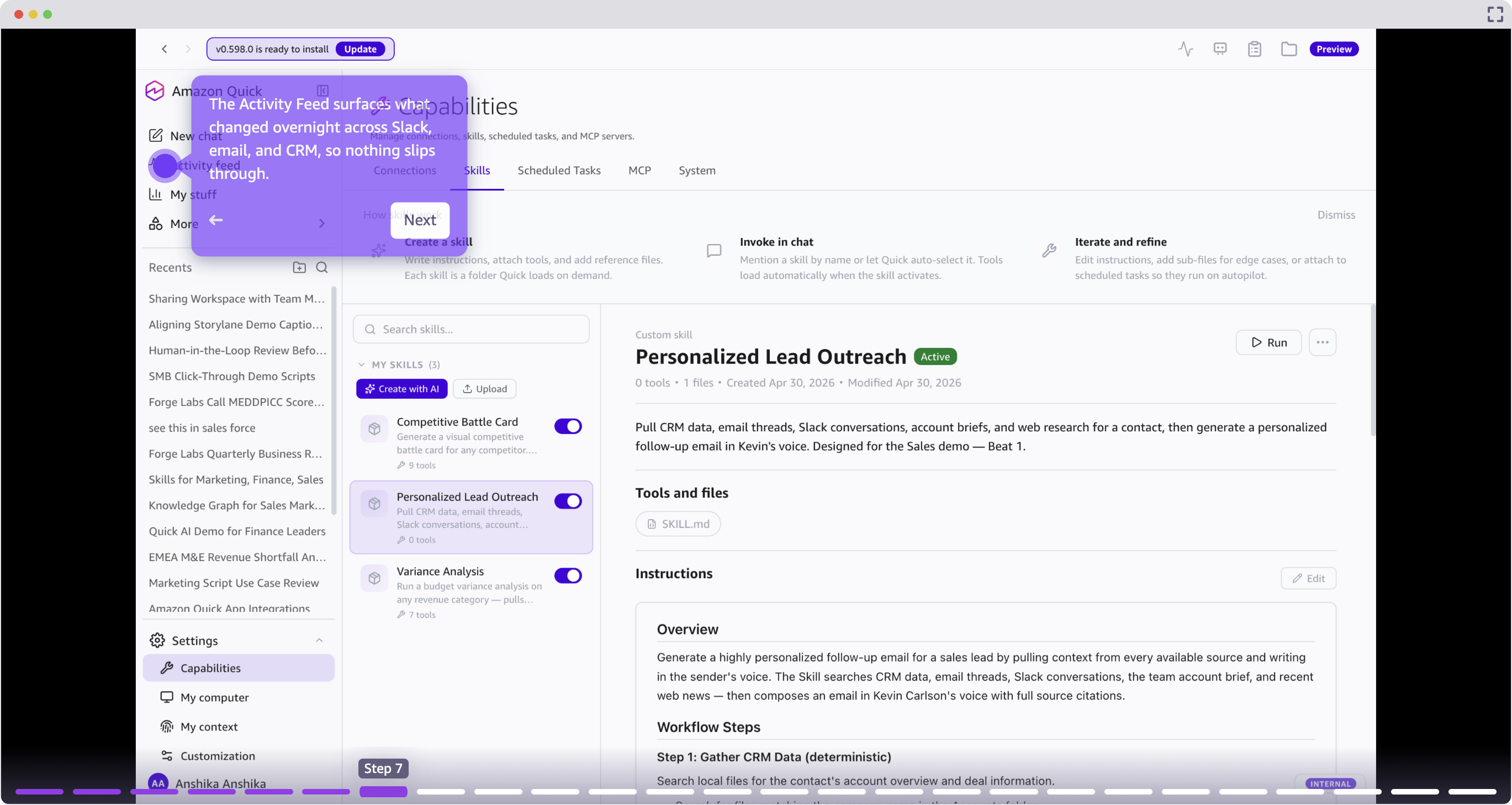
活动源(Activity Feed)会展示过夜间 Slack、邮件和 CRM 中发生的变更,并根据与销售人员活跃交易的相关性进行优先级排序。这用单一的整合视图取代了在多个工具间进行手动晨间分类的工作。
账户情报:满怀信心地为成交做准备
客户同意下周会面讨论你提出的解决方案。成功了!但准备工作就此开始。传统上,你需要花费数小时准备,在 Salesforce 中查找交易历史、在 ServiceNow 中查看支持工单、在邮件客户端中翻阅过往对话、并在搜索引擎中搜索行业背景。等你拼凑出一幅完整图景时,已经耗费了一个小时。
你可以让 Quick 创建一页会议准备文档,内容包括账户快照、与会者简介、问题和风险。将 Quick Chat 链接到一个 Quick 空间,这是一个集中的知识库,你可以在其中组织文档、数据源和文件,供 Quick 在回答问题或完成任务时引用。
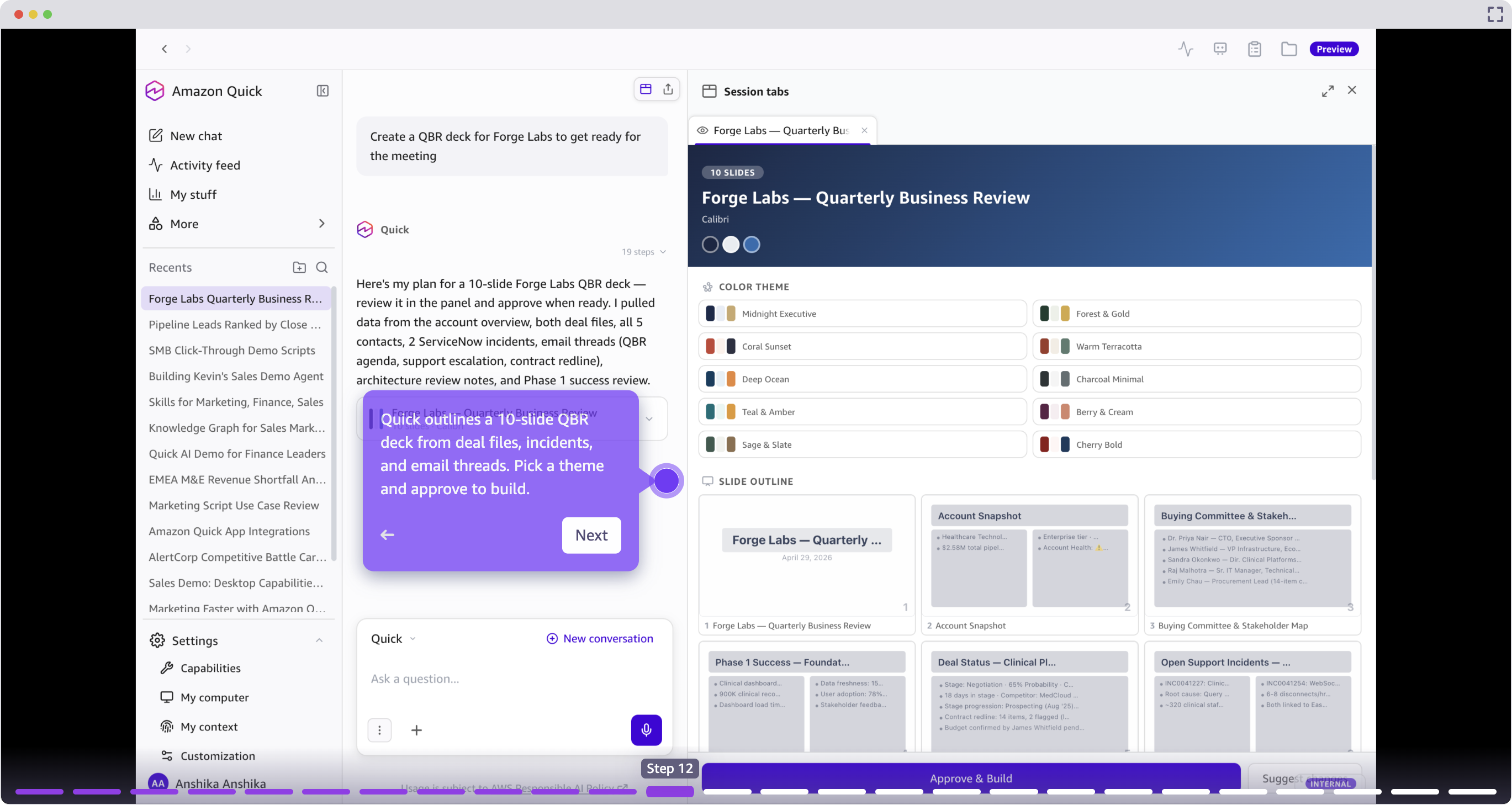
在准备季度业务回顾(QBR)时,Quick 可以更进一步,从交易文件、支持工单和邮件往来中勾勒并构建完整的演示文稿。销售人员审阅提议的大纲,选择主题,然后批准构建。
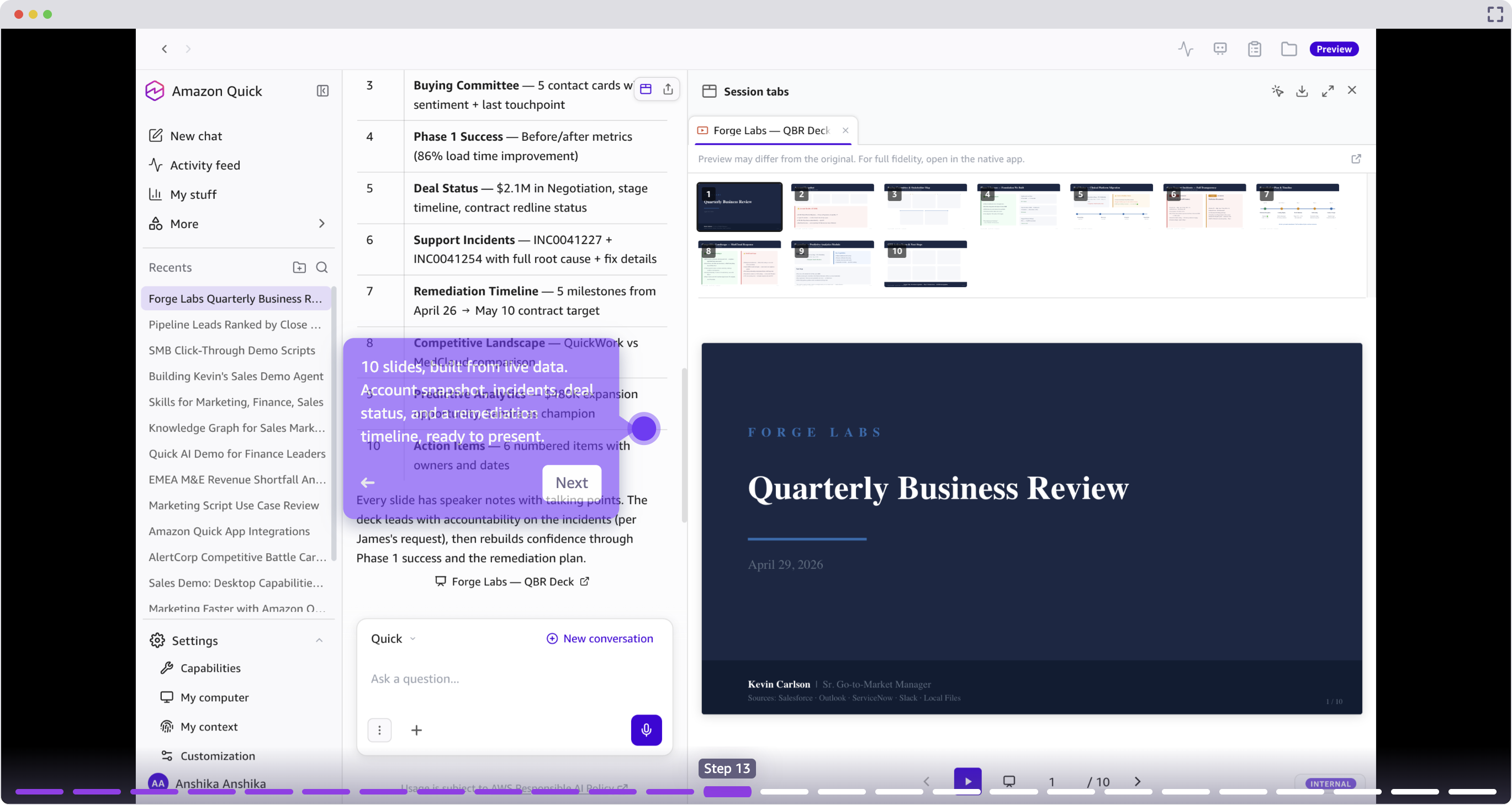
生成的演示文稿包括账户快照、工单时间线、交易状态和整改计划,完全由当前数据构建,而非从多个来源手动拼凑。几分钟的准备代替了数小时。
通话记录评分:针对你的方法论评估每一次对话
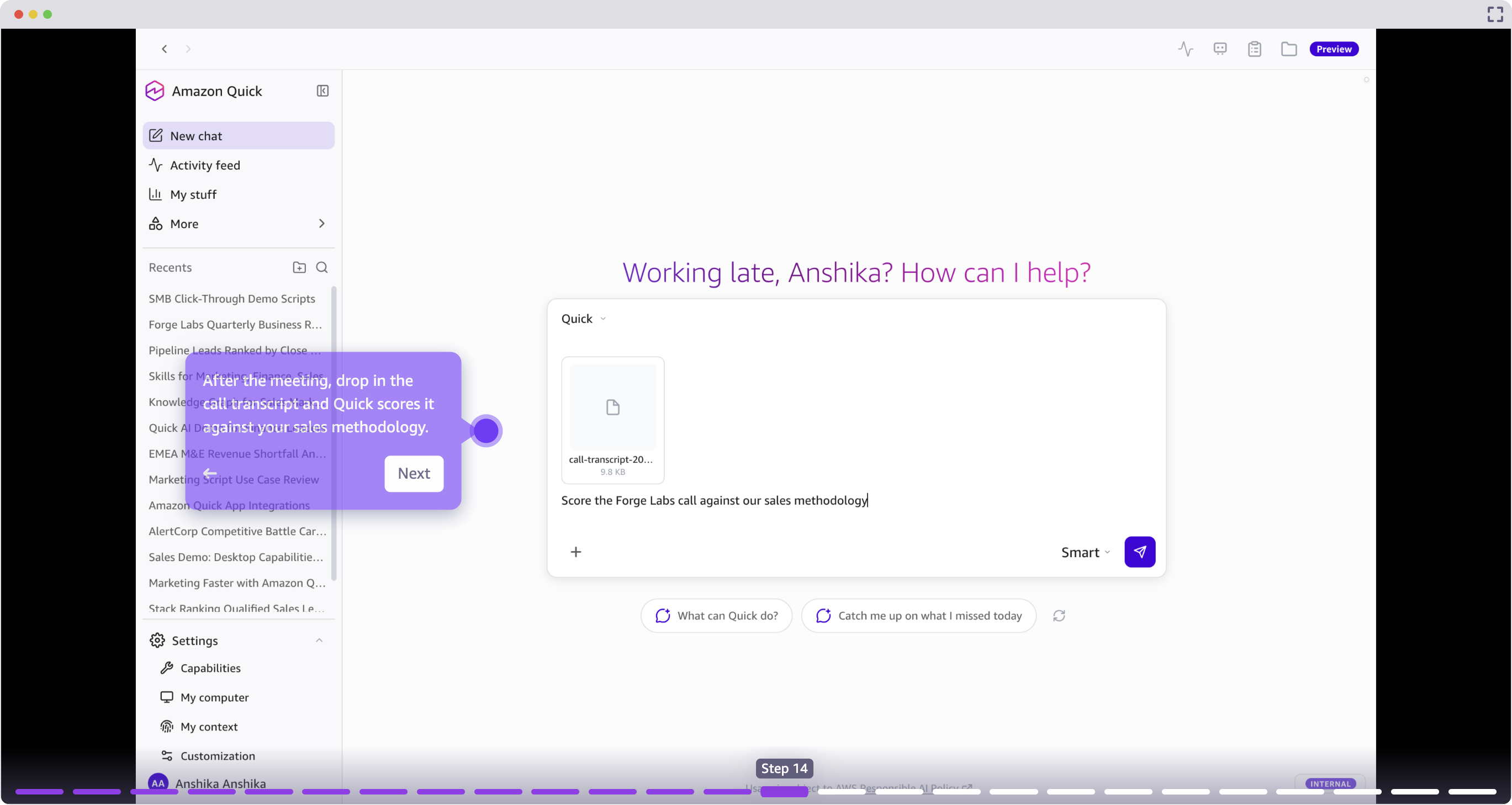
会议结束后,销售人员可以将通话记录放入 Quick,按照其销售方法论(例如 MEDDPICC、BANT 或自定义框架)进行自动评分。Quick 会识别讨论了哪些内容、存在哪些缺口,并基于对话提供关于交易健康状况的结构化评估。
CRM 自动化与活动记录:保持记录系统的准确性
传统上,每次互动都需要 15-20 分钟的 CRM 更新,而在处理其他时间敏感的客户互动时,这一更新往往难以被优先考虑。随着从开会到更新 Salesforce 之间的时间流逝,上下文会丢失,细节也会被遗漏。
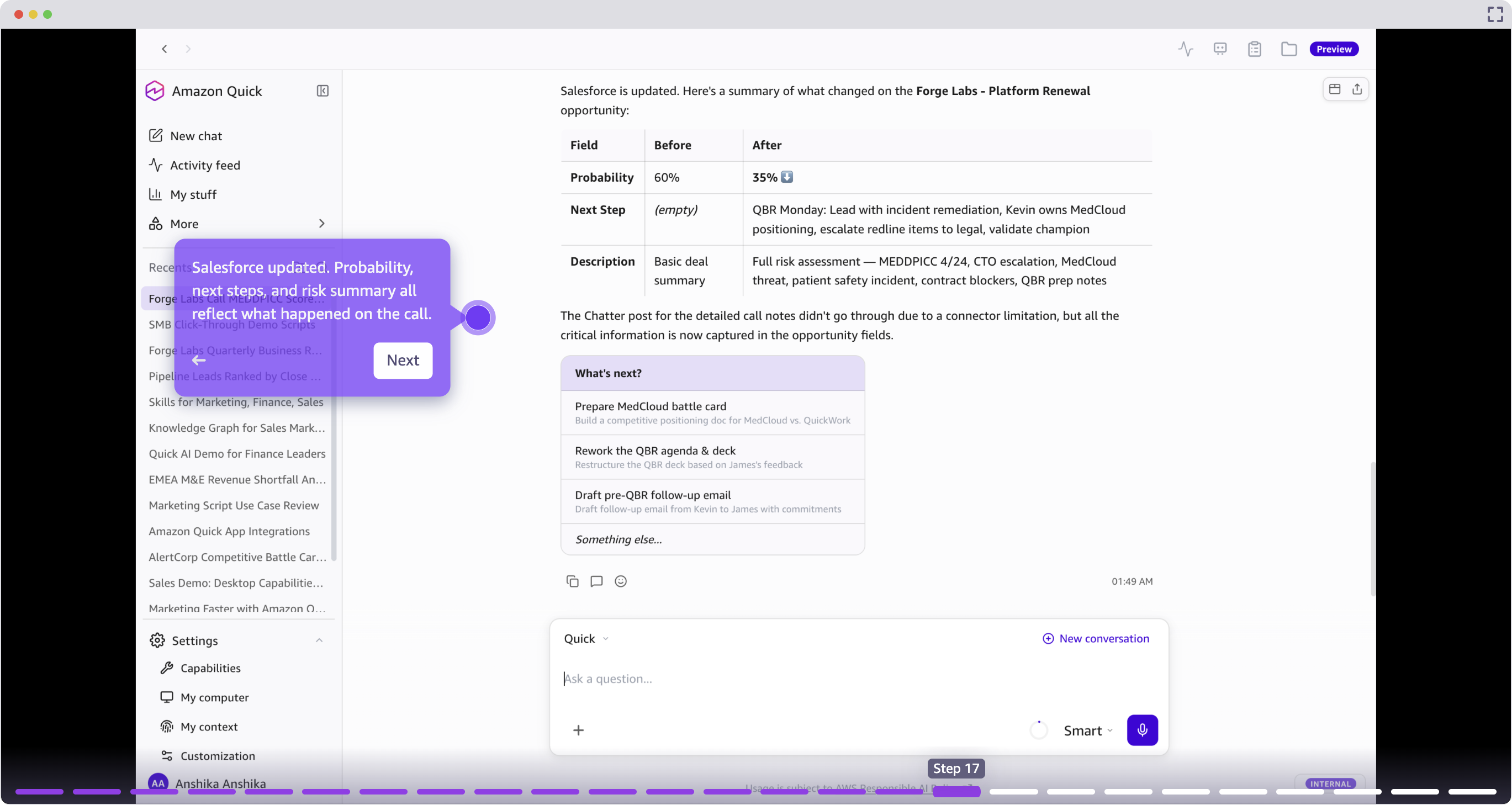
在通话分析之后,Quick 会将结构化更新推送到 Salesforce,包括交易可能性、下一步行动、风险标志和对话摘要。这使得记录系统保持准确,且无需手动数据输入。
从自然语言构建自定义应用:无需代码构建工具
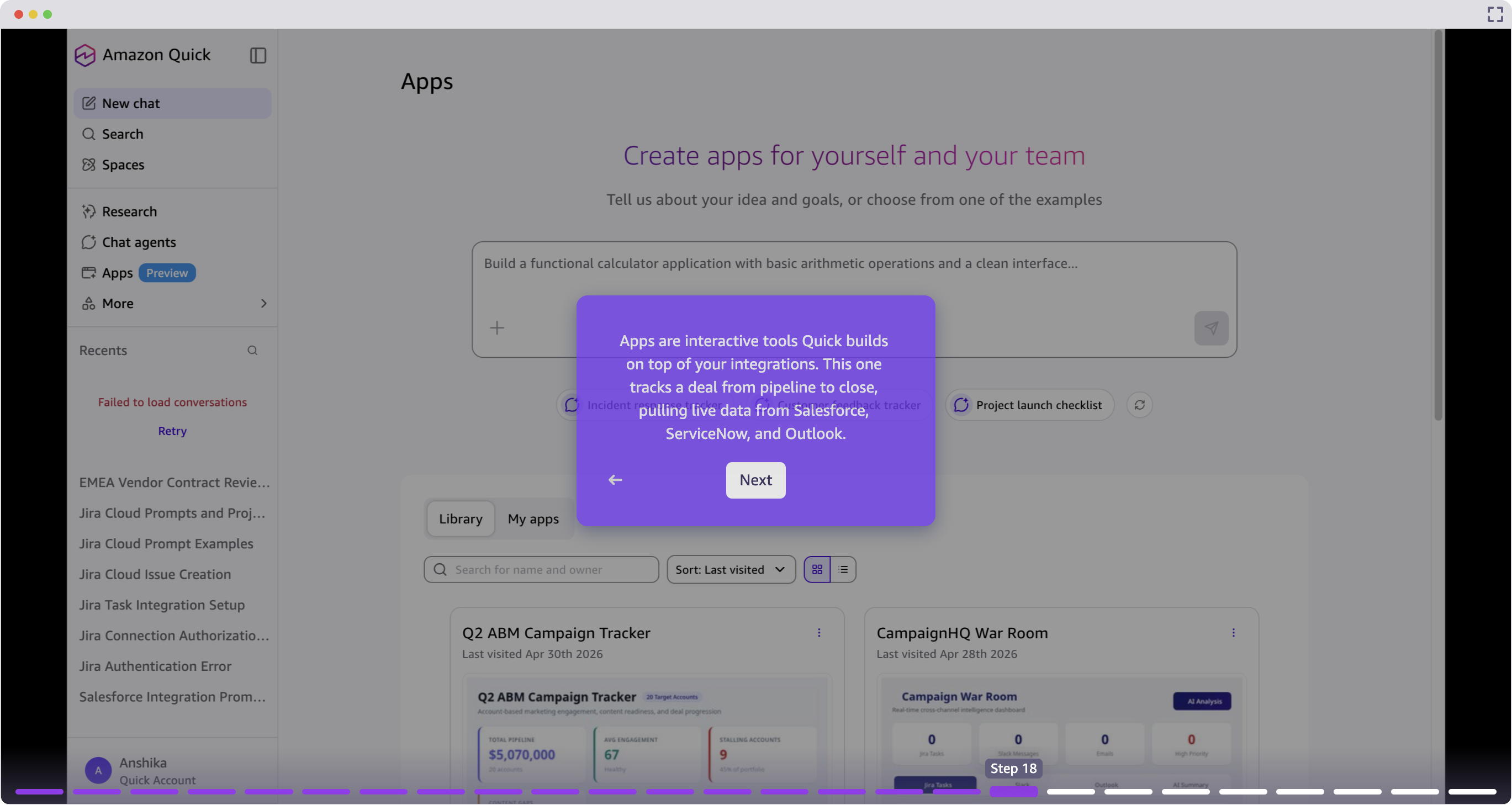
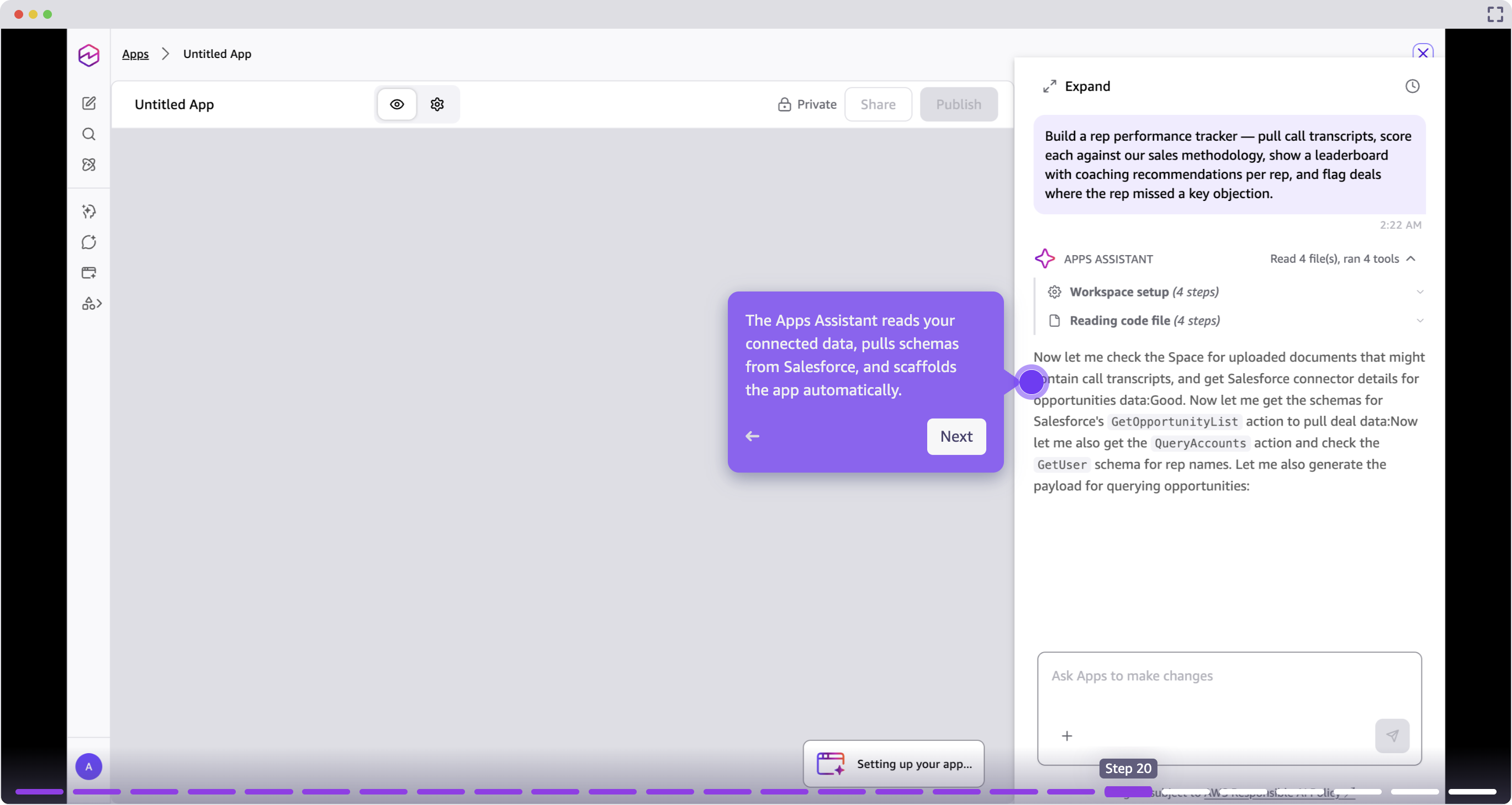
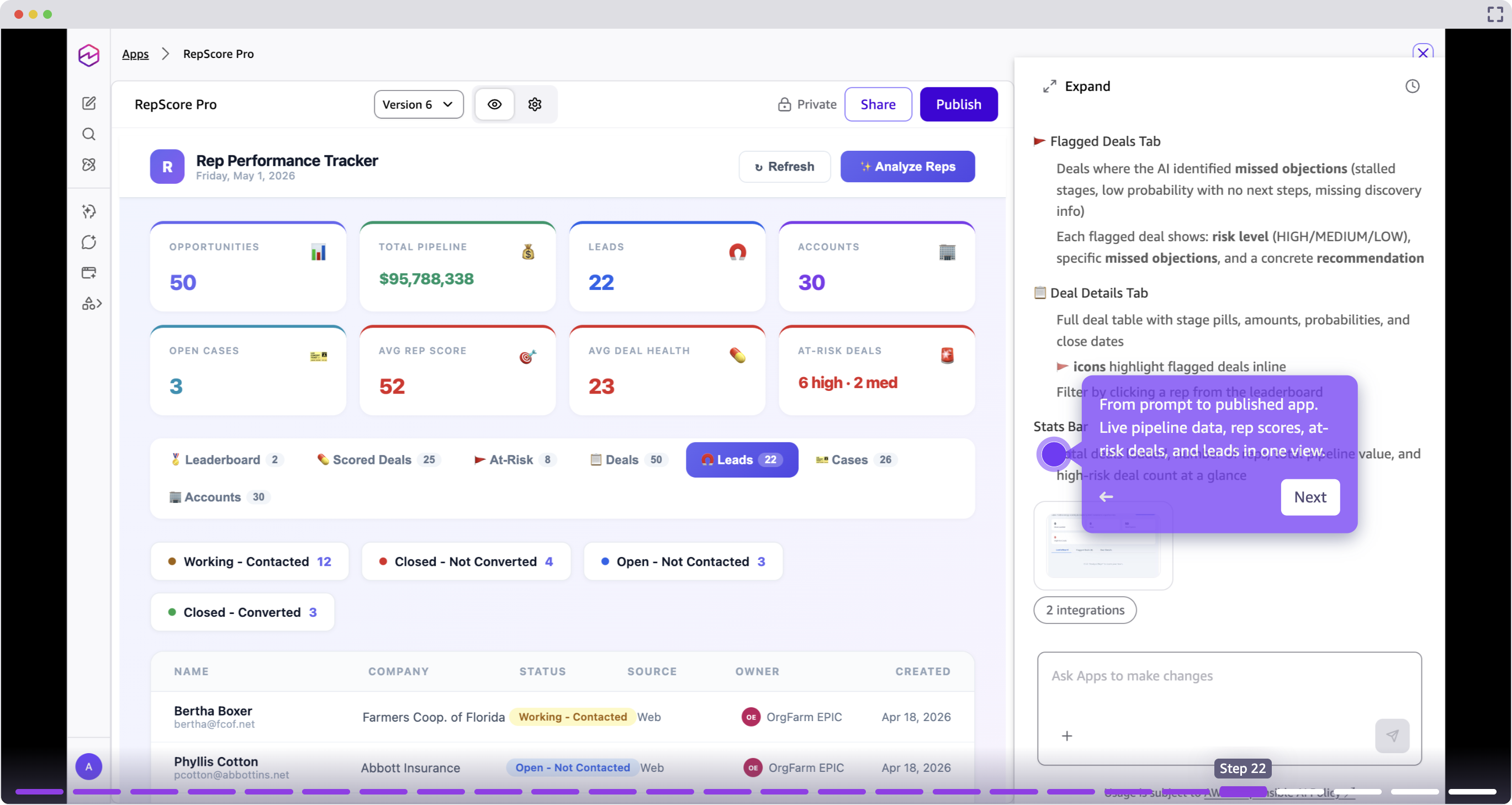
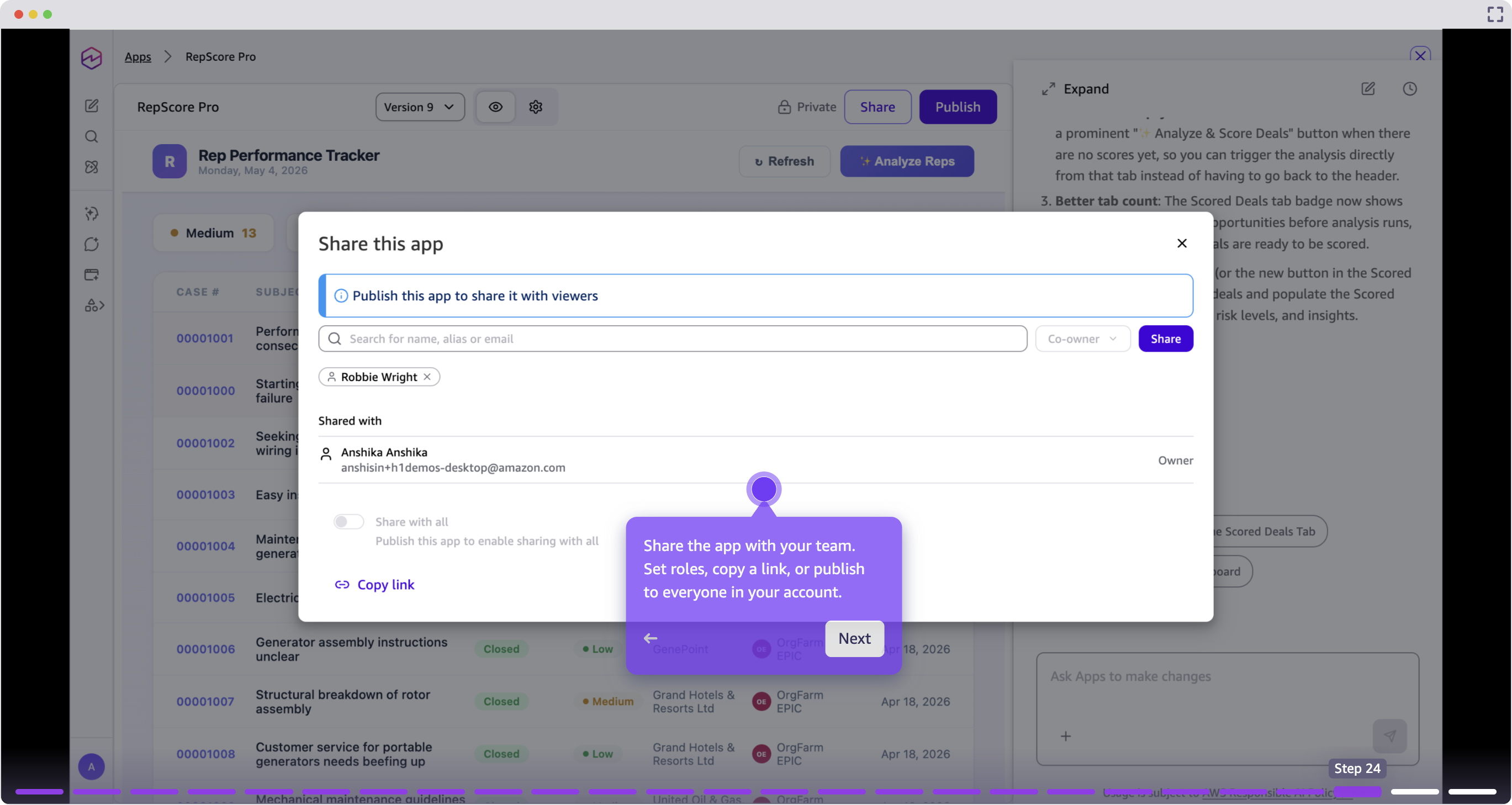
Quick 允许销售人员和销售运营团队通过自然语言提示构建交互式应用程序,自动读取已连接的数据模式并搭建一个实时应用,无需编写代码。
生成的应用程序是实时的、可共享且可迭代的。你可以通过后续提示添加功能、更改布局或连接新的数据源。
知识图谱:映射你业务账簿中的关系
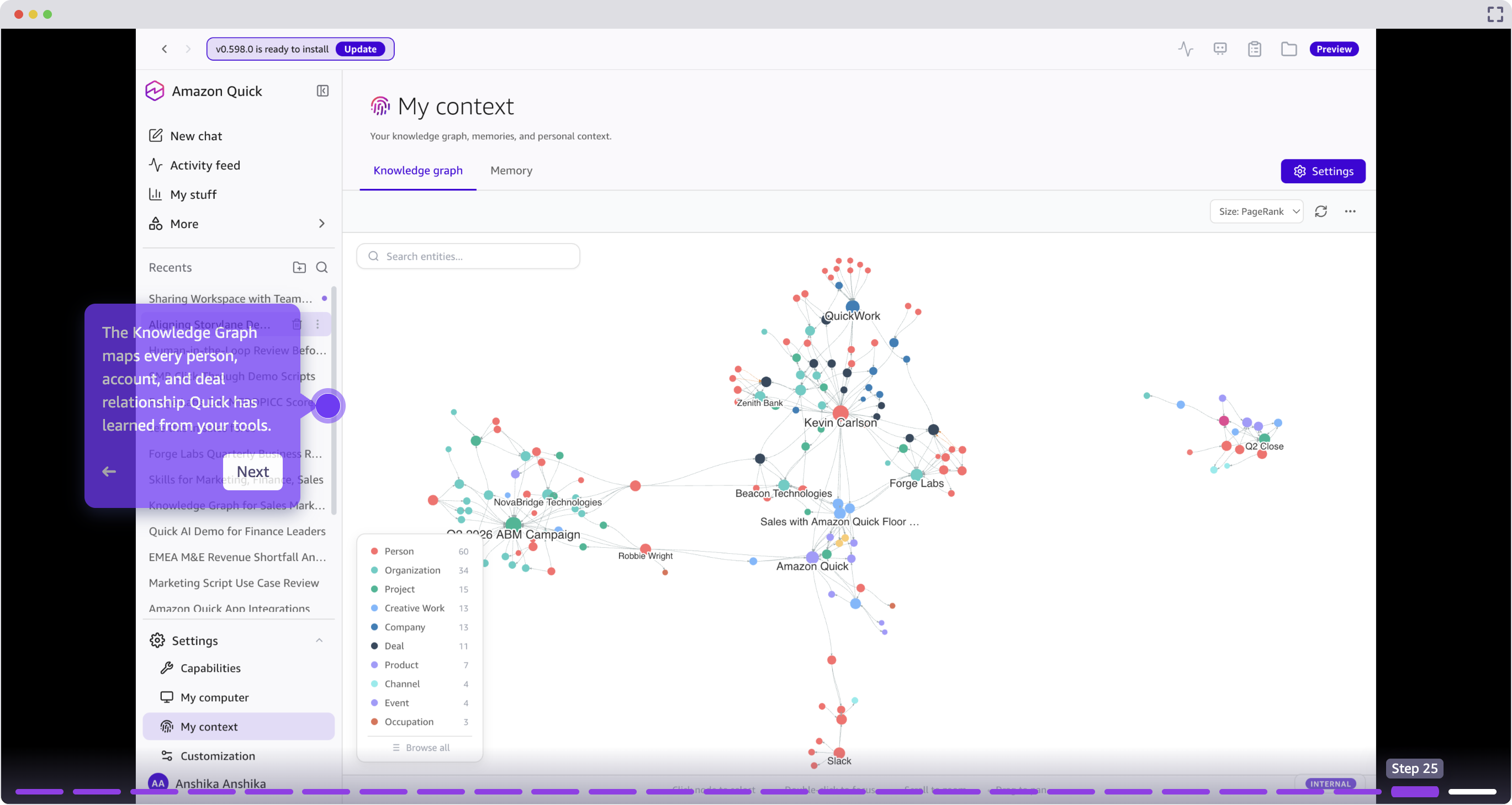
知识图谱会映射 Quick 从已连接工具中学到的关于人员、账户、交易和互动之间的关系。销售人员可以查询关系历史,识别热络的介绍路径,并在无需人工调研的情况下理解账户结构。
开始使用
本文演示了 Amazon Quick 中一个完整的销售工作流,从早间的管道审查,到个性化外联、会议准备、通话评分、CRM 更新、自定义应用程序创建和关系映射。每项能力相互衔接,创建了一个连续的工作流,让销售人员保持在心流状态,而不是在不同工具之间来回切换。
下表总结了本文涵盖的能力。
| 能力 | 功能 |
|---|---|
| 管道评分 | 使用实时 CRM 信号排列交易。 |
| 风险检测 | 浮现有停滞的交易和竞争威胁。 |
| 个性化外联 | 根据交易历史生成上下文感知的邮件消息。 |
| 自定义技能 | 整理并共享可重用工作流。 |
| 活动源 | 监控各系统的过夜变更。 |
| 会议准备与 QBR 演示文稿 | 从实时账户数据构建演示材料。 |
| 通话评分 | 根据方法论评估通话记录。 |
| CRM 更新 | 将结构化更新推送到 Salesforce。 |
| 自定义应用程序 | 从提示构建交互式工具。 |
| 知识图谱 | 映射关系智能。 |
你的一天会是什么样子?从一个工作流开始,例如线索评分、会议准备或 CRM 自动化,亲身体验差异。访问 Amazon Quick for Sales 页面了解更多,或观看 Quick 的实际操作「视频:Sales 演示」和「视频:完整演练」。
关于作者
English / 原文
The average sales rep spends only 40% of their time actually selling. The rest is eaten up by necessary, but lower-value work: customer relationship management (CRM) updates, prospect research, email drafting, and endless context-switching between tools. Before you know it, the day has passed and you’ve spent only a small fraction of your time on the things that close deals and deliver value for customers.
Amazon Quick is an AI assistant for work that turns questions into answers, answers into actions, and actions into outcomes. Quick helps reps spend more time selling and less time on administrative tasks, whether you’re working in the browser, the desktop app, or directly within Microsoft 365, Outlook, and other tools you already use every day. The result? Your sales team can cover more territory, close deals faster, and deepen customer loyalty at any scale.
Companies like 3M, AWS Global Sales, and Amazon are already using Quick to unlock their sellers’ full potential. See how AWS Global Sales transforms insights delivery, AWS sales teams stay current on new launches, and Amazon’s journey deploying Quick Suite across thousands of users.
In this post, we walk through a few ways that Quick delivers on this promise. We cover the entire sales cycle, from identifying your highest-priority prospect, contacting them, working the deal to close, and keeping the CRM up to date as the account matures, while protecting your scarcest resource: your time.
Lead scoring and prospect prioritization: focus on the highest-value opportunities
You’re staring at a list of 200 leads in your CRM. Some filled out a form 6 months ago. Others downloaded a whitepaper last week. A few replied to cold email messages. Which ones deserve your attention today?
This challenge is the norm. Most sales teams lack visibility into which leads are actually ready to buy, leading to missed opportunities and longer sales cycles. Or, scarce resources are used prioritizing smaller opportunities at the expense of the largest ones.
Amazon Quick helps you identify and prioritize high-intent prospects automatically by connecting to your CRM, email, web analytics, and support systems to analyze engagement signals and dynamically rank leads by buying intent. With custom chat agents that pull context from internal documents, opportunity details, and account history, Quick helps you focus on the prospects most likely to convert.
Before we can start prioritizing prospects for outreach, you must integrate Quick with your existing CRM system. Step-by-step instructions are available for Salesforce, HubSpot, ServiceNow, and other systems in the Quick documentation.
Start by creating a dashboard using Amazon Quick Sight, the business intelligence service within Amazon Quick that’s used to build interactive visualizations from your connected data sources. Then, use chat to prompt Quick to assess the dashboard and provide a list of the most urgent deals to pursue.
The user provides a natural language prompt, for example “rank my pipeline”, and Quick aggregates data across connected systems to produce a prioritized view. Deals with stalled progression, overdue follow-ups, or competitive pressure surface at the top.
Risk detection and next steps
For each deal, Quick identifies specific risk signals such as stalled email threads, missed follow-ups, and competitor mentions, and recommends concrete next actions. Sellers can trigger a follow-up skill directly from the conversation without switching context.
Personalized outreach and email engagement: craft messages that resonate in seconds
Now that you’ve identified your highest-priority prospect, it’s time to reach out. Traditionally, crafting a message that’s sufficiently personalized required you to manually search across your CRM, internal documents, and external signals like the company’s website, recent press releases, and your prospect’s LinkedIn page. The alternative is to send a generic email message that will almost certainly be ignored.
Quick removes this tradeoff, helping you craft highly tailored outreach that references specific context such as recent company news, pain points from past interactions, and relevant use cases, without hours of manual research.
Because this is a recurring challenge, you can create a skill using Amazon Quick: a reusable, automated workflow that runs a series of steps on your behalf. In this case, we tell Quick to “research a prospect by pulling data from multiple sources (CRM, email threads, Slack conversations, account briefs, and web research), then generate a personalized outreach message.” You use this skill for the current prospect, but you can repurpose it across all your accounts going forward.
This step requires you to integrate Outlook with Amazon Quick.
This outreach is powered by a custom skill: a reusable workflow that any team member can trigger by name or configure to run automatically when conditions are met. After reviewing the email and providing any feedback, you can send it directly from Quick.
With the extensions for Microsoft 365, you can also work directly inside Outlook or Teams. Quick surfaces as a side panel within your email client, so you can generate personalized outreach, pull account context, and refine messaging without ever switching tabs.
Activity monitoring: start every day with clarity
The Activity Feed surfaces changes that occurred overnight across Slack, email, and CRM, prioritized by relevance to the seller’s active deals. This replaces manual morning triage across multiple tools with a single consolidated view.
Account intelligence: prepare to close with confidence
The customer agrees to meet the following week to discuss your proposed solution. Success! But now comes the prep work. Traditionally, you’d spend multiple hours preparing, toggling between Salesforce for deal history, ServiceNow for support tickets, your email client for past conversations, and a search engine for industry context. By the time you’ve pieced together a full picture, you’ve burned an hour.
You can ask Quick to create a one-page meeting prep document with the account snapshot, attendee bios, questions, and risks. Link Quick Chat to a Quick Space, a centralized knowledge repository where you can organize documents, data sources, and files that Quick can reference when answering questions or finishing tasks.
When preparing for a Quarterly Business Review (QBR), Quick can go further by outlining and building a full presentation deck from deal files, support incidents, and email threads. The seller reviews the proposed outline, selects a theme, and approves the build.
The resulting deck includes an account snapshot, incident timeline, deal status, and remediation plan, built from current data rather than manually assembled from multiple sources. A few minutes of prep instead of hours.
Call transcript scoring: evaluate every conversation against your methodology
After a meeting, sellers can drop a call transcript into Quick for automated scoring against their sales methodology, such as MEDDPICC, BANT, or a custom framework. Quick identifies what was covered, what gaps remain, and provides a structured assessment of deal health based on the conversation.
CRM automation and activity logging: keep the system of record accurate
Traditionally, every interaction requires 15–20 minutes of CRM updates that are often difficult to prioritize while juggling other time-sensitive customer interactions. As time passes between a meeting and updating Salesforce, context gets lost and details slip through the cracks.
Following call analysis, Quick pushes structured updates to Salesforce, including deal probability, next steps, risk flags, and a conversation summary. This keeps the system of record accurate without requiring manual data entry.
Custom applications from natural language: build tools without code
Quick lets sellers and sales operations teams build interactive applications from a natural language prompt, automatically reading connected data schemas and scaffolding a live application without writing code.
The resulting application is live, shareable, and iterable. You can add features, change layouts, or connect new data sources with follow-up prompts.
Knowledge Graph: map relationships across your book of business
The Knowledge Graph maps relationships between people, accounts, deals, and interactions that Quick has learned from connected tools. Sellers can query relationship history, identify warm introduction paths, and understand account structures without manual research.
Getting started
This post demonstrated a full sales workflow in Amazon Quick, from morning pipeline review through personalized outreach, meeting preparation, call scoring, CRM updates, custom application creation, and relationship mapping. Each capability connects to the next, creating a continuous workflow that keeps sellers in flow rather than switching between tools.
The following table summarizes the capabilities covered in this post.
| Capability | Function |
|---|---|
| Pipeline scoring | Rank deals using live CRM signals. |
| Risk detection | Surface stalled deals and competitive threats. |
| Personalized outreach | Generate context-aware email messages from deal history. |
| Custom skills | Codify and share reusable workflows. |
| Activity Feed | Monitor overnight changes across systems. |
| Meeting prep and QBR decks | Build presentations from live account data. |
| Call scoring | Evaluate transcripts against methodology. |
| CRM updates | Push structured updates to Salesforce. |
| Custom applications | Build interactive tools from prompts. |
| Knowledge Graph | Map relationship intelligence. |
What could your day look like? Start with one workflow, such as lead scoring, meeting prep, or CRM automation, and experience the difference. Explore the Amazon Quick for Sales page to learn more, or watch Quick in action in the Sales demo and full walkthrough.