🔶 本地 Agent 优先的 AI 搜索优化工具 Canonry
英文标题:🔶 Local agent first AI search optimization tooling
Canonry 是一个开源、可自托管的 Agent-first AEO(答案引擎优化)运营平台,用于追踪 Gemini、ChatGPT、Claude、Perplexity 及本地 LLM 对网站的引用与可见性。它整合服务器日志、Google Search Console、GA4、Bing Webmaster、Google Business Profile、Common Crawl 外链数据,并可通过 WordPress、JSON-LD 和索引提交执行优化修复。平台提供 CLI、API、MCP 适配器以及原生 Codex 和 Claude Code 插件,并强调对广告投放、内容修改和配额消耗操作进行人工审批。Canonry 要求 Node.js 22.14.0 及以上版本,采用 FSL-1.1-ALv2 许可证,每个版本在两年后转为 Apache 2.0。
 1.3 KB
 1.3 KB
 303.0 KB
 107.6 KB
中文
Canonry 
面向 Agent 的 AEO 运营平台。开源。可自托管。
- 跨 Gemini、ChatGPT、Claude、Perplexity 和本地 LLM 追踪引用
- 通过服务器日志导入监控 AI 引擎的抓取与引流情况——目前支持 Cloud Run、Vercel 和 WordPress Traffic Logger 插件
- 通过内置 GSC、GA4 和 Bing Webmaster,结合真实流量进行诊断
- 通过 Google Business Profile追踪本地化 AEO——包括搜索词展示次数、效果指标,以及酒店住宿和预订 CTA 的缺口
- 使用 OpenAI Ads Manager 管理 ChatGPT 广告——连接广告账户、检查转化设置和表现、准备暂停状态的广告活动,并且仅在获得明确人工批准后启动
- 通过 Common Crawl 外链发现链接到你的网站的来源——跟踪 Common Crawl 按月滚动更新的超链接图谱,按计划自动同步每个新窗口,并通过 DuckDB 在本地查询
- 通过 WordPress、JSON-LD schema 和索引提交执行修复
- 以声明式方式管理多个客户——配置即代码 YAML +
cnry apply - 定期安排可见性检查、流量同步和 Business Profile 同步,并在指标回退时发送 webhook 告警
- 生成可直接交付客户的 HTML 报告——
cnry report <project> - 通过 MCP 适配器、原生 Codex 或 Claude Code 插件,或 webhook 由你自己的 Agent 驱动
- 或使用 Aero——Canonry 的内置 Agent,会在每次运行后自动唤醒
每个仪表盘视图都对应一条 CLI 命令和一个 API 端点。CLI 是操作界面;UI 使用的 API 与你的 Agent 使用的 API 相同。
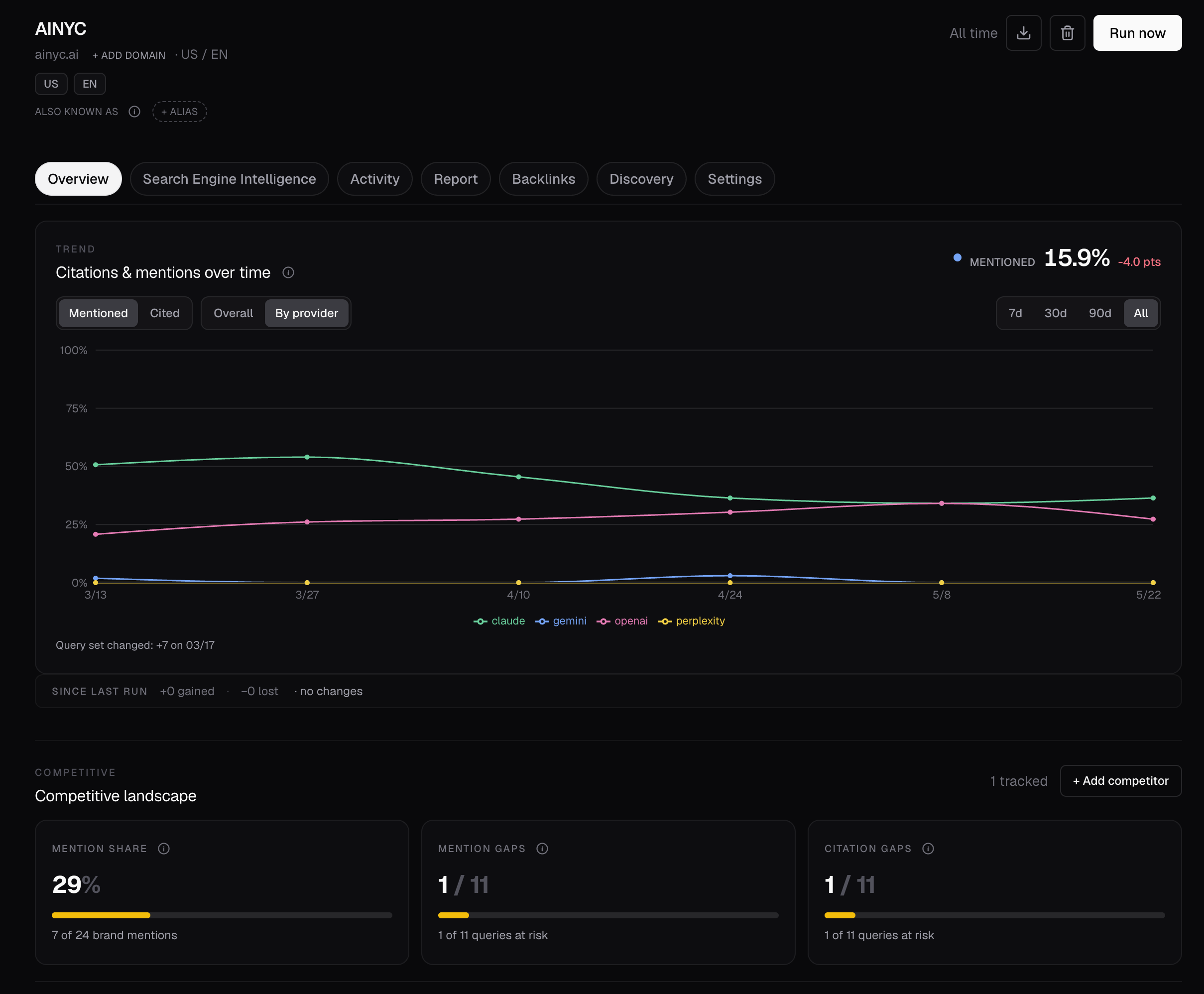
在 5 分钟内运行首次 AI 可见性检查
npm install -g @canonry/canonry
cnry init
cnry serve
CLI 可通过 cnry(短名称)和 canonry 安装,两者可互换使用。为兼容性而保留的旧包名 @ainyc/canonry 仍会以相同版本发布,但新安装应使用 @canonry/canonry。
打开 http://localhost:4100/setup。引导向导将带你完成供应商密钥、项目设置、查询配置以及首次可见性检查。
如果你在 0.0.0.0 或 LAN 地址上提供 Canonry 服务,请先通过 loopback 完成首次仪表盘密码设置,或使用 cnry_... bearer key 进行认证。未认证的设置路径按设计仅限 loopback 访问。
更倾向于使用终端?
cnry project create my-site --domain example.com
cnry query add my-site "your first query" "second query"
cnry run my-site --wait
cnry evidence my-site
cnry insights my-site
若要将项目固定到某个供应商模型以供后续扫描,请使用显式覆盖。省略供应商会让项目保留在所有已配置的引擎上;省略模型则会让该引擎使用实例设置中的模型。
cnry project update my-site --provider gemini --provider-model gemini=gemini-2.5-pro
cnry project update my-site --clear-provider-model gemini
在人工控制下管理 ChatGPT 广告
连接 OpenAI Ads Manager 账户,将账户状态、完整性审核、转化像素和事件设置、广告活动结构以及付费效果汇总,纳入与自然 AEO 证据相同的项目中。
cnry ads connect my-site --api-key <ads-manager-sdk-key>
cnry ads sync my-site
cnry ads account my-site
cnry ads summary my-site
Canonry 和你的 Agent 可以检查在线账户、查询地域定向、准备暂停状态的广告活动、广告组及 ChatGPT chat-card 广告,并保留持久化操作回执以供核对。激活操作被刻意分离:人工批准一棵确切的广告活动树后,受范围限制的执行器才能仅启动该已批准的树。这样可让涉及花费的变更保持可审查和可恢复,而非授予 Agent 对广告账户的无限制访问权限。完整的 Agent 工作流与安全模型请参见 MCP 工具界面。
使用原生 Codex 或 Claude Code 插件
原生插件会向你的 Agent 提供 Canonry 的操作手册,并启动现有的 canonry-mcp 适配器。Canonry 本身仍然是执行与数据平面。
安装运行时。如果这是首次初始化,请跳过旧版的按项目复制 skills 和 MCP:
npm install -g @canonry/canonry
# First initialization only
cnry init --skip-skills --skip-mcp
请在私有终端中运行 cnry init:它会提示输入凭证,并且仅显示一次新的完整访问 API key。切勿将该输出粘贴到 Agent 聊天或共享日志中。
随后为你的客户端安装插件:
# Codex
codex plugin marketplace add Canonry/canonry
codex plugin add canonry@canonry

# Claude Code
claude plugin marketplace add Canonry/canonry
claude plugin install canonry@canonry
确保 Canonry 的本地 daemon 正在运行,然后验证其建议性的 doctor 检查是否识别到已启用的插件:
# Only when Canonry is not already running
cnry start
cnry doctor --check 'agent.skills.*' --format json
该插件不包含任何凭证,也不声明 hooks 或自动供应商调用。它不会扩展 Canonry 服务器强制执行的 key scope;但新的 cnry init 会创建一个完整实例范围的 * key,而具有写入能力的 key 默认会向客户端开放写入工具;只读 key 则会将工具目录限制为只读。应将默认权限视为对该单租户实例中每个项目和共享设置均具有队友级别的访问权限,并在每次修改或消耗配额的扫描前获得明确批准。现有的 cnry skills install 和独立 MCP 配置仍然受支持;每个客户端只应使用一种集成路径,以避免重复的 skills 或 MCP servers。请参见插件设置与安全指南。
或使用任何具备 shell 能力的编程 Agent
如果不使用原生插件,可将以下内容交给任何具备 shell 能力的 Agent。它会将凭证设置保持私密,并在每次持久化或消耗配额的操作前征求确认:
Set up canonry for me. Canonry is an open-source platform that tracks how AI answer engines (Gemini, ChatGPT, Claude, Perplexity) cite my site.

1. Ask me for: my domain, 3–5 queries I want to track, and which provider I want to start with (gemini / openai / claude / perplexity). Wait for my answers before proceeding.
2. Ask for approval, then run `npm install -g @canonry/canonry`.
3. Do not run `cnry init` yourself or ask me for credentials. Tell me to run `cnry init` in my own private terminal because it prompts for provider secrets and prints the new full-access API key once. Wait for me to confirm completion; never ask me to paste its output. This scaffolds config and installs the Canonry skills.
4. Read `.claude/skills/canonry/SKILL.md`, run the read-only doctor checks, and show me the exact project/domain/query changes you propose. Ask for explicit approval before creating the project or changing queries.
5. After project setup, show the provider and query count for the first sweep and ask for explicit approval for that quota-consuming run. Only then trigger it.
6. Read `.claude/skills/aero/SKILL.md` and summarize the existing mention and citation evidence. Propose the technical audit, including its page limit, and ask for separate approval before running `cnry technical-aeo run <project> --wait`; after approval, read the result with `cnry technical-aeo score <project> --format json`.
7. Open the dashboard only if I ask, then summarize what you found: mention and citation rates per provider, the top 3 gaps, and the highest-impact site issues. Ask again before drafting content, submitting URLs, editing files, publishing, or performing any other mutation or quota-consuming operation.
可在 canonry.ai 一键复制。
| 问题 | 解决方法 |
|---|---|
| 未配置供应商 key | 打开 /setup,或获取免费的 Gemini key,设置 GEMINI_API_KEY,然后重启 cnry serve。 |
| 为什么我的首次审计失败? | 运行 cnry doctor,然后重新打开 /setup;它会在首次扫描前检查供应商 key 和设置阻碍因素。 |
| 运行后没有结果 | 可见性检查为异步操作——查看 Runs 标签页,或使用 cnry run <project> --wait。 |
| 不确定要测试哪些查询 | 设置向导会自动生成查询;稍后可使用 cnry discover run <project> --icp "..." 扩展查询集合——参见发现方法论。 |
npm install 在 node-gyp 上失败 |
为 better-sqlite3 安装构建工具(指南)。 |
可在 cnry init 期间、仪表盘的 /settings 中,或通过环境变量进行配置。
Node.js ≥ 22.14.0。至少需要一个供应商 API key。
git clone https://github.com/Canonry/canonry.git && cd canonry
pnpm install && pnpm run typecheck && pnpm run test && pnpm run lint
参见 CONTRIBUTING.md。
FSL-1.1-ALv2。可免费使用、修改和自托管。每个版本会在两年后转换为 Apache 2.0。
English / 原文
Canonry
Agent-first AEO operating platform. Open source. Self-hosted.
- Track citations across Gemini, ChatGPT, Claude, Perplexity, and local LLMs
- Watch AI engines crawl and refer traffic via server-log ingestion — Cloud Run, Vercel, and the WordPress Traffic Logger plugin today
- Diagnose against real traffic with built-in GSC, GA4, and Bing Webmaster
- Track local AEO via Google Business Profile — search-term impressions, performance metrics, and hotel lodging + booking-CTA gaps
- Manage ChatGPT ads with OpenAI Ads Manager — connect an ad account, inspect conversion setup and performance, prepare paused campaigns, and launch only with an explicit human approval
- Discover who links to you with Common Crawl backlinks — follows Common Crawl's rolling monthly hyperlink graph, auto-syncing each new window on a schedule, queried locally with DuckDB
- Execute fixes via WordPress, JSON-LD schema, and indexing submissions
- Manage many clients declaratively — config-as-code YAML +
cnry apply - Schedule recurring visibility checks, traffic syncs, and Business Profile syncs, with webhook alerts on regressions
- Generate client-ready HTML reports —
cnry report <project> - Drive from your own agent via the MCP adapter, a native Codex or Claude Code plugin, or webhooks
- Or use Aero — Canonry's built-in agent that wakes up after every run
Every dashboard view has a matching CLI command and API endpoint. The CLI is the surface; the UI consumes the same API your agent does.
Run your first AI visibility check in 5 minutes
npm install -g @canonry/canonry
cnry init
cnry serve
The CLI installs as cnry (short form) and canonry — the two are interchangeable. The legacy package name @ainyc/canonry is still published at the same versions for compatibility, but new installs should use @canonry/canonry.
Open http://localhost:4100/setup. A guided wizard walks you through provider keys, project setup, queries, and your first visibility check.
If you serve Canonry on 0.0.0.0 or a LAN address, complete first-run dashboard password setup from loopback first, or authenticate with a cnry_... bearer key. The unauthenticated setup path is loopback-only by design.
Prefer the terminal?
cnry project create my-site --domain example.com
cnry query add my-site "your first query" "second query"
cnry run my-site --wait
cnry evidence my-site
cnry insights my-site
To pin a project to a provider model for future sweeps, use an explicit override. Omitting a provider keeps the project on all configured engines; omitting its model keeps that engine on the instance setting.
cnry project update my-site --provider gemini --provider-model gemini=gemini-2.5-pro
cnry project update my-site --clear-provider-model gemini
Manage ChatGPT ads with human control
Connect an OpenAI Ads Manager account to bring its account state, integrity review, conversion pixels and event settings, campaign structure, and paid-performance rollups into the same project as your organic AEO evidence.
cnry ads connect my-site --api-key <ads-manager-sdk-key>
cnry ads sync my-site
cnry ads account my-site
cnry ads summary my-site
Canonry and your agent can inspect the live account, look up geo targets, prepare campaigns, ad groups, and ChatGPT chat-card ads in a paused state, and keep durable operation receipts for reconciliation. Activation is deliberately separate: a human approves one exact campaign tree, then a scoped executor may launch only that approved tree. This keeps spend-bearing changes reviewable and recoverable instead of granting an agent unrestricted access to your ad account. See the MCP tool surface for the complete agent workflow and safety model.
Use the native Codex or Claude Code plugin
The native plugin gives your agent Canonry's operator playbooks and starts the existing canonry-mcp adapter. Canonry itself remains the execution and data plane.
Install the runtime. If this is the first initialization, skip the legacy per-project skill and MCP copies:
npm install -g @canonry/canonry
# First initialization only
cnry init --skip-skills --skip-mcp
Run cnry init in a private terminal: it prompts for credentials and prints the new full-access API key once. Never paste that output into an agent chat or shared log.
Then install the plugin for your client:
# Codex
codex plugin marketplace add Canonry/canonry
codex plugin add canonry@canonry

# Claude Code
claude plugin marketplace add Canonry/canonry
claude plugin install canonry@canonry
Ensure Canonry's local daemon is running, then verify that its advisory doctor check sees the enabled plugin:
# Only when Canonry is not already running
cnry start
cnry doctor --check 'agent.skills.*' --format json
The plugin contains no credentials and declares no hooks or automatic provider calls. It does not expand Canonry's server-enforced key scope, but fresh cnry init creates a full-instance * key and a write-capable key makes write tools available to the client by default; a read-only key restricts the catalog to reads. Treat the default as teammate-level access to every project and shared setting on that single-tenant instance, and get explicit approval before every mutation or quota-consuming sweep. Existing cnry skills install and standalone MCP configuration remain supported; use one integration path per client to avoid duplicate skills or MCP servers. See the plugin setup and security guide.
Or use any shell-capable coding agent
Without the native plugin, drop this into any shell-capable agent. It keeps credential setup private and asks before each persisted or quota-consuming operation:
Set up canonry for me. Canonry is an open-source platform that tracks how AI answer engines (Gemini, ChatGPT, Claude, Perplexity) cite my site.

1. Ask me for: my domain, 3–5 queries I want to track, and which provider I want to start with (gemini / openai / claude / perplexity). Wait for my answers before proceeding.
2. Ask for approval, then run `npm install -g @canonry/canonry`.
3. Do not run `cnry init` yourself or ask me for credentials. Tell me to run `cnry init` in my own private terminal because it prompts for provider secrets and prints the new full-access API key once. Wait for me to confirm completion; never ask me to paste its output. This scaffolds config and installs the Canonry skills.
4. Read `.claude/skills/canonry/SKILL.md`, run the read-only doctor checks, and show me the exact project/domain/query changes you propose. Ask for explicit approval before creating the project or changing queries.
5. After project setup, show the provider and query count for the first sweep and ask for explicit approval for that quota-consuming run. Only then trigger it.
6. Read `.claude/skills/aero/SKILL.md` and summarize the existing mention and citation evidence. Propose the technical audit, including its page limit, and ask for separate approval before running `cnry technical-aeo run <project> --wait`; after approval, read the result with `cnry technical-aeo score <project> --format json`.
7. Open the dashboard only if I ask, then summarize what you found: mention and citation rates per provider, the top 3 gaps, and the highest-impact site issues. Ask again before drafting content, submitting URLs, editing files, publishing, or performing any other mutation or quota-consuming operation.
One-click copy at canonry.ai.
| Problem | Fix |
|---|---|
| No provider key configured | Open /setup, or grab a free Gemini key, set GEMINI_API_KEY, and restart cnry serve. |
| Why did my first audit fail? | Run cnry doctor, then reopen /setup; it checks provider keys and setup blockers before the first sweep. |
| No results after a run | Visibility checks are async — check the Runs tab or use cnry run <project> --wait. |
| Not sure what queries to test | Setup wizard auto-generates them; expand the basket later with cnry discover run <project> --icp "..." — see the discovery methodology. |
npm install fails on node-gyp |
Install build tools for better-sqlite3 (guide). |
Configure during cnry init, in the dashboard /settings, or as env vars.
Node.js ≥ 22.14.0. At least one provider API key.
git clone https://github.com/Canonry/canonry.git && cd canonry
pnpm install && pnpm run typecheck && pnpm run test && pnpm run lint
See CONTRIBUTING.md.
FSL-1.1-ALv2. Free to use, modify, and self-host. Each version converts to Apache 2.0 after two years.