利用 Amazon Bedrock AgentCore optimization 检测静默的 Agent 故障
英文标题:Detecting silent agent failures with Amazon Bedrock AgentCore optimization
Amazon Bedrock AgentCore optimization 的 Insights 功能可从生产环境 Agent 的追踪数据中发现“健康检查全绿”但实际结果错误的静默行为故障。它能够对失败模式进行聚类、根因分析和影响范围排序,并提供用户意图分析与执行洞察,帮助开发者优先修复影响最大的系统性问题。该能力可分析 11 类行为故障,包括幻觉、错误操作、任务指令违反、编排错误和上下文处理问题等。开发者可通过 AgentCore 控制台配置定期或一次性分析,也可直接连接 AgentCore runtime 端点或 Amazon CloudWatch 日志组。
 1.3 MB
 101.1 KB
 124.1 KB
 345.0 KB
 141.2 KB
 346.5 KB
 980.2 KB
 325.0 KB
 155.7 KB
 150.5 KB
 130.9 KB
 218.7 KB
 423.1 KB
 610.7 KB
 123.8 KB
中文
如果你在大规模运营 AI Agent,Amazon Bedrock AgentCore 能够揭示一类你可能已经遇到、却难以检测的问题:仪表板上的各项指标看起来一片正常。完成率 99%,延迟健康,没有错误峰值。然而,关于结果不正确的客户投诉仍会不断出现。
订单修改实际上从未执行。库存 API 超时时,产品却被报告为“有货”。审批步骤被跳过。这些都是行为故障,与基础设施问题的表现不同。从系统视角看,它们成功完成;它们通过健康检查,通常只会在开始大规模影响用户数周后,通过客户升级反馈暴露出来。
即使是会产生错误信号的故障,也存在另一项挑战:当一个每天服务数千个会话的 Agent 积累数百个错误时,哪些问题最值得优先关注?审查单条追踪记录可以揭示一个会话中发生了什么,但几乎无法告诉你,眼前的问题是影响 30% 流量的模式,还是仅影响 3 个会话的边缘案例。
Amazon Bedrock AgentCore optimization 提供了 Insights,帮助你发现、解释并确定已部署 AI Agent 中行为故障的优先级,包括那些从不产生错误信号的静默故障。这些洞察将可观测性模型从被动的追踪记录检查,转变为主动的模式检测。它帮助你找到故障、理解其影响范围,并按优先级进行修复。本文将介绍 AgentCore optimization 中 Insights 的工作方式、配置方法,以及它在真实 Agent 上能够揭示什么。
Amazon Bedrock AgentCore optimization 中的 Insights 能提供什么
Insights 的工作层位于现有可观测性技术栈之上。它会使用你的工具已收集的追踪数据,并将其转化为可执行的行为智能。这提供了一种调查能力,帮助你理解大规模影响 Agent 性能的更广泛模式,而不只是单个会话的故障。
下图展示了 AgentCore 为提供 Insights 而执行的端到端分析。每种会话分析方法都会从每个会话中提取一个或多个属性。来自每种会话分析方法的属性会被独立聚类,并对每个聚类进行摘要以提升可解释性。
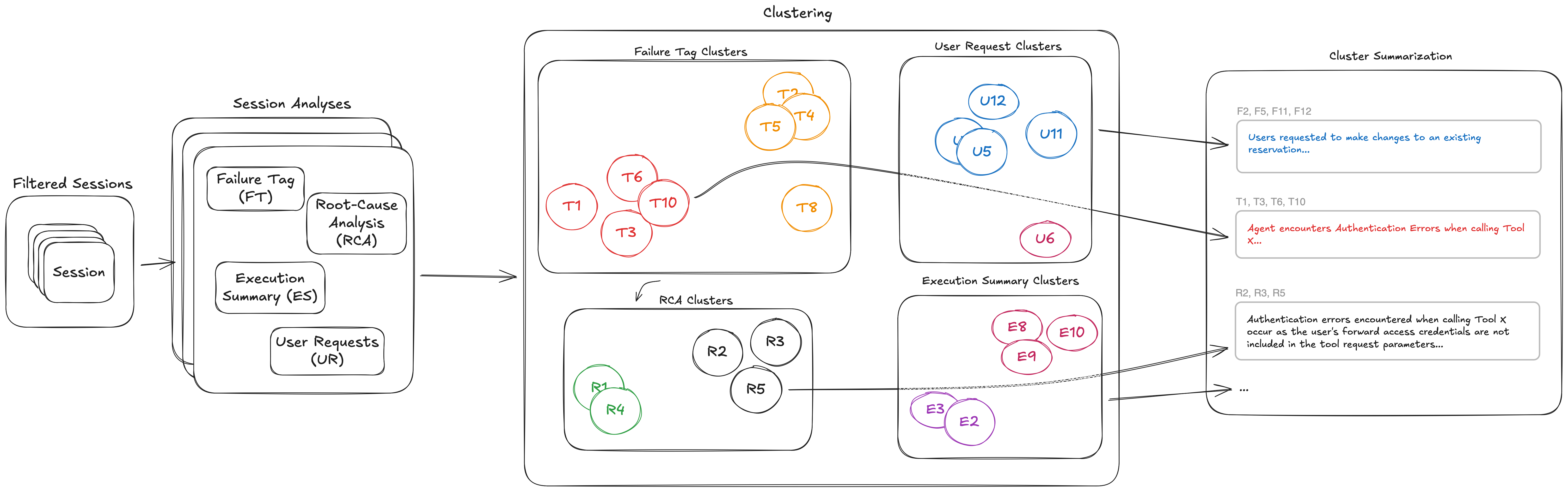
Insights 报告呈现以下内容:
-
按优先级排序的故障模式发现与根因分析。
在无需预定义类别或筛选条件的情况下,展示跨数百个会话、经过排序的聚类。每个聚类提供一项汇总说明,涵盖受影响的会话,并且足够具体,可直接采取行动,无需打开单条追踪记录。模式按受影响会话占比排序,因此能够立即区分重要问题和边缘案例。没有这项能力时,开发者只能凭直觉分流错误,且无法在不手动审查数百条记录的情况下识别系统性问题。 -
用户意图分析。
揭示用户如何在不同场景中与 Agent 交互。生产环境中的 Agent 往往会收到偏离其预期设计的请求。意图分析会展示用户实际请求内容的分布,无需在已有追踪之外增加任何埋点,即可揭示需要弥补的覆盖缺口以及需要强制执行的范围边界。 -
执行洞察。
揭示 Agent 在不同场景下如何响应。执行洞察展示 Agent 采取的策略、操作在会话中的推进方式,以及 Agent 的实际行为在哪些地方偏离了预期设计。这弥合了“我们设计 Agent 要做什么”与“Agent 在大规模运行中实际做什么”之间的差距。
接下来,我们将深入了解每项能力。
故障模式发现
AgentCore 会依据结构化的行为故障类型分类体系分析每条会话追踪记录。它可检测 11 类问题,包括幻觉、错误操作、任务指令违反、编排错误、上下文处理问题及其他问题。该分析会推理策略合规性和行为正确性,而不是仅依赖错误信号,因此能够检测静默故障。每个检测到的故障都会生成追踪记录中的位置、类别以及对问题的自然语言描述。随后,Insights 会将这些描述分组为聚类。这样便可在数百个会话中呈现一个命名模式,而不是数百条独立的追踪记录条目。
下图展示了故障聚类和根因分析(RCA)管道。系统会识别每个会话中的故障,并将其聚类为子聚类。对于故障子聚类中的每个会话,系统都会生成根因解释。
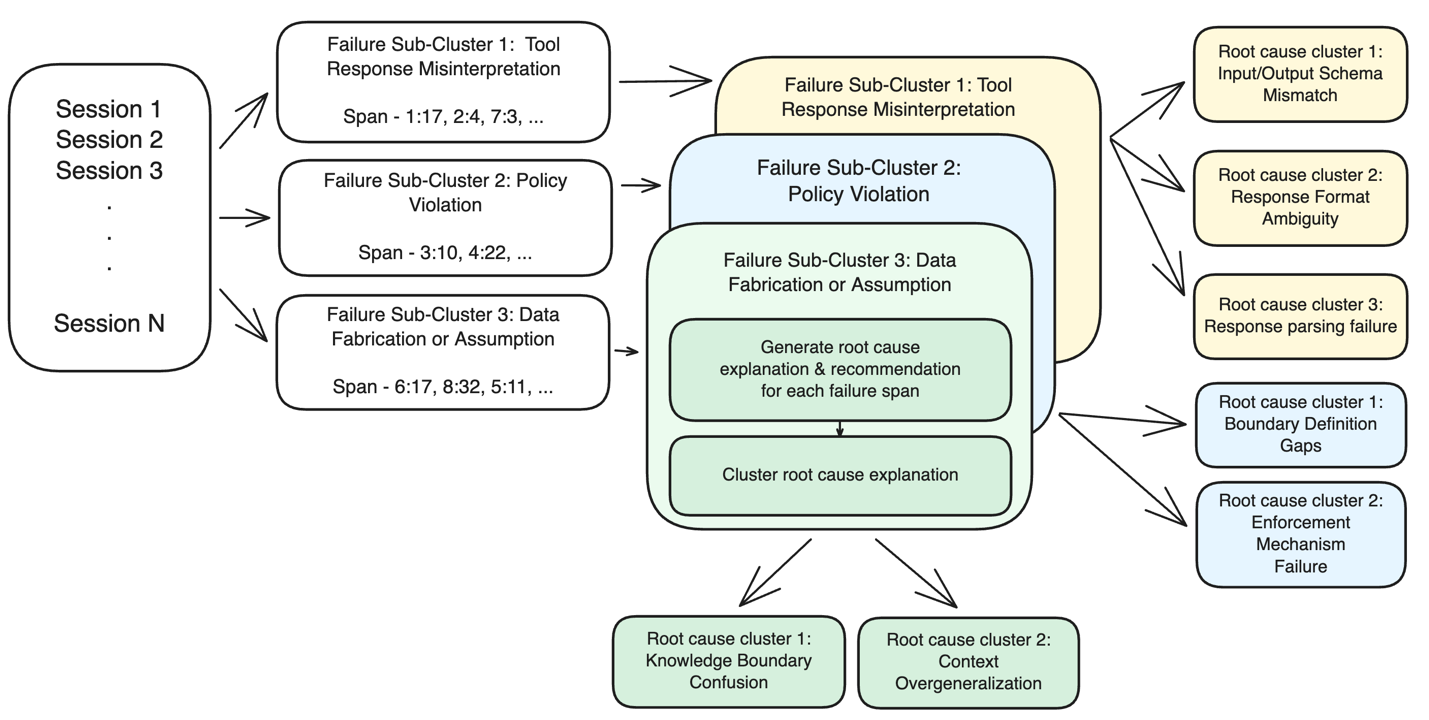
对于每个故障聚类,AgentCore 会沿执行图反向追踪,以识别导致故障的原因,而不仅是故障出现的位置。会话被表示为由 span 构成的图(推理调用、工具执行、子 Agent 调用),系统会在进行因果推理前剪除与故障无关的分支。这种剪枝通过将一个 50 步工作流缩小到导致故障的特定执行路径,使长会话的 RCA 变得可处理。输出会提供根因位置(日志中的 span ID)、因果关系分类以及修复建议(修改系统提示词、更新工具描述或开展基础设施工作)。然后,Insights 会对一个聚类内的根因进行分组。你可能会发现,100 个故障中有 90 个共享相同的底层原因和相同的修复类型。
仅靠聚类能够告诉你存在哪些类型的故障,而范围排序则告诉你哪些故障最重要。每个故障聚类都带有受影响会话数量,聚类会根据该数量相对于已分析会话总数的比例排序。两级层级结构将宽泛的故障类别与具体的子模式区分开来。
一个顶层聚类可能显示,“Agent 绕过信息收集”影响了 116 个会话。进一步展开后会发现,其中 114 个属于同一子模式(“跳过先决信息检索”),其余 2 个则是无关的边缘案例。这种结构意味着你能够立即识别出可解决最大比例故障的单一修复措施。
用户意图分析
除故障之外,AgentCore 还会提取 Agent 行为的另外两种视图。用户请求聚类会嵌入并分组用户实际发送给 Agent 的提示词,从而揭示生产环境中的用例分布。你可能发现,40% 的流量属于你为之设计的用例,另有 30% 得到部分支持,剩余 30% 则是你从未预料到的情形。
执行洞察
执行摘要会提取 Agent 在每个会话中采取的方法及最终达成的结果。它采用分层摘要策略,可处理长度不同的会话。随后,AgentCore 会对这些摘要进行聚类,以揭示执行模式。这包括 Agent 常用的策略、这些策略与成功或失败之间的关联,以及 Agent 实际行为偏离预期设计的位置。
这些能力共同为你提供一张生产环境中 Agent 的行为地图,不仅能够检测错误,还能帮助你理解系统是如何被使用的,以及它如何作出响应。
如何在 Amazon Bedrock AgentCore optimization 中设置 Insights
当你的 Agent 已将遥测数据记录在 Amazon Bedrock AgentCore observability 中时,你可以使用 Insights 来了解该 Agent 的故障模式、用户意图和执行摘要。
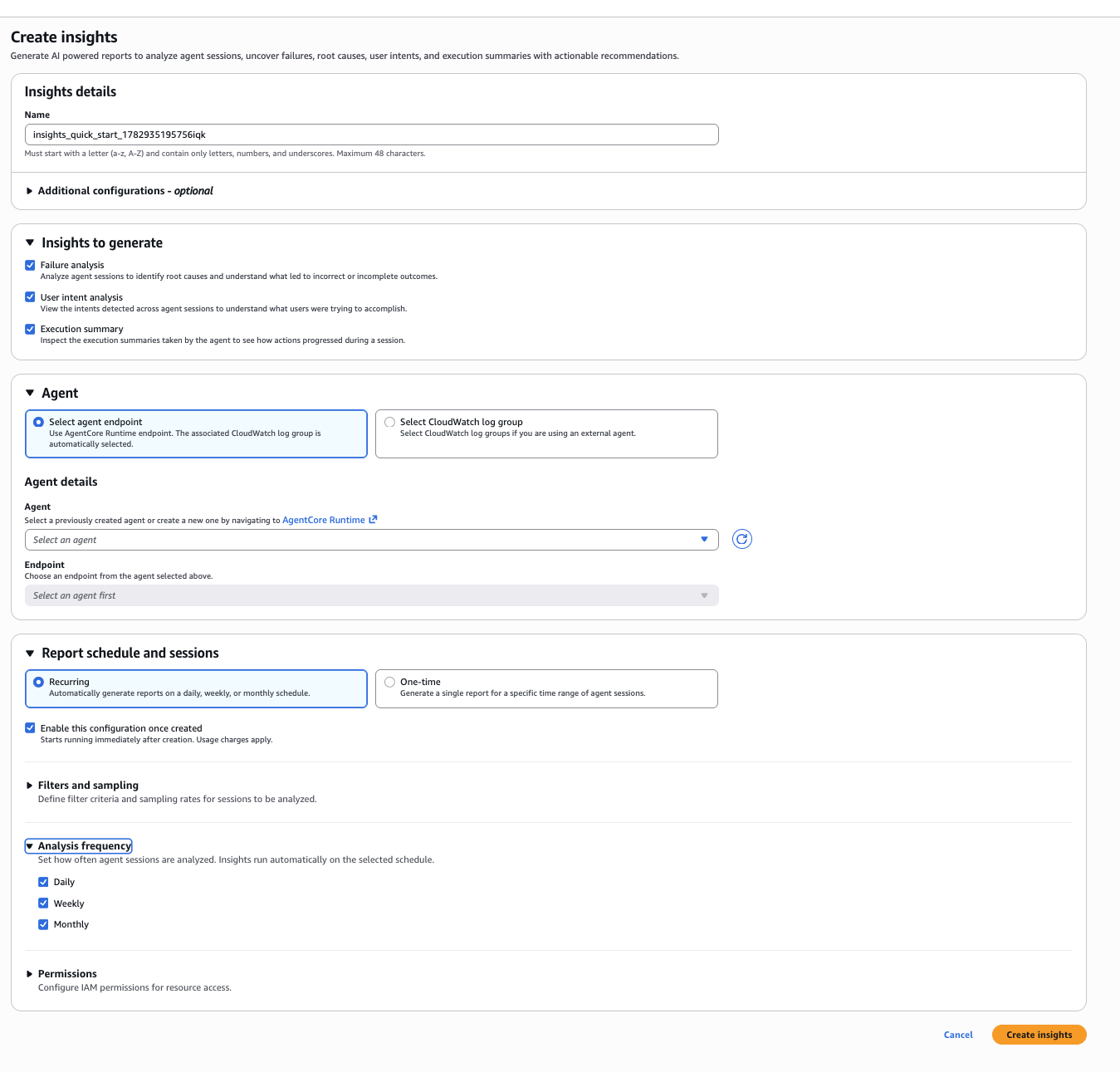
你可以在 AgentCore 控制台的 Optimizations > Insights > Create Insights 下创建 Insights 配置。
选择要分析的内容
在“Insights to generate”下,选择你希望使用的分析类型:
- Failure analysis:识别根因,并呈现跨会话出现的不正确或不完整结果。
- User intent analysis:将用户发送给 Agent 的请求聚类,以便了解他们希望完成什么任务。
- Execution summary:提取 Agent 在每个会话中采取的操作,以及这些操作如何向解决方案推进。
你可以单独运行它们,也可以组合运行。
连接你的 Agent
你有两种方式可将 Insights 指向会话数据:
- Select agent endpoint:选择一个通过 AgentCore runtime 部署的 Agent,系统会自动选择关联的 Amazon CloudWatch 日志组。
- Select Amazon CloudWatch log group:如果你的 Agent 运行在 AgentCore runtime 之外,则直接指定追踪记录写入的日志组。
设置计划
Insights 可以通过两种模式进行设置:
Recurring 会按你选择的周期自动生成报告。你可以启用每日、每周和每月分析频率的任意组合。创建后,Insights 会在后台处理会话,无需进一步操作。
One-time 会针对特定时间范围生成一份单次报告。你可以将其用于部署后评审、由投诉触发的调查,或解释需要关注的指标异常。
“Enable this configuration once created”复选框默认选中,保存后会立即开始处理。
可选项:筛选、采样和权限
展开“Filters and sampling”,可将分析范围限定为特定会话条件,或对部分流量进行采样。展开“Permissions”,可配置 Insights 用于访问日志的 IAM 角色。
完成配置后,选择 Create Insights,你的首份报告将根据所选计划生成。
查看 Insights 的实际效果
以一个提供投资分析、股票推荐和行业表现数据的市场趋势 Agent为例。在运行 10 个会话后,以下是每种 Insights 分析视图呈现的结果。
故障分析
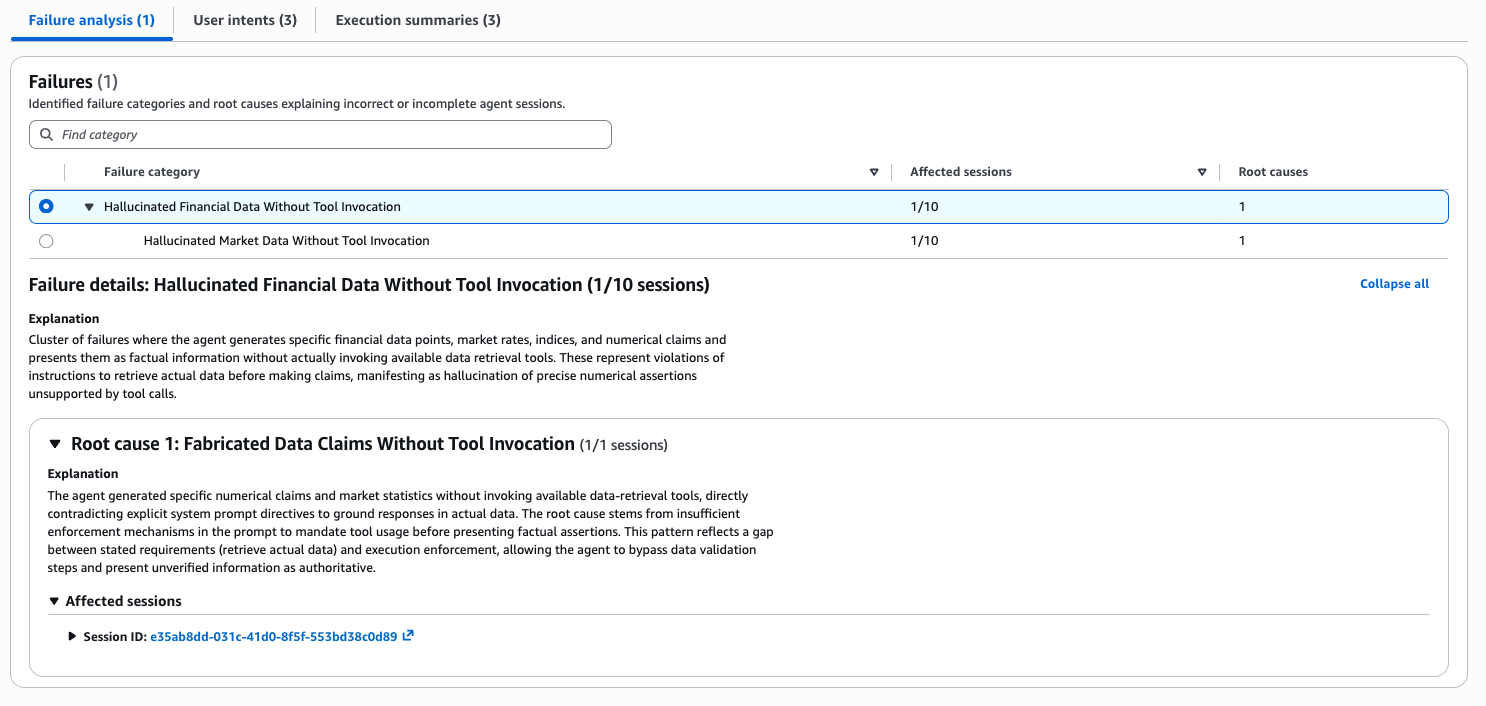
Insights 识别出一个故障类别:“未调用工具即生成虚构金融数据”,影响了 10 个会话中的 1 个。Agent 生成了具体的财务数据点、市场利率和数值声明,并将其作为事实信息呈现,但没有调用可用的数据检索工具。这违反了系统提示词中“在提出主张前检索实际数据”的指令。
根因“未调用工具即捏造数据声明”将问题追溯到既定要求与执行约束之间的缺口。系统提示词要求 Agent 基于实际数据生成回答,但缺乏足够的强制机制,无法要求 Agent 在给出事实性断言前必须使用工具。Agent 绕过了数据验证步骤,并将未经验证的信息作为权威内容呈现。
这一故障没有产生错误。会话成功完成。借助 Insights,你可以看到根因、受影响的具体会话,以及明确的修复路径:强化系统提示词,以便在提出数值声明前强制调用工具。
用户意图分析
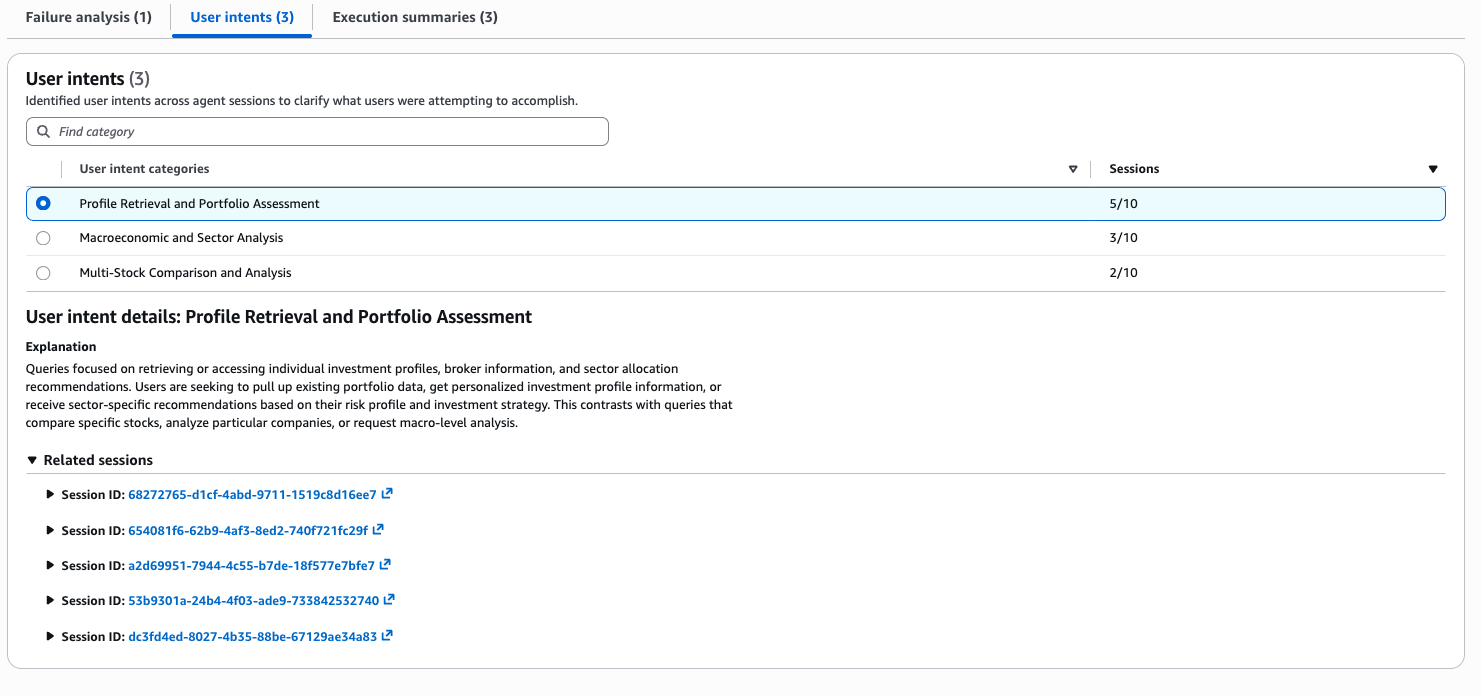
要理解用户通常要求 Agent 完成什么任务,往往需要人工阅读会话记录。意图分析可直接基于你已经收集的追踪数据,自动提供这种分布。这里的用户请求被聚类为 3 个类别,揭示了用户实际要求 Agent 完成的任务分布:
- 个人资料检索和投资组合评估(5/10 个会话):用户调取已有投资组合数据、请求个性化投资者资料信息,或基于其风险偏好寻求特定行业建议。
- 宏观经济和行业分析(3/10 个会话):用户询问更广泛的市场状况和行业层面的趋势。
- 多股票比较和分析(2/10 个会话):用户对特定股票进行相互比较。
全部流量中有一半属于个人资料和投资组合检索。这告诉你应首先在哪些方面投入可靠性建设。如果资料查询失败或返回过时数据,你将降低 50% 用户的使用体验。
执行摘要
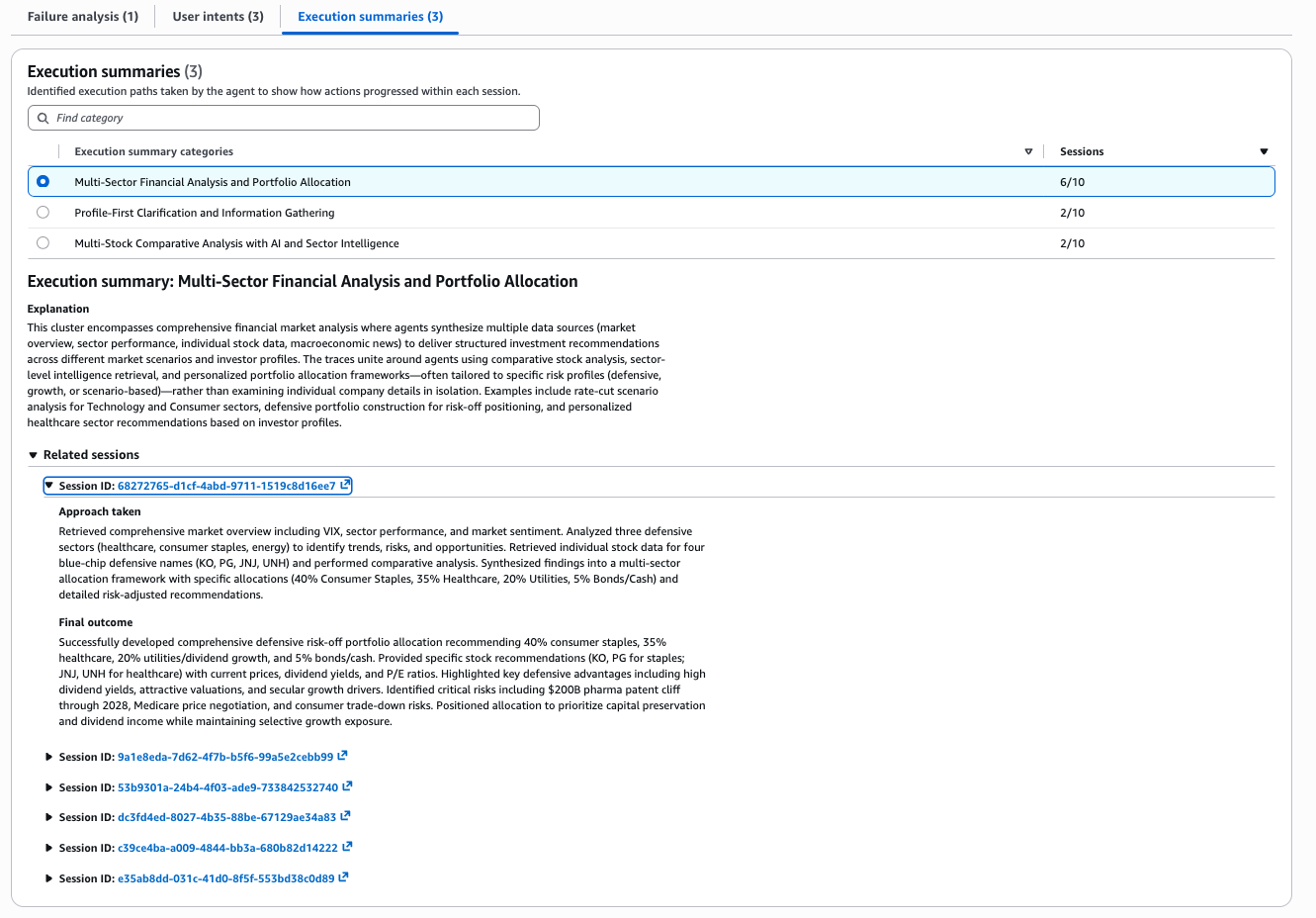
你知道 Agent 被设计为完成哪些任务,但对于它在大规模会话中的实际行为,通常缺乏足够可见性。执行摘要能够弥合这一差距。这里,市场 Agent 的行为被分为三种执行模式:
- 多行业金融分析和投资组合配置(6/10 个会话):Agent 检索市场概览数据(VIX、行业表现、市场情绪),分析防御性行业,调取蓝筹股(KO、PG、JNJ、UNH)的个股数据,并综合生成包含具体比例配置和风险调整建议的多行业配置框架。
- 以个人资料为先的澄清和信息收集
English / 原文
If you’re operating AI agents at scale, Amazon Bedrock AgentCore surfaces a category of insights you’ve probably experienced but struggle to detect: your dashboards show green across the board. 99% completion rate, healthy latency, zero error spikes. And yet customer complaints trickle in about incorrect outcomes.
An order modification that was never actually executed. A product reported as “in stock” when the inventory API timed out. An approval step that was skipped. These are behavioral failures, and they look different from infrastructure issues. They complete successfully from the system’s perspective. They pass health checks and only surface through customer escalations, often weeks after they began affecting users at scale.
Even for failures that do produce error signals, a separate challenge exists: when an agent serving thousands of daily sessions accumulates hundreds of errors, which ones deserve attention first? Reviewing individual traces reveals what happened in a single session. But it tells you little about whether you’re looking at a pattern affecting 30% of traffic or an edge case affecting three sessions.
Amazon Bedrock AgentCore optimization provides insights that help you discover, explain, and prioritize behavioral failures in your deployed AI agents, including the silent ones that never generate an error signal. These insights shift the observability model from reactive trace inspection to proactive pattern detection. It helps you find the failures, understand their scope, and fix them in priority order. In this post, we walk through how insights in AgentCore optimization works, how to set it up, and what it reveals when pointed at a real agent.
What insights in Amazon Bedrock AgentCore optimization delivers
Insights operate one layer above your existing observability stack. It consumes the trace data your tools already collect and transforms it into actionable behavioral intelligence. This provides an investigation capability that helps you understand broader patterns affecting agent performance at scale, beyond individual session failures.
The following figure shows the end-to-end analysis performed by AgentCore to deliver insights. Each session analysis method extracts one or more attributes from each session. The attributes from each session analysis method are clustered independently. Each cluster is summarized to enhance interpretability.
The insights report surfaces the following:
-
Ranked failure pattern discovery with root cause analysis.
Surfaces ranked clusters across hundreds of sessions without requiring predefined categories or filters. One aggregate explanation per cluster covering affected sessions, specific enough to act on without opening individual traces. Patterns are ordered by proportion of sessions affected, so a pertinent issue is immediately distinguishable from an edge case. Without this, developers triage errors by gut feel and cannot distinguish a systematic issue without manually reviewing hundreds of traces. -
User intent analysis.
Reveals how users interact with the agent across different scenarios. Agents in production often receive requests that diverge from their intended design. Intent analysis shows you the actual distribution of what users ask for. It surfaces coverage gaps to address and scope boundaries to enforce, without requiring you to instrument anything beyond the traces you already collect. -
Execution insights.
Reveals how the agent responds across different scenarios. Execution insights show you the strategies your agent employs, how actions progress during a session, and where the agent’s real behavior diverges from your intended design. This closes the gap between “what we built the agent to do” and “what the agent actually does at scale.”
Let’s now see each capability in depth.
Failure pattern discovery
AgentCore analyzes each session trace against a structured taxonomy of behavioral failure types. It detects 11 categories including hallucination, incorrect actions, task instruction violations, orchestration errors, context handling issues, and others. The analysis reasons about policy compliance and behavioral correctness rather than relying on error signals alone. This approach detects silent failures. Each detected failure produces a location in the trace, a category, and a natural language description of what went wrong. Insights then group the descriptions into clusters. This surfaces a single named pattern across hundreds of sessions, rather than hundreds of individual trace entries.
The following figure shows the failure clustering and root cause analysis (RCA pipeline). We identify failures for each session, cluster them into sub-clusters. For each session in a failure sub-cluster, we produce root cause explanations.
For each failure cluster, AgentCore traces backward through the execution graph to identify what caused the failure, not just where it appeared. The session is represented as a graph of spans (inference calls, tool executions, sub-agent invocations), and the system prunes branches unrelated to the failure before reasoning about causality. This pruning makes RCA tractable on long sessions by narrowing a 50-step workflow down to the specific execution path that led to the failure. The output surfaces a root cause location (a span ID in your logs), a causality classification, and a fix recommendation (system prompt change, tool description update, or infrastructure work). Insights then group root causes within a cluster. You might see that 90 of 100 failures share the same underlying cause and the same fix type.
Clustering alone tells you what kinds of failures exist. Scope ranking tells you which ones matter most. Each failure cluster carries a count of affected sessions, and clusters are ordered by that count relative to total sessions analyzed. The two-level hierarchy separates broad failure categories from specific sub-patterns.
A top-level cluster might show “Agent Bypasses Information Gathering” affecting 116 sessions. Drilling in reveals that 114 of those are a single sub-pattern (“Skipped Prerequisite Information Retrieval”). The remaining 2 are unrelated edge cases. This structure means you can immediately identify the single fix that addresses the largest share of failures.
User intent analysis
Beyond failures, AgentCore extracts two additional views of agent behavior. User request clustering embeds and groups the actual prompts users send to your agent, revealing the distribution of use cases in production. You may discover that 40% of traffic is a use case you designed for. Another 30% is partially supported. The remaining 30% is something you never anticipated.
Execution insights
Execution summary extracts the approach the agent took and the outcome it reached for each session. It uses a hierarchical summarization strategy that handles sessions of varying lengths. AgentCore then clusters these summaries to reveal execution patterns. This includes common strategies the agent employs, how those strategies correlate with success or failure, and where the agent’s actual behavior diverges from your intended design.
Together, these give you a behavioral map of your agent in production that goes beyond error detection into understanding how the system is being used and how it responds.
How to set up insights in Amazon Bedrock AgentCore optimization
When you have an agent with its telemetry recorded in Amazon Bedrock AgentCore observability, you can use insights to understand failure modes, user intents and execution summaries of this agent.
You can create an insights configuration from the AgentCore console under Optimizations > Insights > Create Insights.
Choose what to analyze
Under “Insights to generate,” select the analysis types you want:
- Failure analysis : identifies root causes and surfaces incorrect or incomplete outcomes across sessions.
- User intent analysis : clusters the requests users are sending to your agent so you can see what they are trying to accomplish.
- Execution summary : extracts the actions the agent took during each session and how they progressed toward a resolution.
You can run them independently or together.
Connect your agent
You have two options for pointing insights at your session data:
- Select agent endpoint : choose an agent deployed through AgentCore runtime, and the associated Amazon CloudWatch log group is selected automatically.
- Select Amazon CloudWatch log group : if your agent runs outside AgentCore runtime, point directly to the log group where your traces land.
Set a schedule
Insights can be set up in two modes:
Recurring generates reports automatically on a cadence you choose. You can enable a combination of daily, weekly, and monthly analysis frequencies. Once created, insights processes sessions in the background with no further action required.
One-time generates a single report for a specific time range. Use this for post-deployment reviews, complaint-driven investigations, or metric anomalies you want to explain.
The “Enable this configuration once created” checkbox (checked by default) starts processing immediately after you save.
Optional: Filters, sampling, and permissions
Expand “Filters and sampling” to scope analysis to specific session criteria or sample a subset of traffic. Expand “Permissions” to configure the IAM role insights uses to access your logs.
Once configured, choose Create Insights and your first report will be available based on the schedule you chose.
Seeing insights in action
Consider a market trends agent that provides investment analysis, stock recommendations, and sector performance data. After running 10 sessions, here is what each insight analysis view surfaces.
Failure analysis
Insights identified one failure category: “Hallucinated Financial Data Without Tool Invocation,” affecting 1 out of 10 sessions. The agent generated specific financial data points, market rates, and numerical claims and presented them as factual information without invoking available data retrieval tools. This violates the system prompt directive to retrieve actual data before making claims.
The root cause (“Fabricated Data Claims Without Tool Invocation”) traces this to a gap between stated requirements and execution enforcement. The system prompt tells the agent to ground responses in actual data but lacks sufficient enforcement mechanisms to mandate tool usage before presenting factual assertions. The agent bypasses data validation steps and presents unverified information as authoritative.
This failure produced no error. The session completed successfully. With insights, you see the root cause, the specific session affected, and a clear path to fix: strengthen the system prompt to enforce tool invocation before numerical claims.
User intent analysis
Understanding what users ask your agent to do normally requires manually reading session transcripts. Intent analysis gives you this distribution automatically from the traces you already collect. User requests here are clustered into 3 categories, revealing the actual distribution of what users ask the agent to do:
- Profile Retrieval and Portfolio Assessment (5/10 sessions): users pulling up existing portfolio data, requesting personalized investment profile information, or seeking sector-specific recommendations based on their risk profile.
- Macroeconomic and Sector Analysis (3/10 sessions): users asking about broader market conditions and sector-level trends.
- Multi-Stock Comparison and Analysis (2/10 sessions): users comparing specific stocks against each other.
Half of all traffic is profile and portfolio retrieval. This tells you where to invest in reliability first. If profile lookups fail or return stale data, you are degrading the experience for 50% of your users.
Execution summaries
You know what your agent was designed to do but have limited visibility into what it does across sessions at scale. Execution summaries close that gap. Here the market agent behavior is grouped into three execution patterns:
- Multi-Sector Financial Analysis and Portfolio Allocation (6/10 sessions): the agent retrieves market overview data (VIX, sector performance, sentiment), analyzes defensive sectors, pulls individual stock data for blue-chip names (KO, PG, JNJ, UNH), and synthesizes a multi-sector allocation framework with specific percentage allocations and risk-adjusted recommendations.
- Profile-First Clarification and Information Gathering (2/10 sessions): the agent prioritizes understanding the user’s profile before acting.
- Multi-Stock Comparative Analysis with AI and Sector Intelligence (2/10 sessions): the agent compares multiple stocks with sector-level context.
The dominant execution pattern shows the agent completing full advisory workflows end-to-end. The two smaller patterns reveal alternative behavioral paths.
Conclusion
Amazon Bedrock AgentCore optimization provides insights when your agent is silently wrong. Use it for post-deployment validation when complaints spike but dashboards look normal. Perform proactive weekly monitoring that catches invisible failures before customers do. Use it for scope ranking assessment when a handful of complaints turns out to be less than 10% of actual impact. Whether you are validating a system prompt change against a time window, or tracing complaints back to affected sessions, the workflow is the same: submit sessions, receive ranked patterns, act on specific root causes. Enable insights in Amazon Bedrock AgentCore optimization for your agent and see what your dashboards are missing. Visit the documentation to learn more.
Acknowledgements: Thank you to the science and engineering team that delivered this capability: Sanjana Agarwal, Abhimanyu Siwach, Vincent Chen, Swarnim, Frankie Kim, Stephanie Yuan, Aron Thakur, Jaejin Cho, Muhyun Kim, Arron Bailiss, Shoaib Javed, Gitika Jha and Michael Fan.
About the authors
Vivek Singh
Vivek is the Product Lead for Observability, Evaluations, and Behavioral Analysis at AWS AgentCore. He is responsible for the products that enable enterprise developers to understand, measure, and improve how AI agents behave in production, closing the gap between prototype and production-grade autonomous systems. His work spans instrumentation, automated evaluation frameworks, and optimization tooling that make agent workflows transparent, testable, and reliable at scale. Outside of work, he follows a probably unhealthy number of sports (F1, chess, tennis, college football, soccer), gardens, and hunts for good bakeries around Seattle.
Bharathi Srinivasan
Bharathi is the technical go-to-market for Responsible AI at AWS, helping organizations safely move frontier AI concepts into real-world production environments. Passionate about AI reliability and developer enablement, she frequently publishes research and code samples on LLM evaluation, reliability and security. In her free time, she enjoys exploring mountain trails, gearing up for backcountry adventures, and indulging in K-dramas.