在 Amazon Bedrock 上开始使用 OpenAI GPT-5.6 Sol、Terra 和 Luna
英文标题:Get started with OpenAI GPT-5.6 Sol, Terra, and Luna on Amazon Bedrock
OpenAI GPT-5.6 Sol、Terra 和 Luna 现已在 Amazon Bedrock 正式可用,分别面向自主编码与深度推理、日常生产工作负载,以及高吞吐低延迟推理。开发者可通过 `bedrock-mantle` 端点上的 OpenAI Responses API,使用 OpenAI Python 和 TypeScript SDK 调用这些模型,并采用 AWS 凭证或 Amazon Bedrock API 密钥认证。三款模型均支持 272K token 上下文窗口、文本与图像输入、工具调用及多档推理强度;其定价与 OpenAI 第一方费率一致,使用量可计入现有 AWS 承诺。文章还介绍了提示词缓存、Codex 编码 Agent 接入、控制台评估、配额和扩缩容规划等开发实践。
 1.3 MB
 101.1 KB
 124.1 KB
 345.0 KB
 141.2 KB
 346.5 KB
 264.7 KB
 257.5 KB
 212.7 KB
 8.2 KB
 7.0 KB
 8.2 KB
 9.6 KB
 7.6 KB
 5.3 MB
 146.7 KB
中文
本文由 OpenAI 的 Chris Dickens 共同撰写。
构建 Agentic 编码、长程推理和高吞吐推理工作负载的开发者,希望能够通过熟悉的 API 调用前沿模型,而无需运营独立的模型基础设施。OpenAI GPT-5.6 Sol、Terra 和 Luna 现已在 Amazon Bedrock 正式可用。这三款模型覆盖从自主编码 Agent、长程推理到高吞吐量、延迟敏感型推理的工作负载,并具备 AWS 的安全性、区域内处理和成本控制能力。
您可通过 bedrock-mantle 端点上的 OpenAI Responses API 访问全部三款模型。Sol 是旗舰推理模型;Terra 在日常生产任务中平衡性能和成本;Luna 则针对快速、低成本推理进行了优化,因此您可以针对每种工作负载合理匹配能力和成本。定价与 OpenAI 第一方费率保持一致,使用量可计入您现有的 AWS 承诺。
本文将介绍如何选择模型、通过 Responses API 运行首次推理、使用提示词缓存降低成本并衡量缓存 token 使用情况、连接 OpenAI Codex 编码 Agent,以及规划配额和扩缩容。您的提示词和补全内容不会用于训练任何模型,也不会与模型提供商共享。
Amazon Bedrock 上的 GPT-5.6 系列
GPT-5.6 引入了 OpenAI 的一套命名体系:数字表示代际,Sol、Terra 和 Luna 等名称表示可独立按自身节奏演进的稳定能力层级。下表总结了 Amazon Bedrock 上每个模型的关键规格。
| 模型 | 模型 ID | 最适合的场景 | AWS 区域 |
|---|---|---|---|
| Sol | openai.gpt-5.6-sol | 自主编码、安全研究、科学分析和深度多步骤推理 | 美国东部(弗吉尼亚北部)、美国东部(俄亥俄) |
| Terra | openai.gpt-5.6-terra | 在推理能力、性能和成本之间取得平衡的通用生产工作负载 | 美国东部(弗吉尼亚北部)、美国东部(俄亥俄)、美国西部(俄勒冈) |
| Luna | openai.gpt-5.6-luna | 分类、摘要和路由等高吞吐量、延迟敏感型工作负载 | 美国东部(弗吉尼亚北部)、美国东部(俄亥俄)、美国西部(俄勒冈) |
三款模型均支持文本和图像输入、文本输出、272K token 上下文窗口以及 Responses API。它们还支持 none、low、medium、high、xhigh 和 max 推理强度,因此您无需更改 API 集成即可切换模型。
通过 bedrock-mantle 端点访问 GPT-5.6
您可通过 bedrock-mantle 端点上的 OpenAI Responses API 访问 GPT-5.6 模型。基础 URL 为 https://bedrock-mantle.{region}.api.aws,Responses API 的路径为 /openai/v1/responses。请将 {region} 替换为受支持的 AWS 区域,例如 us-east-1。该 openai/v1 路径专供 OpenAI 模型使用。该端点兼容 OpenAI Python 和 TypeScript SDK。要在 Amazon Bedrock 上运行现有的 OpenAI SDK 应用程序,请将 OpenAI 基础 URL 替换为 bedrock-mantle 端点,使用对应的 Amazon Bedrock 模型 ID,并通过 Amazon Bedrock API 密钥或 AWS 凭证进行认证。
安全与数据处理
每次模型调用均在您的 AWS Identity and Access Management (IAM) 策略下运行、位于您的虚拟私有云(VPC)内,并记录在 AWS CloudTrail 中。区域内推理会将请求保留在您指定的 AWS 区域中,有助于团队满足数据驻留要求。
GPT-5.6 Sol、Terra 和 Luna 是来自 OpenAI 的第三方模型,通过 Amazon Bedrock 提供,并受 OpenAI 条款约束。对于这些 OpenAI 模型,经分类器标记的流量将最多保留 30 天,以用于自动化离线滥用检测。保留的输入和输出由 AWS 存储和处理,除非您选择加入,否则不会与模型提供商共享。您可通过数据保留模式控制保留配置。
在 Amazon Bedrock 上开始使用 GPT-5.6
完成以下步骤,即可开始在 Amazon Bedrock 上使用 GPT-5.6。
前提条件
要使用 GPT-5.6 模型,您需要拥有一个 AWS 账户,并具有在 bedrock-mantle 端点上运行推理的权限。一种授予这些权限的方式是,将 AWS 托管策略 AmazonBedrockMantleInferenceAccess 附加到您的 IAM 主体。该策略授予本文示例所需的读取和创建推理访问权限,包括 bedrock-mantle:CreateInference 和 bedrock-mantle:CallWithBearerToken。
安装 2.45.0 或更高版本的 OpenAI Python SDK:
pip install "openai>=2.45.0"
您需要使用 API 密钥进行认证。OpenAI SDK 有两种认证方式。
-
自动刷新的短期密钥: OpenAI SDK 原生的 BedrockOpenAI 客户端接受一个 token 提供程序,该程序可基于您的 AWS 凭证生成短期密钥,并在每次请求前刷新。本文示例使用此客户端。
from aws_bedrock_token_generator import provide_token from openai import BedrockOpenAI region = "us-east-1" client = BedrockOpenAI( aws_region=region, bedrock_token_provider=lambda: provide_token(region=region), ) -
来自环境变量的短期密钥: 在 AWS_BEARER_TOKEN_BEDROCK 中设置密钥,并将其传递给客户端。由于该密钥不会自动刷新,它最多会在 12 小时后过期。对于生产环境,请使用自动刷新选项,或将密钥存储在 AWS Secrets Manager 中。
import os
from openai import OpenAI

client = OpenAI(
    base_url="https://bedrock-mantle.us-east-1.api.aws/openai/v1",
    api_key=os.environ["AWS_BEARER_TOKEN_BEDROCK"],
)
使用 Responses API 运行首次推理
使用上一步中的 BedrockOpenAI 客户端,通过 Responses API 调用 GPT-5.6 Terra。Responses API 使用单一的 input 字段,并在 output_text 中返回生成的文本。
response = client.responses.create(
    model="openai.gpt-5.6-terra",
    input="Explain the benefits of prompt caching for agentic workloads.",
    max_output_tokens=512,
    store=False,
)

print(response.output_text)
要将现有 OpenAI SDK 应用程序迁移至 Amazon Bedrock 上的 GPT-5.6,请更新基础 URL 和模型 ID。
控制推理强度
GPT-5.6 模型可以在回答前为复杂的多步骤任务投入额外推理 token,这可以提升结果质量,但也会增加延迟和成本。使用 reasoning 参数设置推理级别。Sol、Terra 和 Luna 均支持 none、low、medium、high、xhigh 和 max。请根据任务匹配相应级别。
response = client.responses.create(
    model="openai.gpt-5.6-sol",
    input="A train leaves at 3 PM at 60 km/h. Another leaves an hour later at "
    "90 km/h from the same station. When does the second catch up?",
    reasoning={"effort": "high"},
)

print(response.output_text)
GPT-5.6 支持工具调用,允许模型请求由您定义的工具,并使用工具结果完成请求。以下示例演示客户端工具调用:您的应用程序运行工具,并将结果返回给模型。示例定义了一个 get_weather 工具,并完成一次往返调用。模型请求调用该工具,您的应用程序运行工具并返回结果,然后模型生成最终答案。
import json

tools = [
    {
        "type": "function",
        "name": "get_weather",
        "description": "Get the current weather for a given location",
        "parameters": {
            "type": "object",
            "properties": {
                "location": {
                    "type": "string",
                    "description": "City and country (for example, Seattle, US)",
                },
                "unit": {
                    "type": "string",
                    "enum": ["celsius", "fahrenheit"],
                    "description": "Temperature unit",
                },
            },
            "required": ["location"],
        },
    }
]

# Step 1: Send the user request with the tool definition.
input_list = [{"role": "user", "content": "What's the weather like in Seattle?"}]

response = client.responses.create(
    model="openai.gpt-5.6-terra",
    input=input_list,
    tools=tools,
)

# Step 2: Carry the model's output (including any reasoning items) into the next turn.
input_list += response.output

# Step 3: Run each requested function and append its result.
for item in response.output:
    if item.type == "function_call":
        args = json.loads(item.arguments)
        result = {
            "location": args["location"],
            "temperature": 64,
            "condition": "Partly cloudy",
        }
        input_list.append(
            {
                "type": "function_call_output",
                "call_id": item.call_id,
                "output": json.dumps(result),
            }
        )

# Step 4: Ask the model for the final response, incorporating the tool result.
final_response = client.responses.create(
    model="openai.gpt-5.6-terra",
    input=input_list,
    tools=tools,
)

print(final_response.output_text)
由于 GPT-5.6 模型会在响应前进行推理,您应当在下一次请求中将模型的输出项(其中可能包含推理项)传回,如前述示例中将 response.output 追加到 input 列表的做法。
对于生产部署,请使用 Amazon Bedrock Guardrails 实施针对您的使用场景和负责任 AI 政策定制的安全防护措施。
在控制台中试用 GPT-5.6
GPT-5.6 模型运行于新一代推理引擎,该引擎提供了针对 bedrock-mantle 端点及其兼容 OpenAI 和 Anthropic 的 API 进行优化的新版 Amazon Bedrock 控制台体验。
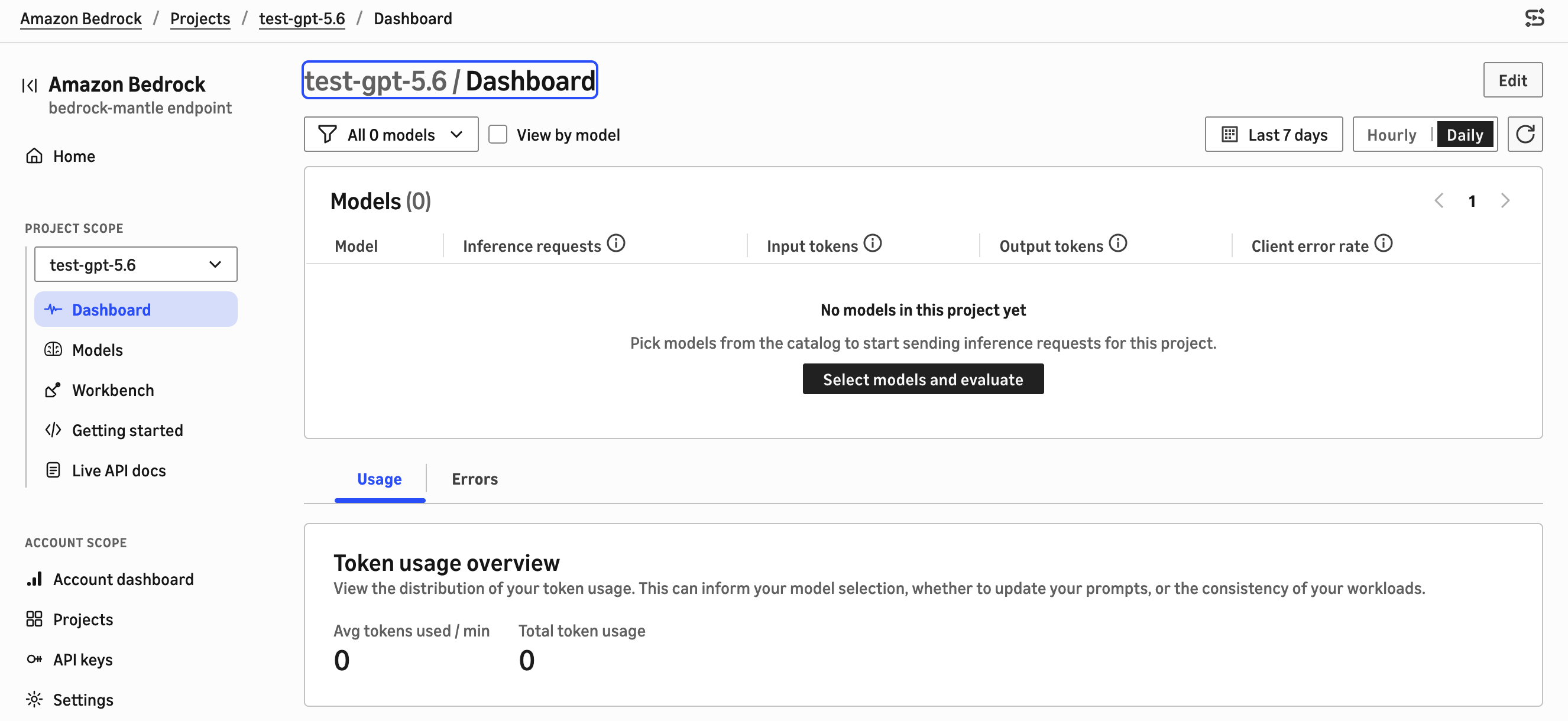
该体验以项目为基础。您可以创建项目、分配模型、配置 API 密钥,并在编写应用程序代码之前并排评估模型。完成以下步骤,即可无需离开控制台试用 GPT-5.6:
- 在模型可用的区域(例如美国东部〔弗吉尼亚北部〕)中打开新版 Amazon Bedrock 控制台。如果您位于现有控制台中,请选择 Try the new Bedrock console。
- 创建一个项目,或打开现有项目。
- 在模型目录中查看可用的 GPT、Claude 和开放权重模型。您可以并排比较最多三个模型的能力、模态、上下文窗口、定价和区域可用性。
- 选择一个 GPT-5.6 模型并将其添加到项目中。
- 开始评估,输入提示词,并查看模型响应。您最多可以选择三个模型,对同一提示词的响应进行比较。
以下截图展示了新版 Amazon Bedrock 控制台中的模型目录,您可以在其中浏览和比较 GPT-5.6 及其他模型。
使用 GPT-5.6 提示词缓存降低成本
Agentic 和多步骤工作负载会在多次调用间重复大量上下文。系统指令、工具定义和参考文件通常保持不变,只有最新输入发生变化。GPT-5.6 在 Amazon Bedrock 上支持两种提示词缓存模式。隐式缓存默认启用,因此符合条件的请求会自动缓存,无需修改代码。显式缓存则允许您标记缓存断点,从而精确控制提示词的哪些部分被缓存。在这两种模式下,随着请求量增长,提示词缓存都能降低重复处理共享上下文的成本。
使用缓存断点时,您可标记可复用提示词前缀的末尾。在后续共享该前缀的请求中,Amazon Bedrock 会复用已经处理过的上下文,每次调用仅对新增工作按全价计费。与未缓存输入 token 相比,缓存输入可享受 90% 的折扣;写入缓存的 token 则按未缓存输入费率的 1.25 倍计费。有关当前费率,请参阅 Amazon Bedrock 定价页面。缓存内容可供复用至少 30 分钟,足以覆盖一次单独 Agent 运行所产生的一波请求。每个断点都要求前缀至少包含 1,024 个 token,每次请求最多可设置四个缓存检查点。如果前缀短于最低要求,请求仍会成功,但不会缓存任何内容,且 cached_tokens 会保持为零。
使用缓存断点进行显式缓存
要缓存一个前缀,请将 prompt_cache_breakpoint 添加到可复用部分末尾的内容块,并将 prompt_cache_options 设置为 explicit 模式。在多个请求中设置一致的 prompt_cache_key,可将它们路由至同一个缓存,并提高匹配可靠性。在以下示例中,系统指令会被缓存,用户问题位于断点之后,因此可以在不
English / 原文
This post is co-written with Chris Dickens from OpenAI.
Developers building agentic coding, long-horizon reasoning, and high-volume inference workloads want frontier models they can call through familiar APIs, without operating separate model infrastructure. OpenAI GPT-5.6 Sol, Terra, and Luna are now generally available on Amazon Bedrock. The three models cover workloads from autonomous coding agents and long-horizon reasoning to high-volume, latency-sensitive inference, and they run with the security, Regional processing, and cost controls of AWS.
You access all three models through the OpenAI Responses API on the bedrock-mantle endpoint. Sol is the flagship reasoning model, Terra balances performance and cost for everyday production work, and Luna is optimized for fast, low-cost inference, so you can right-size capability and cost for each workload. Pricing matches OpenAI first-party rates, and usage counts toward your existing AWS commitments.
In this post, we show you how to select a model, run your first inference through the Responses API, reduce cost with prompt caching and measure cached-token usage, connect the OpenAI Codex coding agent, and plan for quotas and scaling. Your prompts and completions are not used to train any models, and are not shared with the model provider.
The GPT-5.6 family on Amazon Bedrock
GPT-5.6 introduces a naming system from OpenAI where the number identifies the generation and the names Sol, Terra, and Luna identify durable capability tiers that can advance on their own cadence. The following table summarizes the key specifications for each model on Amazon Bedrock.
| Model | Model ID | Best suited for | AWS Regions |
|---|---|---|---|
| Sol | openai.gpt-5.6-sol | Autonomous coding, security research, scientific analysis, and deep multi-step reasoning | US East (N. Virginia), US East (Ohio) |
| Terra | openai.gpt-5.6-terra | General-purpose production workloads that balance reasoning, performance, and cost | US East (N. Virginia), US East (Ohio), US West (Oregon) |
| Luna | openai.gpt-5.6-luna | High-volume, latency-sensitive workloads such as classification, summarization, and routing | US East (N. Virginia), US East (Ohio), US West (Oregon) |
All three models support text and image input, text output, a 272K-token context window, and the Responses API. They also support none, low, medium, high, xhigh, and max reasoning effort, so you can switch models without changing your API integration.
Accessing GPT-5.6 through the bedrock-mantle endpoint
You access GPT-5.6 models through the OpenAI Responses API on the bedrock-mantle endpoint. The base URL is https://bedrock-mantle.{region}.api.aws, and the Responses API is served at /openai/v1/responses. Replace {region} with a supported AWS Region, such as us-east-1. This openai/v1 path is specific to the OpenAI models. The endpoint works with the OpenAI Python and TypeScript SDKs. To run an existing OpenAI SDK application on Amazon Bedrock, replace the OpenAI base URL with the bedrock-mantle endpoint, use the corresponding Amazon Bedrock model ID, and authenticate with an Amazon Bedrock API key or AWS credentials.
Security and data handling
Every model call runs under your AWS Identity and Access Management (IAM) policies, inside your virtual private cloud (VPC), and is logged in AWS CloudTrail. In-Region inference keeps requests within the AWS Region you specify, which helps teams meet data-residency requirements.
GPT-5.6 Sol, Terra, and Luna are third-party models from OpenAI, made available on Amazon Bedrock and subject to the OpenAI terms. For these OpenAI models, classifier-flagged traffic is retained for up to 30 days for automated offline abuse detection. Retained inputs and outputs are stored and processed by AWS and are not shared with the model provider unless you opt in. You control retention configuration through data retention mode.
Get started with GPT-5.6 on Amazon Bedrock
Complete the following steps to start using GPT-5.6 on Amazon Bedrock.
Prerequisites
To use GPT-5.6 models, you need an AWS account with permissions to run inference on the bedrock-mantle endpoint. One way to grant these is to attach the AWS managed policy AmazonBedrockMantleInferenceAccess to your IAM principal. It grants the read and inference-creation access the examples in this post need, including bedrock-mantle:CreateInference and bedrock-mantle:CallWithBearerToken.
Install the OpenAI Python SDK, version 2.45.0 or later:
pip install "openai>=2.45.0"
You authenticate with an API key. There are two options for authenticating the OpenAI SDK.
-
Auto-refreshing short-term key: The OpenAI SDK’s native BedrockOpenAI client takes a token provider that generates a short-term key from your AWS credentials and refreshes it before each request. The examples in this post use this client.
from aws_bedrock_token_generator import provide_token from openai import BedrockOpenAI region = "us-east-1" client = BedrockOpenAI( aws_region=region, bedrock_token_provider=lambda: provide_token(region=region), ) -
Short-term key from an environment variable: Set the key on AWS_BEARER_TOKEN_BEDROCK and pass it to the client. Because this key isn’t refreshed, it expires after at most 12 hours. For production, use the auto-refreshing option or store the key in AWS Secrets Manager.
import os
from openai import OpenAI

client = OpenAI(
    base_url="https://bedrock-mantle.us-east-1.api.aws/openai/v1",
    api_key=os.environ["AWS_BEARER_TOKEN_BEDROCK"],
)
Run your first inference with the Responses API
Using the BedrockOpenAI client from the previous step, call GPT-5.6 Terra through the Responses API. The Responses API uses a single input field and returns the generated text in output_text.
response = client.responses.create(
    model="openai.gpt-5.6-terra",
    input="Explain the benefits of prompt caching for agentic workloads.",
    max_output_tokens=512,
    store=False,
)

print(response.output_text)
To move an existing OpenAI SDK application to GPT-5.6 on Amazon Bedrock, update the base URL and the model ID.
Control reasoning effort
GPT-5.6 models can spend additional reasoning tokens on complex, multi-step tasks before answering, which improves results but increases latency and cost. Set the level with the reasoning parameter. Sol, Terra, and Luna support none, low, medium, high, xhigh, and max. Match the level to the task.
response = client.responses.create(
    model="openai.gpt-5.6-sol",
    input="A train leaves at 3 PM at 60 km/h. Another leaves an hour later at "
    "90 km/h from the same station. When does the second catch up?",
    reasoning={"effort": "high"},
)

print(response.output_text)
GPT-5.6 supports tool calling, which lets the model request tools you define and use their results to complete a request. The following example demonstrates client-side tool calling, where your application runs the tool and returns the result to the model. It defines a get_weather tool and completes one round-trip. The model requests the tool, your application runs it and returns the result, and the model produces the final answer.
import json

tools = [
    {
        "type": "function",
        "name": "get_weather",
        "description": "Get the current weather for a given location",
        "parameters": {
            "type": "object",
            "properties": {
                "location": {
                    "type": "string",
                    "description": "City and country (for example, Seattle, US)",
                },
                "unit": {
                    "type": "string",
                    "enum": ["celsius", "fahrenheit"],
                    "description": "Temperature unit",
                },
            },
            "required": ["location"],
        },
    }
]

# Step 1: Send the user request with the tool definition.
input_list = [{"role": "user", "content": "What's the weather like in Seattle?"}]

response = client.responses.create(
    model="openai.gpt-5.6-terra",
    input=input_list,
    tools=tools,
)

# Step 2: Carry the model's output (including any reasoning items) into the next turn.
input_list += response.output

# Step 3: Run each requested function and append its result.
for item in response.output:
    if item.type == "function_call":
        args = json.loads(item.arguments)
        result = {
            "location": args["location"],
            "temperature": 64,
            "condition": "Partly cloudy",
        }
        input_list.append(
            {
                "type": "function_call_output",
                "call_id": item.call_id,
                "output": json.dumps(result),
            }
        )

# Step 4: Ask the model for the final response, incorporating the tool result.
final_response = client.responses.create(
    model="openai.gpt-5.6-terra",
    input=input_list,
    tools=tools,
)

print(final_response.output_text)
Because GPT-5.6 models reason before responding, pass the model’s output items (which can include reasoning) back in the next request, as the preceding example does when it appends response.output to the input list.
For production deployments, use Amazon Bedrock Guardrails to implement safeguards customized to your use cases and responsible AI policies.
Try GPT-5.6 on the console
GPT-5.6 models run on the next-generation inference engine, which has a new Amazon Bedrock console experience optimized for the bedrock-mantle endpoint and its OpenAI-compatible and Anthropic-compatible APIs.
This experience is project-based. You create a project, assign models, configure API keys, and evaluate models side by side before writing application code. Complete the following steps to try GPT-5.6 without leaving the console:
- Open the new Amazon Bedrock console in a Region where the models are available, such as US East (N. Virginia). If you are in the existing console, choose Try the new Bedrock console.
- Create a project, or open an existing one.
- In the model catalog, review the available GPT, Claude, and open-weight models. You can compare up to three models side by side on capabilities, modalities, context window, pricing, and Regional availability.
- Choose a GPT-5.6 model to add it to your project.
- Start an evaluation, enter a prompt, and review the model’s response. You can select up to three models to compare responses to the same prompt.
The following screenshot shows the model catalog in the new Amazon Bedrock console, where you can browse and compare GPT-5.6 and other models.
Reduce cost with GPT-5.6 prompt caching
Agentic and multi-step workloads repeat much of their context between calls. System instructions, tool definitions, and reference files often stay the same while only the latest input changes. GPT-5.6 supports prompt caching in two modes on Amazon Bedrock. Implicit caching is on by default, so eligible requests are cached automatically without code changes. Explicit caching lets you mark cache breakpoints for precise control over which parts of a prompt are cached. In both modes, prompt caching reduces the cost of repeatedly processing shared context as request volume grows.
With a cache breakpoint, you mark the end of a reusable prompt prefix. On a subsequent request that shares that prefix, Amazon Bedrock reuses the processed context, and each call pays full price only for the new work. Cached input is billed at a 90% discount compared to uncached input tokens, and tokens written to cache are billed at 1.25 times the uncached input rate. For current rates, see the Amazon Bedrock pricing page. Cached content stays available for reuse for at least 30 minutes, long enough to cover the burst of calls a single agent run generates. Each breakpoint requires a prefix of at least 1,024 tokens, and you can set up to four cache checkpoints per request. If a prefix is shorter than the minimum, the request still succeeds, but nothing is cached and cached_tokens stays zero.
Explicit caching with cache breakpoints
To cache a prefix, add a prompt_cache_breakpoint to the content block that ends the reusable section, and set prompt_cache_options to explicit mode. Setting a consistent prompt_cache_key across requests routes them to the same cache and improves match reliability. In the following example, the system instruction is cached, and the user’s question comes after the breakpoint so it can change without invalidating the cached prefix. The same request is sent twice to show a cache write followed by a cache read.
# Replace with your real system instructions and reference content.
# The cached prefix must be at least 1,024 tokens, or nothing is cached.
system_prompt = "You are a technical support agent for Example Corp. ...(1,024+ tokens)..."

def ask(question):
    return client.responses.create(
        model="openai.gpt-5.6-terra",
        prompt_cache_key="support-agent:system-prompt-v1",
        prompt_cache_options={"mode": "explicit"},
        input=[
            {
                "type": "message",
                "role": "developer",
                "content": [
                    {
                        "type": "input_text",
                        "text": system_prompt,
                        # Cache everything up to this breakpoint (the system instruction).
                        "prompt_cache_breakpoint": {"mode": "explicit"},
                    }
                ],
            },
            {
                "type": "message",
                "role": "user",
                "content": [{"type": "input_text", "text": question}],
            },
        ],
    )

# First call: writes the prefix to cache.
first = ask("How do I configure single sign-on?")
print("write:", first.usage.input_tokens_details.cache_write_tokens)

# Second call with the same prefix and cache key: read the prefix from cache.
second = ask("How do I reset a password?")
print("read: ", second.usage.input_tokens_details.cached_tokens)
print(second.output_text)
The system_prompt here is an abbreviated placeholder. Replace it with real content of at least 1,024 tokens. With a large enough prefix, the first call reports a nonzero cache_write_tokens and the second a nonzero cached_tokens, confirming the prefix was reused. Explicit mode is a good fit for agentic loops with a large, stable prefix, where you want full control over what gets cached.
Implicit caching
If you don’t set prompt_cache_options, GPT-5.6 uses implicit caching, the default mode. Amazon Bedrock places an automatic cache breakpoint on the latest message and honors any explicit breakpoints you add, so a stable prompt prefix can be reused across requests without any change to your input structure. This is the quickest way to benefit from caching. Keep static content (system instructions, tool definitions, reference documents) at the front of the prompt and variable content at the end, set a consistent prompt_cache_key for related requests, and the endpoint reuses the processed prefix when it matches.
The following example uses implicit caching. It sets no prompt_cache_options and no breakpoint, and reuses the system_prompt from the previous example (replace it with real content of at least 1,024 tokens) with a consistent prompt_cache_key:
response = client.responses.create(
    model="openai.gpt-5.6-terra",
    prompt_cache_key="support-agent:kb-v1",
    input=[
        {
            "type": "message",
            "role": "developer",
            # Static content first so it forms a stable, cacheable prefix.
            "content": [{"type": "input_text", "text": system_prompt}],
        },
        {
            "type": "message",
            "role": "user",
            "content": [{"type": "input_text", "text": "How do I configure single sign-on?"}],
        },
    ],
)

print(response.output_text)
The trade-off is control. In implicit mode, you don’t decide exactly where the cacheable boundary falls. Implicit caching suits chat and Retrieval Augmented Generation (RAG) workloads with a naturally stable prefix, while explicit caching suits agentic loops where you want to pin a large, known prefix and avoid unnecessary cache writes. Billing is the same in both modes. Cache reads receive the 90% discount, and cache writes are billed at 1.25 times the uncached input rate. For current rates, see the Amazon Bedrock pricing page. To turn caching off for a request, set prompt_cache_options to explicit mode without adding any breakpoints.
Monitor and evaluate your cache hit rate
Each response reports cache activity in the usage object. The input_tokens_details.cached_tokens field is the number of input tokens read from cache, and cache_write_tokens is the number written. Because cached_tokens is already part of the total input_tokens, you get the cached-input ratio by dividing cached_tokens by input_tokens:
usage = response.usage
details = usage.input_tokens_details

cached = getattr(details, "cached_tokens", 0) or 0
cache_write = getattr(details, "cache_write_tokens", 0) or 0

total_input = usage.input_tokens
hit_rate = cached / total_input if total_input else 0.0

print(f"Cached tokens: {cached}")
print(f"Written tokens: {cache_write}")
print(f"Total input: {total_input}")
print(f"Cache hit rate: {hit_rate:.1%}")
A cache hit appears in the usage object as cached_tokens greater than zero and cache_write_tokens of zero. A zero cache_write_tokens alone doesn’t confirm a hit, since you also see it when nothing was cached. Cache hits aren’t guaranteed on every request, even with an identical prefix, so measure cached_tokens across calls rather than expecting a hit on any single one.
To track cache performance across many requests, aggregate cached_tokens and cache_write_tokens from each response in your application logging. The bedrock-mantle endpoint publishes account, project, and model token metrics to Amazon CloudWatch under the AWS/BedrockMantle namespace, but it does not publish a cache-specific metric, so the response usage object is the authoritative source for cache measurement.
Use GPT-5.6 with Codex
Codex is the OpenAI coding agent for developers. It works with local files, repositories, terminals, and development environments to write features, fix bugs, run tests, and open pull requests. You can run Codex from the command line (Codex CLI), as an IDE extension for Visual Studio Code and JetBrains, or in the ChatGPT desktop app. Each of these can route its model inference to Amazon Bedrock so it runs in your AWS account with In-Region processing and the access controls described earlier.
To point Codex at Amazon Bedrock, set the model and provider in your ~/.codex/config.toml file. The new Amazon Bedrock console also includes a Clients section that generates these connection instructions for you.
model = "openai.gpt-5.6-sol"
model_provider = "amazon-bedrock"
[model_providers.amazon-bedrock.aws]
region = "us-east-1"
Codex authenticates with an API key or your AWS SDK credentials. If you set AWS_BEARER_TOKEN_BEDROCK, Codex uses it first. Otherwise it falls back to the AWS SDK credential chain. The ChatGPT desktop app and the IDE extension might not inherit your shell environment, so place the variables they need in ~/.codex/.env:
AWS_BEARER_TOKEN_BEDROCK=<your-api-key>
Restart the app or extension after you change ~/.codex/config.toml or ~/.codex/.env. If you run the Codex CLI instead, you can export the same variable in your shell rather than using the .env file. Codex routes inference through the bedrock-mantle endpoint in supported commercial AWS Regions. For coding tasks, higher reasoning effort suits complex refactoring and debugging, while a lower level keeps routine edits fast.
The following screenshot shows Codex in the ChatGPT desktop app configured to run a GPT-5.6 model on Amazon Bedrock.
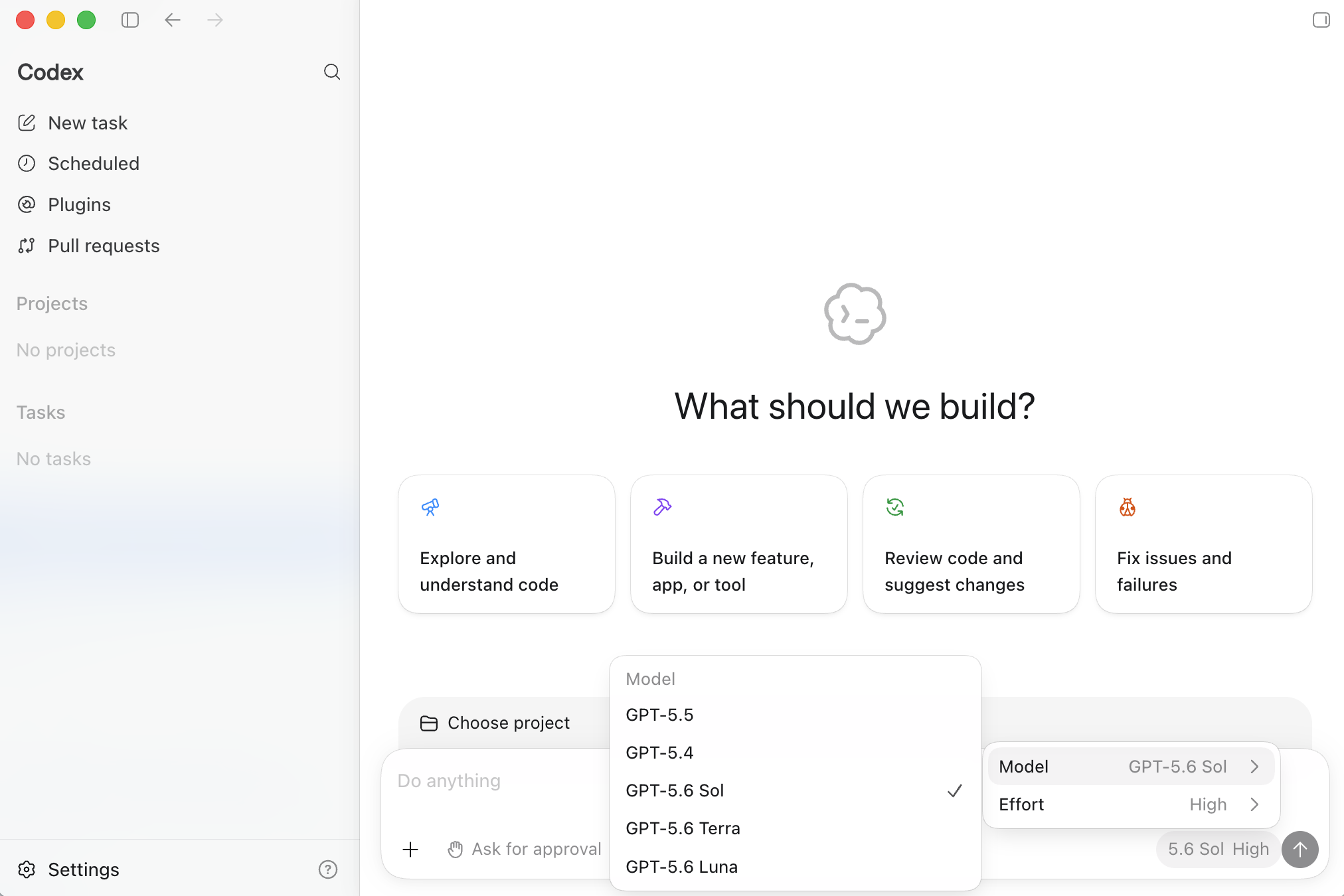
Codex in the ChatGPT desktop app running GPT-5.6 on Amazon Bedrock
You can change the reasoning effort in the ChatGPT desktop app, choosing between Light, Medium, High, and Extra High for a task. The following screenshot shows the reasoning-effort selector.
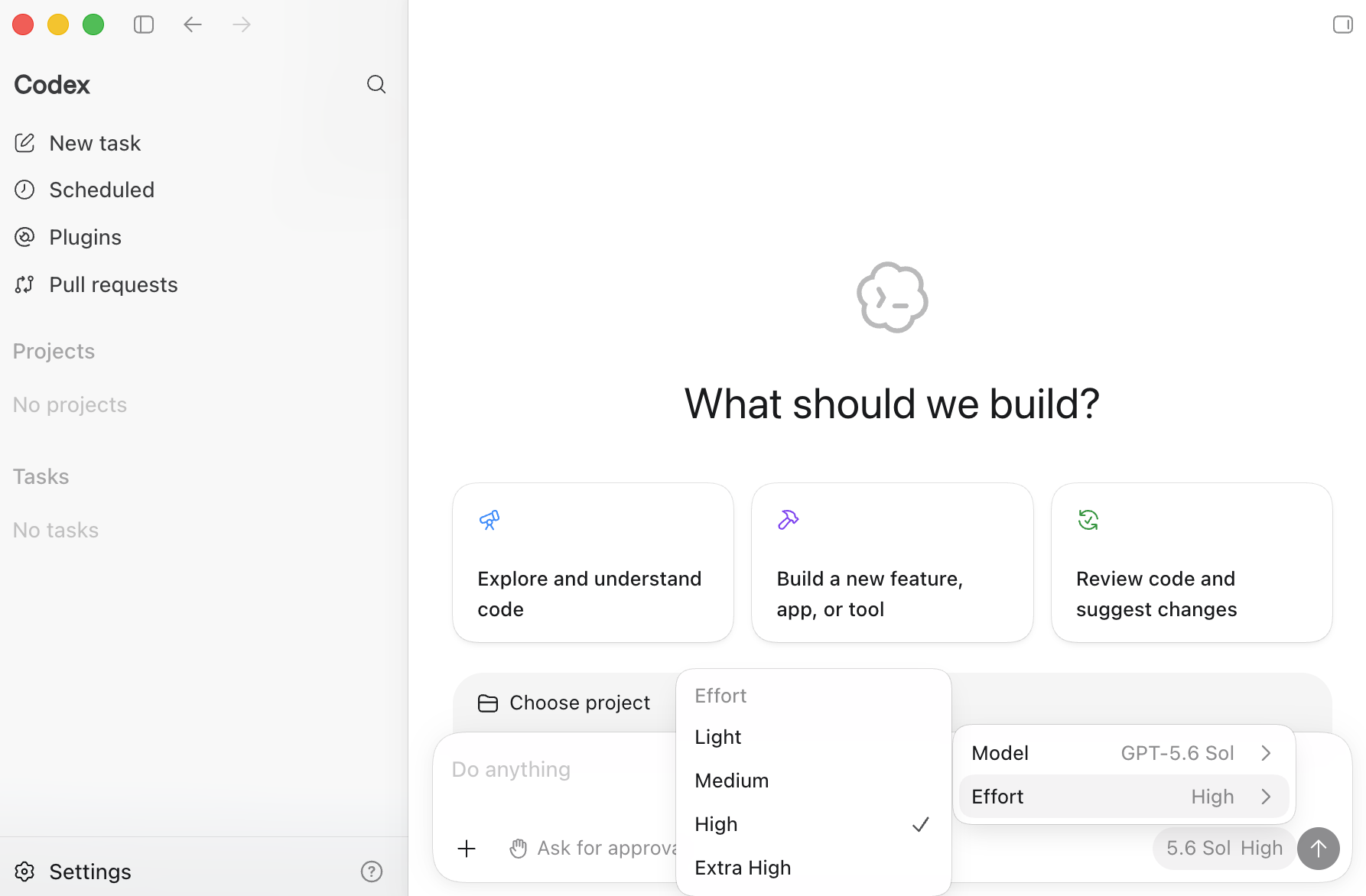
Choosing the reasoning effort for a Codex task in the ChatGPT desktop app
Quotas and scaling
When you invoke GPT-5.6 models, requests use on-demand inference on the Standard service tier, where you pay per token without reserving capacity.
Inference on the bedrock-mantle endpoint is governed by two per-model, per-Region quotas, one for input tokens per minute and one for output tokens per minute. There is no requests-per-minute quota. Cached input tokens read through prompt caching do not count against the input-tokens-per-minute quota, which is one more reason caching helps at scale. If a token-per-minute quota is exceeded, the endpoint returns an HTTP 429 response. Handle transient throttling with exponential backoff and a bounded retry count, which the OpenAI SDK supports through its max_retries setting. For more information, refer to Quotas for the bedrock-mantle endpoint.
One recommended way to handle transient throttling is exponential backoff with a bounded retry count. The OpenAI SDK supports this through its max_retries setting:
from aws_bedrock_token_generator import provide_token
from openai import BedrockOpenAI

region = "us-east-1"

client = BedrockOpenAI(
    aws_region=region,
    bedrock_token_provider=lambda: provide_token(region=region),
    max_retries=6,
)
To reduce throttling on sustained high volume, spread large workloads across multiple minutes rather than firing them in tight bursts, and increase request rates gradually so throughput can track regional capacity.
Clean up
On-demand inference incurs charges only when you invoke a model, so there is no infrastructure to tear down. To avoid unintended charges:
- If you generated a short-term API key, it expires automatically within 12 hours. To revoke one sooner, delete the API key in the new Amazon Bedrock console. Deleting a key immediately revokes access for any application using it, so confirm no active applications depend on it first.
- Each model invocation incurs per-token charges. For current rates, refer to Amazon Bedrock pricing.
Conclusion
In this post, we showed how to get started with OpenAI GPT-5.6 Sol, Terra, and Luna on Amazon Bedrock. We covered how to choose a variant, how to run inference through the Responses API on the bedrock-mantle endpoint, how to control reasoning effort and call tools, how to reduce cost with explicit prompt caching and measure your cache hit rate, and how to connect the OpenAI Codex coding agent. We also walked through quotas and scaling for the endpoint.
To get started:
- Open the new Amazon Bedrock console, create a project, and evaluate a GPT-5.6 model against your prompts.
- Run the Responses API sample from this post against your own data.
- Add an explicit cache breakpoint to a repeated prompt prefix and measure the cache hit rate.
- Evaluate Sol, Terra, and Luna on your workloads to choose the variant that fits your cost and latency profile.
For more information, refer to the following resources:
To discuss how GPT-5.6 on Amazon Bedrock can support your workloads, contact an AWS Representative.
About the authors
Zohreh Norouzi
Zohreh is a Senior Security Solutions Architect at Amazon Web Services (AWS). She helps customers make good security choices and accelerate their journey to the AWS Cloud. She has been actively involved in AI security initiatives, using her expertise to help customers build secure AI solutions at scale.
Koushik Kethamakka
Koushik is a Principal Software Engineer at AWS, currently focused on inference at scale as part of Amazon Mantle, the foundational infrastructure for hosting large models across AWS. Previously at AWS, Koushik built Amazon Bedrock Evaluations and Amazon Bedrock Guardrails, focused on LLM evaluations and safety. Before that, he contributed to building AI/ML services including Amazon Lex and Amazon Bedrock, with expertise spanning product and system design, LLM hosting, evaluations, and fine-tuning. Prior to AWS, Koushik built real-time ML fraud prevention systems for Amazon.com. He holds an MS from the University of Houston.
Saurabh Trikande
Saurabh is a Senior Product Manager for Amazon Bedrock and Amazon SageMaker Inference. He is passionate about working with customers and partners, motivated by the goal of democratizing AI. He focuses on deploying complex AI applications, inference with multi-tenant models, and cost optimizations.
Kamalesh Palanisamy
Kamalesh is a Software Engineer at AWS, focused on scalable model inference and safety orchestration for AWS Mantle. He works on model onboarding, inference optimization, and reliable serving infrastructure for large generative AI models.
Manish Rathaur
Manish is a Senior Manager, Product for Amazon Bedrock.
Chris Dickens
Chris is a Member of Product Staff at OpenAI focused on the OpenAI APIs. His work includes collaboration with AWS on Amazon Bedrock to make OpenAI’s frontier models widely accessible to developers.