Gemini Enterprise Agent Platform 的 Agent 与模型评估现已正式发布
英文标题:Agent and Model Evaluations in Gemini Enterprise Agent Platform are now GA
Gemini Enterprise Agent Platform 的 Agent 和模型评估服务现已正式发布,开发者可在本地实验与线上生产流量中使用同一套引擎和一致的指标评估质量。该服务提供 20 多项预构建指标、由 Google DeepMind 共同开发的自适应评估量规,以及自定义代码和 LLM-as-a-judge 指标能力。开发者还可通过在线监控、生产追踪评估、用例生成及用户和环境模拟器,持续发现 Agent 在真实环境中的质量漂移与故障模式。
 11.7 KB
 848.6 KB
 1.1 MB
 247.6 KB
 494.0 KB
 83.9 KB
 420.0 KB
 715.3 KB
中文
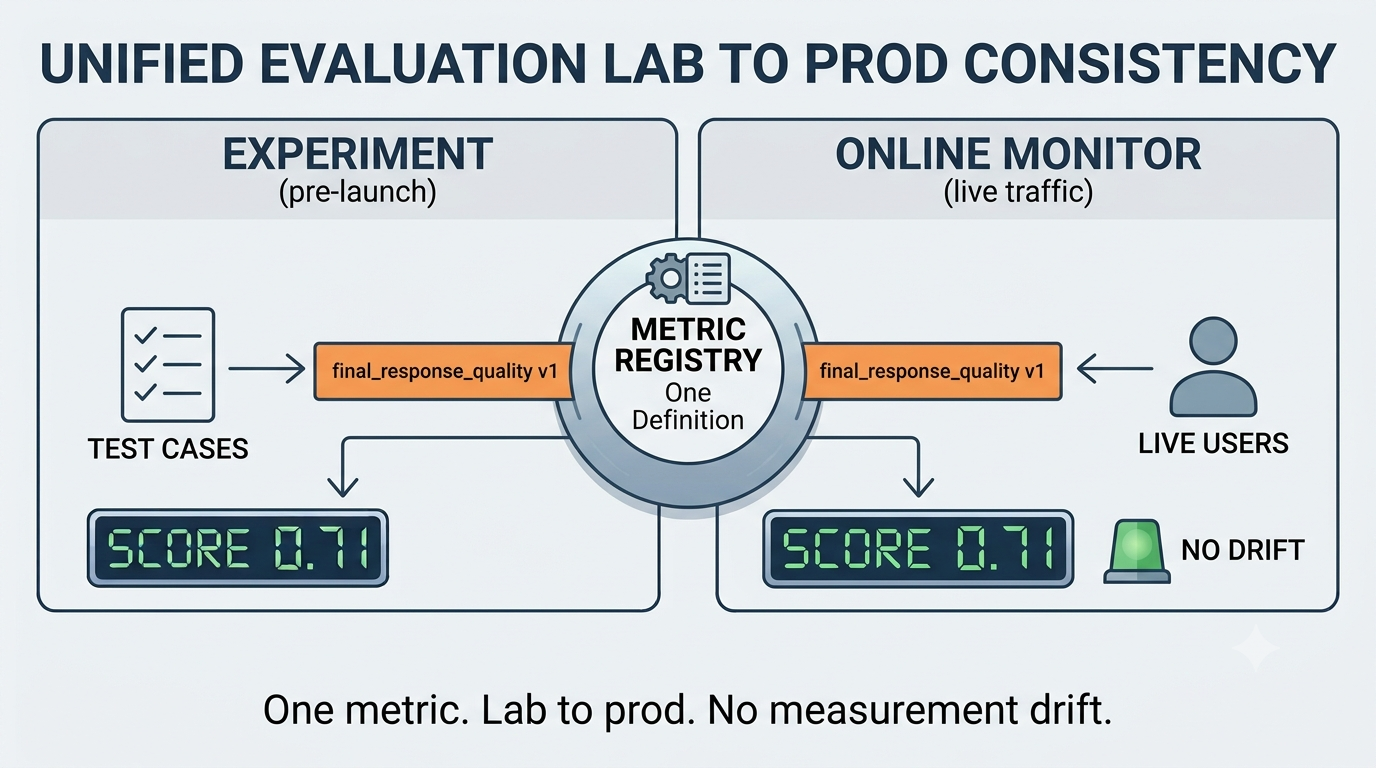
Agent 的质量必须在开发期间针对你编写的测试用例进行衡量,也必须在上线后针对 Agent 实际执行的任务进行衡量。Agent Platform 中的Agent 和模型评估现已正式发布,让你能够在这两个阶段使用同一套引擎和一致的指标来衡量、比较 Agent 和模型。当你在本地实验与实时流量中使用一致的质量评分时,生产环境中的质量漂移将指向 Agent 本身的问题,而不是测量方式的问题。
现已正式发布的功能
- 指标。 可从 20 多项预构建指标开始使用,这些指标覆盖质量、安全性、事实依据性、Agent 工具使用与轨迹,以及适用于摘要和翻译等任务的基于参考答案的评分。自适应评估量规会针对每个用例定制评判标准,而不是针对不应被问同样问题的不同输入,使用一条脆弱的 llm-as-judge 提示词。你还可以定义自己的基于代码的指标或LLM-as-a-judge 指标,并将其存储在统一的、带版本控制的组织级位置中,以便评分长期保持一致和可比较。
- 实验。 可在客户端或服务端运行实验。服务端会将所有工件保存在 Cloud Storage 中,因此每次运行都可审计、可复现。实验集成了用例生成,可用于快速创建评估数据集;集成了用户模拟器,可在无需为每条回复编写脚本的情况下完成多轮用例;还集成了环境模拟器,用于模拟 Agent 调用的系统,因此你可以模拟故障或缓慢的后端,而不会影响生产环境。
- 在线监控和遥测集成。 对实时生产流量进行持续评估,可为你已收集的追踪记录评分,并生成随时间变化的评分图表和漂移告警,无需搭建自定义数据处理流水线。
你可以通过 Agent Platform SDK、agents-cli、Agent Platform Google Cloud 控制台中的 Evaluation 部分,以及直接通过 ADK 访问评估功能。
实验
评估工作的主要单元是实验:它包含一个评估用例数据集,以及一组可在迭代过程中运行和审查的指标与评分。评估服务提供了灵活的 UI,可用于定义指标、启动新的运行任务并审查结果,甚至可深入查看单个失败案例;你可以打开 Agent 的完整追踪记录和会话日志,准确了解发生了什么。
[视频/嵌入内容:Evals Worksheet — 审查并运行 Agent 评估。]
你可以在本地运行实验以快速迭代;或者,如果你的 Agent 已部署在 Agent Platform 上并启用了遥测功能,则可以为已有的会话和追踪记录评分,也可以在启用用户模拟器的情况下运行 Agent,在真实用户产生追踪记录之前先创建这些记录。所有实验工件都会透明地存储在 Cloud Storage 中,因此你可以对运行任务进行版本控制和审计,以满足合规与长期留存要求。
对于大型评估任务,系统支持问题聚类:它会依据你自定义的分类法对失败原因进行归类,将评估失败分组成易于理解且可采取行动的集群。如果你尚未建立分类法,可以使用我们为自适应评估量规提供的预构建分类法,它涵盖了 Agent 常见的出错方式。
评估指标
该服务内置了 20 多项预构建指标。基于计算的指标会根据真实参考答案进行确定性评分:用于摘要的 ROUGE;用于翻译的 BLEU、MetricX 和 COMET;以及用于抽取式问答的精确匹配。
除此之外,自适应评估量规是一种高级 LLM-judge 指标工作流,由我们与 Google DeepMind 的研究合作伙伴共同开发。它会根据评估用例定义、开发者指令和工具声明,为每个用例生成特定的通过/失败测试(评估量规)。随后,它会根据这些评估量规为追踪记录打分,并为每条评估量规提供判定结果和理由。
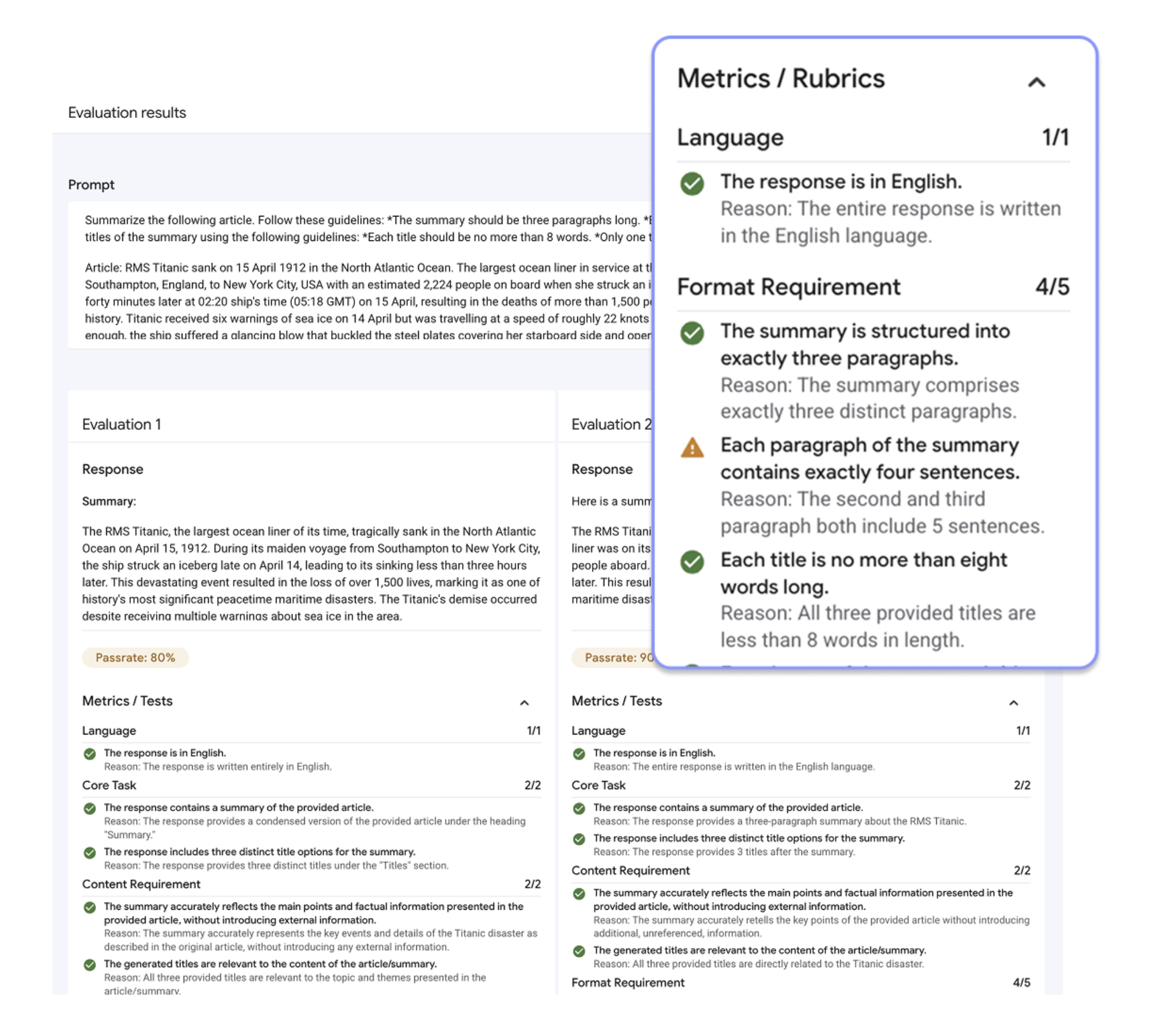
针对每个评估用例生成评判标准的自适应评估量规。
我们针对你通常希望了解的 Agent 能力设计并校准了多个变体。任务成功会根据 Agent 回复中可观察的结果和确认信息,评估其在整个对话中达成目标的情况。工具使用质量评估工具选择、参数正确性和 Schema 合规性。安全性会依据涵盖仇恨言论、骚扰、危险内容、露骨色情材料和 PII 的内容政策为回复评分,并返回被违反的政策。还提供了轨迹质量、最终回复质量、幻觉、事实依据性以及图像和视频质量指标。自然语言指南可引导评估量规生成朝向你指定的标准,生成的评估量规组可以审查,并可在多个 Agent 之间复用。
当预构建指标不适用时,你可以引入自己的指标。基于代码的指标是一个 Python 函数,可覆盖精确文本匹配、JSON 结构检查,以及其他任何可以用代码表达的逻辑。LLM-as-a-judge 指标则包含你自己的评判标准、评分尺度和裁判模型。在本地运行时,你可以使用任意提供商的任何模型;服务端评估运行则支持任何 Model Garden 模型,包括所有 Gemini 和 Anthropic 模型。
无论指标以何种方式定义,都会进入同一个带版本控制的组织级注册表,并在离线实验和在线监控中保持不变地运行。我们正在积极扩展对更多专业任务和输入模态的覆盖,也欢迎你提供反馈。
在线监控和遥测集成
即使一个 Agent 在完整测试套件中全部通过,仍可能在上线一周后发生漂移,因为它会面对从未有人写成测试用例的输入。这与其说是测试失败,不如说是生产环境的现实:真实任务比你能预先编写的任何测试套件都更庞大、更不可预测。
你在开发 Agent 时构建的指标,应当在 Agent 上线后继续运行。如果你已经通过 Cloud Trace 收集追踪记录和会话,只需在追踪记录 UI 中单击一下,即可直接对其进行评估。更好的方式是设置一个在线监控器,在实时流量到达时对其进行评分。为避免评估每一个请求并将成本控制在可接受范围内,你可以使用内置采样和定向筛选功能。监控器启用后,你可以在内置仪表板中查看评分随时间的变化,甚至可以为电子邮件、Slack 或其他渠道设置漂移告警。
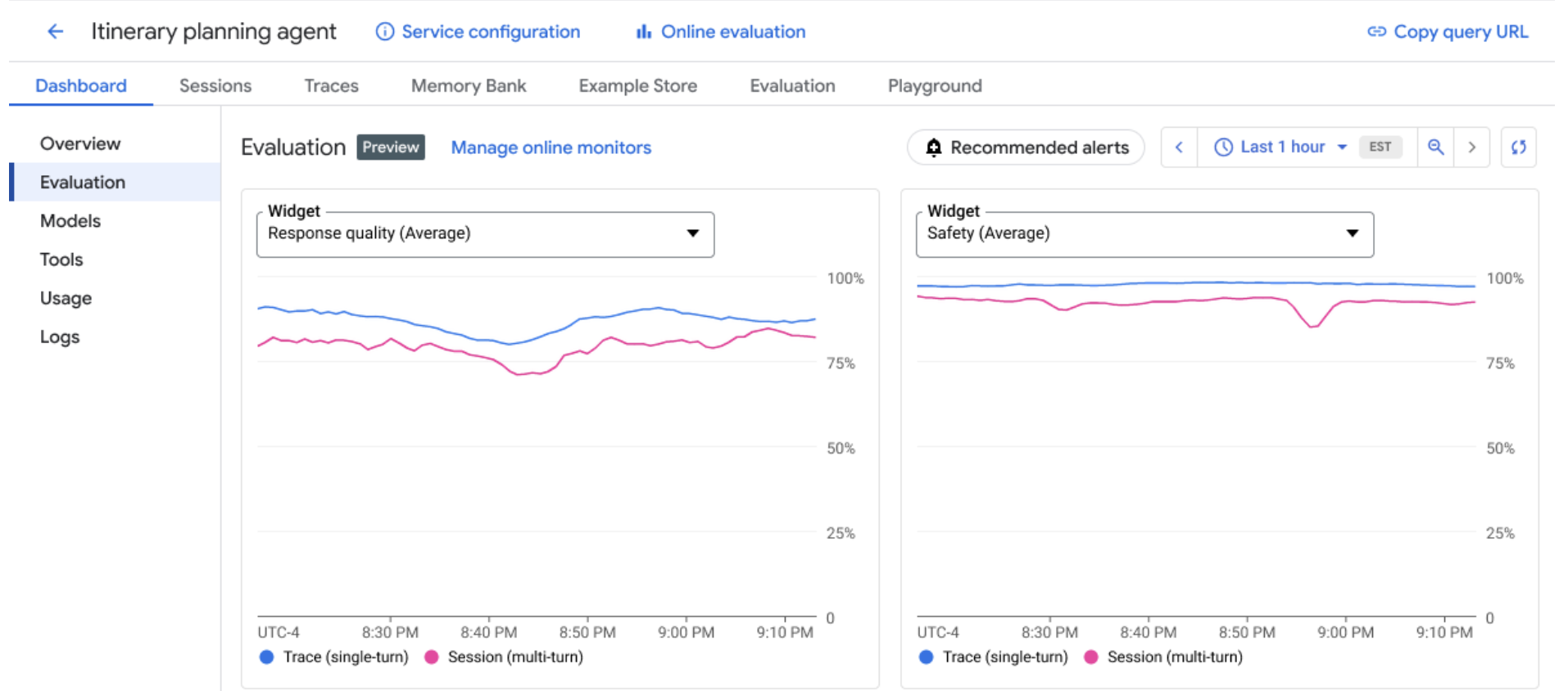
在线监控器展示生产追踪记录上的评估评分变化。
用例生成和模拟
每项评估都需要可运行的测试用例,而手动编写所有用例既缓慢,又容易遗漏不明显的情况。评估服务可以通过用例生成器、用户模拟器和环境模拟器为你生成这些用例。
用例生成器会根据 Agent 的指令和工具生成合成评估用例,因此你无需从空白页面开始,也不会将覆盖范围局限于你想到并手动写出的内容。对于 ADK Agent,它可以与用户模拟器配合,覆盖那些难以手动生成的场景:你定义一个角色设定和简短的对话计划,模拟器便会在完整的多轮交互中扮演该用户,让你无需为每条回复编写脚本,也能评估真实的来回对话。
环境模拟器可替代 Agent 调用的系统。将其指向某个工具,并提供你希望得到的响应——模拟数据、强制错误或增加的延迟——它便会在运行过程中拦截该调用。这样,你可以在不触及生产环境的情况下,测试 Agent 如何处理发生故障或响应缓慢的后端。
定价和可用性
Agent 和模型评估现已正式发布。有关支持的区域和企业安全功能,请参阅区域和安全功能表。对于 LLM-as-a-judge 及其他基于模型的指标背后的模型调用,你需要按标准费率付费;此外,服务端运行保存的工件还会产生 Cloud Storage 费用。基于代码的指标和基于计算的指标不会增加额外费用。你的数据集和追踪记录始终保留在你的项目中。
开始使用
无论你当前使用什么工具构建 Agent,评估功能都可融入其中。它是 Agent Platform SDK 的一部分;对于 SDK 未覆盖的语言和流水线,也可以通过 REST API 使用相同的操作。
如果你通过命令行工作,agents-cli 可将评估作为一项一等命令,与部署 Agent 和检查遥测数据时已使用的命令并列(目前支持 ADK-Python Agent)。你甚至可以直接通过编码 Agent 运行这一循环:一项可复用技能可引导 Claude Code 和类似工具完成完整的 Agent 质量飞轮。对于基于 ADK 构建的团队,评估功能已内置于该框架中——你可以定义评估集,并在本地开发 Agent 时针对它运行评估,其中也包括在 pytest 中用于 CI。若你希望在不编写代码的情况下审查一次运行结果,则可以使用前文介绍的 Evals Worksheet Web UI 网格界面。
我们迫不及待想看到你将构建和发布什么。
English / 原文
Agent quality must be measured during development against the cases you wrote, and after launch against the tasks the agent actually performed. Agent and model evaluations in Agent Platform are now generally available, letting you measure and compare agents and models at both stages, on one engine with consistent metrics. When you use consistent quality scoring on local experiments and live traffic, a drift in production points to a problem with the agent rather than with the way it was measured.
What's generally available
- Metrics. Start from more than 20 pre-built metrics spanning quality, safety, grounding, agent tool use and trajectory, and reference-based scoring for tasks like summarization and translation. Adaptive rubrics tailor the judging criteria to each case instead of applying one brittle llm-as-judge prompt across inputs that don't deserve the same questions. You can also define your own code-based or LLM-as-a-judge metrics and store them in one versioned, org-wide place so scoring stays consistent and comparable over time.
- Experiments. Run them client- or server-side. Server-side keeps every artifact in Cloud Storage, so runs are auditable and reproducible. Experiments integrate with case generation to bootstrap an evaluation dataset, a user simulator to play out multi-turn cases without scripting each reply, and an environment simulator to stand in for the systems the agent calls, so you can emulate a failing or slow backend without affecting production.
- Online monitors and telemetry integrations. Continuous evaluation on live production traffic grades the traces you already collect and produces score-over-time charts and drift alerts, without needing to set up custom data processing pipelines.
You can reach evaluations from the Agent Platform SDK, agents-cli, the Evaluation section in Agent Platform Google Cloud console, and directly from ADK.
Experiments
The primary unit of work in evaluation is the experiment , a dataset of eval cases and a set of metrics and scores to run and review as you iterate. The evaluation service comes with a flexible UI to define metrics, kick off new runs, and review the results, all the way down to a single failure, where you can open the agent's full trace and session log to see exactly what happened.
Sorry, your browser doesn't support playback for this video
Evals Worksheet — review and run agent evaluations.
You can run experiments locally for fast iterations, or, if your agent is already deployed on Agent Platform with telemetry enabled, you can grade existing sessions and traces , or run the agent with the user simulator enabled to create traces before your users produce them. Every experiment artifact is stored transparently in Cloud Storage , so you can version and audit your runs for compliance and posterity.
For large evaluation jobs, the system supports issue clustering: it groups eval failures into interpretable, actionable clusters against your own taxonomy of failure reasons. If you haven't developed a taxonomy yet, you can use a pre-built one we have for adaptive rubrics, which covers the common ways agents go wrong.
Evaluation metrics
More than 20 pre-built metrics ship with the service. Computation-based metrics score deterministically against a ground-truth reference: ROUGE for summarization, BLEU , MetricX , and COMET for translation, exact match for extractive QA.
Beyond those, an adaptive rubric is an advanced LLM-judge metric workflow co-developed with our research partners at Google DeepMind. It creates case-specific pass/fail tests (rubrics) from the eval case definition, the developer instruction, and the tool declarations. It then grades the traces against these rubrics, providing the verdict and rationale per rubric.
Adaptive rubric with criteria generated per evaluation case.
We designed and calibrated variants for what you usually want to know about an agent. Task Success grades goal fulfillment across a conversation from observable outcomes and confirmations in the agent's responses. Tool Use Quality evaluates tool selection, argument correctness, and schema compliance. Safety scores the response against content policies spanning hate speech, harassment, dangerous content, sexually explicit material, and PII, returning the policies violated. Trajectory Quality, Final Response Quality, Hallucination, Grounding , and image and video quality metrics are also available. Natural-language guidelines steer rubrics generation toward criteria you specify, with the resulting rubric group reviewable and reusable across agents.
When the pre-built metrics don't fit, you can bring your own. A code-based metric is a Python function, covering exact text matches, JSON-shape checks, and anything else expressible in code. An LLM-as-a-judge metric carries your own criteria, rating scale, and judge model. When running locally you can use any model from any provider, and server-side evaluation runs support any Model Garden model, including all Gemini and Anthropic models.
However a metric is defined, it lands in the same versioned, org-wide registry, running unchanged in offline experiments and online monitors. We're actively expanding coverage to more specialized tasks and input modalities, and we welcome your feedback.
Online monitors and telemetry integrations
An agent that's green across your whole test suite can still drift a week after launch, when faced with inputs nobody wrote a case for. That's not a testing failure so much as a fact of production where real tasks are bigger and stranger than any suite you can write up front.
The metrics you built when developing your agent should keep running after your agent launches. If you already collect traces and sessions through Cloud Trace, you can evaluate them directly with just one click in the traces UI. Better still is to set up an online monitor to grade the live traffic as it arrives. To avoid grading every request and keep costs manageable, you can use the built-in sampling and targeted filters. When monitors are active you can see scores over time in built-in dashboards and even set up drift alerts for email, Slack, or other channels.
Online monitors show eval scores over on production traces.
Case generation and simulation
Every evaluation needs test cases to run against, and writing them all by hand is slow and tends to miss the non-obvious ones. The evaluation service can generate them for you, with a case generator , a user simulator , and an environment simulator.
The case generator seeds synthetic eval cases from the agent's instructions and tools, so you're not starting from a blank page or capping your coverage at what you thought to type out. For ADK agents, it can pair with a user simulator to reach the scenarios that are hard to produce by hand: you define a persona and a short conversation plan, and the simulator plays that user across a full multi-turn exchange, so you can evaluate real back-and-forth without scripting each reply.
The environment simulator stands in for the systems your agent calls. Point it at a tool, give it the response you want — mocked data, a forced error, added latency — and it intercepts that call during the run, so you can test how the agent handles a failing or slow backend without touching production.
Pricing and availability
Agent and model evaluations are generally available. For supported regions and enterprise security features see regions and security features table. You pay standard rates for the model calls behind LLM-as-a-judge and the other model-based metrics – plus Cloud Storage for the artifacts a server-side run keeps. Code-based and computation metrics add no additional cost. Your datasets and traces always stay in your project.
Get started
Evaluation meets you in whatever tool you already build agents with. It's part of the Agent Platform SDK, with the same operations available over the REST API for the languages and pipelines the SDK doesn't reach.
If you work from the command line, agents-cli makes eval a first-class command next to the ones you already use to deploy agents and inspect telemetry (ADK-Python agents today). You can even run the loop straight from your coding agent: a reusable skill walks Claude Code and similar tools through the full agent-quality flywheel. For teams building on ADK, evaluation is built into the framework — define eval sets and run them against your agent locally as you develop, including inside pytest for CI. And when you'd rather review a run without writing code, the Evals Worksheet web UI is the grid covered above.
We can't wait to see what you ship.