在 Genkit Go 中通过 Agent Skills 启用按需专业能力
英文标题:Enable on-demand expertise with Agent Skills in Genkit Go
Genkit 已在 TypeScript、Go、Dart 和 Python 中支持 Agent Skills,使开发者能够将专业指令、脚本与参考资料封装为模块化的 `SKILL.md` 能力包。该机制采用“渐进式披露”架构:系统初始仅向模型提供技能元数据,只有在请求匹配时才加载完整指令与附带资源,从而减少上下文膨胀和 token 消耗。Genkit Go 通过 middleware hook 体系实现技能发现、激活和执行,并可在 `Generate` 或 `GenerateText` 调用中通过 `ai.WithUse` 启用。文中展示了菜谱生成工具和多模态艺术修复应用示例,说明该能力适用于需要按需调度专业知识的生产级 Agent 工作流。
 11.7 KB
 1.4 MB
 1.5 MB
 209.4 KB
 185.6 KB
 83.9 KB
 420.0 KB
 351.9 KB
 133.6 KB
中文

基于大语言模型的 Agent 正越来越多地被用于自动化复杂工作流。然而,随着其职责不断扩大,管理提示词上下文的规模成为一项挑战。将每一份标准操作流程、参考指南和文档都加载到持久上下文窗口中并不可持续:这会消耗宝贵的 token,分散模型注意力,并提高生成错误回答的可能性。
为解决这一问题,我们已在适用于 TypeScript、Go、Dart 和 Python 的 Genkit 中增加对 Agent Skills 的支持。本文将说明如何在 Go 中结合 Genkit 使用 Agent Skills。Agent Skills 标准让开发者能够将专业知识封装为可发现的能力,Agent 仅在需要时加载这些能力。它们如同专业知识包,在真正被需要前始终处于后台。
Agent Skills 简要回顾
Agent Skills 遵循一种称为 渐进式披露(progressive disclosure)的原则,即只有在必要时才向模型揭示信息。技能通过包含两个部分的 SKILL.md 文件定义:frontmatter 和正文。frontmatter 包含技能描述及其他元数据,技能正文则包含实际提供给模型的指令。此外,还可以添加参考资料或脚本等补充文件。
按照规范,一个技能在磁盘上的组织方式如下:
text skill-name/ ├── SKILL.md # Required: metadata + instructions ├── scripts/ # Optional: executable code ├── references/ # Optional: documentation ├── assets/ # Optional: templates, resources └── ... # Any additional files or directories
下面是一个技能 frontmatter 示例:
text
name: adr-template description: Activate this skill when proposing significant architectural changes, documenting codebase refactorings, or resolving design/technical debates. Use this skill to author and maintain Architecture Decision Records (ADRs) to preserve engineering context. license: Apache-2.0 metadata: author: example-org version: "1.0"
起初,Agent 运行框架会从 SKILL.md 文件加载技能定义,但只会将 frontmatter 暴露给 Agent 的系统提示词。这些信息足以让它判断是否需要激活该技能。随着对话推进,Agent 最终可能遇到需要该技能的情况,随后激活流程便会启动,并加载完整的技能正文。Agent 还可能依据正文内容决定加载额外参考资料或使用打包脚本,从而完成当前任务的披露周期。
下图概括了这一流程:
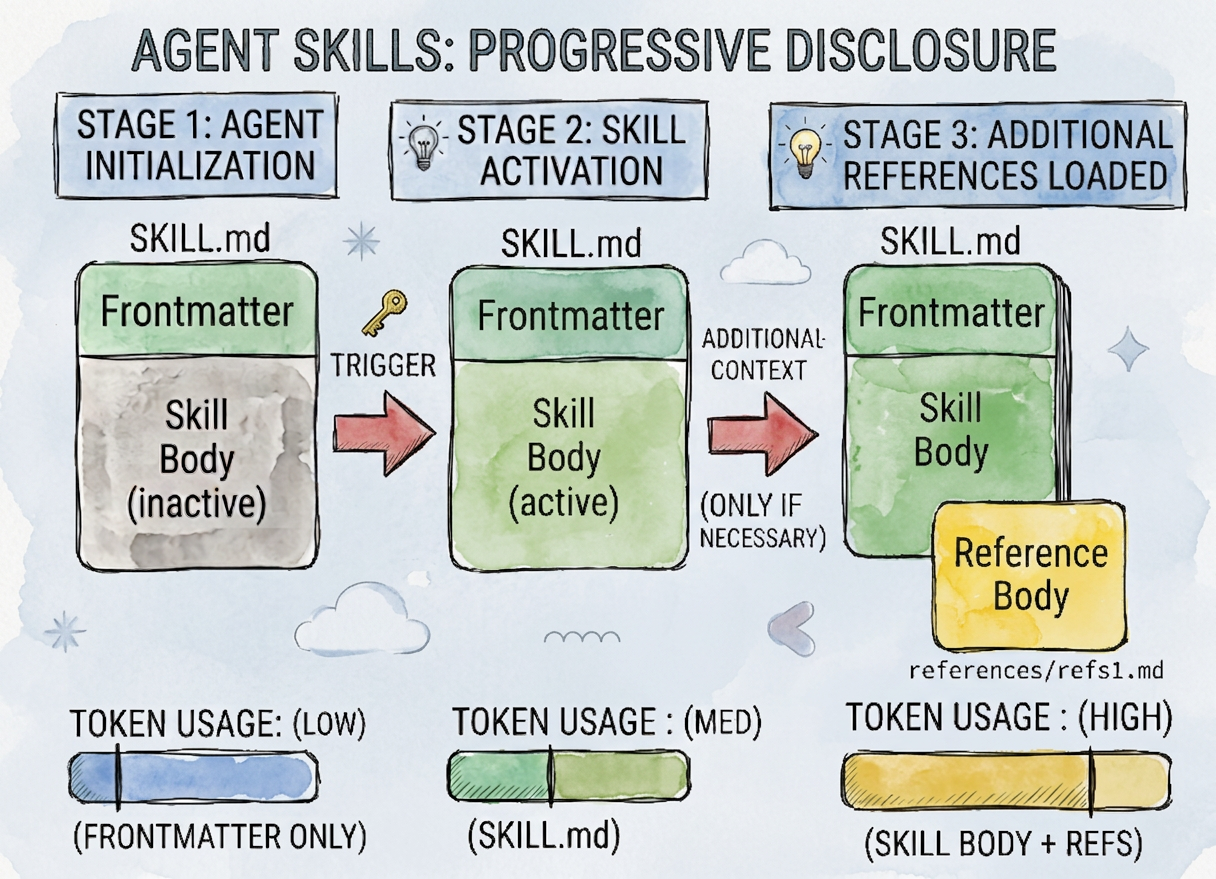
借助渐进式披露,token 消耗会被延后到绝对必要时才发生。图示由 Gemini 3.1 Flash Image 生成。
这一渐进式披露模型具有三项关键优势:
- Token 效率:Genkit 初始仅加载技能元数据,只有当技能被激活时才注入详细指令。
- 轻量实现:Skills 是一组 Markdown 文件,可以像代码一样分发。无需配置额外基础设施即可使用技能。
- 资源打包:Skills 可以包含 Agent 可执行的脚本(Python、Node.js、Bash),确保它拥有完成任务所需的准确工具。
Genkit Go 中的 Agent Skills
要理解 Agent Skills 如何在 Genkit Go 中工作,首先需要了解 Genkit middleware 架构。Genkit middleware 是一条由 hook 构成的流水线,可拦截并封装模型生命周期中的关键阶段:
- 模型包装器(WrapModel): 在一次迭代内,每次模型 API 调用时触发一次,处理与模型调用本身相关的逻辑,例如重试、回退和缓存。
- 工具包装器(WrapTool): 每次工具执行时触发一次;同一次迭代中的并行工具调用可能会并发运行。
- 生成包装器(WrapGenerate): 每次工具循环迭代时触发一次(N 个工具轮次意味着 N+1 次调用),处理需要查看完整对话的逻辑,例如重写、系统提示词注入和消息累积。
Agent Skills 构建于这一 hook 系统之上。middleware 通过监控传入的提示词来检测匹配的技能描述,并动态激活技能。
以下代码片段展示了如何为 Genkit Flow 添加技能支持:
go resp, err := genkit.Generate(ctx, g, ai.WithPrompt("How do I run tests in this repo?"), ai.WithUse(&middleware.Skills{SkillPaths: []string{"./skills"}}), )
工作原理
技能使用分为三个不同阶段:
- 发现(Discovery):使用 Skills middleware 初始化 Genkit 时,系统会扫描配置的
SkillPaths,查找SKILL.md文件,并将其元数据注入系统提示词。 - 激活(Activation):当用户请求与某项技能的描述匹配时,Genkit 会调用
use_skill工具,以获取当前任务所需的具体指令。 - 执行(Execution):完整的
SKILL.md文件内容,以及对脚本和参考资料等打包资源的访问权限,会被加载到活动上下文中,引导模型完成精确的工作流。
准备环境
安装 SDK
要开始在 Genkit 中使用 Agent Skills,首先请确保你使用的是最新版本的 Genkit Go SDK:
shell go get github.com/firebase/genkit/go
安装 Genkit CLI
此步骤为可选项,但建议完成。在 macOS 或 Linux 上,运行:
shell curl -sL cli.genkit.dev | bash
在 Windows 上,请从以下地址下载二进制文件:cli.genkit.dev
更多详细信息请参阅 https://cli.genkit.dev
将技能添加到基础 Flow
安装 SDK 后,你可以注册 Skills middleware,并在 Generate 调用期间提供它。下面的代码示例定义了一个由 Genkit Flow 驱动的菜谱生成命令行工具:
go package main
import ( "context" "fmt" "log" "os"
"github.com/firebase/genkit/go/ai"
"github.com/firebase/genkit/go/genkit"
"github.com/firebase/genkit/go/plugins/googlegenai"
"github.com/firebase/genkit/go/plugins/middleware"
"google.golang.org/genai"
)
func main() { if len(os.Args) < 2 { fmt.Println("Usage: recipe <food|ingredient>") os.Exit(1) }
input := os.Args[1]

ctx := context.Background()

g := genkit.Init(ctx, genkit.WithPlugins(&googlegenai.GoogleAI{}, &middleware.Middleware{}))

recipeFlow := genkit.DefineFlow(g, "recipeFlow", func(ctx context.Context, input string) (string, error) {
	prompt := fmt.Sprintf("Provide a recipe using %s", input)

	return genkit.GenerateText(ctx, g,
		ai.WithModel(googlegenai.ModelRef("googleai/gemini-flash-latest", &genai.GenerateContentConfig{
			ThinkingConfig: &genai.ThinkingConfig{
				ThinkingLevel: genai.ThinkingLevelLow,
			},
		})),
		ai.WithSystem(
			"You are a professional chef assistant with wide knowledge about recipes. "+
				"The user will give you a food or ingredient and you need to respond with a recipe. "+
				"Use specialized knowledge (skills) whenever possible. "+
				"Respond with ASCII formatting optimized for terminal output (no markdown).",
		),
		ai.WithPrompt(prompt),
		ai.WithUse(&middleware.Skills{SkillPaths: []string{"./skills"}}),
	)
})

result, err := recipeFlow.Run(ctx, input)
if err != nil {
	log.Fatalf("Error running flow: %v", err)
}

fmt.Println(result)
}
请注意,我们在 genkit.GenerateText 中通过 ai.WithUse 函数式选项配置了 Skills middleware。在实例化的 Skills middleware 中,我们通过 SkillPaths 映射 ./skills 文件夹;在本示例中,该目录包含两个技能:banana-bread 和 cheese-bread。
使用关键词 cheese 运行应用程序会激活 cheese-bread 技能,并返回对应的菜谱:
text $ go run main.go cheese +-------------------------------------------------------------+ | TRADITIONAL BRAZILIAN CHEESE BREAD | | (Pao de Queijo) | +-------------------------------------------------------------+
Naturally gluten-free, crispy on the outside, and chewy inside.
=============================================================== INGREDIENTS
- Tapioca Flour (Sour Starch) .. 2 cups (240g)
- Whole Milk .................. 1/2 cup (120ml)
- Water ....................... 1/2 cup (120ml)
- Vegetable Oil ............... 1/3 cup (80ml)
- Salt ........................ 1 tsp
- Eggs (Room Temp) ............ 2 large
- Grated Parmesan/Queijo ...... 1.5 cups (150g)
=============================================================== EQUIPMENT
- Medium saucepan
- Mixing bowl or Stand mixer with paddle attachment
- Baking sheet with parchment paper
- Ice cream scoop (optional)
=============================================================== INSTRUCTIONS
- SCALD THE STARCH
- Place the tapioca flour in a large mixing bowl.
- In a saucepan, bring milk, water, oil, and salt to a boil.
- Immediately pour the boiling liquid over the tapioca flour.
- Stir with a wooden spoon until a lumpy, sticky dough forms.
- Let it cool for 5-10 minutes until warm (not hot).
- INCORPORATE EGGS & CHEESE
- Add the eggs one at a time, mixing thoroughly after each.
- Mix in the grated cheese until the dough is cohesive and glossy.
- SHAPE & PORTION
- Preheat your oven to 400 deg F (200 deg C).
- Grease your hands with oil to handle the sticky dough.
- Roll into 1 to 1.5-inch balls.
- Place on a baking sheet lined with parchment paper.
- BAKE
- Bake for 15 to 20 minutes until puffed and lightly golden.
- Serve warm!
=============================================================== PRO TIP: You can freeze the unbaked dough balls on a tray, then store them in a bag. Bake directly from frozen for 25 mins!
免责声明:以上菜谱由 Gemini 生成。尽管我的巴西人直觉告诉我它是正确的,但请自行承担尝试风险。
你可以在这里查看技能内容并下载本示例的完整代码。
一个更贴近实际的示例
虽然菜谱 Flow 演示了基础的按需加载能力,但生产系统需要 Agent 协调并应用专业指令来处理非确定性任务。以下是一个使用 Genkit Go 和 Gemini 3.1 Flash Image(Nano Banana 2)构建的多模态艺术修复应用:
go package main
import ( "context" "encoding/base64" "fmt" "log" "log/slog" "os" "path/filepath" "strings"
"github.com/firebase/genkit/go/ai"
"github.com/firebase/genkit/go/genkit"
"github.com/firebase/genkit/go/plugins/googlegenai"
"github.com/firebase/genkit/go/plugins/middleware"
"google.golang.org/genai"
)
// Input defines the schema for the Renaissance flow, accepting a Base64 image data URI.
type Input struct {
URL string json:"url"
}
// Output defines the schema for the flow output, containing both text explanation and image data.
type Output struct {
Text string json:"text"
Image string json:"image" // Base64 image data URI
}
func main() { // Configure logging to suppress verbose Genkit trace and info logs on standard output. logger := slog.New(slog.NewTextHandler(os.Stderr, &slog.HandlerOptions{ Level: slog.LevelError, })) slog.SetDefault(logger)
if len(os.Args) < 2 {
	log.Fatalf("Usage: go run . <path-to-image>")
}
filePath := os.Args[1]

// Read and convert the image to a Base64 Data URI.
data, err := os.ReadFile(filePath)
if err != nil {
	log.Fatalf("Failed to read file: %v", err)
}
dataURI := "data:image/jpeg;base64," + base64.StdEncoding.EncodeToString(data)

ctx := context.Background()

// 1. Initialize Genkit with standard Google AI and Middleware plugins.
g := genkit.Init(ctx, genkit.WithPlugins(
	&googlegenai.GoogleAI{},
	&middleware.Middleware{},
))

// 2. Define a Genkit Flow for actual image-to-image restoration.
renaissanceFlow := genkit.DefineFlow(g, "renaissanceFlow", func(ctx context.Context, input Input) (Output, error) {
	// 3. Prompt the model with multimodal input and configure it to output both TEXT and IMAGE modalities.
English / 原文
Large language model-based agents are increasingly used to automate complex workflows. However, as their responsibilities grow, managing the size of the prompt context becomes a challenge. Loading every standard operating procedure, reference guide, and document into the persistent context window is not sustainable: it consumes valuable tokens, dilutes the model’s focus, and increases the likelihood of incorrect responses.
To address this, we added support for Agent Skills in Genkit for TypeScript, Go, Dart, and Python. This post will illustrate how to use Agent Skills with Genkit in Go. The agent skills standard lets developers package specialized expertise into discoverable capabilities that the agent loads only when needed. They act as specialized knowledge packs that remain in the background until the moment they are required.
Brief Recap of Agent Skills
Agent skills operate on a principle called progressive disclosure , meaning information will only be revealed to the model when it is necessary. Skills are defined using a SKILL.md file that has two sections: frontmatter and body. The frontmatter contains the skill description and any additional metadata. The body of the skill is the part that contains the actual instructions to the model. Additionally, it is possible to add supplementary files like references or scripts as well.
Following the specification, this is how a skill is organized on disk:
skill-name/
├── SKILL.md          # Required: metadata + instructions
├── scripts/          # Optional: executable code
├── references/       # Optional: documentation
├── assets/           # Optional: templates, resources
└── ...               # Any additional files or directories
Plain text
And here is a skill frontmatter example:
---
name: adr-template
description: Activate this skill when proposing significant architectural changes, documenting codebase refactorings, or resolving design/technical debates. Use this skill to author and maintain Architecture Decision Records (ADRs) to preserve engineering context.
license: Apache-2.0
metadata:
  author: example-org
  version: "1.0"
---
Plain text
At first, the agent harness will load the skill definition from the SKILL.md file, but only expose the frontmatter to the agent's system prompt. This is the information it needs to know to consider if the skill must be activated or not. As the conversation evolves, eventually the agent will hit a circumstance where that skill might be needed, and the activation process will start, loading the full body of the skill. Based on the body content, the agent might decide to load additional references or use bundled scripts, completing the disclosure cycle for that given task.
This flow is summarized in the following diagram:
With progressive disclosure, token consumption is delayed until absolutely necessary. Diagram generated with Gemini 3.1 Flash Image.
This progressive disclosure model offers three key advantages:
- Token efficiency : Genkit loads only the skill's metadata initially, injecting detailed instructions only when the skill becomes active.
- Lean implementation : Skills are a bundle of markdown files and can be distributed the same way as code. You can benefit from skills without configuring any additional infrastructure.
- Resource bundling : Skills can contain their own scripts (Python, Node.js, Bash) that the agent can execute, ensuring it has the exact right tools for the job.
Agent Skills in Genkit Go
To understand how Agent Skills operate in Genkit Go, we must first look at the Genkit middleware architecture. Genkit middleware acts as a pipeline of hooks that intercept and wrap crucial model lifecycle phases:
- Model Wrapper (WrapModel): Fires once per model API call inside an iteration and handles logic about the model call itself, such as retry, fallback, and caching.
- Tool Wrapper (WrapTool): Fires once per tool execution and may run concurrently for parallel tool calls in the same iteration.
- Generate Wrapper (WrapGenerate): Fires once per tool-loop iteration (N tool turns means N+1 invocations) and handles logic that needs to see the whole conversation, such as rewrites, system-prompt injection, and message accumulation.
Agent Skills build on this hook system. By monitoring incoming prompts, the middleware detects matching descriptions and activates skills dynamically.
Here is a code snippet demonstrating how you can add skill support to your Genkit flow:
resp, err := genkit.Generate(ctx, g,
    ai.WithPrompt("How do I run tests in this repo?"),
    ai.WithUse(&middleware.Skills{SkillPaths: []string{"./skills"}}),
)
Go
How it works
Skill usage happens in three distinct stages:
- Discovery : When initializing Genkit with the skills middleware, the system scans your configured SkillPaths for SKILL.md files and injects their metadata into the system prompt.
- Activation : When a user request matches a skill's description, Genkit calls the use_skill tool to retrieve the specific instructions needed for the current task.
- Execution : The full content of the SKILL.md file, along with access to bundled resources like scripts and references, is loaded into the active context to guide the model through the precise workflow.
Preparing the environment
Installing the SDK
To get started with Agent Skills in Genkit, first ensure you have the latest version of the Genkit Go SDK:
go get github.com/firebase/genkit/go
Shell
Installing the Genkit CLI
This step is optional, but recommended. On macOS or Linux, run:
curl -sL cli.genkit.dev | bash
Shell
On Windows, download the binary from: cli.genkit.dev
More details can be found at https://cli.genkit.dev
Adding skills to a basic flow
With the SDK installed, you can register the skills middleware and provide it during a Generate call. The following code sample defines a recipe generation command-line tool powered by a Genkit flow:
package main

import (
	"context"
	"fmt"
	"log"
	"os"

	"github.com/firebase/genkit/go/ai"
	"github.com/firebase/genkit/go/genkit"
	"github.com/firebase/genkit/go/plugins/googlegenai"
	"github.com/firebase/genkit/go/plugins/middleware"
	"google.golang.org/genai"
)

func main() {
	if len(os.Args) < 2 {
		fmt.Println("Usage: recipe <food|ingredient>")
		os.Exit(1)
	}

	input := os.Args[1]

	ctx := context.Background()

	g := genkit.Init(ctx, genkit.WithPlugins(&googlegenai.GoogleAI{}, &middleware.Middleware{}))

	recipeFlow := genkit.DefineFlow(g, "recipeFlow", func(ctx context.Context, input string) (string, error) {
		prompt := fmt.Sprintf("Provide a recipe using %s", input)

		return genkit.GenerateText(ctx, g,
			ai.WithModel(googlegenai.ModelRef("googleai/gemini-flash-latest", &genai.GenerateContentConfig{
				ThinkingConfig: &genai.ThinkingConfig{
					ThinkingLevel: genai.ThinkingLevelLow,
				},
			})),
			ai.WithSystem(
				"You are a professional chef assistant with wide knowledge about recipes. "+
					"The user will give you a food or ingredient and you need to respond with a recipe. "+
					"Use specialized knowledge (skills) whenever possible. "+
					"Respond with ASCII formatting optimized for terminal output (no markdown).",
			),
			ai.WithPrompt(prompt),
			ai.WithUse(&middleware.Skills{SkillPaths: []string{"./skills"}}),
		)
	})

	result, err := recipeFlow.Run(ctx, input)
	if err != nil {
		log.Fatalf("Error running flow: %v", err)
	}

	fmt.Println(result)
}
Go
Note that we configure the Skills middleware with the ai.WithUse functional option in genkit.GenerateText. In the instantiated Skills middleware, we map the ./skills folder via SkillPaths, which in this example contains two skills: "banana-bread" and "cheese-bread".
Running the application with the word "cheese" activates the "cheese-bread" skill and returns the corresponding recipe:
$ go run main.go cheese
+-------------------------------------------------------------+
|               TRADITIONAL BRAZILIAN CHEESE BREAD            |
|                        (Pao de Queijo)                      |
+-------------------------------------------------------------+

Naturally gluten-free, crispy on the outside, and chewy inside.

===============================================================
INGREDIENTS
===============================================================
* Tapioca Flour (Sour Starch) .. 2 cups (240g)
* Whole Milk .................. 1/2 cup (120ml)
* Water ....................... 1/2 cup (120ml)
* Vegetable Oil ............... 1/3 cup (80ml)
* Salt ........................ 1 tsp
* Eggs (Room Temp) ............ 2 large
* Grated Parmesan/Queijo ...... 1.5 cups (150g)

===============================================================
EQUIPMENT
===============================================================
* Medium saucepan
* Mixing bowl or Stand mixer with paddle attachment
* Baking sheet with parchment paper
* Ice cream scoop (optional)

===============================================================
INSTRUCTIONS
===============================================================

1. SCALD THE STARCH
 - Place the tapioca flour in a large mixing bowl.
 - In a saucepan, bring milk, water, oil, and salt to a boil.
 - Immediately pour the boiling liquid over the tapioca flour.
 - Stir with a wooden spoon until a lumpy, sticky dough forms.
 - Let it cool for 5-10 minutes until warm (not hot).

2. INCORPORATE EGGS & CHEESE
 - Add the eggs one at a time, mixing thoroughly after each.
 - Mix in the grated cheese until the dough is cohesive and glossy.

3. SHAPE & PORTION
 - Preheat your oven to 400 deg F (200 deg C).
 - Grease your hands with oil to handle the sticky dough.
 - Roll into 1 to 1.5-inch balls.
 - Place on a baking sheet lined with parchment paper.

4. BAKE
 - Bake for 15 to 20 minutes until puffed and lightly golden.
 - Serve warm!

===============================================================
PRO TIP: You can freeze the unbaked dough balls on a tray, then store them in a bag.
Bake directly from frozen for 25 mins!
===============================================================
Plain text
Disclaimer: the recipe above was generated by Gemini. Even though my Brazilian instinct tells me it is correct, please try it at your own risk.
You can view the skill content and download the complete code for this example here.
A more realistic example
While the recipe flow demonstrates basic on-demand loading, production systems need agents to orchestrate and apply specialized instructions to non-deterministic tasks. Here is a multi-modal art restoration application built with Genkit Go and Gemini 3.1 Flash Image (Nano Banana 2):
package main
import (
"context"
"encoding/base64"
"fmt"
"log"
"log/slog"
"os"
"path/filepath"
"strings"
"github.com/firebase/genkit/go/ai"
"github.com/firebase/genkit/go/genkit"
"github.com/firebase/genkit/go/plugins/googlegenai"
"github.com/firebase/genkit/go/plugins/middleware"
"google.golang.org/genai"
)
// Input defines the schema for the Renaissance flow, accepting a Base64 image data URI.
type Input struct {
URL string `json:"url"`
}
// Output defines the schema for the flow output, containing both text explanation and image data.
type Output struct {
Text string `json:"text"`
Image string `json:"image"` // Base64 image data URI
}
func main() {
// Configure logging to suppress verbose Genkit trace and info logs on standard output.
logger := slog.New(slog.NewTextHandler(os.Stderr, &slog.HandlerOptions{
Level: slog.LevelError,
}))
slog.SetDefault(logger)
if len(os.Args) < 2 {
log.Fatalf("Usage: go run . <path-to-image>")
}
filePath := os.Args[1]
// Read and convert the image to a Base64 Data URI.
data, err := os.ReadFile(filePath)
if err != nil {
log.Fatalf("Failed to read file: %v", err)
}
dataURI := "data:image/jpeg;base64," + base64.StdEncoding.EncodeToString(data)
ctx := context.Background()
// 1. Initialize Genkit with standard Google AI and Middleware plugins.
g := genkit.Init(ctx, genkit.WithPlugins(
&googlegenai.GoogleAI{},
&middleware.Middleware{},
))
// 2. Define a Genkit Flow for actual image-to-image restoration.
renaissanceFlow := genkit.DefineFlow(g, "renaissanceFlow", func(ctx context.Context, input Input) (Output, error) {
// 3. Prompt the model with multimodal input and configure it to output both TEXT and IMAGE modalities.
resp, err := genkit.Generate(ctx, g,
ai.WithModel(googlegenai.ModelRef("googleai/gemini-3.1-flash-image", &genai.GenerateContentConfig{
ResponseModalities: []string{"TEXT", "IMAGE"},
})),
ai.WithSystem("You are Renaissance, a multimodal art restoration AI. First, analyze the image to determine "+
"the type of image, then invoke the corresponding restoration skills as appropriate. "+
"Finally, perform a highly precise restoration and output the restored IMAGE. "+
"REQUIRED: In your response, return a text part summarizing your process and "+
"naming any skills used. ",
),
ai.WithMessages(
ai.NewUserMessage(
ai.NewTextPart("Please restore this image using the appropriate techniques."),
ai.NewMediaPart("image/jpeg", input.URL),
),
),
// Load agent skills dynamically from the "./skills" directory.
ai.WithUse(&middleware.Skills{SkillPaths: []string{"./skills"}}),
)
if err != nil {
return Output{}, err
}
// Return both the explanation and the generated media content (image data URI).
return Output{
Text: resp.Text(),
Image: resp.Media(),
}, nil
})
// 4. Run the flow with the prepared input.
fmt.Println("Running renaissanceFlow...")
result, err := renaissanceFlow.Run(ctx, Input{URL: dataURI})
if err != nil {
log.Fatalf("Flow execution failed: %v", err)
}
// 5. Render the textual restoration plan if it is actual text and not the raw image data.
if result.Text != "" && !strings.HasPrefix(result.Text, "data:") {
fmt.Printf("\nRestoration Plan:\n%s\n", result.Text)
} else {
fmt.Println("\nRestoration process completed (no separate textual explanation returned).")
}
// 6. Parse, decode, and save the output image locally.
if !strings.HasPrefix(result.Image, "data:") {
log.Fatalf("Unsupported or invalid image format returned by the flow")
}
parts := strings.Split(result.Image, ";base64,")
if len(parts) != 2 {
log.Fatalf("Invalid data URI format received from flow")
}
decodedImage, err := base64.StdEncoding.DecodeString(parts[1])
if err != nil {
log.Fatalf("Failed to decode restored image base64 data: %v", err)
}
ext := filepath.Ext(filePath)
base := filePath[:len(filePath)-len(ext)]
outputPath := base + "_restored.png"
err = os.WriteFile(outputPath, decodedImage, 0644)
if err != nil {
log.Fatalf("Failed to write output image file: %v", err)
}
// 7. Print the completion confirmation.
fmt.Printf("\nSuccessfully saved restored image to %s\n", outputPath)
}
Go
This application is bundled with three skills: drawings, paintings, and photography, as each distinct art style requires its own set of custom instructions for restoration. As an example, here is the SKILL.md file for the paintings skill:
---
name: paintings
description: Restoration protocol for fine art paintings.
---

# Painting restoration

Perform direct, minimal-intervention restoration of fine art paintings. Prioritize historical integrity, original pigment depth, and surface textures over cosmetic modernization. Do not include any elements, nor introduce any techniques not present in the original piece.

### 1. Core conservation mandates
* **Absolute Fidelity:** Strictly forbidden to add new subjects, figures, scenery, details, or narrative elements under any circumstances.
* **Anti-Modernization:** Retain original brushstroke characteristics. Do not flatten support textures.
* **Patina & Craquelure:** Respect the natural crack network (craquelure) as part of the artwork's history. Do not fill or erase cracks unless they pose an active risk of paint loss.

### 2. Step-by-step restoration process
1. **Varnish Correction:** Gently balance aged, yellowed natural varnishes to recover original pigment chromaticity without forcing modern, high-contrast saturation.
2. **Soot & Grime Reduction:** Isolate and lift surface grime while protecting delicate, thin underlying glaze layers.
3. **Inpaint Major Loss:** Where paint layers are missing, use references from the surviving elements to bridge the gap. Replicate the original brush direction, speed, height, transparency, and light source.
Plain text
Let's run this application giving it a painting to see it in action. This is "Ecce Homo", by Elías García Martínez, before its infamous restoration attempt:
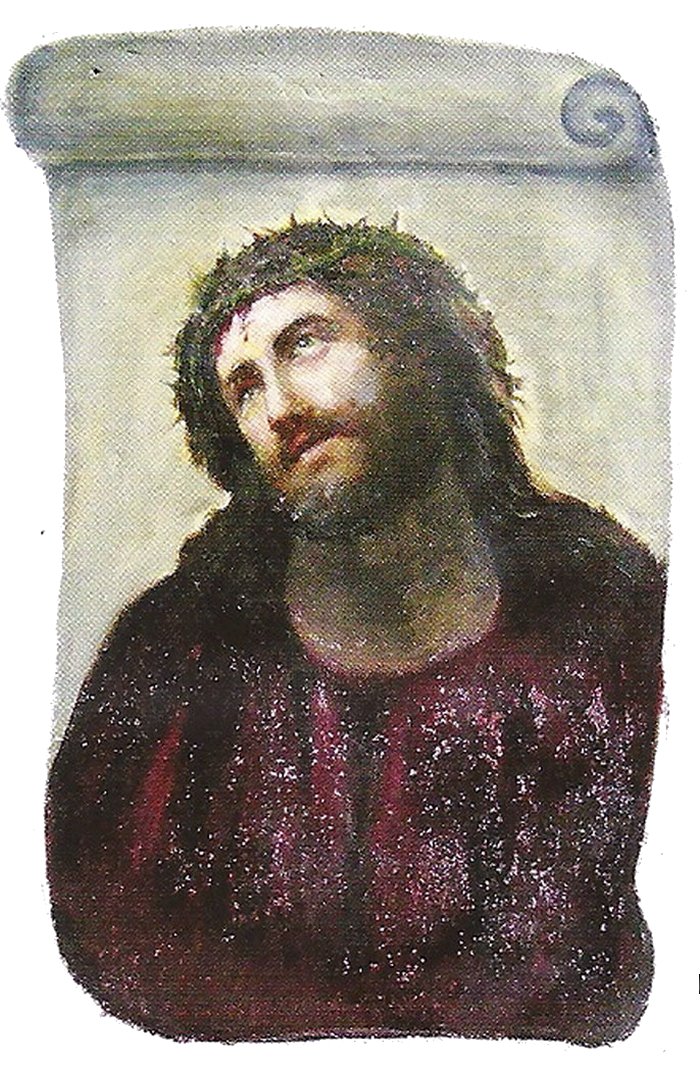
Ecce Homo by Elías García Martínez, Public domain, via Wikimedia Commons
With this file saved as ecce_homo.png, run the application (note: you will need a GEMINI_API_KEY configured on your environment to run this example):
go run main.go ecce_homo.png
Plain text
Here is the terminal output:
$ go run main.go ecce_homo.png
Running renaissanceFlow...

Restoration Plan:
*   **Process:** I identified the image as an antique religious painting, specifically a devotional portrait of Jesus Christ as the Man of Sorrows (Ecce Homo). The restoration process focused on simulating a precise physical conservation. First, surface cleaning was emulated to remove layers of grime and dulled, yellowed varnish, which revealed the original vibrant deep reds and rich, dark skin tones. This improved color fidelity and value contrast. Second, the structural integrity of the canvas or panel was addressed by minimizing non-artistic cracks and visible canvas weave (craquelure), particularly across the face and upper garment, making the portrait sharper and more coherent while retaining a sense of age. The distinctive textured purple robe with speckles of light was preserved, with only the largest, distracting surface blemishes removed. Finally, the scroll-like background structure, which was originally pale and indistinct, was reinforced by refining the scroll scrollwork and adding realistic, antique parchment texture and localized aging, making it a clear visual frame that integrated well with the portrait.

*   **Skills Used:** `paintings`.

Successfully saved restored image to ecce_homo_restored.png
Plain text
As indicated by the terminal output, the model correctly identified the image as a painting and activated the appropriate skill for restoration. Here is the restoration result:

Ecce Homo restored using Gemini 3.1 Flash Image.
Please note that given the non-deterministic nature of large language models it might take a few tries for you to get a good result. The restoration skill presented here is also an early effort and could use professional tuning.
You can download the complete code for this example here. Experiment by giving it other types of images, such as photographs and drawings, to see it activating the respective skills.
Best practices for skills
Follow these practices to optimize your Agent Skills integration:
- Write detailed descriptions : The YAML frontmatter description acts as the primary trigger for the middleware. Use clear, imperative language so the model knows when to call use_skill.
- Keep it focused : A skill should do one thing well. Avoid creating monolithic "do-everything" skills.
- Deterministic Tooling : Bundle lightweight scripts within the skill. This gives the agent a "source of truth" to bypass its internal training limitations.
- Modularize resources : Use the references/ folder to keep your SKILL.md clean. The agent can read these files on demand.
Get started
Agent Skills provide a modular, scalable framework for managing developer expertise in Genkit Go. Integrating the skills middleware helps your applications execute complex, multi-step tasks with higher reliability.
Ready to build your first skill-enabled Genkit application?
The Go Gopher mascot was created by Renee French and is licensed under the Creative Commons 4.0 Attribution License.